mirror FORD EXPLORER 2020 Owner's Manual
[x] Cancel search | Manufacturer: FORD, Model Year: 2020, Model line: EXPLORER, Model: FORD EXPLORER 2020Pages: 555, PDF Size: 8.16 MB
Page 274 of 555
Cross Traffic Alert Behavior When
Trailer is Attached
Note:
The system may not correctly operate
when towing a trailer. For vehicles with an
approved trailer tow module and tow bar,
the system turns off when you attach a
trailer. For vehicles with an aftermarket
trailer tow module or tow bar, we
recommend that you switch the system off
when you attach a trailer.
Cross traffic alert remains on when you
attach a trailer in vehicles that come with
blind spot information system with trailer
tow under the following conditions:
• You connect a trailer.
• The trailer is a bike rack or cargo rack
with a maximum length of 3 ft (1 m).
• You set the trailer length to
3 ft (1 m)
in the information display.
See
Blind Spot Information System
(page 264).
Switching the System On and Off
To switch the system on or off, adjust the
setting. Depending on your vehicle options,
the setting could be in the following: •
Information display.
See General
Information (page 112).
• Touchscreen. See Settings (page
469).
Note: The system turns on every time you
switch the ignition on. To permanently
switch the system off, contact an authorized
dealer.
Cross Traffic Alert Indicator When the system detects an
approaching vehicle, a tone
sounds, a warning lamp
illuminates in the relevant exterior mirror
and arrows appear in the information
display to show which side the
approaching vehicle is coming from.
Note: If arrows do not display, a message
appears in the information display.
If the system malfunctions, a warning lamp
illuminates in the instrument cluster and
a message appears in the information
display. Have your vehicle checked as soon
as possible.
Note: In exceptional conditions, the system
could alert you, even when there is nothing
in the detection zone, for example a vehicle
passing further away from your vehicle.
Cross Traffic Alert Information Messages Action
Message
Displays instead of indication arrows when the system
detects a vehicle. Check for approaching traffic.
Cross Traffic Alert
Indicates blocked cross traffic alert system sensors. Clean
the sensors. If the message continues to appear, have your
vehicle checked as soon as possible.
Cross Traffic Not Avail-
able Sensor Blocked See
Manual
The system has malfunctioned. Have your vehicle checked
as soon as possible.
Cross Traffic System
Fault
Displays if you attach a trailer to your vehicle.
Cross Traffic Alert Deac-
tivated Trailer Attached
271
Explorer (CTW) Canada/United States of America, enUSA, Edition date: 201902, Third-Printing- Driving AidsE268294
Page 275 of 555
TRAFFIC SIGN RECOGNITION
(IF EQUIPPED)
Principle of Operation
WARNING: You are responsible for
controlling your vehicle at all times. The
system is designed to be an aid and does
not relieve you of your responsibility to
drive with due care and attention. Failure
to follow this instruction could result in
the loss of control of your vehicle,
personal injury or death. WARNING: The system may not
function if the sensor is blocked.
Note: In cold and severe weather conditions
the system may not function. Rain, snow,
spray and large contrasts in lighting can all
prevent the sensor from functioning
correctly.
Note: Do not carry out windshield repairs
in the immediate area surrounding the
sensor.
Note: If your vehicle has a suspension kit
not approved by us, the system may not
correctly function.
Note: Always fit Ford original parts when
replacing headlamp bulbs. Other bulbs may
reduce system performance.
Note: The system may not detect all traffic
signs and may incorrectly read signs.
Note: Keep the windshield free from
obstructions for example bird droppings,
insects and snow or ice.
Note: The system is designed to detect
traffic signs meeting the Vienna convention.
Note: Traffic sign data provided by the
navigation system contains information
integrated to the data carrier release. The sensor is behind the interior rear view
mirror. It continuously monitors road signs
to inform you of the current maximum
speed limit and overtaking regulations.
The system detects recognizable traffic
signs, for example:
•
Speed limit signs.
• No overtaking signs.
• Speed limit cancellation signs.
• No overtaking cancellation signs.
Using Traffic Sign Recognition
Setting the System Speed Warning
The system has a number of speed
warning levels that you can set using the
information display. See
General
Information (page 112).
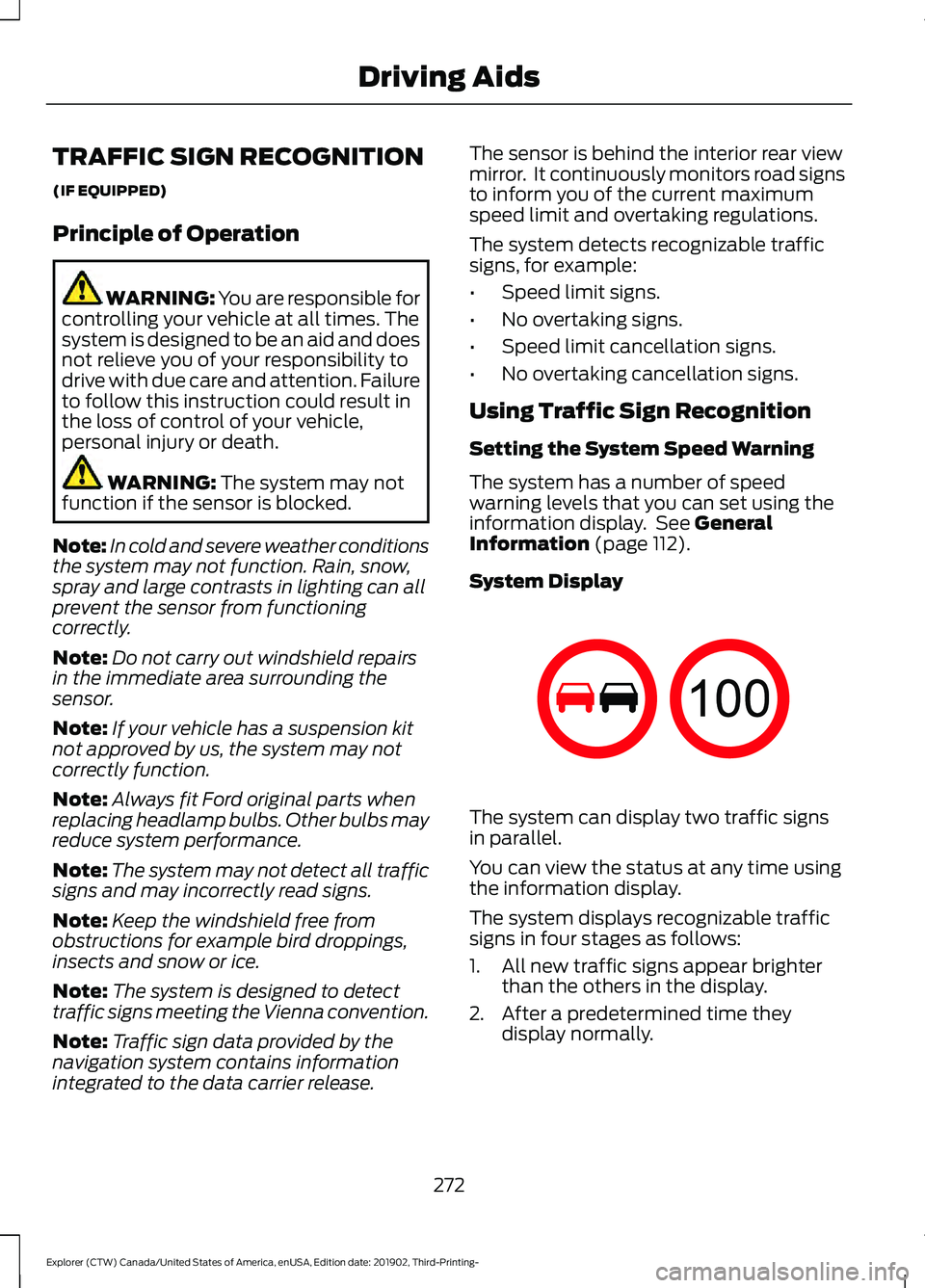
System Display The system can display two traffic signs
in parallel.
You can view the status at any time using
the information display.
The system displays recognizable traffic
signs in four stages as follows:
1. All new traffic signs appear brighter
than the others in the display.
2. After a predetermined time they display normally.
272
Explorer (CTW) Canada/United States of America, enUSA, Edition date: 201902, Third-Printing- Driving Aids E132994
Page 350 of 555
Underbody
Regularly clean the underside of your
vehicle using water. Keep body and door
drain holes free of debris or foreign
material.
Under Hood
For removing black rubber marks from
under the hood we recommend Motorcraft
Wheel and Tire Cleaner or Motorcraft Bug
and Tar Remover.
WAXING
Regular waxing is necessary to protect your
car's paint from the elements. We
recommend that you wash and wax the
painted surface once or twice a year.
When washing and waxing, park your
vehicle in a shaded area out of direct
sunlight. Always wash your vehicle before
applying wax.
•
Use a quality wax that does not contain
abrasives.
• Follow the manufacturer ’s instructions
to apply and remove the wax.
• Apply a small amount of wax in a
back-and-forth motion, not in circles.
• Do not allow wax to come in contact
with any non-body (low-gloss black)
colored trim. The wax will discolor or
stain the parts over time.
•Roof racks.
• Bumpers.
• Grained door handles.
• Side moldings.
• Mirror housings.
• Windshield cowl area.
• Do not apply wax to glass areas.
• After waxing, your car's paint should
feel smooth, and be free of streaks and
smudges. CLEANING THE ENGINE
Engines are more efficient when they are
clean because grease and dirt buildup keep
the engine warmer than normal.
When washing:
•
Take care when using a power washer
to clean the engine. The high-pressure
fluid could penetrate the sealed parts
and cause damage.
• Do not spray a hot engine with cold
water to avoid cracking the engine
block or other engine components.
• Spray Motorcraft Engine Shampoo and
Degreaser on all parts that require
cleaning and pressure rinse clean. In
Canada, use Motorcraft Engine
Shampoo.
Note: If your vehicle has an engine cover
remove the cover before application of
Motorcraft Engine Shampoo and Degreaser.
Immediately rinse away any over spray.
• Never wash or rinse the engine while it
is hot or running; water in the running
engine may cause internal damage.
• Never wash or rinse any ignition coil,
spark plug wire or spark plug well, or
the area in and around these locations.
• Cover the battery, power distribution
box, and air filter assembly to prevent
water damage when cleaning the
engine.
CLEANING THE WINDOWS AND
WIPER BLADES
Car wash chemicals and environmental
fallout can result in windshield and wiper
blade contamination. Dirty windshield and
wipers will result in poor windshield wiper
operation. Keep the windshield and wiper
blades clean to maintain windshield wiper
performance.
347
Explorer (CTW) Canada/United States of America, enUSA, Edition date: 201902, Third-Printing- Vehicle Care
Page 351 of 555
To clean the windshield and wiper blades:
•
Clean the windshield with a
non-abrasive glass cleaner. When
cleaning the interior of the windshield,
avoid getting any glass cleaner on the
instrument panel or door panels. Wipe
any glass cleaner off these surfaces
immediately.
• For windshields contaminated with
tree sap, chemicals, wax or bugs, clean
the entire windshield using steel wool
(no greater than 0000 grade) in a
circular motion and rinse with water.
• Clean the wiper blades with isopropyl
rubbing alcohol or windshield washer
concentrate.
Note: Do not use razor blades or other
sharp objects to clean or remove decals
from the inside of the heated rear window.
The vehicle warranty does not cover
damage caused to the heated rear window
grid lines.
CLEANING THE INTERIOR WARNING: Do not use cleaning
solvents, bleach or dye on the vehicle's
seatbelts, as these actions may weaken
the belt webbing. WARNING:
On vehicles equipped
with seat-mounted airbags, do not use
chemical solvents or strong detergents.
Such products could contaminate the
side airbag system and affect
performance of the side airbag in a crash.
For fabric, carpets, cloth seats and seats
equipped with side airbags:
• Remove dust and loose dirt with a
vacuum cleaner.
• Remove light stains and soil with
Motorcraft Professional Strength
Carpet & Upholstery Cleaner. •
If grease or tar is present on the
material, spot-clean the area first with
Motorcraft Spot and Stain Remover. In
Canada, use Motorcraft Multi-Purpose
Cleaner.
• If a ring forms on the fabric after spot
cleaning, clean the entire area
immediately (but do not oversaturate)
or the ring will set.
• Do not use household cleaning
products or glass cleaners, which can
stain and discolor the fabric and affect
the flame retardant abilities of the seat
materials.
Mirrors
Do not clean the housing or glass of any
mirror with harsh abrasives, fuel or other
petroleum or ammonia-based cleaning
products.
CLEANING THE INSTRUMENT
PANEL AND INSTRUMENT
CLUSTER LENS WARNING:
Do not use chemical
solvents or strong detergents when
cleaning the steering wheel or
instrument panel to avoid contamination
of the airbag system.
Note: Follow the same procedure as
cleaning leather seats for cleaning leather
instrument panels and leather interior trim
surfaces. See
Cleaning Leather Seats
(page 349).
Clean the instrument panel and cluster
lens with a clean, damp and soft cloth,
then use a clean, dry and soft cloth to dry
these areas.
348
Explorer (CTW) Canada/United States of America, enUSA, Edition date: 201902, Third-Printing- Vehicle Care
Page 460 of 555
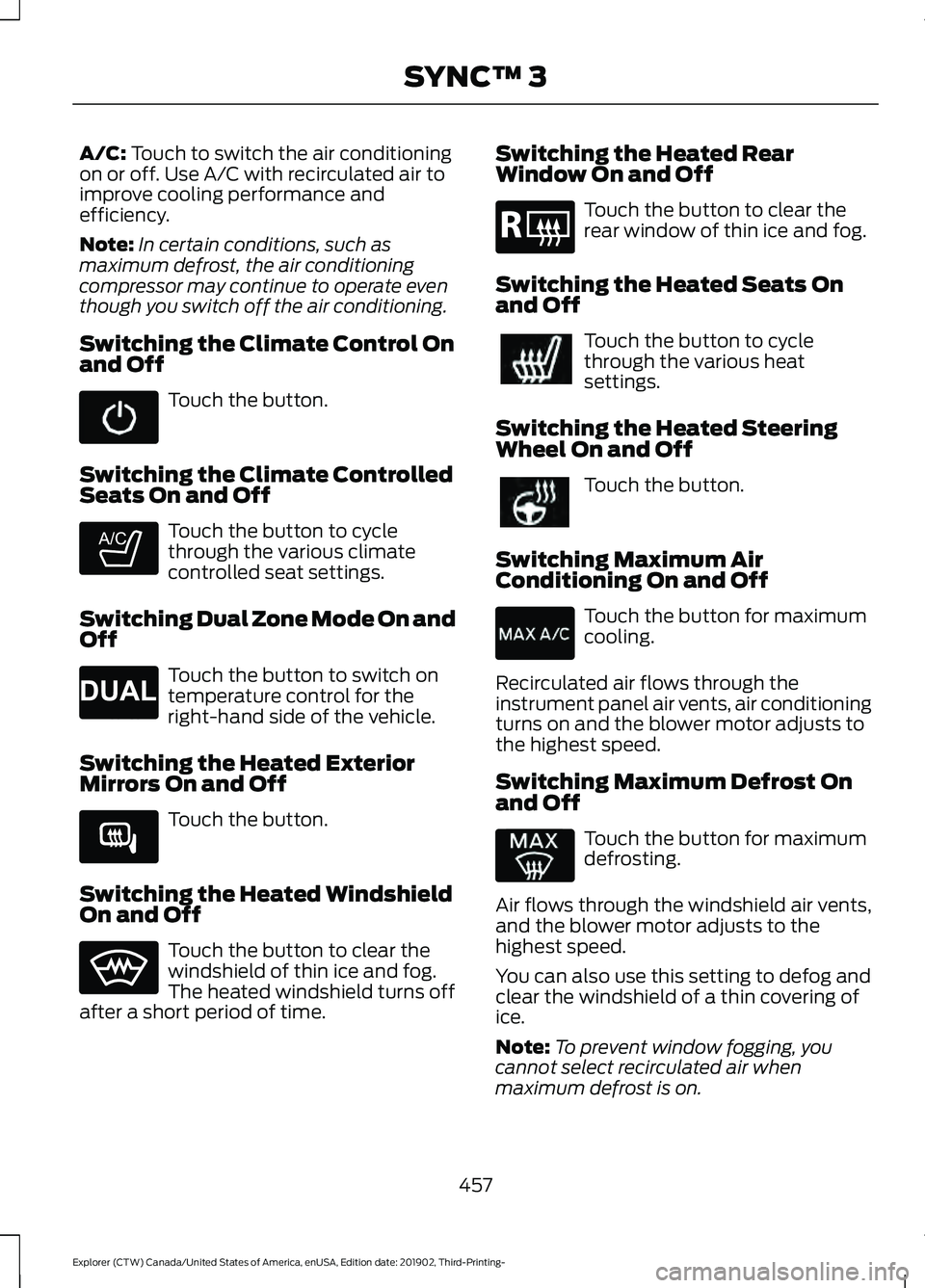
A/C: Touch to switch the air conditioning
on or off. Use A/C with recirculated air to
improve cooling performance and
efficiency.
Note: In certain conditions, such as
maximum defrost, the air conditioning
compressor may continue to operate even
though you switch off the air conditioning.
Switching the Climate Control On
and Off Touch the button.
Switching the Climate Controlled
Seats On and Off Touch the button to cycle
through the various climate
controlled seat settings.
Switching Dual Zone Mode On and
Off Touch the button to switch on
temperature control for the
right-hand side of the vehicle.
Switching the Heated Exterior
Mirrors On and Off Touch the button.
Switching the Heated Windshield
On and Off Touch the button to clear the
windshield of thin ice and fog.
The heated windshield turns off
after a short period of time. Switching the Heated Rear
Window On and Off Touch the button to clear the
rear window of thin ice and fog.
Switching the Heated Seats On
and Off Touch the button to cycle
through the various heat
settings.
Switching the Heated Steering
Wheel On and Off Touch the button.
Switching Maximum Air
Conditioning On and Off Touch the button for maximum
cooling.
Recirculated air flows through the
instrument panel air vents, air conditioning
turns on and the blower motor adjusts to
the highest speed.
Switching Maximum Defrost On
and Off Touch the button for maximum
defrosting.
Air flows through the windshield air vents,
and the blower motor adjusts to the
highest speed.
You can also use this setting to defog and
clear the windshield of a thin covering of
ice.
Note: To prevent window fogging, you
cannot select recirculated air when
maximum defrost is on.
457
Explorer (CTW) Canada/United States of America, enUSA, Edition date: 201902, Third-Printing- SYNC™ 3 E265282 E265280 E266189 E184884
Page 543 of 555
Changing a Bulb...........................................343
LED Lamps........................................................... 343
License Plate Lamp.......................................... 344
Rear Direction Indicator and Reversing Lamp................................................................. 343
Changing a Fuse............................................321
Fuses........................................................................\
321
Changing a Road Wheel
............................376
Dissimilar Spare Wheel and Tire Assembly
Information...................................................... 376
Tire Change Procedure..................................... 377
Changing the 12V Battery.........................338 Battery Management System....................... 339
Remove and Reinstall the Battery..............339
Changing the Engine Air Filter - 2.3L EcoBoost™.................................................329
Changing the Engine Air Filter - 3.0L................................................................330
Changing the Engine Air Filter - 3.3L..................................................................331
Changing the Front Wiper Blades.........342
Changing the Rear Wiper Blades...........342
Changing the Vehicle Wi-Fi Hotspot Name or Password
..................................429
Checking MyKey System Status..............66 MyKey Distance.................................................... 66
Number of Admin Keys...................................... 67
Number of MyKeys............................................... 67
Checking the Wiper Blades......................342
Child Restraint and Seatbelt Maintenance.................................................43
Child Restraint Positioning.........................35
Child Safety......................................................23 General Information............................................ 23
Child Safety Locks.........................................36 Left-Hand Side...................................................... 37
Right-Hand Side................................................... 37
Cleaning Leather Seats
.............................349
Cleaning Products.......................................345 Materials............................................................... 345
Cleaning the Engine
....................................347
Cleaning the Exterior..................................346 Cleaning the Headlamps................................ 346
Exterior Chrome Parts..................................... 346
Exterior Plastic Parts........................................ 346
Stripes or Graphics........................................... 346
Underbody............................................................ 347
Under Hood.......................................................... 347Cleaning the Instrument Panel and
Instrument Cluster Lens........................348
Cleaning the Interior...................................348 Mirrors.................................................................... 348
Cleaning the Wheels..................................350
Cleaning the Windows and Wiper Blades............................................................347
Clearing All MyKeys.......................................66
Climate............................................................456 Accessing Rear Climate Controls................458
Accessing the Climate Control Menu........456
Directing the Airflow........................................ 456
Rear Climate Control Lock Indicator..........458
Setting the Blower Motor Speed.................456
Setting the Temperature................................ 456
Switching Auto Mode On and Off...............456
Switching Dual Zone Mode On and Off....................................................................... 457
Switching Maximum Air Conditioning On and Off.............................................................. 457
Switching Maximum Defrost On and Off....................................................................... 457
Switching Rear Auto Mode On and Off...................................................................... 458
Switching Recirculated Air On and Off...................................................................... 458
Switching the Air Conditioning On and Off...................................................................... 456
Switching the Climate Controlled Seats On and Off.............................................................. 457
Switching the Climate Control On and Off....................................................................... 457
Switching the Heated Exterior Mirrors On and Off.............................................................. 457
Switching the Heated Rear Window On and Off....................................................................... 457
Switching the Heated Seats On and Off....................................................................... 457
Switching the Heated Steering Wheel On and Off.............................................................. 457
Switching the Heated Windshield On and Off....................................................................... 457
Switching the Rear Climate Controlled Seats On and Off.......................................... 458
Switching the Rear Heated Seats On and Off...................................................................... 458
Switching the Rear Ventilated Seats On and Off............................................................. 458
540
Explorer (CTW) Canada/United States of America, enUSA, Edition date: 201902, Third-Printing- Index
Page 546 of 555
Safety Chains......................................................
293
Trailer Brakes....................................................... 293
Trailer Lamps....................................................... 293
When Towing a Trailer..................................... 294
Event Data Recording See: Data Recording.............................................. 11
Export Unique Options.................................18
Exterior Mirrors - Excluding: ST................98 360-Degree Camera.......................................... 99
Auto-dimming Feature...................................... 99
Auto-Folding Mirrors .......................................... 98
Blind Spot Information System...................... 99
Direction Indicator Mirrors ............................... 99
Fold-Away Exterior Mirrors............................... 98
Heated Exterior Mirrors ..................................... 99
Memory Mirrors .................................................... 99
Power Exterior Mirrors........................................ 98
Puddle Lamps....................................................... 99
Exterior Mirrors - ST......................................99 Auto-dimming Feature...................................... 101
Auto-Folding Mirrors......................................... 100
Blind Spot Information System..................... 101
Direction Indicator Mirrors................................ 101
Fold-Away Exterior Mirrors............................. 100
Heated Exterior Mirrors..................................... 101
Memory Mirrors.................................................... 101
Power Exterior Mirrors........................................ 99
Puddle Lamps...................................................... 101
F
Fastening the Seatbelts
..............................39
Seatbelt Locking Modes................................... 40
Using Seatbelts During Pregnancy................39
Flat Tire See: Changing a Road Wheel........................ 376
Floor Mats
......................................................298
Fog Lamps - Front See: Front Fog Lamps........................................ 90
Ford Credit
.........................................................15
US Only..................................................................... 15
Ford Protect..................................................485 Ford Protect Extended Service Plan
(CANADA ONLY).......................................... 486
Ford Protect Extended Service Plans (U.S. Only)................................................................. 485
Four-Wheel Drive
........................................208
Principle of Operation..................................... 208Front Fog Lamps............................................90
Front Fog Lamp Indicator.................................. 91
Switching the Front Fog Lamps On or Off........................................................................\
. 90
Front Parking Aid
..........................................232
Object Distance Indicator............................... 233
Front Passenger Sensing System
............48
Front Wiper Blades See: Changing the Front Wiper Blades......342
Fuel and Refueling.......................................186
Fuel Consumption.......................................195 Advertised Capacity.......................................... 195
Calculating Fuel Economy.............................. 196
Filling the Fuel Tank.......................................... 196
Fuel Filler Funnel Location
.......................188
Fuel Filter.........................................................341
Fuel Quality - E85........................................186 Choosing the Right Fuel - Flex Fuel
Vehicles............................................................. 186
Switching Between E85 and Gasoline............................................................. 187
Fuel Quality - Gasoline..............................188 Choosing the Right Fuel.................................. 188
Fuel Shutoff..................................................300
Fuses.................................................................313
Fuse Specification Chart
............................313
Engine Compartment Fuse Box.................... 313
Passenger Compartment Fuse Panel........318
G
Garage Door Opener...................................162
Garage Door Opener See: Universal Garage Door Opener............162
Gauges
.............................................................104
12 Inch Display..................................................... 106
4 Inch Display...................................................... 104
6 Inch Display...................................................... 105
Engine Coolant Temperature Gauge..........106
Fuel Gauge............................................................ 107
Gearbox See: Transmission............................................. 202
General Information on Radio Frequencies...................................................57
Intelligent Access.................................................. 57
General Maintenance Information........487 Multi-Point Inspection.................................... 489
Owner Checks and Services......................... 488
543
Explorer (CTW) Canada/United States of America, enUSA, Edition date: 201902, Third-Printing- Index
Page 547 of 555
Protecting Your Investment...........................
487
Why Maintain Your Vehicle?......................... 487
Why Maintain Your Vehicle at Your Dealership?..................................................... 487
Getting Assistance Outside the U.S. and Canada.........................................................309
Getting the Services You Need..............306 Away From Home............................................. 306
Global Opening..............................................98 Remote Control Front Windows.................... 98
H
Hazard Flashers...........................................300
Headlamp Adjusting See: Adjusting the Headlamps.................... 340
Headlamp Exit Delay
....................................89
Headrest See: Head Restraints......................................... 144
Head Restraints
............................................144
Adjusting the Head Restraints....................... 145
Tilting Head Restraints .................................... 146
Heated Exterior Mirrors...............................142
Heated Rear Window..................................142
Heated Seats
.................................................156
Front Seats........................................................... 156
Second Row Heated Seats.............................. 157
Heated Steering Wheel...............................83
Heated Windshield
.......................................141
Windshield Wiper De-Icer................................ 141
Heating See: Climate Control.......................................... 137
High Voltage Battery...................................201 General Information.......................................... 201
Hill Descent Control....................................228
Hill Descent Control Indicator
.................229
Hill Start Assist...............................................217 Switching the System On and Off................217
Using Hill Start Assist........................................ 217
Hints on Controlling the Interior Climate
..........................................................139
Defogging the Side Windows in Cold
Weather............................................................ 140
General Hints....................................................... 139
Quickly Cooling the Interior............................ 140
Quickly Heating the Interior............................ 140
Recommended Settings for Cooling..........140
Recommended Settings for Heating..........140 Hints on Driving With Anti-Lock
Brakes.............................................................215
Hood Lock See: Opening and Closing the Hood..........323
Horn....................................................................84
How Does Adaptive Cruise Control With Stop and Go Work....................................246
How Does the Rear Occupant Alert System Work
...............................................160
Hybrid Vehicle Frequently Asked Questions - 3.3L, Hybrid Electric
Vehicle (HEV).............................................184
Hybrid Vehicle Operation - 3.3L, Hybrid Electric Vehicle (HEV)
.............................182
Battery.................................................................... 182
Braking.................................................................... 183
Driving..................................................................... 182
Driving to Optimize Fuel Economy..............183
Starting................................................................... 182
Stopping................................................................. 182
Transmission Operation................................... 182
I
Ignition Switch................................................172
In California (U.S. Only).............................307
Information Display Control
.......................83
Information Displays.....................................112
General Information............................................ 112
Information Messages................................120 4WD........................................................................\
. 136
Active Park.............................................................. 121
Adaptive Cruise Control.................................... 121
Adaptive Headlamps.......................................... 121
AdvanceTrac ™ and Traction Control..........122
Alarm....................................................................... 122
Battery and Charging System (12 Volt).................................................................... 122
Battery and Charging System (High Voltage)............................................................. 123
Blind Spot Information and Cross Traffic Alert System.................................................... 124
Doors and Locks.................................................. 125
Driver Alert............................................................. 126
Fuel........................................................................\
.. 126
Hill Descent Control........................................... 126
Hill Start Assist..................................................... 127
Keys and Intelligent Access............................. 127
544
Explorer (CTW) Canada/United States of America, enUSA, Edition date: 201902, Third-Printing- Index
Page 548 of 555
Lane Keeping System.......................................
128
Maintenance......................................................... 128
MyKey...................................................................... 129
Park Aid.................................................................. 130
Park Brake............................................................... 131
Power Steering..................................................... 132
Pre-Collision Assist............................................ 132
Remote Start........................................................ 132
Seats........................................................................\
133
Starting System................................................... 133
Tire Pressure Monitoring System.................. 133
Trailer....................................................................... 134
Transmission........................................................ 134
Installing Child Restraints...........................25
Child Seats.............................................................. 25
Using Lap and Shoulder Belts......................... 25
Using Lower Anchors and Tethers for CHildren (LATCH)........................................... 28
Using Tether Straps............................................. 29
Instrument Cluster.......................................104
Instrument Lighting Dimmer
.....................89
Instrument Panel.............................................21
Interior Air Quality.........................................143
Interior Lamps
.................................................92
Front Interior Lamp.............................................. 92
Rear Interior Lamps............................................. 92
Interior Mirror
...................................................101
Automatic Dimming Mirror.............................. 101
Manual Dimming Mirror.................................... 101
Introduction........................................................9
J
Jump Starting the Vehicle.........................301 Connecting the Jumper Cables..................... 301
Jump Starting...................................................... 302
Locating the Jump Starting Connection Points................................................................. 301
Preparing Your Vehicle..................................... 301
Removing the Jumper Cables....................... 302
K
Keyless Entry
....................................................72
SECURICODE™ Keyless Entry Keypad........72
Keyless Starting
.............................................172
Ignition Modes...................................................... 173
Keys and Remote Controls.........................57 L
Lane Keeping System
................................260
Switching the System On and Off...............261
Liftgate...............................................................74
Lighting Control
..............................................88
Flashing High Beam Headlamps................... 89
Lighting Control Selections............................. 88
Switching High Beam Headlamps On and Off........................................................................\
. 88
Lighting..............................................................88 General Information........................................... 88
Load Carriers See: Roof Racks and Load Carriers.............282
Load Carrying.................................................281
Load Limit.......................................................283 Special Loading Instructions for Owners of
Pick-up Trucks and Utility-type
Vehicles............................................................. 287
Vehicle Loading - with and without a Trailer................................................................. 283
Locating the Cabin Air Filter.....................143
Locking and Unlocking................................69 Activating Intelligent Access............................ 70
Autolock.................................................................... 71
Battery Saver.......................................................... 72
Illuminated Entry.................................................... 71
Illuminated Exit...................................................... 72
Locking and Unlocking the Doors with the Key Blade........................................................... 69
Power Door Locks................................................ 69
Remote Control.................................................... 69
Smart Unlocks for Integrated Keyhead Remote Control................................................ 70
Smart Unlocks for Intelligent Access Keys........................................................................\
71
Luggage Covers
............................................282
Lug Nuts See: Changing a Road Wheel........................ 376
M
Maintenance..................................................323 General Information.......................................... 323
Manual Seats
..................................................147
Adjusting the Seat Backrest........................... 147
Moving the Seat Backward and Forward.............................................................. 147
545
Explorer (CTW) Canada/United States of America, enUSA, Edition date: 201902, Third-Printing- Index
Page 549 of 555
Memory Function.........................................150
Easy Entry and Exit Feature............................. 151
Linking a PreSet Position to your Remote Control ............................................................... 151
Saving a PreSet Position................................... 151
Message Center See: Information Displays................................. 112
Mirrors See: Windows and Mirrors................................ 97
Mobile Communications Equipment.......17
Moonroof.........................................................102 Bounce-Back....................................................... 103
Opening and Closing the Moonroof............102
Rear SunShade Opening and Closing........103
Motorcraft Parts - 2.3L EcoBoost™................................................390
Motorcraft Parts - 3.0L...............................391
Motorcraft Parts - 3.3L..............................392
MyKey – Troubleshooting...........................67
MyKey ™.............................................................64
Principle of Operation........................................ 64
N
Navigation.....................................................460 Changing the Format of the Map................462
cityseeker............................................................. 464
Michelin Travel Guide...................................... 465
Navigation Map Accuracy and Updates........................................................... 465
Route Guidance................................................. 462
Setting a Destination........................................ 461
SiriusXM Traffic and Travel Link.................. 465
Zoom...................................................................... 462
Network Connectivity
................................426
Connecting the Vehicle to a Mobile
Network............................................................ 426
Network Connectivity – Troubleshooting........................................427
Normal Scheduled Maintenance..........490 Intelligent Oil-Life Monitor™........................ 490
Normal Maintenance Intervals...................... 491
O
Oil Change Indicator Reset......................328
Oil Check See: Engine Oil Check....................................... 327Opening and Closing the Hood..............323
Closing the Hood............................................... 324
Opening the Hood............................................. 323
Ordering Additional Owner's Literature........................................................311
Obtaining a French Owner ’s Manual............311
Overhead Console.........................................171
Overriding Automatic High Beam Control............................................................96
Overriding Reverse Braking Assist..........221
Overriding the Set Speed..........................252
P
Parking Aids
...................................................230
Principle of Operation...................................... 230
Passive Anti-Theft System.........................78 Programming a Spare Intelligent Access
Key........................................................................\
. 78
SecuriLock®........................................................... 78
PATS See: Passive Anti-Theft System..................... 78
Pedestrian Alert System
.............................54
Pedestrian Protection..................................54
Perchlorate........................................................15
Personalized Settings
..................................118
Fuel Economy....................................................... 119
Hybrid Information.............................................. 119
Trip 1 and 2.............................................................. 119
Personal Safety System ™
..........................45
How Does the Personal Safety System
Work?.................................................................. 45
Phone..............................................................458 Android Auto...................................................... 460
Apple CarPlay..................................................... 460
Pairing Your Cell Phone for the First Time.................................................................. 459
Text Messaging.................................................. 459
Using Your Cell Phone..................................... 459
Post-Crash Alert System
..........................304
Power Door Locks See: Locking and Unlocking............................. 69
Power Liftgate
..................................................74
Hands-Free Feature............................................ 76
Obstacle Detection.............................................. 76
Opening and Closing the Liftgate................... 74
Setting the Liftgate Open Height................... 76
Stopping the Liftgate Movement................... 75
546
Explorer (CTW) Canada/United States of America, enUSA, Edition date: 201902, Third-Printing- Index