power FORD EXPLORER 2020 Owner's Manual
[x] Cancel search | Manufacturer: FORD, Model Year: 2020, Model line: EXPLORER, Model: FORD EXPLORER 2020Pages: 555, PDF Size: 8.16 MB
Page 102 of 555
You can switch this feature on and off
through the information display. See
General Information (page 112).
You can fold the mirrors on demand by
pressing the power-folding mirror control
on the door. The control lights and the
mirrors fold in toward the glass. Press the
control again to unfold the mirrors. The
control light turns off.
Note: If you use the power-folding control
to fold the mirrors on demand with the auto
fold feature on, you must use the control
again to unfold them.
Loose Mirror
If you manually fold your power-folding
mirrors, they may not work properly even
after you re-position them. You need to
reset them if:
• The mirrors vibrate when you drive.
• The mirrors feel loose.
• The mirrors do not stay in the folded or
unfolded position.
• One of the mirrors is not in its normal
driving position.
To reset the power-fold feature, use the
power-folding mirror control to fold and
unfold the mirrors. You may hear a loud
noise as you reset the power-folding
mirrors. This sound is normal. Repeat this
process as needed each time you manually
fold the mirrors.
Heated Exterior Mirrors
(If Equipped)
See
Heated Exterior Mirrors (page 142).
Memory Mirrors
(If Equipped)
You can save and recall the mirror
positions through the memory function.
See
Memory Function (page 150). Auto-dimming Feature
(If Equipped)
The driver exterior mirror dims when the
interior auto-dimming mirror turns on.
Direction Indicator Mirrors (If Equipped)
When the vehicle is running, the
forward-facing portion of the appropriate
mirror housing blinks when you switch on
the direction indicator.
Puddle Lamps
(If Equipped)
The lamps on the bottom part of the mirror
housing light when you use your
transmitter to unlock the doors or when
you open a door.
360-Degree Camera
(If Equipped)
See
360 Degree Camera (page 241).
Blind Spot Information System
See
Blind Spot Information System
(page 264).
EXTERIOR MIRRORS - ST
Power Exterior Mirrors WARNING:
Do not adjust the
mirrors when your vehicle is moving. This
could result in the loss of control of your
vehicle, serious personal injury or death.
99
Explorer (CTW) Canada/United States of America, enUSA, Edition date: 201902, Third-Printing- Windows and Mirrors
Page 103 of 555
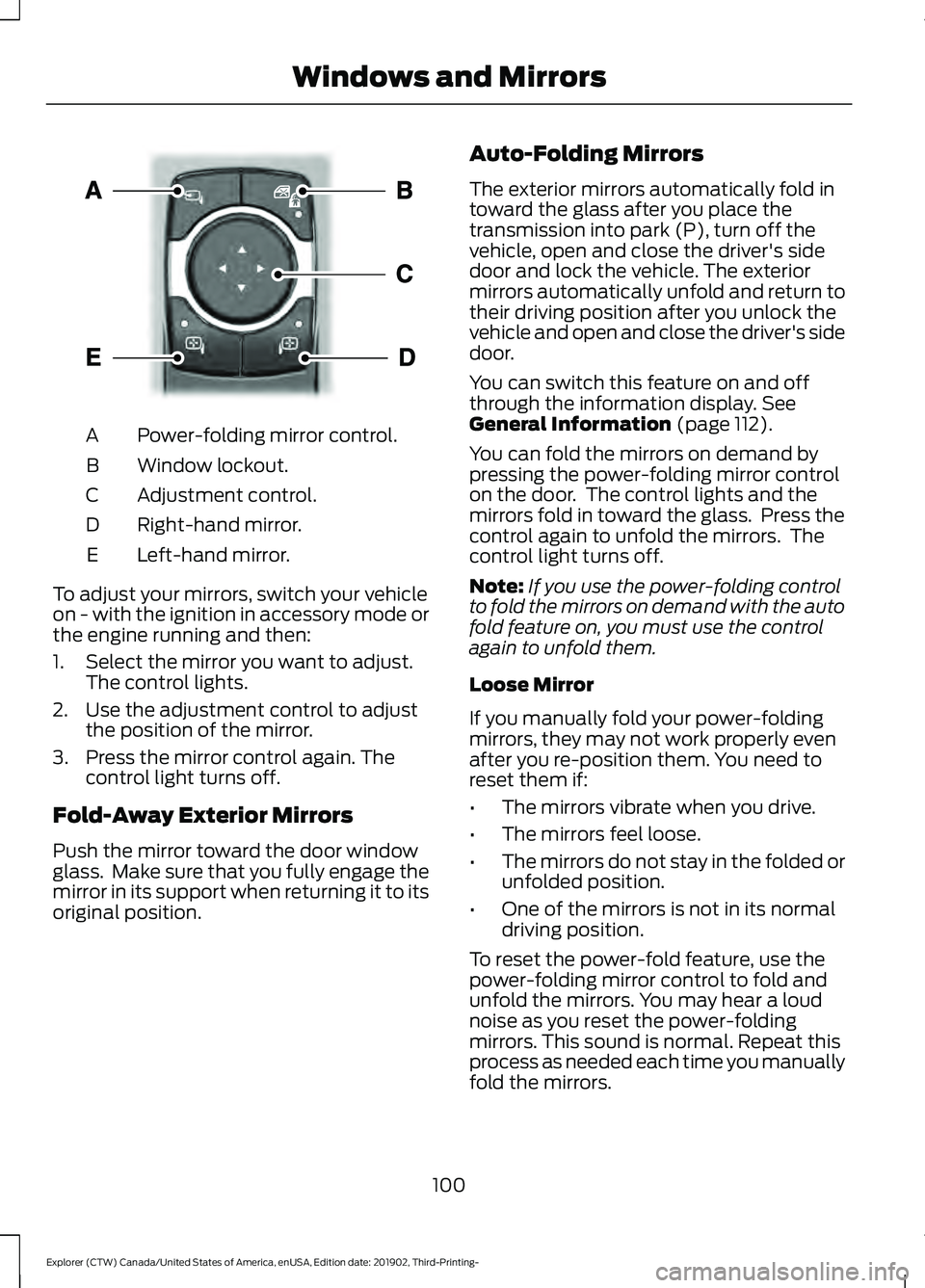
Power-folding mirror control.
A
Window lockout.
B
Adjustment control.
C
Right-hand mirror.
D
Left-hand mirror.
E
To adjust your mirrors, switch your vehicle
on - with the ignition in accessory mode or
the engine running and then:
1. Select the mirror you want to adjust. The control lights.
2. Use the adjustment control to adjust the position of the mirror.
3. Press the mirror control again. The control light turns off.
Fold-Away Exterior Mirrors
Push the mirror toward the door window
glass. Make sure that you fully engage the
mirror in its support when returning it to its
original position. Auto-Folding Mirrors
The exterior mirrors automatically fold in
toward the glass after you place the
transmission into park (P), turn off the
vehicle, open and close the driver's side
door and lock the vehicle. The exterior
mirrors automatically unfold and return to
their driving position after you unlock the
vehicle and open and close the driver's side
door.
You can switch this feature on and off
through the information display. See
General Information (page 112).
You can fold the mirrors on demand by
pressing the power-folding mirror control
on the door. The control lights and the
mirrors fold in toward the glass. Press the
control again to unfold the mirrors. The
control light turns off.
Note: If you use the power-folding control
to fold the mirrors on demand with the auto
fold feature on, you must use the control
again to unfold them.
Loose Mirror
If you manually fold your power-folding
mirrors, they may not work properly even
after you re-position them. You need to
reset them if:
• The mirrors vibrate when you drive.
• The mirrors feel loose.
• The mirrors do not stay in the folded or
unfolded position.
• One of the mirrors is not in its normal
driving position.
To reset the power-fold feature, use the
power-folding mirror control to fold and
unfold the mirrors. You may hear a loud
noise as you reset the power-folding
mirrors. This sound is normal. Repeat this
process as needed each time you manually
fold the mirrors.
100
Explorer (CTW) Canada/United States of America, enUSA, Edition date: 201902, Third-Printing- Windows and MirrorsE295322
Page 113 of 555
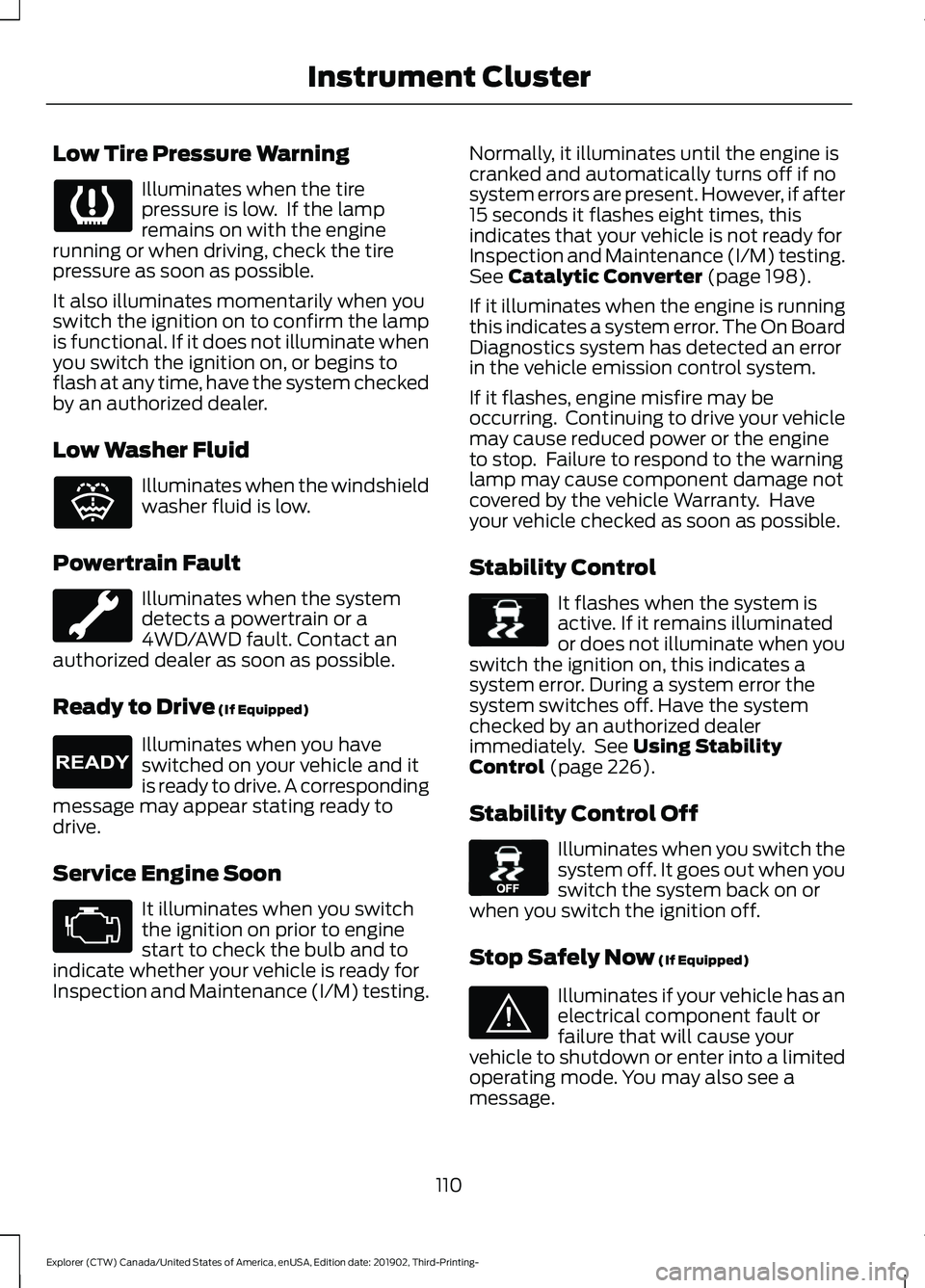
Low Tire Pressure Warning
Illuminates when the tire
pressure is low. If the lamp
remains on with the engine
running or when driving, check the tire
pressure as soon as possible.
It also illuminates momentarily when you
switch the ignition on to confirm the lamp
is functional. If it does not illuminate when
you switch the ignition on, or begins to
flash at any time, have the system checked
by an authorized dealer.
Low Washer Fluid Illuminates when the windshield
washer fluid is low.
Powertrain Fault Illuminates when the system
detects a powertrain or a
4WD/AWD fault. Contact an
authorized dealer as soon as possible.
Ready to Drive (If Equipped) Illuminates when you have
switched on your vehicle and it
is ready to drive. A corresponding
message may appear stating ready to
drive.
Service Engine Soon It illuminates when you switch
the ignition on prior to engine
start to check the bulb and to
indicate whether your vehicle is ready for
Inspection and Maintenance (I/M) testing. Normally, it illuminates until the engine is
cranked and automatically turns off if no
system errors are present. However, if after
15 seconds it flashes eight times, this
indicates that your vehicle is not ready for
Inspection and Maintenance (I/M) testing.
See
Catalytic Converter (page 198).
If it illuminates when the engine is running
this indicates a system error. The On Board
Diagnostics system has detected an error
in the vehicle emission control system.
If it flashes, engine misfire may be
occurring. Continuing to drive your vehicle
may cause reduced power or the engine
to stop. Failure to respond to the warning
lamp may cause component damage not
covered by the vehicle Warranty. Have
your vehicle checked as soon as possible.
Stability Control It flashes when the system is
active. If it remains illuminated
or does not illuminate when you
switch the ignition on, this indicates a
system error. During a system error the
system switches off. Have the system
checked by an authorized dealer
immediately. See
Using Stability
Control (page 226).
Stability Control Off Illuminates when you switch the
system off. It goes out when you
switch the system back on or
when you switch the ignition off.
Stop Safely Now
(If Equipped) Illuminates if your vehicle has an
electrical component fault or
failure that will cause your
vehicle to shutdown or enter into a limited
operating mode. You may also see a
message.
110
Explorer (CTW) Canada/United States of America, enUSA, Edition date: 201902, Third-Printing- Instrument Cluster E132353 E224090 E138639 E130458 E144693
Page 120 of 555
Phone
Phone
Menu options covered in the SYNC chapter. See Phone (page 458).
Settings Settings
Brake Coach Percent Oil Life Indication XXX%
Hold Ok to Reset
Oil Life
Hold Ok to Reset
Tire Monitor
Hold Ok to Initialize
Neutral Tow
Note: Additional vehicle settings are
available through your touchscreen. See
Settings
(page 469).
Display Setup Display Setup
Show Tachometer
Show Power Gauge 1
Speedometer Units Select Your Setting
Eco Coach
Hold
OK to Reset
Driving History 1
1 Hybrid only
Note: Additional display settings are
available through your touchscreen. See
Settings
(page 469).
Hybrid Display Information
(If
Equipped)
Displays unique hybrid vehicle information
when you shut off your vehicle or come to
a stop. Brake Coach
The Brake Coach appears after the vehicle
has come to a stop. It coaches you to brake
in a manner that maximizes the amount
of energy returned through the
regenerative braking system.
117
Explorer (CTW) Canada/United States of America, enUSA, Edition date: 201902, Third-Printing- Information Displays
Page 122 of 555
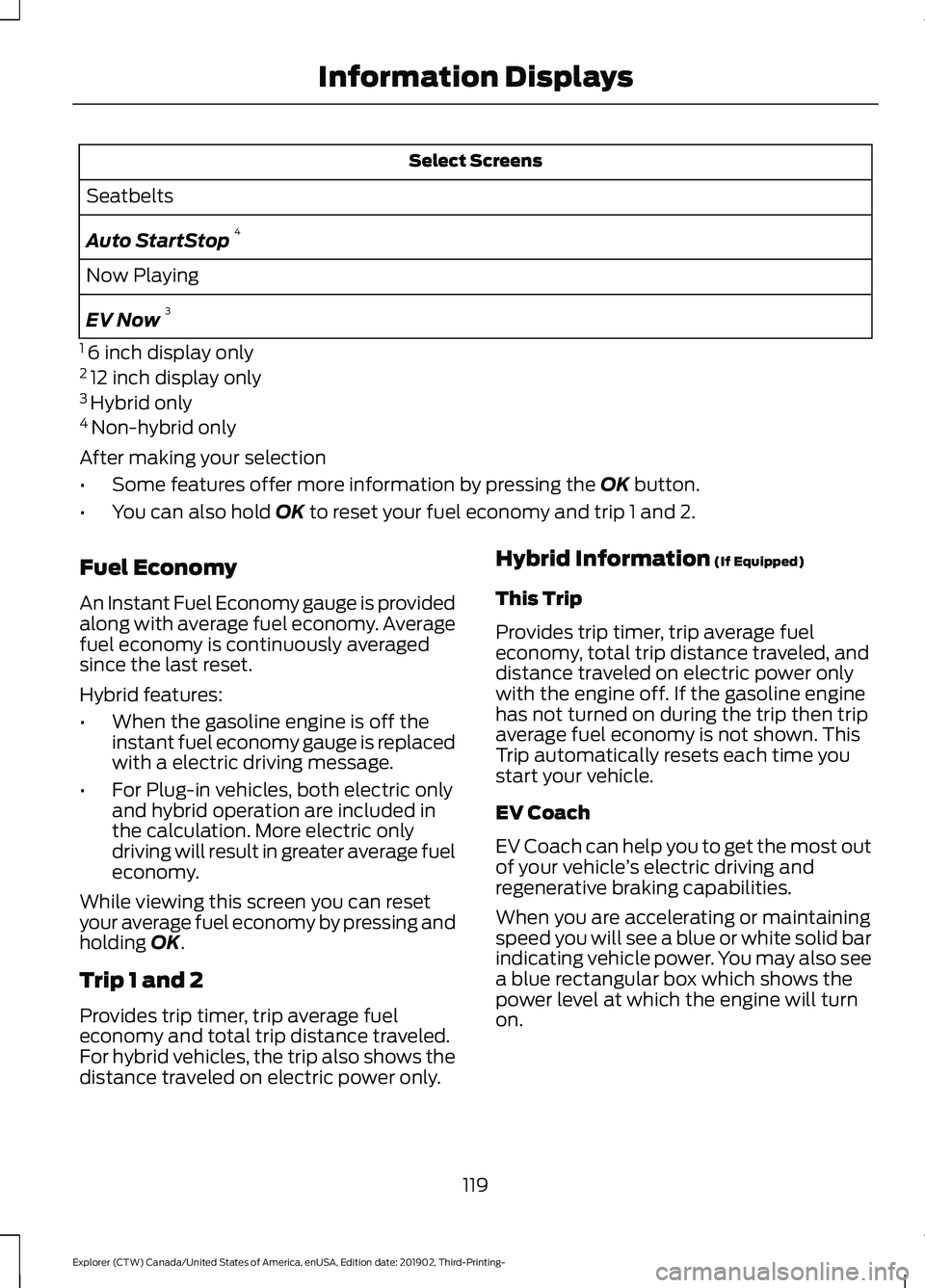
Select Screens
Seatbelts
Auto StartStop 4
Now Playing
EV Now 3
1 6 inch display only
2 12 inch display only
3 Hybrid only
4 Non-hybrid only
After making your selection
• Some features offer more information by pressing the OK button.
• You can also hold
OK to reset your fuel economy and trip 1 and 2.
Fuel Economy
An Instant Fuel Economy gauge is provided
along with average fuel economy. Average
fuel economy is continuously averaged
since the last reset.
Hybrid features:
• When the gasoline engine is off the
instant fuel economy gauge is replaced
with a electric driving message.
• For Plug-in vehicles, both electric only
and hybrid operation are included in
the calculation. More electric only
driving will result in greater average fuel
economy.
While viewing this screen you can reset
your average fuel economy by pressing and
holding
OK.
Trip 1 and 2
Provides trip timer, trip average fuel
economy and total trip distance traveled.
For hybrid vehicles, the trip also shows the
distance traveled on electric power only. Hybrid Information
(If Equipped)
This Trip
Provides trip timer, trip average fuel
economy, total trip distance traveled, and
distance traveled on electric power only
with the engine off. If the gasoline engine
has not turned on during the trip then trip
average fuel economy is not shown. This
Trip automatically resets each time you
start your vehicle.
EV Coach
EV Coach can help you to get the most out
of your vehicle ’s electric driving and
regenerative braking capabilities.
When you are accelerating or maintaining
speed you will see a blue or white solid bar
indicating vehicle power. You may also see
a blue rectangular box which shows the
power level at which the engine will turn
on.
119
Explorer (CTW) Canada/United States of America, enUSA, Edition date: 201902, Third-Printing- Information Displays
Page 123 of 555
•
When your power level is within the box
the color of the bar will be blue. This
means you are in Electric operation and
the engine is off.
• When your power level is outside of the
box the color of the bar will be white.
This means you are in Hybrid operation
with a combination of the electric
motor and the engine providing vehicle
power.
When you are decelerating with either your
foot off the accelerator pedal or on the
brake pedal you will see a green or white
solid bar indicating the power being used
to slow down the vehicle. You may also
see a green rectangular box which shows
the amount of power that can be
recaptured by the regenerative braking
system and returned to the high voltage
battery.
• When your power level is completely
within the box the color of the bar will
be all green. This means that the
regenerative braking system is being
used to efficiently slow the vehicle
down and return the maximum
percentage of energy to the high
voltage battery.
• When your power level is outside of the
green box then the bar will be white.
This means that both the regenerative
braking system and conventional
braking system are being used.
Electric Efficiency
Note: This feature applies to Plug-in
vehicles only.
This screen shows your average driving
distance per kWh of electricity used on
your plug-in hybrid vehicle. The value is
calculated only when your available
electric range is being used and the
gasoline engine is off. Distance per full charge is also shown. This
is an estimate of the electric range you
would have if you plugged in and fully
charged your vehicle right now. The higher
your electric efficiency, the higher your
distance per full charge.
Your electric efficiency is affected by your
driving style and route, climate control use,
outside temperature and other factors.
Best efficiency is achieved in mild ambient
temperatures with mild to moderate
acceleration and braking, moderate speeds
and low climate control usage.
INFORMATION MESSAGES
Note:
Depending on your vehicle options
and instrument cluster type, not all of the
messages could display or be available.
Certain messages may be abbreviated or
shortened depending upon which cluster
type you have. Press the OK button to acknowledge and
remove some messages from the
information display. Other message will
be removed automatically after a short
time.
Certain messages need to be confirmed
before you can access the menus.
120
Explorer (CTW) Canada/United States of America, enUSA, Edition date: 201902, Third-Printing- Information DisplaysE222314
Page 126 of 555
Action
Message
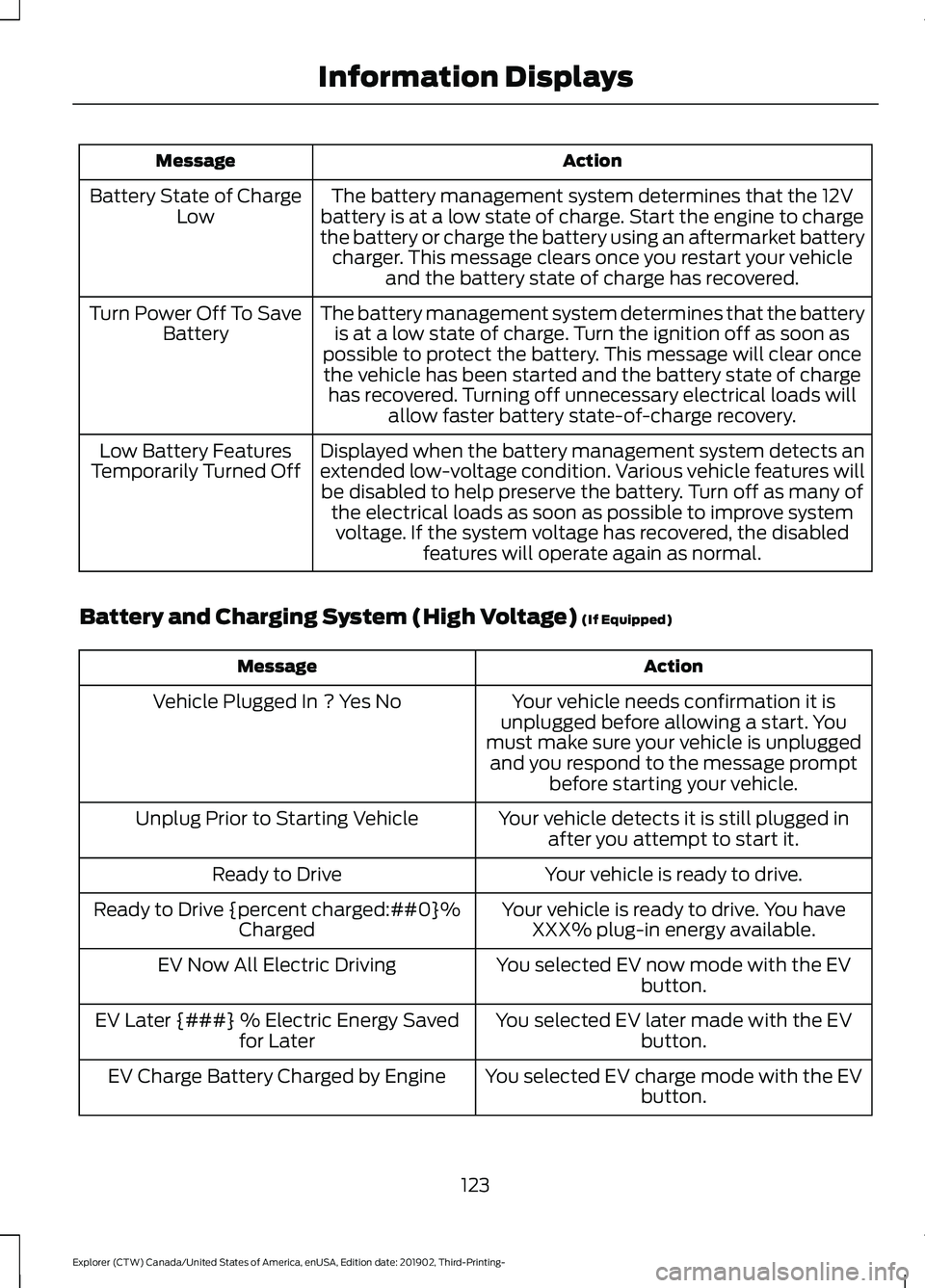
The battery management system determines that the 12V
battery is at a low state of charge. Start the engine to charge
the battery or charge the battery using an aftermarket battery charger. This message clears once you restart your vehicle and the battery state of charge has recovered.
Battery State of Charge
Low
The battery management system determines that the batteryis at a low state of charge. Turn the ignition off as soon as
possible to protect the battery. This message will clear once the vehicle has been started and the battery state of charge has recovered. Turning off unnecessary electrical loads will allow faster battery state-of-charge recovery.
Turn Power Off To Save
Battery
Displayed when the battery management system detects an
extended low-voltage condition. Various vehicle features willbe disabled to help preserve the battery. Turn off as many of the electrical loads as soon as possible to improve systemvoltage. If the system voltage has recovered, the disabled features will operate again as normal.
Low Battery Features
Temporarily Turned Off
Battery and Charging System (High Voltage) (If Equipped) Action
Message
Your vehicle needs confirmation it is
unplugged before allowing a start. You
must make sure your vehicle is unplugged and you respond to the message prompt before starting your vehicle.
Vehicle Plugged In ? Yes No
Your vehicle detects it is still plugged inafter you attempt to start it.
Unplug Prior to Starting Vehicle
Your vehicle is ready to drive.
Ready to Drive
Your vehicle is ready to drive. You haveXXX% plug-in energy available.
Ready to Drive {percent charged:##0}%
Charged
You selected EV now mode with the EVbutton.
EV Now All Electric Driving
You selected EV later made with the EVbutton.
EV Later {###} % Electric Energy Saved
for Later
You selected EV charge mode with the EVbutton.
EV Charge Battery Charged by Engine
123
Explorer (CTW) Canada/United States of America, enUSA, Edition date: 201902, Third-Printing- Information Displays
Page 129 of 555
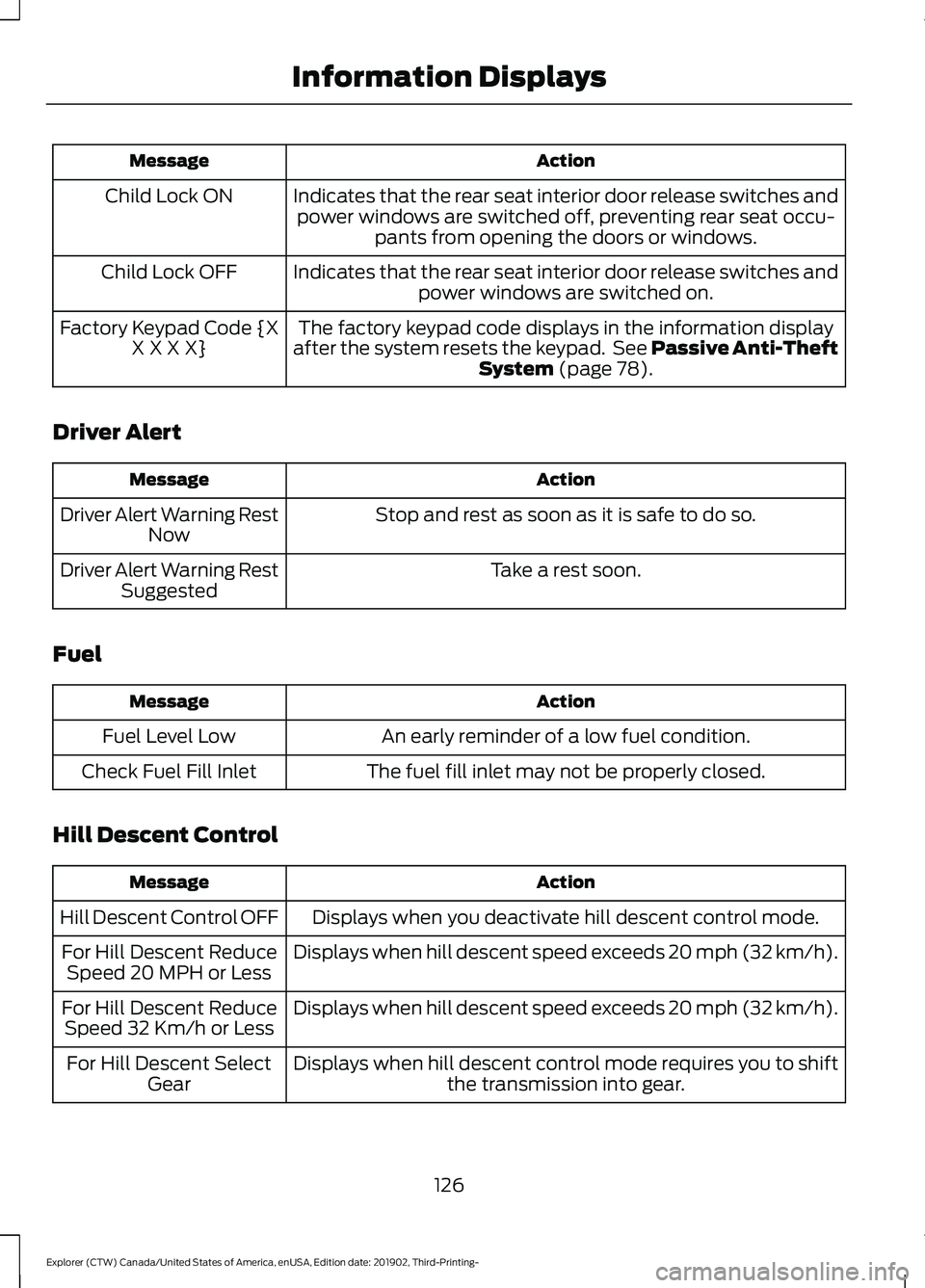
Action
Message
Indicates that the rear seat interior door release switches andpower windows are switched off, preventing rear seat occu- pants from opening the doors or windows.
Child Lock ON
Indicates that the rear seat interior door release switches andpower windows are switched on.
Child Lock OFF
The factory keypad code displays in the information display
after the system resets the keypad. See Passive Anti-Theft System (page 78).
Factory Keypad Code {X
X X X X}
Driver Alert Action
Message
Stop and rest as soon as it is safe to do so.
Driver Alert Warning Rest
Now
Take a rest soon.
Driver Alert Warning Rest
Suggested
Fuel Action
Message
An early reminder of a low fuel condition.
Fuel Level Low
The fuel fill inlet may not be properly closed.
Check Fuel Fill Inlet
Hill Descent Control Action
Message
Displays when you deactivate hill descent control mode.
Hill Descent Control OFF
Displays when hill descent speed exceeds 20 mph (32 km/h).
For Hill Descent Reduce
Speed 20 MPH or Less
Displays when hill descent speed exceeds 20 mph (32 km/h).
For Hill Descent Reduce
Speed 32 Km/h or Less
Displays when hill descent control mode requires you to shiftthe transmission into gear.
For Hill Descent Select
Gear
126
Explorer (CTW) Canada/United States of America, enUSA, Edition date: 201902, Third-Printing- Information Displays
Page 130 of 555
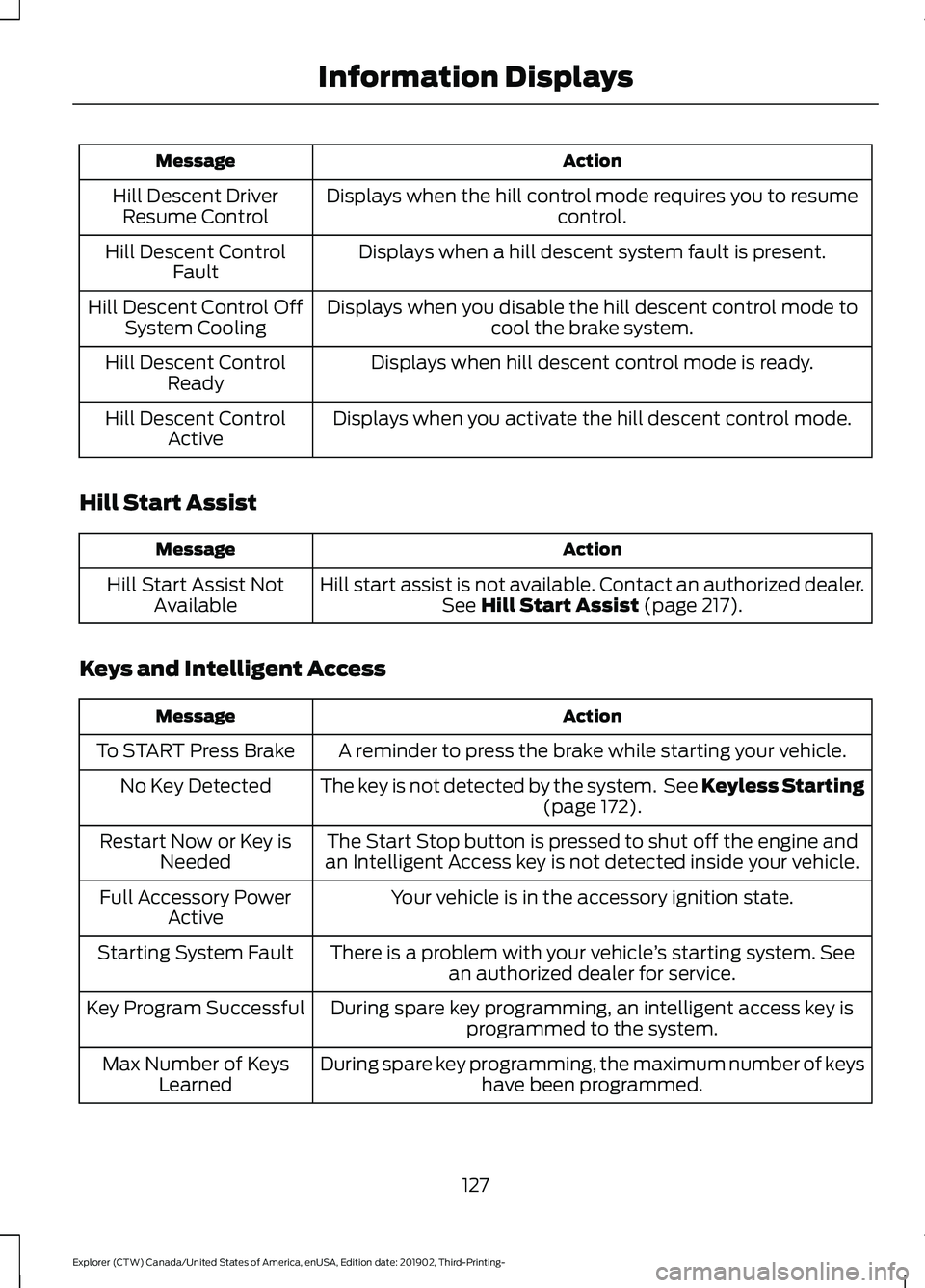
Action
Message
Displays when the hill control mode requires you to resume control.
Hill Descent Driver
Resume Control
Displays when a hill descent system fault is present.
Hill Descent Control
Fault
Displays when you disable the hill descent control mode to cool the brake system.
Hill Descent Control Off
System Cooling
Displays when hill descent control mode is ready.
Hill Descent Control
Ready
Displays when you activate the hill descent control mode.
Hill Descent Control
Active
Hill Start Assist Action
Message
Hill start assist is not available. Contact an authorized dealer.See Hill Start Assist (page 217).
Hill Start Assist Not
Available
Keys and Intelligent Access Action
Message
A reminder to press the brake while starting your vehicle.
To START Press Brake
The key is not detected by the system. See Keyless Starting(page
172).
No Key Detected
The Start Stop button is pressed to shut off the engine and
an Intelligent Access key is not detected inside your vehicle.
Restart Now or Key is
Needed
Your vehicle is in the accessory ignition state.
Full Accessory Power
Active
There is a problem with your vehicle ’s starting system. See
an authorized dealer for service.
Starting System Fault
During spare key programming, an intelligent access key isprogrammed to the system.
Key Program Successful
During spare key programming, the maximum number of keyshave been programmed.
Max Number of Keys
Learned
127
Explorer (CTW) Canada/United States of America, enUSA, Edition date: 201902, Third-Printing- Information Displays
Page 132 of 555
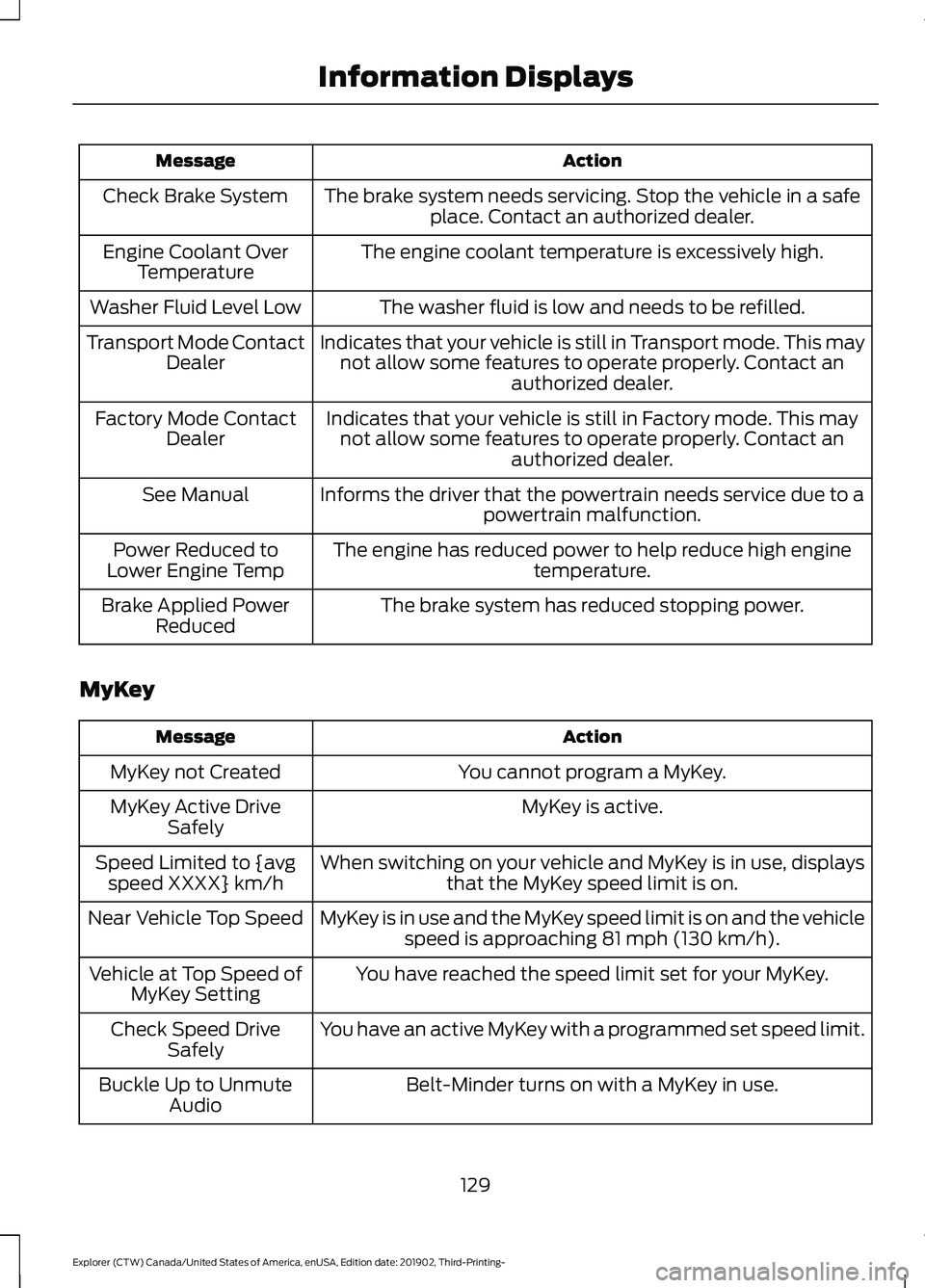
Action
Message
The brake system needs servicing. Stop the vehicle in a safeplace. Contact an authorized dealer.
Check Brake System
The engine coolant temperature is excessively high.
Engine Coolant Over
Temperature
The washer fluid is low and needs to be refilled.
Washer Fluid Level Low
Indicates that your vehicle is still in Transport mode. This maynot allow some features to operate properly. Contact an authorized dealer.
Transport Mode Contact
Dealer
Indicates that your vehicle is still in Factory mode. This maynot allow some features to operate properly. Contact an authorized dealer.
Factory Mode Contact
Dealer
Informs the driver that the powertrain needs service due to a powertrain malfunction.
See Manual
The engine has reduced power to help reduce high engine temperature.
Power Reduced to
Lower Engine Temp
The brake system has reduced stopping power.
Brake Applied Power
Reduced
MyKey Action
Message
You cannot program a MyKey.
MyKey not Created
MyKey is active.
MyKey Active Drive
Safely
When switching on your vehicle and MyKey is in use, displaysthat the MyKey speed limit is on.
Speed Limited to {avg
speed XXXX} km/h
MyKey is in use and the MyKey speed limit is on and the vehiclespeed is approaching 81 mph (130 km/h).
Near Vehicle Top Speed
You have reached the speed limit set for your MyKey.
Vehicle at Top Speed of
MyKey Setting
You have an active MyKey with a programmed set speed limit.
Check Speed Drive
Safely
Belt-Minder turns on with a MyKey in use.
Buckle Up to Unmute
Audio
129
Explorer (CTW) Canada/United States of America, enUSA, Edition date: 201902, Third-Printing- Information Displays