spare tire FORD EXPLORER 2020 Owner's Manual
[x] Cancel search | Manufacturer: FORD, Model Year: 2020, Model line: EXPLORER, Model: FORD EXPLORER 2020Pages: 555, PDF Size: 8.16 MB
Page 380 of 555
•
Use commercial car washing
equipment.
• Try to repair the dissimilar spare tire.
Use of one of the dissimilar spare tires
listed above at any one wheel location can
lead to impairment of the following:
• Handling, stability and braking
performance.
• Comfort and noise.
• Ground clearance and parking at curbs.
• Winter weather driving capability.
• Wet weather driving capability.
• Four-wheel driving capability.
3. Full-size dissimilar spare without
label on wheel.
When driving with the full-size dissimilar
spare wheel and tire assembly, do not:
• Exceed 70 mph (113 km/h).
• Use more than one dissimilar spare
wheel and tire assembly at a time.
• Use commercial car washing
equipment.
• Use snow chains on the end of the
vehicle with the dissimilar spare wheel
and tire assembly.
The usage of a full-size dissimilar spare
wheel and tire assembly can lead to
impairment of the following:
• Handling, stability and braking
performance.
• Comfort and noise.
• Ground clearance and parking at curbs.
• Winter weather driving capability.
• Wet weather driving capability.
• Four-wheel driving capability. When driving with the full-size dissimilar
spare wheel and tire assembly additional
caution should be given to:
•
Towing a trailer.
• Driving vehicles equipped with a
camper body.
• Driving vehicles with a load on the
cargo rack.
Drive cautiously when using a full-size
dissimilar spare wheel and tire assembly
and seek service as soon as possible.
Tire Change Procedure WARNING:
The jack supplied with
this vehicle is only intended for changing
wheels. Do not use the vehicle jack other
than when you are changing a wheel in
an emergency. WARNING: Check that the vehicle
jack is not damaged or deformed and
the thread is lubricated and clean. WARNING:
To help prevent your
vehicle from moving when changing a
wheel, shift the transmission into park
(P), set the parking brake and use an
appropriate block or wheel chock to
secure the wheel diagonally opposite to
the wheel being changed. For example,
when changing the front left wheel,
place an appropriate block or wheel
chock on the right rear wheel. WARNING:
Always use the jack
provided as original equipment with your
vehicle. If using a jack other than the one
provided, make sure the jack capacity is
adequate for the vehicle weight,
including any vehicle cargo or
modifications. If you are unsure if the jack
capacity is adequate, contact the
authorized dealer.
377
Explorer (CTW) Canada/United States of America, enUSA, Edition date: 201902, Third-Printing- Wheels and Tires
Page 382 of 555
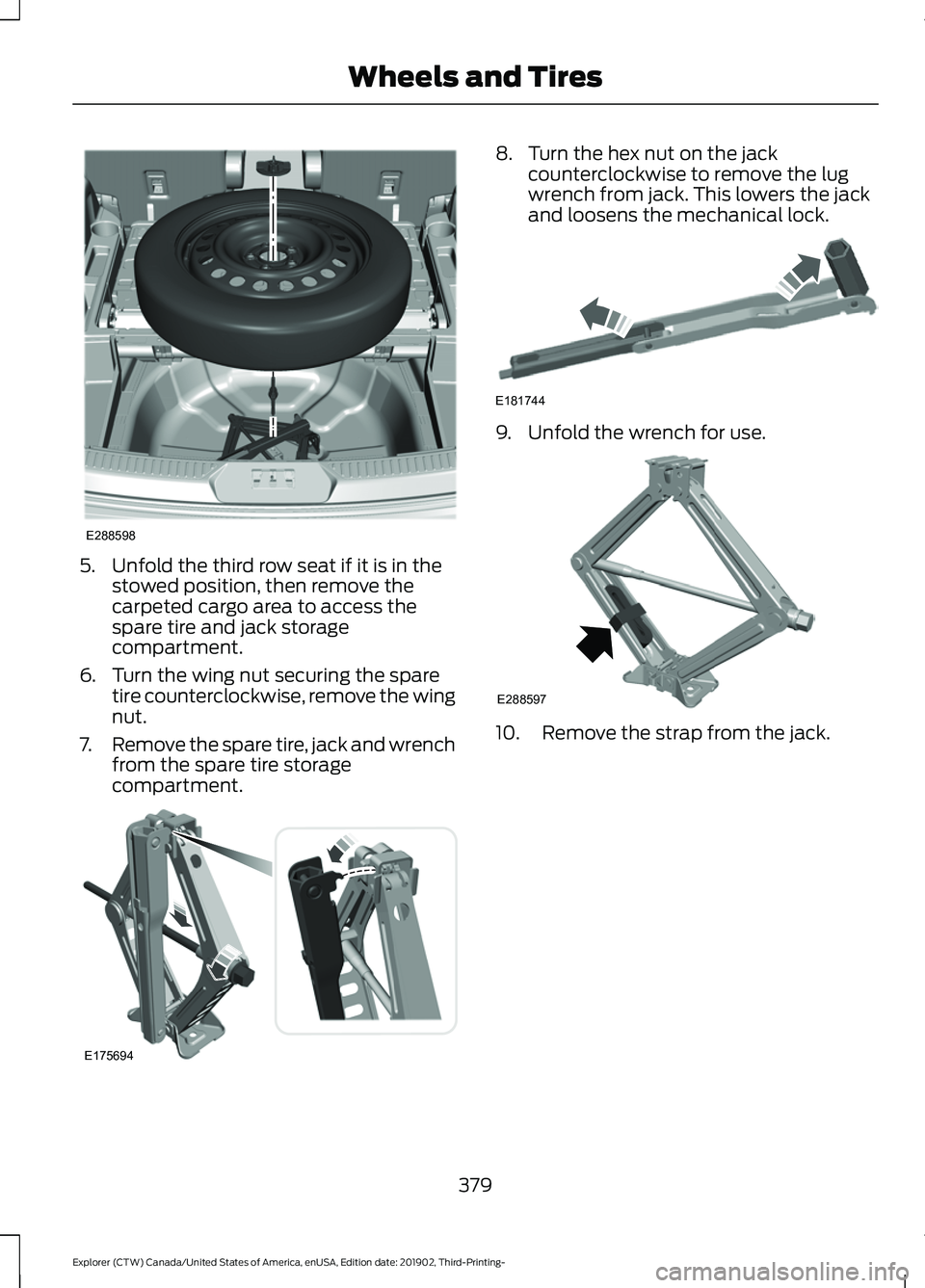
5. Unfold the third row seat if it is in the
stowed position, then remove the
carpeted cargo area to access the
spare tire and jack storage
compartment.
6. Turn the wing nut securing the spare tire counterclockwise, remove the wing
nut.
7. Remove the spare tire, jack and wrench
from the spare tire storage
compartment. 8. Turn the hex nut on the jack
counterclockwise to remove the lug
wrench from jack. This lowers the jack
and loosens the mechanical lock. 9. Unfold the wrench for use.
10. Remove the strap from the jack.
379
Explorer (CTW) Canada/United States of America, enUSA, Edition date: 201902, Third-Printing- Wheels and TiresE288598 E175694 E181744 E288597
Page 383 of 555
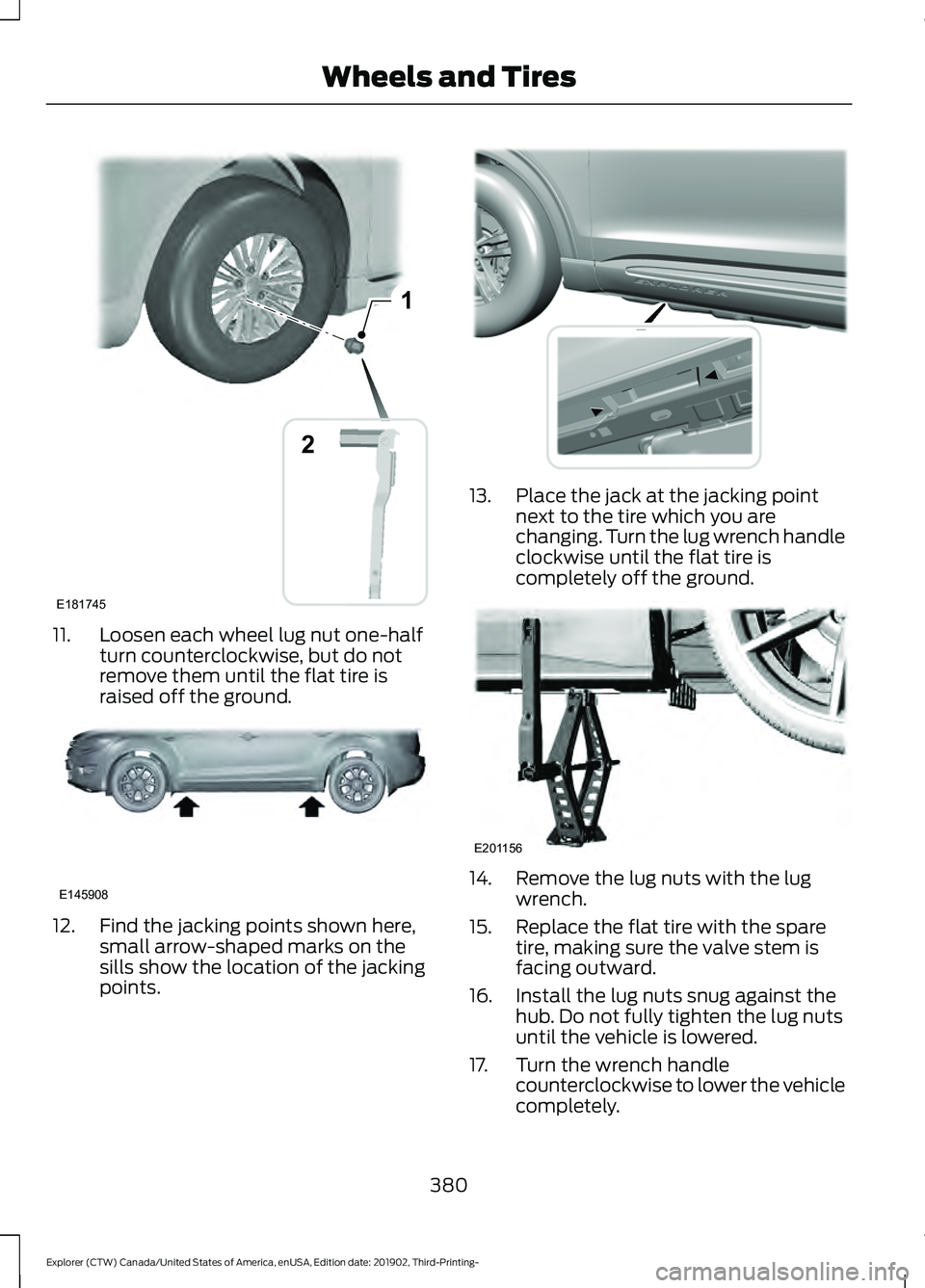
11. Loosen each wheel lug nut one-half
turn counterclockwise, but do not
remove them until the flat tire is
raised off the ground.12. Find the jacking points shown here,
small arrow-shaped marks on the
sills show the location of the jacking
points. 13. Place the jack at the jacking point
next to the tire which you are
changing. Turn the lug wrench handle
clockwise until the flat tire is
completely off the ground. 14. Remove the lug nuts with the lug
wrench.
15. Replace the flat tire with the spare tire, making sure the valve stem is
facing outward.
16. Install the lug nuts snug against the hub. Do not fully tighten the lug nuts
until the vehicle is lowered.
17. Turn the wrench handle counterclockwise to lower the vehicle
completely.
380
Explorer (CTW) Canada/United States of America, enUSA, Edition date: 201902, Third-Printing- Wheels and Tires1
E181745
2 E145908 E307859 E201156
Page 384 of 555
18.
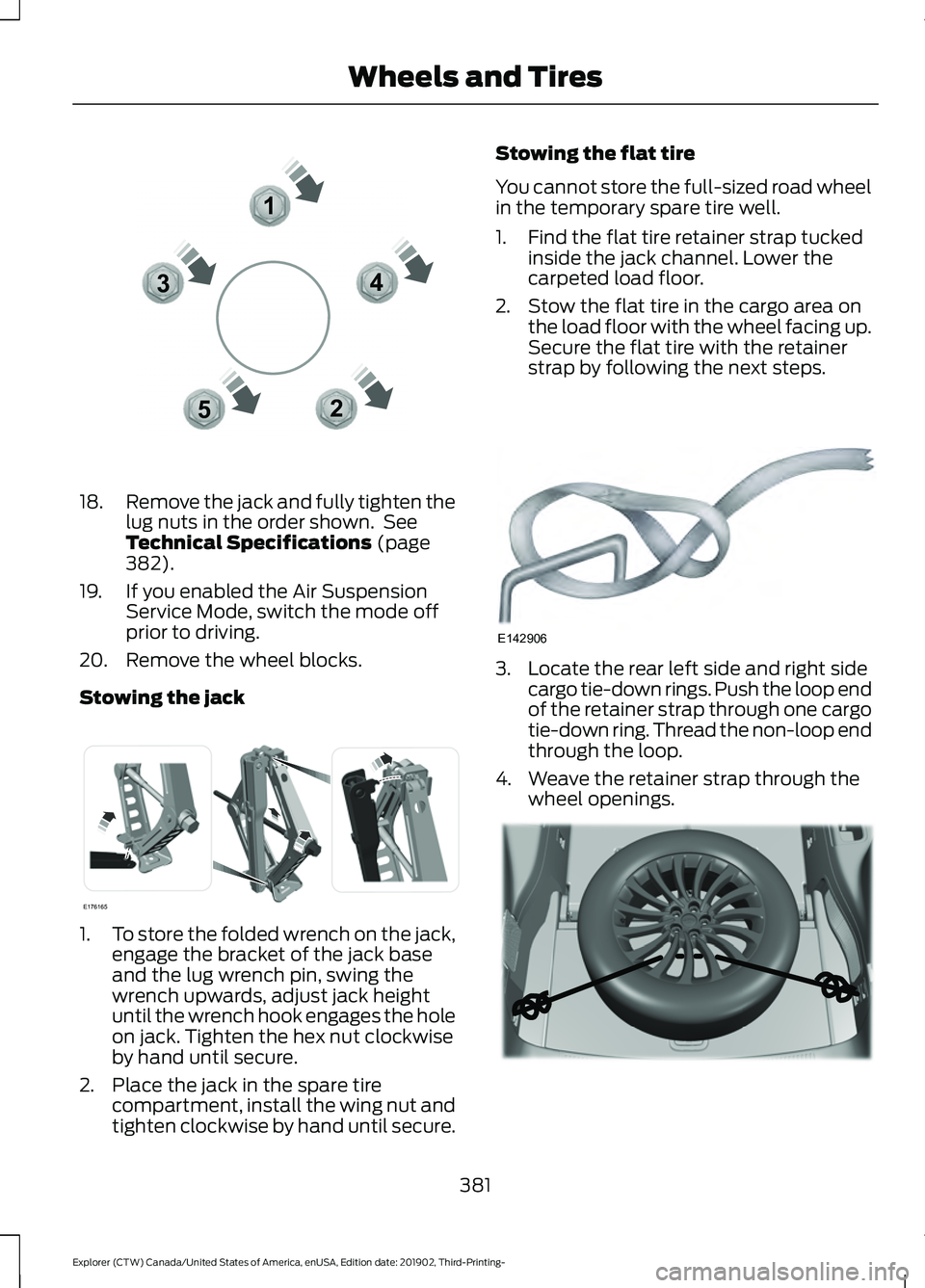
Remove the jack and fully tighten the
lug nuts in the order shown. See
Technical Specifications (page
382).
19. If you enabled the Air Suspension Service Mode, switch the mode off
prior to driving.
20. Remove the wheel blocks.
Stowing the jack 1.
To store the folded wrench on the jack,
engage the bracket of the jack base
and the lug wrench pin, swing the
wrench upwards, adjust jack height
until the wrench hook engages the hole
on jack. Tighten the hex nut clockwise
by hand until secure.
2. Place the jack in the spare tire compartment, install the wing nut and
tighten clockwise by hand until secure. Stowing the flat tire
You cannot store the full-sized road wheel
in the temporary spare tire well.
1. Find the flat tire retainer strap tucked
inside the jack channel. Lower the
carpeted load floor.
2. Stow the flat tire in the cargo area on the load floor with the wheel facing up.
Secure the flat tire with the retainer
strap by following the next steps. 3. Locate the rear left side and right side
cargo tie-down rings. Push the loop end
of the retainer strap through one cargo
tie-down ring. Thread the non-loop end
through the loop.
4. Weave the retainer strap through the wheel openings. 381
Explorer (CTW) Canada/United States of America, enUSA, Edition date: 201902, Third-Printing- Wheels and Tires12
3
4
5E306781 E176165 E142906 E294325
Page 492 of 555
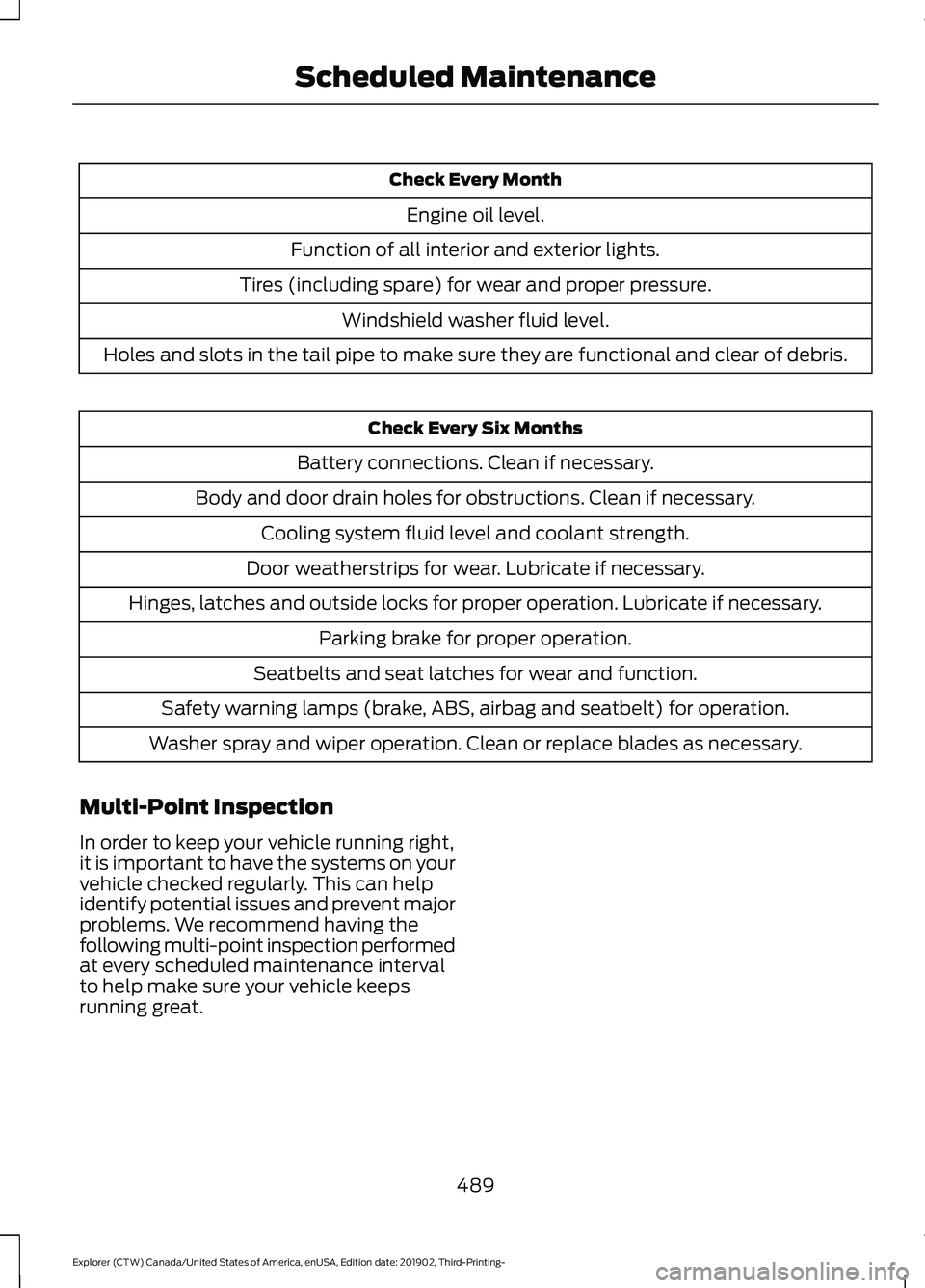
Check Every Month
Engine oil level.
Function of all interior and exterior lights.
Tires (including spare) for wear and proper pressure. Windshield washer fluid level.
Holes and slots in the tail pipe to make sure they are functional and clear of debris. Check Every Six Months
Battery connections. Clean if necessary.
Body and door drain holes for obstructions. Clean if necessary. Cooling system fluid level and coolant strength.
Door weatherstrips for wear. Lubricate if necessary.
Hinges, latches and outside locks for proper operation. Lubricate if necessary. Parking brake for proper operation.
Seatbelts and seat latches for wear and function.
Safety warning lamps (brake, ABS, airbag and seatbelt) for operation.
Washer spray and wiper operation. Clean or replace blades as necessary.
Multi-Point Inspection
In order to keep your vehicle running right,
it is important to have the systems on your
vehicle checked regularly. This can help
identify potential issues and prevent major
problems. We recommend having the
following multi-point inspection performed
at every scheduled maintenance interval
to help make sure your vehicle keeps
running great.
489
Explorer (CTW) Canada/United States of America, enUSA, Edition date: 201902, Third-Printing- Scheduled Maintenance
Page 493 of 555
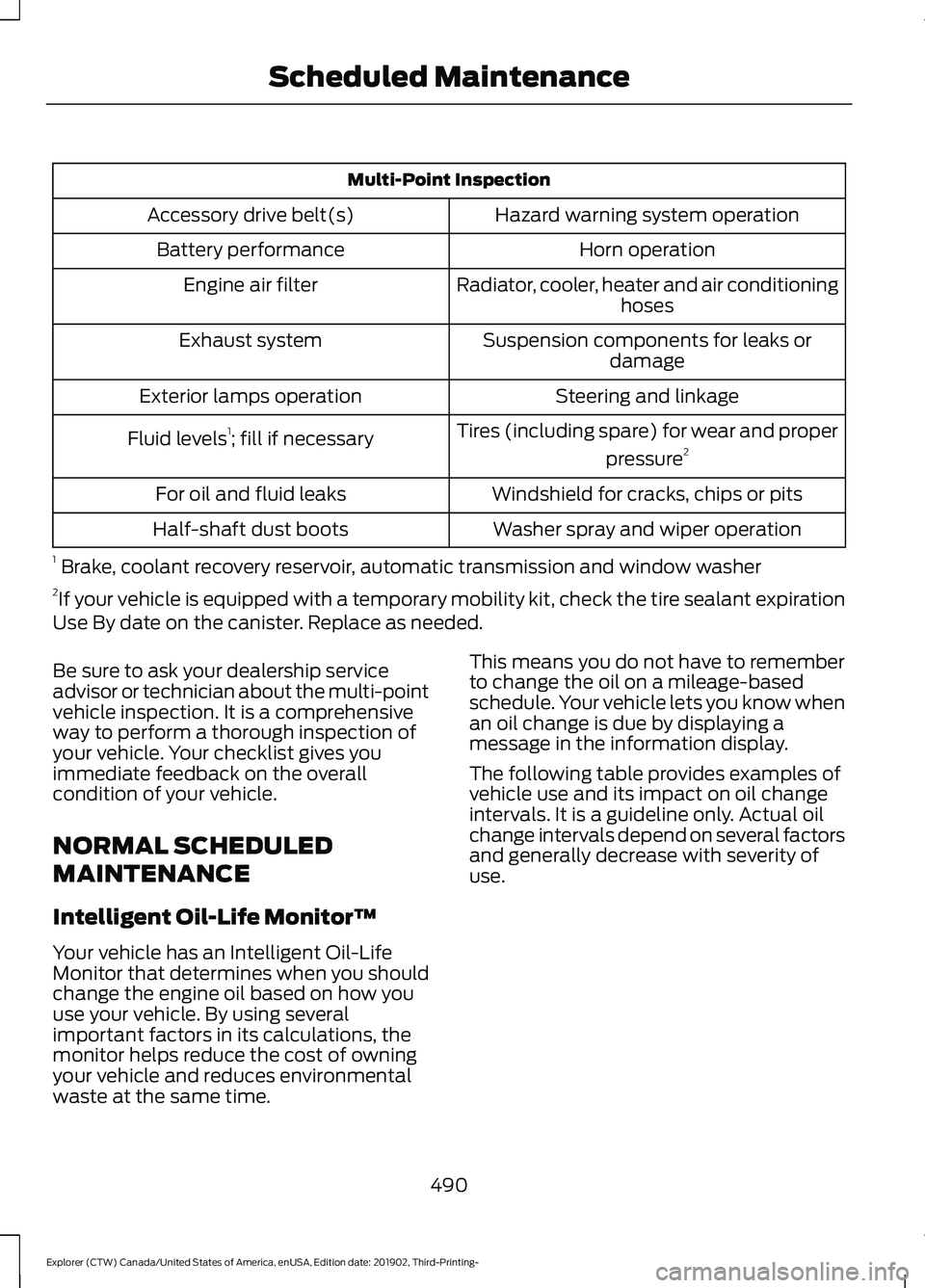
Multi-Point Inspection
Hazard warning system operation
Accessory drive belt(s)
Horn operation
Battery performance
Radiator, cooler, heater and air conditioninghoses
Engine air filter
Suspension components for leaks ordamage
Exhaust system
Steering and linkage
Exterior lamps operation
Tires (including spare) for wear and properpressure2
Fluid levels 1
; fill if necessary
Windshield for cracks, chips or pits
For oil and fluid leaks
Washer spray and wiper operation
Half-shaft dust boots
1 Brake, coolant recovery reservoir, automatic transmission and window washer
2 If your vehicle is equipped with a temporary mobility kit, check the tire sealant expiration
Use By date on the canister. Replace as needed.
Be sure to ask your dealership service
advisor or technician about the multi-point
vehicle inspection. It is a comprehensive
way to perform a thorough inspection of
your vehicle. Your checklist gives you
immediate feedback on the overall
condition of your vehicle.
NORMAL SCHEDULED
MAINTENANCE
Intelligent Oil-Life Monitor™
Your vehicle has an Intelligent Oil-Life
Monitor that determines when you should
change the engine oil based on how you
use your vehicle. By using several
important factors in its calculations, the
monitor helps reduce the cost of owning
your vehicle and reduces environmental
waste at the same time. This means you do not have to remember
to change the oil on a mileage-based
schedule. Your vehicle lets you know when
an oil change is due by displaying a
message in the information display.
The following table provides examples of
vehicle use and its impact on oil change
intervals. It is a guideline only. Actual oil
change intervals depend on several factors
and generally decrease with severity of
use.
490
Explorer (CTW) Canada/United States of America, enUSA, Edition date: 201902, Third-Printing- Scheduled Maintenance
Page 543 of 555
Changing a Bulb...........................................343
LED Lamps........................................................... 343
License Plate Lamp.......................................... 344
Rear Direction Indicator and Reversing Lamp................................................................. 343
Changing a Fuse............................................321
Fuses........................................................................\
321
Changing a Road Wheel
............................376
Dissimilar Spare Wheel and Tire Assembly
Information...................................................... 376
Tire Change Procedure..................................... 377
Changing the 12V Battery.........................338 Battery Management System....................... 339
Remove and Reinstall the Battery..............339
Changing the Engine Air Filter - 2.3L EcoBoost™.................................................329
Changing the Engine Air Filter - 3.0L................................................................330
Changing the Engine Air Filter - 3.3L..................................................................331
Changing the Front Wiper Blades.........342
Changing the Rear Wiper Blades...........342
Changing the Vehicle Wi-Fi Hotspot Name or Password
..................................429
Checking MyKey System Status..............66 MyKey Distance.................................................... 66
Number of Admin Keys...................................... 67
Number of MyKeys............................................... 67
Checking the Wiper Blades......................342
Child Restraint and Seatbelt Maintenance.................................................43
Child Restraint Positioning.........................35
Child Safety......................................................23 General Information............................................ 23
Child Safety Locks.........................................36 Left-Hand Side...................................................... 37
Right-Hand Side................................................... 37
Cleaning Leather Seats
.............................349
Cleaning Products.......................................345 Materials............................................................... 345
Cleaning the Engine
....................................347
Cleaning the Exterior..................................346 Cleaning the Headlamps................................ 346
Exterior Chrome Parts..................................... 346
Exterior Plastic Parts........................................ 346
Stripes or Graphics........................................... 346
Underbody............................................................ 347
Under Hood.......................................................... 347Cleaning the Instrument Panel and
Instrument Cluster Lens........................348
Cleaning the Interior...................................348 Mirrors.................................................................... 348
Cleaning the Wheels..................................350
Cleaning the Windows and Wiper Blades............................................................347
Clearing All MyKeys.......................................66
Climate............................................................456 Accessing Rear Climate Controls................458
Accessing the Climate Control Menu........456
Directing the Airflow........................................ 456
Rear Climate Control Lock Indicator..........458
Setting the Blower Motor Speed.................456
Setting the Temperature................................ 456
Switching Auto Mode On and Off...............456
Switching Dual Zone Mode On and Off....................................................................... 457
Switching Maximum Air Conditioning On and Off.............................................................. 457
Switching Maximum Defrost On and Off....................................................................... 457
Switching Rear Auto Mode On and Off...................................................................... 458
Switching Recirculated Air On and Off...................................................................... 458
Switching the Air Conditioning On and Off...................................................................... 456
Switching the Climate Controlled Seats On and Off.............................................................. 457
Switching the Climate Control On and Off....................................................................... 457
Switching the Heated Exterior Mirrors On and Off.............................................................. 457
Switching the Heated Rear Window On and Off....................................................................... 457
Switching the Heated Seats On and Off....................................................................... 457
Switching the Heated Steering Wheel On and Off.............................................................. 457
Switching the Heated Windshield On and Off....................................................................... 457
Switching the Rear Climate Controlled Seats On and Off.......................................... 458
Switching the Rear Heated Seats On and Off...................................................................... 458
Switching the Rear Ventilated Seats On and Off............................................................. 458
540
Explorer (CTW) Canada/United States of America, enUSA, Edition date: 201902, Third-Printing- Index
Page 550 of 555

Switching the Power Liftgate On or
Off........................................................................\
. 76
Power Seats...................................................148
Adjusting the Lumbar Support..................... 149
Adjusting the Multi-Contour Front Seats With Active Motion ...................................... 149
Power Steering Fluid Check....................338
Power Windows
..............................................97
Accessory Delay................................................... 98
Bounce-Back.......................................................... 97
One-Touch Down................................................. 97
One-Touch Up....................................................... 97
Window Lock......................................................... 97
Pre-Collision Assist
.....................................274
Adjusting the Pre-Collision Assist
Settings............................................................. 276
Blocked Sensors................................................. 277
Distance Indication and Alert........................ 275
Evasive Steering Assist.................................... 276
Using the Pre-Collision Assist System............................................................... 274
Protecting the Environment
........................19
Puncture See: Changing a Road Wheel........................ 376
R
Rear Occupant Alert System Audible Warnings........................................................161
Rear Occupant Alert System Indicators.......................................................161
Rear Occupant Alert System Limitations...................................................160
Rear Occupant Alert System Precautions.................................................160
Rear Occupant Alert System...................160
Rear Parking Aid...........................................230 Object Distance Indicator............................... 232
Rear Passenger Climate Controls..........140 Directing Air to the Overhead Air
Vents.................................................................... 141
Directing Air to the Rear Footwell Air Vents.................................................................... 141
Rear Climate Control Lock Indicator............141
Setting the Rear Blower Motor Speed.........141
Setting the Rear Temperature........................ 141
Switching the Rear Climate Control On and Off........................................................................\
. 141Switching the Rear Heated Seats On and
Off........................................................................\
. 141
Rear Seats
.......................................................152
Adjusting the Second Row Rear
Seats................................................................... 152
Adjusting the Third Row Power Seats.................................................................. 156
Rear Under Floor Storage..........................281 Adjustable Load Floor....................................... 281
Spare Tire Cover.................................................. 281
Rear View Camera.......................................238 Camera Guidelines........................................... 240
Manual Zoom....................................................... 241
Obstacle Distance Indicator.......................... 240
Rear Camera Delay............................................ 241
Using the Rear View Camera System........239
Rear View Camera See: Rear View Camera................................... 238
Rear Window Wiper and Washers...........87 Rear Camera Washer.......................................... 87
Rear Window Washer......................................... 87
Rear Window Wiper............................................. 87
Rear Wiper Blades See: Changing the Rear Wiper Blades.......342
Recommended Towing Weights
...........290
Reduced Engine Performance...............296
Refueling - Excluding: Hybrid Electric Vehicle (HEV)
.............................................190
Refueling System Overview........................... 190
Refueling System Warning.............................. 192
Refueling Your Vehicle....................................... 191
Refueling - Hybrid Electric Vehicle (HEV).............................................................193
Fuel Filler Door Manual Override Lever................................................................... 195
System Warnings............................................... 194
Remote Control
...............................................57
Car Finder................................................................ 62
Integrated Keyhead Transmitter..................... 57
Intelligent Access Key........................................ 58
Memory Feature.................................................... 61
Remote Start......................................................... 62
Replacing the Battery......................................... 59
Sounding the Panic Alarm................................ 62
Remote Start
..................................................142
Automatic Settings............................................ 142
Heated and Cooled Features......................... 142
Last Settings......................................................... 142
547
Explorer (CTW) Canada/United States of America, enUSA, Edition date: 201902, Third-Printing- Index
Page 553 of 555
Switching Lane Centering On and
Off..................................................................254
Activating Lane Centering.............................. 254
System Alerts and Automatic Cancellation.................................................... 254
Switching Rear Occupant Alert System On and Off
...................................................160
Switching Reverse Braking Assist On and Off
....................................................................221
Symbols Glossary.............................................9
SYNC™ 3........................................................438
General Information......................................... 438
SYNC™ 3 Troubleshooting.......................471 Additional Information and
Assistance....................................................... 483
Apps........................................................................\
478
Navigation............................................................. 477
Personal Profiles................................................. 481
Phone..................................................................... 475
Resetting the System...................................... 483
USB and Bluetooth Audio............................... 472
Voice Recognition............................................... 471
Wi-Fi Connectivity............................................ 480
T
Technical Specifications See: Capacities and Specifications............384
The Better Business Bureau (BBB) Auto Line Program (U.S. Only)
......................308
Tire Care..........................................................355
Glossary of Tire Terminology........................ 356
Information About Uniform Tire Quality Grading............................................................. 355
Information Contained on the Tire Sidewall............................................................ 357
Temperature A B C............................................ 356
Traction AA A B C............................................... 355
Treadwear............................................................. 355
Tire Pressure Monitoring System
...........370
Changing Tires With a Tire Pressure
Monitoring System......................................... 371
Understanding Your Tire Pressure Monitoring System ....................................... 372
Tires See: Wheels and Tires..................................... 353
Towing a Trailer............................................289 Load Placement................................................ 289Towing the Vehicle on Four
Wheels..........................................................295
Emergency Towing............................................ 295
Recreational Towing - All-Wheel and Four-Wheel Drive Vehicles........................ 295
Recreational Towing - Front-Wheel Drive Vehicles............................................................ 295
Recreational Towing - Rear-Wheel Drive Vehicles............................................................ 295
Towing.............................................................289
Traction Control............................................224 Principle of Operation...................................... 224
Traffic Sign Recognition.............................272 Principle of Operation....................................... 272
Using Traffic Sign Recognition...................... 272
Trailer Sway Control...................................290
Transmission Code Designation............394
Transmission Specifications - ST.........388
Transmission.................................................202
Transporting the Vehicle
..........................304
U
Under Hood Overview - 2.3L EcoBoost™.................................................324
Under Hood Overview - 3.0L...................325
Under Hood Overview - 3.3L...................326
Unique Driving Characteristics...............180
Universal Garage Door Opener...............162 HomeLink Wireless Control System............162
USB Port.........................................................436 Locating the USB Ports................................... 437
Using Four-Wheel Drive...........................208 Driving in Special Conditions With
Four-Wheel drive (4WD)............................ 210
How Your Vehicle Differs from Other Vehicles............................................................ 209
Operating Four-Wheel drive (4WD) Vehicles with Mismatched Tires.............209
Operating Four-Wheel Drive (4WD) Vehicles With Spare Tires......................... 208
Using MyKey With Remote Start Systems...........................................................67
Using Snow Chains
....................................368
Using Stability Control...............................226 Electronic Stability Control - Base
Model................................................................ 226
550
Explorer (CTW) Canada/United States of America, enUSA, Edition date: 201902, Third-Printing- Index