tow FORD EXPLORER 2020 Owner's Manual
[x] Cancel search | Manufacturer: FORD, Model Year: 2020, Model line: EXPLORER, Model: FORD EXPLORER 2020Pages: 555, PDF Size: 8.16 MB
Page 104 of 555
Heated Exterior Mirrors
See Heated Exterior Mirrors (page 142).
Memory Mirrors
You can save and recall the mirror
positions through the memory function.
See
Memory Function (page 150).
Auto-dimming Feature
The driver exterior mirror dims when the
interior auto-dimming mirror turns on.
Direction Indicator Mirrors
When the vehicle is running, the
forward-facing portion of the appropriate
mirror housing blinks when you switch on
the direction indicator.
Puddle Lamps
The lamps on the bottom part of the mirror
housing light when you use your
transmitter to unlock the doors or when
you open a door.
Blind Spot Information System
See
Blind Spot Information System
(page 264).
INTERIOR MIRROR WARNING:
Do not adjust the
mirrors when your vehicle is moving. This
could result in the loss of control of your
vehicle, serious personal injury or death.
Note: Do not clean the mirror housing or
glass with harsh abrasives, fuel or other
petroleum-based cleaning products. You can adjust the interior mirror to your
preference. Some mirrors also have a
second pivot point. This lets you move the
mirror head up or down and from side to
side.
Manual Dimming Mirror
Pull the tab below the mirror toward you
to reduce the effect of bright light from
behind.
Automatic Dimming Mirror (If Equipped)
Note:
Do not block the sensors on the front
and back of the mirror. A rear center
passenger or raised rear center head
restraint may also block light from reaching
the sensor.
The mirror dims to reduce the effect of
bright light from behind. It returns to
normal when the bright light from behind
is no longer present or if you shift into
reverse (R).
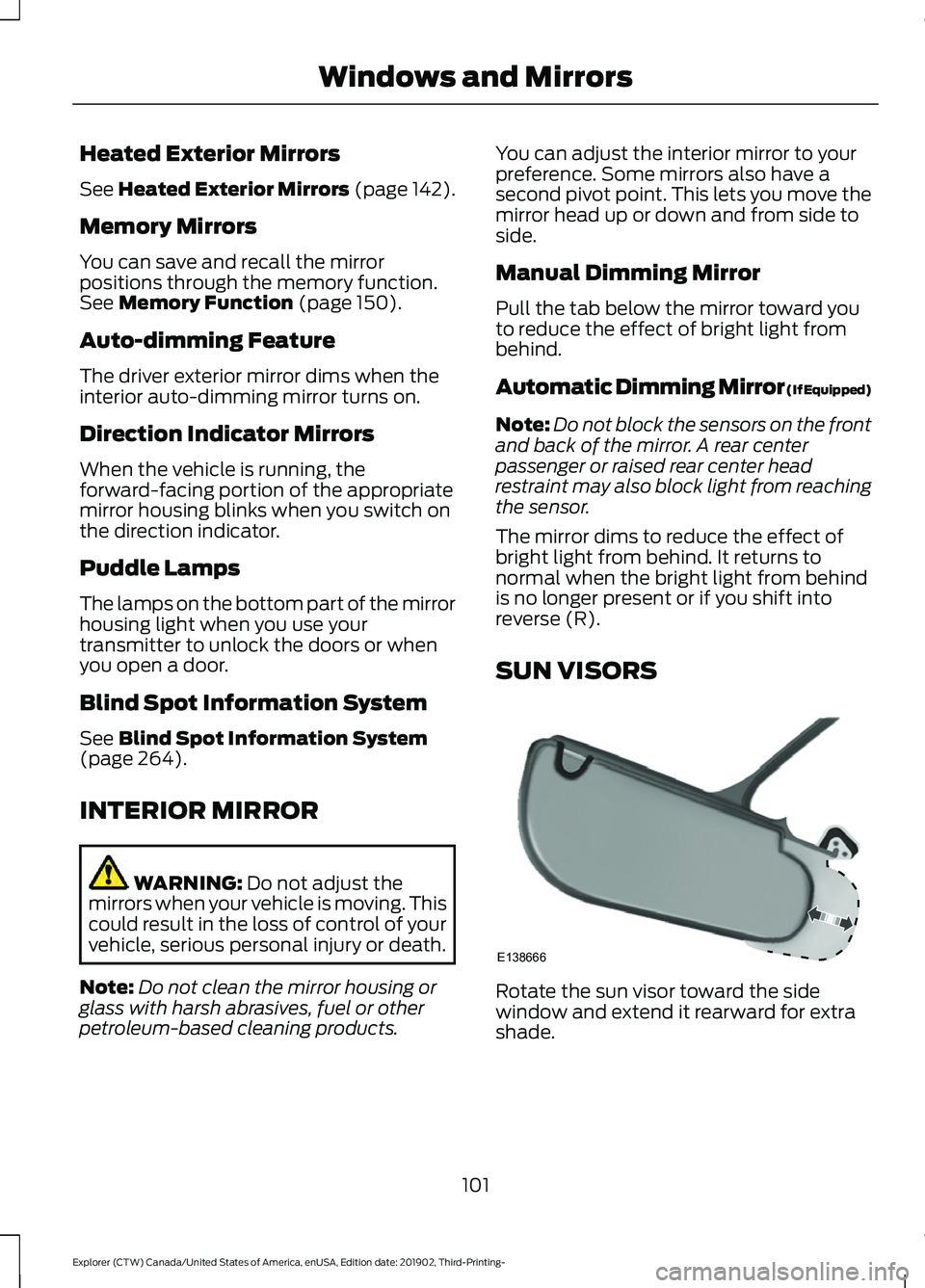
SUN VISORS Rotate the sun visor toward the side
window and extend it rearward for extra
shade.
101
Explorer (CTW) Canada/United States of America, enUSA, Edition date: 201902, Third-Printing- Windows and MirrorsE138666
Page 118 of 555
6 Inch Display Menu
This icon shows the features on
or off status. A check in the box
indicates the feature is on, and
unchecked indicates the feature is off. Note:
Some options may appear different
or not at all if the items are optional.
Note: Some MyKey menu options only
appear if MyKey is enabled and at least one
MyKey is programmed.
Select Screens Select Screens
Menu options covered in personalized settings. See Personalized Settings (page 118).
Navigation Navigation
Menu options covered in the SYNC chapter. See
Navigation (page 460).
Audio Audio
Menu options covered in the SYNC chapter. See
Settings (page 469).
Phone Phone
Menu options covered in the SYNC chapter. See
Phone (page 458).
Settings Settings
Brake Coach Percent Oil Life Indication XXX%
Hold Ok to Reset
Oil Life
Hold Ok to Reset
Tire Monitor
Hold Ok to Initialize
Neutral Tow
115
Explorer (CTW) Canada/United States of America, enUSA, Edition date: 201902, Third-Printing- Information DisplaysE204495
Page 120 of 555
Phone
Phone
Menu options covered in the SYNC chapter. See Phone (page 458).
Settings Settings
Brake Coach Percent Oil Life Indication XXX%
Hold Ok to Reset
Oil Life
Hold Ok to Reset
Tire Monitor
Hold Ok to Initialize
Neutral Tow
Note: Additional vehicle settings are
available through your touchscreen. See
Settings
(page 469).
Display Setup Display Setup
Show Tachometer
Show Power Gauge 1
Speedometer Units Select Your Setting
Eco Coach
Hold
OK to Reset
Driving History 1
1 Hybrid only
Note: Additional display settings are
available through your touchscreen. See
Settings
(page 469).
Hybrid Display Information
(If
Equipped)
Displays unique hybrid vehicle information
when you shut off your vehicle or come to
a stop. Brake Coach
The Brake Coach appears after the vehicle
has come to a stop. It coaches you to brake
in a manner that maximizes the amount
of energy returned through the
regenerative braking system.
117
Explorer (CTW) Canada/United States of America, enUSA, Edition date: 201902, Third-Printing- Information Displays
Page 137 of 555
Trailer
Action
Message
A correct trailer connection is sensed during a givenignition cycle.
Trailer Connected
A trailer connection becomes disconnected, either
intentionally or unintentionally, and has been sensed during a given ignition cycle.
Trailer Disconnected
The trailer sway control has detected trailer sway.
Trailer Sway Reduce Speed
There are certain faults in your vehicle wiring and trailer
wiring/brake system. See Towing a Trailer (page 289).
Trailer Wiring Fault
There is a fault with your trailer turn lamp. Check yourlamp.
Trailer Left Turn Lamps Fault
Check Lamps
There is a fault with your trailer turn lamp. Check yourlamp.
Trailer Right Turn Lamps Fault
Check Lamps
There is a fault with your trailer battery. See Towing
a Trailer (page 289).
Trailer Battery Not Charging See
Manual
There is a fault with your vehicle trailer lighting module.See
Towing a Trailer (page 289).
Trailer Lighting Module Fault
See Manual
Transmission Action
Message
You switched the engine off and shift select lever is in anyposition other than park (P).
Shift to Park
Transmission is too cold. Wait for it to warm up before you drive.
Transmission Warming
Up Please Wait
Displays when the brake pedal needs to be depressed.
Press Brake Pedal
The transmission is overheating and needs to cool. Stop in asafe place as soon as it’ s possible.
Transmission Over
Temperature Stop Safely
See an authorized dealer.
Transmission Service
Required
The transmission is overheating and needs to cool. Stop in asafe place as soon as it’ s possible.
Transmission Too Hot
Press Brake
134
Explorer (CTW) Canada/United States of America, enUSA, Edition date: 201902, Third-Printing- Information Displays
Page 138 of 555
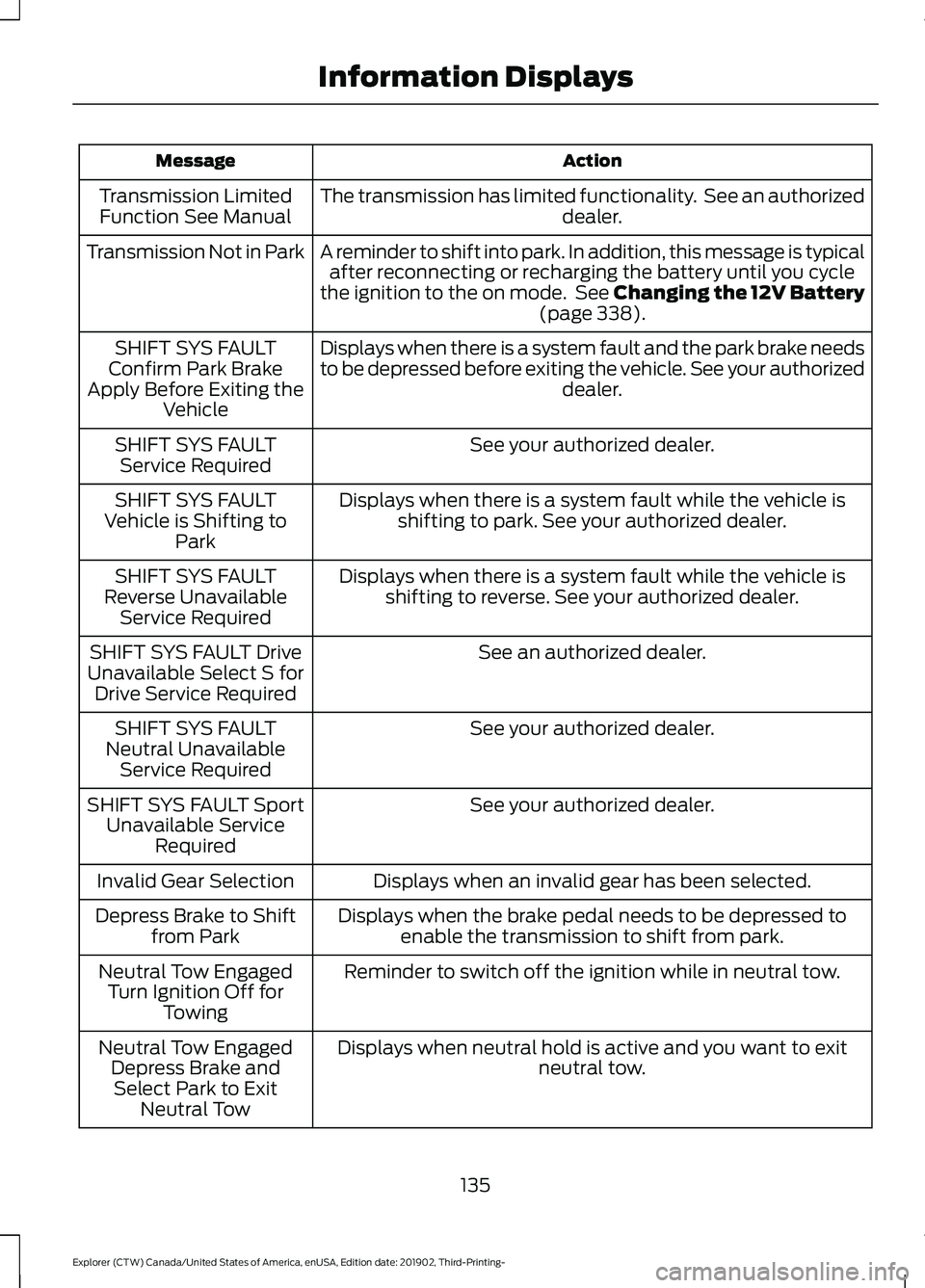
Action
Message
The transmission has limited functionality. See an authorized dealer.
Transmission Limited
Function See Manual
A reminder to shift into park. In addition, this message is typicalafter reconnecting or recharging the battery until you cycle
the ignition to the on mode. See Changing the 12V Battery (page 338).
Transmission Not in Park
Displays when there is a system fault and the park brake needs
to be depressed before exiting the vehicle. See your authorized dealer.
SHIFT SYS FAULT
Confirm Park Brake
Apply Before Exiting the Vehicle
See your authorized dealer.
SHIFT SYS FAULT
Service Required
Displays when there is a system fault while the vehicle isshifting to park. See your authorized dealer.
SHIFT SYS FAULT
Vehicle is Shifting to Park
Displays when there is a system fault while the vehicle isshifting to reverse. See your authorized dealer.
SHIFT SYS FAULT
Reverse Unavailable Service Required
See an authorized dealer.
SHIFT SYS FAULT Drive
Unavailable Select S for Drive Service Required
See your authorized dealer.
SHIFT SYS FAULT
Neutral Unavailable Service Required
See your authorized dealer.
SHIFT SYS FAULT Sport
Unavailable Service Required
Displays when an invalid gear has been selected.
Invalid Gear Selection
Displays when the brake pedal needs to be depressed toenable the transmission to shift from park.
Depress Brake to Shift
from Park
Reminder to switch off the ignition while in neutral tow.
Neutral Tow Engaged
Turn Ignition Off for Towing
Displays when neutral hold is active and you want to exit neutral tow.
Neutral Tow Engaged
Depress Brake andSelect Park to Exit Neutral Tow
135
Explorer (CTW) Canada/United States of America, enUSA, Edition date: 201902, Third-Printing- Information Displays
Page 139 of 555
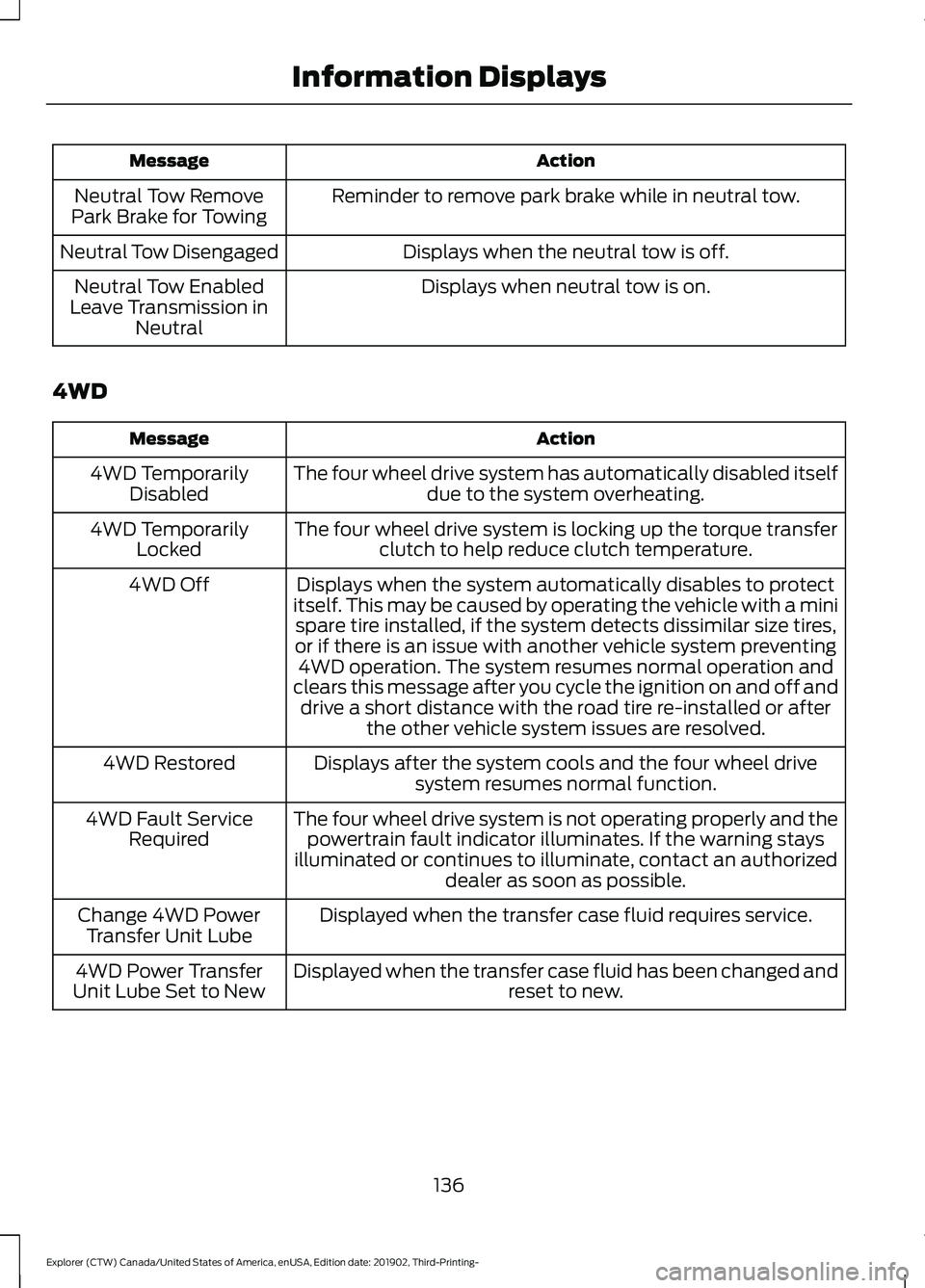
Action
Message
Reminder to remove park brake while in neutral tow.
Neutral Tow Remove
Park Brake for Towing
Displays when the neutral tow is off.
Neutral Tow Disengaged
Displays when neutral tow is on.
Neutral Tow Enabled
Leave Transmission in Neutral
4WD Action
Message
The four wheel drive system has automatically disabled itselfdue to the system overheating.
4WD Temporarily
Disabled
The four wheel drive system is locking up the torque transferclutch to help reduce clutch temperature.
4WD Temporarily
Locked
Displays when the system automatically disables to protect
itself. This may be caused by operating the vehicle with a mini spare tire installed, if the system detects dissimilar size tires,
or if there is an issue with another vehicle system preventing 4WD operation. The system resumes normal operation and
clears this message after you cycle the ignition on and off and drive a short distance with the road tire re-installed or after the other vehicle system issues are resolved.
4WD Off
Displays after the system cools and the four wheel drivesystem resumes normal function.
4WD Restored
The four wheel drive system is not operating properly and thepowertrain fault indicator illuminates. If the warning stays
illuminated or continues to illuminate, contact an authorized dealer as soon as possible.
4WD Fault Service
Required
Displayed when the transfer case fluid requires service.
Change 4WD Power
Transfer Unit Lube
Displayed when the transfer case fluid has been changed and reset to new.
4WD Power Transfer
Unit Lube Set to New
136
Explorer (CTW) Canada/United States of America, enUSA, Edition date: 201902, Third-Printing- Information Displays
Page 149 of 555
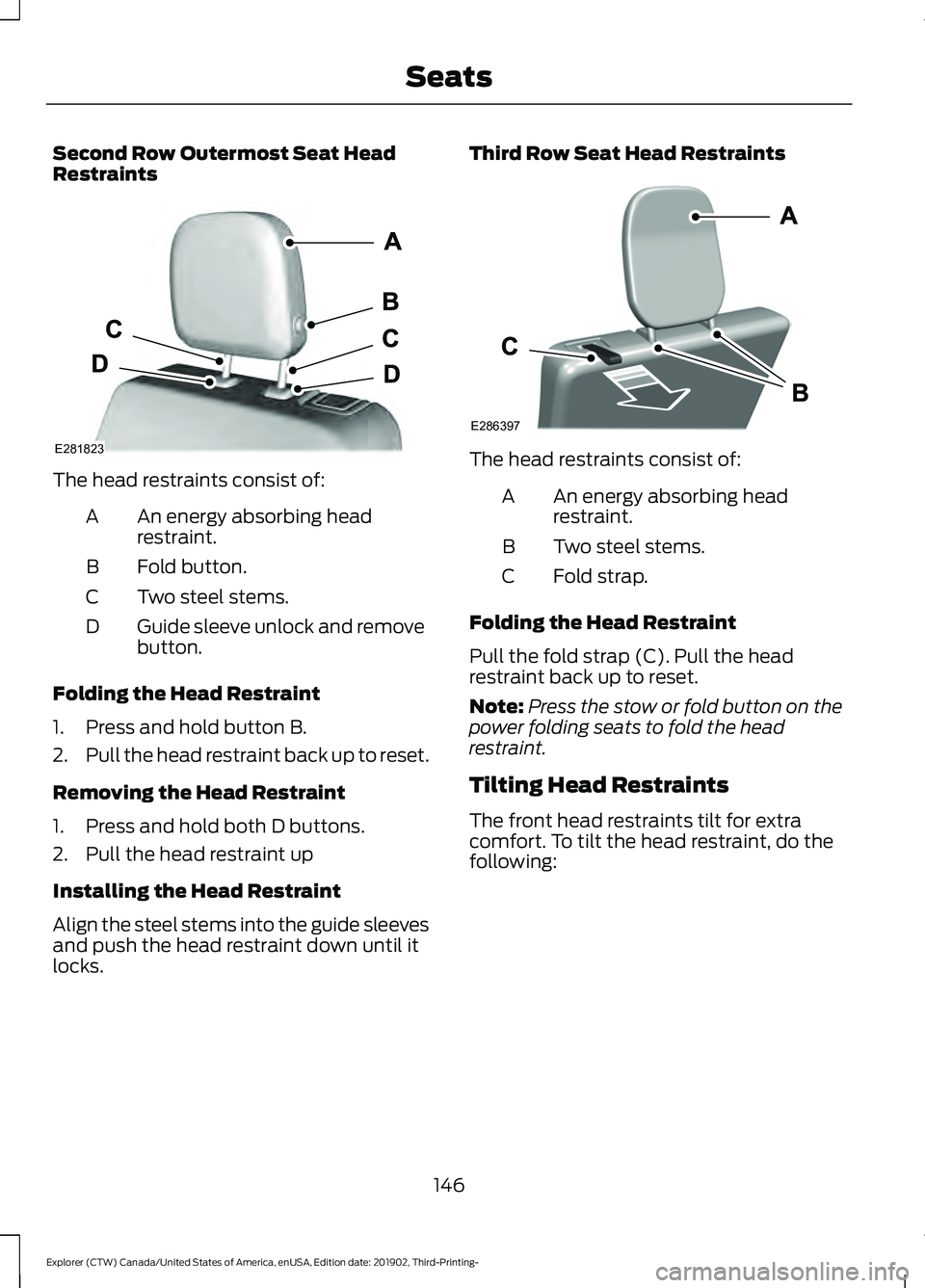
Second Row Outermost Seat Head
Restraints
The head restraints consist of:
An energy absorbing head
restraint.
A
Fold button.
B
Two steel stems.
C
Guide sleeve unlock and remove
button.
D
Folding the Head Restraint
1. Press and hold button B.
2. Pull the head restraint back up to reset.
Removing the Head Restraint
1. Press and hold both D buttons.
2. Pull the head restraint up
Installing the Head Restraint
Align the steel stems into the guide sleeves
and push the head restraint down until it
locks. Third Row Seat Head Restraints
The head restraints consist of:
An energy absorbing head
restraint.
A
Two steel stems.
B
Fold strap.
C
Folding the Head Restraint
Pull the fold strap (C). Pull the head
restraint back up to reset.
Note: Press the stow or fold button on the
power folding seats to fold the head
restraint.
Tilting Head Restraints
The front head restraints tilt for extra
comfort. To tilt the head restraint, do the
following:
146
Explorer (CTW) Canada/United States of America, enUSA, Edition date: 201902, Third-Printing- SeatsE281823 E286397
Page 150 of 555
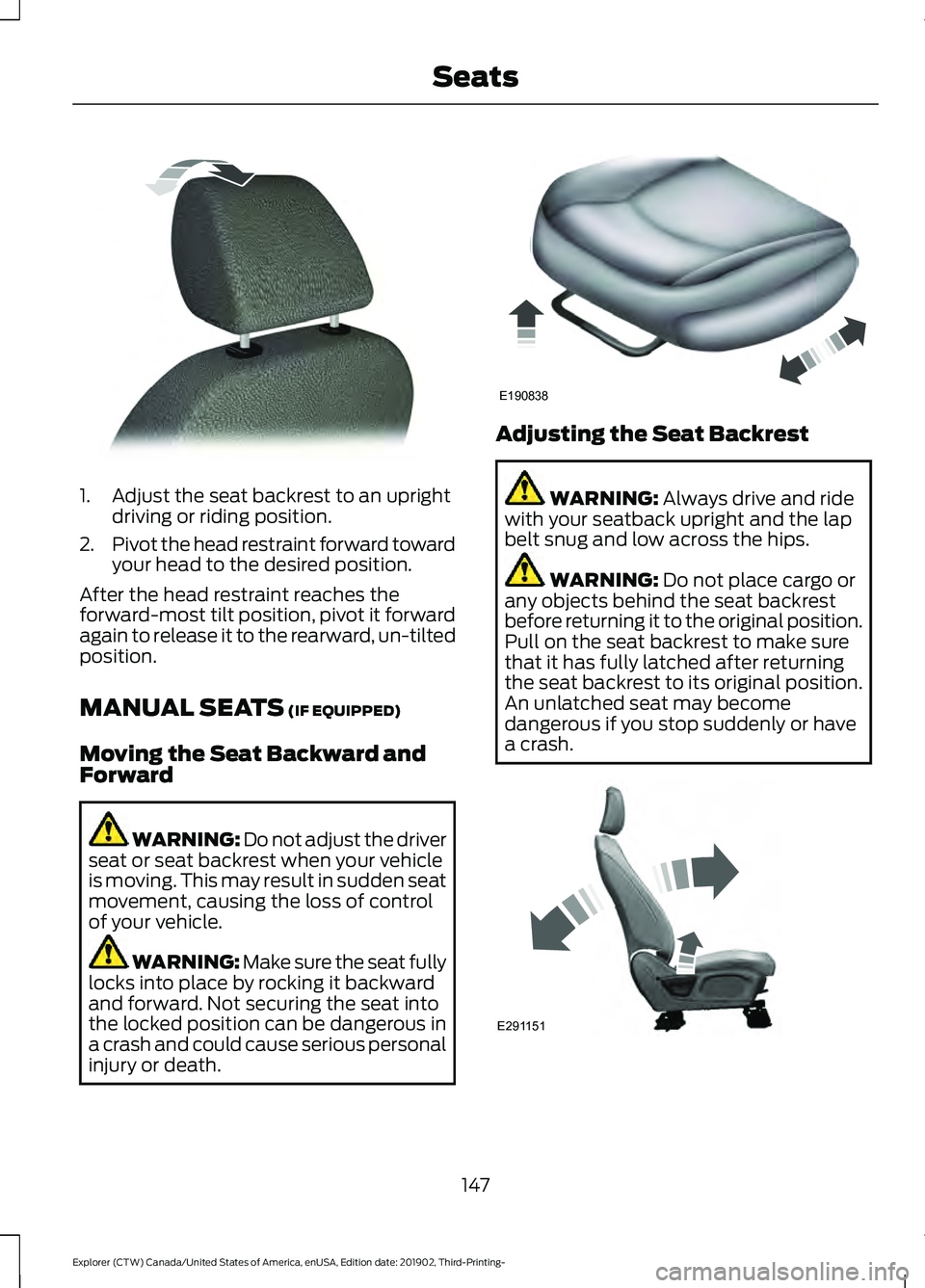
1. Adjust the seat backrest to an upright
driving or riding position.
2. Pivot the head restraint forward toward
your head to the desired position.
After the head restraint reaches the
forward-most tilt position, pivot it forward
again to release it to the rearward, un-tilted
position.
MANUAL SEATS (IF EQUIPPED)
Moving the Seat Backward and
Forward WARNING: Do not adjust the driver
seat or seat backrest when your vehicle
is moving. This may result in sudden seat
movement, causing the loss of control
of your vehicle. WARNING: Make sure the seat fully
locks into place by rocking it backward
and forward. Not securing the seat into
the locked position can be dangerous in
a crash and could cause serious personal
injury or death. Adjusting the Seat Backrest
WARNING:
Always drive and ride
with your seatback upright and the lap
belt snug and low across the hips. WARNING:
Do not place cargo or
any objects behind the seat backrest
before returning it to the original position.
Pull on the seat backrest to make sure
that it has fully latched after returning
the seat backrest to its original position.
An unlatched seat may become
dangerous if you stop suddenly or have
a crash. 147
Explorer (CTW) Canada/United States of America, enUSA, Edition date: 201902, Third-Printing- SeatsE144727 E190838 E291151
Page 158 of 555
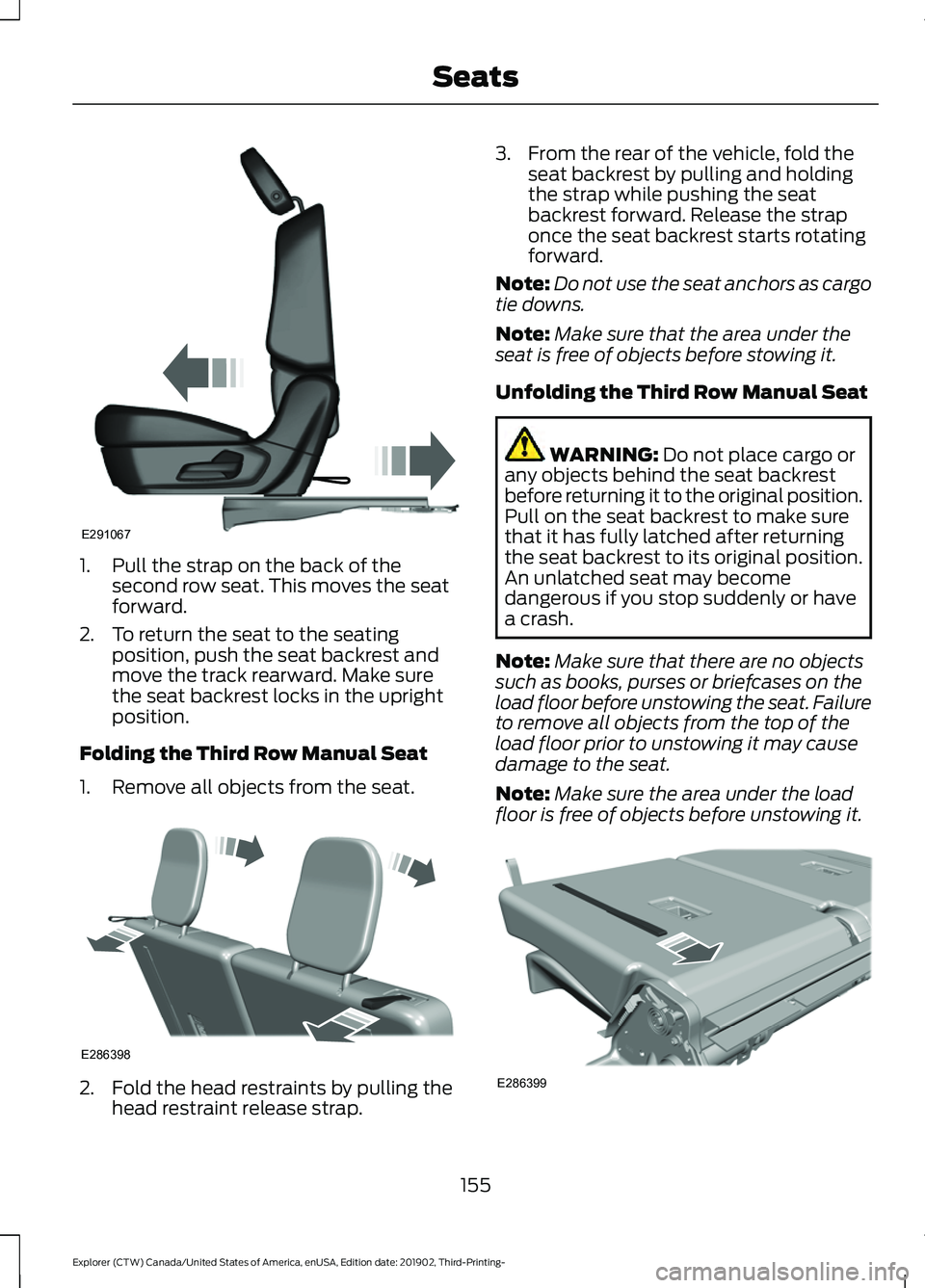
1. Pull the strap on the back of the
second row seat. This moves the seat
forward.
2. To return the seat to the seating position, push the seat backrest and
move the track rearward. Make sure
the seat backrest locks in the upright
position.
Folding the Third Row Manual Seat
1. Remove all objects from the seat. 2. Fold the head restraints by pulling the
head restraint release strap. 3. From the rear of the vehicle, fold the
seat backrest by pulling and holding
the strap while pushing the seat
backrest forward. Release the strap
once the seat backrest starts rotating
forward.
Note: Do not use the seat anchors as cargo
tie downs.
Note: Make sure that the area under the
seat is free of objects before stowing it.
Unfolding the Third Row Manual Seat WARNING: Do not place cargo or
any objects behind the seat backrest
before returning it to the original position.
Pull on the seat backrest to make sure
that it has fully latched after returning
the seat backrest to its original position.
An unlatched seat may become
dangerous if you stop suddenly or have
a crash.
Note: Make sure that there are no objects
such as books, purses or briefcases on the
load floor before unstowing the seat. Failure
to remove all objects from the top of the
load floor prior to unstowing it may cause
damage to the seat.
Note: Make sure the area under the load
floor is free of objects before unstowing it. 155
Explorer (CTW) Canada/United States of America, enUSA, Edition date: 201902, Third-Printing- SeatsE291067 E286398 E286399
Page 174 of 555
CUP HOLDERS
Note:
Stow items in the cupholders
carefully as items may become loose during
hard braking, acceleration or crashes,
including hot drinks which may spill.
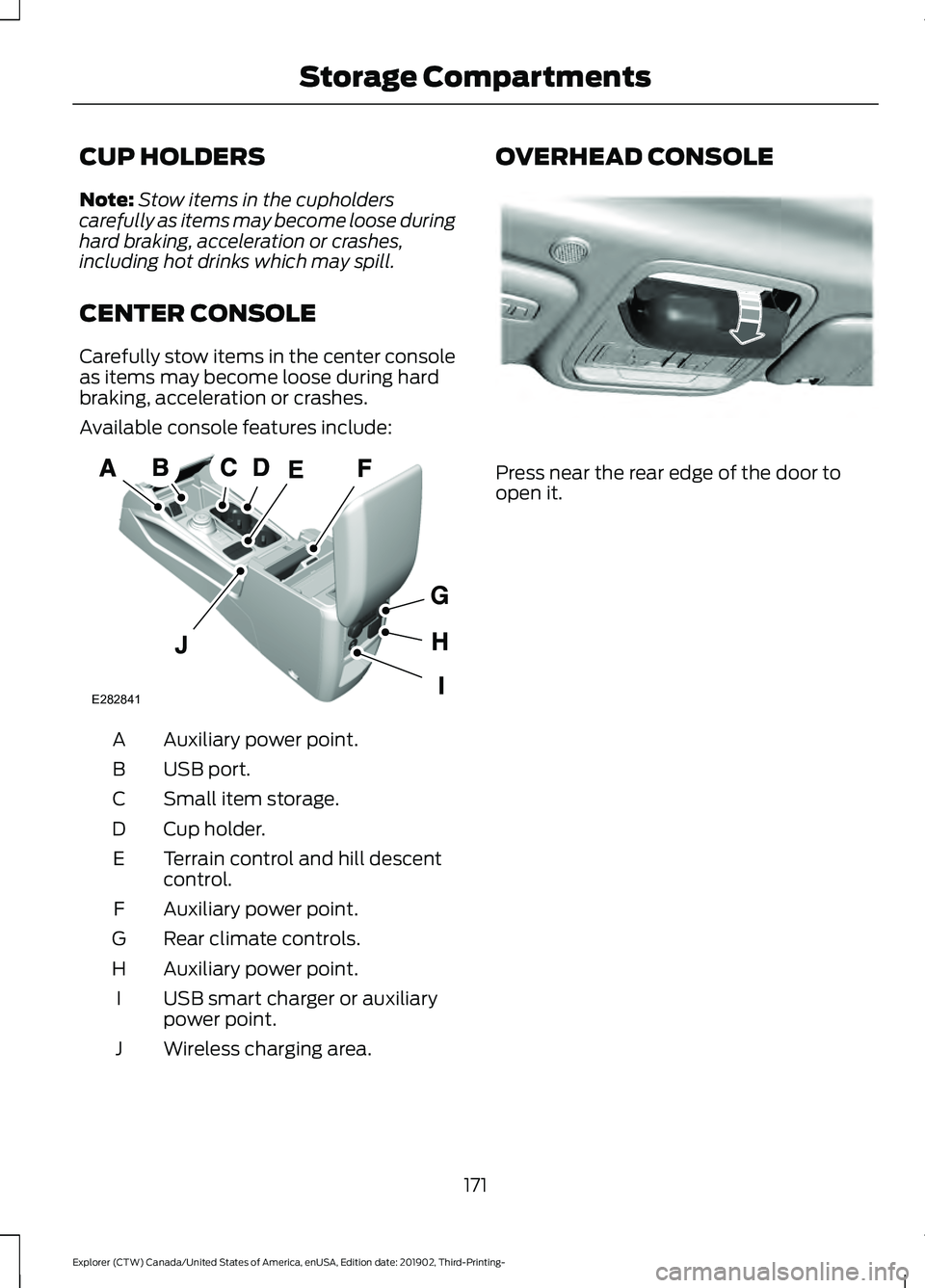
CENTER CONSOLE
Carefully stow items in the center console
as items may become loose during hard
braking, acceleration or crashes.
Available console features include: Auxiliary power point.
A
USB port.
B
Small item storage.
C
Cup holder.
D
Terrain control and hill descent
control.
E
Auxiliary power point.
F
Rear climate controls.
G
Auxiliary power point.
H
USB smart charger or auxiliary
power point.
I
Wireless charging area.
J OVERHEAD CONSOLE
Press near the rear edge of the door to
open it.
171
Explorer (CTW) Canada/United States of America, enUSA, Edition date: 201902, Third-Printing- Storage CompartmentsA
E282841 E307323