lane centering FORD EXPLORER 2020 Owners Manual
[x] Cancel search | Manufacturer: FORD, Model Year: 2020, Model line: EXPLORER, Model: FORD EXPLORER 2020Pages: 555, PDF Size: 8.16 MB
Page 5 of 555
Liftgate
Power Liftgate
................................................74
Security
Passive Anti-Theft System ........................
78
Anti-Theft Alarm ...........................................
78
Steering Wheel
Adjusting the Steering Wheel - Vehicles With: Manual Adjustable Steering
Column .........................................................
80
Adjusting the Steering Wheel - Vehicles With: Power Adjustable Steering
Column .........................................................
80
Audio Control ..................................................
82
Voice Control ..................................................
82
Cruise Control - Vehicles With: Adaptive Cruise Control With Lane Centering
........................................................................\
..
82
Cruise Control - Vehicles With: Adaptive Cruise Control With Stop and Go .......
83
Cruise Control - Vehicles With: Cruise Control ..........................................................
83
Information Display Control ......................
83
Heated Steering Wheel ..............................
83
Horn ...................................................................
84
Wipers and Washers
Windshield Wipers .......................................
85
Autowipers ......................................................
85
Windshield Washers ....................................
86
Rear Window Wiper and Washers ..........
87
Lighting
General Information ....................................
88
Lighting Control .............................................
88
Autolamps .......................................................
89
Instrument Lighting Dimmer ....................
89
Headlamp Exit Delay ...................................
89
Daytime Running Lamps - Vehicles With: Configurable Daytime Running Lamps
........................................................................\
..
90 Daytime Running Lamps - Vehicles With:
Daytime Running Lamps (DRL) .........
90
Front Fog Lamps ...........................................
90
Adaptive Headlamps ....................................
91
Direction Indicators .......................................
91
Interior Lamps ................................................
92
Ambient Lighting - Vehicles With: 8 Inch Information and Entertainment Display
Screen ...........................................................
93
Ambient Lighting - Vehicles With: 10.1 Inch Information and Entertainment
Display Screen ...........................................
93
Automatic High Beam Control
What Is Automatic High Beam Control ........................................................................\
..
95
Switching Automatic High Beam Control On and Off ...................................................
95
Automatic High Beam Control Indicators ........................................................................\
..
95
Overriding Automatic High Beam Control ........................................................................\
..
96
Windows and Mirrors
Power Windows .............................................
97
Global Opening .............................................
98
Exterior Mirrors - Excluding: ST ...............
98
Exterior Mirrors - ST .....................................
99
Interior Mirror ..................................................
101
Sun Visors .......................................................
101
Moonroof ........................................................
102
Instrument Cluster
Gauges ............................................................
104
Warning Lamps and Indicators ..............
107
Audible Warnings and Indicators .............
111
Information Displays
General Information ....................................
112
Personalized Settings .................................
118
Information Messages ...............................
120
2
Explorer (CTW) Canada/United States of America, enUSA, Edition date: 201902, Third-Printing- Table of Contents
Page 7 of 555
Fuel Consumption
......................................195
Engine Emission Control
Emission Law ................................................
197
Catalytic Converter .....................................
198
High Voltage Battery
General Information ...................................
201
Transmission
Automatic Transmission ..........................
202
Four-Wheel Drive
Principle of Operation ..............................
208
Using Four-Wheel Drive ..........................
208
Brakes
General Information ...................................
214
Hints on Driving With Anti-Lock Brakes ........................................................................\
.
215
Electric Parking Brake ................................
215
Hill Start Assist ..............................................
217
Auto Hold ........................................................
218
Reverse Braking Assist
What Is Reverse Braking Assist .............
220
Reverse Braking Assist Precautions .....
220
Switching Reverse Braking Assist On and Off ..................................................................
221
Overriding Reverse Braking Assist .........
221
Reverse Braking Assist Indicators ..........
221
Reverse Braking Assist – Troubleshooting ......................................
222
Traction Control
Principle of Operation ...............................
224
Using Traction Control ..............................
224
Stability Control
Principle of Operation ...............................
225Using Stability Control
..............................
226
Hill Descent Control
What Is Hill Descent Control ..................
228
Switching Hill Descent Control On and Off ................................................................
228
Setting the Hill Descent Speed .............
228
Hill Descent Control Indicator ................
229
Parking Aids
Principle of Operation ...............................
230
Rear Parking Aid ..........................................
230
Front Parking Aid .........................................
232
Side Sensing System .................................
234
Active Park Assist .......................................
235
Rear View Camera ......................................
238
360 Degree Camera ...................................
241
Cruise Control
What Is Cruise Control ..............................
244
Switching Cruise Control On and Off ........................................................................\
244
Setting the Cruise Control Speed ........
244
Canceling the Set Speed .........................
245
Resuming the Set Speed .........................
245
Cruise Control Indicators .........................
245
Adaptive Cruise Control
How Does Adaptive Cruise Control With Stop and Go Work .................................
246
What Is Adaptive Cruise Control With Lane Centering ........................................
246
What Is Intelligent Adaptive Cruise Control ........................................................
246
Adaptive Cruise Control Precautions - Vehicles With: Adaptive Cruise Control
With Lane Centering .............................
246
Adaptive Cruise Control Precautions - Vehicles With: Adaptive Cruise Control
With Stop and Go ..................................
246
4
Explorer (CTW) Canada/United States of America, enUSA, Edition date: 201902, Third-Printing- Table of Contents
Page 8 of 555
Adaptive Cruise Control Limitations -
Vehicles With: Adaptive Cruise Control
With Lane Centering ..............................247
Adaptive Cruise Control Limitations - Vehicles With: Adaptive Cruise Control
With Stop and Go ..................................
248
Switching Adaptive Cruise Control On and Off .......................................................
250
Setting the Adaptive Cruise Control Speed .........................................................
250
Setting the Adaptive Cruise Control Gap ........................................................................\
.
251
Canceling the Set Speed .........................
252
Resuming the Set Speed .........................
252
Overriding the Set Speed .........................
252
Adaptive Cruise Control Indicators - Vehicles With: Adaptive Cruise Control
With Lane Centering ..............................
253
Adaptive Cruise Control Indicators - Vehicles With: Adaptive Cruise Control
With Stop and Go ...................................
253
Adaptive Cruise Control Indicators - Vehicles With: Intelligent Adaptive
Cruise Control ..........................................
253
Switching From Adaptive Cruise Control to Cruise Control .....................................
253
Switching Lane Centering On and Off ........................................................................\
254
Switching Intelligent Mode On and Off ........................................................................\
255
Adjusting the Set Speed Tolerance ......
255
Adaptive Cruise Control – Troubleshooting ......................................
256
Driving Aids
Driver Alert ....................................................
259
Lane Keeping System ...............................
260
Blind Spot Information System ............
264
Cross Traffic Alert .......................................
268
Traffic Sign Recognition ............................
272
Steering ...........................................................
273
Pre-Collision Assist ....................................
274Drive Mode Control
What Is Drive Mode Control
....................
279
Selecting a Drive Mode .............................
279
Drive Modes ..................................................
279
Load Carrying
Rear Under Floor Storage .........................
281
Cargo Nets ......................................................
281
Luggage Covers ...........................................
282
Roof Racks and Load Carriers ...............
282
Load Limit ......................................................
283
Towing
Towing a Trailer ...........................................
289
Trailer Sway Control ..................................
290
Recommended Towing Weights ..........
290
Essential Towing Checks .........................
293
Towing the Vehicle on Four Wheels .....
295
Driving Hints
Reduced Engine Performance ..............
296
Economical Driving ....................................
296
Cold Weather Precautions ......................
297
Breaking-In ....................................................
297
Driving Through Water ..............................
297
Floor Mats .....................................................
298
Roadside Emergencies
Roadside Assistance .................................
299
Hazard Flashers ..........................................
300
Fuel Shutoff .................................................
300
Jump Starting the Vehicle ........................
301
Collision, Damage or Fire Event ............
303
Post-Crash Alert System .........................
304
Transporting the Vehicle .........................
304
Customer Assistance
Getting the Services You Need .............
306
In California (U.S. Only) ............................
307
5
Explorer (CTW) Canada/United States of America, enUSA, Edition date: 201902, Third-Printing- Table of Contents
Page 85 of 555
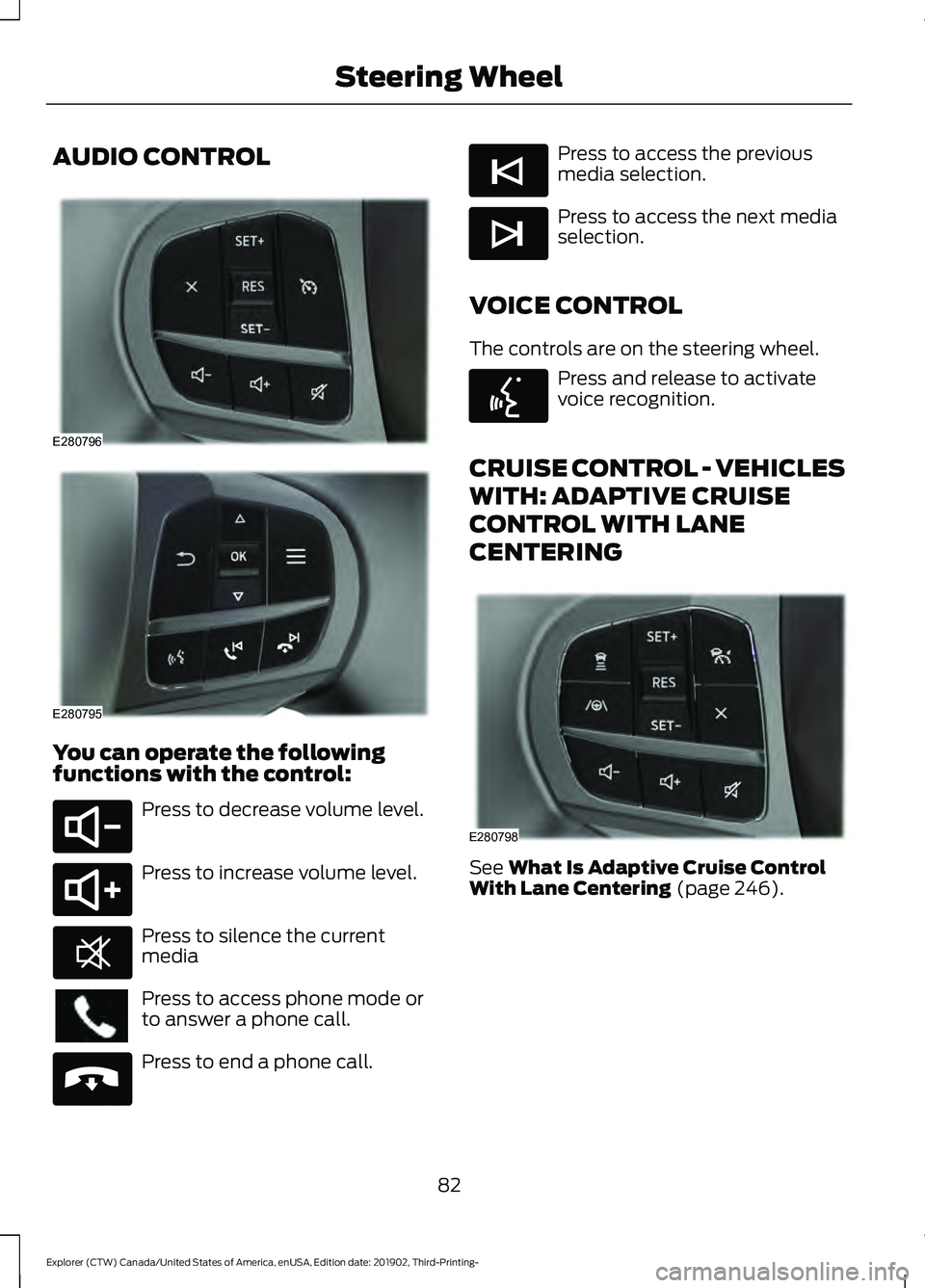
AUDIO CONTROL
You can operate the following
functions with the control:
Press to decrease volume level.
Press to increase volume level.
Press to silence the current
media
Press to access phone mode or
to answer a phone call.
Press to end a phone call. Press to access the previous
media selection.
Press to access the next media
selection.
VOICE CONTROL
The controls are on the steering wheel. Press and release to activate
voice recognition.
CRUISE CONTROL - VEHICLES
WITH: ADAPTIVE CRUISE
CONTROL WITH LANE
CENTERING See What Is Adaptive Cruise Control
With Lane Centering (page 246).
82
Explorer (CTW) Canada/United States of America, enUSA, Edition date: 201902, Third-Printing- Steering WheelE280796 E280795 E280802 E280803 E268549 E265040 E265045 E265044 E142599 E280798
Page 249 of 555
HOW DOES ADAPTIVE CRUISE
CONTROL WITH STOP AND GO
WORK
Adaptive cruise control with stop and go
uses radar and camera sensors to adjust
the speed of your vehicle to maintain a set
gap from the vehicle in front of you in the
same lane while following it to a complete
stop. You can also engage the system to
follow a vehicle in front of you and adjust
set speed while stopped.
WHAT IS ADAPTIVE CRUISE
CONTROL WITH LANE
CENTERING
Adaptive cruise control with lane centering
uses radar and camera sensors to help
keep your vehicle in the lane by applying
continuous assistance steering torque
input toward the lane center on highways.
Note:
The adaptive cruise control gap
setting operates normally.
WHAT IS INTELLIGENT
ADAPTIVE CRUISE CONTROL
Intelligent adaptive cruise control
combines speed sign recognition with
adaptive cruise control to adjust the cruise
set speed to the speed limit detected by
the speed sign recognition system. For
example, if the speed sign recognition
system detects a 50 mph (80 km/h)
speed limit, the cruise set speed is updated
to
50 mph (80 km/h).
Note: The adaptive cruise control gap
setting operates normally. ADAPTIVE CRUISE CONTROL
PRECAUTIONS - VEHICLES
WITH: ADAPTIVE CRUISE
CONTROL WITH LANE
CENTERING
Adaptive cruise control precautions apply
to lane centering unless stated otherwise
or contradicted by a lane centering
precaution. See Adaptive Cruise Control
Precautions
(page 246).
WARNING:
Do not use the system
when towing a trailer. Failure to follow
this instruction could result in the loss of
control of your vehicle, personal injury or
death. WARNING:
Do not use the system
if any changes or modifications to the
steering wheel have been made. Any
changes or modifications to the steering
wheel could affect the functionality or
performance of the system. Failure to
follow this instruction could result in the
loss of control of your vehicle, personal
injury or death.
ADAPTIVE CRUISE CONTROL
PRECAUTIONS - VEHICLES
WITH: ADAPTIVE CRUISE
CONTROL WITH STOP AND GO WARNING: You are responsible for
controlling your vehicle at all times. The
system is designed to be an aid and does
not relieve you of your responsibility to
drive with due care and attention. Failure
to follow this instruction could result in
the loss of control of your vehicle,
personal injury or death.
246
Explorer (CTW) Canada/United States of America, enUSA, Edition date: 201902, Third-Printing- Adaptive Cruise Control
(If Equipped)
Page 250 of 555
WARNING: Pay close attention to
changing road conditions such as
entering or leaving a highway, on roads
with intersections or roundabouts, roads
without visible lanes of travel, roads that
are winding, slippery, unpaved, or steep
slopes. WARNING:
The system does not
control speed in low traction conditions
or extremely steep slopes. The system
is designed to be an aid and does not
relieve you of your responsibility to drive
with due care and attention. Failure to
follow this instruction could result in
personal injury. WARNING:
The system is not a
crash warning or avoidance system. WARNING:
Do not use the system
when towing a trailer that has
aftermarket electronic trailer brake
controls. Failure to follow this instruction
could result in the loss of control of your
vehicle, personal injury or death. WARNING:
Do not use tire sizes
other than those recommended because
this can affect the normal operation of
the system. Failure to do so may result
in a loss of vehicle control, which could
result in serious injury. WARNING:
Do not use the system
with a snow plow blade installed. WARNING:
Do not use the system
in poor visibility, for example fog, heavy
rain, spray or snow. When Following a Vehicle WARNING:
When following a
vehicle that is braking, your vehicle does
not always decelerate quickly enough to
avoid a crash without driver intervention.
Apply the brakes when necessary. Failure
to follow this instruction could result in
personal injury or death.
Hilly Condition Usage
You should select a lower gear when the
system is active in situations such as
prolonged downhill driving on steep
grades, for example in mountainous areas.
The system needs additional engine
braking in these situations to reduce the
load on the vehicle ’s regular brake system
to prevent it from overheating.
Note: An audible alarm sounds and the
system shuts down if it applies brakes for
an extended period of time. This allows the
brakes to cool. The system functions
normally again after the brakes cool.
ADAPTIVE CRUISE CONTROL
LIMITATIONS - VEHICLES
WITH: ADAPTIVE CRUISE
CONTROL WITH LANE
CENTERING
Adaptive cruise control limitations apply
to lane centering unless stated otherwise
or contradicted by a lane centering
limitation. See Adaptive Cruise Control
Limitations
(page 248).
The system may not correctly operate in
any of the following conditions:
• Your vehicle is not centered in the lane.
• The lane is too narrow or wide.
247
Explorer (CTW) Canada/United States of America, enUSA, Edition date: 201902, Third-Printing- Adaptive Cruise Control
(If Equipped)
Page 256 of 555
ADAPTIVE CRUISE CONTROL
INDICATORS - VEHICLES
WITH: ADAPTIVE CRUISE
CONTROL WITH LANE
CENTERING
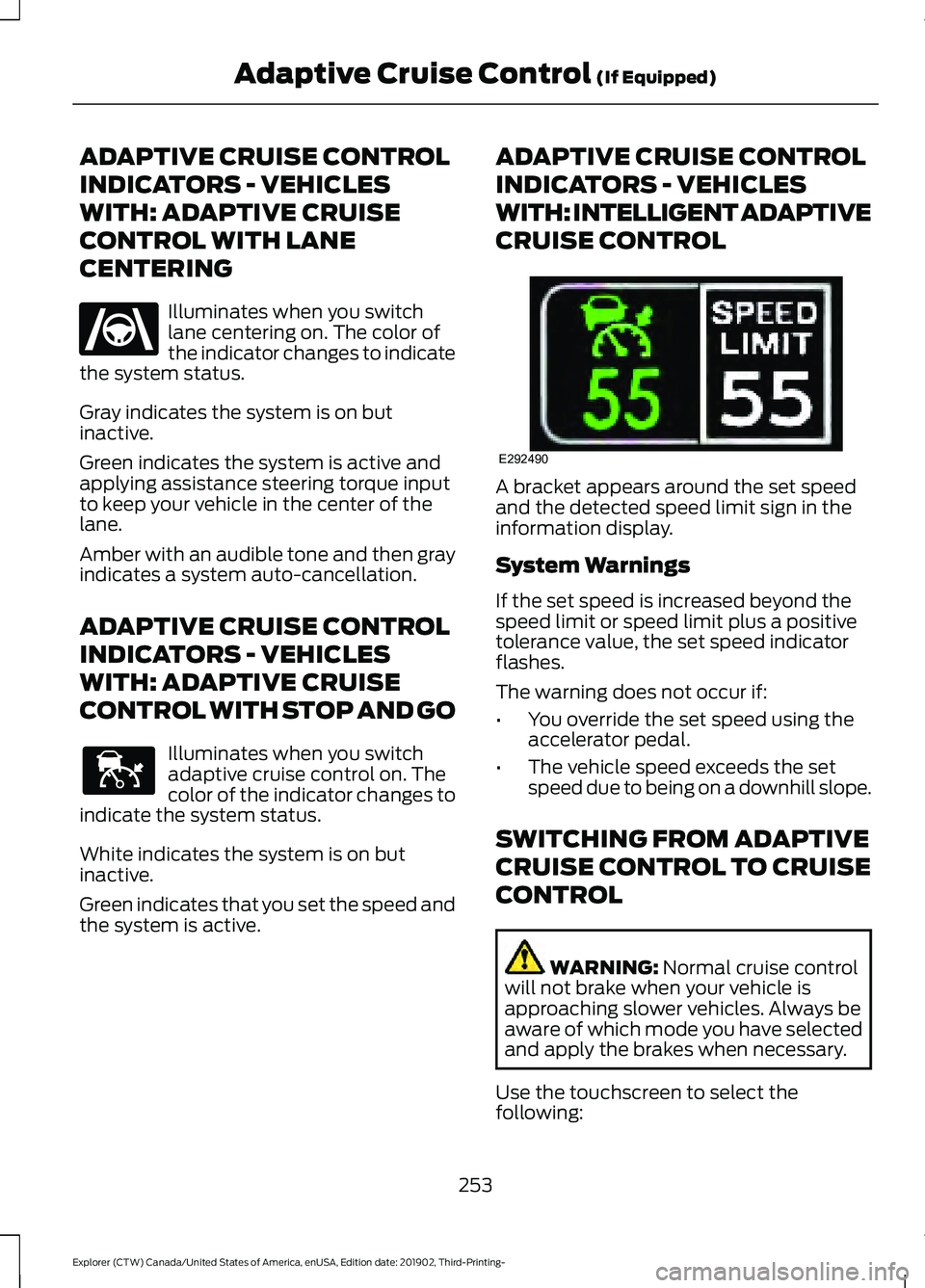
Illuminates when you switch
lane centering on. The color of
the indicator changes to indicate
the system status.
Gray indicates the system is on but
inactive.
Green indicates the system is active and
applying assistance steering torque input
to keep your vehicle in the center of the
lane.
Amber with an audible tone and then gray
indicates a system auto-cancellation.
ADAPTIVE CRUISE CONTROL
INDICATORS - VEHICLES
WITH: ADAPTIVE CRUISE
CONTROL WITH STOP AND GO Illuminates when you switch
adaptive cruise control on. The
color of the indicator changes to
indicate the system status.
White indicates the system is on but
inactive.
Green indicates that you set the speed and
the system is active. ADAPTIVE CRUISE CONTROL
INDICATORS - VEHICLES
WITH: INTELLIGENT ADAPTIVE
CRUISE CONTROL
A bracket appears around the set speed
and the detected speed limit sign in the
information display.
System Warnings
If the set speed is increased beyond the
speed limit or speed limit plus a positive
tolerance value, the set speed indicator
flashes.
The warning does not occur if:
•
You override the set speed using the
accelerator pedal.
• The vehicle speed exceeds the set
speed due to being on a downhill slope.
SWITCHING FROM ADAPTIVE
CRUISE CONTROL TO CRUISE
CONTROL WARNING: Normal cruise control
will not brake when your vehicle is
approaching slower vehicles. Always be
aware of which mode you have selected
and apply the brakes when necessary.
Use the touchscreen to select the
following:
253
Explorer (CTW) Canada/United States of America, enUSA, Edition date: 201902, Third-Printing- Adaptive Cruise Control
(If Equipped)E262175 E144529 E292490
Page 257 of 555
1. Select Settings.
2. Select
Driver Assist..
3. Select
Cruise Control.
4. Select
Normal. The cruise control indicator
replaces the adaptive cruise
control indicator if you select
normal cruise control. The gap setting does
not display, and the system does not
respond to lead vehicles. Automatic
braking remains active to maintain set
speed. The system remembers the last
setting when you start your vehicle.
SWITCHING LANE CENTERING
ON AND OFF
The cruise controls are on the steering
wheel. See
Cruise Control (page 82). Press the button.
The indicator appears in the information
display. When the system is on, the color
of the indicator changes to indicate the
system status. See
Adaptive Cruise
Control Indicators (page 253).
Note: Adaptive cruise control must be on
before you can switch lane centering on.
Activating Lane Centering
The system only activates when all of the
following occur:
• You have adaptive cruise control with
stop-and-go on.
• Your hands are on the steering wheel.
• The system detects both lane
markings.
Note: If it does not detect valid lane
markings, the system stays inactive until
valid markings are available. You can override the system at any time
by steering your vehicle.
System Alerts and Automatic
Cancellation
You must keep your hands on the steering
wheel at all times.
When the system is active and detects no
steering activity for a certain period of time,
the system alerts you to put your hands on
the steering wheel. If you do not react to
the warnings the system cancels and slows
your vehicle down to idle speeds while
maintaining steering control.
The system also alerts you if your vehicle
crosses lane markings without detected
steering activity.
Note:
The system may detect a light grip
or touch on the steering wheel as hands-off
driving.
When an external condition cancels the
system, for example, no lane markings
available, a tone sounds and a message
appears in the information display. If your vehicle starts to slow
down, you must provide steering
input to the wheel and press and
release the button to regain full system
performance.
Automatic cancellation can also occur if:
• The lane becomes too wide or too
narrow.
• The system cannot detect valid lane
markings.
• Lane markings are crossed.
Note: The system disables until the next
key cycle if your vehicle slows down due to
driver inactivity twice within a key cycle.
254
Explorer (CTW) Canada/United States of America, enUSA, Edition date: 201902, Third-Printing- Adaptive Cruise Control
(If Equipped)E71340 E262175
Page 259 of 555
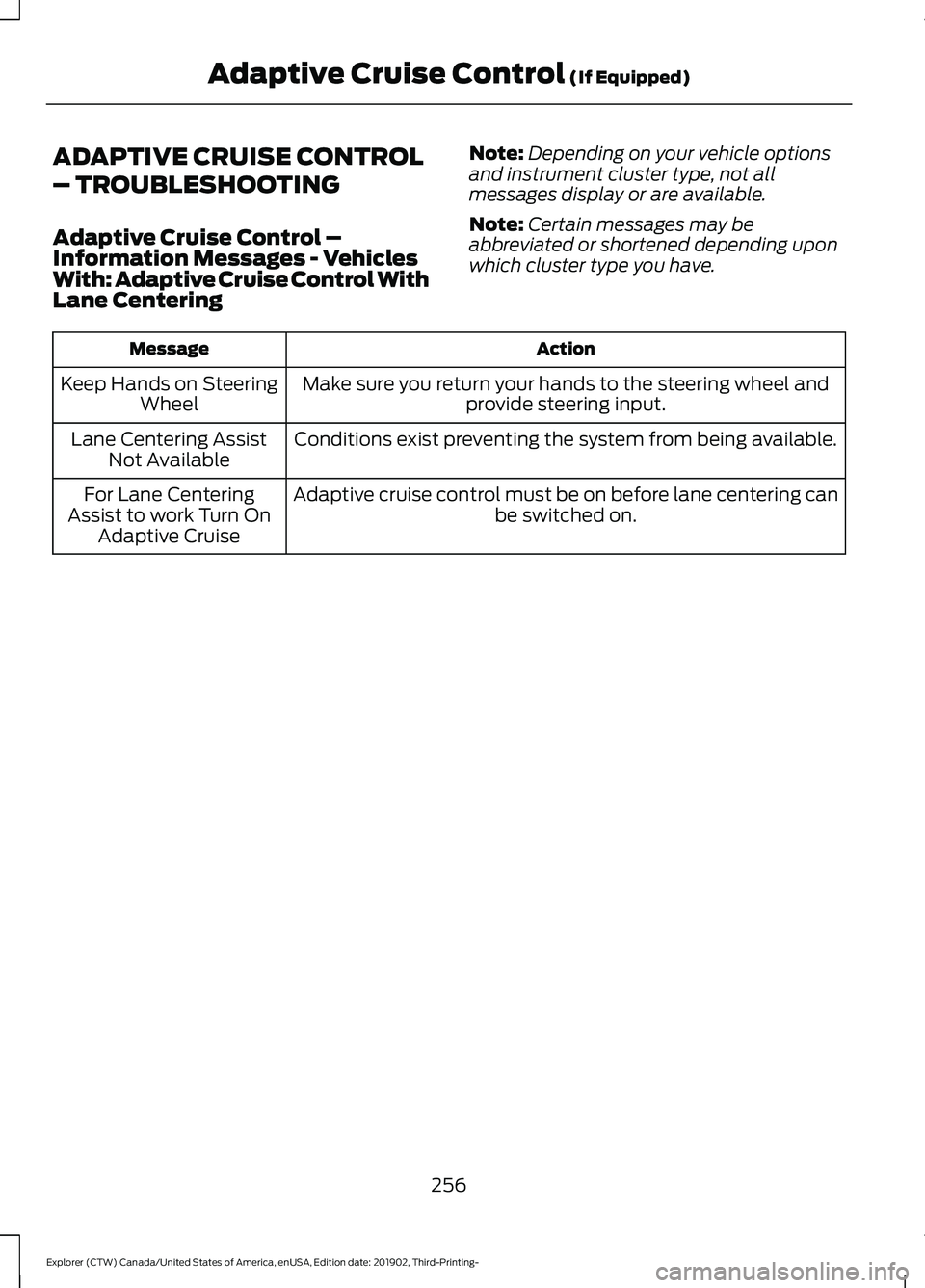
ADAPTIVE CRUISE CONTROL
– TROUBLESHOOTING
Adaptive Cruise Control –
Information Messages - Vehicles
With: Adaptive Cruise Control With
Lane Centering
Note:
Depending on your vehicle options
and instrument cluster type, not all
messages display or are available.
Note: Certain messages may be
abbreviated or shortened depending upon
which cluster type you have. Action
Message
Make sure you return your hands to the steering wheel andprovide steering input.
Keep Hands on Steering
Wheel
Conditions exist preventing the system from being available.
Lane Centering Assist
Not Available
Adaptive cruise control must be on before lane centering can be switched on.
For Lane Centering
Assist to work Turn On Adaptive Cruise
256
Explorer (CTW) Canada/United States of America, enUSA, Edition date: 201902, Third-Printing- Adaptive Cruise Control (If Equipped)
Page 266 of 555
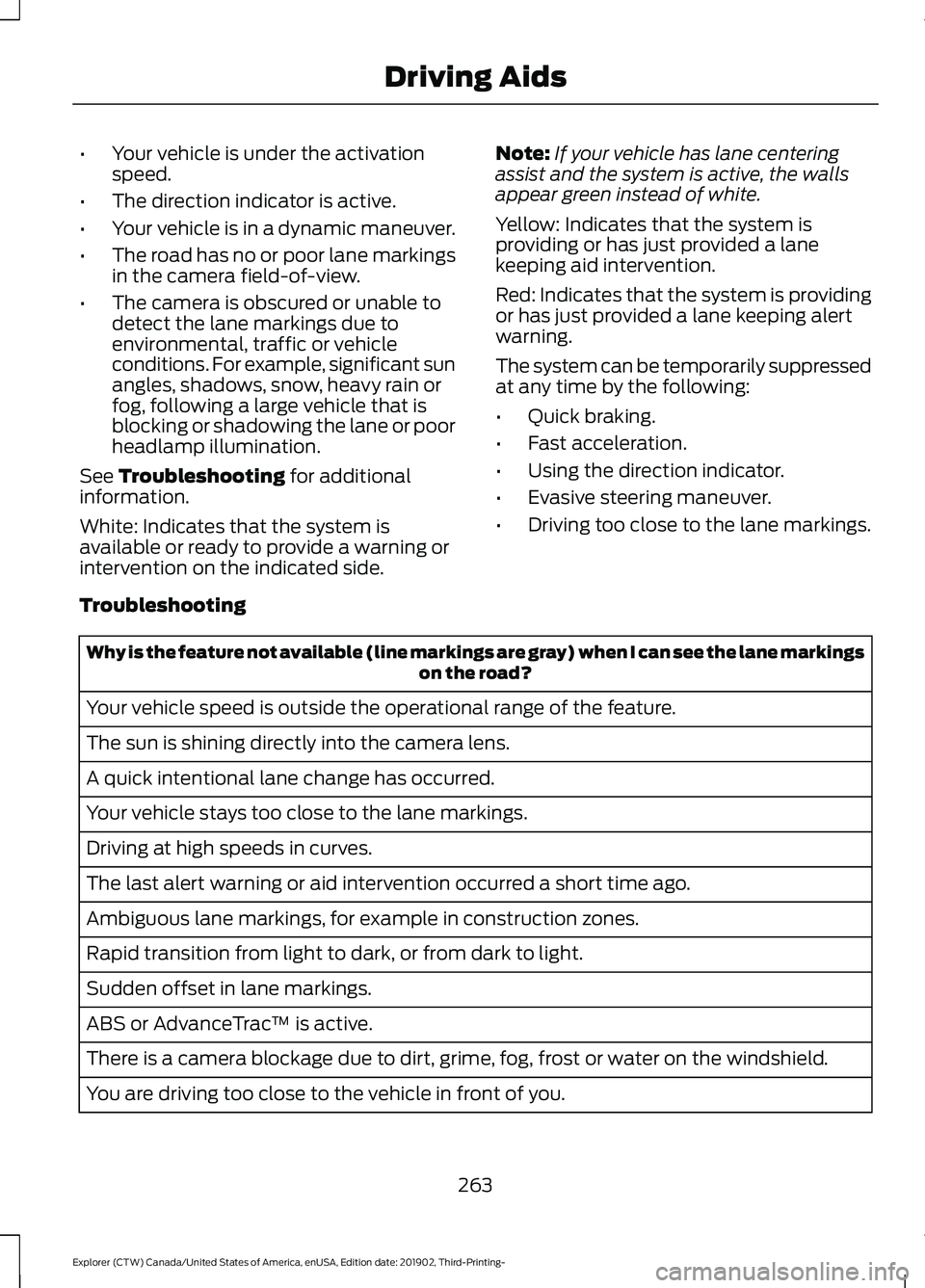
•
Your vehicle is under the activation
speed.
• The direction indicator is active.
• Your vehicle is in a dynamic maneuver.
• The road has no or poor lane markings
in the camera field-of-view.
• The camera is obscured or unable to
detect the lane markings due to
environmental, traffic or vehicle
conditions. For example, significant sun
angles, shadows, snow, heavy rain or
fog, following a large vehicle that is
blocking or shadowing the lane or poor
headlamp illumination.
See Troubleshooting for additional
information.
White: Indicates that the system is
available or ready to provide a warning or
intervention on the indicated side. Note:
If your vehicle has lane centering
assist and the system is active, the walls
appear green instead of white.
Yellow: Indicates that the system is
providing or has just provided a lane
keeping aid intervention.
Red: Indicates that the system is providing
or has just provided a lane keeping alert
warning.
The system can be temporarily suppressed
at any time by the following:
• Quick braking.
• Fast acceleration.
• Using the direction indicator.
• Evasive steering maneuver.
• Driving too close to the lane markings.
Troubleshooting Why is the feature not available (line markings are gray) when I can see the lane markings
on the road?
Your vehicle speed is outside the operational range of the feature.
The sun is shining directly into the camera lens.
A quick intentional lane change has occurred.
Your vehicle stays too close to the lane markings.
Driving at high speeds in curves.
The last alert warning or aid intervention occurred a short time ago.
Ambiguous lane markings, for example in construction zones.
Rapid transition from light to dark, or from dark to light.
Sudden offset in lane markings.
ABS or AdvanceTrac ™ is active.
There is a camera blockage due to dirt, grime, fog, frost or water on the windshield.
You are driving too close to the vehicle in front of you.
263
Explorer (CTW) Canada/United States of America, enUSA, Edition date: 201902, Third-Printing- Driving Aids