seats FORD EXPLORER 2021 Owner's Guide
[x] Cancel search | Manufacturer: FORD, Model Year: 2021, Model line: EXPLORER, Model: FORD EXPLORER 2021Pages: 577, PDF Size: 9.79 MB
Page 155 of 577
Lumbar and Bolster Mode
Massage Mode
Upper lumbar
Back massage intensity
adjustment
A
Lumbar decrease
Massage intensity decrease
and off*
B
Lower lumbar**
Cushion massage intensity
adjustment
C
Lumbar increase
Massage intensity increase
D
-
On and off
E
* The massage feature defaults to an
alternating massage mode with back
massage intensity adjustment. The lumbar
and bolster feature defaults to the middle
lumbar mode.
** Press C a second time to adjust the back
bolster. Press C a third time to adjust the
cushion bolster.
You can also adjust this feature through
the touchscreen. When switched on, the
system displays directions for you to adjust
the lumbar settings in your seat or to set
the massage function.
MEMORY FUNCTION (IF EQUIPPED) WARNING:
Before activating the
memory seat, make sure that the area
immediately surrounding the seat is clear
of obstructions and that all occupants
are clear of moving parts. WARNING:
Do not use the memory
function when your vehicle is moving.
This feature recalls the position of the
following: •
Driver seat.
• Power mirrors.
• Optional power steering column.
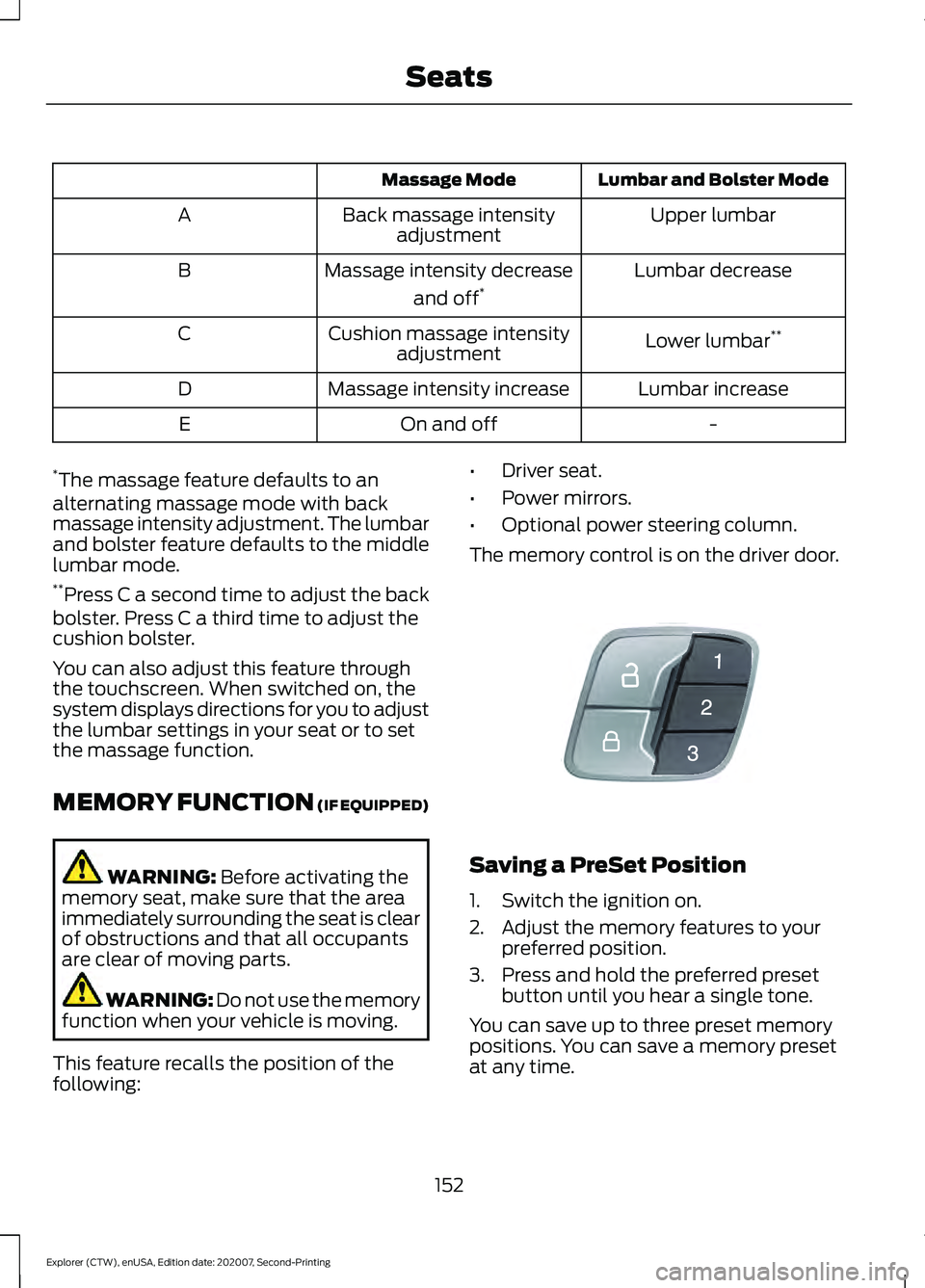
The memory control is on the driver door. Saving a PreSet Position
1. Switch the ignition on.
2. Adjust the memory features to your
preferred position.
3. Press and hold the preferred preset button until you hear a single tone.
You can save up to three preset memory
positions. You can save a memory preset
at any time.
152
Explorer (CTW), enUSA, Edition date: 202007, Second-Printing SeatsE142554
Page 156 of 577
Recalling a PreSet Position
Press and release the preset button
associated with your preferred driving
position. The memory features move to
the position stored for that preset.
Note:
You can only recall a preset memory
position when the ignition is off, or when the
transmission is in park (P) or neutral (N)
and the vehicle is not moving if the ignition
is on.
You can also recall a preset memory
position by:
• Pressing the unlock button on your
remote control if it is linked to a preset
position.
• Unlocking the driver door handle if a
linked remote control is present.
Note: Using a linked remote control to
recall your memory position when the
ignition is off moves the seat to the Easy
Entry position.
Note: Pressing any active memory feature
adjustment control, or any memory button
during a memory recall, cancels the
operation.
Linking a PreSet Position to your
Remote Control
Your vehicle can save the preset memory
positions for up to three remote controls.
1. With the ignition on, move the memory
features to the preferred positions.
2. Press and hold the preferred preset button for about five seconds. A tone
sounds after about two seconds.
Continue holding until you hear a
second tone.
3. Within three seconds, press the lock button on the remote control you are
linking.
To unlink a remote control, follow the
same procedure – except in step 3, press
the unlock button on the remote control. Note:
If more than one linked remote
control or intelligent access key is in range,
the memory function moves to the settings
of the first key to recall a memory position.
Easy Entry and Exit Feature
If you enable the easy entry and exit
feature, it moves the driver seat position
rearward up to 2 in (5 cm) when you switch
the ignition off.
The driver seat returns to the previous
position when you switch the ignition on.
You can enable or disable this feature
through the touchscreen. See Settings
(page 464).
REAR SEATS
Adjusting the Second Row Rear
Seats WARNING:
Always drive and ride
with your seatback upright and the lap
belt snug and low across the hips. WARNING: Do not recline the seat
backrest too far as this can cause the
occupant to slide under the seatbelt,
resulting in personal injury in the event
of a crash.
153
Explorer (CTW), enUSA, Edition date: 202007, Second-Printing Seats
Page 157 of 577
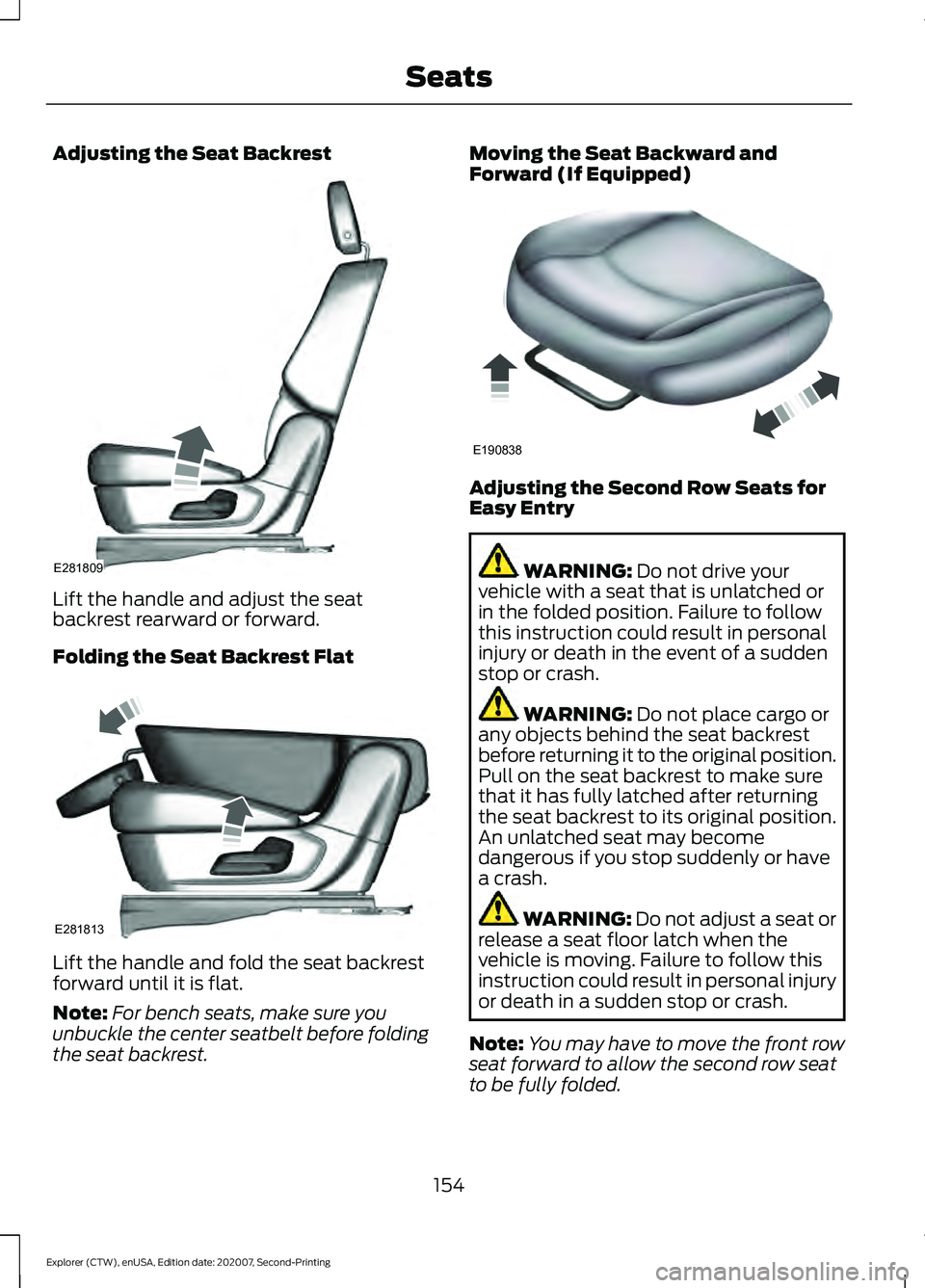
Adjusting the Seat Backrest
Lift the handle and adjust the seat
backrest rearward or forward.
Folding the Seat Backrest Flat
Lift the handle and fold the seat backrest
forward until it is flat.
Note:
For bench seats, make sure you
unbuckle the center seatbelt before folding
the seat backrest. Moving the Seat Backward and
Forward (If Equipped)
Adjusting the Second Row Seats for
Easy Entry
WARNING: Do not drive your
vehicle with a seat that is unlatched or
in the folded position. Failure to follow
this instruction could result in personal
injury or death in the event of a sudden
stop or crash. WARNING:
Do not place cargo or
any objects behind the seat backrest
before returning it to the original position.
Pull on the seat backrest to make sure
that it has fully latched after returning
the seat backrest to its original position.
An unlatched seat may become
dangerous if you stop suddenly or have
a crash. WARNING:
Do not adjust a seat or
release a seat floor latch when the
vehicle is moving. Failure to follow this
instruction could result in personal injury
or death in a sudden stop or crash.
Note: You may have to move the front row
seat forward to allow the second row seat
to be fully folded.
154
Explorer (CTW), enUSA, Edition date: 202007, Second-Printing SeatsE281809 E281813 E190838
Page 158 of 577
Note:
You can move the second row
outermost seats forward to allow access to
the third row seats.
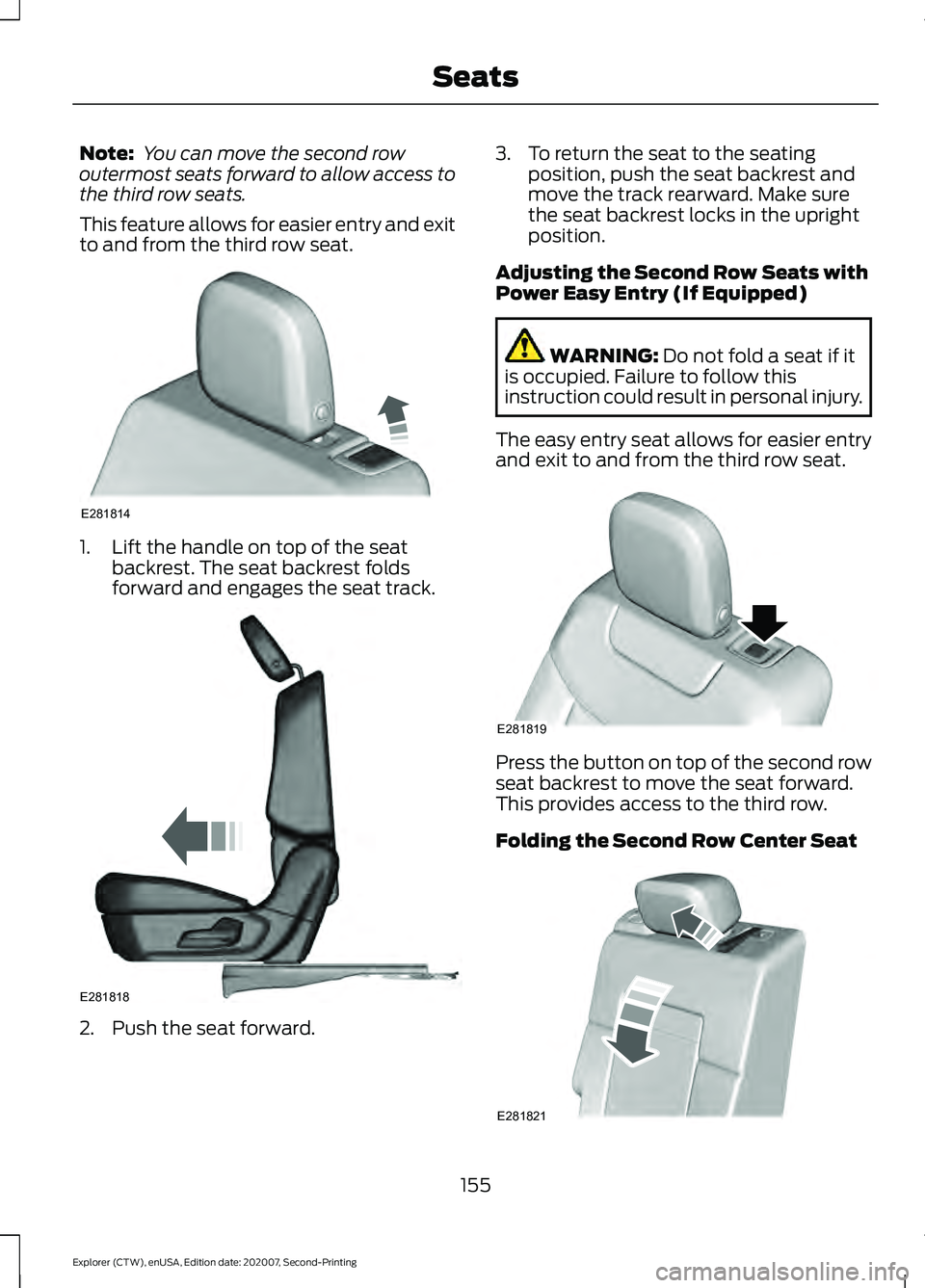
This feature allows for easier entry and exit
to and from the third row seat. 1. Lift the handle on top of the seat
backrest. The seat backrest folds
forward and engages the seat track. 2. Push the seat forward. 3. To return the seat to the seating
position, push the seat backrest and
move the track rearward. Make sure
the seat backrest locks in the upright
position.
Adjusting the Second Row Seats with
Power Easy Entry (If Equipped) WARNING: Do not fold a seat if it
is occupied. Failure to follow this
instruction could result in personal injury.
The easy entry seat allows for easier entry
and exit to and from the third row seat. Press the button on top of the second row
seat backrest to move the seat forward.
This provides access to the third row.
Folding the Second Row Center Seat
155
Explorer (CTW), enUSA, Edition date: 202007, Second-Printing SeatsE281814 E281818 E281819 E281821
Page 159 of 577
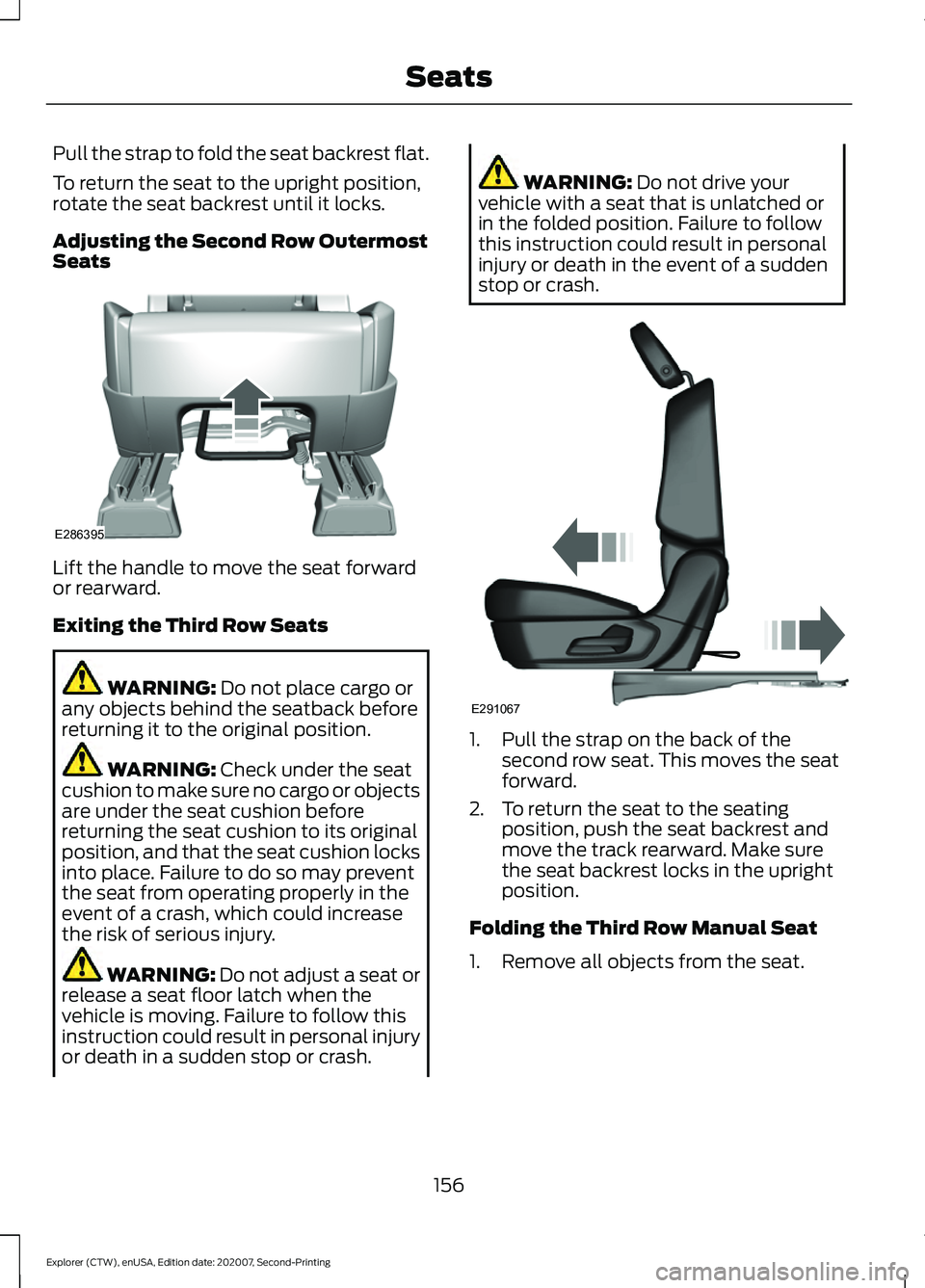
Pull the strap to fold the seat backrest flat.
To return the seat to the upright position,
rotate the seat backrest until it locks.
Adjusting the Second Row Outermost
Seats
Lift the handle to move the seat forward
or rearward.
Exiting the Third Row Seats
WARNING: Do not place cargo or
any objects behind the seatback before
returning it to the original position. WARNING:
Check under the seat
cushion to make sure no cargo or objects
are under the seat cushion before
returning the seat cushion to its original
position, and that the seat cushion locks
into place. Failure to do so may prevent
the seat from operating properly in the
event of a crash, which could increase
the risk of serious injury. WARNING:
Do not adjust a seat or
release a seat floor latch when the
vehicle is moving. Failure to follow this
instruction could result in personal injury
or death in a sudden stop or crash. WARNING:
Do not drive your
vehicle with a seat that is unlatched or
in the folded position. Failure to follow
this instruction could result in personal
injury or death in the event of a sudden
stop or crash. 1. Pull the strap on the back of the
second row seat. This moves the seat
forward.
2. To return the seat to the seating position, push the seat backrest and
move the track rearward. Make sure
the seat backrest locks in the upright
position.
Folding the Third Row Manual Seat
1. Remove all objects from the seat.
156
Explorer (CTW), enUSA, Edition date: 202007, Second-Printing SeatsE286395 E291067
Page 160 of 577
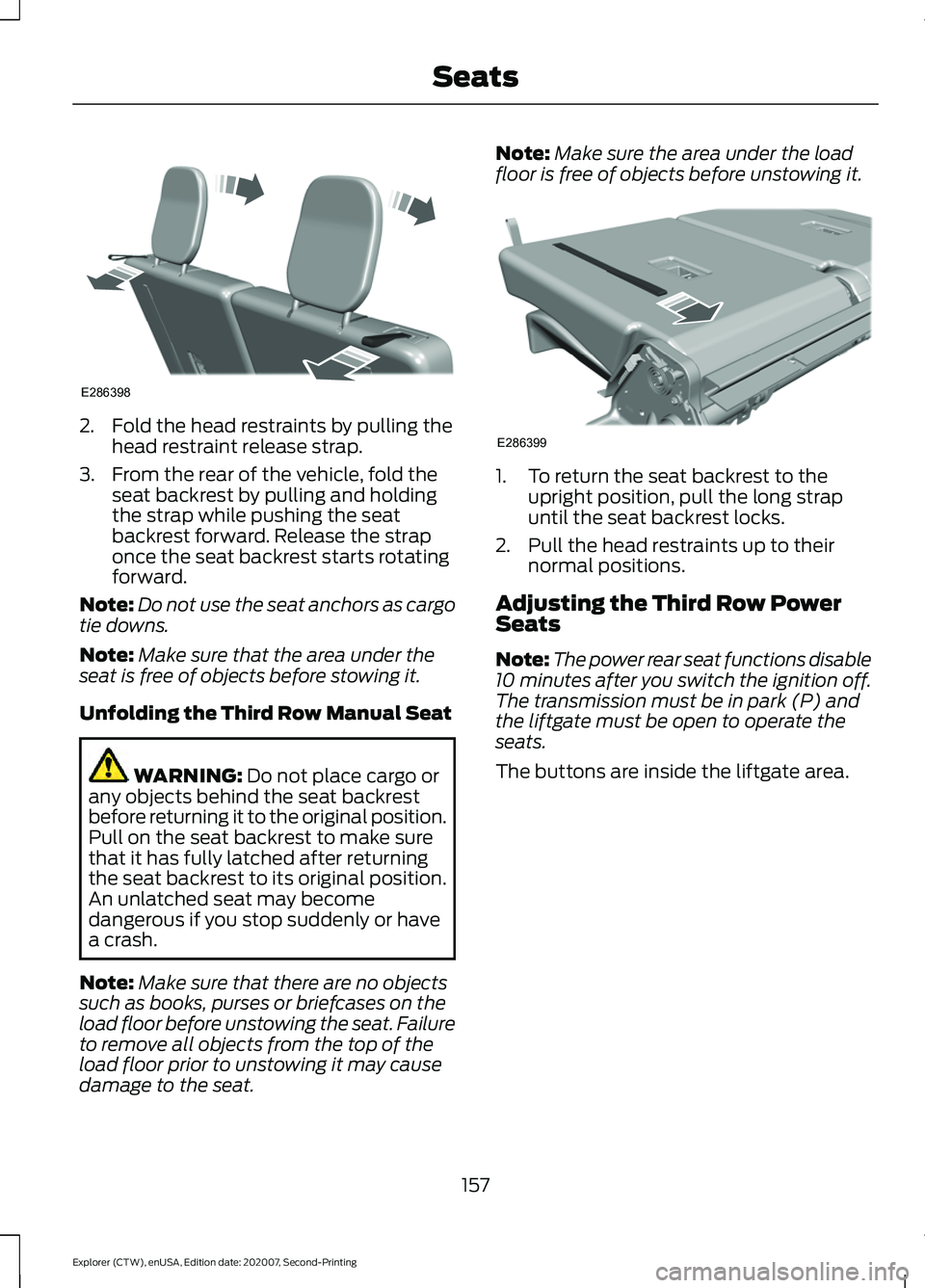
2. Fold the head restraints by pulling the
head restraint release strap.
3. From the rear of the vehicle, fold the seat backrest by pulling and holding
the strap while pushing the seat
backrest forward. Release the strap
once the seat backrest starts rotating
forward.
Note: Do not use the seat anchors as cargo
tie downs.
Note: Make sure that the area under the
seat is free of objects before stowing it.
Unfolding the Third Row Manual Seat WARNING: Do not place cargo or
any objects behind the seat backrest
before returning it to the original position.
Pull on the seat backrest to make sure
that it has fully latched after returning
the seat backrest to its original position.
An unlatched seat may become
dangerous if you stop suddenly or have
a crash.
Note: Make sure that there are no objects
such as books, purses or briefcases on the
load floor before unstowing the seat. Failure
to remove all objects from the top of the
load floor prior to unstowing it may cause
damage to the seat. Note:
Make sure the area under the load
floor is free of objects before unstowing it. 1. To return the seat backrest to the
upright position, pull the long strap
until the seat backrest locks.
2. Pull the head restraints up to their normal positions.
Adjusting the Third Row Power
Seats
Note: The power rear seat functions disable
10 minutes after you switch the ignition off.
The transmission must be in park (P) and
the liftgate must be open to operate the
seats.
The buttons are inside the liftgate area.
157
Explorer (CTW), enUSA, Edition date: 202007, Second-Printing SeatsE286398 E286399
Page 161 of 577
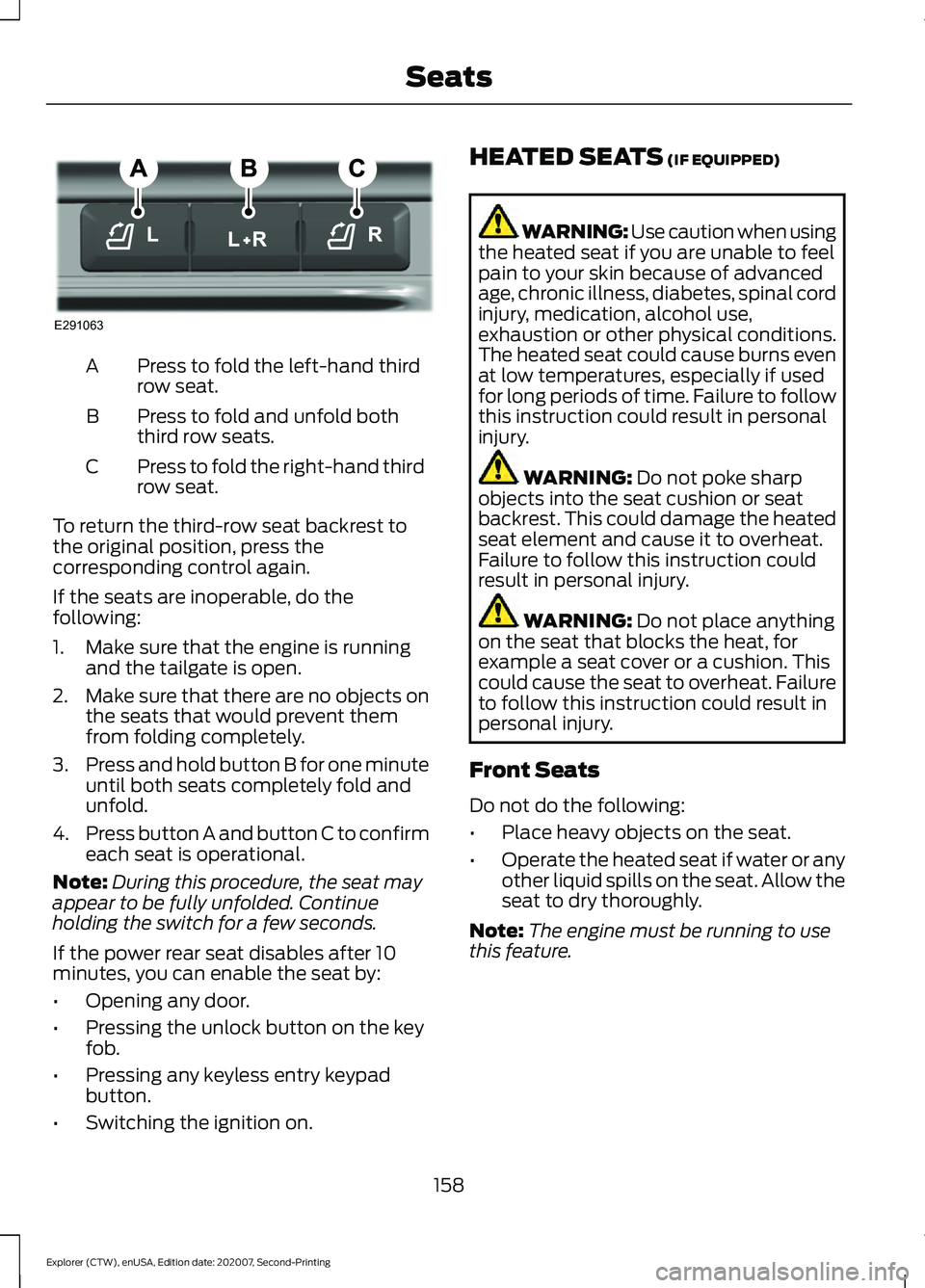
Press to fold the left-hand third
row seat.
A
Press to fold and unfold both
third row seats.
B
Press to fold the right-hand third
row seat.
C
To return the third-row seat backrest to
the original position, press the
corresponding control again.
If the seats are inoperable, do the
following:
1. Make sure that the engine is running and the tailgate is open.
2. Make sure that there are no objects on
the seats that would prevent them
from folding completely.
3. Press and hold button B for one minute
until both seats completely fold and
unfold.
4. Press button A and button C to confirm
each seat is operational.
Note: During this procedure, the seat may
appear to be fully unfolded. Continue
holding the switch for a few seconds.
If the power rear seat disables after 10
minutes, you can enable the seat by:
• Opening any door.
• Pressing the unlock button on the key
fob.
• Pressing any keyless entry keypad
button.
• Switching the ignition on. HEATED SEATS (IF EQUIPPED) WARNING: Use caution when using
the heated seat if you are unable to feel
pain to your skin because of advanced
age, chronic illness, diabetes, spinal cord
injury, medication, alcohol use,
exhaustion or other physical conditions.
The heated seat could cause burns even
at low temperatures, especially if used
for long periods of time. Failure to follow
this instruction could result in personal
injury. WARNING:
Do not poke sharp
objects into the seat cushion or seat
backrest. This could damage the heated
seat element and cause it to overheat.
Failure to follow this instruction could
result in personal injury. WARNING:
Do not place anything
on the seat that blocks the heat, for
example a seat cover or a cushion. This
could cause the seat to overheat. Failure
to follow this instruction could result in
personal injury.
Front Seats
Do not do the following:
• Place heavy objects on the seat.
• Operate the heated seat if water or any
other liquid spills on the seat. Allow the
seat to dry thoroughly.
Note: The engine must be running to use
this feature.
158
Explorer (CTW), enUSA, Edition date: 202007, Second-Printing SeatsE291063
Page 162 of 577
Press the heated seat symbol to cycle
through the various heat settings and off.
More indicator lights indicate warmer
settings.
Note:
The heated seats switch on during a
remote start if they are enabled.
Note: The heated seats may switch on
when you start your vehicle if they were on
when you previously switched your vehicle
off.
Automatic Climate Controlled
Seats (If Equipped)
When you switch on the auto setting, the
seats switch between the heated seats
and ventilated seats to match your climate
control setting.
Second Row Heated Seats
The heated seat controls are on the rear
of the center console.
VENTILATED SEATS
(IF EQUIPPED)
Do not do the following:
• Spill liquid on the front seats. This may
cause the air vent holes to become
blocked and not work properly.
• Place cargo or objects under the seats.
They may block the air intake causing
the air vents to not work properly.
The engine must be running to use this
feature. Press this symbol to cycle through the
various ventilation settings and off. More
indicator lights indicate higher fan speeds.
Note:
The ventilated seats switch on during
a remote start if they are enabled.
Note: The ventilated seats may switch on
when you start your vehicle if they were on
when you previously switched your vehicle
off.
If the engine falls below 350 RPM when
the ventilated seats are on, the system
turns off. You need to switch it back on.
Note: To improve comfort, use the
ventilated seats along with the vehicle ’s air
conditioning system.
Automatic Climate Controlled
Seats
(If Equipped)
When you switch on the auto setting, the
seats switch between the heated seats
and ventilated seats to match your climate
control setting.
159
Explorer (CTW), enUSA, Edition date: 202007, Second-Printing SeatsE146322 E224689
Page 164 of 577
REAR OCCUPANT ALERT
SYSTEM INDICATORS
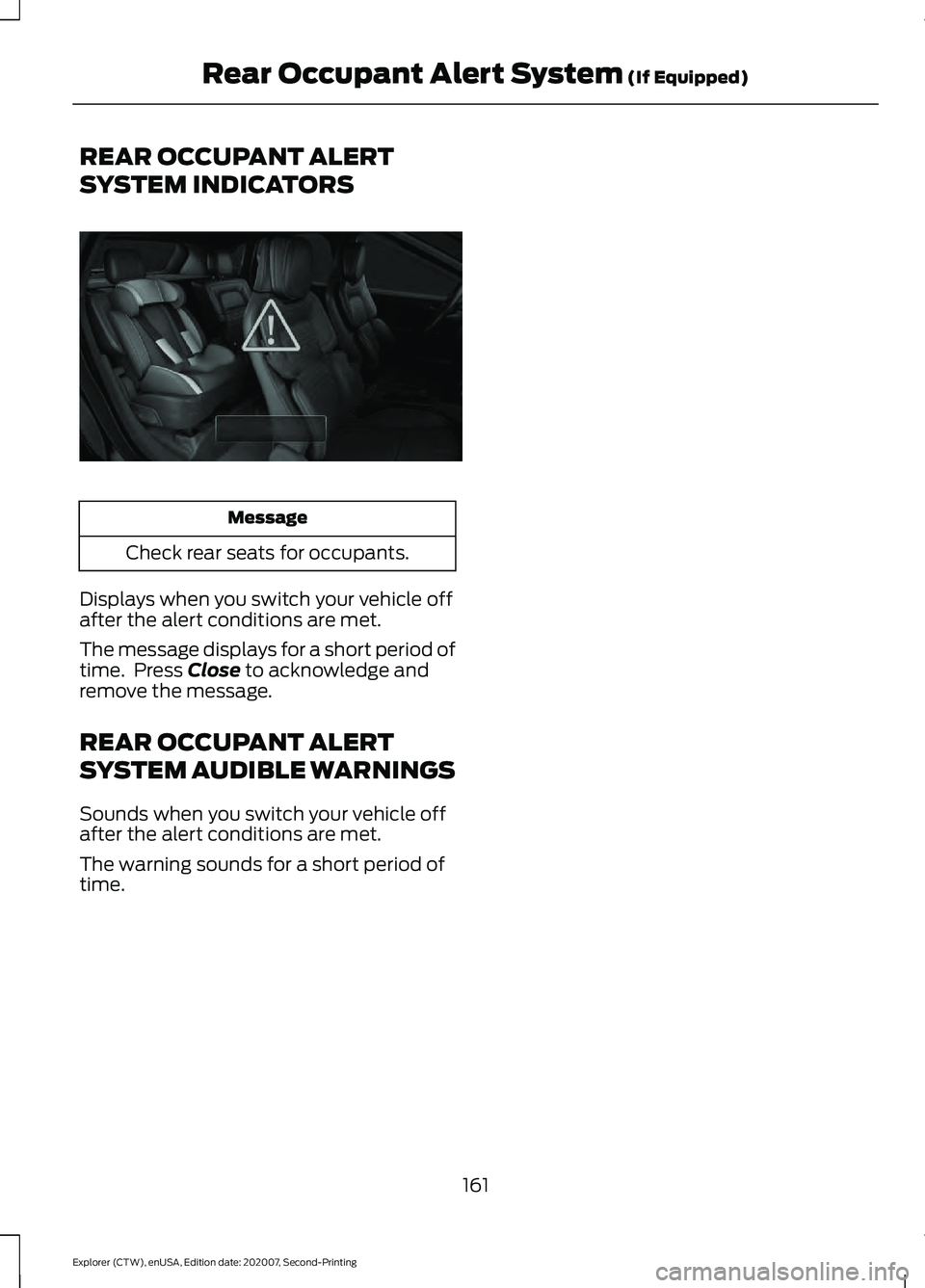
Message
Check rear seats for occupants.
Displays when you switch your vehicle off
after the alert conditions are met.
The message displays for a short period of
time. Press Close to acknowledge and
remove the message.
REAR OCCUPANT ALERT
SYSTEM AUDIBLE WARNINGS
Sounds when you switch your vehicle off
after the alert conditions are met.
The warning sounds for a short period of
time.
161
Explorer (CTW), enUSA, Edition date: 202007, Second-Printing Rear Occupant Alert System
(If Equipped)E325002
Page 228 of 577
PRINCIPLE OF OPERATION
WARNING: Vehicle modifications
involving braking system, aftermarket
roof racks, suspension, steering system,
tire construction and wheel and tire size
may change the handling characteristics
of your vehicle and may adversely affect
the performance of the electronic
stability control system. In addition,
installing any stereo loudspeakers may
interfere with and adversely affect the
electronic stability control system. Install
any aftermarket stereo loudspeaker as
far as possible from the front center
console, the tunnel, and the front seats
in order to minimize the risk of interfering
with the electronic stability control
sensors. Reducing the effectiveness of
the electronic stability control system
could lead to an increased risk of loss of
vehicle control, vehicle rollover, personal
injury and death. WARNING:
Remember that even
advanced technology cannot defy the
laws of physics. It’ s always possible to
lose control of a vehicle due to
inappropriate driver input for the
conditions. Aggressive driving on any
road condition can cause you to lose
control of your vehicle increasing the risk
of personal injury or property damage.
Activation of the electronic stability
control system is an indication that at
least some of the tires have exceeded
their ability to grip the road; this could
reduce the operator ’s ability to control
the vehicle potentially resulting in a loss
of vehicle control, vehicle rollover,
personal injury and death. If your
electronic stability control system
activates, SLOW DOWN.
The system automatically turns on each
time you switch the ignition on. If a driving condition activates either the
stability control or the traction control
system you may experience the following
conditions:
•
The stability and traction control light
flashes.
• Your vehicle slows down.
• Reduced engine power.
• A vibration in the brake pedal.
• The brake pedal is stiffer than usual.
• If the driving condition is severe and
your foot is not on the brake, the brake
pedal may move as the systems
applies higher brake forces.
The stability control system has several
features built into it to help you maintain
control of your vehicle:
Electronic Stability Control
The system enhances your vehicle ’s ability
to prevent skids or lateral slides by
applying brakes to one or more of the
wheels individually and, if necessary,
reducing engine power.
Roll Stability Control
The system enhances your vehicle ’s ability
to prevent rollovers by detecting your
vehicle ’s roll motion and the rate at which
it changes by applying the brakes to one
or more wheels individually.
Curve Control
The system enhances your vehicle ’s ability
to follow the road when cornering severely
or avoiding objects in the roadway. Curve
Control operates by reducing engine power
and, if necessary, applying brakes to one
or more of the wheels individually.
225
Explorer (CTW), enUSA, Edition date: 202007, Second-Printing Stability Control