seat memory FORD EXPLORER 2021 Owners Manual
[x] Cancel search | Manufacturer: FORD, Model Year: 2021, Model line: EXPLORER, Model: FORD EXPLORER 2021Pages: 577, PDF Size: 9.79 MB
Page 6 of 577

Instrument Cluster
Gauges - Vehicles With: 6.5 Inch
Instrument Cluster Display Screen
........................................................................\
.103
Gauges - Vehicles With: 12.3 Inch Instrument Cluster Display Screen
........................................................................\
104
Gauges - Vehicles With: 4.2 Inch Instrument Cluster Display Screen
........................................................................\
106
Warning Lamps and Indicators ..............
107
Audible Warnings and Indicators .............
111
Information Displays
General Information - Vehicles With: 6.5 Inch Instrument Cluster Display Screen
........................................................................\
..
112
General Information - Vehicles With: 12.3 Inch Instrument Cluster Display Screen
........................................................................\
..
114
General Information - Vehicles With: 4.2 Inch Instrument Cluster Display Screen
........................................................................\
..
117
Personalized Settings .................................
119
Information Messages ................................
121
Climate Control
Automatic Climate Control .....................
139
Hints on Controlling the Interior Climate ........................................................................\
..
141
Rear Passenger Climate Controls .........
142
Heated Windshield .....................................
143
Heated Rear Window .................................
144
Heated Exterior Mirrors .............................
144
Remote Start ................................................
144
Interior Air Quality
What Is the Cabin Air Filter ......................
145
Replacing the Cabin Air Filter ..................
145
Seats
Sitting in the Correct Position .................
146Head Restraints
...........................................
146
Manual Seats ................................................
148
Power Seats ..................................................
149
Memory Function .........................................
152
Rear Seats ......................................................
153
Heated Seats ................................................
158
Ventilated Seats ..........................................
159
Rear Occupant Alert System
What is the Rear Occupant Alert System ........................................................................\
160
How Does the Rear Occupant Alert System Work ............................................
160
Rear Occupant Alert System Precautions ........................................................................\
160
Rear Occupant Alert System Limitations ........................................................................\
160
Switching Rear Occupant Alert System On and Off .................................................
160
Rear Occupant Alert System Indicators ........................................................................\
..
161
Rear Occupant Alert System Audible Warnings ......................................................
161
Garage Door Opener
Universal Garage Door Opener ..............
162
Auxiliary Power Points
Auxiliary Power Points ...............................
167
Wireless Accessory Charger ....................
168
Storage Compartments
Cup Holders .....................................................
171
Overhead Console ........................................
171
Starting and Stopping the Engine
General Information ....................................
172
Ignition Switch ...............................................
172
Keyless Starting ............................................
172
3
Explorer (CTW), enUSA, Edition date: 202007, Second-Printing Table of Contents
Page 64 of 577
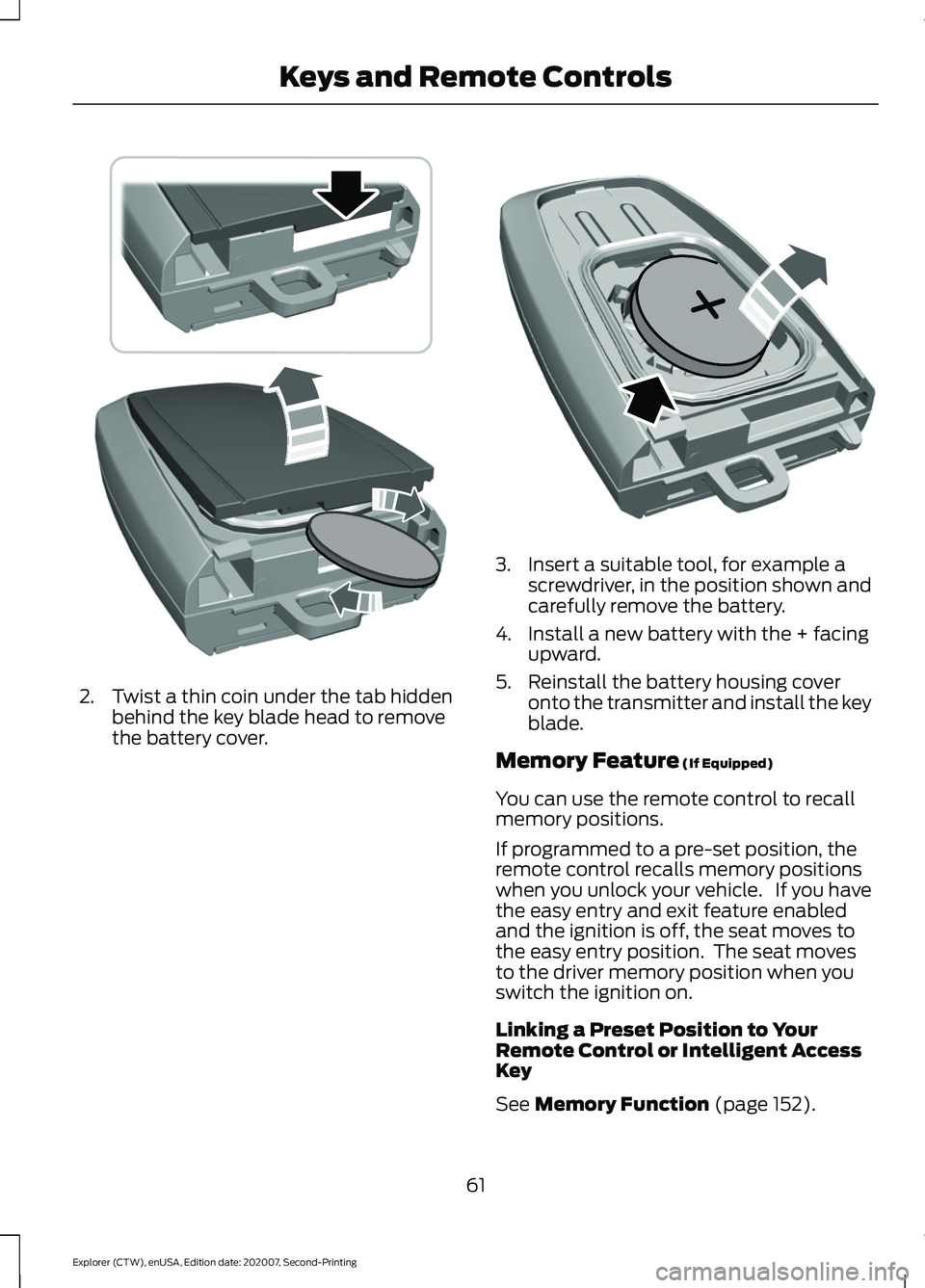
2. Twist a thin coin under the tab hidden
behind the key blade head to remove
the battery cover. 3. Insert a suitable tool, for example a
screwdriver, in the position shown and
carefully remove the battery.
4. Install a new battery with the + facing upward.
5. Reinstall the battery housing cover onto the transmitter and install the key
blade.
Memory Feature (If Equipped)
You can use the remote control to recall
memory positions.
If programmed to a pre-set position, the
remote control recalls memory positions
when you unlock your vehicle. If you have
the easy entry and exit feature enabled
and the ignition is off, the seat moves to
the easy entry position. The seat moves
to the driver memory position when you
switch the ignition on.
Linking a Preset Position to Your
Remote Control or Intelligent Access
Key
See
Memory Function (page 152).
61
Explorer (CTW), enUSA, Edition date: 202007, Second-Printing Keys and Remote ControlsE303824 E218402
Page 137 of 577
Seats
Action
Message
Objects are by the passenger seat. After the objects are moved
away from the seat, if the warning stays on or continues to come on have the system checked as soon as possible.
Occupant Sensor
BLOCKED Remove Objects Near
Passenger Seat
Displays as a reminder that memory seats are not available while driving.
Memory Recall Not
Permitted While Driving
Displays to show where your memory setting has been saved.
Memory X Saved
Starting System Action
Message
Displays when starting the vehicle as a reminder to apply the brake.
To START Press
Brake
Displays when the starter has exceeded its cranking time inattempting to start the vehicle.
Cranking Time
Exceeded
Displays when the starter is attempting to start the vehicle.
Engine Start
Pending Please Wait
Displays when the pending start has been cancelled.
Pending Start
Cancelled
134
Explorer (CTW), enUSA, Edition date: 202007, Second-Printing Information Displays
Page 155 of 577
Lumbar and Bolster Mode
Massage Mode
Upper lumbar
Back massage intensity
adjustment
A
Lumbar decrease
Massage intensity decrease
and off*
B
Lower lumbar**
Cushion massage intensity
adjustment
C
Lumbar increase
Massage intensity increase
D
-
On and off
E
* The massage feature defaults to an
alternating massage mode with back
massage intensity adjustment. The lumbar
and bolster feature defaults to the middle
lumbar mode.
** Press C a second time to adjust the back
bolster. Press C a third time to adjust the
cushion bolster.
You can also adjust this feature through
the touchscreen. When switched on, the
system displays directions for you to adjust
the lumbar settings in your seat or to set
the massage function.
MEMORY FUNCTION (IF EQUIPPED) WARNING:
Before activating the
memory seat, make sure that the area
immediately surrounding the seat is clear
of obstructions and that all occupants
are clear of moving parts. WARNING:
Do not use the memory
function when your vehicle is moving.
This feature recalls the position of the
following: •
Driver seat.
• Power mirrors.
• Optional power steering column.
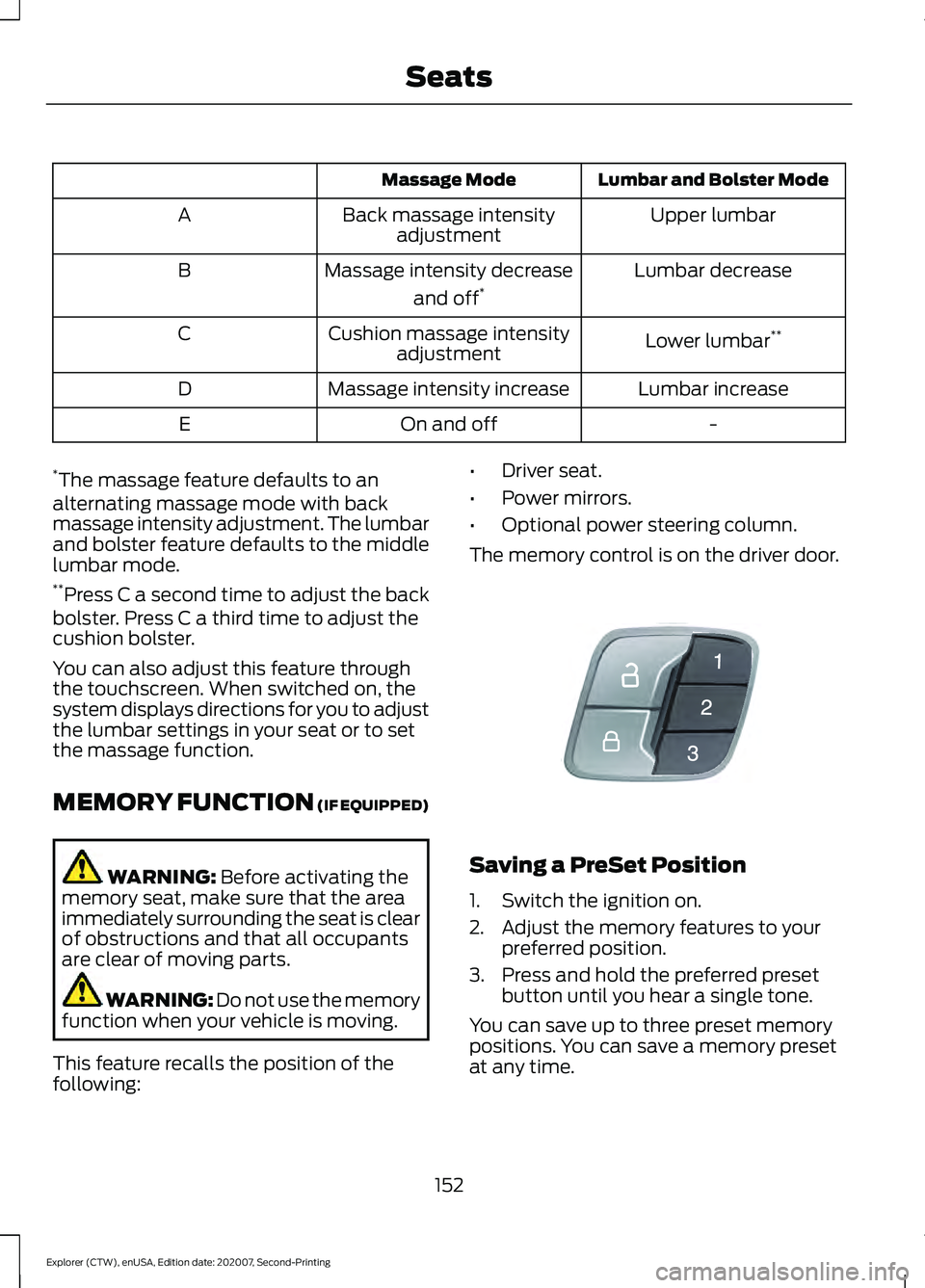
The memory control is on the driver door. Saving a PreSet Position
1. Switch the ignition on.
2. Adjust the memory features to your
preferred position.
3. Press and hold the preferred preset button until you hear a single tone.
You can save up to three preset memory
positions. You can save a memory preset
at any time.
152
Explorer (CTW), enUSA, Edition date: 202007, Second-Printing SeatsE142554
Page 156 of 577
Recalling a PreSet Position
Press and release the preset button
associated with your preferred driving
position. The memory features move to
the position stored for that preset.
Note:
You can only recall a preset memory
position when the ignition is off, or when the
transmission is in park (P) or neutral (N)
and the vehicle is not moving if the ignition
is on.
You can also recall a preset memory
position by:
• Pressing the unlock button on your
remote control if it is linked to a preset
position.
• Unlocking the driver door handle if a
linked remote control is present.
Note: Using a linked remote control to
recall your memory position when the
ignition is off moves the seat to the Easy
Entry position.
Note: Pressing any active memory feature
adjustment control, or any memory button
during a memory recall, cancels the
operation.
Linking a PreSet Position to your
Remote Control
Your vehicle can save the preset memory
positions for up to three remote controls.
1. With the ignition on, move the memory
features to the preferred positions.
2. Press and hold the preferred preset button for about five seconds. A tone
sounds after about two seconds.
Continue holding until you hear a
second tone.
3. Within three seconds, press the lock button on the remote control you are
linking.
To unlink a remote control, follow the
same procedure – except in step 3, press
the unlock button on the remote control. Note:
If more than one linked remote
control or intelligent access key is in range,
the memory function moves to the settings
of the first key to recall a memory position.
Easy Entry and Exit Feature
If you enable the easy entry and exit
feature, it moves the driver seat position
rearward up to 2 in (5 cm) when you switch
the ignition off.
The driver seat returns to the previous
position when you switch the ignition on.
You can enable or disable this feature
through the touchscreen. See Settings
(page 464).
REAR SEATS
Adjusting the Second Row Rear
Seats WARNING:
Always drive and ride
with your seatback upright and the lap
belt snug and low across the hips. WARNING: Do not recline the seat
backrest too far as this can cause the
occupant to slide under the seatbelt,
resulting in personal injury in the event
of a crash.
153
Explorer (CTW), enUSA, Edition date: 202007, Second-Printing Seats
Page 321 of 577
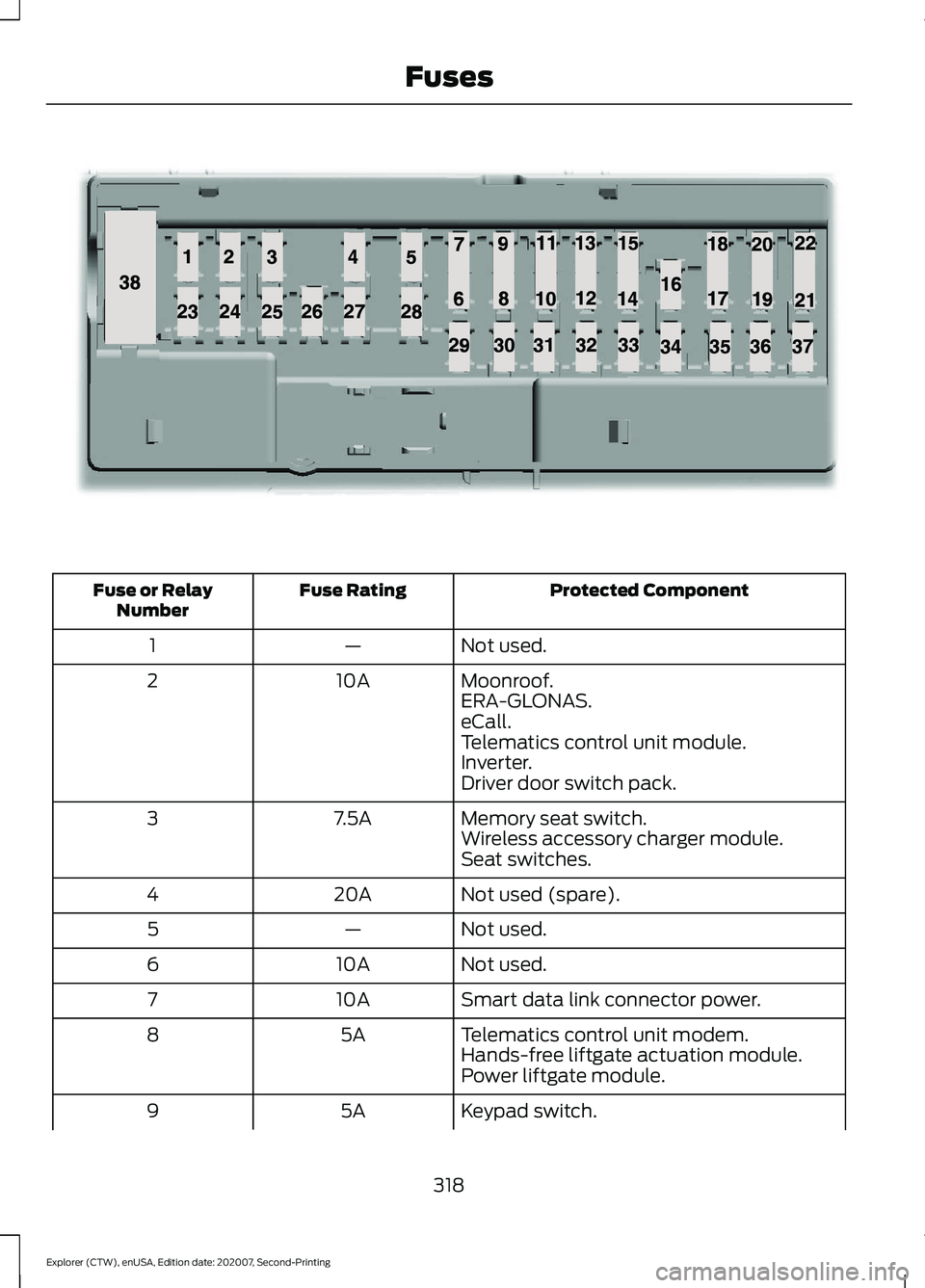
Protected Component
Fuse Rating
Fuse or Relay
Number
Not used.
—
1
Moonroof.
10A
2
ERA-GLONAS.
eCall.
Telematics control unit module.
Inverter.
Driver door switch pack.
Memory seat switch.
7.5A
3
Wireless accessory charger module.
Seat switches.
Not used (spare).
20A
4
Not used.
—
5
Not used.
10A
6
Smart data link connector power.
10A
7
Telematics control unit modem.
5A
8
Hands-free liftgate actuation module.
Power liftgate module.
Keypad switch.
5A
9
318
Explorer (CTW), enUSA, Edition date: 202007, Second-Printing FusesE145984
Page 468 of 577
Display
Select this tile to adjust display settings
like brightness and auto dim.
Charge Settings (If Equipped)
Select this tile to adjust the electric vehicle
charge settings.
Voice Control
Select this tile to adjust voice control
settings like command confirmations and
displayed lists.
Navigation
(If Equipped)
Select this tile to adjust navigation settings
like map preferences and route guidance.
Multi Contour Seats
(If Equipped)
Select this tile to adjust the position and
massage function of your multi contour
seats. Seats
(If Equipped)
Select this tile to adjust the lumbar
function of your seats.
Message Center
(If Equipped)
Select this tile to view vehicle messages.
Personal Profiles
(If Equipped)
Select this tile to adjust recalled memory
features when using personal profiles.
Valet Mode
(If Equipped)
Select this tile to enable and disable valet
mode.
Ambient Lighting
(If Equipped)
Select this tile to change the color or
intensity of the interior lighting.
465
Explorer (CTW), enUSA, Edition date: 202007, Second-Printing SYNC™ 3
Page 568 of 577
Trailer Lamps.......................................................
292
When Towing a Trailer..................................... 293
Event Data.........................................................16
Export Unique Options.................................14
Exterior Mirrors - Excluding: ST.................97 360-Degree Camera.......................................... 98
Auto-dimming Feature...................................... 98
Auto-Folding Mirrors .......................................... 97
Blind Spot Information System...................... 98
Direction Indicator Mirrors ............................... 98
Fold-Away Exterior Mirrors............................... 97
Heated Exterior Mirrors ..................................... 98
Memory Mirrors ................................................... 98
Power Exterior Mirrors......................................... 97
Puddle Lamps....................................................... 98
Exterior Mirrors - ST......................................98 Auto-dimming Feature.................................... 100
Auto-Folding Mirrors........................................... 99
Blind Spot Information System.................... 100
Direction Indicator Mirrors.............................. 100
Fold-Away Exterior Mirrors............................... 99
Heated Exterior Mirrors.................................... 100
Memory Mirrors................................................... 100
Power Exterior Mirrors........................................ 98
Puddle Lamps..................................................... 100
F
Fastening the Seatbelts..............................39
Seatbelt Locking Modes................................... 40
Using Seatbelts During Pregnancy................39
Flat Tire See: Changing a Road Wheel........................ 374
Floor Mats.......................................................297
Fog Lamps - Front See: Front Fog Lamps........................................ 89
Ford Credit
..........................................................11
US Only...................................................................... 11
Ford Protect..................................................480 Ford Protect Extended Service Plan
(CANADA ONLY)........................................... 481
Ford Protect Extended Service Plans (U.S. Only)................................................................. 480
Four-Wheel Drive.........................................207 Principle of Operation...................................... 207
Front Fog Lamps
............................................89
Front Fog Lamp Indicator................................. 90Switching the Front Fog Lamps On or
Off........................................................................\
. 89
Front Parking Aid
..........................................232
Object Distance Indicator............................... 233
Front Passenger Sensing System
............48
Front Wiper Blades See: Changing the Front Wiper Blades......340
Fuel and Refueling.......................................185
Fuel Consumption.......................................194 Advertised Capacity.......................................... 194
Calculating Fuel Economy.............................. 195
Fuel Filler Funnel Location........................187
Fuel Filter........................................................340
Fuel Quality - E85........................................185 Choosing the Right Fuel - Flex Fuel
Vehicles............................................................. 185
Switching Between E85 and Gasoline............................................................ 186
Fuel Quality - Gasoline...............................187 Choosing the Right Fuel................................... 187
Fuel Shutoff
..................................................299
Fuses..................................................................312
Fuse Specification Chart............................312 Engine Compartment Fuse Box.................... 312
Passenger Compartment Fuse Panel.........317
G
Garage Door Opener...................................162
Garage Door Opener See: Universal Garage Door Opener............162
Gauges - Vehicles With: 12.3 Inch Instrument Cluster Display
Screen...........................................................104
Distance to Empty............................................. 106
Engine Coolant Temperature Gauge..........106
Fuel Gauge............................................................ 105
Gauge Display...................................................... 105
Information Bar................................................... 105
Information Display........................................... 105
Low Fuel Reminder............................................ 105
Gauges - Vehicles With: 4.2 Inch Instrument Cluster Display
Screen...........................................................106
Engine Coolant Temperature Gauge...........107
Fuel Gauge............................................................ 107
Information Display............................................ 107
565
Explorer (CTW), enUSA, Edition date: 202007, Second-Printing Index
Page 571 of 577
Locking and Unlocking................................69
Activating Intelligent Access............................ 70
Autolock.................................................................... 71
Battery Saver.......................................................... 72
Illuminated Entry.................................................... 71
Illuminated Exit...................................................... 72
Locking and Unlocking the Doors with the Key Blade........................................................... 69
Power Door Locks................................................ 69
Remote Control.................................................... 69
Smart Unlocks for Integrated Keyhead Remote Control................................................ 70
Smart Unlocks for Intelligent Access Keys........................................................................\
71
Luggage Covers.............................................281
Lug Nuts See: Changing a Road Wheel........................ 374
M
Maintenance..................................................322 General Information.......................................... 322
Manual Seats.................................................148
Adjusting the Seat Backrest........................... 149
Moving the Seat Backward and Forward............................................................. 148
Memory Function
..........................................152
Easy Entry and Exit Feature............................ 153
Linking a PreSet Position to your Remote Control .............................................................. 153
Saving a PreSet Position.................................. 152
Message Center See: Information Displays................................. 112
Mirrors See: Windows and Mirrors............................... 96
Mobile Communications Equipment.......13
Mobile Device Data........................................18
Moonroof..........................................................101 Bounce-Back........................................................102
Opening and Closing the Moonroof.............101
Rear SunShade Opening and Closing........102
Motorcraft Parts - 2.3L EcoBoost™
................................................388
Motorcraft Parts - 3.0L.............................389
Motorcraft Parts - 3.3L..............................390
MyKey – Troubleshooting
...........................67
MyKey ™.............................................................64
Principle of Operation........................................ 64N
Navigation......................................................455
Changing the Format of the Map................457
cityseeker............................................................. 459
Michelin Travel Guide...................................... 460
Navigation Map Accuracy and Updates........................................................... 460
Route Guidance.................................................. 457
Setting a Destination....................................... 456
SiriusXM Traffic and Travel Link.................. 460
Zoom...................................................................... 457
Normal Scheduled Maintenance
..........485
Intelligent Oil-Life Monitor™........................ 485
Normal Maintenance Intervals.................... 486
O
Oil Change Indicator Reset.......................327
Oil Check See: Engine Oil Check...................................... 326
Opening and Closing the Hood..............322 Closing the Hood................................................ 323
Opening the Hood............................................. 322
Ordering Additional Owner's Literature......................................................310
Obtaining a French Owner ’s Manual..........310
Overhead Console.........................................171
Overriding Automatic High Beam Control............................................................95
Overriding Reverse Braking Assist..........221
Overriding the Set Speed..........................252
P
Parking Aids
...................................................230
Principle of Operation...................................... 230
Passive Anti-Theft System.........................78 Programming a Spare Intelligent Access
Key........................................................................\
. 78
SecuriLock®........................................................... 78
PATS See: Passive Anti-Theft System..................... 78
Pedestrian Alert System
.............................54
Pedestrian Protection..................................54
Perchlorate.........................................................11
Personalized Settings..................................119 Fuel Economy...................................................... 120
568
Explorer (CTW), enUSA, Edition date: 202007, Second-Printing Index