engine FORD EXPLORER SPORT 2002 1.G Owner's Manual
[x] Cancel search | Manufacturer: FORD, Model Year: 2002, Model line: EXPLORER SPORT, Model: FORD EXPLORER SPORT 2002 1.GPages: 184, PDF Size: 2.8 MB
Page 95 of 184
N (Neutral)
With the gearshift lever in N (Neutral), the vehicle can be started and is
free to roll. Hold the brake pedal down while in this position.
(Overdrive)
The normal driving position for the
best fuel economy. Transmission
operates in gears one through
five.
(Overdrive) can be
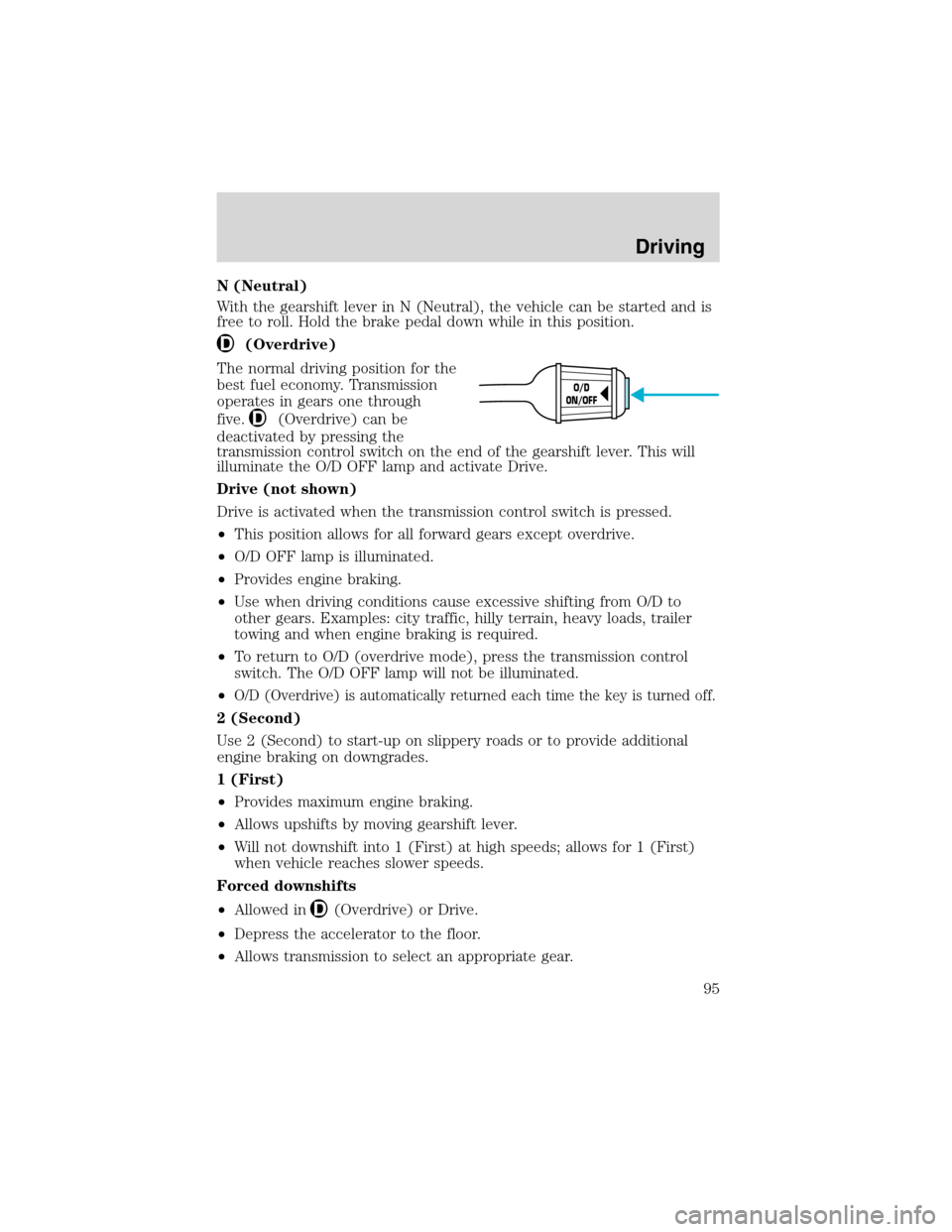
deactivated by pressing the
transmission control switch on the end of the gearshift lever. This will
illuminate the O/D OFF lamp and activate Drive.
Drive (not shown)
Drive is activated when the transmission control switch is pressed.
•This position allows for all forward gears except overdrive.
•O/D OFF lamp is illuminated.
•Provides engine braking.
•Use when driving conditions cause excessive shifting from O/D to
other gears. Examples: city traffic, hilly terrain, heavy loads, trailer
towing and when engine braking is required.
•To return to O/D (overdrive mode), press the transmission control
switch. The O/D OFF lamp will not be illuminated.
•
O/D (Overdrive) is automatically returned each time the key is turned off.
2 (Second)
Use 2 (Second) to start-up on slippery roads or to provide additional
engine braking on downgrades.
1 (First)
•Provides maximum engine braking.
•Allows upshifts by moving gearshift lever.
•Will not downshift into 1 (First) at high speeds; allows for 1 (First)
when vehicle reaches slower speeds.
Forced downshifts
•Allowed in
(Overdrive) or Drive.
•Depress the accelerator to the floor.
•Allows transmission to select an appropriate gear.
O/D
ON/OFF
Driving
95
Page 96 of 184
MANUAL TRANSMISSION OPERATION (IF EQUIPPED)
Using the clutch
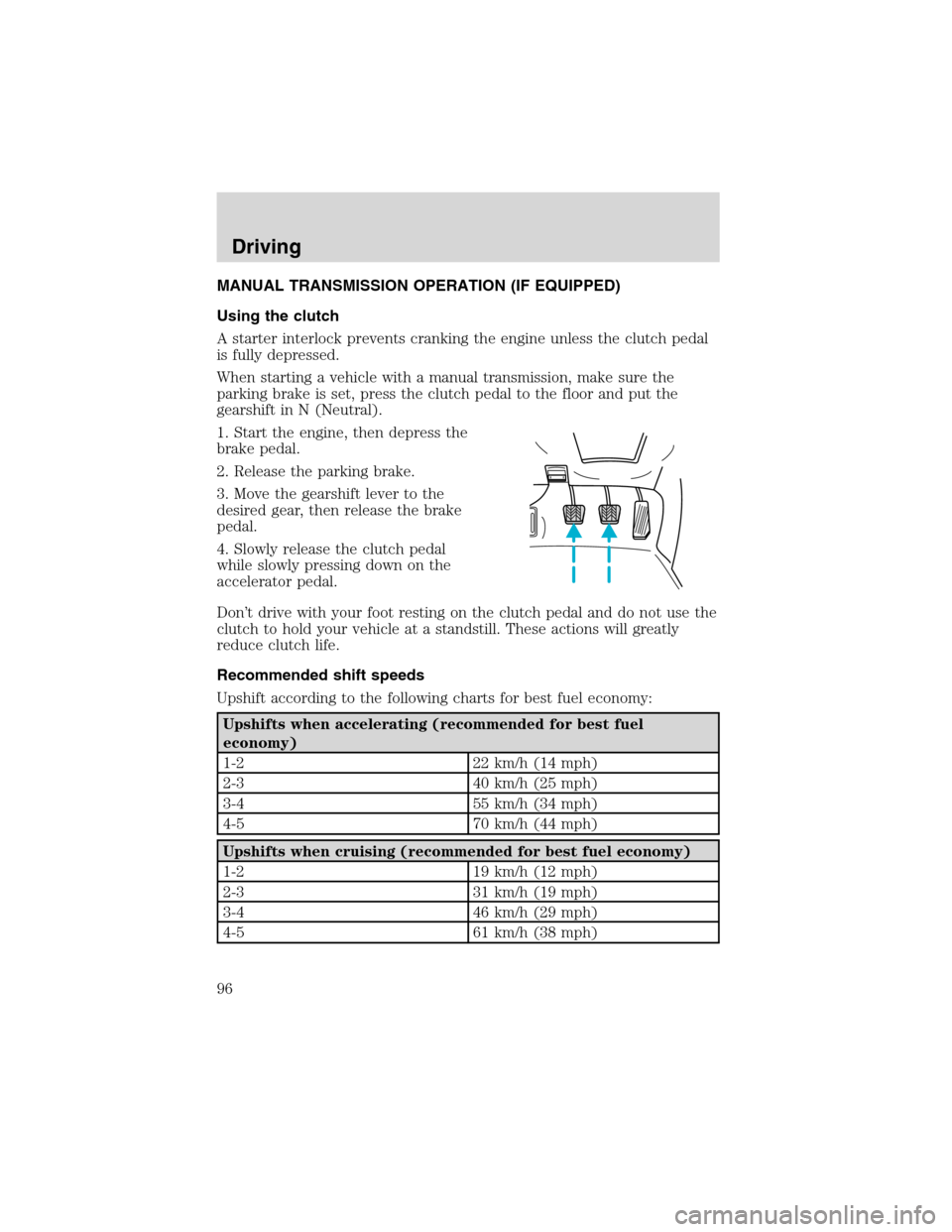
A starter interlock prevents cranking the engine unless the clutch pedal
is fully depressed.
When starting a vehicle with a manual transmission, make sure the
parking brake is set, press the clutch pedal to the floor and put the
gearshift in N (Neutral).
1. Start the engine, then depress the
brake pedal.
2. Release the parking brake.
3. Move the gearshift lever to the
desired gear, then release the brake
pedal.
4. Slowly release the clutch pedal
while slowly pressing down on the
accelerator pedal.
Don’t drive with your foot resting on the clutch pedal and do not use the
clutch to hold your vehicle at a standstill. These actions will greatly
reduce clutch life.
Recommended shift speeds
Upshift according to the following charts for best fuel economy:
Upshifts when accelerating (recommended for best fuel
economy)
1-2 22 km/h (14 mph)
2-3 40 km/h (25 mph)
3-4 55 km/h (34 mph)
4-5 70 km/h (44 mph)
Upshifts when cruising (recommended for best fuel economy)
1-2 19 km/h (12 mph)
2-3 31 km/h (19 mph)
3-4 46 km/h (29 mph)
4-5 61 km/h (38 mph)
Driving
96
Page 100 of 184
accelerator in each gear.Do not rock the vehicle for more than a
few minutes or damage to the transmission and tires may occur
or the engine may overheat.
Do not spin the wheels at over 56 km/h (35 mph). The tires may
fail and injure a passenger or bystander.
Emergency maneuvers
In an emergency situation where a sudden sharp turn must be made,
turn the steering wheel only as rapidly and as far as required to avoid
the emergency. Excessive steering will result in less vehicle control. Also
avoid abrupt braking. In the event of an emergency stop, do not attempt
any sharp steering wheel movements. If the vehicle goes from one type
of surface to another (i.e., from concrete to gravel) there will be a
change in the way the vehicle responds to a maneuver (steering,
acceleration or braking).
Parking
On some 4WD vehicles, when the transfer case is in the N (Neutral)
position, the engine and transmission are disconnected from the rest of
the driveline. Therefore, the vehicle is free to roll even if the automatic
transmission is in P (Park) or the manual transmission is in gear. Do not
leave the vehicle unattended with the transfer case in N (Neutral)
position. Always set the parking brake fully and turn off the ignition
when leaving the vehicle.
Normal characteristics
On some 4WD vehicles, the initial shift from two-wheel drive to
four–wheel drive while the vehicle is moving can cause some momentary
clunk and ratcheting sounds. This is normal and should be no cause for
concern.
Driving on sand, mud and water
When driving over sand, avoid reducing the tire pressures; instead, shift
to a lower gear. Apply the accelerator slowly and avoid spinning the
wheels. If you must reduce the tire pressure, make sure you re-inflate
the tires as soon as possible. Avoid excessive speed because vehicle
momentum can work against your vehicle and cause it to become stuck.
Driving
100
Page 103 of 184
continue to roll so that you may steer in the direction you want to travel.
If you lock the wheels, release the brake pedal and repeat the squeeze
technique.
Never drive with chains on the front tires of 4WD vehicles without also
putting them on the rear tires. This could cause the rear to slide and
swing around during braking.
Maintenance and Modifications
Ford strongly recommends that you do not add or removing steering or
suspension parts (such as lift kits or stabilizer bars) or by using
replacement parts not equivalent to the original factory equipment. Do
not use aftermarket“lift kits”or other suspension modifications. These
could adversely affect the vehicle’s handling characteristics, which could
lead to loss of vehicle control or roll over and serious injury. Frequent
inspection of vehicle chassis components is recommended if the vehicle
is subjected to heavy off-road usage.
DRIVING THROUGH WATER
If driving through deep or standing water is unavoidable, proceed very
slowly especially if the depth is not known. Never drive through water
that is higher than the bottom of the hubs (for trucks) or the bottom of
the wheel rims (for cars). Traction or brake capability may be limited
and your vehicle may stall. Water may also enter your engine’s air intake
and severely damage your engine.
Once through the water, always dry the brakes by moving your vehicle
slowly while applying light pressure on the brake pedal. Wet brakes do
not stop the vehicle as quickly as dry brakes.Driving through deep
water where the transmission vent tube is submerged may allow
water into the transmission and cause internal transmission
damage.
VEHICLE LOADING
Before loading a vehicle, familiarize yourself with the following terms:
•Base Curb Weight:Weight of the vehicle including any standard
equipment, fluids, lubricants, etc. It does not include occupants or
aftermarket equipment.
•Payload:Combined maximum allowable weight of cargo, occupants
and optional equipment. The payload equals the gross vehicle weight
rating minus base curb weight.
•GVW (Gross Vehicle Weight):Base curb weight plus payload
weight.
Driving
103
Page 104 of 184
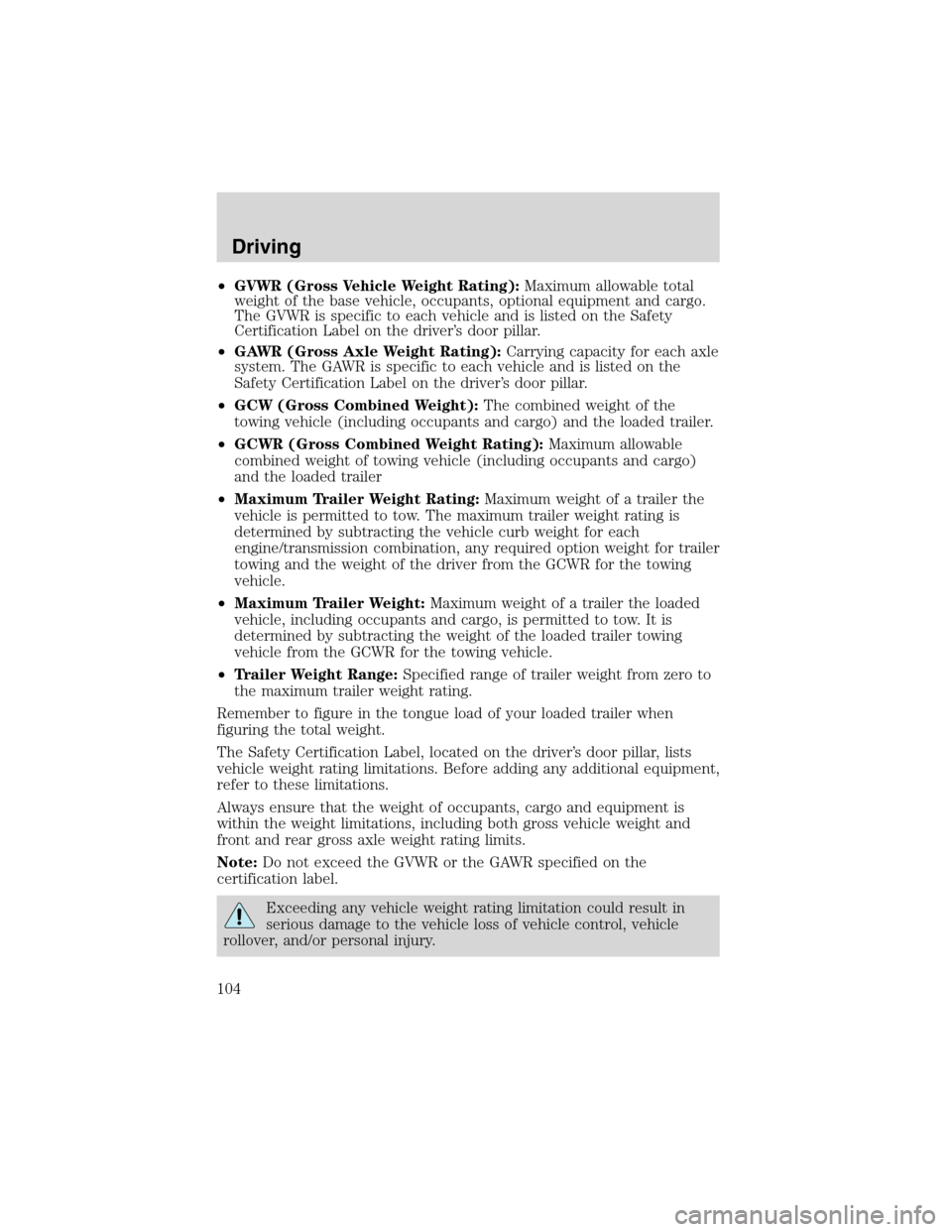
•GVWR (Gross Vehicle Weight Rating):Maximum allowable total
weight of the base vehicle, occupants, optional equipment and cargo.
The GVWR is specific to each vehicle and is listed on the Safety
Certification Label on the driver’s door pillar.
•GAWR (Gross Axle Weight Rating):Carrying capacity for each axle
system. The GAWR is specific to each vehicle and is listed on the
Safety Certification Label on the driver’s door pillar.
•GCW (Gross Combined Weight):The combined weight of the
towing vehicle (including occupants and cargo) and the loaded trailer.
•GCWR (Gross Combined Weight Rating):Maximum allowable
combined weight of towing vehicle (including occupants and cargo)
and the loaded trailer
•Maximum Trailer Weight Rating:Maximum weight of a trailer the
vehicle is permitted to tow. The maximum trailer weight rating is
determined by subtracting the vehicle curb weight for each
engine/transmission combination, any required option weight for trailer
towing and the weight of the driver from the GCWR for the towing
vehicle.
•Maximum Trailer Weight:Maximum weight of a trailer the loaded
vehicle, including occupants and cargo, is permitted to tow. It is
determined by subtracting the weight of the loaded trailer towing
vehicle from the GCWR for the towing vehicle.
•Trailer Weight Range:Specified range of trailer weight from zero to
the maximum trailer weight rating.
Remember to figure in the tongue load of your loaded trailer when
figuring the total weight.
The Safety Certification Label, located on the driver’s door pillar, lists
vehicle weight rating limitations. Before adding any additional equipment,
refer to these limitations.
Always ensure that the weight of occupants, cargo and equipment is
within the weight limitations, including both gross vehicle weight and
front and rear gross axle weight rating limits.
Note:Do not exceed the GVWR or the GAWR specified on the
certification label.
Exceeding any vehicle weight rating limitation could result in
serious damage to the vehicle loss of vehicle control, vehicle
rollover, and/or personal injury.
Driving
104
Page 105 of 184
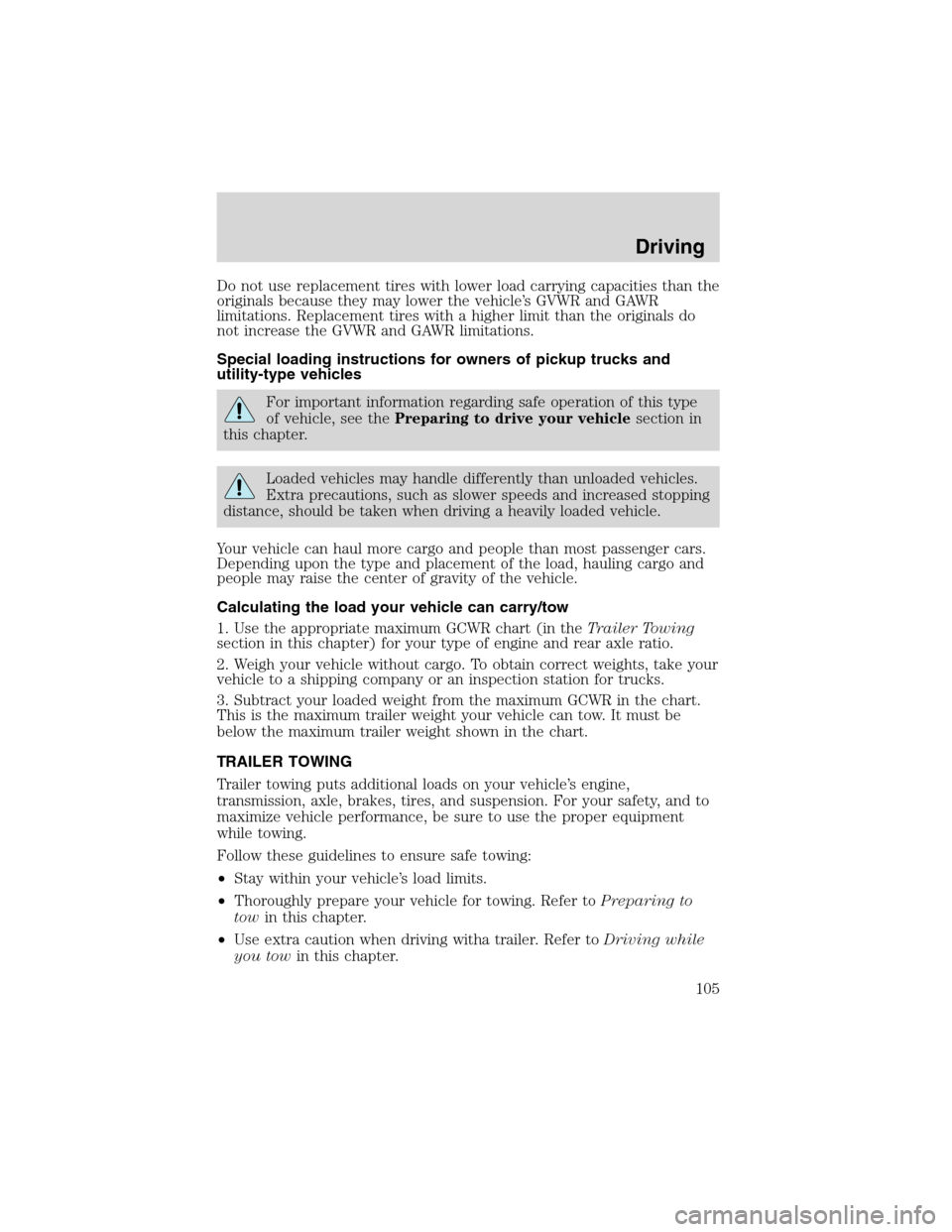
Do not use replacement tires with lower load carrying capacities than the
originals because they may lower the vehicle’s GVWR and GAWR
limitations. Replacement tires with a higher limit than the originals do
not increase the GVWR and GAWR limitations.
Special loading instructions for owners of pickup trucks and
utility-type vehicles
For important information regarding safe operation of this type
of vehicle, see thePreparing to drive your vehiclesection in
this chapter.
Loaded vehicles may handle differently than unloaded vehicles.
Extra precautions, such as slower speeds and increased stopping
distance, should be taken when driving a heavily loaded vehicle.
Your vehicle can haul more cargo and people than most passenger cars.
Depending upon the type and placement of the load, hauling cargo and
people may raise the center of gravity of the vehicle.
Calculating the load your vehicle can carry/tow
1. Use the appropriate maximum GCWR chart (in theTrailer Towing
section in this chapter) for your type of engine and rear axle ratio.
2. Weigh your vehicle without cargo. To obtain correct weights, take your
vehicle to a shipping company or an inspection station for trucks.
3. Subtract your loaded weight from the maximum GCWR in the chart.
This is the maximum trailer weight your vehicle can tow. It must be
below the maximum trailer weight shown in the chart.
TRAILER TOWING
Trailer towing puts additional loads on your vehicle’s engine,
transmission, axle, brakes, tires, and suspension. For your safety, and to
maximize vehicle performance, be sure to use the proper equipment
while towing.
Follow these guidelines to ensure safe towing:
•Stay within your vehicle’s load limits.
•Thoroughly prepare your vehicle for towing. Refer toPreparing to
towin this chapter.
•Use extra caution when driving witha trailer. Refer toDriving while
you towin this chapter.
Driving
105
Page 106 of 184
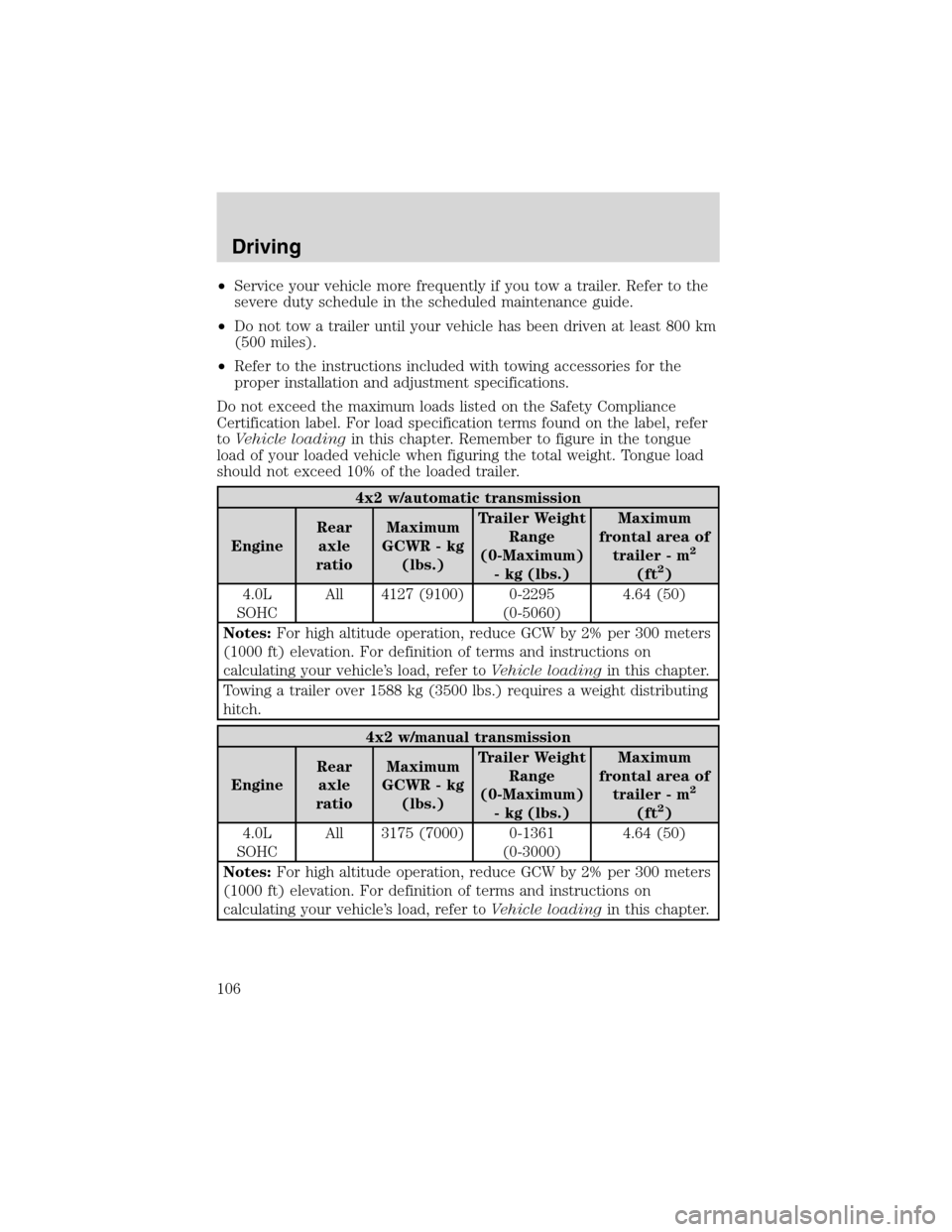
•Service your vehicle more frequently if you tow a trailer. Refer to the
severe duty schedule in the scheduled maintenance guide.
•Do not tow a trailer until your vehicle has been driven at least 800 km
(500 miles).
•Refer to the instructions included with towing accessories for the
proper installation and adjustment specifications.
Do not exceed the maximum loads listed on the Safety Compliance
Certification label. For load specification terms found on the label, refer
toVehicle loadingin this chapter. Remember to figure in the tongue
load of your loaded vehicle when figuring the total weight. Tongue load
should not exceed 10% of the loaded trailer.
4x2 w/automatic transmission
EngineRear
axle
ratioMaximum
GCWR - kg
(lbs.)Trailer Weight
Range
(0-Maximum)
- kg (lbs.)Maximum
frontal area of
trailer - m
2
(ft2)
4.0L
SOHCAll 4127 (9100) 0-2295
(0-5060)4.64 (50)
Notes:For high altitude operation, reduce GCW by 2% per 300 meters
(1000 ft) elevation. For definition of terms and instructions on
calculating your vehicle’s load, refer toVehicle loadingin this chapter.
Towing a trailer over 1588 kg (3500 lbs.) requires a weight distributing
hitch.
4x2 w/manual transmission
EngineRear
axle
ratioMaximum
GCWR - kg
(lbs.)Trailer Weight
Range
(0-Maximum)
- kg (lbs.)Maximum
frontal area of
trailer - m
2
(ft2)
4.0L
SOHCAll 3175 (7000) 0-1361
(0-3000)4.64 (50)
Notes:For high altitude operation, reduce GCW by 2% per 300 meters
(1000 ft) elevation. For definition of terms and instructions on
calculating your vehicle’s load, refer toVehicle loadingin this chapter.
Driving
106
Page 107 of 184
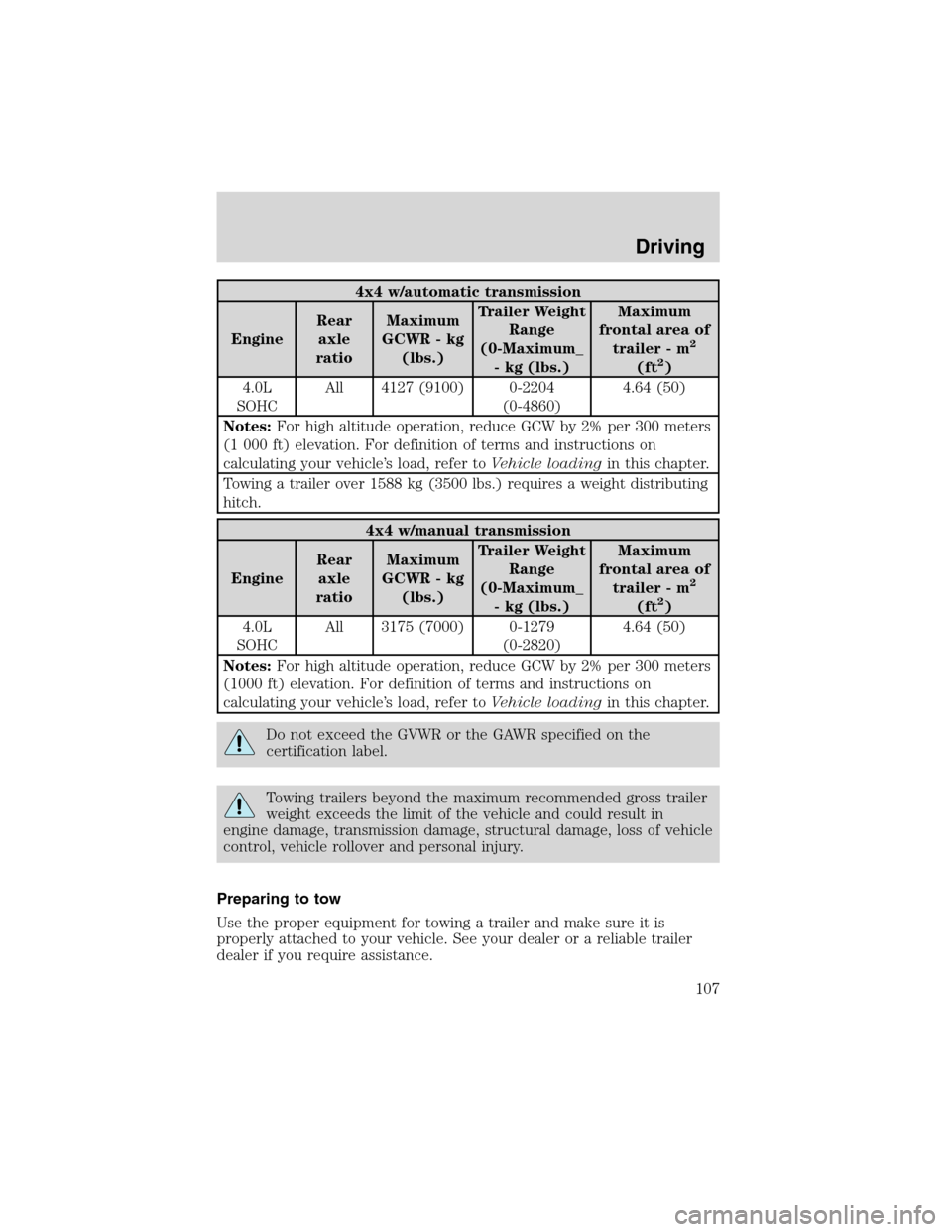
4x4 w/automatic transmission
EngineRear
axle
ratioMaximum
GCWR - kg
(lbs.)Trailer Weight
Range
(0-Maximum_
- kg (lbs.)Maximum
frontal area of
trailer - m
2
(ft2)
4.0L
SOHCAll 4127 (9100) 0-2204
(0-4860)4.64 (50)
Notes:For high altitude operation, reduce GCW by 2% per 300 meters
(1 000 ft) elevation. For definition of terms and instructions on
calculating your vehicle’s load, refer toVehicle loadingin this chapter.
Towing a trailer over 1588 kg (3500 lbs.) requires a weight distributing
hitch.
4x4 w/manual transmission
EngineRear
axle
ratioMaximum
GCWR - kg
(lbs.)Trailer Weight
Range
(0-Maximum_
- kg (lbs.)Maximum
frontal area of
trailer - m
2
(ft2)
4.0L
SOHCAll 3175 (7000) 0-1279
(0-2820)4.64 (50)
Notes:For high altitude operation, reduce GCW by 2% per 300 meters
(1000 ft) elevation. For definition of terms and instructions on
calculating your vehicle’s load, refer toVehicle loadingin this chapter.
Do not exceed the GVWR or the GAWR specified on the
certification label.
Towing trailers beyond the maximum recommended gross trailer
weight exceeds the limit of the vehicle and could result in
engine damage, transmission damage, structural damage, loss of vehicle
control, vehicle rollover and personal injury.
Preparing to tow
Use the proper equipment for towing a trailer and make sure it is
properly attached to your vehicle. See your dealer or a reliable trailer
dealer if you require assistance.
Driving
107
Page 109 of 184
Driving while you tow
When towing a trailer:
•Turn off your speed control. The speed control may shut off
automatically when you are towing on long, steep grades.
•Consult your local motor vehicle speed regulations for towing a trailer.
•Use a lower gear when towing up or down steep hills.
•Anticipate stops and brake gradually.
Servicing after towing
If you tow a trailer for long distances, your vehicle will require more
frequent service intervals. Refer to your scheduled maintenance guide for
more information.
Trailer towing tips
•Practice turning, stopping and backing up before starting on a trip to
get the feel of the vehicle/trailer combination. When turning, make
wider turns so the trailer wheels will clear curbs and other obstacles.
•Allow more distance for stopping with a trailer attached.
•The trailer tongue weight should be no more than 10–15% of the
loaded trailer weight.
•After you have traveled 80 km (50 miles), thoroughly check your
hitch, electrical connections and trailer wheel lug nuts.
•When stopped in traffic for long periods of time in hot weather, place
the gearshift in P (Park) (automatic transmissions) or N (Neutral)
(manual transmissions). This aids engine cooling and air conditioner
efficiency.
•Vehicles with trailers should not be parked on a grade. If you must
park on a grade, place wheel chocks under the trailer’s wheels.
Launching or retrieving a boat
When backing down a ramp during boat launching or retrieval:
•do not allow the static water level to rise above the bottom edge of
the rear bumper.
•do not allow waves to break higher than 15 cm (6 inches) above the
bottom edge of the rear bumper.
Exceeding these limits may allow water to enter critical vehicle
components, adversely affecting driveability, emissions, reliability and
Driving
109
Page 112 of 184
If you need to arrange roadside assistance for yourself, Ford Motor
Company will reimburse a reasonable amount. To obtain reimbursement
information, U.S. Ford or Mercury vehicles customers call
1-800-241-3673; Lincoln vehicle customers call 1–800–521–4140.
Canadian customers who need to obtain reimbursement information, call
1–800–665–2006.
Roadside coverage beyond basic warranty
In the United States, you may purchase additional roadside assistance
coverage beyond this period through the Ford Auto Club by contacting
your Ford or Lincoln Mercury dealer.
Similarly in Canada, for uninterrupted Roadside Assistance coverage, you
may purchase extended coverage prior to your Basic Warranty’s Roadside
Assistance expiring. For more information and enrollment, contact
1–877–294–2582 or visit our website at www.ford.ca.
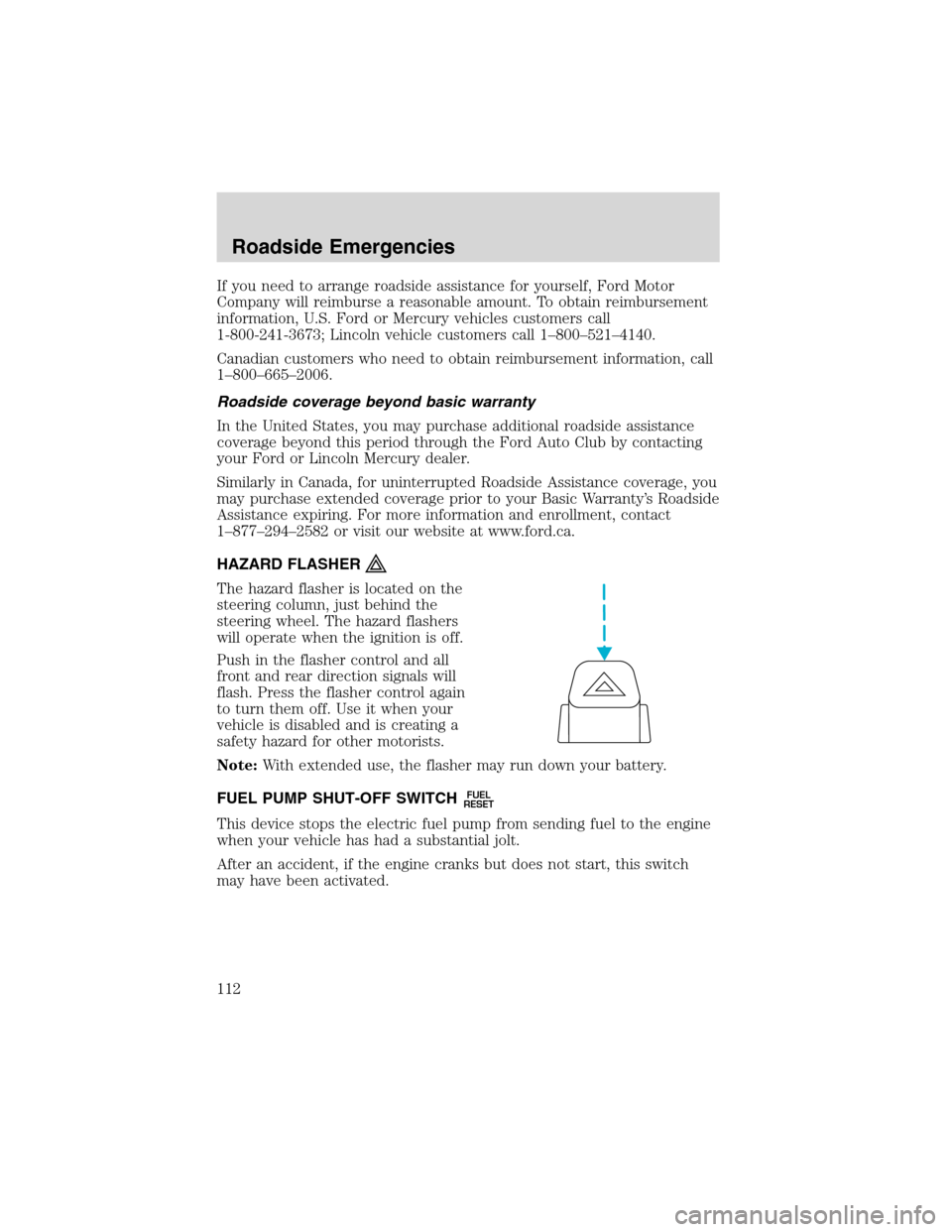
HAZARD FLASHER
The hazard flasher is located on the
steering column, just behind the
steering wheel. The hazard flashers
will operate when the ignition is off.
Push in the flasher control and all
front and rear direction signals will
flash. Press the flasher control again
to turn them off. Use it when your
vehicle is disabled and is creating a
safety hazard for other motorists.
Note:With extended use, the flasher may run down your battery.
FUEL PUMP SHUT-OFF SWITCH
FUEL
RESET
This device stops the electric fuel pump from sending fuel to the engine
when your vehicle has had a substantial jolt.
After an accident, if the engine cranks but does not start, this switch
may have been activated.
Roadside Emergencies
112