mirror FORD F-150 2018 Owner's Manual
[x] Cancel search | Manufacturer: FORD, Model Year: 2018, Model line: F-150, Model: FORD F-150 2018Pages: 641, PDF Size: 8.37 MB
Page 266 of 641
Zone coverage also decreases when
parking at narrow angles. The sensor on
the left-hand side is mostly obstructed and
zone coverage on that side is severely
reduced.
System Lights, Messages and
Audible Alerts
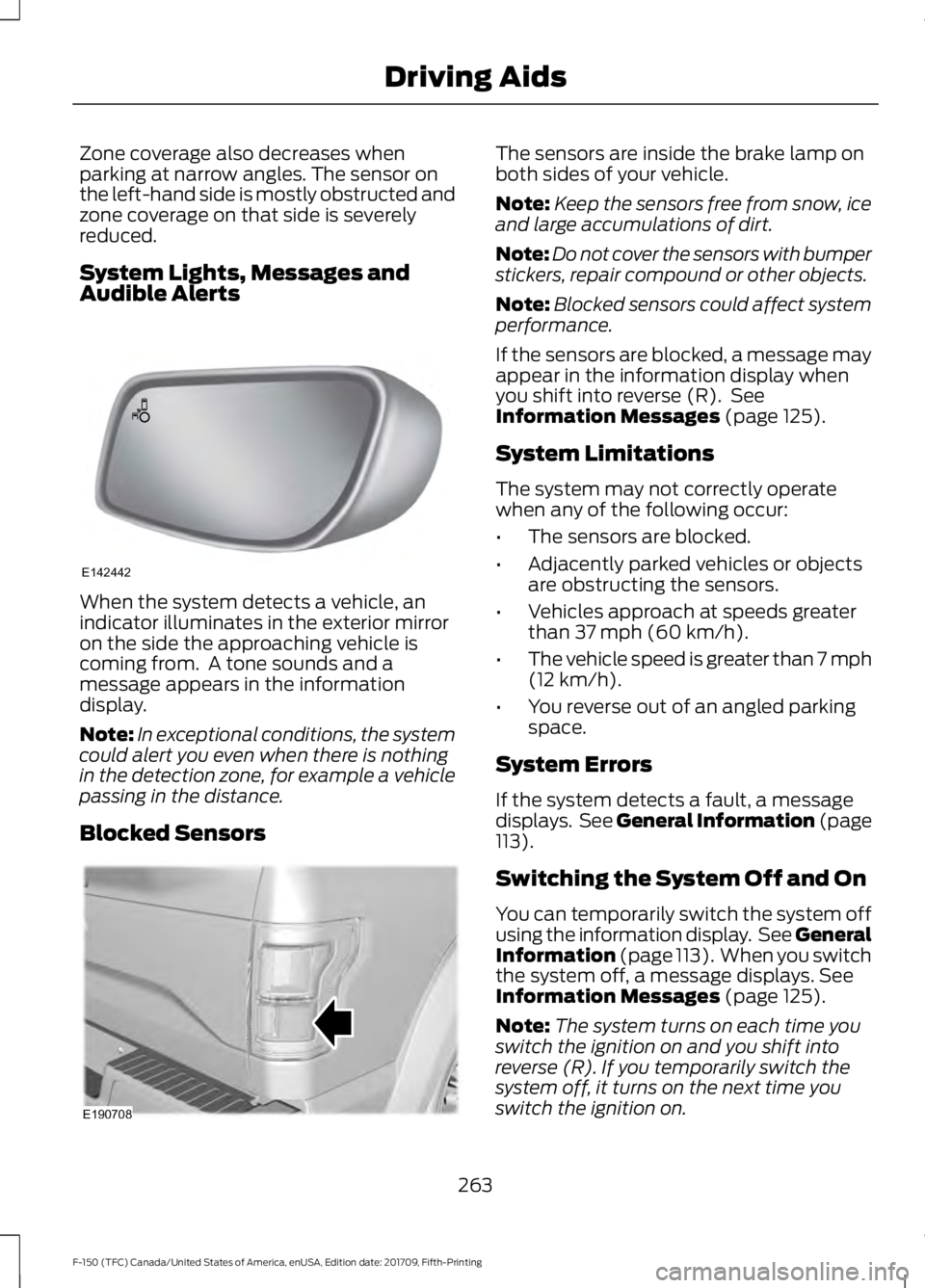
When the system detects a vehicle, an
indicator illuminates in the exterior mirror
on the side the approaching vehicle is
coming from. A tone sounds and a
message appears in the information
display.
Note:
In exceptional conditions, the system
could alert you even when there is nothing
in the detection zone, for example a vehicle
passing in the distance.
Blocked Sensors The sensors are inside the brake lamp on
both sides of your vehicle.
Note:
Keep the sensors free from snow, ice
and large accumulations of dirt.
Note: Do not cover the sensors with bumper
stickers, repair compound or other objects.
Note: Blocked sensors could affect system
performance.
If the sensors are blocked, a message may
appear in the information display when
you shift into reverse (R). See
Information Messages (page 125).
System Limitations
The system may not correctly operate
when any of the following occur:
• The sensors are blocked.
• Adjacently parked vehicles or objects
are obstructing the sensors.
• Vehicles approach at speeds greater
than
37 mph (60 km/h).
• The vehicle speed is greater than 7 mph
(12 km/h)
.
• You reverse out of an angled parking
space.
System Errors
If the system detects a fault, a message
displays. See General Information (page
113
).
Switching the System Off and On
You can temporarily switch the system off
using the information display. See
General
Information (page 113). When you switch
the system off, a message displays. See
Information Messages (page 125).
Note: The system turns on each time you
switch the ignition on and you shift into
reverse (R). If you temporarily switch the
system off, it turns on the next time you
switch the ignition on.
263
F-150 (TFC) Canada/United States of America, enUSA, Edition date: 201709, Fifth-Printing Driving AidsE142442 E190708
Page 285 of 641
TRAILER REVERSING AIDS (IF
EQUIPPED)
Pro Trailer Backup Assist™ WARNING:
Driving while
distracted can result in loss of vehicle
control, crash and injury. We strongly
recommend that you use extreme
caution when using any device that may
take your focus off the road. Your
primary responsibility is the safe
operation of your vehicle. We
recommend against the use of any
hand-held device while driving and
encourage the use of voice-operated
systems when possible. Make sure you
are aware of all applicable local laws
that may affect the use of electronic
devices while driving. WARNING: This system is an extra
driving aid. It does not replace your
attention and judgment, or the need to
apply the brakes. This system does NOT
automatically brake your vehicle. If you
fail to press the brake pedal when
necessary, you may collide with another
vehicle.
Note: The system is not a substitute for
safe driving practices.
Note: You must always be aware of the
vehicle and trailer combination, and the
surrounding environment.
Note: The system does not detect or
prevent your vehicle or trailer from making
contact with obstacles in the surrounding
environment.
Note: Keep in mind that the front end of
your vehicle swings out when changing the
direction of the trailer. Note:
The system relies on user
measurements to determine sticker
placement and system limits. It is critical to
take the key measurements correctly.
Incorrect measurements can result in the
improper function of the system up to and
including contact between the vehicle and
trailer.
Note: The system limits vehicle speed when
backing up. The system is not a replacement
for proper use of the throttle and brake
pedals.
Principle of Operation
This feature helps you to steer your vehicle
when reversing with a trailer. Turn and hold
the control knob in the direction you want
the trailer to go and the system takes over
the steering. This allows you to focus on
checking the mirrors and operating the
brake and accelerator.
Each trailer you use with your vehicle has
to be setup once.
You must take care to follow the setup
process accurately, to make sure the
sticker is placed correctly.
Contact your dealership if you need
assistance in setting up your trailer.
Setting Up Pro Trailer Backup
Assist
Note: Your vehicle saves the trailer
information when you enter it into the
system. A maximum of 10 trailers can be
added to the system.
Step 1: Position your Vehicle and Trailer
Hitch your trailer to the truck and connect
the electrical wiring harness. Check to
make sure that the wiring is working.
See
Essential Towing Checks (page 304).
282
F-150 (TFC) Canada/United States of America, enUSA, Edition date: 201709, Fifth-Printing Towing
Page 343 of 641
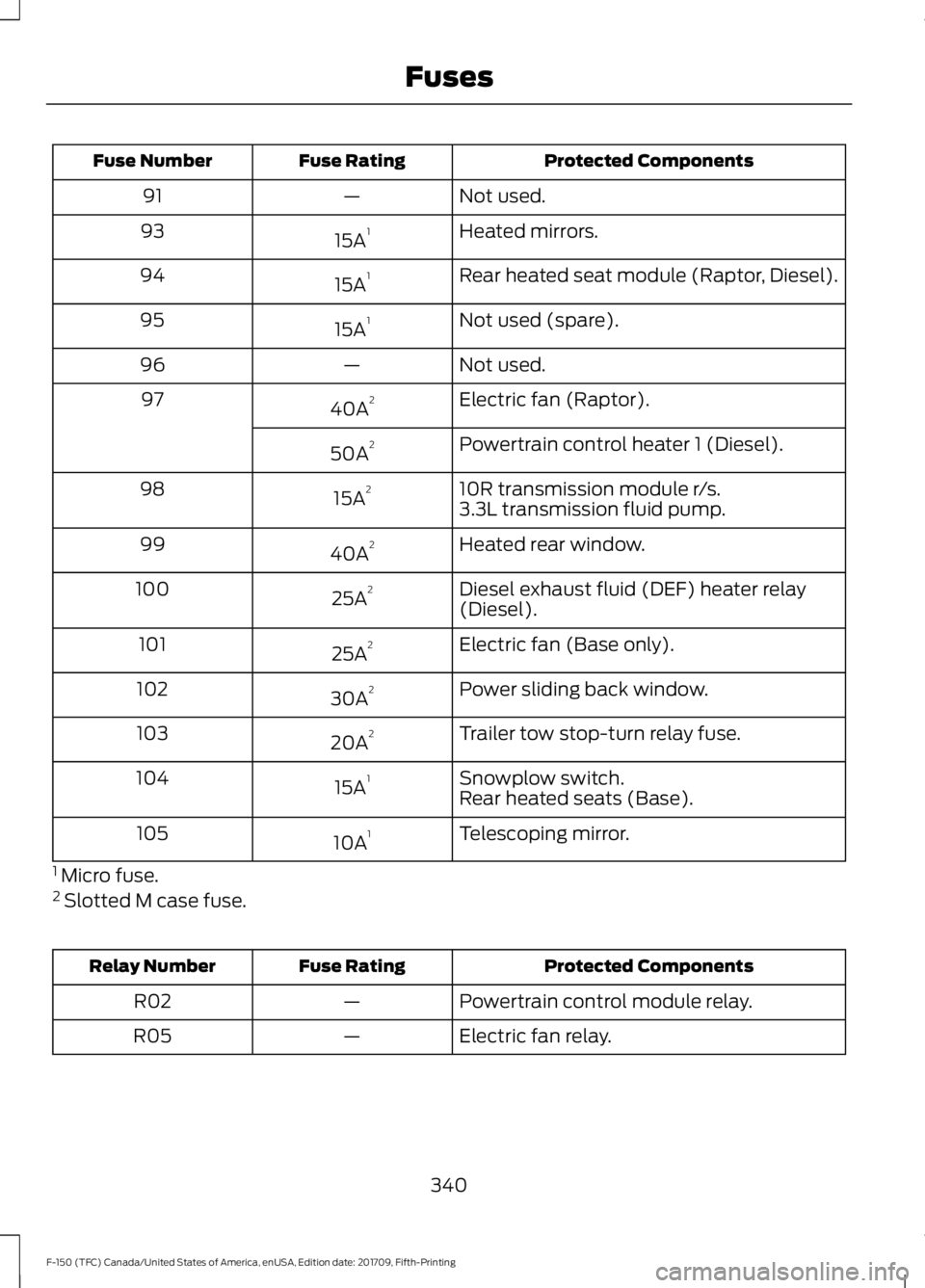
Protected Components
Fuse Rating
Fuse Number
Not used.
—
91
Heated mirrors.
15A 1
93
Rear heated seat module (Raptor, Diesel).
15A 1
94
Not used (spare).
15A 1
95
Not used.
—
96
Electric fan (Raptor).
40A 2
97
Powertrain control heater 1 (Diesel).
50A 2
10R transmission module r/s.
15A 2
98
3.3L transmission fluid pump.
Heated rear window.
40A 2
99
Diesel exhaust fluid (DEF) heater relay
(Diesel).
25A 2
100
Electric fan (Base only).
25A 2
101
Power sliding back window.
30A 2
102
Trailer tow stop-turn relay fuse.
20A 2
103
Snowplow switch.
15A 1
104
Rear heated seats (Base).
Telescoping mirror.
10A 1
105
1 Micro fuse.
2 Slotted M case fuse. Protected Components
Fuse Rating
Relay Number
Powertrain control module relay.
—
R02
Electric fan relay.
—
R05
340
F-150 (TFC) Canada/United States of America, enUSA, Edition date: 201709, Fifth-Printing Fuses
Page 346 of 641
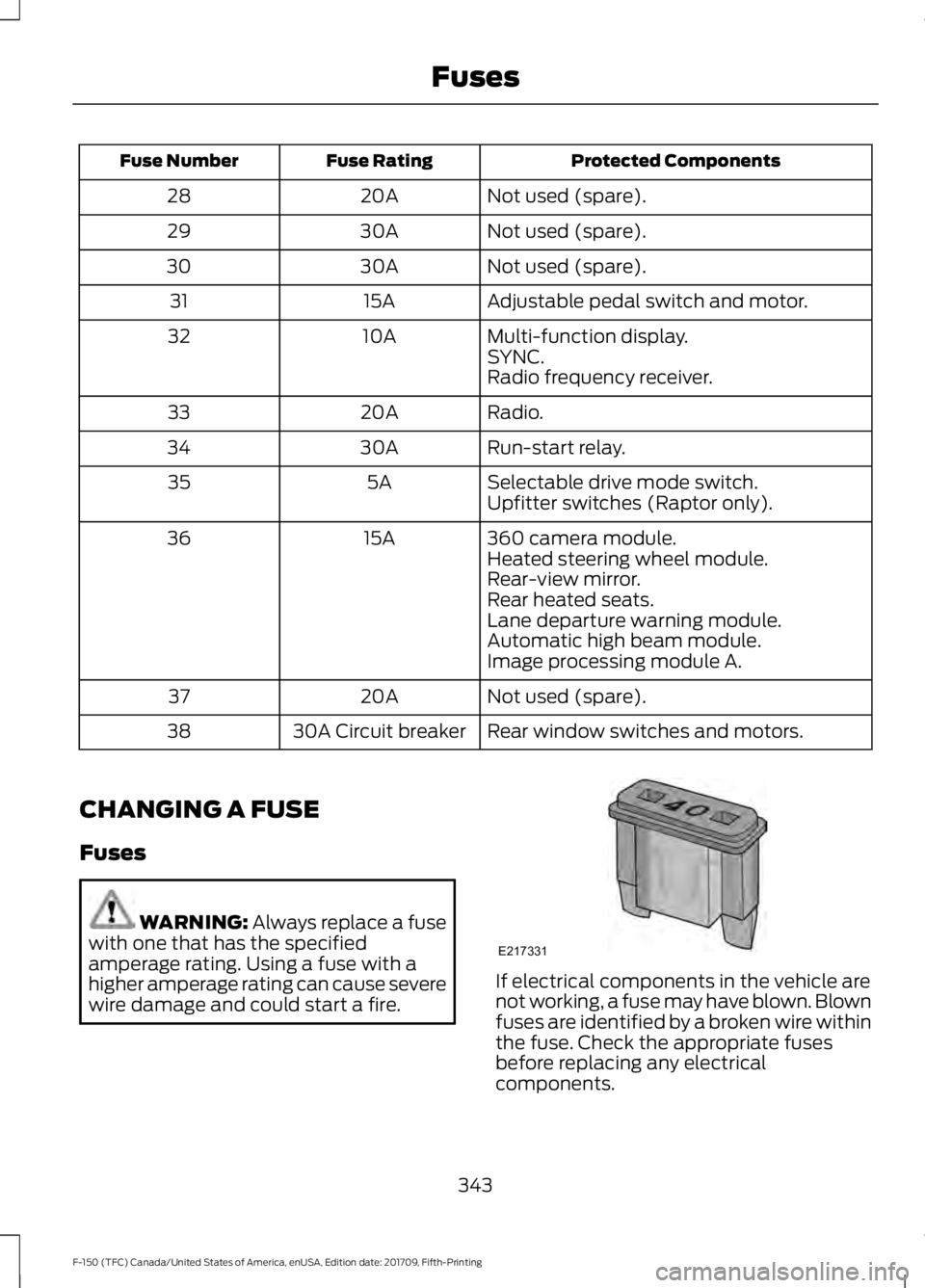
Protected Components
Fuse Rating
Fuse Number
Not used (spare).
20A
28
Not used (spare).
30A
29
Not used (spare).
30A
30
Adjustable pedal switch and motor.
15A
31
Multi-function display.
10A
32
SYNC.
Radio frequency receiver.
Radio.
20A
33
Run-start relay.
30A
34
Selectable drive mode switch.
5A
35
Upfitter switches (Raptor only).
360 camera module.
15A
36
Heated steering wheel module.
Rear-view mirror.
Rear heated seats.
Lane departure warning module.
Automatic high beam module.
Image processing module A.
Not used (spare).
20A
37
Rear window switches and motors.
30A Circuit breaker
38
CHANGING A FUSE
Fuses WARNING: Always replace a fuse
with one that has the specified
amperage rating. Using a fuse with a
higher amperage rating can cause severe
wire damage and could start a fire. If electrical components in the vehicle are
not working, a fuse may have blown. Blown
fuses are identified by a broken wire within
the fuse. Check the appropriate fuses
before replacing any electrical
components.
343
F-150 (TFC) Canada/United States of America, enUSA, Edition date: 201709, Fifth-Printing FusesE217331
Page 364 of 641
WARNING: Keep batteries out of
reach of children. Batteries contain
sulfuric acid. Avoid contact with skin,
eyes or clothing. Shield your eyes when
working near the battery to protect
against possible splashing of acid
solution. In case of acid contact with skin
or eyes, flush immediately with water for
a minimum of 15 minutes and get prompt
medical attention. If acid is swallowed,
call a physician immediately. WARNING:
Battery posts,
terminals and related accessories
contain lead and lead compounds,
chemicals known to the State of
California to cause cancer and
reproductive harm. Wash your hands
after handling
. WARNING: This vehicle may have
more than one battery. Removing the
battery cables from only one battery
does not disconnect your vehicle
electrical system. Make sure you
disconnect the battery cables from all
batteries when disconnecting power.
Failure to do so may cause serious
personal injury or property damage.
Your vehicle is fitted with a Motorcraft
maintenance-free battery which normally
does not require additional water.
When a battery replacement is required,
you must use a recommended
replacement battery that matches the
electrical requirements of the vehicle.
Note: After cleaning or replacing the
battery, make sure you reinstall the battery
cover or shield. Note:
If you add electrical accessories or
components to the vehicle, it may adversely
affect the low voltage battery performance
and durability. This may also affect the
performance of other electrical systems in
the vehicle.
For longer, trouble-free operation, keep the
top of the battery clean and dry.
If you see any corrosion on the battery or
terminals, remove the cables from the
terminals and clean with a wire brush. You
can neutralize the acid with a solution of
baking soda and water.
Because your vehicle ’s engine is
electronically controlled by a computer,
some control conditions are maintained
by power from the battery. When the
battery is disconnected or a new battery
is installed, the engine must relearn its idle
and fuel trim strategy for optimum
driveability and performance. Flexible fuel
vehicles (FFV) must also relearn the
ethanol content of the fuel for optimum
driveability and performance.
To restore the settings, do the following:
1. Apply the parking brake.
2. Shift into park (P) or neutral (N).
3. Switch off all accessories.
4. Press the brake pedal and start your vehicle.
5. Run the engine until it reaches normal operating temperature. While the
engine is warming up, complete the
following: Reset the clock. Reset the
power windows bounce-back feature.
See Windows and Mirrors (page 98).
Reset the radio station presets. See
Audio System
(page 448).
6. Allow the engine to idle for at least one
minute.
7. Drive the vehicle at least 10 mi (16 km)
to completely relearn the idle trim and
fuel trim strategy.
361
F-150 (TFC) Canada/United States of America, enUSA, Edition date: 201709, Fifth-Printing Maintenance
Page 371 of 641
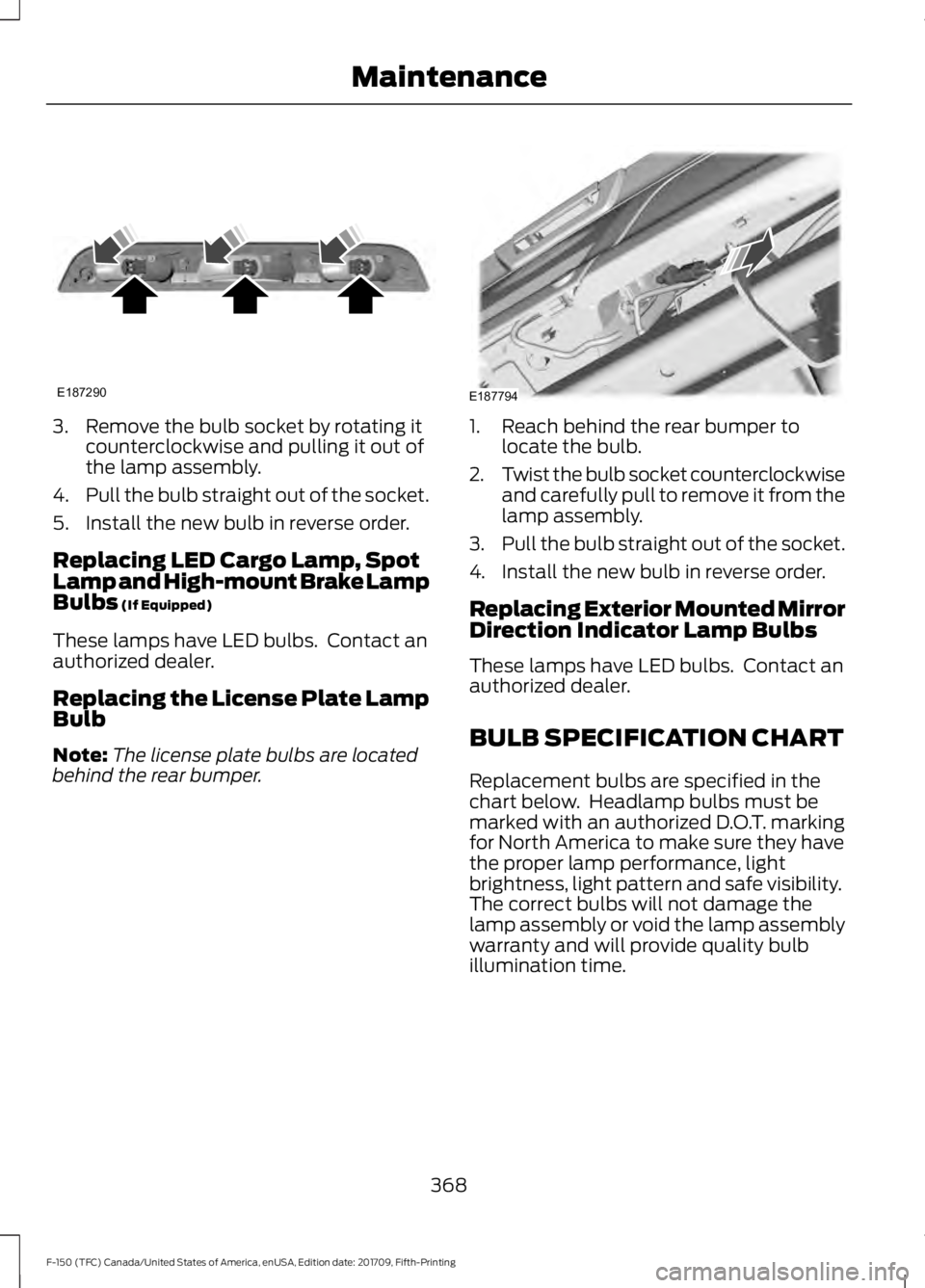
3. Remove the bulb socket by rotating it
counterclockwise and pulling it out of
the lamp assembly.
4. Pull the bulb straight out of the socket.
5. Install the new bulb in reverse order.
Replacing LED Cargo Lamp, Spot
Lamp and High-mount Brake Lamp
Bulbs (If Equipped)
These lamps have LED bulbs. Contact an
authorized dealer.
Replacing the License Plate Lamp
Bulb
Note: The license plate bulbs are located
behind the rear bumper. 1. Reach behind the rear bumper to
locate the bulb.
2. Twist the bulb socket counterclockwise
and carefully pull to remove it from the
lamp assembly.
3. Pull the bulb straight out of the socket.
4. Install the new bulb in reverse order.
Replacing Exterior Mounted Mirror
Direction Indicator Lamp Bulbs
These lamps have LED bulbs. Contact an
authorized dealer.
BULB SPECIFICATION CHART
Replacement bulbs are specified in the
chart below. Headlamp bulbs must be
marked with an authorized D.O.T. marking
for North America to make sure they have
the proper lamp performance, light
brightness, light pattern and safe visibility.
The correct bulbs will not damage the
lamp assembly or void the lamp assembly
warranty and will provide quality bulb
illumination time.
368
F-150 (TFC) Canada/United States of America, enUSA, Edition date: 201709, Fifth-Printing MaintenanceE187290 E187794
Page 378 of 641
WAXING
Regular waxing is necessary to protect your
car's paint from the elements. We
recommend that you wash and wax the
painted surface once or twice a year.
When washing and waxing, park your
vehicle in a shaded area out of direct
sunlight. Always wash your vehicle before
applying wax.
•
Use a quality wax that does not contain
abrasives.
• Follow the manufacturer ’s instructions
to apply and remove the wax.
• Apply a small amount of wax in a
back-and-forth motion, not in circles.
• Do not allow wax to come in contact
with any non-body (low-gloss black)
colored trim. The wax will discolor or
stain the parts over time.
•Roof racks.
• Bumpers.
• Grained door handles.
• Side moldings.
• Mirror housings.
• Windshield cowl area.
• Do not apply wax to glass areas.
• After waxing, your car's paint should
feel smooth, and be free of streaks and
smudges.
CLEANING THE ENGINE
Engines are more efficient when they are
clean because grease and dirt buildup keep
the engine warmer than normal. When washing:
•
Take care when using a power washer
to clean the engine. The high-pressure
fluid could penetrate the sealed parts
and cause damage.
• Do not spray a hot engine with cold
water to avoid cracking the engine
block or other engine components.
• Spray Motorcraft Engine Shampoo and
Degreaser on all parts that require
cleaning and pressure rinse clean. In
Canada, use Motorcraft Engine
Shampoo.
• Never wash or rinse the engine while it
is hot or running; water in the running
engine may cause internal damage.
• Never wash or rinse any ignition coil,
spark plug wire or spark plug well, or
the area in and around these locations.
• Cover the battery, power distribution
box, and air filter assembly to prevent
water damage when cleaning the
engine.
CLEANING THE EXHAUST WARNING: Failure to keep the
holes in the exhaust tailpipe clean and
free of debris or foreign material may
result in blocked holes. Blocked holes
may result in increased exhaust gas
temperatures, vehicle damage, property
damage or personal injury.
375
F-150 (TFC) Canada/United States of America, enUSA, Edition date: 201709, Fifth-Printing Vehicle Care
Page 380 of 641
For fabric, carpets, cloth seats and seats
equipped with side airbags:
•
Remove dust and loose dirt with a
vacuum cleaner.
• Remove light stains and soil with
Motorcraft Professional Strength
Carpet & Upholstery Cleaner.
• If grease or tar is present on the
material, spot-clean the area first with
Motorcraft Spot and Stain Remover. In
Canada, use Motorcraft Multi-Purpose
Cleaner.
• If a ring forms on the fabric after spot
cleaning, clean the entire area
immediately (but do not oversaturate)
or the ring will set.
• Do not use household cleaning
products or glass cleaners, which can
stain and discolor the fabric and affect
the flame retardant abilities of the seat
materials.
Mirrors
Do not clean the housing or glass of any
mirror with harsh abrasives, fuel or other
petroleum or ammonia-based cleaning
products.
CLEANING THE INSTRUMENT
PANEL AND INSTRUMENT
CLUSTER LENS WARNING: Do not use chemical
solvents or strong detergents when
cleaning the steering wheel or
instrument panel to avoid contamination
of the airbag system.
Clean the instrument panel and cluster
lens with a clean, damp, white cotton
cloth, then use a clean and dry white
cotton cloth to dry these areas. •
Avoid cleaners or polishes that increase
the gloss of the upper portion of the
instrument panel. The dull finish in this
area helps protect you from
undesirable windshield reflection.
• Be certain to wash or wipe your hands
clean if you have been in contact with
certain products such as insect
repellent and suntan lotion in order to
avoid possible damage to the interior
painted surfaces.
• Do not use household or glass cleaners
as these may damage the finish of the
instrument panel, interior trim and
cluster lens.
• Do not allow air fresheners and hand
sanitizers to spill onto interior surfaces.
If a spill occurs, wipe off immediately.
Damage may not be covered by your
warranty.
If a staining liquid like coffee or juice has
been spilled on the instrument panel or on
interior trim surfaces, clean as follows:
1. Wipe up spilled liquid using a clean, white, cotton cloth.
2. Wipe the surface with a damp, clean, white cotton cloth. For more thorough
cleaning, use a mild soap and water
solution. If the spot cannot be
completely cleaned by this method,
the area may be cleaned using a
commercially available cleaning
product designed for automotive
interiors.
3. If necessary, apply more soap and water solution or cleaning product to
a clean, white, cotton cloth and press
the cloth onto the soiled area. Allow
this to set at room temperature for 30
minutes.
4. Remove the soaked cloth and if it is not
soiled badly, use this cloth to clean the
area by using a rubbing motion for 60
seconds.
377
F-150 (TFC) Canada/United States of America, enUSA, Edition date: 201709, Fifth-Printing Vehicle Care
Page 559 of 641
For a complete listing of the accessories
that are available for your vehicle, please
contact your authorized dealer or visit the
online store web site:
Web Address (United States)
www.Accessories.Ford.com Web Address (Canada)
www.Accessories.Ford.ca
Ford Accessories are available for your
vehicle through an authorized Ford dealer.
Ford Motor Company will repair or replace
any properly authorized dealer-installed
Ford Original Accessory found to be
defective in factory-supplied materials or
workmanship during the warranty period,
as well as any component damaged by the
defective accessories.
Ford Motor Company will warrant your
Ford Original Accessory through the
warranty that provides the greatest
benefit:
• 24 months, unlimited mileage.
• The remainder of your new vehicle
limited warranty.
Contact an authorized dealer for details
and a copy of the warranty.
Exterior Style
• Bed rails.
• Chrome exhaust tips.
• Custom graphics*.
• Door sills*.
• Fender flares*.
• Fog lamps*.
• Hood deflector.
• Running boards.
• Side window deflectors*. •
Splash guards.
• Tailgate dampener.
• Tow hooks.
• Trailer tow mirrors.
• Trim kits.
Interior Style
• Ambient lighting.
• Floor mats.
• Premium floor liners.
Lifestyle
• Audio upgrade*.
• Bed divider.
• Bed extender.
• Bed lighting.
• Bedliners and bedmats.
• Bed ramps.
• Bed side step.
• Ford Telematics ™*.
• Hitch balls and towbars.
• Interior cargo organization and
management.
• In-vehicle safe*.
• Racks and carriers*.
• Rear-seat entertainment*.
• Smoker's package.
• Sportliner cargo liner*.
• Tablet cradle*
• Tonneau/Bed cover*.
• Trailer brake controller.
• Trailer hitches, wiring harnesses and
accessories.
• Truck bed camping tent*.
• Truck bed cargo organization and
management.
• Wireless charging*.
556
F-150 (TFC) Canada/United States of America, enUSA, Edition date: 201709, Fifth-Printing Accessories
Page 630 of 641
Changing a Bulb..........................................364
Accessing the Halogen High Beam, Low
Beam and Direction Indicator
Bulbs................................................................. 365
Replacing Brake, Rear, Direction Indicator and Reverse Lamp Bulbs........................... 367
Replacing Cargo Lamp and High-mount Brake Lamp Bulbs......................................... 367
Replacing Exterior Mounted Mirror Direction Indicator Lamp Bulbs................................. 368
Replacing Fog Lamp Bulbs............................ 366
Replacing LED Brake, Rear, Direction Indicator and Reverse Lamp Bulbs........367
Replacing LED Cargo Lamp, Spot Lamp and High-mount Brake Lamp Bulbs..............368
Replacing LED Direction Indicator and Side Marker Bulbs................................................... 367
Replacing LED Headlamp Bulbs.................. 367
Replacing Side Marker Bulb.......................... 366
Replacing the Halogen High Beam, Low Beam and Direction Indicator
Bulbs................................................................. 365
Replacing the License Plate Lamp Bulb................................................................... 368
Changing a Fuse..........................................343 Fuses...................................................................... 343
Changing a Road Wheel...........................405 Dissimilar Spare Wheel and Tire Assembly
Information
..................................................... 405
Jacking the Vehicle........................................... 409
Remove the Vehicle Jack and Tool Bag..................................................................... 407
Removing the Spare Tire............................... 408
Stowing the Flat or Spare Tire........................ 411
Stowing the Vehicle Jack and Tool Bag....................................................................... 411
Tire Change Procedure................................... 406
Changing the 12V Battery........................360 Battery Management System....................... 362
Changing the Engine Air Filter - Diesel.............................................................370
Air Filter Restriction Gauge.............................. 371
Changing the Engine Air Filter - Gasoline.......................................................370
Changing the Wiper Blades
.....................363
Checking MyKey System Status...............65
Checking the Wiper Blades
.....................362 Child Restraint and Seatbelt
Maintenance.................................................44
Child Restraint Positioning
.........................33
Child Safety.......................................................18
General Information............................................. 18
Child Safety Locks
.........................................35
Left-Hand Side...................................................... 35
Right-Hand Side................................................... 35
Cleaning Leather Seats.............................378 With King Ranch Edition................................. 378
Without King Ranch Edition.......................... 378
Cleaning Products
.......................................373
Materials................................................................ 373
Cleaning the Engine....................................375
Cleaning the Exhaust..................................375
Cleaning the Exterior..................................373 Cleaning the Headlamps................................ 374
Exterior Chrome Parts...................................... 374
Exterior Plastic Parts......................................... 374
Stripes or Graphics............................................ 374
Underbody............................................................ 374
Under Hood.......................................................... 374
Cleaning the Instrument Panel and Instrument Cluster Lens.........................377
Cleaning the Interior
...................................376
Mirrors..................................................................... 377
Cleaning the Wheels..................................379
Cleaning the Windows and Wiper Blades............................................................376
Clearing All MyKeys.......................................65
Climate...........................................................509
Climate Control.............................................143
Coolant Check See: Engine Coolant Check............................ 354
Crash Sensors and Airbag Indicator.......54
Creating a MyKey...........................................64 Programming/Changing Configurable
Settings............................................................... 64
Cross Traffic Alert.........................................261 Blocked Sensors................................................ 263
Switching the System Off and On..............263
System Errors...................................................... 263
System Lights, Messages and Audible Alerts................................................................. 263
System Limitations........................................... 263
Using the Cross Traffic Alert System..........261
Cruise Control.................................................86 Principle of Operation...................................... 244
627
F-150 (TFC) Canada/United States of America, enUSA, Edition date: 201709, Fifth-Printing Index