lock FORD F-150 2019 Owners Manual
[x] Cancel search | Manufacturer: FORD, Model Year: 2019, Model line: F-150, Model: FORD F-150 2019Pages: 644, PDF Size: 14.81 MB
Page 548 of 644
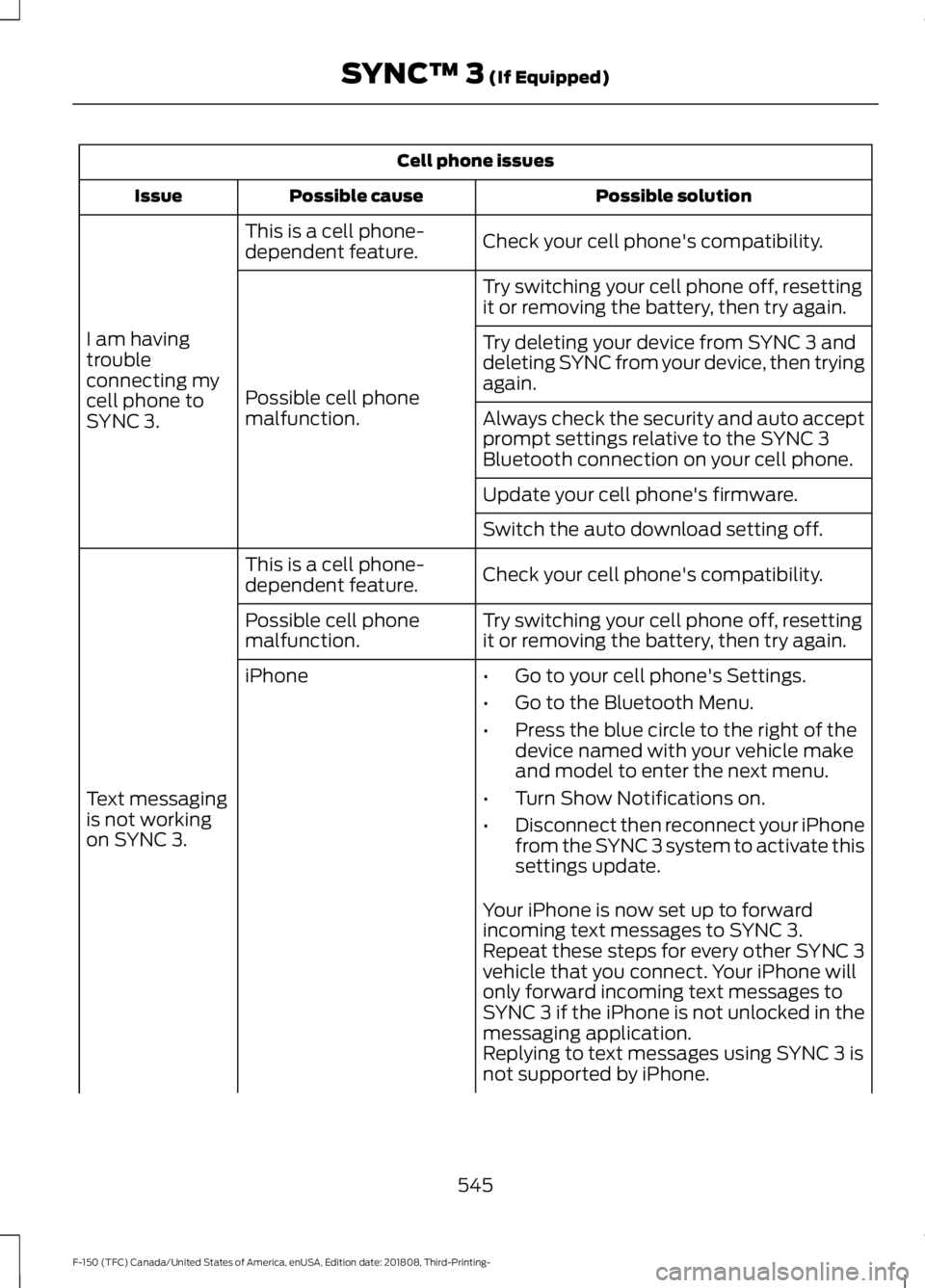
Cell phone issues
Possible solution
Possible cause
Issue
Check your cell phone's compatibility.
This is a cell phone-
dependent feature.
I am having
trouble
connecting my
cell phone to
SYNC 3. Try switching your cell phone off, resetting
it or removing the battery, then try again.
Possible cell phone
malfunction. Try deleting your device from SYNC 3 and
deleting SYNC from your device, then trying
again.
Always check the security and auto accept
prompt settings relative to the SYNC 3
Bluetooth connection on your cell phone.
Update your cell phone's firmware.
Switch the auto download setting off.
Check your cell phone's compatibility.
This is a cell phone-
dependent feature.
Text messaging
is not working
on SYNC 3. Try switching your cell phone off, resetting
it or removing the battery, then try again.
Possible cell phone
malfunction.
iPhone
•Go to your cell phone's Settings.
• Go to the Bluetooth Menu.
• Press the blue circle to the right of the
device named with your vehicle make
and model to enter the next menu.
• Turn Show Notifications on.
• Disconnect then reconnect your iPhone
from the SYNC 3 system to activate this
settings update.
Your iPhone is now set up to forward
incoming text messages to SYNC 3.
Repeat these steps for every other SYNC 3
vehicle that you connect. Your iPhone will
only forward incoming text messages to
SYNC 3 if the iPhone is not unlocked in the
messaging application.
Replying to text messages using SYNC 3 is
not supported by iPhone.
545
F-150 (TFC) Canada/United States of America, enUSA, Edition date: 201808, Third-Printing- SYNC™ 3 (If Equipped)
Page 549 of 644
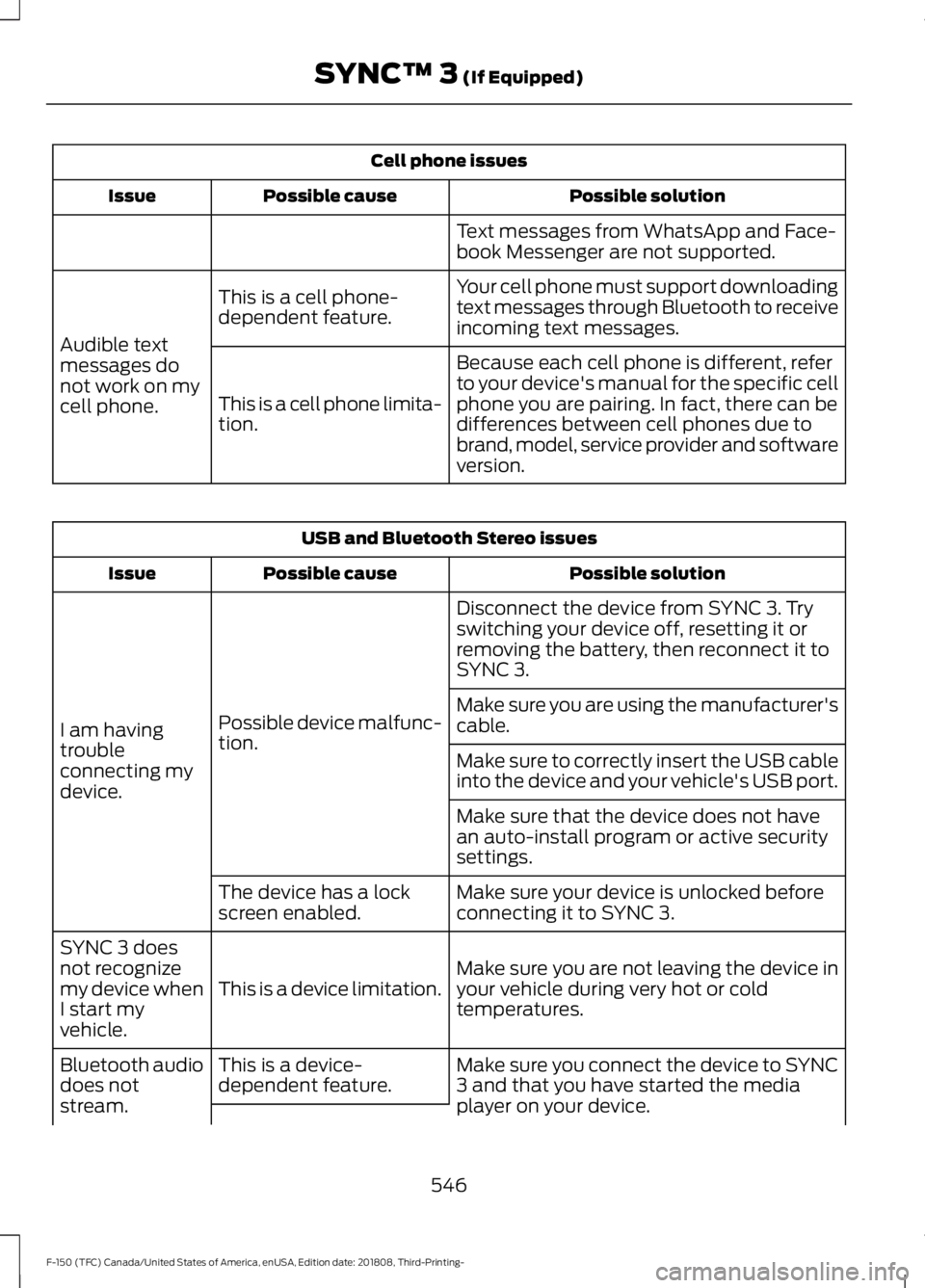
Cell phone issues
Possible solution
Possible cause
Issue
Text messages from WhatsApp and Face-
book Messenger are not supported.
Your cell phone must support downloading
text messages through Bluetooth to receive
incoming text messages.
This is a cell phone-
dependent feature.
Audible text
messages do
not work on my
cell phone. Because each cell phone is different, refer
to your device's manual for the specific cell
phone you are pairing. In fact, there can be
differences between cell phones due to
brand, model, service provider and software
version.
This is a cell phone limita-
tion. USB and Bluetooth Stereo issues
Possible solution
Possible cause
Issue
Disconnect the device from SYNC 3. Try
switching your device off, resetting it or
removing the battery, then reconnect it to
SYNC 3.
Possible device malfunc-
tion.
I am having
trouble
connecting my
device. Make sure you are using the manufacturer's
cable.
Make sure to correctly insert the USB cable
into the device and your vehicle's USB port.
Make sure that the device does not have
an auto-install program or active security
settings.
Make sure your device is unlocked before
connecting it to SYNC 3.
The device has a lock
screen enabled.
Make sure you are not leaving the device in
your vehicle during very hot or cold
temperatures.
This is a device limitation.
SYNC 3 does
not recognize
my device when
I start my
vehicle.
Make sure you connect the device to SYNC
3 and that you have started the media
player on your device.
This is a device-
dependent feature.
Bluetooth audio
does not
stream.
546
F-150 (TFC) Canada/United States of America, enUSA, Edition date: 201808, Third-Printing- SYNC™ 3 (If Equipped)
Page 550 of 644
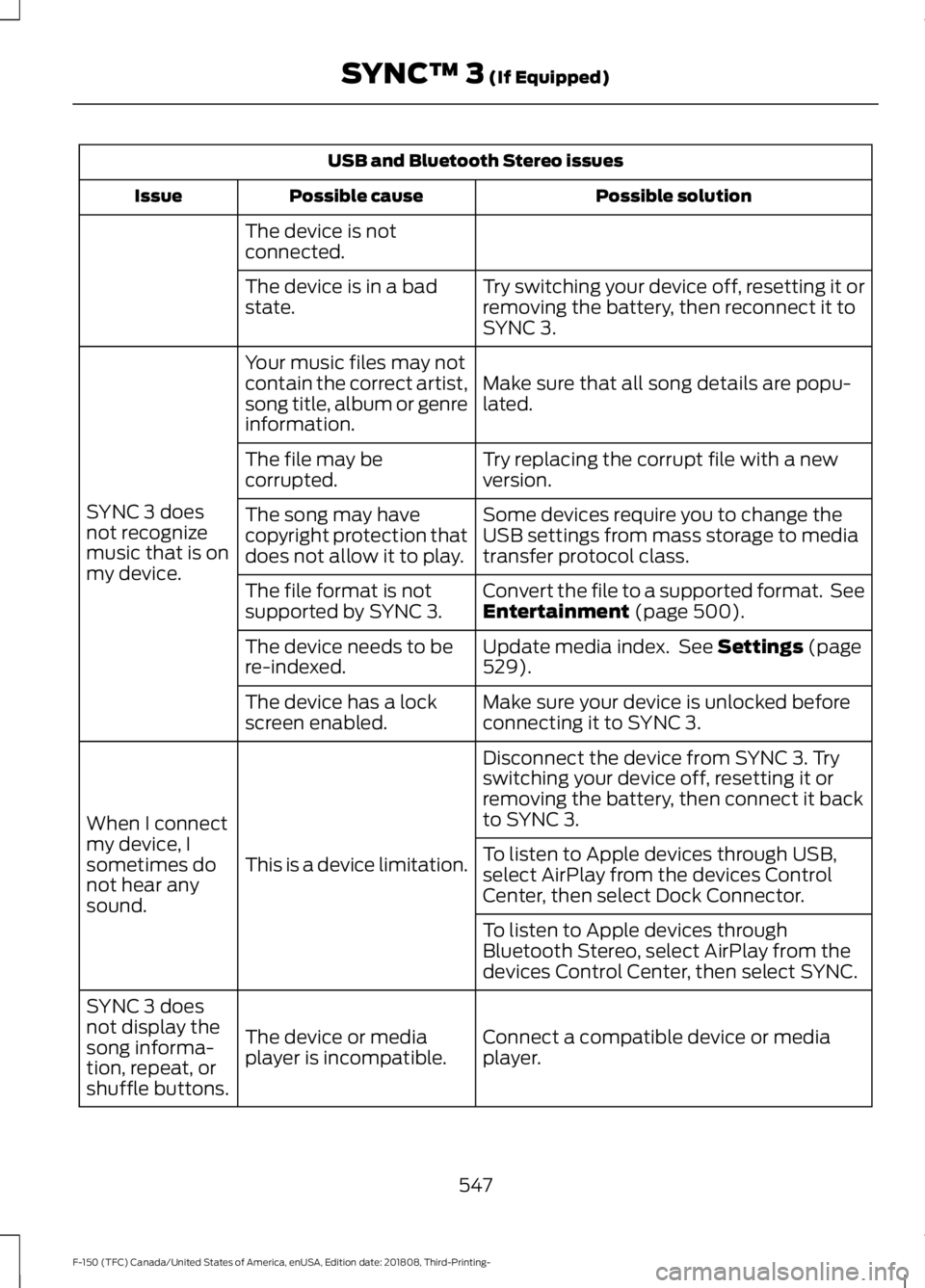
USB and Bluetooth Stereo issues
Possible solution
Possible cause
Issue
The device is not
connected. Try switching your device off, resetting it or
removing the battery, then reconnect it to
SYNC 3.
The device is in a bad
state.
Make sure that all song details are popu-
lated.
Your music files may not
contain the correct artist,
song title, album or genre
information.
SYNC 3 does
not recognize
music that is on
my device. Try replacing the corrupt file with a new
version.
The file may be
corrupted.
Some devices require you to change the
USB settings from mass storage to media
transfer protocol class.
The song may have
copyright protection that
does not allow it to play.
Convert the file to a supported format. See
Entertainment (page 500).
The file format is not
supported by SYNC 3.
Update media index. See
Settings (page
529).
The device needs to be
re-indexed.
Make sure your device is unlocked before
connecting it to SYNC 3.
The device has a lock
screen enabled.
Disconnect the device from SYNC 3. Try
switching your device off, resetting it or
removing the battery, then connect it back
to SYNC 3.
This is a device limitation.
When I connect
my device, I
sometimes do
not hear any
sound. To listen to Apple devices through USB,
select AirPlay from the devices Control
Center, then select Dock Connector.
To listen to Apple devices through
Bluetooth Stereo, select AirPlay from the
devices Control Center, then select SYNC.
Connect a compatible device or media
player.
The device or media
player is incompatible.
SYNC 3 does
not display the
song informa-
tion, repeat, or
shuffle buttons.
547
F-150 (TFC) Canada/United States of America, enUSA, Edition date: 201808, Third-Printing- SYNC™ 3
(If Equipped)
Page 557 of 644
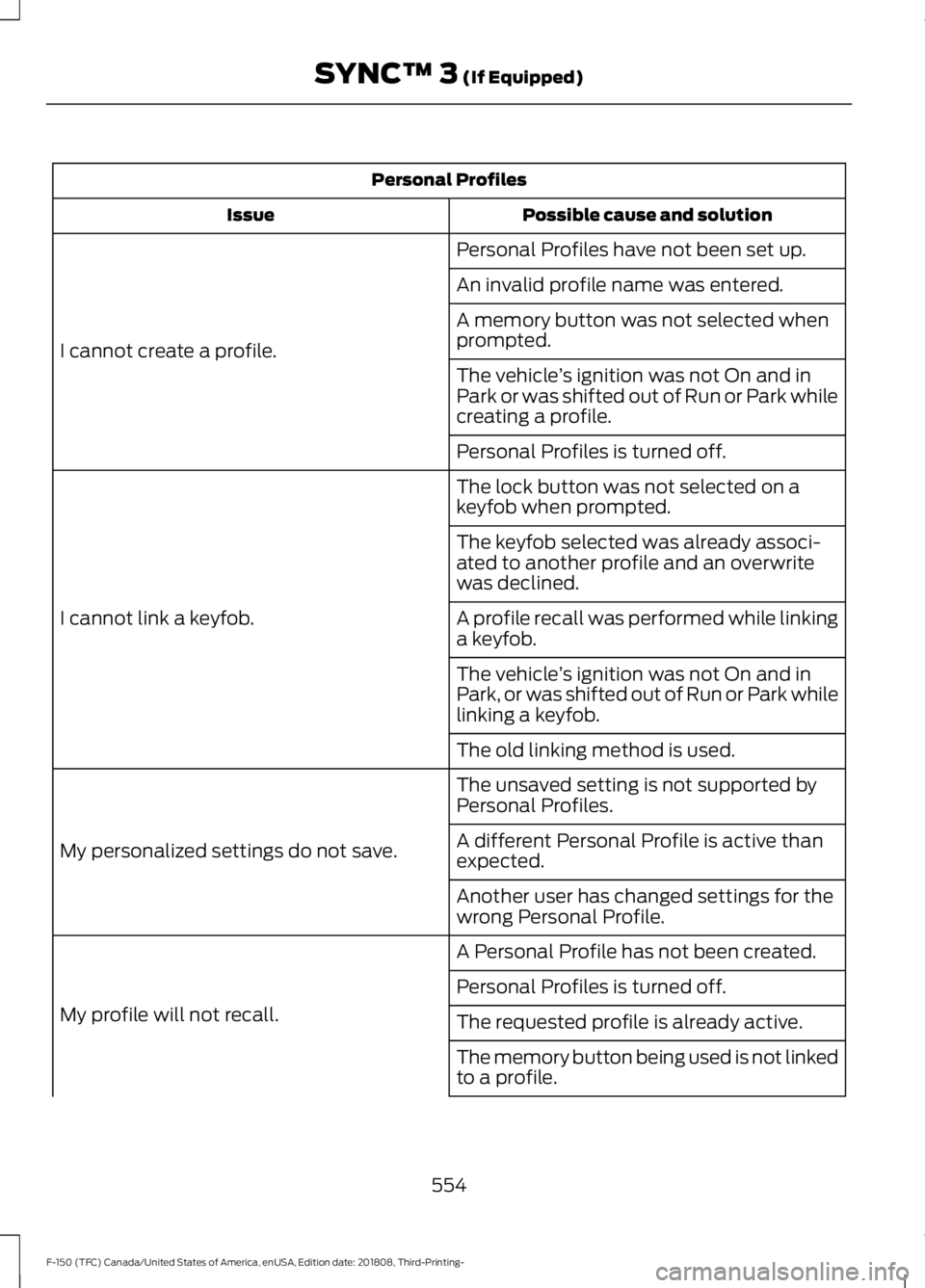
Personal Profiles
Possible cause and solution
Issue
Personal Profiles have not been set up.
I cannot create a profile. An invalid profile name was entered.
A memory button was not selected when
prompted.
The vehicle
’s ignition was not On and in
Park or was shifted out of Run or Park while
creating a profile.
Personal Profiles is turned off.
The lock button was not selected on a
keyfob when prompted.
I cannot link a keyfob. The keyfob selected was already associ-
ated to another profile and an overwrite
was declined.
A profile recall was performed while linking
a keyfob.
The vehicle
’s ignition was not On and in
Park, or was shifted out of Run or Park while
linking a keyfob.
The old linking method is used.
The unsaved setting is not supported by
Personal Profiles.
My personalized settings do not save. A different Personal Profile is active than
expected.
Another user has changed settings for the
wrong Personal Profile.
A Personal Profile has not been created.
My profile will not recall. Personal Profiles is turned off.
The requested profile is already active.
The memory button being used is not linked
to a profile.
554
F-150 (TFC) Canada/United States of America, enUSA, Edition date: 201808, Third-Printing- SYNC™ 3 (If Equipped)
Page 558 of 644
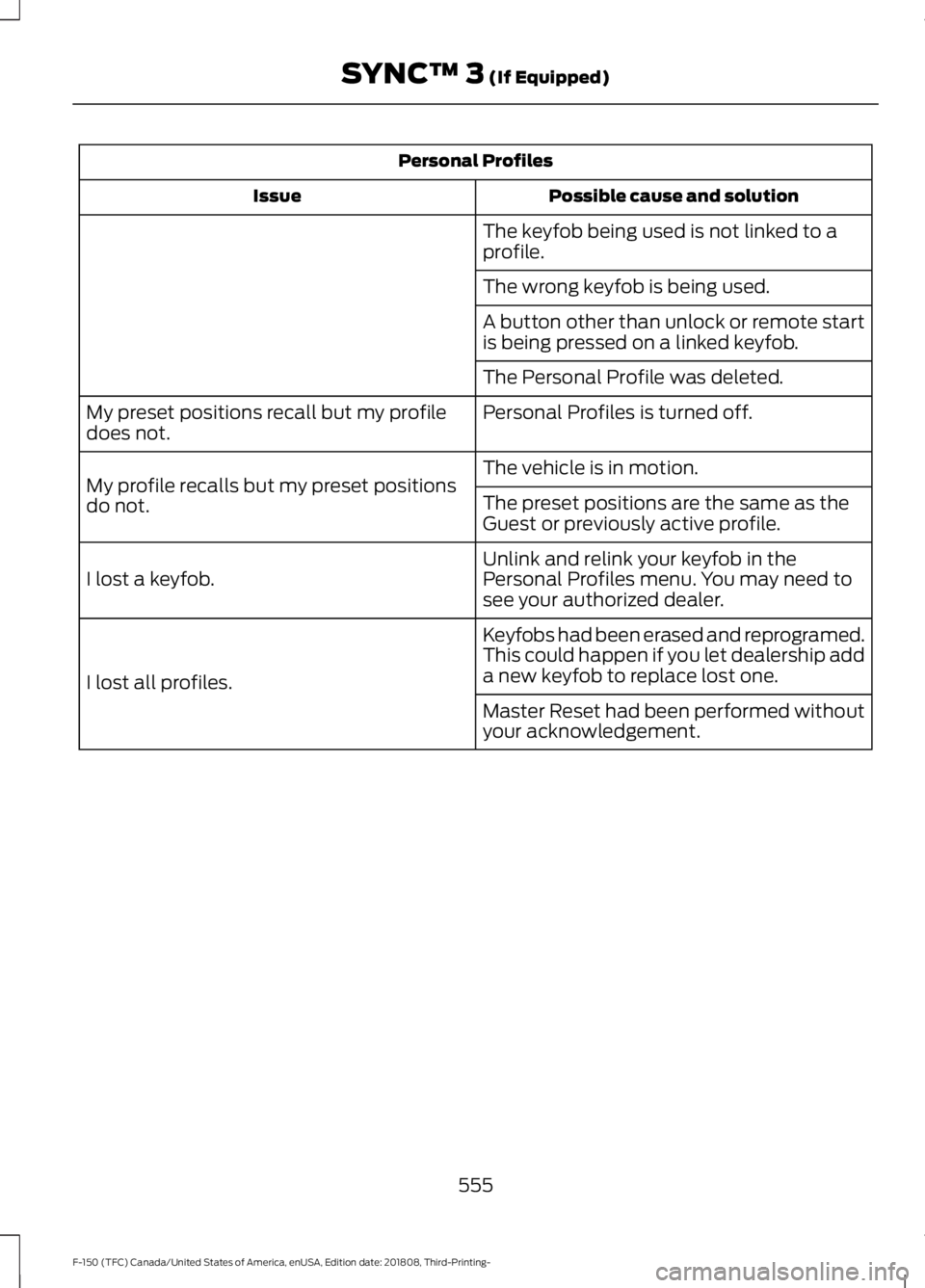
Personal Profiles
Possible cause and solution
Issue
The keyfob being used is not linked to a
profile.
The wrong keyfob is being used.
A button other than unlock or remote start
is being pressed on a linked keyfob.
The Personal Profile was deleted.
Personal Profiles is turned off.
My preset positions recall but my profile
does not.
The vehicle is in motion.
My profile recalls but my preset positions
do not. The preset positions are the same as the
Guest or previously active profile.
Unlink and relink your keyfob in the
Personal Profiles menu. You may need to
see your authorized dealer.
I lost a keyfob.
Keyfobs had been erased and reprogramed.
This could happen if you let dealership add
a new keyfob to replace lost one.
I lost all profiles.
Master Reset had been performed without
your acknowledgement.
555
F-150 (TFC) Canada/United States of America, enUSA, Edition date: 201808, Third-Printing- SYNC™ 3 (If Equipped)
Page 561 of 644
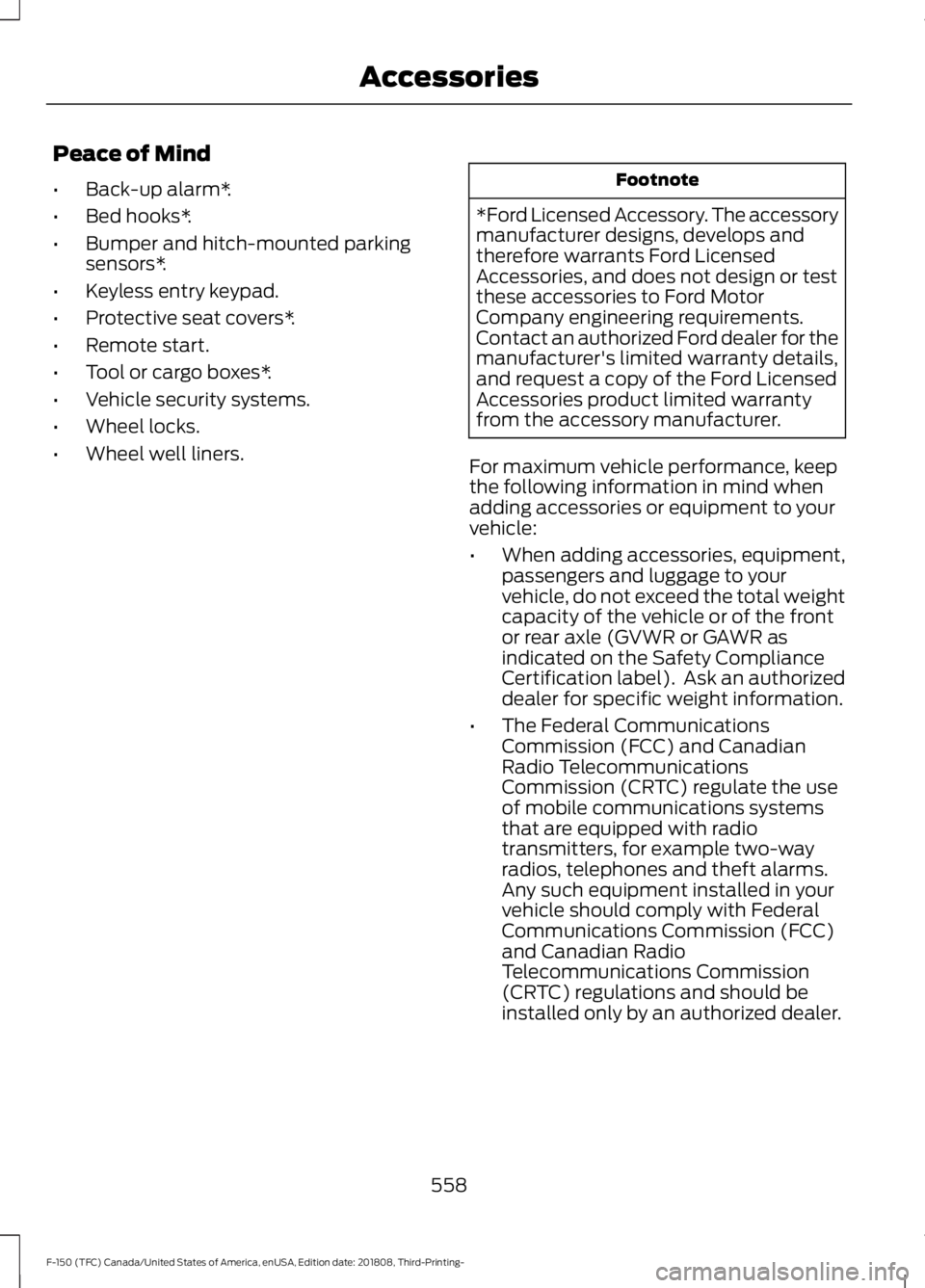
Peace of Mind
•
Back-up alarm*.
• Bed hooks*.
• Bumper and hitch-mounted parking
sensors*.
• Keyless entry keypad.
• Protective seat covers*.
• Remote start.
• Tool or cargo boxes*.
• Vehicle security systems.
• Wheel locks.
• Wheel well liners. Footnote
*Ford Licensed Accessory. The accessory
manufacturer designs, develops and
therefore warrants Ford Licensed
Accessories, and does not design or test
these accessories to Ford Motor
Company engineering requirements.
Contact an authorized Ford dealer for the
manufacturer's limited warranty details,
and request a copy of the Ford Licensed
Accessories product limited warranty
from the accessory manufacturer.
For maximum vehicle performance, keep
the following information in mind when
adding accessories or equipment to your
vehicle:
• When adding accessories, equipment,
passengers and luggage to your
vehicle, do not exceed the total weight
capacity of the vehicle or of the front
or rear axle (GVWR or GAWR as
indicated on the Safety Compliance
Certification label). Ask an authorized
dealer for specific weight information.
• The Federal Communications
Commission (FCC) and Canadian
Radio Telecommunications
Commission (CRTC) regulate the use
of mobile communications systems
that are equipped with radio
transmitters, for example two-way
radios, telephones and theft alarms.
Any such equipment installed in your
vehicle should comply with Federal
Communications Commission (FCC)
and Canadian Radio
Telecommunications Commission
(CRTC) regulations and should be
installed only by an authorized dealer.
558
F-150 (TFC) Canada/United States of America, enUSA, Edition date: 201808, Third-Printing- Accessories
Page 563 of 644
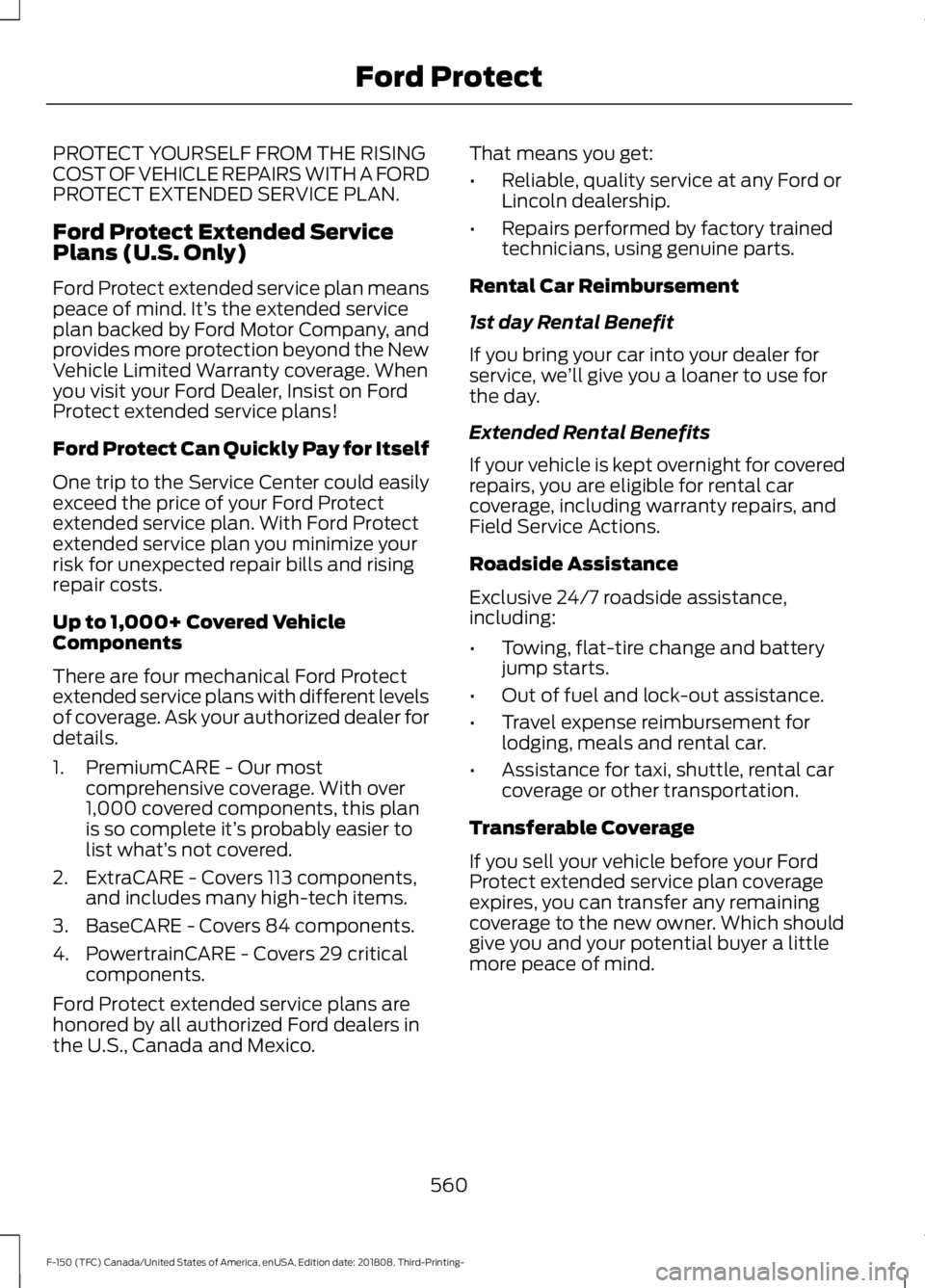
PROTECT YOURSELF FROM THE RISING
COST OF VEHICLE REPAIRS WITH A FORD
PROTECT EXTENDED SERVICE PLAN.
Ford Protect Extended Service
Plans (U.S. Only)
Ford Protect extended service plan means
peace of mind. It’
s the extended service
plan backed by Ford Motor Company, and
provides more protection beyond the New
Vehicle Limited Warranty coverage. When
you visit your Ford Dealer, Insist on Ford
Protect extended service plans!
Ford Protect Can Quickly Pay for Itself
One trip to the Service Center could easily
exceed the price of your Ford Protect
extended service plan. With Ford Protect
extended service plan you minimize your
risk for unexpected repair bills and rising
repair costs.
Up to 1,000+ Covered Vehicle
Components
There are four mechanical Ford Protect
extended service plans with different levels
of coverage. Ask your authorized dealer for
details.
1. PremiumCARE - Our most comprehensive coverage. With over
1,000 covered components, this plan
is so complete it’ s probably easier to
list what’ s not covered.
2. ExtraCARE - Covers 113 components, and includes many high-tech items.
3. BaseCARE - Covers 84 components.
4. PowertrainCARE - Covers 29 critical components.
Ford Protect extended service plans are
honored by all authorized Ford dealers in
the U.S., Canada and Mexico. That means you get:
•
Reliable, quality service at any Ford or
Lincoln dealership.
• Repairs performed by factory trained
technicians, using genuine parts.
Rental Car Reimbursement
1st day Rental Benefit
If you bring your car into your dealer for
service, we ’ll give you a loaner to use for
the day.
Extended Rental Benefits
If your vehicle is kept overnight for covered
repairs, you are eligible for rental car
coverage, including warranty repairs, and
Field Service Actions.
Roadside Assistance
Exclusive 24/7 roadside assistance,
including:
• Towing, flat-tire change and battery
jump starts.
• Out of fuel and lock-out assistance.
• Travel expense reimbursement for
lodging, meals and rental car.
• Assistance for taxi, shuttle, rental car
coverage or other transportation.
Transferable Coverage
If you sell your vehicle before your Ford
Protect extended service plan coverage
expires, you can transfer any remaining
coverage to the new owner. Which should
give you and your potential buyer a little
more peace of mind.
560
F-150 (TFC) Canada/United States of America, enUSA, Edition date: 201808, Third-Printing- Ford Protect
Page 567 of 644
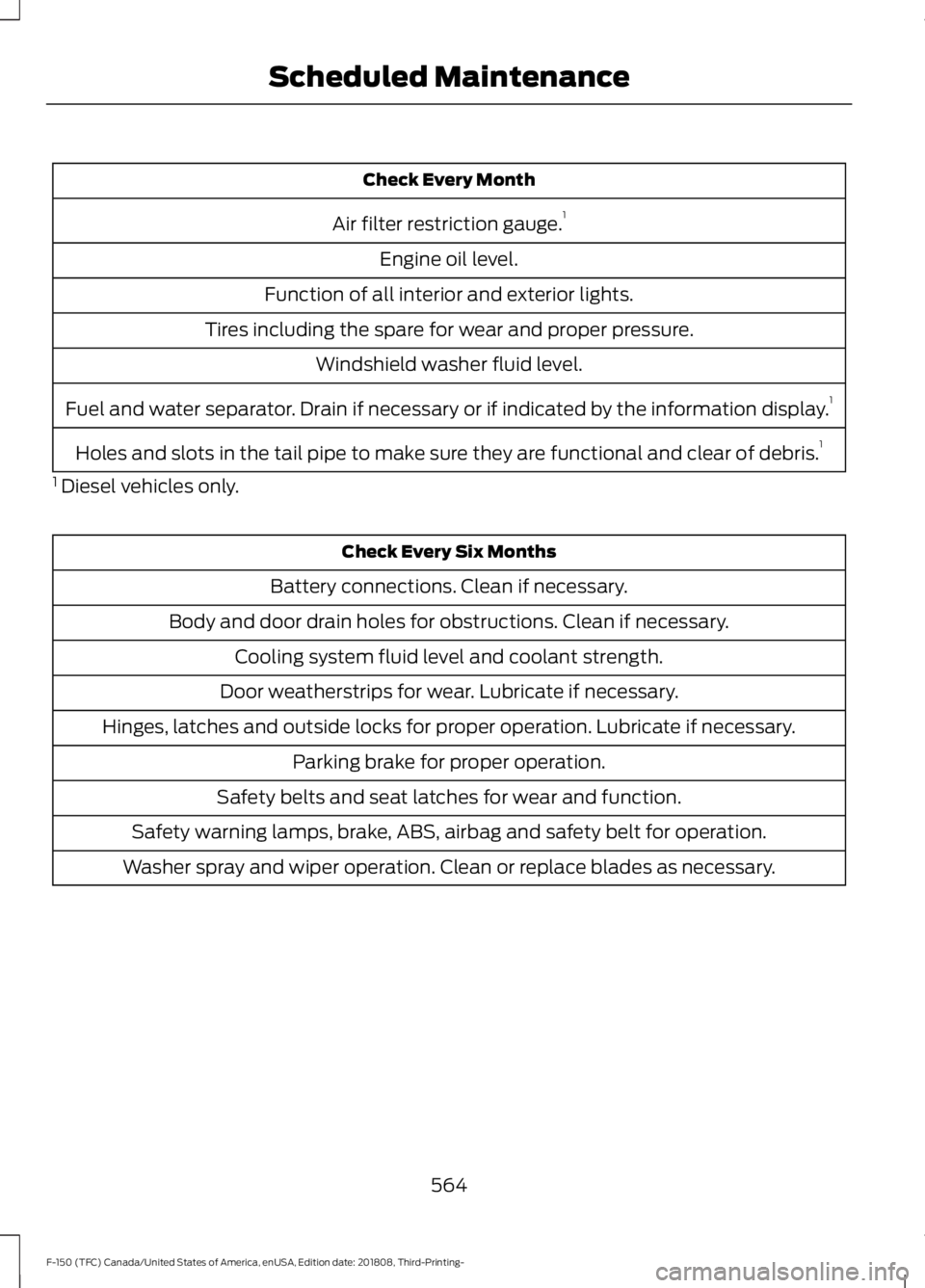
Check Every Month
Air filter restriction gauge. 1
Engine oil level.
Function of all interior and exterior lights.
Tires including the spare for wear and proper pressure. Windshield washer fluid level.
Fuel and water separator. Drain if necessary or if indicated by the information display. 1
Holes and slots in the tail pipe to make sure they are functional and clear of debris. 1
1 Diesel vehicles only. Check Every Six Months
Battery connections. Clean if necessary.
Body and door drain holes for obstructions. Clean if necessary. Cooling system fluid level and coolant strength.
Door weatherstrips for wear. Lubricate if necessary.
Hinges, latches and outside locks for proper operation. Lubricate if necessary. Parking brake for proper operation.
Safety belts and seat latches for wear and function.
Safety warning lamps, brake, ABS, airbag and safety belt for operation.
Washer spray and wiper operation. Clean or replace blades as necessary.
564
F-150 (TFC) Canada/United States of America, enUSA, Edition date: 201808, Third-Printing- Scheduled Maintenance
Page 630 of 644
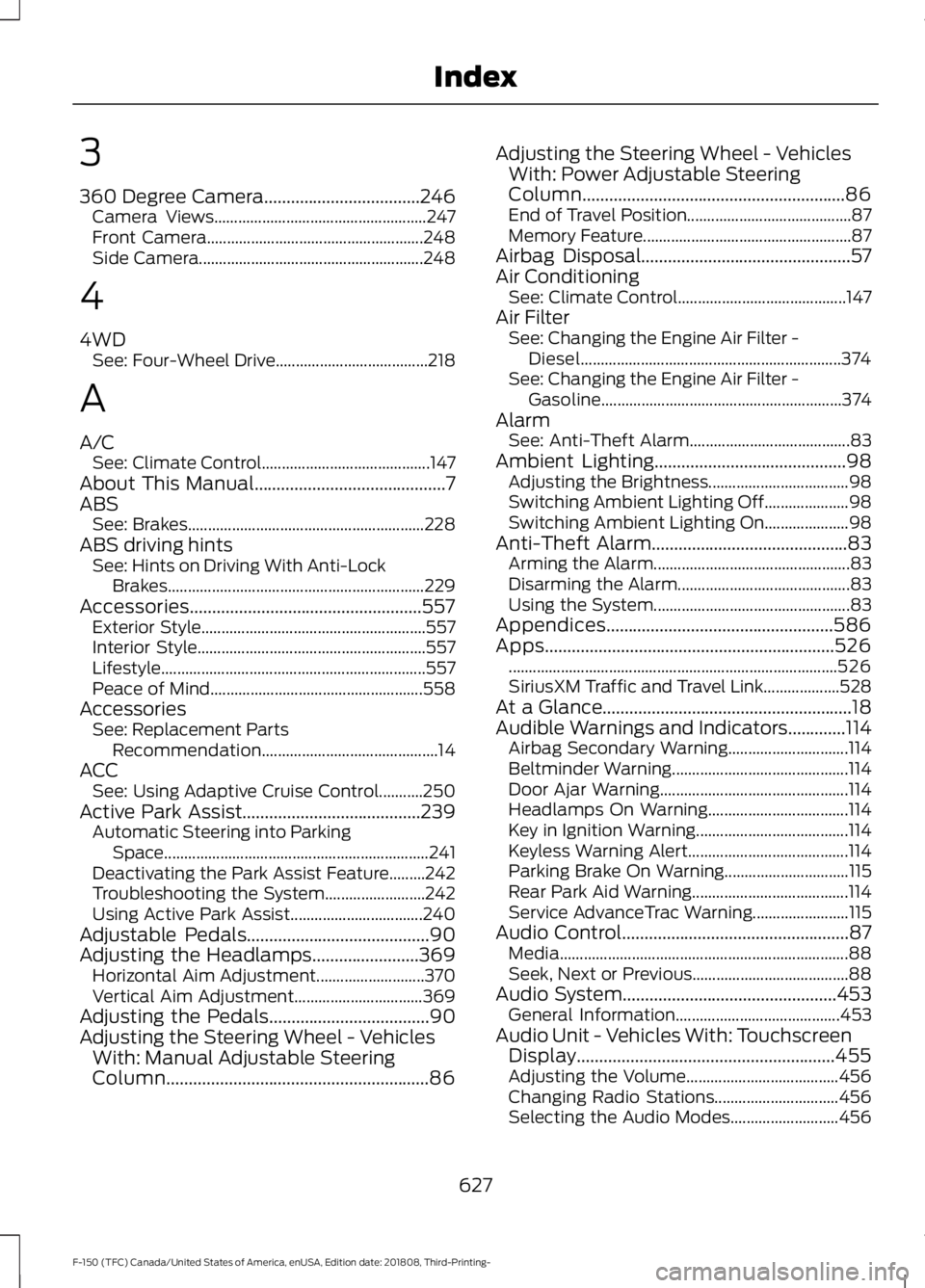
3
360 Degree Camera...................................246
Camera Views..................................................... 247
Front Camera...................................................... 248
Side Camera........................................................ 248
4
4WD See: Four-Wheel Drive...................................... 218
A
A/C See: Climate Control.......................................... 147
About This Manual
...........................................7
ABS See: Brakes........................................................... 228
ABS driving hints See: Hints on Driving With Anti-Lock
Brakes................................................................ 229
Accessories....................................................557 Exterior Style........................................................ 557
Interior Style......................................................... 557
Lifestyle.................................................................. 557
Peace of Mind..................................................... 558
Accessories See: Replacement Parts
Recommendation............................................ 14
ACC See: Using Adaptive Cruise Control...........250
Active Park Assist
........................................239
Automatic Steering into Parking
Space.................................................................. 241
Deactivating the Park Assist Feature.........242
Troubleshooting the System......................... 242
Using Active Park Assist................................. 240
Adjustable Pedals
.........................................90
Adjusting the Headlamps........................369 Horizontal Aim Adjustment........................... 370
Vertical Aim Adjustment................................ 369
Adjusting the Pedals....................................90
Adjusting the Steering Wheel - Vehicles With: Manual Adjustable Steering
Column...........................................................86 Adjusting the Steering Wheel - Vehicles
With: Power Adjustable Steering
Column...........................................................86
End of Travel Position......................................... 87
Memory Feature.................................................... 87
Airbag Disposal...............................................57
Air Conditioning See: Climate Control.......................................... 147
Air Filter See: Changing the Engine Air Filter -
Diesel................................................................. 374
See: Changing the Engine Air Filter - Gasoline............................................................ 374
Alarm See: Anti-Theft Alarm........................................ 83
Ambient Lighting
...........................................98
Adjusting the Brightness................................... 98
Switching Ambient Lighting Off..................... 98
Switching Ambient Lighting On..................... 98
Anti-Theft Alarm............................................83 Arming the Alarm................................................. 83
Disarming the Alarm........................................... 83
Using the System................................................. 83
Appendices...................................................586
Apps.................................................................526 ........................................................................\
.......... 526
SiriusXM Traffic and Travel Link................... 528
At a Glance........................................................18
Audible Warnings and Indicators.............114 Airbag Secondary Warning.............................. 114
Beltminder Warning............................................ 114
Door Ajar Warning............................................... 114
Headlamps On Warning................................... 114
Key in Ignition Warning...................................... 114
Keyless Warning Alert........................................ 114
Parking Brake On Warning............................... 115
Rear Park Aid Warning....................................... 114
Service AdvanceTrac Warning........................ 115
Audio Control...................................................87 Media........................................................................\
88
Seek, Next or Previous....................................... 88
Audio System
................................................453
General Information......................................... 453
Audio Unit - Vehicles With: Touchscreen Display..........................................................455
Adjusting the Volume...................................... 456
Changing Radio Stations............................... 456
Selecting the Audio Modes........................... 456
627
F-150 (TFC) Canada/United States of America, enUSA, Edition date: 201808, Third-Printing- Index
Page 631 of 644
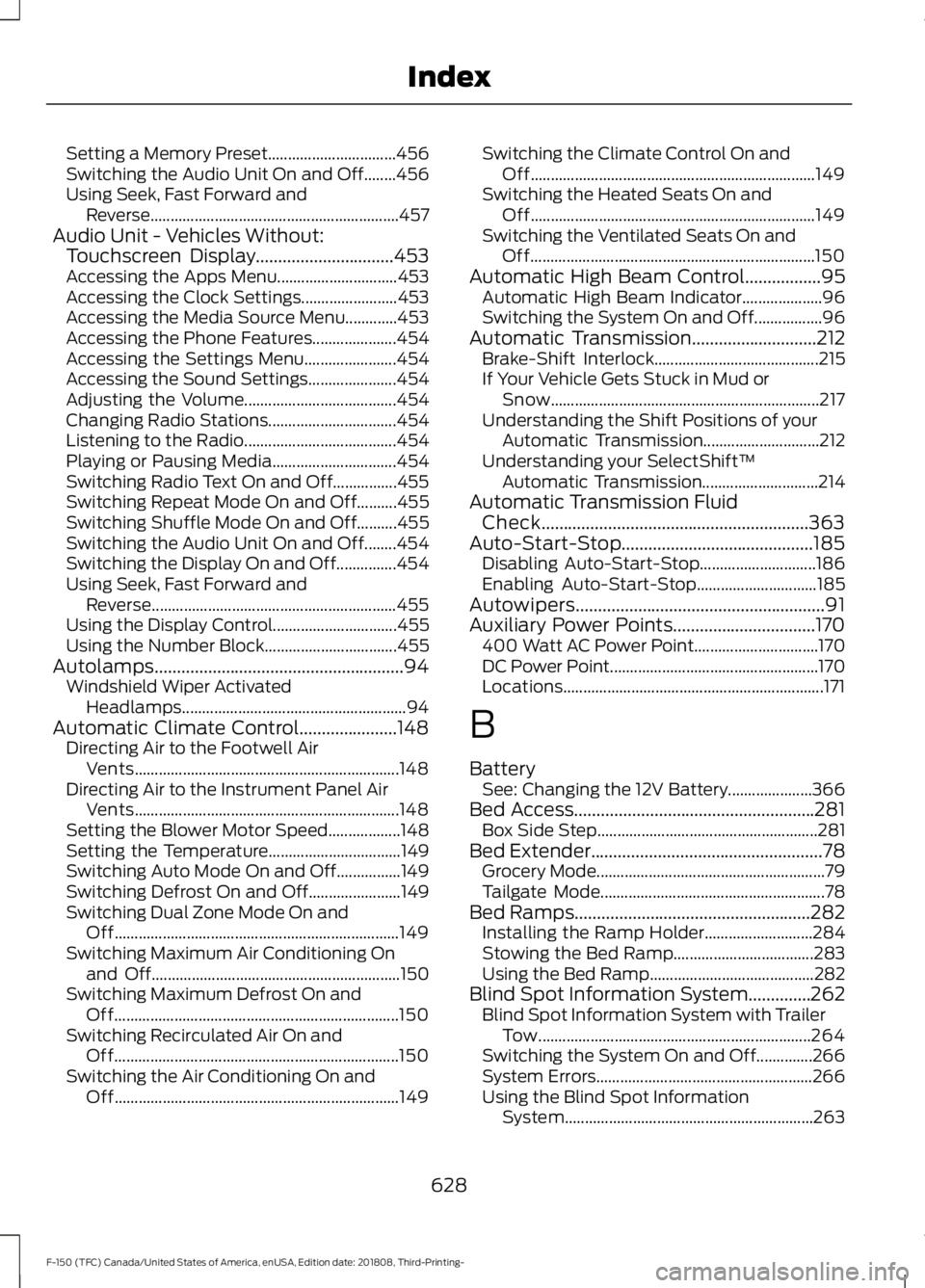
Setting a Memory Preset................................
456
Switching the Audio Unit On and Off........456
Using Seek, Fast Forward and Reverse.............................................................. 457
Audio Unit - Vehicles Without: Touchscreen Display...............................453
Accessing the Apps Menu.............................. 453
Accessing the Clock Settings........................ 453
Accessing the Media Source Menu.............453
Accessing the Phone Features..................... 454
Accessing the Settings Menu....................... 454
Accessing the Sound Settings...................... 454
Adjusting the Volume...................................... 454
Changing Radio Stations................................ 454
Listening to the Radio...................................... 454
Playing or Pausing Media............................... 454
Switching Radio Text On and Off................455
Switching Repeat Mode On and Off..........455
Switching Shuffle Mode On and Off..........455
Switching the Audio Unit On and Off........454
Switching the Display On and Off...............454
Using Seek, Fast Forward and Reverse............................................................. 455
Using the Display Control............................... 455
Using the Number Block................................. 455
Autolamps........................................................94 Windshield Wiper Activated
Headlamps........................................................ 94
Automatic Climate Control......................148 Directing Air to the Footwell Air
Vents.................................................................. 148
Directing Air to the Instrument Panel Air Vents.................................................................. 148
Setting the Blower Motor Speed.................. 148
Setting the Temperature................................. 149
Switching Auto Mode On and Off................149
Switching Defrost On and Off....................... 149
Switching Dual Zone Mode On and Off....................................................................... 149
Switching Maximum Air Conditioning On and Off.............................................................. 150
Switching Maximum Defrost On and Off....................................................................... 150
Switching Recirculated Air On and Off....................................................................... 150
Switching the Air Conditioning On and Off....................................................................... 149Switching the Climate Control On and
Off....................................................................... 149
Switching the Heated Seats On and Off....................................................................... 149
Switching the Ventilated Seats On and Off....................................................................... 150
Automatic High Beam Control.................95 Automatic High Beam Indicator.................... 96
Switching the System On and Off.................96
Automatic Transmission............................212 Brake-Shift Interlock......................................... 215
If Your Vehicle Gets Stuck in Mud or Snow................................................................... 217
Understanding the Shift Positions of your Automatic Transmission............................. 212
Understanding your SelectShift™ Automatic Transmission............................. 214
Automatic Transmission Fluid Check............................................................363
Auto-Start-Stop...........................................185 Disabling Auto-Start-Stop............................. 186
Enabling Auto-Start-Stop.............................. 185
Autowipers........................................................91
Auxiliary Power Points................................170 400 Watt AC Power Point............................... 170
DC Power Point.................................................... 170
Locations................................................................. 171
B
Battery See: Changing the 12V Battery..................... 366
Bed Access......................................................281 Box Side Step....................................................... 281
Bed Extender....................................................78 Grocery Mode......................................................... 79
Tailgate Mode........................................................ 78
Bed Ramps.....................................................282
Installing the Ramp Holder........................... 284
Stowing the Bed Ramp................................... 283
Using the Bed Ramp......................................... 282
Blind Spot Information System..............262 Blind Spot Information System with Trailer
Tow.................................................................... 264
Switching the System On and Off..............266
System Errors...................................................... 266
Using the Blind Spot Information System.............................................................. 263
628
F-150 (TFC) Canada/United States of America, enUSA, Edition date: 201808, Third-Printing- Index