automatic transmission FORD F-150 2019 User Guide
[x] Cancel search | Manufacturer: FORD, Model Year: 2019, Model line: F-150, Model: FORD F-150 2019Pages: 644, PDF Size: 14.81 MB
Page 215 of 644
AUTOMATIC TRANSMISSION
WARNING: Always fully apply the
parking brake and make sure you shift
into park (P). Failure to follow this
instruction could result in personal injury
or death. WARNING:
Do not use tow/haul
when the road surface is slippery. Failure
to follow this instruction could result in
the loss of control of your vehicle. WARNING:
When your vehicle is
stationary, keep the brake pedal fully
pressed when shifting gears. Failure to
follow this instruction could result in
personal injury, death or property
damage.
Note: Under certain conditions, you will not
be able to shift out of park (P) unless the
intelligent access key is inside the vehicle.
Understanding the Shift Positions
of your Automatic Transmission
Putting your vehicle in or out of gear:
1. Fully press down on the brake pedal.
2. Move the gearshift lever into the desired gear.
3. When you are finished driving, come to
a complete stop.
4. Move the gearshift lever and securely latch it in park (P).
The instrument cluster displays the current
gear.
Park (P)
This position locks the transmission and
prevents the wheels from turning. Reverse (R)
With the gearshift lever in reverse (R), your
vehicle moves backward. Always come to
a complete stop before shifting into and
out of reverse (R).
Neutral (N)
With the gearshift lever in neutral (N), you
can start your vehicle, which is free to roll.
Hold the brake pedal down when in this
position.
Drive (D)
Drive (D) is the normal driving position for
the best fuel economy, and allows
automatic upshifts and downshifts through
all available gears.
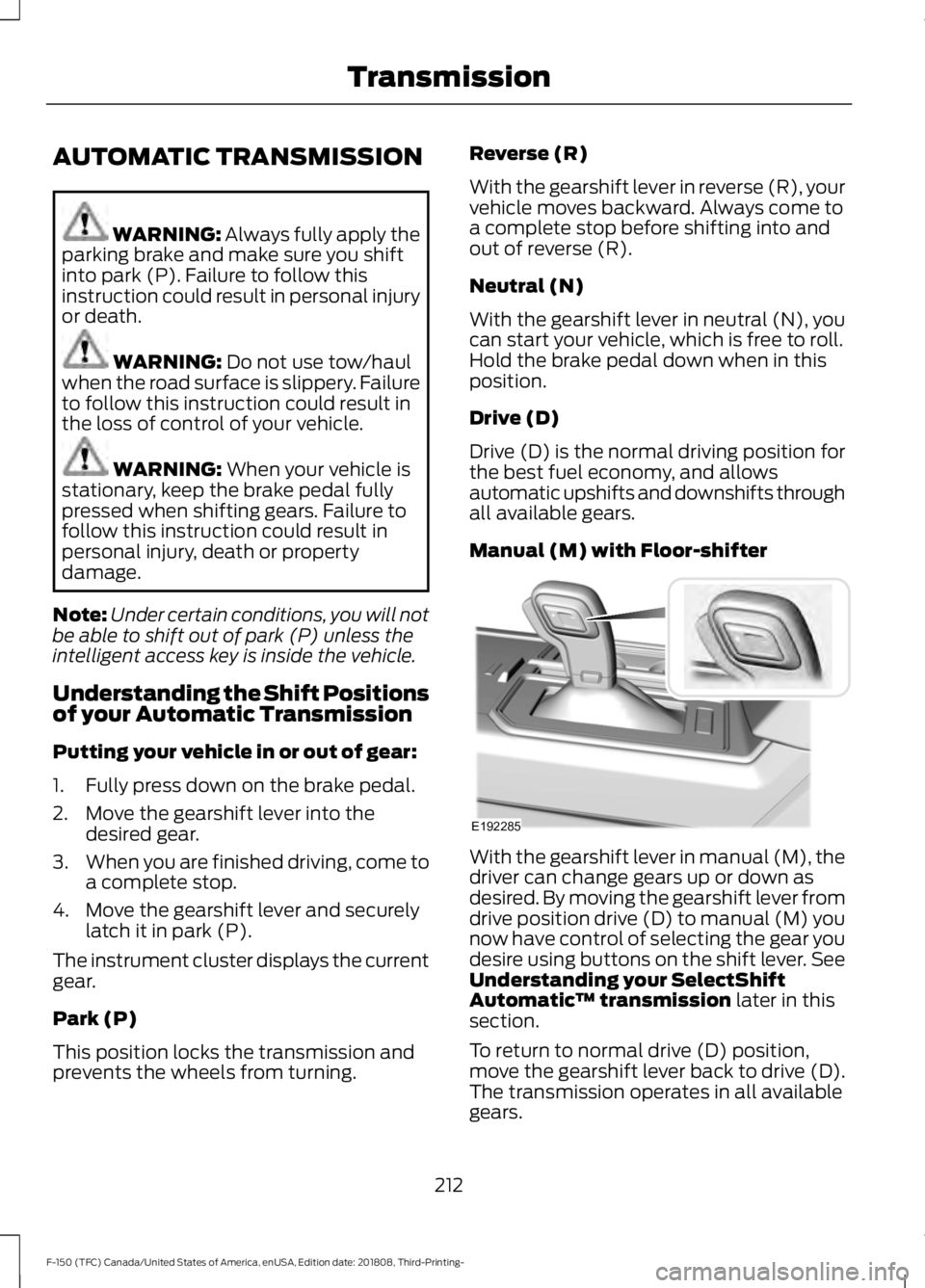
Manual (M) with Floor-shifter
With the gearshift lever in manual (M), the
driver can change gears up or down as
desired. By moving the gearshift lever from
drive position drive (D) to manual (M) you
now have control of selecting the gear you
desire using buttons on the shift lever. See
Understanding your SelectShift
Automatic
™ transmission
later in this
section.
To return to normal drive (D) position,
move the gearshift lever back to drive (D).
The transmission operates in all available
gears.
212
F-150 (TFC) Canada/United States of America, enUSA, Edition date: 201808, Third-Printing- TransmissionE192285
Page 217 of 644
To deactivate the tow mode feature and
return to normal driving mode, press the
button on the gearshift lever twice. The
indicator light deactivates when the
system turns off. Tow mode also
deactivates when you power down your
vehicle.
Sport Mode
To activate Sport Mode, press
the button on the gearshift lever
until sport mode is selected. The
SPORT or S indicator light illuminates in
the instrument display when the system
becomes active.
The sport mode feature:
• Provides additional slope, engine
braking and extends lower gear
operation to enhance performance for
uphill climbs, hilly terrain or
mountainous areas. This increases
engine RPM during engine braking.
• Provides additional lower gear
operation through the automatic
transmission shift strategy.
• Selects gears more quickly and at
higher engine speeds.
To deactivate the sport mode feature and
return to normal driving mode, press the
button on the gearshift lever again. The
SPORT or
S indicator light deactivates
when the system turns off. The sport mode
feature also deactivates when you power
down your vehicle. Automatic Transmission Adaptive
Learning
This feature increases durability and
provides consistent shift feel over the life
of your vehicle. A new vehicle or
transmission may have firm shifts, soft
shifts or both. This operation is normal and
does not affect function or durability of the
transmission. Over time, the adaptive
learning process fully updates transmission
operation.
Forced Downshifts
•
Allowed in drive (D) with the tow mode
feature on or off.
• Press the accelerator to the floor.
• Allows transmission to select an
appropriate gear.
Understanding your SelectShift™
Automatic Transmission
Your vehicle is equipped with a SelectShift
Automatic transmission gearshift lever.
The SelectShift Automatic transmission
gives you the ability to change gears up or
down (without a clutch) as desired.
In order to prevent the engine from running
at too low an RPM, which may cause it to
stall, SelectShift still automatically makes
some downshifts if it has determined that
you have not downshifted in time.
Although SelectShift makes some
downshifts for you, it still allows you to
downshift at any time as long as
SelectShift determines that damage to
the engine from over-revving does not
occur.
SelectShift does not automatically upshift,
even if the engine is approaching the RPM
limit. It must be shifted manually by
pressing the
+ button.
Note: Engine damage may occur if you
maintain excessive engine revving without
shifting.
214
F-150 (TFC) Canada/United States of America, enUSA, Edition date: 201808, Third-Printing- TransmissionE176099
Page 218 of 644
The SelectShift Automatic transmission
feature has two modes: PRS and M mode.
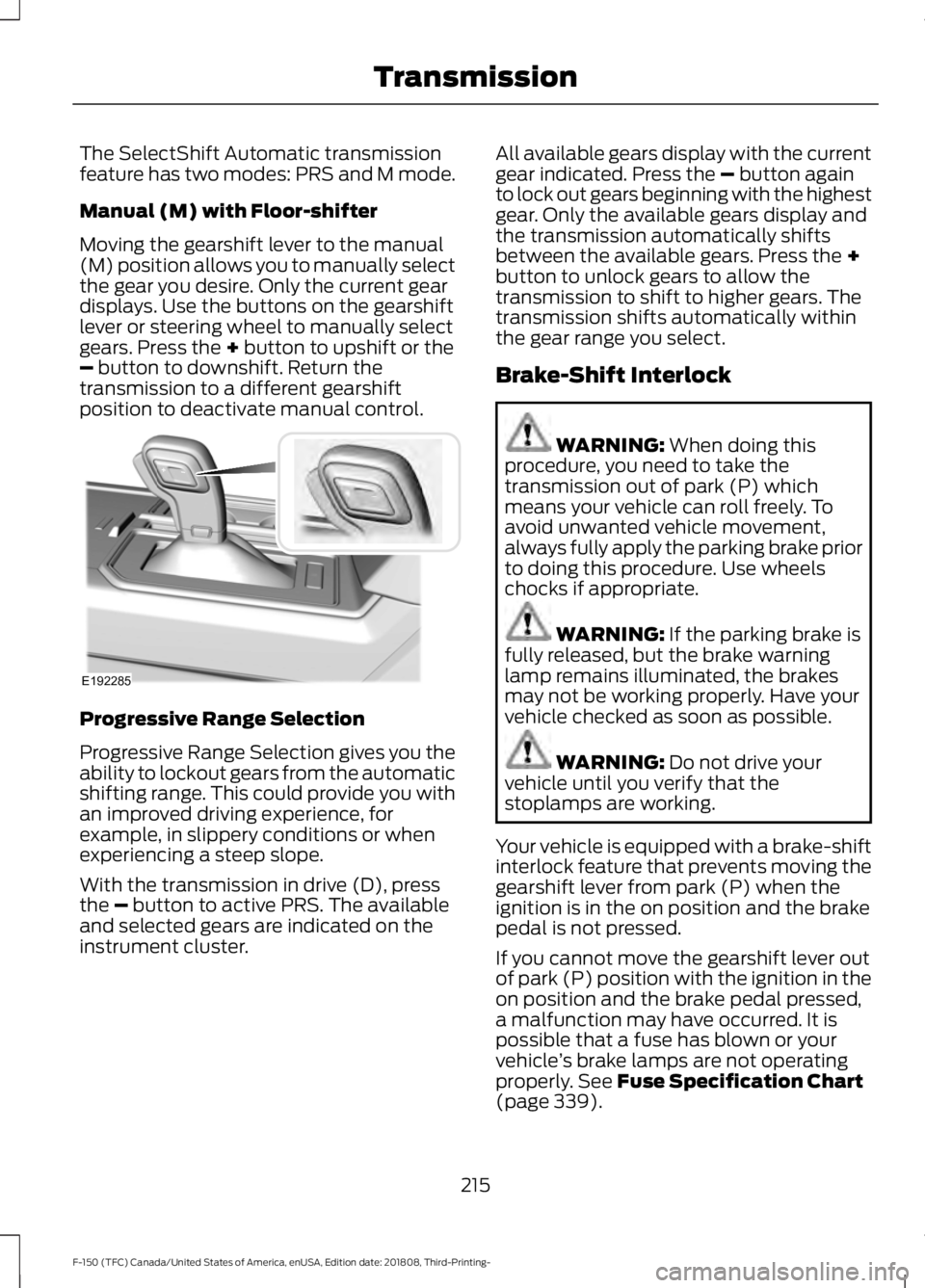
Manual (M) with Floor-shifter
Moving the gearshift lever to the manual
(M) position allows you to manually select
the gear you desire. Only the current gear
displays. Use the buttons on the gearshift
lever or steering wheel to manually select
gears. Press the + button to upshift or the
– button to downshift. Return the
transmission to a different gearshift
position to deactivate manual control. Progressive Range Selection
Progressive Range Selection gives you the
ability to lockout gears from the automatic
shifting range. This could provide you with
an improved driving experience, for
example, in slippery conditions or when
experiencing a steep slope.
With the transmission in drive (D), press
the
– button to active PRS. The available
and selected gears are indicated on the
instrument cluster. All available gears display with the current
gear indicated. Press the
– button again
to lock out gears beginning with the highest
gear. Only the available gears display and
the transmission automatically shifts
between the available gears. Press the
+
button to unlock gears to allow the
transmission to shift to higher gears. The
transmission shifts automatically within
the gear range you select.
Brake-Shift Interlock WARNING:
When doing this
procedure, you need to take the
transmission out of park (P) which
means your vehicle can roll freely. To
avoid unwanted vehicle movement,
always fully apply the parking brake prior
to doing this procedure. Use wheels
chocks if appropriate. WARNING:
If the parking brake is
fully released, but the brake warning
lamp remains illuminated, the brakes
may not be working properly. Have your
vehicle checked as soon as possible. WARNING:
Do not drive your
vehicle until you verify that the
stoplamps are working.
Your vehicle is equipped with a brake-shift
interlock feature that prevents moving the
gearshift lever from park (P) when the
ignition is in the on position and the brake
pedal is not pressed.
If you cannot move the gearshift lever out
of park (P) position with the ignition in the
on position and the brake pedal pressed,
a malfunction may have occurred. It is
possible that a fuse has blown or your
vehicle ’s brake lamps are not operating
properly.
See Fuse Specification Chart
(page 339).
215
F-150 (TFC) Canada/United States of America, enUSA, Edition date: 201808, Third-Printing- TransmissionE192285
Page 222 of 644
4H (4X4 HIGH)
Provides mechanically locked four-wheel
drive power to both the front and rear
wheels for use in off-road or winter
conditions such as deep snow, sand or
mud. This mode is not for use on dry
pavement.
4L (4X4 LOW)
Provides mechanically locked four-wheel
drive power to both the front and rear
wheels for use on low traction surfaces,
but does so with additional gearing for
increased torque multiplication. Intended
only for off-road applications such as deep
sand, steep grades, or pulling heavy
objects. 4L (4X4 low) should not engage
while your vehicle is moving above 3 mph
(5 km/h); this is normal and should be no
reason for concern. Refer to Shifting to or
from 4L (4X4 low) for proper operation.
Shifting between system modes
Note: Momentarily releasing the accelerator
pedal while a shift in progress message
displays can improve
engagement/disengagement performance.
Note: Do not perform this operation if the
rear wheels are slipping or while applying
the accelerator pedal.
Note: You may hear some noise as the
system shifts or engages; this is normal.
You can move the control from 2H or 4H
at a stop or while driving. The information
display may display a message indicating
a 4X4 shift is in progress. Once the shift is
complete the message center can then
display the system mode selected.
Shifting to or from 4L (4X4 low)
Note: You may hear some noise as the
system shifts or engages; this is normal.
1. Bring your vehicle to a speed of
3 mph
(5 km/h) or less. 2. Place the transmission in neutral (N).
3. Move the 4WD control to the desired
position.
The information display can display a
message indicating a 4X4 shift is in
progress. The information display can then
display the system mode selected. If any
of the above shift conditions are not
present, the shift should not occur and the
information display can display
information guiding the driver through the
proper shifting procedures.
If
Shift Delayed Pull Forward displays in
the information display, a transfer case
gear tooth blockage is present. To alleviate
this condition, place the transmission in a
forward gear, move your vehicle forward
approximately
5 ft (1.5 m), and shift the
transmission back to neutral (N) to allow
the transfer case to complete the range
shift.
Using the 2-Speed Automatic 4WD
System
(If Equipped)
This system includes an electronically
controlled transfer case with a high
capacity clutch. The system is interactive
with the road, continually monitoring and
adjusting power delivery to the front and
rear wheels to optimize traction.
Note: The AdvanceTrac system has the
ability to take over control of the transfer
case clutch in 4A mode and disable it during
driving maneuvers when necessary.
Note: The information display may show
messages during 4WD operation. See
Information Messages
(page 128).
219
F-150 (TFC) Canada/United States of America, enUSA, Edition date: 201808, Third-Printing- Four-Wheel Drive
(If Equipped)
Page 225 of 644
You should either know the terrain or
examine maps of the area before driving.
Map out your route before driving in the
area. To maintain steering and braking
control of your vehicle, you must have all
four wheels on the ground and they must
be rolling, not sliding or spinning.
Driving Off-Road With Truck and
Utility Vehicles
Note:
On some models, the initial shift from
two-wheel drive to four-wheel drive while
your vehicle is moving can cause some
momentary clunk and ratcheting sounds.
This is the front drivetrain coming up to
speed and the automatic locking hubs
engaging and is not cause for concern.
Note: Your vehicle may have a front air
dam. Due to low ground clearance, you can
damage it when taking your vehicle off-road.
You can take the air dam off by removing
the bolts that secure it.
Note: Your vehicle may have an underbody
transmission shield and brackets. Due to
low ground clearance, you can damage
them when taking your vehicle off-road.
Remove the shield by disengaging the
fasteners at each corner of the shield. Then,
remove the shield's rear brackets by
removing the bracket to frame bolts.
Four-wheel drive vehicles are specially
equipped for driving on sand, snow, mud
and rough terrain and have operating
characteristics that are somewhat
different from conventional vehicles, both
on and off the road. The transfer case supplies power to all four
wheels. On four-wheel drive vehicles, the
transfer case allows you to select different
4WD modes when necessary. You can find
information on transfer case operation and
shifting procedures in this chapter. You can
find information on transfer case
maintenance in the Maintenance chapter.
You should become thoroughly familiar
with this information before you operate
your vehicle.
Four-wheel drive (when you select a 4WD
mode) uses all four wheels to power your
vehicle. This increases traction, enabling
you to drive over terrain and road
conditions that a conventional two-wheel
drive vehicle cannot.
Basic Operating Principles
•
Drive slower in strong crosswinds which
can affect the normal steering
characteristics of your vehicle.
• When driving your vehicle on surfaces
made slippery by loose sand, water,
gravel, snow or ice proceed with care.
• Do not use 4H or 4L on dry, hard
surfaced roads. Doing so can produce
excessive noise, increase tire wear and
may damage drive components. 4H or
4L modes are only for consistently
slippery or loose surfaces.
If Your Vehicle leaves the Road
If your vehicle leaves the road, reduce your
vehicle speed and avoid severe braking.
When your vehicle speed decreases, ease
your vehicle back onto the road. Do not
turn the steering wheel sharply while
returning your vehicle to the road.
It may be safer to stay on the shoulder of
the road and slow down gradually before
returning to the road. You may lose control
if you do not slow down or if you turn the
steering wheel too sharply or abruptly.
222
F-150 (TFC) Canada/United States of America, enUSA, Edition date: 201808, Third-Printing- Four-Wheel Drive (If Equipped)
Page 232 of 644
HINTS ON DRIVING WITH
ANTI-LOCK BRAKES
The anti-lock braking system does not
eliminate the risks when:
•
You drive too closely to the vehicle in
front of you.
• Your vehicle is hydroplaning.
• You take corners too fast.
• The road surface is poor.
Note: If the system activates, the brake
pedal may pulse and may travel further.
Maintain pressure on the brake pedal. You
may also hear a noise from the system. This
is normal.
ELECTRIC PARKING BRAKE WARNING: Always fully apply the
parking brake and make sure you shift
into park (P). Failure to follow this
instruction could result in personal injury
or death. WARNING:
If you drive extended
distances with the parking brake applied,
you could cause damage to the brake
system. WARNING:
The electric parking
brake does not operate if the vehicle
battery is running out of charge.
Your vehicle has an electric parking brake.
You operate it with a switch instead of a
lever. The switch is on the center console
or to the left-hand side of the steering
wheel, on the lower part of the instrument
panel.
Note: The electric parking brake makes
noises during operation. This is normal. Applying the Electric Parking
Brake Pull the switch upward.
The red warning lamp flashes
during operation and illuminates
when the parking brake is
applied. Note:
It remains illuminated for a short
period of time after you switch the ignition
off.
If it continues to flash or does not
illuminate, the system has malfunctioned.
Have your vehicle checked as soon as
possible.
Note: You can apply the electric parking
brake when the ignition is off.
Note: The electric parking brake could
automatically apply when you shift into park
(P). See
Transmission (page 212).
Applying the Electric Parking Brake in
an Emergency
Note: Do not apply the electric parking
brake when your vehicle is moving, except
in an emergency. If you repeatedly use the
electric parking brake to slow or stop your
vehicle, you could cause damage to the
brake system.
You can use the electric parking brake to
slow or stop your vehicle in an emergency. Pull the switch upward and hold
it.
The red warning lamp
illuminates, a tone sounds and
the stoplamps turn on.
229
F-150 (TFC) Canada/United States of America, enUSA, Edition date: 201808, Third-Printing- BrakesE267156 E270480 E267156 E270480
Page 234 of 644
The system makes it easier to pull away
when your vehicle is on a slope without the
need to use the parking brake.
When the system is active, your vehicle
remains stationary on the slope for two to
three seconds after you release the brake
pedal. This allows time to move your foot
from the brake to the accelerator pedal.
The system releases the brakes
automatically once the engine has
developed sufficient torque to prevent your
vehicle from rolling down the slope. This
is an advantage when pulling away on a
slope, for example from a car park ramp,
traffic lights or when reversing uphill into
a parking space.
The system activates on any slope that
causes your vehicle to roll.
Note:
There is no warning light to indicate
the system is either on or off.
Using Hill Start Assist
1. Press the brake pedal to bring your vehicle to a complete standstill. Keep
the brake pedal pressed and shift into
first gear when facing uphill or reverse
(R) when facing downhill.
2. If the sensors detect that your vehicle is on a slope, the system activates
automatically.
3. When you remove your foot from the brake pedal, your vehicle remains on
the slope without rolling away for
about two to three seconds. This hold
time automatically extends if you are
in the process of driving off.
4. Drive off in the normal manner. The system releases the brakes
automatically.
Note: When you remove your foot from the
brake pedal and press the pedal again when
the system is active, you will experience
significantly reduced brake pedal travel. This
is normal. Switching the System On and Off
Vehicles with Manual Transmission
You can switch this feature on or off in the
information display. The system
remembers the last setting when you start
your vehicle.
Vehicles with Automatic Transmission
You cannot turn the system on or off.
When you switch the ignition on, the
system automatically turns on.
231
F-150 (TFC) Canada/United States of America, enUSA, Edition date: 201808, Third-Printing- Brakes
Page 237 of 644
Side-Wind Stabilization
The system applies the brakes on one side
of your vehicle to reduce the effect of a
sudden side-wind gust on your vehicle's
path. When the system turns on, the
stability and traction control light flashes,
and a message may appear in the
information display. You may notice a
slight deceleration and may still need to
make a steering correction to maintain the
intended vehicle path. The system does
not turn on for a continuous side-wind or
during turns.
Traction Control
The system enhances your vehicle's ability
to maintain traction of the wheels by
detecting and controlling wheel spin. See
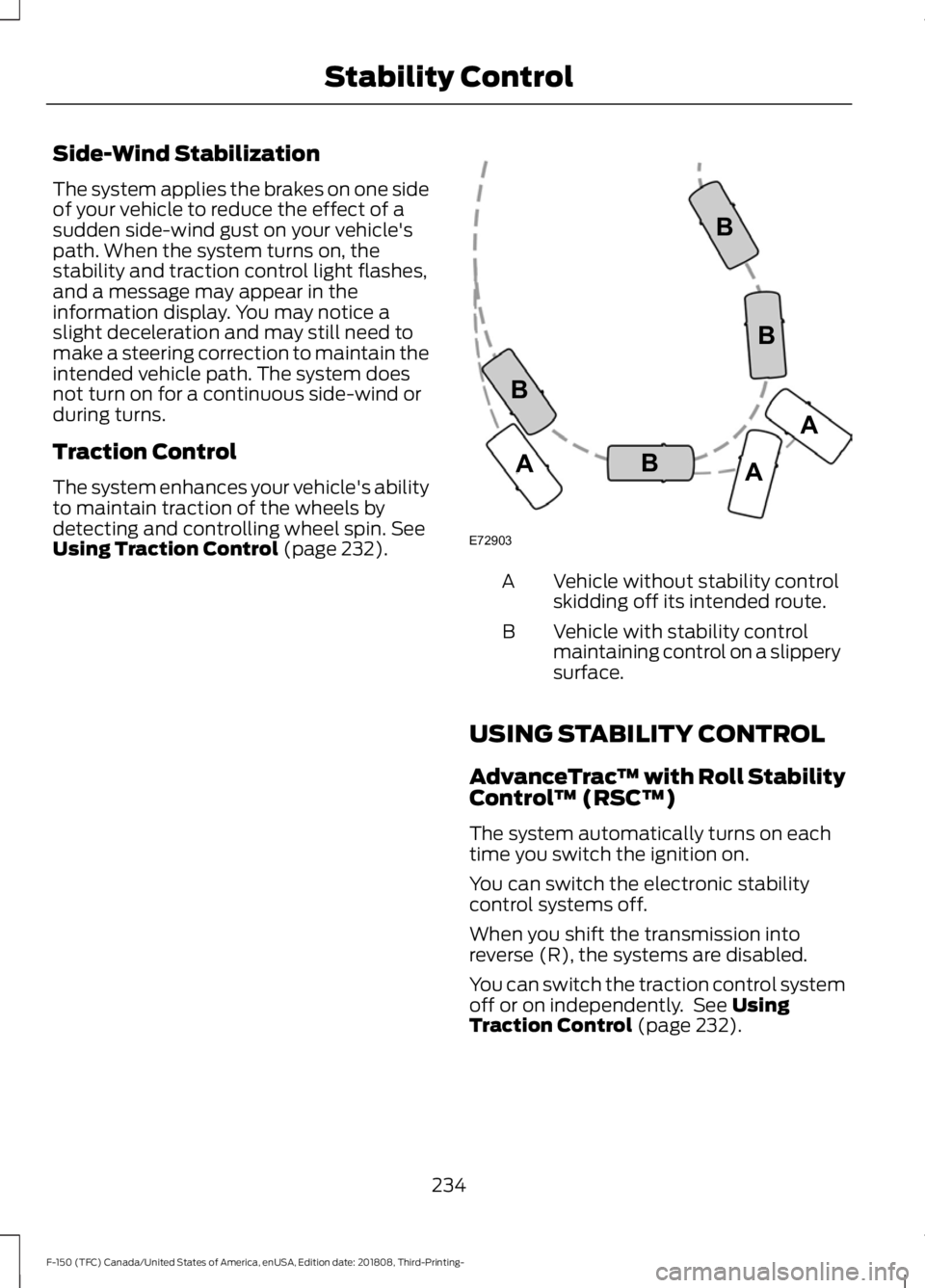
Using Traction Control (page 232). Vehicle without stability control
skidding off its intended route.
A
Vehicle with stability control
maintaining control on a slippery
surface.
B
USING STABILITY CONTROL
AdvanceTrac ™ with Roll Stability
Control ™ (RSC™)
The system automatically turns on each
time you switch the ignition on.
You can switch the electronic stability
control systems off.
When you shift the transmission into
reverse (R), the systems are disabled.
You can switch the traction control system
off or on independently. See
Using
Traction Control (page 232).
234
F-150 (TFC) Canada/United States of America, enUSA, Edition date: 201808, Third-Printing- Stability ControlE72903A
AA
B
BB
B
Page 241 of 644
PRINCIPLE OF OPERATION
WARNING: To help avoid personal
injury, always use caution when in
reverse (R) and when using the sensing
system. WARNING: The system may not
detect objects with surfaces that absorb
reflection. Always drive with due care
and attention. Failure to take care may
result in a crash. WARNING:
Traffic control
systems, inclement weather, air brakes,
external motors and fans may affect the
correct operation of the sensing
system.This may cause reduced
performance or false alerts. WARNING:
The system may not
detect small or moving objects,
particularly those close to the ground.
Note: Certain add-on devices installed
around the bumper or fascia may create
false beeps. For example, large trailer
hitches, bike or surfboard racks, license plate
brackets, bumper covers or any other device
that may block the normal detection zone
of the system. Remove the add-on devices
to prevent the false beeps.
Note: Keep the sensors, located on the
bumper or fascia, free from snow, ice and
large accumulations of dirt. If the sensors
are covered, the system ’s accuracy can be
affected. Do not clean the sensors with
sharp objects.
Note: If your vehicle sustains damage to
the bumper or fascia, leaving it misaligned
or bent, the sensing zone may be altered
causing inaccurate measurement of
obstacles or false alarms. Note:
If your vehicle is equipped with
MyKey ™, the sensing system cannot be
turned off when a MyKey ™ is present. See
Principle of Operation
(page 65).
Note: When a trailer is connected to the
vehicle, the rear parking aid may detect the
trailer and therefore provide warnings. It is
suggested that you disable the system when
a trailer is connected to the vehicle to
prevent these warnings.
The sensing system warns the driver of
obstacles within a certain range of your
vehicle. The system turns on automatically
whenever you switch the ignition on.
When receiving a detection warning, the
radio volume reduces to a predetermined
level. After the warning goes away, the
radio volume returns to the previous level.
The system can be switched off through
the information display menu or from the
pop-up message that appears once you
shift the transmission into reverse (R). See
General Information
(page 116).
If a fault is present in the system, a warning
message appears in the information
display and you cannot switch the system
on through the pop-up message. See
Information Messages
(page 128).
REAR PARKING AID
(IF EQUIPPED)
The rear sensors are only active when the
transmission is in reverse (R). As your
vehicle moves closer to the obstacle, the
rate of the audible warning increases.
When the obstacle is less than
12 in
(30 cm) away, the warning sounds
continuously. If the system detects a
stationary or receding object farther than
12 in (30 cm)
from the corners of the
bumper, the tone sounds for only three
seconds. Once the system detects an
object approaching, the warning sounds
again.
238
F-150 (TFC) Canada/United States of America, enUSA, Edition date: 201808, Third-Printing- Parking Aids
Page 242 of 644
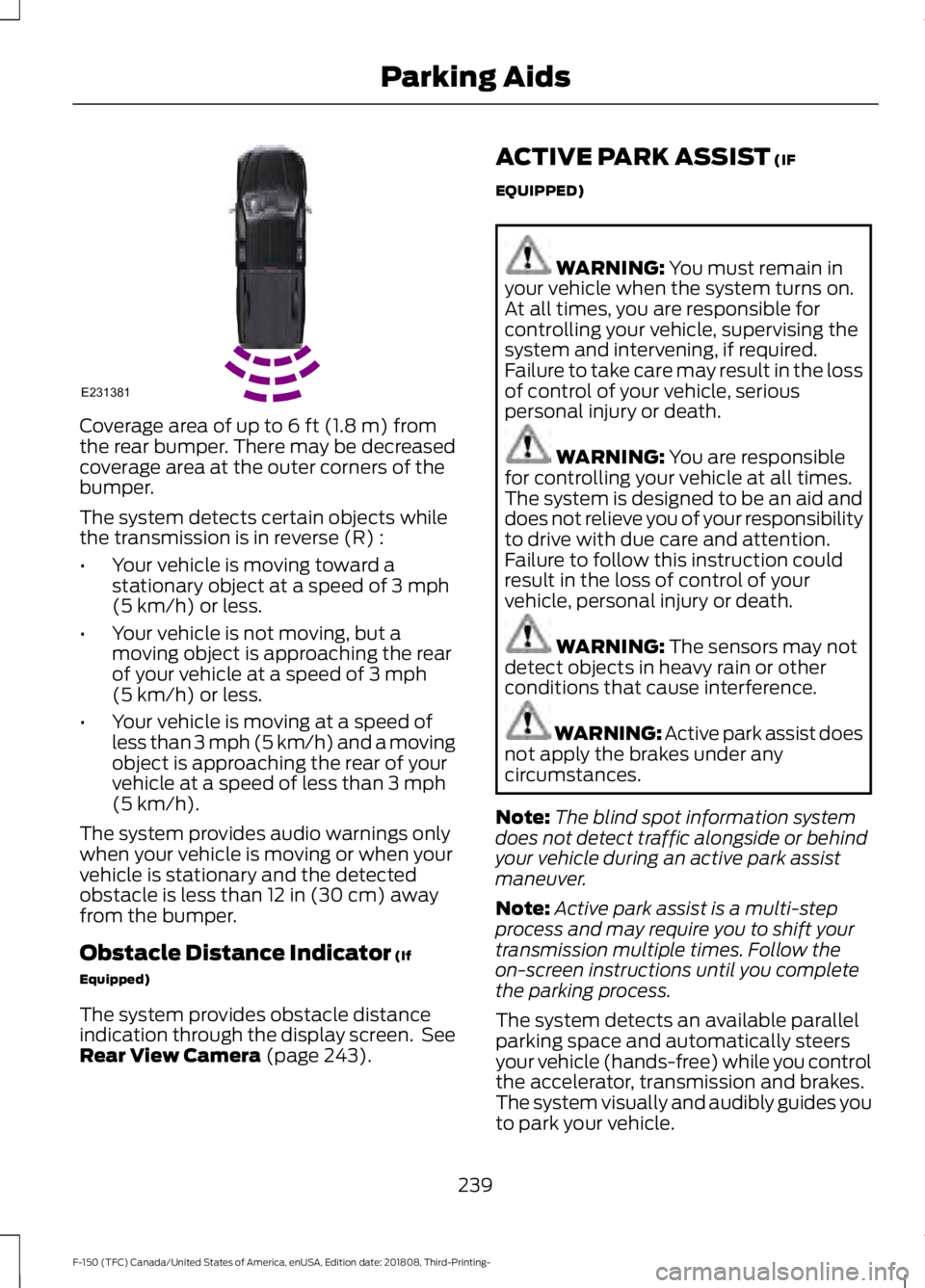
Coverage area of up to 6 ft (1.8 m) from
the rear bumper. There may be decreased
coverage area at the outer corners of the
bumper.
The system detects certain objects while
the transmission is in reverse (R) :
• Your vehicle is moving toward a
stationary object at a speed of
3 mph
(5 km/h) or less.
• Your vehicle is not moving, but a
moving object is approaching the rear
of your vehicle at a speed of
3 mph
(5 km/h) or less.
• Your vehicle is moving at a speed of
less than 3 mph (5 km/h) and a moving
object is approaching the rear of your
vehicle at a speed of less than
3 mph
(5 km/h).
The system provides audio warnings only
when your vehicle is moving or when your
vehicle is stationary and the detected
obstacle is less than
12 in (30 cm) away
from the bumper.
Obstacle Distance Indicator
(If
Equipped)
The system provides obstacle distance
indication through the display screen. See
Rear View Camera
(page 243). ACTIVE PARK ASSIST
(IF
EQUIPPED) WARNING:
You must remain in
your vehicle when the system turns on.
At all times, you are responsible for
controlling your vehicle, supervising the
system and intervening, if required.
Failure to take care may result in the loss
of control of your vehicle, serious
personal injury or death. WARNING:
You are responsible
for controlling your vehicle at all times.
The system is designed to be an aid and
does not relieve you of your responsibility
to drive with due care and attention.
Failure to follow this instruction could
result in the loss of control of your
vehicle, personal injury or death. WARNING:
The sensors may not
detect objects in heavy rain or other
conditions that cause interference. WARNING:
Active park assist does
not apply the brakes under any
circumstances.
Note: The blind spot information system
does not detect traffic alongside or behind
your vehicle during an active park assist
maneuver.
Note: Active park assist is a multi-step
process and may require you to shift your
transmission multiple times. Follow the
on-screen instructions until you complete
the parking process.
The system detects an available parallel
parking space and automatically steers
your vehicle (hands-free) while you control
the accelerator, transmission and brakes.
The system visually and audibly guides you
to park your vehicle.
239
F-150 (TFC) Canada/United States of America, enUSA, Edition date: 201808, Third-Printing- Parking AidsE231381