remote start FORD F-150 2019 Owner's Manual
[x] Cancel search | Manufacturer: FORD, Model Year: 2019, Model line: F-150, Model: FORD F-150 2019Pages: 644, PDF Size: 14.81 MB
Page 167 of 644
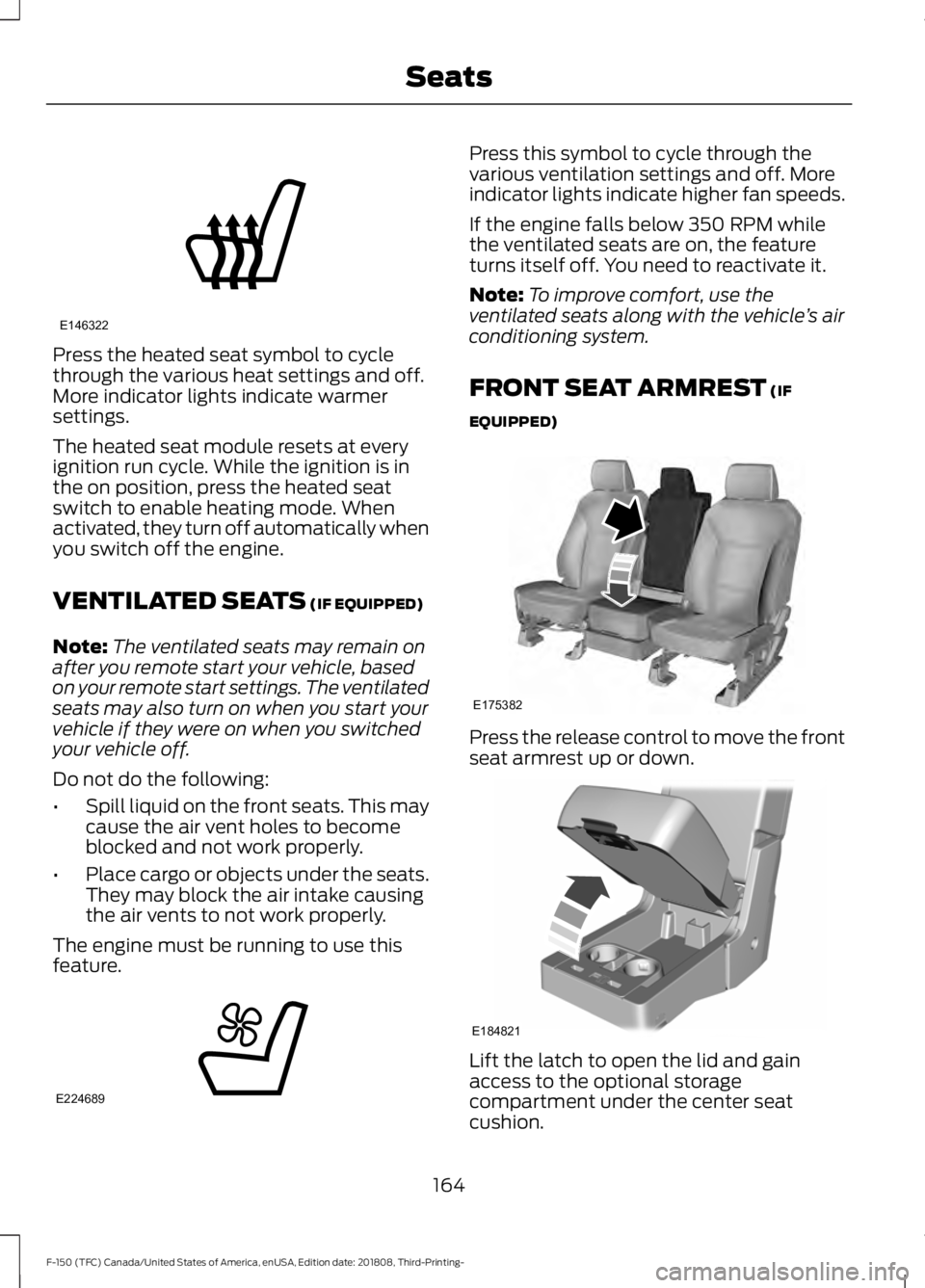
Press the heated seat symbol to cycle
through the various heat settings and off.
More indicator lights indicate warmer
settings.
The heated seat module resets at every
ignition run cycle. While the ignition is in
the on position, press the heated seat
switch to enable heating mode. When
activated, they turn off automatically when
you switch off the engine.
VENTILATED SEATS (IF EQUIPPED)
Note: The ventilated seats may remain on
after you remote start your vehicle, based
on your remote start settings. The ventilated
seats may also turn on when you start your
vehicle if they were on when you switched
your vehicle off.
Do not do the following:
• Spill liquid on the front seats. This may
cause the air vent holes to become
blocked and not work properly.
• Place cargo or objects under the seats.
They may block the air intake causing
the air vents to not work properly.
The engine must be running to use this
feature. Press this symbol to cycle through the
various ventilation settings and off. More
indicator lights indicate higher fan speeds.
If the engine falls below 350 RPM while
the ventilated seats are on, the feature
turns itself off. You need to reactivate it.
Note:
To improve comfort, use the
ventilated seats along with the vehicle ’s air
conditioning system.
FRONT SEAT ARMREST
(IF
EQUIPPED) Press the release control to move the front
seat armrest up or down.
Lift the latch to open the lid and gain
access to the optional storage
compartment under the center seat
cushion.
164
F-150 (TFC) Canada/United States of America, enUSA, Edition date: 201808, Third-Printing- SeatsE146322 E224689 E175382 E184821
Page 259 of 644
A message displays if something obstructs
the radar signals from the sensor. The
sensor is in the lower grille. The system
cannot detect a vehicle ahead and does
not function when something blocks the
sensor.
Note:
You cannot see the sensor. It is
behind a fascia panel.
Keep the front of your vehicle free of dirt,
metal badges or objects. Vehicle front
protectors and aftermarket lights may also
block the sensor.
Possible Causes and Actions for This Message Displaying: Action
Cause
Clean the grille surface in front of the radar
or remove the object causing the obstruc-
tion.
The surface of the radar is dirty or
obstructed.
Wait a short time. It may take several
minutes for the radar to detect that it is free
from obstruction.
The surface of the radar is clean but the
message remains in the display.
Do not use the system in these conditions
because it may not detect any vehicles
ahead.
Heavy rain or snow is interfering with the
radar signals.
Do not use the system in these conditions
because it may not detect any vehicles
ahead.
Water, snow or ice on the surface of the
road may interfere with the radar signals.
Wait a short time or switch to normal cruise
control.
You are in a desert or remote area with no
other vehicles and no roadside objects.
Due to the nature of radar technology, it is possible to get a blockage warning with no
actual block. A false blocked condition either self clears, or clears after you restart your
vehicle.
Switching to Normal Cruise
Control WARNING: Normal cruise control
will not brake when your vehicle is
approaching slower vehicles. Always be
aware of which mode you have selected
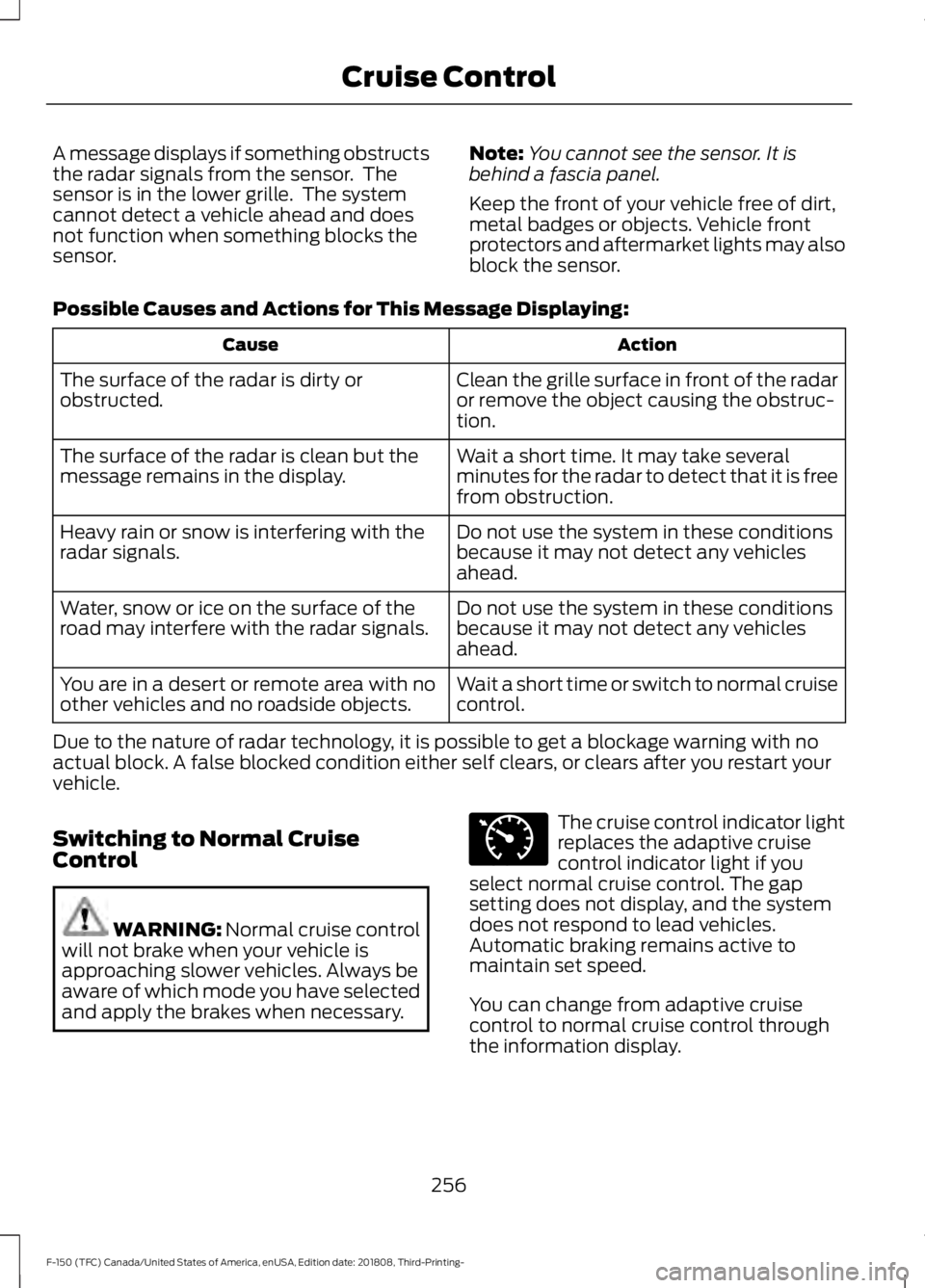
and apply the brakes when necessary. The cruise control indicator light
replaces the adaptive cruise
control indicator light if you
select normal cruise control. The gap
setting does not display, and the system
does not respond to lead vehicles.
Automatic braking remains active to
maintain set speed.
You can change from adaptive cruise
control to normal cruise control through
the information display.
256
F-150 (TFC) Canada/United States of America, enUSA, Edition date: 201808, Third-Printing- Cruise ControlE71340
Page 403 of 644
WARNING: Always inflate
steel carcass tires with a remote
air fill with the person inflating
standing at a minimum of
12 ft
(3.66 m) away from the wheel
and tire assembly.
Important: Remember to replace
the wheel valve stems when the
road tires are replaced on your
vehicle.
The two front tires or two rear tires
should generally be replaced as a
pair, except if the vehicle is
equipped with four wheel drive.
Vehicles equipped with four wheel
drive should have all four tires
replaced simultaneously.
Unevenly worn tires, mismatched
makes, models or brands can be
different in size, resulting in
potential damage to the four
wheel drive system.
The tire pressure sensors mounted
in the wheels are not designed to
be used in aftermarket wheels.
The use of wheels or tires not
recommended by us may affect
the operation of your tire pressure
monitoring system.
If the tire pressure monitoring
system indicator is flashing, the
system is malfunctioning. Your
replacement tire might be
incompatible with your tire
pressure monitoring system, or
some component of the system
may be damaged. Safety Practices WARNING:
If your vehicle
is stuck in snow, mud or sand, do
not rapidly spin the tires;
spinning the tires can tear the
tire and cause an explosion. A
tire can explode in as little as
three to five seconds. WARNING: Do not spin the
wheels at over
34 mph
(55 km/h). The tires may fail and
injure a passenger or bystander.
Driving habits have a great deal
to do with your tire mileage and
safety.
*Observe posted speed limits
*Avoid fast starts, stops and turns
*Avoid potholes and objects on
the road
*Do not run over curbs or hit the
tire against a curb when parking
Highway Hazards
No matter how carefully you drive
there ’s always the possibility that
you may eventually have a flat tire
on the highway. Drive slowly to the
closest safe area out of traffic.
This may further damage the flat
tire, but your safety is more
important.
400
F-150 (TFC) Canada/United States of America, enUSA, Edition date: 201808, Third-Printing- Wheels and Tires
Page 492 of 644
Restricted features
Pairing a Bluetooth phone.
Cellular Phone
Browsing of list entries is limited for phone contacts and
recent phone calls.
Editing the keypad code.
System Functionality
Enabling Valet Mode.
Editing settings while the rear view camera or active park
assist are active.
Editing Wi-Fi settings.
Wi-Fi
Editing the list of wireless networks.
Connecting to a new Wi-Fi network.
Viewing received text messages.
Text Messages
Using the keyboard to enter a destination.
Navigation
Adding or editing Navigation Favorites entries or Avoid
Areas.
Creating a SYNC Owner Account
Why do I need a SYNC owner account?
• Essential for keeping up with the latest
software and connected features.
• Access to customer support for any
questions you may have.
• Maintain account permissions.
Visit the website to sign up and register. Website
www.owner.ford.com
www.syncmyride.ca Website
www.syncmaroute.ca
FordPass ™ Connect (If Equipped)
With a FordPass-equipped vehicle, you can
use FordPass to track your vehicle ’s
location and remotely access vehicle
features such as start, lock and unlock and
vehicle status including fuel level and
approximate mileage. You can also
schedule specific times to remotely start
your vehicle so it’ s ready to hit the road as
soon as you are. FordPass is available
through a free download via the Apple App
Store® or Google Play ™. Message and
data rates may apply. Services may be
limited by mobile phone network coverage
area.
489
F-150 (TFC) Canada/United States of America, enUSA, Edition date: 201808, Third-Printing- SYNC™ 3
(If Equipped)
Page 558 of 644
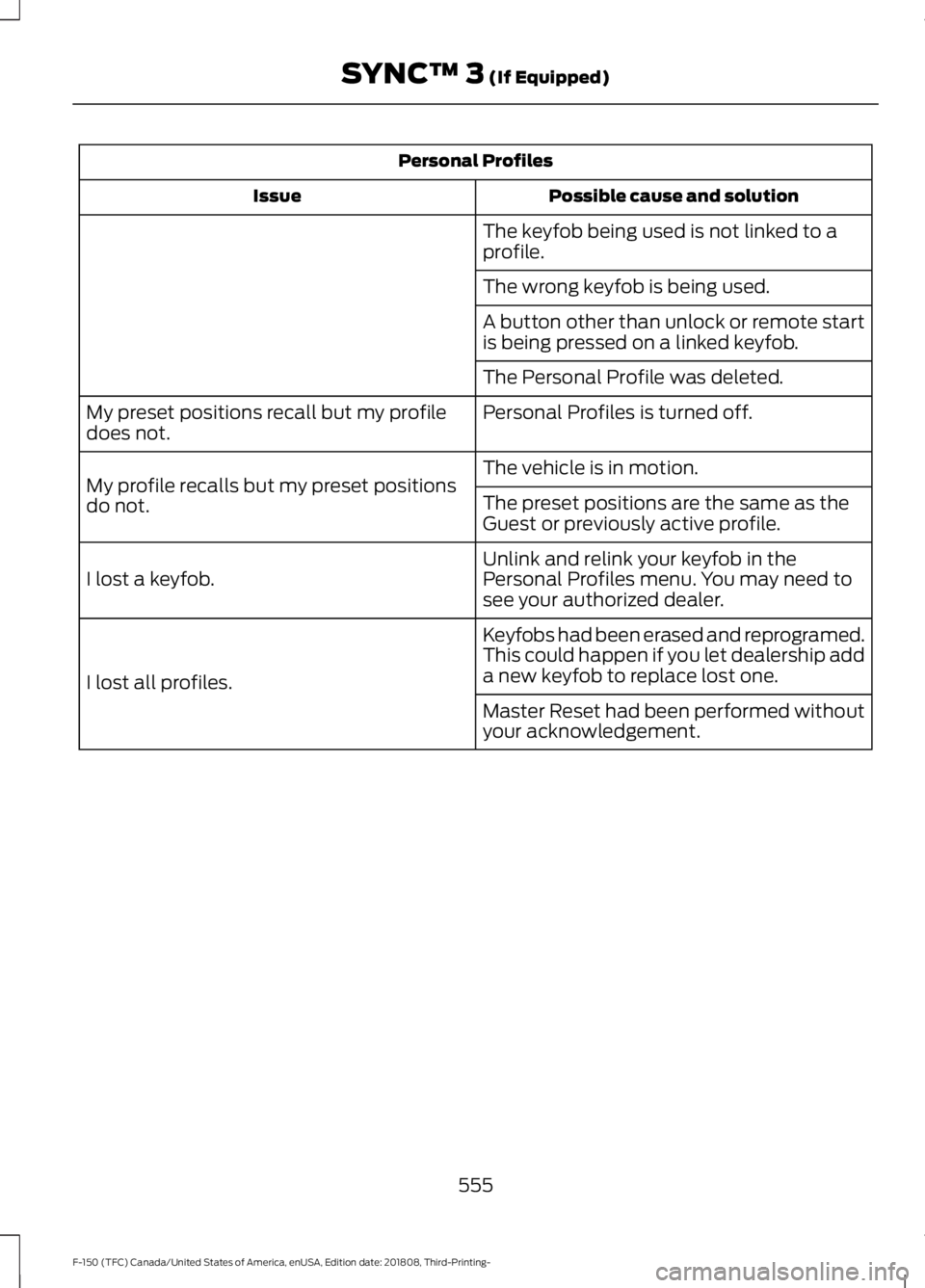
Personal Profiles
Possible cause and solution
Issue
The keyfob being used is not linked to a
profile.
The wrong keyfob is being used.
A button other than unlock or remote start
is being pressed on a linked keyfob.
The Personal Profile was deleted.
Personal Profiles is turned off.
My preset positions recall but my profile
does not.
The vehicle is in motion.
My profile recalls but my preset positions
do not. The preset positions are the same as the
Guest or previously active profile.
Unlink and relink your keyfob in the
Personal Profiles menu. You may need to
see your authorized dealer.
I lost a keyfob.
Keyfobs had been erased and reprogramed.
This could happen if you let dealership add
a new keyfob to replace lost one.
I lost all profiles.
Master Reset had been performed without
your acknowledgement.
555
F-150 (TFC) Canada/United States of America, enUSA, Edition date: 201808, Third-Printing- SYNC™ 3 (If Equipped)
Page 561 of 644
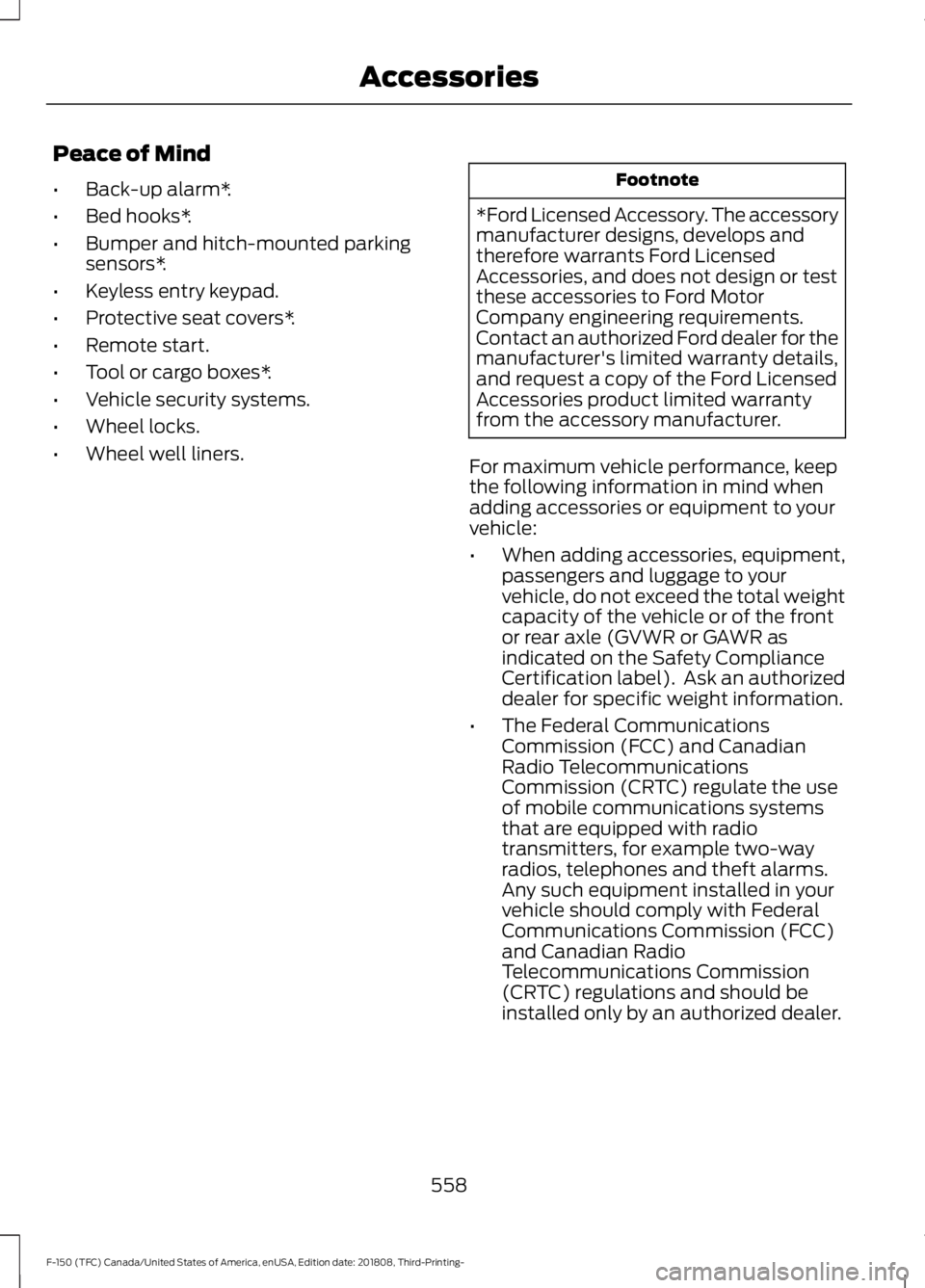
Peace of Mind
•
Back-up alarm*.
• Bed hooks*.
• Bumper and hitch-mounted parking
sensors*.
• Keyless entry keypad.
• Protective seat covers*.
• Remote start.
• Tool or cargo boxes*.
• Vehicle security systems.
• Wheel locks.
• Wheel well liners. Footnote
*Ford Licensed Accessory. The accessory
manufacturer designs, develops and
therefore warrants Ford Licensed
Accessories, and does not design or test
these accessories to Ford Motor
Company engineering requirements.
Contact an authorized Ford dealer for the
manufacturer's limited warranty details,
and request a copy of the Ford Licensed
Accessories product limited warranty
from the accessory manufacturer.
For maximum vehicle performance, keep
the following information in mind when
adding accessories or equipment to your
vehicle:
• When adding accessories, equipment,
passengers and luggage to your
vehicle, do not exceed the total weight
capacity of the vehicle or of the front
or rear axle (GVWR or GAWR as
indicated on the Safety Compliance
Certification label). Ask an authorized
dealer for specific weight information.
• The Federal Communications
Commission (FCC) and Canadian
Radio Telecommunications
Commission (CRTC) regulate the use
of mobile communications systems
that are equipped with radio
transmitters, for example two-way
radios, telephones and theft alarms.
Any such equipment installed in your
vehicle should comply with Federal
Communications Commission (FCC)
and Canadian Radio
Telecommunications Commission
(CRTC) regulations and should be
installed only by an authorized dealer.
558
F-150 (TFC) Canada/United States of America, enUSA, Edition date: 201808, Third-Printing- Accessories
Page 637 of 644
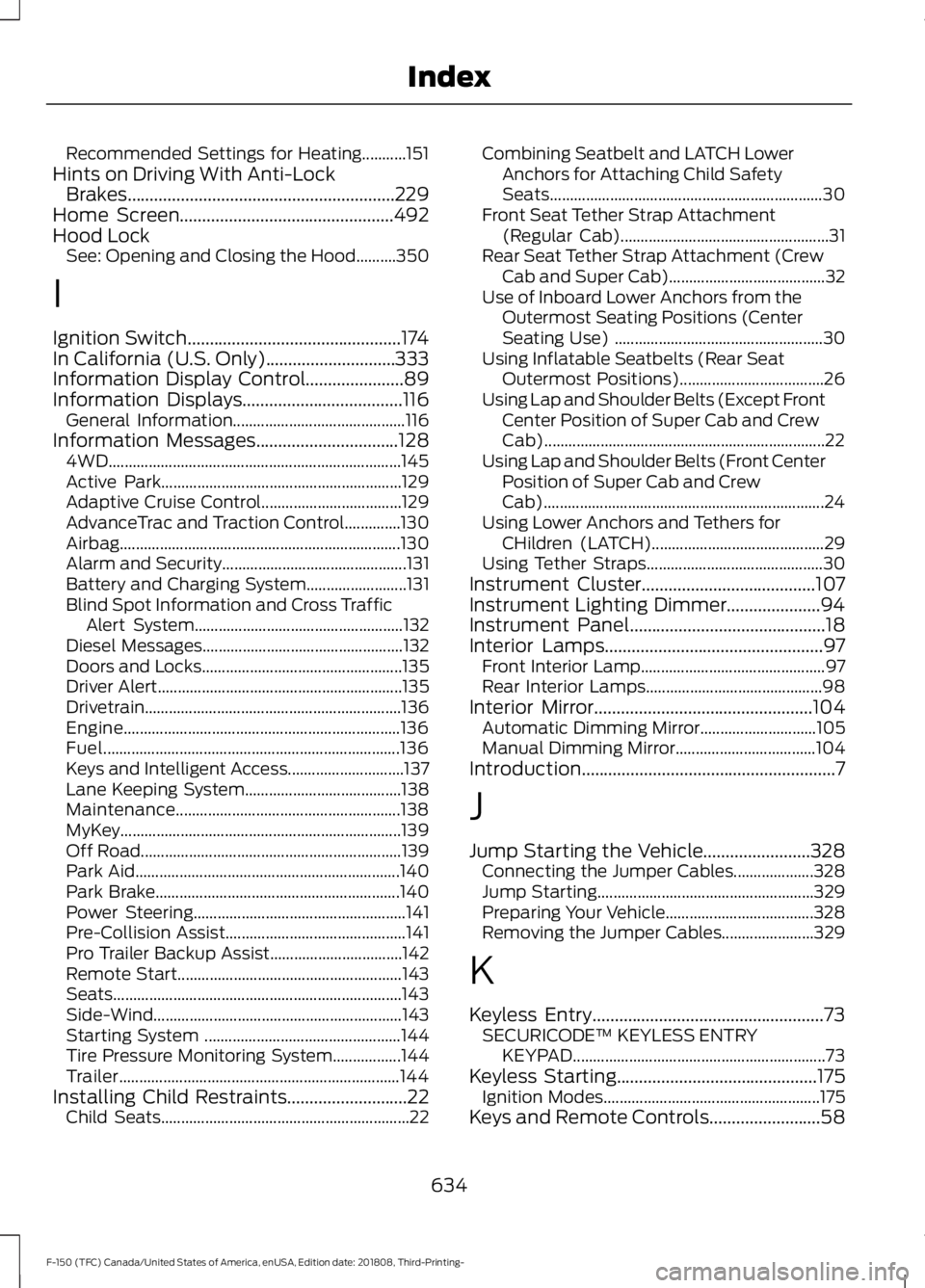
Recommended Settings for Heating...........151
Hints on Driving With Anti-Lock Brakes............................................................229
Home Screen................................................492
Hood Lock See: Opening and Closing the Hood..........350
I
Ignition Switch................................................174
In California (U.S. Only).............................333
Information Display Control......................89
Information Displays
....................................116
General Information........................................... 116
Information Messages
................................128
4WD........................................................................\
. 145
Active Park............................................................ 129
Adaptive Cruise Control................................... 129
AdvanceTrac and Traction Control..............130
Airbag...................................................................... 130
Alarm and Security.............................................. 131
Battery and Charging System......................... 131
Blind Spot Information and Cross Traffic Alert System.................................................... 132
Diesel Messages.................................................. 132
Doors and Locks.................................................. 135
Driver Alert............................................................. 135
Drivetrain................................................................ 136
Engine..................................................................... 136
Fuel........................................................................\
.. 136
Keys and Intelligent Access............................. 137
Lane Keeping System....................................... 138
Maintenance........................................................ 138
MyKey...................................................................... 139
Off Road................................................................. 139
Park Aid.................................................................. 140
Park Brake............................................................. 140
Power Steering..................................................... 141
Pre-Collision Assist............................................. 141
Pro Trailer Backup Assist................................. 142
Remote Start........................................................ 143
Seats........................................................................\
143
Side-Wind.............................................................. 143
Starting System ................................................. 144
Tire Pressure Monitoring System.................144
Trailer...................................................................... 144
Installing Child Restraints...........................22 Child Seats.............................................................. 22Combining Seatbelt and LATCH Lower
Anchors for Attaching Child Safety
Seats.................................................................... 30
Front Seat Tether Strap Attachment (Regular Cab).................................................... 31
Rear Seat Tether Strap Attachment (Crew Cab and Super Cab)....................................... 32
Use of Inboard Lower Anchors from the Outermost Seating Positions (Center
Seating Use) .................................................... 30
Using Inflatable Seatbelts (Rear Seat Outermost Positions).................................... 26
Using Lap and Shoulder Belts (Except Front Center Position of Super Cab and Crew
Cab)...................................................................... 22
Using Lap and Shoulder Belts (Front Center Position of Super Cab and Crew
Cab)...................................................................... 24
Using Lower Anchors and Tethers for CHildren (LATCH)........................................... 29
Using Tether Straps............................................ 30
Instrument Cluster
.......................................107
Instrument Lighting Dimmer.....................94
Instrument Panel
............................................18
Interior Lamps.................................................97
Front Interior Lamp.............................................. 97
Rear Interior Lamps............................................ 98
Interior Mirror
.................................................104
Automatic Dimming Mirror............................. 105
Manual Dimming Mirror................................... 104
Introduction.........................................................7
J
Jump Starting the Vehicle........................328 Connecting the Jumper Cables.................... 328
Jump Starting...................................................... 329
Preparing Your Vehicle..................................... 328
Removing the Jumper Cables....................... 329
K
Keyless Entry....................................................73 SECURICODE™ KEYLESS ENTRY
KEYPAD............................................................... 73
Keyless Starting
.............................................175
Ignition Modes...................................................... 175
Keys and Remote Controls.........................58
634
F-150 (TFC) Canada/United States of America, enUSA, Edition date: 201808, Third-Printing- Index
Page 640 of 644
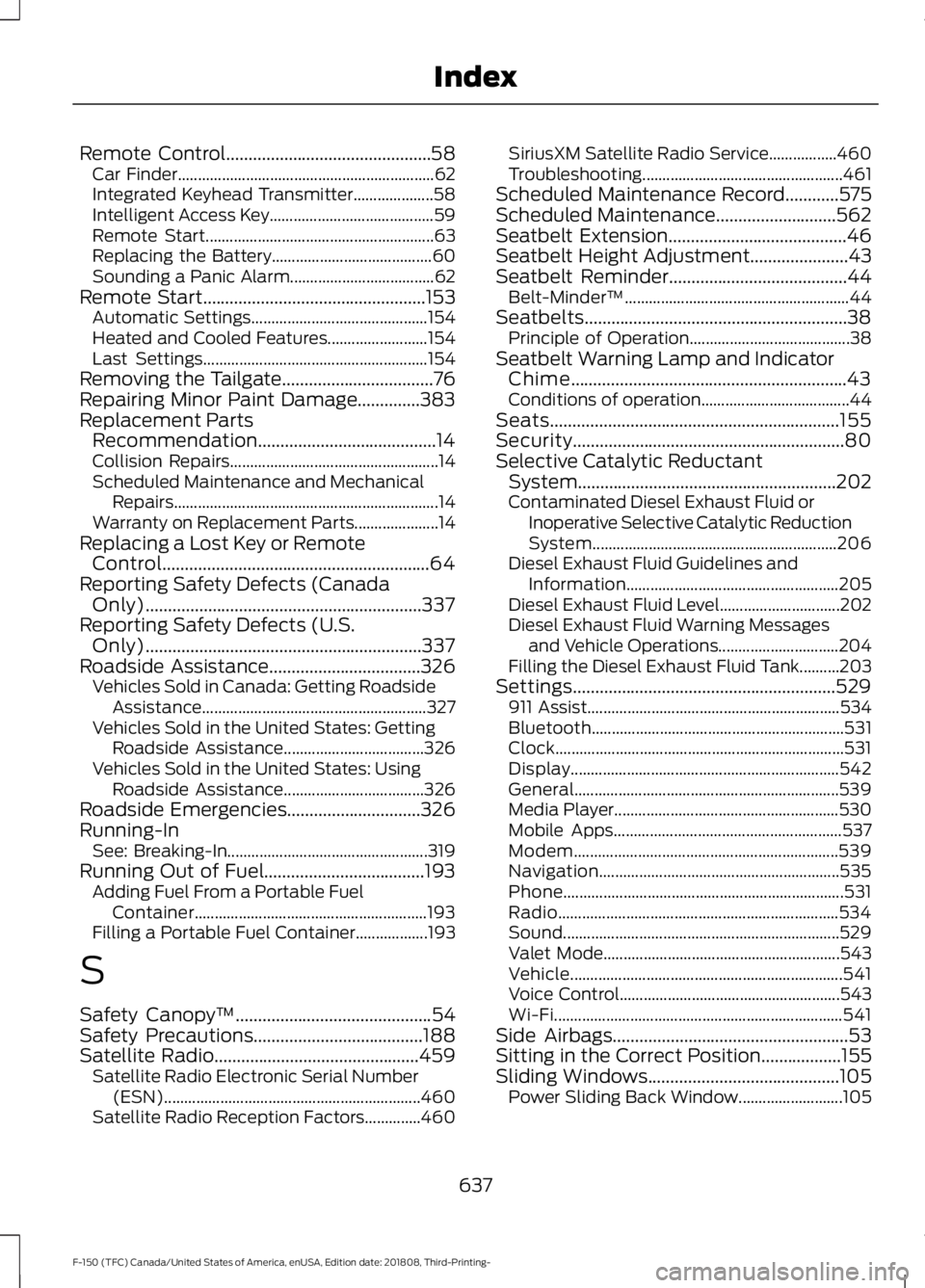
Remote Control..............................................58
Car Finder................................................................ 62
Integrated Keyhead Transmitter.................... 58
Intelligent Access Key......................................... 59
Remote Start......................................................... 63
Replacing the Battery........................................ 60
Sounding a Panic Alarm.................................... 62
Remote Start..................................................153
Automatic Settings............................................ 154
Heated and Cooled Features......................... 154
Last Settings........................................................ 154
Removing the Tailgate
..................................76
Repairing Minor Paint Damage..............383
Replacement Parts Recommendation........................................14
Collision Repairs.................................................... 14
Scheduled Maintenance and Mechanical Repairs.................................................................. 14
Warranty on Replacement Parts..................... 14
Replacing a Lost Key or Remote Control............................................................64
Reporting Safety Defects (Canada Only)..............................................................337
Reporting Safety Defects (U.S. Only)..............................................................337
Roadside Assistance..................................326 Vehicles Sold in Canada: Getting Roadside
Assistance........................................................ 327
Vehicles Sold in the United States: Getting Roadside Assistance................................... 326
Vehicles Sold in the United States: Using Roadside Assistance................................... 326
Roadside Emergencies
..............................326
Running-In See: Breaking-In.................................................. 319
Running Out of Fuel....................................193 Adding Fuel From a Portable Fuel
Container.......................................................... 193
Filling a Portable Fuel Container.................. 193
S
Safety Canopy ™
............................................54
Safety Precautions......................................188
Satellite Radio
..............................................459
Satellite Radio Electronic Serial Number
(ESN)................................................................ 460
Satellite Radio Reception Factors..............460 SiriusXM Satellite Radio Service.................460
Troubleshooting..................................................
461
Scheduled Maintenance Record
............575
Scheduled Maintenance...........................562
Seatbelt Extension........................................46
Seatbelt Height Adjustment......................43
Seatbelt Reminder
........................................44
Belt-Minder™........................................................ 44
Seatbelts...........................................................38 Principle of Operation........................................ 38
Seatbelt Warning Lamp and Indicator Chime..............................................................43
Conditions of operation..................................... 44
Seats.................................................................155
Security.............................................................80
Selective Catalytic Reductant System..........................................................202
Contaminated Diesel Exhaust Fluid or Inoperative Selective Catalytic Reduction
System............................................................. 206
Diesel Exhaust Fluid Guidelines and Information
..................................................... 205
Diesel Exhaust Fluid Level.............................. 202
Diesel Exhaust Fluid Warning Messages and Vehicle Operations.............................. 204
Filling the Diesel Exhaust Fluid Tank..........203
Settings...........................................................529 911 Assist............................................................... 534
Bluetooth............................................................... 531
Clock........................................................................\
531
Display................................................................... 542
General.................................................................. 539
Media Player........................................................ 530
Mobile Apps......................................................... 537
Modem.................................................................. 539
Navigation............................................................ 535
Phone...................................................................... 531
Radio...................................................................... 534
Sound..................................................................... 529
Valet Mode........................................................... 543
Vehicle.................................................................... 541
Voice Control....................................................... 543
Wi-Fi........................................................................\
541
Side Airbags
.....................................................53
Sitting in the Correct Position..................155
Sliding Windows...........................................105 Power Sliding Back Window.......................... 105
637
F-150 (TFC) Canada/United States of America, enUSA, Edition date: 201808, Third-Printing- Index
Page 643 of 644
Using Cruise Control...................................249
Canceling the Set Speed................................ 250
Changing the Set Speed................................. 249
Resuming the Set Speed................................ 250
Setting the Cruise Speed................................ 249
Switching Cruise Control Off........................ 250
Switching Cruise Control On......................... 249
Using Four-Wheel Drive.............................218 4WD Indicator Lights........................................ 218
Driving Off-Road With Truck and Utility Vehicles............................................................. 222
How Your Vehicle Differs From Other Vehicles.............................................................. 221
Using the 2-Speed Automatic 4WD System............................................................... 219
Using the Electronic Shift on the Fly 4WD system................................................................ 218
Using Hill Descent Control.......................236 Hill descent modes........................................... 236
Using MyKey With Remote Start Systems..........................................................68
Using Power Running Boards....................84
Automatic Power Deploy.................................. 84
Automatic Power Stow..................................... 84
Bounce-back......................................................... 85
Enabling and Disabling...................................... 85
Manual Power Deploy........................................ 84
Using Snow Chains.....................................402
Using Stability Control...............................234 AdvanceTrac ™ with Roll Stability Control ™
(RSC™)............................................................ 234
Using SYNC™ With Your Media Player..............................................................471
Audio Voice Commands................................... 471
Media Sources...................................................... 471
Using SYNC™ With Your Phone...........466 Accessing Features through the Phone
Menu.................................................................. 467
Pairing a Phone.................................................. 466
Phone Controls................................................... 467
Phone Voice Commands................................ 467
Using Traction Control...............................232 Switching the System Off .............................. 232
System Indicator Lights and Messages......................................................... 232
Using Voice Recognition...........................464 Audio Voice Commands................................. 494Climate Voice Commands.............................
495
Initiating a Voice Session............................... 464
Mobile App Voice Commands..................... 498
Navigation Voice Commands....................... 497
Phone Voice Commands................................ 495
SiriusXM Traffic and Travel Link Voice Commands..................................................... 498
System Interaction and Feedback..............465
Voice Settings Commands............................ 499
Utilizing the Mediation/Arbitration Program (Canada Only)
........................335
V
Vehicle Care....................................................377 General Information.......................................... 377
Vehicle Certification Label.......................426
Vehicle Identification Number................425
Vehicle Storage............................................383 Battery................................................................... 384
Body....................................................................... 384
Brakes.................................................................... 384
Cooling system................................................... 384
Engine.................................................................... 384
Fuel system......................................................... 384
General.................................................................. 384
Miscellaneous..................................................... 385
Removing Vehicle From Storage.................385
Tires........................................................................\
384
Ventilated Seats
...........................................164
Ventilation See: Climate Control.......................................... 147
VIN See: Vehicle Identification Number............425
Voice Control
...................................................88
W
Warning Lamps and Indicators................110 Adaptive Cruise Control Indicator.................110
Anti-Lock Braking System............................... 110
Automatic Headlamp High Beam Indicator............................................................. 110
Automatic Regen Control Off......................... 110
Auto-Start-Stop Indicator............................... 110
Battery....................................................................... 111
Blind Spot Monitor............................................... 111
Brake System Warning Lamp........................... 111
640
F-150 (TFC) Canada/United States of America, enUSA, Edition date: 201808, Third-Printing- Index