battery FORD F-150 2020 Repair Manual
[x] Cancel search | Manufacturer: FORD, Model Year: 2020, Model line: F-150, Model: FORD F-150 2020Pages: 625, PDF Size: 7.98 MB
Page 500 of 625
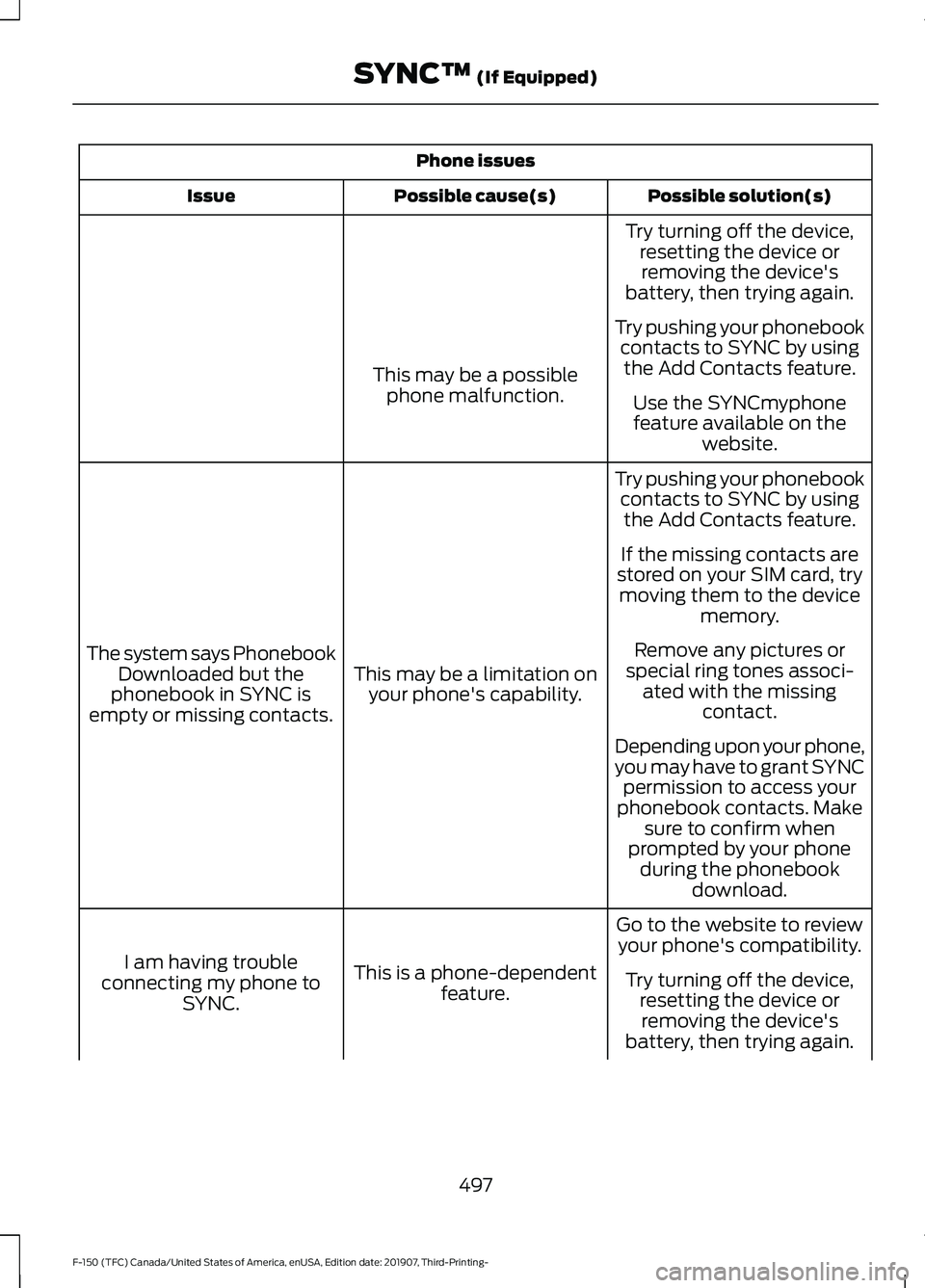
Phone issues
Possible solution(s)
Possible cause(s)
Issue
Try turning off the device,resetting the device orremoving the device's
battery, then trying again.
Try pushing your phonebook contacts to SYNC by usingthe Add Contacts feature.
This may be a possible
phone malfunction. Use the SYNCmyphone
feature available on the website.
Try pushing your phonebook contacts to SYNC by usingthe Add Contacts feature.
This may be a limitation on your phone's capability.
The system says Phonebook
Downloaded but the
phonebook in SYNC is
empty or missing contacts. If the missing contacts are
stored on your SIM card, try moving them to the device memory.
Remove any pictures or
special ring tones associ- ated with the missing contact.
Depending upon your phone,
you may have to grant SYNC permission to access your
phonebook contacts. Make sure to confirm when
prompted by your phone during the phonebook download.
Go to the website to review your phone's compatibility.
This is a phone-dependent feature.
I am having trouble
connecting my phone to SYNC. Try turning off the device,
resetting the device orremoving the device's
battery, then trying again.
497
F-150 (TFC) Canada/United States of America, enUSA, Edition date: 201907, Third-Printing- SYNC™ (If Equipped)
Page 501 of 625
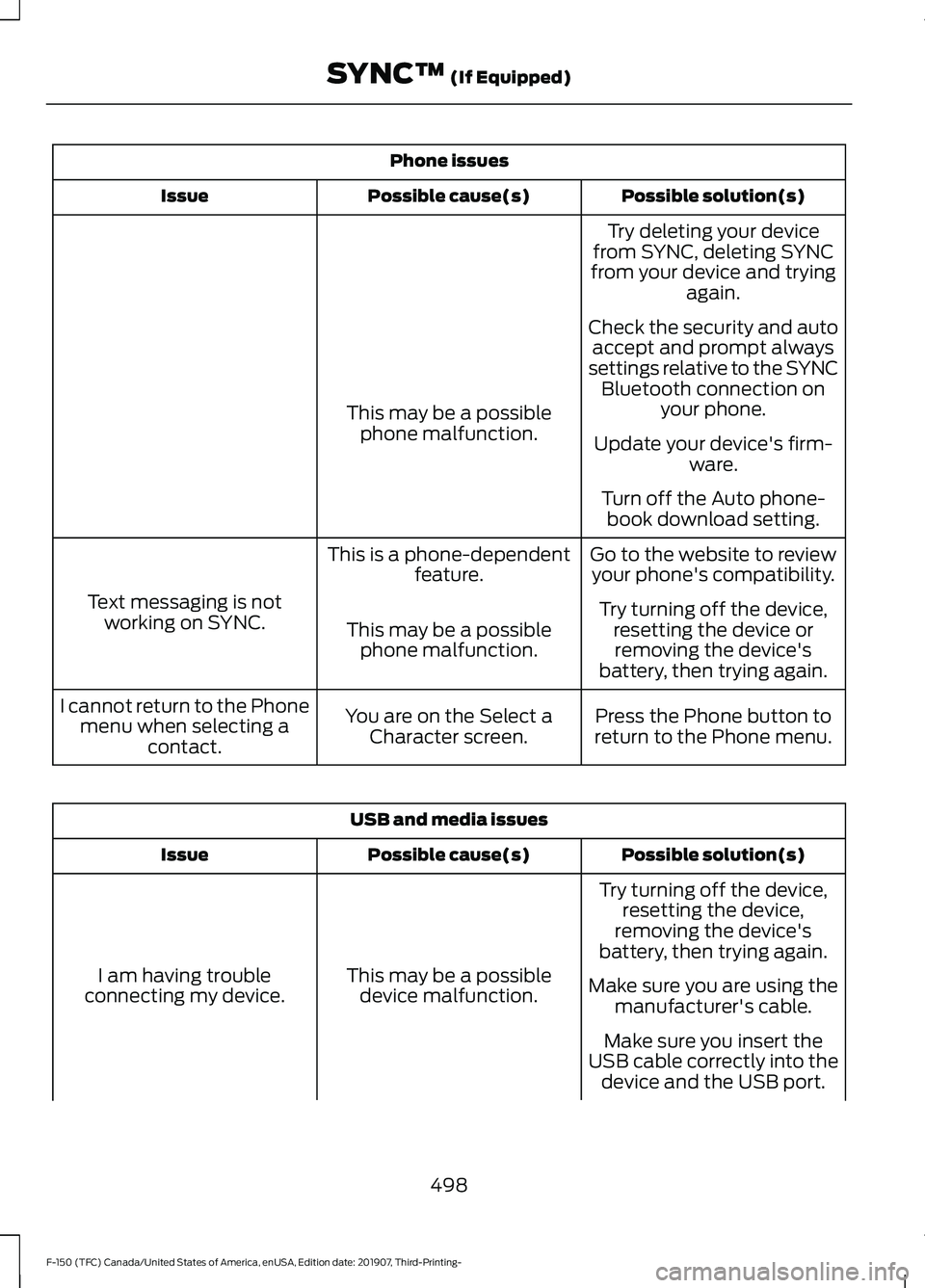
Phone issues
Possible solution(s)
Possible cause(s)
Issue
Try deleting your device
from SYNC, deleting SYNC
from your device and trying again.
Check the security and auto accept and prompt always
settings relative to the SYNC Bluetooth connection on your phone.
This may be a possible
phone malfunction. Update your device's firm-
ware.
Turn off the Auto phone- book download setting.
Go to the website to review your phone's compatibility.
This is a phone-dependent
feature.
Text messaging is not working on SYNC. Try turning off the device,
resetting the device orremoving the device's
battery, then trying again.
This may be a possible
phone malfunction.
Press the Phone button to
return to the Phone menu.
You are on the Select a
Character screen.
I cannot return to the Phone
menu when selecting a contact. USB and media issues
Possible solution(s)
Possible cause(s)
Issue
Try turning off the device,resetting the device,
removing the device's
battery, then trying again.
This may be a possible device malfunction.
I am having trouble
connecting my device. Make sure you are using the
manufacturer's cable.
Make sure you insert the
USB cable correctly into the device and the USB port.
498
F-150 (TFC) Canada/United States of America, enUSA, Edition date: 201907, Third-Printing- SYNC™ (If Equipped)
Page 553 of 625
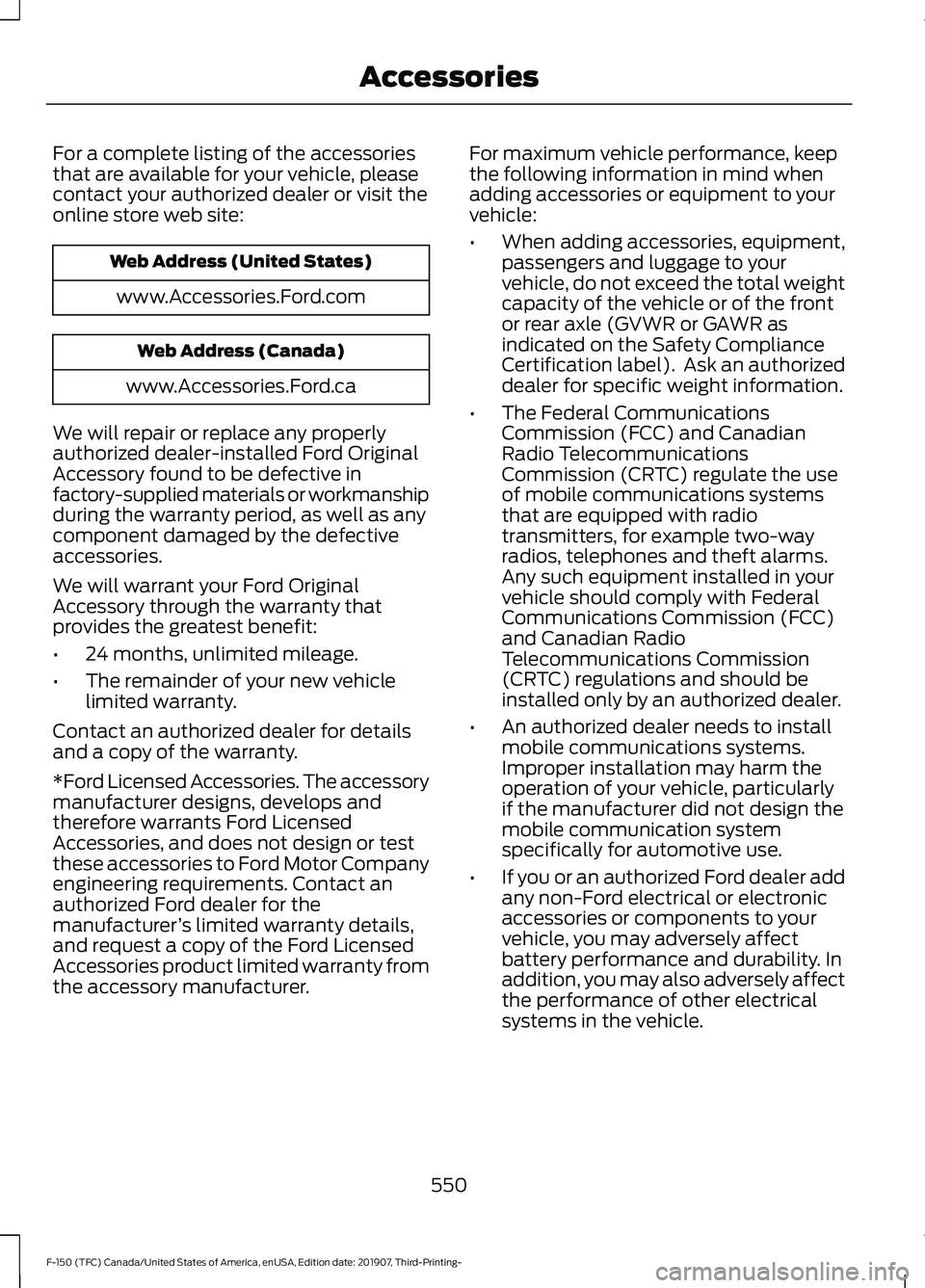
For a complete listing of the accessories
that are available for your vehicle, please
contact your authorized dealer or visit the
online store web site:
Web Address (United States)
www.Accessories.Ford.com Web Address (Canada)
www.Accessories.Ford.ca
We will repair or replace any properly
authorized dealer-installed Ford Original
Accessory found to be defective in
factory-supplied materials or workmanship
during the warranty period, as well as any
component damaged by the defective
accessories.
We will warrant your Ford Original
Accessory through the warranty that
provides the greatest benefit:
• 24 months, unlimited mileage.
• The remainder of your new vehicle
limited warranty.
Contact an authorized dealer for details
and a copy of the warranty.
*Ford Licensed Accessories. The accessory
manufacturer designs, develops and
therefore warrants Ford Licensed
Accessories, and does not design or test
these accessories to Ford Motor Company
engineering requirements. Contact an
authorized Ford dealer for the
manufacturer ’s limited warranty details,
and request a copy of the Ford Licensed
Accessories product limited warranty from
the accessory manufacturer. For maximum vehicle performance, keep
the following information in mind when
adding accessories or equipment to your
vehicle:
•
When adding accessories, equipment,
passengers and luggage to your
vehicle, do not exceed the total weight
capacity of the vehicle or of the front
or rear axle (GVWR or GAWR as
indicated on the Safety Compliance
Certification label). Ask an authorized
dealer for specific weight information.
• The Federal Communications
Commission (FCC) and Canadian
Radio Telecommunications
Commission (CRTC) regulate the use
of mobile communications systems
that are equipped with radio
transmitters, for example two-way
radios, telephones and theft alarms.
Any such equipment installed in your
vehicle should comply with Federal
Communications Commission (FCC)
and Canadian Radio
Telecommunications Commission
(CRTC) regulations and should be
installed only by an authorized dealer.
• An authorized dealer needs to install
mobile communications systems.
Improper installation may harm the
operation of your vehicle, particularly
if the manufacturer did not design the
mobile communication system
specifically for automotive use.
• If you or an authorized Ford dealer add
any non-Ford electrical or electronic
accessories or components to your
vehicle, you may adversely affect
battery performance and durability. In
addition, you may also adversely affect
the performance of other electrical
systems in the vehicle.
550
F-150 (TFC) Canada/United States of America, enUSA, Edition date: 201907, Third-Printing- Accessories
Page 554 of 625
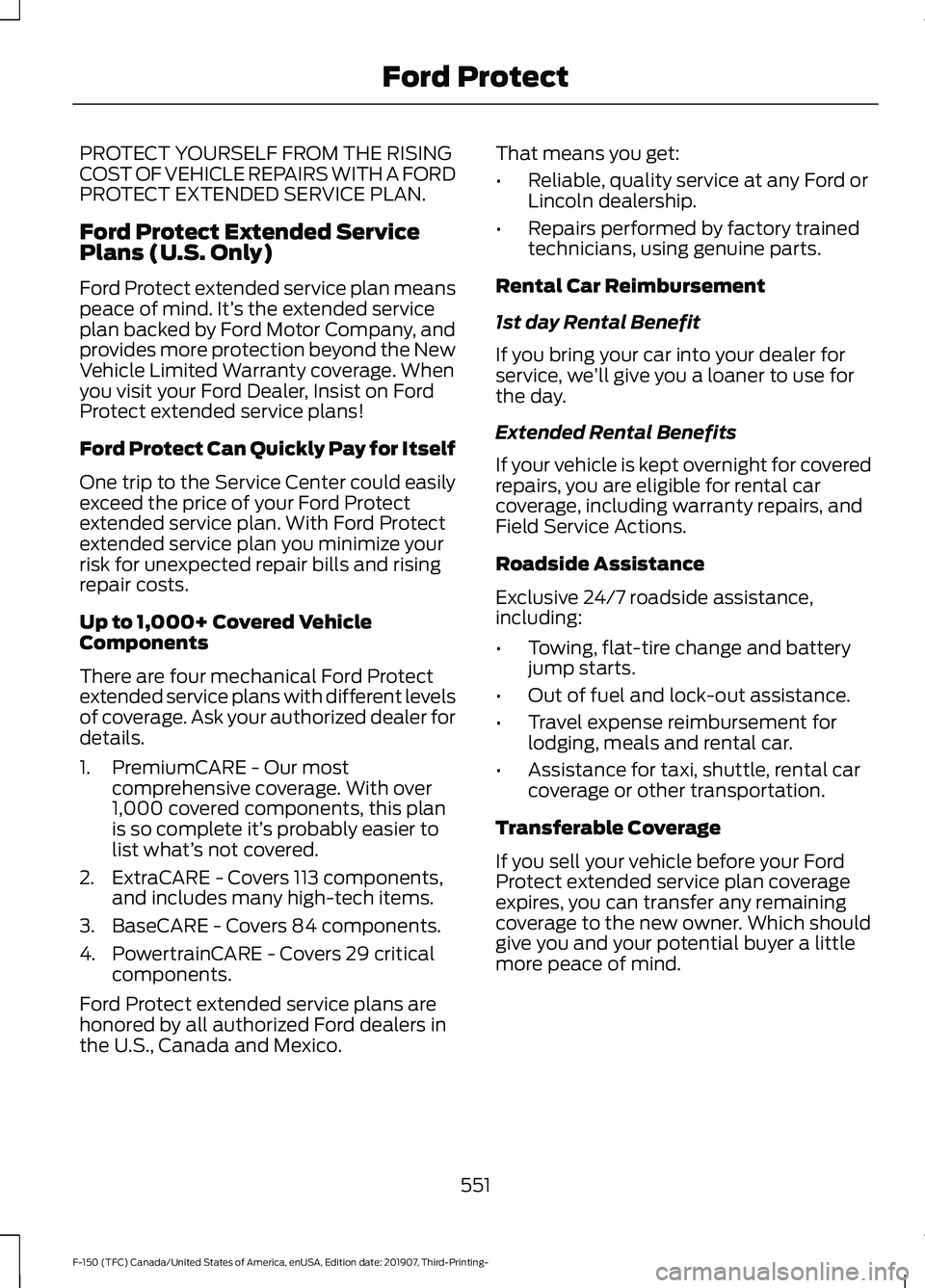
PROTECT YOURSELF FROM THE RISING
COST OF VEHICLE REPAIRS WITH A FORD
PROTECT EXTENDED SERVICE PLAN.
Ford Protect Extended Service
Plans (U.S. Only)
Ford Protect extended service plan means
peace of mind. It’
s the extended service
plan backed by Ford Motor Company, and
provides more protection beyond the New
Vehicle Limited Warranty coverage. When
you visit your Ford Dealer, Insist on Ford
Protect extended service plans!
Ford Protect Can Quickly Pay for Itself
One trip to the Service Center could easily
exceed the price of your Ford Protect
extended service plan. With Ford Protect
extended service plan you minimize your
risk for unexpected repair bills and rising
repair costs.
Up to 1,000+ Covered Vehicle
Components
There are four mechanical Ford Protect
extended service plans with different levels
of coverage. Ask your authorized dealer for
details.
1. PremiumCARE - Our most comprehensive coverage. With over
1,000 covered components, this plan
is so complete it’ s probably easier to
list what’ s not covered.
2. ExtraCARE - Covers 113 components, and includes many high-tech items.
3. BaseCARE - Covers 84 components.
4. PowertrainCARE - Covers 29 critical components.
Ford Protect extended service plans are
honored by all authorized Ford dealers in
the U.S., Canada and Mexico. That means you get:
•
Reliable, quality service at any Ford or
Lincoln dealership.
• Repairs performed by factory trained
technicians, using genuine parts.
Rental Car Reimbursement
1st day Rental Benefit
If you bring your car into your dealer for
service, we ’ll give you a loaner to use for
the day.
Extended Rental Benefits
If your vehicle is kept overnight for covered
repairs, you are eligible for rental car
coverage, including warranty repairs, and
Field Service Actions.
Roadside Assistance
Exclusive 24/7 roadside assistance,
including:
• Towing, flat-tire change and battery
jump starts.
• Out of fuel and lock-out assistance.
• Travel expense reimbursement for
lodging, meals and rental car.
• Assistance for taxi, shuttle, rental car
coverage or other transportation.
Transferable Coverage
If you sell your vehicle before your Ford
Protect extended service plan coverage
expires, you can transfer any remaining
coverage to the new owner. Which should
give you and your potential buyer a little
more peace of mind.
551
F-150 (TFC) Canada/United States of America, enUSA, Edition date: 201907, Third-Printing- Ford Protect
Page 558 of 625
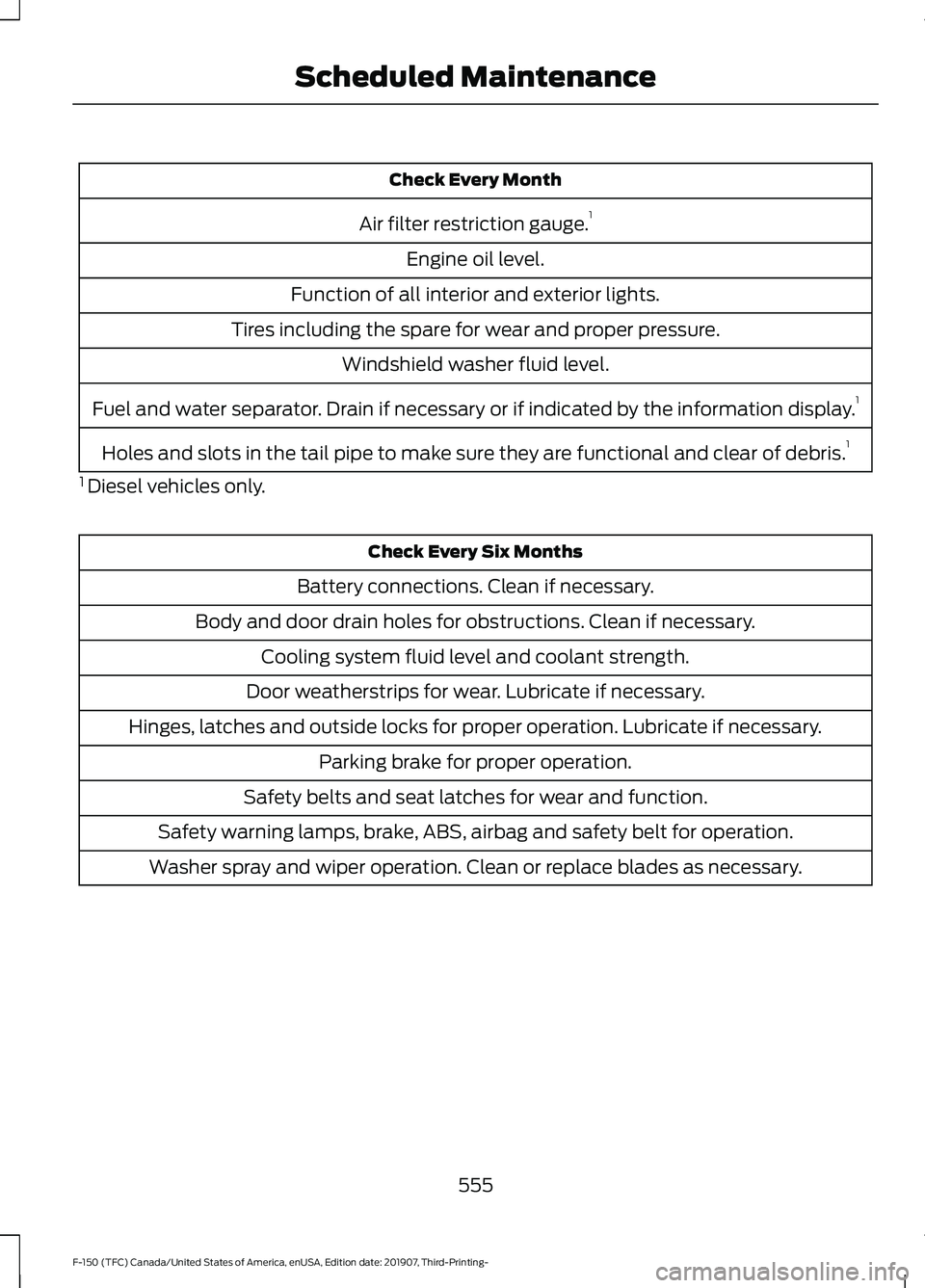
Check Every Month
Air filter restriction gauge. 1
Engine oil level.
Function of all interior and exterior lights.
Tires including the spare for wear and proper pressure. Windshield washer fluid level.
Fuel and water separator. Drain if necessary or if indicated by the information display. 1
Holes and slots in the tail pipe to make sure they are functional and clear of debris. 1
1 Diesel vehicles only. Check Every Six Months
Battery connections. Clean if necessary.
Body and door drain holes for obstructions. Clean if necessary. Cooling system fluid level and coolant strength.
Door weatherstrips for wear. Lubricate if necessary.
Hinges, latches and outside locks for proper operation. Lubricate if necessary. Parking brake for proper operation.
Safety belts and seat latches for wear and function.
Safety warning lamps, brake, ABS, airbag and safety belt for operation.
Washer spray and wiper operation. Clean or replace blades as necessary.
555
F-150 (TFC) Canada/United States of America, enUSA, Edition date: 201907, Third-Printing- Scheduled Maintenance
Page 559 of 625
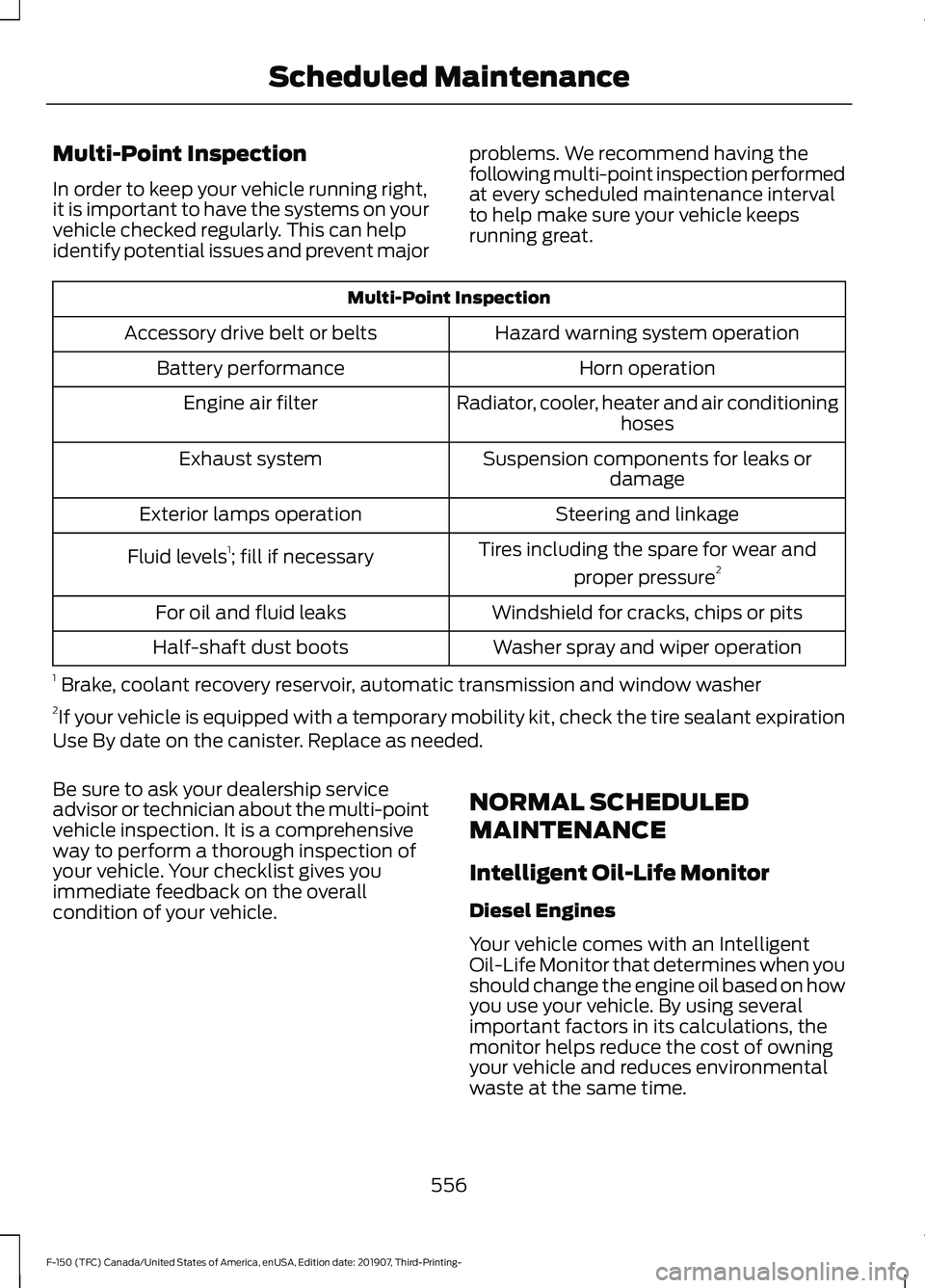
Multi-Point Inspection
In order to keep your vehicle running right,
it is important to have the systems on your
vehicle checked regularly. This can help
identify potential issues and prevent major
problems. We recommend having the
following multi-point inspection performed
at every scheduled maintenance interval
to help make sure your vehicle keeps
running great.Multi-Point Inspection
Hazard warning system operation
Accessory drive belt or belts
Horn operation
Battery performance
Radiator, cooler, heater and air conditioninghoses
Engine air filter
Suspension components for leaks ordamage
Exhaust system
Steering and linkage
Exterior lamps operation
Tires including the spare for wear andproper pressure 2
Fluid levels 1
; fill if necessary
Windshield for cracks, chips or pits
For oil and fluid leaks
Washer spray and wiper operation
Half-shaft dust boots
1 Brake, coolant recovery reservoir, automatic transmission and window washer
2 If your vehicle is equipped with a temporary mobility kit, check the tire sealant expiration
Use By date on the canister. Replace as needed.
Be sure to ask your dealership service
advisor or technician about the multi-point
vehicle inspection. It is a comprehensive
way to perform a thorough inspection of
your vehicle. Your checklist gives you
immediate feedback on the overall
condition of your vehicle. NORMAL SCHEDULED
MAINTENANCE
Intelligent Oil-Life Monitor
Diesel Engines
Your vehicle comes with an Intelligent
Oil-Life Monitor that determines when you
should change the engine oil based on how
you use your vehicle. By using several
important factors in its calculations, the
monitor helps reduce the cost of owning
your vehicle and reduces environmental
waste at the same time.
556
F-150 (TFC) Canada/United States of America, enUSA, Edition date: 201907, Third-Printing- Scheduled Maintenance
Page 611 of 625
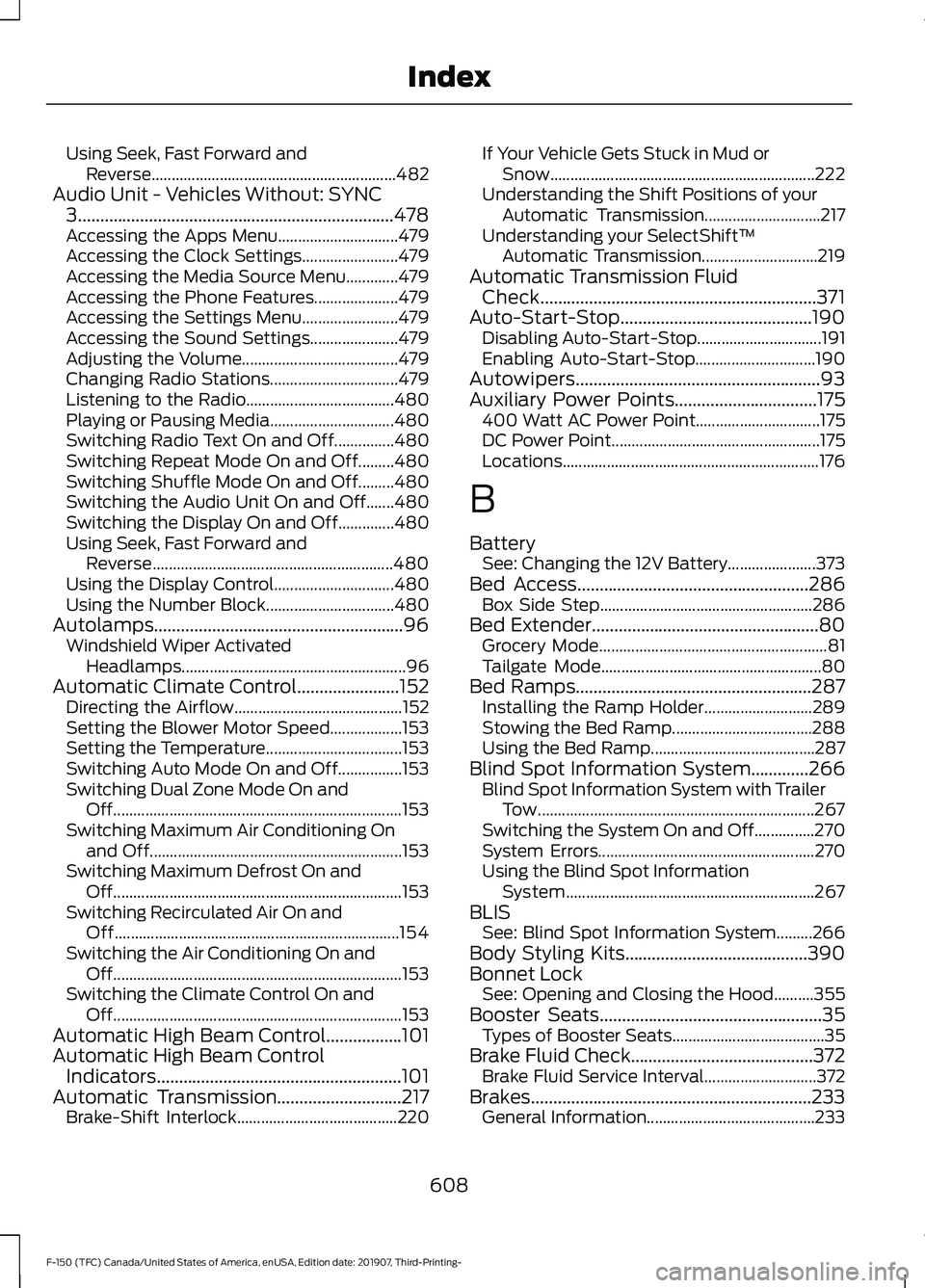
Using Seek, Fast Forward and
Reverse............................................................. 482
Audio Unit - Vehicles Without: SYNC 3.......................................................................478
Accessing the Apps Menu.............................. 479
Accessing the Clock Settings........................ 479
Accessing the Media Source Menu.............479
Accessing the Phone Features..................... 479
Accessing the Settings Menu........................ 479
Accessing the Sound Settings...................... 479
Adjusting the Volume....................................... 479
Changing Radio Stations................................ 479
Listening to the Radio..................................... 480
Playing or Pausing Media............................... 480
Switching Radio Text On and Off...............480
Switching Repeat Mode On and Off.........480
Switching Shuffle Mode On and Off.........480
Switching the Audio Unit On and Off.......480
Switching the Display On and Off..............480
Using Seek, Fast Forward and Reverse............................................................ 480
Using the Display Control.............................. 480
Using the Number Block................................ 480
Autolamps........................................................96 Windshield Wiper Activated
Headlamps........................................................ 96
Automatic Climate Control.......................152 Directing the Airflow.......................................... 152
Setting the Blower Motor Speed.................. 153
Setting the Temperature.................................. 153
Switching Auto Mode On and Off................153
Switching Dual Zone Mode On and Off........................................................................\
153
Switching Maximum Air Conditioning On and Off............................................................... 153
Switching Maximum Defrost On and Off........................................................................\
153
Switching Recirculated Air On and Off....................................................................... 154
Switching the Air Conditioning On and Off........................................................................\
153
Switching the Climate Control On and Off........................................................................\
153
Automatic High Beam Control.................101
Automatic High Beam Control Indicators.......................................................101
Automatic Transmission
............................217
Brake-Shift Interlock........................................ 220If Your Vehicle Gets Stuck in Mud or
Snow.................................................................. 222
Understanding the Shift Positions of your Automatic Transmission............................. 217
Understanding your SelectShift™ Automatic Transmission............................. 219
Automatic Transmission Fluid Check..............................................................371
Auto-Start-Stop...........................................190 Disabling Auto-Start-Stop............................... 191
Enabling Auto-Start-Stop.............................. 190
Autowipers
.......................................................93
Auxiliary Power Points................................175
400 Watt AC Power Point............................... 175
DC Power Point.................................................... 175
Locations................................................................ 176
B
Battery See: Changing the 12V Battery...................... 373
Bed Access
....................................................286
Box Side Step..................................................... 286
Bed Extender...................................................80 Grocery Mode......................................................... 81
Tailgate Mode....................................................... 80
Bed Ramps
.....................................................287
Installing the Ramp Holder........................... 289
Stowing the Bed Ramp................................... 288
Using the Bed Ramp......................................... 287
Blind Spot Information System.............266 Blind Spot Information System with Trailer
Tow..................................................................... 267
Switching the System On and Off...............270
System Errors...................................................... 270
Using the Blind Spot Information System.............................................................. 267
BLIS See: Blind Spot Information System.........266
Body Styling Kits.........................................390
Bonnet Lock See: Opening and Closing the Hood..........355
Booster Seats
..................................................35
Types of Booster Seats...................................... 35
Brake Fluid Check.........................................372 Brake Fluid Service Interval............................ 372
Brakes...............................................................233 General Information.......................................... 233
608
F-150 (TFC) Canada/United States of America, enUSA, Edition date: 201907, Third-Printing- Index
Page 613 of 625
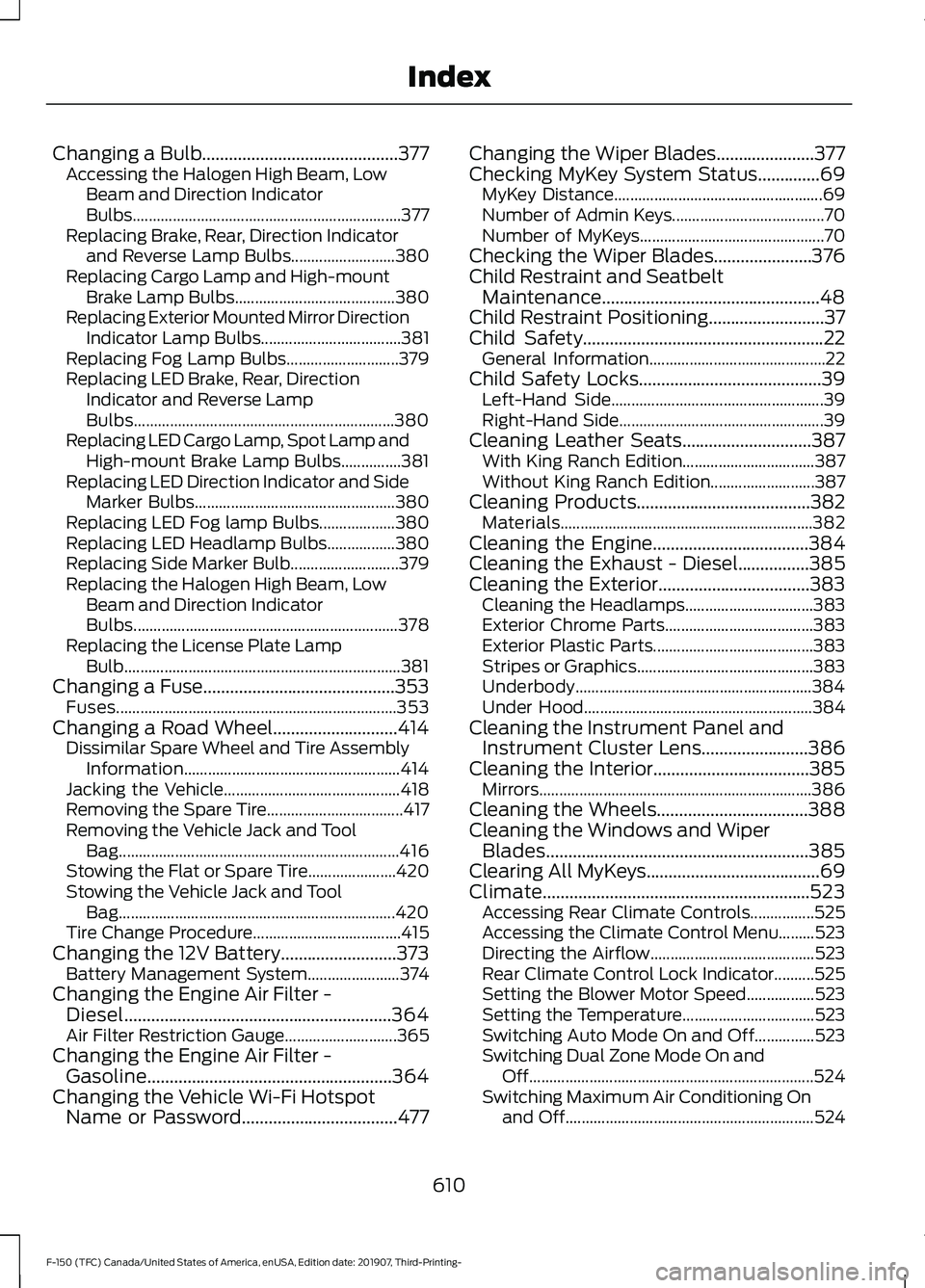
Changing a Bulb............................................377
Accessing the Halogen High Beam, Low
Beam and Direction Indicator
Bulbs................................................................... 377
Replacing Brake, Rear, Direction Indicator and Reverse Lamp Bulbs.......................... 380
Replacing Cargo Lamp and High-mount Brake Lamp Bulbs........................................ 380
Replacing Exterior Mounted Mirror Direction Indicator Lamp Bulbs................................... 381
Replacing Fog Lamp Bulbs............................ 379
Replacing LED Brake, Rear, Direction Indicator and Reverse Lamp
Bulbs................................................................. 380
Replacing LED Cargo Lamp, Spot Lamp and High-mount Brake Lamp Bulbs...............381
Replacing LED Direction Indicator and Side Marker Bulbs.................................................. 380
Replacing LED Fog lamp Bulbs................... 380
Replacing LED Headlamp Bulbs.................380
Replacing Side Marker Bulb........................... 379
Replacing the Halogen High Beam, Low Beam and Direction Indicator
Bulbs.................................................................. 378
Replacing the License Plate Lamp Bulb..................................................................... 381
Changing a Fuse...........................................353 Fuses...................................................................... 353
Changing a Road Wheel............................414
Dissimilar Spare Wheel and Tire Assembly
Information...................................................... 414
Jacking the Vehicle............................................ 418
Removing the Spare Tire.................................. 417
Removing the Vehicle Jack and Tool Bag...................................................................... 416
Stowing the Flat or Spare Tire...................... 420
Stowing the Vehicle Jack and Tool Bag..................................................................... 420
Tire Change Procedure..................................... 415
Changing the 12V Battery..........................373 Battery Management System....................... 374
Changing the Engine Air Filter - Diesel............................................................364
Air Filter Restriction Gauge............................ 365
Changing the Engine Air Filter - Gasoline
.......................................................364
Changing the Vehicle Wi-Fi Hotspot Name or Password...................................477 Changing the Wiper Blades......................377
Checking MyKey System Status..............69
MyKey Distance.................................................... 69
Number of Admin Keys...................................... 70
Number of MyKeys.............................................. 70
Checking the Wiper Blades......................376
Child Restraint and Seatbelt Maintenance.................................................48
Child Restraint Positioning..........................37
Child Safety
......................................................22
General Information............................................ 22
Child Safety Locks
.........................................39
Left-Hand Side..................................................... 39
Right-Hand Side................................................... 39
Cleaning Leather Seats.............................387 With King Ranch Edition................................. 387
Without King Ranch Edition.......................... 387
Cleaning Products
.......................................382
Materials............................................................... 382
Cleaning the Engine
...................................384
Cleaning the Exhaust - Diesel................385
Cleaning the Exterior..................................383 Cleaning the Headlamps................................ 383
Exterior Chrome Parts..................................... 383
Exterior Plastic Parts........................................ 383
Stripes or Graphics............................................ 383
Underbody........................................................... 384
Under Hood......................................................... 384
Cleaning the Instrument Panel and Instrument Cluster Lens........................386
Cleaning the Interior...................................385 Mirrors.................................................................... 386
Cleaning the Wheels..................................388
Cleaning the Windows and Wiper Blades...........................................................385
Clearing All MyKeys.......................................69
Climate............................................................523 Accessing Rear Climate Controls................525
Accessing the Climate Control Menu.........523
Directing the Airflow......................................... 523
Rear Climate Control Lock Indicator..........525
Setting the Blower Motor Speed.................523
Setting the Temperature................................. 523
Switching Auto Mode On and Off...............523
Switching Dual Zone Mode On and Off....................................................................... 524
Switching Maximum Air Conditioning On and Off.............................................................. 524
610
F-150 (TFC) Canada/United States of America, enUSA, Edition date: 201907, Third-Printing- Index
Page 615 of 625
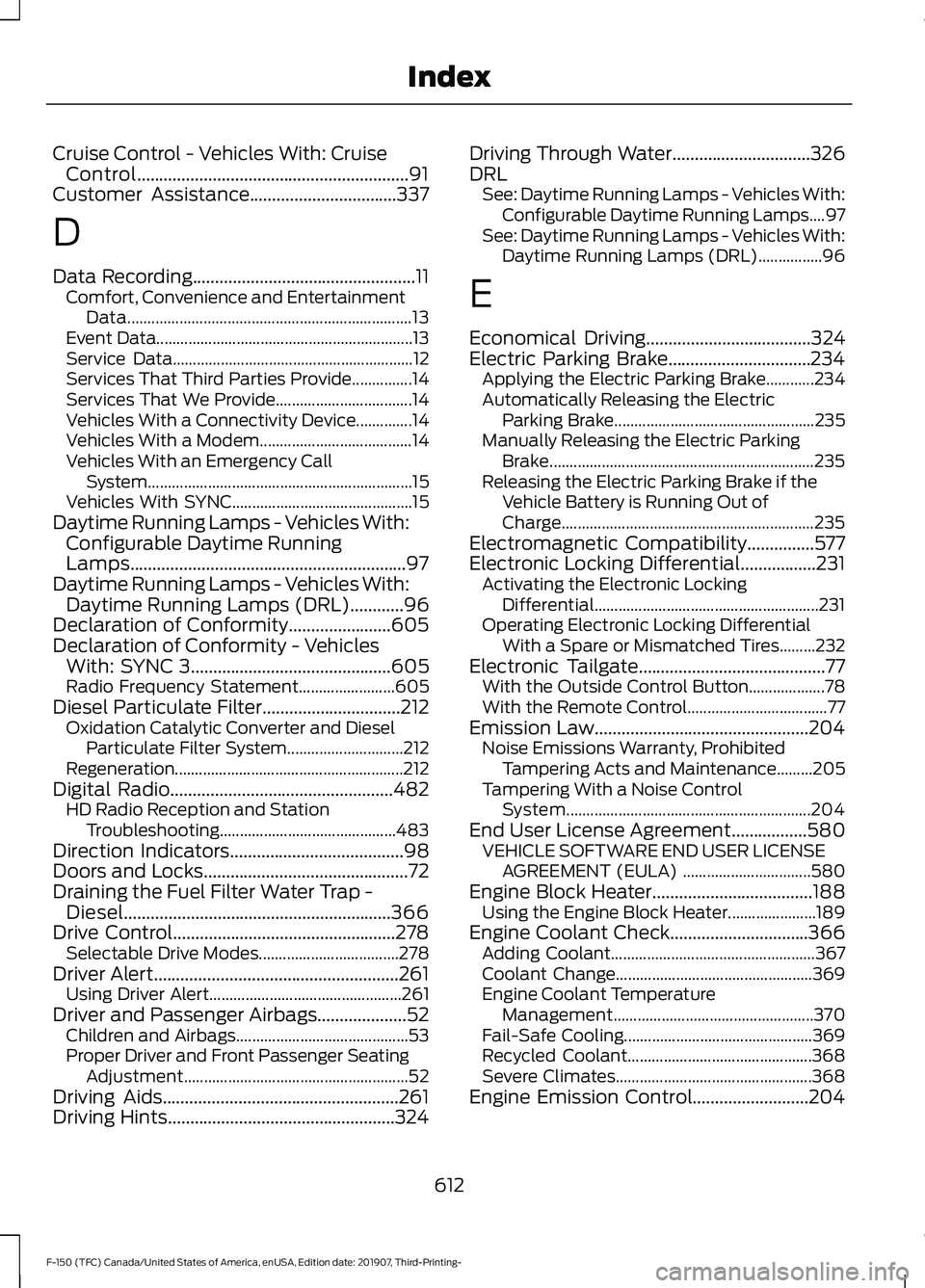
Cruise Control - Vehicles With: Cruise
Control.............................................................91
Customer Assistance.................................337
D
Data Recording
..................................................11
Comfort, Convenience and Entertainment
Data....................................................................... 13
Event Data................................................................ 13
Service Data............................................................ 12
Services That Third Parties Provide...............14
Services That We Provide.................................. 14
Vehicles With a Connectivity Device..............14
Vehicles With a Modem...................................... 14
Vehicles With an Emergency Call System.................................................................. 15
Vehicles With SYNC............................................. 15
Daytime Running Lamps - Vehicles With: Configurable Daytime Running
Lamps..............................................................97
Daytime Running Lamps - Vehicles With: Daytime Running Lamps (DRL)
............96
Declaration of Conformity.......................605
Declaration of Conformity - Vehicles With: SYNC 3
.............................................605
Radio Frequency Statement........................ 605
Diesel Particulate Filter...............................212 Oxidation Catalytic Converter and Diesel
Particulate Filter System............................. 212
Regeneration.........................................................212
Digital Radio
..................................................482
HD Radio Reception and Station
Troubleshooting............................................ 483
Direction Indicators
.......................................98
Doors and Locks..............................................72
Draining the Fuel Filter Water Trap - Diesel............................................................366
Drive Control..................................................278 Selectable Drive Modes................................... 278
Driver Alert
.......................................................261
Using Driver Alert................................................ 261
Driver and Passenger Airbags....................52 Children and Airbags........................................... 53
Proper Driver and Front Passenger Seating Adjustment........................................................ 52
Driving Aids
.....................................................261
Driving Hints...................................................324 Driving Through Water...............................326
DRL
See: Daytime Running Lamps - Vehicles With:
Configurable Daytime Running Lamps....97
See: Daytime Running Lamps - Vehicles With: Daytime Running Lamps (DRL)................96
E
Economical Driving
.....................................324
Electric Parking Brake................................234 Applying the Electric Parking Brake............234
Automatically Releasing the Electric
Parking Brake.................................................. 235
Manually Releasing the Electric Parking Brake.................................................................. 235
Releasing the Electric Parking Brake if the Vehicle Battery is Running Out of
Charge............................................................... 235
Electromagnetic Compatibility...............577
Electronic Locking Differential.................231 Activating the Electronic Locking
Differential........................................................ 231
Operating Electronic Locking Differential With a Spare or Mismatched Tires.........232
Electronic Tailgate
..........................................77
With the Outside Control Button................... 78
With the Remote Control................................... 77
Emission Law................................................204 Noise Emissions Warranty, Prohibited
Tampering Acts and Maintenance.........205
Tampering With a Noise Control System............................................................. 204
End User License Agreement
.................580
VEHICLE SOFTWARE END USER LICENSE
AGREEMENT (EULA) ................................ 580
Engine Block Heater....................................188 Using the Engine Block Heater...................... 189
Engine Coolant Check...............................366 Adding Coolant................................................... 367
Coolant Change................................................. 369
Engine Coolant Temperature Management.................................................. 370
Fail-Safe Cooling............................................... 369
Recycled Coolant.............................................. 368
Severe Climates................................................. 368
Engine Emission Control..........................204
612
F-150 (TFC) Canada/United States of America, enUSA, Edition date: 201907, Third-Printing- Index
Page 618 of 625
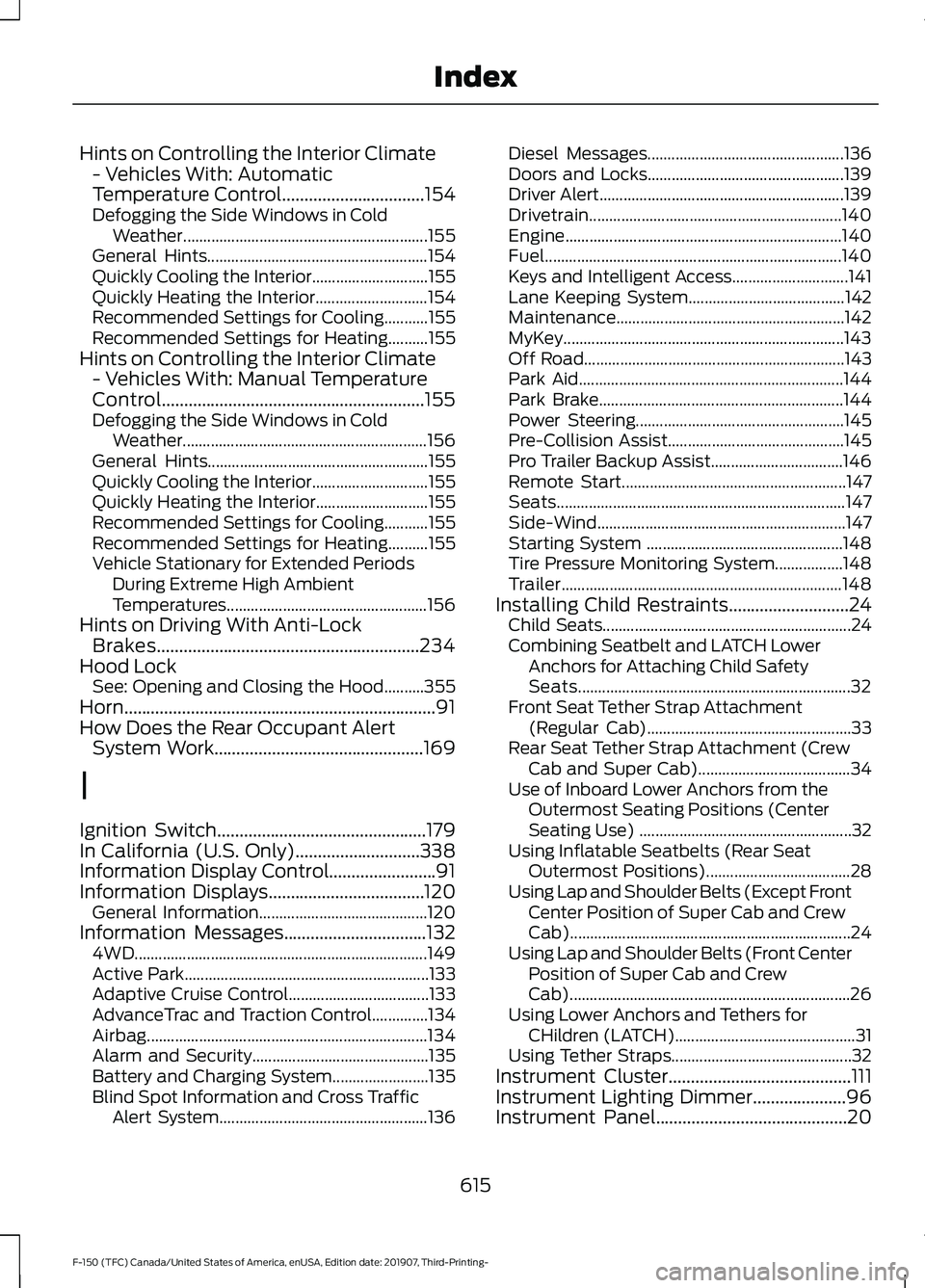
Hints on Controlling the Interior Climate
- Vehicles With: Automatic
Temperature Control................................154
Defogging the Side Windows in Cold
Weather............................................................. 155
General Hints....................................................... 154
Quickly Cooling the Interior............................. 155
Quickly Heating the Interior............................ 154
Recommended Settings for Cooling...........155
Recommended Settings for Heating..........155
Hints on Controlling the Interior Climate - Vehicles With: Manual Temperature
Control...........................................................155
Defogging the Side Windows in Cold Weather............................................................. 156
General Hints....................................................... 155
Quickly Cooling the Interior............................. 155
Quickly Heating the Interior............................ 155
Recommended Settings for Cooling...........155
Recommended Settings for Heating..........155
Vehicle Stationary for Extended Periods During Extreme High Ambient
Temperatures.................................................. 156
Hints on Driving With Anti-Lock Brakes
...........................................................234
Hood Lock See: Opening and Closing the Hood..........355
Horn......................................................................91
How Does the Rear Occupant Alert System Work
...............................................169
I
Ignition Switch...............................................179
In California (U.S. Only)
............................338
Information Display Control........................91
Information Displays...................................120 General Information.......................................... 120
Information Messages................................132 4WD........................................................................\
. 149
Active Park............................................................. 133
Adaptive Cruise Control................................... 133
AdvanceTrac and Traction Control..............134
Airbag...................................................................... 134
Alarm and Security............................................ 135
Battery and Charging System........................ 135
Blind Spot Information and Cross Traffic Alert System.................................................... 136Diesel Messages.................................................
136
Doors and Locks................................................. 139
Driver Alert............................................................. 139
Drivetrain............................................................... 140
Engine..................................................................... 140
Fuel........................................................................\
.. 140
Keys and Intelligent Access............................. 141
Lane Keeping System....................................... 142
Maintenance......................................................... 142
MyKey...................................................................... 143
Off Road................................................................. 143
Park Aid.................................................................. 144
Park Brake............................................................. 144
Power Steering.................................................... 145
Pre-Collision Assist............................................ 145
Pro Trailer Backup Assist................................. 146
Remote Start........................................................ 147
Seats........................................................................\
147
Side-Wind.............................................................. 147
Starting System ................................................. 148
Tire Pressure Monitoring System.................148
Trailer...................................................................... 148
Installing Child Restraints
...........................24
Child Seats.............................................................. 24
Combining Seatbelt and LATCH Lower Anchors for Attaching Child Safety
Seats.................................................................... 32
Front Seat Tether Strap Attachment (Regular Cab)................................................... 33
Rear Seat Tether Strap Attachment (Crew Cab and Super Cab)...................................... 34
Use of Inboard Lower Anchors from the Outermost Seating Positions (Center
Seating Use) ..................................................... 32
Using Inflatable Seatbelts (Rear Seat Outermost Positions).................................... 28
Using Lap and Shoulder Belts (Except Front Center Position of Super Cab and Crew
Cab)...................................................................... 24
Using Lap and Shoulder Belts (Front Center Position of Super Cab and Crew
Cab)...................................................................... 26
Using Lower Anchors and Tethers for CHildren (LATCH)............................................. 31
Using Tether Straps............................................. 32
Instrument Cluster
.........................................111
Instrument Lighting Dimmer.....................96
Instrument Panel...........................................20
615
F-150 (TFC) Canada/United States of America, enUSA, Edition date: 201907, Third-Printing- Index