wheel FORD F-150 2020 Repair Manual
[x] Cancel search | Manufacturer: FORD, Model Year: 2020, Model line: F-150, Model: FORD F-150 2020Pages: 625, PDF Size: 7.98 MB
Page 297 of 625
Note:
The default option is low. This is
recommended for most trailers. If the
trailer's brakes require more initial voltage,
or if you prefer more aggressive braking then
select the other options as required.
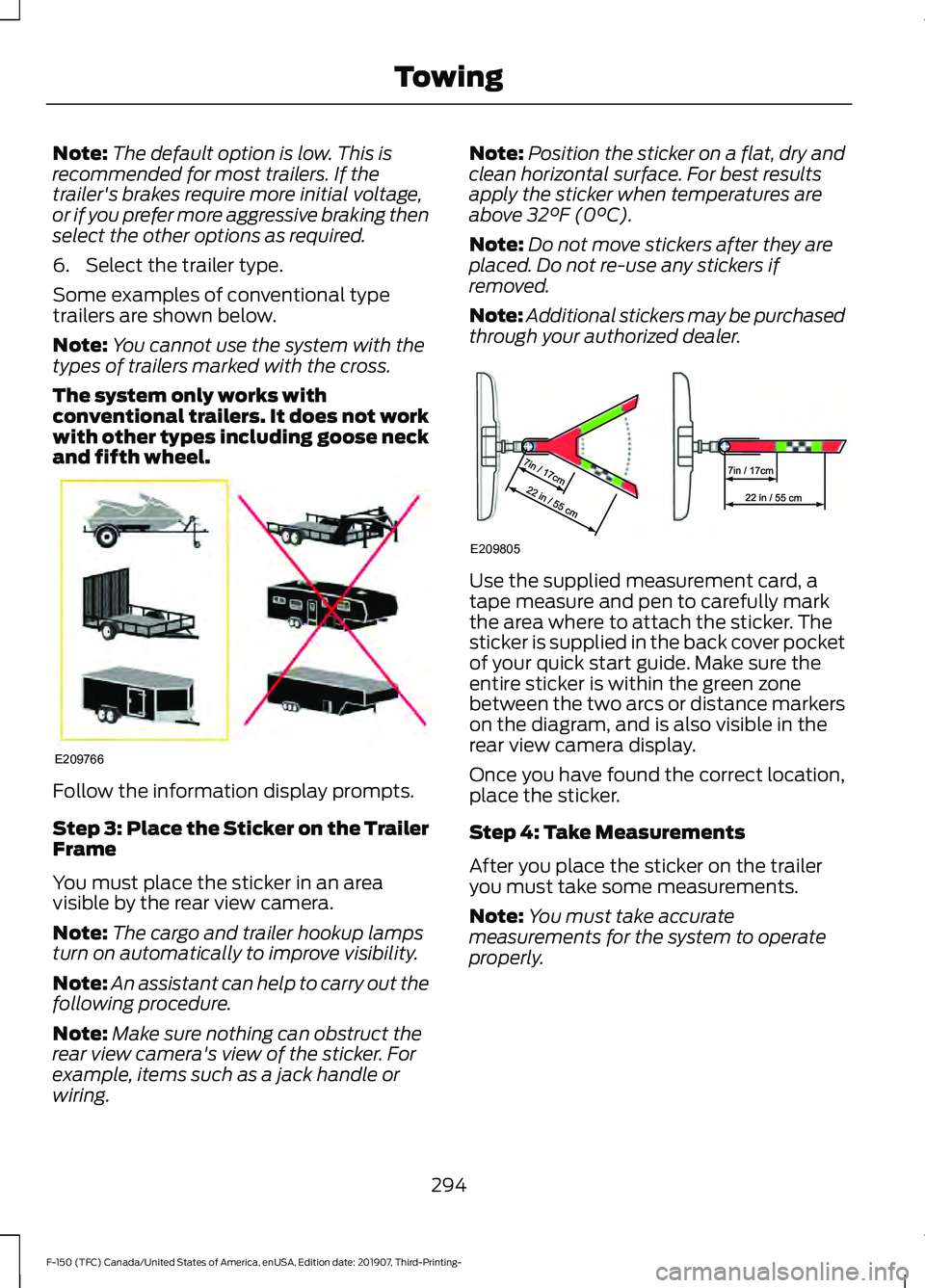
6. Select the trailer type.
Some examples of conventional type
trailers are shown below.
Note: You cannot use the system with the
types of trailers marked with the cross.
The system only works with
conventional trailers. It does not work
with other types including goose neck
and fifth wheel. Follow the information display prompts.
Step 3: Place the Sticker on the Trailer
Frame
You must place the sticker in an area
visible by the rear view camera.
Note:
The cargo and trailer hookup lamps
turn on automatically to improve visibility.
Note: An assistant can help to carry out the
following procedure.
Note: Make sure nothing can obstruct the
rear view camera's view of the sticker. For
example, items such as a jack handle or
wiring. Note:
Position the sticker on a flat, dry and
clean horizontal surface. For best results
apply the sticker when temperatures are
above 32°F (0°C).
Note: Do not move stickers after they are
placed. Do not re-use any stickers if
removed.
Note: Additional stickers may be purchased
through your authorized dealer. Use the supplied measurement card, a
tape measure and pen to carefully mark
the area where to attach the sticker. The
sticker is supplied in the back cover pocket
of your quick start guide. Make sure the
entire sticker is within the green zone
between the two arcs or distance markers
on the diagram, and is also visible in the
rear view camera display.
Once you have found the correct location,
place the sticker.
Step 4: Take Measurements
After you place the sticker on the trailer
you must take some measurements.
Note:
You must take accurate
measurements for the system to operate
properly.
294
F-150 (TFC) Canada/United States of America, enUSA, Edition date: 201907, Third-Printing- TowingE209766 E209805
Page 299 of 625
Calibrating the System
To complete setup, drive your vehicle
straight forward between 4–
24 mph
(6– 39 km/h), as directed by the
information display.
The information display shows a message
during calibration and after calibration is
complete
Note: Keep the steering wheel straight
during the calibration process. If the steering
wheel is in a turned position, the calibration
pauses. The information display prompts
you to drive straight forward to complete
the calibration.
Note: For best results, do not calibrate the
system at night.
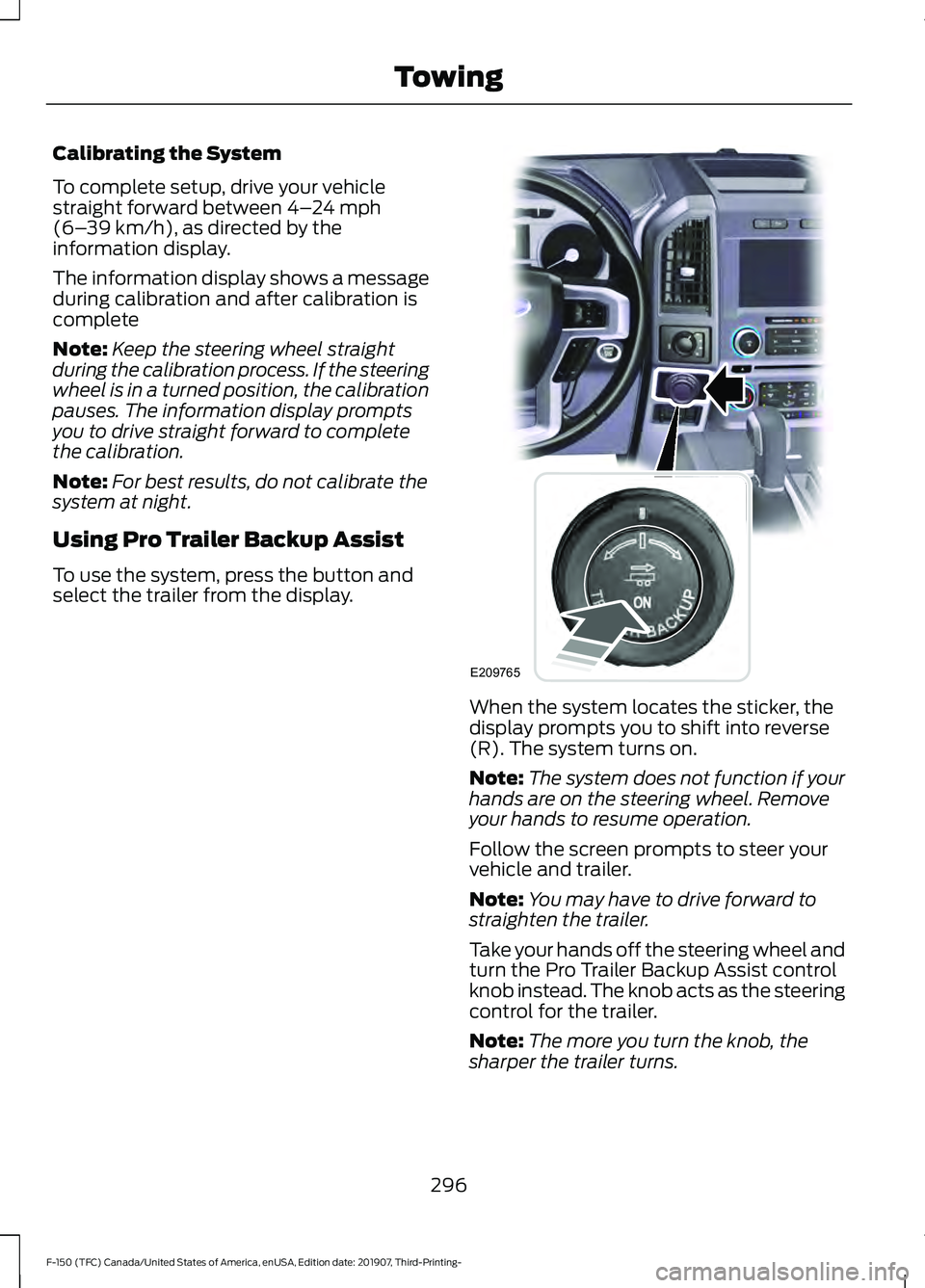
Using Pro Trailer Backup Assist
To use the system, press the button and
select the trailer from the display. When the system locates the sticker, the
display prompts you to shift into reverse
(R). The system turns on.
Note:
The system does not function if your
hands are on the steering wheel. Remove
your hands to resume operation.
Follow the screen prompts to steer your
vehicle and trailer.
Note: You may have to drive forward to
straighten the trailer.
Take your hands off the steering wheel and
turn the Pro Trailer Backup Assist control
knob instead. The knob acts as the steering
control for the trailer.
Note: The more you turn the knob, the
sharper the trailer turns.
296
F-150 (TFC) Canada/United States of America, enUSA, Edition date: 201907, Third-Printing- TowingE209765
Page 304 of 625
System consistently shows Pro Trailer
Backup Assist™ Stop now Maximum
trailer angle Press Knob to Exit
:
• The system uses your measurements
to determine sticker position and
establish system limits. Accurate
sticker placement and trailer
measurements provide the best
system performance. If you are
consistently receiving this warning, it is
likely there is an issue with sticker
placement or the entered
measurements. Make sure that the
sticker is placed correctly based on
step 3 and the measurements were
made correctly according to step 4.
The troubleshooting guide for trailer
measurements can also be reviewed
for help in making measurements.
• To change sticker location or change
trailer measurements, go into the
information display menu, select trailer
options, select change trailer setting
and then select the change sticker
option.
• If the sticker location needs to be
changed, the previous sticker must be
removed and a new sticker needs to
be placed on the trailer. ONLY ONE
STICKER SHOULD BE PLACED ON
THE TRAILER FOR PROPER
SYSTEM FUNCTION.
• Disregard the prompt to remove this
sticker and continue to the next step if
you only plan to update the
measurements for the current sticker
location. System consistently shows
Pro Trailer
Backup Assist™ Stop Now Take Control
of Steering Wheel
:
• The system displays this warning when
it can no longer steer the vehicle and
you must take over steering. There are
four reasons why this warning displays
and additional information regarding
the reason for the warning is available
on the center display.
• The steering wheel is touched while
under system control. Avoid touching
the wheel during system operation.
• The maximum speed for feature
operation is exceeded. System
performance is optimized at slower
speeds. Reverse slowly.
• The sticker was lost by the camera
system. Once your vehicle is stopped,
additional warnings indicate the sticker
was lost. Refer to sticker lost
troubleshooting tips.
• An internal condition for system
operation was not met which requires
your vehicle return to manual control
of the steering.
Note: The system is designed to be used
with the same trailer connection every time
the trailer is chosen from the selection
menu. When using a different drawbar or a
different pin hole on drawbars with more
than one, connecting the drawbar to your
vehicle affects the trailer measurements.
Take the measurements again and update
if required.
301
F-150 (TFC) Canada/United States of America, enUSA, Edition date: 201907, Third-Printing- Towing
Page 305 of 625
TRAILER SWAY CONTROL
WARNING: Turning off trailer sway
control increases the risk of loss of
vehicle control, serious injury or death.
Ford does not recommend disabling this
feature except in situations where speed
reduction may be detrimental (such as
hill climbing), the driver has significant
trailer towing experience, and can control
trailer sway and maintain safe operation.
Note: This feature does not prevent trailer
sway, but reduces it once it begins.
Note: This feature cannot stop all trailers
from swaying.
Note: In some cases, if vehicle speed is too
high, the system may activate multiple
times, gradually reducing vehicle speed.
This feature applies your vehicle brakes at
individual wheels and, if necessary, reduces
engine power. If the trailer begins to sway,
the stability control light flashes and the
message TRAILER SWAY REDUCE
SPEED appears in the information display.
The first thing to do is slow your vehicle
down, then pull safely to the side of the
road and check for proper tongue load and
trailer load distribution. See
Load
Carrying (page 281).
RECOMMENDED TOWING
WEIGHTS
Note: Do not exceed a trailer
weight of 5,000 lb (2,268 kg) when
towing with, or by, the bumper only. Note:
For vehicles equipped with
2.7L and 3.3L engines without a
Heavy Duty Towing Package, do
not exceed a trailer weight of
5,000 lb (2,268 kg) when using the
trailer hitch.
Note: For vehicles equipped with
3.5L and 5.0L engines without a
Heavy Duty Towing Package, do
not exceed a trailer weight of
7,000 lb (3,175 kg)
when using the
trailer hitch.
Note: Make sure to take into
consideration trailer frontal area.
Vehicles not equipped with the
Trailer Tow Package or the Heavy
Duty Payload Package should not
exceed 11 ft² (3.4 m²) trailer frontal
area. Vehicles equipped with the
Trailer Tow Package or the Heavy
Duty Payload Package should not
exceed 18 ft² (5.6 m²) trailer
frontal area. All values calculated
with SAE J2807 method.
Note: Exceeding this limitation
may significantly reduce the
performance of your towing
vehicle. Selecting a trailer with a
low aerodynamic drag and rounded
front design helps optimize
performance and fuel economy.
Note: For high altitude operation,
reduce the gross combined weight
by 2% per
1,000 ft (300 m)
starting at the 1,000 ft (300 m)
elevation point.
302
F-150 (TFC) Canada/United States of America, enUSA, Edition date: 201907, Third-Printing- Towing
Page 306 of 625
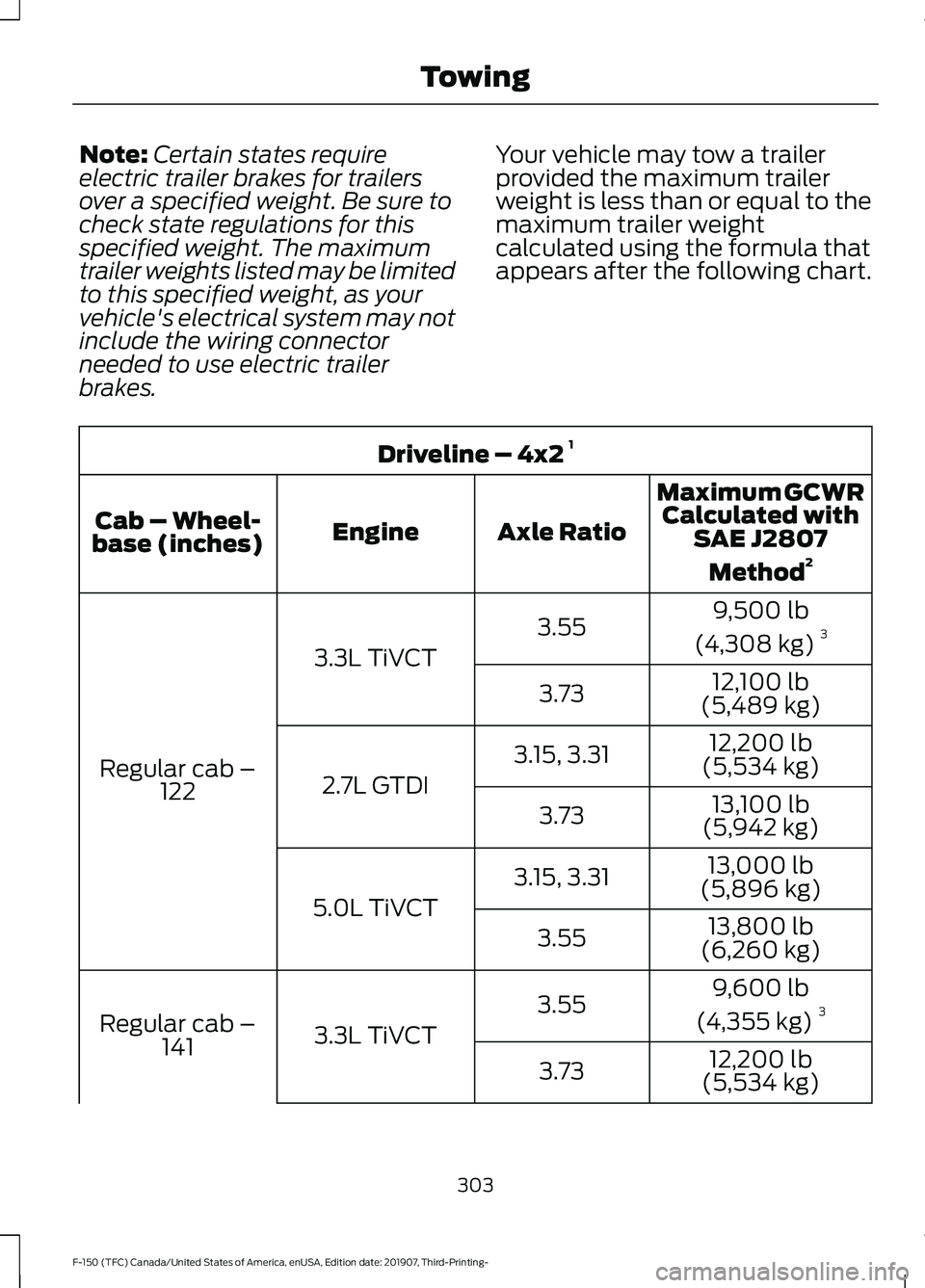
Note:
Certain states require
electric trailer brakes for trailers
over a specified weight. Be sure to
check state regulations for this
specified weight. The maximum
trailer weights listed may be limited
to this specified weight, as your
vehicle's electrical system may not
include the wiring connector
needed to use electric trailer
brakes. Your vehicle may tow a trailer
provided the maximum trailer
weight is less than or equal to the
maximum trailer weight
calculated using the formula that
appears after the following chart.Driveline – 4x2
1
Maximum GCWRCalculated with SAE J2807
Method 2
Axle Ratio
Engine
Cab – Wheel-
base (inches)
9,500 lb
(4,308 kg) 3
3.55
3.3L TiVCT
Regular cab – 122 12,100 lb
(5,489 kg)
3.73
12,200 lb
(5,534 kg)
3.15, 3.31
2.7L GTDI 13,100 lb
(5,942 kg)
3.73
13,000 lb
(5,896 kg)
3.15, 3.31
5.0L TiVCT 13,800 lb
(6,260 kg)
3.55
9,600 lb
(4,355 kg) 3
3.55
3.3L TiVCT
Regular cab –
141 12,200 lb
(5,534 kg)
3.73
303
F-150 (TFC) Canada/United States of America, enUSA, Edition date: 201907, Third-Printing- Towing
Page 307 of 625
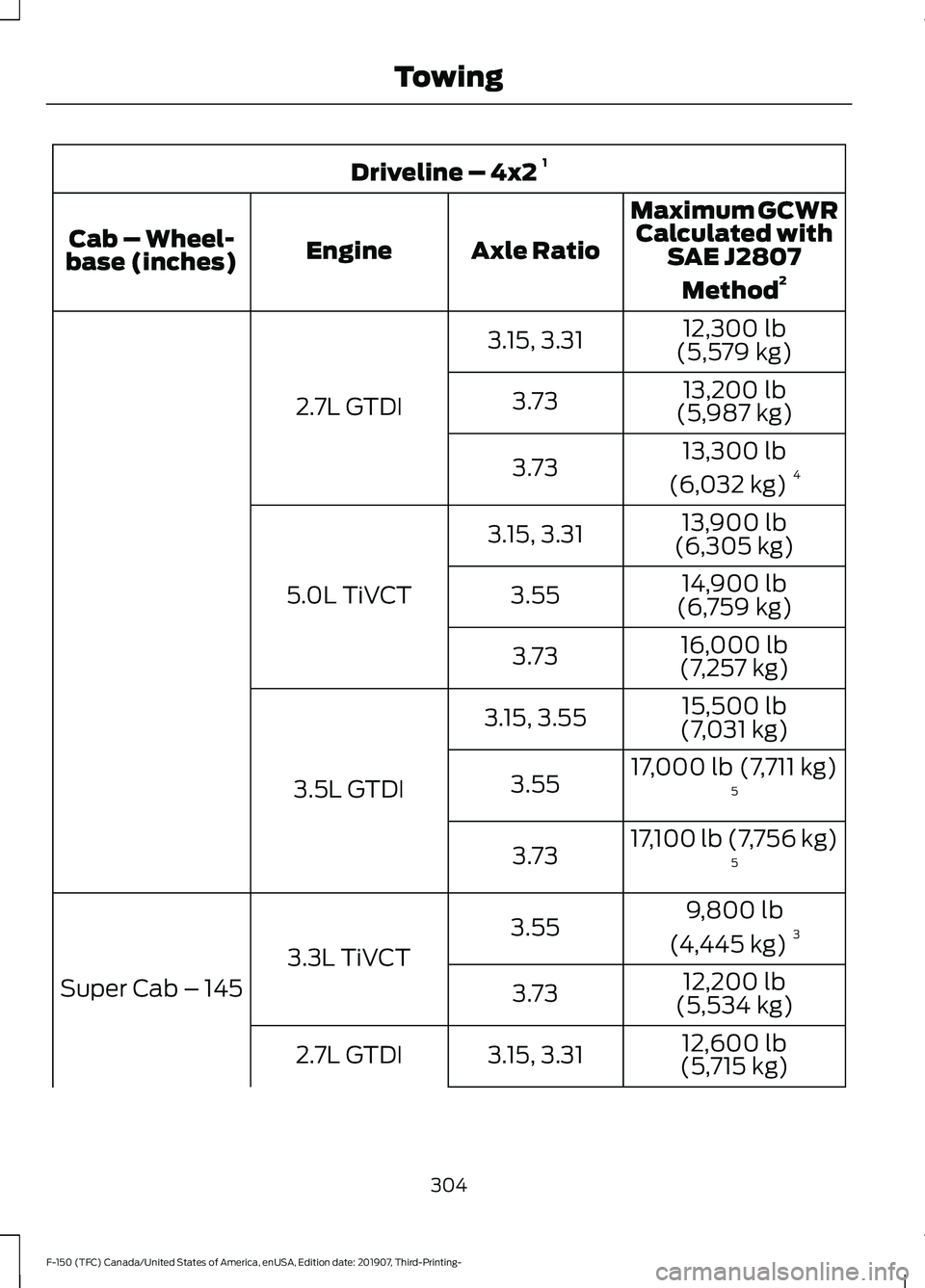
Driveline – 4x2
1
Maximum GCWRCalculated with SAE J2807
Method 2
Axle Ratio
Engine
Cab – Wheel-
base (inches)
12,300 lb
(5,579 kg)
3.15, 3.31
2.7L GTDI 13,200 lb
(5,987 kg)
3.73
13,300 lb
(6,032 kg) 4
3.73
13,900 lb
(6,305 kg)
3.15, 3.31
5.0L TiVCT 14,900 lb
(6,759 kg)
3.55
16,000 lb
(7,257 kg)
3.73
15,500 lb
(7,031 kg)
3.15, 3.55
3.5L GTDI 17,000 lb (7,711 kg)
5
3.55
17,100 lb (7,756 kg)5
3.73
9,800 lb
(4,445 kg) 3
3.55
3.3L TiVCT
Super Cab – 145 12,200 lb
(5,534 kg)
3.73
12,600 lb
(5,715 kg)
3.15, 3.31
2.7L GTDI
304
F-150 (TFC) Canada/United States of America, enUSA, Edition date: 201907, Third-Printing- Towing
Page 308 of 625
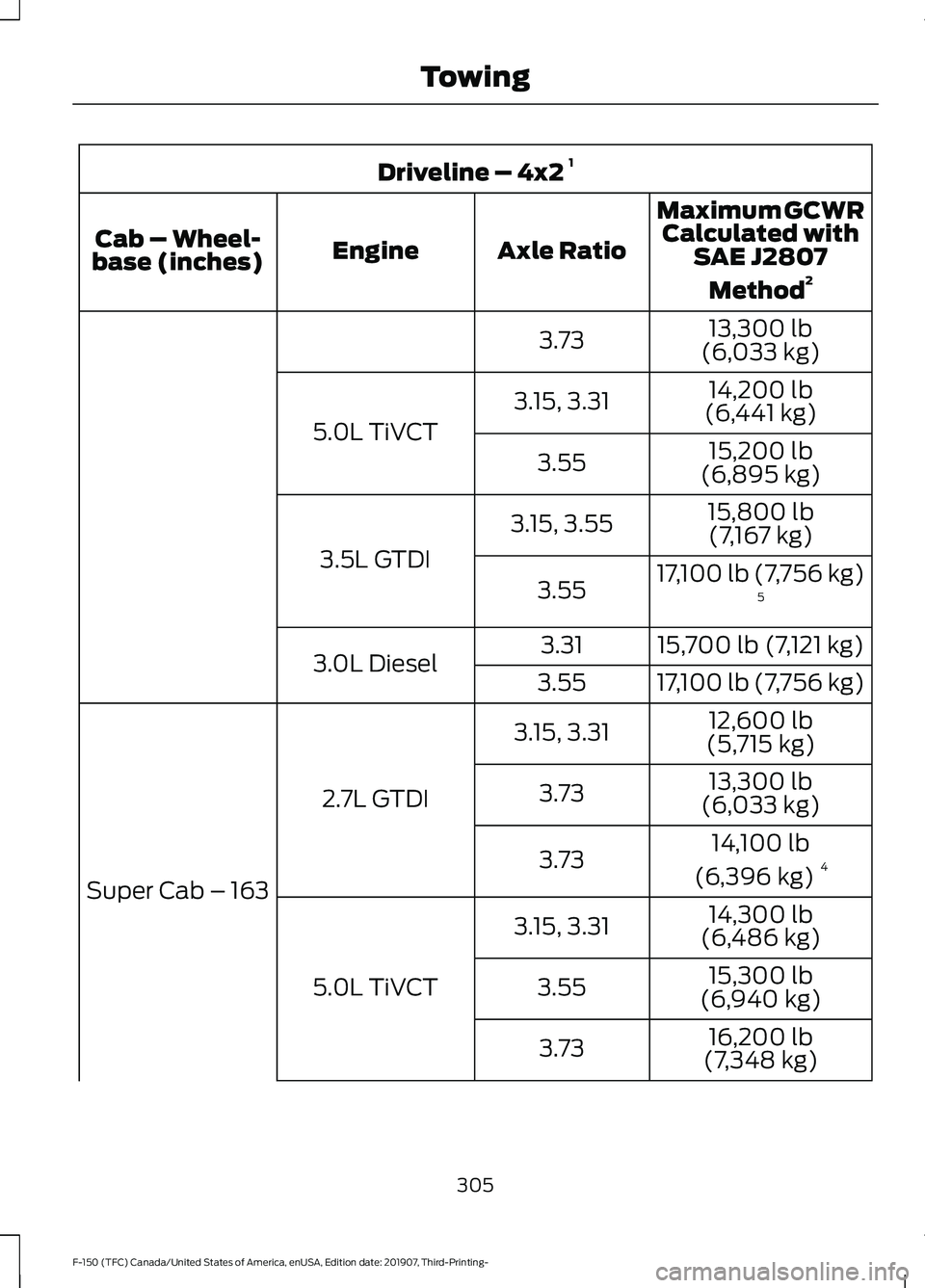
Driveline – 4x2
1
Maximum GCWRCalculated with SAE J2807
Method 2
Axle Ratio
Engine
Cab – Wheel-
base (inches)
13,300 lb
(6,033 kg)
3.73
14,200 lb
(6,441 kg)
3.15, 3.31
5.0L TiVCT 15,200 lb
(6,895 kg)
3.55
15,800 lb(7,167 kg)
3.15, 3.55
3.5L GTDI 17,100 lb (7,756 kg)
5
3.55
15,700 lb (7,121 kg)
3.31
3.0L Diesel 17,100 lb (7,756 kg)
3.55
12,600 lb
(5,715 kg)
3.15, 3.31
2.7L GTDI
Super Cab – 163 13,300 lb
(6,033 kg)
3.73
14,100 lb
(6,396 kg) 4
3.73
14,300 lb
(6,486 kg)
3.15, 3.31
5.0L TiVCT 15,300 lb
(6,940 kg)
3.55
16,200 lb
(7,348 kg)
3.73
305
F-150 (TFC) Canada/United States of America, enUSA, Edition date: 201907, Third-Printing- Towing
Page 309 of 625
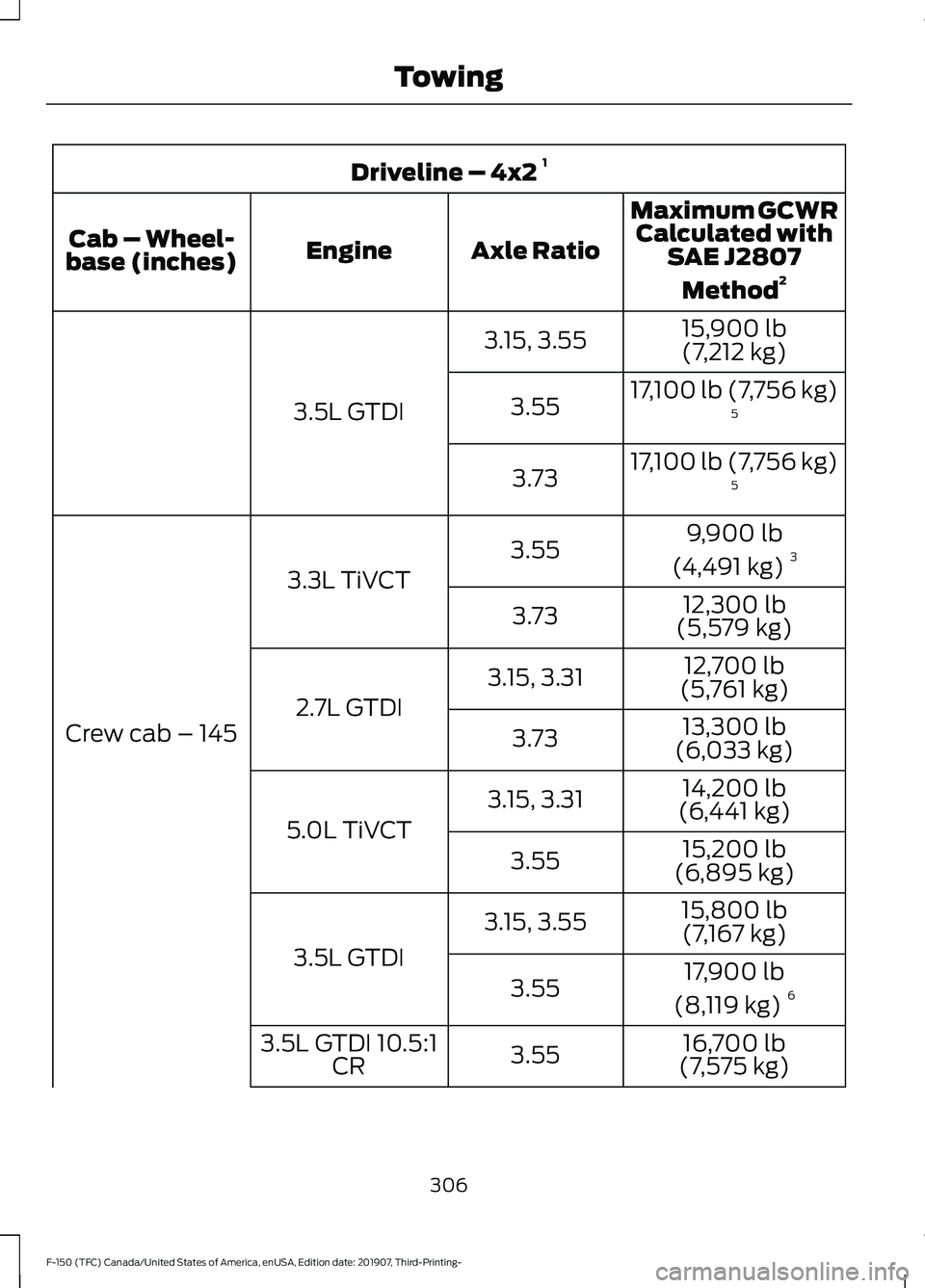
Driveline – 4x2
1
Maximum GCWRCalculated with SAE J2807
Method 2
Axle Ratio
Engine
Cab – Wheel-
base (inches)
15,900 lb
(7,212 kg)
3.15, 3.55
3.5L GTDI 17,100 lb (7,756 kg)
5
3.55
17,100 lb (7,756 kg)5
3.73
9,900 lb
(4,491 kg) 3
3.55
3.3L TiVCT
Crew cab – 145 12,300 lb
(5,579 kg)
3.73
12,700 lb
(5,761 kg)
3.15, 3.31
2.7L GTDI 13,300 lb
(6,033 kg)
3.73
14,200 lb
(6,441 kg)
3.15, 3.31
5.0L TiVCT 15,200 lb
(6,895 kg)
3.55
15,800 lb(7,167 kg)
3.15, 3.55
3.5L GTDI 17,900 lb
(8,119 kg) 6
3.55
16,700 lb
(7,575 kg)
3.55
3.5L GTDI 10.5:1
CR
306
F-150 (TFC) Canada/United States of America, enUSA, Edition date: 201907, Third-Printing- Towing
Page 310 of 625
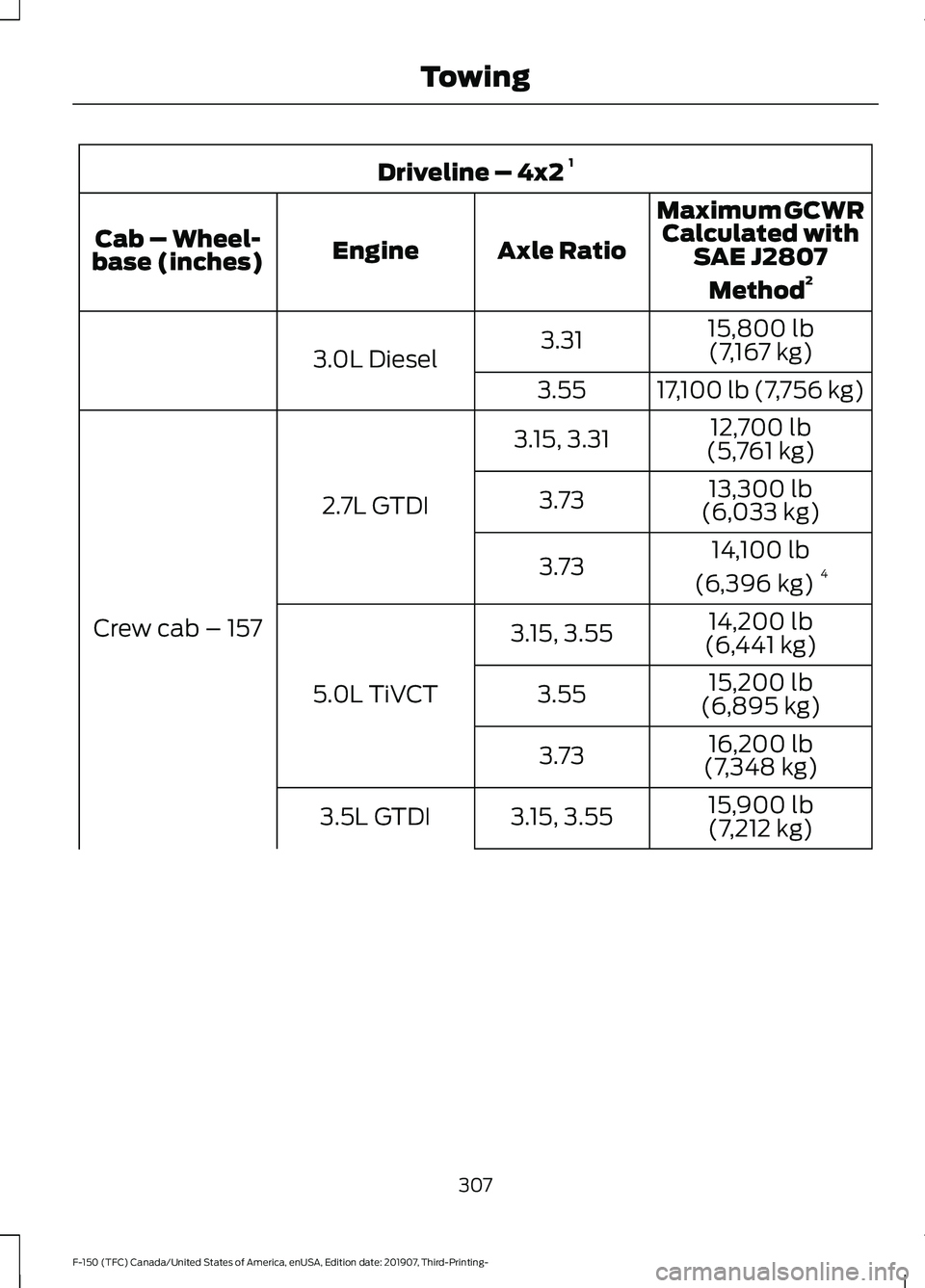
Driveline – 4x2
1
Maximum GCWRCalculated with SAE J2807
Method 2
Axle Ratio
Engine
Cab – Wheel-
base (inches)
15,800 lb(7,167 kg)
3.31
3.0L Diesel
17,100 lb (7,756 kg)
3.55
12,700 lb
(5,761 kg)
3.15, 3.31
2.7L GTDI
Crew cab – 157 13,300 lb
(6,033 kg)
3.73
14,100 lb
(6,396 kg) 4
3.73
14,200 lb
(6,441 kg)
3.15, 3.55
5.0L TiVCT 15,200 lb
(6,895 kg)
3.55
16,200 lb
(7,348 kg)
3.73
15,900 lb
(7,212 kg)
3.15, 3.55
3.5L GTDI
307
F-150 (TFC) Canada/United States of America, enUSA, Edition date: 201907, Third-Printing- Towing
Page 311 of 625
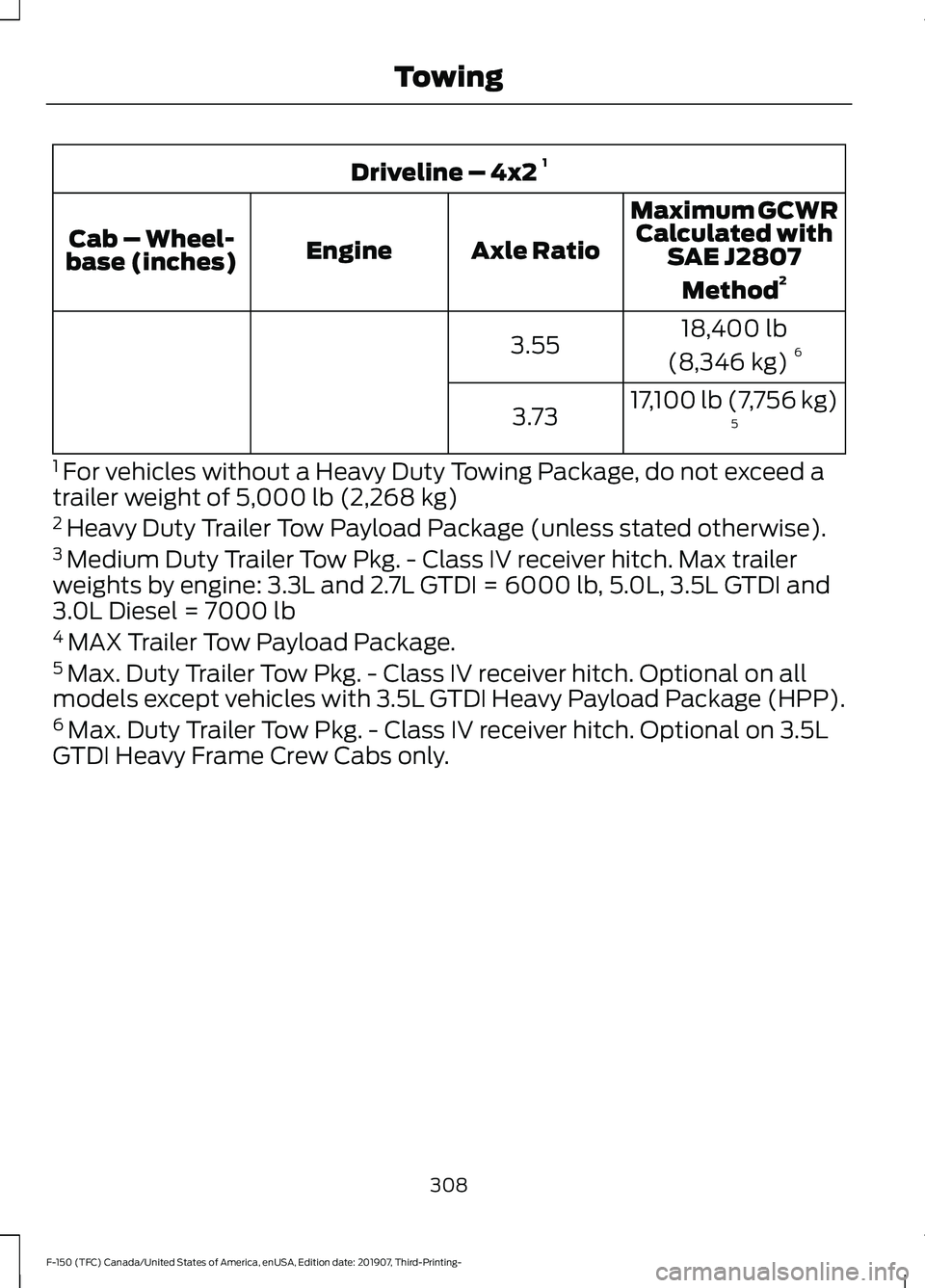
Driveline – 4x2
1
Maximum GCWRCalculated with SAE J2807
Method 2
Axle Ratio
Engine
Cab – Wheel-
base (inches)
18,400 lb
(8,346 kg) 6
3.55
17,100 lb (7,756 kg)5
3.73
1 For vehicles without a Heavy Duty Towing Package, do not exceed a
trailer weight of 5,000 lb (2,268 kg)
2 Heavy Duty Trailer Tow Payload Package (unless stated otherwise).
3 Medium Duty Trailer Tow Pkg. - Class IV receiver hitch. Max trailer
weights by engine: 3.3L and 2.7L GTDI = 6000 lb, 5.0L, 3.5L GTDI and
3.0L Diesel = 7000 lb
4 MAX Trailer Tow Payload Package.
5 Max. Duty Trailer Tow Pkg. - Class IV receiver hitch. Optional on all
models except vehicles with 3.5L GTDI Heavy Payload Package (HPP).
6 Max. Duty Trailer Tow Pkg. - Class IV receiver hitch. Optional on 3.5L
GTDI Heavy Frame Crew Cabs only.
308
F-150 (TFC) Canada/United States of America, enUSA, Edition date: 201907, Third-Printing- Towing