AUX FORD F-150 2020 Owners Manual
[x] Cancel search | Manufacturer: FORD, Model Year: 2020, Model line: F-150, Model: FORD F-150 2020Pages: 625, PDF Size: 7.98 MB
Page 6 of 625
Hints on Controlling the Interior Climate
- Vehicles With: Manual Temperature
Control .........................................................155
Heated Windshield .....................................
156
Heated Rear Window .................................
156
Heated Exterior Mirrors .............................
156
Cabin Air Filter ..............................................
156
Remote Start .................................................
157
Seats
Sitting in the Correct Position .................
158
Head Restraints ...........................................
158
Manual Seats ................................................
160
Power Seats ...................................................
161
Memory Function ........................................
164
Rear Seats ......................................................
165
Heated Seats ................................................
166
Ventilated Seats ...........................................
167
Front Seat Armrest ......................................
167
Rear Occupant Alert System
What is the Rear Occupant Alert System ........................................................................\
169
How Does the Rear Occupant Alert System Work ............................................
169
Rear Occupant Alert System Precautions ........................................................................\
169
Rear Occupant Alert System Limitations ........................................................................\
169
Switching Rear Occupant Alert System On and Off .................................................
169
Rear Occupant Alert System Indicators ........................................................................\
.
170
Rear Occupant Alert System Audible Warnings .....................................................
170
Garage Door Opener
Universal Garage Door Opener ................
171
Auxiliary Power Points
Auxiliary Power Points ...............................
175Storage Compartments
Center Console
..............................................
177
Overhead Console .......................................
178
Rear Seat Armrest .......................................
178
Starting and Stopping the Engine
General Information ...................................
179
Ignition Switch ..............................................
179
Keyless Starting ............................................
179
Steering Wheel Lock - Vehicles Without: Push Button Start ...................................
180
Steering Wheel Lock - Vehicles With: Push Button Start ...................................
180
Starting a Gasoline Engine .......................
181
Starting a Diesel Engine ............................
184
Switching Off the Engine .........................
188
Engine Block Heater ...................................
188
Unique Driving Characteristics
Auto-Start-Stop ..........................................
190
Fuel and Refueling
Safety Precautions ......................................
193
Fuel Quality - Diesel ...................................
193
Fuel Quality - E85 .......................................
196
Fuel Quality - Gasoline ..............................
197
Fuel Filler Funnel Location - Regular Cab ........................................................................\
198
Fuel Filler Funnel Location - SuperCab/ SuperCrew .................................................
198
Running Out of Fuel ...................................
198
Refueling .......................................................
200
Fuel Consumption ......................................
202
Engine Emission Control
Emission Law ...............................................
204
Catalytic Converter ....................................
205
3
F-150 (TFC) Canada/United States of America, enUSA, Edition date: 201907, Third-Printing- Table of Contents
Page 23 of 625
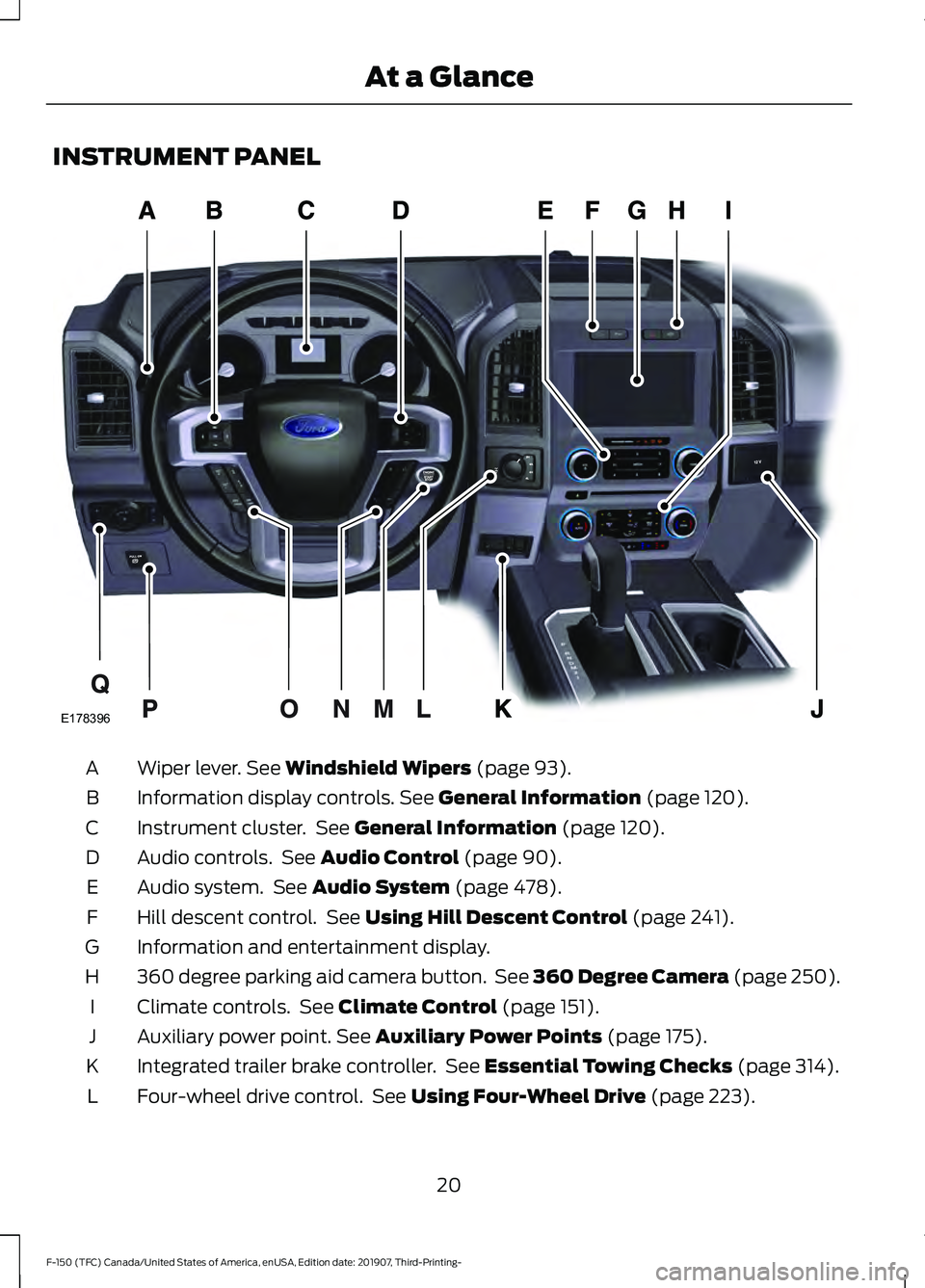
INSTRUMENT PANEL
Wiper lever. See Windshield Wipers (page 93).
A
Information display controls.
See General Information (page 120).
B
Instrument cluster. See
General Information (page 120).
C
Audio controls. See
Audio Control (page 90).
D
Audio system. See
Audio System (page 478).
E
Hill descent control. See
Using Hill Descent Control (page 241).
F
Information and entertainment display.
G
360 degree parking aid camera button. See 360 Degree Camera (page 250).
H
Climate controls. See
Climate Control (page 151).
I
Auxiliary power point.
See Auxiliary Power Points (page 175).
J
Integrated trailer brake controller. See
Essential Towing Checks (page 314).
K
Four-wheel drive control. See
Using Four-Wheel Drive (page 223).
L
20
F-150 (TFC) Canada/United States of America, enUSA, Edition date: 201907, Third-Printing- At a GlanceE178396
Page 178 of 625
12 V DC Power Point
WARNING: Do not plug optional
electrical accessories into the cigar
lighter socket. Incorrect use of the cigar
lighter can cause damage not covered
by the vehicle warranty, and can result
in fire or serious injury.
Note: When you switch the ignition on, you
can use the socket to power
12 V appliances
with a maximum current rating of 20 A20
amps.
Note: Do not plug in any device that
supplies power to the vehicle through the
power points, this may result in damage to
vehicle systems.
Note: Do not hang any accessory from the
accessory plug.
Note: Do not use the power point over the
vehicle capacity of 12 V DC 240 W or a fuse
may blow.
Note: Always keep the power point caps
closed when not in use.
Do not insert objects other than an
accessory plug into the power point. This
damages the power point and may blow
the fuse.
Run the vehicle for full capacity use of the
power point.
To prevent the battery from running out of
charge:
• Do not use the power point longer than
necessary when the engine is off.
• Do not leave devices plugged in
overnight or when you park your vehicle
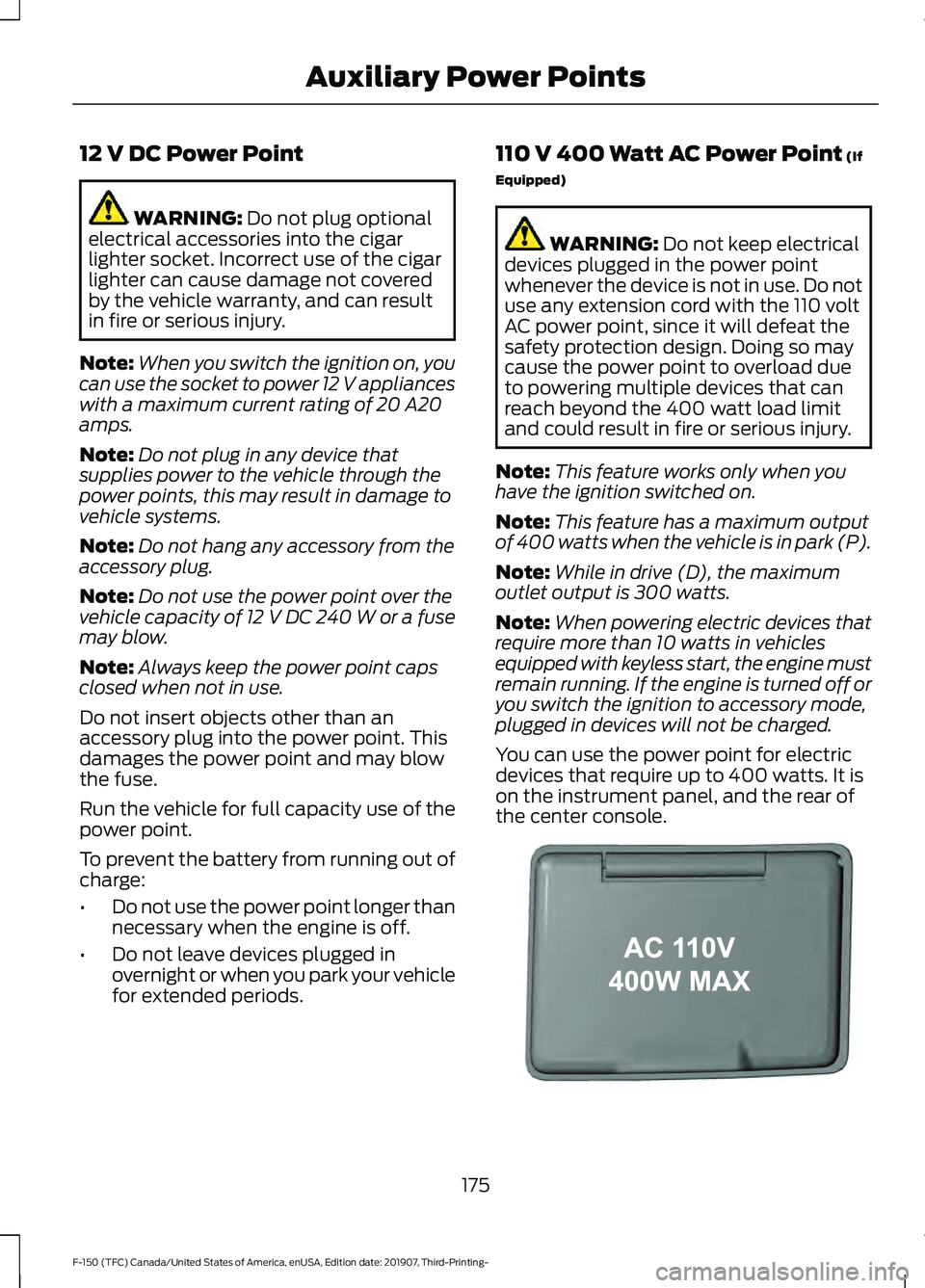
for extended periods. 110 V 400 Watt AC Power Point
(If
Equipped) WARNING:
Do not keep electrical
devices plugged in the power point
whenever the device is not in use. Do not
use any extension cord with the 110 volt
AC power point, since it will defeat the
safety protection design. Doing so may
cause the power point to overload due
to powering multiple devices that can
reach beyond the 400 watt load limit
and could result in fire or serious injury.
Note: This feature works only when you
have the ignition switched on.
Note: This feature has a maximum output
of 400 watts when the vehicle is in park (P).
Note: While in drive (D), the maximum
outlet output is 300 watts.
Note: When powering electric devices that
require more than 10 watts in vehicles
equipped with keyless start, the engine must
remain running. If the engine is turned off or
you switch the ignition to accessory mode,
plugged in devices will not be charged.
You can use the power point for electric
devices that require up to 400 watts. It is
on the instrument panel, and the rear of
the center console. 175
F-150 (TFC) Canada/United States of America, enUSA, Edition date: 201907, Third-Printing- Auxiliary Power PointsE191617
Page 179 of 625
When the indicator light on the power point
is:
•
On: The power point is working, the
ignition is on and a device is plugged
in.
• Off: The power point is off, the ignition
is off or no device is plugged in.
• Flashing: The power point is in fault
mode.
The power outlet temporarily turns off
power when in fault mode if the device
exceeds the 400 watt limit. Unplug your
device and switch the ignition off. Switch
the ignition back on, but do not plug your
device back in. Let the system cool off and
switch the ignition off to reset the fault
mode. Switch the ignition back on and
make sure the indicator light remains on.
You can use the 400 watt power outlet for
these types of electric devices:
• Electric hand drills.
• Rechargeable power tools.
• Video games.
• Laptops.
• Televisions.
Note: Max 400W - when the vehicle is
parked and 300W - when the vehicle is
driving.
Do not use the power point for certain
electric devices, including:
• Cathode-ray, tube-type televisions.
• Motor loads, such as vacuum cleaners,
electric saws and other electric power
tools or compressor-driven
refrigerators.
• Measuring devices, which process
precise data, such as medical
equipment or measuring equipment.
• Other appliances requiring an
extremely stable power supply such as
microcomputer-controlled electric
blankets or touch-sensor lamps. Locations
Note:
Timed power points remain on for 30
minutes if the vehicle is in accessory mode.
If you switch the vehicle off, the timed
power points remain on for 75 minutes.
Power points may be in the following
locations:
• On the instrument panel.
• Inside the center console.
• On the rear of the center console.
• In the seat bin.
176
F-150 (TFC) Canada/United States of America, enUSA, Edition date: 201907, Third-Printing- Auxiliary Power Points
Page 180 of 625
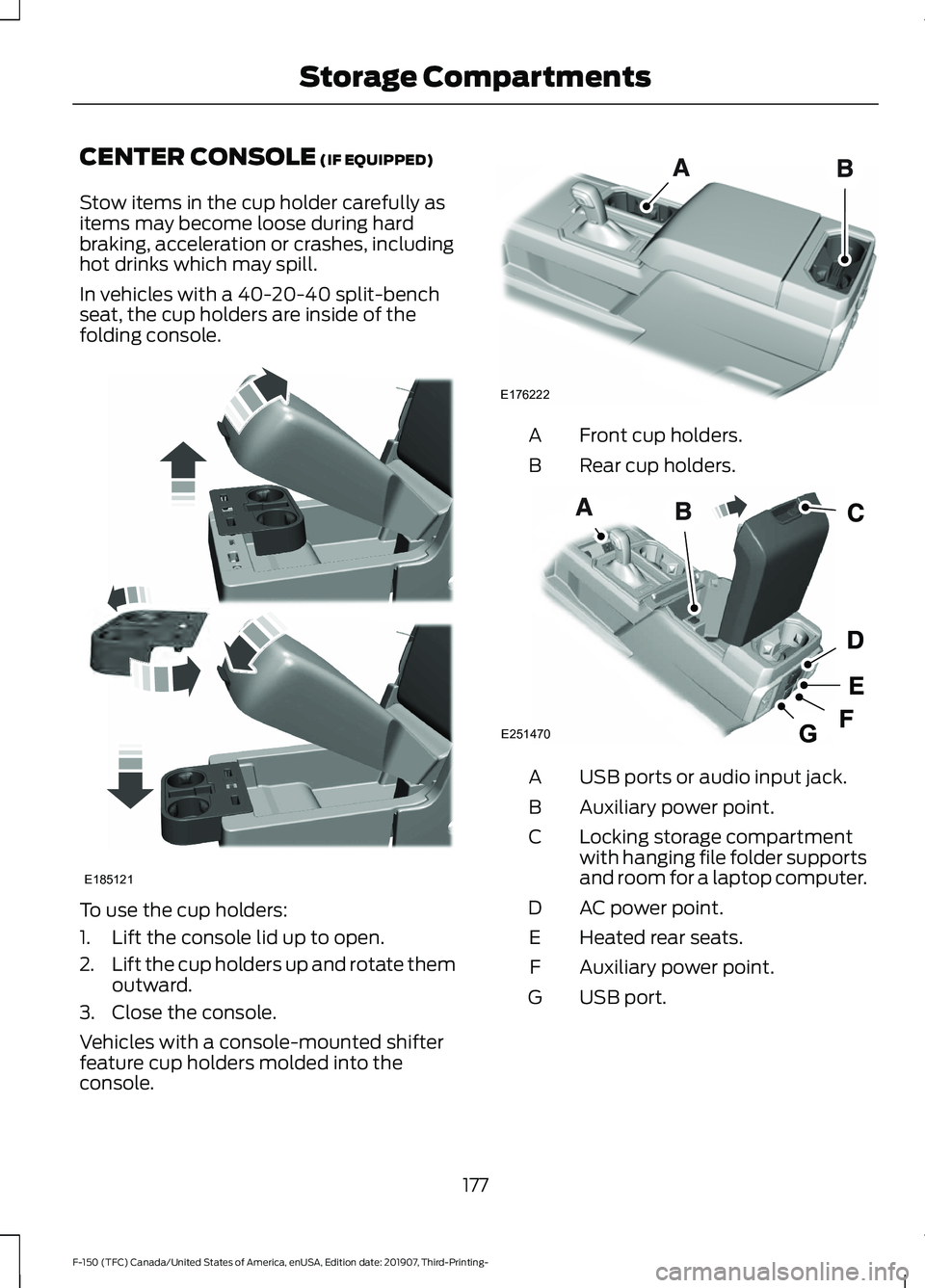
CENTER CONSOLE (IF EQUIPPED)
Stow items in the cup holder carefully as
items may become loose during hard
braking, acceleration or crashes, including
hot drinks which may spill.
In vehicles with a 40-20-40 split-bench
seat, the cup holders are inside of the
folding console. To use the cup holders:
1. Lift the console lid up to open.
2.
Lift the cup holders up and rotate them
outward.
3. Close the console.
Vehicles with a console-mounted shifter
feature cup holders molded into the
console. Front cup holders.
A
Rear cup holders.
B USB ports or audio input jack.
A
Auxiliary power point.
B
Locking storage compartment
with hanging file folder supports
and room for a laptop computer.
C
AC power point.
D
Heated rear seats.
E
Auxiliary power point.
F
USB port.
G
177
F-150 (TFC) Canada/United States of America, enUSA, Edition date: 201907, Third-Printing- Storage CompartmentsE185121 E176222 E251470
Page 330 of 625
When driving through standing water, drive
very slowly and do not stop your vehicle.
Your brake performance and traction may
be limited. After driving through water and
as soon as it is safe to do so:
•
Lightly press the brake pedal to dry the
brakes and to check that they work.
• Check that the horn works.
• Check that the exterior lights work.
• Turn the steering wheel to check that
the steering power assist works.
SNOW PLOWING
We recommend the four-wheel drive F-150
in XL, XLT or Lariat trim levels with the 5.0L
engine and snowplow option for residential
snowplowing only. We do not recommend
the F-150 with the automatic four-wheel
drive system for snowplowing.
Do not use F-150 vehicles equipped with
the 2.7L, 3.0L, 3.3L or 3.5L engines for
snowplowing.
Installing the Snowplow
Weight limits and guidelines for selecting
and installing the snowplow are in the Ford
Truck Body Builders Layout Book,
snowplow section, found at
www.fleet.ford.com/truckbbas. A typical installation affects the following:
•
Certification to government safety laws
such as occupant protection and airbag
deployment, braking, and lighting. Look
for an Alterer ’s Label on your vehicle
from the snowplow installer certifying
that the installation meets all
applicable Federal Motor Vehicle
Safety Standards (FMVSS).
• The Front Gross Axle Weight Rating
(GAWR) is on the upper left side of the
vehicle ’s Safety Compliance
Certification Label. This is the total
weight that front axle supports, which
includes the vehicle weight plus any
auxiliary equipment such as snowplow
frame-mounted hardware that can be
added to the vehicle and satisfy Ford
compliance certification to FMVSS. Do
not exceed FGAWR or Gross Vehicle
Weight Rating (GVWR).
• Rear ballast weight behind the rear
axle may be required to prevent
exceeding the FGAWR, and provide
front-to-rear weight balance for proper
braking and steering.
• Front wheel toe may require
re-adjustment to prevent premature
uneven tire wear. Specifications are in
the Ford Workshop Manual.
• Headlight aim may require adjustment.
• The tire air pressures recommended
for general driving are on the vehicle ’s
Safety Certification Label. The
maximum cold inflation pressure for
the tire and associated load rating are
on the tire sidewall. Tire air pressure
may require re-adjustment within these
pressure limits to accommodate the
additional weight of the snowplow
installation.
• Federal and some local regulations
require additional exterior lamps for
snowplow-equipped vehicles. Contact
an authorized dealer for additional
information.
327
F-150 (TFC) Canada/United States of America, enUSA, Edition date: 201907, Third-Printing- Driving Hints
Page 498 of 625
App Permissions
App permissions are organized by groups.
You can grant these group permissions
individually. You can change a permission
group status any time when not driving, by
using the settings menu.
When you launch an app using SYNC, the
system may ask you to grant certain
permissions, for example:
•
To allow your vehicle to provide vehicle
information to the app such as, but not
limited to: Fuel level, fuel economy, fuel
consumption, engine speed, rain
sensor, odometer, VIN, external
temperature, gear position, tire
pressure, and head lamp status.
• To allow your vehicle to provide driving
characteristic information such as, but
not limited to: MyKey, seat belt status,
engine revolutions per minute, gear
position, braking events, steering wheel
angle, and accelerator pedal position.
• To allow your vehicle to provide
location information, including: GPS
and speed.
• To allow the app to send push
notifications using the vehicle display
and voice capabilities while running in
a background state. Push notifications
may be particularly useful for news or
location based apps.
Note: You only need to grant permissions
the first time you use an app with SYNC.
Note: Ford is not responsible or liable for
any damages or loss of privacy relating to
usage of an app, or dissemination of any
vehicle data that you approve Ford to
provide to an app. Enabling SYNC Mobile Apps
In order to enable mobile apps, SYNC
requires user consent to send and receive
app authorization information and updates
using the data plan associated with the
connected device.
Data is sent to Ford in the United States
through the connected device. The
information is encrypted and includes your
VIN, SYNC module number, anonymous
usage statistics and debugging
information. Updates may take place.
Note:
You must enable mobile apps for
each connected device the first time you
select a mobile app using the system.
Note: Standard data rates apply. Ford is
not responsible for any additional charges
you may receive from your service provider,
when your vehicle sends or receives data
through the connected device. This includes
any additional charges incurred due to
driving in areas when roaming out of a home
network.
USING SYNC™ WITH YOUR
MEDIA PLAYER
SYNC supports digital media sources
including: iPod, Bluetooth devices, and
most USB drives. SYNC also supports
audio formats, such as MP3, WMA, WAV
and ACC.
Media Sources
The AUX or MEDIA button allows you to
view and select available media sources.
Press the
AUX or MEDIA button to view
your sources. Use the directional arrows
and OK button to select your source. You
can also use the steering wheel audio
controls.
495
F-150 (TFC) Canada/United States of America, enUSA, Edition date: 201907, Third-Printing- SYNC™
(If Equipped)
Page 611 of 625
Using Seek, Fast Forward and
Reverse............................................................. 482
Audio Unit - Vehicles Without: SYNC 3.......................................................................478
Accessing the Apps Menu.............................. 479
Accessing the Clock Settings........................ 479
Accessing the Media Source Menu.............479
Accessing the Phone Features..................... 479
Accessing the Settings Menu........................ 479
Accessing the Sound Settings...................... 479
Adjusting the Volume....................................... 479
Changing Radio Stations................................ 479
Listening to the Radio..................................... 480
Playing or Pausing Media............................... 480
Switching Radio Text On and Off...............480
Switching Repeat Mode On and Off.........480
Switching Shuffle Mode On and Off.........480
Switching the Audio Unit On and Off.......480
Switching the Display On and Off..............480
Using Seek, Fast Forward and Reverse............................................................ 480
Using the Display Control.............................. 480
Using the Number Block................................ 480
Autolamps........................................................96 Windshield Wiper Activated
Headlamps........................................................ 96
Automatic Climate Control.......................152 Directing the Airflow.......................................... 152
Setting the Blower Motor Speed.................. 153
Setting the Temperature.................................. 153
Switching Auto Mode On and Off................153
Switching Dual Zone Mode On and Off........................................................................\
153
Switching Maximum Air Conditioning On and Off............................................................... 153
Switching Maximum Defrost On and Off........................................................................\
153
Switching Recirculated Air On and Off....................................................................... 154
Switching the Air Conditioning On and Off........................................................................\
153
Switching the Climate Control On and Off........................................................................\
153
Automatic High Beam Control.................101
Automatic High Beam Control Indicators.......................................................101
Automatic Transmission
............................217
Brake-Shift Interlock........................................ 220If Your Vehicle Gets Stuck in Mud or
Snow.................................................................. 222
Understanding the Shift Positions of your Automatic Transmission............................. 217
Understanding your SelectShift™ Automatic Transmission............................. 219
Automatic Transmission Fluid Check..............................................................371
Auto-Start-Stop...........................................190 Disabling Auto-Start-Stop............................... 191
Enabling Auto-Start-Stop.............................. 190
Autowipers
.......................................................93
Auxiliary Power Points................................175
400 Watt AC Power Point............................... 175
DC Power Point.................................................... 175
Locations................................................................ 176
B
Battery See: Changing the 12V Battery...................... 373
Bed Access
....................................................286
Box Side Step..................................................... 286
Bed Extender...................................................80 Grocery Mode......................................................... 81
Tailgate Mode....................................................... 80
Bed Ramps
.....................................................287
Installing the Ramp Holder........................... 289
Stowing the Bed Ramp................................... 288
Using the Bed Ramp......................................... 287
Blind Spot Information System.............266 Blind Spot Information System with Trailer
Tow..................................................................... 267
Switching the System On and Off...............270
System Errors...................................................... 270
Using the Blind Spot Information System.............................................................. 267
BLIS See: Blind Spot Information System.........266
Body Styling Kits.........................................390
Bonnet Lock See: Opening and Closing the Hood..........355
Booster Seats
..................................................35
Types of Booster Seats...................................... 35
Brake Fluid Check.........................................372 Brake Fluid Service Interval............................ 372
Brakes...............................................................233 General Information.......................................... 233
608
F-150 (TFC) Canada/United States of America, enUSA, Edition date: 201907, Third-Printing- Index