keyless entry FORD F-150 2020 Owners Manual
[x] Cancel search | Manufacturer: FORD, Model Year: 2020, Model line: F-150, Model: FORD F-150 2020Pages: 625, PDF Size: 7.98 MB
Page 4 of 625
Introduction
About This Manual
..........................................9
Symbols Glossary ............................................
9
Data Recording .................................................
11
Perchlorate .......................................................
16
Ford Credit ........................................................
16
Replacement Parts Recommendation ........................................................................\
...
16
Special Notices ................................................
17
Mobile Communications Equipment ........................................................................\
...
18
Export Unique Options ................................
18
Environment
Protecting the Environment .......................
19
At a Glance
Instrument Panel ..........................................
20
Child Safety
General Information .....................................
22
Installing Child Restraints ..........................
24
Booster Seats .................................................
35
Child Restraint Positioning .........................
37
Child Safety Locks ........................................
39
Seatbelts
Principle of Operation .................................
40
Fastening the Seatbelts ..............................
41
Seatbelt Height Adjustment .....................
45
Seatbelt Warning Lamp and Indicator Chime ............................................................
45
Seatbelt Reminder .......................................
46
Child Restraint and Seatbelt Maintenance ...............................................
48
Seatbelt Extensions .....................................
48
Personal Safety System ™
Personal Safety System ™........................
50 Supplementary Restraints
System
Principle of Operation ..................................
51
Driver and Passenger Airbags ...................
52
Front Passenger Sensing System ...........
53
Side Airbags ....................................................
55
Safety Canopy ™............................................
57
Crash Sensors and Airbag Indicator ......
58
Airbag Disposal ..............................................
59
Keys and Remote Controls
General Information on Radio Frequencies ................................................
60
Remote Control .............................................
60
Replacing a Lost Key or Remote Control ........................................................................\
..
66
MyKey ™
Principle of Operation ..................................
67
Creating a MyKey ..........................................
68
Clearing All MyKeys ......................................
69
Checking MyKey System Status .............
69
Using MyKey With Remote Start Systems ........................................................
70
MyKey – Troubleshooting ..........................
70
Doors and Locks
Locking and Unlocking ................................
72
Keyless Entry ...................................................
75
Tailgate
Tailgate Lock ....................................................
77
Manual Tailgate ..............................................
77
Electronic Tailgate .........................................
77
Removing the Tailgate .................................
78
Tailgate Step ...................................................
79
Bed Extender ..................................................
80
Security
Passive Anti-Theft System ........................
82
1
F-150 (TFC) Canada/United States of America, enUSA, Edition date: 201907, Third-Printing- Table of Contents
Page 75 of 625
LOCKING AND UNLOCKING
You can use the power door lock control
or the remote control to lock and unlock
your doors and tailgate. See Tailgate
Lock (page 77).
Power Door Locks
(If Equipped)
The power door lock control is on the driver
and front passenger door panels. Unlock.
A
Lock.
B
Remote Control
(If Equipped)
You can use the remote control at any time
your vehicle is not running.
Unlocking the Vehicle (Two-Stage
Unlock) Press the button to unlock the
driver door. Press the button
again within three seconds to
unlock all doors. The direction indicators
flash. The direction indicators flash twice
to confirm the change. The unlocking
mode applies to the remote control,
keyless entry keypad and intelligent
access. Press and hold both the lock and unlock
buttons on the remote control for four
seconds to disable or enable two-stage
unlocking. Disabling two-stage unlocking
allows your entire vehicle to unlock with
one press of the button.
Intelligent access at the driver door unlocks
your entire vehicle when you disable
two-stage unlocking.
Locking the Vehicle
Press the button to lock all
doors. The direction indicators
flash.
Press the button again within three
seconds to confirm that all the doors are
closed. The doors lock again, the horn
sounds and the direction indicators flash
if all the doors are closed.
Mislock
If any door is open, or if the hood is open
on vehicles with an anti-theft alarm or
remote start, the horn sounds twice and
the direction indicators do not flash.
Activating Intelligent Access
(If
Equipped)
General Information
You can unlock and lock the vehicle
without taking the keys out of your pocket
or purse when your intelligent access key
is within
3 ft (1 m) of your vehicle.
Intelligent access uses a sensor on the
back of the door handle for unlocking and
a separate sensor on the face of each door
handle for locking.
The system does not function if:
• Your vehicle battery has no charge.
• The key battery has no charge.
• The key frequencies are jammed.
72
F-150 (TFC) Canada/United States of America, enUSA, Edition date: 201907, Third-Printing- Doors and LocksE138628 E138629 E138623
Page 76 of 625
Note:
The system may not function if the
key is close to metal objects or electronic
devices, for example keys or a cell phone.
Note: If the system does not function, use
the key blade to lock and unlock your
vehicle. See Remote Control (page 60).
Unlocking Using Intelligent Access With your intelligent access key within
3 ft
(1 m) of your vehicle, touch the unlock
sensor on the back of the door handle for
a brief period and then pull on the door
handle to unlock, being careful to not
touch the lock sensor at the same time or
pulling the door handle too quickly. The
intelligent access system requires a brief
delay to authenticate your intelligent
access key fob.
Locking Using Intelligent Access With your intelligent access key within
3 ft
(1 m) of your vehicle, touch the outer door
handle lock sensor for approximately one
second to lock, being careful to not touch
the unlock sensor on the back of the door
handle at the same time. After locking, you
can immediately pull on the door handle
to confirm locking occurred without
inadvertently unlocking.
Note: Do not use the outside door handle
as a roof cargo strap. At the Electronic Tailgate (If Equipped)
Press the exterior tailgate release button
inside of the tailgate handle. The tailgate
unlocks and opens. See
Tailgate Lock
(page 77).
Smart Unlock
(If Equipped)
This feature helps to prevent you from
locking your intelligent access key inside
your vehicle ’s passenger compartment or
rear cargo area.
If you leave your key in the ignition, when
you open the driver door and lock your
vehicle with the power door lock control,
the doors lock then unlock.
You can still lock your vehicle with the key
in the ignition by:
• Using the manual lock on the inside of
the door.
• Locking the driver door with a key.
• Using the keyless entry keypad.
• Using the lock button on the remote
control.
Smart Unlocks for Intelligent
Access Keys
(If Equipped)
This feature helps to prevent you from
locking your intelligent access key inside
your vehicle ’s passenger compartment or
rear cargo area.
73
F-150 (TFC) Canada/United States of America, enUSA, Edition date: 201907, Third-Printing- Doors and LocksE248555 E248556 E187693
Page 77 of 625
When you lock your vehicle using the
power door lock control (with the door
open, vehicle in park and ignition off), your
vehicle searches for an intelligent access
key in the passenger compartment after
you close the door. If your vehicle finds a
key, all of the doors immediately unlock.
In order to override the smart unlock
feature and intentionally lock the
intelligent access key inside your vehicle,
you can lock your vehicle after all doors
are closed by using the keyless entry
keypad, pressing the lock button on
another intelligent access key or touching
the locking area on the handle with another
intelligent access key in your hand.
When you open one of the front doors and
lock your vehicle using the power door lock
control, all doors lock then unlock if the
ignition is on.
Autolock (If Equipped)
Autolock locks all the doors when:
• All doors are closed.
• The ignition is on.
• You shift into any gear putting your
vehicle in motion.
• Your vehicle reaches a speed greater
than
12 mph (20 km/h).
Autolock repeats when:
• You open then close any door while the
ignition is on and your vehicle speed is
9 mph (15 km/h)
or lower.
• Your vehicle reaches a speed greater
than
12 mph (20 km/h). Autounlock
Autounlock unlocks all the doors when:
•
Your vehicle comes to a stop and you
switch the ignition off or to the
accessory position.
• You open the driver door within 10
minutes of switching the ignition off or
to accessory.
Note: The doors do not autounlock if you
electronically lock your vehicle after you
switch the ignition off and before you open
the driver door.
Enabling or Disabling Autounlock
You can enable or disable the autounlock
feature in the information display or an
authorized dealer can do it for you. See
General Information
(page 120).
Illuminated Entry
The interior lamps and select exterior
lamps illuminate when you unlock the
doors with the remote entry system.
The illuminated entry system turns off the
lights if:
• The ignition is on.
• You press the remote control lock
button.
• After 25 seconds of illumination.
The dome lamp does not turn on if the
control is set to the off position.
The lights do not turn off if:
• You switch them on with the dimmer
control.
• Any door is open.
Battery Saver
The battery saver turns off the interior
lamps 10 minutes after you switch the
ignition off, or 10 minutes after you exit the
vehicle.
74
F-150 (TFC) Canada/United States of America, enUSA, Edition date: 201907, Third-Printing- Doors and Locks
Page 78 of 625
Accessory Mode Battery Saver for
Intelligent Access Keys (If Equipped)
If you leave the ignition on after leaving
your vehicle, it turns off 30 minutes after
you close all of the doors.
KEYLESS ENTRY (IF EQUIPPED)
SECURICODE™ KEYLESS ENTRY
KEYPAD
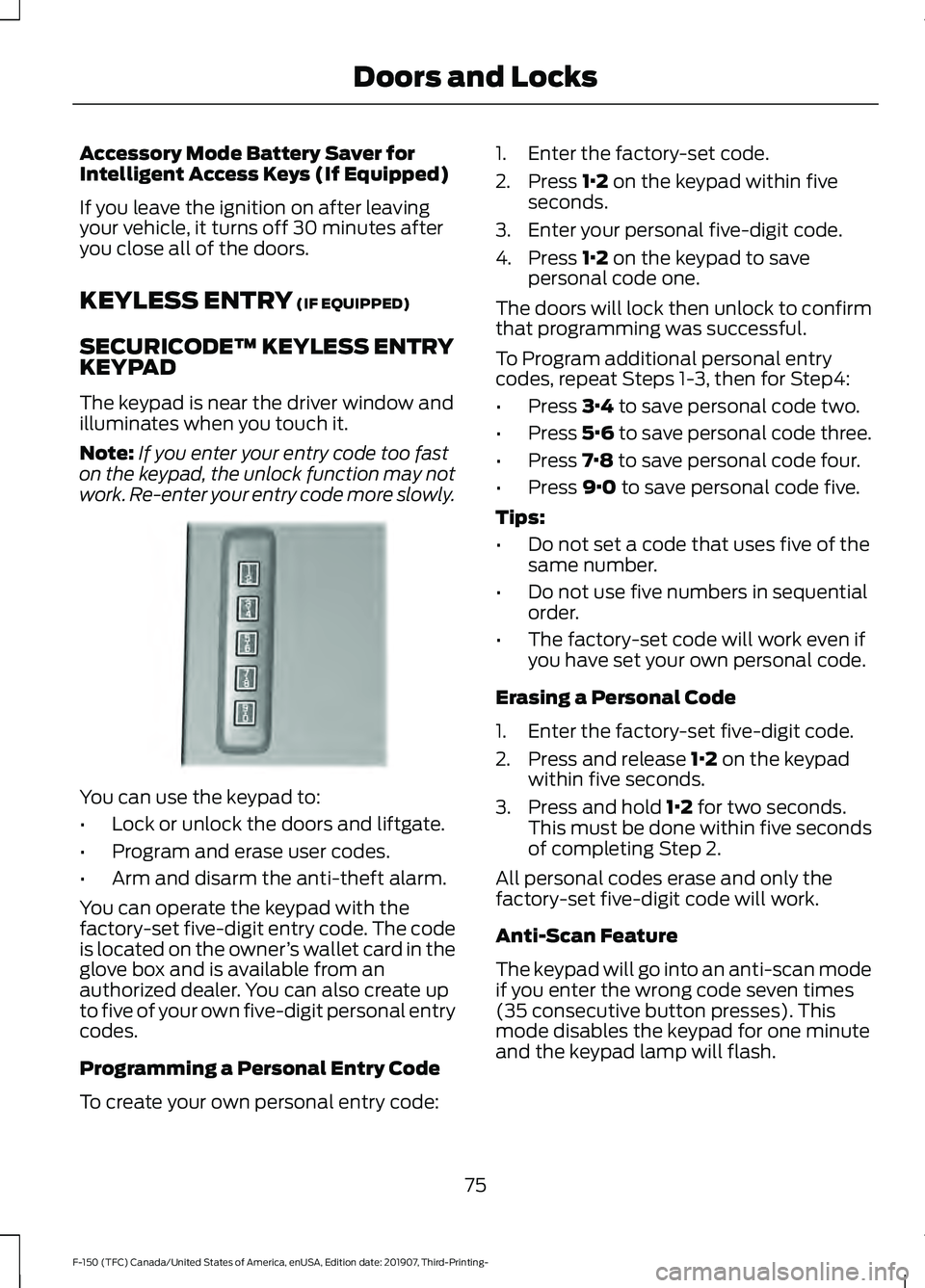
The keypad is near the driver window and
illuminates when you touch it.
Note: If you enter your entry code too fast
on the keypad, the unlock function may not
work. Re-enter your entry code more slowly. You can use the keypad to:
•
Lock or unlock the doors and liftgate.
• Program and erase user codes.
• Arm and disarm the anti-theft alarm.
You can operate the keypad with the
factory-set five-digit entry code. The code
is located on the owner ’s wallet card in the
glove box and is available from an
authorized dealer. You can also create up
to five of your own five-digit personal entry
codes.
Programming a Personal Entry Code
To create your own personal entry code: 1. Enter the factory-set code.
2. Press
1·2 on the keypad within five
seconds.
3. Enter your personal five-digit code.
4. Press
1·2 on the keypad to save
personal code one.
The doors will lock then unlock to confirm
that programming was successful.
To Program additional personal entry
codes, repeat Steps 1-3, then for Step4:
• Press
3·4 to save personal code two.
• Press
5·6 to save personal code three.
• Press
7·8 to save personal code four.
• Press
9·0 to save personal code five.
Tips:
• Do not set a code that uses five of the
same number.
• Do not use five numbers in sequential
order.
• The factory-set code will work even if
you have set your own personal code.
Erasing a Personal Code
1. Enter the factory-set five-digit code.
2. Press and release
1·2 on the keypad
within five seconds.
3. Press and hold
1·2 for two seconds.
This must be done within five seconds
of completing Step 2.
All personal codes erase and only the
factory-set five-digit code will work.
Anti-Scan Feature
The keypad will go into an anti-scan mode
if you enter the wrong code seven times
(35 consecutive button presses). This
mode disables the keypad for one minute
and the keypad lamp will flash.
75
F-150 (TFC) Canada/United States of America, enUSA, Edition date: 201907, Third-Printing- Doors and LocksE190936
Page 88 of 625
Using the System
You can select two levels of alarm security.
You can change the level of security when
the ignition is switched off through the
information display with the two options
below:
Perimeter Only (If Equipped)
Perimeter only monitors the following:
•
Doors.
• Hood.
• Tailgate.
All Sensors (If Equipped)
All sensors monitors the following:
• Doors.
• Hood.
• Tailgate.
• Movement inside your vehicle.
• Change in vehicle inclination, for
example, unwanted towing.
Note: Do not choose all sensors monitor
mode when the vehicle is in transport or if
movement within the vehicle is likely to
occur.
Note: For correct operation of the interior
motion detection system, make sure you
close all the windows prior to arming the
system. This helps prevent accidental alarm
activation due to external influences.
Additionally, the interior motion sensing
system does not arm if any door is ajar.
Arming the Alarm
The alarm is ready to arm when there is
not a key in the ignition. Lock your vehicle
using the remote control or keyless entry
keypad. You can also lock your vehicle
using the lock sensor on the exterior door
handle if your vehicle is equipped with
intelligent access. See Locking and
Unlocking (page 72). The direction indicators flash once after
you lock your vehicle. This indicates the
alarm is in the pre-armed mode. It fully
arms after 20 seconds.
Disarming the Alarm
Disarm the alarm by any of the following
actions:
•
Press the power door unlock button
within the 20-second pre-armed mode.
• Unlock the doors with the remote
control or keyless entry keypad. If
equipped with intelligent access, you
can use the unlock sensor on the
exterior door handle. See
Locking and
Unlocking (page 72).
• Switch the ignition on or start your
vehicle.
• Use a key in the driver door lock
cylinder to unlock your vehicle, then
switch the ignition on within 12
seconds.
85
F-150 (TFC) Canada/United States of America, enUSA, Edition date: 201907, Third-Printing- Security
Page 182 of 625
GENERAL INFORMATION
WARNING: Extended idling at high
engine speeds can produce very high
temperatures in the engine and exhaust
system, creating the risk of fire or other
damage. WARNING:
Do not park, idle or
drive your vehicle on dry grass or other
dry ground cover. The emission system
heats up the engine compartment and
exhaust system, creating the risk of fire. WARNING: Do not start the engine
in a closed garage or in other enclosed
areas. Exhaust fumes can be toxic.
Always open the garage door before you
start the engine. WARNING:
Exhaust leaks may
result in entry of harmful and potentially
lethal fumes into the passenger
compartment. If you smell exhaust
fumes inside your vehicle, have your
vehicle inspected immediately. Do not
drive if you smell exhaust fumes.
If you disconnect the battery, your vehicle
may exhibit some unusual driving
characteristics for approximately
5 mi
(8 km) after you reconnect it. This is
because the engine management system
must realign itself with the engine. You
can disregard any unusual driving
characteristics during this period.
The powertrain control system meets all
Canadian interference-causing equipment
standard requirements regulating the
impulse electrical field or radio noise.
When you start the engine, avoid pressing
the accelerator pedal before and during
operation. Only use the accelerator pedal
when you have difficulty starting the
engine. IGNITION SWITCH
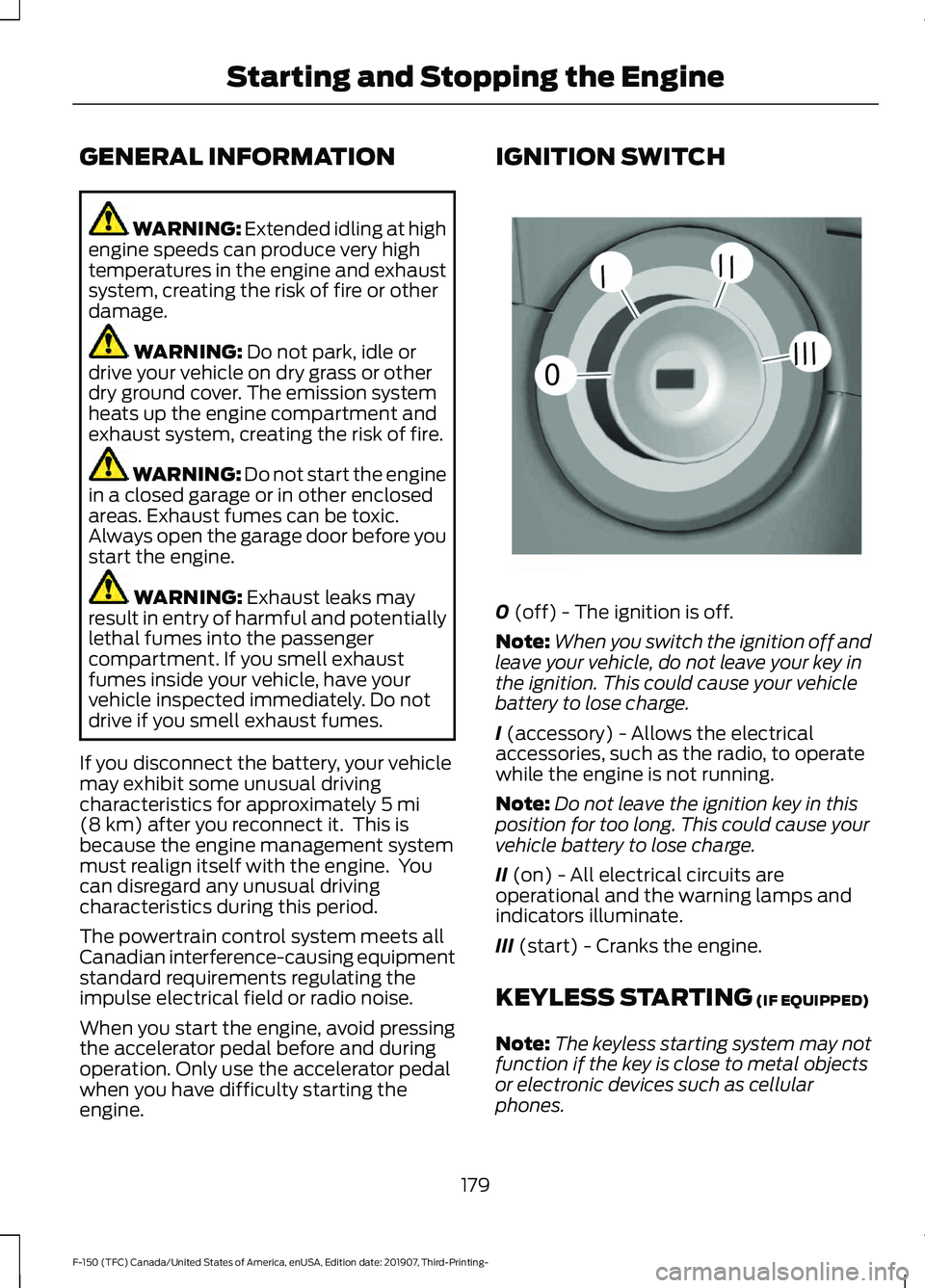
0
(off) - The ignition is off.
Note: When you switch the ignition off and
leave your vehicle, do not leave your key in
the ignition. This could cause your vehicle
battery to lose charge.
I
(accessory) - Allows the electrical
accessories, such as the radio, to operate
while the engine is not running.
Note: Do not leave the ignition key in this
position for too long. This could cause your
vehicle battery to lose charge.
II
(on) - All electrical circuits are
operational and the warning lamps and
indicators illuminate.
III
(start) - Cranks the engine.
KEYLESS STARTING
(IF EQUIPPED)
Note: The keyless starting system may not
function if the key is close to metal objects
or electronic devices such as cellular
phones.
179
F-150 (TFC) Canada/United States of America, enUSA, Edition date: 201907, Third-Printing- Starting and Stopping the Engine0
///
///E252522
Page 187 of 625
2. When your vehicle has stopped, move
the transmission selector lever to
position P and turn the key to off.
3. Apply the parking brake.
Vehicles with Keyless Start
1. Move the transmission selector lever to position
N and use the brakes to
bring your vehicle to a safe stop.
2. When your vehicle has stopped, move the transmission selector lever to
position
P.
3. Press and hold the button for one second, or press it three times within
two seconds.
4. Apply the parking brake.
Guarding Against Exhaust Fumes WARNING:
Exhaust leaks may
result in entry of harmful and potentially
lethal fumes into the passenger
compartment. If you smell exhaust
fumes inside your vehicle, have your
vehicle inspected immediately. Do not
drive if you smell exhaust fumes.
Important Ventilating Information
If you stop your vehicle and leave the
engine idling for long periods, we
recommend that you do one of the
following:
• Open the windows at least
1 in
(2.5 cm).
• Set your climate control to outside air.
STARTING A DIESEL ENGINE (IF
EQUIPPED)
Read all starting instructions carefully
before you start your vehicle. For temperatures below
32°F (0°C), the
use of the correct grade engine oil is
essential for proper operation. Refer to
Engine oil specifications for more
information. See
Capacities and
Specifications (page 433).
Your vehicle may be equipped with a cold
weather starting strategy that prevents
severe engine damage by assisting in
engine lubrication warm-up. In extremely
cold ambient temperatures, this strategy
activates and prevents the accelerator
pedal from being used for 30 seconds after
starting your vehicle. A message will
appear in the information display as your
vehicle warms up. By not allowing the
accelerator pedal to be used, the engine
oil is allowed to properly lubricate the
bearings preventing engine damage due
to lack of proper lubrication. After the 30
second warm-up period, the accelerator
pedal will be operational again and a
message will appear informing you the
vehicle is ok to drive.
When starting the engine in extremely cold
temperatures
-15°F (-26°C), it is
recommended to allow the engine to idle
for several minutes before driving the
vehicle.
Before starting the engine check the
following:
• Make sure all occupants have fastened
their seatbelts.
• Make sure the headlamps and
electrical accessories are off.
• Make sure the parking brake is on.
• Make sure the transmission is in park
(P).
Note: Do not press the accelerator during
starting.
Vehicles with Keyless Start
Note: Do not touch the accelerator pedal.
184
F-150 (TFC) Canada/United States of America, enUSA, Edition date: 201907, Third-Printing- Starting and Stopping the Engine
Page 325 of 625
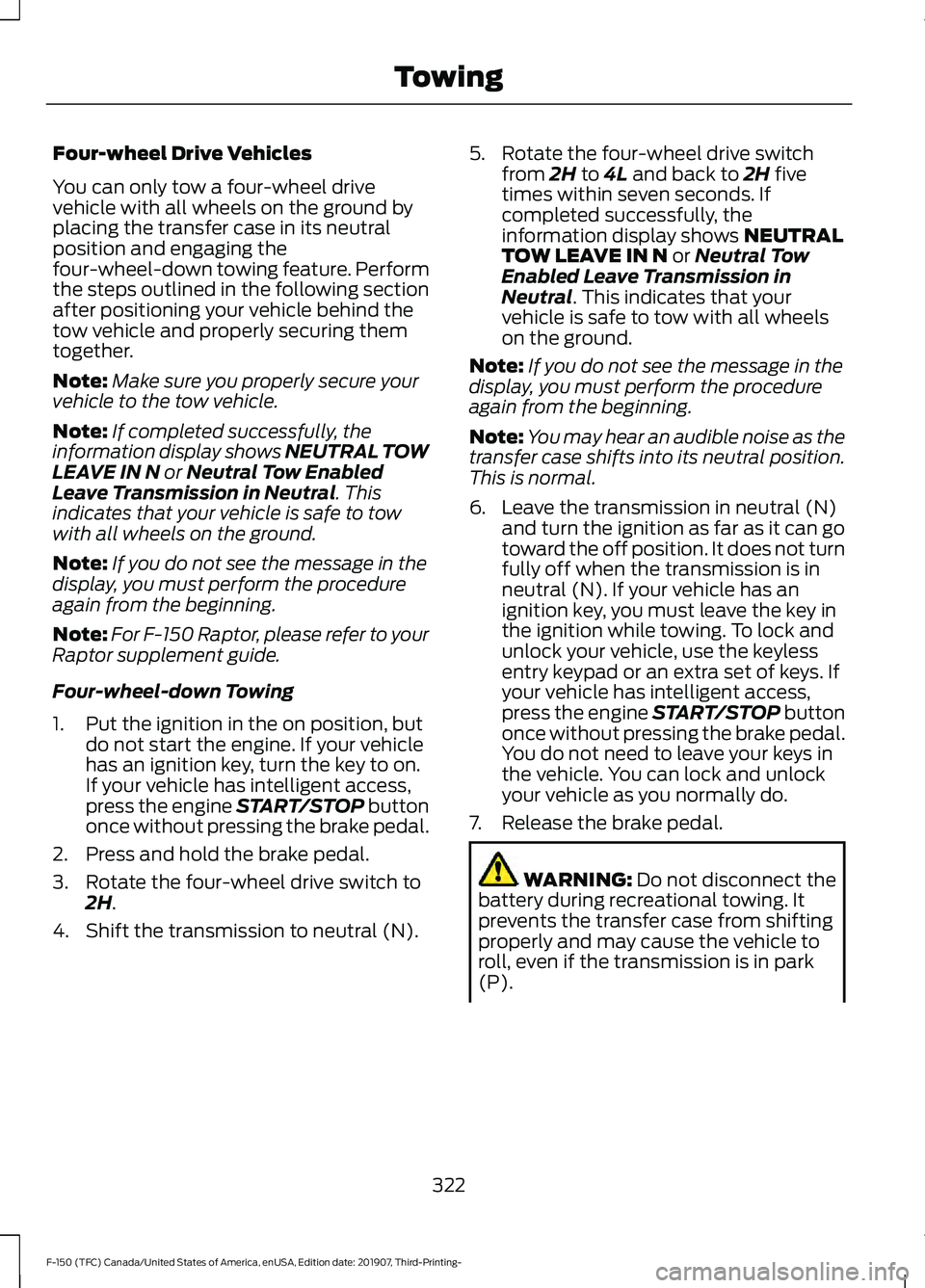
Four-wheel Drive Vehicles
You can only tow a four-wheel drive
vehicle with all wheels on the ground by
placing the transfer case in its neutral
position and engaging the
four-wheel-down towing feature. Perform
the steps outlined in the following section
after positioning your vehicle behind the
tow vehicle and properly securing them
together.
Note:
Make sure you properly secure your
vehicle to the tow vehicle.
Note: If completed successfully, the
information display shows NEUTRAL TOW
LEAVE IN N or Neutral Tow Enabled
Leave Transmission in Neutral. This
indicates that your vehicle is safe to tow
with all wheels on the ground.
Note: If you do not see the message in the
display, you must perform the procedure
again from the beginning.
Note: For F-150 Raptor, please refer to your
Raptor supplement guide.
Four-wheel-down Towing
1. Put the ignition in the on position, but do not start the engine. If your vehicle
has an ignition key, turn the key to on.
If your vehicle has intelligent access,
press the engine START/STOP button
once without pressing the brake pedal.
2. Press and hold the brake pedal.
3. Rotate the four-wheel drive switch to 2H
.
4. Shift the transmission to neutral (N). 5. Rotate the four-wheel drive switch
from
2H to 4L and back to 2H five
times within seven seconds. If
completed successfully, the
information display shows
NEUTRAL
TOW LEAVE IN N or Neutral Tow
Enabled Leave Transmission in
Neutral
. This indicates that your
vehicle is safe to tow with all wheels
on the ground.
Note: If you do not see the message in the
display, you must perform the procedure
again from the beginning.
Note: You may hear an audible noise as the
transfer case shifts into its neutral position.
This is normal.
6. Leave the transmission in neutral (N) and turn the ignition as far as it can go
toward the off position. It does not turn
fully off when the transmission is in
neutral (N). If your vehicle has an
ignition key, you must leave the key in
the ignition while towing. To lock and
unlock your vehicle, use the keyless
entry keypad or an extra set of keys. If
your vehicle has intelligent access,
press the engine START/STOP button
once without pressing the brake pedal.
You do not need to leave your keys in
the vehicle. You can lock and unlock
your vehicle as you normally do.
7. Release the brake pedal. WARNING:
Do not disconnect the
battery during recreational towing. It
prevents the transfer case from shifting
properly and may cause the vehicle to
roll, even if the transmission is in park
(P).
322
F-150 (TFC) Canada/United States of America, enUSA, Edition date: 201907, Third-Printing- Towing
Page 619 of 625
Interior Lamps.................................................98
Front Interior Lamp............................................. 98
Rear Interior Lamps............................................ 99
Interior Mirror..................................................107
Automatic Dimming Mirror............................. 108
Manual Dimming Mirror.................................... 107
Introduction........................................................9
J
Jump Starting the Vehicle
........................333
Connecting the Jumper Cables.................... 333
Jump Starting...................................................... 334
Preparing Your Vehicle..................................... 333
Removing the Jumper Cables....................... 334
K
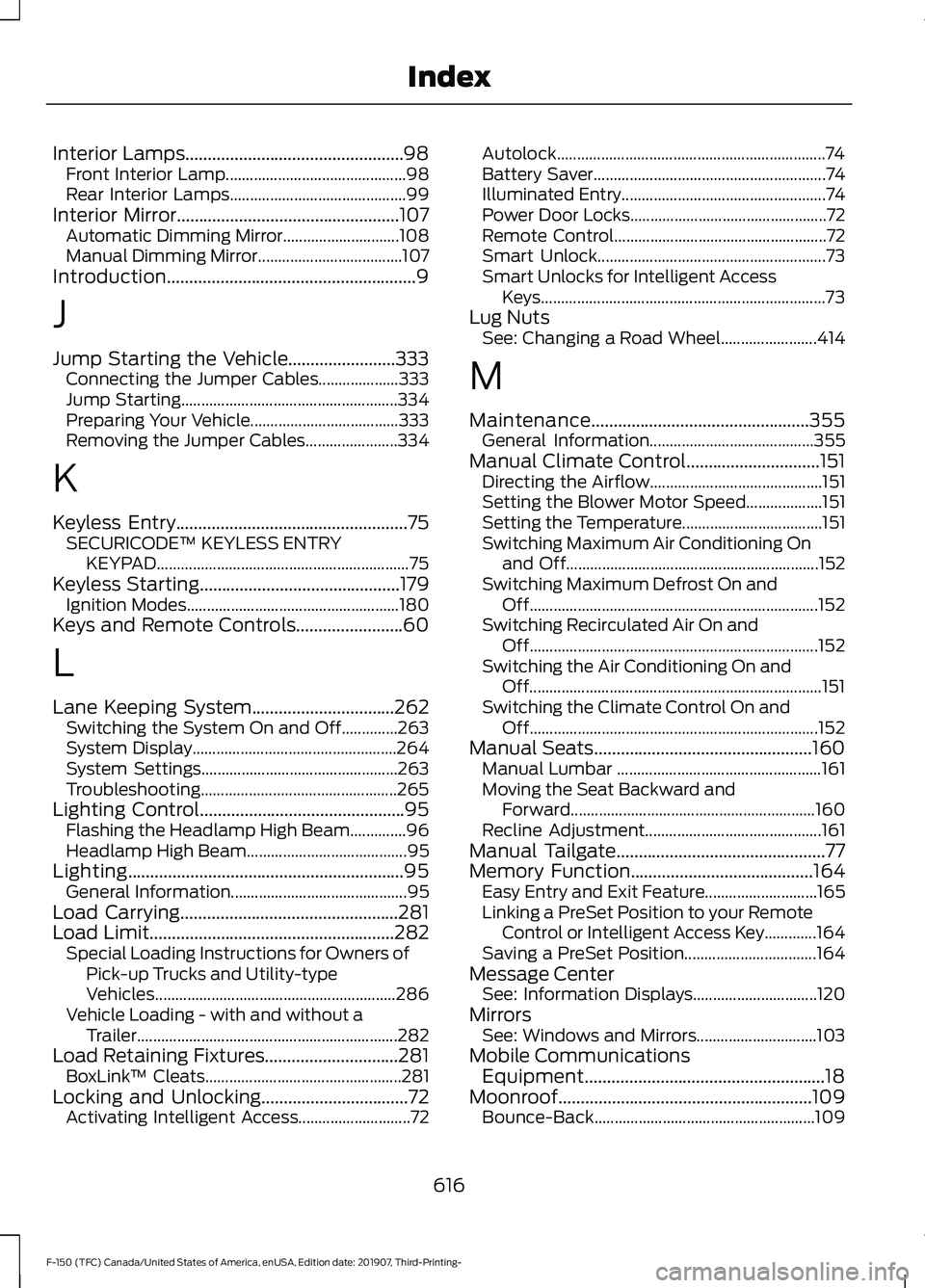
Keyless Entry....................................................75 SECURICODE™ KEYLESS ENTRY
KEYPAD............................................................... 75
Keyless Starting
.............................................179
Ignition Modes..................................................... 180
Keys and Remote Controls........................60
L
Lane Keeping System................................262 Switching the System On and Off..............263
System Display................................................... 264
System Settings................................................. 263
Troubleshooting................................................. 265
Lighting Control..............................................95 Flashing the Headlamp High Beam..............96
Headlamp High Beam........................................ 95
Lighting..............................................................95 General Information............................................ 95
Load Carrying.................................................281
Load Limit
.......................................................282
Special Loading Instructions for Owners of
Pick-up Trucks and Utility-type
Vehicles............................................................ 286
Vehicle Loading - with and without a Trailer................................................................. 282
Load Retaining Fixtures..............................281 BoxLink ™ Cleats................................................. 281
Locking and Unlocking
.................................72
Activating Intelligent Access............................ 72Autolock...................................................................
74
Battery Saver.......................................................... 74
Illuminated Entry................................................... 74
Power Door Locks................................................. 72
Remote Control..................................................... 72
Smart Unlock......................................................... 73
Smart Unlocks for Intelligent Access Keys....................................................................... 73
Lug Nuts See: Changing a Road Wheel........................ 414
M
Maintenance.................................................355 General Information......................................... 355
Manual Climate Control
..............................151
Directing the Airflow........................................... 151
Setting the Blower Motor Speed................... 151
Setting the Temperature................................... 151
Switching Maximum Air Conditioning On and Off............................................................... 152
Switching Maximum Defrost On and Off........................................................................\
152
Switching Recirculated Air On and Off........................................................................\
152
Switching the Air Conditioning On and Off........................................................................\
. 151
Switching the Climate Control On and Off........................................................................\
152
Manual Seats.................................................160 Manual Lumbar ................................................... 161
Moving the Seat Backward and Forward............................................................. 160
Recline Adjustment............................................ 161
Manual Tailgate
...............................................77
Memory Function.........................................164
Easy Entry and Exit Feature............................ 165
Linking a PreSet Position to your Remote Control or Intelligent Access Key.............164
Saving a PreSet Position................................. 164
Message Center See: Information Displays............................... 120
Mirrors See: Windows and Mirrors.............................. 103
Mobile Communications Equipment......................................................18
Moonroof.........................................................109 Bounce-Back....................................................... 109
616
F-150 (TFC) Canada/United States of America, enUSA, Edition date: 201907, Third-Printing- Index