tire pressure reset FORD F-150 2020 Owners Manual
[x] Cancel search | Manufacturer: FORD, Model Year: 2020, Model line: F-150, Model: FORD F-150 2020Pages: 625, PDF Size: 7.98 MB
Page 13 of 625
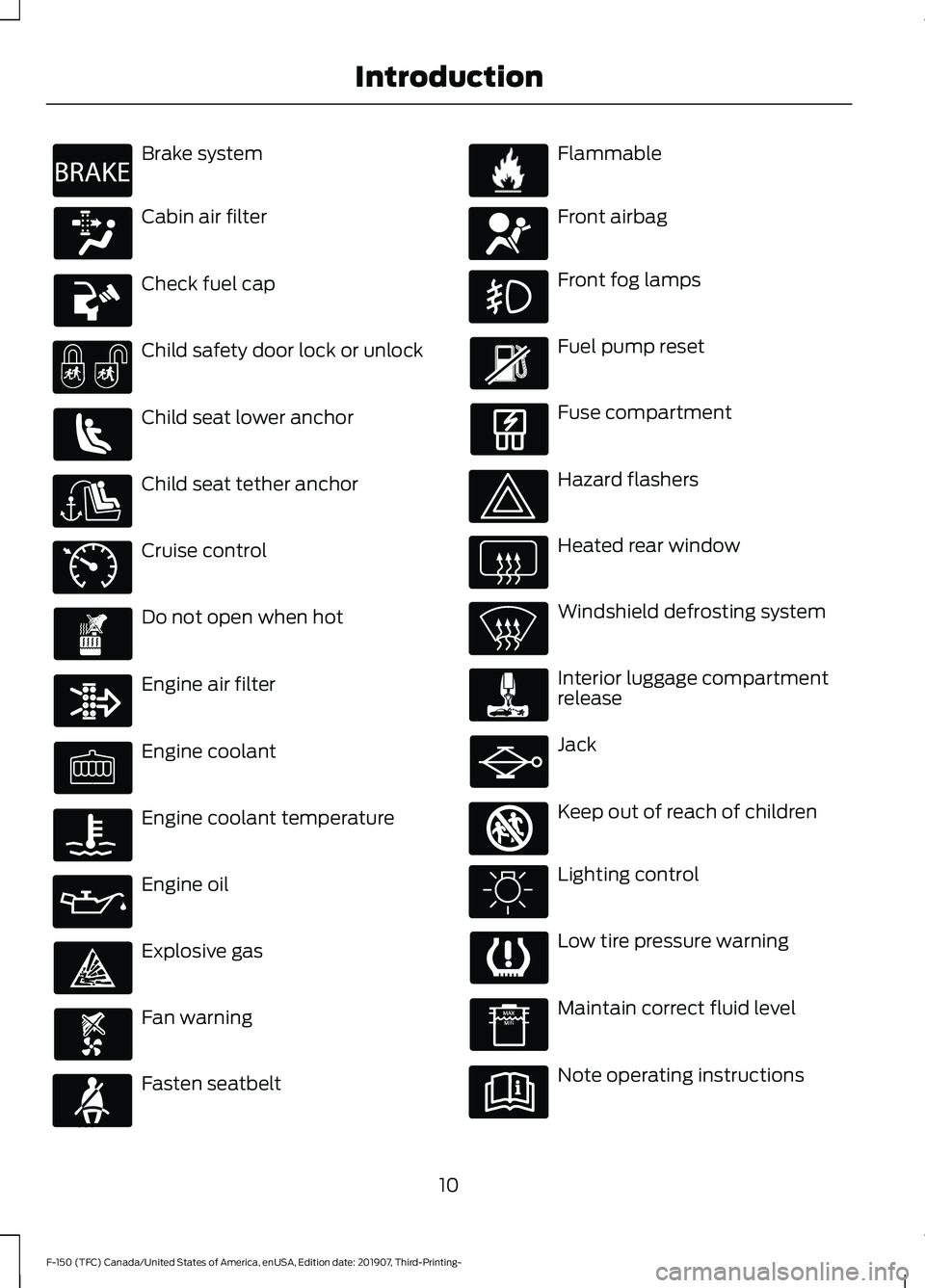
Brake system
Cabin air filter
Check fuel cap
Child safety door lock or unlock
Child seat lower anchor
Child seat tether anchor
Cruise control
Do not open when hot
Engine air filter
Engine coolant
Engine coolant temperature
Engine oil
Explosive gas
Fan warning
Fasten seatbelt Flammable
Front airbag
Front fog lamps
Fuel pump reset
Fuse compartment
Hazard flashers
Heated rear window
Windshield defrosting system
Interior luggage compartment
release
Jack
Keep out of reach of children
Lighting control
Low tire pressure warning
Maintain correct fluid level
Note operating instructions
10
F-150 (TFC) Canada/United States of America, enUSA, Edition date: 201907, Third-Printing- IntroductionE270480 E71340 E71880 E231160 E67017 E161353
Page 15 of 625
Your vehicle has electronic control units
that have data recording functionality and
the ability to permanently or temporarily
store data. This data could include
information on the condition and status of
your vehicle, vehicle maintenance
requirements, events and malfunctions.
The types of data that can be recorded are
described in this section. Some of the data
recorded is stored in event logs or error
logs.
Note:
Error logs are reset following a service
or repair.
Note: We may provide information in
response to requests from law enforcement,
other government authorities and third
parties acting with lawful authority or
through a legal process. Such information
could be used by them in legal proceedings.
Data recorded includes, for example:
• Operating states of system
components, for example, fuel level,
tire pressure and battery charge level.
• Vehicle and component status, for
example, wheel speed, deceleration,
lateral acceleration and seatbelt
status.
• Events or errors in essential systems,
for example, headlamps and brakes.
• System responses to driving situations,
for example, airbag deployment and
stability control.
• Environmental conditions, for example,
temperature.
Some of this data, when used in
combination with other information, for
example, an accident report, damage to a
vehicle or eyewitness statements, could
be associated with a specific person. Service Data
Service data recorders in your vehicle are
capable of collecting and storing
diagnostic information about your vehicle.
This potentially includes information about
the performance or status of various
systems and modules in the vehicle, such
as engine, throttle, steering or brake
systems. In order to properly diagnose and
service your vehicle, Ford Motor Company
(Ford of Canada in Canada), and service
and repair facilities may access or share
among them vehicle diagnostic
information received through a direct
connection to your vehicle when
diagnosing or servicing your vehicle.
Additionally, Ford Motor Company (Ford
of Canada, in Canada) may, where
permitted by law, use vehicle diagnostic
information for vehicle improvement or
with other information we may have about
you, for example, your contact information,
to offer you products or services that may
interest you. Data may be provided to our
service providers such as part suppliers
that may help diagnose malfunctions, and
who are similarly obligated to protect data.
We retain this data only as long as
necessary to perform these functions or to
comply with law. We may provide
information where required in response to
official requests to law enforcement or
other government authorities or third
parties acting with lawful authority or court
order, and such information may be used
in legal proceedings. For U.S. only (if
equipped), if you choose to use connected
apps and services, you consent that certain
diagnostic information may also be
accessed electronically by Ford Motor
Company and Ford authorized service
facilities, and that the diagnostic
information may be used to provide
services to you, personalizing your
experience, troubleshoot, and to improve
products and services and offer you
products and services that may interest
12
F-150 (TFC) Canada/United States of America, enUSA, Edition date: 201907, Third-Printing- Introduction
Page 125 of 625
Fuel Economy
Average Speed
Auto StartStop
• Distance to E - Shows the approximate distance your vehicle can travel before running
out of fuel.
• Instant Fuel Economy - Shows your instantaneous fuel usage.
• Average Fuel Economy - Shows the average fuel usage based on time. Press and hold
OK to reset this value.
• Average Speed - Shows the average speed your vehicle travels.
• Auto StartStop - Shows the current status of the Auto StartStop system.
Note: You can reset your average fuel economy by pressing and holding the
OK button on
the left hand steering wheel controls.
Driver Assist
Note: Use the arrow buttons to configure different driver setting choices. Driver Assist
Prog Range Sel
Driver Assist
DEF Gauge
Exhaust Filter
Engine Hours
Tire Pressure
Trans. Temp.
Rear Park Aid
Brake Type
Brake Effort
Trailer Sway
122
F-150 (TFC) Canada/United States of America, enUSA, Edition date: 201907, Third-Printing- Information Displays
Page 126 of 625
Settings
Settings
Enter the submenu and select your
setting
Auto Regen
Vehicle
DTE Calculate
Lighting
Locks
Neutral Tow
Oil Life Reset
Remote Start
Wiper Controls Enter the submenu and select your
setting
MyKey Status
MyKey
Create MyKey
911 Assist
Do Not Disturb
AdvanceTrac
Max Speed
Speed Minder
Vol. Limiter Enter the submenu and select your
setting
Clear MyKeys
Enter the submenu and select your
setting
Units
Display Setup
Temperature
Tire Pressure
Language
Main menu (Type 2)
• Display Mode
• Trip/Fuel •
Towing
• Off Road
• Settings
123
F-150 (TFC) Canada/United States of America, enUSA, Edition date: 201907, Third-Printing- Information Displays
Page 127 of 625
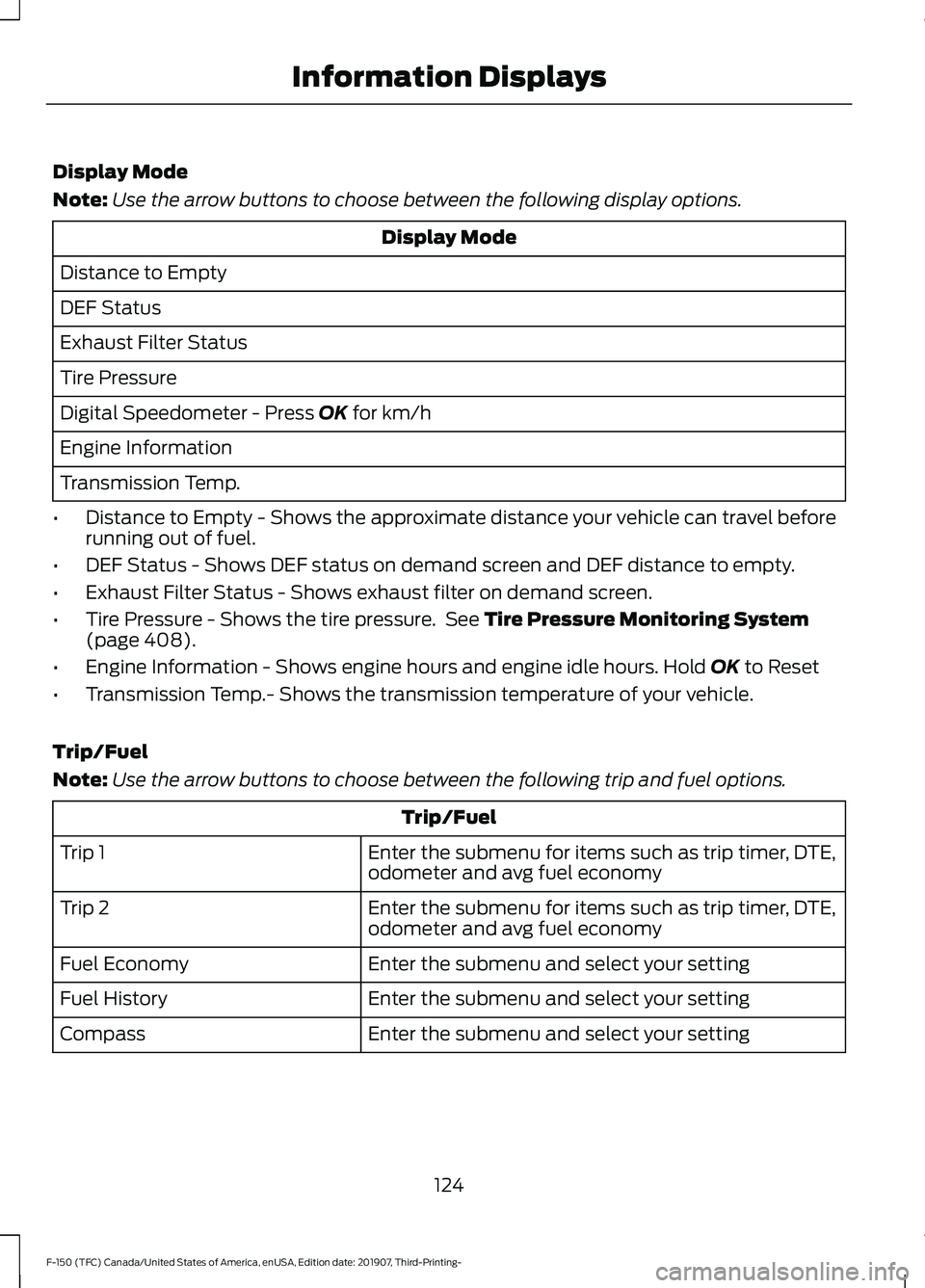
Display Mode
Note:
Use the arrow buttons to choose between the following display options. Display Mode
Distance to Empty
DEF Status
Exhaust Filter Status
Tire Pressure
Digital Speedometer - Press OK for km/h
Engine Information
Transmission Temp.
• Distance to Empty - Shows the approximate distance your vehicle can travel before
running out of fuel.
• DEF Status - Shows DEF status on demand screen and DEF distance to empty.
• Exhaust Filter Status - Shows exhaust filter on demand screen.
• Tire Pressure - Shows the tire pressure. See
Tire Pressure Monitoring System
(page 408).
• Engine Information - Shows engine hours and engine idle hours. Hold
OK to Reset
• Transmission Temp.- Shows the transmission temperature of your vehicle.
Trip/Fuel
Note: Use the arrow buttons to choose between the following trip and fuel options. Trip/Fuel
Enter the submenu for items such as trip timer, DTE,
odometer and avg fuel economy
Trip 1
Enter the submenu for items such as trip timer, DTE,
odometer and avg fuel economy
Trip 2
Enter the submenu and select your setting
Fuel Economy
Enter the submenu and select your setting
Fuel History
Enter the submenu and select your setting
Compass
124
F-150 (TFC) Canada/United States of America, enUSA, Edition date: 201907, Third-Printing- Information Displays
Page 132 of 625
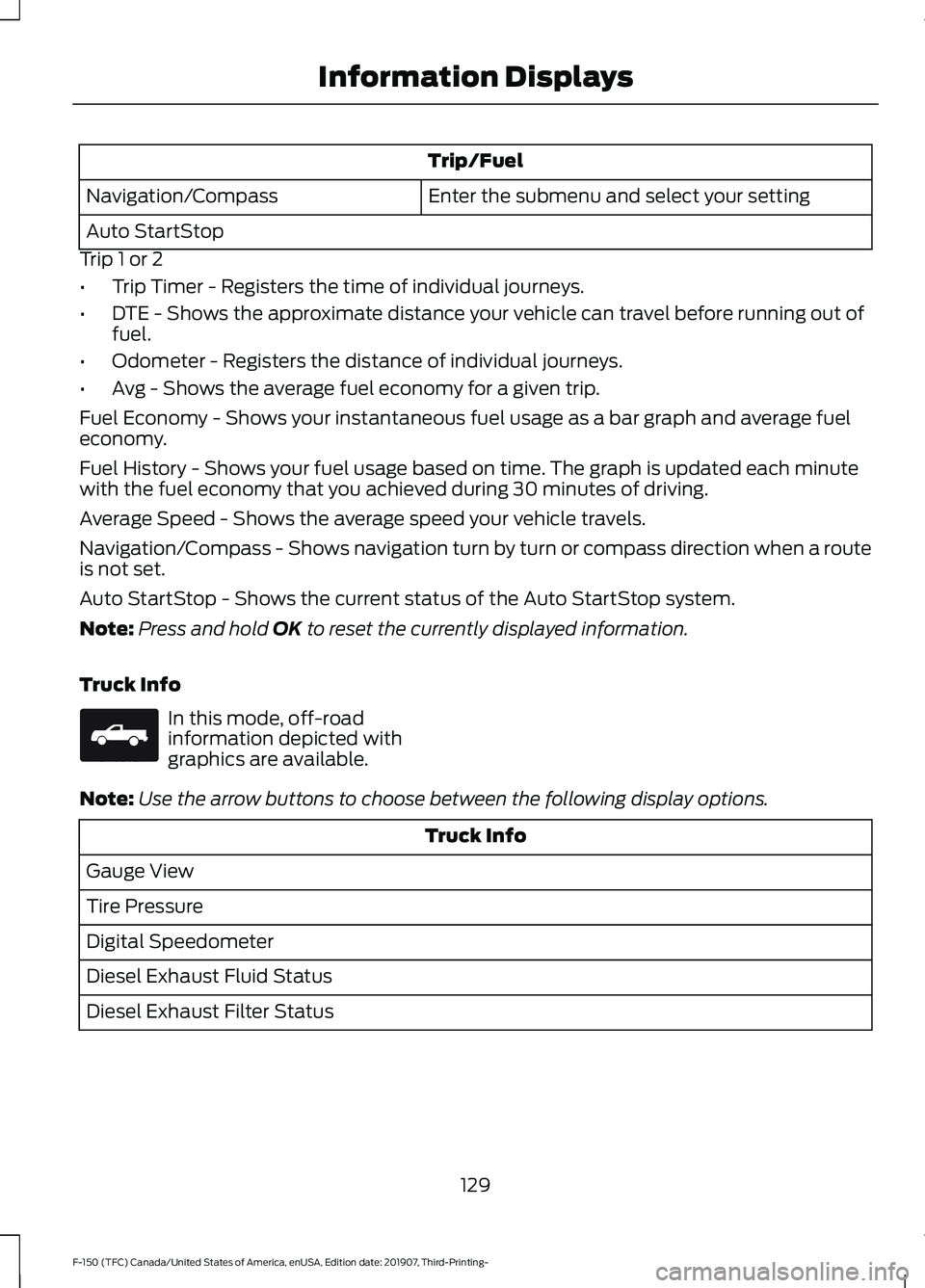
Trip/Fuel
Enter the submenu and select your setting
Navigation/Compass
Auto StartStop
Trip 1 or 2
• Trip Timer - Registers the time of individual journeys.
• DTE - Shows the approximate distance your vehicle can travel before running out of
fuel.
• Odometer - Registers the distance of individual journeys.
• Avg - Shows the average fuel economy for a given trip.
Fuel Economy - Shows your instantaneous fuel usage as a bar graph and average fuel
economy.
Fuel History - Shows your fuel usage based on time. The graph is updated each minute
with the fuel economy that you achieved during 30 minutes of driving.
Average Speed - Shows the average speed your vehicle travels.
Navigation/Compass - Shows navigation turn by turn or compass direction when a route
is not set.
Auto StartStop - Shows the current status of the Auto StartStop system.
Note: Press and hold OK to reset the currently displayed information.
Truck Info In this mode, off-road
information depicted with
graphics are available.
Note: Use the arrow buttons to choose between the following display options. Truck Info
Gauge View
Tire Pressure
Digital Speedometer
Diesel Exhaust Fluid Status
Diesel Exhaust Filter Status
129
F-150 (TFC) Canada/United States of America, enUSA, Edition date: 201907, Third-Printing- Information DisplaysE163181
Page 135 of 625
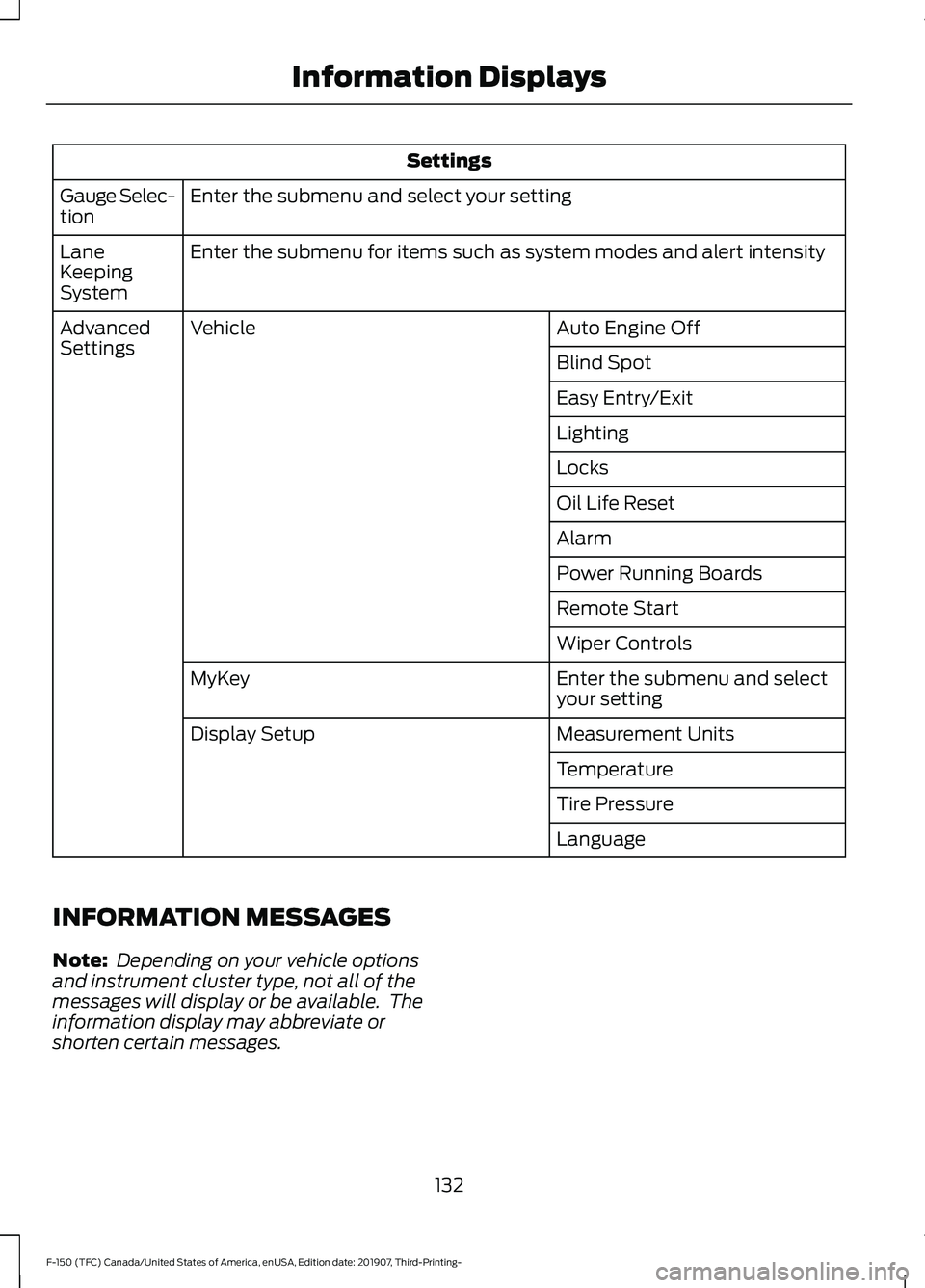
Settings
Enter the submenu and select your setting
Gauge Selec-
tion
Enter the submenu for items such as system modes and alert intensity
Lane
Keeping
System
Auto Engine Off
Vehicle
Advanced
Settings
Blind Spot
Easy Entry/Exit
Lighting
Locks
Oil Life Reset
Alarm
Power Running Boards
Remote Start
Wiper Controls
Enter the submenu and select
your setting
MyKey
Measurement Units
Display Setup
Temperature
Tire Pressure
Language
INFORMATION MESSAGES
Note: Depending on your vehicle options
and instrument cluster type, not all of the
messages will display or be available. The
information display may abbreviate or
shorten certain messages.
132
F-150 (TFC) Canada/United States of America, enUSA, Edition date: 201907, Third-Printing- Information Displays
Page 409 of 625
If you feel a sudden vibration or
ride disturbance while driving, or
you suspect your tire or vehicle
has been damaged, immediately
reduce your speed. Drive with
caution until you can safely pull
off the road. Stop and inspect the
tires for damage. If a tire is
under-inflated or damaged,
deflate it, remove wheel and
replace it with your spare tire and
wheel. If you cannot detect a
cause, have the vehicle towed to
the nearest repair facility or tire
dealer to have the vehicle
inspected.
Tire and Wheel Alignment
A bad jolt from hitting a curb or
pothole can cause the front end
of your vehicle to become
misaligned or cause damage to
your tires. If your vehicle seems to
pull to one side when you’re
driving, the wheels may be out of
alignment. Have an authorized
dealer check the wheel alignment
periodically.
Wheel misalignment in the front
or the rear can cause uneven and
rapid treadwear of your tires and
should be corrected by an
authorized dealer. Front-wheel
drive vehicles and those with an
independent rear suspension may
require alignment of all four
wheels.
The tires should also be balanced
periodically. An unbalanced tire
and wheel assembly may result in
irregular tire wear.
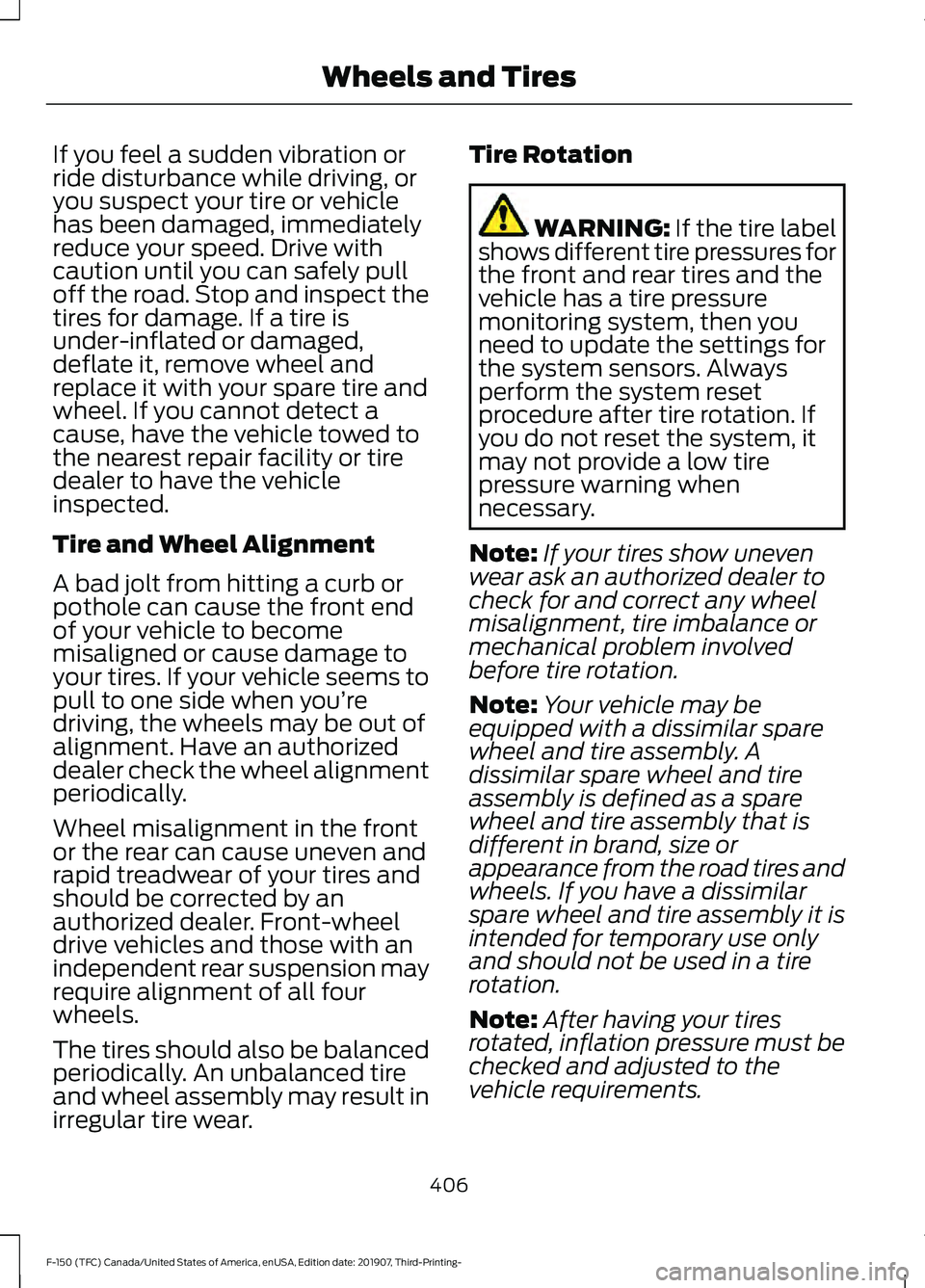
Tire Rotation WARNING: If the tire label
shows different tire pressures for
the front and rear tires and the
vehicle has a tire pressure
monitoring system, then you
need to update the settings for
the system sensors. Always
perform the system reset
procedure after tire rotation. If
you do not reset the system, it
may not provide a low tire
pressure warning when
necessary.
Note: If your tires show uneven
wear ask an authorized dealer to
check for and correct any wheel
misalignment, tire imbalance or
mechanical problem involved
before tire rotation.
Note: Your vehicle may be
equipped with a dissimilar spare
wheel and tire assembly. A
dissimilar spare wheel and tire
assembly is defined as a spare
wheel and tire assembly that is
different in brand, size or
appearance from the road tires and
wheels. If you have a dissimilar
spare wheel and tire assembly it is
intended for temporary use only
and should not be used in a tire
rotation.
Note: After having your tires
rotated, inflation pressure must be
checked and adjusted to the
vehicle requirements.
406
F-150 (TFC) Canada/United States of America, enUSA, Edition date: 201907, Third-Printing- Wheels and Tires
Page 415 of 625
When Inflating Your Tires
WARNING: Do not use the tire
pressure displayed in the information
display as a tire pressure gauge. Failure
to follow this instruction could result in
personal injury or death.
When putting air into your tires, such as at
a gas station or in your garage, the tire
pressure monitoring system may not
immediately respond to the air added to
your tires.
It may take up to two minutes of driving
over 20 mph (32 km/h) for the light to turn
off after you have filled your tires to the
recommended inflation pressure.
How Temperature Affects Your Tire
Pressure
The tire pressure monitoring system
monitors tire pressure in each pneumatic
tire. When driving in a normal manner, a
typical passenger tire inflation pressure
may increase about
2 –4 psi (14– 28 kPa)
from a cold start situation. If the vehicle is
stationary overnight with the outside
temperature significantly lower than the
daytime temperature, the tire pressure may
decrease about 3 psi (21 kPa) for a drop of
30°F (17°C) in ambient temperature. This
lower pressure value may be detected by
the tire pressure monitoring system as
being significantly lower than the
recommended inflation pressure and
activate the system warning light for low
tire pressure. If the low tire pressure warning light is on,
visually check each tire to verify that no tire
is flat. If one or more tires are flat, repair as
necessary. Check the air pressure in the
road tires. If any tire is under-inflated,
carefully drive the vehicle to the nearest
location where air can be added to the
tires. Inflate all the tires to the
recommended inflation pressure.
Tire Pressure Monitoring System Reset
Procedure WARNING:
To determine the
required pressure(s) for your vehicle, see
the Safety Compliance Certification
Label (on the door hinge pillar,
door-latch post or the door edge that
meets the door-latch post, next to the
driver seat) or the Tire Label on the
B-Pillar or the edge of the driver door.
Note: You need to perform the tire pressure
monitoring system reset procedure after
each tire rotation on vehicles that require
different recommended tire pressures in the
front tires as compared to the rear tires.
Overview
To provide the vehicle's load carrying
capability, some vehicles require different
recommended tire pressures in the front
tires as compared to the rear tires. The tire
pressure monitoring system equipped on
these vehicles is designed to illuminate the
low tire pressure warning light at two
different pressures; one for the front tires
and one for the rear tires.
Since tires need to be rotated to provide
consistent performance and maximum tire
life, the tire pressure monitoring system
needs to know when the tires are rotated
to determine which set of tires are on the
front and which are on the rear. With this
information, the system can detect and
properly warn of low tire pressures.
412
F-150 (TFC) Canada/United States of America, enUSA, Edition date: 201907, Third-Printing- Wheels and Tires
Page 416 of 625
System reset tips:
•
To reduce the chances of interference
from another vehicle, perform the
system reset procedure at least three
feet, one meter, away from another
Ford Motor Company vehicle
undergoing the system reset procedure
at the same time.
• Do not wait more than two minutes
between resetting each tire sensor or
the system can time-out and you need
to repeat the entire procedure on all
four wheels.
• A double horn sounds indicating the
need to repeat the procedure.
Performing the System Reset Procedure
Read the entire procedure before
attempting.
1. Drive the vehicle above 20 mph
(32 km/h) for at least two minutes,
then park in a safe location where you
can easily get to all four tires and have
access to an air pump.
2. Place the ignition in the off position and
keep the key in the ignition.
3. Cycle the ignition to the on position with the engine off.
4. Switch the hazard flashers on then off three times. You must accomplish this
within 10 seconds. If you successfully
enter the reset mode, the horn sounds
once, the system indicator flashes and
a message shows in the information
display. If this does not occur, please
try again starting at Step 2. If after
repeated attempts to enter the reset
mode, the horn does not sound, the
system indicator does not flash and no
message shows in the information
display, seek service from your
authorized dealer. 5. Train the tire pressure monitoring
system sensors in the tires using the
following system reset sequence
starting with the left front tire in the
following clockwise order: Left front -
driver side front tire, Right front -
passenger side front tire, Right rear -
passenger side rear tire - Left rear,
driver side rear tire.
6. Remove the valve cap from the valve stem on the left front tire. Decrease the
air pressure until the horn sounds.
Note: The single horn tone confirms that
the sensor identification code has been
learned by the module for this position. If a
double horn is heard, the reset procedure
was unsuccessful, and you must repeat it.
7. Remove the valve cap from the valve stem on the right front tire. Decrease
the air pressure until the horn sounds.
8. Remove the valve cap from the valve stem on the right rear tire. Decrease the
air pressure until the horn sounds.
9. Remove the valve cap from the valve stem on the left rear tire. Decrease the
air pressure until the horn sounds.
Training is complete after the horn
sounds for the last tire trained, driver
side rear tire, the system indicator
stops flashing, and a message shows
in the information display.
10. Turn the ignition off. If two short horn
beeps are heard, the reset procedure
was unsuccessful and you must
repeat it. If after repeating the
procedure and two short beeps are
heard when the ignition is turned to
off, seek assistance from your
authorized dealer.
413
F-150 (TFC) Canada/United States of America, enUSA, Edition date: 201907, Third-Printing- Wheels and Tires