display FORD F-150 2021 Owners Manual
[x] Cancel search | Manufacturer: FORD, Model Year: 2021, Model line: F-150, Model: FORD F-150 2021Pages: 796, PDF Size: 13.89 MB
Page 679 of 796
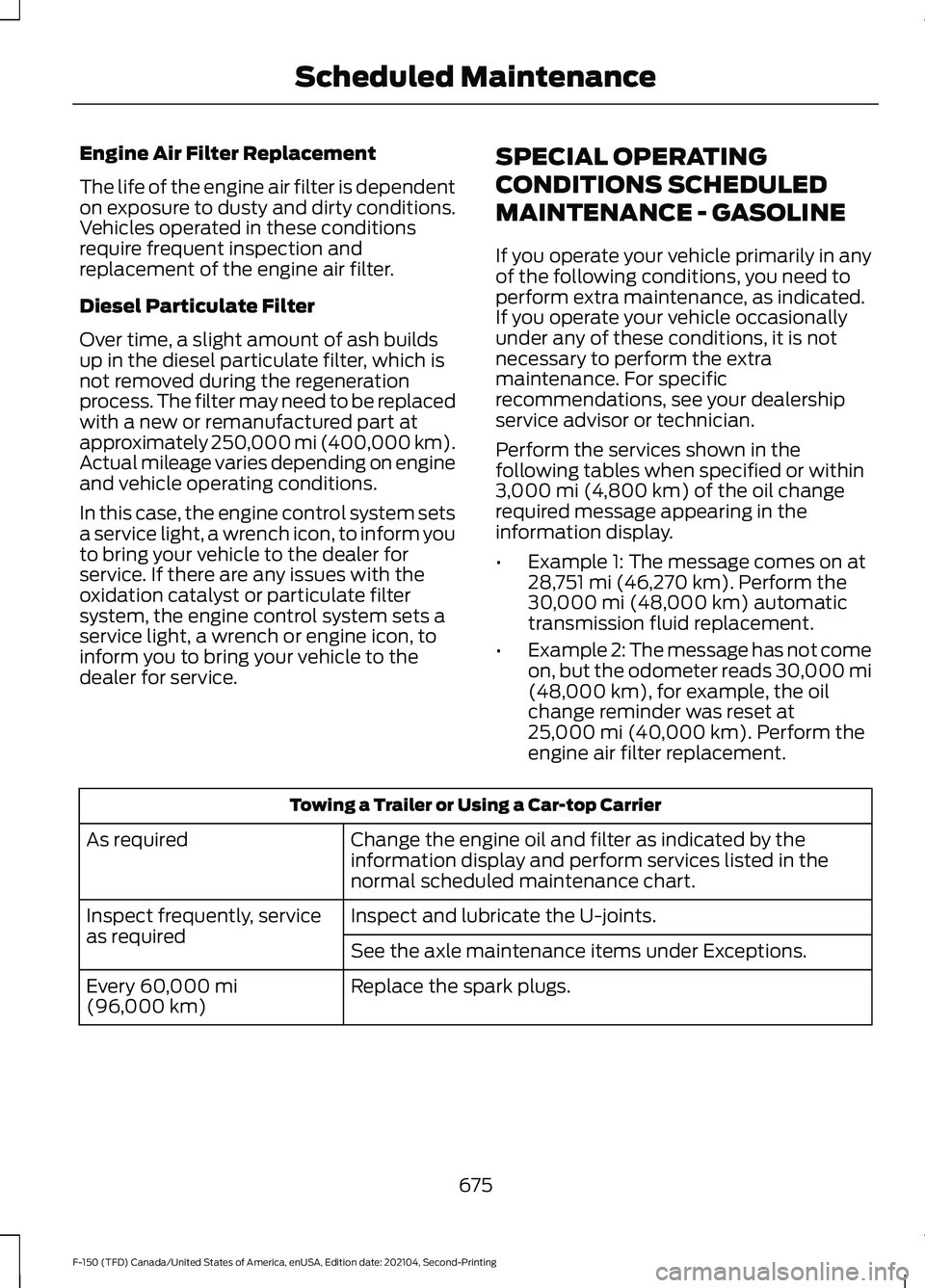
Engine Air Filter Replacement
The life of the engine air filter is dependent
on exposure to dusty and dirty conditions.
Vehicles operated in these conditions
require frequent inspection and
replacement of the engine air filter.
Diesel Particulate Filter
Over time, a slight amount of ash builds
up in the diesel particulate filter, which is
not removed during the regeneration
process. The filter may need to be replaced
with a new or remanufactured part at
approximately 250,000 mi (400,000 km).
Actual mileage varies depending on engine
and vehicle operating conditions.
In this case, the engine control system sets
a service light, a wrench icon, to inform you
to bring your vehicle to the dealer for
service. If there are any issues with the
oxidation catalyst or particulate filter
system, the engine control system sets a
service light, a wrench or engine icon, to
inform you to bring your vehicle to the
dealer for service.
SPECIAL OPERATING
CONDITIONS SCHEDULED
MAINTENANCE - GASOLINE
If you operate your vehicle primarily in any
of the following conditions, you need to
perform extra maintenance, as indicated.
If you operate your vehicle occasionally
under any of these conditions, it is not
necessary to perform the extra
maintenance. For specific
recommendations, see your dealership
service advisor or technician.
Perform the services shown in the
following tables when specified or within
3,000 mi (4,800 km) of the oil change
required message appearing in the
information display.
• Example 1: The message comes on at
28,751 mi (46,270 km)
. Perform the
30,000 mi (48,000 km) automatic
transmission fluid replacement.
• Example 2: The message has not come
on, but the odometer reads 30,000 mi
(48,000 km)
, for example, the oil
change reminder was reset at
25,000 mi (40,000 km)
. Perform the
engine air filter replacement. Towing a Trailer or Using a Car-top Carrier
Change the engine oil and filter as indicated by the
information display and perform services listed in the
normal scheduled maintenance chart.
As required
Inspect and lubricate the U-joints.
Inspect frequently, service
as required
See the axle maintenance items under Exceptions.
Replace the spark plugs.
Every
60,000 mi
(96,000 km)
675
F-150 (TFD) Canada/United States of America, enUSA, Edition date: 202104, Second-Printing Scheduled Maintenance
Page 680 of 796
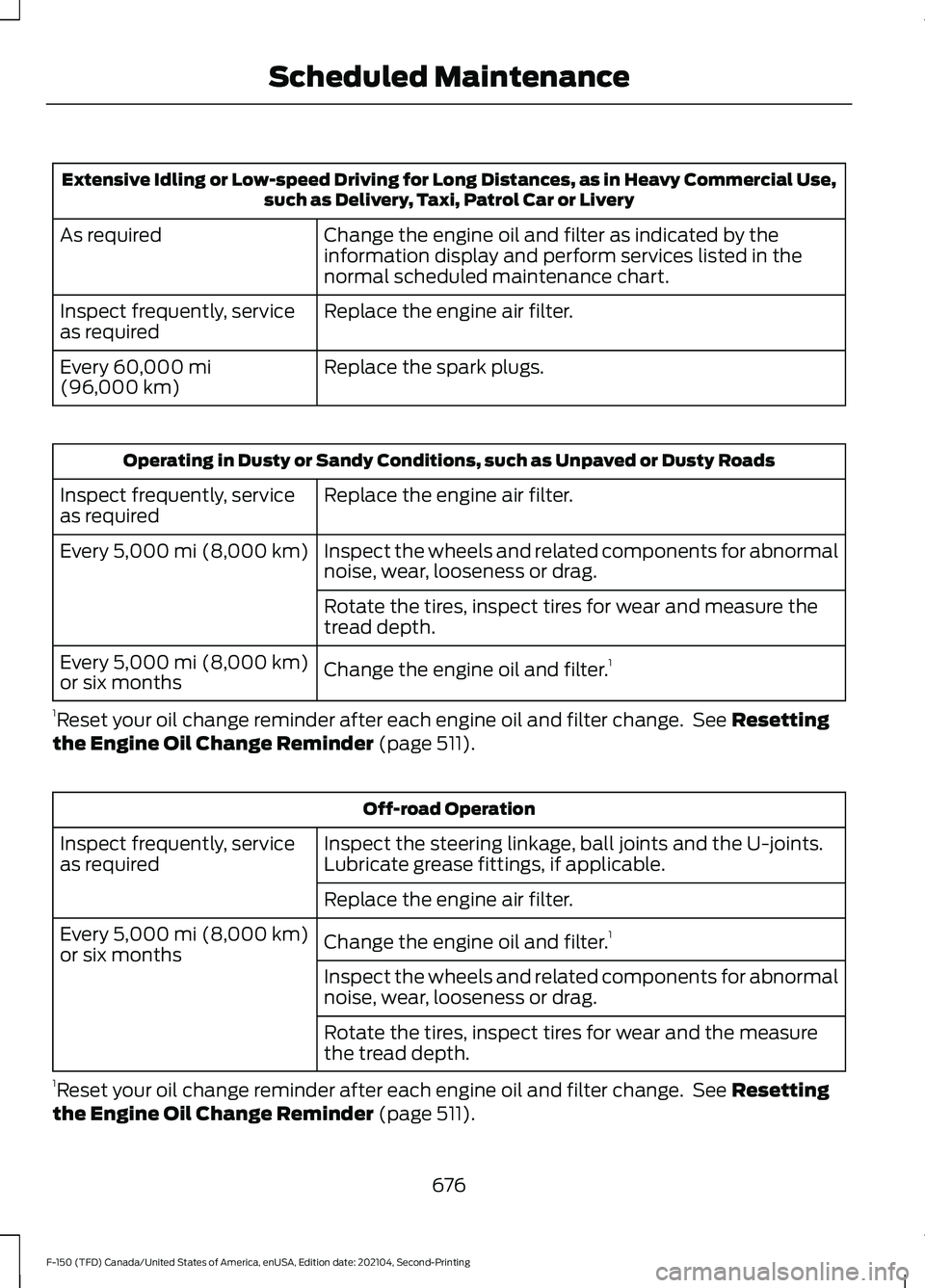
Extensive Idling or Low-speed Driving for Long Distances, as in Heavy Commercial Use,
such as Delivery, Taxi, Patrol Car or Livery
Change the engine oil and filter as indicated by the
information display and perform services listed in the
normal scheduled maintenance chart.
As required
Replace the engine air filter.
Inspect frequently, service
as required
Replace the spark plugs.
Every 60,000 mi
(96,000 km) Operating in Dusty or Sandy Conditions, such as Unpaved or Dusty Roads
Replace the engine air filter.
Inspect frequently, service
as required
Inspect the wheels and related components for abnormal
noise, wear, looseness or drag.
Every
5,000 mi (8,000 km)
Rotate the tires, inspect tires for wear and measure the
tread depth.
Change the engine oil and filter. 1
Every
5,000 mi (8,000 km)
or six months
1 Reset your oil change reminder after each engine oil and filter change. See
Resetting
the Engine Oil Change Reminder (page 511). Off-road Operation
Inspect the steering linkage, ball joints and the U-joints.
Lubricate grease fittings, if applicable.
Inspect frequently, service
as required
Replace the engine air filter.
Change the engine oil and filter. 1
Every
5,000 mi (8,000 km)
or six months
Inspect the wheels and related components for abnormal
noise, wear, looseness or drag.
Rotate the tires, inspect tires for wear and the measure
the tread depth.
1 Reset your oil change reminder after each engine oil and filter change. See
Resetting
the Engine Oil Change Reminder (page 511).
676
F-150 (TFD) Canada/United States of America, enUSA, Edition date: 202104, Second-Printing Scheduled Maintenance
Page 681 of 796
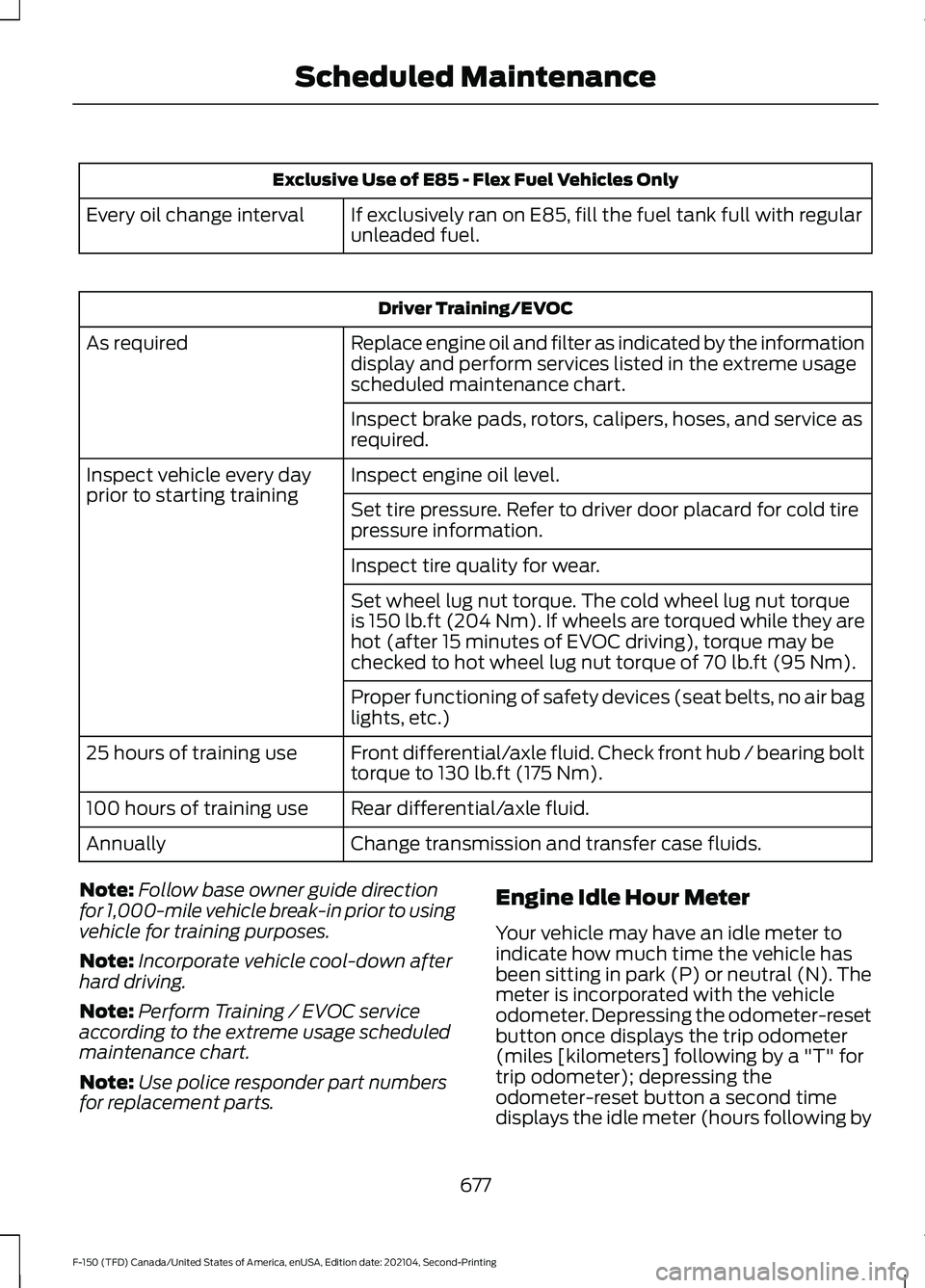
Exclusive Use of E85 - Flex Fuel Vehicles Only
If exclusively ran on E85, fill the fuel tank full with regular
unleaded fuel.
Every oil change interval Driver Training/EVOC
Replace engine oil and filter as indicated by the information
display and perform services listed in the extreme usage
scheduled maintenance chart.
As required
Inspect brake pads, rotors, calipers, hoses, and service as
required.
Inspect engine oil level.
Inspect vehicle every day
prior to starting training
Set tire pressure. Refer to driver door placard for cold tire
pressure information.
Inspect tire quality for wear.
Set wheel lug nut torque. The cold wheel lug nut torque
is 150 lb.ft (204 Nm). If wheels are torqued while they are
hot (after 15 minutes of EVOC driving), torque may be
checked to hot wheel lug nut torque of
70 lb.ft (95 Nm).
Proper functioning of safety devices (seat belts, no air bag
lights, etc.)
Front differential/axle fluid. Check front hub / bearing bolt
torque to 130 lb.ft (175 Nm).
25 hours of training use
Rear differential/axle fluid.
100 hours of training use
Change transmission and transfer case fluids.
Annually
Note: Follow base owner guide direction
for 1,000-mile vehicle break-in prior to using
vehicle for training purposes.
Note: Incorporate vehicle cool-down after
hard driving.
Note: Perform Training / EVOC service
according to the extreme usage scheduled
maintenance chart.
Note: Use police responder part numbers
for replacement parts. Engine Idle Hour Meter
Your vehicle may have an idle meter to
indicate how much time the vehicle has
been sitting in park (P) or neutral (N). The
meter is incorporated with the vehicle
odometer. Depressing the odometer-reset
button once displays the trip odometer
(miles [kilometers] following by a "T" for
trip odometer); depressing the
odometer-reset button a second time
displays the idle meter (hours following by
677
F-150 (TFD) Canada/United States of America, enUSA, Edition date: 202104, Second-Printing Scheduled Maintenance
Page 682 of 796
an "H" for hours). The idle meter only
accumulates time while the vehicle is in
park (P) or neutral (N). Displayed time is
cumulative for the vehicle and cannot be
reset to zero. Police vehicles often
experience long periods of idling, during
which engine oil continues to break down
but distance is not accumulated on the
odometer. Engine Idle Hours have been
incorporated into the Intelligent Oil-Life
Monitor.
Exceptions
There are several exceptions to the Normal
Schedule.
Axle and Transfer Case Maintenance
In four-wheel drive vehicles, axle(s) and
transfer case fluid changes or level checks
are not required unless a leak is suspected
or the assembly has been submerged in
water. Contact an authorized dealer for
service.
California Fuel Filter Replacement
If you register your vehicle in California, the
California Air Resources Board has
determined that the failure to perform this
maintenance item does not nullify the
emission warranty or limit recall liability
before the completion of your vehicle's
useful life. Ford Motor Company urges you
to have all recommended maintenance
services performed at the specified
intervals and to record all vehicle service.
Hot Climate Oil Change Intervals
Vehicles operating in the Middle East,
North Africa, Sub-Saharan Africa or
locations with similar climates using an oil
that meets our specification or has an
American Petroleum Institute certified for
gasoline engines (certification mark) oil,
the normal oil change interval is 3,000 mi
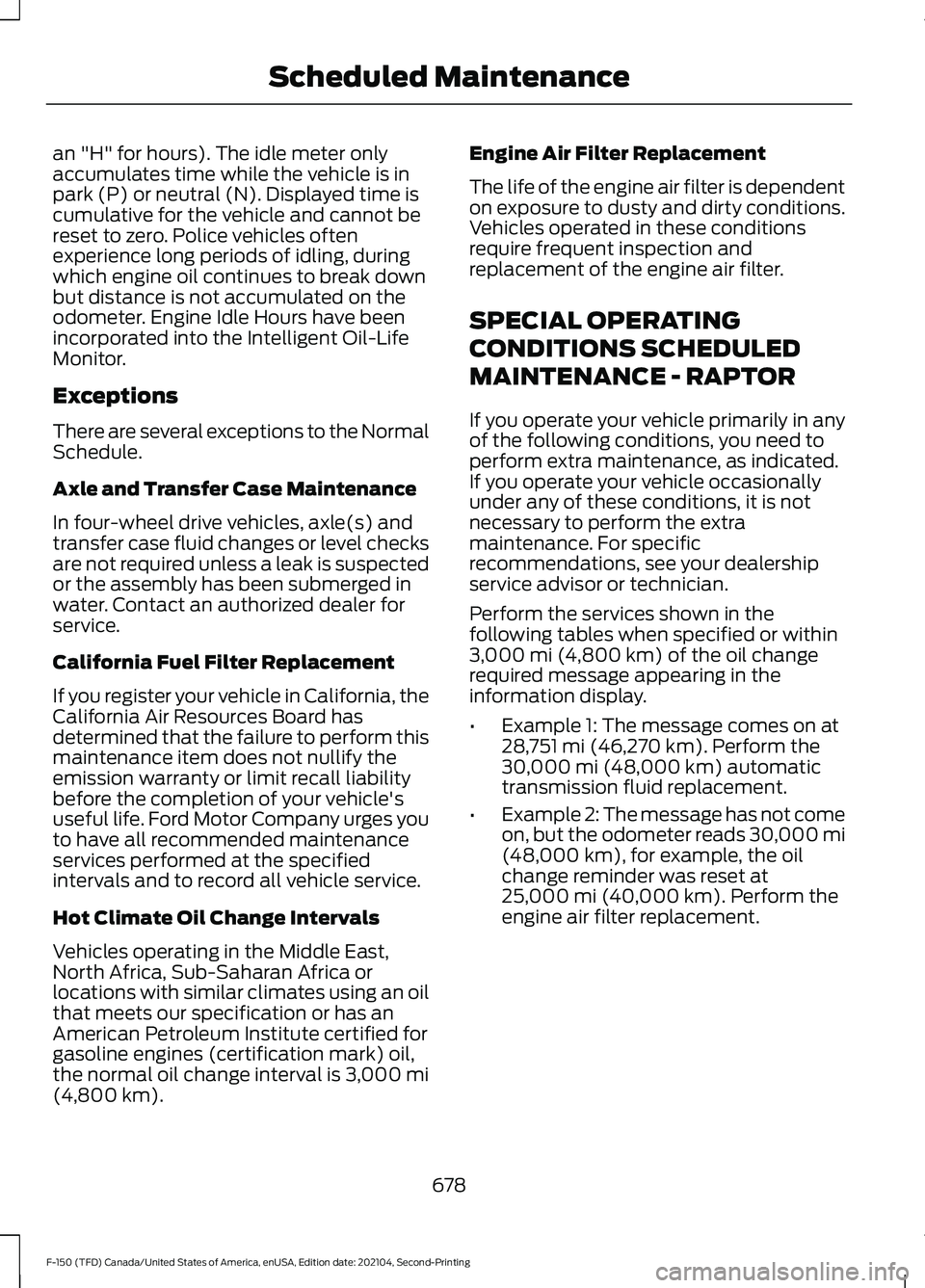
(4,800 km). Engine Air Filter Replacement
The life of the engine air filter is dependent
on exposure to dusty and dirty conditions.
Vehicles operated in these conditions
require frequent inspection and
replacement of the engine air filter.
SPECIAL OPERATING
CONDITIONS SCHEDULED
MAINTENANCE - RAPTOR
If you operate your vehicle primarily in any
of the following conditions, you need to
perform extra maintenance, as indicated.
If you operate your vehicle occasionally
under any of these conditions, it is not
necessary to perform the extra
maintenance. For specific
recommendations, see your dealership
service advisor or technician.
Perform the services shown in the
following tables when specified or within
3,000 mi (4,800 km)
of the oil change
required message appearing in the
information display.
• Example 1: The message comes on at
28,751 mi (46,270 km)
. Perform the
30,000 mi (48,000 km) automatic
transmission fluid replacement.
• Example 2: The message has not come
on, but the odometer reads 30,000 mi
(48,000 km)
, for example, the oil
change reminder was reset at
25,000 mi (40,000 km)
. Perform the
engine air filter replacement.
678
F-150 (TFD) Canada/United States of America, enUSA, Edition date: 202104, Second-Printing Scheduled Maintenance
Page 683 of 796
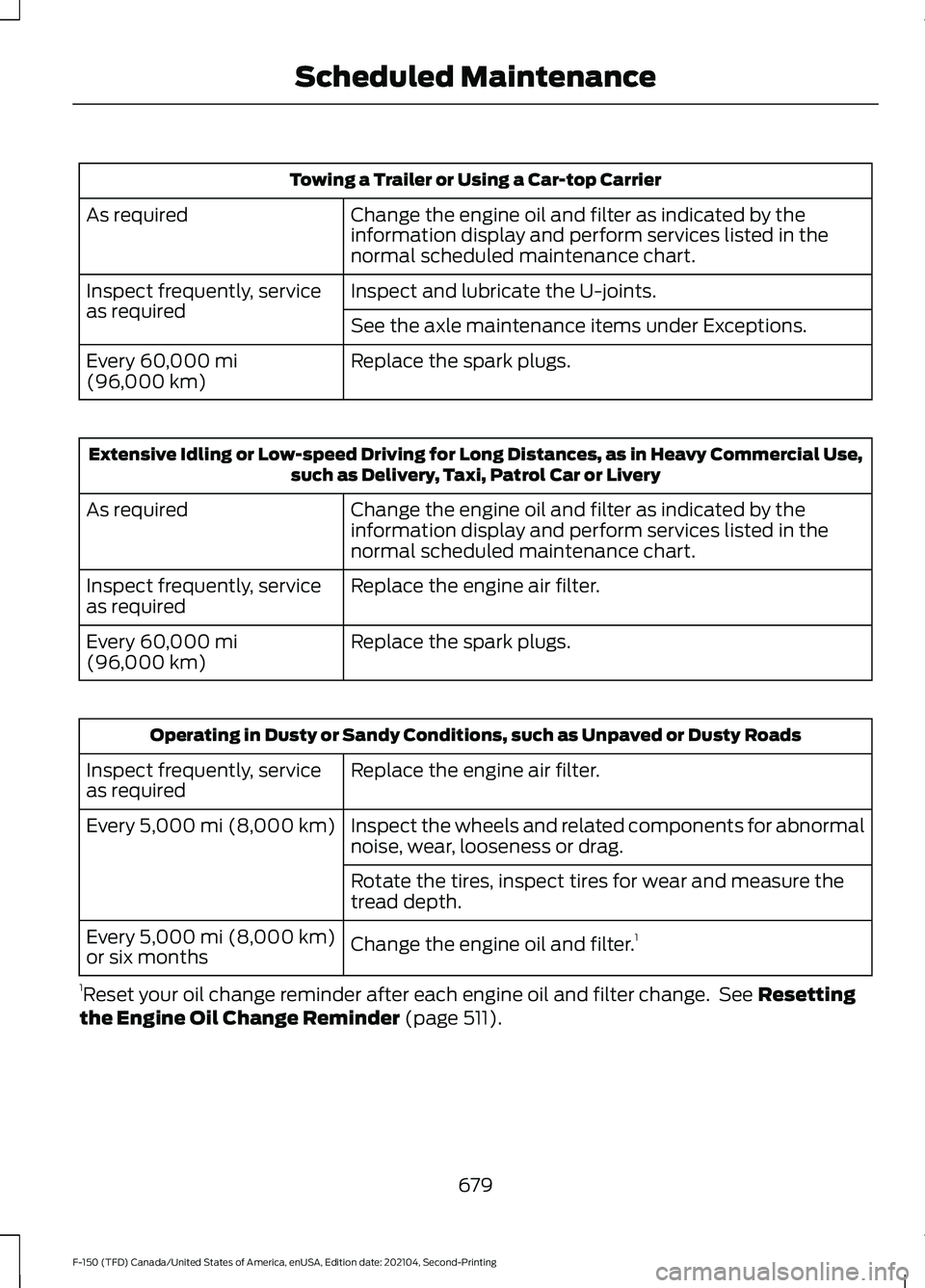
Towing a Trailer or Using a Car-top Carrier
Change the engine oil and filter as indicated by the
information display and perform services listed in the
normal scheduled maintenance chart.
As required
Inspect and lubricate the U-joints.
Inspect frequently, service
as required
See the axle maintenance items under Exceptions.
Replace the spark plugs.
Every 60,000 mi
(96,000 km) Extensive Idling or Low-speed Driving for Long Distances, as in Heavy Commercial Use,
such as Delivery, Taxi, Patrol Car or Livery
Change the engine oil and filter as indicated by the
information display and perform services listed in the
normal scheduled maintenance chart.
As required
Replace the engine air filter.
Inspect frequently, service
as required
Replace the spark plugs.
Every
60,000 mi
(96,000 km) Operating in Dusty or Sandy Conditions, such as Unpaved or Dusty Roads
Replace the engine air filter.
Inspect frequently, service
as required
Inspect the wheels and related components for abnormal
noise, wear, looseness or drag.
Every
5,000 mi (8,000 km)
Rotate the tires, inspect tires for wear and measure the
tread depth.
Change the engine oil and filter. 1
Every
5,000 mi (8,000 km)
or six months
1 Reset your oil change reminder after each engine oil and filter change. See
Resetting
the Engine Oil Change Reminder (page 511).
679
F-150 (TFD) Canada/United States of America, enUSA, Edition date: 202104, Second-Printing Scheduled Maintenance
Page 756 of 796
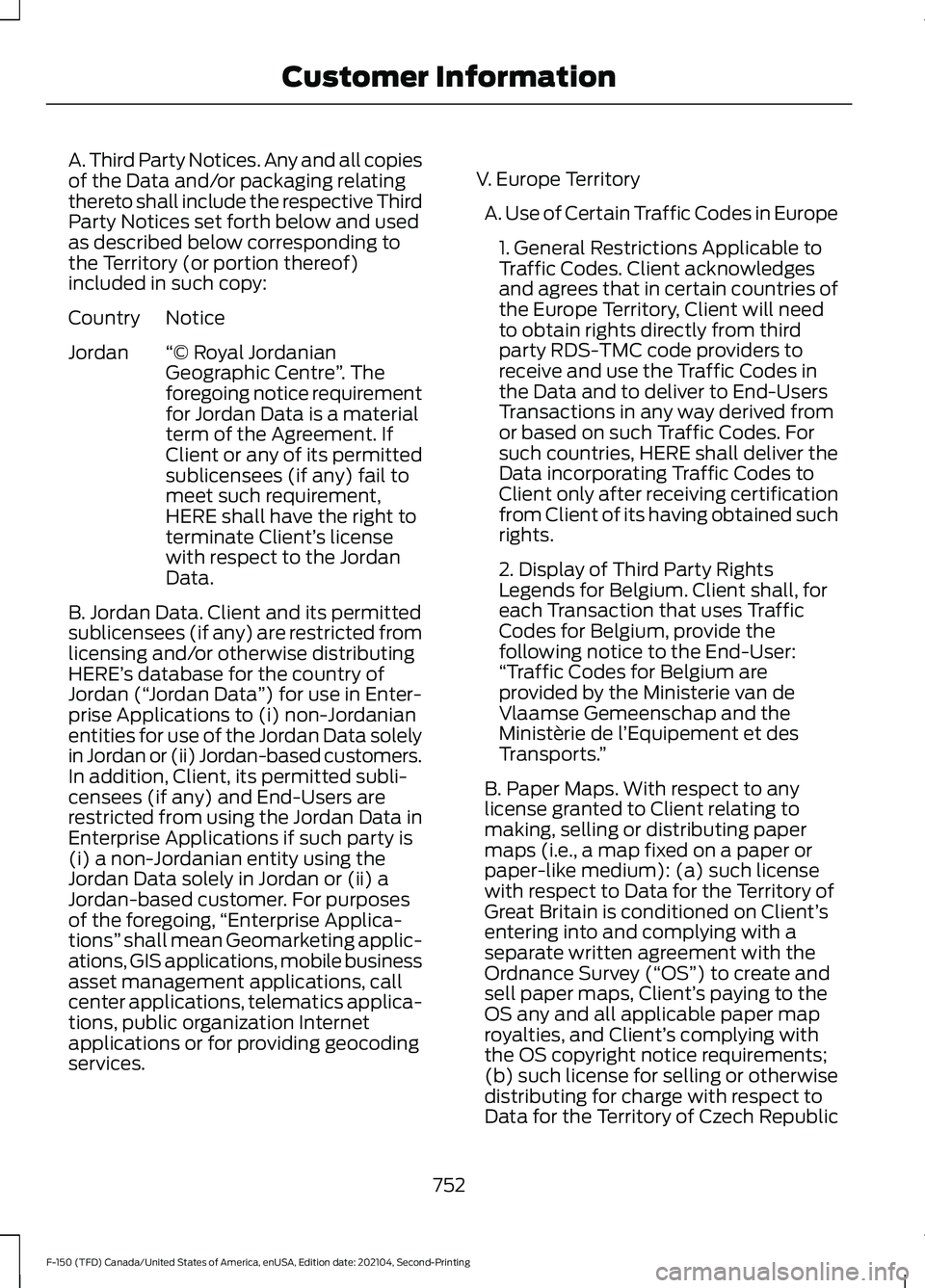
A. Third Party Notices. Any and all copies
of the Data and/or packaging relating
thereto shall include the respective Third
Party Notices set forth below and used
as described below corresponding to
the Territory (or portion thereof)
included in such copy:
Notice
Country
“© Royal Jordanian
Geographic Centre ”. The
foregoing notice requirement
for Jordan Data is a material
term of the Agreement. If
Client or any of its permitted
Jordan
sublicensees (if any) fail to
meet such requirement,
HERE shall have the right to
terminate Client’ s license
with respect to the Jordan
Data.
B. Jordan Data. Client and its permitted
sublicensees (if any) are restricted from
licensing and/or otherwise distributing
HERE’ s database for the country of
Jordan (“ Jordan Data ”) for use in Enter-
prise Applications to (i) non-Jordanian
entities for use of the Jordan Data solely
in Jordan or (ii) Jordan-based customers.
In addition, Client, its permitted subli-
censees (if any) and End-Users are
restricted from using the Jordan Data in
Enterprise Applications if such party is
(i) a non-Jordanian entity using the
Jordan Data solely in Jordan or (ii) a
Jordan-based customer. For purposes
of the foregoing, “Enterprise Applica-
tions” shall mean Geomarketing applic-
ations, GIS applications, mobile business
asset management applications, call
center applications, telematics applica-
tions, public organization Internet
applications or for providing geocoding
services. V. Europe Territory
A. Use of Certain Traffic Codes in Europe 1. General Restrictions Applicable to
Traffic Codes. Client acknowledges
and agrees that in certain countries of
the Europe Territory, Client will need
to obtain rights directly from third
party RDS-TMC code providers to
receive and use the Traffic Codes in
the Data and to deliver to End-Users
Transactions in any way derived from
or based on such Traffic Codes. For
such countries, HERE shall deliver the
Data incorporating Traffic Codes to
Client only after receiving certification
from Client of its having obtained such
rights.
2. Display of Third Party Rights
Legends for Belgium. Client shall, for
each Transaction that uses Traffic
Codes for Belgium, provide the
following notice to the End-User:
“Traffic Codes for Belgium are
provided by the Ministerie van de
Vlaamse Gemeenschap and the
Ministèrie de l ’Equipement et des
Transports. ”
B. Paper Maps. With respect to any
license granted to Client relating to
making, selling or distributing paper
maps (i.e., a map fixed on a paper or
paper-like medium): (a) such license
with respect to Data for the Territory of
Great Britain is conditioned on Client’ s
entering into and complying with a
separate written agreement with the
Ordnance Survey (“OS ”) to create and
sell paper maps, Client’ s paying to the
OS any and all applicable paper map
royalties, and Client’ s complying with
the OS copyright notice requirements;
(b) such license for selling or otherwise
distributing for charge with respect to
Data for the Territory of Czech Republic
752
F-150 (TFD) Canada/United States of America, enUSA, Edition date: 202104, Second-Printing Customer Information
Page 774 of 796
Blind Spot Information System.............389
Blind Spot Information System –
Troubleshooting............................................ 392
Blind Spot Information System With Trailer Coverage.......................................................... 390
Blind Spot Information System Indicators.....................................................392
Blind Spot Information System Limitations..................................................389
Blind Spot Information System Precautions................................................389
Blind Spot Information System Requirements............................................389
Blind Spot Information System – Troubleshooting........................................392
Blind Spot Information System – Information Messages................................ 392
Blind Spot Information System With Trailer Coverage........................................390
Blind Spot Information System With Trailer
Coverage Limitations.................................. 390
Selecting a Trailer.............................................. 392
Setting a Trailer Length.................................... 391
What Is Blind Spot Information System with Trailer Coverage............................................ 390
BlueCruise Alerts
.........................................368
BlueCruise Automatic Cancellation...............................................368
BlueCruise......................................................365 BlueCruise – Troubleshooting......................369
BlueCruise Indicators
.................................368
BlueCruise Limitations..............................366
BlueCruise Precautions
.............................365
BlueCruise Requirements........................366
BlueCruise Settings.....................................367
BlueCruise – Troubleshooting................369 BlueCruise – Information Messages..........369
Bluetooth®....................................................648
Body Control Module Fuse Box.............499 Accessing the Body Control Module Fuse
Box..................................................................... 499
Identifying the Fuses in the Body Control Module Fuse Box.......................................... 499
Locating the Body Control Module Fuse Box..................................................................... 499
Bonnet Lock See: Opening and Closing the Hood..........503
Booster Seats
.................................................60 Brake Fluid Specification.........................309
Brake Over Accelerator.............................308
Brake Over Accelerator - Raptor...........308
Brake Precautions
.......................................308
Brakes..............................................................308 Anti-Lock Braking System............................. 308
Brakes – Troubleshooting............................... 310
Brakes – Troubleshooting.........................310 Brakes – Frequently Asked
Questions......................................................... 310
Brakes – Warning Lamps................................ 310
Breaking-In.....................................................476
C
Calculating Payload
.....................................415
Calculating the Load Limit........................415
Canceling the Set Speed...........................351
Canceling the Set Speed - Raptor........324
Capacities and Specifications................574
Catalytic Converter......................................279 Catalytic Converter –
Troubleshooting............................................ 279
Catalytic Converter Precautions............279
Catalytic Converter – Troubleshooting........................................279
C
atalytic Converter – Warning
Lamps................................................................ 279
Center Console Work Surface.................228 C
enter Console Work Surface –
Troubleshooting............................................ 230
Center Console Work Surface – Troubleshooting........................................230
Center Console Work Surface – Information Messages......................................................... 230
Center Display Limitations.......................637
Center Display Overview
...........................637
Center Display Precautions......................637
Changing a Flat Tire...................................566
Changing a Road Wheel...........................566
Changing the 12V Battery..........................519
Changing the Fuel Filter - Diesel............519
Changing the Fuel Filter - Gasoline.......519
Changing the Remote Control Battery - Police Responder.........................................91
Changing the Remote Control Battery - Vehicles With: Flip Key..............................94
770
F-150 (TFD) Canada/United States of America, enUSA, Edition date: 202104, Second-Printing Index
Page 775 of 796
Changing the Remote Control Battery -
Vehicles With: Push Button Start..........92
Changing the Vehicle Wi-Fi Hotspot Name or Password..................................624
Charging a Device.........................................215
Charging a Wireless Device.......................231
Checking MyKey System Status............100
Checking the Brake Fluid
..........................309
Checking the Coolant..................................511
Checking the Seatbelts
...............................69
Checking the Selective Catalytic Reduction System Status.......................277
Checking the Tire Pressures....................555
Checking the Wiper Blades
......................144
Children and Airbags.....................................75
Child Restraint Anchor Points...................50 Locating the Child Restraint Lower Anchor
Points................................................................... 50
Locating the Child Restraint Top Tether Anchor Points.................................................... 51
What Are the Child Restraint Anchor Points................................................................... 50
Child Restraints...............................................52 Child Restraint Position Information.............52
Child Restraints Recommendation...............53
Child Safety......................................................49 Child Restraint Anchor Points......................... 50
Child Restraints..................................................... 52
Installing Child Restraints................................. 53
Child Safety Locks.........................................62
Child Safety Precautions.............................49
Cleaning Products.......................................534
Cleaning the Exterior..................................535 Cleaning Camera Lenses and
Sensors............................................................. 536
Cleaning Chrome, Aluminium or Stainless Steel................................................................... 535
Cleaning Headlamps and Rear Lamps............................................................... 535
Cleaning Stripes or Graphics.........................536
Cleaning the Engine Compartment...........536
Cleaning the Exterior Precautions...............535
Cleaning the Underbody................................. 536
Cleaning Wheels................................................ 535
Cleaning Windows and Wiper Blades............................................................... 535
Cleaning the Interior....................................537 Cleaning Carpets and Floor Mats................538 Cleaning Displays and Screens.....................
537
Cleaning Moonroof Tracks............................. 538
Cleaning Plastic.................................................. 537
Cleaning Seatbelts............................................ 538
Cleaning Seats and the Headliner...............537
Cleaning the Instrument Panel.....................537
Clearing All MyKeys
.....................................100
Clearing the Garage Door Opener..........212
Climate Control
.............................................186
Auto Mode............................................................ 188
Climate Control Hints.................................189
Closing the Tailgate
......................................119
Closing the Tailgate From Inside Your
Vehicle................................................................ 119
Closing the Tailgate From Outside Your Vehicle................................................................ 119
Closing the Tailgate Using the Remote Control............................................................... 120
Cold Weather Precautions.......................476
Connected Vehicle
......................................620
Connected Vehicle –
Troubleshooting............................................. 621
Connecting the Vehicle to a Mobile Network........................................................... 620
Connected Vehicle Data...............................31
Connected Vehicle Limitations..............620
Connected Vehicle Requirements
........620
Connected Vehicle – Troubleshooting.........................................621
Connected Vehicle – Frequently Asked Questions......................................................... 621
Connecting a Bluetooth® Device.........648
Connecting a Trailer....................................424 Connecting a Trailer –
Troubleshooting............................................ 427
Hitches................................................................... 424
Connecting a Trailer Precautions..........424
Connecting a Trailer – Troubleshooting........................................427
Connecting a Trailer – Information Messages.......................................................... 427
Connecting the Vehicle to a Mobile Network.......................................................620
Connecting FordPass to the Modem.........620
Enabling and Disabling the Modem...........620
What Is the Modem.......................................... 620
Connecting the Vehicle to a Wi-Fi Network.......................................................620
771
F-150 (TFD) Canada/United States of America, enUSA, Edition date: 202104, Second-Printing Index
Page 776 of 796
Connecting Your Phone............................643
Contacting Us..................................................22
Cooling System Capacity and Specification - 2.7L EcoBoost™.........598
Cooling System Capacity and Specification - 3.0L Diesel....................599
Cooling System Capacity and Specification - 3.3L
..................................599
Cooling System Capacity and Specification - 3.5L, Hybrid Electric
Vehicle (HEV)
.............................................601
Cooling System Capacity and Specification - 3.5L Ecoboost™,
Raptor, Police Responder
.....................602
Cooling System Capacity and Specification - 3.5L Ecoboost™
........600
Cooling System Capacity and Specification - 5.0L
..................................601
Crash and Breakdown Information.................................................483
Automatic Crash Shutoff................................ 487
Jump Starting the Vehicle.............................. 485
Post-Crash Alert System................................ 487
Recovery Towing............................................... 488
Crash Sensors and Airbag Indicator........79
Crash Sensors and Airbag Indicator - Police Responder
........................................80
Creating a MyKey - Vehicles With: Flip Key..................................................................100
Creating a MyKey - Vehicles With: Push Button Start..................................................99
Creating a Personal Profile......................652
Creating a Vehicle Wi-Fi Hotspot..........624
Cross Traffic Alert........................................393 Cross Traffic Alert –
Troubleshooting............................................ 395
Cross Traffic Alert Indicators...................394
Cross Traffic Alert Limitations
................393
Cross Traffic Alert Precautions...............393
Cross Traffic Alert – Troubleshooting........................................395
Cross Traffic Alert – Information Messages......................................................... 395
Cruise Control...............................................350
Cruise Control Indicators...........................351
Cup Holders...................................................232 Cup Holder Precautions.................................. 232Customer Information
...............................683
Radio Frequency Certification
Labels................................................................ 705
Customizing the Instrument Cluster Display...........................................................180
D
Data Privacy
.....................................................29
Decommissioning Requirements..........682
Decommissioning the Vehicle................682
Department of Transportation Uniform Tire Quality Grades
..................................542
Deploying and Stowing the Power Running Boards..........................................139
Diesel Exhaust Fluid Capacity and Specification...............................................277
Diesel Exhaust Fluid Gauge
.......................172
Diesel Particulate Filter.............................268 Diesel Particulate Filter Manual
Regeneration.................................................. 269
Diesel Particulate Filter – Troubleshooting.............................................. 271
Diesel Particulate Filter Manual Regeneration..............................................269
Diesel Particulate Filter Manual Regeneration Limitations........................... 270
Diesel Particulate Filter Manual Regeneration Precautions......................... 269
Diesel Particulate Filter Manual Regeneration Requirements....................269
Starting Diesel Particulate Filter Manual Regeneration
.................................................. 270
What Is Diesel Particulate Filter Manual Regeneration.................................................. 269
Diesel Particulate Filter Precautions................................................268
Diesel Particulate Filter Requirements............................................269
Diesel Particulate Filter – Troubleshooting..........................................271
Diesel Particulate Filter – Information Messages........................................................... 271
Diesel Particulate Filter – Warning Lamps................................................................. 271
Digital Radio..................................................629 Digital Radio Indicators................................... 630
Digital Radio Limitations................................ 629
772
F-150 (TFD) Canada/United States of America, enUSA, Edition date: 202104, Second-Printing Index
Page 782 of 796
How Does the Electronic Locking
Differential Work - Raptor......................301
How Does the Garage Door Opener Work...............................................................210
How Does the Lane Keeping System Work..............................................................382
How Does the Personal Safety System Work...................................................................71
How Does the Rear Occupant Alert System Work..............................................207
How Does the Safety Canopy ™
Work
..................................................................73
How Does the Selective Catalytic Reduction System Work.........................273
How Does Traction Control Work...........319
How Does Trailer Backup Assistance Work..............................................................446
How Does Trailer Hitching Assistance Work..............................................................439
How Does Trailer Reverse Guidance Work..............................................................459
How Does Trailer Sway Control Work..............................................................438
How Do Personal Profiles Work..............651
How Do the Front Airbags Work...............72
How Do the Knee Airbags Work................73
How Do the Side Airbags Work.................72
Hybrid Display Information........................181 How Does EV Coach Work............................... 181
What Is EV Coach................................................ 181
Hybrid Electric Vehicle Driving Characteristics...........................................249
Hybrid Electric Vehicle Indicators..........249
Hybrid Electric Vehicle Information.................................................249
Eco Idle.................................................................. 250
Eco Idle – Troubleshooting............................. 251
Hybrid Electric Vehicle Information – Troubleshooting............................................ 250
Hybrid Electric Vehicle Information – Troubleshooting........................................250
Hybrid Electric Vehicle Information – Frequently Asked Questions....................250
I
Identifying Fuse Types
...............................502
Identifying the Audio Unit........................626 Identifying the Auxiliary Switch
Wiring...........................................................660
Identifying the Climate Control Unit.................................................................186
Ignition Switch
..............................................236
Inflating the Tires.........................................555
Information On Demand Screen - Vehicles With: 12.3 Inch Screen...........639
Information on the Tire Sidewall
...........543
Inspecting the Tire for Damage.............556
Inspecting the Tire for Wear....................556
Inspecting the Wheel Valve Stems.......557
Installing Child Restraints...........................53 Attaching the Front Seat Tether
Strap.................................................................... 58
Attaching the Rear Seat Tether Strap..........59
Combining the Seatbelt and Lower Anchors for Attaching Child Restraints.................... 58
Installing a Child Restraint in a Center Seat....................................................................... 57
Using Lower Anchors and Tethers for Children............................................................... 57
Using Seatbelts..................................................... 53
Using Tether Straps............................................. 58
Instrument Cluster Display.......................178 Hybrid Display Information.............................. 181
Personalized Settings........................................ 181
Trip Computer - Vehicles With: 4.2 Inch Screen............................................................... 180
Trip Computer - Vehicles With: 8 Inch Screen/12.3 Inch Screen............................. 180
Instrument Cluster Display Main Menu - Raptor, Vehicles With: 12.3 Inch
Screen............................................................179
Instrument Cluster Display Main Menu - Vehicles With: 12.3 Inch Screen
............178
Instrument Cluster Display Main Menu - Vehicles With: 4.2 Inch Screen..............179
Instrument Cluster Display Main Menu - Vehicles With: 8 Inch Screen
.................179
Instrument Cluster Indicators...................174
Instrument Cluster Indicators - Police Responder....................................................176
Instrument Cluster.......................................169 Fuel Gauge.............................................................. 171
Instrument Cluster Overview - Vehicles With: 12.3 Inch Screen
................................171
778
F-150 (TFD) Canada/United States of America, enUSA, Edition date: 202104, Second-Printing Index