ad blue FORD F-150 2021 User Guide
[x] Cancel search | Manufacturer: FORD, Model Year: 2021, Model line: F-150, Model: FORD F-150 2021Pages: 796, PDF Size: 13.89 MB
Page 370 of 796
WARNING: Do not use the system
if any changes or modifications to the
steering wheel have been made. Any
changes or modifications to the steering
wheel could affect the functionality or
performance of the system. Failure to
follow this instruction could result in the
loss of control of your vehicle, personal
injury or death. WARNING:
The system may not
function if the sensor is blocked. WARNING:
Pay close attention to
changing road conditions such as
entering or leaving a highway, on roads
with intersections or roundabouts, roads
without visible lanes of travel, roads that
are winding, slippery, unpaved, or steep
slopes. WARNING:
The system is not a
crash warning or avoidance system. WARNING:
Large contrasts in
outside lighting can limit sensor
performance. WARNING:
The system attempts
to keep your vehicle in the center of the
lane as well as maintain speed and gap
control. The system may not be able to
perform these tasks in all situations. Do
not use the system in complex or
uncertain driving conditions. Failure to
follow this instruction could result in the
loss of control of your vehicle, personal
injury or death. WARNING: Your vehicle could drift
out of the lane of travel. Always be
prepared to manually steer your vehicle.
Failure to follow this instruction could
result in the loss of control of your
vehicle, personal injury or death. WARNING:
The system will not
operate if the sensor cannot track the
road lane markings.
BLUECRUISE REQUIREMENTS
BlueCruise only activates when all of the
following occur:
• BlueCruise is enabled in your
information and entertainment screen.
See
BlueCruise Settings (page 367).
• Adaptive cruise control is on.
• The system detects both lane
markings.
• Your hands are on the steering wheel.
• Your eyes are on the road.
Note: For hands-free mode to work, your
vehicle must be on certain limited access
divided freeways.
Note: The system may require updated
software for hands-free mode. See Vehicle
System Updates
(page 656).
BLUECRUISE LIMITATIONS
Any of the following conditions could result
in BlueCruise not correctly operating:
• You do not have your vehicle centered
in the lane.
• The lane is too narrow or too wide.
• The system does not detect at least
one lane marking or when lanes merge
or split.
• You are applying a low amount of
steering input.
• You are using the system in areas under
construction.
• If you make any aftermarket
modifications to the steering system.
• You are using a spare tire.
366
F-150 (TFD) Canada/United States of America, enUSA, Edition date: 202104, Second-Printing BlueCruise
(If Equipped)
Page 371 of 796
The driver-facing camera may not operate
correctly due to any of the following:
•
You have a pre-existing eye condition,
such as an eye misalignment, or have
had eye surgery.
• You cover your facial features by a
mask, hat or other items.
• The lighting conditions change
significantly.
• You are not in the field of view of the
camera.
• You position or tilt yourself to one side.
• You are moving around extensively.
• You are wearing glasses or sunglasses
that are too dark or reflective.
Note: The system has limited steering
assistance and may not be sufficient for all
driving situations.
Note: In exceptional conditions, such as
inclement weather or direct sunlight, the
system could deviate from the center line.
Note: The information provided by the
navigation map data could be inaccurate or
out of date.
BLUECRUISE SETTINGS
Enabling BlueCruise
1. Press Features on the touchscreen.
2. Press
Driver Assistance.
3. Press
Cruise Control.
4. Press
Lane Centering with
Hands-Free.
Enabling Activation Prompts
1. Press
Features on the touchscreen.
2. Press
Driver Assistance.
3. Press
Cruise Control.
4. Press
Activation Prompts. SWITCHING BLUECRUISE ON
AND OFF
Switching BlueCruise On
The controls are on the steering wheel.
Using Activation Prompts
When the prompt appears, press
the button to switch BlueCruise
on.
The indicator appears in the instrument
cluster. When the system is on, the color
of the indicator changes to indicate the
system status.
Note: You must enable activation prompts
in the touchscreen.
Using Steering Wheel Controls Using the adaptive cruise control
and lateral support buttons,
ensure both systems are active.
BlueCruise activates.
Switching BlueCruise Off Press either the lateral support
or adaptive cruise control button
when system is active or in
standby mode.
BlueCruise turns off through
each ignition cycle.
367
F-150 (TFD) Canada/United States of America, enUSA, Edition date: 202104, Second-Printing BlueCruise
(If Equipped)E144529 E308131 E144529 E308131 E144529
Page 372 of 796
BLUECRUISE ALERTS
When BlueCruise is providing hands-on
driving or transitioning to hands-on driving
from hands-free driving and detects no
steering activity for a certain period of time,
the system alerts you with a message in
the instrument cluster to put your hands
on the steering wheel. After the first alert,
the system alerts you with a message in
the instrument cluster and an audible
warning.
When BlueCruise is providing hands-on or
hands-free driving and detects you are not
looking at the road for a certain period of
time, the system alerts you to return your
eyes to the road. Depending on where you
are looking, the alert can be a message in
the instrument cluster and an audible
warning.
If you do not react to the warnings,
BlueCruise cancels, quickly activates and
releases the brakes, and slows your vehicle
down to low speeds while maintaining
steering control.
If your vehicle slows down and you resume
control, a message appears to prompt you
to press the accelerator pedal to allow the
system to resume.
Note:
If the system detects repeated
inactivity, it disables until the next key cycle.
BLUECRUISE AUTOMATIC
CANCELLATION
When an external condition cancels
BlueCruise, for example, no lane markings
available, a tone sounds and a message
appears in the instrument cluster. If your vehicle starts to slow
down, you must take control of
steering and press and release
the button to reactivate BlueCruise. System cancellation can also occur if:
•
The lane becomes too narrow.
• The system cannot detect valid lane
markings.
• Lane markings cross.
• Your eyes are not on the road or your
hands are not the steering wheel.
If you have your hands on the steering
wheel and your eyes are on the road when
the feature is active and a cancellation
occurs, the system sounds a tone and
displays a cancelled graphic in the
instrument cluster.
If you are not paying attention to the road
or your hands are not on the steering wheel
and a cancellation occurs, the system
displays a message and a tone sounds until
you resume control. If you do not resume
control in time, BlueCruise quickly activates
and releases the brakes, and slows your
vehicle down to low speeds while
maintaining steering control. If your vehicle
slows down and you resume control, a
message appears to prompt you to press
the accelerator pedal to allow the system
to resume.
Note: The system disables until the next
key cycle if it detects repeated inactivity.
BLUECRUISE INDICATORS When on, the color of the
indicator changes to indicate the
status.
Gray indicates BlueCruise is on but inactive.
Green indicates BlueCruise is active and
applying continuous steering support.
Blue indicates BlueCruise is active and
hands-free driving mode is available.
368
F-150 (TFD) Canada/United States of America, enUSA, Edition date: 202104, Second-Printing BlueCruise (If Equipped)E308130 E297977
Page 373 of 796
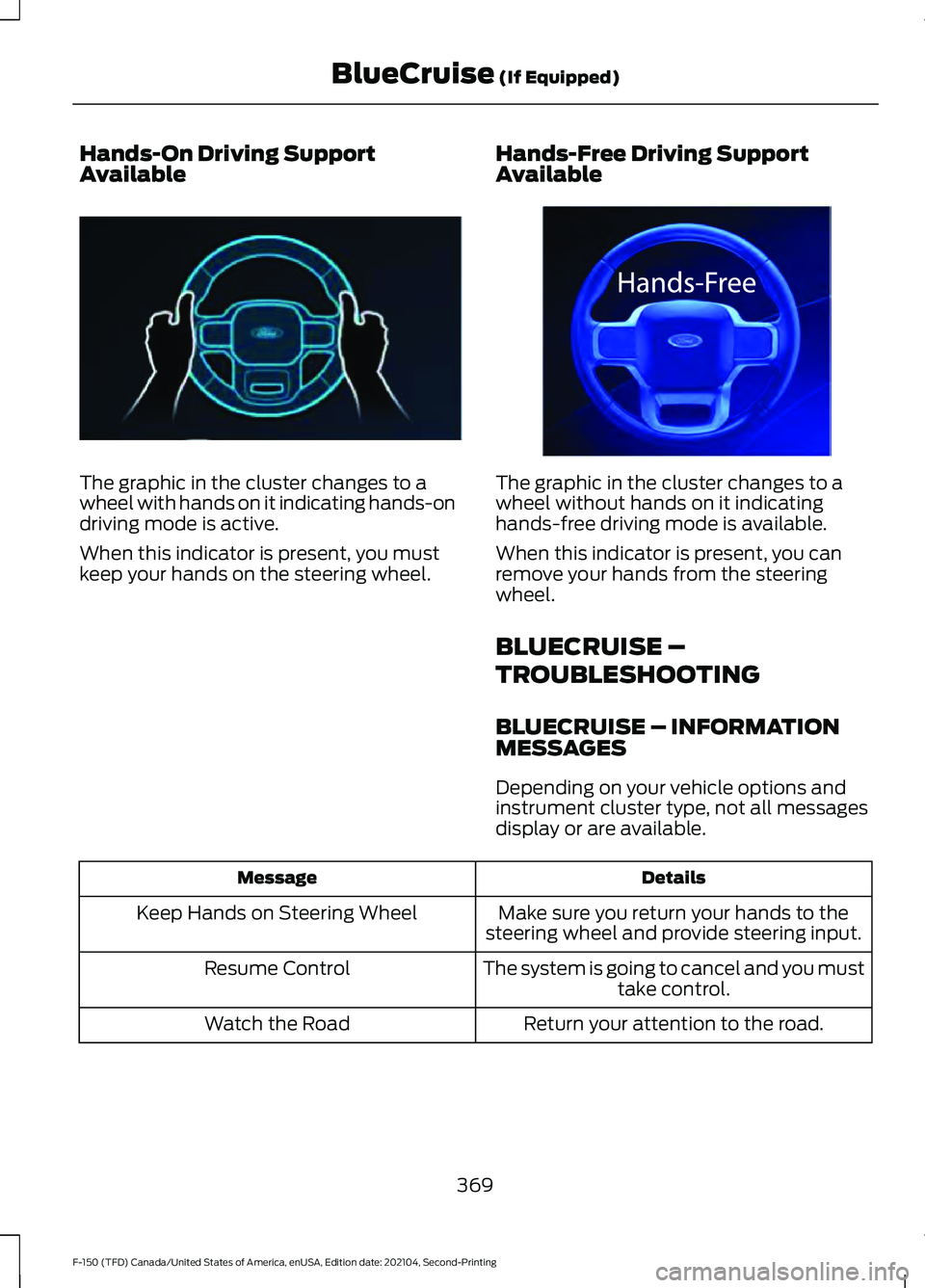
Hands-On Driving Support
Available
The graphic in the cluster changes to a
wheel with hands on it indicating hands-on
driving mode is active.
When this indicator is present, you must
keep your hands on the steering wheel.
Hands-Free Driving Support
Available The graphic in the cluster changes to a
wheel without hands on it indicating
hands-free driving mode is available.
When this indicator is present, you can
remove your hands from the steering
wheel.
BLUECRUISE –
TROUBLESHOOTING
BLUECRUISE – INFORMATION
MESSAGES
Depending on your vehicle options and
instrument cluster type, not all messages
display or are available.
Details
Message
Make sure you return your hands to the
steering wheel and provide steering input.
Keep Hands on Steering Wheel
The system is going to cancel and you musttake control.
Resume Control
Return your attention to the road.
Watch the Road
369
F-150 (TFD) Canada/United States of America, enUSA, Edition date: 202104, Second-Printing BlueCruise (If Equipped)E310620 E332864
Page 374 of 796
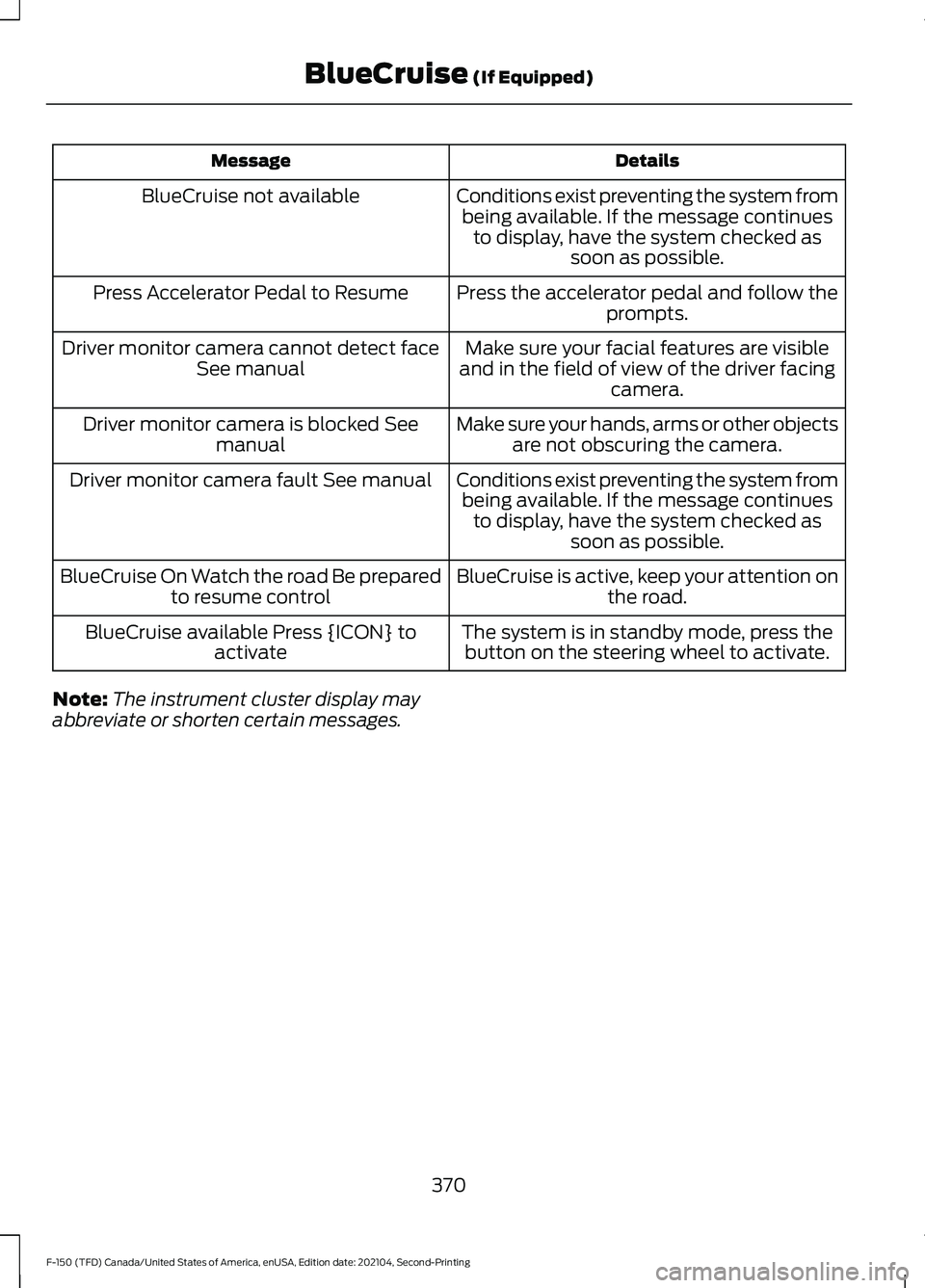
Details
Message
Conditions exist preventing the system frombeing available. If the message continues to display, have the system checked as soon as possible.
BlueCruise not available
Press the accelerator pedal and follow theprompts.
Press Accelerator Pedal to Resume
Make sure your facial features are visible
and in the field of view of the driver facing camera.
Driver monitor camera cannot detect face
See manual
Make sure your hands, arms or other objectsare not obscuring the camera.
Driver monitor camera is blocked See
manual
Conditions exist preventing the system frombeing available. If the message continues to display, have the system checked as soon as possible.
Driver monitor camera fault See manual
BlueCruise is active, keep your attention onthe road.
BlueCruise On Watch the road Be prepared
to resume control
The system is in standby mode, press thebutton on the steering wheel to activate.
BlueCruise available Press {ICON} to
activate
Note: The instrument cluster display may
abbreviate or shorten certain messages.
370
F-150 (TFD) Canada/United States of America, enUSA, Edition date: 202104, Second-Printing BlueCruise (If Equipped)
Page 642 of 796
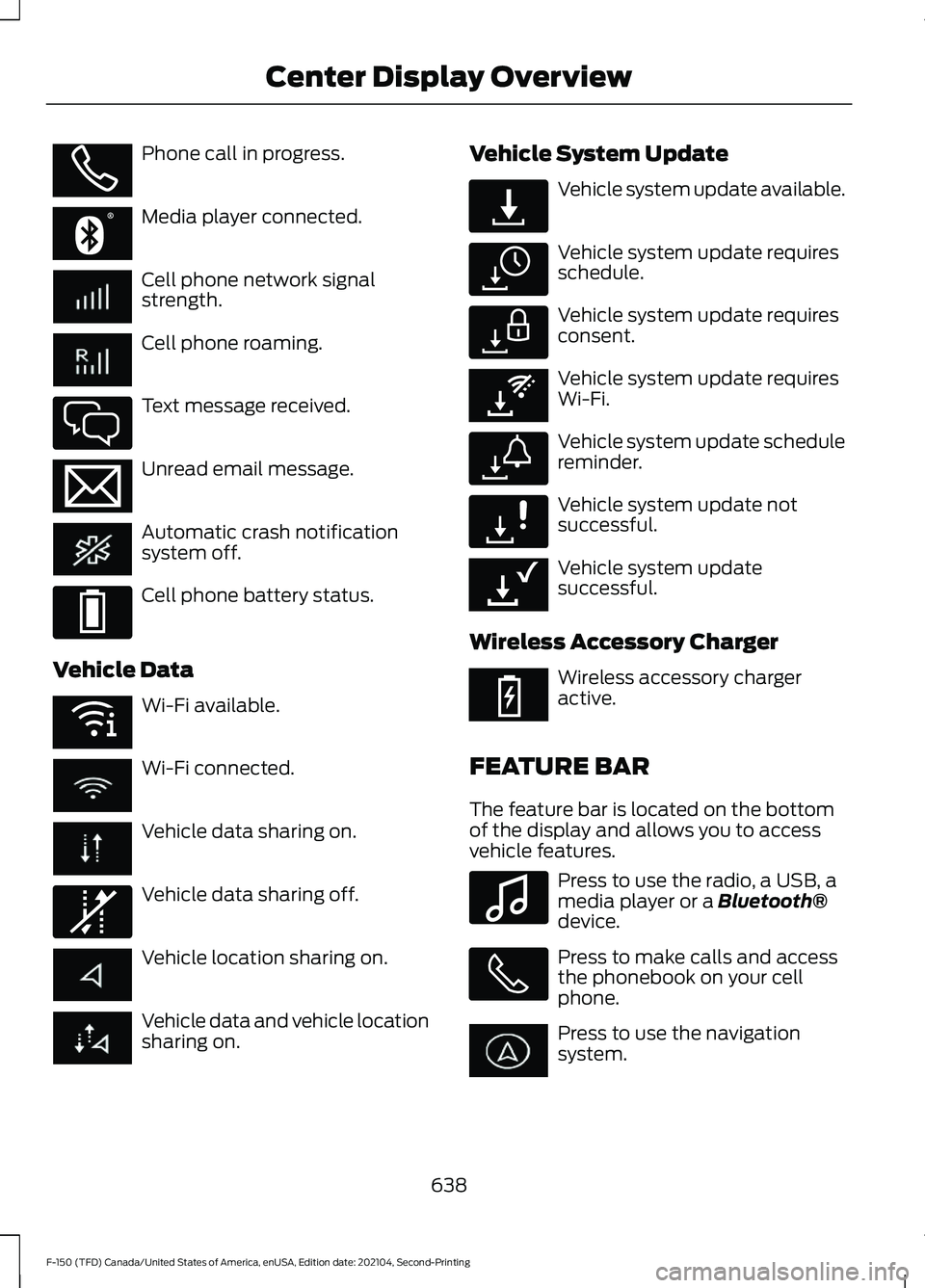
Phone call in progress.
Media player connected.
Cell phone network signal
strength.
Cell phone roaming.
Text message received.
Unread email message.
Automatic crash notification
system off.
Cell phone battery status.
Vehicle Data Wi-Fi available.
Wi-Fi connected.
Vehicle data sharing on.
Vehicle data sharing off.
Vehicle location sharing on.
Vehicle data and vehicle location
sharing on. Vehicle System Update Vehicle system update available.
Vehicle system update requires
schedule.
Vehicle system update requires
consent.
Vehicle system update requires
Wi-Fi.
Vehicle system update schedule
reminder.
Vehicle system update not
successful.
Vehicle system update
successful.
Wireless Accessory Charger Wireless accessory charger
active.
FEATURE BAR
The feature bar is located on the bottom
of the display and allows you to access
vehicle features. Press to use the radio, a USB, a
media player or a Bluetooth®
device. Press to make calls and access
the phonebook on your cell
phone.
Press to use the navigation
system.
638
F-150 (TFD) Canada/United States of America, enUSA, Edition date: 202104, Second-Printing Center Display OverviewE353213 E353208 E335295 E353216 E335293 E353219 E335292 E327789 E327785 E327786 E353217 E327787 E327788 E353218 E353214 E100027
Page 647 of 796
PHONE PRECAUTIONS
WARNING: Driving while distracted
can result in loss of vehicle control, crash
and injury. We strongly recommend that
you use extreme caution when using any
device that may take your focus off the
road. Your primary responsibility is the
safe operation of your vehicle. We
recommend against the use of any
hand-held device while driving and
encourage the use of voice-operated
systems when possible. Make sure you
are aware of all applicable local laws
that may affect the use of electronic
devices while driving.
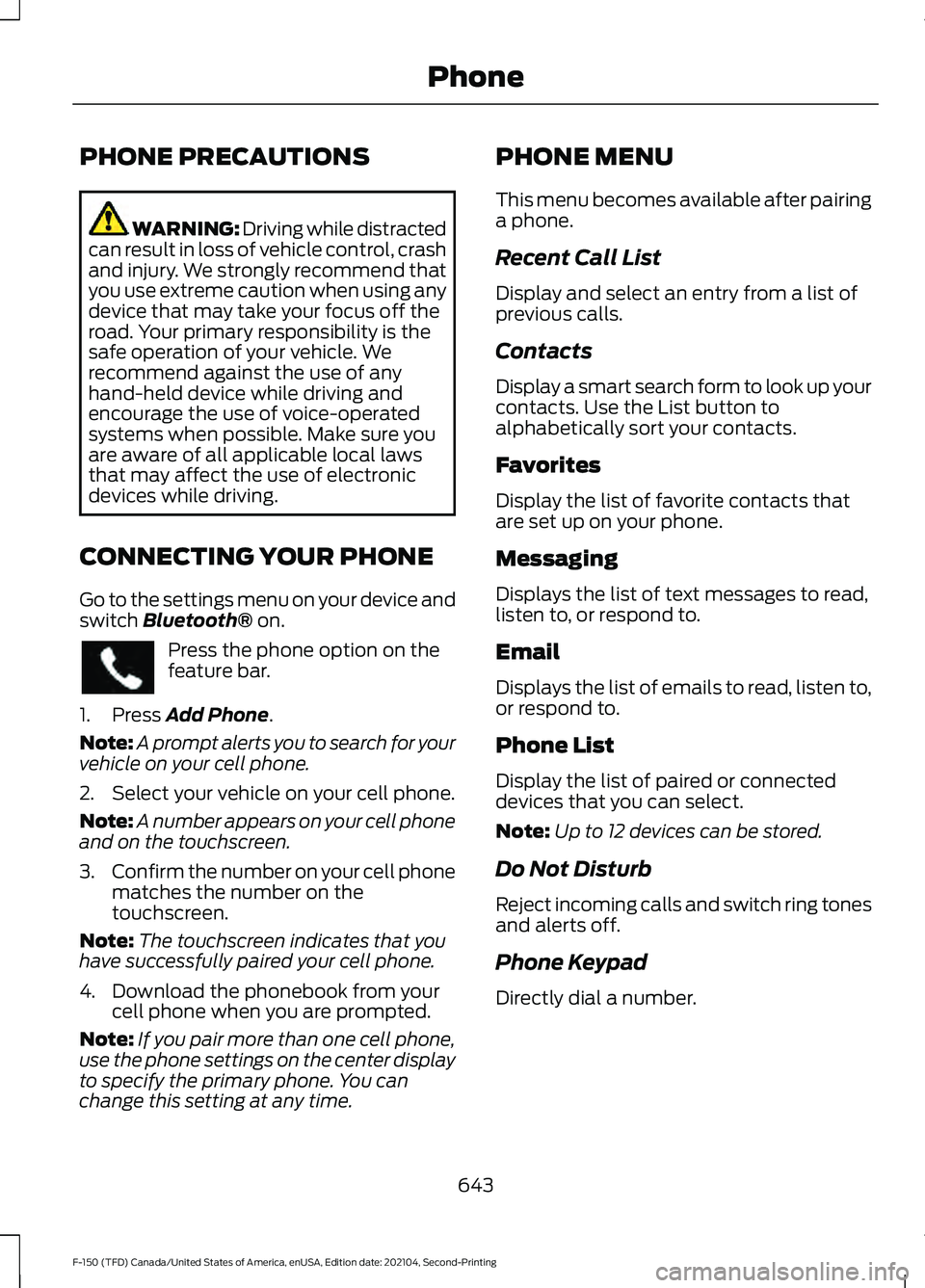
CONNECTING YOUR PHONE
Go to the settings menu on your device and
switch Bluetooth® on. Press the phone option on the
feature bar.
1. Press
Add Phone.
Note: A prompt alerts you to search for your
vehicle on your cell phone.
2. Select your vehicle on your cell phone.
Note: A number appears on your cell phone
and on the touchscreen.
3. Confirm the number on your cell phone
matches the number on the
touchscreen.
Note: The touchscreen indicates that you
have successfully paired your cell phone.
4. Download the phonebook from your cell phone when you are prompted.
Note: If you pair more than one cell phone,
use the phone settings on the center display
to specify the primary phone. You can
change this setting at any time. PHONE MENU
This menu becomes available after pairing
a phone.
Recent Call List
Display and select an entry from a list of
previous calls.
Contacts
Display a smart search form to look up your
contacts. Use the List button to
alphabetically sort your contacts.
Favorites
Display the list of favorite contacts that
are set up on your phone.
Messaging
Displays the list of text messages to read,
listen to, or respond to.
Email
Displays the list of emails to read, listen to,
or respond to.
Phone List
Display the list of paired or connected
devices that you can select.
Note:
Up to 12 devices can be stored.
Do Not Disturb
Reject incoming calls and switch ring tones
and alerts off.
Phone Keypad
Directly dial a number.
643
F-150 (TFD) Canada/United States of America, enUSA, Edition date: 202104, Second-Printing Phone
Page 651 of 796
SWITCHING TEXT MESSAGE
NOTIFICATION ON AND OFF
iOS
1. Go to the settings menu on your cell
phone.
2. Select Bluetooth®.
3. Select the information icon to the right
of your vehicle.
4. Switch text message notification on or
off.
Android
1. Go to the settings menu on your cell phone.
2. Select
Bluetooth®.
3. Select the profiles option.
4. Select the phone profile.
5. Switch text message notification on or
off.
647
F-150 (TFD) Canada/United States of America, enUSA, Edition date: 202104, Second-Printing Phone
Page 652 of 796
CONNECTING A BLUETOOTH®
DEVICE
1. Make sure Bluetooth® is enabled on
your device.
2. Press
Settings on the touchscreen.
3. Press
Connectivity.
4. Press
Bluetooth.
5. Press
Add a Bluetooth Device.
Note: A prompt alerts you to search for your
vehicle on your device.
6. Select your vehicle on your device.
Note: A number appears on your device and
on the touchscreen.
7. Confirm that the number on your device matches the number on the
touchscreen.
Note: The touchscreen indicates that you
have successfully paired your device.
The Bluetooth® word mark and logos are
registered trademarks owned by Bluetooth
SIG, Inc.
and any use of such marks by
Ford Motor Company is under license.
Other trademarks and trade names are
those of their respective owners.
PLAYING MEDIA USING
BLUETOOTH® WARNING: Driving while distracted
can result in loss of vehicle control, crash
and injury. We strongly recommend that
you use extreme caution when using any
device that may take your focus off the
road. Your primary responsibility is the
safe operation of your vehicle. We
recommend against the use of any hand-held device while driving and
encourage the use of voice-operated
systems when possible. Make sure you
are aware of all applicable local laws
that may affect the use of electronic
devices while driving.
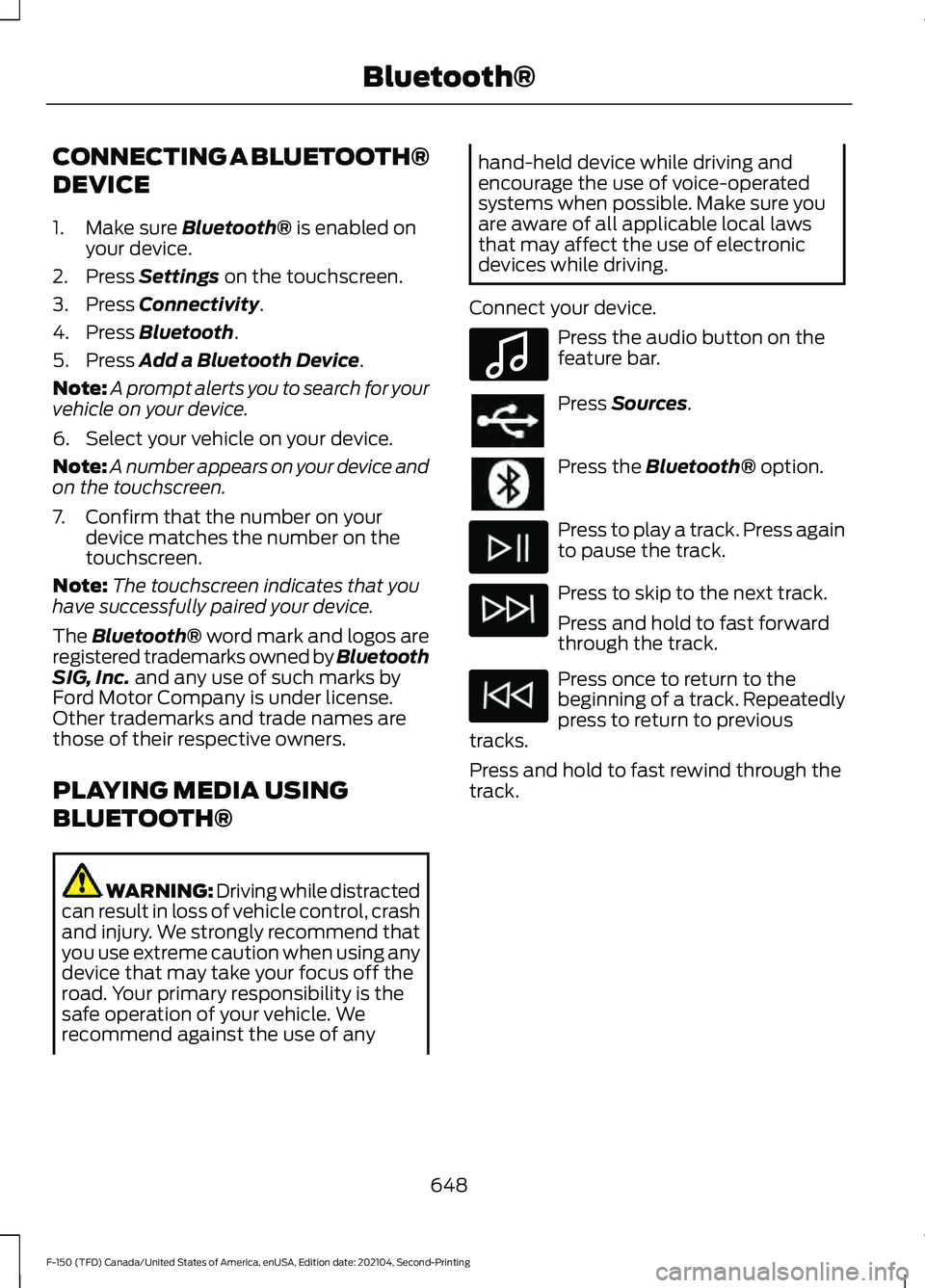
Connect your device. Press the audio button on the
feature bar.
Press
Sources.
Press the
Bluetooth® option.
Press to play a track. Press again
to pause the track.
Press to skip to the next track.
Press and hold to fast forward
through the track.
Press once to return to the
beginning of a track. Repeatedly
press to return to previous
tracks.
Press and hold to fast rewind through the
track.
648
F-150 (TFD) Canada/United States of America, enUSA, Edition date: 202104, Second-Printing Bluetooth®E100027
Page 653 of 796
APP PRECAUTIONS
WARNING: Driving while distracted
can result in loss of vehicle control, crash
and injury. We strongly recommend that
you use extreme caution when using any
device that may take your focus off the
road. Your primary responsibility is the
safe operation of your vehicle. We
recommend against the use of any
hand-held device while driving and
encourage the use of voice-operated
systems when possible. Make sure you
are aware of all applicable local laws
that may affect the use of electronic
devices while driving.
APP REQUIREMENTS
When you start an app through the system
for the first time, you could be asked to
grant certain permissions. You can review
and change the permissions that you have
granted at any time when your vehicle is
not moving. We recommend that you
check your data plan before using your
apps through the system. Using them
could result in additional charges. We also
recommend that you check the app
provider's terms and conditions and
privacy policy before using their app. Make
sure that you have an active account for
apps that you want to use through the
system. Some apps will work with no
setup. Others require you to configure
some personal settings before you can use
them.
ACCESSING APPS Select the apps option on the
feature bar. ENABLING APPS ON AN IOS
DEVICE Select the apps option on the
feature bar.
1. Select Mobile Apps Help.
2. Follow the instructions to pair and connect your device via Bluetooth® or
with a USB cable.
3. Start the apps on your device that you want to use.
4. Select the app that you want to use on
the touchscreen.
Note: Some apps may run through Apple
CarPlay if it is enabled.
Note: Closing an app on your device will
close it on the touchscreen.
Note: For troubleshooting assistance select
Mobile Apps List under Mobile Apps Help.
ENABLING APPS ON AN
ANDROID DEVICE Select the apps option on the
feature bar.
1. Select Mobile Apps Help.
2. Follow the instructions to pair and connect your device via Bluetooth® or
with a USB cable.
3. Start the apps on your device that you want to use.
4. Select Find Mobile Apps.
5. Select the app that you want to use on
the touchscreen.
Note: Some devices may lose the ability to
play music over USB when Mobile Apps are
enabled.
Note: Some apps may run through Android
Auto if it is enabled.
649
F-150 (TFD) Canada/United States of America, enUSA, Edition date: 202104, Second-Printing Apps