fuse FORD F-150 2021 Owner's Manual
[x] Cancel search | Manufacturer: FORD, Model Year: 2021, Model line: F-150, Model: FORD F-150 2021Pages: 796, PDF Size: 13.89 MB
Page 517 of 796
Water alone, without engine coolant, can
cause engine damage from corrosion,
overheating or freezing.
Do not use the following as a coolant
substitute, as they can cause engine
damage from overheating or freezing:
•
Alcohol.
• Methanol.
• Brine.
• Any coolant mixed with alcohol or
methanol antifreeze.
Do not add extra inhibitors or additives to
the coolant. These can be harmful and
compromise the corrosion protection of
the coolant.
Severe Climates
If you drive in extremely cold climates, you
may need to increase the coolant
concentration above 50%.
Note: A coolant concentration of 60%
provides improved freeze point protection.
Coolant concentrations above 60%
decrease the overheat protection
characteristics of the coolant and could
cause engine damage.
If you drive in extremely hot climates, you
may need to decrease the coolant
concentration to 40%.
Note: A coolant concentration of 40%
provides improved overheat protection.
Coolant concentrations below 40%
decrease the overheat and corrosion
protection characteristics of the coolant and
could cause engine damage.
Coolant Change WARNING: Do not dispose of
coolant in the household refuse or the
public sewage system. Use an authorized
waste disposal facility. Change the coolant at specific mileage
intervals. Refer to the scheduled
maintenance information. See
Normal
Scheduled Maintenance (page 667).
Note: Dispose of used coolant in the
appropriate manner.
Follow your community's regulations and
standards for recycling and disposing of
automotive fluids.
Fail-Safe Cooling
Fail-safe cooling allows you to temporarily
drive your vehicle before any incremental
component damage occurs. The fail-safe
distance depends on ambient
temperature, vehicle load and terrain.
How Fail-Safe Cooling Works If the engine begins to overheat,
the coolant temperature gauge
moves toward the red zone:
A warning lamp illuminates and
a message may appear in the
information display.
If the engine reaches a preset
over-temperature condition, the engine
automatically switches to alternating
cylinder operation. Each disabled cylinder
acts as an air pump and cools the engine.
When this occurs, your vehicle still
operates, however:
• Engine power is limited.
• The air conditioning system turns off.
Continued operation increases the engine
temperature, causing the engine to
completely shut down. Your steering and
braking effort increases in this situation.
When the engine temperature cools, you
can re-start the engine. Have your vehicle
checked as soon as possible to minimize
engine damage.
513
F-150 (TFD) Canada/United States of America, enUSA, Edition date: 202104, Second-Printing Maintenance
Page 522 of 796
ENGINE AIR FILTER - INFORMATION MESSAGES - DIESEL
Action
Message
Indicates the engine air filter is performing as expected.
Filter OK
Indicates that there is a higher than expected restriction
across the engine air filter, which could represent an air filter at full useful life or a filter with an obstruction.
When this displays, inspect the engine air filter and replace if necessary.
After the inspection or engine air filter replacement, you must reset the system in order to change the status from Check Filter to Filter OK.
Check Filter See Manual
Indicates that there is an error within the electronic air filtermaintenance minder system requiring service.
System Fault See Manual
DRAINING THE FUEL FILTER
WATER TRAP - DIESEL WARNING: Do not drain the
water-in-fuel separator while the engine
is running. Failure to follow this warning
may result in fire, serious injury, death or
property damage. WARNING:
Do not dispose of fuel
in the household refuse or the public
sewage system. Use an authorized waste
disposal facility.
Your vehicle's fuel system has a fuel filter
and water separator to remove water from
the fuel.
If the water in fuel indicator illuminates
when the engine is running, stop your
vehicle as soon as safely possible, shut off
the engine, then drain the fuel and water
separator.
Note: Allowing water to stay in the fuel
system after the water in fuel indicator
illuminates could result in extensive damage
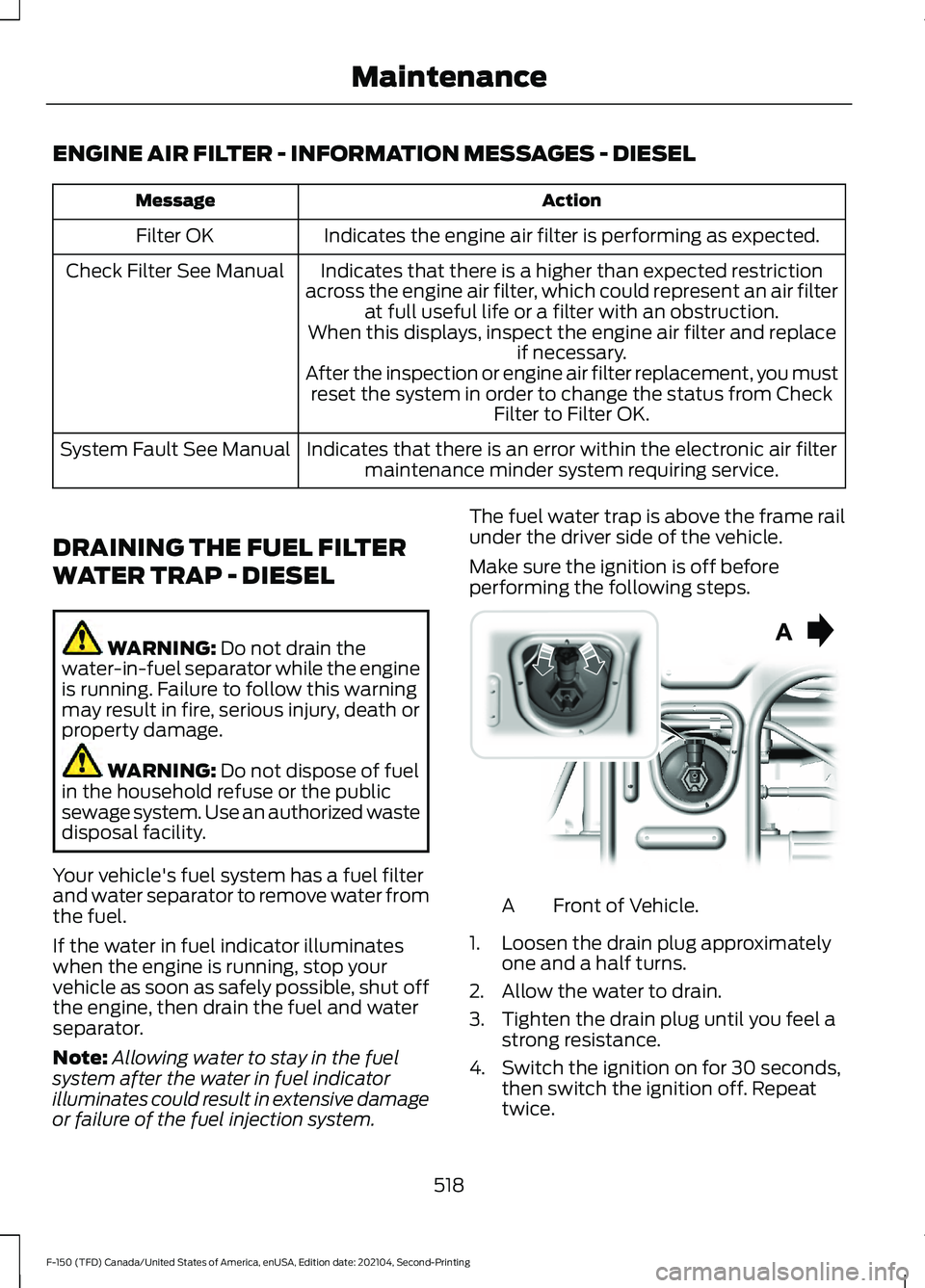
or failure of the fuel injection system. The fuel water trap is above the frame rail
under the driver side of the vehicle.
Make sure the ignition is off before
performing the following steps.
Front of Vehicle.
A
1. Loosen the drain plug approximately one and a half turns.
2. Allow the water to drain.
3. Tighten the drain plug until you feel a strong resistance.
4. Switch the ignition on for 30 seconds, then switch the ignition off. Repeat
twice.
518
F-150 (TFD) Canada/United States of America, enUSA, Edition date: 202104, Second-Printing MaintenanceE254226
Page 663 of 796
WHAT ARE THE AUXILIARY
SWITCHES
The auxiliary switchboard on the overhead
console makes aftermarket customization
easier with six prewired switches
connected to the power distribution box.
Each circuit is individually fused for
connection of electrical accessories.
LOCATING THE AUXILIARY
SWITCHES
The auxiliary switchboard on the overhead
console makes aftermarket customization
easier with six prewired switches
connected to the power distribution box.
The circuits are individually fused for
connection of electrical accessories.
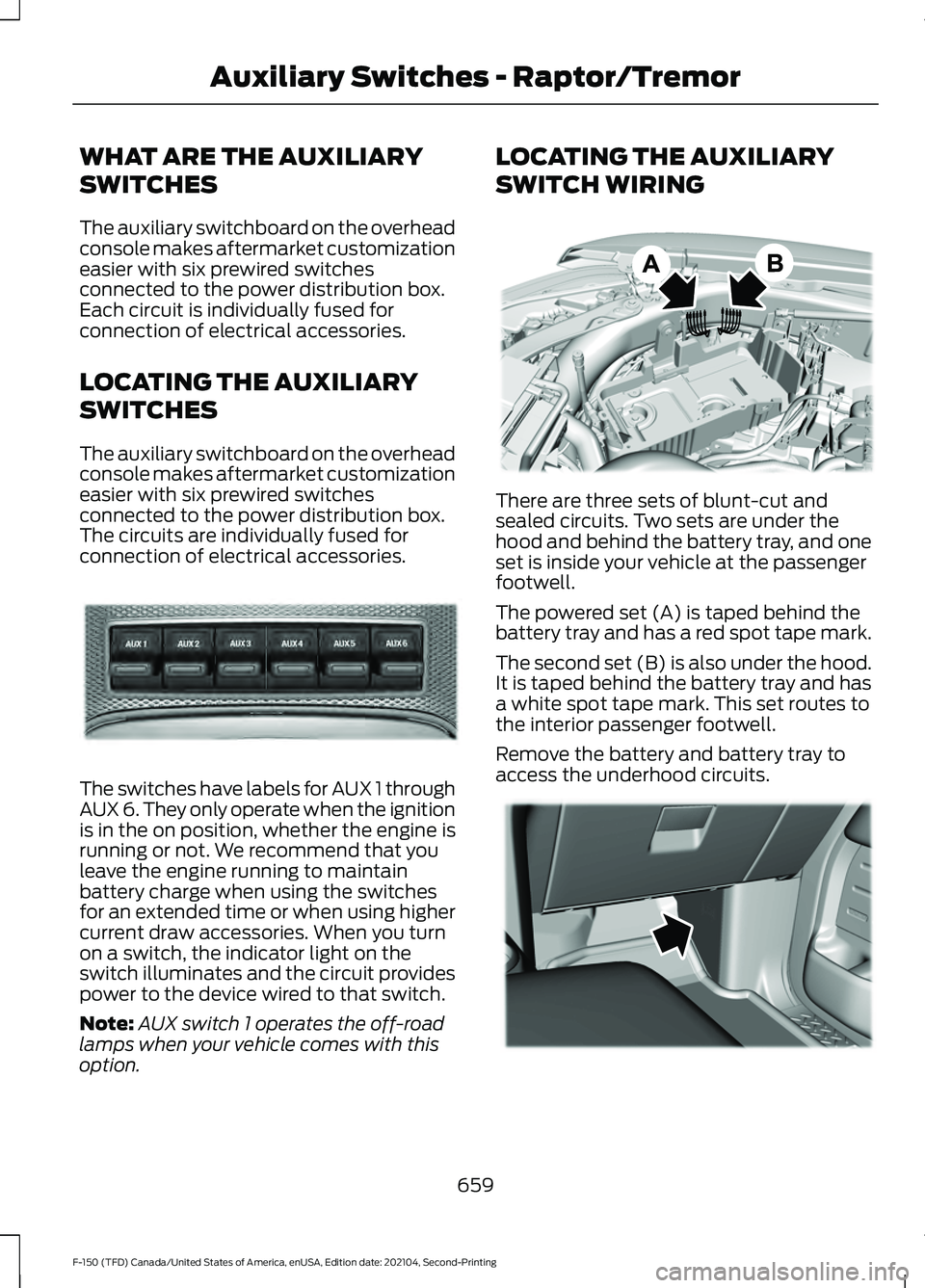
The switches have labels for AUX 1 through
AUX 6. They only operate when the ignition
is in the on position, whether the engine is
running or not. We recommend that you
leave the engine running to maintain
battery charge when using the switches
for an extended time or when using higher
current draw accessories. When you turn
on a switch, the indicator light on the
switch illuminates and the circuit provides
power to the device wired to that switch.
Note:
AUX switch 1 operates the off-road
lamps when your vehicle comes with this
option. LOCATING THE AUXILIARY
SWITCH WIRING
There are three sets of blunt-cut and
sealed circuits. Two sets are under the
hood and behind the battery tray, and one
set is inside your vehicle at the passenger
footwell.
The powered set (A) is taped behind the
battery tray and has a red spot tape mark.
The second set (B) is also under the hood.
It is taped behind the battery tray and has
a white spot tape mark. This set routes to
the interior passenger footwell.
Remove the battery and battery tray to
access the underhood circuits.
659
F-150 (TFD) Canada/United States of America, enUSA, Edition date: 202104, Second-Printing Auxiliary Switches - Raptor/TremorE220728 E347548 E347399
Page 664 of 796
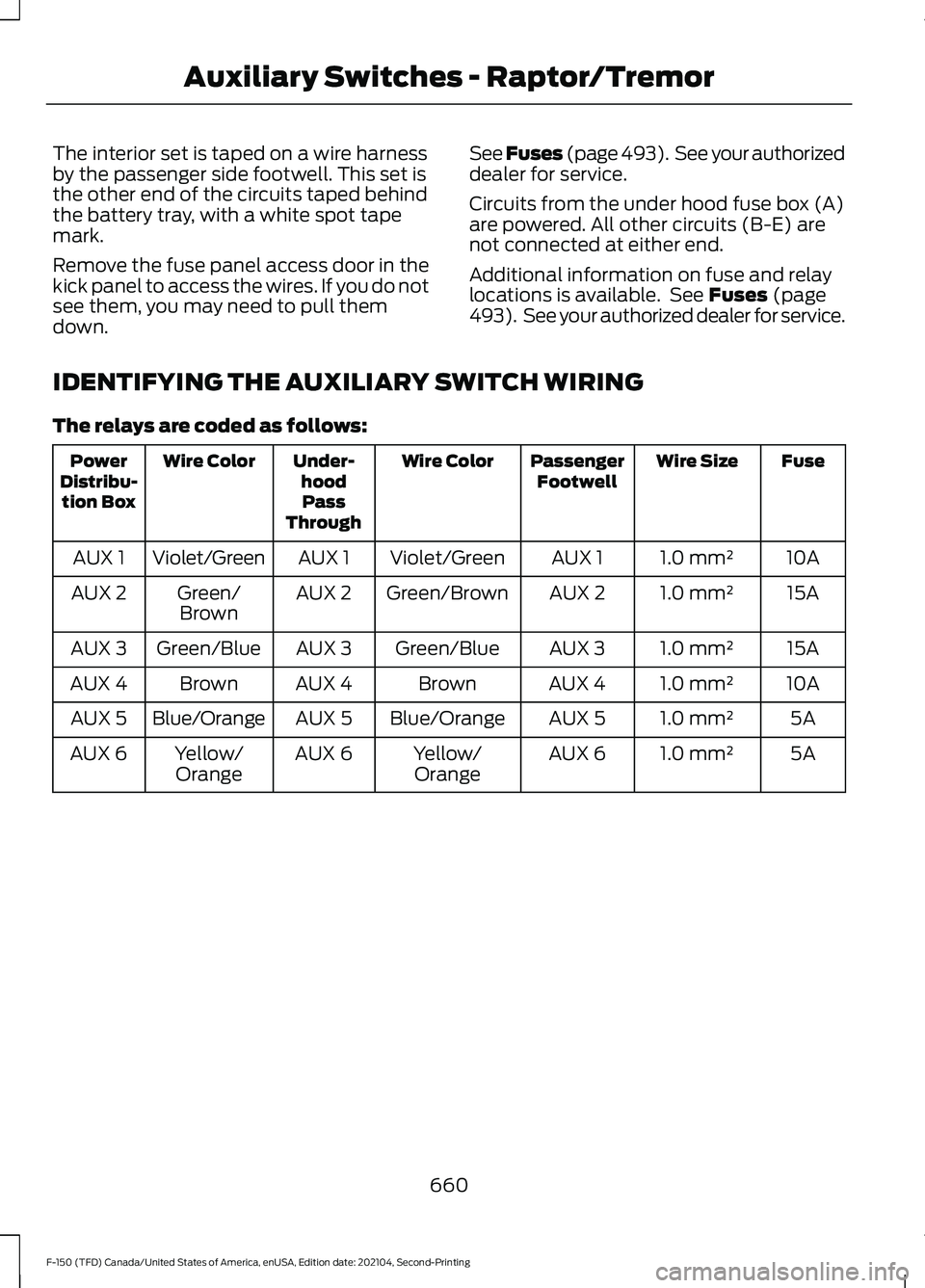
The interior set is taped on a wire harness
by the passenger side footwell. This set is
the other end of the circuits taped behind
the battery tray, with a white spot tape
mark.
Remove the fuse panel access door in the
kick panel to access the wires. If you do not
see them, you may need to pull them
down.
See Fuses (page 493). See your authorized
dealer for service.
Circuits from the under hood fuse box (A)
are powered. All other circuits (B-E) are
not connected at either end.
Additional information on fuse and relay
locations is available. See Fuses (page
493). See your authorized dealer for service.
IDENTIFYING THE AUXILIARY SWITCH WIRING
The relays are coded as follows: Fuse
Wire Size
Passenger
Footwell
Wire Color
Under-
hoodPass
Through
Wire Color
Power
Distribu- tion Box
10A
1.0 mm²
AUX 1
Violet/Green
AUX 1
Violet/Green
AUX 1
15A
1.0 mm²
AUX 2
Green/Brown
AUX 2
Green/
Brown
AUX 2
15A
1.0 mm²
AUX 3
Green/Blue
AUX 3
Green/Blue
AUX 3
10A
1.0 mm²
AUX 4
Brown
AUX 4
Brown
AUX 4
5A
1.0 mm²
AUX 5
Blue/Orange
AUX 5
Blue/Orange
AUX 5
5A
1.0 mm²
AUX 6
Yellow/
Orange
AUX 6
Yellow/
Orange
AUX 6
660
F-150 (TFD) Canada/United States of America, enUSA, Edition date: 202104, Second-Printing Auxiliary Switches - Raptor/Tremor
Page 753 of 796
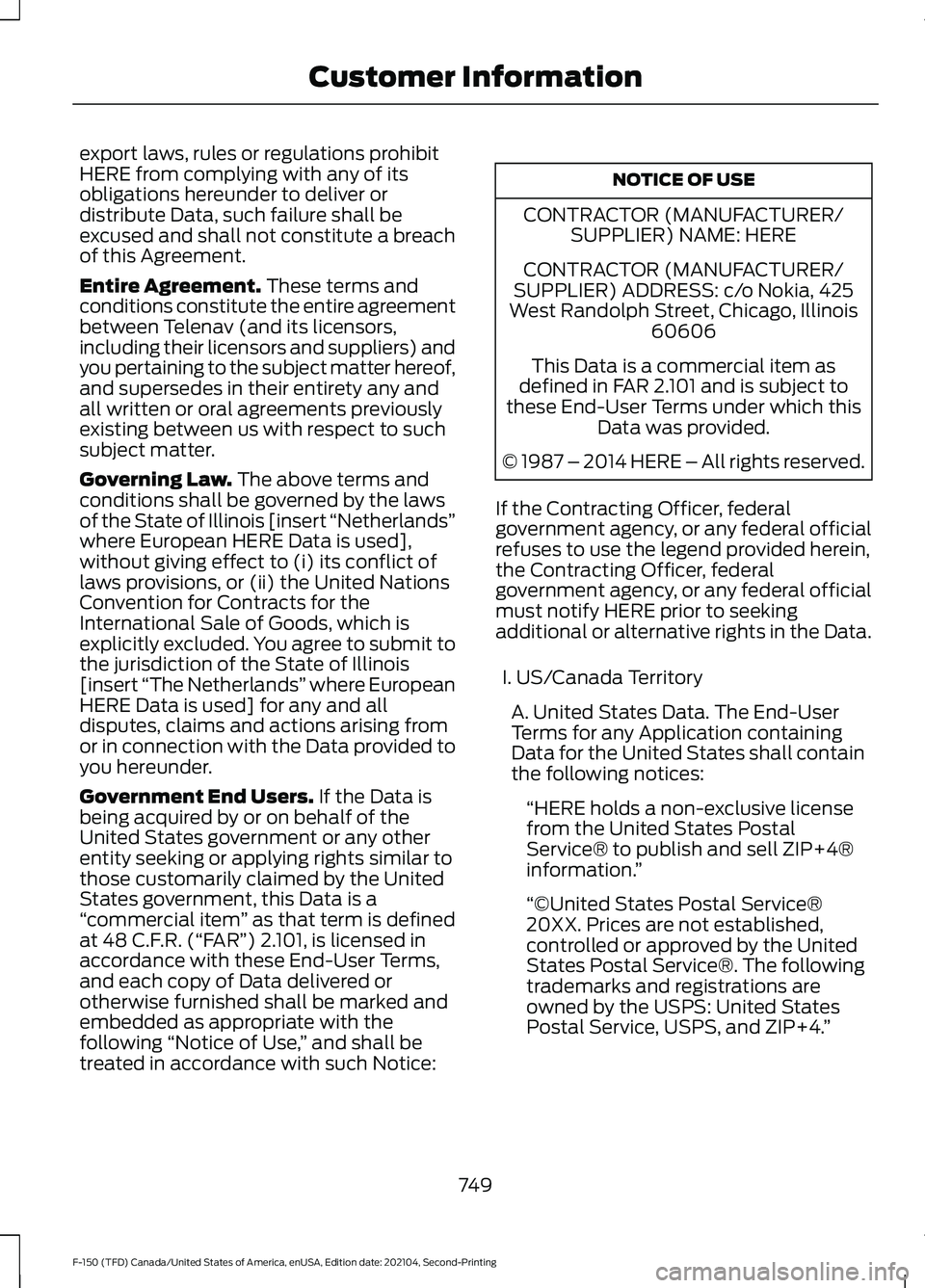
export laws, rules or regulations prohibit
HERE from complying with any of its
obligations hereunder to deliver or
distribute Data, such failure shall be
excused and shall not constitute a breach
of this Agreement.
Entire Agreement. These terms and
conditions constitute the entire agreement
between Telenav (and its licensors,
including their licensors and suppliers) and
you pertaining to the subject matter hereof,
and supersedes in their entirety any and
all written or oral agreements previously
existing between us with respect to such
subject matter.
Governing Law.
The above terms and
conditions shall be governed by the laws
of the State of Illinois [insert “Netherlands”
where European HERE Data is used],
without giving effect to (i) its conflict of
laws provisions, or (ii) the United Nations
Convention for Contracts for the
International Sale of Goods, which is
explicitly excluded. You agree to submit to
the jurisdiction of the State of Illinois
[insert “The Netherlands” where European
HERE Data is used] for any and all
disputes, claims and actions arising from
or in connection with the Data provided to
you hereunder.
Government End Users.
If the Data is
being acquired by or on behalf of the
United States government or any other
entity seeking or applying rights similar to
those customarily claimed by the United
States government, this Data is a
“ commercial item ” as that term is defined
at 48 C.F.R. (“FAR”) 2.101, is licensed in
accordance with these End-User Terms,
and each copy of Data delivered or
otherwise furnished shall be marked and
embedded as appropriate with the
following “Notice of Use, ” and shall be
treated in accordance with such Notice: NOTICE OF USE
CONTRACTOR (MANUFACTURER/ SUPPLIER) NAME: HERE
CONTRACTOR (MANUFACTURER/
SUPPLIER) ADDRESS: c/o Nokia, 425
West Randolph Street, Chicago, Illinois 60606
This Data is a commercial item as
defined in FAR 2.101 and is subject to
these End-User Terms under which this Data was provided.
© 1987 – 2014 HERE – All rights reserved.
If the Contracting Officer, federal
government agency, or any federal official
refuses to use the legend provided herein,
the Contracting Officer, federal
government agency, or any federal official
must notify HERE prior to seeking
additional or alternative rights in the Data. I. US/Canada Territory A. United States Data. The End-User
Terms for any Application containing
Data for the United States shall contain
the following notices: “HERE holds a non-exclusive license
from the United States Postal
Service® to publish and sell ZIP+4®
information. ”
“©United States Postal Service®
20XX. Prices are not established,
controlled or approved by the United
States Postal Service®. The following
trademarks and registrations are
owned by the USPS: United States
Postal Service, USPS, and ZIP+4. ”
749
F-150 (TFD) Canada/United States of America, enUSA, Edition date: 202104, Second-Printing Customer Information
Page 774 of 796
Blind Spot Information System.............389
Blind Spot Information System –
Troubleshooting............................................ 392
Blind Spot Information System With Trailer Coverage.......................................................... 390
Blind Spot Information System Indicators.....................................................392
Blind Spot Information System Limitations..................................................389
Blind Spot Information System Precautions................................................389
Blind Spot Information System Requirements............................................389
Blind Spot Information System – Troubleshooting........................................392
Blind Spot Information System – Information Messages................................ 392
Blind Spot Information System With Trailer Coverage........................................390
Blind Spot Information System With Trailer
Coverage Limitations.................................. 390
Selecting a Trailer.............................................. 392
Setting a Trailer Length.................................... 391
What Is Blind Spot Information System with Trailer Coverage............................................ 390
BlueCruise Alerts
.........................................368
BlueCruise Automatic Cancellation...............................................368
BlueCruise......................................................365 BlueCruise – Troubleshooting......................369
BlueCruise Indicators
.................................368
BlueCruise Limitations..............................366
BlueCruise Precautions
.............................365
BlueCruise Requirements........................366
BlueCruise Settings.....................................367
BlueCruise – Troubleshooting................369 BlueCruise – Information Messages..........369
Bluetooth®....................................................648
Body Control Module Fuse Box.............499 Accessing the Body Control Module Fuse
Box..................................................................... 499
Identifying the Fuses in the Body Control Module Fuse Box.......................................... 499
Locating the Body Control Module Fuse Box..................................................................... 499
Bonnet Lock See: Opening and Closing the Hood..........503
Booster Seats
.................................................60 Brake Fluid Specification.........................309
Brake Over Accelerator.............................308
Brake Over Accelerator - Raptor...........308
Brake Precautions
.......................................308
Brakes..............................................................308 Anti-Lock Braking System............................. 308
Brakes – Troubleshooting............................... 310
Brakes – Troubleshooting.........................310 Brakes – Frequently Asked
Questions......................................................... 310
Brakes – Warning Lamps................................ 310
Breaking-In.....................................................476
C
Calculating Payload
.....................................415
Calculating the Load Limit........................415
Canceling the Set Speed...........................351
Canceling the Set Speed - Raptor........324
Capacities and Specifications................574
Catalytic Converter......................................279 Catalytic Converter –
Troubleshooting............................................ 279
Catalytic Converter Precautions............279
Catalytic Converter – Troubleshooting........................................279
C
atalytic Converter – Warning
Lamps................................................................ 279
Center Console Work Surface.................228 C
enter Console Work Surface –
Troubleshooting............................................ 230
Center Console Work Surface – Troubleshooting........................................230
Center Console Work Surface – Information Messages......................................................... 230
Center Display Limitations.......................637
Center Display Overview
...........................637
Center Display Precautions......................637
Changing a Flat Tire...................................566
Changing a Road Wheel...........................566
Changing the 12V Battery..........................519
Changing the Fuel Filter - Diesel............519
Changing the Fuel Filter - Gasoline.......519
Changing the Remote Control Battery - Police Responder.........................................91
Changing the Remote Control Battery - Vehicles With: Flip Key..............................94
770
F-150 (TFD) Canada/United States of America, enUSA, Edition date: 202104, Second-Printing Index
Page 780 of 796
Four-Wheel Drive –
Troubleshooting........................................297
Four-Wheel Drive – Information Messages......................................................... 297
Four-Wheel Drive – Warning Lamps..........297
Front Axle Fluid Capacity and Specification - 4x4...................................616
Front Exterior...................................................43
Front Exterior - Police Responder............45
Front Exterior - Raptor.................................44
Front Parking Aid.........................................335 Front Parking Aid Audible Warnings...........336
Front Parking Aid Limitations........................ 335
Locating the Front Parking Aid Sensors............................................................. 336
What is the Front Parking Aid....................... 335
Front Passenger Sensing System............76 Front Passenger Sensing System
Indicators............................................................ 78
Front Passenger Sensing System Precautions........................................................ 78
How Does the Front Passenger Sensing System Work..................................................... 76
What Is the Front Passenger Sensing System................................................................. 76
Front Seat Precautions..............................195
Front Seats.....................................................195 Heated Seats....................................................... 202
Manual Seats....................................................... 196
Massage Seats.................................................... 201
Power Seats......................................................... 198
Ventilated Seats................................................. 203
Fuel and Refueling
......................................255
Fuel and Refueling –
Troubleshooting............................................ 267
Fuel Quality.......................................................... 256
Refueling................................................................ 261
Running Out of Fuel......................................... 260
Fuel and Refueling Precautions.............255
Fuel and Refueling – Troubleshooting........................................267
Fuel and Refueling – Information Messages..........................................................267
Fuel and Refueling – Warning Lamps................................................................ 267
Fuel Gauge
........................................................171
Fuel Gauge Limitations..................................... 172
Locating the Fuel Filler Door........................... 172What Is Distance to Empty..............................
172
What Is the Fuel Gauge..................................... 171
What Is the Low Fuel Reminder..................... 172
Fuel Quality
...................................................256
Selecting the Correct Fuel.............................. 256
Selecting the Correct Fuel for Cold Weather............................................................ 257
Switching Between E85 and Gasoline........................................................... 260
Fuel Tank Capacity - Diesel
....................604
Fuel Tank Capacity - Excluding: Hybrid Electric Vehicle (HEV)............................266
Fuel Tank Capacity - Gasoline, Excluding: Hybrid Electric Vehicle (HEV)
.............603
Fuel Tank Capacity - Gasoline, Hybrid Electric Vehicle (HEV)............................605
Fuel Tank Capacity - Hybrid Electric Vehicle (HEV)
.............................................267
Fuel Tank Capacity - Raptor...................606
Fuse Precautions
.........................................493
Fuses................................................................493
Body Control Module Fuse Box................... 499
Fuses – Troubleshooting................................ 502
Under Hood Fuse Box...................................... 493
Fuses – Troubleshooting..........................502 Fuses – Frequently Asked Questions........502
G
Garage Door Opener...................................210
Garage Door Opener Limitations...........210
Garage Door Opener Precautions..........210
Garage Door Opener Radio Frequencies..................................................213
General Maintenance Information.......664
Glare Free Lighting
.......................................155
Glare Free Lighting Indicators........................ 156
Glare Free Lighting Limitations..................... 156
Glare Free Lighting Precautions....................155
Glare Free Lighting Requirements................155
How Does Glare Free Lighting Work............155
Overriding Glare Free Lighting....................... 156
Switching Glare Free Lighting On and Off....................................................................... 156
Glare Free Lighting – Troubleshooting.........................................157
Glare Free Lighting – Information Messages........................................................... 157
776
F-150 (TFD) Canada/United States of America, enUSA, Edition date: 202104, Second-Printing Index
Page 782 of 796
How Does the Electronic Locking
Differential Work - Raptor......................301
How Does the Garage Door Opener Work...............................................................210
How Does the Lane Keeping System Work..............................................................382
How Does the Personal Safety System Work...................................................................71
How Does the Rear Occupant Alert System Work..............................................207
How Does the Safety Canopy ™
Work
..................................................................73
How Does the Selective Catalytic Reduction System Work.........................273
How Does Traction Control Work...........319
How Does Trailer Backup Assistance Work..............................................................446
How Does Trailer Hitching Assistance Work..............................................................439
How Does Trailer Reverse Guidance Work..............................................................459
How Does Trailer Sway Control Work..............................................................438
How Do Personal Profiles Work..............651
How Do the Front Airbags Work...............72
How Do the Knee Airbags Work................73
How Do the Side Airbags Work.................72
Hybrid Display Information........................181 How Does EV Coach Work............................... 181
What Is EV Coach................................................ 181
Hybrid Electric Vehicle Driving Characteristics...........................................249
Hybrid Electric Vehicle Indicators..........249
Hybrid Electric Vehicle Information.................................................249
Eco Idle.................................................................. 250
Eco Idle – Troubleshooting............................. 251
Hybrid Electric Vehicle Information – Troubleshooting............................................ 250
Hybrid Electric Vehicle Information – Troubleshooting........................................250
Hybrid Electric Vehicle Information – Frequently Asked Questions....................250
I
Identifying Fuse Types
...............................502
Identifying the Audio Unit........................626 Identifying the Auxiliary Switch
Wiring...........................................................660
Identifying the Climate Control Unit.................................................................186
Ignition Switch
..............................................236
Inflating the Tires.........................................555
Information On Demand Screen - Vehicles With: 12.3 Inch Screen...........639
Information on the Tire Sidewall
...........543
Inspecting the Tire for Damage.............556
Inspecting the Tire for Wear....................556
Inspecting the Wheel Valve Stems.......557
Installing Child Restraints...........................53 Attaching the Front Seat Tether
Strap.................................................................... 58
Attaching the Rear Seat Tether Strap..........59
Combining the Seatbelt and Lower Anchors for Attaching Child Restraints.................... 58
Installing a Child Restraint in a Center Seat....................................................................... 57
Using Lower Anchors and Tethers for Children............................................................... 57
Using Seatbelts..................................................... 53
Using Tether Straps............................................. 58
Instrument Cluster Display.......................178 Hybrid Display Information.............................. 181
Personalized Settings........................................ 181
Trip Computer - Vehicles With: 4.2 Inch Screen............................................................... 180
Trip Computer - Vehicles With: 8 Inch Screen/12.3 Inch Screen............................. 180
Instrument Cluster Display Main Menu - Raptor, Vehicles With: 12.3 Inch
Screen............................................................179
Instrument Cluster Display Main Menu - Vehicles With: 12.3 Inch Screen
............178
Instrument Cluster Display Main Menu - Vehicles With: 4.2 Inch Screen..............179
Instrument Cluster Display Main Menu - Vehicles With: 8 Inch Screen
.................179
Instrument Cluster Indicators...................174
Instrument Cluster Indicators - Police Responder....................................................176
Instrument Cluster.......................................169 Fuel Gauge.............................................................. 171
Instrument Cluster Overview - Vehicles With: 12.3 Inch Screen
................................171
778
F-150 (TFD) Canada/United States of America, enUSA, Edition date: 202104, Second-Printing Index
Page 794 of 796
Trail One Pedal Drive Indicators...................326
Trail One Pedal Drive Limitations................325
Trail One Pedal Drive Precautions...............325
What Is Trail One Pedal Drive........................325
Trail One Pedal Drive – Troubleshooting........................................326
Trail One Pedal Drive – Information Messages......................................................... 326
Trail Turn Assist Indicators.......................328
Trail Turn Assist Limitations....................328
Trail Turn Assist Precautions...................328
Trail Turn Assist
............................................328
Trail Turn Assist – Troubleshooting............329
Trail Turn Assist – Troubleshooting........................................329
T
rail Turn Assist – Frequently Asked
Questions........................................................ 329
Trail Turn Assist – Information Messages......................................................... 329
Transfer Case Fluid Capacity and Specification - 4x4...................................614
Transfer Case Fluid Capacity and Specification - Raptor.............................615
Transmission Fluid Temperature Gauge..............................................................172
Transporting the Vehicle..........................489
Trip Computer - Vehicles With: 4.2 Inch Screen...........................................................180
Accessing the Trip Computer........................180
Resetting the Trip Computer......................... 180
Trip Computer - Vehicles With: 8 Inch Screen/12.3 Inch Screen.........................180
Accessing the Trip Computer........................180
Resetting the Trip Computer......................... 180
Turbo Boost Gauge.......................................172
Type Approvals............................................686
U
Under Hood Fus
e Box
................................493
Accessing the Under Hood Fuse Box.........493
Identifying the Fuses in the Under Hood
Fuse Box.......................................................... 494
Locating the Under Hood Fuse Box...........493
Under Hood Overview - 2.7L EcoBoost™................................................504
Under Hood Overview - 3.0L Diesel............................................................505 Under Hood Overview - 3.3L..................506
Under Hood Overview - 3.5L, Hybrid
Electric Vehicle (HEV)............................508
Under Hood Overview - 3.5L Ecoboost™.................................................507
Under Hood Overview - 5.0L..................509
Under Seat Storage
....................................233
Locating the Under Seat Storage
Compartment................................................ 233
Unique Features..............................................33
Updating the Vehicle Systems Wirelessly....................................................656
USB Ports
........................................................214
Using a Slide-In Camper............................413
Using Auto Hold............................................318
Using Bead-Lock Wheels - Raptor.......553
Using Keyless Entry.....................................108
Using MyKey With Remote Start Systems........................................................100
Using On-Board Scale...............................444
Using Progressive Range Selection......................................................286
Using Smart Hitch.......................................442
Using Snow Chains......................................551
Using the Center Console Work Surface - Vehicles With: Column Shift..............228
Using the Center Console Work Surface - Vehicles With: Console Shift.............229
Using the Instrument Cluster Display Controls.........................................................178
Using the Integrated Trailer Brake Controller.....................................................434
Using the Keyless Entry Keypad................111
Using the Remote Control - Police Responder.....................................................89
Using the Remote Control
.........................90
Using the Trailer Backup Assistance Controller....................................................450
Using the Trailer Backup Assistance Views..............................................................451
Using This Publication..................................25
Using Trailer Hitching Assistance.........440
Using Trailer Reverse Guidance Views.............................................................463
790
F-150 (TFD) Canada/United States of America, enUSA, Edition date: 202104, Second-Printing Index