change time FORD F-150 2021 Owners Manual
[x] Cancel search | Manufacturer: FORD, Model Year: 2021, Model line: F-150, Model: FORD F-150 2021Pages: 796, PDF Size: 13.89 MB
Page 3 of 796
The information contained in this publication was correct at the time of going to print. In the interest of
continuous development, we reserve the right to change specifications, design or equipment at any time
without notice or obligation. No part of this publication may be reproduced, transmitted, stored in a
retrieval system or translated into any language in any form by any means without our written permission.
Errors and omissions excepted.
© Ford Motor Company 2021
All rights reserved.
Part Number: 202104 20210816214408
California Proposition 65
WARNING: Operating, servicing and
maintaining a passenger vehicle or off-highway
motor vehicle can expose you to chemicals
including engine exhaust, carbon monoxide,
phthalates, and lead, which are known to the
State of California to cause cancer and birth
defects or other reproductive harm. To minimize
exposure, avoid breathing exhaust, do not idle the
engine except as necessary, service your vehicle
in a well-ventilated area and wear gloves or wash
your hands frequently when servicing your vehicle.
For more information go to
www.P65Warnings.ca.gov/passenger-vehicle. WARNING:
Battery posts, terminals and
related accessories contain lead and lead
compounds, chemicals known to the State of
California to cause cancer and reproductive harm.
Wash your hands after handling
.
Page 33 of 796
WARNING: Do not connect
wireless plug-in devices to the data link
connector. Unauthorized third parties
could gain access to vehicle data and
impair the performance of safety related
systems. Only allow repair facilities that
follow our service and repair instructions
to connect their equipment to the data
link connector.
We respect your privacy and are
committed to protecting it. The
information contained in this manual was
correct at the time of publication, but as
technology rapidly changes, we
recommend that you visit the local Ford
website for the latest information.
Your vehicle has electronic control units
that have data recording functionality and
the ability to permanently or temporarily
store data. This data could include
information on the condition and status of
your vehicle, vehicle maintenance
requirements, events and malfunctions.
The types of data that can be recorded are
described in this section. Some of the data
recorded is stored in event logs or error
logs.
Note: Error logs are reset following a service
or repair.
Note: We may provide information in
response to requests from law enforcement,
other government authorities and third
parties acting with lawful authority or
through a legal process. Such information
could be used by them in legal proceedings.
Data recorded includes, for example:
• Operating states of system
components, for example fuel level,
tire pressure and battery charge level.
• Vehicle and component status, for
example wheel speed, deceleration,
lateral acceleration and seatbelt
status. •
Events or errors in essential systems,
for example headlamps and brakes.
• System responses to driving situations,
for example airbag deployment and
stability control.
• Environmental conditions, for example
temperature.
Some of this data, when used in
combination with other information, for
example an accident report, damage to a
vehicle or eyewitness statements, could
be associated with a specific person.
Services That We Provide
If you use our services, we collect and use
data, for example account information,
vehicle location and driving characteristics,
that could identify you. We transmit this
data through a dedicated, protected
connection. We only collect and use data
to enable your use of our services to which
you have subscribed, with your consent or
where permitted by law. For additional
information, see the terms and conditions
of the services to which you have
subscribed.
For additional information about our
privacy policy, refer to the local Ford
website.
Services That Third Parties
Provide
We recommend that you review the terms
and conditions and data privacy
information for any services equipped with
your vehicle or to which you subscribe. We
take no responsibility for services that third
parties provide.
Where equipped, SiriusXM with 360L could
use the modem. To disable, turn off the
SiriusXM with 360L or Vehicle Connectivity
setting. See Enabling and Disabling the
Modem
(page 620).
29
F-150 (TFD) Canada/United States of America, enUSA, Edition date: 202104, Second-Printing Data Privacy
Page 143 of 796
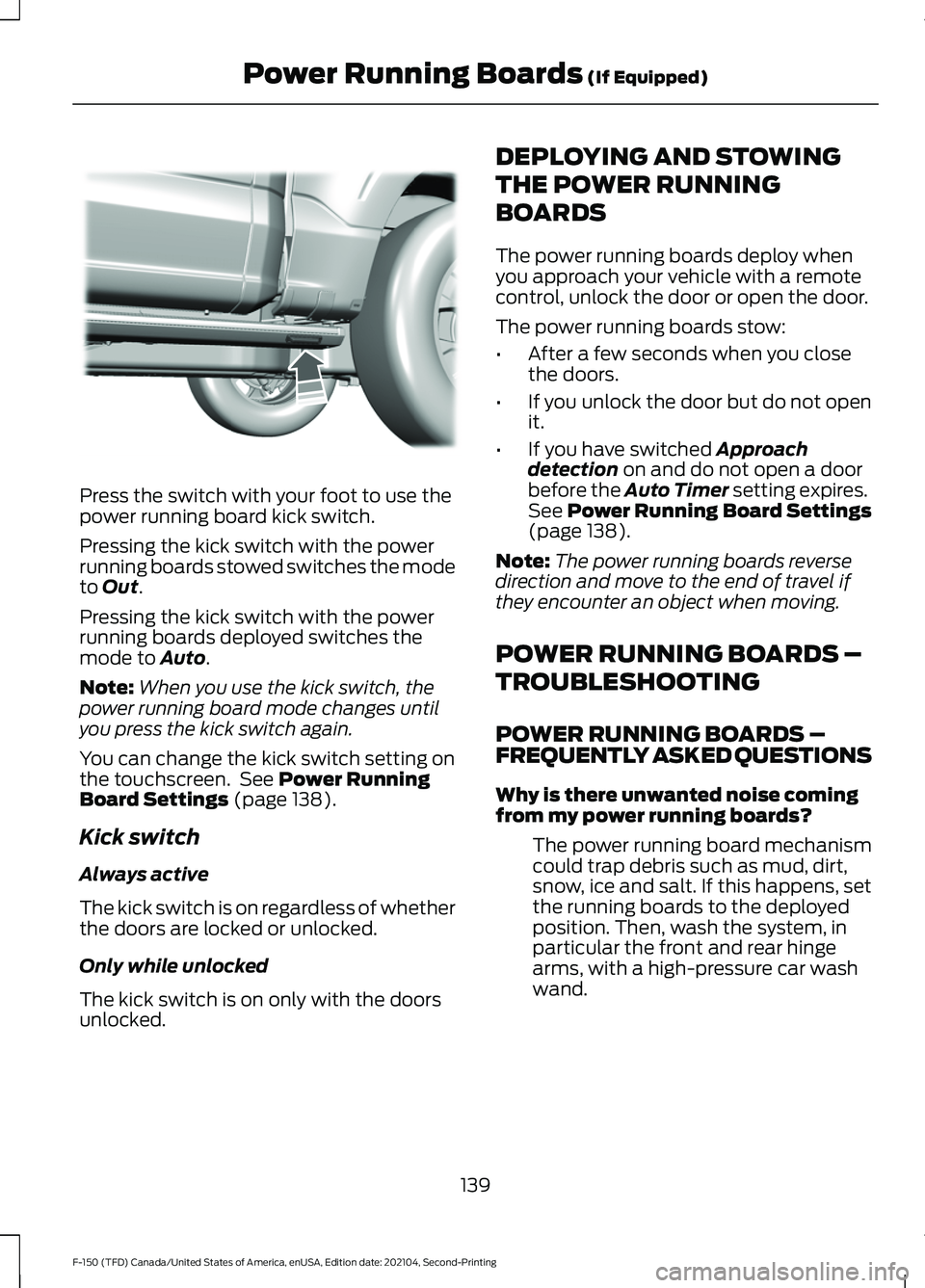
Press the switch with your foot to use the
power running board kick switch.
Pressing the kick switch with the power
running boards stowed switches the mode
to Out.
Pressing the kick switch with the power
running boards deployed switches the
mode to
Auto.
Note: When you use the kick switch, the
power running board mode changes until
you press the kick switch again.
You can change the kick switch setting on
the touchscreen. See
Power Running
Board Settings (page 138).
Kick switch
Always active
The kick switch is on regardless of whether
the doors are locked or unlocked.
Only while unlocked
The kick switch is on only with the doors
unlocked. DEPLOYING AND STOWING
THE POWER RUNNING
BOARDS
The power running boards deploy when
you approach your vehicle with a remote
control, unlock the door or open the door.
The power running boards stow:
•
After a few seconds when you close
the doors.
• If you unlock the door but do not open
it.
• If you have switched
Approach
detection on and do not open a door
before the Auto Timer setting expires.
See
Power Running Board Settings
(page 138).
Note: The power running boards reverse
direction and move to the end of travel if
they encounter an object when moving.
POWER RUNNING BOARDS –
TROUBLESHOOTING
POWER RUNNING BOARDS –
FREQUENTLY ASKED QUESTIONS
Why is there unwanted noise coming
from my power running boards?
The power running board mechanism
could trap debris such as mud, dirt,
snow, ice and salt. If this happens, set
the running boards to the deployed
position. Then, wash the system, in
particular the front and rear hinge
arms, with a high-pressure car wash
wand.
139
F-150 (TFD) Canada/United States of America, enUSA, Edition date: 202104, Second-Printing Power Running Boards
(If Equipped)E334917
Page 152 of 796
HEADLAMPS –
TROUBLESHOOTING
HEADLAMPS – FREQUENTLY
ASKED QUESTIONS
Why is there condensation in the
headlamps?
Headlamps have vents to
accommodate normal changes in air
pressure. Condensation can be a
natural by-product of this design.
When moist air enters the lamp
assembly through the vents, there is a
possibility that condensation can
occur when the temperature is cold.
When normal condensation occurs, a
fine mist can form on the interior of the
lens. The fine mist eventually clears
and exits through the vents during
normal operation.
How much condensation is
acceptable? The presence of a fine mist, for
example no streaks, drip marks or
large droplets. A fine mist covers less
than 50% of the lens.
How long may it take for the
acceptable condensation to be
cleared? Clearing time may take as long as 48
hours under dry weather conditions.
How much condensation is
unacceptable? A water puddle inside the lamp.
Streaks, drip marks or large droplets
present on the interior of the lens.
What should I do if unacceptable
condensation is present? Have your vehicle checked as soon as
possible. Why do my headlamps turn off when I
have them switched on when I switch
my vehicle off?
The battery saver turns the headlamps
off after a short period of time after
you switch your vehicle off.
AUTOLAMPS
WHAT ARE AUTOLAMPS WARNING: The system does not
relieve you of your responsibility to drive
with due care and attention. You may
need to override the system if it does not
turn the headlamps on in low visibility
conditions, for example daytime fog.
Autolamps turn the headlamps on in low
light situations or when the windshield
wipers operate.
AUTOLAMP SETTINGS
1. Press
Settings on the touchscreen.
2. Press
Vehicle Settings.
3. Press
Lighting.
4. Press
Autolamp Delay.
5. Press a setting.
148
F-150 (TFD) Canada/United States of America, enUSA, Edition date: 202104, Second-Printing Exterior Lighting
Page 156 of 796
You can also use individual zone controls
to switch on each zone.
Note:
Make sure to remove exterior lighting
covers when using zone lighting.
Note: When your vehicle is off and the timer
has one minute remaining, the direction
indicators flash six times.
Note: Indicators on the touchscreen
illuminate when the lights outside of the
zone lighting control are on.
Note: You can remotely control the zone
lighting using the FordPass app.
Note: Vehicles without spot lamps only
have two zones.
EXTERIOR ZONE LIGHTING
SETTINGS
1. Press Features on the touchscreen.
2. Press
Zone Lighting.
3. Press the settings menu in the upper right-hand corner.
4. Press a setting.
Enable Autolamp Override
This setting allows your vehicle to override
the autolamps when using zone lighting.
When you access zone lighting for the first
time, you can choose this setting. You can
change this setting at any time. AUTOMATIC HIGH BEAM
CONTROL
(IF EQUIPPED)
HOW DOES AUTOMATIC HIGH
BEAM CONTROL WORK
Automatic high beam control turns the
high beams on if it is dark enough and no
other traffic is present. If it detects an
approaching vehicle ’s headlamps or tail
lamps, or street lighting ahead, the system
turns the high beams off.
A camera sensor, centrally mounted
behind the windshield of your vehicle,
continuously monitors conditions to turn
the high beams on and off.
152
F-150 (TFD) Canada/United States of America, enUSA, Edition date: 202104, Second-Printing Exterior Lighting
Page 176 of 796
FUEL GAUGE LIMITATIONS
The fuel gauge may not provide an
accurate reading when your vehicle is on
an incline.
LOCATING THE FUEL FILLER
DOOR
The arrow adjacent to the fuel pump
symbol indicates on which side of your
vehicle the fuel filler door is located.
WHAT IS THE LOW FUEL
REMINDER
A low fuel level reminder displays and
sounds when the distance to empty
reaches 75 mi (120 km) to empty for
MyKey, and at 50 mi (80 km), 25 mi
(40 km), 12 mi (20 km) and 0 mi (0 km)
for all vehicle keys.
Note: The low fuel reminder can appear at
different fuel gauge positions depending on
fuel economy conditions. This variation is
normal.
WHAT IS DISTANCE TO EMPTY
Indicates the approximate distance your
vehicle can travel on the fuel remaining in
the tank. Changes in driving pattern can
cause the value to not only decrease but
also increase or stay constant for periods
of time.
ENGINE COOLANT
TEMPERATURE GAUGE
Indicates the engine coolant temperature.
ENGINE OIL PRESSURE GAUGE
Indicates the engine oil pressure.
Note: This is a configurable gauge. TRANSMISSION FLUID
TEMPERATURE GAUGE
Indicates the transmission fluid
temperature.
Special operating conditions can cause
higher than normal operating
temperatures. See
Special Operating
Conditions Scheduled Maintenance
(page
675).
Note: This is a configurable gauge.
TURBO BOOST GAUGE
(IF
EQUIPPED)
Indicates the amount of manifold air
pressure in the engine.
Note: This is a configurable gauge.
DIESEL EXHAUST FLUID
GAUGE
(IF EQUIPPED)
Indicates the current diesel exhaust fluid
level.
WHAT ARE THE INSTRUMENT
CLUSTER WARNING LAMPS
Warning lamps alert you to a vehicle
condition that could become serious.
Some lamps illuminate when you start
your vehicle to make sure they work. If any
lamps remain on after starting your vehicle,
refer to the respective system warning
lamp for further information.
172
F-150 (TFD) Canada/United States of America, enUSA, Edition date: 202104, Second-Printing Instrument Cluster
Page 184 of 796
TRIP COMPUTER - VEHICLES
WITH: 4.2 INCH SCREEN
ACCESSING THE TRIP COMPUTER
Using Select Screens
1. Select Select Screens.
2. Use the controls on the steering wheel
to navigate the menu. See
Customizing the Instrument Cluster
Display
(page 180).
Using the Home Screen
Once screens have been added, use the
controls on the steering wheel to view each
trip screen.
RESETTING THE TRIP COMPUTER
1. Use the controls on the steering wheel
to navigate the home screen.
2. Select
Trip 1 or Trip 2.
3. Press and hold the OK button for a few
seconds.
Note: This Trip resets every time you start
your vehicle.
TRIP COMPUTER - VEHICLES
WITH: 8 INCH SCREEN/12.3
INCH SCREEN
ACCESSING THE TRIP COMPUTER
1. Select
Trip/Fuel.
2. Select
This Trip, Trip 1 or Trip 2.
RESETTING THE TRIP COMPUTER
1. Select
Trip/Fuel.
2. Select
Trip 1 or Trip 2. 3.
Press and hold the OK button for a few
seconds.
Note: This Trip resets every time you start
your vehicle.
CUSTOMIZING THE
INSTRUMENT CLUSTER
DISPLAY
Adding Screens Using MyView
1. Using the information display controls on the steering wheel, select
MyView.
2. Select
Configure MyView.
3. Select a screen.
4. Press the
OK button.
Note: The number of screens you can add
is limited. If the selected screen does not
appear you must deselect screens from the
MyView menu.
Adding Screens Using Select
Screens
1. Select
Select Screens.
2. Use the controls on the steering wheel
to highlight a screen to add.
3. Press the
OK button.
Note: The number of screens you can add
is limited. If the selected screen does not
appear you must deselect screens from the
Select Screens menu.
Configuring Gauges
1. Select
Settings.
2. Select
Configure Gauges.
3. Select to swap or change left-hand side and right-hand side gauges.
180
F-150 (TFD) Canada/United States of America, enUSA, Edition date: 202104, Second-Printing Instrument Cluster Display
Page 214 of 796
WHAT IS THE GARAGE DOOR
OPENER
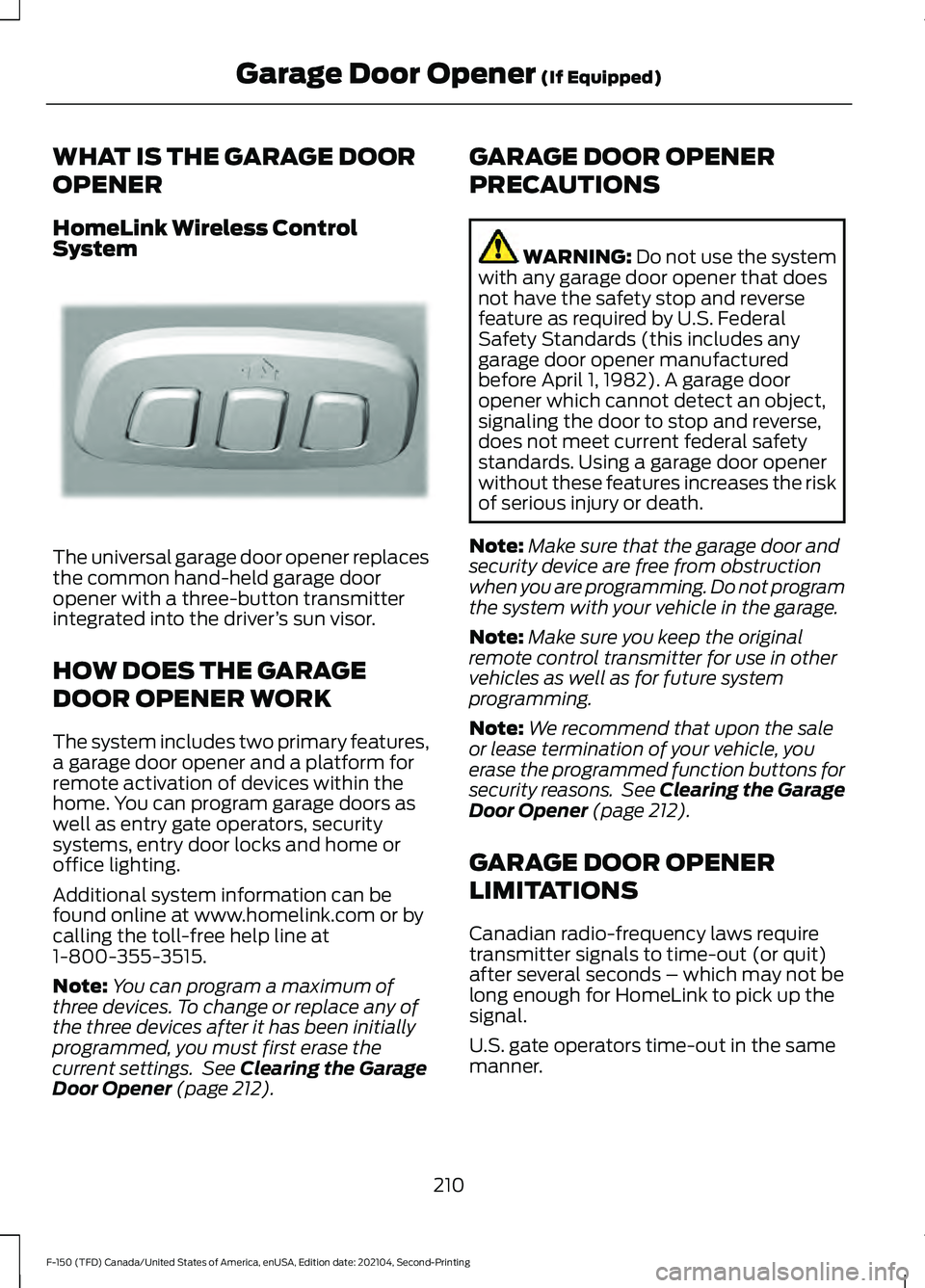
HomeLink Wireless Control
System
The universal garage door opener replaces
the common hand-held garage door
opener with a three-button transmitter
integrated into the driver
’s sun visor.
HOW DOES THE GARAGE
DOOR OPENER WORK
The system includes two primary features,
a garage door opener and a platform for
remote activation of devices within the
home. You can program garage doors as
well as entry gate operators, security
systems, entry door locks and home or
office lighting.
Additional system information can be
found online at www.homelink.com or by
calling the toll-free help line at
1-800-355-3515.
Note: You can program a maximum of
three devices. To change or replace any of
the three devices after it has been initially
programmed, you must first erase the
current settings. See Clearing the Garage
Door Opener (page 212). GARAGE DOOR OPENER
PRECAUTIONS WARNING:
Do not use the system
with any garage door opener that does
not have the safety stop and reverse
feature as required by U.S. Federal
Safety Standards (this includes any
garage door opener manufactured
before April 1, 1982). A garage door
opener which cannot detect an object,
signaling the door to stop and reverse,
does not meet current federal safety
standards. Using a garage door opener
without these features increases the risk
of serious injury or death.
Note: Make sure that the garage door and
security device are free from obstruction
when you are programming. Do not program
the system with your vehicle in the garage.
Note: Make sure you keep the original
remote control transmitter for use in other
vehicles as well as for future system
programming.
Note: We recommend that upon the sale
or lease termination of your vehicle, you
erase the programmed function buttons for
security reasons. See Clearing the Garage
Door Opener
(page 212).
GARAGE DOOR OPENER
LIMITATIONS
Canadian radio-frequency laws require
transmitter signals to time-out (or quit)
after several seconds – which may not be
long enough for HomeLink to pick up the
signal.
U.S. gate operators time-out in the same
manner.
210
F-150 (TFD) Canada/United States of America, enUSA, Edition date: 202104, Second-Printing Garage Door Opener
(If Equipped)E188211
Page 216 of 796
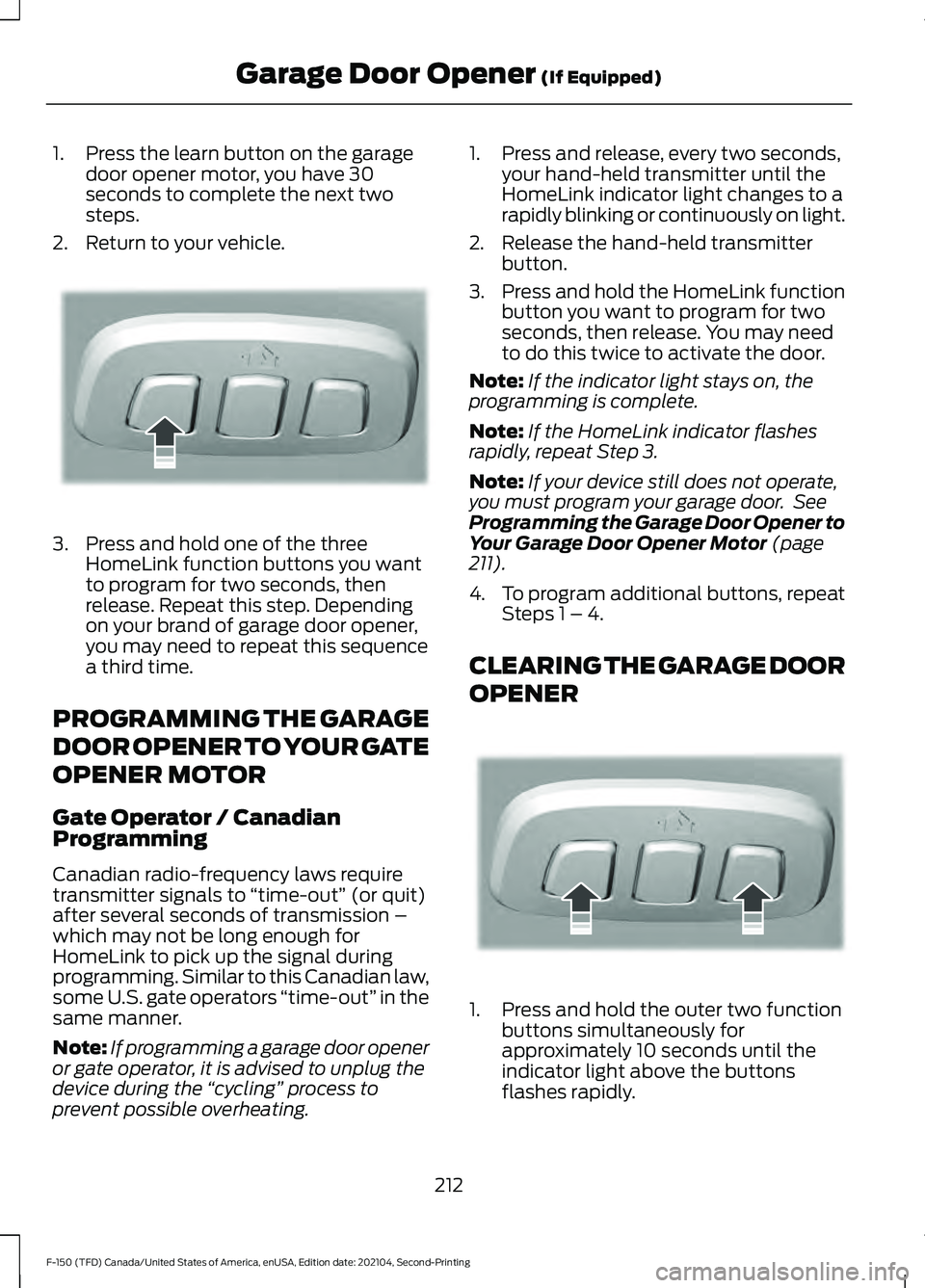
1. Press the learn button on the garage
door opener motor, you have 30
seconds to complete the next two
steps.
2. Return to your vehicle. 3. Press and hold one of the three
HomeLink function buttons you want
to program for two seconds, then
release. Repeat this step. Depending
on your brand of garage door opener,
you may need to repeat this sequence
a third time.
PROGRAMMING THE GARAGE
DOOR OPENER TO YOUR GATE
OPENER MOTOR
Gate Operator / Canadian
Programming
Canadian radio-frequency laws require
transmitter signals to “time-out” (or quit)
after several seconds of transmission –
which may not be long enough for
HomeLink to pick up the signal during
programming. Similar to this Canadian law,
some U.S. gate operators “time-out” in the
same manner.
Note: If programming a garage door opener
or gate operator, it is advised to unplug the
device during the “cycling” process to
prevent possible overheating. 1. Press and release, every two seconds,
your hand-held transmitter until the
HomeLink indicator light changes to a
rapidly blinking or continuously on light.
2. Release the hand-held transmitter button.
3. Press and hold the HomeLink function
button you want to program for two
seconds, then release. You may need
to do this twice to activate the door.
Note: If the indicator light stays on, the
programming is complete.
Note: If the HomeLink indicator flashes
rapidly, repeat Step 3.
Note: If your device still does not operate,
you must program your garage door. See
Programming the Garage Door Opener to
Your Garage Door Opener Motor (page
211).
4. To program additional buttons, repeat Steps 1 – 4.
CLEARING THE GARAGE DOOR
OPENER 1. Press and hold the outer two function
buttons simultaneously for
approximately 10 seconds until the
indicator light above the buttons
flashes rapidly.
212
F-150 (TFD) Canada/United States of America, enUSA, Edition date: 202104, Second-Printing Garage Door Opener
(If Equipped)E188212 E188213
Page 274 of 796
Before you start manual regeneration, do
the following:
•
Shift into park (P) and apply the
parking brake, on stable, level ground.
• Park your vehicle outside of any
structure.
• Park your vehicle 10– 15 ft (3–5 m)
away from any obstructions and away
from materials that can easily combust
or melt, for example paper, leaves,
petroleum products, fuels, plastics and
other dry organic material.
• Make sure there is a minimum of 1/8
tank of fuel.
• Make sure all fluids are at proper levels.
DIESEL PARTICULATE FILTER
MANUAL REGENERATION
LIMITATIONS
You cannot use manual regeneration until
the diesel particulate filter load percentage
has reached 100%. The diesel particulate
filter load percentage fluctuates up and
down when driving your vehicle due to
active and passive regenerations.
If your vehicle is operated with significant
stationary operation, low speed drive
cycles less than
25 mph (40 km/h), short
drive cycles, drive time less than 15 minutes
or the vehicle does not fully warm up,
passive and active regeneration may not
sufficiently clean the diesel particulate
filter system.
Aftermarket devices or modifications to
the exhaust system may reduce the
effectiveness of the exhaust system as
well as cause damage to the exhaust
system or engine. This may also degrade
vehicle performance and could lead to
engine damage that may not be covered
by the vehicle Warranty. STARTING DIESEL PARTICULATE
FILTER MANUAL REGENERATION
Start with your vehicle engine and when it
has reached the normal operating
temperature, press the information display
control button on the steering wheel. See
Instrument Cluster Display
(page 178).
If the diesel particulate filter is near or at
saturation, a message requesting
permission to initiate filter cleaning
appears in the information display. See
What Is the Diesel Particulate Filter
(page 268). Answer yes to this prompt and
then follow the next prompts regarding
exhaust position required to initiate
manual regeneration. Be sure to
understand each prompt. If you are not
sure what is being asked by each prompt,
contact an authorized dealer. The display
confirms the operation has started and
when it has finished. You can also drive to
clean the filter. When the system is at the point
of oversaturation, the service
engine warning lamp illuminates
and a message appears in the information
display. You cannot initiate filter cleaning.
You must have your vehicle checked as
soon as possible.
Once manual regeneration starts, engine
speed increases to approximately 1600
rpm and the cooling fan speed increases.
You will hear a change in audible sound
due to engine speed and cooling fan speed
increases.
It is not necessary to open the hood on the
engine compartment. Once manual
regeneration completes, the engine speed
returns to normal idling. The exhaust
system remains very hot for several
minutes even after regeneration is
complete. Do not reposition the vehicle
over materials that could burn until the
270
F-150 (TFD) Canada/United States of America, enUSA, Edition date: 202104, Second-Printing Diesel Particulate Filter
(If Equipped)