display FORD F-150 2021 Owners Manual
[x] Cancel search | Manufacturer: FORD, Model Year: 2021, Model line: F-150, Model: FORD F-150 2021Pages: 796, PDF Size: 13.89 MB
Page 9 of 796

Engine Oil Pressure Gauge
.......................172
Transmission Fluid Temperature Gauge ........................................................................\
..
172
Turbo Boost Gauge ......................................
172
Diesel Exhaust Fluid Gauge ......................
172
What Are the Instrument Cluster Warning Lamps .........................................
172
Instrument Cluster Warning Lamps ......
173
What Are the Instrument Cluster Indicators ....................................................
174
Instrument Cluster Indicators .................
174
Instrument Cluster Indicators - Police Responder ..................................................
176
Instrument Cluster Display
Using the Instrument Cluster Display Controls .......................................................
178
Instrument Cluster Display Main Menu - Vehicles With: 12.3 Inch Screen ..........
178
Instrument Cluster Display Main Menu - Raptor, Vehicles With: 12.3 Inch Screen
........................................................................\
.
179
Instrument Cluster Display Main Menu - Vehicles With: 4.2 Inch Screen ...........
179
Instrument Cluster Display Main Menu - Vehicles With: 8 Inch Screen ...............
179
Trip Computer - Vehicles With: 4.2 Inch Screen .........................................................
180
Trip Computer - Vehicles With: 8 Inch Screen/12.3 Inch Screen ......................
180
Customizing the Instrument Cluster Display ........................................................
180
Personalized Settings .................................
181
Hybrid Display Information .......................
181
What Is Brake Coach ...................................
181
What Is the Trip Summary .......................
182
Remote Start
What Is Remote Start ................................
183
Remote Start Precautions .......................
183
Remote Start Limitations .........................
183
Enabling Remote Start ..............................
183Remotely Starting and Stopping the
Vehicle .........................................................
183
Extending the Remote Start Duration ........................................................................\
.
184
Remote Start Remote Control Indicators ........................................................................\
.
184
Remote Start Settings ..............................
184
Climate Control - Vehicles With: Automatic
Temperature Control
Identifying the Climate Control Unit .....
186
Switching Climate Control On and Off ........................................................................\
186
Switching Recirculated Air On and Off ........................................................................\
186
Switching Air Conditioning On and Off ........................................................................\
186
Switching Defrost On and Off ................
186
Switching Maximum Defrost On and Off ........................................................................\
186
Switching Maximum Cooling On and Off ........................................................................\
.
187
Switching the Heated Wiper Park On and Off .................................................................
187
Switching the Heated Rear Window On and Off .........................................................
187
Setting the Blower Motor Speed ...........
187
Switching the Heated Mirrors On and Off ........................................................................\
.
187
Setting the Temperature ...........................
187
Directing the Flow of Air ...........................
188
Auto Mode .....................................................
188
Climate Control Hints ................................
189
Climate Control - Vehicles With: Manual Temperature
Control
Identifying the Climate Control Unit ......
191
Switching Climate Control On and Off ........................................................................\
..
191
Switching Recirculated Air On and Off ........................................................................\
..
191
5
F-150 (TFD) Canada/United States of America, enUSA, Edition date: 202104, Second-Printing Table of Contents
Page 21 of 796
Cooling System Capacity and
Specification - 5.0L ................................601
Cooling System Capacity and Specification - 3.5L Ecoboost™,
Raptor, Police Responder ...................
602
Fuel Tank Capacity - Gasoline, Excluding: Hybrid Electric Vehicle (HEV) ...........
603
Fuel Tank Capacity - Diesel ...................
604
Fuel Tank Capacity - Gasoline, Hybrid Electric Vehicle (HEV) .........................
605
Fuel Tank Capacity - Raptor ..................
606
Air Conditioning System Capacity and Specification - 2.7L EcoBoost™ .......
607
Air Conditioning System Capacity and Specification - 3.0L Diesel .................
608
Air Conditioning System Capacity and Specification - 3.3L ...............................
609
Air Conditioning System Capacity and Specification - 3.5L Ecoboost™ .......
610
Air Conditioning System Capacity and Specification - 3.5L, Hybrid Electric
Vehicle (HEV) ............................................
611
Air Conditioning System Capacity and Specification - 5.0L ................................
612
Washer Fluid Specification ......................
612
Diesel Exhaust Fluid Capacity and Specification .............................................
613
Brake Fluid Specification ..........................
613
Transfer Case Fluid Capacity and Specification - 4x4 .................................
614
Transfer Case Fluid Capacity and Specification - Raptor ...........................
615
Front Axle Fluid Capacity and Specification - 4x4 .................................
616
Rear Axle Fluid Capacity and Specification .............................................
616
Rear Axle Fluid Capacity and Specification - Raptor ............................
617
Rear Axle Fluid Capacity and Specification - Police Responder ......
618
Vehicle Identification
Vehicle Identification Number ...............
619Connected Vehicle
What Is a Connected Vehicle
................
620
Connected Vehicle Requirements .......
620
Connected Vehicle Limitations .............
620
Connecting the Vehicle to a Mobile Network .....................................................
620
Connecting the Vehicle to a Wi-Fi Network .....................................................
620
Connected Vehicle – Troubleshooting ........................................................................\
.
621
Vehicle Wi-Fi Hotspot
Creating a Vehicle Wi-Fi Hotspot .........
624
Changing the Vehicle Wi-Fi Hotspot Name or Password ................................
624
Audio System
Audio System Precautions .....................
626
Identifying the Audio Unit .......................
626
Switching the Audio Unit On and Off ........................................................................\
626
Selecting the Audio Source ....................
626
Playing or Pausing the Audio Source ........................................................................\
626
Adjusting the Volume ................................
627
Switching Shuffle Mode On and Off ........................................................................\
627
Switching Repeat Mode On and Off ........................................................................\
627
Setting a Memory Preset .........................
627
Muting the Audio .........................................
627
Adjusting the Sound Settings ................
627
Setting the Clock and Date ....................
628
AM/FM Radio ...............................................
628
Switching the Display On and Off .......
629
Digital Radio .................................................
629
Satellite Radio .............................................
630
Audio System – Troubleshooting .........
633
Center Display Overview
Center Display Precautions .....................
637
17
F-150 (TFD) Canada/United States of America, enUSA, Edition date: 202104, Second-Printing Table of Contents
Page 22 of 796
Center Display Limitations
......................637
Status Bar ......................................................
637
Feature Bar ...................................................
638
Information On Demand Screen - Vehicles With: 12.3 Inch Screen ........
639
Rebooting the Center Display ...............
639
Voice Interaction
What is Voice Interaction ........................
640
Setting the Wake Word ...........................
640
Beginning a Voice Interaction ...............
640
Voice Interaction Examples ...................
640
Phone
Phone Precautions ....................................
643
Connecting Your Phone ...........................
643
Phone Menu .................................................
643
Making and Receiving a Phone Call .....
645
Sending and Receiving a Text Message .......................................................................
646
Switching Text Message Notification On and Off .......................................................
647
Bluetooth®
Connecting a Bluetooth® Device ........
648
Playing Media Using Bluetooth® .........
648
Apps
App Precautions .........................................
649
App Requirements ....................................
649
Accessing Apps ...........................................
649
Enabling Apps on an iOS Device ..........
649
Enabling Apps on an Android Device .......................................................................
649
Switching Apple CarPlay On and Off .......................................................................
650
Switching Android Auto On and Off ....
650
Personal Profiles
How Do Personal Profiles Work .............
651Enabling or Disabling Personal Profiles
........................................................................\
.
651
Creating a Personal Profile .....................
652
Linking or Unlinking a Personal Profile to a Remote Control ...................................
652
Navigation
Accessing Navigation ................................
653
Navigation Map Updates .........................
653
Adjusting the Map ......................................
653
Live Traffic .....................................................
653
Setting a Destination ................................
653
Waypoints .....................................................
654
Route Guidance ..........................................
654
Trailer Towing Navigation ........................
655
Vehicle System Updates
Updating the Vehicle Systems Wirelessly .......................................................................
656
Performing a Master Reset .....................
657
Accessories
Accessories ...................................................
658
Auxiliary Switches - Raptor/ Tremor
What Are the Auxiliary Switches ..........
659
Locating the Auxiliary Switches ...........
659
Locating the Auxiliary Switch Wiring .......................................................................
659
Identifying the Auxiliary Switch Wiring .......................................................................
660
Warranty Terms and Conditions - Raptor
Base Warranty ..............................................
661
Ford Protect
What Is Ford Protect .................................
662
18
F-150 (TFD) Canada/United States of America, enUSA, Edition date: 202104, Second-Printing Table of Contents
Page 36 of 796
MOBILE DEVICE DATA
If you connect a mobile device to your
vehicle, you can display data from your
device on the touchscreen for example,
music and album art. You can share your
vehicle data with mobile apps on your
device through the system. See App
Requirements (page 649).
The mobile apps function operates by your
connected device sending data to us in the
United States. The data is encrypted and
includes, for example, the vehicle
identification number of your vehicle, the
SYNC module serial number, odometer,
enabled apps, usage statistics and
debugging information. We retain it only
as long as necessary to provide the service,
to troubleshoot, for continuous
improvement and to offer you products
and services that may be of interest to you
according to your preferences and where
allowed by law.
If you connect a cell phone to the system,
the system creates a profile that links to
that cell phone. The cell phone profile
enables more mobile features and efficient
operation. The profile contains, for
example data from your phonebook, read
and unread text messages and call history,
including history of calls when your cell
phone was not connected to the system.
If you connect a media device, the system
creates and retains a media device index
of supported media content. The system
also records a short diagnostic log of
approximately 10 minutes of all recent
system activity. The cell phone profile, media device index
and diagnostic log remain in your vehicle
unless you delete them and are generally
accessible only in your vehicle when you
connect your cell phone or media device.
If you no longer plan to use the system or
your vehicle, we recommend you use the
master reset function to erase the stored
information. See Performing a Master
Reset (page 657).
System data cannot be accessed without
special equipment and access to your
vehicle's module.
For additional information about our
privacy policy, refer to the local Ford
website.
Note: To find out if your vehicle has
connectivity technology, visit
www .For dC onne c t e d . c om .
EMERGENCY CALL SYSTEM
DATA
(IF EQUIPPED)
When the emergency call system is active,
it may disclose to emergency services that
your vehicle has been in a crash involving
the deployment of an airbag or activation
of the fuel pump shut-off. Certain versions
or updates to the emergency call system
may also be capable of electronically or
verbally disclosing to emergency services
operators your vehicle location or other
details about your vehicle or crash to assist
emergency services operators to provide
the most appropriate emergency services.
If you do not want to disclose this
information, do not activate the emergency
call system.
Note: You cannot deactivate emergency
call systems that are required by law.
32
F-150 (TFD) Canada/United States of America, enUSA, Edition date: 202104, Second-Printing Data Privacy
Page 38 of 796
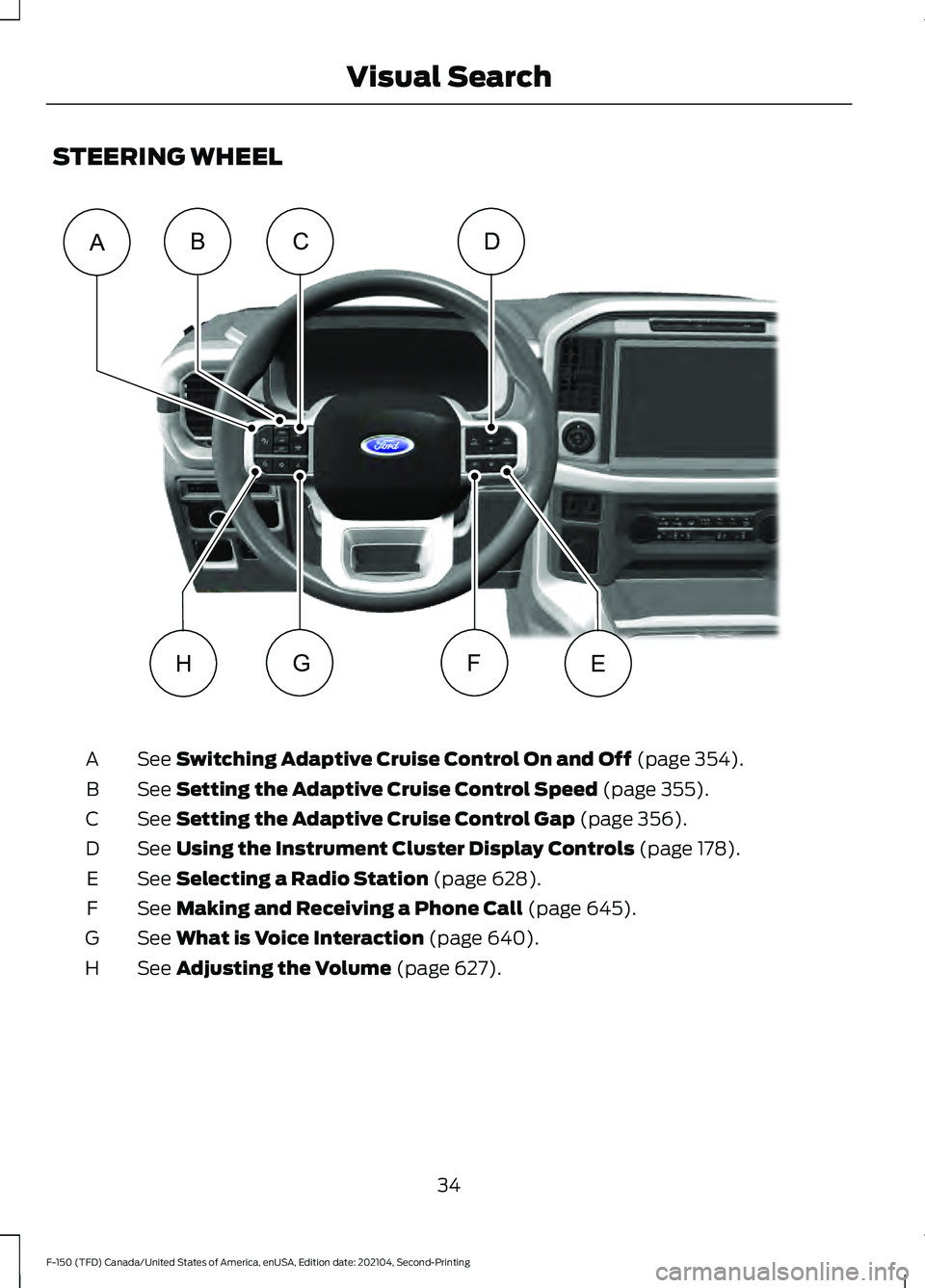
STEERING WHEEL
See Switching Adaptive Cruise Control On and Off (page 354).
A
See
Setting the Adaptive Cruise Control Speed (page 355).
B
See
Setting the Adaptive Cruise Control Gap (page 356).
C
See
Using the Instrument Cluster Display Controls (page 178).
D
See
Selecting a Radio Station (page 628).
E
See
Making and Receiving a Phone Call (page 645).
F
See
What is Voice Interaction (page 640).
G
See
Adjusting the Volume (page 627).
H
34
F-150 (TFD) Canada/United States of America, enUSA, Edition date: 202104, Second-Printing Visual SearchCD
EHFG
ABE356893
Page 39 of 796
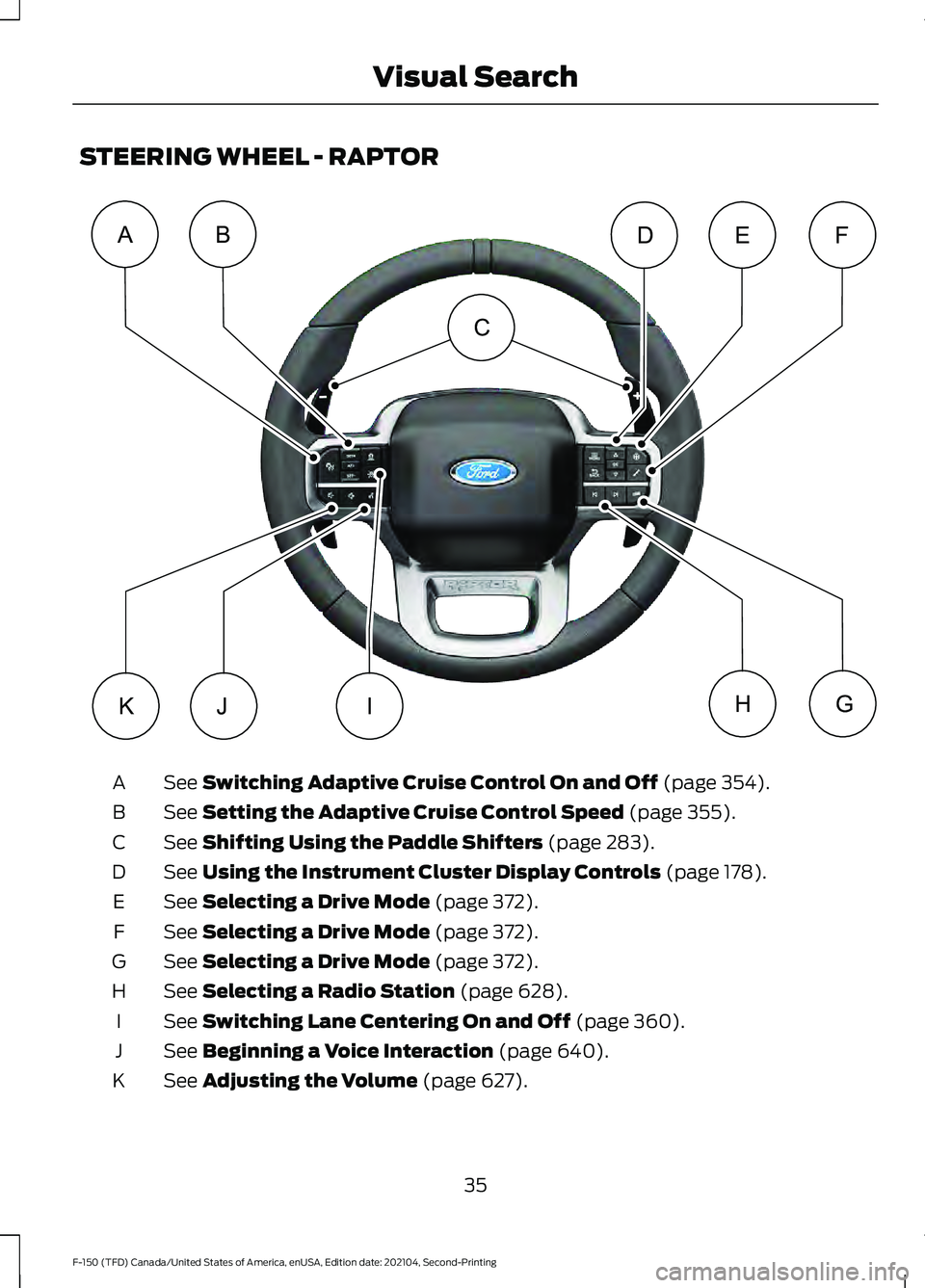
STEERING WHEEL - RAPTOR
See Switching Adaptive Cruise Control On and Off (page 354).
A
See
Setting the Adaptive Cruise Control Speed (page 355).
B
See
Shifting Using the Paddle Shifters (page 283).
C
See
Using the Instrument Cluster Display Controls (page 178).
D
See
Selecting a Drive Mode (page 372).
E
See
Selecting a Drive Mode (page 372).
F
See
Selecting a Drive Mode (page 372).
G
See
Selecting a Radio Station (page 628).
H
See
Switching Lane Centering On and Off (page 360).
I
See
Beginning a Voice Interaction (page 640).
J
See
Adjusting the Volume (page 627).
K
35
F-150 (TFD) Canada/United States of America, enUSA, Edition date: 202104, Second-Printing Visual SearchABFED
KJGHI
C E343517
Page 40 of 796
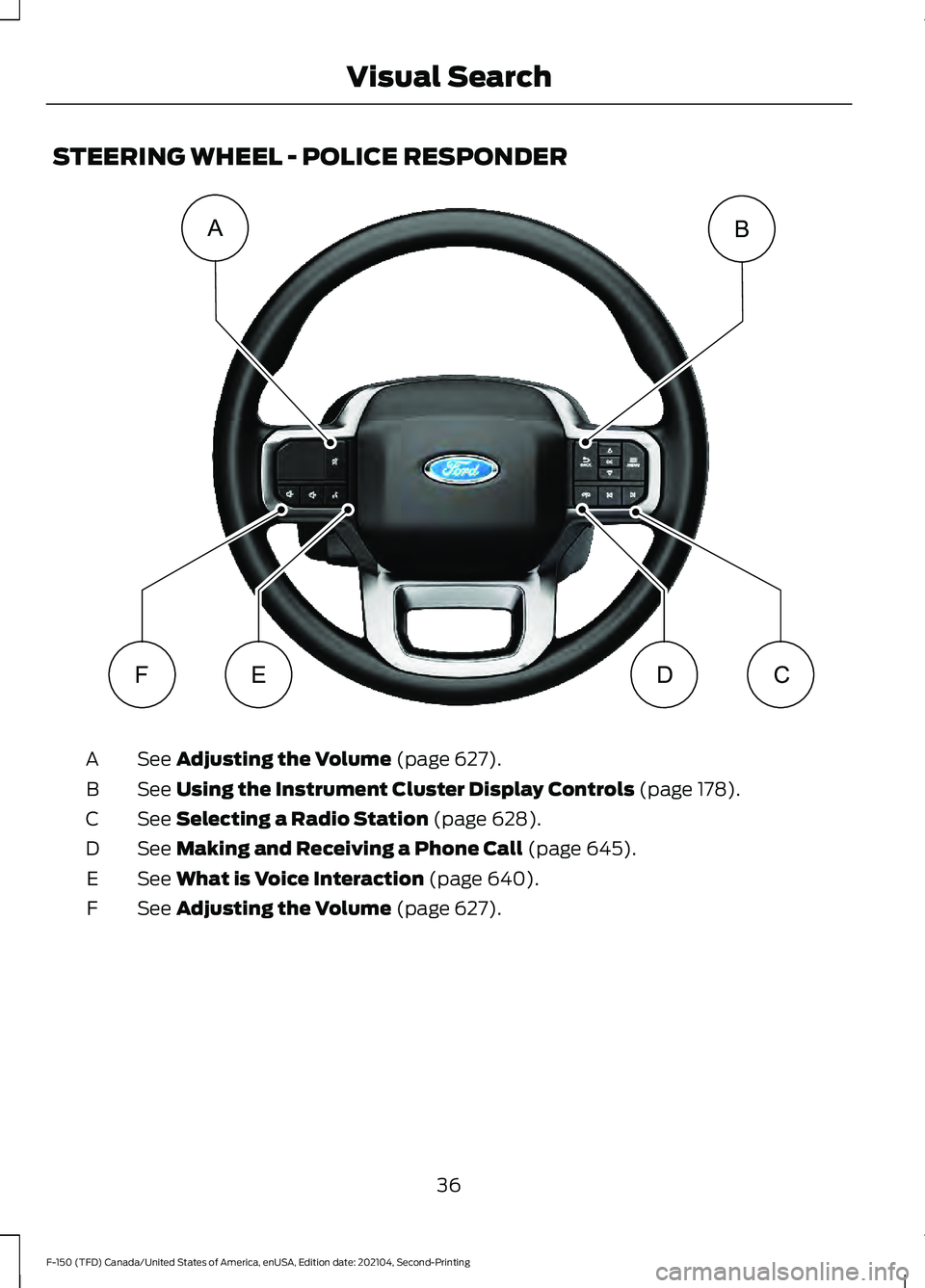
STEERING WHEEL - POLICE RESPONDER
See Adjusting the Volume (page 627).
A
See
Using the Instrument Cluster Display Controls (page 178).
B
See
Selecting a Radio Station (page 628).
C
See
Making and Receiving a Phone Call (page 645).
D
See
What is Voice Interaction (page 640).
E
See
Adjusting the Volume (page 627).
F
36
F-150 (TFD) Canada/United States of America, enUSA, Edition date: 202104, Second-Printing Visual SearchAB
FEDCE343530
Page 92 of 796
•
A connected Bluetooth® enabled
phone must have adequate network
coverage, battery power and signal
strength.
• The vehicle must have battery power
and be located in the U.S., Canada or
in a territory in which 911 is the
emergency number.
Note: If any user sets 911 Assist to on or off,
that setting applies for all paired phones. If
911 Assist is off and the phone connected
to SYNC, an icon displays on the status bar.
Note: Every phone operates differently.
While SYNC 911 Assist works with most
cellular phones, some may have trouble
using this feature.
EMERGENCY CALL
LIMITATIONS
The SYNC 911 Assist feature only operates
in the U.S., Canada or in a territory in which
911 is the emergency number. The following
are limitations of this feature:
• Your cellular phone or 911 Assist
hardware sustains damage in a crash.
• The vehicle's battery or the SYNC
system has no power.
• The phone(s) thrown from your vehicle
are the ones paired and connected to
the system.
88
F-150 (TFD) Canada/United States of America, enUSA, Edition date: 202104, Second-Printing 911 Assist
(If Equipped)
Page 102 of 796
WHAT IS MYKEY
MyKey allows you to program keys with
restricted driving modes to promote good
driving habits.
MYKEY SETTINGS
NON-CONFIGURABLE MYKEY
SETTINGS
Seatbelt Reminder or Belt-
Minder™
MyKey mutes the audio system until the
front seat passengers buckle the front seat
belts.
Note:
If your vehicle includes an AM/FM
radio or a very basic audio system, then the
radio may not mute.
Satellite Radio (If Equipped)
Some Satellite radio channels have
restricted access to adult radio content.
Early Low Fuel
The low fuel level warning lamp turns on
earlier.
Driving and Parking Aids
You cannot configure settings for parking
aids, blind spot information system, and
cross traffic alert. These systems turn on
when the vehicle turns on, and you cannot
switch them off with a MyKey.
You cannot configure settings for
pre-collision assist and lane keeping. These
systems turn on when the vehicle turns on,
but you can switch them off with a MyKey.
A new destination in the navigation system
can only be set using voice commands
when using a MyKey, and with your vehicle
moving. Note:
MyKey drivers may be able to switch
the lane departure warning feature off, but
this feature turns back on automatically
with every new key cycle.
CONFIGURABLE MYKEY
SETTINGS
You can configure the following settings
after creating a MyKey. See
Creating a
MyKey (page 100).
Speed Limit WARNING:
Do not set MyKey
maximum speed limit to a limit that will
prevent the driver from maintaining a
safe speed considering posted speed
limits and prevailing road conditions. The
driver is always responsible to drive in
accordance with local laws and
prevailing conditions. Failure to do so
could result in accident or injury.
You can set a speed limit for your vehicle.
Warning messages appear in the
information display and a tone sounds if
your vehicle reaches the set speed. You
cannot override the set speed when using
a MyKey.
Speed Minder
You can set a speed reminder for your
vehicle. Warning messages appear in the
information display and a tone sounds if
your vehicle exceeds the set speed.
Audio System Volume Limit
The audio system maximum volume
reduces. A message appears in the
information display if you attempt to
exceed the volume limit. Automatic
volume control turns off.
98
F-150 (TFD) Canada/United States of America, enUSA, Edition date: 202104, Second-Printing MyKey
™
(If Equipped)
Page 105 of 796
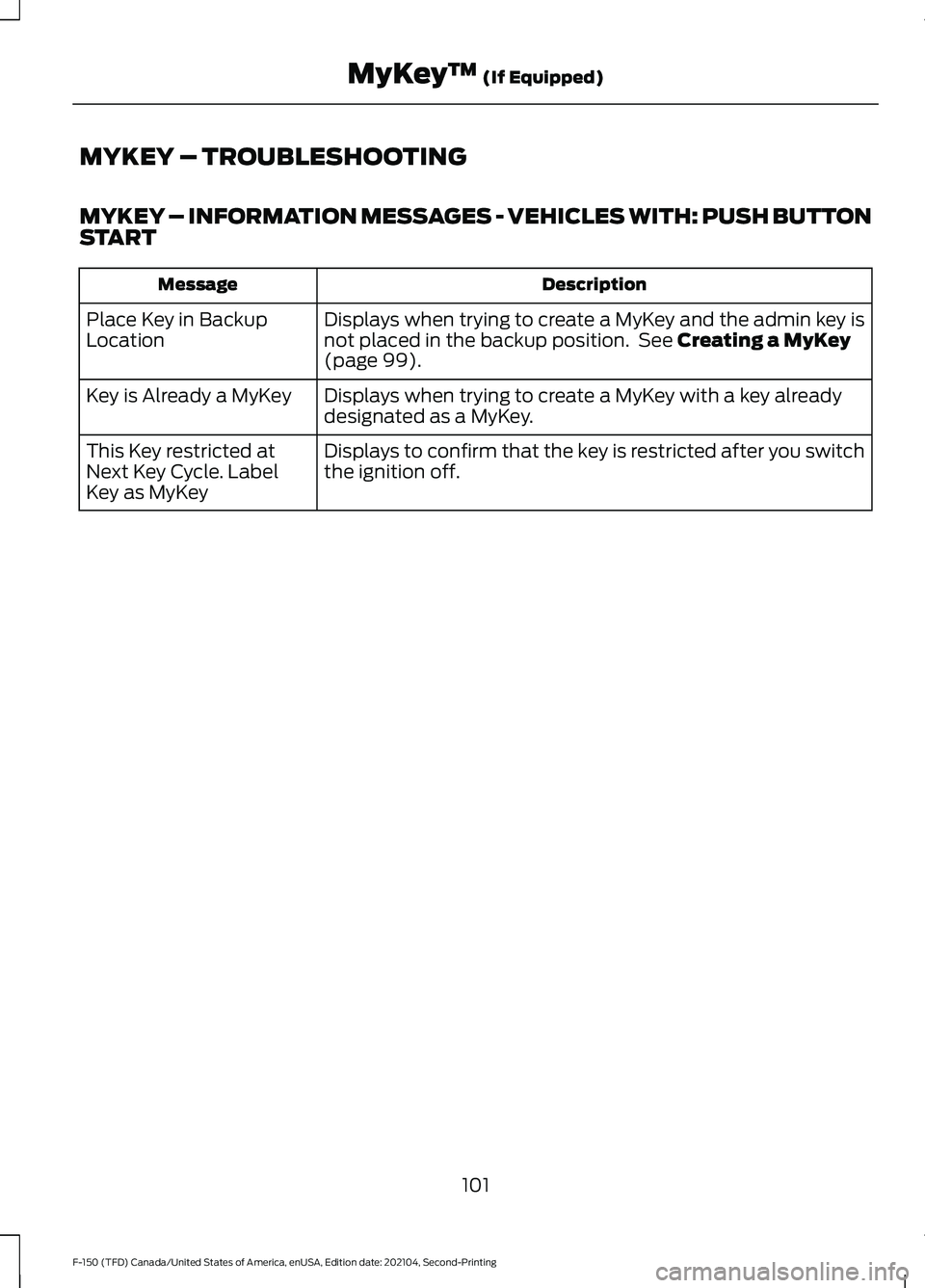
MYKEY – TROUBLESHOOTING
MYKEY – INFORMATION MESSAGES - VEHICLES WITH: PUSH BUTTON
START
Description
Message
Displays when trying to create a MyKey and the admin key is
not placed in the backup position. See Creating a MyKey
(page 99).
Place Key in Backup
Location
Displays when trying to create a MyKey with a key already
designated as a MyKey.
Key is Already a MyKey
Displays to confirm that the key is restricted after you switch
the ignition off.
This Key restricted at
Next Key Cycle. Label
Key as MyKey
101
F-150 (TFD) Canada/United States of America, enUSA, Edition date: 202104, Second-Printing MyKey
™
(If Equipped)