changing a flat FORD F-150 2022 User Guide
[x] Cancel search | Manufacturer: FORD, Model Year: 2022, Model line: F-150, Model: FORD F-150 2022Pages: 750, PDF Size: 12.96 MB
Page 557 of 750
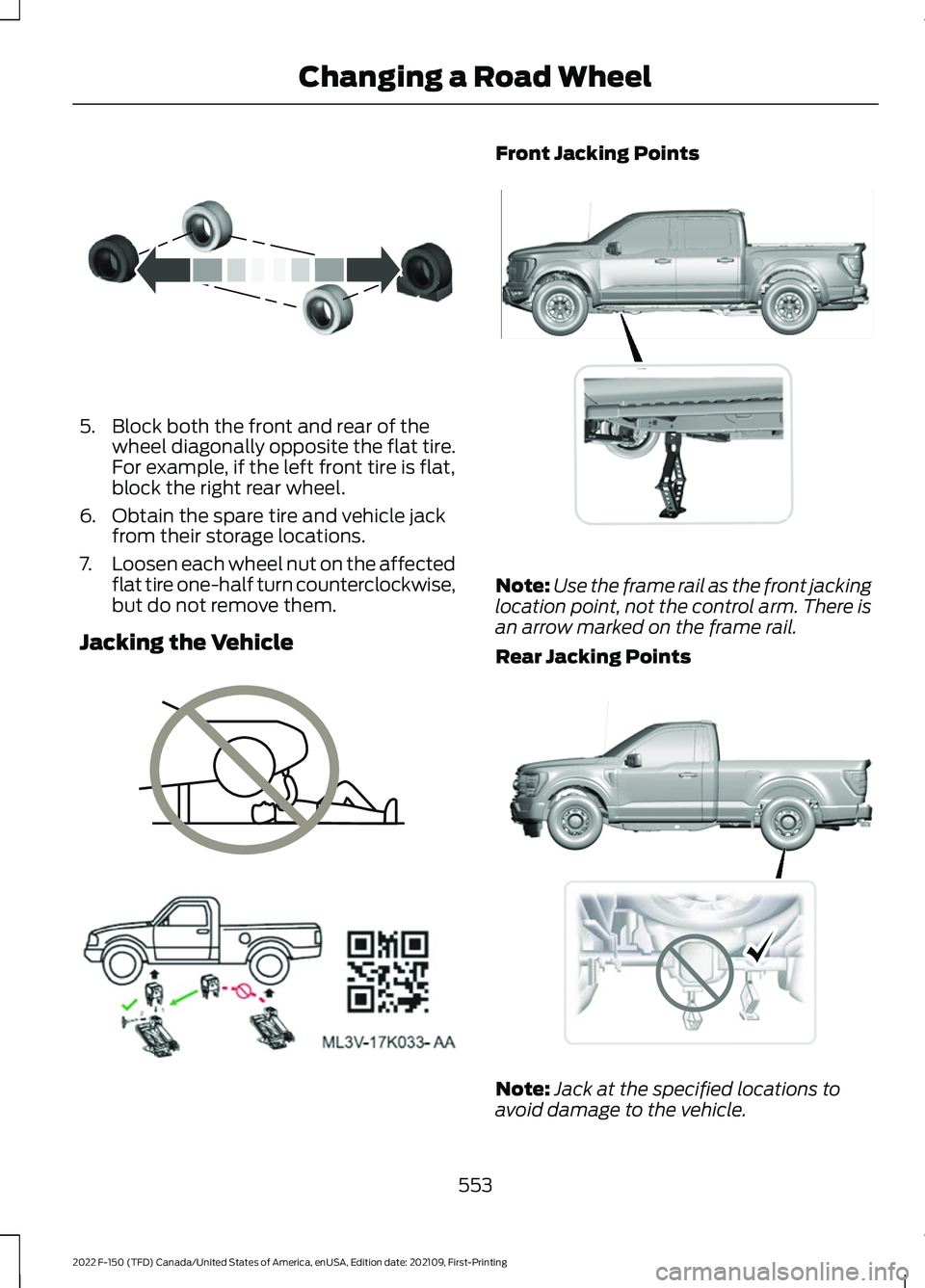
5. Block both the front and rear of the
wheel diagonally opposite the flat tire.
For example, if the left front tire is flat,
block the right rear wheel.
6. Obtain the spare tire and vehicle jack from their storage locations.
7. Loosen each wheel nut on the affected
flat tire one-half turn counterclockwise,
but do not remove them.
Jacking the Vehicle Front Jacking Points
Note:
Use the frame rail as the front jacking
location point, not the control arm. There is
an arrow marked on the frame rail.
Rear Jacking Points Note:
Jack at the specified locations to
avoid damage to the vehicle.
553
2022 F-150 (TFD) Canada/United States of America, enUSA, Edition date: 202109, First-Printing Changing a Road WheelE175447 E166722 E363810 E363124 E323397
Page 558 of 750
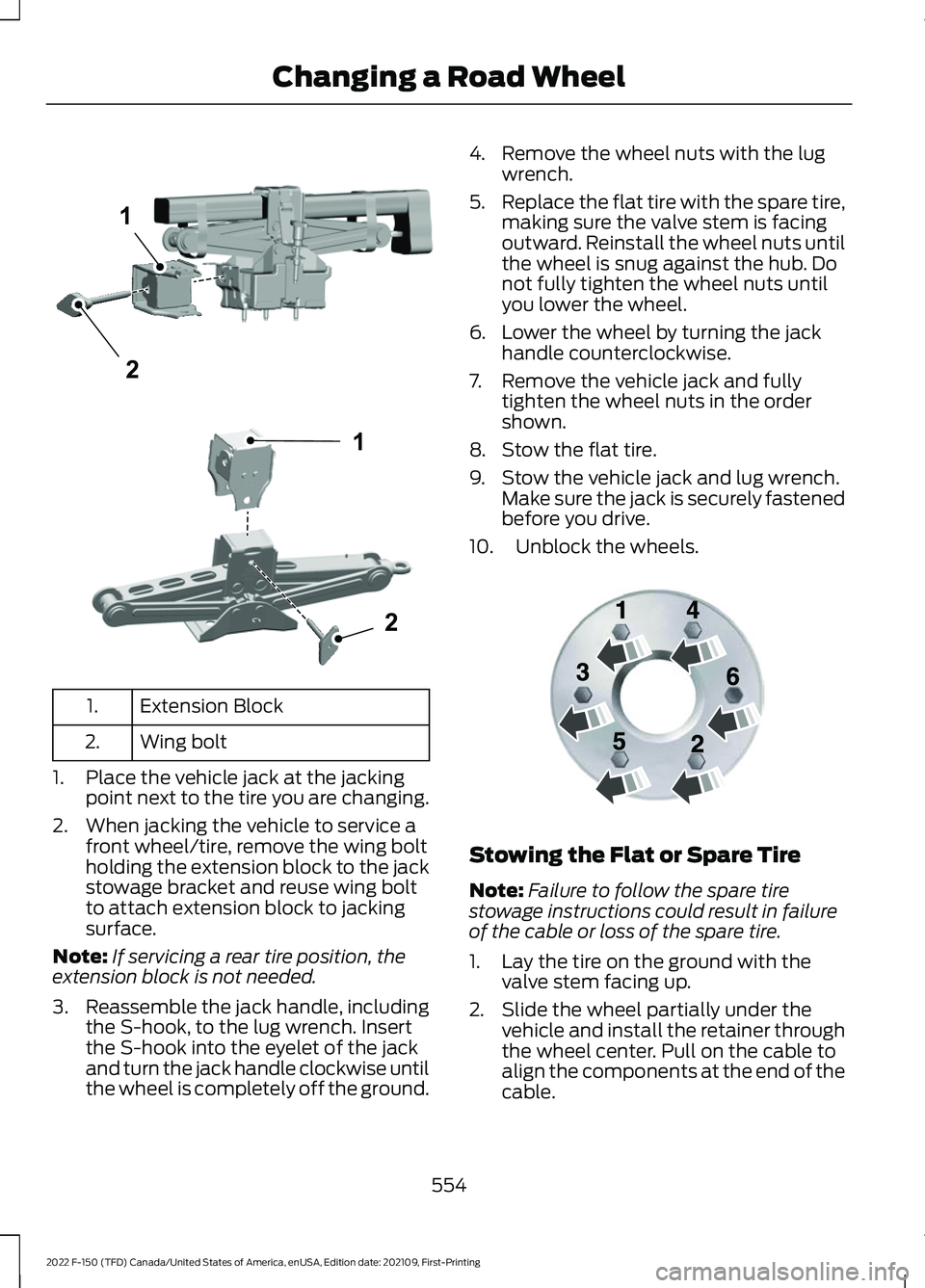
Extension Block
1.
Wing bolt
2.
1. Place the vehicle jack at the jacking point next to the tire you are changing.
2. When jacking the vehicle to service a front wheel/tire, remove the wing bolt
holding the extension block to the jack
stowage bracket and reuse wing bolt
to attach extension block to jacking
surface.
Note: If servicing a rear tire position, the
extension block is not needed.
3. Reassemble the jack handle, including
the S-hook, to the lug wrench. Insert
the S-hook into the eyelet of the jack
and turn the jack handle clockwise until
the wheel is completely off the ground. 4. Remove the wheel nuts with the lug
wrench.
5. Replace the flat tire with the spare tire,
making sure the valve stem is facing
outward. Reinstall the wheel nuts until
the wheel is snug against the hub. Do
not fully tighten the wheel nuts until
you lower the wheel.
6. Lower the wheel by turning the jack handle counterclockwise.
7. Remove the vehicle jack and fully tighten the wheel nuts in the order
shown.
8. Stow the flat tire.
9. Stow the vehicle jack and lug wrench. Make sure the jack is securely fastened
before you drive.
10. Unblock the wheels. Stowing the Flat or Spare Tire
Note:
Failure to follow the spare tire
stowage instructions could result in failure
of the cable or loss of the spare tire.
1. Lay the tire on the ground with the valve stem facing up.
2. Slide the wheel partially under the vehicle and install the retainer through
the wheel center. Pull on the cable to
align the components at the end of the
cable.
554
2022 F-150 (TFD) Canada/United States of America, enUSA, Edition date: 202109, First-Printing Changing a Road Wheel1
2E363809 1
2E363808 E166719
Page 559 of 750
3. Turn the jack handle clockwise until
you raise the tire to its stowed position
underneath the vehicle. The effort to
turn the jack handle increases
significantly and the spare tire carrier
ratchets or slips when you raise the tire
to the maximum tightness. Tighten to
the point where the ratchet or slip
occurs a minimum of three times, as
indicated by an audible click each time.
The spare tire carrier does not allow
you to overtighten. If the spare tire
carrier ratchets or slips with little effort,
have your vehicle checked as soon as
possible.
4. Check that the tire lies flat against the frame and you properly tighten it. Try
to push or pull, then turn the tire to be
sure it does not move. Loosen and
retighten, if necessary. Failure to
properly stow the spare tire could
result in failure of the winch cable and
loss of the tire.
5. Repeat this tightness check procedure
when servicing the spare tire pressure,
every six months, as per your scheduled
maintenance information, or at any
time that the spare tire gets disturbed
through service of other components.
6. If removed, install the spare tire lock into the bumper drive tube with the
spare tire lock key and jack handle. Stowing the Vehicle Jack and Tool
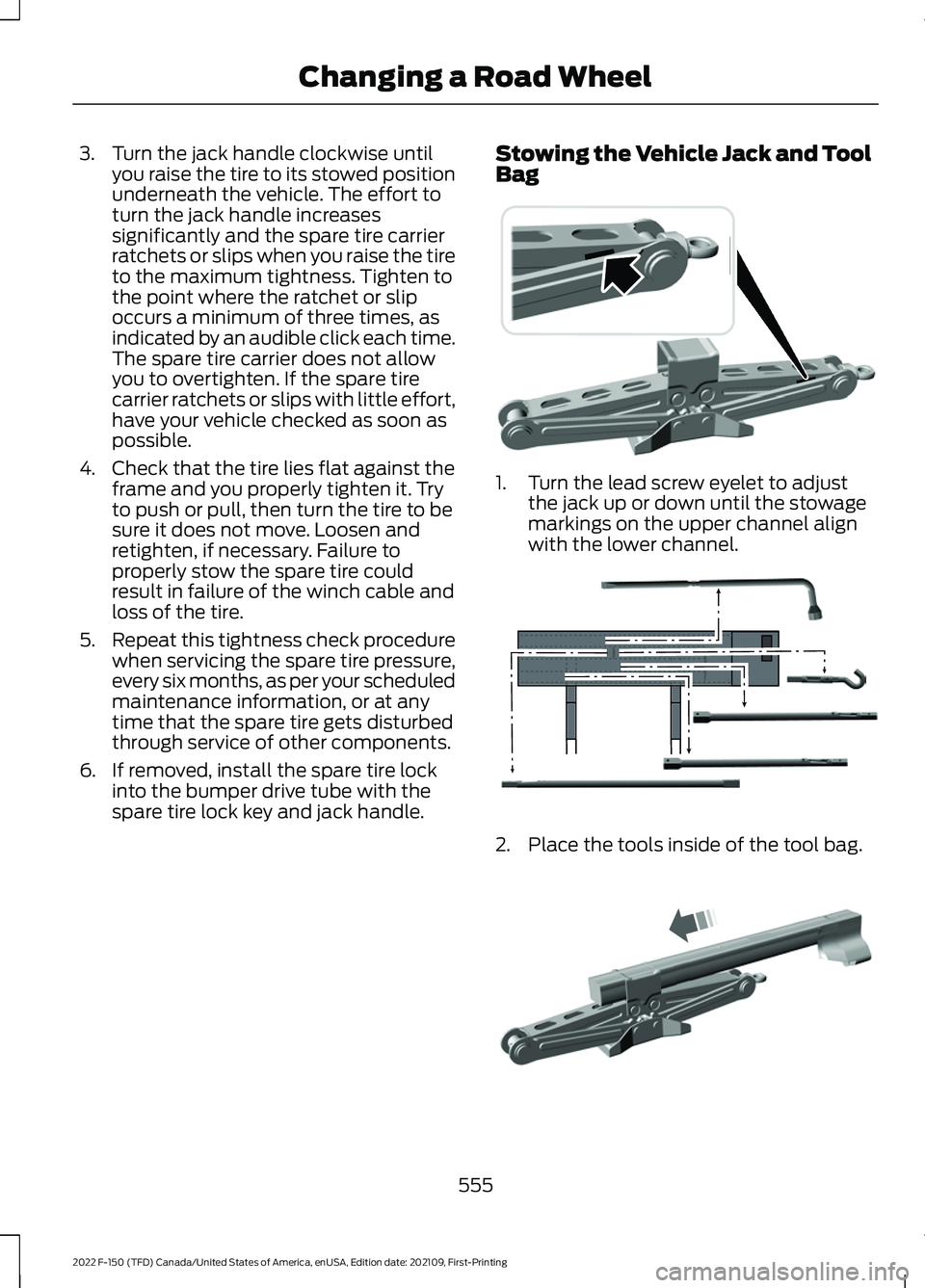
Bag 1. Turn the lead screw eyelet to adjust
the jack up or down until the stowage
markings on the upper channel align
with the lower channel. 2. Place the tools inside of the tool bag.
555
2022 F-150 (TFD) Canada/United States of America, enUSA, Edition date: 202109, First-Printing Changing a Road Wheel E323394 E323393 E327653
Page 561 of 750
Retighten the wheel nuts to the specified
torque within 100 mi (160 km) after any
wheel disturbance, such as tire rotation,
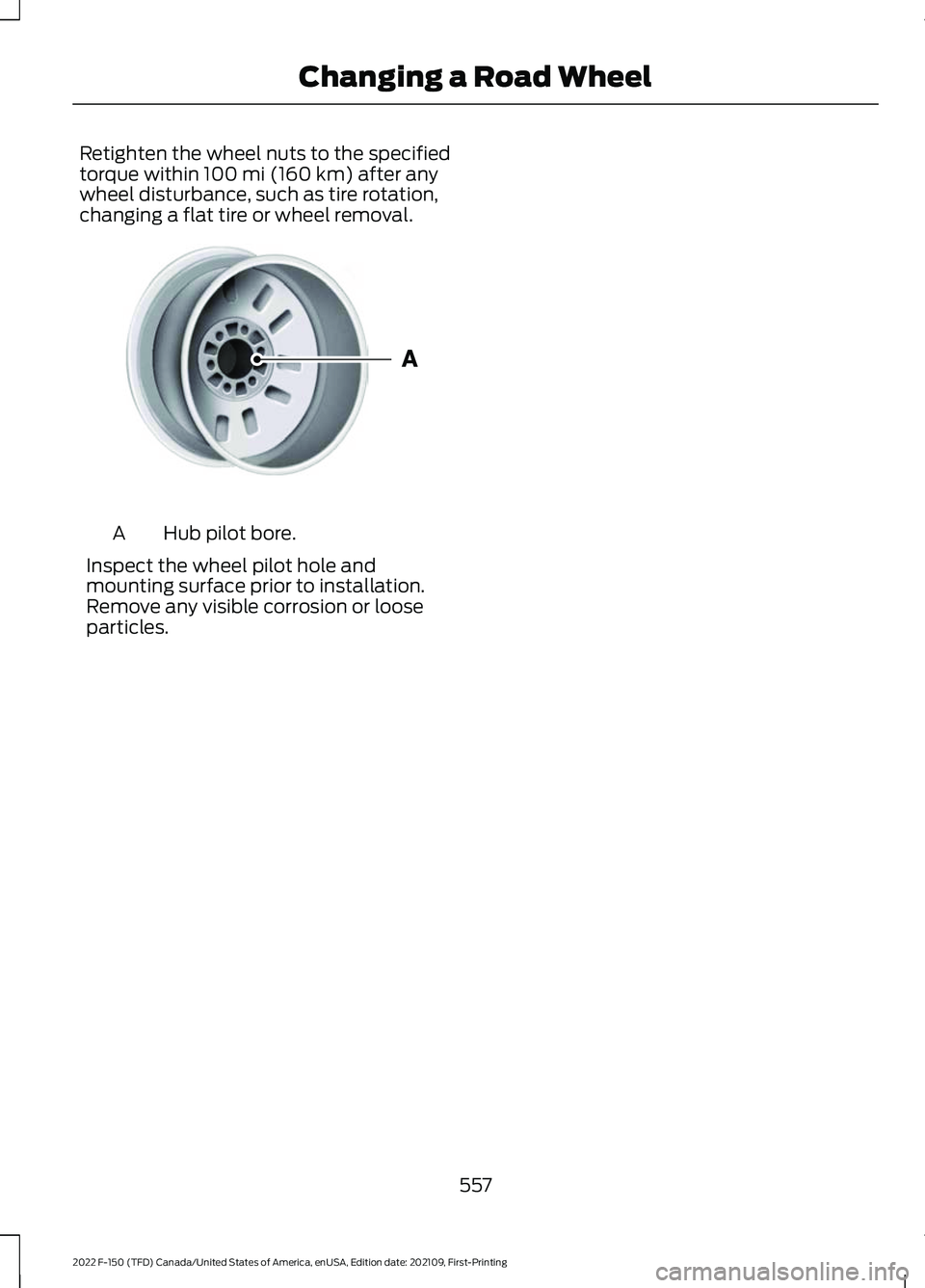
changing a flat tire or wheel removal. Hub pilot bore.
A
Inspect the wheel pilot hole and
mounting surface prior to installation.
Remove any visible corrosion or loose
particles.
557
2022 F-150 (TFD) Canada/United States of America, enUSA, Edition date: 202109, First-Printing Changing a Road WheelE145950
Page 726 of 750
Beginning a Voice Interaction...................617
Blind Spot Information System.............368 Blind Spot Information System –
Troubleshooting.............................................. 371
Blind Spot Information System With Trailer Coverage.......................................................... 369
Blind Spot Information System Indicators.......................................................371
Blind Spot Information System Limitations..................................................368
Blind Spot Information System Precautions................................................368
Blind Spot Information System Requirements............................................368
Blind Spot Information System – Troubleshooting.........................................371
Blind Spot Information System – Information Messages.................................. 371
Blind Spot Information System With Trailer Coverage........................................369
Blind Spot Information System With Trailer Coverage Limitations.................................. 369
Selecting a Trailer................................................ 371
Setting a Trailer Length................................... 370
What Is Blind Spot Information System with Trailer Coverage............................................ 369
BlueCruise Alerts
..........................................347
BlueCruise Automatic Cancellation................................................347
BlueCruise......................................................344 BlueCruise – Troubleshooting...................... 348
BlueCruise Indicators
..................................347
BlueCruise Limitations..............................345
BlueCruise Precautions.............................344
BlueCruise Requirements.........................345
BlueCruise Settings....................................346
BlueCruise – Troubleshooting................348 BlueCruise – Information Messages..........348
Bluetooth®....................................................625
Body Control Module Fuse Box
..............478
Accessing the Body Control Module Fuse
Box...................................................................... 478
Identifying the Fuses in the Body Control Module Fuse Box........................................... 478
Locating the Body Control Module Fuse Box...................................................................... 478
Bonnet Lock See: Opening and Closing the Hood..........482 Booster Seats
..................................................58
Brake Fluid Specification..........................287
Brake Over Accelerator.............................286
Brake Over Accelerator - Raptor............286
Brake Precautions.......................................286
Brakes..............................................................286 Anti-Lock Braking System............................. 286
Brakes – Troubleshooting.............................. 288
Brakes – Troubleshooting........................288 Brakes – Frequently Asked
Questions........................................................ 288
Brakes – Warning Lamps............................... 288
Breaking-In.....................................................455
C
Calculating Payload
.....................................391
Calculating the Load Limit........................391
Canceling the Set Speed..........................330
Canceling the Set Speed - Raptor........303
Capacities and Specifications
................558
Catalytic Converter.....................................258
Catalytic Converter –
Troubleshooting............................................ 258
Catalytic Converter Precautions............258
Catalytic Converter – Troubleshooting........................................
258
Catalytic Converter – Warning
Lamps............................................................... 258
Center Console Work Surface.................223 Center Console Work Surface –
Troubleshooting............................................ 225
Center Console Work Surface – Troubleshooting........................................225
Center Console Work Surface – Information Messages......................................................... 225
Center Display Limitations
........................614
Center Display Overview...........................614
Center Display Precautions......................614
Changing a Flat Tire....................................543
Changing a Flat Tire - Raptor/ Tremor..........................................................549
Changing a Road Wheel...........................543
Changing the 12V Battery.........................494
Changing the Fuel Filter - Gasoline.......................................................493
Changing the Remote Control Battery - Police Responder
........................................89
722
2022 F-150 (TFD) Canada/United States of America, enUSA, Edition date: 202109, First-Printing Index
Page 731 of 750
Automatic High Beam Control –
Troubleshooting............................................. 152
Exterior Lamps..................................................... 147
Exterior Zone Lighting....................................... 149
Glare Free Lighting............................................. 153
Glare Free Lighting – Troubleshooting............................................. 155
Headlamps........................................................... 145
Headlamps – Troubleshooting..................... 146
Exterior Mirrors...............................................162 Auto-Dimming Exterior Mirror....................... 163
Exterior Zone Lighting.................................149 Exterior Zone Lighting Settings..................... 150
Using the Exterior Zone Lighting.................. 149
What Is Exterior Zone Lighting...................... 149
F
Fastening and Unfastening the Seatbelts........................................................62
Feature Bar.....................................................615
Flat Tire See: Changing a Flat Tire................................ 543
See: Changing a Flat Tire - Raptor/ Tremor.............................................................. 549
Floor Mats......................................................456
Folding the Exterior Mirrors - Vehicles With: Manual Folding Mirrors................162
Folding the Exterior Mirrors - Vehicles With: Power Folding Mirrors..................162
Foot Pedals See: Adjusting the Pedals............................... 140
Ford Performance...........................................19
Ford Protect..................................................640
Four-Wheel Drive
........................................269
Four-Wheel Drive Modes................................ 273
Four-Wheel Drive – Troubleshooting.........274
Four-Wheel Drive Indicators
....................274
Four-Wheel Drive Limitations.................270
Four-Wheel Drive Modes..........................273 Four-Wheel Drive Auto.................................... 273
Four-Wheel Drive High..................................... 273
Four-Wheel Drive Low...................................... 274
Two-Wheel Drive High..................................... 273
Four-Wheel Drive Precautions
...............270 Four-Wheel Drive –
Troubleshooting.........................................274
Four-Wheel Drive – Information Messages.......................................................... 275
Four-Wheel Drive – Warning Lamps..........274
Front Axle Fluid Capacity and Specification..............................................592
Front Exterior
....................................................41
Front Exterior - Police Responder............43
Front Exterior - Raptor.................................42
Front Parking Aid..........................................314 Front Parking Aid Audible Warnings............315
Front Parking Aid Limitations......................... 315
Locating the Front Parking Aid Sensors.............................................................. 315
What is the Front Parking Aid........................ 314
Front Passenger Sensing System
.............74
Front Passenger Sensing System
Indicators............................................................ 76
Front Passenger Sensing System Precautions........................................................ 76
How Does the Front Passenger Sensing System Work..................................................... 74
What Is the Front Passenger Sensing System................................................................. 74
Front Seat Precautions
..............................190
Front Seats.....................................................190
Heated Seats........................................................ 197
Manual Seats........................................................ 191
Massage Seats.................................................... 196
Power Seats.......................................................... 193
Ventilated Seats.................................................. 197
Fuel and Refueling.......................................247 Fuel and Refueling –
Troubleshooting............................................. 257
Fuel Quality.......................................................... 248
Refueling................................................................ 251
Running Out of Fuel......................................... 250
Fuel and Refueling Precautions
..............247
Fuel and Refueling – Troubleshooting.........................................257
Fuel and Refueling – Information Messages.......................................................... 257
Fuel and Refueling – Warning Lamps........257
Fuel Gauge
......................................................168
Fuel Gauge Limitations.................................... 169
Locating the Fuel Filler Door.......................... 169
What Is Distance to Empty............................. 169
727
2022 F-150 (TFD) Canada/United States of America, enUSA, Edition date: 202109, First-Printing Index
Page 738 of 750
Post-Crash Alert System
Limitations...................................................... 466
Switching the Post-Crash Alert System Off...................................................................... 466
What Is the Post-Crash Alert System............................................................. 466
Power Outlet Indicators..............................221
Power Outlet Indicators - Vehicles With: 2.4kW/7.2kW................................................214
Power Outlet Indicators - Vehicles With: 2kW.................................................................213
Power Outlet Limitations.........................220
Power Outlet...................................................211
Power Outlet – Troubleshooting................... 217
Power Outlet Precautions
........................220
Power Outlet Precautions - Vehicles With: 2.4kW/7.2kW
....................................212
Power Outlet Precautions - Vehicles With: 2kW......................................................211
Power Outlet – Troubleshooting
.............217
Power Outlet – Frequently Asked
Questions......................................................... 219
Power Outlet – Information Messages........................................................... 217
Power Running Board Kick Switch
........136
Power Running Board Precautions........136
Power Running Board Settings
...............136
Power Running Boards...............................136 Power Running Boards –
Troubleshooting.............................................. 137
Power Running Boards – Troubleshooting.........................................137
Power Running Boards – Frequently Asked Questions.......................................................... 137
Power Seats
...................................................193
Adjusting the Head Restraint......................... 193
Adjusting the Lumbar Support..................... 196
Adjusting the Seat Backrest........................... 194
Adjusting the Seat Cushion............................ 194
Adjusting the Seat Height............................... 195
Head Restraint Components......................... 193
Installing the Head Restraint......................... 194
Moving the Seat Backward and Forward............................................................. 194
Removing the Head Restraint....................... 194
Pre-Collision Assist Limitations.............376
Pre-Collision Assist Precautions
............375 Pre-Collision Assist
.....................................375
Automatic Emergency Braking...................... 381
Distance Alert..................................................... 380
Distance Indication........................................... 379
Evasive Steering Assist..................................... 381
Pre-Collision Assist – Troubleshooting............................................ 382
Pre-Collision Assist – Troubleshooting
........................................382
Pre-Collision Assist – Frequently Asked
Questions........................................................ 384
Pre-Collision Assist – Information Messages......................................................... 382
Pre-Collision Assist – Warning Lamps............................................................... 382
Preparing Your Vehicle for Storage........517
Programming a MyKey
................................98
Programming the Garage Door Opener to Your Garage Door Opener
Motor
............................................................206
Programming the Garage Door Opener to Your Gate Opener Motor...................207
Programming the Garage Door Opener to Your Hand-Held Transmitter..........206
Programming the Remote Control - Vehicles With: Flip Key..............................94
Programming the Remote Control - Vehicles With: Push Button Start.........93
Properly Adjusting the Driver and Front Passenger Seats..........................................73
Puncture See: Changing a Flat Tire................................ 543
See: Changing a Flat Tire - Raptor/ Tremor.............................................................. 549
Push Button Ignition Switch
....................232
R
Radio Frequency Certification Labels...........................................................659
Blind Spot Information System Sensors............................................................ 659
Body Control Module...................................... 660
Cruise Control Module..................................... 663
Keys and Remote Controls............................ 665
Passive Anti-Theft System........................... 668
Radio Transceiver Module.............................. 672
SYNC...................................................................... 675
734
2022 F-150 (TFD) Canada/United States of America, enUSA, Edition date: 202109, First-Printing Index