navigation FORD F-150 2022 User Guide
[x] Cancel search | Manufacturer: FORD, Model Year: 2022, Model line: F-150, Model: FORD F-150 2022Pages: 750, PDF Size: 12.96 MB
Page 622 of 750
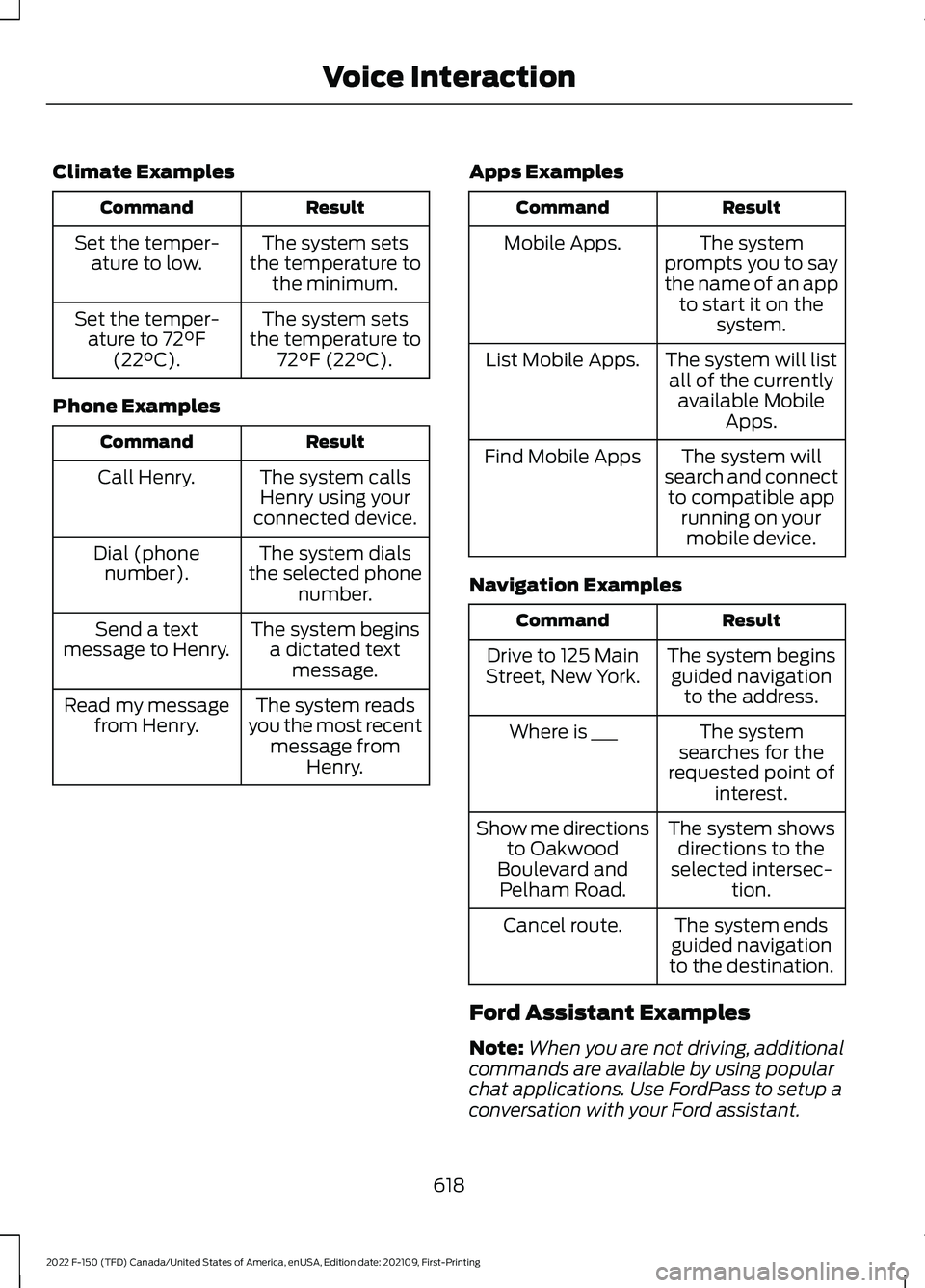
Climate Examples
Result
Command
The system sets
the temperature to the minimum.
Set the temper-
ature to low.
The system sets
the temperature to 72°F (22°C).
Set the temper-
ature to 72°F
(22°C).
Phone Examples Result
Command
The system callsHenry using your
connected device.
Call Henry.
The system dials
the selected phone number.
Dial (phone
number).
The system beginsa dictated text message.
Send a text
message to Henry.
The system reads
you the most recent message from Henry.
Read my message
from Henry. Apps Examples Result
Command
The system
prompts you to say
the name of an app to start it on the system.
Mobile Apps.
The system will listall of the currently available Mobile Apps.
List Mobile Apps.
The system will
search and connect to compatible app running on yourmobile device.
Find Mobile Apps
Navigation Examples Result
Command
The system beginsguided navigation to the address.
Drive to 125 Main
Street, New York.
The system
searches for the
requested point of interest.
Where is ___
The system showsdirections to the
selected intersec- tion.
Show me directions
to Oakwood
Boulevard and Pelham Road.
The system ends
guided navigation
to the destination.
Cancel route.
Ford Assistant Examples
Note: When you are not driving, additional
commands are available by using popular
chat applications. Use FordPass to setup a
conversation with your Ford assistant.
618
2022 F-150 (TFD) Canada/United States of America, enUSA, Edition date: 202109, First-Printing Voice Interaction
Page 632 of 750
HOW DO PERSONAL PROFILES
WORK
This feature allows you to create multiple
personal profiles enabling users to
personalize vehicle
’s settings such as seats
and mirrors, as well as non-positional
settings like radio, navigation, driver assist
system settings. Positional settings are
saved by holding a memory seat button.
Non-positional settings are saved you
change a setting while a profile is active.
You can create one profile for each preset
memory seat button along with a guest
profile.
Recalling and Changing a Profile
You can recall a profile using the
touchscreen or the preset button you
selected when you created your profile.
You can also link a remote control and a
mobile device to your profile, which are
used to recall it. ENABLING OR DISABLING
PERSONAL PROFILES
When you switch on the Personal Profiles
feature:
•
Unlocking a door with a remote control
or mobile device that is not linked to a
driver profile does not change the
active profile, but remains in the last
known profile. It does not change the
positional settings.
• Pressing a memory seat button that is
not linked to a driver profile or saved to
a preset setting does not change the
active profile, but remains in the last
known profile. It does not change the
positional settings.
• Pressing a memory seat button that is
not linked to a driver profile but is saved
to a preset setting does not change the
active profile, but remains in the last
known profile. It recalls the positional
settings that you saved to that memory
seat button.
When you switch off a Personal Profiles
feature:
• Unlocking a door with a remote control
or mobile device does not recall any
non-positional settings but still recalls
positional settings from the driver
profile which the remote control or
mobile device is linked to.
• Pressing a memory seat button that is
not linked to a driver profile or saved to
a preset setting does not change the
positional or non-positional settings.
• Pressing a memory seat button that is
linked to a driver profile or has saved
to a preset setting recalls the positional
settings that you saved to that memory
seat button.
628
2022 F-150 (TFD) Canada/United States of America, enUSA, Edition date: 202109, First-Printing Personal Profiles (If Equipped)
Page 634 of 750
ACCESSING NAVIGATION
Press the button to access
Navigation.
Note: As the driver, be aware of all local
traffic regulations and road attributes, and
operate your vehicle in a safe and legal
manner.
NAVIGATION MAP UPDATES
To update your Map data over Wi-Fi, your
vehicle must be connected to a Wi-Fi
access point. For USB updates and other
details, contact dealers at
1-866-462-8837 in the United States and
Canada, or 01-800-557-5539 in Mexico.
Note: If you find map data errors, you may
report them by going to
www.here.com/mapcreator.
ADJUSTING THE MAP
ZOOMING THE MAP IN AND OUT
You can use pinch gestures to zoom in and
out. Place two fingers on the screen and
move them apart to zoom in. Place two
fingers on the screen and bring them
together to zoom out.
CHANGING THE FORMAT OF THE
MAP Press the Menu button.
1. Press the Map Orientation tile.
2. Select a map orientation. LIVE TRAFFIC
WHAT IS LIVE TRAFFIC
You can observe real-time road congestion
when live traffic is on.
SWITCHING LIVE TRAFFIC ON
AND OFF
Press the Menu button.
1. Press the Traffic on Map tile.
2. Press Traffic on or Traffic Off.
SETTING A DESTINATION
SETTING A DESTINATION USING
THE TEXT ENTRY SCREEN
1. Press the search bar at the top of the screen.
2. Enter your destination using the keyboard.
3. Press Search.
4. Select a destination from the list.
5. Press Start to begin navigation.
SETTING A DESTINATION USING
THE MAP SCREEN
Press and hold on the map to place a pin
at that location. Information about the
location of the pin appears on the screen. Press the button to begin
navigation to the pin.
630
2022 F-150 (TFD) Canada/United States of America, enUSA, Edition date: 202109, First-Printing Navigation (If Equipped) E328845 E328845 E328844
Page 635 of 750
SETTING A DESTINATION USING
A PREDICTIVE DESTINATION
Press the predicted destination card on
the screen to navigate to it. These appear
when the navigation system has learned
your driving habits.
SETTING A DESTINATION USING
A RECENT DESTINATION
Press the button.
Press a destination from the list.
Note: You can also use the search button
to view recent destinations.
SETTING A DESTINATION USING
A SAVED DESTINATION
Press the star icon next when viewing
location details to save the location. Press the button.
Press a destination from the list.
Note: You can also use the search button
to view saved destinations.
SETTING A DESTINATION USING
A POINT OF INTEREST
Press a point of interest icon on the map.
Information about the location of the point
of interest appears on the screen. Press the button to begin
navigation to the point of
interest.
Note: You can also use the search button
to view points of interest. WAYPOINTS
ADDING A WAYPOINT Press the Add Waypoint button
when in an active navigation
session.
1. Enter your waypoint on the keyboard.
2. Press Search.
3. Select a waypoint from the list.
4. Press Add to Trip.
EDITING WAYPOINTS
1. Press the waypoint you would like to edit.
2. Select an option to reorder or delete the waypoint.
ROUTE GUIDANCE
ADJUSTING THE GUIDANCE
PROMPT VOLUME
Turn the volume control when a guidance
prompt plays to adjust the volume.
REPEATING AN INSTRUCTION
Press the turn indicator to hear the last
voice instruction.
CANCELING ROUTE GUIDANCE Press the button to cancel route
guidance to the selected
location.
631
2022 F-150 (TFD) Canada/United States of America, enUSA, Edition date: 202109, First-Printing Navigation (If Equipped)E358714 E353215 E328844 E328843 E280804
Page 636 of 750
TRAILER TOWING
NAVIGATION
When you have an active subscription and
Trailer Towing Navigation is switched on,
the system will calculate the best route for
trailer towing by avoiding dangerous road
conditions based on the dimensions of your
trailer.
Switching Trailer Towing
Navigation On and Off
1. Press the Navigation button on the
feature bar.
2. Press the
Menu button.
3. Press
Trailer Routing.
4. Switch
Trailer-optimized Routing on
or off.
Entering Trailer Dimensions
1. Press the
Navigation button on the
feature bar.
2. Press the
Menu button.
3. Press
Trailer Routing.
4. Press
Towing Menu.
5. Press
Add Trailer.
6. Follow the instructions on the screen to enter the type and dimensions of the
trailer into the system.
Navigation Alerts
Alerts will appear on the navigation map
while driving. An orange alert triangle
indicates you should proceed with caution.
When not following active guidance to a
destination, a red alert triangle may appear
and indicates you should avoid the road
and find a detour.
632
2022 F-150 (TFD) Canada/United States of America, enUSA, Edition date: 202109, First-Printing Navigation
(If Equipped)
Page 696 of 750
TRADEMARKS: This EULA does not grant
you any rights in connection with any
trademarks or service marks of FORD
MOTOR COMPANY, its affiliates, and third
party software and service providers.
PRODUCT SUPPORT: Please refer to
FORD MOTOR COMPANY instructions
provided in the documentation for the
DEVICES product support, such as the
vehicle owner guide.
Should you have any questions concerning
this EULA, or if you desire to contact FORD
MOTOR COMPANY for any other reason,
please refer to the address provided in the
documentation for the DEVICES.
No Liability for Certain Damages:
EXCEPT AS PROHIBITED BY LAW, FORD
MOTOR COMPANY, ANY THIRD PARTY
SOFTWARE OR SERVICES SUPPLIERS,
AND THEIR AFFILIATES SHALL HAVE NO
LIABILITY FOR ANY INDIRECT, SPECIAL,
CONSEQUENTIAL OR INCIDENTAL
DAMAGES ARISING FROM OR IN
CONNECTION WITH THE USE OR
PERFORMANCE OF THE SOFTWARE. THIS
LIMITATION SHALL APPLY EVEN IF ANY
REMEDY FAILS OF ITS ESSENTIAL
PURPOSE. THERE ARE NO WARRANTIES
OTHER THAN THOSE THAT MAY BE
EXPRESSLY PROVIDED FOR YOUR NEW
VEHICLE.
SYNC® Automotive Important Safety
Information Read and follow
instructions:
• Before using your SYNC® system, read
and follow all instructions and safety
information provided in this end user
manual ("Owner Guide".) Not
following precautions found in the
Owner Guide can lead to an accident
or other serious injuries. General Operation
•
Voice Command Control
: Certain
functions within the SYNC® system
may be accomplished using voice
commands. Using voice commands
while driving helps you to operate the
system without removing your hands
from the wheel or eyes from the road.
• Prolonged Views of Screen:
Do not
access any function requiring a
prolonged view of the screen while you
are driving. Pull over in a safe and legal
manner before attempting to access a
function of the system requiring
prolonged attention.
• Volume Setting:
Do not raise the
volume excessively. Keep the volume
at a level where you can still hear
outside traffic and emergency signals
while driving. Driving while unable to
hear these sounds could cause an
accident.
• Navigation Features:
Any navigation
features included in the system are
intended to provide turn by turn
instructions to get you to a desired
destination. Please make certain all
persons using this system carefully
read and follow instructions and safety
information fully.
• Distraction Hazard:
Any navigation
features may require manual
(non-verbal) setup. Attempting to
perform such set-up or insert data
while driving can distract your attention
and could cause an accident or other
serious injury. Stop the vehicle in a safe
and legal manner before attempting
these operations.
• Let Your Judgment Prevail:
Any
navigation features are provided only
as an aid. Make your driving decisions
based on your observations of local
conditions and existing traffic
regulations. Any such feature is not a
692
2022 F-150 (TFD) Canada/United States of America, enUSA, Edition date: 202109, First-Printing Customer Information
Page 697 of 750
substitute for your personal judgment.
Any route suggestions made by this
system should never replace any local
traffic regulations or your personal
judgment or knowledge of safe driving
practices.
• Route Safety: Do not follow the route
suggestions if doing so would result in
an unsafe or illegal maneuver, if you
would be placed in an unsafe situation,
or if you would be directed into an area
that you consider unsafe. The driver is
ultimately responsible for the safe
operation of the vehicle and therefore,
must evaluate whether it is safe to
follow the suggested directions.
• Potential Map Inaccuracy: Maps
used by this system may be inaccurate
because of changes in roads, traffic
controls or driving conditions. Always
use good judgment and common sense
when following the suggested routes.
• Emergency Services:
Do not rely on
any navigation features included in the
system to route you to emergency
services. Ask local authorities or an
emergency services operator for these
locations. Not all emergency services
such as police, fire stations, hospitals
and clinics are likely to be contained in
the map database for such navigation
features. Your Responsibilities and Assumptions of
Risk
•
You agree to each of the following:(a)
Any use of the SOFTWARE while
driving an automobile or other vehicle
in violation of applicable law or
otherwise driving in an unsafe manner
presents a significant risk of distracted
driving and should not be attempted
under any circumstances;(b) Use of
the SOFTWARE at excessive volume
poses a significant risk of hearing
damage and should not be attempted
under any circumstances;(c) The
SOFTWARE may not be compatible
with new or different versions of an
operating system, third party software,
or third party services, and the
SOFTWARE may potentially cause a
critical failure of an operating system,
third party software, or third party
service.(d) Any third party service
accessed by or third party software
used with the SOFTWARE (I) may
charge an additional fee for access, (ii)
may not work correctly, on an
uninterrupted basis, or error free, (iii)
may change streaming formats or
discontinue operation, (iv) may contain
adult, profane or offensive content; and
(v) may contain inaccurate, false or
misleading traffic, weather, financial
or safety information or other content;
and (e) Use of the SOFTWARE may
cause you to incur additional charges
from your wireless service provider
(WSP) and any data or minute
calculators that may be included in the
software program are for reference
only, are not warranted in any way and
should not be relied upon in anyway.
• When using the SOFTWARE, you agree
to be responsible for and assume the
entire risk to the items set forth in
Section (a) – (e) above.
693
2022 F-150 (TFD) Canada/United States of America, enUSA, Edition date: 202109, First-Printing Customer Information
Page 701 of 750
1. Safe and Lawful Use
You acknowledge that devoting attention
to the TeleNav Software may pose a risk
of injury or death to you and others in
situations that otherwise require your
undivided attention, and you therefore
agree to comply with the following when
using the TeleNav Software:
(a) observe all traffic laws and otherwise
drive safely;
(b) use your own personal judgment while
driving. If you feel that a route suggested
by the TeleNav Software instructs you to
perform an unsafe or illegal maneuver,
places you in an unsafe situation, or directs
you into an area that you consider to be
unsafe, do not follow such instructions;
(c) do not input destinations, or otherwise
manipulate the TeleNav Software, unless
your vehicle is stationary and parked;
(d) do not use the TeleNav Software for
any illegal, unauthorized, unintended,
unsafe, hazardous, or unlawful purposes,
or in any manner inconsistent with this
Agreement;
(e) arrange all GPS and wireless devices
and cables necessary for use of the
TeleNav Software in a secure manner in
your vehicle so that they will not interfere
with your driving and will not prevent the
operation of any safety device (such as an
airbag).
You agree to indemnify and hold TeleNav
harmless against all claims resulting from
any dangerous or otherwise inappropriate
use of the TeleNav Software in any moving
vehicle, including as a result of your failure
to comply with the directions above.
2. Account Information
You agree: (a) when registering the
TeleNav Software, to provide TeleNav with
true, accurate, current, and complete
information about yourself, and (b) to
inform TeleNav promptly of any changes
to such information, and to keep it true,
accurate, current and complete.
3. Software License
•
Subject to your compliance with the
terms of this Agreement, TeleNav
hereby grants to you a personal,
non-exclusive, non-transferable license
(except as expressly permitted below
in connection with your permanent
transfer of the TeleNav Software
license), without the right to
sublicense, to use the TeleNav
Software (in object code form only) in
order to access and use the TeleNav
Software. This license shall terminate
upon any termination or expiration of
this Agreement. You agree that you will
use the TeleNav Software only for your
personal business or leisure purposes,
and not to provide commercial
navigation services to other parties.
3.1 License Limitations
• (a) reverse engineer, decompile,
disassemble, translate, modify, alter
or otherwise change the TeleNav
Software or any part thereof;
(b)
attempt to derive the source code,
audio library or structure of the
TeleNav Software without the prior
express written consent of TeleNav;
(c)
remove from the TeleNav
Software, or alter, any of TeleNav's or
its suppliers' trademarks, trade names,
logos, patent or copyright notices, or
other notices or markings;
(d)
697
2022 F-150 (TFD) Canada/United States of America, enUSA, Edition date: 202109, First-Printing Customer Information
Page 702 of 750
distribute, sublicense or otherwise
transfer the TeleNav Software to
others, except as part of your
permanent transfer of the TeleNav
Software; or (e) use the TeleNav
Software in any manner that
I. infringes the intellectual property or
proprietary rights, rights of publicity or
privacy or other rights of any party,
ii. violates any law, statute, ordinance or
regulation, including but not limited to laws
and regulations related to spamming,
privacy, consumer and child protection,
obscenity or defamation, or
iii. is harmful, threatening, abusive,
harassing, tortuous, defamatory, vulgar,
obscene, libelous, or otherwise
objectionable; and (f) lease, rent out, or
otherwise permit unauthorized access by
third parties to the TeleNav Software
without advanced written permission of
TeleNav.
4. Disclaimers
• To the fullest extent permissible
pursuant to applicable law, in no event
will TeleNav, its licensors and suppliers,
or agents or employees of any of the
foregoing, be liable for any decision
made or action taken by you or anyone
else in reliance on the information
provided by the TeleNav Software.
TeleNav also does not warrant the
accuracy of the map or other data used
for the TeleNav Software. Such data
may not always reflect reality due to,
among other things, road closures,
construction, weather, new roads and
other changing conditions. You are
responsible for the entire risk arising
out of your use of the TeleNav
Software. For example but without
limitation, you agree not to rely on the
TeleNav Software for critical
navigation in areas where the
well-being or survival of you or others is dependent on the accuracy of
navigation, as the maps or functionality
of the TeleNav Software are not
intended to support such high risk
applications, especially in more remote
geographical areas.
• TELENAV EXPRESSLY DISCLAIMS
AND EXCLUDES ALL WARRANTIES IN
CONNECTION WITH THE TELENAV
SOFTWARE, WHETHER STATUTORY,
EXPRESS OR IMPLIED, INCLUDING ALL
WARRANTIES WHICH MAY ARISE
FROM COURSE OF DEALING, CUSTOM
OR TRADE AND INCLUDING, BUT NOT
LIMITED TO, THE IMPLIED
WARRANTIES OF MERCHANTABILITY,
FITNESS FOR A PARTICULAR
PURPOSE AND NON-INFRINGEMENT
OF THIRD PARTY RIGHTS WITH
RESPECT TO THE TELENAV
SOFTWARE.
• Certain jurisdictions do not permit the
disclaimer of certain warranties, so this
limitation may not apply to you.
5. Limitation of Liability
• TO THE EXTENT PERMITTED UNDER
APPLICABLE LAW, UNDER NO
CIRCUMSTANCES SHALL TELENAV
OR ITS LICENSORS AND SUPPLIERS
BE LIABLE TO YOU OR TO ANY THIRD
PARTY FOR ANY INDIRECT,
INCIDENTAL, CONSEQUENTIAL,
SPECIAL OR EXEMPLARY DAMAGES
(INCLUDING IN EACH CASE, BUT NOT
LIMITED TO, DAMAGES FOR THE
INABILITY TO USE THE EQUIPMENT
OR ACCESS DATA, LOSS OF DATA,
LOSS OF BUSINESS, LOSS OF
PROFITS, BUSINESS INTERRUPTION
OR THE LIKE) ARISING OUT OF THE
USE OF OR INABILITY TO USE THE
TELENAV SOFTWARE, EVEN IF
TELENAV HAS BEEN ADVISED OF THE
POSSIBILITY OF SUCH DAMAGES.
NOTWITHSTANDING ANY DAMAGES
THAT YOU MIGHT INCUR FOR ANY
698
2022 F-150 (TFD) Canada/United States of America, enUSA, Edition date: 202109, First-Printing Customer Information
Page 705 of 750
HERE holds a non-exclusive license from
the United States Postal Service® to
publish and sell ZIP+4® information.
©United States Postal Service® 2014.
Prices are not established, controlled or
approved by the United States Postal
Service®. The following trademarks and
registrations are owned by the USPS:
United States Postal Service, USPS, and
ZIP+4
The Data for Mexico includes certain data
from Instituto Nacional de Estadística y
Geografía.
9.2 End User Terms Required by NAV2
(Shanghai) Co., Ltd
The data (“Data
”) is provided for your
personal, internal use only and not for
resale. It is protected by copyright, and is
subject to the following terms and
conditions which are agreed to by you, on
the one hand, and NAV2 (Shanghai) Co.,
Ltd (“NAV2”) and its licensors (including
their licensors and suppliers) on the other
hand. 20xx. All rights reserved
Terms and Conditions
Permitted Use. You agree to use this Data
together with the Telenav Software solely
for the internal business and personal
purposes for which you were licensed, and
not for service bureau, time-sharing or
other similar purposes. Accordingly, but
subject to the restrictions set forth in the
following paragraphs, you agree not to
otherwise reproduce, copy, modify,
decompile, disassemble, create any
derivative works of, or reverse engineer any
portion of this Data, and may not transfer
or distribute it in any form, for any purpose,
except to the extent permitted by
mandatory laws. Restrictions. Except where you have been
specifically licensed to do so by Telenav,
and without limiting the preceding
paragraph, you may not use this Data (a)
with any products, systems, or applications
installed or otherwise connected to or in
communication with vehicles, capable of
vehicle navigation, positioning, dispatch,
real time route guidance, fleet
management or similar applications; or (b)
with or in communication with any
positioning devices or any mobile or
wireless-connected electronic or computer
devices, including without limitation
cellular phones, palmtop and handheld
computers, pagers, and personal digital
assistants or PDAs.
Warning. The Data may contain
inaccurate or incomplete information due
to the passage of time, changing
circumstances, sources used and the
nature of collecting comprehensive
geographic data, any of which may lead to
incorrect results.
No Warranty.
This Data is provided to you
“ as is, ” and you agree to use it at your own
risk. Telenav and its licensors (and their
licensors and suppliers) make no
guarantees, representations or warranties
of any kind, express or implied, arising by
law or otherwise, including but not limited
to, content, quality, accuracy,
completeness, effectiveness, reliability,
fitness for a particular purpose, usefulness,
use or results to be obtained from this
Data, or that the Data or server will be
uninterrupted or error-free.
Disclaimer of Warranty:
TELENAV AND
ITS LICENSORS (INCLUDING THEIR
LICENSORS AND SUPPLIERS) DISCLAIM
ANY WARRANTIES, EXPRESS OR IMPLIED,
OF QUALITY, PERFORMANCE,
MERCHANTABILITY, FITNESS FOR A
701
2022 F-150 (TFD) Canada/United States of America, enUSA, Edition date: 202109, First-Printing Customer Information