power steering FORD F-150 2022 Owners Manual
[x] Cancel search | Manufacturer: FORD, Model Year: 2022, Model line: F-150, Model: FORD F-150 2022Pages: 750, PDF Size: 12.96 MB
Page 7 of 750
Keyless Entry Keypad Master Access
Code .............................................................108
Keyless Entry Keypad Personal Access Codes ..........................................................
108
Using the Keyless Entry Keypad ............
109
Keyless Entry Keypad – Troubleshooting ........................................................................\
109
Easy Entry and Exit
How Does Easy Entry and Exit Work ........................................................................\
..
110
Switching Easy Entry and Exit On and Off ..................................................................
110
Tailgate - Vehicles With: Manual Tailgate
Tailgate Precautions .....................................
111
Opening the Tailgate ....................................
111
Locking and Unlocking the Tailgate ........
111
Removing and Installing the Tailgate ........................................................................\
...
111
Tailgate Step ...................................................
112
Bed Extender ..................................................
113
Tailgate Work Surface .................................
115
Tailgate - Vehicles With: Power Tailgate
Tailgate Precautions ....................................
117
Opening the Tailgate ...................................
117
Closing the Tailgate ......................................
117
Removing and Installing the Tailgate ........................................................................\
..
118
Tailgate Step ..................................................
119
Bed Extender .................................................
120
Tailgate Work Surface ................................
122
Tailgate – Troubleshooting ......................
123
Tailgate - Vehicles With: Remote Release Tailgate
Tailgate Precautions ...................................
125
Opening the Tailgate ..................................
125Removing and Installing the Tailgate
........................................................................\
.
125
Tailgate Step .................................................
126
Bed Extender .................................................
127
Tailgate Work Surface ................................
129
Tailgate – Troubleshooting ......................
130
Security
Passive Anti-Theft System ......................
132
Anti-Theft Alarm System .........................
132
Anti-Theft Alarm System Settings .......
133
Security – Troubleshooting .....................
134
Power Running Boards
Power Running Board Precautions .......
136
Power Running Board Settings ..............
136
Power Running Board Kick Switch .......
136
Deploying and Stowing the Power Running Boards ........................................
137
Power Running Boards – Troubleshooting .......................................
137
Steering Wheel
Adjusting the Steering Wheel - Vehicles With: Power Adjustable Steering
Column ........................................................
138
Adjusting the Steering Wheel - Vehicles With: Manual Adjustable Steering
Column ........................................................
138
Resetting the Stopping Position - Vehicles With: Power Adjustable
Steering Column ......................................
139
Horn ..................................................................
139
Switching the Heated Steering Wheel On and Off - Vehicles With: Heated
Steering Wheel .........................................
139
Adjustable Pedals
Adjusting the Pedals ..................................
140
Wipers and Washers
Wipers ...............................................................
141
3
2022 F-150 (TFD) Canada/United States of America, enUSA, Edition date: 202109, First-Printing Table of Contents
Page 14 of 750

Trail One Pedal Drive – Troubleshooting
........................................................................\
305
Trail Control – Troubleshooting - Raptor .......................................................................
306
Trail Turn Assist
What Is Trail Turn Assist ...........................
307
Trail Turn Assist Precautions ..................
307
Trail Turn Assist Limitations ...................
307
Switching Trail Turn Assist On and Off ........................................................................\
307
Trail Turn Assist Indicators ......................
307
Trail Turn Assist – Troubleshooting .....
308
Hill Descent Control
What Is Hill Descent Control .................
309
How Does Hill Descent Control Work .......................................................................
309
Hill Descent Control Precautions .........
309
Switching Hill Descent Control On and Off ................................................................
309
Setting the Hill Descent Speed ............
309
Hill Descent Control Indicator ...............
309
Hill Descent Control – Troubleshooting ........................................................................\
.
310
Steering
Electric Power Steering ..............................
311
Steering – Troubleshooting .....................
312
Parking Aids
Parking Aid Precautions ............................
313
Switching Parking Aid On and Off .........
313
Rear Parking Aid ...........................................
314
Front Parking Aid .........................................
314
Side Parking Aid ...........................................
315
Parking Aid Indicators .................................
317
Parking Aids – Troubleshooting .............
317
Rear View Camera
What Is the Rear View Camera ..............
318Rear View Camera Precautions
.............
318
Locating the Rear View Camera ............
318
Rear View Camera Guide Lines ..............
319
Rear View Camera Settings .....................
319
360 Degree Camera
What Is the 360 Degree Camera ...........
321
How Does the 360 Degree Camera Work ........................................................................\
.
321
360 Degree Camera Precautions ..........
321
360 Degree Camera Limitations ...........
321
Locating the 360 Degree Cameras .......
321
Locating the 360 Degree Cameras - Raptor/Tremor .........................................
322
360 Degree Camera Guide Lines ..........
322
360 Degree Camera Settings ................
323
Active Park Assist
What Is Active Park Assist .......................
325
How Does Active Park Assist Work ......
325
Active Park Assist Precautions ..............
325
Switching Active Park Assist On and Off ........................................................................\
325
Entering a Parallel Parking Space ........
325
Entering a Perpendicular Parking Space ........................................................................\
326
Exiting a Parking Space ............................
326
Active Park Assist – Troubleshooting ........................................................................\
.
327
Cruise Control
What Is Cruise Control ..............................
329
Switching Cruise Control On and Off ........................................................................\
329
Setting the Cruise Control Speed .........
329
Canceling the Set Speed .........................
330
Resuming the Set Speed .........................
330
Cruise Control Indicators .........................
330
10
2022 F-150 (TFD) Canada/United States of America, enUSA, Edition date: 202109, First-Printing Table of Contents
Page 29 of 750
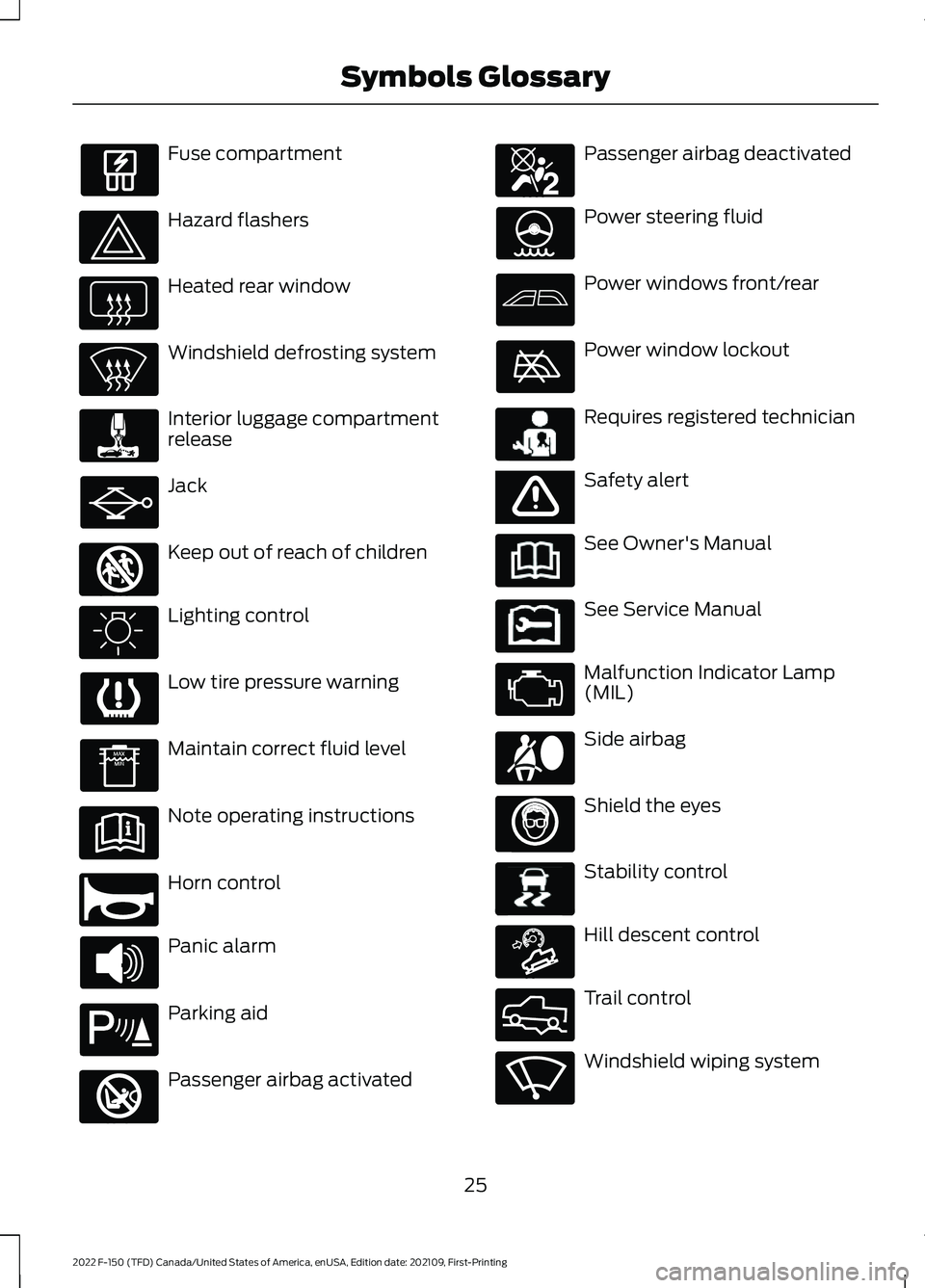
Fuse compartment
Hazard flashers
Heated rear window
Windshield defrosting system
Interior luggage compartment
release
Jack
Keep out of reach of children
Lighting control
Low tire pressure warning
Maintain correct fluid level
Note operating instructions
Horn control
Panic alarm
Parking aid
Passenger airbag activated Passenger airbag deactivated
Power steering fluid
Power windows front/rear
Power window lockout
Requires registered technician
Safety alert
See Owner's Manual
See Service Manual
Malfunction Indicator Lamp
(MIL)
Side airbag
Shield the eyes
Stability control
Hill descent control
Trail control
Windshield wiping system
25
2022 F-150 (TFD) Canada/United States of America, enUSA, Edition date: 202109, First-Printing Symbols Glossary E161353 E270945 E139213 E270849 E270850 E231159 E65963 E231158 E167012 E138639 E163171 E332910 E270969
Page 89 of 750
WHAT IS 911 ASSIST
911 Assist is a SYNC system feature that
can call for help.
For more information, visit
www
. o wner .f or d . c om .
HOW DOES 911 ASSIST WORK
If a crash deploys an airbag, excluding knee
airbags and rear inflatable seatbelts, or
activates the fuel pump shut-off, your
vehicle may be able to contact emergency
services by dialing 911 through a paired and
connected Bluetooth®-enabled phone.
Not all crashes will deploy an airbag or
activate the fuel pump shut-off. If a
connected cell phone sustains damage or
loses its connection to SYNC during a
crash, SYNC will search for and try to
connect to a previously paired cell phone.
SYNC will then attempt to call the
emergency services.
Before making the call:
• SYNC provides about 10 seconds to
cancel the call. If you fail to cancel the
call, SYNC attempts to dial 911.
• SYNC says the following, or a similar
message: "SYNC will attempt to call
911, to cancel the call, press Cancel on
your screen or press and hold the
phone button on your steering wheel."
If you do not cancel the call and SYNC
makes a successful call a pre-recorded
message plays for the 911 operator. The
occupants in your vehicle are able to talk
with the operator. Be prepared to provide
your name, phone number and location
immediately because not all 911 systems
are capable of receiving this information
electronically.
During an emergency call the system
transmits vehicle data to the emergency
service. EMERGENCY CALL
REQUIREMENTS WARNING:
Do not wait for 911
Assist to make an emergency call if you
can do it yourself. Dial emergency
services immediately to avoid delayed
response time which could increase the
risk of serious injury or death after a
crash. If you do not hear 911 Assist within
five seconds of the crash, the system or
phone may be damaged or
non-functional. WARNING:
Always place your
phone in a secure location in your vehicle
so it does not become a projectile or get
damaged in a crash. Failure to do so may
cause serious injury to someone or
damage the phone which could prevent
911 Assist from working properly. WARNING:
Unless the 911 Assist
setting is set on before a crash, the
system will not dial for help which could
delay response time, potentially
increasing the risk of serious injury or
death after a crash.
• SYNC is powered and working properly
at the time of the incident and
throughout feature activation and use.
• The 911 Assist feature must be set on
before the incident.
• You must pair and connect a
Bluetooth®
enabled and compatible
cell phone to SYNC.
• A connected
Bluetooth® enabled
phone must have the ability to make
and maintain an outgoing call at the
time of the incident.
85
2022 F-150 (TFD) Canada/United States of America, enUSA, Edition date: 202109, First-Printing 911 Assist
(If Equipped)
Page 134 of 750
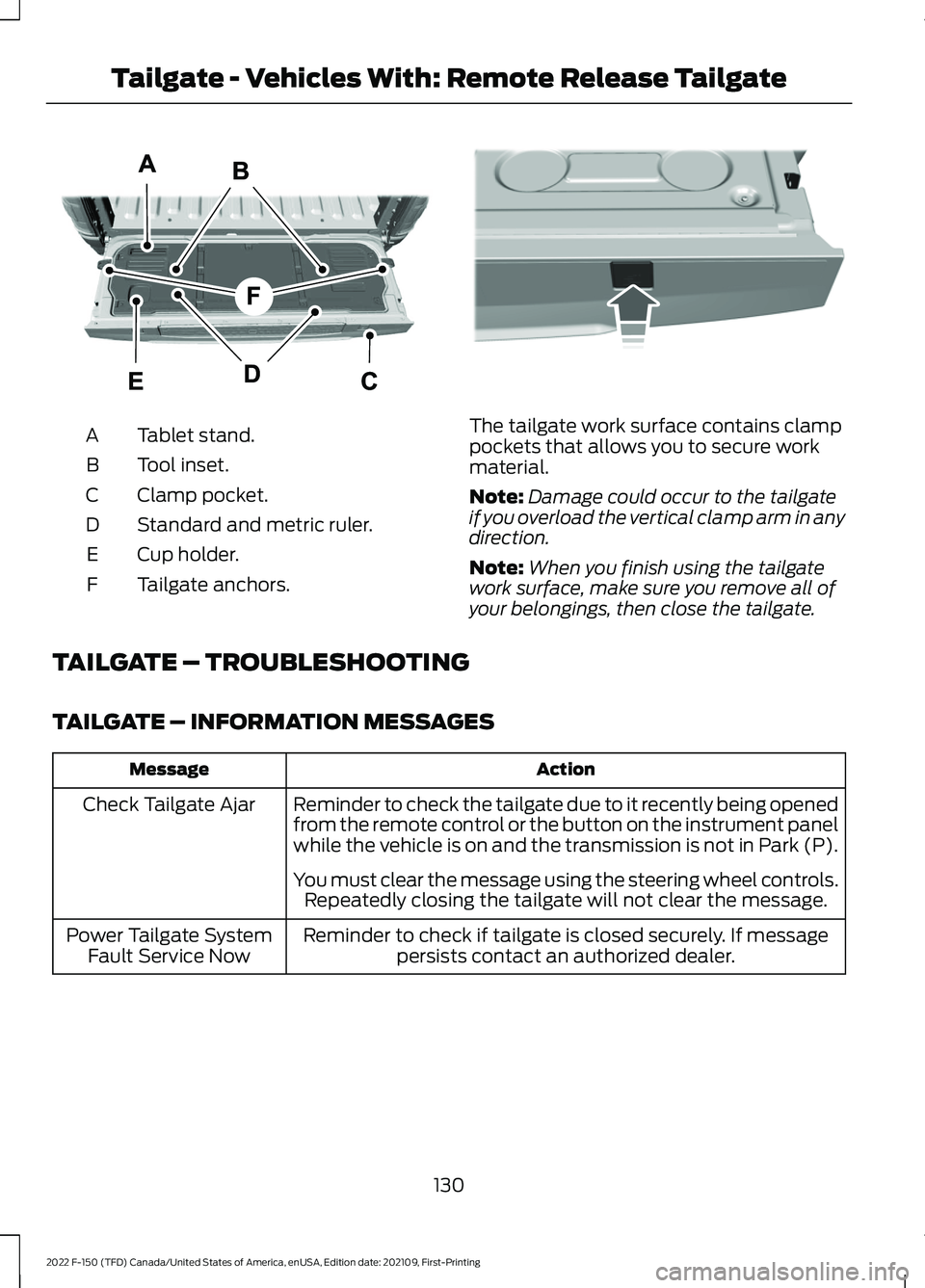
Tablet stand.
A
Tool inset.
B
Clamp pocket.
C
Standard and metric ruler.
D
Cup holder.
E
Tailgate anchors.
F The tailgate work surface contains clamp
pockets that allows you to secure work
material.
Note:
Damage could occur to the tailgate
if you overload the vertical clamp arm in any
direction.
Note: When you finish using the tailgate
work surface, make sure you remove all of
your belongings, then close the tailgate.
TAILGATE – TROUBLESHOOTING
TAILGATE – INFORMATION MESSAGES Action
Message
Reminder to check the tailgate due to it recently being opened
from the remote control or the button on the instrument panel
while the vehicle is on and the transmission is not in Park (P).
Check Tailgate Ajar
You must clear the message using the steering wheel controls.Repeatedly closing the tailgate will not clear the message.
Reminder to check if tailgate is closed securely. If message persists contact an authorized dealer.
Power Tailgate System
Fault Service Now
130
2022 F-150 (TFD) Canada/United States of America, enUSA, Edition date: 202109, First-Printing Tailgate - Vehicles With: Remote Release TailgateE308677 E336605
Page 142 of 750
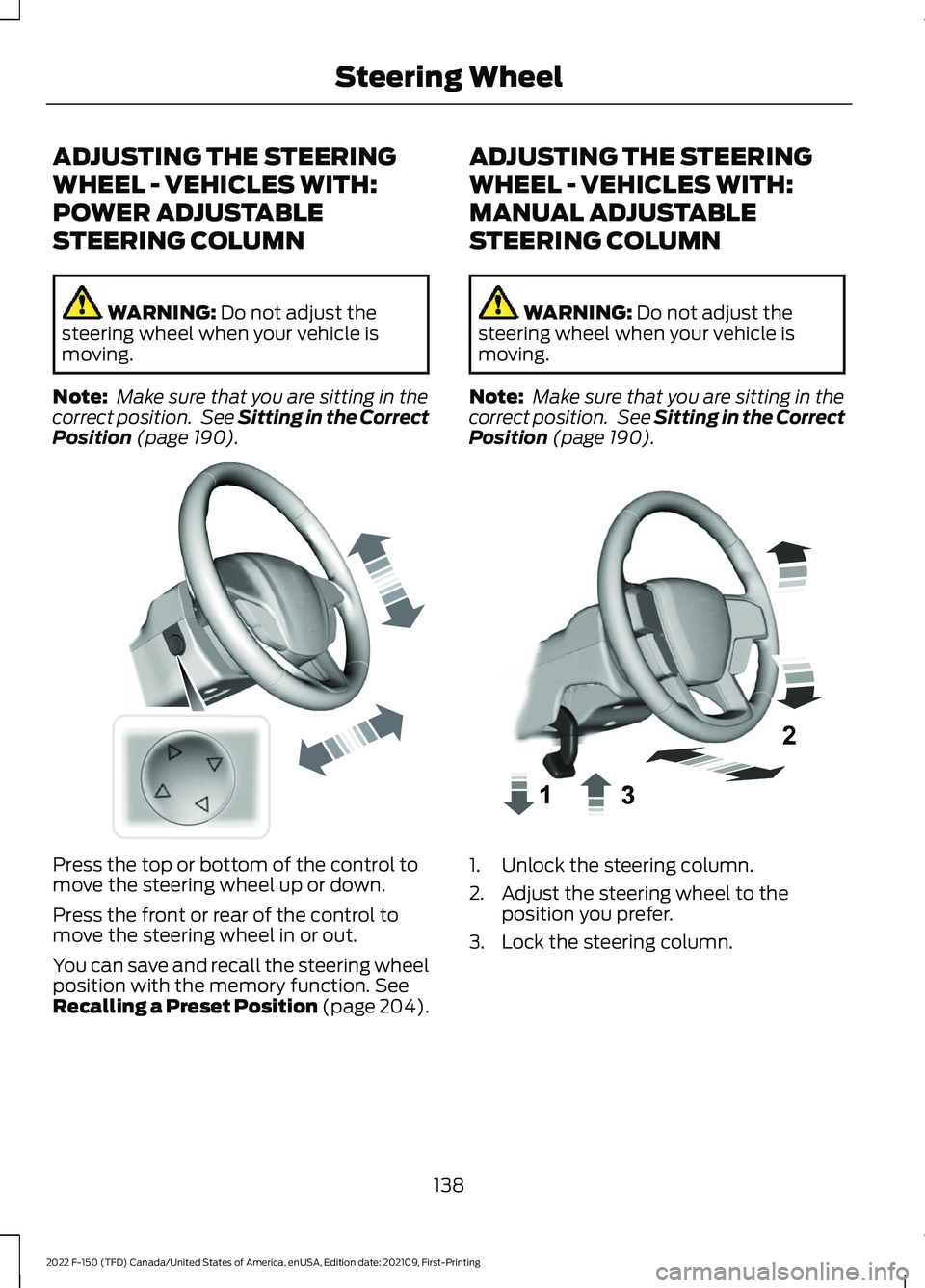
ADJUSTING THE STEERING
WHEEL - VEHICLES WITH:
POWER ADJUSTABLE
STEERING COLUMN
WARNING: Do not adjust the
steering wheel when your vehicle is
moving.
Note: Make sure that you are sitting in the
correct position. See
Sitting in the Correct
Position (page 190). Press the top or bottom of the control to
move the steering wheel up or down.
Press the front or rear of the control to
move the steering wheel in or out.
You can save and recall the steering wheel
position with the memory function.
See
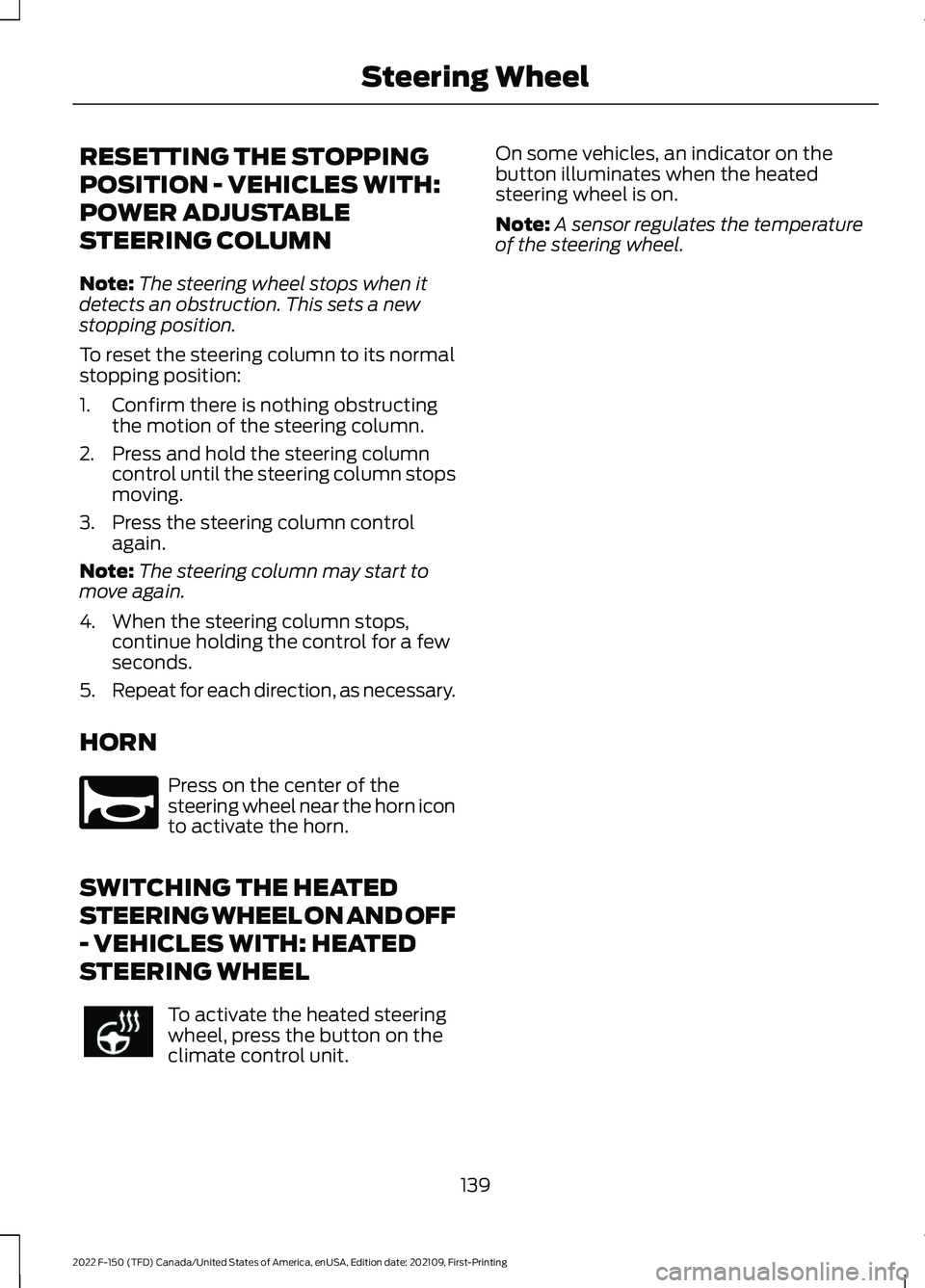
Recalling a Preset Position (page 204). ADJUSTING THE STEERING
WHEEL - VEHICLES WITH:
MANUAL ADJUSTABLE
STEERING COLUMN WARNING:
Do not adjust the
steering wheel when your vehicle is
moving.
Note: Make sure that you are sitting in the
correct position. See
Sitting in the Correct
Position (page 190). 1. Unlock the steering column.
2. Adjust the steering wheel to the
position you prefer.
3. Lock the steering column.
138
2022 F-150 (TFD) Canada/United States of America, enUSA, Edition date: 202109, First-Printing Steering WheelE261582 E359744
Page 143 of 750
RESETTING THE STOPPING
POSITION - VEHICLES WITH:
POWER ADJUSTABLE
STEERING COLUMN
Note:
The steering wheel stops when it
detects an obstruction. This sets a new
stopping position.
To reset the steering column to its normal
stopping position:
1. Confirm there is nothing obstructing the motion of the steering column.
2. Press and hold the steering column control until the steering column stops
moving.
3. Press the steering column control again.
Note: The steering column may start to
move again.
4. When the steering column stops, continue holding the control for a few
seconds.
5. Repeat for each direction, as necessary.
HORN Press on the center of the
steering wheel near the horn icon
to activate the horn.
SWITCHING THE HEATED
STEERING WHEEL ON AND OFF
- VEHICLES WITH: HEATED
STEERING WHEEL To activate the heated steering
wheel, press the button on the
climate control unit. On some vehicles, an indicator on the
button illuminates when the heated
steering wheel is on.
Note:
A sensor regulates the temperature
of the steering wheel.
139
2022 F-150 (TFD) Canada/United States of America, enUSA, Edition date: 202109, First-Printing Steering WheelE270945
Page 208 of 750
WHAT IS THE MEMORY
FUNCTION
The memory function recalls the position
of these features:
•
Driver seat.
• Power mirrors.
• Optional power steering column.
• Optional power adjustable pedals.
MEMORY FUNCTION
PRECAUTIONS WARNING: Before activating the
memory seat, make sure that the area
immediately surrounding the seat is clear
of obstructions and that all occupants
are clear of moving parts. WARNING:
Do not use the memory
function when your vehicle is moving.
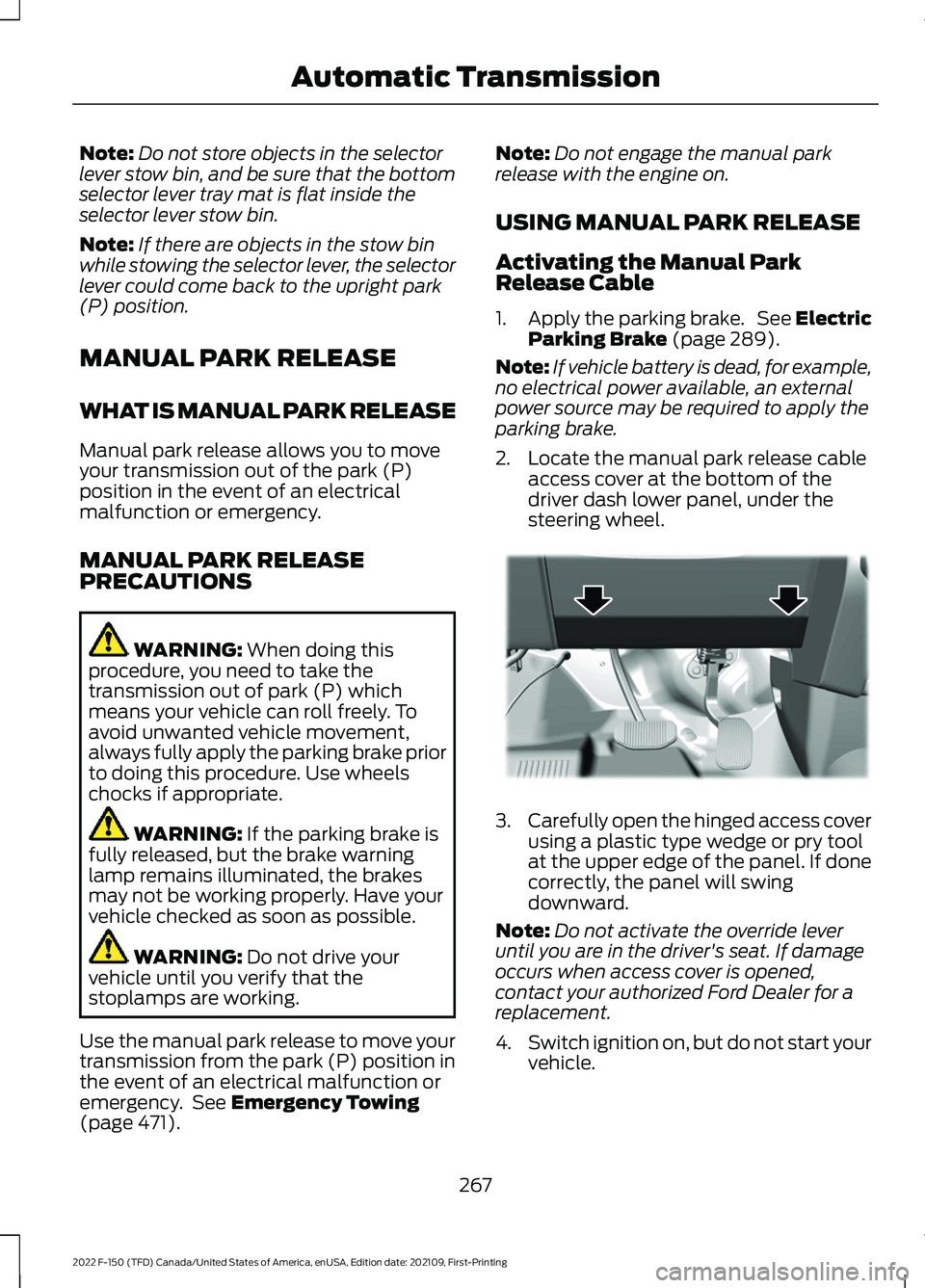
LOCATING THE MEMORY
FUNCTION BUTTONS The memory function buttons are on the
driver door. SAVING A PRESET POSITION
1. Adjust the memory features to your
preferred position.
2. Press and hold the preferred preset button until you hear a single tone.
A confirmation message appears in the
information display.
You can save up to three preset memory
positions at any time.
RECALLING A PRESET
POSITION
Press and release a preset button.
Note: You can recall a preset memory
position when the ignition is off, or when you
place the transmission in park (P) or neutral
(N) if the ignition is on and the vehicle is not
moving.
Note: Pressing any of the preset buttons or
any memory feature control during a
memory recall cancels the operation.
You can also recall a preset memory
position by:
• Pressing the unlock button on your
remote control if you linked it to a
preset position.
• Unlocking the intelligent driver door
handle if a linked remote control is
present.
Using a linked remote control to recall your
memory position when the ignition is off
moves the seat and steering column to the
easy entry position.
Linking a Preset Position to Your
Remote Control or Passive Key
See
Linking or Unlinking a Personal
Profile to a Remote Control (page 629).
204
2022 F-150 (TFD) Canada/United States of America, enUSA, Edition date: 202109, First-Printing Memory Function
(If Equipped)E332006
Page 271 of 750
Note:
Do not store objects in the selector
lever stow bin, and be sure that the bottom
selector lever tray mat is flat inside the
selector lever stow bin.
Note: If there are objects in the stow bin
while stowing the selector lever, the selector
lever could come back to the upright park
(P) position.
MANUAL PARK RELEASE
WHAT IS MANUAL PARK RELEASE
Manual park release allows you to move
your transmission out of the park (P)
position in the event of an electrical
malfunction or emergency.
MANUAL PARK RELEASE
PRECAUTIONS WARNING: When doing this
procedure, you need to take the
transmission out of park (P) which
means your vehicle can roll freely. To
avoid unwanted vehicle movement,
always fully apply the parking brake prior
to doing this procedure. Use wheels
chocks if appropriate. WARNING:
If the parking brake is
fully released, but the brake warning
lamp remains illuminated, the brakes
may not be working properly. Have your
vehicle checked as soon as possible. WARNING:
Do not drive your
vehicle until you verify that the
stoplamps are working.
Use the manual park release to move your
transmission from the park (P) position in
the event of an electrical malfunction or
emergency. See
Emergency Towing
(page 471). Note:
Do not engage the manual park
release with the engine on.
USING MANUAL PARK RELEASE
Activating the Manual Park
Release Cable
1. Apply the parking brake. See Electric
Parking Brake
(page 289).
Note: If vehicle battery is dead, for example,
no electrical power available, an external
power source may be required to apply the
parking brake.
2. Locate the manual park release cable access cover at the bottom of the
driver dash lower panel, under the
steering wheel. 3.
Carefully open the hinged access cover
using a plastic type wedge or pry tool
at the upper edge of the panel. If done
correctly, the panel will swing
downward.
Note: Do not activate the override lever
until you are in the driver's seat. If damage
occurs when access cover is opened,
contact your authorized Ford Dealer for a
replacement.
4. Switch ignition on, but do not start your
vehicle.
267
2022 F-150 (TFD) Canada/United States of America, enUSA, Edition date: 202109, First-Printing Automatic TransmissionE336473
Page 302 of 750
WHAT IS TRACTION CONTROL
The traction control system helps to avoid
drive wheel spin and loss of traction.
HOW DOES TRACTION
CONTROL WORK
If your wheels begin to spin, the loss of
traction can compromise steering control
and stability of the vehicle. The traction
control system applies the brakes to
individual wheels and when needed,
reduces engine power at the same time to
increase traction.
SWITCHING TRACTION
CONTROL ON AND OFF
WARNING: Operating your vehicle
with the traction control disabled could
lead to an increased risk of loss of vehicle
control, vehicle rollover, personal injury
and death. The traction control system turns on each
time you switch the ignition on.
The button for the stability and traction
control system is on the instrument panel. Press and release the button to switch
traction control off. The stability control
system remains fully active, to switch it off,
press and hold the button for a few
seconds, then release.
When you switch traction control off, a
message and an illuminated icon appear
on the instrument cluster.
Press the switch again to turn the traction
control system back on to normal
operation.
If your vehicle is stuck in mud or snow,
switching traction control off may be
beneficial as this allows the wheels to spin.
Your vehicle may have MyKey restrictions
regarding this feature. See
What Is
MyKey (page 96).
TRACTION CONTROL
INDICATOR
Stability and Traction Control
Indicator If the indicator does not
illuminate when you switch the
ignition on, or remains on when
the engine is running, this indicates a
malfunction. Have your vehicle checked
by an authorized dealer as soon as
possible. The traction control off indicator
illuminates when you switch the
traction control system off, or
when an alternative stability control mode
is selected that requires the traction
control off depending on the drive mode
selected.
298
2022 F-150 (TFD) Canada/United States of America, enUSA, Edition date: 202109, First-Printing Traction ControlE327252 E138639 E130458