lock FORD F-250 2018 Service Manual
[x] Cancel search | Manufacturer: FORD, Model Year: 2018, Model line: F-250, Model: FORD F-250 2018Pages: 660, PDF Size: 11.64 MB
Page 113 of 660
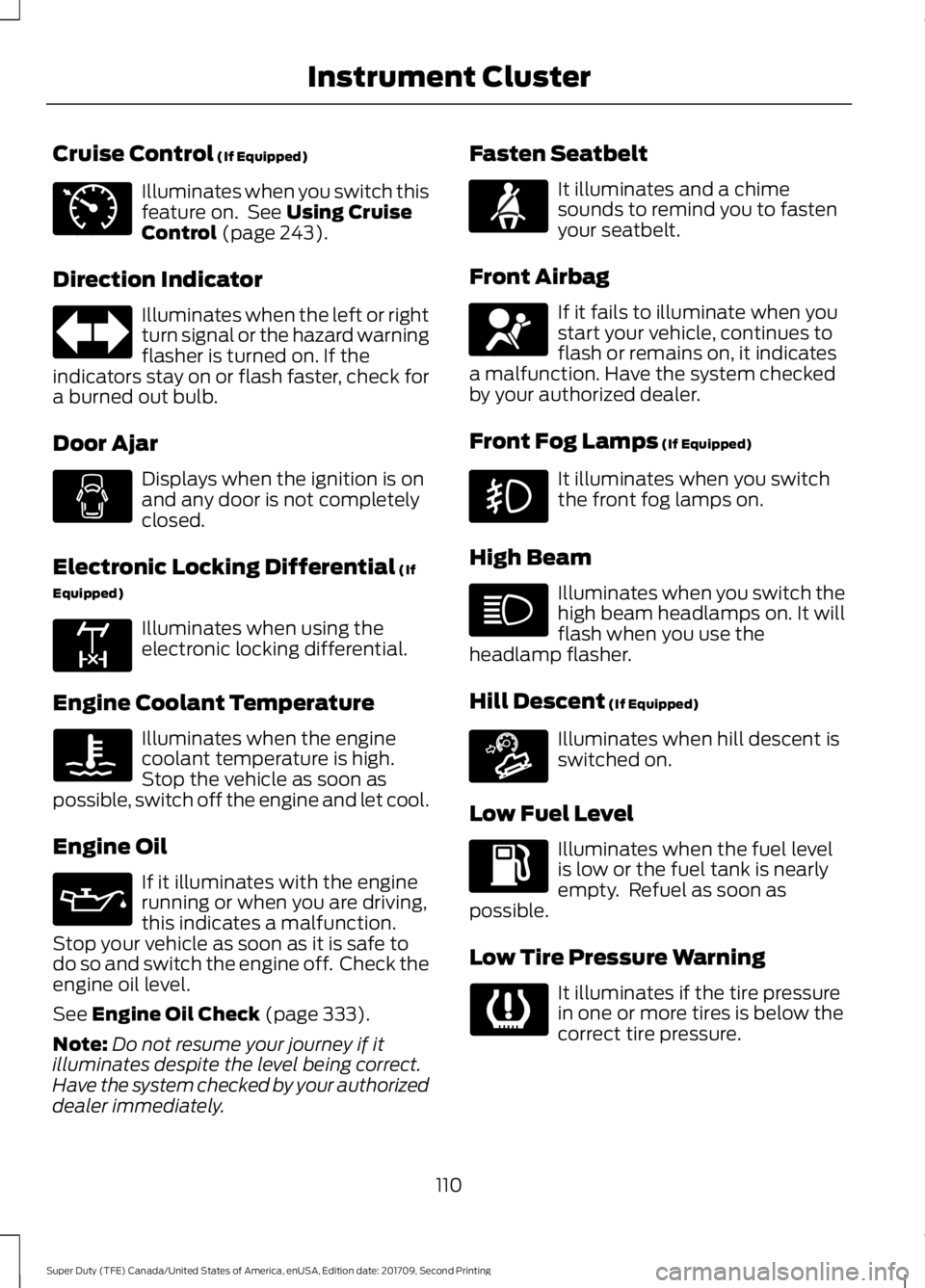
Cruise Control (If Equipped)
Illuminates when you switch this
feature on. See
Using Cruise
Control (page 243).
Direction Indicator Illuminates when the left or right
turn signal or the hazard warning
flasher is turned on. If the
indicators stay on or flash faster, check for
a burned out bulb.
Door Ajar Displays when the ignition is on
and any door is not completely
closed.
Electronic Locking Differential
(If
Equipped) Illuminates when using the
electronic locking differential.
Engine Coolant Temperature Illuminates when the engine
coolant temperature is high.
Stop the vehicle as soon as
possible, switch off the engine and let cool.
Engine Oil If it illuminates with the engine
running or when you are driving,
this indicates a malfunction.
Stop your vehicle as soon as it is safe to
do so and switch the engine off. Check the
engine oil level.
See
Engine Oil Check (page 333).
Note: Do not resume your journey if it
illuminates despite the level being correct.
Have the system checked by your authorized
dealer immediately. Fasten Seatbelt It illuminates and a chime
sounds to remind you to fasten
your seatbelt.
Front Airbag If it fails to illuminate when you
start your vehicle, continues to
flash or remains on, it indicates
a malfunction. Have the system checked
by your authorized dealer.
Front Fog Lamps
(If Equipped) It illuminates when you switch
the front fog lamps on.
High Beam Illuminates when you switch the
high beam headlamps on. It will
flash when you use the
headlamp flasher.
Hill Descent
(If Equipped) Illuminates when hill descent is
switched on.
Low Fuel Level Illuminates when the fuel level
is low or the fuel tank is nearly
empty. Refuel as soon as
possible.
Low Tire Pressure Warning It illuminates if the tire pressure
in one or more tires is below the
correct tire pressure.
110
Super Duty (TFE) Canada/United States of America, enUSA, Edition date: 201709, Second Printing Instrument ClusterE71340 E163170 E71880 E67017 E163171
Page 119 of 660
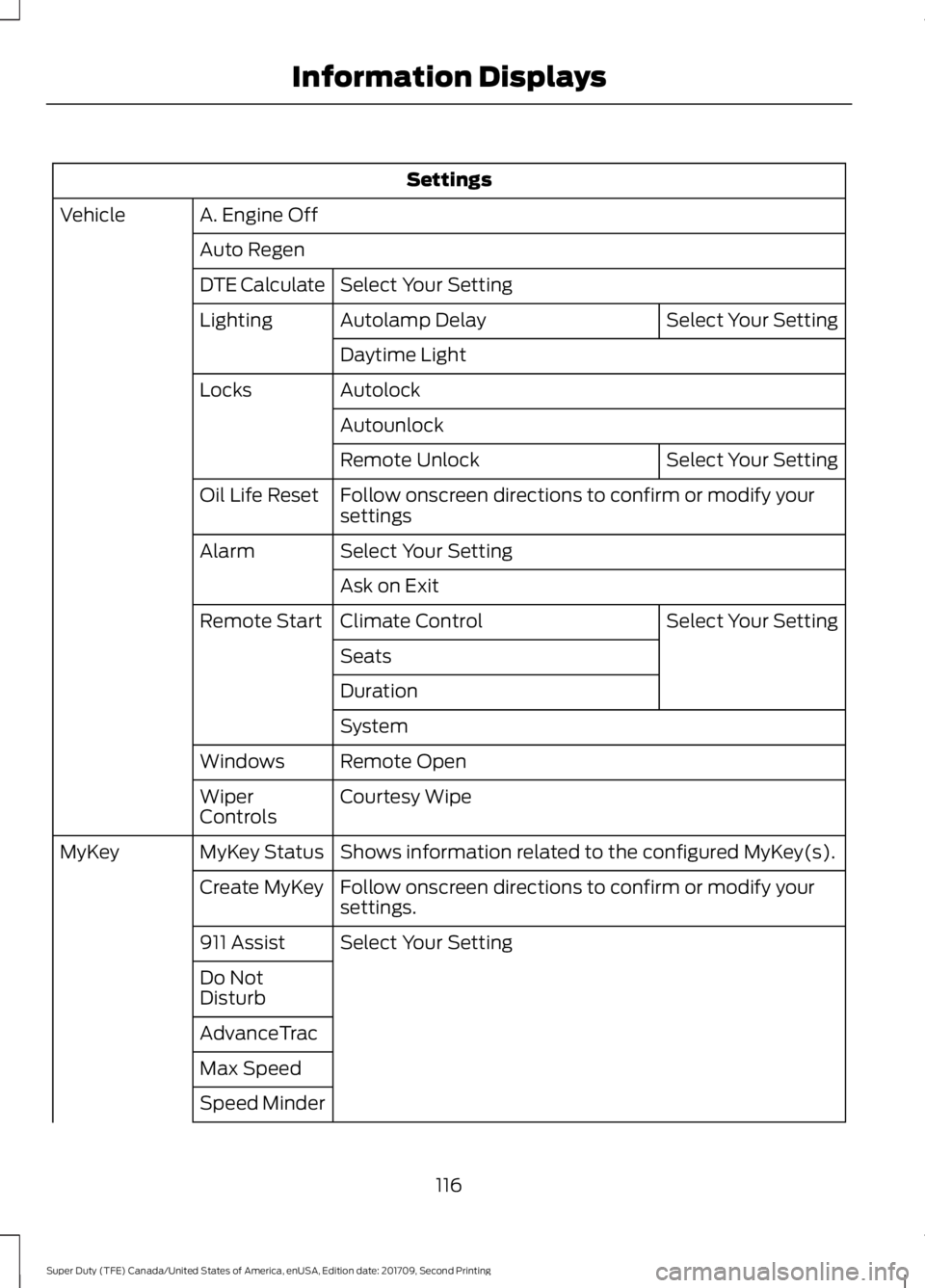
Settings
A. Engine Off
Vehicle
Auto RegenSelect Your Setting
DTE Calculate
Select Your Setting
Autolamp Delay
Lighting
Daytime Light
Autolock
Locks
Autounlock Select Your Setting
Remote Unlock
Follow onscreen directions to confirm or modify your
settings
Oil Life Reset
Select Your Setting
Alarm
Ask on Exit Select Your Setting
Climate Control
Remote Start
Seats
Duration
System
Remote Open
Windows
Courtesy Wipe
Wiper
Controls
Shows information related to the configured MyKey(s).
MyKey Status
MyKey
Follow onscreen directions to confirm or modify your
settings.
Create MyKey
Select Your Setting
911 Assist
Do Not
Disturb
AdvanceTrac
Max Speed
Speed Minder
116
Super Duty (TFE) Canada/United States of America, enUSA, Edition date: 201709, Second Printing Information Displays
Page 123 of 660
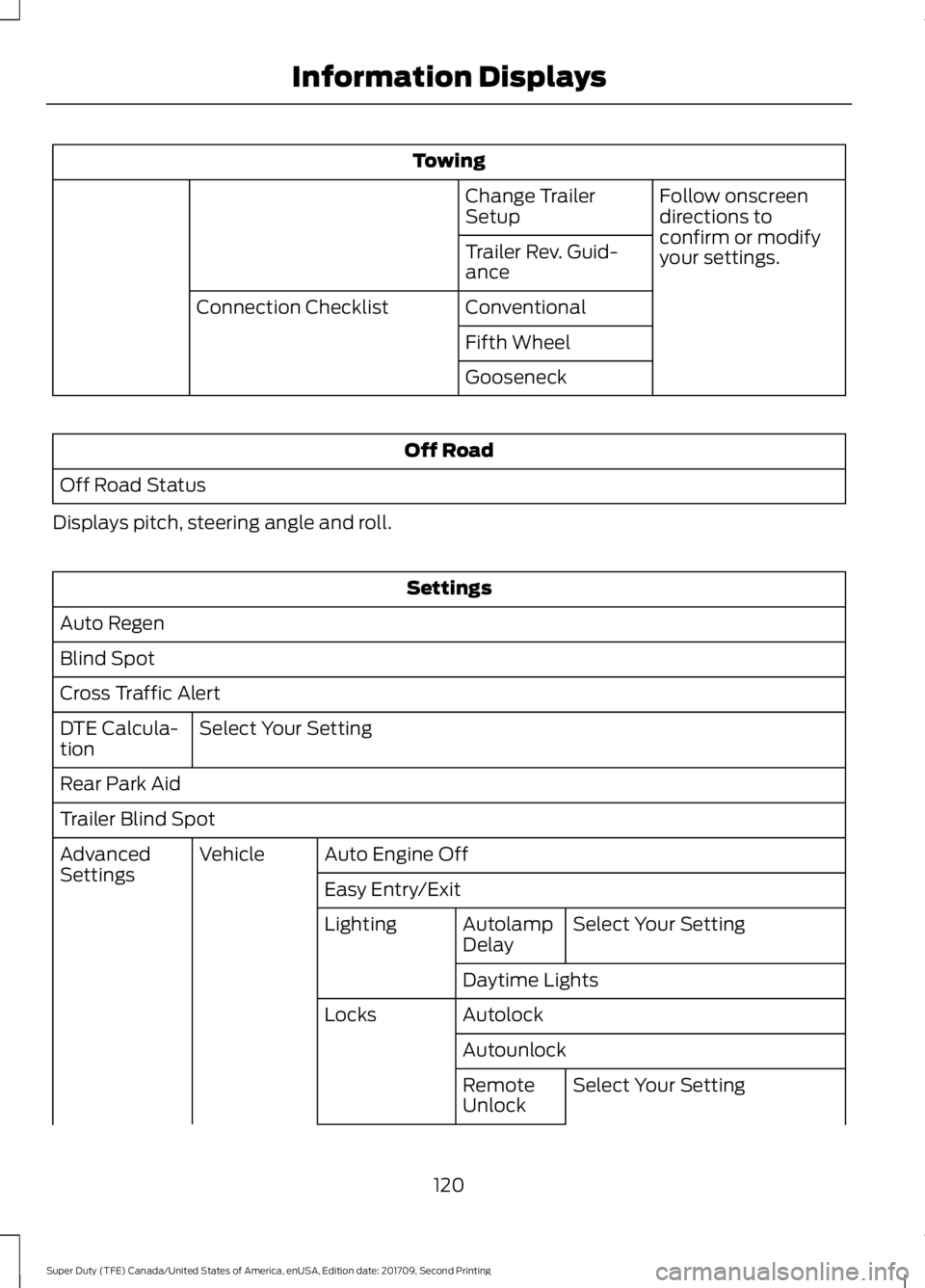
Towing
Follow onscreen
directions to
confirm or modify
your settings.
Change Trailer
Setup
Trailer Rev. Guid-
ance
Conventional
Connection Checklist
Fifth Wheel
Gooseneck Off Road
Off Road Status
Displays pitch, steering angle and roll. Settings
Auto Regen
Blind Spot
Cross Traffic Alert Select Your Setting
DTE Calcula-
tion
Rear Park Aid
Trailer Blind Spot
Auto Engine Off
Vehicle
Advanced
Settings
Easy Entry/Exit
Select Your Setting
Autolamp
Delay
Lighting
Daytime Lights
Autolock
Locks
AutounlockSelect Your Setting
Remote
Unlock
120
Super Duty (TFE) Canada/United States of America, enUSA, Edition date: 201709, Second Printing Information Displays
Page 130 of 660
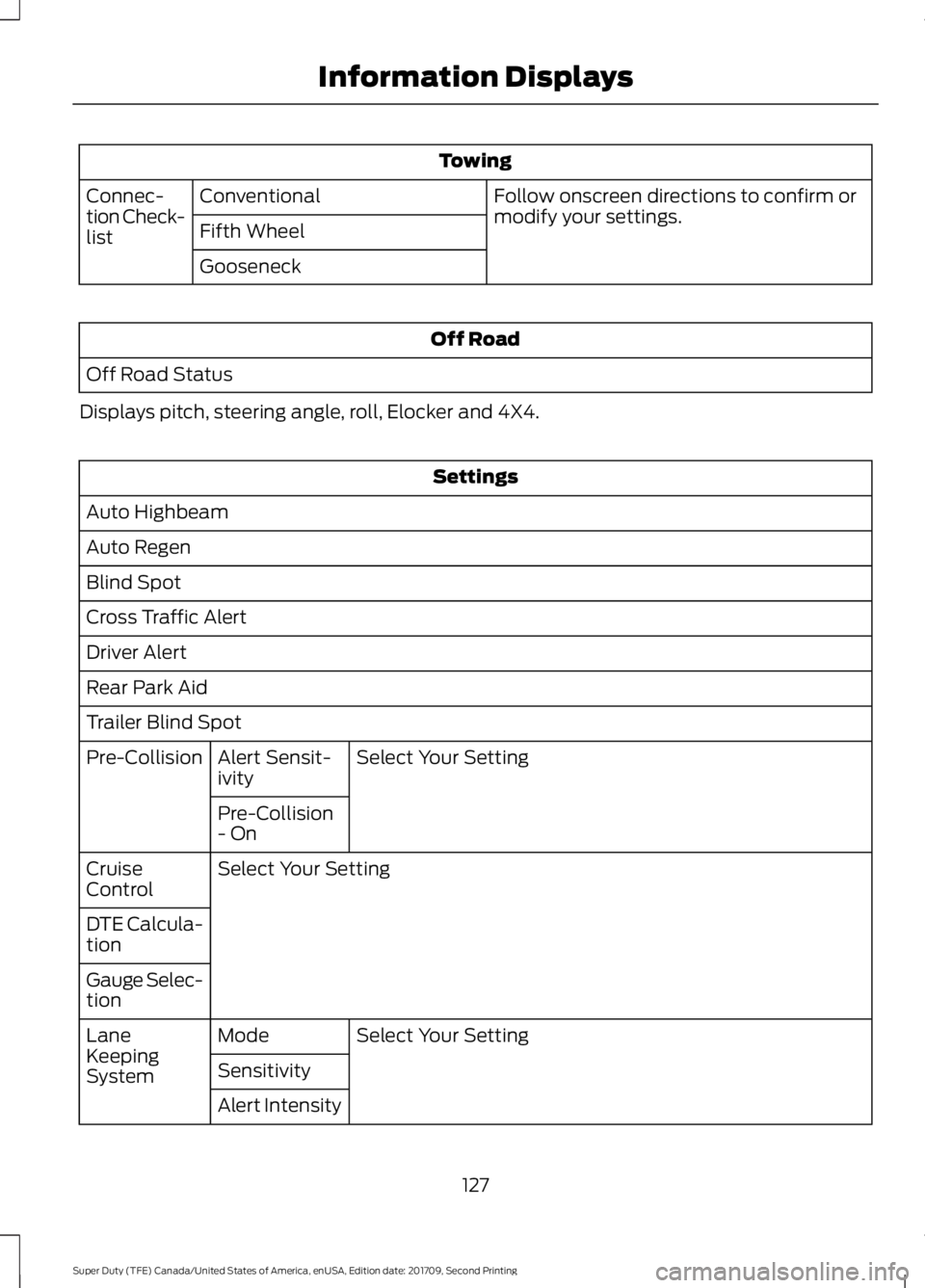
Towing
Follow onscreen directions to confirm or
modify your settings.
Conventional
Connec-
tion Check-
list Fifth Wheel
Gooseneck Off Road
Off Road Status
Displays pitch, steering angle, roll, Elocker and 4X4. Settings
Auto Highbeam
Auto Regen
Blind Spot
Cross Traffic Alert
Driver Alert
Rear Park Aid
Trailer Blind Spot Select Your Setting
Alert Sensit-
ivity
Pre-Collision
Pre-Collision
- On
Select Your Setting
Cruise
Control
DTE Calcula-
tion
Gauge Selec-
tion
Select Your Setting
Mode
Lane
Keeping
System Sensitivity
Alert Intensity
127
Super Duty (TFE) Canada/United States of America, enUSA, Edition date: 201709, Second Printing Information Displays
Page 131 of 660
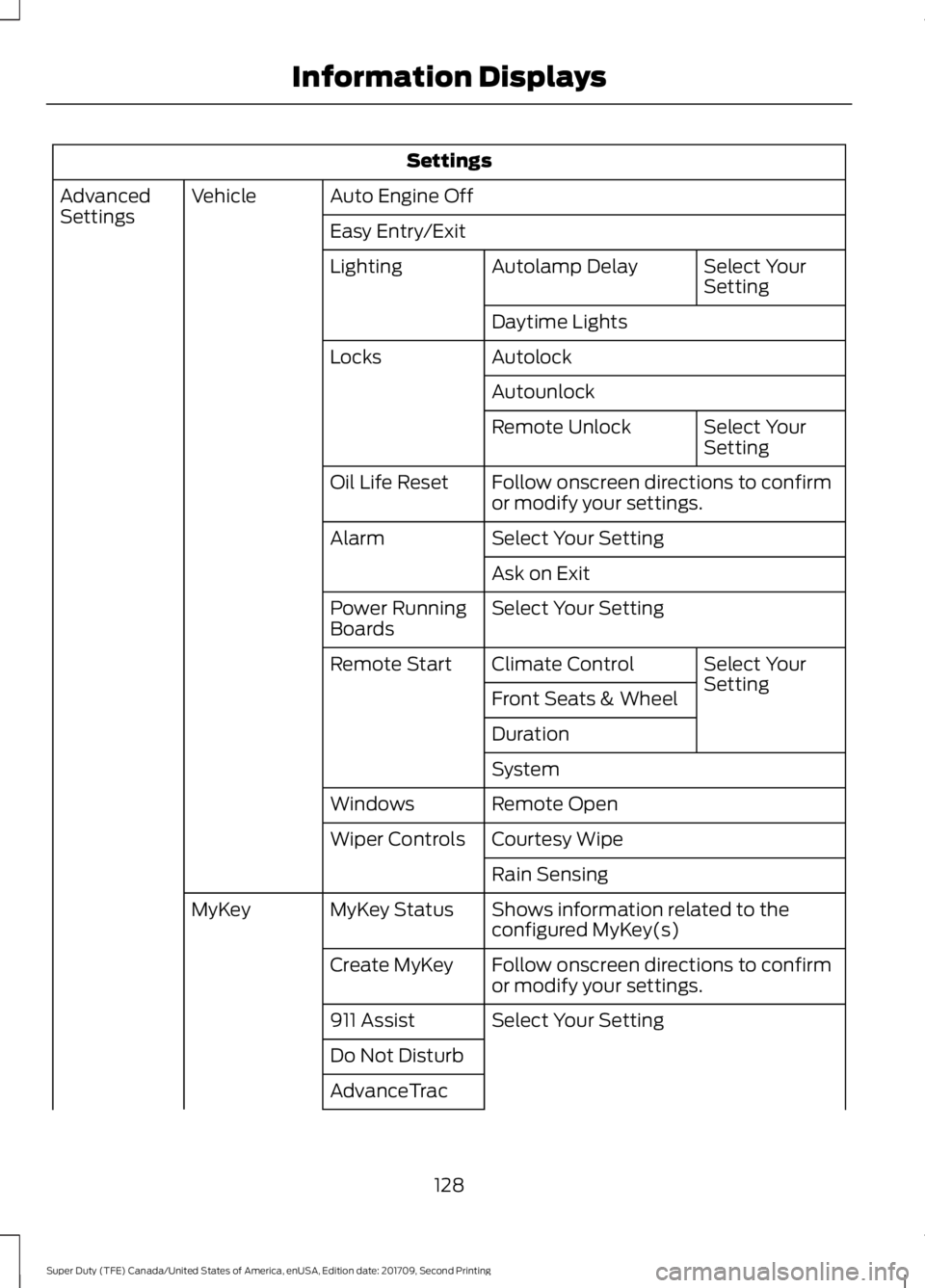
Settings
Auto Engine Off
Vehicle
Advanced
Settings
Easy Entry/Exit
Select Your
Setting
Autolamp Delay
Lighting
Daytime Lights
Autolock
Locks
Autounlock Select Your
Setting
Remote Unlock
Follow onscreen directions to confirm
or modify your settings.
Oil Life Reset
Select Your Setting
Alarm
Ask on Exit
Select Your Setting
Power Running
Boards
Select Your
Setting
Climate Control
Remote Start
Front Seats & Wheel
Duration
System
Remote Open
Windows
Courtesy Wipe
Wiper Controls
Rain Sensing
Shows information related to the
configured MyKey(s)
MyKey Status
MyKey
Follow onscreen directions to confirm
or modify your settings.
Create MyKey
Select Your Setting
911 Assist
Do Not Disturb
AdvanceTrac
128
Super Duty (TFE) Canada/United States of America, enUSA, Edition date: 201709, Second Printing Information Displays
Page 133 of 660
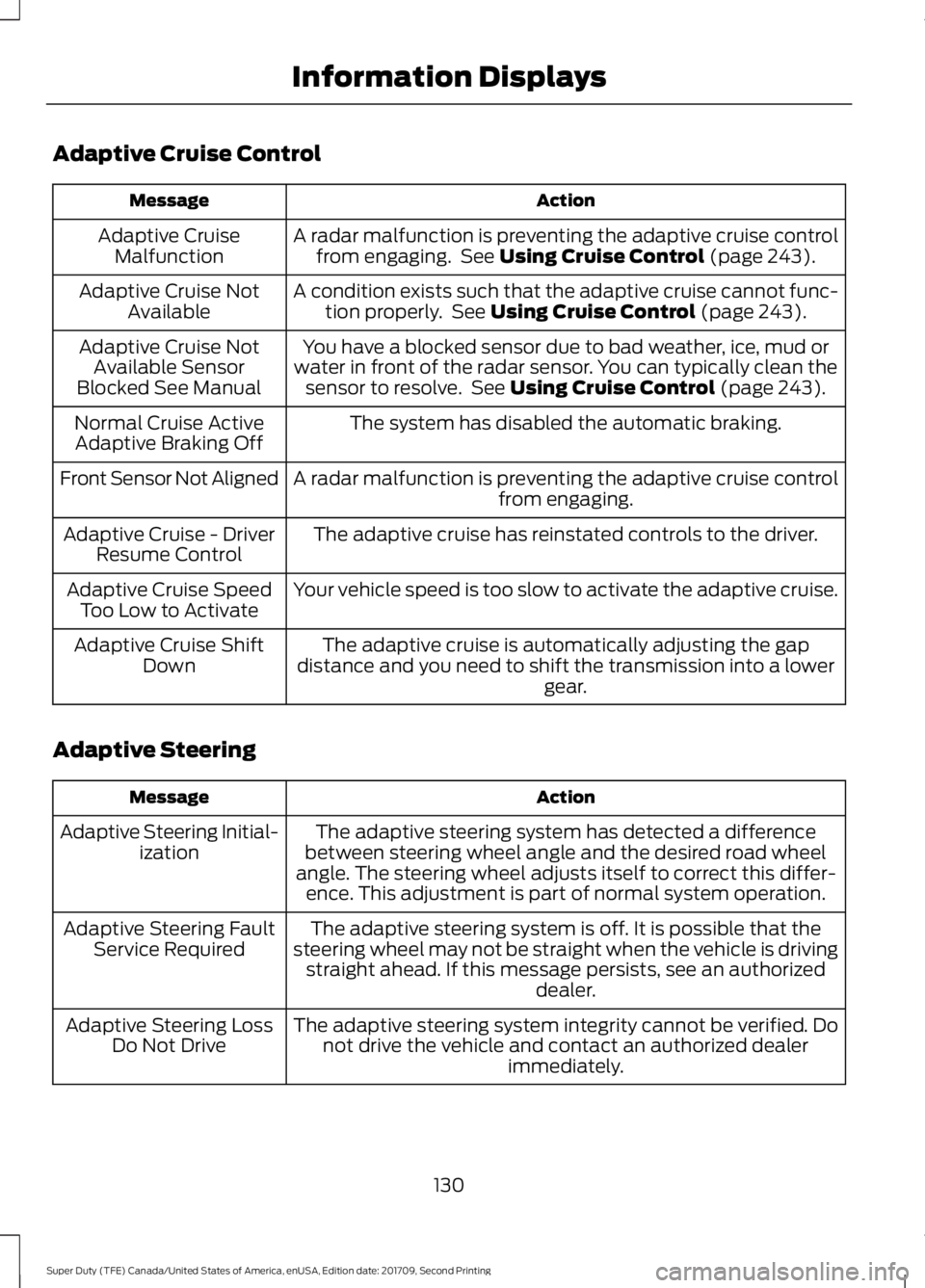
Adaptive Cruise Control
Action
Message
A radar malfunction is preventing the adaptive cruise controlfrom engaging. See Using Cruise Control (page 243).
Adaptive Cruise
Malfunction
A condition exists such that the adaptive cruise cannot func-tion properly. See
Using Cruise Control (page 243).
Adaptive Cruise Not
Available
You have a blocked sensor due to bad weather, ice, mud or
water in front of the radar sensor. You can typically clean the sensor to resolve. See
Using Cruise Control (page 243).
Adaptive Cruise Not
Available Sensor
Blocked See Manual
The system has disabled the automatic braking.
Normal Cruise Active
Adaptive Braking Off
A radar malfunction is preventing the adaptive cruise controlfrom engaging.
Front Sensor Not Aligned
The adaptive cruise has reinstated controls to the driver.
Adaptive Cruise - Driver
Resume Control
Your vehicle speed is too slow to activate the adaptive cruise.
Adaptive Cruise Speed
Too Low to Activate
The adaptive cruise is automatically adjusting the gap
distance and you need to shift the transmission into a lower gear.
Adaptive Cruise Shift
Down
Adaptive Steering Action
Message
The adaptive steering system has detected a difference
between steering wheel angle and the desired road wheel
angle. The steering wheel adjusts itself to correct this differ- ence. This adjustment is part of normal system operation.
Adaptive Steering Initial-
ization
The adaptive steering system is off. It is possible that the
steering wheel may not be straight when the vehicle is driving straight ahead. If this message persists, see an authorized dealer.
Adaptive Steering Fault
Service Required
The adaptive steering system integrity cannot be verified. Donot drive the vehicle and contact an authorized dealer immediately.
Adaptive Steering Loss
Do Not Drive
130
Super Duty (TFE) Canada/United States of America, enUSA, Edition date: 201709, Second Printing Information Displays
Page 134 of 660
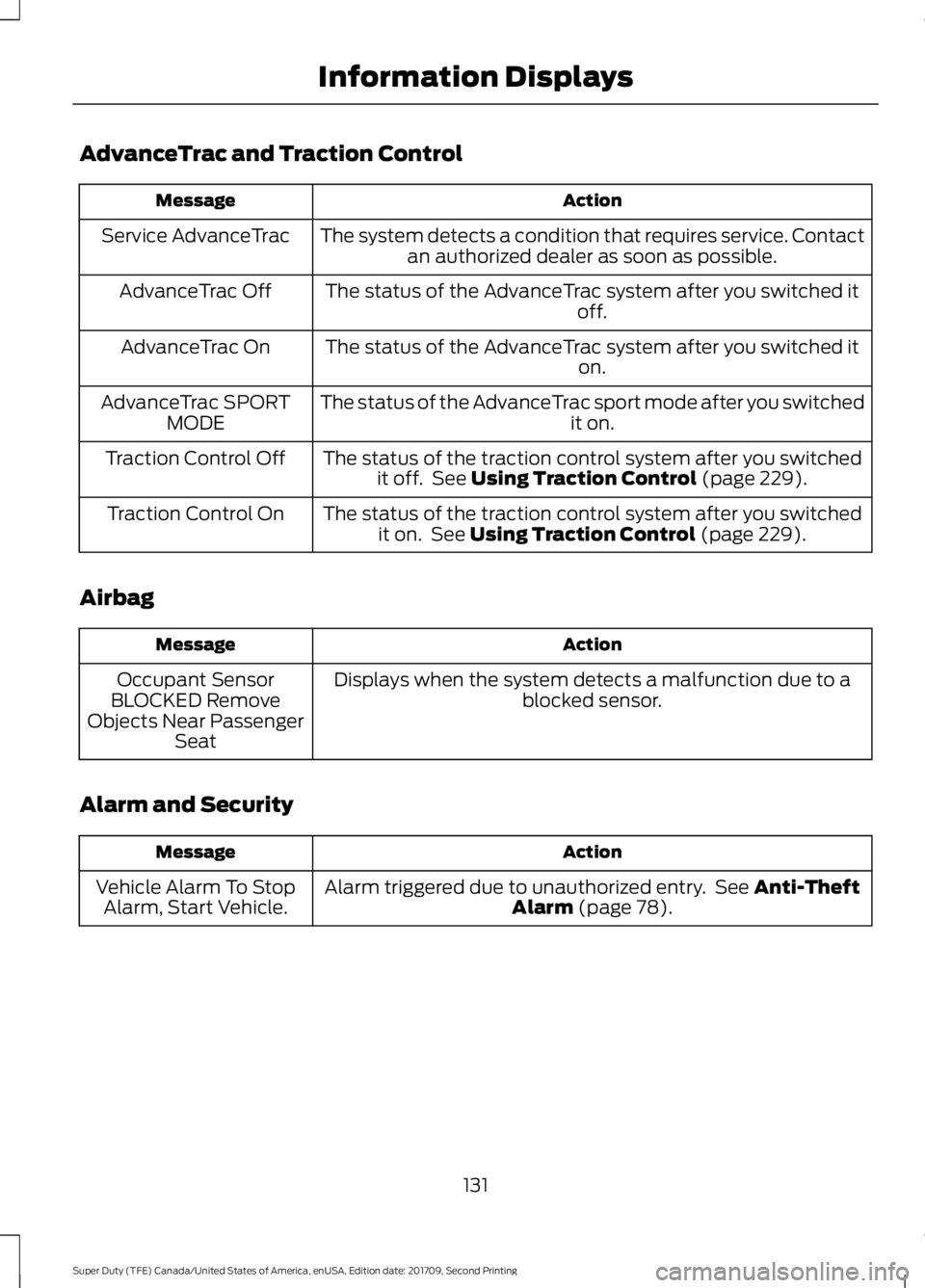
AdvanceTrac and Traction Control
Action
Message
The system detects a condition that requires service. Contactan authorized dealer as soon as possible.
Service AdvanceTrac
The status of the AdvanceTrac system after you switched it off.
AdvanceTrac Off
The status of the AdvanceTrac system after you switched it on.
AdvanceTrac On
The status of the AdvanceTrac sport mode after you switched it on.
AdvanceTrac SPORT
MODE
The status of the traction control system after you switchedit off. See Using Traction Control (page 229).
Traction Control Off
The status of the traction control system after you switchedit on. See
Using Traction Control (page 229).
Traction Control On
Airbag Action
Message
Displays when the system detects a malfunction due to a blocked sensor.
Occupant Sensor
BLOCKED Remove
Objects Near Passenger Seat
Alarm and Security Action
Message
Alarm triggered due to unauthorized entry. See
Anti-Theft
Alarm (page 78).
Vehicle Alarm To Stop
Alarm, Start Vehicle.
131
Super Duty (TFE) Canada/United States of America, enUSA, Edition date: 201709, Second Printing Information Displays
Page 136 of 660
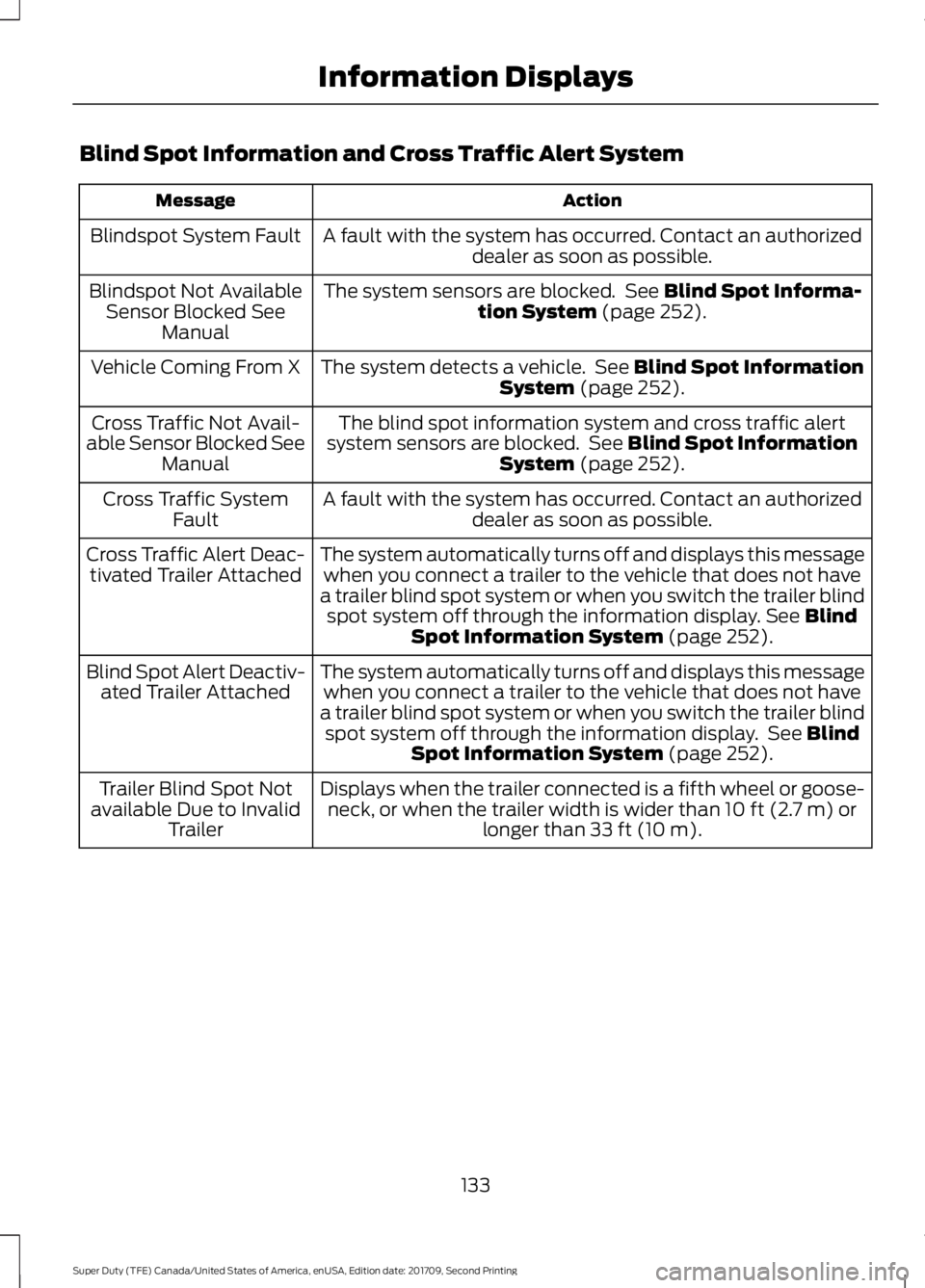
Blind Spot Information and Cross Traffic Alert System
Action
Message
A fault with the system has occurred. Contact an authorizeddealer as soon as possible.
Blindspot System Fault
The system sensors are blocked. See Blind Spot Informa-
tion System (page 252).
Blindspot Not Available
Sensor Blocked See Manual
The system detects a vehicle. See
Blind Spot Information
System (page 252).
Vehicle Coming From X
The blind spot information system and cross traffic alert
system sensors are blocked. See
Blind Spot Information
System (page 252).
Cross Traffic Not Avail-
able Sensor Blocked See Manual
A fault with the system has occurred. Contact an authorizeddealer as soon as possible.
Cross Traffic System
Fault
The system automatically turns off and displays this messagewhen you connect a trailer to the vehicle that does not have
a trailer blind spot system or when you switch the trailer blind spot system off through the information display.
See Blind
Spot Information System (page 252).
Cross Traffic Alert Deac-
tivated Trailer Attached
The system automatically turns off and displays this messagewhen you connect a trailer to the vehicle that does not have
a trailer blind spot system or when you switch the trailer blind spot system off through the information display. See
Blind
Spot Information System (page 252).
Blind Spot Alert Deactiv-
ated Trailer Attached
Displays when the trailer connected is a fifth wheel or goose-neck, or when the trailer width is wider than
10 ft (2.7 m) or
longer than 33 ft (10 m).
Trailer Blind Spot Not
available Due to Invalid Trailer
133
Super Duty (TFE) Canada/United States of America, enUSA, Edition date: 201709, Second Printing Information Displays
Page 137 of 660
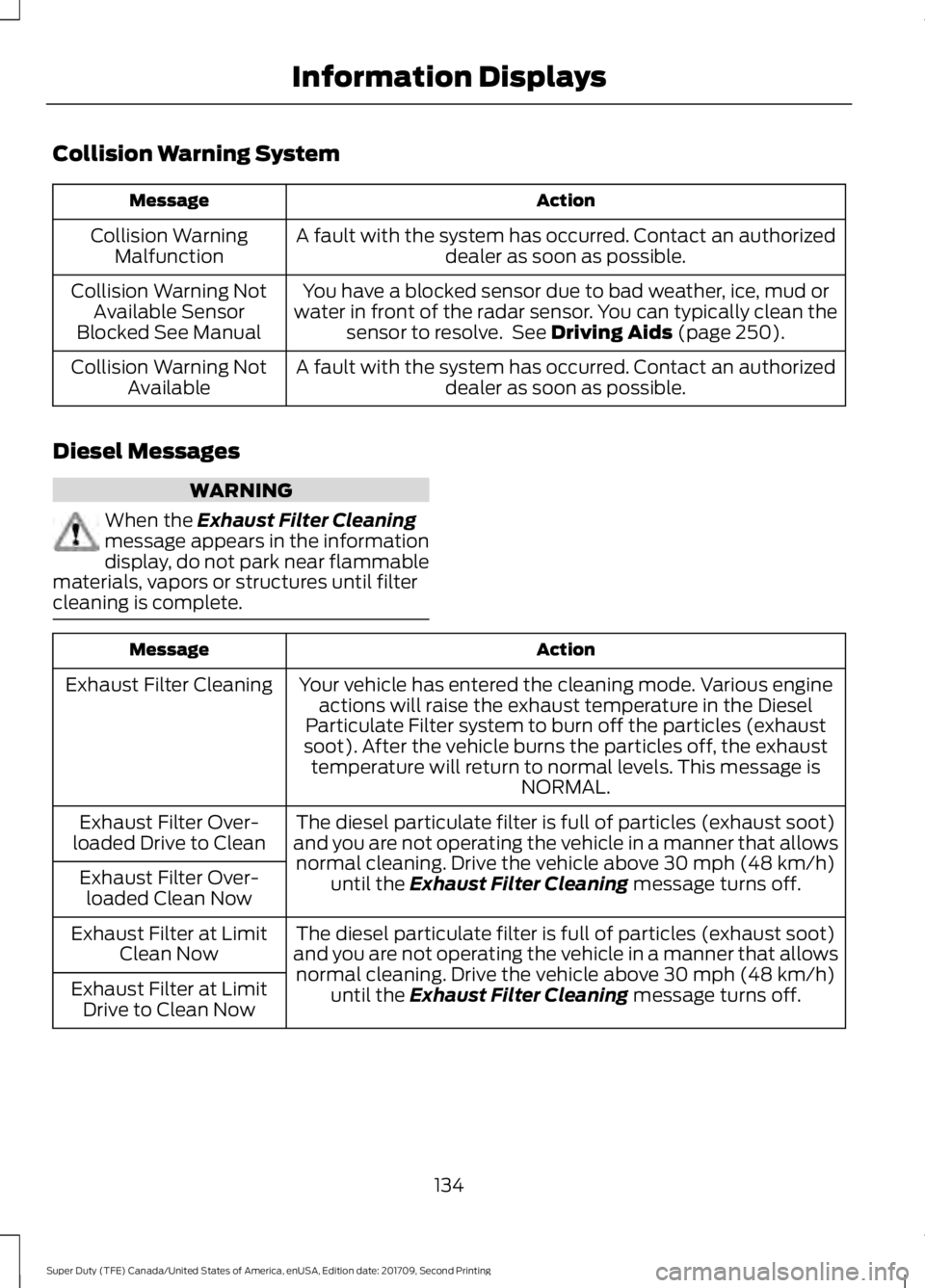
Collision Warning System
Action
Message
A fault with the system has occurred. Contact an authorizeddealer as soon as possible.
Collision Warning
Malfunction
You have a blocked sensor due to bad weather, ice, mud or
water in front of the radar sensor. You can typically clean the sensor to resolve. See Driving Aids (page 250).
Collision Warning Not
Available Sensor
Blocked See Manual
A fault with the system has occurred. Contact an authorizeddealer as soon as possible.
Collision Warning Not
Available
Diesel Messages WARNING
When the
Exhaust Filter Cleaning
message appears in the information
display, do not park near flammable
materials, vapors or structures until filter
cleaning is complete. Action
Message
Your vehicle has entered the cleaning mode. Various engineactions will raise the exhaust temperature in the Diesel
Particulate Filter system to burn off the particles (exhaust
soot). After the vehicle burns the particles off, the exhaust temperature will return to normal levels. This message is NORMAL.
Exhaust Filter Cleaning
The diesel particulate filter is full of particles (exhaust soot)
and you are not operating the vehicle in a manner that allows normal cleaning. Drive the vehicle above
30 mph (48 km/h)
until the Exhaust Filter Cleaning message turns off.
Exhaust Filter Over-
loaded Drive to Clean
Exhaust Filter Over-loaded Clean Now
The diesel particulate filter is full of particles (exhaust soot)
and you are not operating the vehicle in a manner that allows normal cleaning. Drive the vehicle above
30 mph (48 km/h)
until the Exhaust Filter Cleaning message turns off.
Exhaust Filter at Limit
Clean Now
Exhaust Filter at Limit Drive to Clean Now
134
Super Duty (TFE) Canada/United States of America, enUSA, Edition date: 201709, Second Printing Information Displays
Page 138 of 660
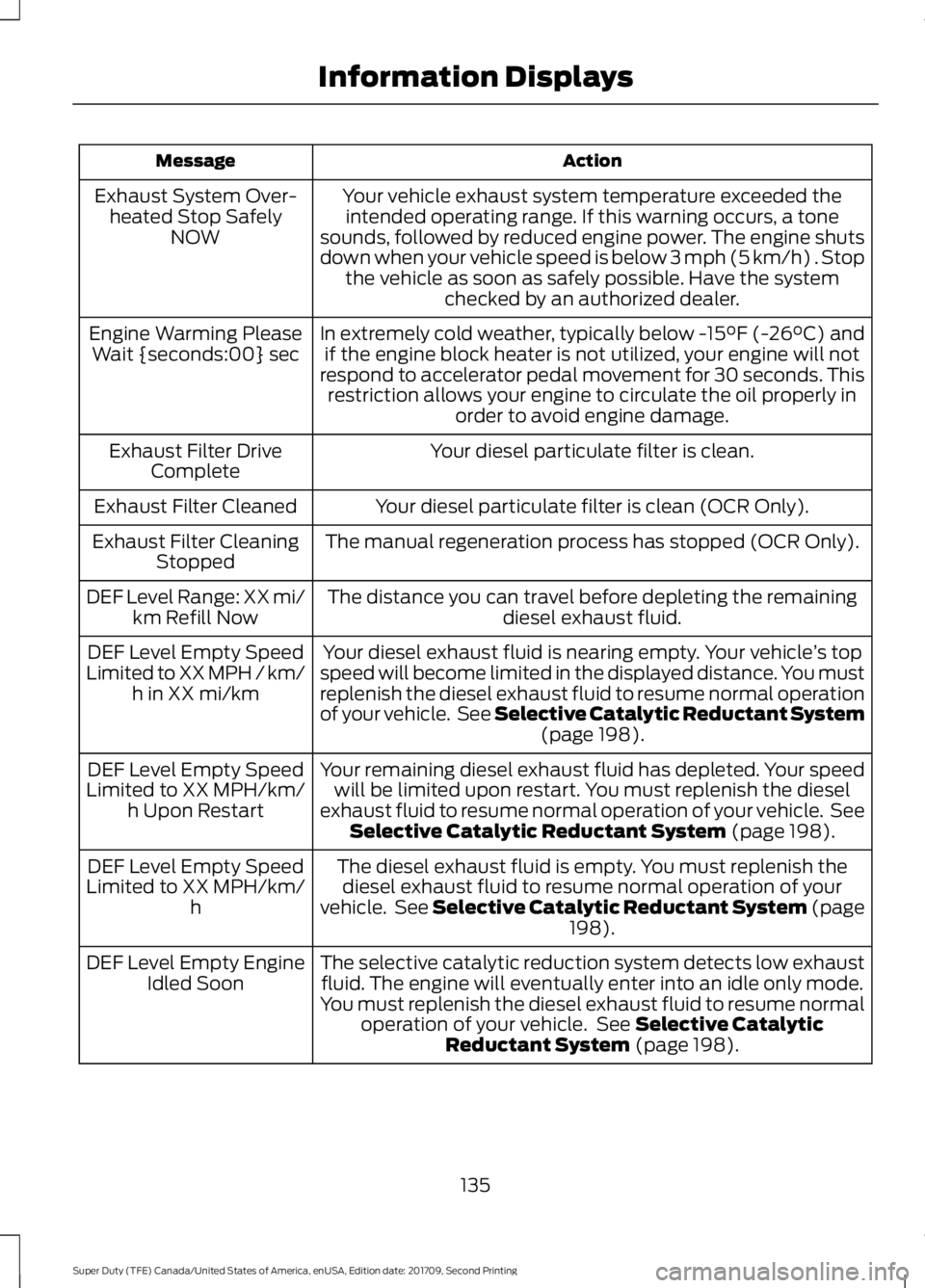
Action
Message
Your vehicle exhaust system temperature exceeded theintended operating range. If this warning occurs, a tone
sounds, followed by reduced engine power. The engine shuts
down when your vehicle speed is below 3 mph (5 km/h) . Stop the vehicle as soon as safely possible. Have the system checked by an authorized dealer.
Exhaust System Over-
heated Stop Safely NOW
In extremely cold weather, typically below -15°F (-26°C) andif the engine block heater is not utilized, your engine will not
respond to accelerator pedal movement for 30 seconds. This restriction allows your engine to circulate the oil properly in order to avoid engine damage.
Engine Warming Please
Wait {seconds:00} sec
Your diesel particulate filter is clean.
Exhaust Filter Drive
Complete
Your diesel particulate filter is clean (OCR Only).
Exhaust Filter Cleaned
The manual regeneration process has stopped (OCR Only).
Exhaust Filter Cleaning
Stopped
The distance you can travel before depleting the remaining diesel exhaust fluid.
DEF Level Range: XX mi/
km Refill Now
Your diesel exhaust fluid is nearing empty. Your vehicle ’s top
speed will become limited in the displayed distance. You must
replenish the diesel exhaust fluid to resume normal operation
of your vehicle. See Selective Catalytic Reductant System (page 198).
DEF Level Empty Speed
Limited to XX MPH / km/ h in XX mi/km
Your remaining diesel exhaust fluid has depleted. Your speedwill be limited upon restart. You must replenish the diesel
exhaust fluid to resume normal operation of your vehicle. See Selective Catalytic Reductant System
(page 198).
DEF Level Empty Speed
Limited to XX MPH/km/ h Upon Restart
The diesel exhaust fluid is empty. You must replenish thediesel exhaust fluid to resume normal operation of your
vehicle. See Selective Catalytic Reductant System (page 198
).
DEF Level Empty Speed
Limited to XX MPH/km/ h
The selective catalytic reduction system detects low exhaustfluid. The engine will eventually enter into an idle only mode.
You must replenish the diesel exhaust fluid to resume normal operation of your vehicle. See
Selective Catalytic
Reductant System (page 198).
DEF Level Empty Engine
Idled Soon
135
Super Duty (TFE) Canada/United States of America, enUSA, Edition date: 201709, Second Printing Information Displays