service interval FORD F-250 2020 User Guide
[x] Cancel search | Manufacturer: FORD, Model Year: 2020, Model line: F-250, Model: FORD F-250 2020Pages: 631, PDF Size: 9.62 MB
Page 557 of 631
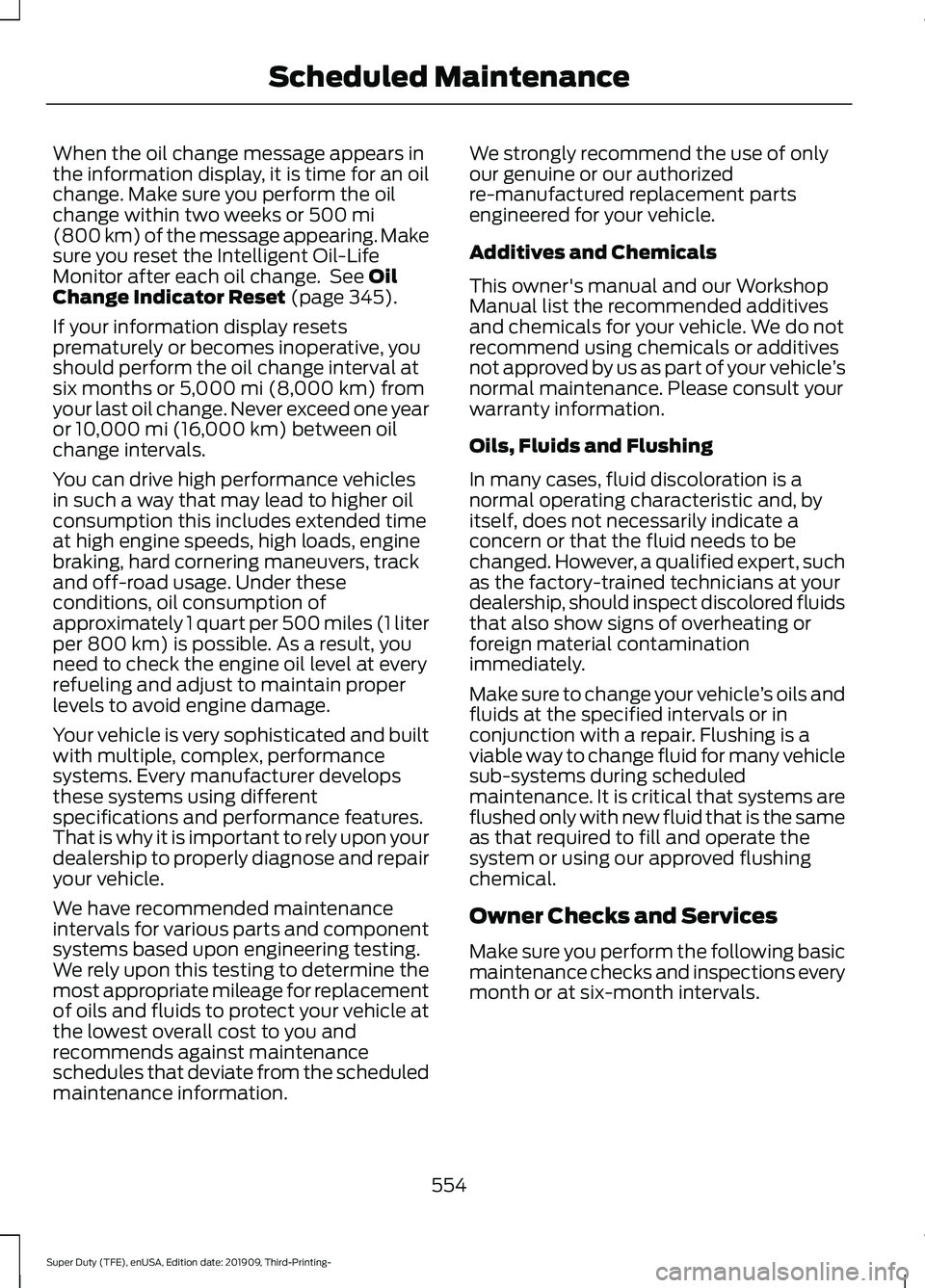
When the oil change message appears in
the information display, it is time for an oil
change. Make sure you perform the oil
change within two weeks or 500 mi
(800 km) of the message appearing. Make
sure you reset the Intelligent Oil-Life
Monitor after each oil change. See
Oil
Change Indicator Reset (page 345).
If your information display resets
prematurely or becomes inoperative, you
should perform the oil change interval at
six months or
5,000 mi (8,000 km) from
your last oil change. Never exceed one year
or
10,000 mi (16,000 km) between oil
change intervals.
You can drive high performance vehicles
in such a way that may lead to higher oil
consumption this includes extended time
at high engine speeds, high loads, engine
braking, hard cornering maneuvers, track
and off-road usage. Under these
conditions, oil consumption of
approximately 1 quart per 500 miles (1 liter
per 800 km) is possible. As a result, you
need to check the engine oil level at every
refueling and adjust to maintain proper
levels to avoid engine damage.
Your vehicle is very sophisticated and built
with multiple, complex, performance
systems. Every manufacturer develops
these systems using different
specifications and performance features.
That is why it is important to rely upon your
dealership to properly diagnose and repair
your vehicle.
We have recommended maintenance
intervals for various parts and component
systems based upon engineering testing.
We rely upon this testing to determine the
most appropriate mileage for replacement
of oils and fluids to protect your vehicle at
the lowest overall cost to you and
recommends against maintenance
schedules that deviate from the scheduled
maintenance information. We strongly recommend the use of only
our genuine or our authorized
re-manufactured replacement parts
engineered for your vehicle.
Additives and Chemicals
This owner's manual and our Workshop
Manual list the recommended additives
and chemicals for your vehicle. We do not
recommend using chemicals or additives
not approved by us as part of your vehicle
’s
normal maintenance. Please consult your
warranty information.
Oils, Fluids and Flushing
In many cases, fluid discoloration is a
normal operating characteristic and, by
itself, does not necessarily indicate a
concern or that the fluid needs to be
changed. However, a qualified expert, such
as the factory-trained technicians at your
dealership, should inspect discolored fluids
that also show signs of overheating or
foreign material contamination
immediately.
Make sure to change your vehicle ’s oils and
fluids at the specified intervals or in
conjunction with a repair. Flushing is a
viable way to change fluid for many vehicle
sub-systems during scheduled
maintenance. It is critical that systems are
flushed only with new fluid that is the same
as that required to fill and operate the
system or using our approved flushing
chemical.
Owner Checks and Services
Make sure you perform the following basic
maintenance checks and inspections every
month or at six-month intervals.
554
Super Duty (TFE), enUSA, Edition date: 201909, Third-Printing- Scheduled Maintenance
Page 559 of 631
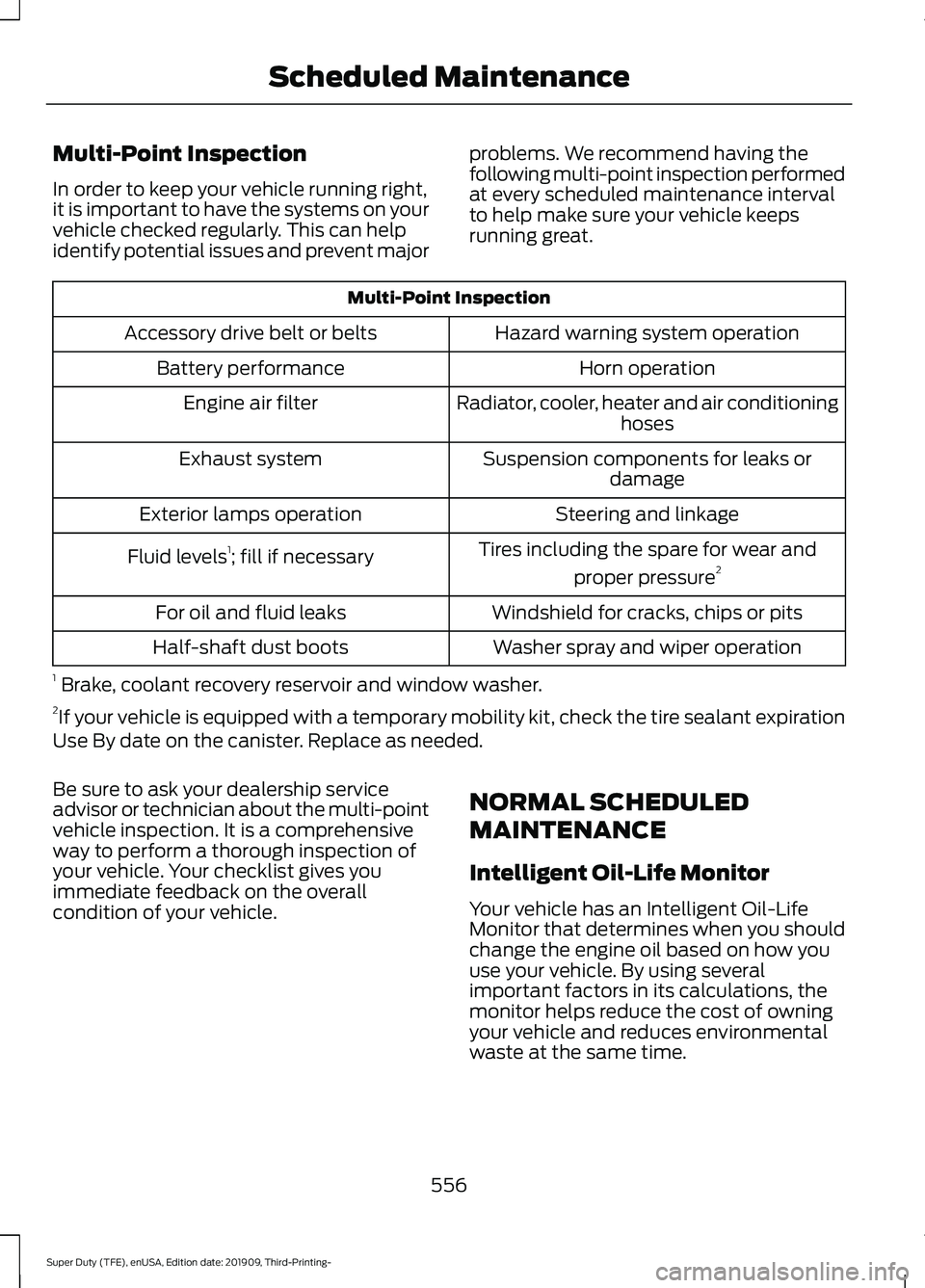
Multi-Point Inspection
In order to keep your vehicle running right,
it is important to have the systems on your
vehicle checked regularly. This can help
identify potential issues and prevent major
problems. We recommend having the
following multi-point inspection performed
at every scheduled maintenance interval
to help make sure your vehicle keeps
running great.Multi-Point Inspection
Hazard warning system operation
Accessory drive belt or belts
Horn operation
Battery performance
Radiator, cooler, heater and air conditioninghoses
Engine air filter
Suspension components for leaks ordamage
Exhaust system
Steering and linkage
Exterior lamps operation
Tires including the spare for wear andproper pressure 2
Fluid levels 1
; fill if necessary
Windshield for cracks, chips or pits
For oil and fluid leaks
Washer spray and wiper operation
Half-shaft dust boots
1 Brake, coolant recovery reservoir and window washer.
2 If your vehicle is equipped with a temporary mobility kit, check the tire sealant expiration
Use By date on the canister. Replace as needed.
Be sure to ask your dealership service
advisor or technician about the multi-point
vehicle inspection. It is a comprehensive
way to perform a thorough inspection of
your vehicle. Your checklist gives you
immediate feedback on the overall
condition of your vehicle. NORMAL SCHEDULED
MAINTENANCE
Intelligent Oil-Life Monitor
Your vehicle has an Intelligent Oil-Life
Monitor that determines when you should
change the engine oil based on how you
use your vehicle. By using several
important factors in its calculations, the
monitor helps reduce the cost of owning
your vehicle and reduces environmental
waste at the same time.
556
Super Duty (TFE), enUSA, Edition date: 201909, Third-Printing- Scheduled Maintenance
Page 563 of 631
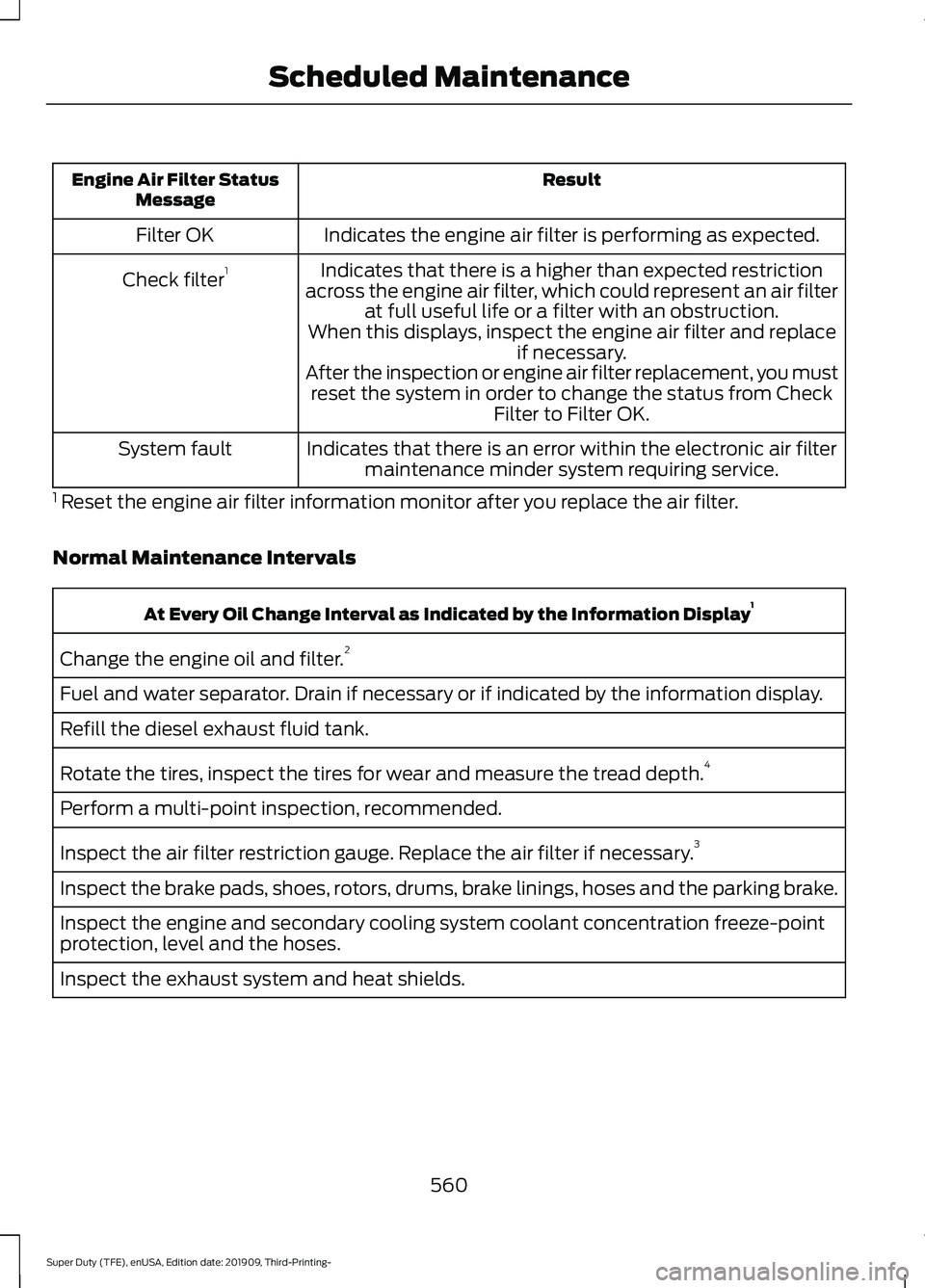
Result
Engine Air Filter Status
Message
Indicates the engine air filter is performing as expected.
Filter OK
Indicates that there is a higher than expected restriction
across the engine air filter, which could represent an air filter at full useful life or a filter with an obstruction.
Check filter
1
When this displays, inspect the engine air filter and replace if necessary.
After the inspection or engine air filter replacement, you must reset the system in order to change the status from Check Filter to Filter OK.
Indicates that there is an error within the electronic air filter maintenance minder system requiring service.
System fault
1 Reset the engine air filter information monitor after you replace the air filter.
Normal Maintenance Intervals At Every Oil Change Interval as Indicated by the Information Display
1
Change the engine oil and filter. 2
Fuel and water separator. Drain if necessary or if indicated by the information display.
Refill the diesel exhaust fluid tank.
Rotate the tires, inspect the tires for wear and measure the tread depth. 4
Perform a multi-point inspection, recommended.
Inspect the air filter restriction gauge. Replace the air filter if necessary. 3
Inspect the brake pads, shoes, rotors, drums, brake linings, hoses and the parking brake.
Inspect the engine and secondary cooling system coolant concentration freeze-point
protection, level and the hoses.
Inspect the exhaust system and heat shields.
560
Super Duty (TFE), enUSA, Edition date: 201909, Third-Printing- Scheduled Maintenance
Page 564 of 631
At Every Oil Change Interval as Indicated by the Information Display
1
Inspect the front axle and U-joints. Lubricate any grease fittings. Four-wheel drive
vehicles.
Inspect the steering linkage, ball joints, suspension, tie-rod ends, driveshaft and the U-
joints. Lubricate any grease fittings.
1 Do not exceed one year/10,000 mi (16,000 km) or 350 engine hours between service
intervals.
2 Reset the Intelligent Oil-Life Monitor after engine oil and filter changes.
3 Reset the engine air filter information monitor after you replace the air filter.
4 Rotate the front wheels on vehicles with dual rear wheels when specified. Only rotate
the rear wheels if you notice unusual wear. Brake Fluid Maintenance
1
Change the brake fluid. 2
Every three years
1 Perform this maintenance item every three years. Do not exceed the designated time
for the interval.
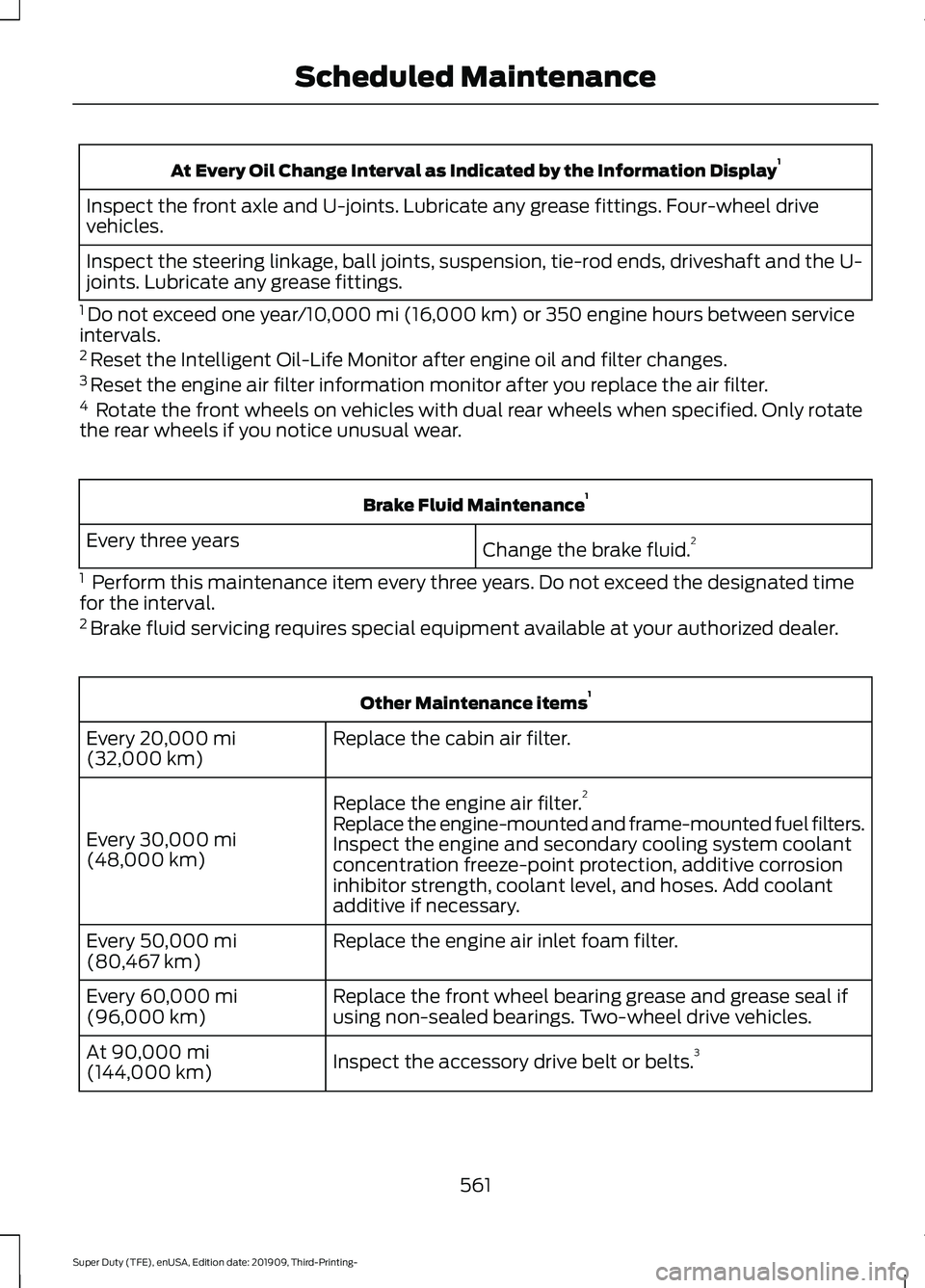
2 Brake fluid servicing requires special equipment available at your authorized dealer. Other Maintenance items
1
Replace the cabin air filter.
Every
20,000 mi
(32,000 km)
Replace the engine air filter. 2
Every
30,000 mi
(48,000 km) Replace the engine-mounted and frame-mounted fuel filters.
Inspect the engine and secondary cooling system coolant
concentration freeze-point protection, additive corrosion
inhibitor strength, coolant level, and hoses. Add coolant
additive if necessary.
Replace the engine air inlet foam filter.
Every
50,000 mi
(80,467 km)
Replace the front wheel bearing grease and grease seal if
using non-sealed bearings. Two-wheel drive vehicles.
Every
60,000 mi
(96,000 km)
Inspect the accessory drive belt or belts. 3
At
90,000 mi
(144,000 km)
561
Super Duty (TFE), enUSA, Edition date: 201909, Third-Printing- Scheduled Maintenance
Page 565 of 631
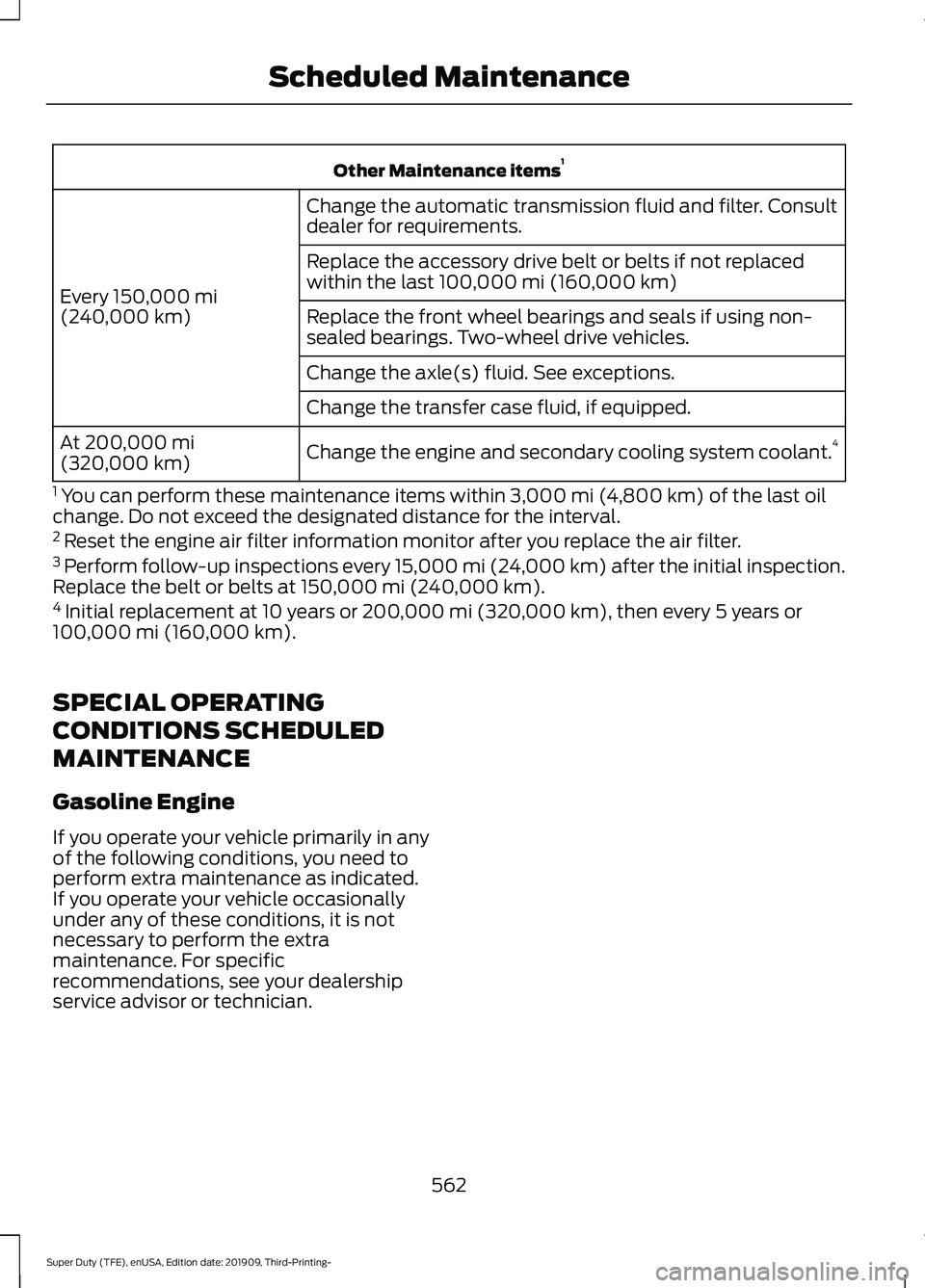
Other Maintenance items
1
Change the automatic transmission fluid and filter. Consult
dealer for requirements.
Every 150,000 mi
(240,000 km) Replace the accessory drive belt or belts if not replaced
within the last 100,000 mi (160,000 km)
Replace the front wheel bearings and seals if using non-
sealed bearings. Two-wheel drive vehicles.
Change the axle(s) fluid. See exceptions.
Change the transfer case fluid, if equipped.
Change the engine and secondary cooling system coolant. 4
At
200,000 mi
(320,000 km)
1 You can perform these maintenance items within
3,000 mi (4,800 km) of the last oil
change. Do not exceed the designated distance for the interval.
2 Reset the engine air filter information monitor after you replace the air filter.
3 Perform follow-up inspections every 15,000 mi (24,000 km) after the initial inspection.
Replace the belt or belts at
150,000 mi (240,000 km).
4 Initial replacement at 10 years or 200,000 mi (320,000 km), then every 5 years or
100,000 mi (160,000 km).
SPECIAL OPERATING
CONDITIONS SCHEDULED
MAINTENANCE
Gasoline Engine
If you operate your vehicle primarily in any
of the following conditions, you need to
perform extra maintenance as indicated.
If you operate your vehicle occasionally
under any of these conditions, it is not
necessary to perform the extra
maintenance. For specific
recommendations, see your dealership
service advisor or technician.
562
Super Duty (TFE), enUSA, Edition date: 201909, Third-Printing- Scheduled Maintenance
Page 568 of 631
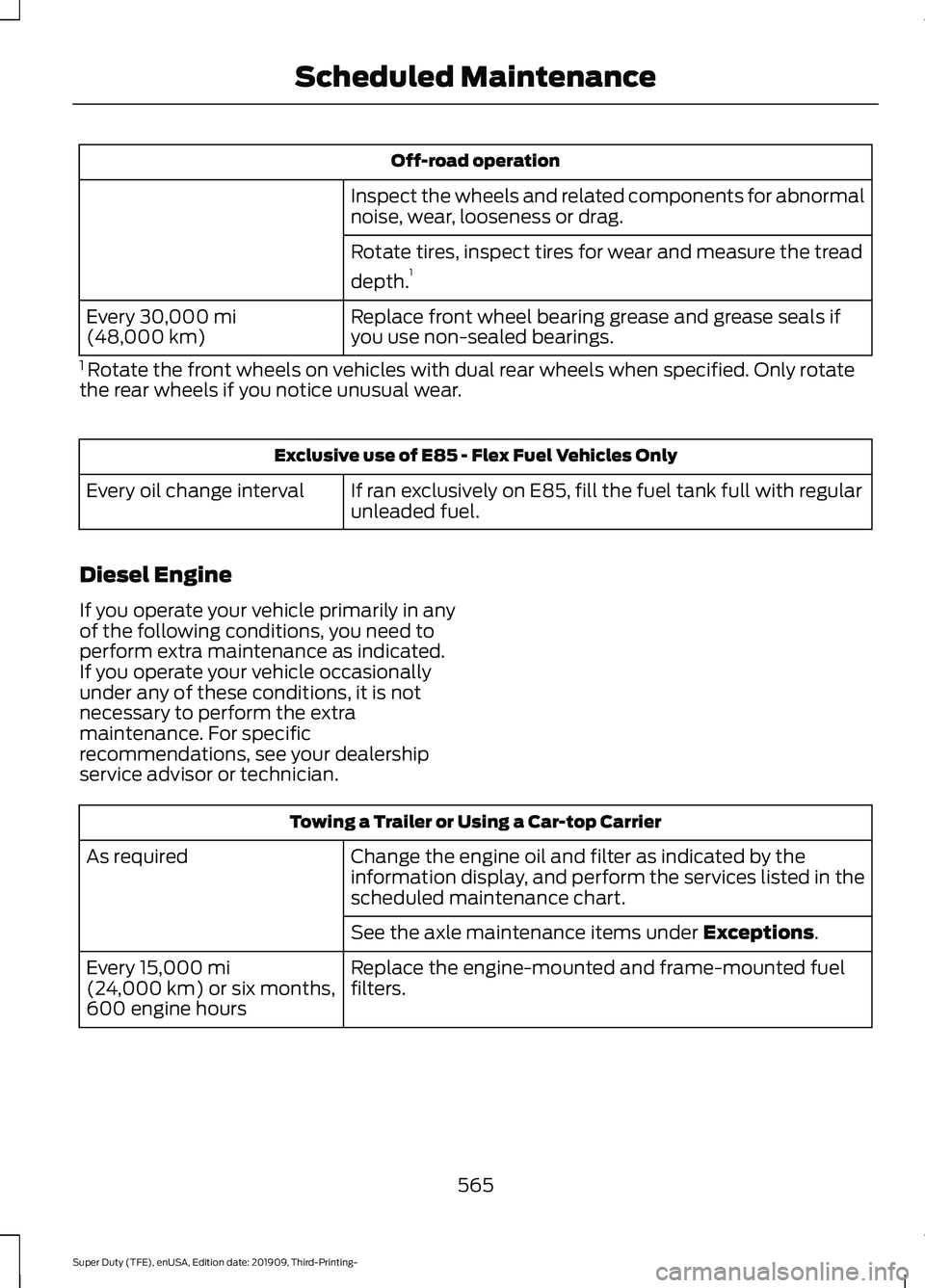
Off-road operation
Inspect the wheels and related components for abnormal
noise, wear, looseness or drag.
Rotate tires, inspect tires for wear and measure the tread
depth. 1
Replace front wheel bearing grease and grease seals if
you use non-sealed bearings.
Every 30,000 mi
(48,000 km)
1 Rotate the front wheels on vehicles with dual rear wheels when specified. Only rotate
the rear wheels if you notice unusual wear. Exclusive use of E85 - Flex Fuel Vehicles Only
If ran exclusively on E85, fill the fuel tank full with regular
unleaded fuel.
Every oil change interval
Diesel Engine
If you operate your vehicle primarily in any
of the following conditions, you need to
perform extra maintenance as indicated.
If you operate your vehicle occasionally
under any of these conditions, it is not
necessary to perform the extra
maintenance. For specific
recommendations, see your dealership
service advisor or technician. Towing a Trailer or Using a Car-top Carrier
Change the engine oil and filter as indicated by the
information display, and perform the services listed in the
scheduled maintenance chart.
As required
See the axle maintenance items under
Exceptions.
Replace the engine-mounted and frame-mounted fuel
filters.
Every
15,000 mi
(24,000 km) or six months,
600 engine hours
565
Super Duty (TFE), enUSA, Edition date: 201909, Third-Printing- Scheduled Maintenance
Page 573 of 631
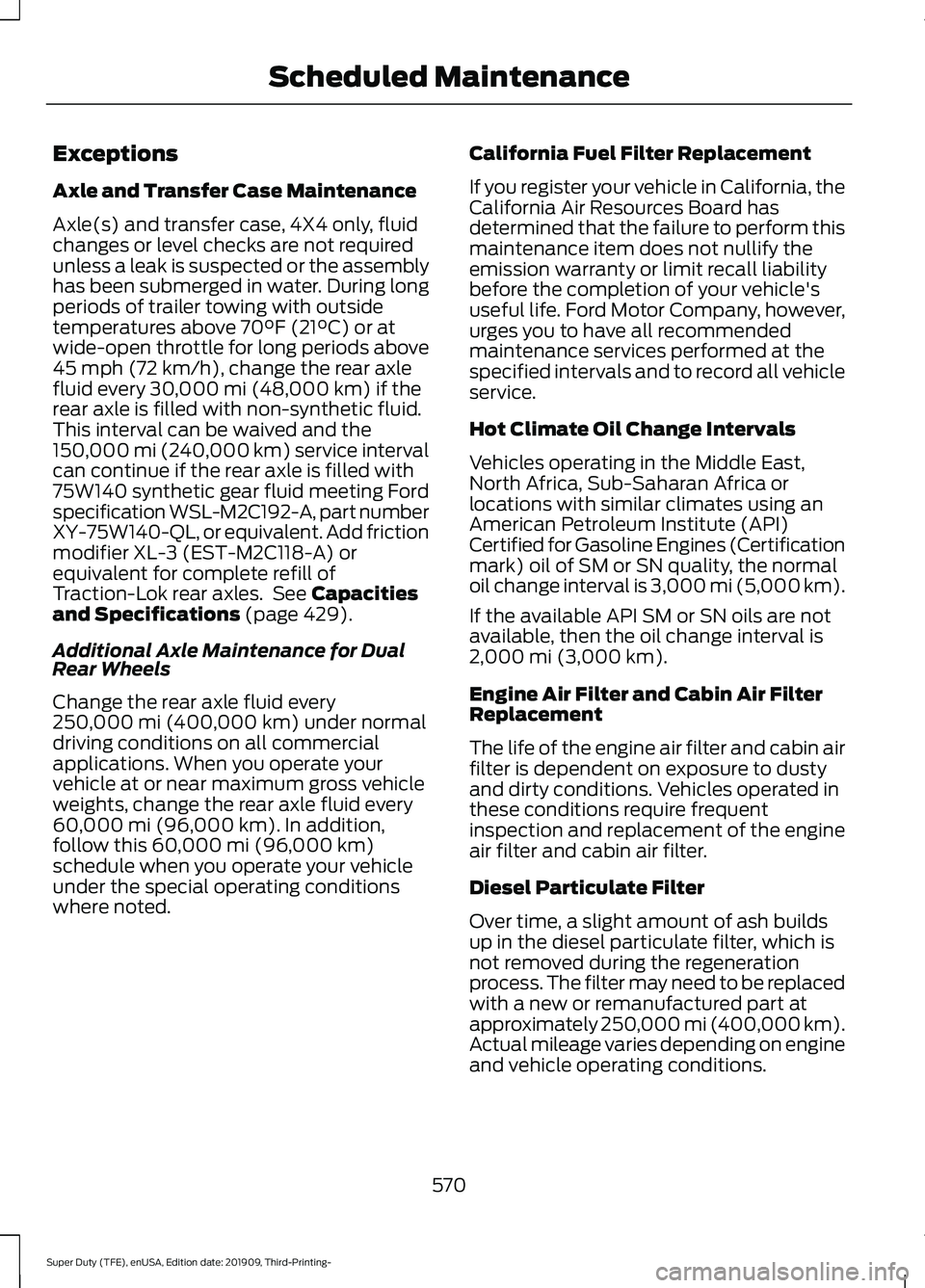
Exceptions
Axle and Transfer Case Maintenance
Axle(s) and transfer case, 4X4 only, fluid
changes or level checks are not required
unless a leak is suspected or the assembly
has been submerged in water. During long
periods of trailer towing with outside
temperatures above 70°F (21°C) or at
wide-open throttle for long periods above
45 mph (72 km/h)
, change the rear axle
fluid every 30,000 mi (48,000 km) if the
rear axle is filled with non-synthetic fluid.
This interval can be waived and the
150,000 mi (240,000 km) service interval
can continue if the rear axle is filled with
75W140 synthetic gear fluid meeting Ford
specification WSL-M2C192-A, part number
XY-75W140-QL, or equivalent. Add friction
modifier XL-3 (EST-M2C118-A) or
equivalent for complete refill of
Traction-Lok rear axles. See
Capacities
and Specifications (page 429).
Additional Axle Maintenance for Dual
Rear Wheels
Change the rear axle fluid every
250,000 mi (400,000 km)
under normal
driving conditions on all commercial
applications. When you operate your
vehicle at or near maximum gross vehicle
weights, change the rear axle fluid every
60,000 mi (96,000 km)
. In addition,
follow this 60,000 mi (96,000 km)
schedule when you operate your vehicle
under the special operating conditions
where noted. California Fuel Filter Replacement
If you register your vehicle in California, the
California Air Resources Board has
determined that the failure to perform this
maintenance item does not nullify the
emission warranty or limit recall liability
before the completion of your vehicle's
useful life. Ford Motor Company, however,
urges you to have all recommended
maintenance services performed at the
specified intervals and to record all vehicle
service.
Hot Climate Oil Change Intervals
Vehicles operating in the Middle East,
North Africa, Sub-Saharan Africa or
locations with similar climates using an
American Petroleum Institute (API)
Certified for Gasoline Engines (Certification
mark) oil of SM or SN quality, the normal
oil change interval is 3,000 mi (5,000 km).
If the available API SM or SN oils are not
available, then the oil change interval is
2,000 mi (3,000 km)
.
Engine Air Filter and Cabin Air Filter
Replacement
The life of the engine air filter and cabin air
filter is dependent on exposure to dusty
and dirty conditions. Vehicles operated in
these conditions require frequent
inspection and replacement of the engine
air filter and cabin air filter.
Diesel Particulate Filter
Over time, a slight amount of ash builds
up in the diesel particulate filter, which is
not removed during the regeneration
process. The filter may need to be replaced
with a new or remanufactured part at
approximately 250,000 mi (400,000 km).
Actual mileage varies depending on engine
and vehicle operating conditions.
570
Super Duty (TFE), enUSA, Edition date: 201909, Third-Printing- Scheduled Maintenance
Page 617 of 631
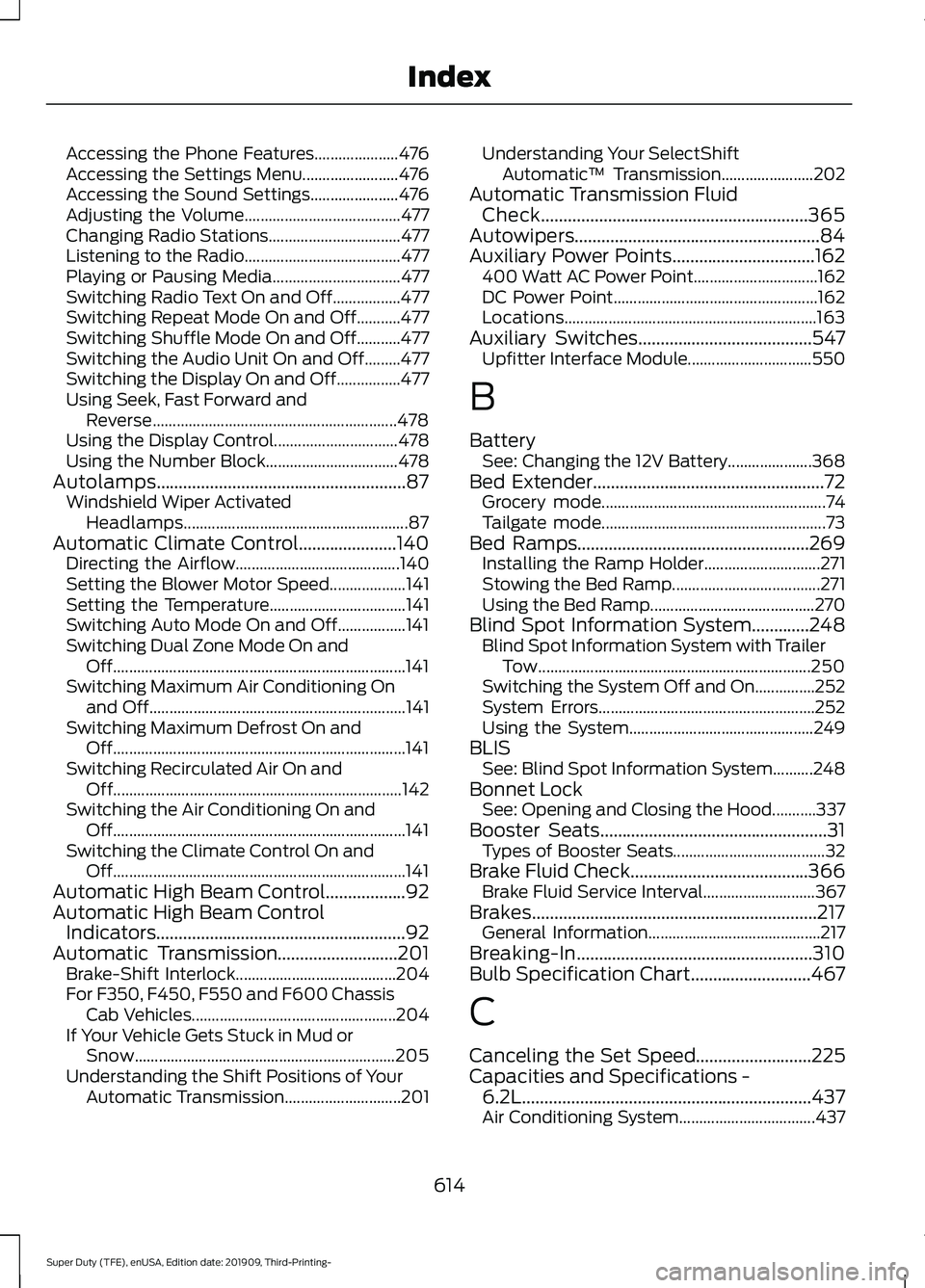
Accessing the Phone Features.....................
476
Accessing the Settings Menu........................ 476
Accessing the Sound Settings...................... 476
Adjusting the Volume....................................... 477
Changing Radio Stations................................. 477
Listening to the Radio....................................... 477
Playing or Pausing Media................................ 477
Switching Radio Text On and Off.................477
Switching Repeat Mode On and Off...........477
Switching Shuffle Mode On and Off...........477
Switching the Audio Unit On and Off.........477
Switching the Display On and Off................477
Using Seek, Fast Forward and Reverse............................................................. 478
Using the Display Control............................... 478
Using the Number Block................................. 478
Autolamps........................................................87 Windshield Wiper Activated
Headlamps........................................................ 87
Automatic Climate Control......................140 Directing the Airflow......................................... 140
Setting the Blower Motor Speed................... 141
Setting the Temperature.................................. 141
Switching Auto Mode On and Off.................141
Switching Dual Zone Mode On and Off........................................................................\
. 141
Switching Maximum Air Conditioning On and Off................................................................ 141
Switching Maximum Defrost On and Off........................................................................\
. 141
Switching Recirculated Air On and Off........................................................................\
142
Switching the Air Conditioning On and Off........................................................................\
. 141
Switching the Climate Control On and Off........................................................................\
. 141
Automatic High Beam Control..................92
Automatic High Beam Control Indicators........................................................92
Automatic Transmission
...........................201
Brake-Shift Interlock........................................ 204
For F350, F450, F550 and F600 Chassis Cab Vehicles................................................... 204
If Your Vehicle Gets Stuck in Mud or Snow................................................................. 205
Understanding the Shift Positions of Your Automatic Transmission............................. 201Understanding Your SelectShift
Automatic ™ Transmission....................... 202
Automatic Transmission Fluid Check............................................................365
Autowipers
.......................................................84
Auxiliary Power Points................................162 400 Watt AC Power Point............................... 162
DC Power Point................................................... 162
Locations............................................................... 163
Auxiliary Switches
.......................................547
Upfitter Interface Module............................... 550
B
Battery See: Changing the 12V Battery..................... 368
Bed Extender
....................................................72
Grocery mode........................................................ 74
Tailgate mode........................................................ 73
Bed Ramps....................................................269 Installing the Ramp Holder............................. 271
Stowing the Bed Ramp..................................... 271
Using the Bed Ramp......................................... 270
Blind Spot Information System
.............248
Blind Spot Information System with Trailer
Tow.................................................................... 250
Switching the System Off and On...............252
System Errors...................................................... 252
Using the System.............................................. 249
BLIS See: Blind Spot Information System..........248
Bonnet Lock See: Opening and Closing the Hood...........337
Booster Seats
...................................................31
Types of Booster Seats...................................... 32
Brake Fluid Check........................................366 Brake Fluid Service Interval............................ 367
Brakes................................................................217 General Information........................................... 217
Breaking-In.....................................................310
Bulb Specification Chart...........................467
C
Canceling the Set Speed..........................225
Capacities and Specifications - 6.2L
.................................................................437
Air Conditioning System.................................. 437
614
Super Duty (TFE), enUSA, Edition date: 201909, Third-Printing- Index