light FORD F-350 2021 Owners Manual
[x] Cancel search | Manufacturer: FORD, Model Year: 2021, Model line: F-350, Model: FORD F-350 2021Pages: 666, PDF Size: 11.3 MB
Page 546 of 666
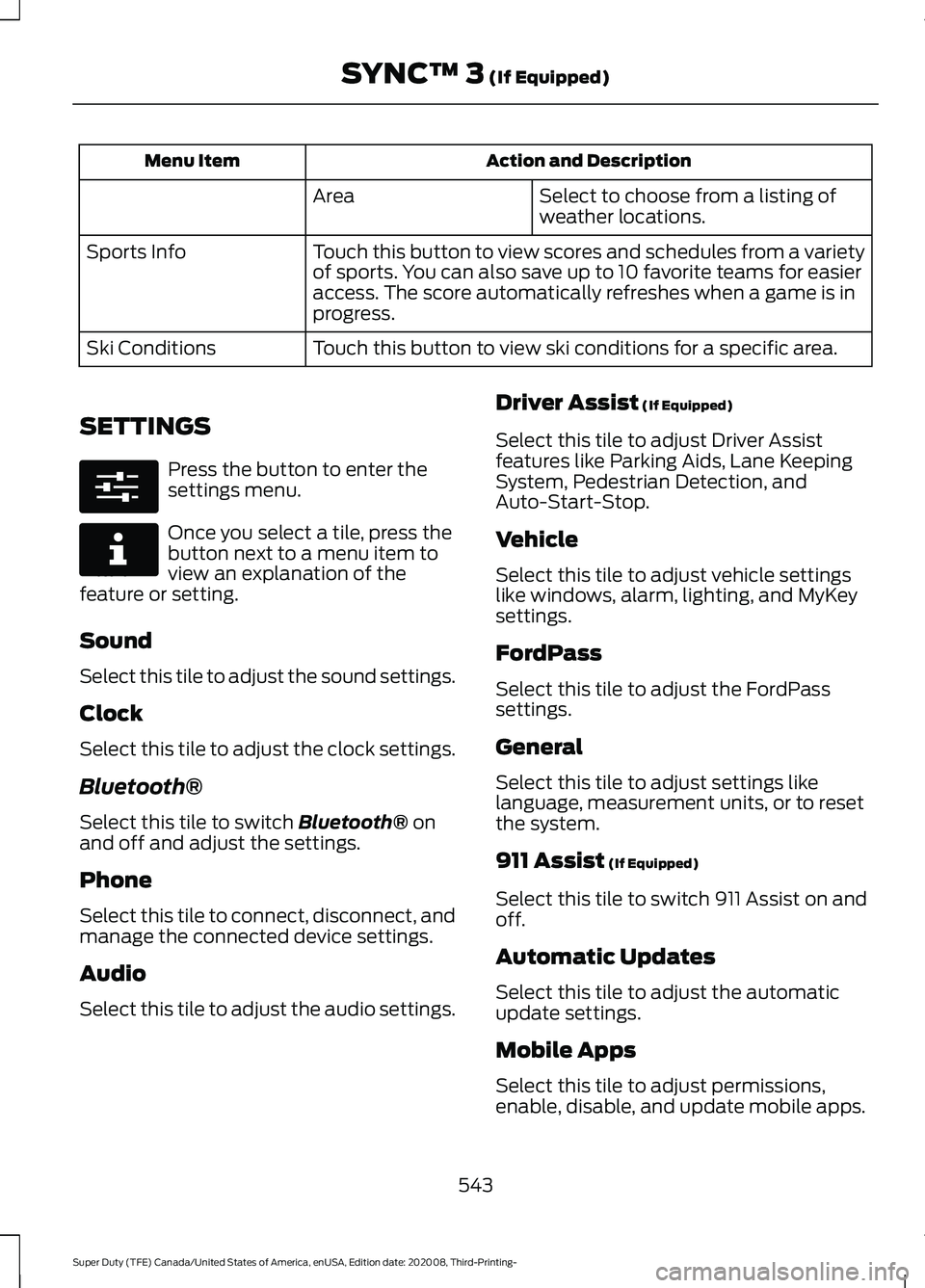
Action and Description
Menu Item
Select to choose from a listing of
weather locations.
Area
Touch this button to view scores and schedules from a variety
of sports. You can also save up to 10 favorite teams for easier
access. The score automatically refreshes when a game is in
progress.
Sports Info
Touch this button to view ski conditions for a specific area.
Ski Conditions
SETTINGS Press the button to enter the
settings menu.
Once you select a tile, press the
button next to a menu item to
view an explanation of the
feature or setting.
Sound
Select this tile to adjust the sound settings.
Clock
Select this tile to adjust the clock settings.
Bluetooth®
Select this tile to switch Bluetooth® on
and off and adjust the settings.
Phone
Select this tile to connect, disconnect, and
manage the connected device settings.
Audio
Select this tile to adjust the audio settings. Driver Assist
(If Equipped)
Select this tile to adjust Driver Assist
features like Parking Aids, Lane Keeping
System, Pedestrian Detection, and
Auto-Start-Stop.
Vehicle
Select this tile to adjust vehicle settings
like windows, alarm, lighting, and MyKey
settings.
FordPass
Select this tile to adjust the FordPass
settings.
General
Select this tile to adjust settings like
language, measurement units, or to reset
the system.
911 Assist
(If Equipped)
Select this tile to switch 911 Assist on and
off.
Automatic Updates
Select this tile to adjust the automatic
update settings.
Mobile Apps
Select this tile to adjust permissions,
enable, disable, and update mobile apps.
543
Super Duty (TFE) Canada/United States of America, enUSA, Edition date: 202008, Third-Printing- SYNC™ 3
(If Equipped)E280315 E268570
Page 547 of 666
Display
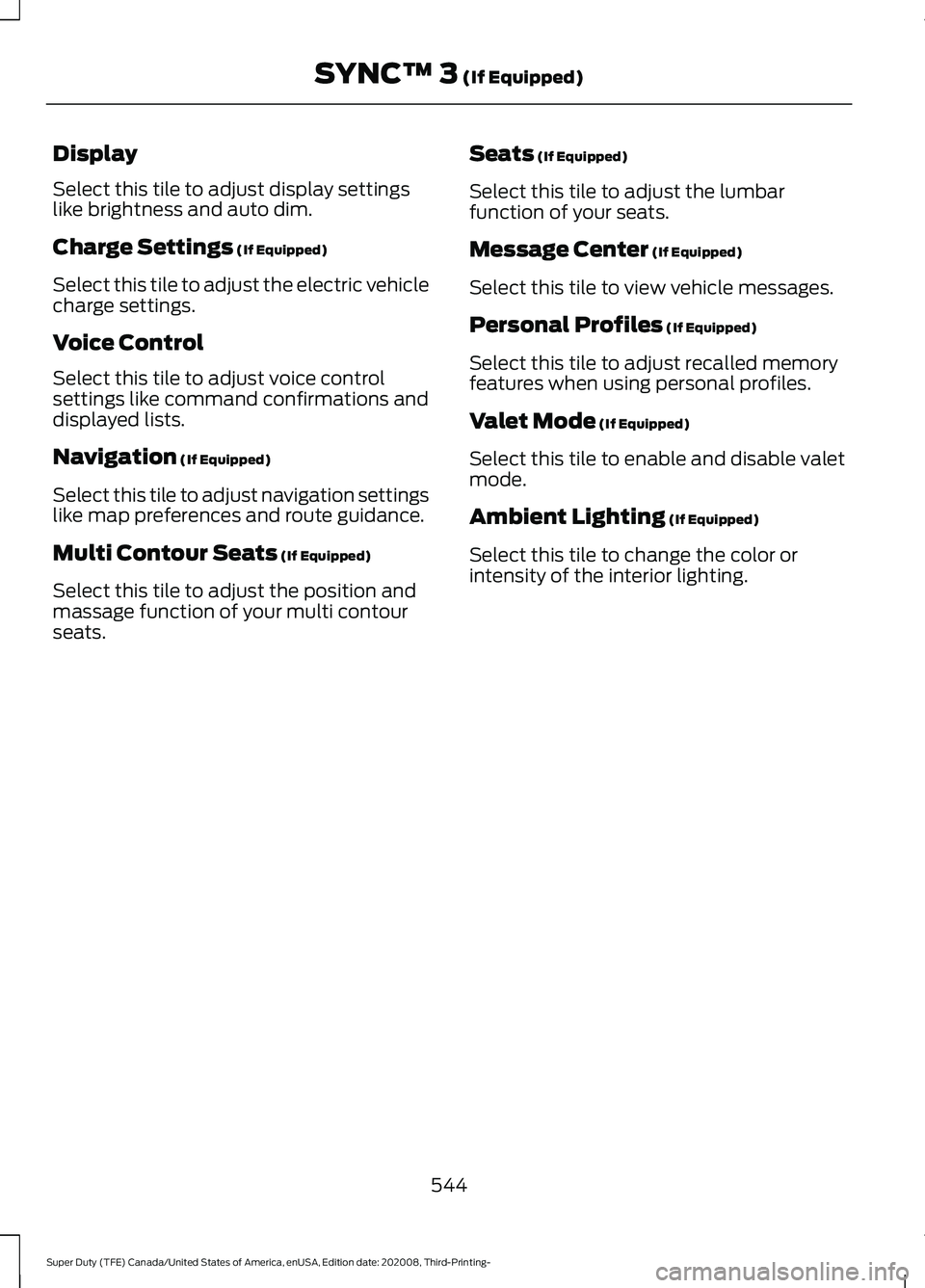
Select this tile to adjust display settings
like brightness and auto dim.
Charge Settings (If Equipped)
Select this tile to adjust the electric vehicle
charge settings.
Voice Control
Select this tile to adjust voice control
settings like command confirmations and
displayed lists.
Navigation
(If Equipped)
Select this tile to adjust navigation settings
like map preferences and route guidance.
Multi Contour Seats
(If Equipped)
Select this tile to adjust the position and
massage function of your multi contour
seats. Seats
(If Equipped)
Select this tile to adjust the lumbar
function of your seats.
Message Center
(If Equipped)
Select this tile to view vehicle messages.
Personal Profiles
(If Equipped)
Select this tile to adjust recalled memory
features when using personal profiles.
Valet Mode
(If Equipped)
Select this tile to enable and disable valet
mode.
Ambient Lighting
(If Equipped)
Select this tile to change the color or
intensity of the interior lighting.
544
Super Duty (TFE) Canada/United States of America, enUSA, Edition date: 202008, Third-Printing- SYNC™ 3
(If Equipped)
Page 570 of 666
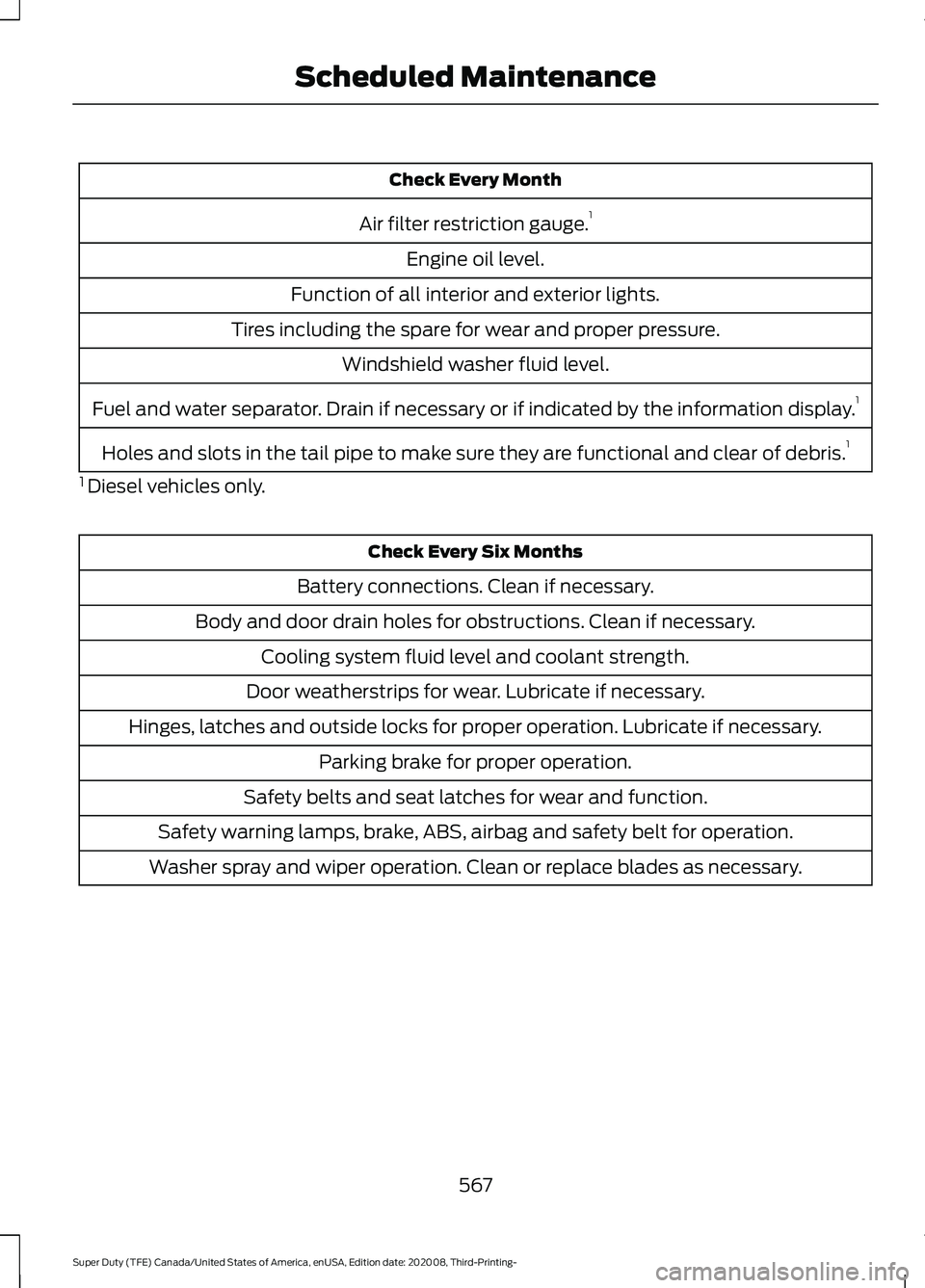
Check Every Month
Air filter restriction gauge. 1
Engine oil level.
Function of all interior and exterior lights.
Tires including the spare for wear and proper pressure. Windshield washer fluid level.
Fuel and water separator. Drain if necessary or if indicated by the information display. 1
Holes and slots in the tail pipe to make sure they are functional and clear of debris. 1
1 Diesel vehicles only. Check Every Six Months
Battery connections. Clean if necessary.
Body and door drain holes for obstructions. Clean if necessary. Cooling system fluid level and coolant strength.
Door weatherstrips for wear. Lubricate if necessary.
Hinges, latches and outside locks for proper operation. Lubricate if necessary. Parking brake for proper operation.
Safety belts and seat latches for wear and function.
Safety warning lamps, brake, ABS, airbag and safety belt for operation.
Washer spray and wiper operation. Clean or replace blades as necessary.
567
Super Duty (TFE) Canada/United States of America, enUSA, Edition date: 202008, Third-Printing- Scheduled Maintenance
Page 585 of 666
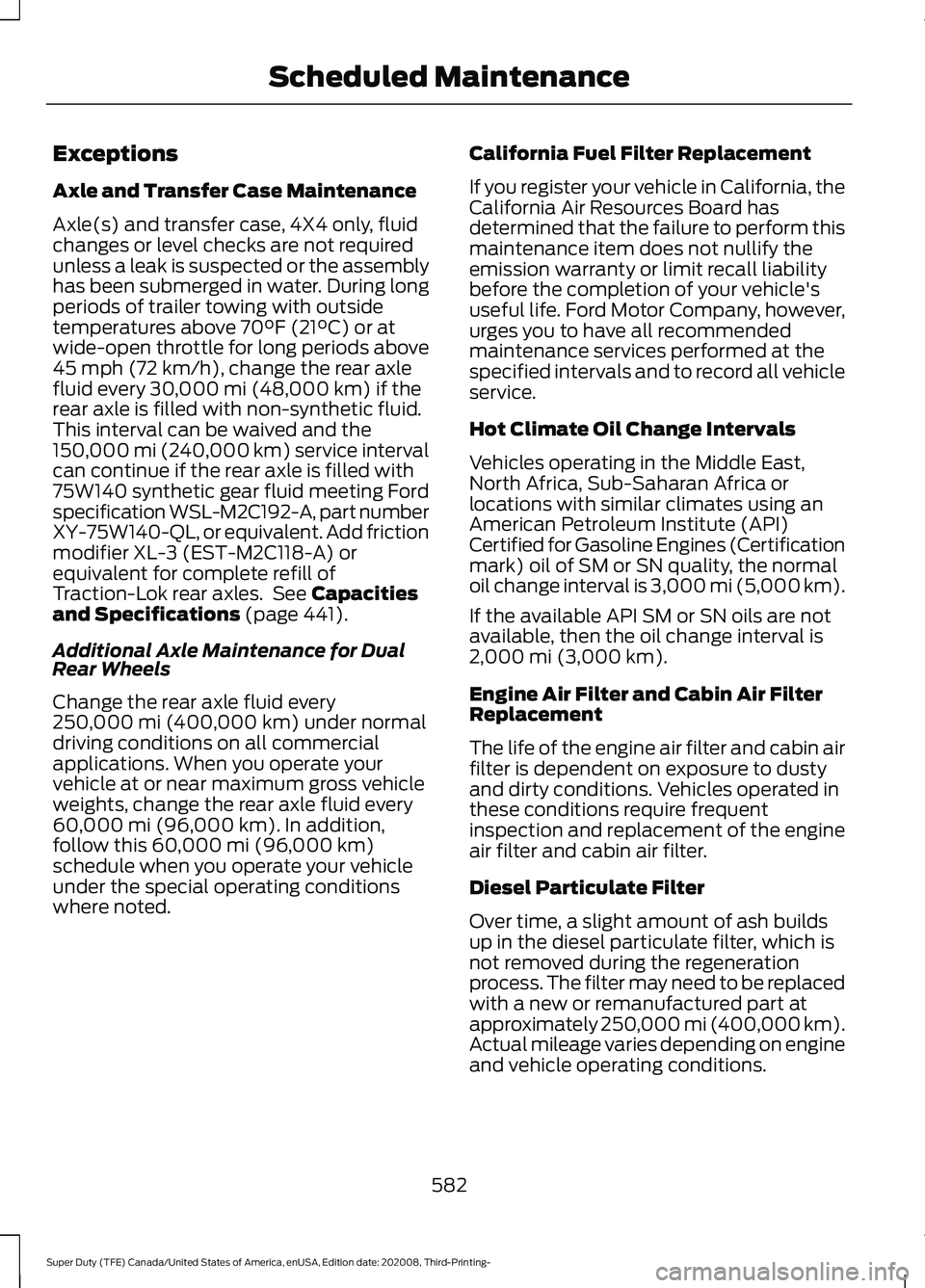
Exceptions
Axle and Transfer Case Maintenance
Axle(s) and transfer case, 4X4 only, fluid
changes or level checks are not required
unless a leak is suspected or the assembly
has been submerged in water. During long
periods of trailer towing with outside
temperatures above 70°F (21°C) or at
wide-open throttle for long periods above
45 mph (72 km/h)
, change the rear axle
fluid every 30,000 mi (48,000 km) if the
rear axle is filled with non-synthetic fluid.
This interval can be waived and the
150,000 mi (240,000 km) service interval
can continue if the rear axle is filled with
75W140 synthetic gear fluid meeting Ford
specification WSL-M2C192-A, part number
XY-75W140-QL, or equivalent. Add friction
modifier XL-3 (EST-M2C118-A) or
equivalent for complete refill of
Traction-Lok rear axles. See
Capacities
and Specifications (page 441).
Additional Axle Maintenance for Dual
Rear Wheels
Change the rear axle fluid every
250,000 mi (400,000 km)
under normal
driving conditions on all commercial
applications. When you operate your
vehicle at or near maximum gross vehicle
weights, change the rear axle fluid every
60,000 mi (96,000 km)
. In addition,
follow this 60,000 mi (96,000 km)
schedule when you operate your vehicle
under the special operating conditions
where noted. California Fuel Filter Replacement
If you register your vehicle in California, the
California Air Resources Board has
determined that the failure to perform this
maintenance item does not nullify the
emission warranty or limit recall liability
before the completion of your vehicle's
useful life. Ford Motor Company, however,
urges you to have all recommended
maintenance services performed at the
specified intervals and to record all vehicle
service.
Hot Climate Oil Change Intervals
Vehicles operating in the Middle East,
North Africa, Sub-Saharan Africa or
locations with similar climates using an
American Petroleum Institute (API)
Certified for Gasoline Engines (Certification
mark) oil of SM or SN quality, the normal
oil change interval is 3,000 mi (5,000 km).
If the available API SM or SN oils are not
available, then the oil change interval is
2,000 mi (3,000 km)
.
Engine Air Filter and Cabin Air Filter
Replacement
The life of the engine air filter and cabin air
filter is dependent on exposure to dusty
and dirty conditions. Vehicles operated in
these conditions require frequent
inspection and replacement of the engine
air filter and cabin air filter.
Diesel Particulate Filter
Over time, a slight amount of ash builds
up in the diesel particulate filter, which is
not removed during the regeneration
process. The filter may need to be replaced
with a new or remanufactured part at
approximately 250,000 mi (400,000 km).
Actual mileage varies depending on engine
and vehicle operating conditions.
582
Super Duty (TFE) Canada/United States of America, enUSA, Edition date: 202008, Third-Printing- Scheduled Maintenance
Page 586 of 666
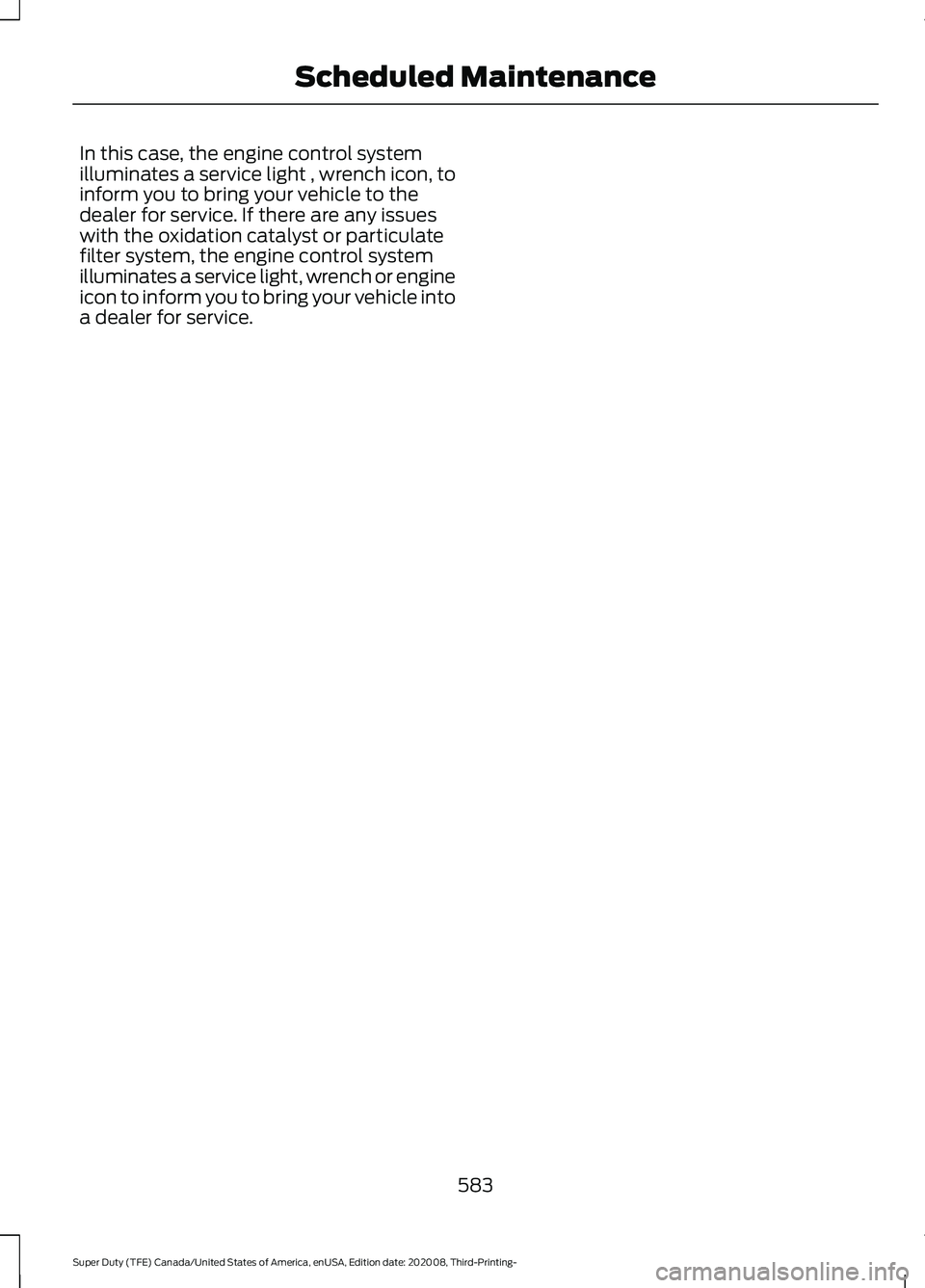
In this case, the engine control system
illuminates a service light , wrench icon, to
inform you to bring your vehicle to the
dealer for service. If there are any issues
with the oxidation catalyst or particulate
filter system, the engine control system
illuminates a service light, wrench or engine
icon to inform you to bring your vehicle into
a dealer for service.
583
Super Duty (TFE) Canada/United States of America, enUSA, Edition date: 202008, Third-Printing- Scheduled Maintenance
Page 649 of 666
5. Service Continuity and Reception of
the SUNA Traffic Channel
We will use reasonable endeavours to
provide the SUNA Traffic Channel 24 hours
a day, 365 days a year. The SUNA Traffic
Channel may occasionally be unavailable
for technical reasons or for planned
maintenance. We will try to perform
maintenance at times when congestion is
light. We reserve the right to withdraw
SUNA Products and/or Services at any
time.
Also, we cannot assure the uninterrupted
reception of the SUNA Traffic Channel
RDS-TMC signal at any particular location.
6. Limitation of Liability
Neither Intelematics (nor its suppliers or
the manufacturer of your device (the
“Suppliers”)) shall be liable to you or to
any third party for any damages either
direct, indirect, incidental, consequential
or otherwise arising out of the use of or inability to use SUNA Products and/or
Services even if Intelematics or a Supplier
has been advised of the possibility of such
damages. You also acknowledge that the
neither Intelematics nor any Supplier
guarantees nor make any warranties that
relate to the availability, accuracy or
completeness of SUNA Products and/or
Services, and to the extent which it is
lawful to do so, both Intelematics and each
Supplier excludes any warranties which
might otherwise be implied by any State
or Federal legislation in relation to SUNA
Products and/or Services.
7. Please Note
Great care has been taken in preparing this
manual. Constant product development
may mean that some information is not
entirely up-to-date. The information in this
document is subject to change without
notice.
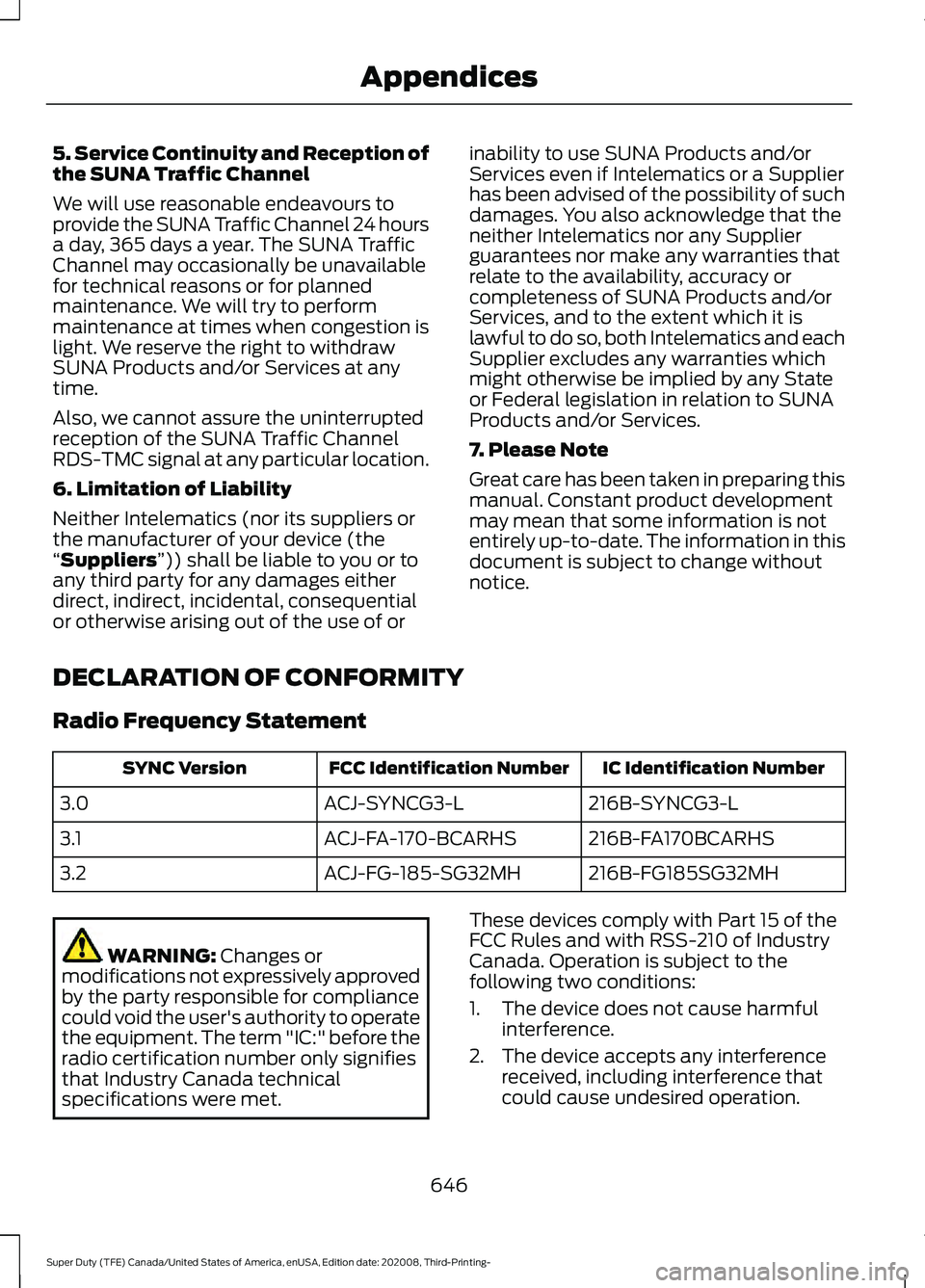
DECLARATION OF CONFORMITY
Radio Frequency Statement IC Identification Number
FCC Identification Number
SYNC Version
216B-SYNCG3-L
ACJ-SYNCG3-L
3.0
216B-FA170BCARHS
ACJ-FA-170-BCARHS
3.1
216B-FG185SG32MH
ACJ-FG-185-SG32MH
3.2 WARNING:
Changes or
modifications not expressively approved
by the party responsible for compliance
could void the user's authority to operate
the equipment. The term "IC:" before the
radio certification number only signifies
that Industry Canada technical
specifications were met. These devices comply with Part 15 of the
FCC Rules and with RSS-210 of Industry
Canada. Operation is subject to the
following two conditions:
1. The device does not cause harmful
interference.
2. The device accepts any interference received, including interference that
could cause undesired operation.
646
Super Duty (TFE) Canada/United States of America, enUSA, Edition date: 202008, Third-Printing- Appendices
Page 650 of 666
3
360 Degree Camera...................................238
Advanced Camera Views............................... 238
Auxiliary Camera................................................. 241
Bed View Camera.............................................. 240
Camera Views..................................................... 238
Front Camera...................................................... 239
Keep Out Zone.................................................... 239
Side Camera........................................................ 240
4
4WD See: Four-Wheel Drive...................................... 213
A
A/C See: Climate Control - Vehicles With:
Automatic Temperature Control.............143
See: Climate Control - Vehicles With: Manual Temperature Control.................................... 147
About This Manual...........................................9
ABS See: Brakes........................................................... 223
ABS driving hints See: Hints on Driving With Anti-Lock
Brakes................................................................ 225
Accessories....................................................558
Accessories See: Replacement Parts
Recommendation............................................ 16
ACC See: Using Adaptive Cruise Control............243
Adjustable Pedals.........................................84
Adjusting the Headlamps.........................381 Horizontal Aim Adjustment........................... 382
Vertical Aim Adjustment................................. 381
Adjusting the Pedals....................................84
Adjusting the Steering Wheel - Vehicles With: Manual Adjustable Steering
Column .............................................................
81
Adjusting the Steering Wheel - Vehicles With: Power Adjustable Steering
Column...........................................................80
End of Travel Position........................................ 80
Memory Feature................................................... 80Airbag Disposal...............................................54
Air Conditioning
See: Climate Control - Vehicles With:
Automatic Temperature Control.............143
See: Climate Control - Vehicles With: Manual Temperature Control.................................... 147
Air Conditioning System Capacity and Specification - 6.2L..................................459
Air Conditioning System Capacity and Specification - 6.7L Diesel....................460
Air Conditioning System Capacity and Specification - 7.3L...................................461
Air Filter See: Changing the Engine Air Filter -
6.2L
..................................................................... 357
See: Changing the Engine Air Filter - 6.7L Diesel ................................................................. 358
See: Changing the Engine Air Filter - 7.3L..................................................................... 360
Alarm See: Anti-Theft Alarm........................................ 76
Ambient Lighting
.............................................91
Adjusting the Brightness.................................... 91
Switching Ambient Lighting Off...................... 91
Switching Ambient Lighting On....................... 91
Anti-Theft Alarm
............................................76
Arming the Alarm.................................................. 77
Disarming the Alarm............................................ 77
Using the System................................................. 76
Appendices.....................................................618
Apps.................................................................540 SiriusXM Traffic and Travel Link................... 542
Using Apps on an Android Device................541
Using Apps on an iOS Device......................... 541
Using Mobile Navigation on an Android Device................................................................. 541
At a Glance.......................................................20
Audible Warnings and Indicators...........109 Headlamps On Warning Chime.................... 109
Key in Ignition Warning Chime...................... 109
Keyless Warning Alert....................................... 109
Parking Brake On Warning Chime...............109
Audio Control
...................................................81
You can operate the following functions
with the control:............................................... 81
Audio System
................................................479
General Information......................................... 479
647
Super Duty (TFE) Canada/United States of America, enUSA, Edition date: 202008, Third-Printing- Index
Page 658 of 666
Use of Inboard Lower Anchors from the
Outboard Seating Positions (Center
Seating Use) .................................................... 29
Using Lap and Shoulder Belts (Except Front Center Position of Super Cab and Crew
Cab)...................................................................... 24
Using Lap and Shoulder Belts (Front Center Position of Super Cab and Crew
Cab)...................................................................... 26
Using Lower Anchors and Tethers for CHildren (LATCH)........................................... 28
Using Tether Straps............................................ 30
Instrument Cluster.......................................102
Instrument Lighting Dimmer.....................88
Instrument Panel
...........................................20
Interior Air Quality........................................150
Interior Lamps
.................................................90
Front Interior Lamp............................................. 90
Rear Interior Lamps.............................................. 91
Interior Mirror
...................................................99
Auto-Dimming Mirror......................................... 99
Manual Dimming Mirror..................................... 99
Introduction........................................................9
J
Jump Starting the Vehicle.........................327 Connecting the Jumper Cables..................... 327
Jump Starting...................................................... 328
Preparing Your Vehicle..................................... 327
Removing the Jumper Cables....................... 328
K
Keyless Entry...................................................69 SECURICODE™ KEYLESS ENTRY
KEYPAD.............................................................. 69
Keyless Starting
.............................................175
Keys and Remote Controls.........................55
L
Lane Keeping System
.................................251
Switching the System On and Off...............252
System Display................................................... 252
System Settings................................................. 252
Troubleshooting................................................. 253Lighting Control
..............................................87
Flashing the Headlamp High Beam..............88
Headlamp High Beam........................................ 87
Lighting...............................................................87 General Information............................................ 87
Limited Slip Differential..............................221
Load Carrying
..................................................271
Load Carrying Precautions........................271
Locating the Cabin Air Filter.....................150
Locating the Safety Compliance Certification Labels
..................................272
Locking and Unlocking................................66 Activating Intelligent Access........................... 66
Autolock.................................................................. 68
Battery Saver......................................................... 68
Illuminated Entry.................................................. 68
Power Door Locks................................................ 66
Remote Control.................................................... 66
Smart Unlock......................................................... 67
Smart Unlocks for Intelligent Access Keys....................................................................... 67
Lug Nuts See: Changing a Road Wheel....................... 429
M
Maintenance
.................................................348
General Information......................................... 348
Manual Seats
.................................................153
Manual Lumbar .................................................. 154
Moving the Seat Backward and Forward............................................................. 154
Recline Adjustment........................................... 154
Memory Function..........................................157 Easy Entry and Exit Feature............................ 158
Linking a PreSet Position to your Remote Control or Intelligent Access Key Fob
........................................................................\
....... 157
Recalling a Preset Position.............................. 157
Saving a Preset Position................................... 157
Message Center See: Information Displays................................ 110
Mirrors See: Windows and Mirrors................................ 95
Mobile Communications Equipment.......17
Moonroof........................................................100 Bounce-Back
........................................................ 101
Opening and Closing the Moonroof...........100
655
Super Duty (TFE) Canada/United States of America, enUSA, Edition date: 202008, Third-Printing- Index
Page 661 of 666

Switching the Heated Seat Settings On and
Off........................................................................\
. 141
Switching the Heated Steering Wheel Settings On and Off....................................... 141
Removing the Tailgate..................................72
Repairing Minor Paint Damage..............399
Replacement Parts Recommendation........................................16
Collision Repairs.................................................... 16
Scheduled Maintenance and Mechanical Repairs................................................................. 16
Warranty on Replacement Parts.................... 16
Replacing a Lost Key or Remote Control
............................................................60
Replacing the Cabin Air Filter..................150
Reporting Safety Defects (Canada Only)..............................................................337
Reporting Safety Defects (U.S. Only)..............................................................337
Resuming the Set Speed..........................243
Roadside Assistance
..................................325
Vehicles Sold in Canada: Getting Roadside
Assistance....................................................... 326
Vehicles Sold in the United States: Getting Roadside Assistance................................... 325
Vehicles Sold in the United States: Using Roadside Assistance................................... 325
Roadside Emergencies..............................325
Running-In See: Breaking-In................................................. 320
Running Out of Fuel....................................189
S
Safety Canopy ™
.............................................52
Safety Precautions......................................184
Satellite Radio
..............................................484
Satellite Radio Electronic Serial Number
(ESN)................................................................ 485
Satellite Radio Reception Factors..............485
SiriusXM Satellite Radio Service.................485
Troubleshooting................................................ 486
Scheduled Maintenance
..........................565
Seatbelt Extensions......................................44
Seatbelt Height Adjustment......................42
Seatbelt Reminder........................................43
Belt-Minder™........................................................ 43Seatbelts...........................................................38
Principle of Operation........................................ 38
Seatbelt Warning Lamp and Indicator Chime...............................................................42
Conditions of operation..................................... 42
Seats...................................................................151
Security..............................................................76
Selective Catalytic Reductant System - Diesel..............................................................197
Contaminated Diesel Exhaust Fluid or Inoperative Selective Catalytic Reduction
System............................................................... 201
Diesel Exhaust Fluid Guidelines and Information..................................................... 200
Diesel Exhaust Fluid Level............................... 197
Diesel Exhaust Fluid Warning Messages and Vehicle Operations............................... 199
Filling the Diesel Exhaust Fluid Tank..........198
Settings...........................................................543 ........................................................................\
.......... 543
911 Assist............................................................... 543
Ambient Lighting............................................... 544
Audio...................................................................... 543
Automatic Updates.......................................... 543
Charge Settings................................................. 544
Clock....................................................................... 543
Display................................................................... 544
Driver Assist......................................................... 543
FordPass............................................................... 543
General.................................................................. 543
Message Center................................................. 544
Mobile Apps......................................................... 543
Multi Contour Seats.......................................... 544
Navigation............................................................ 544
Personal Profiles................................................ 544
Phone..................................................................... 543
Seats...................................................................... 544
Sound..................................................................... 543
Valet Mode........................................................... 544
Vehicle................................................................... 543
Voice Control....................................................... 544
Setting the Blower Motor Speed............144
Setting the Cruise Control Speed..........242 Changing the Set Speed................................. 242
Setting the Temperature...........................144
Setting the Trail Control Speed...............231
Side Airbags......................................................51
Sitting in the Correct Position...................151
658
Super Duty (TFE) Canada/United States of America, enUSA, Edition date: 202008, Third-Printing- Index
Page 664 of 666
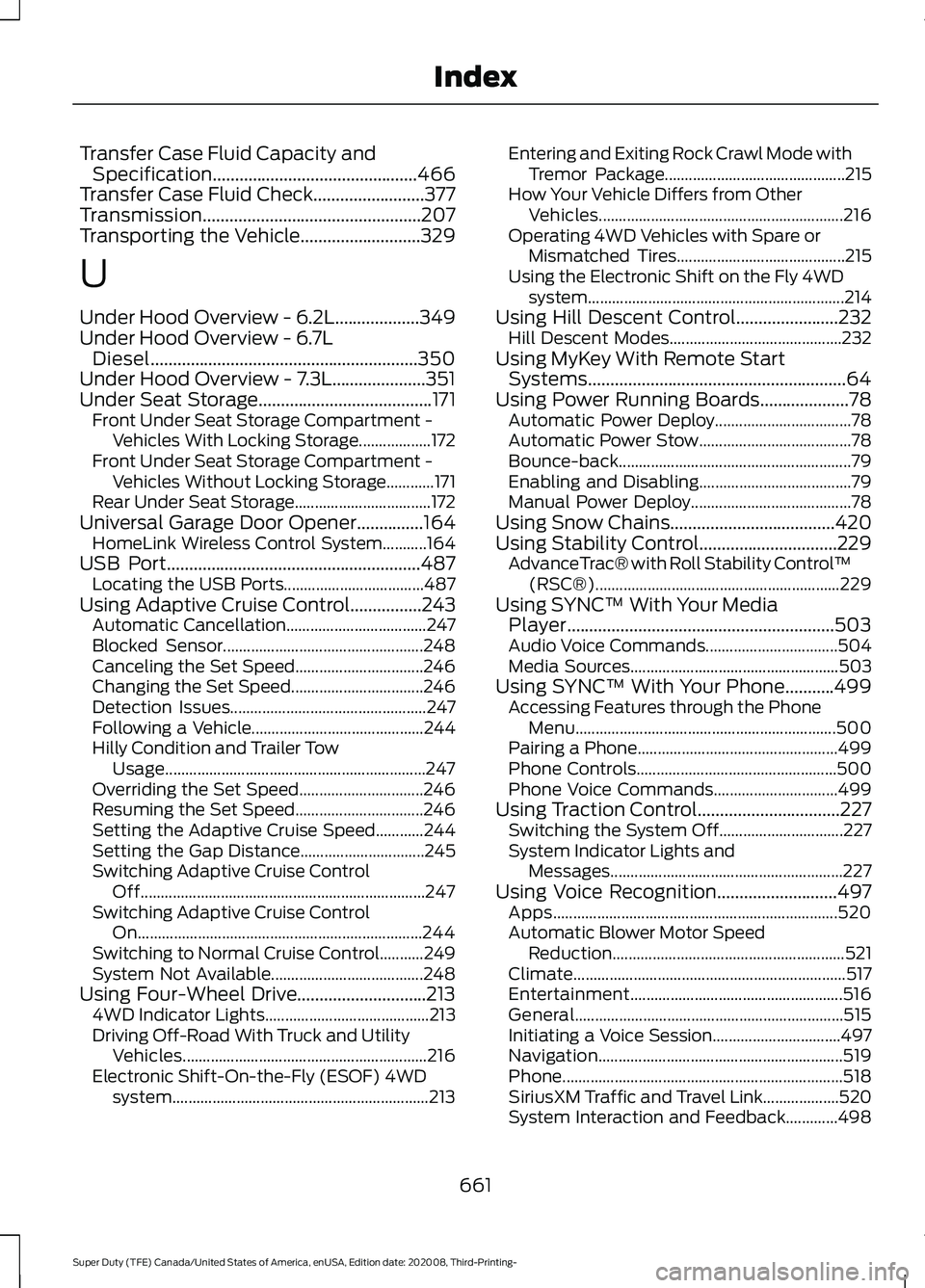
Transfer Case Fluid Capacity and
Specification..............................................466
Transfer Case Fluid Check.........................377
Transmission.................................................207
Transporting the Vehicle
...........................329
U
Under Hood Overview - 6.2L...................349
Under Hood Overview - 6.7L Diesel............................................................350
Under Hood Overview - 7.3L.....................351
Under Seat Storage
.......................................171
Front Under Seat Storage Compartment -
Vehicles With Locking Storage.................. 172
Front Under Seat Storage Compartment - Vehicles Without Locking Storage............171
Rear Under Seat Storage.................................. 172
Universal Garage Door Opener...............164 HomeLink Wireless Control System...........164
USB Port
.........................................................487
Locating the USB Ports................................... 487
Using Adaptive Cruise Control................243 Automatic Cancellation................................... 247
Blocked Sensor.................................................. 248
Canceling the Set Speed................................ 246
Changing the Set Speed................................. 246
Detection Issues................................................. 247
Following a Vehicle........................................... 244
Hilly Condition and Trailer Tow Usage................................................................. 247
Overriding the Set Speed............................... 246
Resuming the Set Speed................................ 246
Setting the Adaptive Cruise Speed............244
Setting the Gap Distance............................... 245
Switching Adaptive Cruise Control Off....................................................................... 247
Switching Adaptive Cruise Control On....................................................................... 244
Switching to Normal Cruise Control...........249
System Not Available...................................... 248
Using Four-Wheel Drive.............................213 4WD Indicator Lights......................................... 213
Driving Off-Road With Truck and Utility Vehicles............................................................. 216
Electronic Shift-On-the-Fly (ESOF) 4WD system................................................................ 213Entering and Exiting Rock Crawl Mode with
Tremor Package............................................. 215
How Your Vehicle Differs from Other Vehicles............................................................. 216
Operating 4WD Vehicles with Spare or Mismatched Tires.......................................... 215
Using the Electronic Shift on the Fly 4WD system................................................................ 214
Using Hill Descent Control.......................232 Hill Descent Modes........................................... 232
Using MyKey With Remote Start Systems..........................................................64
Using Power Running Boards....................78 Automatic Power Deploy.................................. 78
Automatic Power Stow...................................... 78
Bounce-back.......................................................... 79
Enabling and Disabling...................................... 79
Manual Power Deploy........................................ 78
Using Snow Chains.....................................420
Using Stability Control...............................229 AdvanceTrac® with Roll Stability Control ™
(RSC®)............................................................. 229
Using SYNC™ With Your Media Player............................................................503
Audio Voice Commands................................. 504
Media Sources.................................................... 503
Using SYNC™ With Your Phone...........499 Accessing Features through the Phone
Menu................................................................. 500
Pairing a Phone.................................................. 499
Phone Controls.................................................. 500
Phone Voice Commands............................... 499
Using Traction Control................................227 Switching the System Off............................... 227
System Indicator Lights and Messages.......................................................... 227
Using Voice Recognition
...........................497
Apps....................................................................... 520
Automatic Blower Motor Speed Reduction.......................................................... 521
Climate.................................................................... 517
Entertainment..................................................... 516
General................................................................... 515
Initiating a Voice Session................................ 497
Navigation............................................................. 519
Phone...................................................................... 518
SiriusXM Traffic and Travel Link................... 520
System Interaction and Feedback.............498
661
Super Duty (TFE) Canada/United States of America, enUSA, Edition date: 202008, Third-Printing- Index