instrument panel FORD F-450 2018 User Guide
[x] Cancel search | Manufacturer: FORD, Model Year: 2018, Model line: F-450, Model: FORD F-450 2018Pages: 660, PDF Size: 11.64 MB
Page 149 of 660
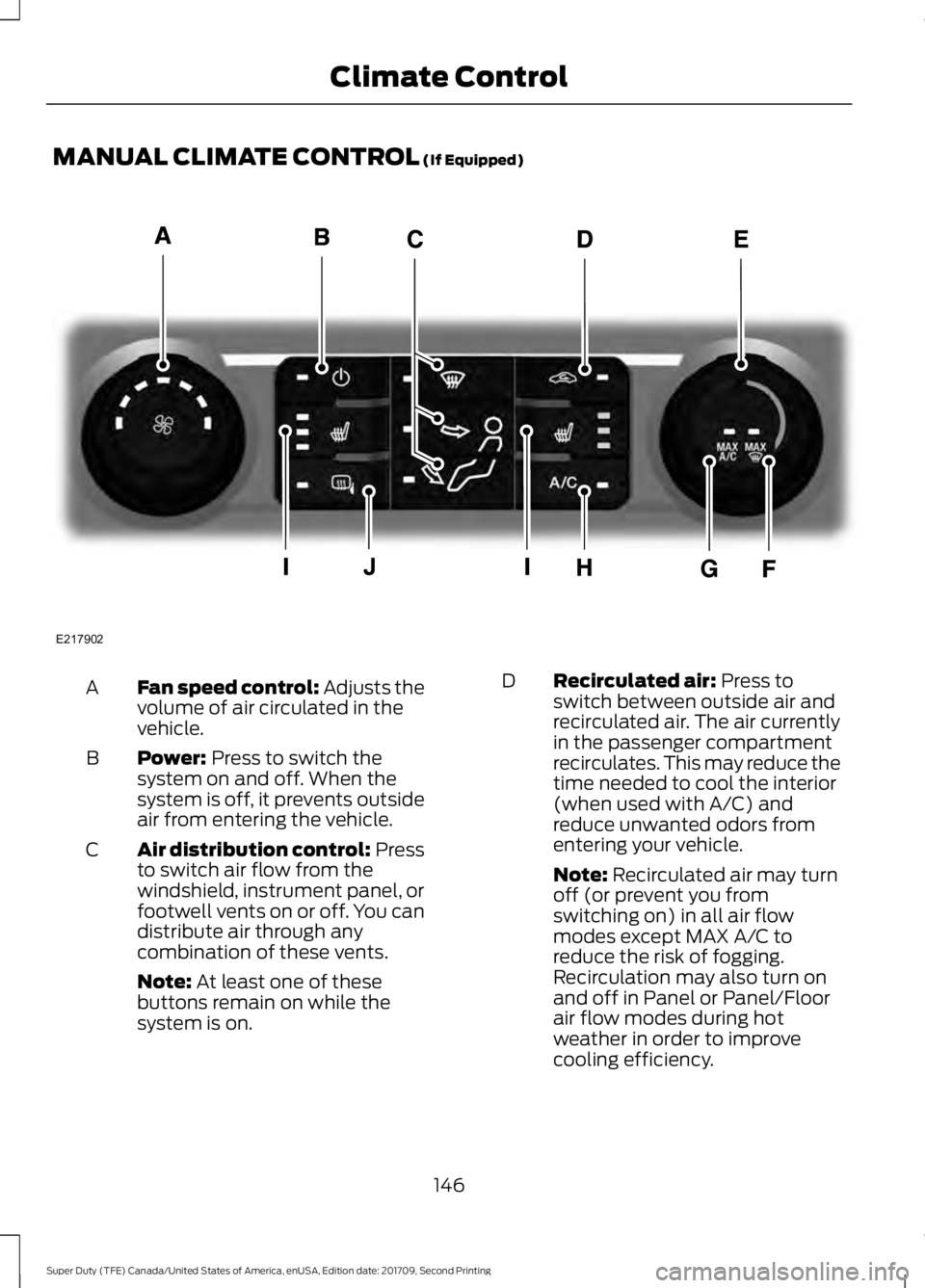
MANUAL CLIMATE CONTROL (If Equipped)
Fan speed control: Adjusts the
volume of air circulated in the
vehicle.
A
Power:
Press to switch the
system on and off. When the
system is off, it prevents outside
air from entering the vehicle.
B
Air distribution control: Press
to switch air flow from the
windshield, instrument panel, or
footwell vents on or off. You can
distribute air through any
combination of these vents.
C
Note:
At least one of these
buttons remain on while the
system is on. Recirculated air:
Press to
switch between outside air and
recirculated air. The air currently
in the passenger compartment
recirculates. This may reduce the
time needed to cool the interior
(when used with A/C) and
reduce unwanted odors from
entering your vehicle.
D
Note:
Recirculated air may turn
off (or prevent you from
switching on) in all air flow
modes except MAX A/C to
reduce the risk of fogging.
Recirculation may also turn on
and off in Panel or Panel/Floor
air flow modes during hot
weather in order to improve
cooling efficiency.
146
Super Duty (TFE) Canada/United States of America, enUSA, Edition date: 201709, Second Printing Climate ControlE217902
Page 150 of 660
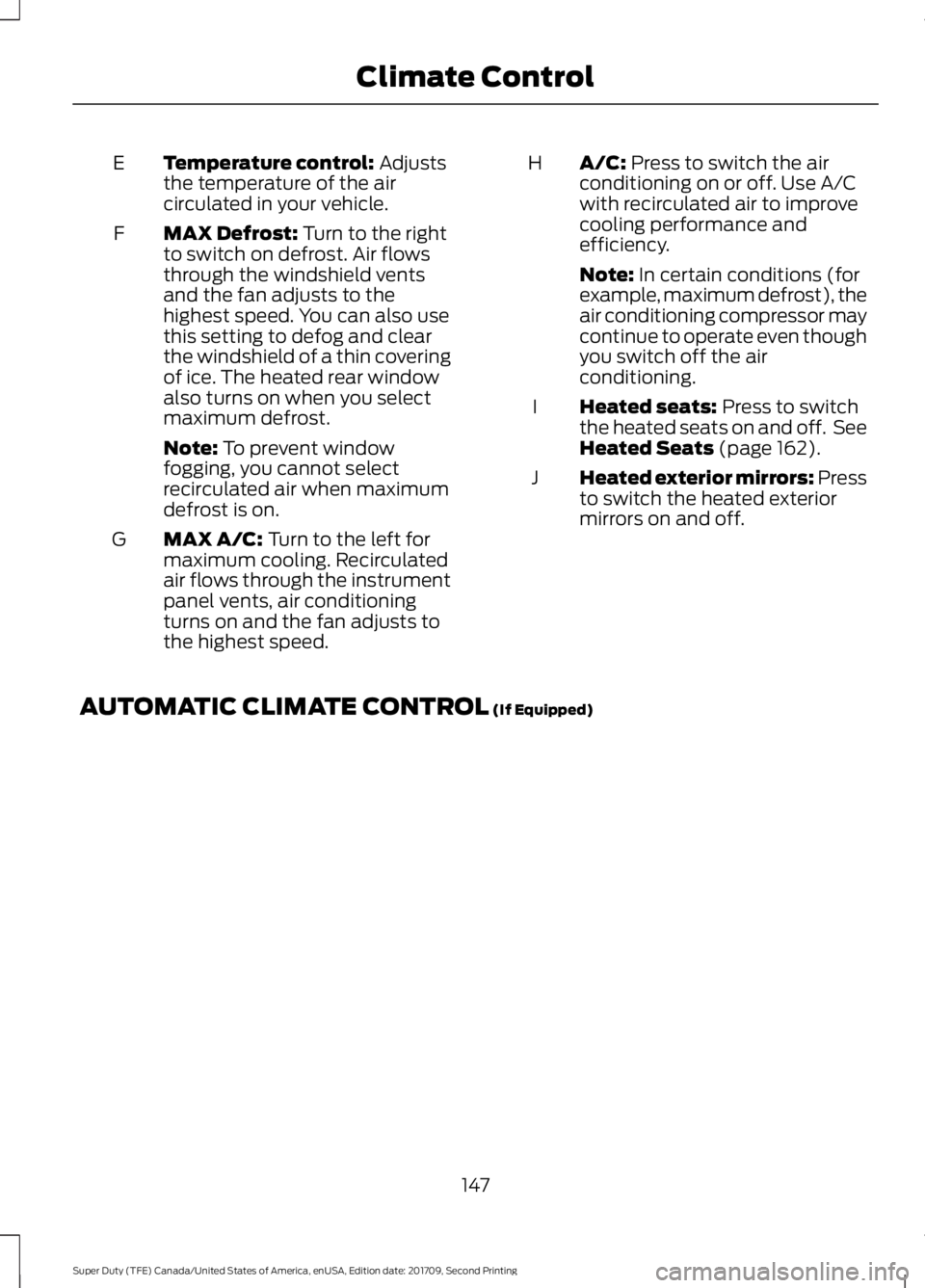
Temperature control: Adjusts
the temperature of the air
circulated in your vehicle.
E
MAX Defrost:
Turn to the right
to switch on defrost. Air flows
through the windshield vents
and the fan adjusts to the
highest speed. You can also use
this setting to defog and clear
the windshield of a thin covering
of ice. The heated rear window
also turns on when you select
maximum defrost.
F
Note:
To prevent window
fogging, you cannot select
recirculated air when maximum
defrost is on.
MAX A/C:
Turn to the left for
maximum cooling. Recirculated
air flows through the instrument
panel vents, air conditioning
turns on and the fan adjusts to
the highest speed.
G A/C:
Press to switch the air
conditioning on or off. Use A/C
with recirculated air to improve
cooling performance and
efficiency.
H
Note:
In certain conditions (for
example, maximum defrost), the
air conditioning compressor may
continue to operate even though
you switch off the air
conditioning.
Heated seats:
Press to switch
the heated seats on and off. See
Heated Seats
(page 162).
I
Heated exterior mirrors: Press
to switch the heated exterior
mirrors on and off.
J
AUTOMATIC CLIMATE CONTROL
(If Equipped)
147
Super Duty (TFE) Canada/United States of America, enUSA, Edition date: 201709, Second Printing Climate Control
Page 151 of 660
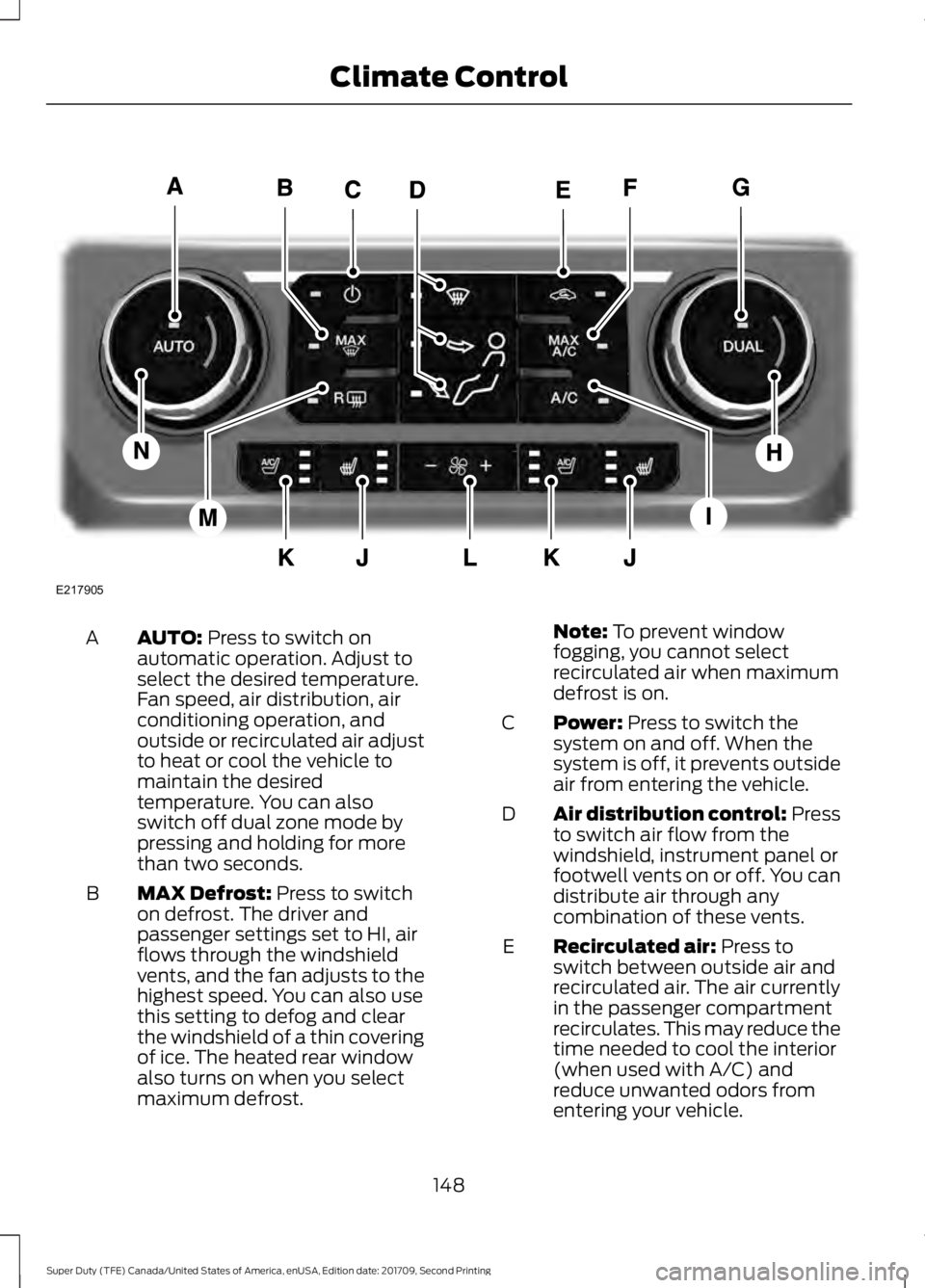
AUTO: Press to switch on
automatic operation. Adjust to
select the desired temperature.
Fan speed, air distribution, air
conditioning operation, and
outside or recirculated air adjust
A
to heat or cool the vehicle to
maintain the desired
temperature. You can also
switch off dual zone mode by
pressing and holding for more
than two seconds.
MAX Defrost:
Press to switch
on defrost. The driver and
passenger settings set to HI, air
flows through the windshield
vents, and the fan adjusts to the
highest speed. You can also use
this setting to defog and clear
the windshield of a thin covering
of ice. The heated rear window
also turns on when you select
maximum defrost.
B Note:
To prevent window
fogging, you cannot select
recirculated air when maximum
defrost is on.
Power:
Press to switch the
system on and off. When the
system is off, it prevents outside
air from entering the vehicle.
C
Air distribution control: Press
to switch air flow from the
windshield, instrument panel or
footwell vents on or off. You can
distribute air through any
combination of these vents.
D
Recirculated air:
Press to
switch between outside air and
recirculated air. The air currently
in the passenger compartment
recirculates. This may reduce the
time needed to cool the interior
(when used with A/C) and
reduce unwanted odors from
entering your vehicle.
E
148
Super Duty (TFE) Canada/United States of America, enUSA, Edition date: 201709, Second Printing Climate ControlE217905
Page 152 of 660
Note: Recirculated air may turn
off (or prevent you from
switching on) in all air flow
modes except MAX A/C to
reduce the risk of fogging.
Recirculation may also turn on
and off in Panel or Panel/Floor
air flow modes during hot
weather in order to improve
cooling efficiency.
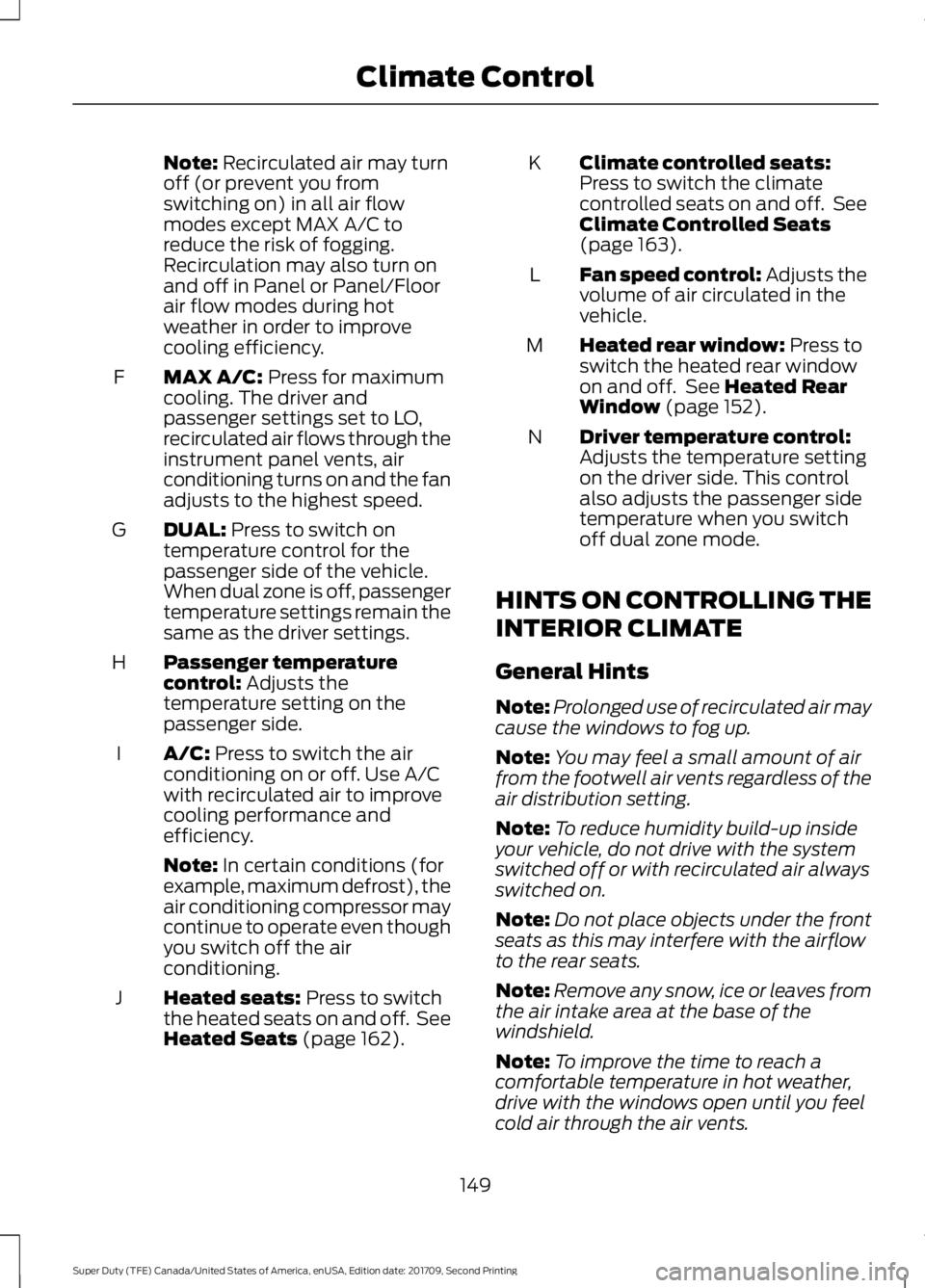
MAX A/C:
Press for maximum
cooling. The driver and
passenger settings set to LO,
recirculated air flows through the
instrument panel vents, air
conditioning turns on and the fan
adjusts to the highest speed.
F
DUAL:
Press to switch on
temperature control for the
passenger side of the vehicle.
When dual zone is off, passenger
temperature settings remain the
same as the driver settings.
G
Passenger temperature
control:
Adjusts the
temperature setting on the
passenger side.
H
A/C:
Press to switch the air
conditioning on or off. Use A/C
with recirculated air to improve
cooling performance and
efficiency.
I
Note:
In certain conditions (for
example, maximum defrost), the
air conditioning compressor may
continue to operate even though
you switch off the air
conditioning.
Heated seats:
Press to switch
the heated seats on and off. See
Heated Seats
(page 162).
J Climate controlled seats:
Press to switch the climate
controlled seats on and off. See
Climate Controlled Seats
(page
163).
K
Fan speed control: Adjusts the
volume of air circulated in the
vehicle.
L
Heated rear window:
Press to
switch the heated rear window
on and off. See
Heated Rear
Window (page 152).
M
Driver temperature control:
Adjusts the temperature setting
on the driver side. This control
also adjusts the passenger side
temperature when you switch
off dual zone mode.
N
HINTS ON CONTROLLING THE
INTERIOR CLIMATE
General Hints
Note: Prolonged use of recirculated air may
cause the windows to fog up.
Note: You may feel a small amount of air
from the footwell air vents regardless of the
air distribution setting.
Note: To reduce humidity build-up inside
your vehicle, do not drive with the system
switched off or with recirculated air always
switched on.
Note: Do not place objects under the front
seats as this may interfere with the airflow
to the rear seats.
Note: Remove any snow, ice or leaves from
the air intake area at the base of the
windshield.
Note: To improve the time to reach a
comfortable temperature in hot weather,
drive with the windows open until you feel
cold air through the air vents.
149
Super Duty (TFE) Canada/United States of America, enUSA, Edition date: 201709, Second Printing Climate Control
Page 153 of 660
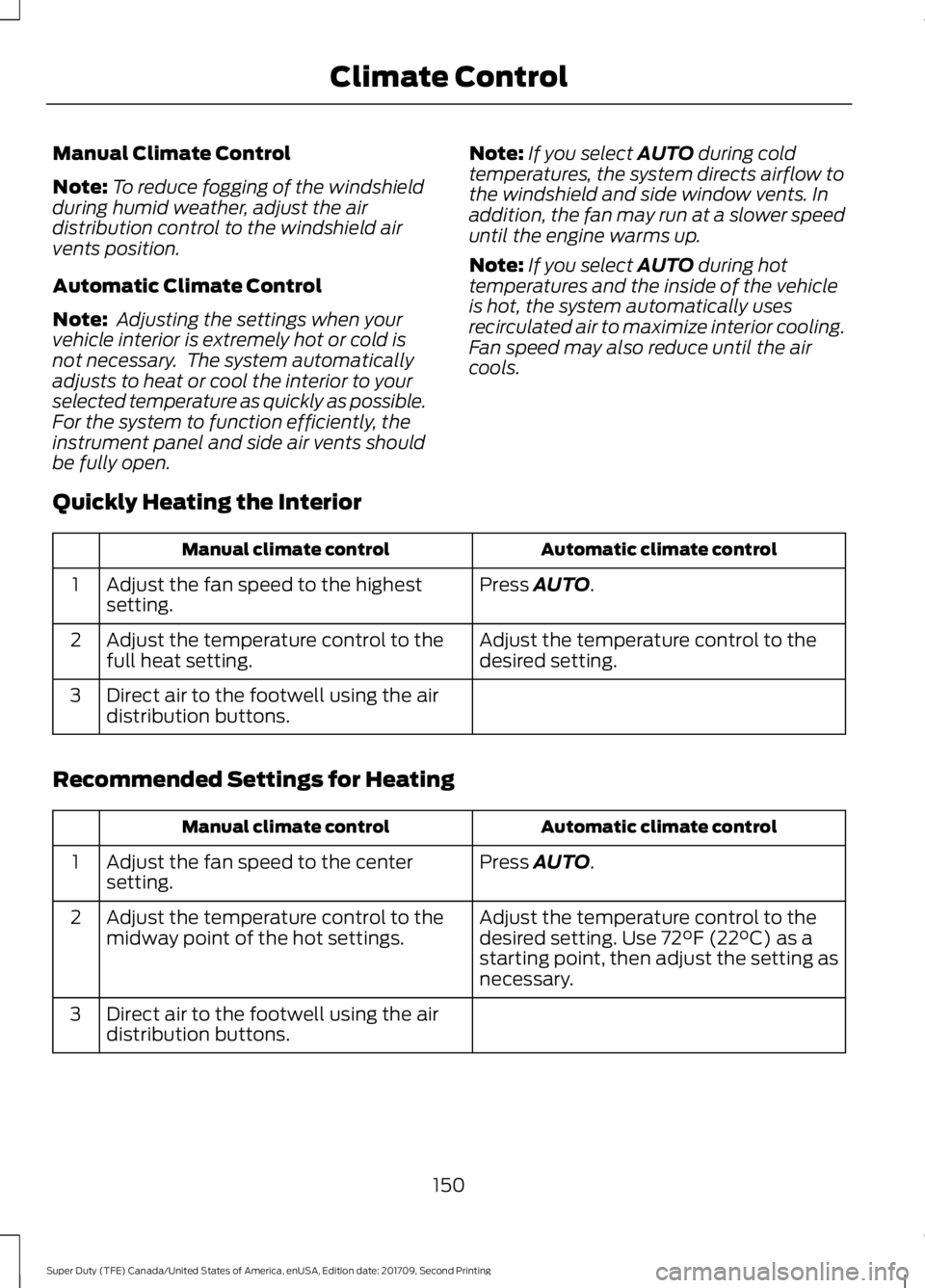
Manual Climate Control
Note:
To reduce fogging of the windshield
during humid weather, adjust the air
distribution control to the windshield air
vents position.
Automatic Climate Control
Note: Adjusting the settings when your
vehicle interior is extremely hot or cold is
not necessary. The system automatically
adjusts to heat or cool the interior to your
selected temperature as quickly as possible.
For the system to function efficiently, the
instrument panel and side air vents should
be fully open. Note:
If you select AUTO during cold
temperatures, the system directs airflow to
the windshield and side window vents. In
addition, the fan may run at a slower speed
until the engine warms up.
Note: If you select
AUTO during hot
temperatures and the inside of the vehicle
is hot, the system automatically uses
recirculated air to maximize interior cooling.
Fan speed may also reduce until the air
cools.
Quickly Heating the Interior Automatic climate control
Manual climate control
Press
AUTO.
Adjust the fan speed to the highest
setting.
1
Adjust the temperature control to the
desired setting.
Adjust the temperature control to the
full heat setting.
2
Direct air to the footwell using the air
distribution buttons.
3
Recommended Settings for Heating Automatic climate control
Manual climate control
Press
AUTO.
Adjust the fan speed to the center
setting.
1
Adjust the temperature control to the
desired setting. Use
72°F (22°C) as a
starting point, then adjust the setting as
necessary.
Adjust the temperature control to the
midway point of the hot settings.
2
Direct air to the footwell using the air
distribution buttons.
3
150
Super Duty (TFE) Canada/United States of America, enUSA, Edition date: 201709, Second Printing Climate Control
Page 154 of 660
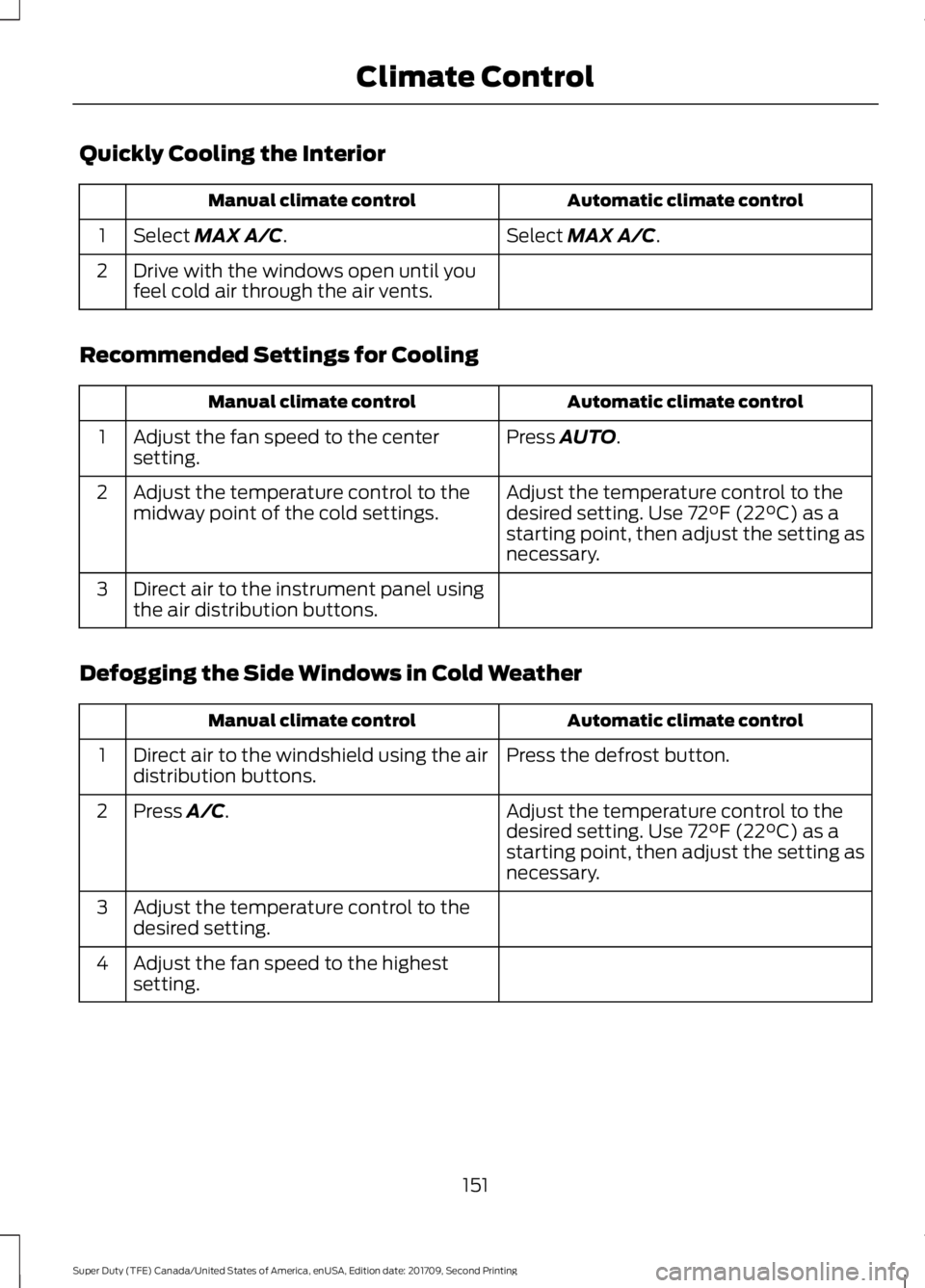
Quickly Cooling the Interior
Automatic climate control
Manual climate control
Select MAX A/C.
Select MAX A/C.
1
Drive with the windows open until you
feel cold air through the air vents.
2
Recommended Settings for Cooling Automatic climate control
Manual climate control
Press
AUTO.
Adjust the fan speed to the center
setting.
1
Adjust the temperature control to the
desired setting. Use
72°F (22°C) as a
starting point, then adjust the setting as
necessary.
Adjust the temperature control to the
midway point of the cold settings.
2
Direct air to the instrument panel using
the air distribution buttons.
3
Defogging the Side Windows in Cold Weather Automatic climate control
Manual climate control
Press the defrost button.
Direct air to the windshield using the air
distribution buttons.
1
Adjust the temperature control to the
desired setting. Use
72°F (22°C) as a
starting point, then adjust the setting as
necessary.
Press A/C.
2
Adjust the temperature control to the
desired setting.
3
Adjust the fan speed to the highest
setting.
4
151
Super Duty (TFE) Canada/United States of America, enUSA, Edition date: 201709, Second Printing Climate Control
Page 173 of 660
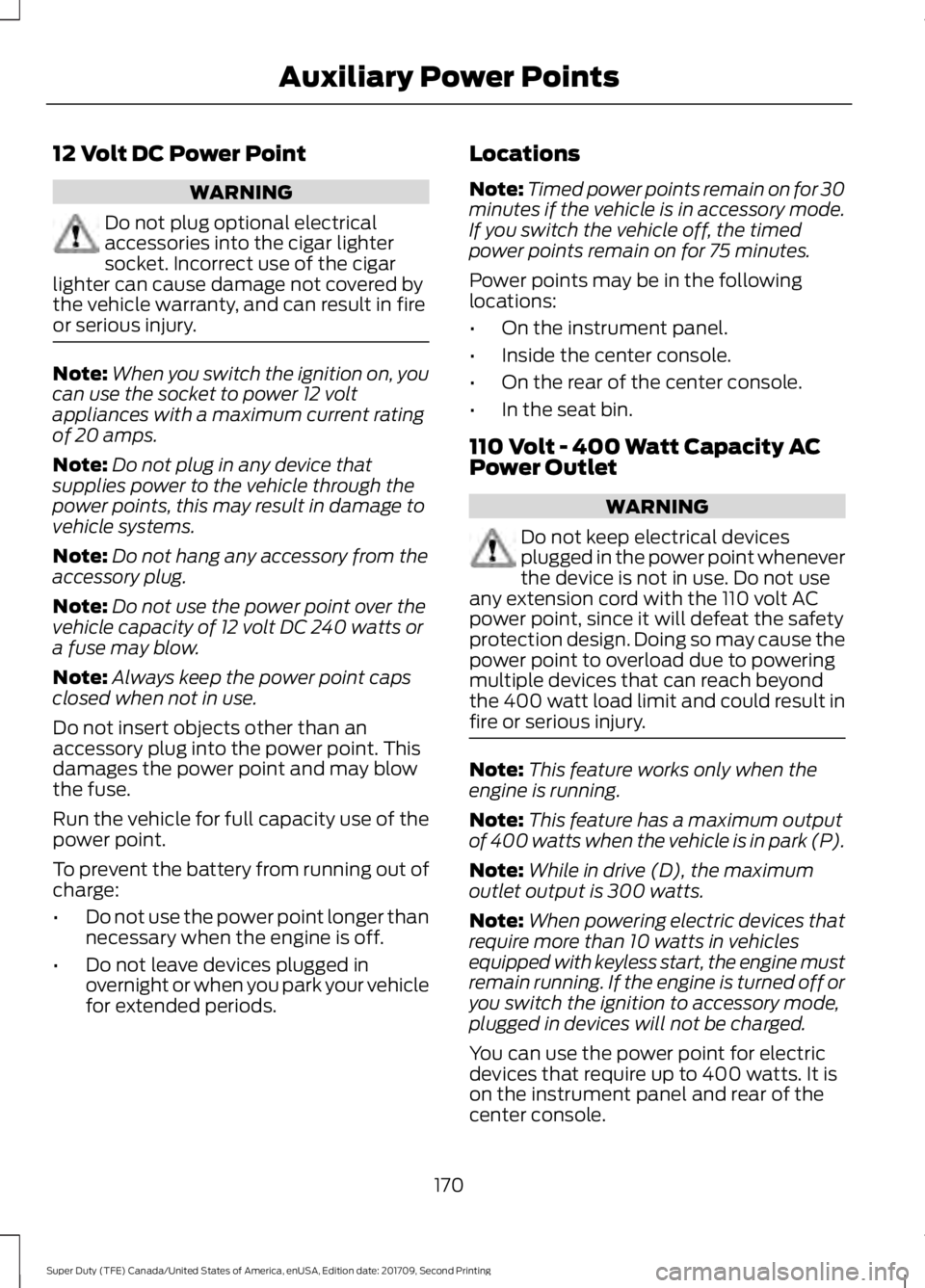
12 Volt DC Power Point
WARNING
Do not plug optional electrical
accessories into the cigar lighter
socket. Incorrect use of the cigar
lighter can cause damage not covered by
the vehicle warranty, and can result in fire
or serious injury. Note:
When you switch the ignition on, you
can use the socket to power 12 volt
appliances with a maximum current rating
of 20 amps.
Note: Do not plug in any device that
supplies power to the vehicle through the
power points, this may result in damage to
vehicle systems.
Note: Do not hang any accessory from the
accessory plug.
Note: Do not use the power point over the
vehicle capacity of 12 volt DC 240 watts or
a fuse may blow.
Note: Always keep the power point caps
closed when not in use.
Do not insert objects other than an
accessory plug into the power point. This
damages the power point and may blow
the fuse.
Run the vehicle for full capacity use of the
power point.
To prevent the battery from running out of
charge:
• Do not use the power point longer than
necessary when the engine is off.
• Do not leave devices plugged in
overnight or when you park your vehicle
for extended periods. Locations
Note:
Timed power points remain on for 30
minutes if the vehicle is in accessory mode.
If you switch the vehicle off, the timed
power points remain on for 75 minutes.
Power points may be in the following
locations:
• On the instrument panel.
• Inside the center console.
• On the rear of the center console.
• In the seat bin.
110 Volt - 400 Watt Capacity AC
Power Outlet WARNING
Do not keep electrical devices
plugged in the power point whenever
the device is not in use. Do not use
any extension cord with the 110 volt AC
power point, since it will defeat the safety
protection design. Doing so may cause the
power point to overload due to powering
multiple devices that can reach beyond
the 400 watt load limit and could result in
fire or serious injury. Note:
This feature works only when the
engine is running.
Note: This feature has a maximum output
of 400 watts when the vehicle is in park (P).
Note: While in drive (D), the maximum
outlet output is 300 watts.
Note: When powering electric devices that
require more than 10 watts in vehicles
equipped with keyless start, the engine must
remain running. If the engine is turned off or
you switch the ignition to accessory mode,
plugged in devices will not be charged.
You can use the power point for electric
devices that require up to 400 watts. It is
on the instrument panel and rear of the
center console.
170
Super Duty (TFE) Canada/United States of America, enUSA, Edition date: 201709, Second Printing Auxiliary Power Points
Page 218 of 660
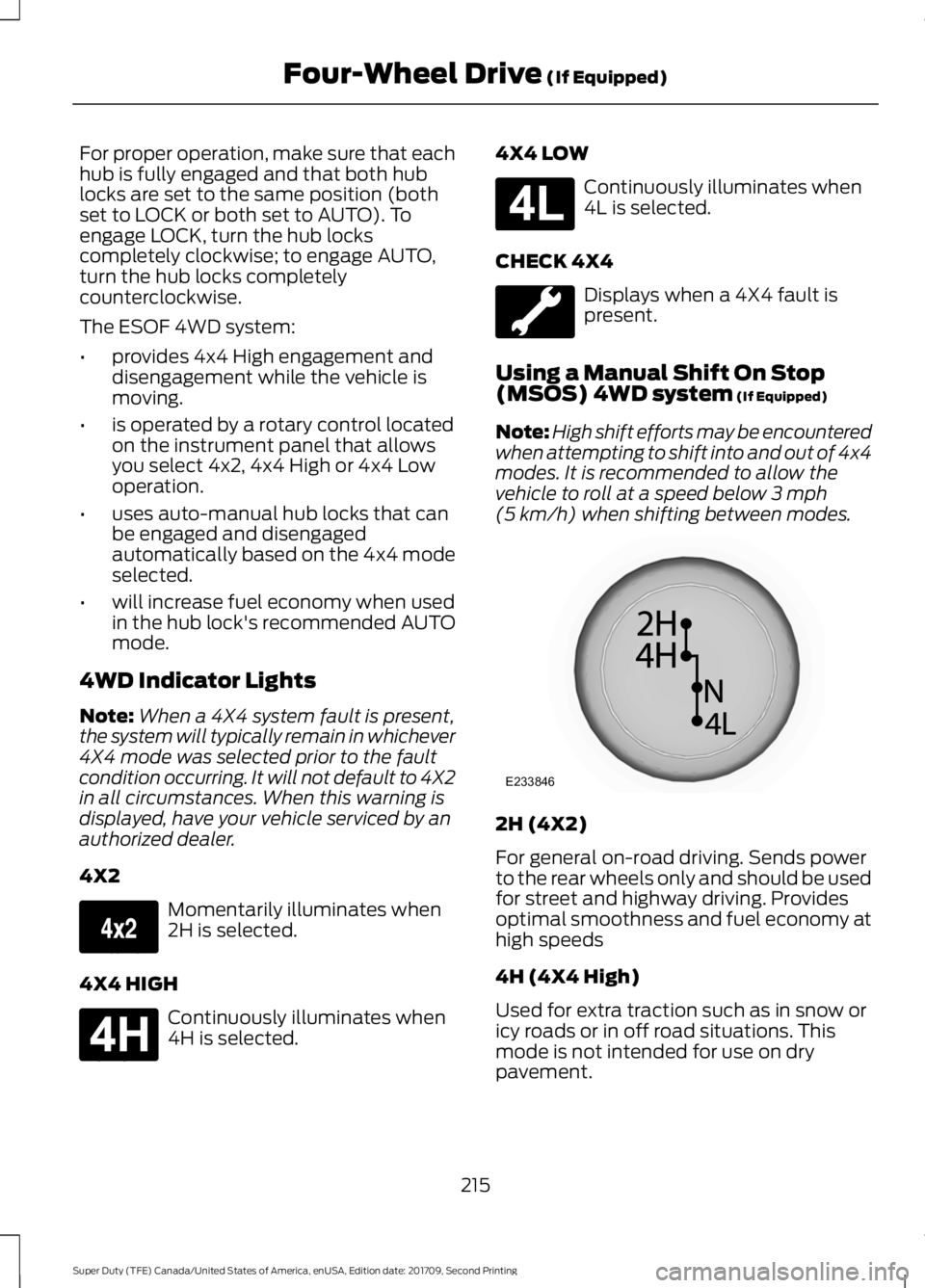
For proper operation, make sure that each
hub is fully engaged and that both hub
locks are set to the same position (both
set to LOCK or both set to AUTO). To
engage LOCK, turn the hub locks
completely clockwise; to engage AUTO,
turn the hub locks completely
counterclockwise.
The ESOF 4WD system:
•
provides 4x4 High engagement and
disengagement while the vehicle is
moving.
• is operated by a rotary control located
on the instrument panel that allows
you select 4x2, 4x4 High or 4x4 Low
operation.
• uses auto-manual hub locks that can
be engaged and disengaged
automatically based on the 4x4 mode
selected.
• will increase fuel economy when used
in the hub lock's recommended AUTO
mode.
4WD Indicator Lights
Note: When a 4X4 system fault is present,
the system will typically remain in whichever
4X4 mode was selected prior to the fault
condition occurring. It will not default to 4X2
in all circumstances. When this warning is
displayed, have your vehicle serviced by an
authorized dealer.
4X2 Momentarily illuminates when
2H is selected.
4X4 HIGH Continuously illuminates when
4H is selected. 4X4 LOW Continuously illuminates when
4L is selected.
CHECK 4X4 Displays when a 4X4 fault is
present.
Using a Manual Shift On Stop
(MSOS) 4WD system (If Equipped)
Note: High shift efforts may be encountered
when attempting to shift into and out of 4x4
modes. It is recommended to allow the
vehicle to roll at a speed below
3 mph
(5 km/h) when shifting between modes. 2H (4X2)
For general on-road driving. Sends power
to the rear wheels only and should be used
for street and highway driving. Provides
optimal smoothness and fuel economy at
high speeds
4H (4X4 High)
Used for extra traction such as in snow or
icy roads or in off road situations. This
mode is not intended for use on dry
pavement.
215
Super Duty (TFE) Canada/United States of America, enUSA, Edition date: 201709, Second Printing Four-Wheel Drive
(If Equipped)E163173 E181779 E181780 E233846
Page 230 of 660
HINTS ON DRIVING WITH
ANTI-LOCK BRAKES
The anti-lock braking system does not
eliminate the risks when:
•
You drive too closely to the vehicle in
front of you.
• Your vehicle is hydroplaning.
• You take corners too fast.
• The road surface is poor.
Note: If the system activates, the brake
pedal may pulse and may travel further.
Maintain pressure on the brake pedal. You
may also hear a noise from the system. This
is normal.
PARKING BRAKE WARNING
Always set the parking brake fully
and make sure the transmission is
placed in park (P). Failure to set the
parking brake and engage park could result
in vehicle roll-away, property damage or
bodily injury. Turn the ignition to the lock
position and remove the key whenever you
leave your vehicle. Apply the parking brake whenever your
vehicle is parked. Press the pedal
downward to set the parking brake. The
brake warning lamp in the instrument
cluster will illuminate and remains
illuminated until the parking brake is
released.
To release, pull the brake release lever
located at the lower left side of the
instrument panel. If you are parking your vehicle on a grade
or with a trailer, press and hold the brake
pedal down, then set the parking brake.
There may be a little vehicle movement as
the parking brake sets to hold the vehicle's
weight. This is normal and should be no
reason for concern. If needed, press and
hold the service brake pedal down, then
try reapplying the parking brake. Chock the
wheels if required. If the parking brake
cannot hold the weight of the vehicle, the
parking brake may need to be serviced or
the vehicle may be overloaded.
HILL START ASSIST
WARNINGS
The system does not replace the
parking brake. When you leave your
vehicle, always apply the parking
brake. You must remain in your vehicle
when the system turns on. At all
times, you are responsible for
controlling your vehicle, supervising the
system and intervening, if required. Failure
to take care may result in the loss of
control of your vehicle, serious personal
injury or death. The system will turn off if a
malfunction is apparent or if you rev
the engine excessively. Failure to
take care may result in the loss of control
of your vehicle, serious personal injury or
death. The system makes it easier to pull away
when your vehicle is on a slope without the
need to use the parking brake.
When the system is active, your vehicle
remains stationary on the slope for two to
three seconds after you release the brake
pedal. This allows time to move your foot
from the brake to the accelerator pedal.
The system releases the brakes
227
Super Duty (TFE) Canada/United States of America, enUSA, Edition date: 201709, Second Printing Brakes
Page 232 of 660
PRINCIPLE OF OPERATION
The traction control system helps avoid
drive wheel spin and loss of traction.
If your vehicle begins to slide, the system
applies the brakes to individual wheels
and, when needed, reduces engine power
at the same time. If the wheels spin when
accelerating on slippery or loose surfaces,
the system reduces engine power in order
to increase traction.
USING TRACTION CONTROL
WARNING
The stability and traction control
light illuminates steadily if the
system detects a failure. Make sure
you did not manually disable the traction
control system using the information
display controls or the switch. If the
stability control and traction control light
is still illuminating steadily, have the
system serviced by an authorized dealer
immediately. Operating your vehicle with
the traction control disabled could lead to
an increased risk of loss of vehicle control,
vehicle rollover, personal injury and death. The system automatically turns on each
time you switch the ignition on.
If your vehicle is stuck in mud or snow,
switching traction control off may be
beneficial as this allows the wheels to spin.
Note:
When you switch traction control off,
stability control remains fully active.
Note: For additional information on the
traction and stability control systems. See
Using Stability Control (page 231).
Switching the System Off
When you switch the system off or on, a
message appears in the information
display showing system status. Use the traction and stability control
switch on the instrument panel to switch
the system off or on.
The switch illuminates when traction
control is off.
When you place your vehicle into
four-wheel drive low mode the traction
control disables. Traction control resumes
full operation when you put your vehicle
back into two-wheel drive mode.
System Indicator Lights and
Messages
The stability and traction control
light:
• Temporarily illuminates on engine
start-up.
• Flashes when a driving condition
activates either of the systems.
• Illuminates if a problem occurs in either
of the systems. The stability and traction control
off light temporarily illuminates
on engine start-up and stays on
when you switch the traction control
system off.
229
Super Duty (TFE) Canada/United States of America, enUSA, Edition date: 201709, Second Printing Traction ControlE166706 E225465 E225466