ignition FORD F-450 2021 Owners Manual
[x] Cancel search | Manufacturer: FORD, Model Year: 2021, Model line: F-450, Model: FORD F-450 2021Pages: 666, PDF Size: 11.3 MB
Page 502 of 666
USING SYNC™ WITH YOUR
PHONE
Hands-free calling is one of the main
features of SYNC. While the system
supports a variety of features, many are
dependent on your cellular phone's
functionality. At a minimum, most cellular
phones with Bluetooth wireless technology
support the following functions:
•
Answering an incoming call.
• Ending a call.
• Dialing a number.
• Redialing.
• Call waiting notification.
• Caller identification.
Other features, such as text messaging
using Bluetooth and automatic phonebook
download, are phone-dependent features.
Pairing a Phone
Wirelessly pairing your phone with SYNC
allows you to make and receive hands-free
calls.
Note: Make sure to switch on the ignition
and the radio. Shift the transmission into
park (P) for automatic transmission or
neutral (N) for manual transmission.
Using the Audio System
Note: To scroll through the menus, press
the up and down arrows on your audio
system.
1. Make sure to switch on your phone's Bluetooth feature before starting the
search. See your device's manual if
necessary.
2. Press the Settings button.
3. Select Bluetooth from the menu.
4. Press the
OK button.
5. Select the option to add. This starts the pairing process. 6. When a message to begin pairing
appears in the audio display, search for
SYNC on your device.
Depending on your phone's capability and
your market, the system may prompt you
with questions, such as setting the current
phone as the primary phone and
downloading your phonebook.
Using Voice Commands Make sure to switch on your
phone's Bluetooth feature
before starting the search. See
your device's manual if necessary.
Press the voice button and when
prompted say: Action and Descrip-
tion
Voice Command
Follow the instruc-
tions on the audio
display.
Pair Phone
Phone Voice Commands Press the voice button. You can
do things like place a phone call
and access text messages.
When prompted, say a command. See the
following table for examples of
commands. Voice Command
___ List of Commands
Help
Call ___
Dial ___
Text Messages
499
Super Duty (TFE) Canada/United States of America, enUSA, Edition date: 202008, Third-Printing- SYNC™
(If Equipped)E142599 E142599
Page 513 of 666
AppLink Issues
Possible Solution(s)
Possible Cause(s)
Issue
SYNC in order to find
AppLink-capable apps on your device. iPhone users must also connect to
SYNC's USB port with an Apple USB cable.
Ensure you have down-
loaded and installed the latest version of the app
from your phone's app store.
Ensure the app is running on your phone. Some apps
AppLink-enabled apps are
not installed and running on your mobile device.
My phone is connected, but
I still cannot find any apps. require you to register or
login on the app on the
phone before using them with AppLink. Also, some may have a Ford SYNC
setting, so check the app's
settings menu on the phone.
Closing and restarting apps may help SYNC find the
application if you cannot
discover it inside the vehicle. On an Android device, if
apps have an Exit or Quit
Sometime apps do not
properly close and re-open their connection to SYNC, over ignition cycles, for example.
My phone is connected, my
app(s) are running, but I still cannot find any apps. option, select that then
restart the app. If the app
does not have that option,
you can also manually Force Close the app by going to
the phone's settings menu,
selecting Apps. then finding the particular app andchoosing Force stop.
Remember to restart the
app afterwards, then select Find New Apps on SYNC.
510
Super Duty (TFE) Canada/United States of America, enUSA, Edition date: 202008, Third-Printing- SYNC™ (If Equipped)
Page 516 of 666
GENERAL INFORMATION
WARNING: Driving while distracted
can result in loss of vehicle control, crash
and injury. We strongly recommend that
you use extreme caution when using any
device that may take your focus off the
road. Your primary responsibility is the
safe operation of your vehicle. We
recommend against the use of any
hand-held device while driving and
encourage the use of voice-operated
systems when possible. Make sure you
are aware of all applicable local laws
that may affect the use of electronic
devices while driving.
About SYNC
The system allows you to interact with the
entertainment, information and
communication systems on your vehicle
using voice commands and a touchscreen.
The system provides easy interaction with
audio, phone, navigation, mobile apps and
settings.
Note: You can switch the system on and
use it for up to an hour without switching
the ignition on.
Note: You can use the system after you
switch the ignition off for up to 10 minutes
or until you open a door.
Note: For your safety, some features are
speed-dependent. Their use is limited to
when your vehicle speed is less than 3 mph
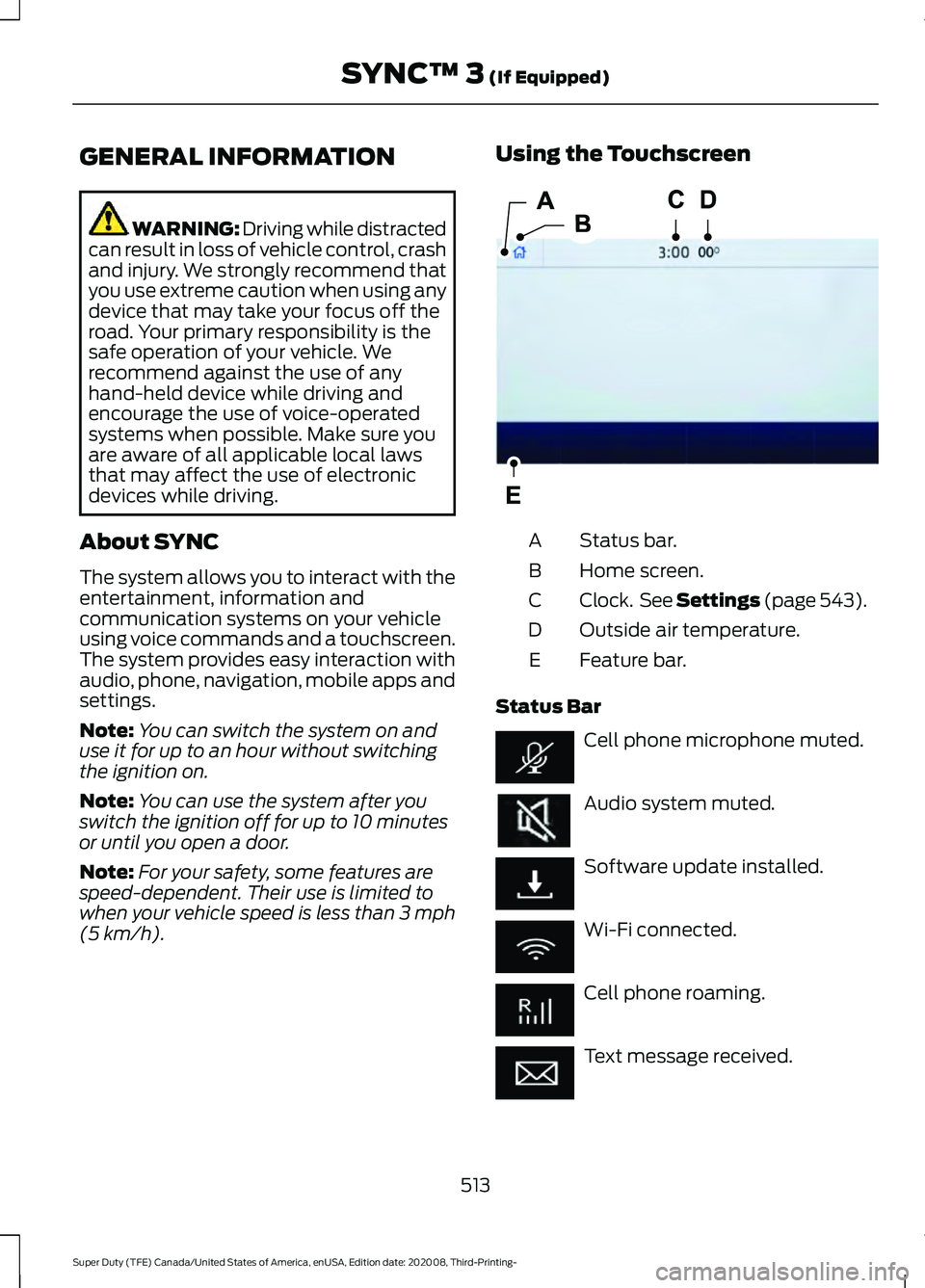
(5 km/h). Using the Touchscreen
Status bar.
A
Home screen.
B
Clock. See Settings (page 543).
C
Outside air temperature.
D
Feature bar.
E
Status Bar Cell phone microphone muted.
Audio system muted.
Software update installed.
Wi-Fi connected.
Cell phone roaming.
Text message received.
513
Super Duty (TFE) Canada/United States of America, enUSA, Edition date: 202008, Third-Printing- SYNC™ 3
(If Equipped)E293823
Page 528 of 666
Troubleshooting Tips
Action
Cause
Message
No action required. This
message should disappear
shortly.
Radio requires more than two
seconds to produce audio for
the selected channel.
Acquiring Signal
If this message does not clear
shortly, or with an ignition key
cycle, your receiver may have
a fault. See an authorized
dealer for service.
There is an internal module or
system failure present.
Satellite antenna fault
SIRIUS system failure
Tune to another channel or
choose another preset.
The channel is no longer avail-
able.
Invalid Channel
Contact SiriusXM at 1-888-
539-7474 to subscribe to the
channel, or tune to another
channel.
Your subscription does not
include this channel.
Unsubscribed Channel
The signal is blocked. When
you move into an open area,
the signal should return.
The signal is lost from the Siri-
usXM satellite or SiriusXM
tower to your vehicle antenna.
Satellite acquiring
signal\b
No action required. The
process may take up to three
minutes.
Update of channel program-
ming in progress.
Updating\b
Contact SiriusXM at 1-888-
539-7474 to resolve subscrip-
tion issues.
Your satellite service is no
longer available.
Questions? Call 1-
888-539-7474
Use the channel guide or the
Sirius XM Settings tile to turn
off the Lock or Skip function on
that station.
All the channels in the selected
category are either skipped or
locked.
None found. Check
channel guide.
No action required.
SiriusXM has updated the
channels available for your
vehicle.
SIRIUS Subscription
updated
HD Radio ™ Information (If
Available)
To activate HD radio, please see the Radio
Settings in the Settings Chapter. See
Settings (page 543). Note:
HD Radio broadcasts are not
available in all markets.
525
Super Duty (TFE) Canada/United States of America, enUSA, Edition date: 202008, Third-Printing- SYNC™ 3
(If Equipped)
Page 552 of 666
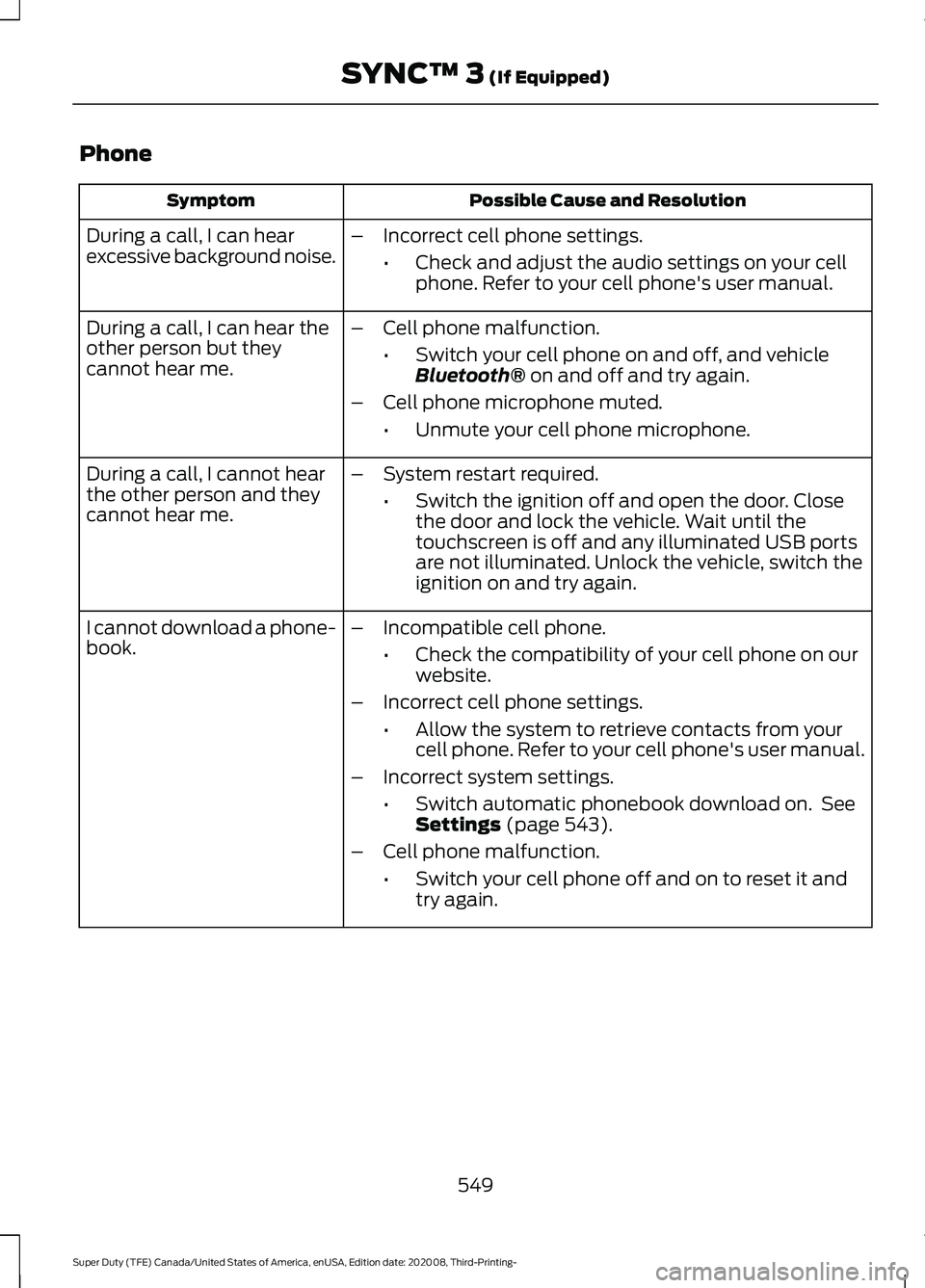
Phone
Possible Cause and Resolution
Symptom
During a call, I can hear
excessive background noise. –
Incorrect cell phone settings.
•Check and adjust the audio settings on your cell
phone. Refer to your cell phone's user manual.
– Cell phone malfunction.
•Switch your cell phone on and off, and vehicle
Bluetooth® on and off and try again.
– Cell phone microphone muted.
•Unmute your cell phone microphone.
During a call, I can hear the
other person but they
cannot hear me.
During a call, I cannot hear
the other person and they
cannot hear me.
–
System restart required.
•Switch the ignition off and open the door. Close
the door and lock the vehicle. Wait until the
touchscreen is off and any illuminated USB ports
are not illuminated. Unlock the vehicle, switch the
ignition on and try again.
I cannot download a phone-
book. –
Incompatible cell phone.
•Check the compatibility of your cell phone on our
website.
– Incorrect cell phone settings.
•Allow the system to retrieve contacts from your
cell phone. Refer to your cell phone's user manual.
– Incorrect system settings.
•Switch automatic phonebook download on. See
Settings
(page 543).
– Cell phone malfunction.
•Switch your cell phone off and on to reset it and
try again.
549
Super Duty (TFE) Canada/United States of America, enUSA, Edition date: 202008, Third-Printing- SYNC™ 3
(If Equipped)
Page 558 of 666
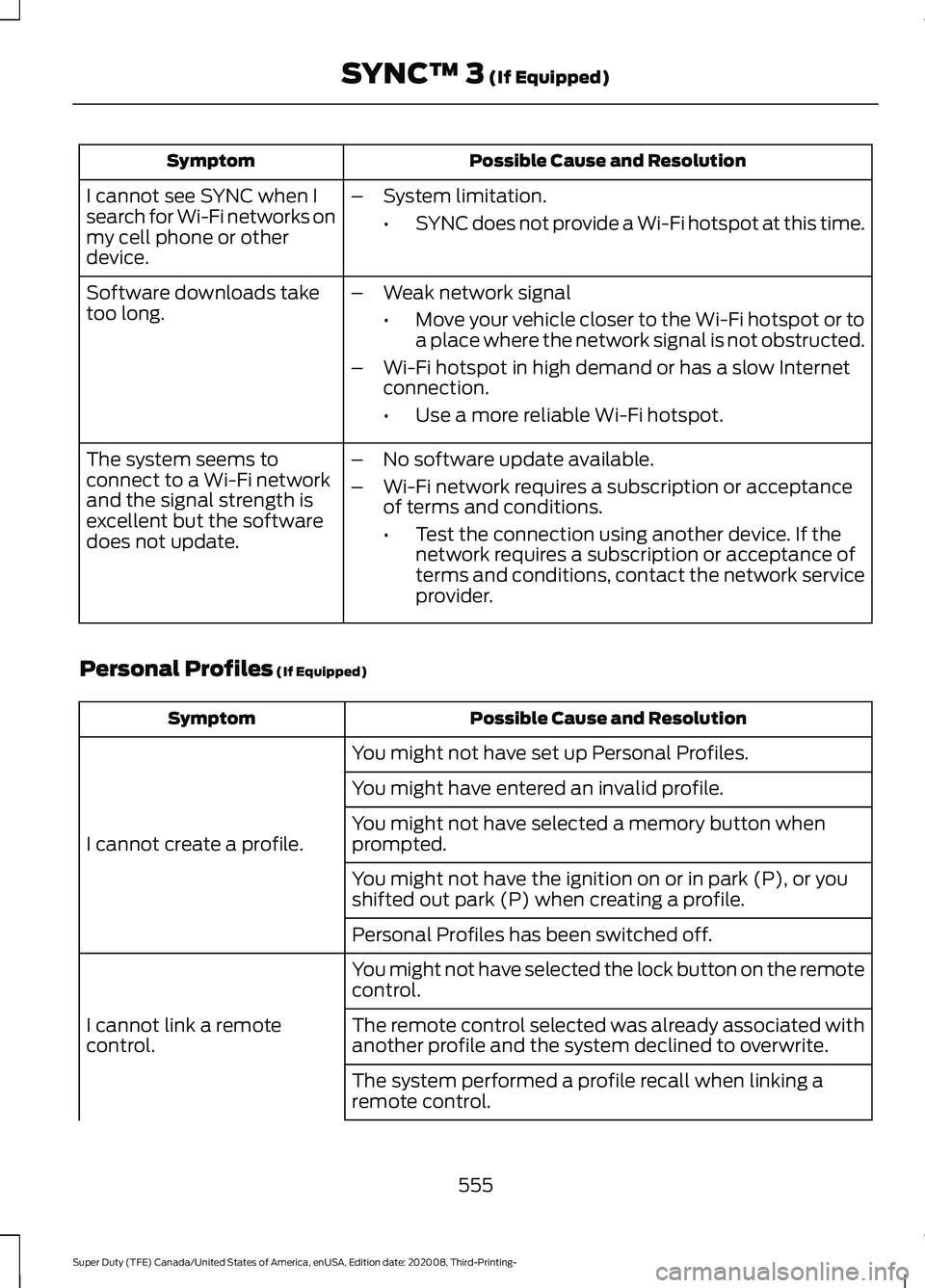
Possible Cause and Resolution
Symptom
I cannot see SYNC when I
search for Wi-Fi networks on
my cell phone or other
device. –
System limitation.
•SYNC does not provide a Wi-Fi hotspot at this time.
– Weak network signal
•Move your vehicle closer to the Wi-Fi hotspot or to
a place where the network signal is not obstructed.
– Wi-Fi hotspot in high demand or has a slow Internet
connection.
•Use a more reliable Wi-Fi hotspot.
Software downloads take
too long.
–No software update available.
– Wi-Fi network requires a subscription or acceptance
of terms and conditions.
•Test the connection using another device. If the
network requires a subscription or acceptance of
terms and conditions, contact the network service
provider.
The system seems to
connect to a Wi-Fi network
and the signal strength is
excellent but the software
does not update.
Personal Profiles (If Equipped) Possible Cause and Resolution
Symptom
You might not have set up Personal Profiles.
I cannot create a profile. You might have entered an invalid profile.
You might not have selected a memory button when
prompted.
You might not have the ignition on or in park (P), or you
shifted out park (P) when creating a profile.
Personal Profiles has been switched off.
You might not have selected the lock button on the remote
control.
I cannot link a remote
control. The remote control selected was already associated with
another profile and the system declined to overwrite.
The system performed a profile recall when linking a
remote control.
555
Super Duty (TFE) Canada/United States of America, enUSA, Edition date: 202008, Third-Printing- SYNC™ 3
(If Equipped)
Page 559 of 666
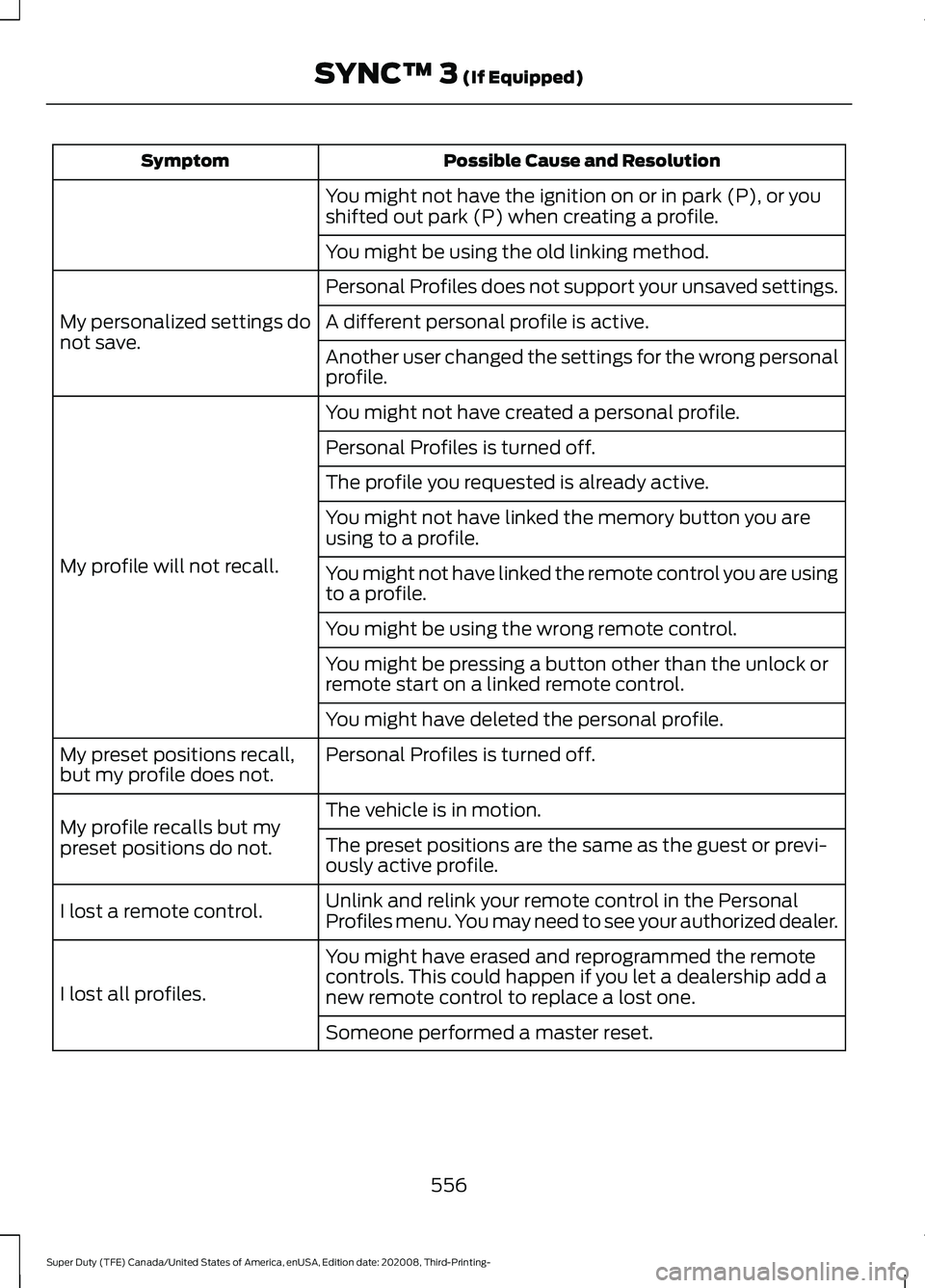
Possible Cause and Resolution
Symptom
You might not have the ignition on or in park (P), or you
shifted out park (P) when creating a profile.
You might be using the old linking method.
Personal Profiles does not support your unsaved settings.
My personalized settings do
not save. A different personal profile is active.
Another user changed the settings for the wrong personal
profile.
You might not have created a personal profile.
My profile will not recall. Personal Profiles is turned off.
The profile you requested is already active.
You might not have linked the memory button you are
using to a profile.
You might not have linked the remote control you are using
to a profile.
You might be using the wrong remote control.
You might be pressing a button other than the unlock or
remote start on a linked remote control.
You might have deleted the personal profile.
Personal Profiles is turned off.
My preset positions recall,
but my profile does not.
The vehicle is in motion.
My profile recalls but my
preset positions do not. The preset positions are the same as the guest or previ-
ously active profile.
Unlink and relink your remote control in the Personal
Profiles menu. You may need to see your authorized dealer.
I lost a remote control.
You might have erased and reprogrammed the remote
controls. This could happen if you let a dealership add a
new remote control to replace a lost one.
I lost all profiles.
Someone performed a master reset.
556
Super Duty (TFE) Canada/United States of America, enUSA, Edition date: 202008, Third-Printing- SYNC™ 3 (If Equipped)
Page 562 of 666
AUXILIARY SWITCHES (IF
EQUIPPED)
For maximum vehicle performance, keep
the following information in mind when
adding accessories or equipment to your
vehicle:
• When adding accessories, equipment,
passengers and luggage to your
vehicle, do not exceed the total weight
capacity of the vehicle or of the front
or rear axle (GVWR or GAWR as
indicated on the Safety Compliance
Certification label). Ask an authorized
dealer for specific weight information.
• The Federal Communications
Commission (FCC) and Canadian
Radio Telecommunications
Commission (CRTC) regulate the use
of mobile communications systems
equipped with radio transmitters, for
example, two-way radios, telephones
and theft alarms. Any such equipment
installed in your vehicle should comply
with Federal Communications
Commission (FCC) and Canadian
Radio Telecommunications
Commission (CRTC) regulations, and
should be installed by an authorized
dealer.
• An authorized dealer needs to install
mobile communications systems.
Improper installation may harm the
operation of your vehicle, particularly
if the manufacturer did not design the
mobile communication system
specifically for automotive use.
• If you or an authorized Ford dealer add
any non-Ford electrical or electronic
accessories or components to your
vehicle, you may adversely affect
battery performance and durability. In
addition, you may also adversely affect
the performance of other electrical
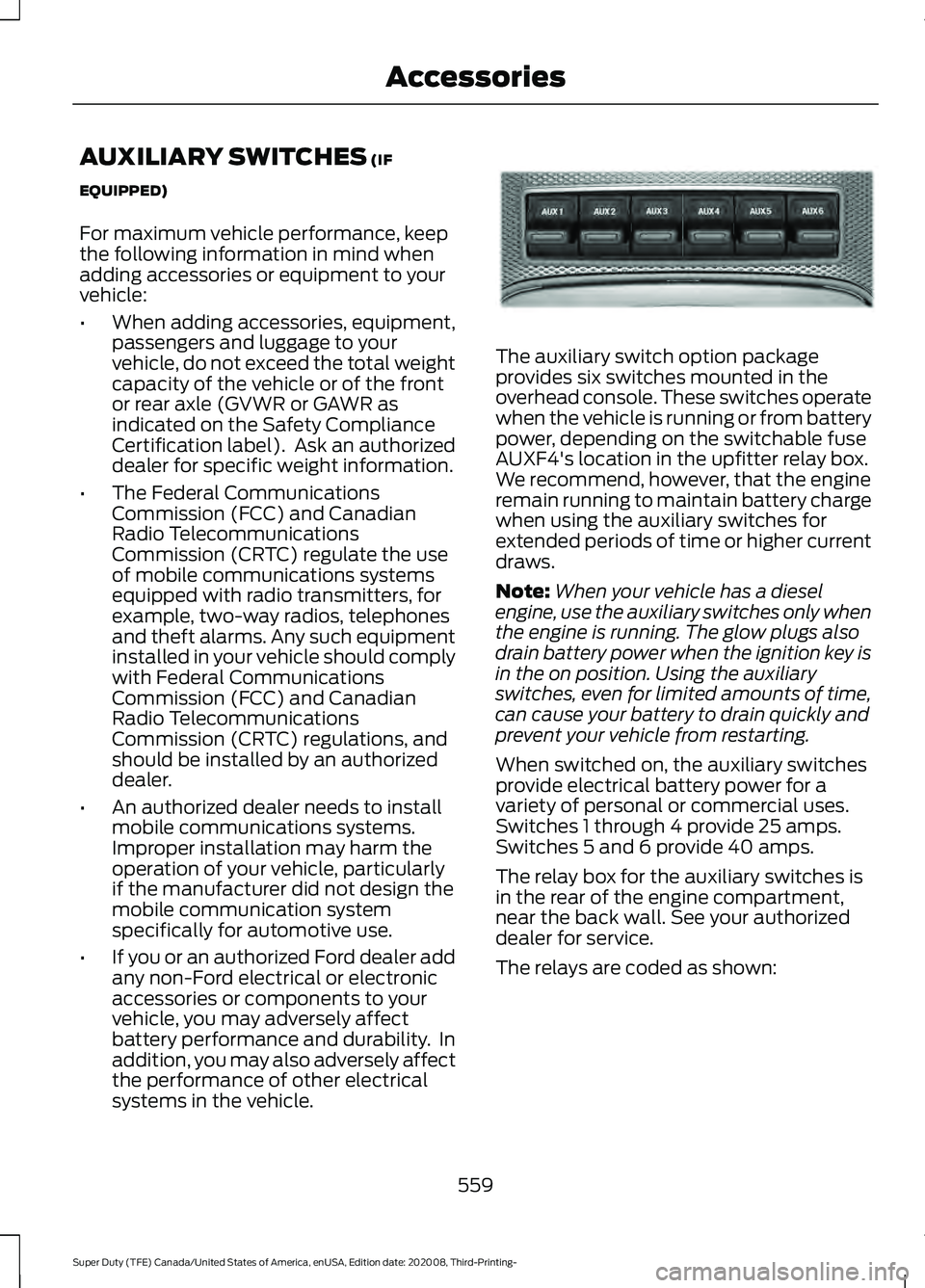
systems in the vehicle. The auxiliary switch option package
provides six switches mounted in the
overhead console. These switches operate
when the vehicle is running or from battery
power, depending on the switchable fuse
AUXF4's location in the upfitter relay box.
We recommend, however, that the engine
remain running to maintain battery charge
when using the auxiliary switches for
extended periods of time or higher current
draws.
Note:
When your vehicle has a diesel
engine, use the auxiliary switches only when
the engine is running. The glow plugs also
drain battery power when the ignition key is
in the on position. Using the auxiliary
switches, even for limited amounts of time,
can cause your battery to drain quickly and
prevent your vehicle from restarting.
When switched on, the auxiliary switches
provide electrical battery power for a
variety of personal or commercial uses.
Switches 1 through 4 provide 25 amps.
Switches 5 and 6 provide 40 amps.
The relay box for the auxiliary switches is
in the rear of the engine compartment,
near the back wall. See your authorized
dealer for service.
The relays are coded as shown:
559
Super Duty (TFE) Canada/United States of America, enUSA, Edition date: 202008, Third-Printing- AccessoriesE220728
Page 650 of 666
3
360 Degree Camera...................................238
Advanced Camera Views............................... 238
Auxiliary Camera................................................. 241
Bed View Camera.............................................. 240
Camera Views..................................................... 238
Front Camera...................................................... 239
Keep Out Zone.................................................... 239
Side Camera........................................................ 240
4
4WD See: Four-Wheel Drive...................................... 213
A
A/C See: Climate Control - Vehicles With:
Automatic Temperature Control.............143
See: Climate Control - Vehicles With: Manual Temperature Control.................................... 147
About This Manual...........................................9
ABS See: Brakes........................................................... 223
ABS driving hints See: Hints on Driving With Anti-Lock
Brakes................................................................ 225
Accessories....................................................558
Accessories See: Replacement Parts
Recommendation............................................ 16
ACC See: Using Adaptive Cruise Control............243
Adjustable Pedals.........................................84
Adjusting the Headlamps.........................381 Horizontal Aim Adjustment........................... 382
Vertical Aim Adjustment................................. 381
Adjusting the Pedals....................................84
Adjusting the Steering Wheel - Vehicles With: Manual Adjustable Steering
Column .............................................................
81
Adjusting the Steering Wheel - Vehicles With: Power Adjustable Steering
Column...........................................................80
End of Travel Position........................................ 80
Memory Feature................................................... 80Airbag Disposal...............................................54
Air Conditioning
See: Climate Control - Vehicles With:
Automatic Temperature Control.............143
See: Climate Control - Vehicles With: Manual Temperature Control.................................... 147
Air Conditioning System Capacity and Specification - 6.2L..................................459
Air Conditioning System Capacity and Specification - 6.7L Diesel....................460
Air Conditioning System Capacity and Specification - 7.3L...................................461
Air Filter See: Changing the Engine Air Filter -
6.2L
..................................................................... 357
See: Changing the Engine Air Filter - 6.7L Diesel ................................................................. 358
See: Changing the Engine Air Filter - 7.3L..................................................................... 360
Alarm See: Anti-Theft Alarm........................................ 76
Ambient Lighting
.............................................91
Adjusting the Brightness.................................... 91
Switching Ambient Lighting Off...................... 91
Switching Ambient Lighting On....................... 91
Anti-Theft Alarm
............................................76
Arming the Alarm.................................................. 77
Disarming the Alarm............................................ 77
Using the System................................................. 76
Appendices.....................................................618
Apps.................................................................540 SiriusXM Traffic and Travel Link................... 542
Using Apps on an Android Device................541
Using Apps on an iOS Device......................... 541
Using Mobile Navigation on an Android Device................................................................. 541
At a Glance.......................................................20
Audible Warnings and Indicators...........109 Headlamps On Warning Chime.................... 109
Key in Ignition Warning Chime...................... 109
Keyless Warning Alert....................................... 109
Parking Brake On Warning Chime...............109
Audio Control
...................................................81
You can operate the following functions
with the control:............................................... 81
Audio System
................................................479
General Information......................................... 479
647
Super Duty (TFE) Canada/United States of America, enUSA, Edition date: 202008, Third-Printing- Index
Page 657 of 666
Why Maintain Your Vehicle?.........................
565
Why Maintain Your Vehicle at Your Dealership?..................................................... 565
Getting Assistance Outside the U.S. and Canada.........................................................335
Getting the Services You Need...............332 Away From Home.............................................. 332
Global Opening..............................................96
Opening the Windows....................................... 96
H
Handbrake See: Parking Brake............................................. 225
Hazard Flashers...........................................326
HDC See: Using Hill Descent Control.................... 232
Headlamp Adjusting See: Adjusting the Headlamps...................... 381
Headrest See: Head Restraints.......................................... 151
Head Restraints
..............................................151
Adjusting the Head Restraint......................... 152
Heated Seats.................................................160 Rear Heated Seats............................................. 160
Heated Steering Wheel
................................82
Heating See: Climate Control - Vehicles With:
Automatic Temperature Control.............143
See: Climate Control - Vehicles With: Manual Temperature Control.................................... 147
Hill Start Assist.............................................225 Switching the System On and Off..............226
Using Hill Start Assist....................................... 226
Hints on Driving With Anti-Lock Brakes............................................................225
Hood Lock See: Opening and Closing the Hood..........348
Horn.....................................................................83
How Does the Rear Occupant Alert System Work
...............................................162
Hydraulic Power Steering Fluid Capacity and Specification
......................................472
I
Identifying the Climate Control Unit..................................................................143 Ignition Switch................................................174
In California (U.S. Only).............................333
Information Display Control
.......................82
Information Displays....................................110
General Information........................................... 110
Information Messages
.................................121
4WD........................................................................\
. 138
Active Park.............................................................. 121
Adaptive Cruise Control.................................... 122
Adaptive Steering............................................... 123
AdvanceTrac and Traction Control..............123
Airbag...................................................................... 124
Alarm and Security............................................. 124
Automatic Engine Shutdown......................... 124
Battery and Charging System........................ 125
Blind Spot Information and Cross Traffic Alert System.................................................... 125
Diesel Messages.................................................. 126
Doors and Locks.................................................. 128
Driver Alert............................................................. 129
Drivetrain................................................................ 129
Engine..................................................................... 129
Fuel........................................................................\
.. 130
Keys and Remote Controls............................. 130
Lane Keeping System......................................... 131
Maintenance.......................................................... 131
MyKey...................................................................... 132
Off Road................................................................. 132
Park Aid................................................................... 133
Park Brake.............................................................. 133
Power Steering.................................................... 134
Pre-Collision Assist............................................ 134
Remote Start........................................................ 135
Seats........................................................................\
135
Starting System .................................................. 135
Tailgate................................................................... 135
Tire Pressure Monitoring System.................. 136
Trail Control.......................................................... 136
Trailer....................................................................... 137
Installing Child Restraints
...........................24
Child Seats.............................................................. 24
Combining Seatbelt and LATCH Lower Anchors for Attaching Child
Restraints........................................................... 30
Front Seat Tether Strap Attachment (Regular Cab).................................................... 31
Rear Seat Tether Strap Attachment (Crew Cab and Super Cab)....................................... 32
654
Super Duty (TFE) Canada/United States of America, enUSA, Edition date: 202008, Third-Printing- Index