lock FORD F-450 2021 Owners Manual
[x] Cancel search | Manufacturer: FORD, Model Year: 2021, Model line: F-450, Model: FORD F-450 2021Pages: 666, PDF Size: 11.3 MB
Page 440 of 666
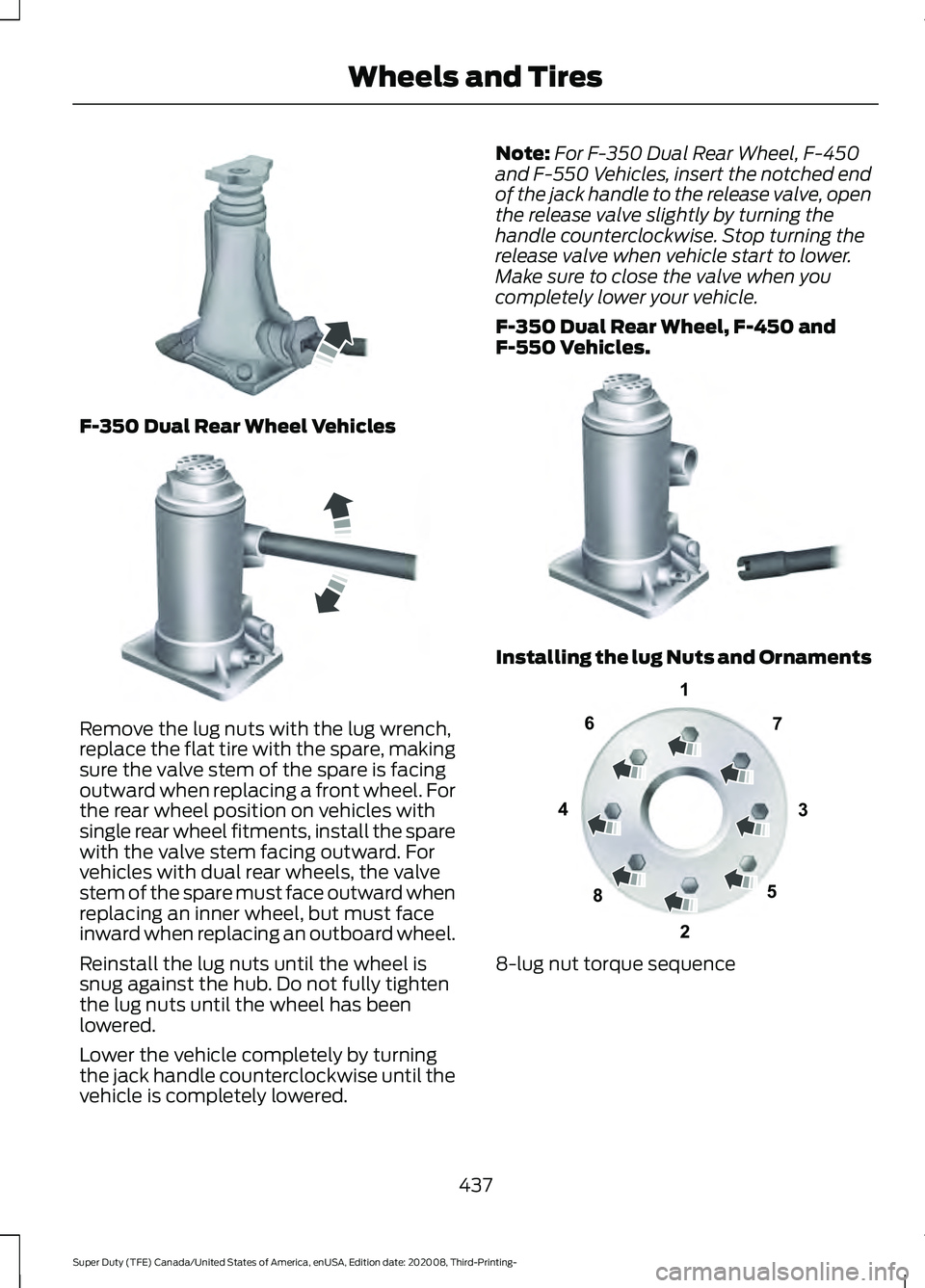
F-350 Dual Rear Wheel Vehicles
Remove the lug nuts with the lug wrench,
replace the flat tire with the spare, making
sure the valve stem of the spare is facing
outward when replacing a front wheel. For
the rear wheel position on vehicles with
single rear wheel fitments, install the spare
with the valve stem facing outward. For
vehicles with dual rear wheels, the valve
stem of the spare must face outward when
replacing an inner wheel, but must face
inward when replacing an outboard wheel.
Reinstall the lug nuts until the wheel is
snug against the hub. Do not fully tighten
the lug nuts until the wheel has been
lowered.
Lower the vehicle completely by turning
the jack handle counterclockwise until the
vehicle is completely lowered. Note:
For F-350 Dual Rear Wheel, F-450
and F-550 Vehicles, insert the notched end
of the jack handle to the release valve, open
the release valve slightly by turning the
handle counterclockwise. Stop turning the
release valve when vehicle start to lower.
Make sure to close the valve when you
completely lower your vehicle.
F-350 Dual Rear Wheel, F-450 and
F-550 Vehicles. Installing the lug Nuts and Ornaments
8-lug nut torque sequence
437
Super Duty (TFE) Canada/United States of America, enUSA, Edition date: 202008, Third-Printing- Wheels and TiresE162811 E162819 E162812 13
4
27
6
5
8E161441
Page 442 of 666
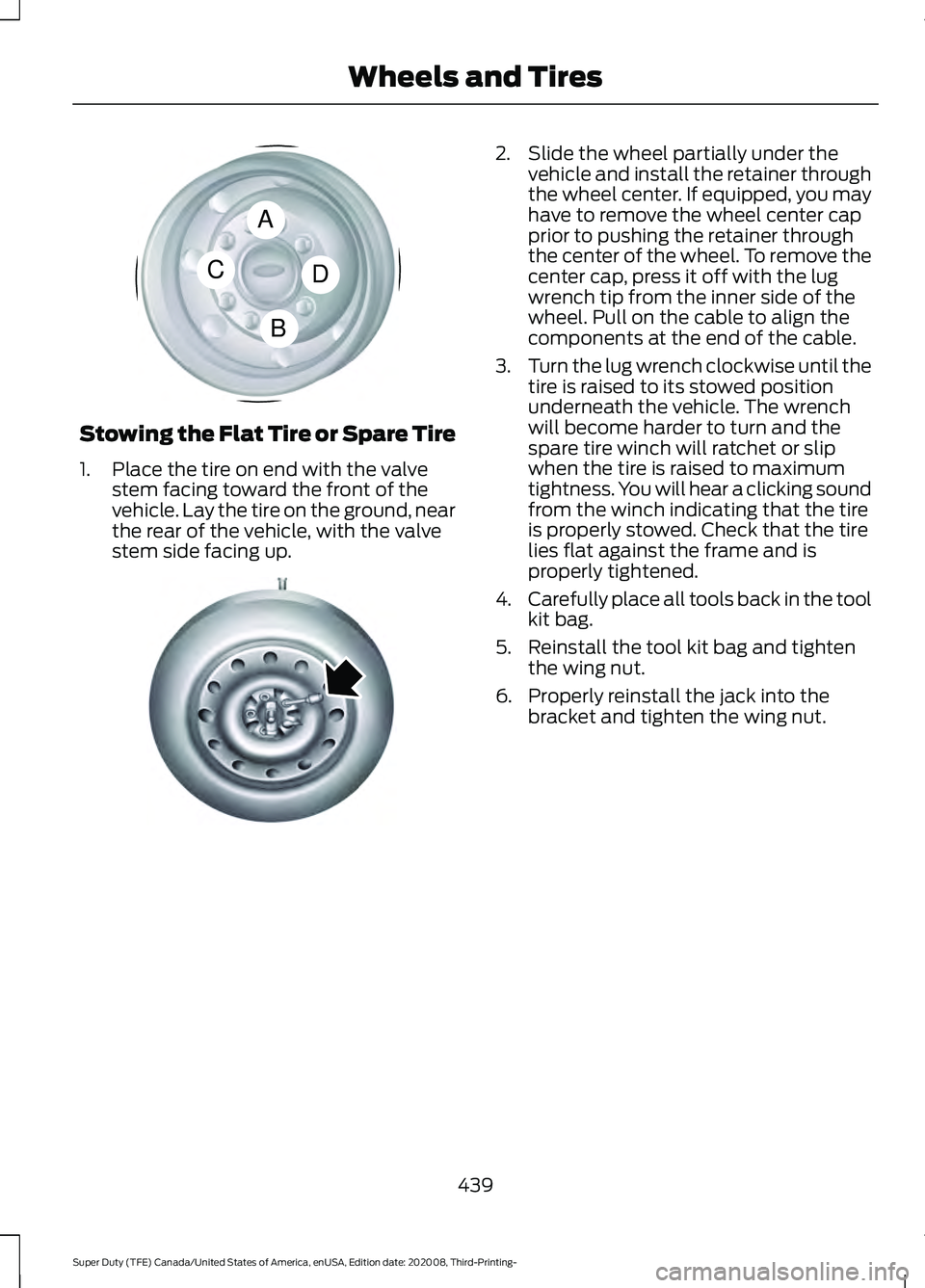
Stowing the Flat Tire or Spare Tire
1. Place the tire on end with the valve
stem facing toward the front of the
vehicle. Lay the tire on the ground, near
the rear of the vehicle, with the valve
stem side facing up. 2. Slide the wheel partially under the
vehicle and install the retainer through
the wheel center. If equipped, you may
have to remove the wheel center cap
prior to pushing the retainer through
the center of the wheel. To remove the
center cap, press it off with the lug
wrench tip from the inner side of the
wheel. Pull on the cable to align the
components at the end of the cable.
3. Turn the lug wrench clockwise until the
tire is raised to its stowed position
underneath the vehicle. The wrench
will become harder to turn and the
spare tire winch will ratchet or slip
when the tire is raised to maximum
tightness. You will hear a clicking sound
from the winch indicating that the tire
is properly stowed. Check that the tire
lies flat against the frame and is
properly tightened.
4. Carefully place all tools back in the tool
kit bag.
5. Reinstall the tool kit bag and tighten the wing nut.
6. Properly reinstall the jack into the bracket and tighten the wing nut.
439
Super Duty (TFE) Canada/United States of America, enUSA, Edition date: 202008, Third-Printing- Wheels and TiresA
C
B
DE162824 E162800
Page 454 of 666
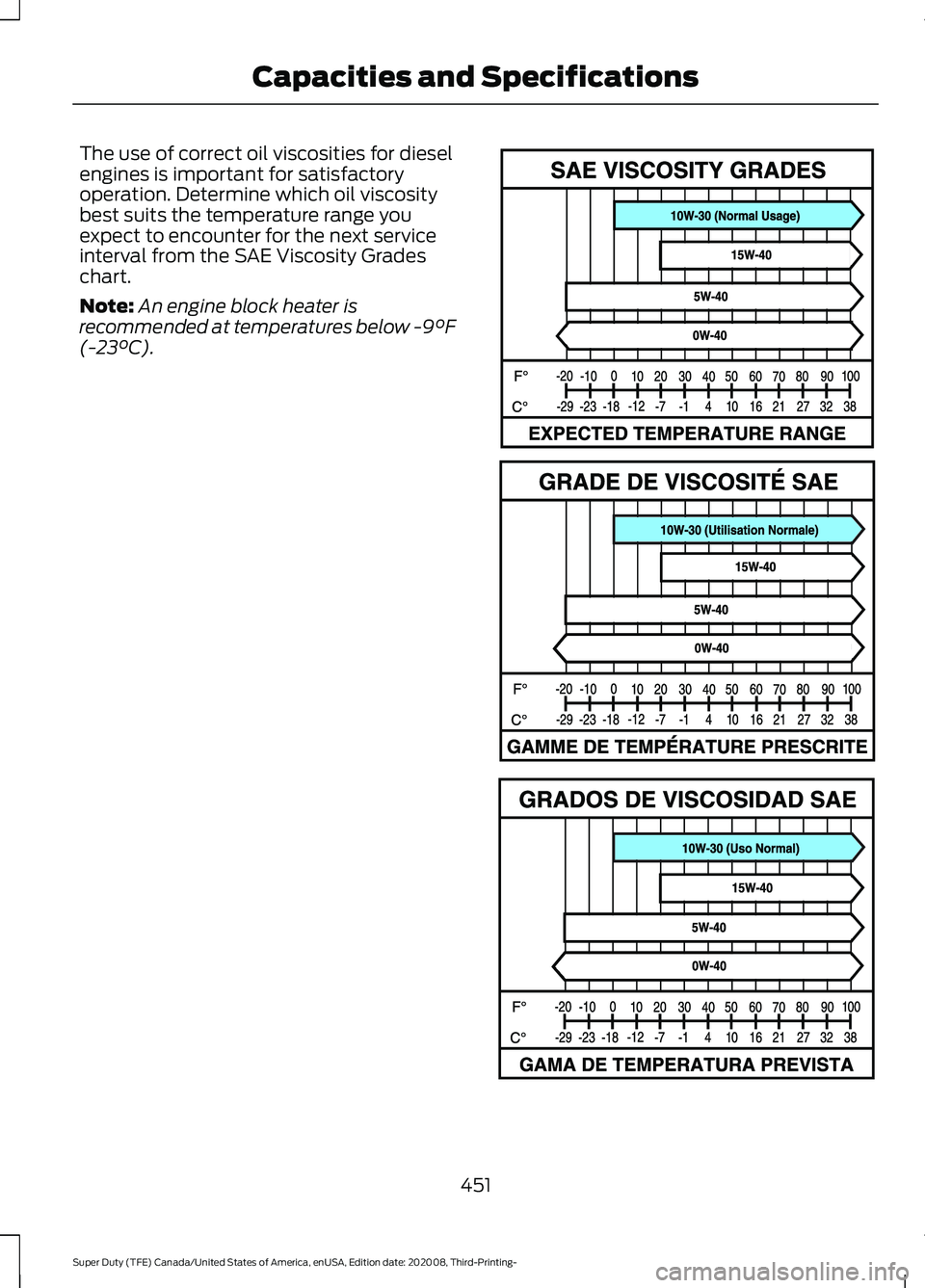
The use of correct oil viscosities for diesel
engines is important for satisfactory
operation. Determine which oil viscosity
best suits the temperature range you
expect to encounter for the next service
interval from the SAE Viscosity Grades
chart.
Note:
An engine block heater is
recommended at temperatures below -9°F
(-23°C). 451
Super Duty (TFE) Canada/United States of America, enUSA, Edition date: 202008, Third-Printing- Capacities and SpecificationsE327351
Page 459 of 666
COOLING SYSTEM CAPACITY
AND SPECIFICATION - 6.7L
DIESEL
Use coolant that meets the defined
specification.
If you do not use coolant that meets the
defined specification, it could result in:
•
Component damage that your vehicle
warranty does not cover.
• Reduced vehicle performance.
Note: An engine block heater is
recommended at temperatures below-9°F
(-23°C).
Capacities Quantity
Variant
31.7 qt (30 L)
Primary cooling system.
8.1 qt (7.7 L)
Secondary cooling system.
Materials Specification
Name
WSS-M97B57-A2
Motorcraft® Yellow Prediluted Antifreeze/
Coolant(U.S.)
Motorcraft® Yellow Prediluted Antifreeze/Coolant
/ Antigel/liquide de refroidissement prédilué jaune
Motorcraft®(Canada)
VC-13DL-G(U.S.)
CVC-13DL-G(Canada)
COOLING SYSTEM CAPACITY
AND SPECIFICATION - 7.3L
Use coolant that meets the defined
specification. If you do not use coolant that meets the
defined specification, it could result in:
•
Component damage that your vehicle
warranty does not cover.
• Reduced vehicle performance.
Capacities Quantity
Variant
22.5 qt (21.3 L)
All.
456
Super Duty (TFE) Canada/United States of America, enUSA, Edition date: 202008, Third-Printing- Capacities and Specifications
Page 470 of 666
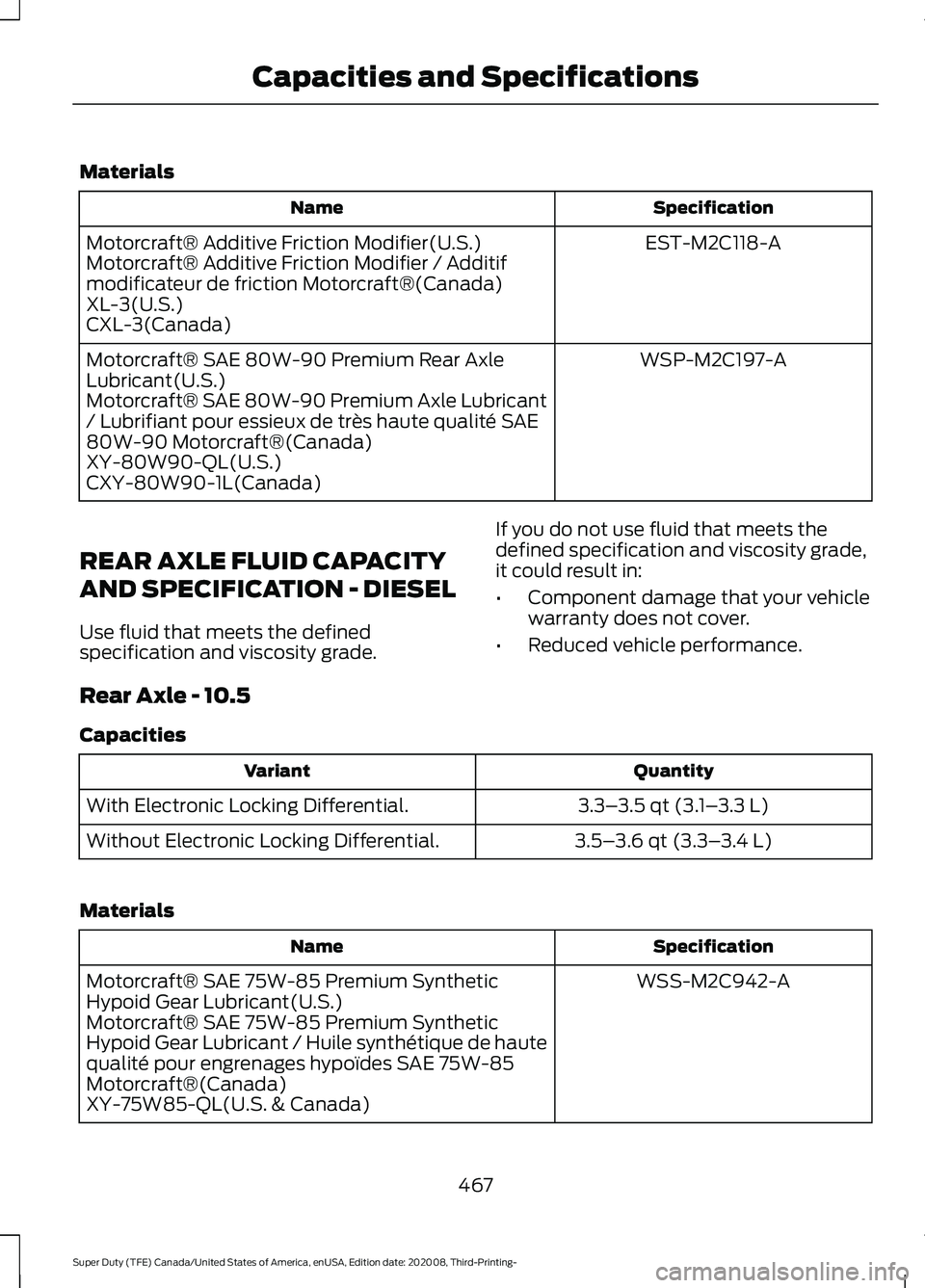
Materials
Specification
Name
EST-M2C118-A
Motorcraft® Additive Friction Modifier(U.S.)
Motorcraft® Additive Friction Modifier / Additif
modificateur de friction Motorcraft®(Canada)
XL-3(U.S.)
CXL-3(Canada)
WSP-M2C197-A
Motorcraft® SAE 80W-90 Premium Rear Axle
Lubricant(U.S.)
Motorcraft® SAE 80W-90 Premium Axle Lubricant
/ Lubrifiant pour essieux de très haute qualité SAE
80W-90 Motorcraft®(Canada)
XY-80W90-QL(U.S.)
CXY-80W90-1L(Canada)
REAR AXLE FLUID CAPACITY
AND SPECIFICATION - DIESEL
Use fluid that meets the defined
specification and viscosity grade. If you do not use fluid that meets the
defined specification and viscosity grade,
it could result in:
•
Component damage that your vehicle
warranty does not cover.
• Reduced vehicle performance.
Rear Axle - 10.5
Capacities Quantity
Variant
3.3–3.5 qt (3.1– 3.3 L)
With Electronic Locking Differential.
3.5–3.6 qt (3.3– 3.4 L)
Without Electronic Locking Differential.
Materials Specification
Name
WSS-M2C942-A
Motorcraft® SAE 75W-85 Premium Synthetic
Hypoid Gear Lubricant(U.S.)
Motorcraft® SAE 75W-85 Premium Synthetic
Hypoid Gear Lubricant / Huile synthétique de haute
qualité pour engrenages hypoïdes SAE 75W-85
Motorcraft®(Canada)
XY-75W85-QL(U.S. & Canada)
467
Super Duty (TFE) Canada/United States of America, enUSA, Edition date: 202008, Third-Printing- Capacities and Specifications
Page 472 of 666
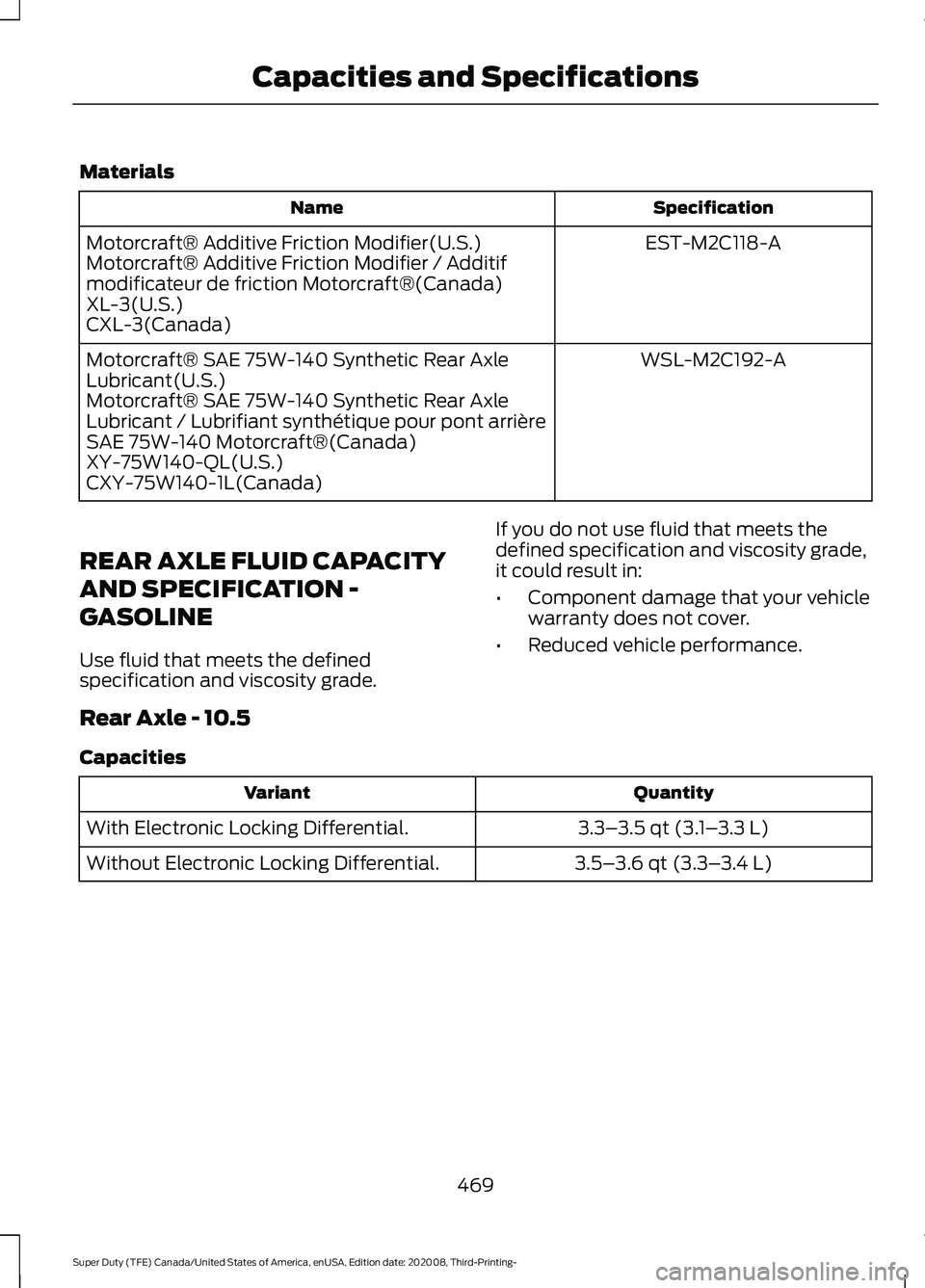
Materials
Specification
Name
EST-M2C118-A
Motorcraft® Additive Friction Modifier(U.S.)
Motorcraft® Additive Friction Modifier / Additif
modificateur de friction Motorcraft®(Canada)
XL-3(U.S.)
CXL-3(Canada)
WSL-M2C192-A
Motorcraft® SAE 75W-140 Synthetic Rear Axle
Lubricant(U.S.)
Motorcraft® SAE 75W-140 Synthetic Rear Axle
Lubricant / Lubrifiant synthétique pour pont arrière
SAE 75W-140 Motorcraft®(Canada)
XY-75W140-QL(U.S.)
CXY-75W140-1L(Canada)
REAR AXLE FLUID CAPACITY
AND SPECIFICATION -
GASOLINE
Use fluid that meets the defined
specification and viscosity grade. If you do not use fluid that meets the
defined specification and viscosity grade,
it could result in:
•
Component damage that your vehicle
warranty does not cover.
• Reduced vehicle performance.
Rear Axle - 10.5
Capacities Quantity
Variant
3.3–3.5 qt (3.1– 3.3 L)
With Electronic Locking Differential.
3.5–3.6 qt (3.3– 3.4 L)
Without Electronic Locking Differential.
469
Super Duty (TFE) Canada/United States of America, enUSA, Edition date: 202008, Third-Printing- Capacities and Specifications
Page 483 of 666
Note:
Some features, such as satellite
radio, may not be available in your location.
Check with an authorized dealer.
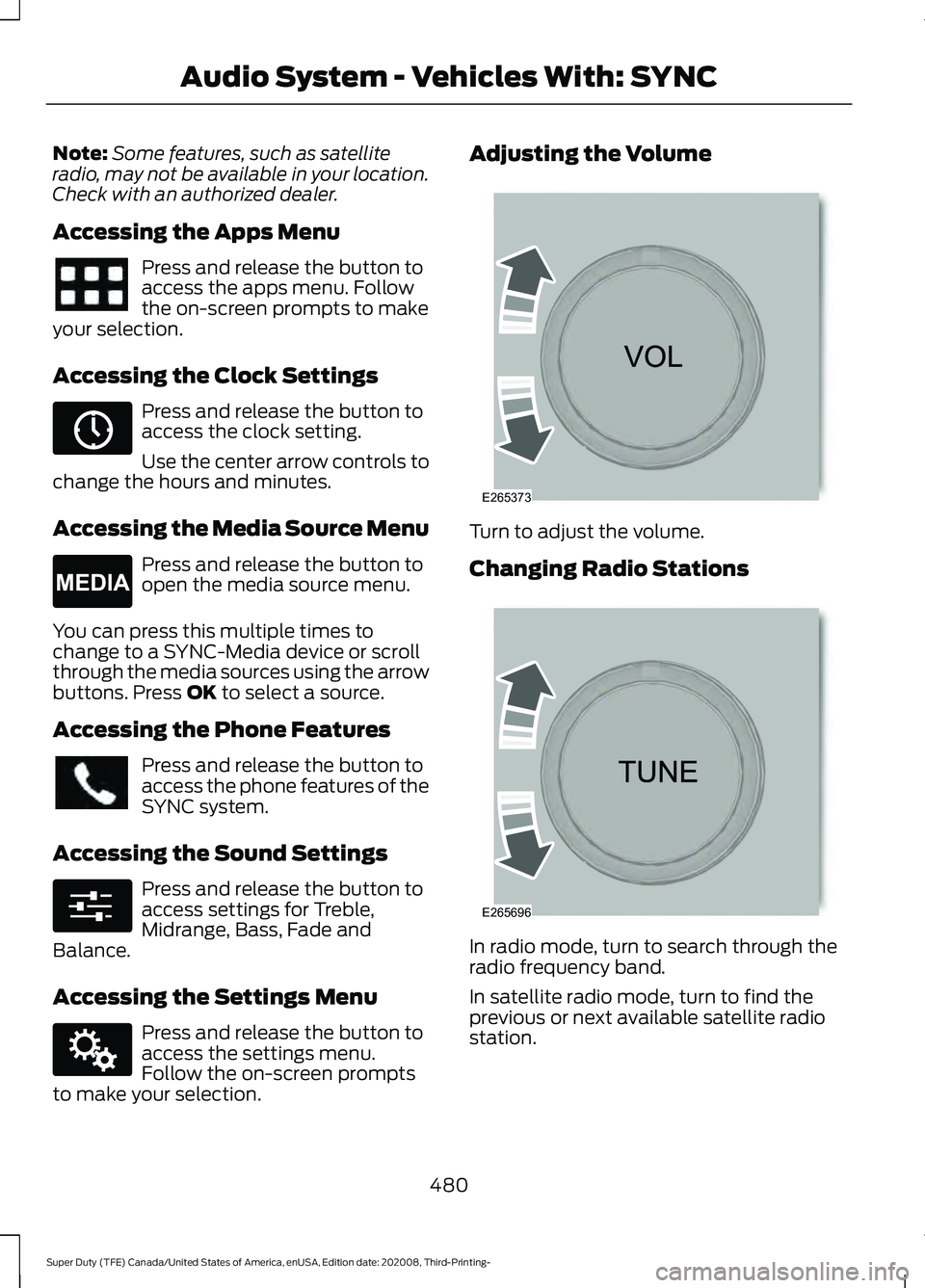
Accessing the Apps Menu Press and release the button to
access the apps menu. Follow
the on-screen prompts to make
your selection.
Accessing the Clock Settings Press and release the button to
access the clock setting.
Use the center arrow controls to
change the hours and minutes.
Accessing the Media Source Menu Press and release the button to
open the media source menu.
You can press this multiple times to
change to a SYNC-Media device or scroll
through the media sources using the arrow
buttons. Press OK to select a source.
Accessing the Phone Features Press and release the button to
access the phone features of the
SYNC system.
Accessing the Sound Settings Press and release the button to
access settings for Treble,
Midrange, Bass, Fade and
Balance.
Accessing the Settings Menu Press and release the button to
access the settings menu.
Follow the on-screen prompts
to make your selection. Adjusting the Volume
Turn to adjust the volume.
Changing Radio Stations
In radio mode, turn to search through the
radio frequency band.
In satellite radio mode, turn to find the
previous or next available satellite radio
station.
480
Super Duty (TFE) Canada/United States of America, enUSA, Edition date: 202008, Third-Printing- Audio System - Vehicles With: SYNC E265036 E265035 E280315 E142607 E265373 E265696
Page 484 of 666
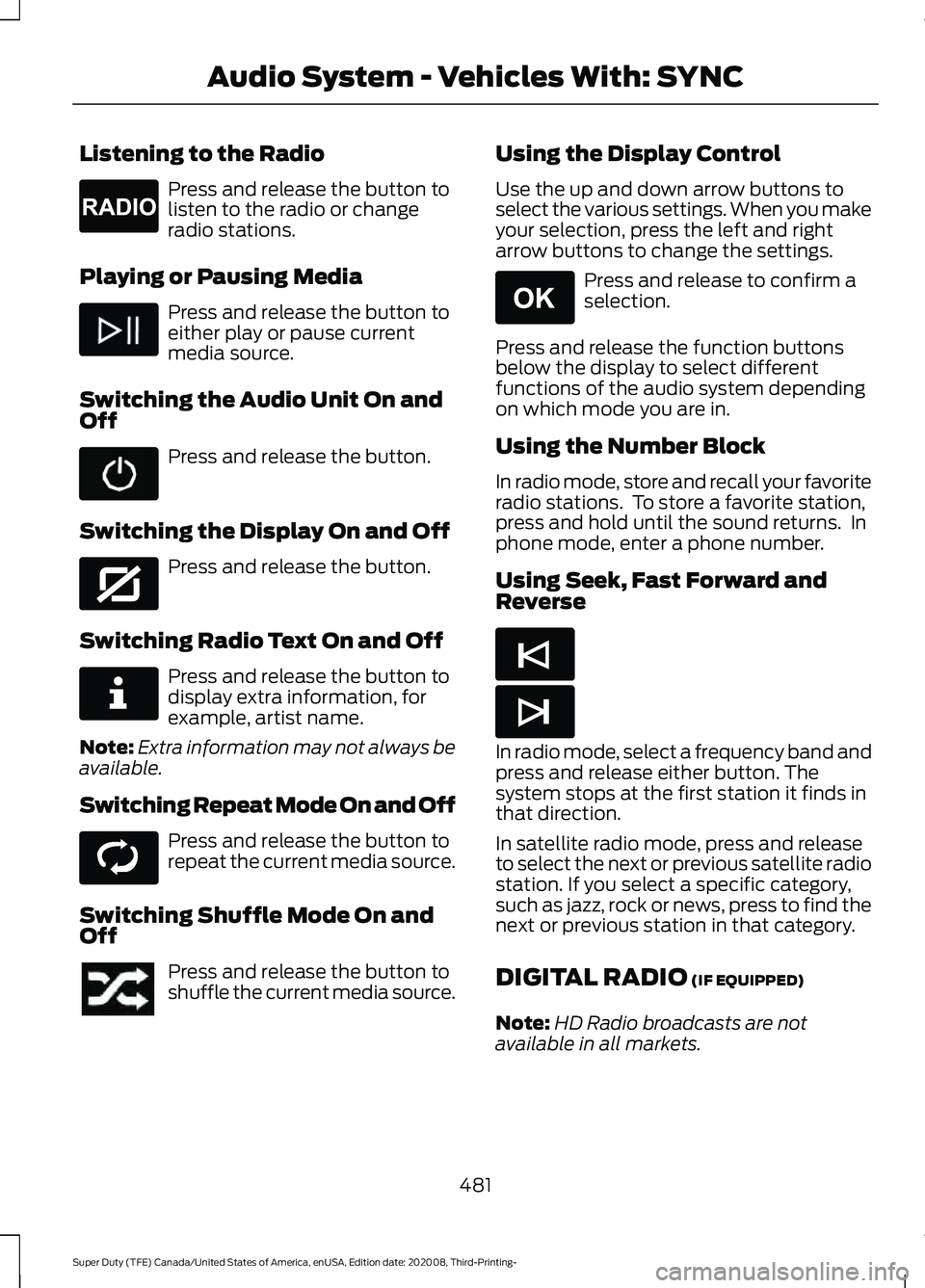
Listening to the Radio
Press and release the button to
listen to the radio or change
radio stations.
Playing or Pausing Media Press and release the button to
either play or pause current
media source.
Switching the Audio Unit On and
Off Press and release the button.
Switching the Display On and Off Press and release the button.
Switching Radio Text On and Off Press and release the button to
display extra information, for
example, artist name.
Note: Extra information may not always be
available.
Switching Repeat Mode On and Off Press and release the button to
repeat the current media source.
Switching Shuffle Mode On and
Off Press and release the button to
shuffle the current media source. Using the Display Control
Use the up and down arrow buttons to
select the various settings. When you make
your selection, press the left and right
arrow buttons to change the settings. Press and release to confirm a
selection.
Press and release the function buttons
below the display to select different
functions of the audio system depending
on which mode you are in.
Using the Number Block
In radio mode, store and recall your favorite
radio stations. To store a favorite station,
press and hold until the sound returns. In
phone mode, enter a phone number.
Using Seek, Fast Forward and
Reverse In radio mode, select a frequency band and
press and release either button. The
system stops at the first station it finds in
that direction.
In satellite radio mode, press and release
to select the next or previous satellite radio
station. If you select a specific category,
such as jazz, rock or news, press to find the
next or previous station in that category.
DIGITAL RADIO (IF EQUIPPED)
Note: HD Radio broadcasts are not
available in all markets.
481
Super Duty (TFE) Canada/United States of America, enUSA, Edition date: 202008, Third-Printing- Audio System - Vehicles With: SYNCE265033 E272035 E268570 E268569 E265041 E265045 E265044
Page 489 of 666
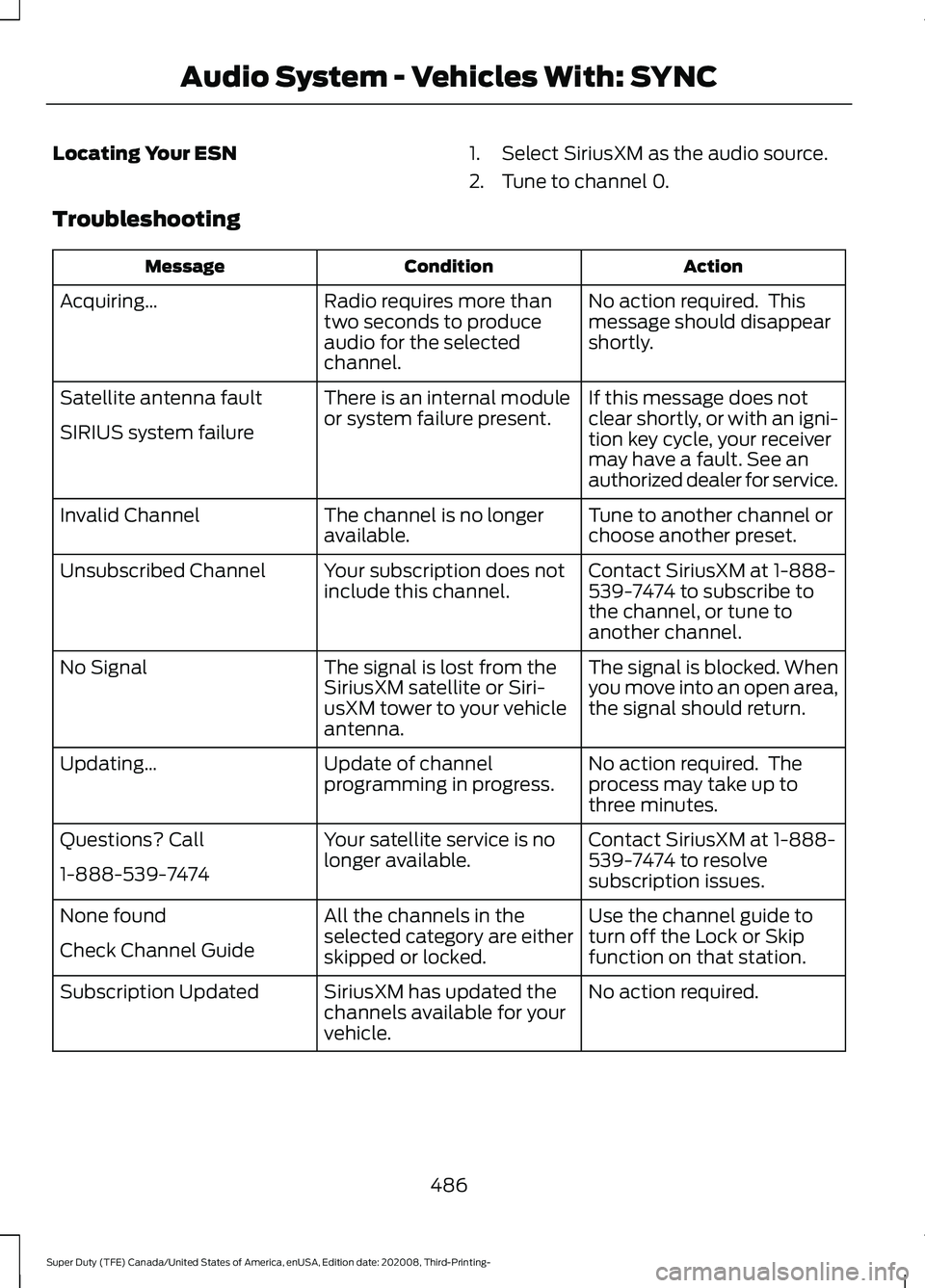
Locating Your ESN
1. Select SiriusXM as the audio source.
2. Tune to channel 0.
Troubleshooting Action
Condition
Message
No action required. This
message should disappear
shortly.
Radio requires more than
two seconds to produce
audio for the selected
channel.
Acquiring\b
If this message does not
clear shortly, or with an igni-
tion key cycle, your receiver
may have a fault. See an
authorized dealer for service.
There is an internal module
or system failure present.
Satellite antenna fault
SIRIUS system failure
Tune to another channel or
choose another preset.
The channel is no longer
available.
Invalid Channel
Contact SiriusXM at 1-888-
539-7474 to subscribe to
the channel, or tune to
another channel.
Your subscription does not
include this channel.
Unsubscribed Channel
The signal is blocked. When
you move into an open area,
the signal should return.
The signal is lost from the
SiriusXM satellite or Siri-
usXM tower to your vehicle
antenna.
No Signal
No action required. The
process may take up to
three minutes.
Update of channel
programming in progress.
Updating\b
Contact SiriusXM at 1-888-
539-7474 to resolve
subscription issues.
Your satellite service is no
longer available.
Questions? Call
1-888-539-7474
Use the channel guide to
turn off the Lock or Skip
function on that station.
All the channels in the
selected category are either
skipped or locked.
None found
Check Channel Guide
No action required.
SiriusXM has updated the
channels available for your
vehicle.
Subscription Updated
486
Super Duty (TFE) Canada/United States of America, enUSA, Edition date: 202008, Third-Printing- Audio System - Vehicles With: SYNC
Page 497 of 666
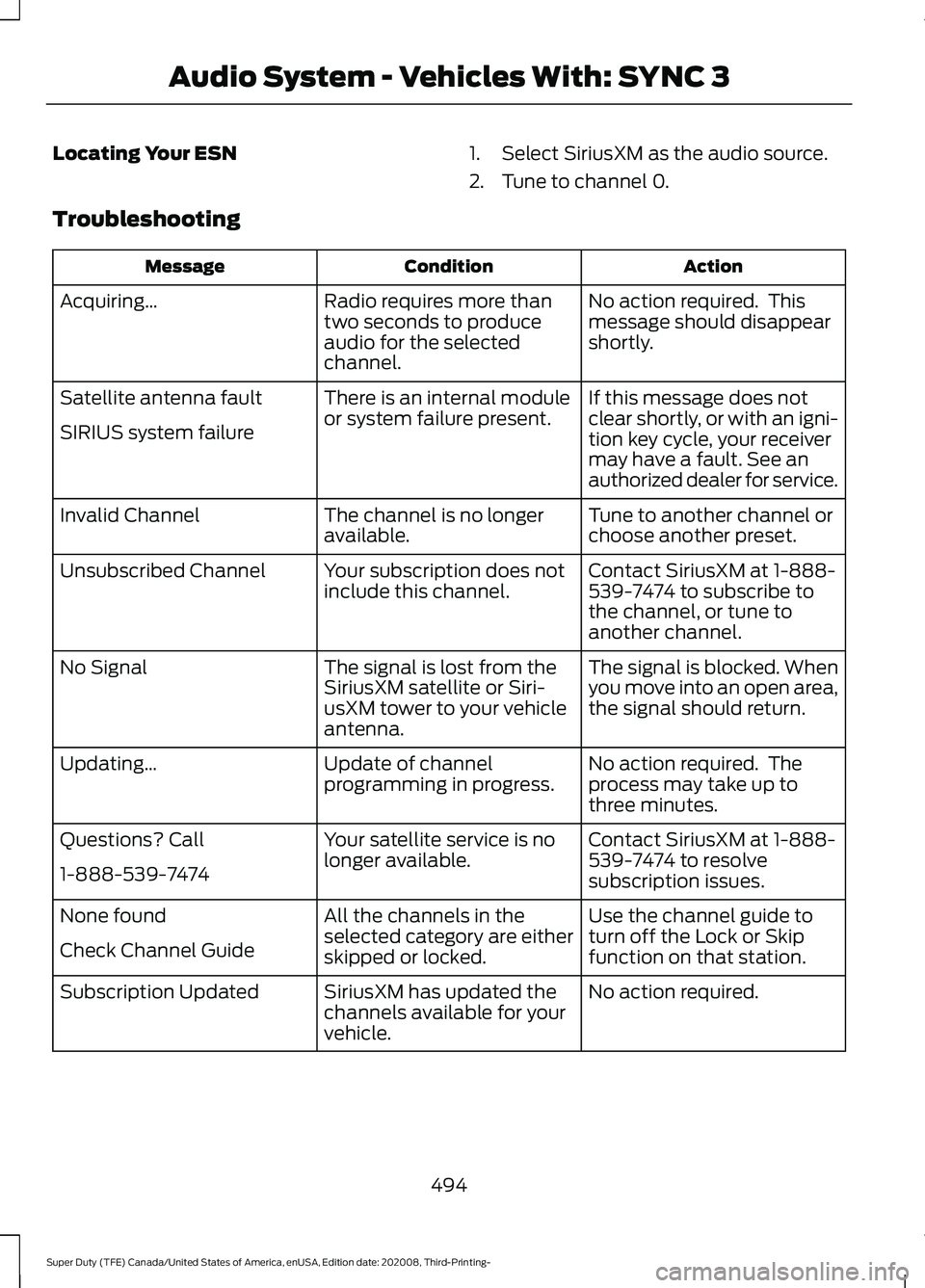
Locating Your ESN
1. Select SiriusXM as the audio source.
2. Tune to channel 0.
Troubleshooting Action
Condition
Message
No action required. This
message should disappear
shortly.
Radio requires more than
two seconds to produce
audio for the selected
channel.
Acquiring\b
If this message does not
clear shortly, or with an igni-
tion key cycle, your receiver
may have a fault. See an
authorized dealer for service.
There is an internal module
or system failure present.
Satellite antenna fault
SIRIUS system failure
Tune to another channel or
choose another preset.
The channel is no longer
available.
Invalid Channel
Contact SiriusXM at 1-888-
539-7474 to subscribe to
the channel, or tune to
another channel.
Your subscription does not
include this channel.
Unsubscribed Channel
The signal is blocked. When
you move into an open area,
the signal should return.
The signal is lost from the
SiriusXM satellite or Siri-
usXM tower to your vehicle
antenna.
No Signal
No action required. The
process may take up to
three minutes.
Update of channel
programming in progress.
Updating\b
Contact SiriusXM at 1-888-
539-7474 to resolve
subscription issues.
Your satellite service is no
longer available.
Questions? Call
1-888-539-7474
Use the channel guide to
turn off the Lock or Skip
function on that station.
All the channels in the
selected category are either
skipped or locked.
None found
Check Channel Guide
No action required.
SiriusXM has updated the
channels available for your
vehicle.
Subscription Updated
494
Super Duty (TFE) Canada/United States of America, enUSA, Edition date: 202008, Third-Printing- Audio System - Vehicles With: SYNC 3