steering wheel FORD F-450 2021 Workshop Manual
[x] Cancel search | Manufacturer: FORD, Model Year: 2021, Model line: F-450, Model: FORD F-450 2021Pages: 666, PDF Size: 11.3 MB
Page 299 of 666
System consistently shows Pro Trailer
Backup Assist™ Stop now Maximum trailer
angle Press Knob to Exit:
•
The system uses your measurements
to determine sticker position and
establish system limits. Accurate
sticker placement and trailer
measurements provide the best
system performance. If you are
consistently receiving this warning, it is
likely there is an issue with sticker
placement or the entered
measurements. Make sure that the
sticker is placed correctly based on
step 3 and the measurements were
made correctly according to step 4.
The troubleshooting guide for trailer
measurements can also be reviewed
for help in making measurements.
• To change sticker location or change
trailer measurements, go into the
information display menu, select trailer
options, select change trailer setting
and then select the change sticker
option.
• If the sticker location needs to be
changed, the previous sticker must be
removed and a new sticker needs to
be placed on the trailer. ONLY ONE
STICKER SHOULD BE PLACED ON THE
TRAILER FOR PROPER SYSTEM
FUNCTION.
• Disregard the prompt to remove this
sticker and continue to the next step if
you only plan to update the
measurements for the current sticker
location. System consistently shows Pro Trailer
Backup Assist™ Stop Now Take Control
of Steering Wheel:
•
The system displays this warning when
it can no longer steer the vehicle and
you must take over steering. There are
four reasons why this warning displays
and additional information regarding
the reason for the warning is available
on the center display.
• The steering wheel is touched when
under system control. Avoid touching
the wheel during system operation.
• The maximum speed for feature
operation is exceeded. System
performance is optimized at slower
speeds. Reverse slowly.
• The sticker was lost by the camera
system. Once your vehicle is stopped,
additional warnings indicate the sticker
was lost. Refer to sticker lost
troubleshooting tips.
• An internal condition for system
operation was not met which requires
your vehicle to return to manual control
of the steering. Using the system for an
extended period of time can cause the
steering system to heat up and turn off
Pro Trailer Backup Assist steering
control to protect itself. The system
may require a cool down time of up to
30 minutes. Keep the system off and
drive forward at a normal speed or
switch the vehicle off.
Note: The system is designed to be used
with the same trailer connection every time
the trailer is chosen from the selection
menu. When using a different drawbar or a
different pin hole on drawbars with more
than one, connecting the drawbar to your
vehicle affects the trailer measurements.
Take the measurements again and update
if required.
296
Super Duty (TFE) Canada/United States of America, enUSA, Edition date: 202008, Third-Printing- Towing
Page 300 of 666
Troubleshooting - Fifth Wheel and
Gooseneck Trailer
Setup
The system is designed to be used with a
wide variety of trailers. There are some
trailers that do not have a proper surface
and location to mount the sensor. These
trailers are not supported. Attempts to
install the sensor in a manner that does
not meet the requirements can result in
improper system function.
To correctly install the trailer sensor:
•
Attach to vertical surface with the
arrows pointed straight up.
• If you are not sure, use a level to check
that the attachment surface is vertical.
• Securely fasten the sensor so that it is
rigidly mounted and does not shake or
wobble.
• Install within the range of the 12 way
connector so that when the trailer
swings the wire harness does not
stretch, pinch or pull.
If the system displays Pro Trailer Backup
Assist™ Sensor Not Detected Refer to
Owner's Manual Press Knob to Exit or
Trailer Reverse Guidance Sensor Not
Detected Refer to Owner's Manual Press
OK to Exit:
• Check that the 12 way connector is fully
inserted into the 12 way socket. The red
rubber seal is not visible when the
connector is fully inserted.
• Check that the wiring harness sensor
connection is fully inserted at the trailer
sensor.
• Check for damaged wiring between the
12 way connector and the trailer sensor.
• If you have a 12 way connector inside
the bed and in the bumper, ensure that
only a single sensor is connected. Note:
If you did not purchase the fifth wheel
prep pack, you need to replace the 7/4 way
trailer connector in your bumper with a 7/12
pin connector. See your authorized dealer.
Calibration
The calibration process is required for the
system to determine the trailer length. The
system supports trailer lengths of 10– 39 ft
(3– 11.94 m) distance from the hitch point
to the center of the axle or axles. The
calibration process consists of a straight
forward drive followed by a turn. During
the straight drive, the system monitors
various vehicle parameters to make sure
your vehicle is being driven straight and the
trailer is straight behind your vehicle. Any
steering input or trailer movement during
this straight drive pauses the calibration.
During the turn, the system monitors
various vehicle parameters to make sure
your vehicle and trailer are correctly
turning.
For best results:
• Use a smooth and level road when
attempting to calibrate.
• Steer and smoothly turn and avoid
abrupt steering inputs.
• Drive between 2 –16 mph (4– 25 km/h)
.
• Make a typical 90 degree corner turn.
Turning too shallow does not allow the
system to calibrate.
The typical calibration process results in
the system displaying messages in the
information display. The system also
displays additional warnings if the vehicle
or trailer motion is not within the
calibration limits.
297
Super Duty (TFE) Canada/United States of America, enUSA, Edition date: 202008, Third-Printing- Towing
Page 301 of 666
If the system remains on one message for
an extended time, is not progressing
through the typical calibration steps or if
Pro Trailer Backup Assist™ Trailer Not
Detected. Shift to Park Press Knob to Exit,
Pro Trailer Backup Assist™ Trailer Not
Detected. Refer to Owner's Manual. Press
Knob to Exit or Trailer Reverse Guidance
Trailer Not Detected. Refer to Owner's
Manual. Press OK to Exit displays, check
the following:
•
Verify the sensor is correctly installed.
See Fifth Wheel and Gooseneck Trailer
Sensor Installation.
• Verify the trailer length is within the
allowed range of 10– 39 ft (3–11.94 m).
• Verify you are calibrating on a smooth
road surface.
Repeat calibration on a different route if
you have verified the previous checks.
System Operation
The following warnings or difficulties may
occur during system operation. Tips to
resolve them are listed in the following
section.
Pro Trailer Backup Assist™ System is Not
Available or Trailer Reverse Guidance
System is Not Available:
• The system relies on many
sub-systems in your vehicle to correctly
operate. If those sub-systems are not
correctly operating, the system may
not be available.
• Low battery voltage is a condition that
prevents the system from operating.
Please make sure the battery is
correctly charged if the system is not
available.
• If the message continues to display,
see your authorized dealer for service. Pro Trailer Backup Assist™ Driving
Required to Initialize Steering Press Knob
to Exit or Trailer Reverse Guidance Driving
Required to Initialize Steering Press OK to
Exit:
•
The steering system needs to learn
internal parameters to fully enable the
feature. Drive your vehicle straight
forward above 25 mph (40 km/h) for
approximately 5 minutes.
• This may occur when your vehicle is
new, the battery voltage is too low, the
battery has been disconnected or your
steering system has been serviced.
Pro Trailer Backup Assist™ Sensor Not
Detected Refer to Owner's Manual Press
Knob to Exit or Trailer Reverse Guidance
Sensor Not Detected Refer to Owner's
Manual Press OK to Exit:
• Check that the 12 way connector is fully
inserted into the 12 way socket. The red
rubber seal is not visible when the
connector is fully inserted.
• Check that the wiring harness sensor
connection is fully inserted at the trailer
sensor.
• Check for damaged wiring between the
12 way connector and the trailer sensor.
• Only one sensor can be connected to
your vehicle at a time. If you have a 7/12
pin connector in the truck bed and in
the bumper, check to make sure that
only one sensor is connected.
Note: If you did not purchase the fifth wheel
prep pack, you need to replace the 7/4 way
trailer connector in your bumper with a 7/12
pin connector. See your authorized dealer.
Pro Trailer Backup Assist™ Trailer Not
Detected. Refer to Owner's Manual. Press
Knob to Exit or Trailer Reverse Guidance
Trailer Not Detected. Refer to Owner's
Manual. Press OK to Exit:
• If the message continues to display,
see your authorized dealer for service.
298
Super Duty (TFE) Canada/United States of America, enUSA, Edition date: 202008, Third-Printing- Towing
Page 302 of 666
Pro Trailer Backup Assist™ Trailer Not
Detected Pull Forward to Initialize Press
Knob to Exit or Trailer Reverse Guidance
Trailer Not Detected Pull Forward to
Initialize Press OK to Exit:
•
If the vehicle has not moved during this
key cycle, it must be driven forward to
initialize the sensing system.
• Extended operation at speeds below
1 mph (1 km/h) may cause the sensing
system to lose the trailer position and
the system needs to be re-initialized.
• Drive forward above 2 mph (3 km/h)
and the system indicates when it
initializes.
System repeatedly displays Pro Trailer
Backup Assist™ Stop Now System Not
Active Press Knob to Exit:
• System is not fully activated. Select
the trailer in the information display by
using the controls on the steering
wheel and wait until Pro Trailer Backup
Assist™ Backup Slowly Turn Knob to
Steer Press Knob to Exit displays
before starting to move backward.
• This displays if you backup during the
calibration process. Drive forward and
complete calibration.
System does not reverse straight:
• Verify sensor is correctly installed. See
Fifth Wheel and Gooseneck Trailer
Sensor Installation.
• Factors such as the hitch connection,
road camber, road slope and
compliance in the trailer suspension
can influence how straight the system
is able to reverse the trailer when the
knob is not turned. You can
compensate for the trailer drifting to
the right or left by slowly turning the
knob until the trailer is following your
preferred path and then holding the
knob in that position. System consistently shows Pro Trailer
Backup Assist™ Stop now Maximum trailer
angle Press Knob to Exit:
•
Verify sensor is correctly installed. See
Fifth Wheel and Gooseneck Trailer
Sensor Installation.
• Verify the correct trailer is selected in
the information display.
• The system may need to be
recalibrated. The system can be
recalibrated by using the information
display to delete the trailer and
repeating the setup process. If the
same sensor is installed on another
trailer, create a new trailer in the
information display and complete the
setup and calibration process for the
new trailer. If using the same sensor on
multiple trailers, disconnect the 7/12
pin connector when switching trailers.
See Setting Up The System.
System consistently shows Pro Trailer
Backup Assist™ Stop Now Take Control
of Steering Wheel:
• The system displays this warning when
it can no longer steer the vehicle and
you must take over steering. There are
four reasons why this warning displays
and additional information regarding
the reason for the warning is available
on the center display.
• The steering wheel is touched when
under system control. Avoid touching
the wheel during system operation.
• The maximum speed for feature
operation is exceeded. System
performance is optimized at slower
speeds. Reverse slowly.
299
Super Duty (TFE) Canada/United States of America, enUSA, Edition date: 202008, Third-Printing- Towing
Page 303 of 666
•
The trailer is not detected. Once your
vehicle is stopped, additional warnings
indicate the trailer is not detected.
Refer to trailer not detected
troubleshooting tips.
• An internal condition for system
operation was not met which requires
your vehicle to return to manual control
of the steering. Using the system for an
extended period of time can cause the
steering system to heat up and turn off
Pro Trailer Backup Assist steering
control to protect itself. The system
may require a cool down time of up to
30 minutes. Keep the system off and
drive forward at a normal speed or
switch the vehicle off.
TRAILER SWAY CONTROL WARNING: Turning off trailer sway
control increases the risk of loss of
vehicle control, serious injury or death.
Ford does not recommend disabling this
feature except in situations where speed
reduction may be detrimental (such as
hill climbing), the driver has significant
trailer towing experience, and can control
trailer sway and maintain safe operation.
Note: This feature does not prevent trailer
sway, but reduces it once it begins.
Note: This feature cannot stop all trailers
from swaying.
Note: In some cases, if vehicle speed is too
high, the system may activate multiple
times, gradually reducing vehicle speed. This feature applies your vehicle brakes at
individual wheels and, if necessary, reduces
engine power. If the trailer begins to sway,
the stability control light flashes and the
message TRAILER SWAY REDUCE
SPEED appears in the information display.
The first thing to do is slow your vehicle
down, then pull safely to the side of the
road and check for proper tongue load and
trailer load distribution. See
Load
Carrying (page 271).
RECOMMENDED TOWING
WEIGHTS WARNING:
You must use
the heavy-duty drawbar pin
supplied with your vehicle when
using the heavy-duty hitch.
Failure to follow this instruction
could result in the loss of control
of your vehicle, personal injury or
death.
Note: Vehicles with a
21,200 lb
(9,616 kg) hitch and above must
use the drawbar pin that came with
the vehicle. You can obtain a
replacement drawbar pin at your
authorized dealer.
Note: Make sure to take into
consideration trailer frontal area.
Do not exceed 60 ft² (5.6 m²)
trailer frontal area for conventional
trailers. Do not exceed 75 ft² (6.9
m²) trailer frontal area for fifth
wheel and gooseneck trailers.
300
Super Duty (TFE) Canada/United States of America, enUSA, Edition date: 202008, Third-Printing- Towing
Page 309 of 666
Note:
If your vehicle is equipped with a
factory brake controller, the Battery (+)
Orange wire is powered when you start the
engine and you apply the brakes at least
once when a trailer with brake lamps is
connected. If your vehicle is not equipped
with a factory brake controller, relays control
the system and it becomes active when you
power on your vehicle.
Dynamic Hitching Using the Rear
View Camera System
Note: Active guidelines and fixed guidelines
are only available when the transmission is
in reverse (R).
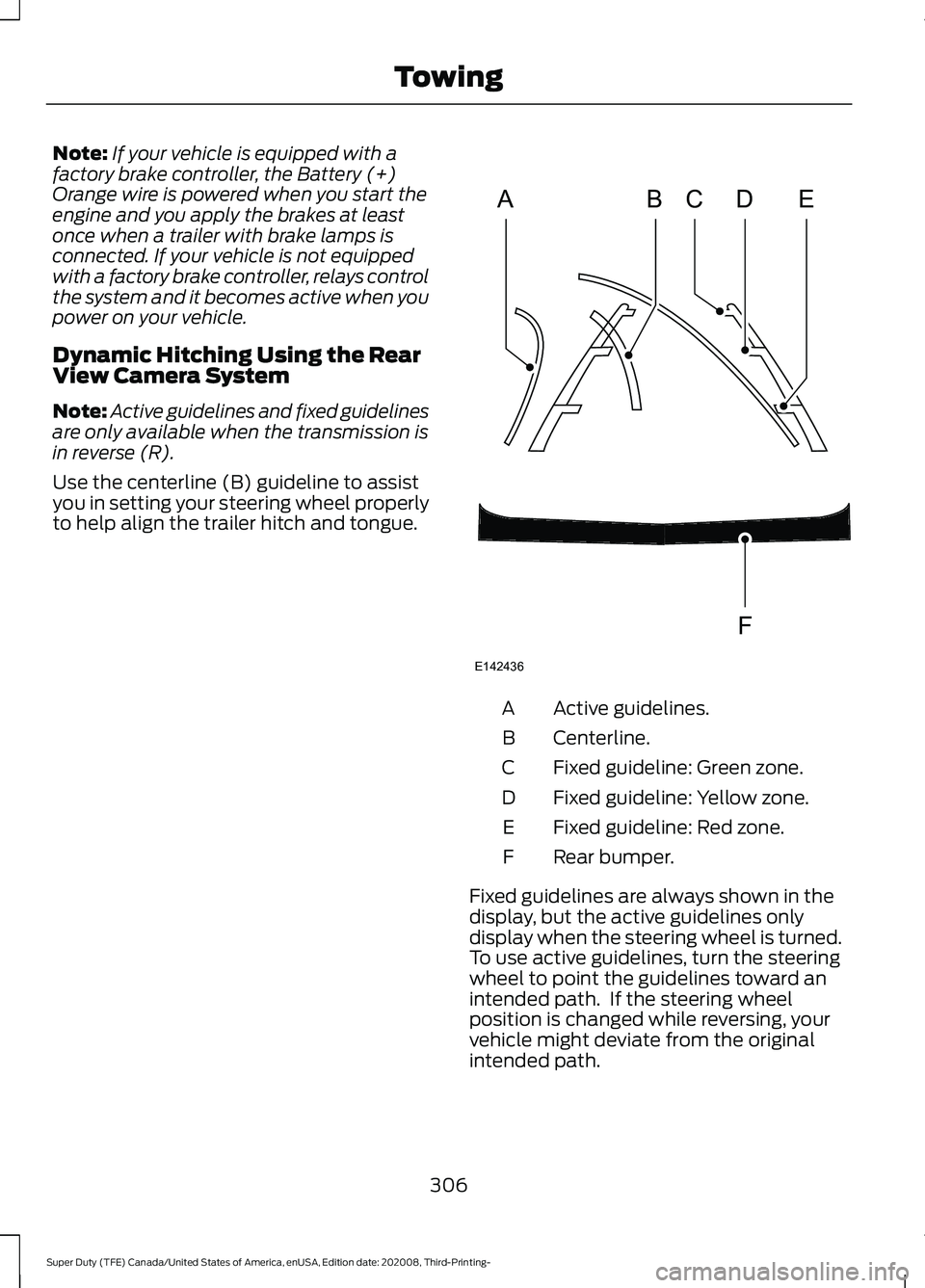
Use the centerline (B) guideline to assist
you in setting your steering wheel properly
to help align the trailer hitch and tongue. Active guidelines.
A
Centerline.
B
Fixed guideline: Green zone.
C
Fixed guideline: Yellow zone.
D
Fixed guideline: Red zone.
E
Rear bumper.
F
Fixed guidelines are always shown in the
display, but the active guidelines only
display when the steering wheel is turned.
To use active guidelines, turn the steering
wheel to point the guidelines toward an
intended path. If the steering wheel
position is changed while reversing, your
vehicle might deviate from the original
intended path.
306
Super Duty (TFE) Canada/United States of America, enUSA, Edition date: 202008, Third-Printing- TowingABCD
F
E
E142436
Page 310 of 666
The active guidelines fade in and out
depending on the steering wheel position.
The active guidelines are not shown when
the steering wheel position is straight.
Always use caution while reversing.
Objects in the red zone are closest to your
vehicle and objects in the green zone are
farther away. Objects are getting closer to
your vehicle as they move from the green
zone to the yellow or red zones. Use the
side view mirrors and rear view mirror to
get better coverage on both sides and rear
of your vehicle.
Refer to the Rear View Camera section for
additional information. See Rear View
Camera (page 235).
Hitches
Note: On pick-up trucks, the trailer hitch
provided on this vehicle enhances crash
protection for the fuel system. Do not
remove!
Note: Do not cut, drill, weld or modify trailer
hitches. Modifying trailer hitches can reduce
hitch rating.
Do not use a hitch that either clamps onto
the bumper or attaches to the axle. You
must distribute the load in your trailer so
that 10-15% for conventional towing or
15-25% for fifth wheel towing of the total
weight of the trailer is on the tongue. Do
not exceed the tongue load rating
indicated on the conventional hitch
receiver.
Hitch Components (If Equipped)
The following components are required.
Some are provided in certain vehicles. •
A trailer hitch with a 3 inch receiver and
a 5/8 inch hitch pin. Check the
stamped rating number on the pin to
determine the
21,200 lb (9,616 kg) or
24,200 lb (10,976 kg) hitch pin
capacity.
• A hitch pin sleeve stored in the glove
box to use when mounting the 3 inch
drawbar with the 3/4 inch pin hole.
• A cotter pin to help keep the hitch pin
in place.
Installing a 3 Inch Drawbar with 3/4
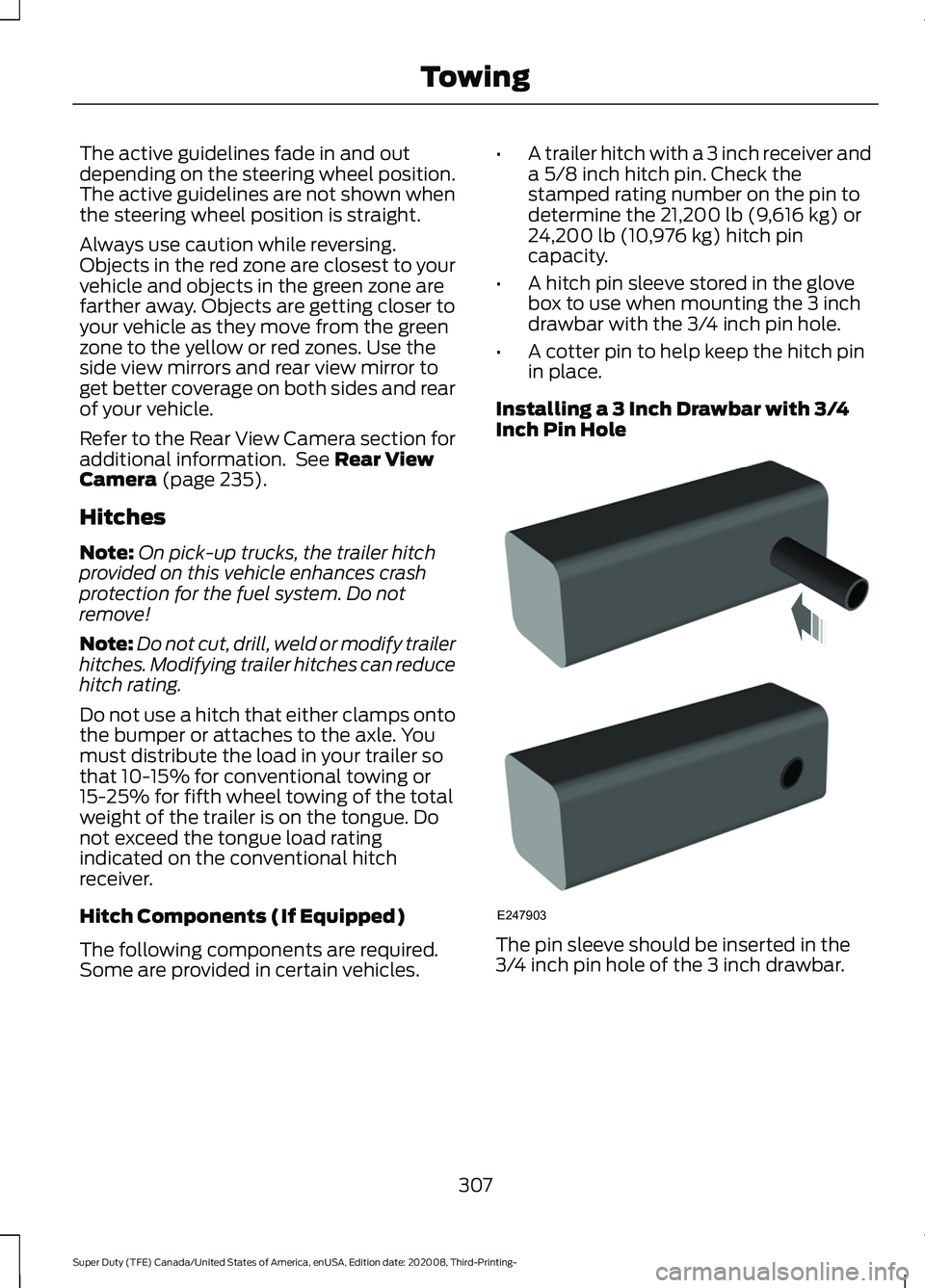
Inch Pin Hole The pin sleeve should be inserted in the
3/4 inch pin hole of the 3 inch drawbar.
307
Super Duty (TFE) Canada/United States of America, enUSA, Edition date: 202008, Third-Printing- TowingE247903
Page 316 of 666
•
Your vehicle's brake system and the
trailer brake system work
independently of each other. Changing
the gain setting on the controller does
not affect the operation of your
vehicle's brakes.
• When you switch the engine off, the
controller output is disabled and the
display and module shut down.
Trailer Lamps WARNING: Never connect any
trailer lamp wiring to the vehicle's tail
lamp wiring; this may damage the
electrical system resulting in fire. Contact
your authorized dealer as soon as
possible for assistance in proper trailer
tow wiring installation. Additional
electrical equipment may be required.
Trailer lamps are required on most towed
vehicles. Make sure all running lights, brake
lights, turn signals and hazard lights are
working.
Before Towing a Trailer
Practice turning, stopping and backing up
to get the feel of your vehicle-trailer
combination before starting on a trip.
When turning, make wider turns so the
trailer wheels clear curbs and other
obstacles.
When Towing a Trailer
• Check your hitch, electrical connections
and trailer wheel lug nuts thoroughly
after you have traveled 50 mi (80 km).
• Do not drive faster than
70 mph
(113 km/h) during the first 500 mi
(800 km).
• Do not make full-throttle starts. •
When stopped in congested or heavy
traffic during hot weather, place the
gearshift in park (P) to aid engine and
transmission cooling and to help A/C
performance.
• Turn off the speed control with heavy
loads or in hilly terrain. The speed
control may turn off automatically
when you are towing on long, steep
grades.
• Shift to a lower gear when driving down
a long or steep hill. Do not apply the
brakes continuously, as they may
overheat and become less effective.
• If your transmission is equipped with a
Grade Assist or Tow/Haul feature, use
this feature when towing. This provides
engine braking and helps eliminate
excessive transmission shifting for
optimum fuel economy and
transmission cooling.
• If your vehicle is equipped with
Adaptive Steering and you have
enabled Tow/Haul, the Adaptive
Steering system adjusts the steering
response to match your vehicle ’s load.
The system reduces vehicle sensitivity
to steering inputs at higher vehicle
speeds while it maintains the ease of
parking and maneuverability at low
speeds.
• If your vehicle is equipped with
AdvanceTrac with RSC, this system
may turn on during typical cornering
maneuvers with a heavily loaded trailer.
This is normal. Turning the corner at a
slower speed while towing may reduce
this tendency.
• If you are towing a trailer frequently in
hot weather, hilly conditions, at the
gross combined weight rating (or any
combination of these factors), consider
refilling your rear axle with synthetic
gear lubricant (if the axle is not already
filled with it). See
Capacities and
Specifications (page 441).
313
Super Duty (TFE) Canada/United States of America, enUSA, Edition date: 202008, Third-Printing- Towing
Page 317 of 666
•
Allow more distance for stopping with
a trailer attached. Anticipate stops and
brake gradually.
• Avoid parking on a grade. However, if
you must park on a grade:
1. Turn the steering wheel to point your vehicle tires away from traffic flow.
2. Set your vehicle parking brake.
3. Place the transmission in park (P).
4. Place wheel chocks in front and back of the trailer wheels. (Chocks not
included with vehicle.)
Your vehicle may be equipped with a
temporary or conventional spare tire. A
"temporary" spare tire is different in size
(diameter or width), tread-type
(All-Season or All Terrain) or is from a
different manufacturer than the road tires
on your vehicle. Consult information on the
tire label or Safety Compliance label for
limitations when using.
Launching or Retrieving a Boat or
Personal Watercraft (PWC)
Note: Disconnect the wiring to the trailer
before backing the trailer into the water.
Note: Reconnect the wiring to the trailer
after
you remove the trailer from the water.
When backing down a ramp during boat
launching or retrieval:
• Do not allow the static water level to
rise above the bottom edge of the rear
bumper.
• Do not allow waves to break higher
than
6 in (15 cm) above the bottom
edge of the rear bumper.
Exceeding these limits may allow water to
enter vehicle components:
• Causing internal damage to the
components.
• Affecting driveability, emissions, and
reliability. Replace the rear axle lubricant anytime
the rear axle has been submerged in water.
Water may have contaminated the rear
axle lubricant, which is not normally
checked or changed unless a leak is
suspected or other axle repair is required.
TOWING THE VEHICLE ON
FOUR WHEELS
WARNING:
If your vehicle has a
steering wheel lock make sure the
ignition is in the accessory or on position
when being towed.
Emergency Towing
If your vehicle becomes inoperable
(without access to wheel dollies,
car-hauling trailer, or flatbed transport
vehicle), it can be flat-towed (all wheels
on the ground, regardless of the powertrain
and transmission configuration) under the
following conditions:
• Your vehicle is facing forward for
towing in a forward direction.
• Place the transmission in neutral (N).
If you cannot move the transmission
into neutral (N), you may need to
override it. See
Transmission (page
207).
• Maximum speed is 35 mph (56 km/h).
• Maximum distance is
50 mi (80 km).
Recreational Towing
Note: Put your climate control system in
recirculated air mode to prevent exhaust
fumes from entering your vehicle.
See
Climate Control (page 143).
314
Super Duty (TFE) Canada/United States of America, enUSA, Edition date: 202008, Third-Printing- Towing
Page 318 of 666
Follow these guidelines if you have a need
for recreational towing, such as towing
your vehicle behind a motorhome. We have
designed these guidelines to prevent
damage to your transmission.
Two-wheel Drive Vehicles
Do not tow your vehicle with any wheels
on the ground, as vehicle or transmission
damage may occur. You must tow your
vehicle with all four (4) wheels off the
ground, such as when using a car-hauling
trailer.
Four-wheel Drive Vehicles
If towing your vehicle with wheels off the
ground it must be all four wheels, such as
when using a car-hauling trailer.
To tow a four-wheel drive vehicle with all
wheels on the ground, place the transfer
case in its neutral position and engage the
four-wheel-down towing feature.
Perform the steps in the following section
after positioning your vehicle behind the
tow vehicle and properly securing them
together.
Note:
Make sure you properly secure your
vehicle to the tow vehicle.
Towing With All Four Wheels On The
Ground
1. Put the ignition in the on position, but do not start the engine.
2. Press and hold the brake pedal.
3. Rotate the four-wheel drive control to 2H.
4. Shift into neutral (N).
5. Using the instrument cluster display controls on the steering wheel, select
Settings
.
6. Select
Advanced Settings.
7. Select
Vehicle.
8. Select
Neutral Tow. 9. Press and hold the
OK button until a
confirmation message appears in the
information display.
Note: You may hear an audible noise as the
transfer case shifts into its neutral position.
10. If you do not see a message in the display, you must perform the
procedure again from the beginning.
11. Leave the transmission in neutral (N)
and turn the ignition off.
12. If your vehicle has an ignition key, you
must leave the key in the ignition
while towing.
Note: To lock and unlock your vehicle, use
the keyless entry keypad or extra set of keys.
13. If your vehicle has intelligent access, switch the vehicle into accessory
mode. See
Starting and Stopping
the Engine (page 174).
Note: You do not need to leave your keys
in the vehicle. You can lock and unlock your
vehicle as you normally do.
14. Release the brake pedal. WARNING:
Do not disconnect the
battery during recreational towing. It
prevents the transfer case from shifting
properly and may cause the vehicle to
roll, even if the transmission is in park
(P). WARNING:
Shifting the transfer
case to its neutral position for
recreational towing may cause the
vehicle to roll, even if the transmission is
in park (P). It may injure the driver and
others. Make sure you press the foot
brake and the vehicle is in a secure, safe
position when you shift to neutral (N).
Note: Failing to put the transfer case in its
neutral position while towing with all four
wheels on the ground will damage vehicle
components.
315
Super Duty (TFE) Canada/United States of America, enUSA, Edition date: 202008, Third-Printing- Towing