service FORD F-450 2021 Manual Online
[x] Cancel search | Manufacturer: FORD, Model Year: 2021, Model line: F-450, Model: FORD F-450 2021Pages: 666, PDF Size: 11.3 MB
Page 433 of 666
When driving with the full-size dissimilar
spare wheel and tire assembly, it is
recommended that you do not:
•
Exceed 50 mph (80 km/h) in 4WD.
• Engage 4WD unless the vehicle is
stationary.
• Use 4WD on dry pavement.
The usage of a full-size dissimilar spare
wheel and tire assembly can lead to
impairment of the following:
• Handling, stability and braking
performance.
• Comfort and noise.
• Ground clearance and parking at curbs.
• Winter weather driving capability. •
Wet weather driving capability.
• Four-wheel drive capability.
When driving with the full-size dissimilar
spare wheel and tire assembly additional
caution should be given to:
• Towing a trailer.
• Driving vehicles equipped with a
camper body.
• Driving vehicles with a load on the
cargo rack.
Drive cautiously when using a full-size
dissimilar spare wheel and tire assembly
and seek service as soon as possible.
Location of the Spare Tire and
Tools
See the following table for their locations: Location
Item
Under the vehicle, just forward of the rearbumper.
Spare tire - pick-up trucks only
Fastened to the floor pan behind the rear-most seat on the passenger side.
Jack
Regular Cab: Fastened to floor behind thedriver seat.
Jack handle, lug wrench, lug wrench exten-
sion - only provided on dual rear wheel vehicles. Super Cab and Crew Cab: Fastened to the
floor under the rear seat on the driver's side.
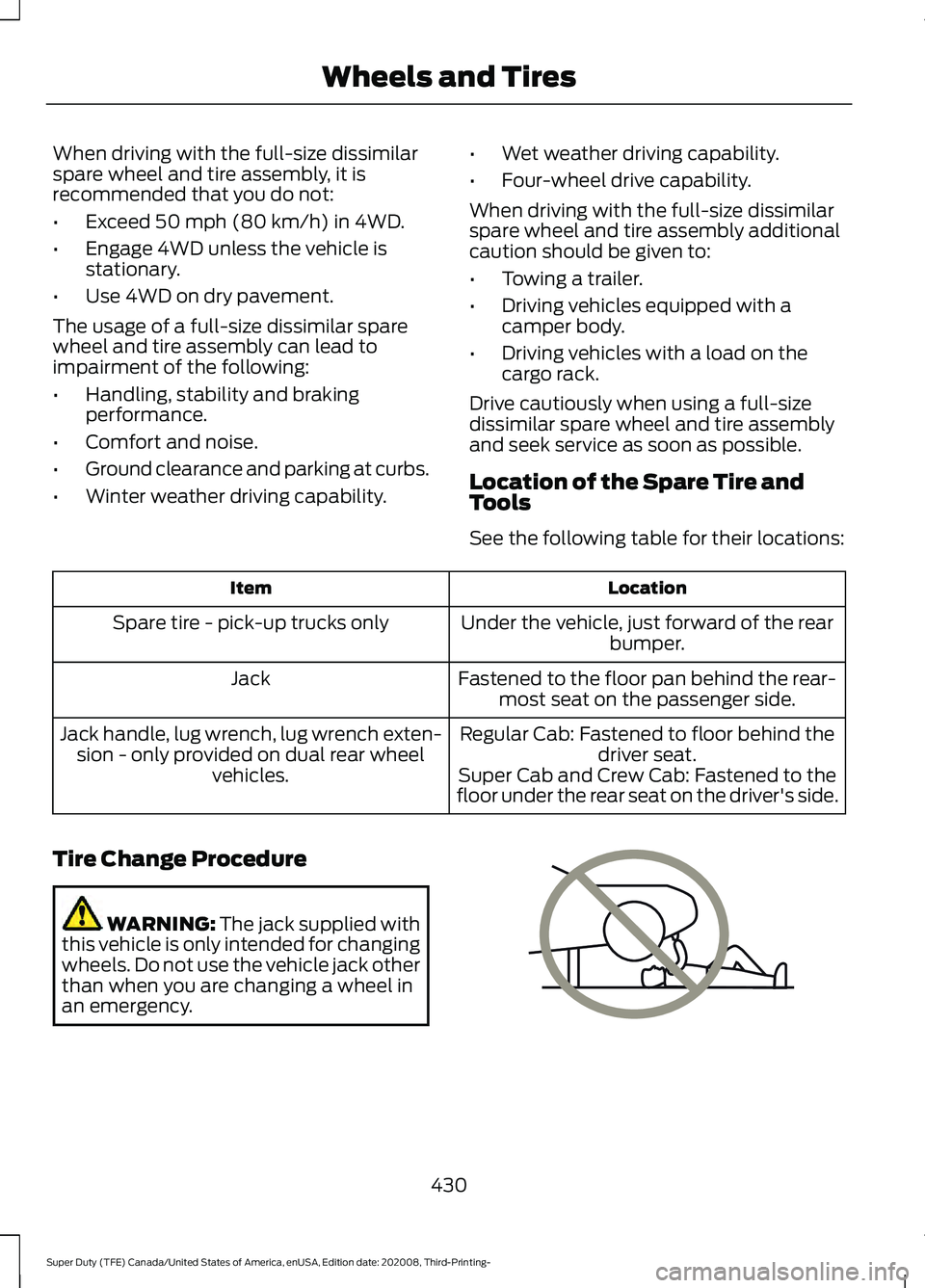
Tire Change Procedure WARNING:
The jack supplied with
this vehicle is only intended for changing
wheels. Do not use the vehicle jack other
than when you are changing a wheel in
an emergency. 430
Super Duty (TFE) Canada/United States of America, enUSA, Edition date: 202008, Third-Printing- Wheels and TiresE166722
Page 451 of 666
Power (Watt)
Specification
Lamp
LED
LED
Front clearance lamp.
LED
LED
Rear clearance lamp.
LED
LED
Front identification lamp.
LED
LED
Rear identification lamp.
LED
LED
Underhood lamp.
1 Pickup only.
2 Chassis cab only.
3 U.S. and Canada only
Note: LED lamps are not serviceable. See an authorized dealer if they fail.
Interior Lamps Power (Watt)
Specification
Lamp
LED
LED
Map lamp.
LED
LED
Glove compartment lamp.
LED
LED
Interior lamp.
LED
LED
Overhead console lamp.
Note: LED lamps are not serviceable. See an authorized dealer if they fail.
448
Super Duty (TFE) Canada/United States of America, enUSA, Edition date: 202008, Third-Printing- Capacities and Specifications
Page 454 of 666
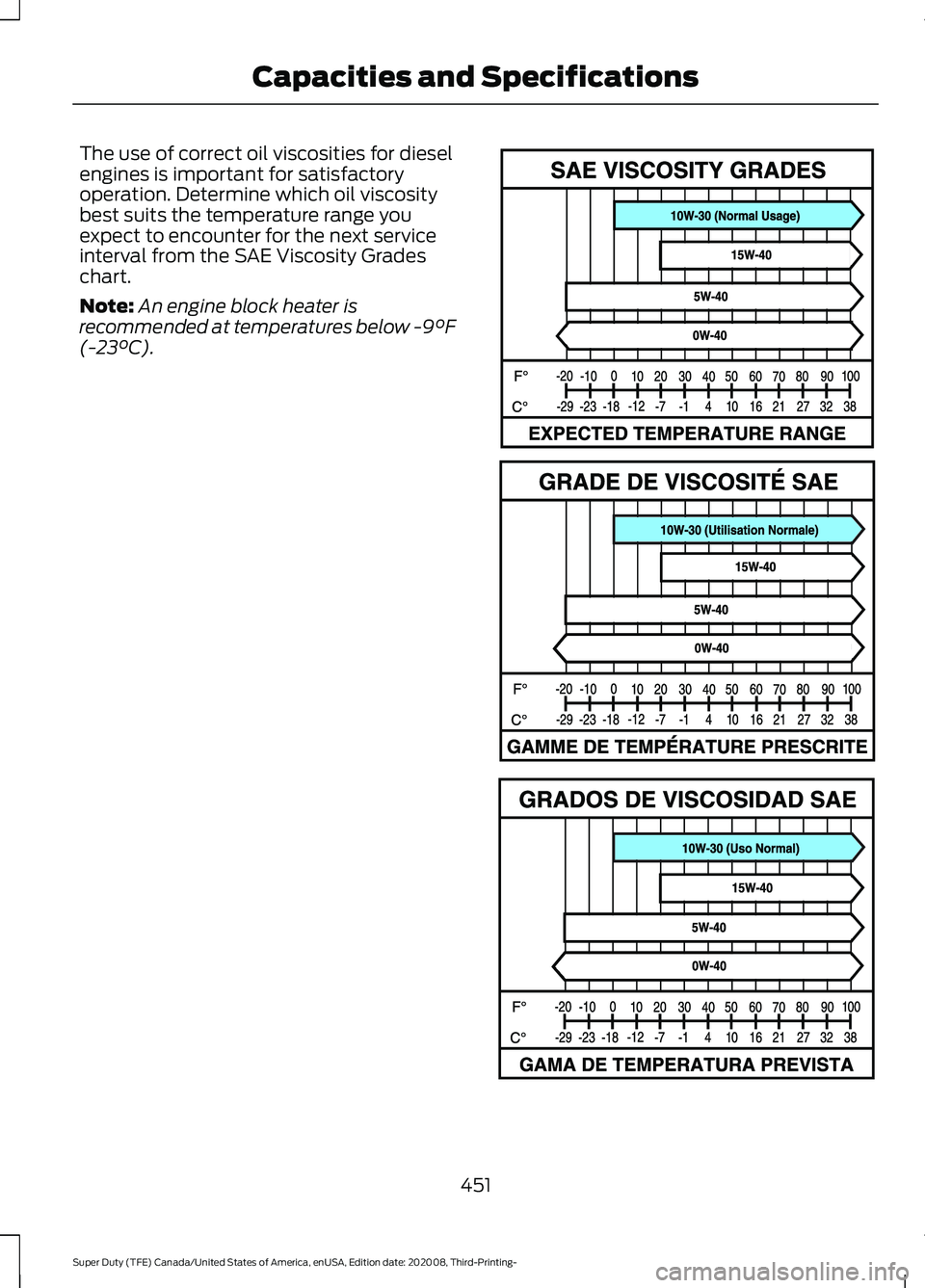
The use of correct oil viscosities for diesel
engines is important for satisfactory
operation. Determine which oil viscosity
best suits the temperature range you
expect to encounter for the next service
interval from the SAE Viscosity Grades
chart.
Note:
An engine block heater is
recommended at temperatures below -9°F
(-23°C). 451
Super Duty (TFE) Canada/United States of America, enUSA, Edition date: 202008, Third-Printing- Capacities and SpecificationsE327351
Page 456 of 666
Materials
Specification
Name
WSS-M2C171-F1
Motorcraft® SAE 5W-40 Full Synthetic Diesel Motor
Oil(U.S.)
(Canada)
XO-5W40-5Q3SD(U.S.)
WSS-M2C171-F1
Motorcraft® SAE 15W-40 Super Duty Diesel Motor
Oil(U.S.)
Motorcraft® Super Duty Motor Oil SAE 15W-40 /
Huile moteur Super Duty SAE 15W-40 Motor-
craft®(Canada)
XO-15W40-QSDF(U.S.)
CXO-15W40-LSD12(Canada)
Alternative Engine Oil for Severe
Duty Service
Materials Specification
Name
WSS-M2C171-F1
Motorcraft® SAE 5W-40 Full Synthetic Diesel Motor
Oil(U.S.)
(Canada)
XO-5W40-5Q3SD(U.S.)
ENGINE OIL CAPACITY AND
SPECIFICATION - 7.3L
Use oil that meets the defined
specification and viscosity grade.
If you do not use oil that meets the defined
specification and viscosity grade, it could
result in:
• Component damage that your vehicle
warranty does not cover.
• Longer engine cranking periods.
• Increased emission levels.
• Reduced vehicle performance.
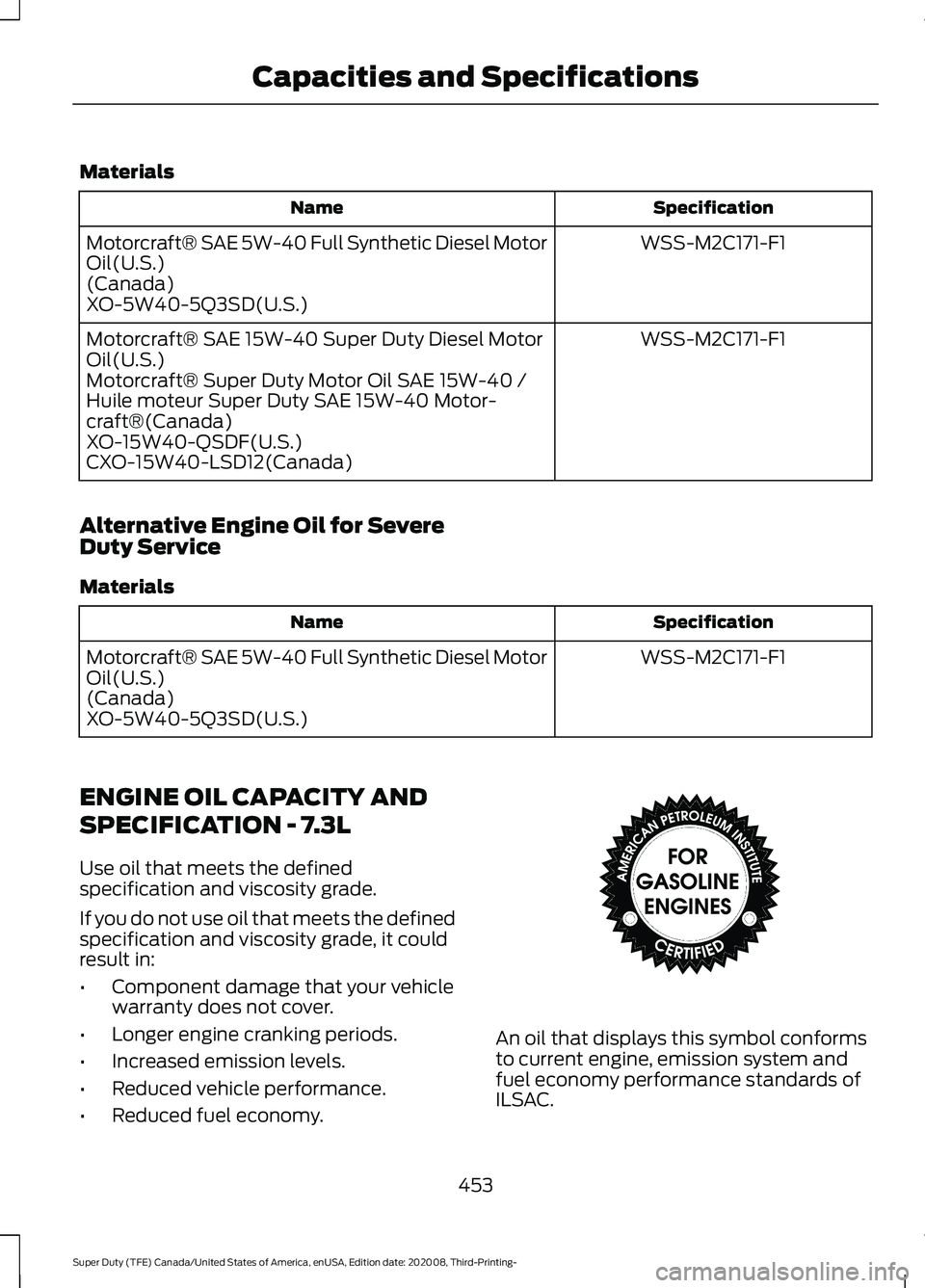
• Reduced fuel economy. An oil that displays this symbol conforms
to current engine, emission system and
fuel economy performance standards of
ILSAC.
453
Super Duty (TFE) Canada/United States of America, enUSA, Edition date: 202008, Third-Printing- Capacities and SpecificationsE142732
Page 462 of 666
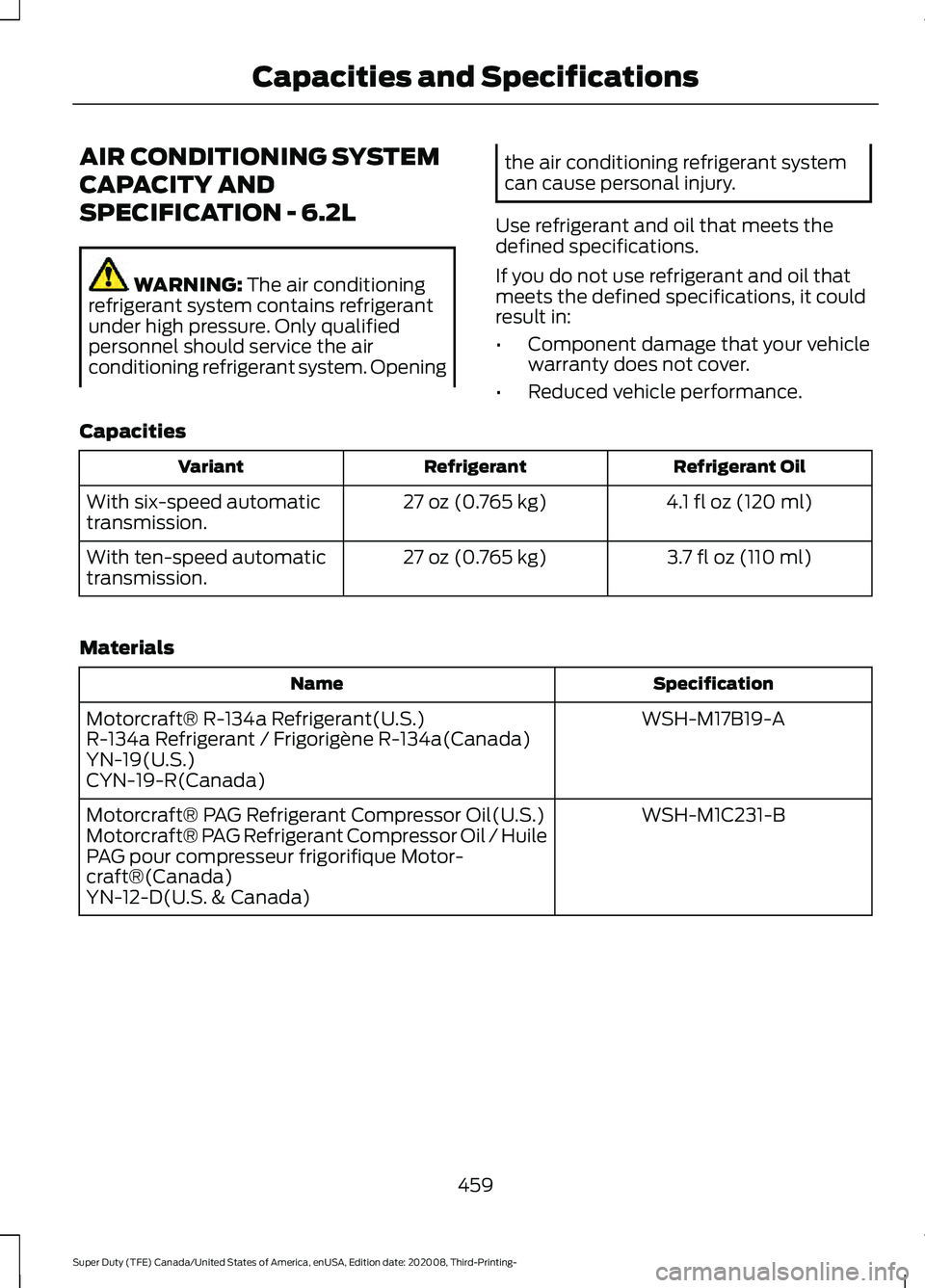
AIR CONDITIONING SYSTEM
CAPACITY AND
SPECIFICATION - 6.2L
WARNING: The air conditioning
refrigerant system contains refrigerant
under high pressure. Only qualified
personnel should service the air
conditioning refrigerant system. Opening the air conditioning refrigerant system
can cause personal injury.
Use refrigerant and oil that meets the
defined specifications.
If you do not use refrigerant and oil that
meets the defined specifications, it could
result in:
• Component damage that your vehicle
warranty does not cover.
• Reduced vehicle performance.
Capacities Refrigerant Oil
Refrigerant
Variant
4.1 fl oz (120 ml)
27 oz (0.765 kg)
With six-speed automatic
transmission.
3.7 fl oz (110 ml)
27 oz (0.765 kg)
With ten-speed automatic
transmission.
Materials Specification
Name
WSH-M17B19-A
Motorcraft® R-134a Refrigerant(U.S.)
R-134a Refrigerant / Frigorigène R-134a(Canada)
YN-19(U.S.)
CYN-19-R(Canada)
WSH-M1C231-B
Motorcraft® PAG Refrigerant Compressor Oil(U.S.)
Motorcraft® PAG Refrigerant Compressor Oil / Huile
PAG pour compresseur frigorifique Motor-
craft®(Canada)
YN-12-D(U.S. & Canada)
459
Super Duty (TFE) Canada/United States of America, enUSA, Edition date: 202008, Third-Printing- Capacities and Specifications
Page 463 of 666
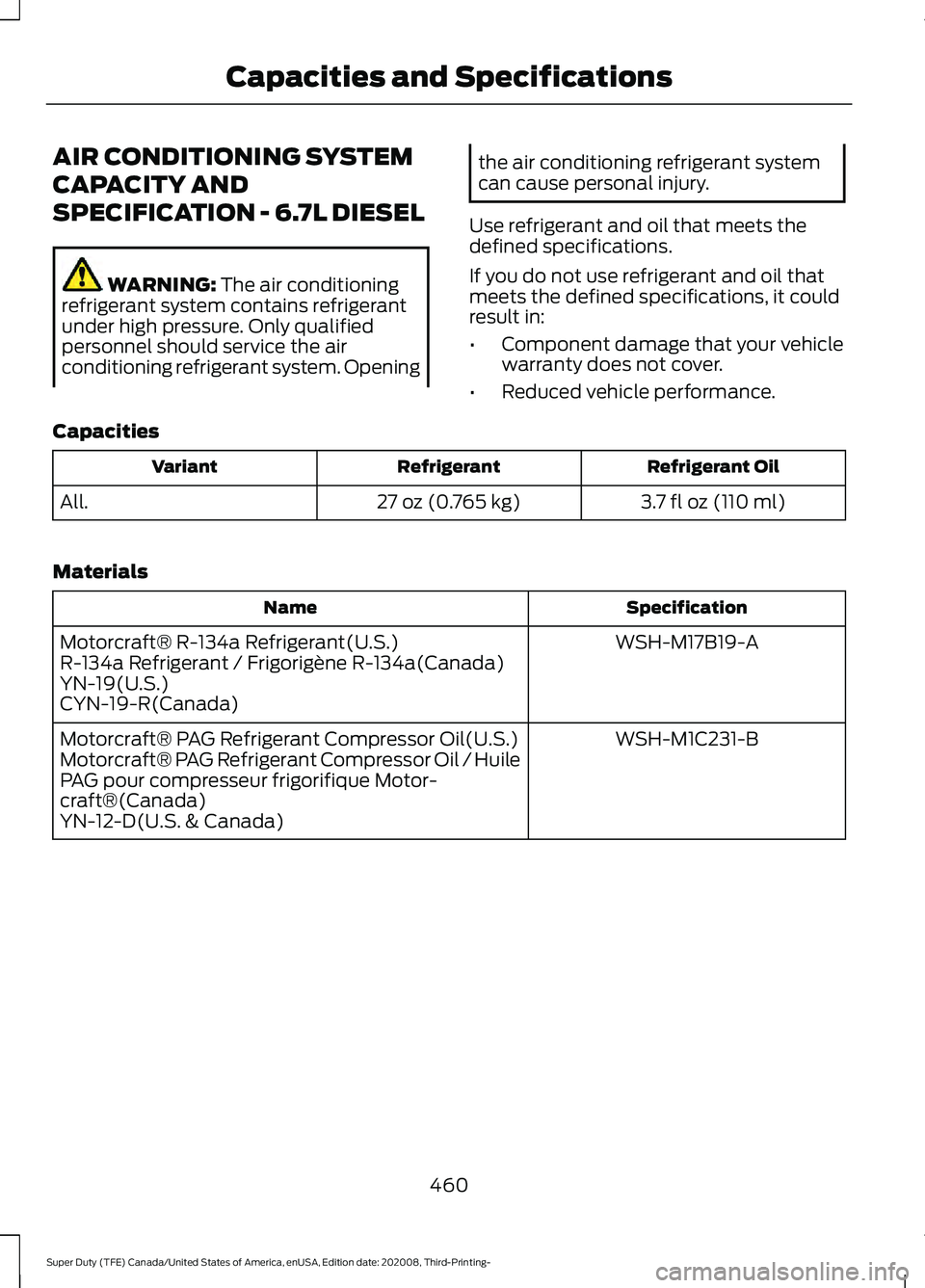
AIR CONDITIONING SYSTEM
CAPACITY AND
SPECIFICATION - 6.7L DIESEL
WARNING: The air conditioning
refrigerant system contains refrigerant
under high pressure. Only qualified
personnel should service the air
conditioning refrigerant system. Opening the air conditioning refrigerant system
can cause personal injury.
Use refrigerant and oil that meets the
defined specifications.
If you do not use refrigerant and oil that
meets the defined specifications, it could
result in:
• Component damage that your vehicle
warranty does not cover.
• Reduced vehicle performance.
Capacities Refrigerant Oil
Refrigerant
Variant
3.7 fl oz (110 ml)
27 oz (0.765 kg)
All.
Materials Specification
Name
WSH-M17B19-A
Motorcraft® R-134a Refrigerant(U.S.)
R-134a Refrigerant / Frigorigène R-134a(Canada)
YN-19(U.S.)
CYN-19-R(Canada)
WSH-M1C231-B
Motorcraft® PAG Refrigerant Compressor Oil(U.S.)
Motorcraft® PAG Refrigerant Compressor Oil / Huile
PAG pour compresseur frigorifique Motor-
craft®(Canada)
YN-12-D(U.S. & Canada)
460
Super Duty (TFE) Canada/United States of America, enUSA, Edition date: 202008, Third-Printing- Capacities and Specifications
Page 464 of 666
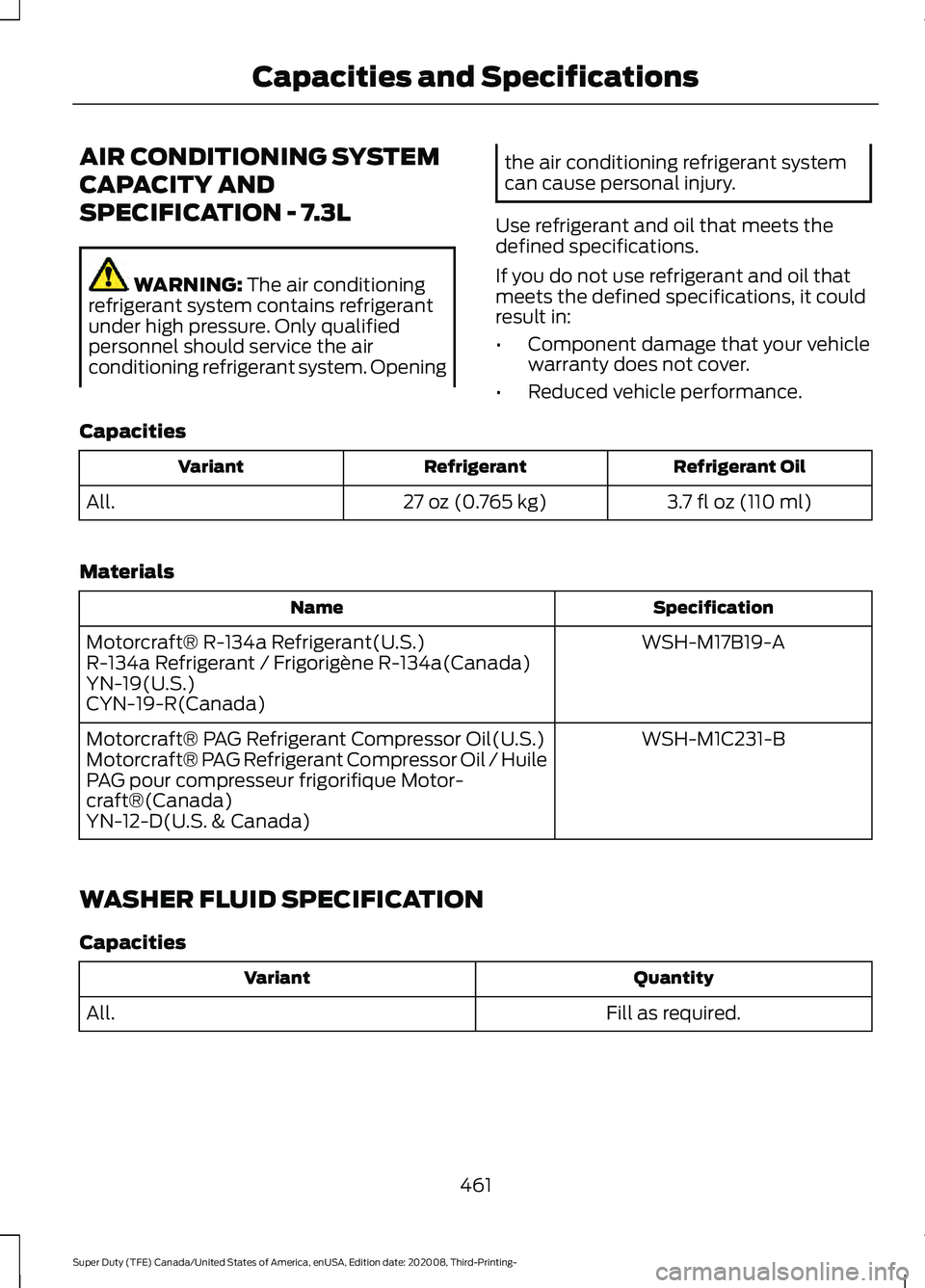
AIR CONDITIONING SYSTEM
CAPACITY AND
SPECIFICATION - 7.3L
WARNING: The air conditioning
refrigerant system contains refrigerant
under high pressure. Only qualified
personnel should service the air
conditioning refrigerant system. Opening the air conditioning refrigerant system
can cause personal injury.
Use refrigerant and oil that meets the
defined specifications.
If you do not use refrigerant and oil that
meets the defined specifications, it could
result in:
• Component damage that your vehicle
warranty does not cover.
• Reduced vehicle performance.
Capacities Refrigerant Oil
Refrigerant
Variant
3.7 fl oz (110 ml)
27 oz (0.765 kg)
All.
Materials Specification
Name
WSH-M17B19-A
Motorcraft® R-134a Refrigerant(U.S.)
R-134a Refrigerant / Frigorigène R-134a(Canada)
YN-19(U.S.)
CYN-19-R(Canada)
WSH-M1C231-B
Motorcraft® PAG Refrigerant Compressor Oil(U.S.)
Motorcraft® PAG Refrigerant Compressor Oil / Huile
PAG pour compresseur frigorifique Motor-
craft®(Canada)
YN-12-D(U.S. & Canada)
WASHER FLUID SPECIFICATION
Capacities Quantity
Variant
Fill as required.
All.
461
Super Duty (TFE) Canada/United States of America, enUSA, Edition date: 202008, Third-Printing- Capacities and Specifications
Page 477 of 666
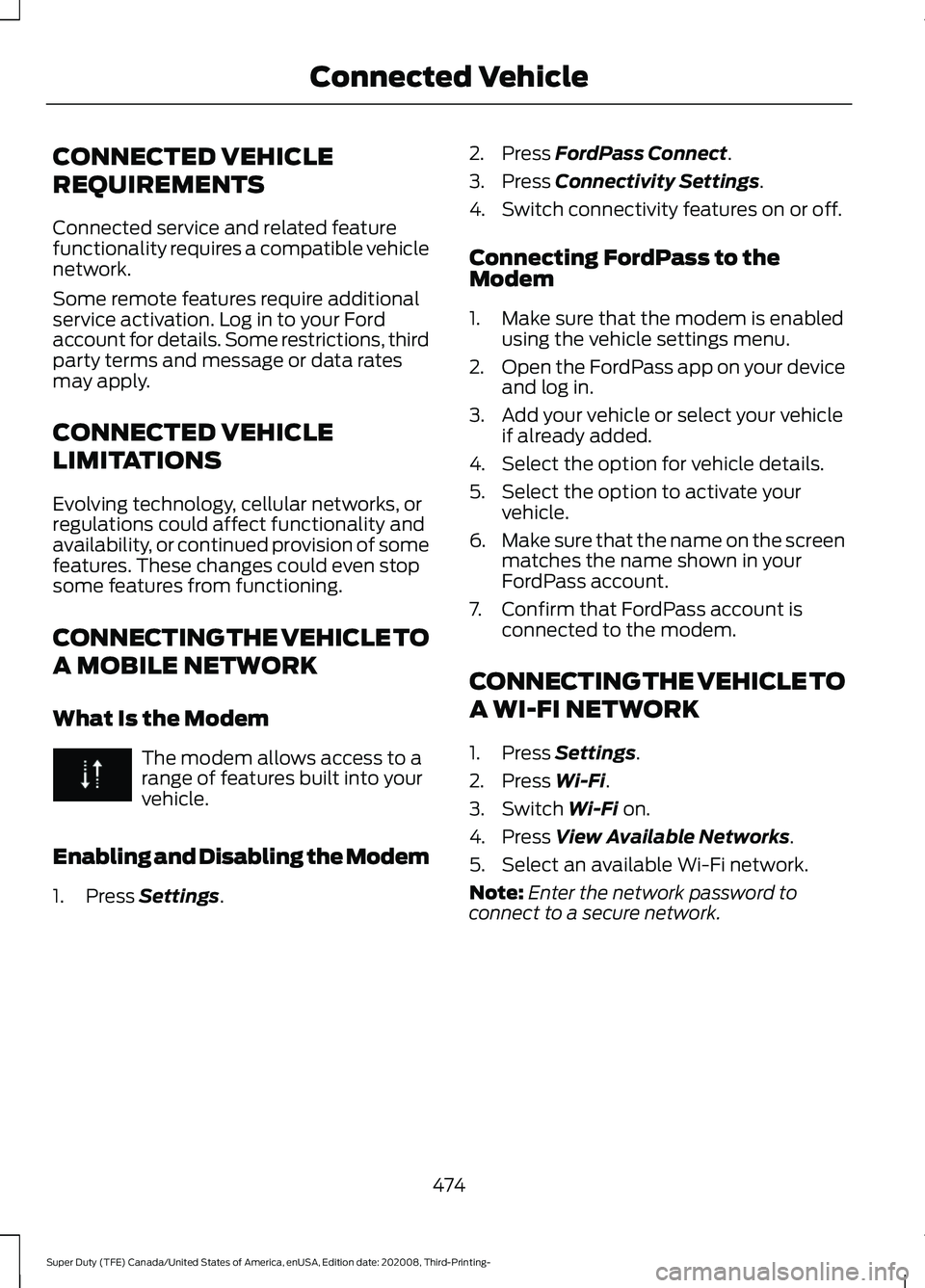
CONNECTED VEHICLE
REQUIREMENTS
Connected service and related feature
functionality requires a compatible vehicle
network.
Some remote features require additional
service activation. Log in to your Ford
account for details. Some restrictions, third
party terms and message or data rates
may apply.
CONNECTED VEHICLE
LIMITATIONS
Evolving technology, cellular networks, or
regulations could affect functionality and
availability, or continued provision of some
features. These changes could even stop
some features from functioning.
CONNECTING THE VEHICLE TO
A MOBILE NETWORK
What Is the Modem
The modem allows access to a
range of features built into your
vehicle.
Enabling and Disabling the Modem
1. Press Settings. 2. Press
FordPass Connect.
3. Press
Connectivity Settings.
4. Switch connectivity features on or off.
Connecting FordPass to the
Modem
1. Make sure that the modem is enabled using the vehicle settings menu.
2. Open the FordPass app on your device
and log in.
3. Add your vehicle or select your vehicle if already added.
4. Select the option for vehicle details.
5. Select the option to activate your vehicle.
6. Make sure that the name on the screen
matches the name shown in your
FordPass account.
7. Confirm that FordPass account is connected to the modem.
CONNECTING THE VEHICLE TO
A WI-FI NETWORK
1. Press
Settings.
2. Press
Wi-Fi.
3. Switch
Wi-Fi on.
4. Press
View Available Networks.
5. Select an available Wi-Fi network.
Note: Enter the network password to
connect to a secure network.
474
Super Duty (TFE) Canada/United States of America, enUSA, Edition date: 202008, Third-Printing- Connected Vehicle
Page 480 of 666
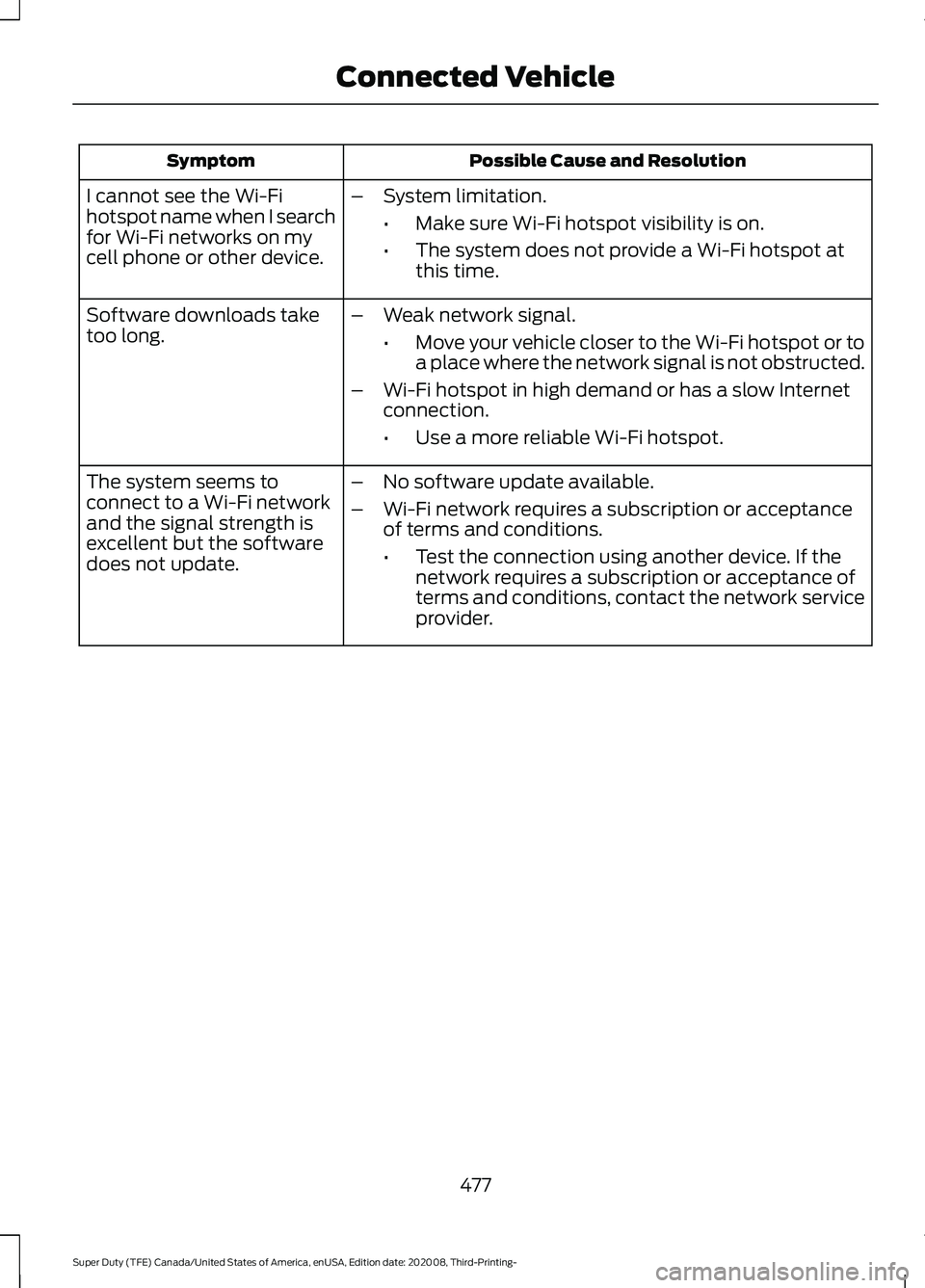
Possible Cause and Resolution
Symptom
I cannot see the Wi-Fi
hotspot name when I search
for Wi-Fi networks on my
cell phone or other device. –
System limitation.
•Make sure Wi-Fi hotspot visibility is on.
• The system does not provide a Wi-Fi hotspot at
this time.
– Weak network signal.
•Move your vehicle closer to the Wi-Fi hotspot or to
a place where the network signal is not obstructed.
– Wi-Fi hotspot in high demand or has a slow Internet
connection.
•Use a more reliable Wi-Fi hotspot.
Software downloads take
too long.
–No software update available.
– Wi-Fi network requires a subscription or acceptance
of terms and conditions.
•Test the connection using another device. If the
network requires a subscription or acceptance of
terms and conditions, contact the network service
provider.
The system seems to
connect to a Wi-Fi network
and the signal strength is
excellent but the software
does not update.
477
Super Duty (TFE) Canada/United States of America, enUSA, Edition date: 202008, Third-Printing- Connected Vehicle
Page 481 of 666
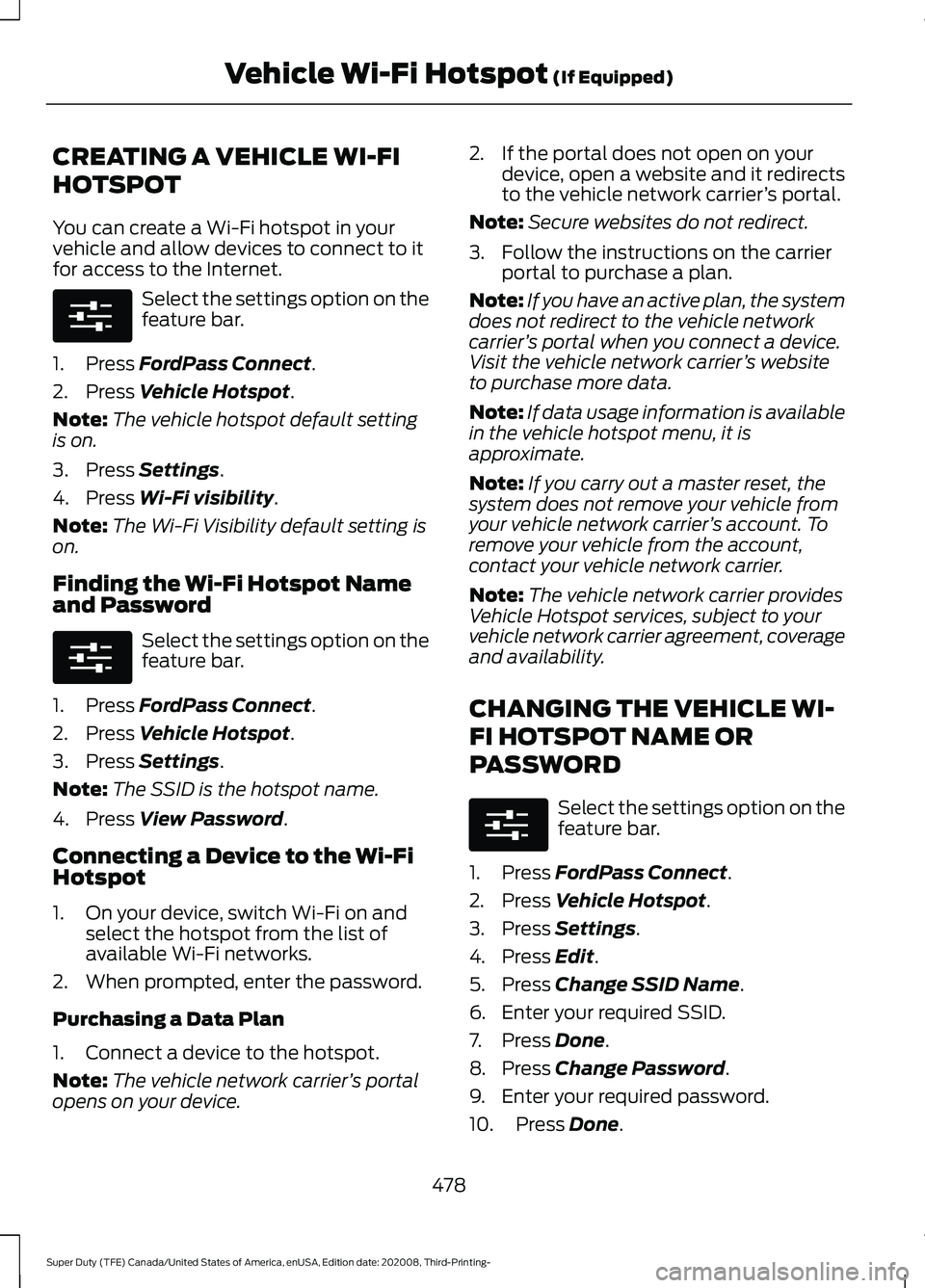
CREATING A VEHICLE WI-FI
HOTSPOT
You can create a Wi-Fi hotspot in your
vehicle and allow devices to connect to it
for access to the Internet.
Select the settings option on the
feature bar.
1. Press FordPass Connect.
2. Press
Vehicle Hotspot.
Note: The vehicle hotspot default setting
is on.
3. Press
Settings.
4. Press
Wi-Fi visibility.
Note: The Wi-Fi Visibility default setting is
on.
Finding the Wi-Fi Hotspot Name
and Password Select the settings option on the
feature bar.
1. Press
FordPass Connect.
2. Press
Vehicle Hotspot.
3. Press
Settings.
Note: The SSID is the hotspot name.
4. Press
View Password.
Connecting a Device to the Wi-Fi
Hotspot
1. On your device, switch Wi-Fi on and select the hotspot from the list of
available Wi-Fi networks.
2. When prompted, enter the password.
Purchasing a Data Plan
1. Connect a device to the hotspot.
Note: The vehicle network carrier ’s portal
opens on your device. 2. If the portal does not open on your
device, open a website and it redirects
to the vehicle network carrier ’s portal.
Note: Secure websites do not redirect.
3. Follow the instructions on the carrier portal to purchase a plan.
Note: If you have an active plan, the system
does not redirect to the vehicle network
carrier ’s portal when you connect a device.
Visit the vehicle network carrier ’s website
to purchase more data.
Note: If data usage information is available
in the vehicle hotspot menu, it is
approximate.
Note: If you carry out a master reset, the
system does not remove your vehicle from
your vehicle network carrier ’s account. To
remove your vehicle from the account,
contact your vehicle network carrier.
Note: The vehicle network carrier provides
Vehicle Hotspot services, subject to your
vehicle network carrier agreement, coverage
and availability.
CHANGING THE VEHICLE WI-
FI HOTSPOT NAME OR
PASSWORD Select the settings option on the
feature bar.
1. Press
FordPass Connect.
2. Press
Vehicle Hotspot.
3. Press
Settings.
4. Press
Edit.
5. Press
Change SSID Name.
6. Enter your required SSID.
7. Press
Done.
8. Press
Change Password.
9. Enter your required password.
10. Press
Done.
478
Super Duty (TFE) Canada/United States of America, enUSA, Edition date: 202008, Third-Printing- Vehicle Wi-Fi Hotspot
(If Equipped)E280315 E280315 E280315