lock FORD F-450 2022 Owners Manual
[x] Cancel search | Manufacturer: FORD, Model Year: 2022, Model line: F-450, Model: FORD F-450 2022Pages: 740, PDF Size: 12.6 MB
Page 590 of 740
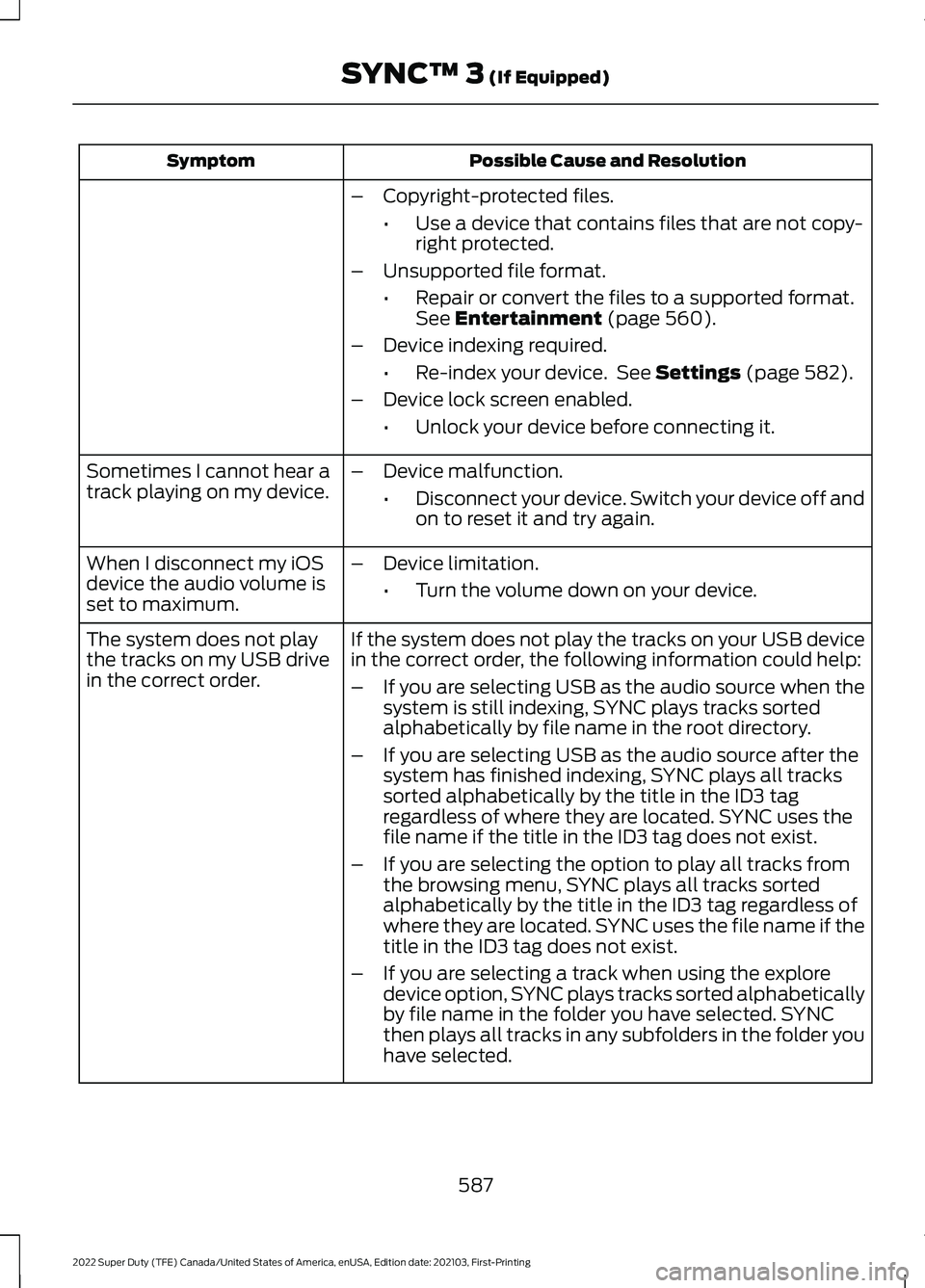
Possible Cause and Resolution
Symptom
–Copyright-protected files.
•Use a device that contains files that are not copy-
right protected.
– Unsupported file format.
•Repair or convert the files to a supported format.
See Entertainment (page 560).
– Device indexing required.
•Re-index your device. See
Settings (page 582).
– Device lock screen enabled.
•Unlock your device before connecting it.
Sometimes I cannot hear a
track playing on my device. –
Device malfunction.
•Disconnect your device. Switch your device off and
on to reset it and try again.
When I disconnect my iOS
device the audio volume is
set to maximum. –
Device limitation.
•Turn the volume down on your device.
If the system does not play the tracks on your USB device
in the correct order, the following information could help:
The system does not play
the tracks on my USB drive
in the correct order.
–If you are selecting USB as the audio source when the
system is still indexing, SYNC plays tracks sorted
alphabetically by file name in the root directory.
– If you are selecting USB as the audio source after the
system has finished indexing, SYNC plays all tracks
sorted alphabetically by the title in the ID3 tag
regardless of where they are located. SYNC uses the
file name if the title in the ID3 tag does not exist.
– If you are selecting the option to play all tracks from
the browsing menu, SYNC plays all tracks sorted
alphabetically by the title in the ID3 tag regardless of
where they are located. SYNC uses the file name if the
title in the ID3 tag does not exist.
– If you are selecting a track when using the explore
device option, SYNC plays tracks sorted alphabetically
by file name in the folder you have selected. SYNC
then plays all tracks in any subfolders in the folder you
have selected.
587
2022 Super Duty (TFE) Canada/United States of America, enUSA, Edition date: 202103, First-Printing SYNC™ 3
(If Equipped)
Page 591 of 740
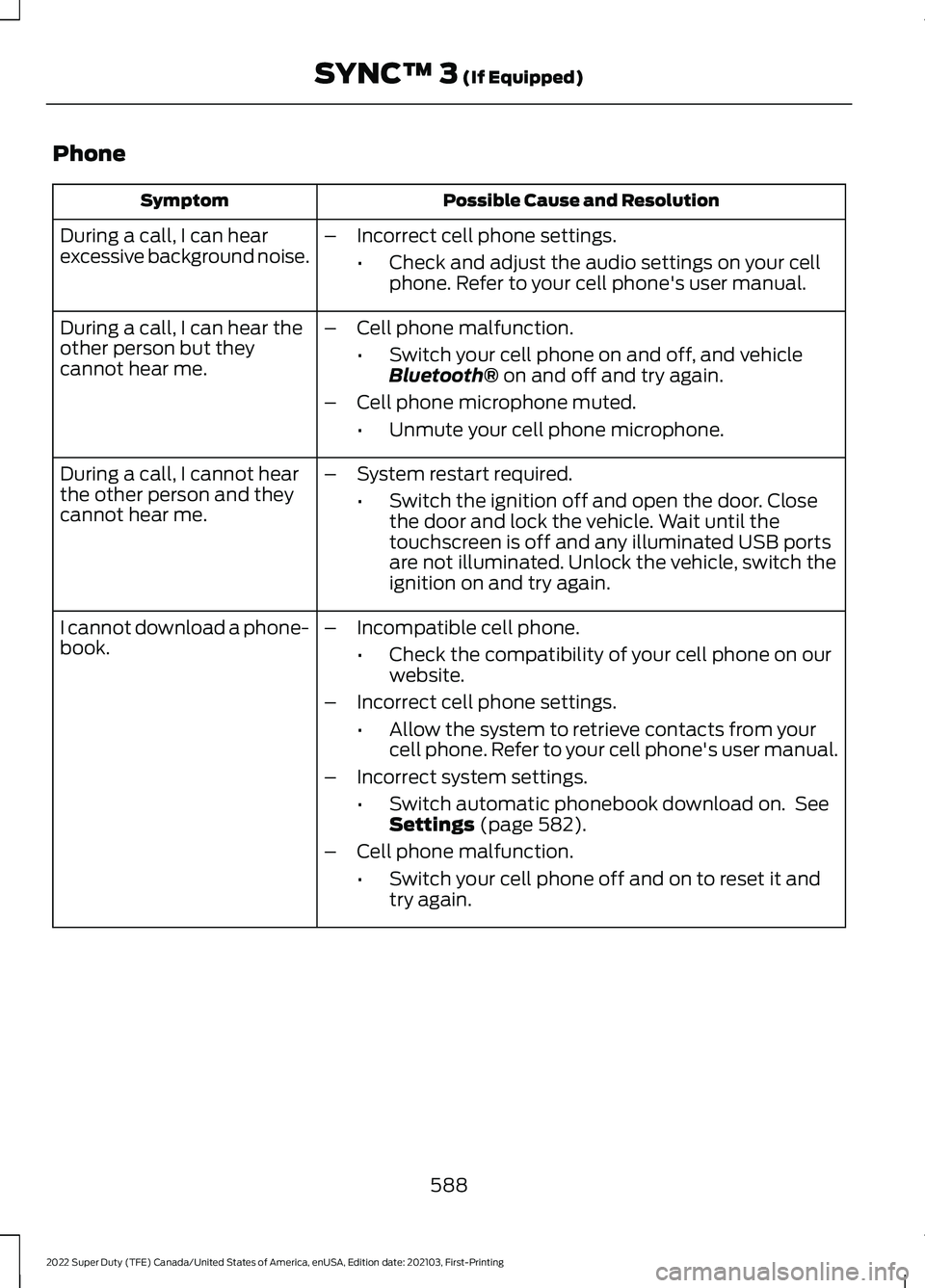
Phone
Possible Cause and Resolution
Symptom
During a call, I can hear
excessive background noise. –
Incorrect cell phone settings.
•Check and adjust the audio settings on your cell
phone. Refer to your cell phone's user manual.
– Cell phone malfunction.
•Switch your cell phone on and off, and vehicle
Bluetooth® on and off and try again.
– Cell phone microphone muted.
•Unmute your cell phone microphone.
During a call, I can hear the
other person but they
cannot hear me.
During a call, I cannot hear
the other person and they
cannot hear me.
–
System restart required.
•Switch the ignition off and open the door. Close
the door and lock the vehicle. Wait until the
touchscreen is off and any illuminated USB ports
are not illuminated. Unlock the vehicle, switch the
ignition on and try again.
I cannot download a phone-
book. –
Incompatible cell phone.
•Check the compatibility of your cell phone on our
website.
– Incorrect cell phone settings.
•Allow the system to retrieve contacts from your
cell phone. Refer to your cell phone's user manual.
– Incorrect system settings.
•Switch automatic phonebook download on. See
Settings
(page 582).
– Cell phone malfunction.
•Switch your cell phone off and on to reset it and
try again.
588
2022 Super Duty (TFE) Canada/United States of America, enUSA, Edition date: 202103, First-Printing SYNC™ 3
(If Equipped)
Page 597 of 740
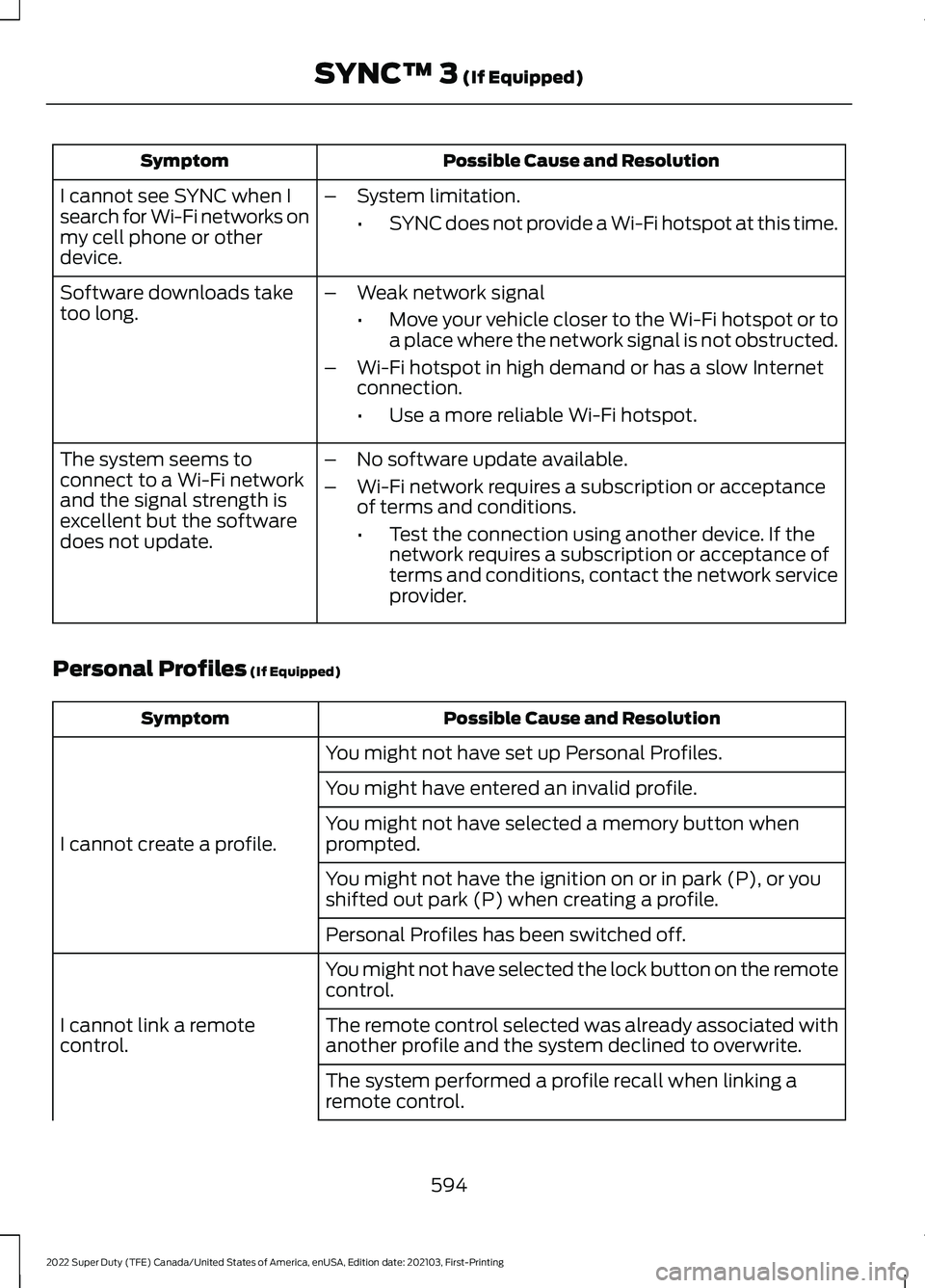
Possible Cause and Resolution
Symptom
I cannot see SYNC when I
search for Wi-Fi networks on
my cell phone or other
device. –
System limitation.
•SYNC does not provide a Wi-Fi hotspot at this time.
– Weak network signal
•Move your vehicle closer to the Wi-Fi hotspot or to
a place where the network signal is not obstructed.
– Wi-Fi hotspot in high demand or has a slow Internet
connection.
•Use a more reliable Wi-Fi hotspot.
Software downloads take
too long.
–No software update available.
– Wi-Fi network requires a subscription or acceptance
of terms and conditions.
•Test the connection using another device. If the
network requires a subscription or acceptance of
terms and conditions, contact the network service
provider.
The system seems to
connect to a Wi-Fi network
and the signal strength is
excellent but the software
does not update.
Personal Profiles (If Equipped) Possible Cause and Resolution
Symptom
You might not have set up Personal Profiles.
I cannot create a profile. You might have entered an invalid profile.
You might not have selected a memory button when
prompted.
You might not have the ignition on or in park (P), or you
shifted out park (P) when creating a profile.
Personal Profiles has been switched off.
You might not have selected the lock button on the remote
control.
I cannot link a remote
control. The remote control selected was already associated with
another profile and the system declined to overwrite.
The system performed a profile recall when linking a
remote control.
594
2022 Super Duty (TFE) Canada/United States of America, enUSA, Edition date: 202103, First-Printing SYNC™ 3
(If Equipped)
Page 598 of 740
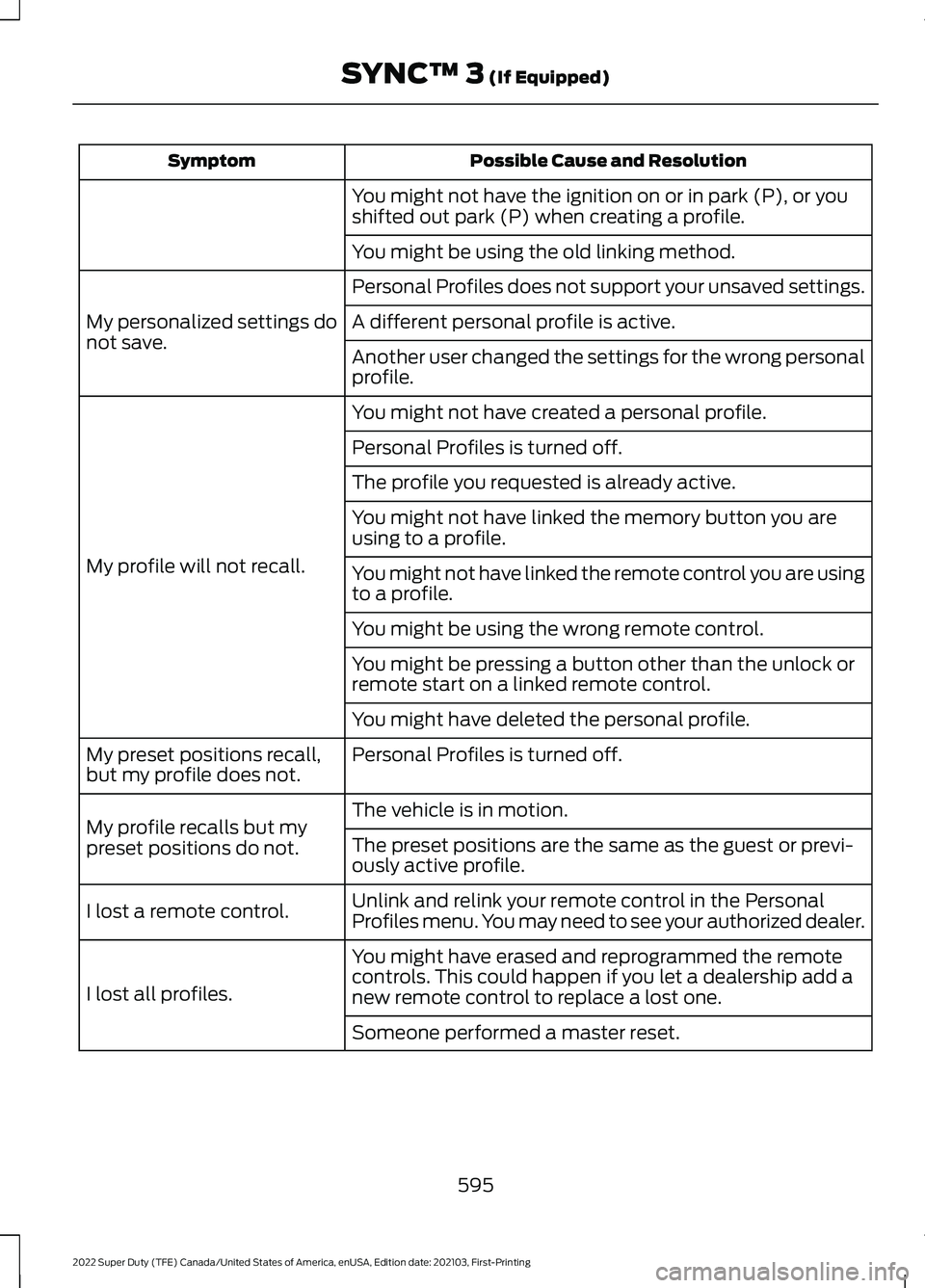
Possible Cause and Resolution
Symptom
You might not have the ignition on or in park (P), or you
shifted out park (P) when creating a profile.
You might be using the old linking method.
Personal Profiles does not support your unsaved settings.
My personalized settings do
not save. A different personal profile is active.
Another user changed the settings for the wrong personal
profile.
You might not have created a personal profile.
My profile will not recall. Personal Profiles is turned off.
The profile you requested is already active.
You might not have linked the memory button you are
using to a profile.
You might not have linked the remote control you are using
to a profile.
You might be using the wrong remote control.
You might be pressing a button other than the unlock or
remote start on a linked remote control.
You might have deleted the personal profile.
Personal Profiles is turned off.
My preset positions recall,
but my profile does not.
The vehicle is in motion.
My profile recalls but my
preset positions do not. The preset positions are the same as the guest or previ-
ously active profile.
Unlink and relink your remote control in the Personal
Profiles menu. You may need to see your authorized dealer.
I lost a remote control.
You might have erased and reprogrammed the remote
controls. This could happen if you let a dealership add a
new remote control to replace a lost one.
I lost all profiles.
Someone performed a master reset.
595
2022 Super Duty (TFE) Canada/United States of America, enUSA, Edition date: 202103, First-Printing SYNC™ 3 (If Equipped)
Page 616 of 740
UPDATING THE VEHICLE
SYSTEMS WIRELESSLY
Over-the-Air Updates allow you
to update your vehicle system
software wirelessly. To make
sure you receive all updates, set a recurring
schedule and connect to Wi-Fi. See
Connected Vehicle (page 498). Updates
may take longer if not connected to Wi-Fi,
or may not download at all. Multiple
connections may be required to complete
a download.
Enabling Over-the-Air Updates Press the settings option on the
feature bar.
1. Press the System Update tile.
2. Switch
Automatic Updates on.
Note: Over-the Air Updates are enabled by
default.
Note: If you do not want to receive
Over-the-Air Updates you can turn them
off. You will not be notified of new updates.
Scheduling an Update
Scheduling an update allows you to set a
convenient time for the update to
complete. We recommend updating
overnight when your vehicle is not in use.
Ensure Vehicle Connectivity and Automatic
Over-the-Air Updates are enabled. Once
you complete these steps, your schedule
will be saved for future updates. As long
as an update is not in process you can
adjust your schedule.
Note: Some updates may be applied
outside of your set schedule. Information
about the unscheduled update appears on
the touchscreen after it is applied. Using the Settings Menu Press the settings option on the
feature bar.
1. Press the
System Update tile.
2. Press
Schedule Update.
3. Use the controls to set the time and day of the update.
4. Save the schedule.
Note: You can set the updates to occur at
any time.
Using the Status Bar Icon When an update is available, tap
the notification icon and follow
the prompts on the screen.
Additional Over-the-Air Update icons may
appear on the status bar.
See Status Bar
(page 597).
Applying an Over-the-Air Update
You can see the progress of the update on
the touchscreen. An update cannot be
canceled once it has been started.
During scheduled updates you will not be
able to drive your vehicle, start the vehicle,
use remote controls to lock and unlock the
vehicle. The alarm, central locks, and door
tones are disabled. The electronic door
lock will not function during an update. You
can open the doors using the mechanical
latch if child locks are not on. Pull the
handle until it stops to use the mechanical
latch. Some updates may not allow you to
use your vehicle during the update process.
Note: Some updates can complete in the
background, but more complex updates can
take up to 45 minutes.
Note: Double locking is switched off and
central locking is switched on during and
after an update.
613
2022 Super Duty (TFE) Canada/United States of America, enUSA, Edition date: 202103, First-Printing Vehicle System Updates - Vehicles With: SYNC 4E327789 E280315 E280315 E327785
Page 623 of 740
WHAT IS FORD PROTECT
Protect yourself from the rising cost of
vehicle repairs with a Ford Protect
extended service plan.
Ford Protect Extended Service
Plans - United States Only
Ford Protect extended service plans mean
peace of mind. Extended service plans are
backed by Ford Motor Company, and
provide more protection beyond the New
Vehicle Limited Warranty coverage. When
you visit your Ford Dealer, insist on the Ford
Protect extended service plan.
Ford Protect Can Quickly Pay for Itself
One trip to the service center could easily
exceed the price of your Ford Protect
extended service plan. With the Ford
Protect extended service plan, you
minimize your risk for unexpected repair
bills and rising repair costs.
Up to 1,000+ Covered Vehicle
Components
There are four mechanical Ford Protect
extended service plans with different levels
of coverage. Ask your authorized dealer for
details.
1. PremiumCARE - Our most
comprehensive coverage. With over
1,000 covered components, this plan
is so complete it is probably easier to
list what is not covered.
2. ExtraCARE - Covers 113 components, and includes many high-tech items.
3. BaseCARE - Covers 84 components.
4. PowertrainCARE - Covers 29 critical components.
Ford Protect extended service plans are
honored by all authorized Ford dealers in
the United States, Canada and Mexico. That means you get:
•
Reliable, quality service at any Ford or
Lincoln dealership.
• Repairs performed by factory trained
technicians, using genuine parts.
Rental Car Reimbursement
First Day Rental Benefit
If you bring your car into your dealer for
service, we will give you a rental vehicle to
use for the day.
Extended Rental Benefits
If your vehicle is kept overnight for covered
repairs, you are eligible for rental car
coverage, warranty repairs, and field
service actions.
Roadside Assistance
Exclusive 24/7 roadside assistance,
including:
• Towing, flat-tire change and battery
jump starts.
• Out of fuel and lock-out assistance.
• Travel expense reimbursement for
lodging, meals and rental car.
• Assistance for taxi, shuttle, rental car
coverage or other transportation.
Transferable Coverage
If you sell your vehicle before your Ford
Protect extended service plan coverage
expires, you can transfer any remaining
coverage to the new owner. This should
give you and your potential buyer peace of
mind.
620
2022 Super Duty (TFE) Canada/United States of America, enUSA, Edition date: 202103, First-Printing Ford Protect
Page 627 of 740
Check Every Six Months
The battery connections. Clean if necessary.
The body and door drain holes for obstructions. Clean if necessary. The cooling system fluid level and the coolant system strength. The door weatherstrips for wear. Lubricate if necessary.
The hinges, latches and outside locks for proper operation. Lubricate if necessary. The parking brake for proper operation.
The seatbelts and seat latches for wear and function.
Safety warning lamps, brake, ABS, airbag and seatbelt for operation.
The washer spray and wiper operation. Clean or replace blades as necessary.
Multi-Point Inspection
It is important to have the systems on your
vehicle regularly checked. This can help
identify potential issues and prevent major
problems. We recommend having the
following multi-point inspection performed
at every scheduled maintenance interval
to help make sure your vehicle keeps
running great. Multi-Point Inspection
Hazard warning system operation
Accessory drive belt or belts
Horn operation
Battery performance
Radiator, cooler, heater and air conditioninghoses
Engine air filter
Suspension components for leaks ordamage
Exhaust system
Steering and linkage
Exterior lamps operation
Tires including the spare for wear andproper pressure 2
Fluid levels 1
; fill if necessary
624
2022 Super Duty (TFE) Canada/United States of America, enUSA, Edition date: 202103, First-Printing Scheduled Maintenance
Page 721 of 740
How Does Alert Mode Work..........................
289
What Is Alert Mode........................................... 288
AM/FM Radio.................................................527 AM/FM Radio Limitations............................... 527
Selecting a Radio Station............................... 527
Ambient Lighting..........................................125 Adjusting Ambient Lighting............................ 125
Switching Ambient Lighting On and Off........................................................................\
125
Anti-Lock Braking System.......................240 Anti-Lock Braking System
Limitations...................................................... 240
Anti-Theft Alarm System.........................106 Arming the Anti-Theft Alarm System.........107
Disarming the Anti-Theft Alarm
System............................................................... 107
How Does the Anti-Theft Alarm System Work................................................................... 106
What Are the Inclination Sensors................106
What Are the Interior Sensors....................... 106
What Is the Anti-Theft Alarm System.............................................................. 106
What Is the Battery Backup Alarm..............106
What Is the Perimeter Alarm......................... 106
Anti-Theft Alarm System Settings........107 Setting the Alarm Security Level.................. 107
Switching Ask on Exit On and Off................107
What are the Alarm Security Levels............107
What Is Ask on Exit............................................. 107
Appendices.....................................................713
Applying the Parking Brake......................243
App Precautions.........................................608
App Requirements.....................................608
Apps.................................................................580
Audio System
...............................................508
AM/FM Radio....................................................... 527
Audio System – Troubleshooting................532
Digital Radio........................................................ 528
General Information......................................... 508
Satellite Radio.................................................... 529
Audio System Precautions.......................525
Audio System – Troubleshooting..........532 Audio System – Information
Messages......................................................... 532
Audio Unit
......................................................508
Auto-Dimming Exterior Mirror.................130 What Is the Auto-Dimming Exterior
Mirror.................................................................. 130Auto-Dimming Interior Mirror
...................128
Auto-Dimming Interior Mirror
Limitations....................................................... 128
What Is the Auto-Dimming Interior Mirror.................................................................. 128
Autolamps
.......................................................119
Autolamp Settings.............................................. 119
What Are Autolamps......................................... 119
Autolock............................................................84 Autolock Requirements..................................... 84
What Is Autolock.................................................. 84
Automatic Crash Shutoff..........................381 Automatic Crash Shutoff
Precautions..................................................... 382
Re-Enabling Your Vehicle............................... 382
What Is Automatic Crash Shutoff................381
Automatic Emergency Braking..............306 Switching Automatic Emergency Braking
On and Off...................................................... 306
What Is Automatic Emergency Braking............................................................. 306
Automatic Engine Stop..............................196 How Does Automatic Engine Stop
Work.................................................................... 197
Overriding Automatic Engine Stop..............197
Switching Automatic Engine Stop On and Off........................................................................\
197
What Is Automatic Engine Stop................... 196
Automatic High Beam Control
.................121
Automatic High Beam Control
Indicators.......................................................... 123
Automatic High Beam Control Limitations........................................................ 122
Automatic High Beam Control Precautions...................................................... 122
Automatic High Beam Control Requirements.................................................. 122
How Does Automatic High Beam Control Work..................................................................... 121
Overriding Automatic High Beam Control............................................................... 123
Switching Automatic High Beam Control On and Off........................................................ 123
Automatic High Beam Control – Troubleshooting.........................................123
Automatic High Beam Control – Information Messages................................. 123
718
2022 Super Duty (TFE) Canada/United States of America, enUSA, Edition date: 202103, First-Printing Index
Page 722 of 740
Automatic Locking Mode.............................51
Disengaging Automatic Locking Mode........52
Engaging Automatic Locking Mode..............52
What Is Automatic Locking Mode................... 51
When to Use Automatic Locking Mode........51
Automatic Transmission...........................224 Automatic Transmission Positions.............224
Brake Shift Interlock......................................... 225
Manually Shifting Gears.................................. 225
Power Take-Off................................................... 227
Automatic Transmission Fluid Capacity and Specification - Diesel
.....................487
Automatic Transmission Fluid Capacity and Specification - Gasoline................487
Automatic Transmission Positions.......224 Drive (D)................................................................ 224
Manual (M).......................................................... 224
Neutral (N)........................................................... 224
Park (P)................................................................. 224
Reverse (R).......................................................... 224
Automatic Transmission Precautions.................................................224
Auto Mode
........................................................151
Auto Mode Indicators......................................... 151
Switching Auto Mode On and Off.................151
Switching Dual Mode On and Off.................152
Autounlock.......................................................84 Autounlock Requirements................................ 84
Switching Autounlock On and Off................84
What Is Autounlock............................................. 84
Autowipers.......................................................115 Adjusting the Sensitivity of the Rain
Sensor................................................................. 115
Autowipers Settings........................................... 115
What Are Autowipers......................................... 115
Auxiliary Switches........................................616
B
Battery See: Changing the 12V Battery.................... 409
Bed Extender...................................................96 Bed Extender Precautions................................ 96
Using the Bed Extender..................................... 97
Beginning a Voice Interaction................600
Blind Spot Information System.............293 Blind Spot Information System –
Troubleshooting............................................ 297Blind Spot Information System With Trailer
Coverage.......................................................... 295
Blind Spot Information System Indicators.....................................................296
Blind Spot Information System Limitations..................................................293
Blind Spot Information System Precautions.................................................293
Blind Spot Information System Requirements.............................................293
Blind Spot Information System – Troubleshooting........................................297
Blind Spot Information System – Information Messages................................. 297
Blind Spot Information System With Trailer Coverage
........................................295
Blind Spot Information System With Trailer
Coverage Limitations.................................. 295
Selecting a Trailer.............................................. 296
Setting a Trailer Length................................... 295
What Is Blind Spot Information System with Trailer Coverage............................................. 295
Bluetooth®....................................................607
Body Control Module Fuse Box..............392 Accessing the Body Control Module Fuse
Box...................................................................... 392
Identifying the Fuses in the Body Control Module Fuse Box.......................................... 393
Locating the Body Control Module Fuse Box...................................................................... 392
Bonnet Lock See: Opening and Closing the Hood..........396
Booster Seats
..................................................46
Brake Fluid Specification...........................241
Brake Over Accelerator
.............................240
Brake Precautions.......................................240
Brakes..............................................................240
Anti-Lock Braking System............................. 240
Brakes – Troubleshooting............................... 241
Brake Shift Interlock
...................................225
Brake Shift Interlock Precautions................225
Using Brake Shift Interlock............................. 226
What Is Brake Shift Interlock......................... 225
Brakes – Troubleshooting
.........................241
Brakes – Frequently Asked
Questions.......................................................... 241
Brakes – Warning Lamps................................. 241
Breaking-In.....................................................373
719
2022 Super Duty (TFE) Canada/United States of America, enUSA, Edition date: 202103, First-Printing Index
Page 723 of 740
C
Calculating Payload.....................................314
Calculating the Load Limit........................314
Canceling the Set Speed..........................252
Capacities and Specifications................467
Catalytic Converter
......................................223
Catalytic Converter –
Troubleshooting............................................ 223
Catalytic Converter Precautions............223
Catalytic Converter – Troubleshooting........................................223
Catalytic Converter – Warning Lamps................................................................ 223
Center Console.............................................188 Opening the Center Console......................... 188
Center Display Limitations.......................597
Center Display Overview...........................597
Center Display Precautions......................597
Changing a Flat Tire...................................455
Changing a Road Wheel...........................455
Changing the 12V Battery........................409
Changing the Fuel Filter - Diesel...........408
Changing the Fuel Filter - Gasoline
.......................................................409
Changing the Remote Control Battery..............................................................71
Changing the Remote Control Battery - Vehicles With: Flip Key...............................72
Changing the Vehicle Wi-Fi Hotspot Name or Password
..................................506
Charging a Device..........................................181
Charging a Wireless Device......................185
Checking MyKey System Status..............80
Checking the Brake Fluid..........................240
Checking the Coolant................................402
Checking the Seatbelts
................................55
Checking the Selective Catalytic Reduction System Status.......................221
Checking the Tire Pressures
.....................441
Checking the Wiper Blades.......................116
Children and Airbags....................................64
Child Restraint Anchor Points
...................36
Locating the Child Restraint Lower Anchor
Points................................................................... 36
Locating the Child Restraint Top Tether Anchor Points.................................................... 37What Are the Child Restraint Anchor
Points................................................................... 36
Child Restraints
...............................................38
Child Restraint Position Information............38
Child Restraints Recommendation...............39
Child Safety
......................................................35
Child Restraint Anchor Points......................... 36
Child Restraints..................................................... 38
Installing Child Restraints................................. 39
Child Safety Locks.........................................48
Child Safety Precautions.............................35
Cleaning Products
........................................421
Cleaning the Exterior...................................421 Cleaning Camera Lenses and
Sensors............................................................. 423
Cleaning Chrome, Aluminium or Stainless Steel................................................................... 422
Cleaning Headlamps and Rear Lamps................................................................ 421
Cleaning Stripes or Graphics......................... 423
Cleaning the Engine Compartment............422
Cleaning the Exhaust....................................... 423
Cleaning the Exterior Precautions................421
Cleaning the Underbody................................. 423
Cleaning Wheels................................................ 422
Cleaning Windows and Wiper Blades............................................................... 422
Cleaning the Interior
...................................424
Cleaning Carpets and Floor Mats................425
Cleaning Displays and Screens.................... 424
Cleaning Moonroof Tracks............................. 426
Cleaning Plastic.................................................. 424
Cleaning Seatbelts............................................ 426
Cleaning Seats and the Headliner..............424
Cleaning the Instrument Panel.................... 424
Clearing All MyKeys
.......................................79
Clearing the Garage Door Opener..........178
Climate............................................................570
Climate Control
.............................................149
Auto Mode.............................................................. 151
Climate Control Hints..................................152
Cold Weather Precautions
........................373
Configuring the Trip Computer................145
Connected Vehicle
.....................................498
Connected Vehicle –
Troubleshooting............................................ 503
Connecting the Vehicle to a Mobile Network........................................................... 498
720
2022 Super Duty (TFE) Canada/United States of America, enUSA, Edition date: 202103, First-Printing Index