steering FORD F-450 2022 Repair Manual
[x] Cancel search | Manufacturer: FORD, Model Year: 2022, Model line: F-450, Model: FORD F-450 2022Pages: 740, PDF Size: 12.6 MB
Page 289 of 740
WHAT IS THE LANE KEEPING
SYSTEM
The lane keeping system alerts you by
providing temporary steering wheel
vibration when it detects an unintended
lane departure.
HOW DOES THE LANE
KEEPING SYSTEM WORK
The lane keeping system uses a forward
looking camera mounted on the windshield
to monitor vehicle movement within the
travel lane.
When the camera detects a drift out of the
travel lane, the lane keeping system alerts
the driver by vibrating the steering wheel.
The driver can select the steering wheel
vibration intensity.
LANE KEEPING SYSTEM
PRECAUTIONS
WARNING: You are responsible for
controlling your vehicle at all times. The
system is designed to be an aid and does
not relieve you of your responsibility to
drive with due care and attention. Failure
to follow this instruction could result in
the loss of control of your vehicle,
personal injury or death. WARNING: The system will not
operate if the sensor cannot track the
road lane markings. WARNING:
The sensor may
incorrectly track lane markings as other
structures or objects. This can result in
a false or missed warning. WARNING:
In cold and severe
weather conditions the system may not
function. Rain, snow and spray can all
limit sensor performance. WARNING:
The system may not
operate properly if the sensor is blocked.
Keep the windshield free from
obstruction. WARNING:
If damage occurs in the
immediate area surrounding the sensor,
have your vehicle checked as soon as
possible. WARNING:
The system may not
correctly operate if your vehicle is fitted
with a suspension kit not approved by
us. WARNING:
Large contrasts in
outside lighting can limit sensor
performance.
LANE KEEPING SYSTEM
LIMITATIONS
The lane keeping system only operates
when the vehicle speed is greater than
40 mph (64 km/h)
.
The system works when the camera can
detect at least one lane marking.
The lane keeping system may not correctly
operate in any of the following conditions:
• The lane keeping system does not
detect at least one lane marking.
• You switch the turn signal on.
• You apply direct steering, accelerate
fast or brake hard.
• The vehicle speed is less than
40 mph
(64 km/h).
• The anti-lock brake, stability control or
traction control system activates.
286
2022 Super Duty (TFE) Canada/United States of America, enUSA, Edition date: 202103, First-Printing Lane Keeping System
(If Equipped)
Page 290 of 740
•
The lane is too narrow.
• Something is obscuring the camera or
it is unable to detect the lane markings
due to environment, traffic or vehicle
conditions.
• Entering or exiting a tight curve when
driving at high speeds.
The lane keeping system may not correct
lane positioning in any of the following
conditions:
• High winds.
• Uneven road surfaces.
• Heavy or uneven loads.
• Incorrect tire pressure.
SWITCHING THE LANE
KEEPING SYSTEM ON AND
OFF - VEHICLES WITH: 4.2
INCH SCREEN To activate the lane keeping
system, press the button on the
steering wheel.
To deactivate the lane keeping system,
press the button again.
Note: When switching the system on or off
a message appears in the information and
entertainment display to show the status.
Note: The system stores the on or off
setting until manually changed, unless it
detects a MyKey ™. If the system detects a
MyKey ™, it defaults to the last setting for
that MyKey ™.
Note: If the system detects a MyKey ™,
pressing the button does not affect the on
or off status of the system. You can only
change the mode and intensity settings.
System Settings
To switch the system on or off, use the
instrument cluster display: 1. Select Driver Assist.
2. Select
Lane-Keeping System.
3. Switch the feature on or off.
The system remembers the last selection.
You do not need to readjust the setting
each time you turn on your vehicle.
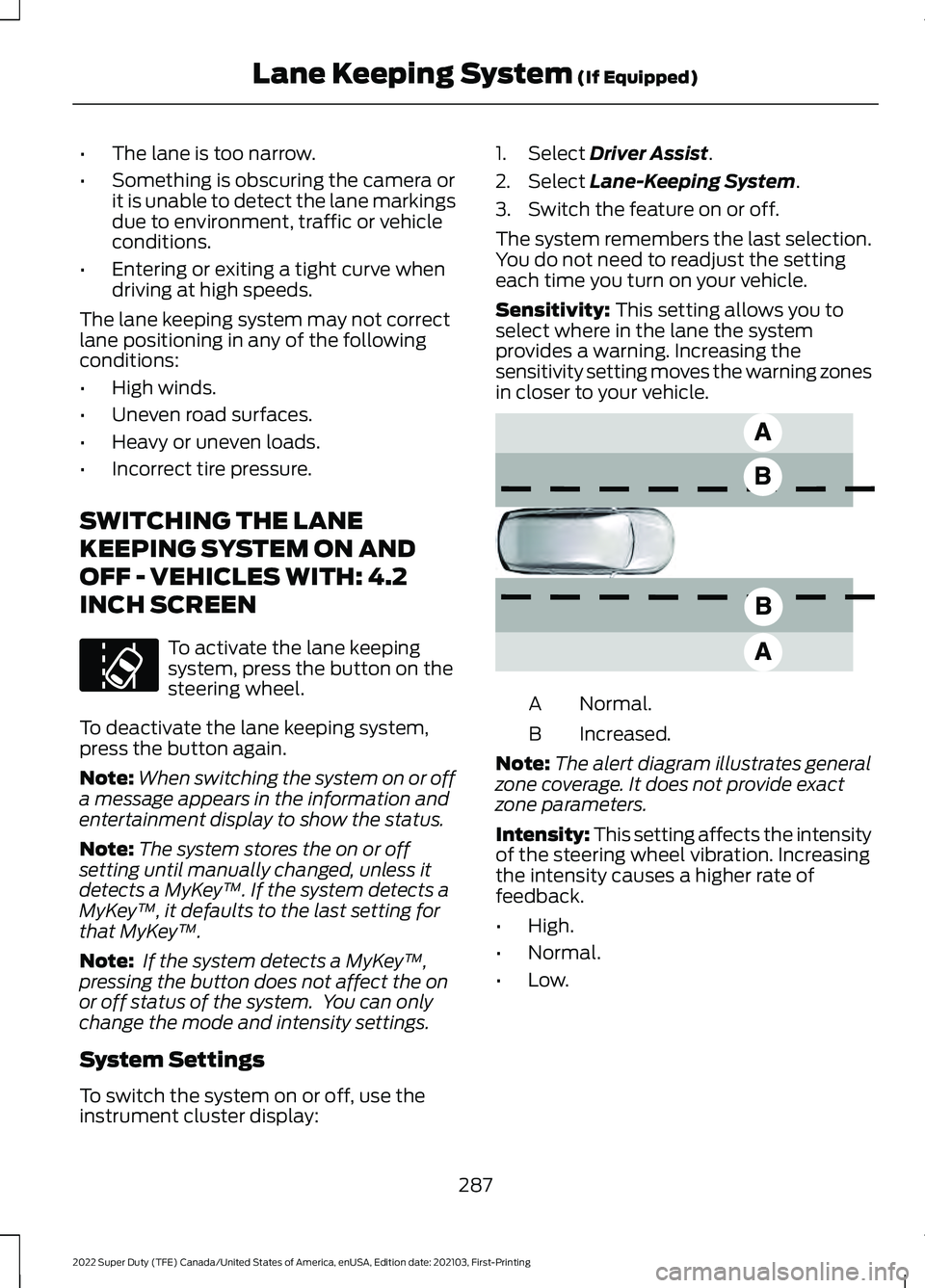
Sensitivity:
This setting allows you to
select where in the lane the system
provides a warning. Increasing the
sensitivity setting moves the warning zones
in closer to your vehicle. Normal.
A
Increased.
B
Note: The alert diagram illustrates general
zone coverage. It does not provide exact
zone parameters.
Intensity: This setting affects the intensity
of the steering wheel vibration. Increasing
the intensity causes a higher rate of
feedback.
• High.
• Normal.
• Low.
287
2022 Super Duty (TFE) Canada/United States of America, enUSA, Edition date: 202103, First-Printing Lane Keeping System
(If Equipped)E173233 E165517
Page 291 of 740
SWITCHING THE LANE
KEEPING SYSTEM ON AND
OFF - VEHICLES WITH: 8 INCH
SCREEN
To activate the lane keeping
system, press the button on the
steering wheel.
To deactivate the lane keeping system,
press the button again.
Note: When switching the system on or off
a message appears in the information and
entertainment display to show the status.
Note: The system stores the on or off
setting until manually changed, unless it
detects a MyKey ™. If the system detects a
MyKey ™, it defaults to the last setting for
that MyKey ™.
Note: If the system detects a MyKey ™,
pressing the button does not affect the on
or off status of the system. You can only
change the mode and intensity settings.
System Settings
To switch the system on or off, use the
instrument cluster display:
1. Select Driver Assist.
2. Select
Lane-Keeping System.
3. Switch the feature on or off.
The system remembers the last selection.
You do not need to readjust the setting
each time you turn on your vehicle.
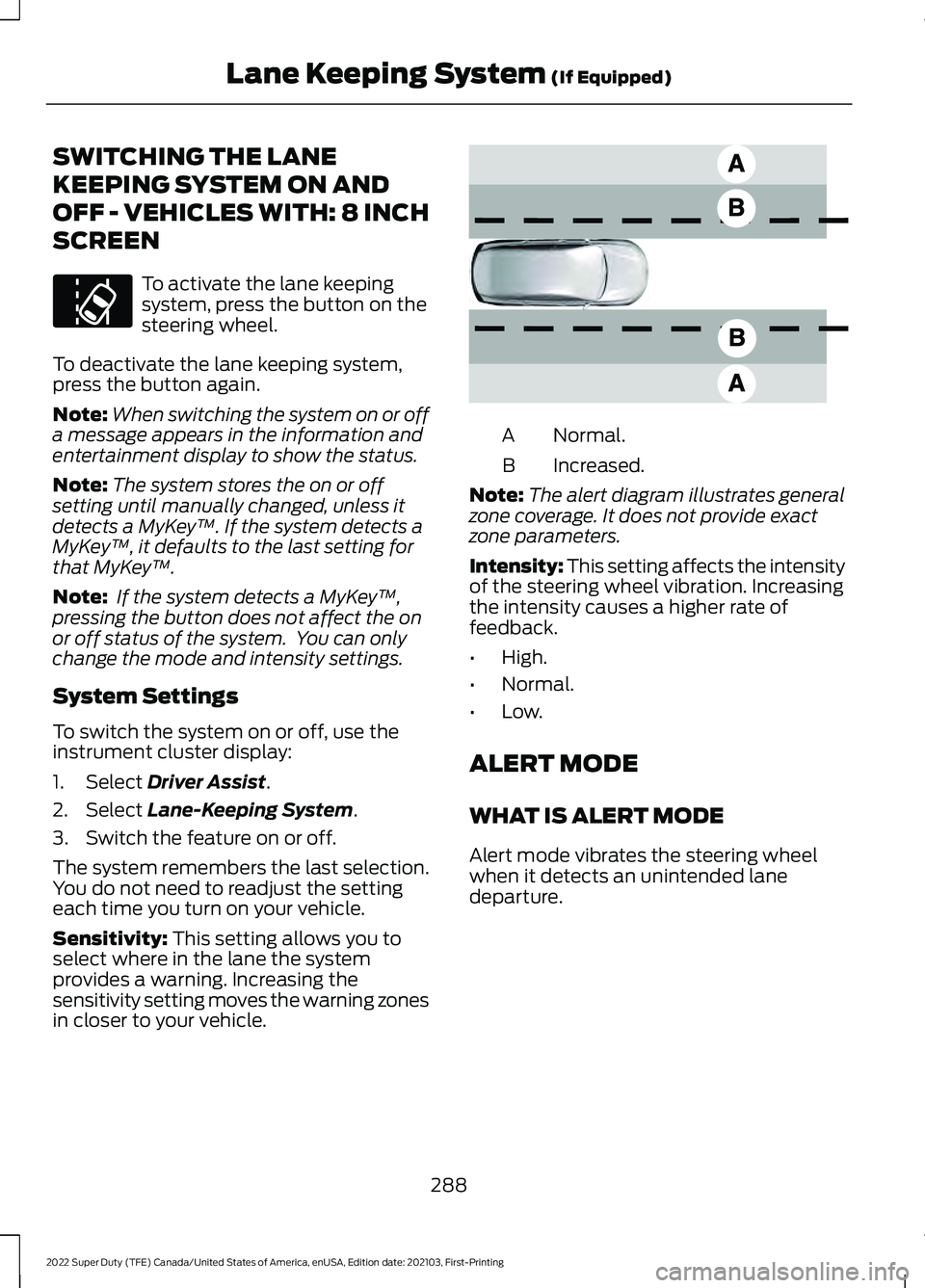
Sensitivity:
This setting allows you to
select where in the lane the system
provides a warning. Increasing the
sensitivity setting moves the warning zones
in closer to your vehicle. Normal.
A
Increased.
B
Note: The alert diagram illustrates general
zone coverage. It does not provide exact
zone parameters.
Intensity: This setting affects the intensity
of the steering wheel vibration. Increasing
the intensity causes a higher rate of
feedback.
• High.
• Normal.
• Low.
ALERT MODE
WHAT IS ALERT MODE
Alert mode vibrates the steering wheel
when it detects an unintended lane
departure.
288
2022 Super Duty (TFE) Canada/United States of America, enUSA, Edition date: 202103, First-Printing Lane Keeping System
(If Equipped)E173233 E165517
Page 292 of 740
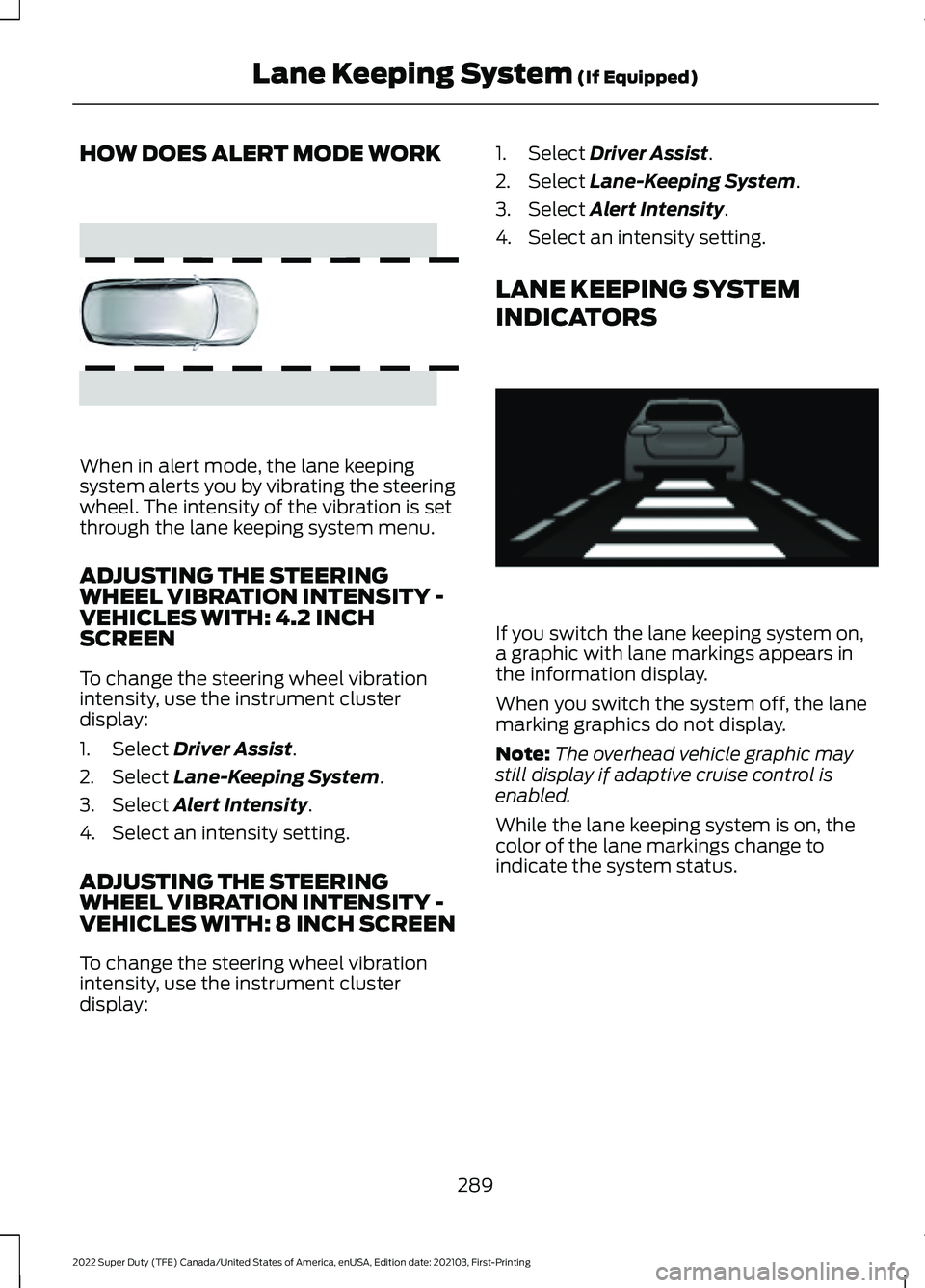
HOW DOES ALERT MODE WORK
When in alert mode, the lane keeping
system alerts you by vibrating the steering
wheel. The intensity of the vibration is set
through the lane keeping system menu.
ADJUSTING THE STEERING
WHEEL VIBRATION INTENSITY -
VEHICLES WITH: 4.2 INCH
SCREEN
To change the steering wheel vibration
intensity, use the instrument cluster
display:
1. Select Driver Assist.
2. Select
Lane-Keeping System.
3. Select
Alert Intensity.
4. Select an intensity setting.
ADJUSTING THE STEERING
WHEEL VIBRATION INTENSITY -
VEHICLES WITH: 8 INCH SCREEN
To change the steering wheel vibration
intensity, use the instrument cluster
display: 1. Select
Driver Assist.
2. Select
Lane-Keeping System.
3. Select
Alert Intensity.
4. Select an intensity setting.
LANE KEEPING SYSTEM
INDICATORS If you switch the lane keeping system on,
a graphic with lane markings appears in
the information display.
When you switch the system off, the lane
marking graphics do not display.
Note:
The overhead vehicle graphic may
still display if adaptive cruise control is
enabled.
While the lane keeping system is on, the
color of the lane markings change to
indicate the system status.
289
2022 Super Duty (TFE) Canada/United States of America, enUSA, Edition date: 202103, First-Printing Lane Keeping System
(If Equipped)E165515 E233874
Page 293 of 740
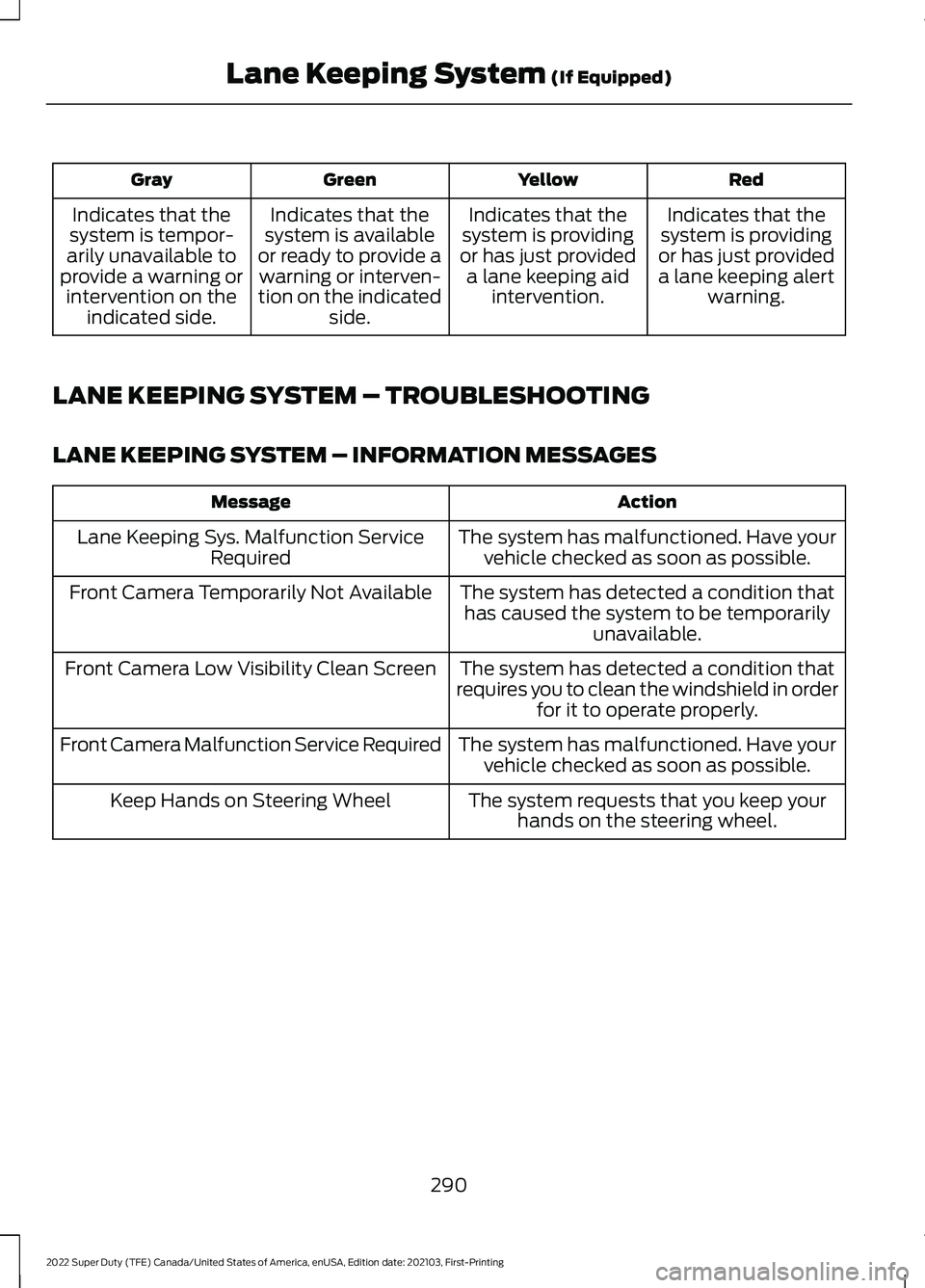
Red
Yellow
Green
Gray
Indicates that the
system is providing
or has just provided a lane keeping alert warning.
Indicates that the
system is providing
or has just provided a lane keeping aid intervention.
Indicates that the
system is available
or ready to provide a warning or interven-
tion on the indicated side.
Indicates that the
system is tempor-
arily unavailable to
provide a warning or intervention on the indicated side.
LANE KEEPING SYSTEM – TROUBLESHOOTING
LANE KEEPING SYSTEM – INFORMATION MESSAGES Action
Message
The system has malfunctioned. Have yourvehicle checked as soon as possible.
Lane Keeping Sys. Malfunction Service
Required
The system has detected a condition thathas caused the system to be temporarily unavailable.
Front Camera Temporarily Not Available
The system has detected a condition that
requires you to clean the windshield in order for it to operate properly.
Front Camera Low Visibility Clean Screen
The system has malfunctioned. Have yourvehicle checked as soon as possible.
Front Camera Malfunction Service Required
The system requests that you keep yourhands on the steering wheel.
Keep Hands on Steering Wheel
290
2022 Super Duty (TFE) Canada/United States of America, enUSA, Edition date: 202103, First-Printing Lane Keeping System (If Equipped)
Page 304 of 740
WHAT IS PRE-COLLISION
ASSIST
Pre-collision assist detects and warns of
approaching hazards in the roadway. If
your vehicle is rapidly approaching another
stationary vehicle, a vehicle traveling in the
same direction as yours, or a pedestrian
within your driving path, the system
provides multiple levels of assistance to
help avoid a collision.
HOW DOES PRE-COLLISION
ASSIST WORK
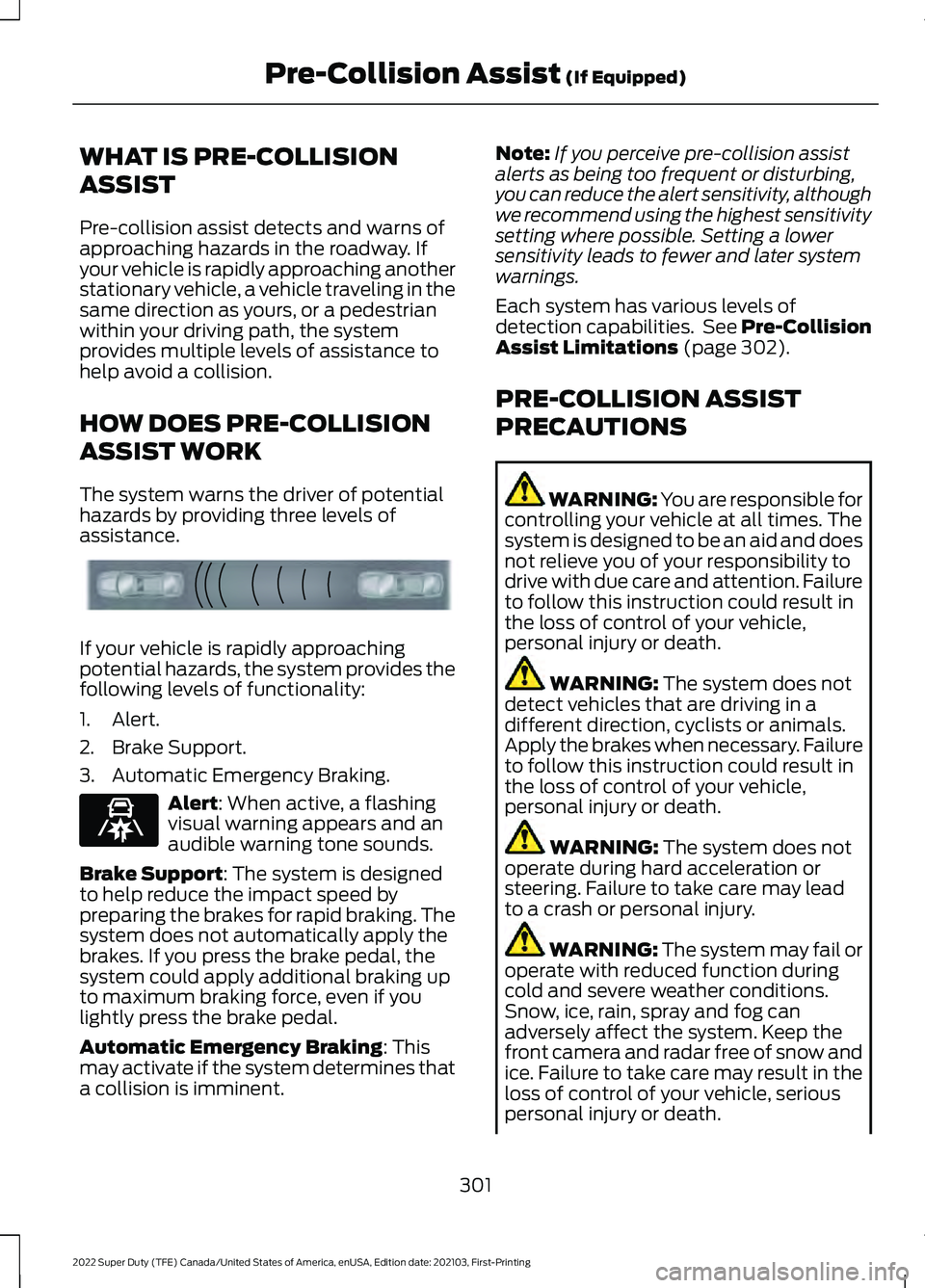
The system warns the driver of potential
hazards by providing three levels of
assistance.
If your vehicle is rapidly approaching
potential hazards, the system provides the
following levels of functionality:
1. Alert.
2. Brake Support.
3. Automatic Emergency Braking.
Alert: When active, a flashing
visual warning appears and an
audible warning tone sounds.
Brake Support
: The system is designed
to help reduce the impact speed by
preparing the brakes for rapid braking. The
system does not automatically apply the
brakes. If you press the brake pedal, the
system could apply additional braking up
to maximum braking force, even if you
lightly press the brake pedal.
Automatic Emergency Braking
: This
may activate if the system determines that
a collision is imminent. Note:
If you perceive pre-collision assist
alerts as being too frequent or disturbing,
you can reduce the alert sensitivity, although
we recommend using the highest sensitivity
setting where possible. Setting a lower
sensitivity leads to fewer and later system
warnings.
Each system has various levels of
detection capabilities. See Pre-Collision
Assist Limitations
(page 302).
PRE-COLLISION ASSIST
PRECAUTIONS WARNING: You are responsible for
controlling your vehicle at all times. The
system is designed to be an aid and does
not relieve you of your responsibility to
drive with due care and attention. Failure
to follow this instruction could result in
the loss of control of your vehicle,
personal injury or death. WARNING:
The system does not
detect vehicles that are driving in a
different direction, cyclists or animals.
Apply the brakes when necessary. Failure
to follow this instruction could result in
the loss of control of your vehicle,
personal injury or death. WARNING:
The system does not
operate during hard acceleration or
steering. Failure to take care may lead
to a crash or personal injury. WARNING: The system may fail or
operate with reduced function during
cold and severe weather conditions.
Snow, ice, rain, spray and fog can
adversely affect the system. Keep the
front camera and radar free of snow and
ice. Failure to take care may result in the
loss of control of your vehicle, serious
personal injury or death.
301
2022 Super Duty (TFE) Canada/United States of America, enUSA, Edition date: 202103, First-Printing Pre-Collision Assist
(If Equipped)E156130 E329466
Page 314 of 740
LOAD CARRYING
PRECAUTIONS
Keep your loaded vehicle weight
within its design rating capability,
with or without a trailer. Properly
loading your vehicle provides
maximum return of vehicle design
performance. Before you load your
vehicle, become familiar with the
following terms for determining
your vehicle
’s weight rating, with
or without a trailer, from the
vehicle ’s Tire and Loading
Information label or Safety
Compliance Certification label. WARNING: Vehicles with
a higher center of gravity (utility
and four-wheel drive vehicles)
handle differently than vehicles
with a lower center of gravity
(passenger cars). Avoid sharp
turns, excessive speed and
abrupt steering in these vehicles.
Failure to drive cautiously
increases the risk of losing
control of your vehicle, vehicle
rollover, personal injury and
death. WARNING:
The
appropriate loading capacity of
your vehicle can be limited either
by volume capacity (how much
space is available) or by payload
capacity (how much weight the
vehicle should carry). Once you
have reached the maximum payload of your vehicle, do not
add more cargo, even if there is
space available. Overloading or
improperly loading your vehicle
can contribute to loss of vehicle
control and vehicle rollover.
WARNING:
Exceeding the
Safety Compliance Certification
label vehicle weight limits can
adversely affect the
performance and handling of
your vehicle, cause vehicle
damage and can result in the
loss of control of your vehicle,
serious personal injury or death. WARNING:
Do not use
replacement tires with lower
load carrying capacities than the
original tires because they may
lower your vehicle's GVWR and
GAWR limitations. Replacement
tires with a higher limit than the
original tires do not increase the
GVWR and GAWR limitations. WARNING:
Do not exceed
the GVWR or the GAWR
specified on the certification
label. WARNING: Exceeding any
vehicle weight rating can
adversely affect the
performance and handling of
your vehicle, cause vehicle
damage and can result in the
loss of control of your vehicle,
serious personal injury or death.
311
2022 Super Duty (TFE) Canada/United States of America, enUSA, Edition date: 202103, First-Printing Load Carrying
Page 333 of 740
Your vehicle may have a temporary or
conventional spare tire. A temporary spare
tire is different in diameter or width,
tread-type, or is from a different
manufacturer than the road tires on your
vehicle. Consult information on the tire
label or Safety Compliance label for
limitations when using.
When towing a trailer:
•
Obey country specific regulations for
towing a trailer.
• Do not drive faster than 70 mph
(113 km/h) during the first 500 mi
(800 km).
• Do not make full-throttle starts.
• Check your hitch, electrical connections
and trailer wheel lug nuts thoroughly
after you have traveled 50 mi (80 km).
• When stopped in congested or heavy
traffic during hot weather, place the
transmission in park (P) to aid engine
and transmission cooling and to help
A/C performance.
• Turn off the speed control with heavy
loads or in hilly terrain. The speed
control may turn off when you are
towing on long, steep slopes.
• Shift to a lower gear when driving down
a long or steep hill. Do not continuously
apply the brakes, as they may overheat
and become less effective.
• If your transmission has Grade Assist
or Tow/Haul, use this feature when
towing. This provides engine braking
and helps eliminate excessive
transmission shifting for optimum fuel
economy and transmission cooling.
• If your vehicle has AdvanceTrac with
roll stability control, this system may
turn on during typical cornering
maneuvers with a heavily loaded trailer.
This is normal. Turning the corner at a
slower speed when towing may reduce
this tendency. •
Allow more distance for stopping with
a trailer attached. Anticipate stops and
gradually brake.
• Avoid parking on a slope. However, if
you must park on a slope, turn the
steering wheel to point your vehicle
tires away from traffic flow, set the
parking brake, place the transmission
in park (P) and place wheel chocks in
front and back of the trailer wheels.
Note: Chocks are not included with your
vehicle.
LAUNCHING OR RETRIEVING
A BOAT OR PERSONAL
WATERCRAFT
When backing down a ramp during boat
launching or retrieval:
• Do not allow the static water level to
rise above the bottom edge of the rear
bumper.
• Do not allow waves to break higher
than
6 in (15 cm) above the bottom
edge of the rear bumper.
Exceeding
6 in (15 cm) could allow water
to enter vehicle components, causing
internal damage to the components and
affecting driveability, emissions and
reliability.
Note: Replace the rear axle lubricant
anytime the rear axle has been submerged
in water.
Note: Disconnect the trailer wiring
connector before backing the trailer into the
water.
Note: Reconnect the trailer wiring
connector after removing the trailer from
the water.
330
2022 Super Duty (TFE) Canada/United States of America, enUSA, Edition date: 202103, First-Printing Towing a Trailer
Page 339 of 740
Selecting the Trailer Brake Type
Use the instrument cluster display controls
on the steering wheel to select the correct
setting for your trailer.
Note:
Select Default
Electric/Surge/None if the trailer has
electric, surge or no brakes. Selecting the Trailer Brake Effort
Select the correct setting for your trailer.
Note:
Select a different setting if your
trailer's brakes require more initial voltage,
or you prefer more aggressive trailer braking.
INTEGRATED TRAILER BRAKE CONTROLLER –
TROUBLESHOOTING
INTEGRATED TRAILER BRAKE CONTROLLER – INFORMATION
MESSAGES Action
Message
The system detects a correct trailer
connection during a given ignition cycle.
Trailer Connected
The system detects the trailer wiring
connection is disconnected, during a given ignition cycle.
Trailer Disconnected
The system detects an electrical fault inthe trailer brake circuit. If this message
appears without a trailer attached, see your authorized dealer. If a trailer is attached, inspect and repair the trailer wiring.
Trailer Wiring Fault
Displays the current gain setting for thetrailer brake.
Trailer Brake Gain: {trailer gain value:#0.0}
Displays the current gain setting for the
trailer brake when you do not have a trailer connected.
Trailer Brake Gain: {trailer gain value:#0.0}
No Trailer
336
2022 Super Duty (TFE) Canada/United States of America, enUSA, Edition date: 202103, First-Printing Integrated Trailer Brake Controller
(If Equipped)
Page 343 of 740
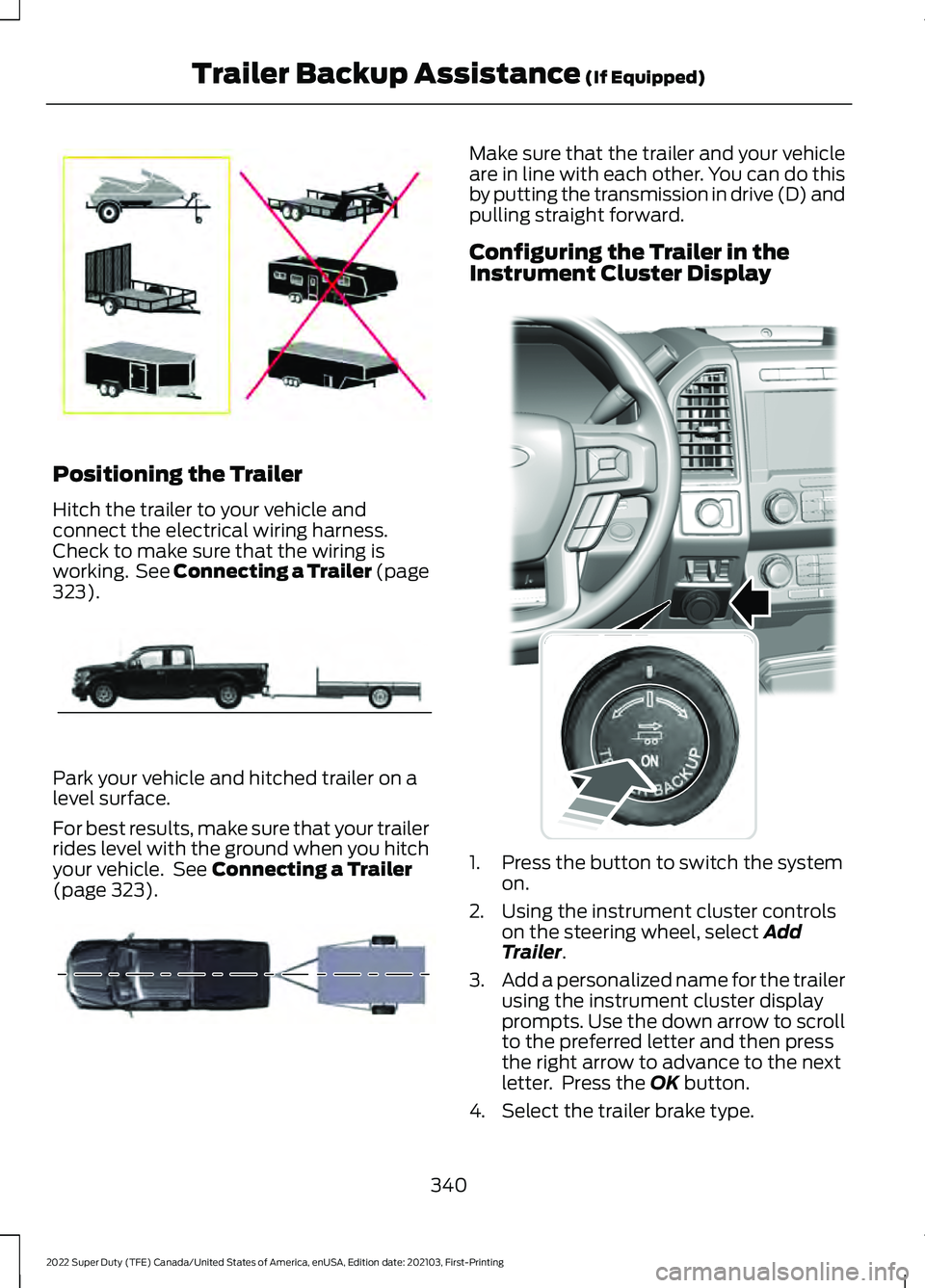
Positioning the Trailer
Hitch the trailer to your vehicle and
connect the electrical wiring harness.
Check to make sure that the wiring is
working. See Connecting a Trailer (page
323).
Park your vehicle and hitched trailer on a
level surface.
For best results, make sure that your trailer
rides level with the ground when you hitch
your vehicle. See
Connecting a Trailer
(page 323). Make sure that the trailer and your vehicle
are in line with each other. You can do this
by putting the transmission in drive (D) and
pulling straight forward.
Configuring the Trailer in the
Instrument Cluster Display
1. Press the button to switch the system
on.
2. Using the instrument cluster controls on the steering wheel, select
Add
Trailer.
3. Add a personalized name for the trailer
using the instrument cluster display
prompts. Use the down arrow to scroll
to the preferred letter and then press
the right arrow to advance to the next
letter. Press the
OK button.
4. Select the trailer brake type.
340
2022 Super Duty (TFE) Canada/United States of America, enUSA, Edition date: 202103, First-Printing Trailer Backup Assistance
(If Equipped)E209766 E209759 E209760 E318266