power steering FORD F-550 2018 Owner's Guide
[x] Cancel search | Manufacturer: FORD, Model Year: 2018, Model line: F-550, Model: FORD F-550 2018Pages: 660, PDF Size: 11.64 MB
Page 432 of 660
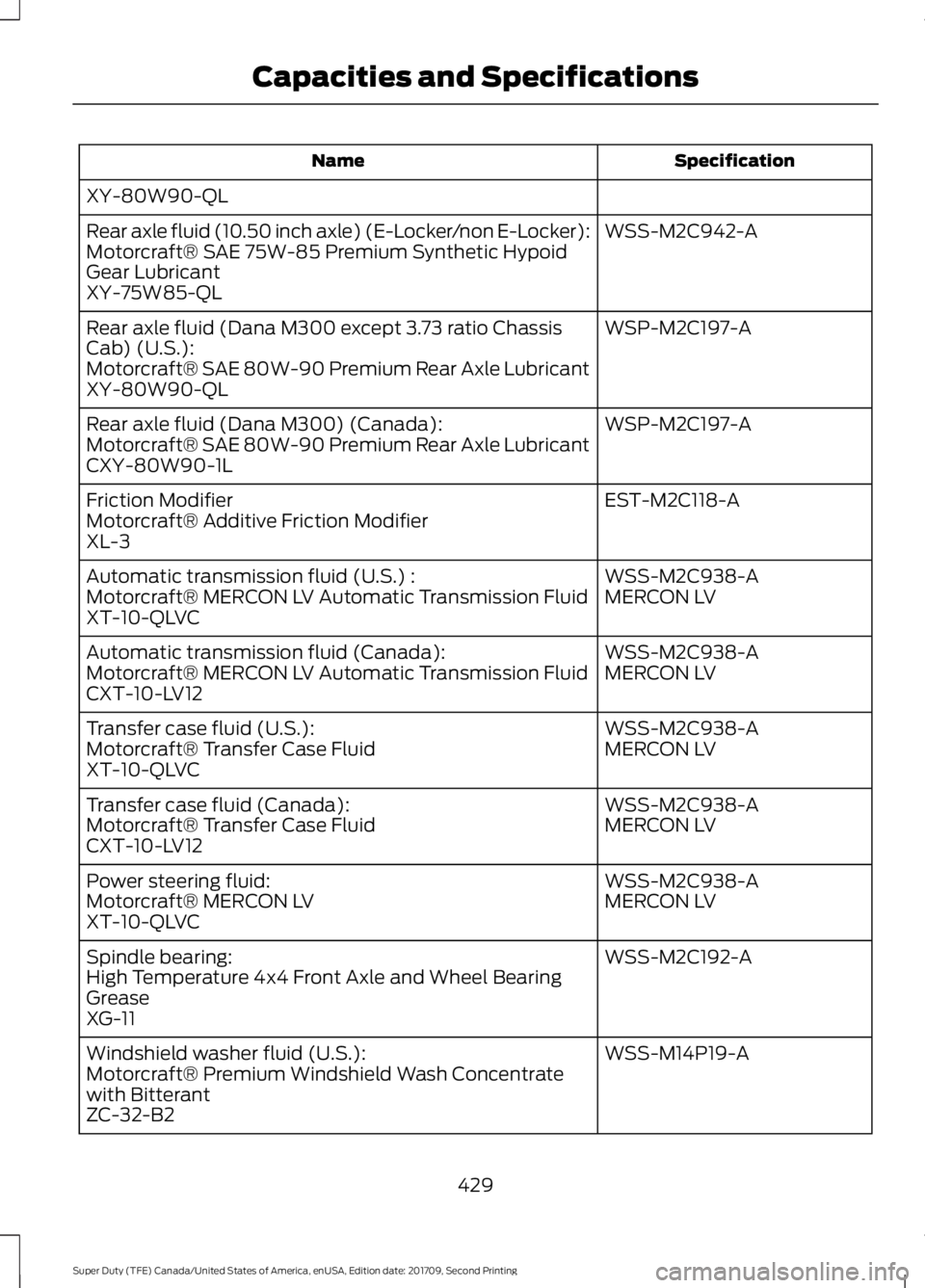
Specification
Name
XY-80W90-QL WSS-M2C942-A
Rear axle fluid (10.50 inch axle) (E-Locker/non E-Locker):
Motorcraft® SAE 75W-85 Premium Synthetic Hypoid
Gear Lubricant
XY-75W85-QL
WSP-M2C197-A
Rear axle fluid (Dana M300 except 3.73 ratio Chassis
Cab) (U.S.):
Motorcraft® SAE 80W-90 Premium Rear Axle Lubricant
XY-80W90-QL
WSP-M2C197-A
Rear axle fluid (Dana M300) (Canada):
Motorcraft® SAE 80W-90 Premium Rear Axle Lubricant
CXY-80W90-1L
EST-M2C118-A
Friction Modifier
Motorcraft® Additive Friction Modifier
XL-3
WSS-M2C938-A
Automatic transmission fluid (U.S.) :
MERCON LV
Motorcraft® MERCON LV Automatic Transmission Fluid
XT-10-QLVC
WSS-M2C938-A
Automatic transmission fluid (Canada):
MERCON LV
Motorcraft® MERCON LV Automatic Transmission Fluid
CXT-10-LV12
WSS-M2C938-A
Transfer case fluid (U.S.):
MERCON LV
Motorcraft® Transfer Case Fluid
XT-10-QLVC
WSS-M2C938-A
Transfer case fluid (Canada):
MERCON LV
Motorcraft® Transfer Case Fluid
CXT-10-LV12
WSS-M2C938-A
Power steering fluid:
MERCON LV
Motorcraft® MERCON LV
XT-10-QLVC
WSS-M2C192-A
Spindle bearing:
High Temperature 4x4 Front Axle and Wheel Bearing
Grease
XG-11
WSS-M14P19-A
Windshield washer fluid (U.S.):
Motorcraft® Premium Windshield Wash Concentrate
with Bitterant
ZC-32-B2
429
Super Duty (TFE) Canada/United States of America, enUSA, Edition date: 201709, Second Printing Capacities and Specifications
Page 439 of 660
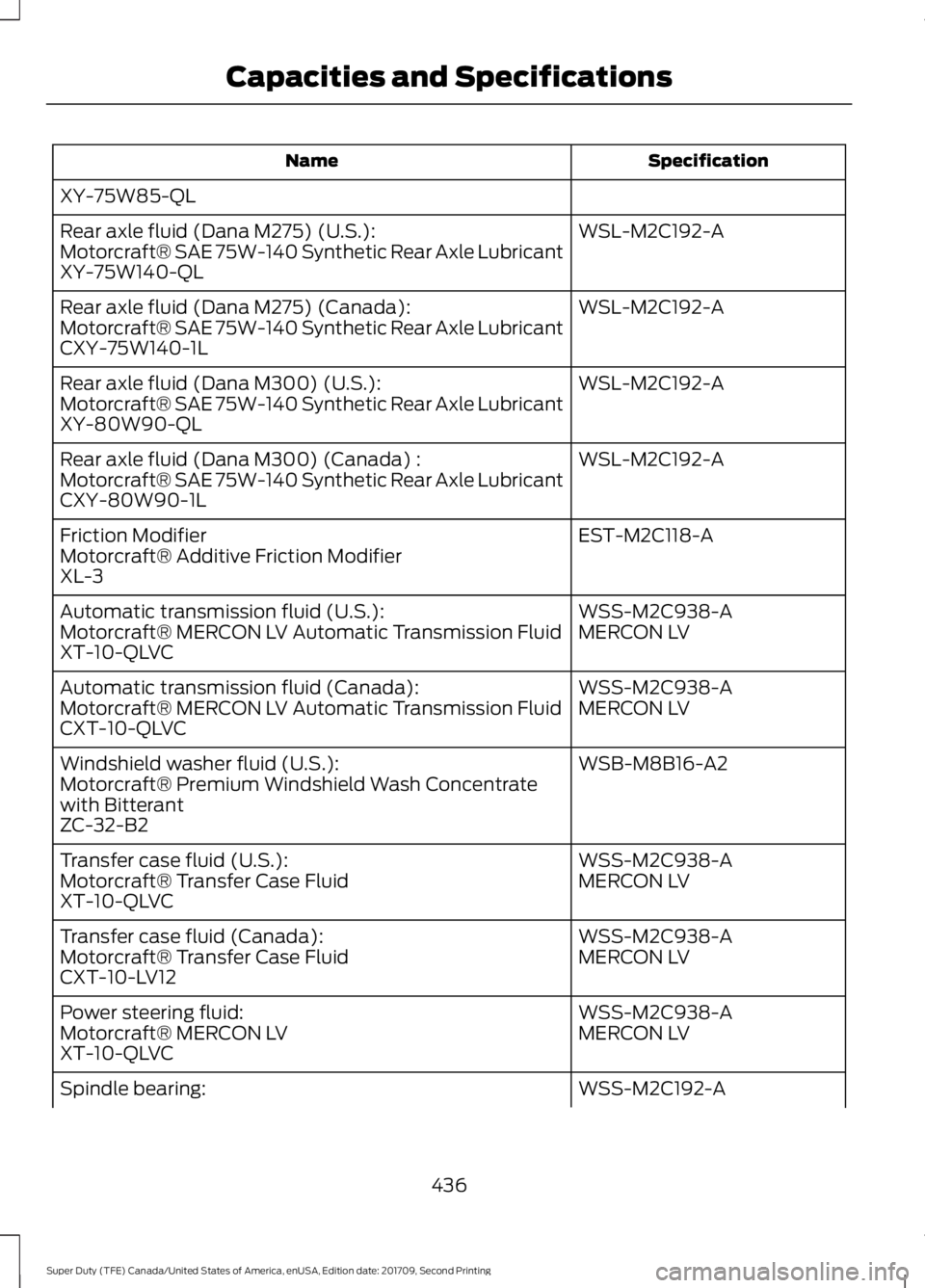
Specification
Name
XY-75W85-QL WSL-M2C192-A
Rear axle fluid (Dana M275) (U.S.):
Motorcraft® SAE 75W-140 Synthetic Rear Axle Lubricant
XY-75W140-QL
WSL-M2C192-A
Rear axle fluid (Dana M275) (Canada):
Motorcraft® SAE 75W-140 Synthetic Rear Axle Lubricant
CXY-75W140-1L
WSL-M2C192-A
Rear axle fluid (Dana M300) (U.S.):
Motorcraft® SAE 75W-140 Synthetic Rear Axle Lubricant
XY-80W90-QL
WSL-M2C192-A
Rear axle fluid (Dana M300) (Canada) :
Motorcraft® SAE 75W-140 Synthetic Rear Axle Lubricant
CXY-80W90-1L
EST-M2C118-A
Friction Modifier
Motorcraft® Additive Friction Modifier
XL-3
WSS-M2C938-A
Automatic transmission fluid (U.S.):
MERCON LV
Motorcraft® MERCON LV Automatic Transmission Fluid
XT-10-QLVC
WSS-M2C938-A
Automatic transmission fluid (Canada):
MERCON LV
Motorcraft® MERCON LV Automatic Transmission Fluid
CXT-10-QLVC
WSB-M8B16-A2
Windshield washer fluid (U.S.):
Motorcraft® Premium Windshield Wash Concentrate
with Bitterant
ZC-32-B2
WSS-M2C938-A
Transfer case fluid (U.S.):
MERCON LV
Motorcraft® Transfer Case Fluid
XT-10-QLVC
WSS-M2C938-A
Transfer case fluid (Canada):
MERCON LV
Motorcraft® Transfer Case Fluid
CXT-10-LV12
WSS-M2C938-A
Power steering fluid:
MERCON LV
Motorcraft® MERCON LV
XT-10-QLVC
WSS-M2C192-A
Spindle bearing:
436
Super Duty (TFE) Canada/United States of America, enUSA, Edition date: 201709, Second Printing Capacities and Specifications
Page 445 of 660
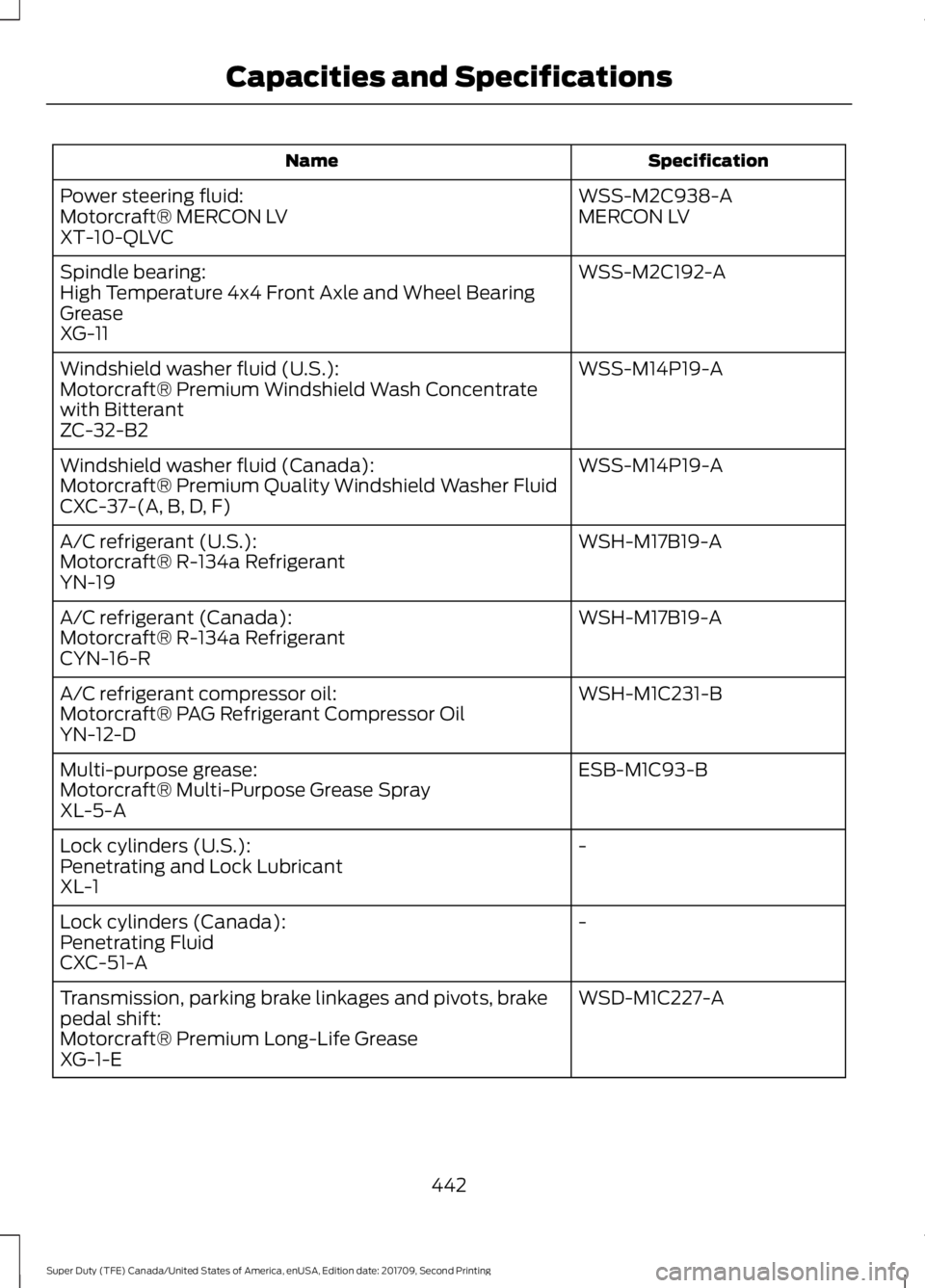
Specification
Name
WSS-M2C938-A
Power steering fluid:
MERCON LV
Motorcraft® MERCON LV
XT-10-QLVC
WSS-M2C192-A
Spindle bearing:
High Temperature 4x4 Front Axle and Wheel Bearing
Grease
XG-11
WSS-M14P19-A
Windshield washer fluid (U.S.):
Motorcraft® Premium Windshield Wash Concentrate
with Bitterant
ZC-32-B2
WSS-M14P19-A
Windshield washer fluid (Canada):
Motorcraft® Premium Quality Windshield Washer Fluid
CXC-37-(A, B, D, F)
WSH-M17B19-A
A/C refrigerant (U.S.):
Motorcraft® R-134a Refrigerant
YN-19
WSH-M17B19-A
A/C refrigerant (Canada):
Motorcraft® R-134a Refrigerant
CYN-16-R
WSH-M1C231-B
A/C refrigerant compressor oil:
Motorcraft® PAG Refrigerant Compressor Oil
YN-12-D
ESB-M1C93-B
Multi-purpose grease:
Motorcraft® Multi-Purpose Grease Spray
XL-5-A
-
Lock cylinders (U.S.):
Penetrating and Lock Lubricant
XL-1
-
Lock cylinders (Canada):
Penetrating Fluid
CXC-51-A
WSD-M1C227-A
Transmission, parking brake linkages and pivots, brake
pedal shift:
Motorcraft® Premium Long-Life Grease
XG-1-E
442
Super Duty (TFE) Canada/United States of America, enUSA, Edition date: 201709, Second Printing Capacities and Specifications
Page 480 of 660
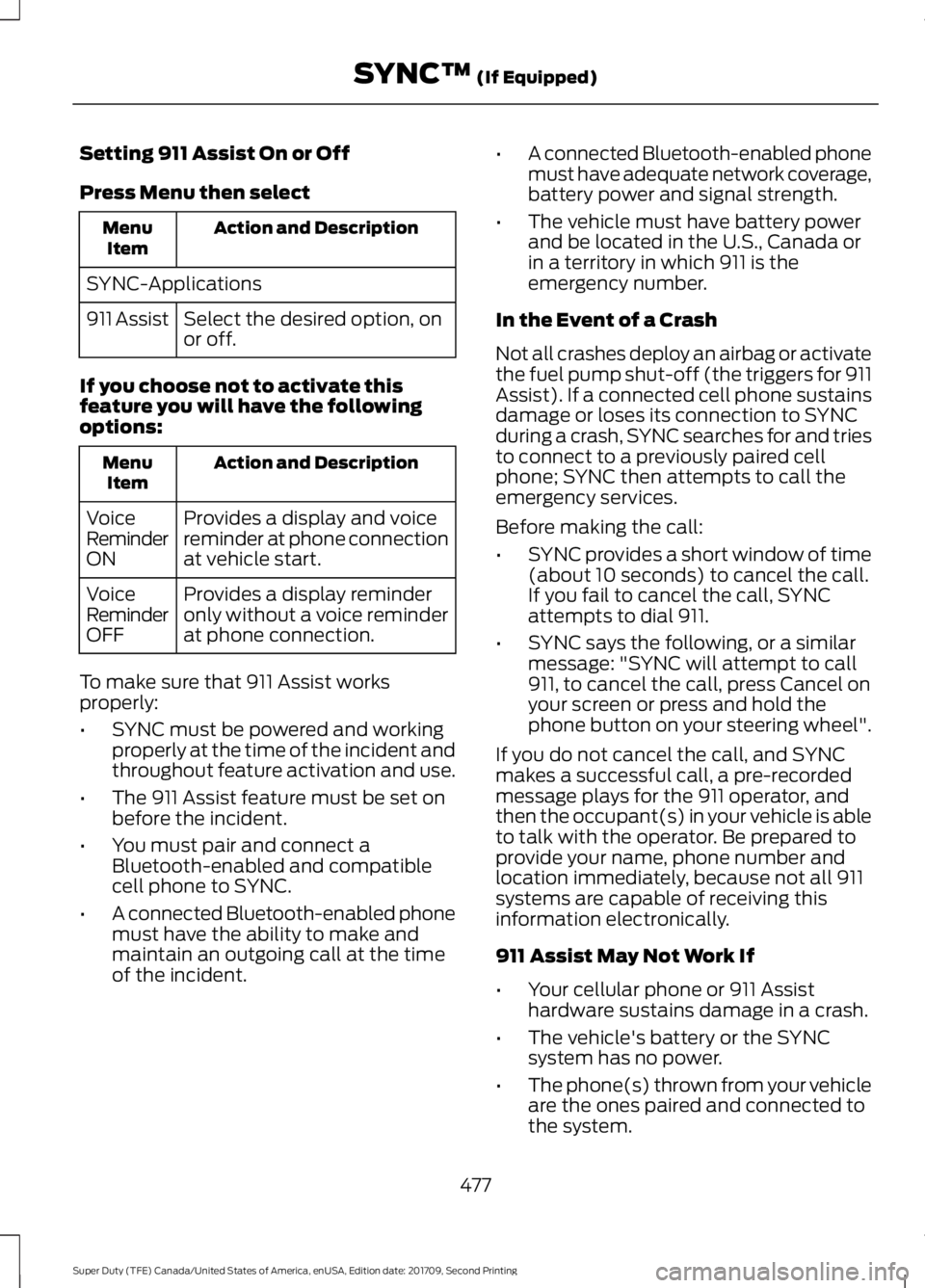
Setting 911 Assist On or Off
Press Menu then select
Action and Description
Menu
Item
SYNC-Applications Select the desired option, on
or off.
911 Assist
If you choose not to activate this
feature you will have the following
options: Action and Description
Menu
Item
Provides a display and voice
reminder at phone connection
at vehicle start.
Voice
Reminder
ON
Provides a display reminder
only without a voice reminder
at phone connection.
Voice
Reminder
OFF
To make sure that 911 Assist works
properly:
• SYNC must be powered and working
properly at the time of the incident and
throughout feature activation and use.
• The 911 Assist feature must be set on
before the incident.
• You must pair and connect a
Bluetooth-enabled and compatible
cell phone to SYNC.
• A connected Bluetooth-enabled phone
must have the ability to make and
maintain an outgoing call at the time
of the incident. •
A connected Bluetooth-enabled phone
must have adequate network coverage,
battery power and signal strength.
• The vehicle must have battery power
and be located in the U.S., Canada or
in a territory in which 911 is the
emergency number.
In the Event of a Crash
Not all crashes deploy an airbag or activate
the fuel pump shut-off (the triggers for 911
Assist). If a connected cell phone sustains
damage or loses its connection to SYNC
during a crash, SYNC searches for and tries
to connect to a previously paired cell
phone; SYNC then attempts to call the
emergency services.
Before making the call:
• SYNC provides a short window of time
(about 10 seconds) to cancel the call.
If you fail to cancel the call, SYNC
attempts to dial 911.
• SYNC says the following, or a similar
message: "SYNC will attempt to call
911, to cancel the call, press Cancel on
your screen or press and hold the
phone button on your steering wheel".
If you do not cancel the call, and SYNC
makes a successful call, a pre-recorded
message plays for the 911 operator, and
then the occupant(s) in your vehicle is able
to talk with the operator. Be prepared to
provide your name, phone number and
location immediately, because not all 911
systems are capable of receiving this
information electronically.
911 Assist May Not Work If
• Your cellular phone or 911 Assist
hardware sustains damage in a crash.
• The vehicle's battery or the SYNC
system has no power.
• The phone(s) thrown from your vehicle
are the ones paired and connected to
the system.
477
Super Duty (TFE) Canada/United States of America, enUSA, Edition date: 201709, Second Printing SYNC™ (If Equipped)
Page 506 of 660
SEEK PREVIOUS:
•
While in radio mode, press to seek
between memory presets.
• While in USB, Bluetooth Audio or CD
mode, press to seek between songs or
press and hold to fast seek.
PHONE ACCEPT: Press to answer a call
or switch between calls.
PHONE REJECT:
Press to end a call or
reject an incoming call.
Note: On some models, SEEK NEXT
may
be combined with PHONE REJECT and
SEEK PREVIOUS may be combined with
PHONE ACCEPT.
M:
Touch the control repeatedly to switch
between media sources (modes).
See
Steering Wheel (page 82).
Using Your Bezel Controls
Depending on your vehicle and option
package, you may also have these controls
on your instrument panel:
• Power:
Switch the audio system on
and off.
• VOL:
Control the volume of playing
audio.
• Seek
and Tune: Use as you normally
would in audio modes.
• Eject:
Eject a CD from the audio
system.
• SOURCE
or MEDIA: Press repeatedly
to advance through available media
modes.
• SOUND:
Press to access the Sound
menu where you can adjust sound and
other audio settings.
• 1-6:
Press and hold to store or press to
select an AM, FM or SIRIUS memory
preset. See Audio System (page 445). •
DISP:
Switch the display on or off. You
can also touch the screen to switch the
display back on.
• Temperature, fan and climate
control buttons:
Control the
temperature, fan speed or settings of
the climate control system. See
Climate Control
(page 146).
911 Assist WARNINGS
Unless the 911 Assist setting is set on
before a crash, the system will not
dial for help which could delay
response time, potentially increasing the
risk of serious injury or death after a crash. Do not wait for 911 Assist to make an
emergency call if you can do it
yourself. Dial emergency services
immediately to avoid delayed response
time which could increase the risk of
serious injury or death after a crash. If you
do not hear 911 Assist within five seconds
of the crash, the system or phone may be
damaged or non-functional. Always place your phone in a secure
location in your vehicle so it does not
become a projectile or get damaged
in a crash. Failure to do so may cause
serious injury to someone or damage the
phone which could prevent 911 Assist from
working properly. Note:
The SYNC 911 Assist feature must be
set on before the incident.
Note: The SYNC 911 Assist feature only
operates in the U.S., Canada or in a territory
in which 911 is the emergency number.
Note: Before setting this feature on, make
sure that you read the 911 Assist Privacy
Notice later in this section for important
information.
503
Super Duty (TFE) Canada/United States of America, enUSA, Edition date: 201709, Second Printing SYNC™ 3
(If Equipped)
Page 507 of 660
Note:
If any user sets 911 Assist to on or off,
that setting applies for all paired phones. If
911 Assist is switched off and the phone is
connected to SYNC, an icon displays on the
status bar.
Note: Every phone operates differently.
While SYNC 911 Assist works with most
cellular phones, some may have trouble
using this feature.
If a crash deploys an airbag (excluding
knee airbags and rear inflatable safety
belts [if equipped]) or activates the fuel
pump shut-off, your SYNC-equipped
vehicle may be able to contact emergency
services by dialing 911 through a paired and
connected Bluetooth-enabled phone. You
can learn more about the 911 Assist
feature, by visiting: Website
www.owner.ford.com
www.syncmyride.ca
www.syncmaroute.ca
See Supplementary Restraints System
(page 46). Important information about
airbag deployment is in this chapter.
See
Roadside Emergencies (page 303).
Important information about the fuel pump
shut-off is in this chapter.
To switch 911 Assist on and off please view
the settings information. See
Settings
(page 546).
To make sure that 911 Assist works
correctly:
• SYNC must be powered and working
properly at the time of the incident and
throughout feature activation and use.
• The 911 Assist feature must be set on
before the incident.
• You must pair and connect a
Bluetooth-enabled and compatible
cell phone to SYNC. •
A connected Bluetooth-enabled phone
must have the ability to make and
maintain an outgoing call at the time
of the incident.
• A connected Bluetooth-enabled phone
must have adequate network coverage,
battery power and signal strength.
• The vehicle must have battery power
and be located in the U.S., Canada or
in a territory in which 911 is the
emergency number.
In the Event of a Crash
Not all crashes will deploy an airbag or
activate the fuel pump shut-off (the
triggers for 911 Assist). If a connected cell
phone sustains damage or loses its
connection to SYNC during a crash, SYNC
will search for and try to connect to a
previously paired cell phone; SYNC will
then attempt to call the emergency
services.
Before making the call:
• SYNC provides a short window of time
(about 10 seconds) to cancel the call.
If you fail to cancel the call, SYNC
attempts to dial 911.
• SYNC says the following, or a similar
message: "SYNC will attempt to call
911, to cancel the call, press Cancel on
your screen or press and hold the
phone button on your steering wheel."
If you do not cancel the call, and SYNC
makes a successful call, a pre-recorded
message plays for the 911 operator, and
then the occupant(s) in your vehicle is able
to talk with the operator. Be prepared to
provide your name, phone number and
location immediately, because not all 911
systems are capable of receiving this
information electronically.
504
Super Duty (TFE) Canada/United States of America, enUSA, Edition date: 201709, Second Printing SYNC™ 3
(If Equipped)
Page 531 of 660
Driver temperature: Touch up
or down to adjust the
temperature.
A
Heated steering wheel: Touch
this icon to switch the heated
steering wheel on and off. It
takes about 5 minutes to warm
the steering wheel to 74°F
(23°C) in temperatures as low
B
as -4°F (-22°C). The wheel
maintains an approximate
temperature of 90°F (32°C) and
operates independently from the
heated seats and other
climate-control functions. The
heating element is in between
the leather covering and foam
core to help provide maximum
heat without adversely affecting
the feel of the steering wheel.
Note:
This feature only
functions when you switch the
engine on.
Note: The heated steering wheel
may remain on after remote
starting the vehicle, based on
your remote start settings. The
heated steering wheel may also
turn on when you start your
vehicle, if it was on when you
switched your vehicle off.
Note:
For steering wheels with
wood trim, the heating feature
will not heat the wheel between
the 10 and 2 o'clock positions.
Defrost:
A pop up appears on
the screen to display the defrost
options.
C
MAX Defrost: Touch the button
to maximize defrosting. Air flows
through the windshield vents,
the fan automatically adjusts to
the highest speed and the driver
and passenger temperatures are set to HI. You can use this setting
to defog or clear a thin covering
of ice from the windshield. The
heated rear window also
automatically turns on when you
select MAX Defrost.
Defrost:
Distributes air through
the windshield defroster vents
and demister vents.
AUTO:
Touch the button to
switch on automatic operation.
Select the desired temperature
using the temperature control.
The system adjusts fan speed,
air distribution, air conditioning
operation, and selects outside
air or recirculated air to heat or
cool the vehicle in order to
maintain the desired
temperature.
D
Power:
Touch the button to
switch the system on and off.
Switching off the climate control
system prevents outside air from
entering the vehicle.
E
DUAL:
This button lights up
when the passenger controls are
active. To switch it off and link
the passenger temperature to
the driver temperature, touch the
DUAL button.
F
Note:
the passenger side
temperature and the DUAL
indication automatically turn on
when you or your passenger
adjust the passenger
temperature.
Passenger temperature:
Touch up or down to adjust the
temperature.
G
Fan speed:
Touch up or down
to increase or decrease the
volume of air that circulates in
your vehicle.
H
528
Super Duty (TFE) Canada/United States of America, enUSA, Edition date: 201709, Second Printing SYNC™ 3
(If Equipped)
Page 648 of 660
3
360 Degree Camera...................................239
Advanced Camera Views............................... 239
Auxiliary Camera................................................ 242
Camera Views..................................................... 239
Center High-Mount Stop Lamp Camera
.............................................................. 241
Front Camera...................................................... 240
Keep Out Zone................................................... 240
Side Camera......................................................... 241
4
4WD See: Four-Wheel Drive...................................... 214
A
A/C See: Climate Control......................................... 146
About This Manual
...........................................7
ABS See: Brakes........................................................... 225
ABS driving hints See: Hints on Driving With Anti-Lock
Brakes................................................................ 227
Accessories.....................................................574 Exterior style........................................................ 574
Interior style.......................................................... 574
Lifestyle.................................................................. 574
Peace of mind..................................................... 574
Accessories See: Replacement Parts
Recommendation............................................ 12
ACC See: Using Adaptive Cruise Control............244
Adjusting the Headlamps.........................355 Horizontal Aim Adjustment........................... 357
Vertical Aim Adjustment................................. 355
Adjusting the Pedals
....................................86
Adjusting the Steering Wheel - Vehicles With: Manual Adjustable Steering
Column............................................................82
Adjusting the Steering Wheel - Vehicles With: Power Adjustable Steering
Column............................................................82
End of Travel Position......................................... 83Airbag Disposal...............................................55
Air Conditioning
See: Climate Control......................................... 146
Air Filter See: Changing the Engine Air Filter - 6.2L/
6.8L.................................................................... 362
See: Changing the Engine Air Filter - 6.7L Diesel................................................................. 363
Alarm See: Anti-Theft Alarm........................................ 78
Ambient Lighting............................................97
Anti-Theft Alarm............................................78 Arming the Alarm................................................. 79
Disarming the Alarm........................................... 79
Using the System................................................. 79
Appendices...................................................609
Apps.................................................................543 ........................................................................\
.......... 543
SiriusXM Traffic and Travel Link................... 545
At a Glance
.........................................................17
Audible Warnings and Indicators.............112 Headlamps On Warning Chime...................... 112
Key in Ignition Warning Chime........................ 112
Parking Brake On Warning Chime.................112
Audio Control
...................................................83
Media........................................................................\
84
Seek, Next or Previous....................................... 84
Audio System
................................................445
General Information......................................... 445
Audio Unit - Vehicles With: AM/FM/CD/ SYNC.............................................................448
Menu Structure.................................................. 450
Audio Unit - Vehicles With: AM/FM/CD/ Touchscreen Display...............................453
Audio Unit - Vehicles With: AM/ FM..................................................................446
Autolamps........................................................90 Windshield Wiper Activated
Headlamps........................................................ 90
Automatic Climate Control.......................147
Automatic High Beam Control
..................92
Automatic High Beam Indicator..................... 93
Switching the System On and Off.................92
Automatic Transmission
..........................208
Brake-Shift Interlock........................................... 211
If Your Vehicle Gets Stuck In Mud or Snow................................................................... 212
645
Super Duty (TFE) Canada/United States of America, enUSA, Edition date: 201709, Second Printing Index
Page 654 of 660
Power Steering....................................................
142
Remote Start........................................................ 142
Seats........................................................................\
142
Starting System .................................................. 143
Tire Pressure Monitoring System.................. 143
Trailer....................................................................... 143
Installing Child Restraints...........................20 Child Seats.............................................................. 20
Combining Seatbelt and LATCH Lower Anchors for Attaching Child Safety
Seats.................................................................... 29
Front Seat Tether Strap Attachment (Regular Cab)................................................... 30
Rear Seat Tether Strap Attachment (Crew Cab and Super Cab)........................................ 31
Use of Inboard Lower Anchors from the Outboard Seating Positions (Center
Seating Use) .................................................... 28
Using Inflatable Seatbelts (Rear Seat Outboard Positions)...................................... 25
Using Lap and Shoulder Belts (Except Front Center Position of Super Cab and Crew
Cab)....................................................................... 21
Using Lap and Shoulder Belts (Front Center Position of Super Cab and Crew
Cab)...................................................................... 23
Using Lower Anchors and Tethers for CHildren (LATCH)............................................ 27
Using Tether Straps............................................. 29
Instrument Cluster.......................................105
Instrument Lighting Dimmer.....................90 Vehicles With Front Fog Lamps...................... 91
Vehicles Without Front Fog Lamps................91
Instrument Panel Overview.........................17
Interior Lamps.................................................94
Front Interior Lamps........................................... 94
Rear Interior Lamps............................................ 96
Interior Mirror
...................................................101
Automatic Dimming Mirror............................. 102
Manual Dimming Mirror.................................... 101
Introduction.........................................................7
J
Jump Starting the Vehicle........................305 Connecting the Jumper Cables.................... 305
Jump Starting..................................................... 306
Preparing Your Vehicle.................................... 305Removing the Jumper Cables......................
306
K
Keyless Entry
....................................................70
SECURICODE™ KEYLESS ENTRY
KEYPAD............................................................... 70
Keyless Starting.............................................176 Ignition Modes...................................................... 176
Keys and Remote Controls.........................56
L
Lane Keeping System
................................250
Switching the System On and Off..............250
System Display.................................................... 251
System Settings................................................. 250
Troubleshooting.................................................. 251
Lighting Control
..............................................89
Headlamp Flasher............................................... 90
Headlamp High Beam....................................... 89
Lighting..............................................................89 General Information........................................... 89
Limited Slip Differential
.............................223
Load Carrying................................................264
Load Limit
......................................................264
Special Loading Instructions for Owners of
Pick-up Trucks and Utility-type
Vehicles............................................................ 268
Vehicle Loading - with and without a Trailer................................................................ 264
Locking and Unlocking.................................67 Activating Intelligent Access............................ 67
Autolock.................................................................. 69
Battery Saver......................................................... 70
Illuminated Entry.................................................. 69
Power Door Locks................................................. 67
Remote Control..................................................... 67
Smart Unlock........................................................ 68
Smart Unlocks for Intelligent Access Keys...................................................................... 68
Lug Nuts See: Changing a Road Wheel....................... 408
M
Maintenance.................................................328 General Information......................................... 328
651
Super Duty (TFE) Canada/United States of America, enUSA, Edition date: 201709, Second Printing Index
Page 655 of 660
Manual Climate Control............................146
Manual Seats.................................................156
Manual Lumbar .................................................. 157
Moving the Seat Backward and Forward.............................................................. 157
Recline Adjustment............................................ 157
Memory Function.........................................159 Easy Entry and Exit Feature........................... 160
Linking a PreSet Position to your Remote Control or Intelligent Access Key Fob
........................................................................\
...... 160
Recalling a Preset Position............................. 160
Saving a Preset Position.................................. 160
Message Center See: Information Displays................................. 113
Mirrors See: Windows and Mirrors............................... 98
Mobile Communications Equipment......14
Moonroof.........................................................103 Bounce-Back....................................................... 104
Opening and Closing the Moonroof............103
Motorcraft Parts - 6.2L..............................422
Motorcraft Parts - 6.7L Diesel.................423
Motorcraft Parts - 6.8L..............................424
MyKey Troubleshooting
...............................65
MyKey ™.............................................................63
Principle of Operation........................................ 63
N
Navigation......................................................535 cityseeker.............................................................. 542
Destination Mode............................................... 537
Map Mode............................................................ 536
Navigation Map Updates................................ 543
Navigation Menu............................................... 540
SiriusXM Traffic and Travel Link................... 543
SYNC AppLink.................................................... 542
Waypoints............................................................. 541
Normal Scheduled Maintenance
..........584
Diesel Engine...................................................... 586
Gasoline Engine................................................. 585
O
Oil Change Indicator Reset.......................337 Oil Check
See: Engine Oil Check - 6.2L/6.8L...............333
See: Engine Oil Check - 6.7L Diesel............334
Opening and Closing the Hood..............328
Ordering Additional Owner's Literature.......................................................314
Obtaining a French Owner ’s Manual..........315
Overhead Console
........................................172
P
Parking Aids
...................................................235
Principle of Operation...................................... 235
Parking Brake.................................................227
Passive Anti-Theft System
.........................76
SecuriLock®........................................................... 76
PATS See: Passive Anti-Theft System..................... 76
Pedals................................................................86
Perchlorate.........................................................12
Phone...............................................................529 During a Phone Call.......................................... 533
Making Calls.........................................................532
Pairing Your Cell Phone for the First Time................................................................... 529
Phone Menu........................................................ 530
Receiving Calls.................................................... 533
Smartphone Connectivity.............................. 534
Text Messaging................................................... 534
Post-Crash Alert System..........................307
Power Door Locks See: Locking and Unlocking............................. 67
Power Running Boards................................80
Power Seats....................................................157 Multi-Contour Front Seats With Active
Motion ............................................................... 158
Power Lumbar..................................................... 158
Power Steering Fluid Check....................350
Power Take-Off.............................................213
Power Windows
.............................................98
Accessory Delay................................................... 99
Bounce-Back......................................................... 98
One-Touch Up or Down.................................... 98
Window Lock......................................................... 99
Protecting the Environment........................16
Puncture See: Changing a Road Wheel....................... 408
652
Super Duty (TFE) Canada/United States of America, enUSA, Edition date: 201709, Second Printing Index