check engine FORD F-550 2018 Owners Manual
[x] Cancel search | Manufacturer: FORD, Model Year: 2018, Model line: F-550, Model: FORD F-550 2018Pages: 660, PDF Size: 11.64 MB
Page 7 of 660
Cruise Control
Principle of Operation
...............................243
Using Cruise Control ..................................
243
Using Adaptive Cruise Control ..............
244
Driving Aids
Lane Keeping System ...............................
250
Blind Spot Information System .............
252
Cross Traffic Alert ........................................
257
Steering ..........................................................
259
Collision Warning System ........................
261
Load Carrying
Load Limit .....................................................
264
Bed Ramps ...................................................
268
Towing
Towing a Trailer ............................................
272
Trailer Reversing Aids ................................
274
Trailer Sway Control ...................................
281
Recommended Towing Weights ..........
282
Essential Towing Checks .........................
286
Towing the Vehicle on Four Wheels .....
295
Driving Hints
Breaking-In ...................................................
298
Economical Driving ....................................
298
Driving Through Water .............................
299
Floor Mats .....................................................
299
Snowplowing ...............................................
300
Roadside Emergencies
Roadside Assistance .................................
303
Hazard Flashers ..........................................
304
Fuel Shutoff .................................................
304
Jump Starting the Vehicle .......................
305
Post-Crash Alert System .........................
307
Transporting the Vehicle ..........................
307
Towing Points ..............................................
308Customer Assistance
Getting the Services You Need
..............
310
In California (U.S. Only) ..............................
311
The Better Business Bureau (BBB) Auto Line Program (U.S. Only) ......................
312
Utilizing the Mediation/Arbitration Program (Canada Only) .......................
313
Getting Assistance Outside the U.S. and Canada ........................................................
313
Ordering Additional Owner's Literature ........................................................................\
.
314
Reporting Safety Defects (U.S. Only) ........................................................................\
.
315
Reporting Safety Defects (Canada Only) ........................................................................\
.
315
Fuses
Fuse Specification Chart ...........................
317
Changing a Fuse .........................................
326
Maintenance
General Information ..................................
328
Opening and Closing the Hood .............
328
Under Hood Overview - 6.2L ..................
329
Under Hood Overview - 6.7L Diesel .....
330
Under Hood Overview - 6.8L ...................
331
Engine Oil Dipstick - 6.2L/6.8L ..............
333
Engine Oil Dipstick - 6.7L Diesel ............
333
Engine Oil Check - 6.2L/6.8L ..................
333
Engine Oil Check - 6.7L Diesel ...............
334
Changing the Engine Oil and Oil Filter ........................................................................\
335
Changing the Crankcase Vent Filter Element ......................................................
336
Oil Change Indicator Reset ......................
337
Engine Coolant Check - 6.2L/6.8L .......
338
Engine Coolant Check - 6.7L Diesel ......
342
Automatic Transmission Fluid Check ........................................................................\
346
Transfer Case Fluid Check ......................
349
Brake Fluid Check .......................................
349
4
Super Duty (TFE) Canada/United States of America, enUSA, Edition date: 201709, Second Printing Table of Contents
Page 8 of 660
Power Steering Fluid Check
...................350
Washer Fluid Check ...................................
350
Draining the Fuel Filter Water Trap - 6.7L Diesel ............................................................
351
Fuel Filter - 6.2L/6.8L ................................
352
Changing the 12V Battery ........................
353
Checking the Wiper Blades .....................
355
Changing the Wiper Blades ....................
355
Adjusting the Headlamps ........................
355
Changing a Bulb ..........................................
357
Bulb Specification Chart .........................
360
Changing the Engine Air Filter - 6.2L/6.8L ........................................................................\
362
Changing the Engine Air Filter - 6.7L Diesel ..........................................................
363
Changing the Engine-Mounted and Diesel Fuel Conditioner Module Fuel
Filters - 6.7L Diesel .................................
365
Vehicle Care
General Information ..................................
370
Cleaning Products ......................................
370
Cleaning the Exterior .................................
370
Waxing ..............................................................
371
Cleaning the Engine ...................................
372
Cleaning the Exhaust - 6.7L Diesel .......
372
Cleaning the Windows and Wiper Blades ........................................................................\
373
Cleaning the Interior ...................................
373
Cleaning the Instrument Panel and Instrument Cluster Lens .......................
375
Cleaning Leather Seats .............................
375
Repairing Minor Paint Damage ..............
377
Cleaning the Wheels ..................................
377
Vehicle Storage ............................................
377
Wheels and Tires
General Information ..................................
380
Tire Care .........................................................
382
Using Snow Chains ...................................
400
Tire Pressure Monitoring System .........
400Changing a Road Wheel
.........................
408
Technical Specifications ..........................
418
Capacities and Specifications
Engine Specifications - 6.2L ..................
420
Engine Specifications - 6.7L Diesel ......
420
Engine Specifications - 6.8L ....................
421
Motorcraft Parts - 6.2L .............................
422
Motorcraft Parts - 6.7L Diesel ................
423
Motorcraft Parts - 6.8L .............................
424
Vehicle Identification Number ...............
425
Vehicle Certification Label ......................
426
Transmission Code Designation ...........
426
Capacities and Specifications - 6.2L ........................................................................\
427
Capacities and Specifications - 6.7L Diesel ...........................................................
432
Capacities and Specifications - 6.8L ........................................................................\
439
Audio System
General Information ..................................
445
Audio Unit - Vehicles With: AM/FM .....
446
Audio Unit - Vehicles With: AM/FM/CD/ SYNC ..........................................................
448
Audio Unit - Vehicles With: AM/FM/CD/ Touchscreen Display .............................
453
Digital Radio .................................................
454
Satellite Radio .............................................
456
USB Port ........................................................
459
SYNC™
General Information .................................
460
Using Voice Recognition ..........................
462
Using SYNC™ With Your Phone ..........
464
SYNC™ Applications and Services ......
476
Using SYNC™ With Your Media Player ........................................................................\
.
481
SYNC™ Troubleshooting ........................
490
5
Super Duty (TFE) Canada/United States of America, enUSA, Edition date: 201709, Second Printing Table of Contents
Page 11 of 660
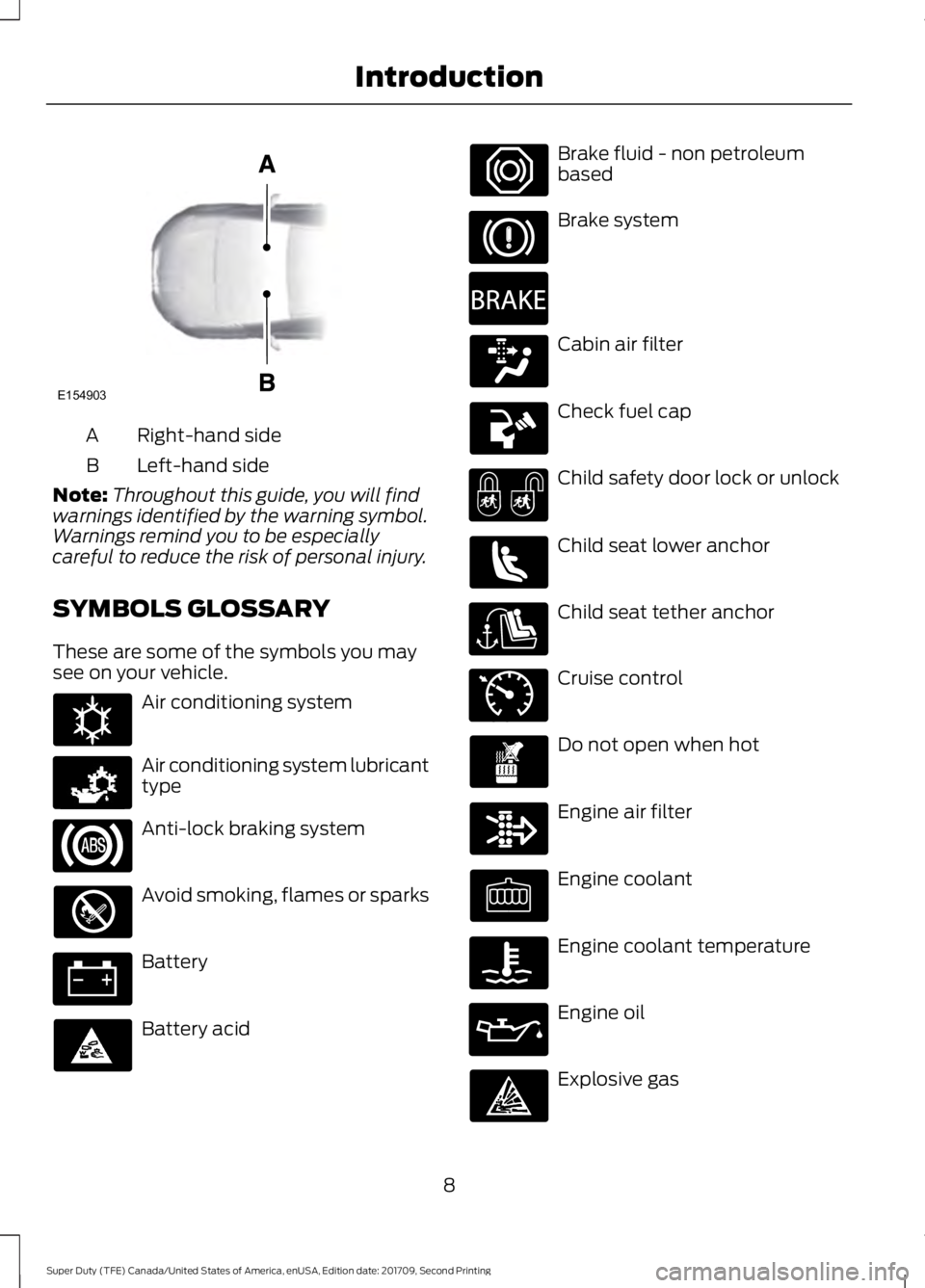
Right-hand side
A
Left-hand side
B
Note: Throughout this guide, you will find
warnings identified by the warning symbol.
Warnings remind you to be especially
careful to reduce the risk of personal injury.
SYMBOLS GLOSSARY
These are some of the symbols you may
see on your vehicle. Air conditioning system
Air conditioning system lubricant
type
Anti-lock braking system
Avoid smoking, flames or sparks
Battery
Battery acid Brake fluid - non petroleum
based
Brake system
Cabin air filter
Check fuel cap
Child safety door lock or unlock
Child seat lower anchor
Child seat tether anchor
Cruise control
Do not open when hot
Engine air filter
Engine coolant
Engine coolant temperature
Engine oil
Explosive gas
8
Super Duty (TFE) Canada/United States of America, enUSA, Edition date: 201709, Second Printing IntroductionE154903 E162384 E231157 E270480 E71340
Page 64 of 660
Car Finder
Press the button twice within
three seconds. A tone sounds
and the direction indicators
flash. We recommend you use this method
to locate your vehicle, rather than using
the panic alarm.
Sounding the Panic Alarm Press the button to sound the
panic alarm. Press the button
again or switch the ignition on to
turn it off.
Note: The panic alarm only operates when
the ignition is off.
Remote Start (If Equipped) WARNING
To avoid exhaust fumes, do not use
remote start if your vehicle is parked
indoors or in areas that are not well
ventilated. Note:
Do not use remote start if your fuel
level is low. The remote start button is on the
transmitter.
This feature allows you to start your
vehicle from the outside. The transmitter
has an extended operating range.
You can configure vehicles with automatic
climate control to turn on the automatic
climate control when you remote start your
vehicle. See Automatic Climate Control
(page
147). A manual climate control
system runs at the setting you set it to
when you switched your vehicle off.
Many states and provinces restrict the use
of remote start. Check your local and state
or provincial laws for specific requirements
regarding remote start systems. The remote start system does not work if
any of the following occur:
•
The ignition is on.
• The anti-theft alarm triggers.
• You switch off the feature.
• The hood is open.
• The transmission is not in park (P).
• The battery voltage is below the
minimum operating voltage.
• The service engine soon light is on.
Remote Control Feedback
An LED on the remote control provides
status feedback of remote start or stop
commands. Status
LED
Remote start orextension
successful
Solid green
Remote stop
successful; vehicle off
Solid red
Remote start orstop failed
Blinking red
Waiting for statusupdate
Blinking green
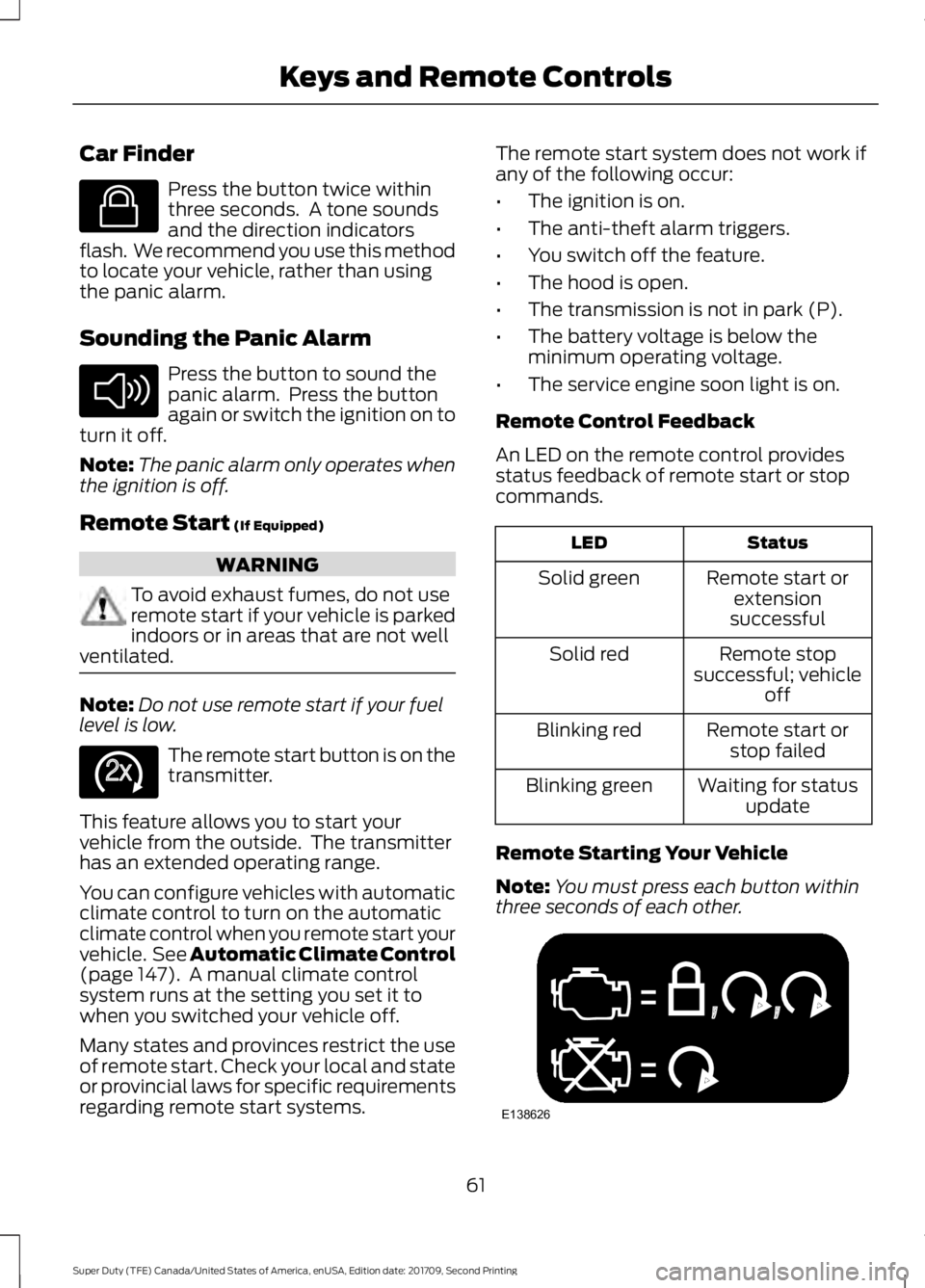
Remote Starting Your Vehicle
Note: You must press each button within
three seconds of each other. 61
Super Duty (TFE) Canada/United States of America, enUSA, Edition date: 201709, Second Printing Keys and Remote ControlsE138623 E138624 E138625 E138626
Page 68 of 660
4.
A confirmation message appears in the
display after you finish programming
your MyKey. The programmed
restrictions apply when you key off,
open and close the driver door and
restart your vehicle with the
programmed key or transmitter.
Note: You can clear or change your MyKey
settings at any time during the same key
cycle as you created the MyKey. If you
switch the engine off, you must use an
admin key to change or clear your optional
MyKey settings.
CLEARING ALL MYKEYS
When you clear your MyKeys, you remove
all restrictions and return all MyKeys to
their original admin key status at once. To
clear all MyKeys of all MyKey settings, use
the information display.
1. Switch the ignition on using an admin key.
2. Access the main menu in the information display and then scroll
through the menus to begin clearing
your MyKey programming. See
Information Displays (page 113).
3. Follow the instructions in the display.
4. A confirmation message appears in the
display after you finish clearing your
MyKeys.
Note: When you clear your MyKeys, you
remove all restrictions and return all MyKeys
to their original admin key status. You
cannot remove the MyKey restrictions
individually. CHECKING MYKEY SYSTEM
STATUS
You can find information about your
programmed MyKeys by using the
information display. See
Information
Displays (page 113).
MyKey Distance
Tracks the distance when drivers use a
MyKey. The only way to delete the
accumulated distance is by using an admin
key to clear all MyKeys. If the distance does
not accumulate as expected, then the
intended user is not using the MyKey, or an
admin key user recently cleared and then
recreated a MyKey.
Number of MyKeys
Indicates the number of MyKeys
programmed to your vehicle. Use this
feature to detect how many MyKeys you
have for your vehicle and determine when
all MyKeys have been deleted.
Number of Admin Keys
Indicates how many admin keys are
programmed to your vehicle. Use this
feature to determine how many admin
keys you have for your vehicle, and detect
if an additional MyKey has been
programmed.
USING MYKEY WITH REMOTE
START SYSTEMS
MyKey is not compatible with non
Ford-approved, aftermarket remote start
systems. If you choose to install a remote
start system, see an authorized dealer for
a Ford-approved remote start system.
MYKEY TROUBLESHOOTING
65
Super Duty (TFE) Canada/United States of America, enUSA, Edition date: 201709, Second Printing MyKey
™
Page 109 of 660
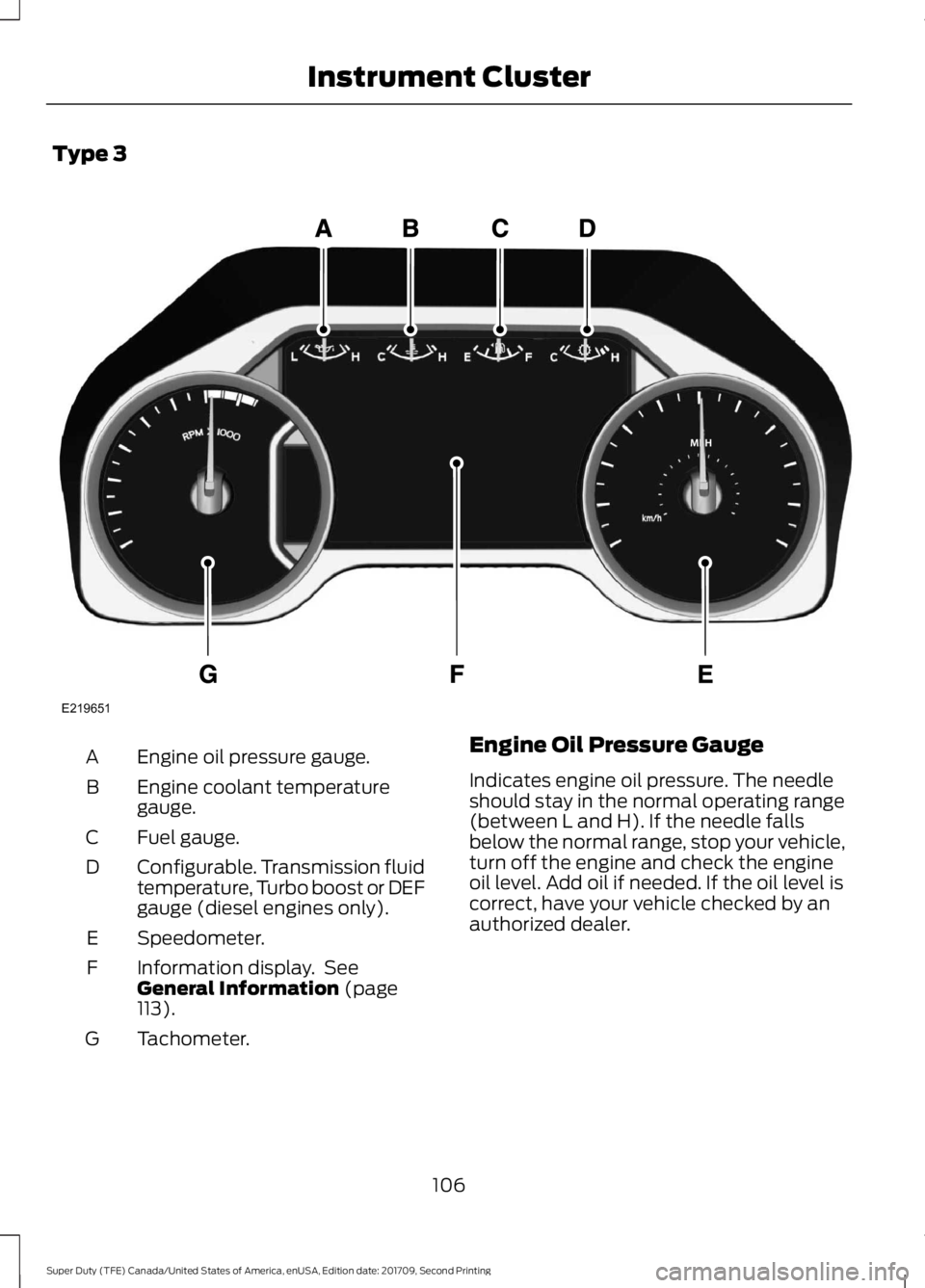
Type 3
Engine oil pressure gauge.
A
Engine coolant temperature
gauge.
B
Fuel gauge.
C
Configurable. Transmission fluid
temperature, Turbo boost or DEF
gauge (diesel engines only).
D
Speedometer.
E
Information display. See
General Information (page
113).
F
Tachometer.
G Engine Oil Pressure Gauge
Indicates engine oil pressure. The needle
should stay in the normal operating range
(between L and H). If the needle falls
below the normal range, stop your vehicle,
turn off the engine and check the engine
oil level. Add oil if needed. If the oil level is
correct, have your vehicle checked by an
authorized dealer.
106
Super Duty (TFE) Canada/United States of America, enUSA, Edition date: 201709, Second Printing Instrument ClusterE219651
Page 111 of 660
Transmission Fluid Temperature
Gauge
Indicates transmission fluid temperature.
At normal operating temperature, the level
indicator will be in the normal range. If the
transmission fluid temperature exceeds
the normal range, stop the vehicle as soon
as safely possible and verify the airflow is
not restricted such as snow or debris
blocking airflow through the grill. Also,
higher than normal operating temperature
can be caused by special operation
conditions (i.e. snowplowing, towing or
off-road use). Operating the transmission
for extended periods with the gauge in the
higher than normal area may cause
internal transmission damage. You need
to alter the severity of your driving
conditions to lower the transmission
temperature into the normal range. If the
gauge continues to show high
temperatures, see an authorized dealer.
Turbo Boost Gauge (If Equipped)
Indicates the amount of manifold air
pressure in the engine.
DEF Gauge
(If Equipped)
Indicates the current DEF level.
WARNING LAMPS AND
INDICATORS
The following warning lamps and
indicators alert you to a vehicle condition
that may become serious. Some lamps
illuminate when you start your vehicle to
make sure they work. If any lamps remain
on after starting your vehicle, refer to the
respective system warning lamp for further
information. Note:
Some warning indicators appear in
the information display and operate the
same as a warning lamp but do not
illuminate when you start your vehicle.
Adaptive Cruise Control
(If Equipped) The speed control system
indicator light changes color to
indicate what mode the system
is in. See Using Adaptive Cruise Control
(page
244).
On (white light): Illuminates when the
adaptive cruise control system is turned
on. Turns off when the speed control
system is turned off.
Engaged (green light): Illuminates when
the adaptive cruise control system is
engaged. Turns off when the speed control
system is disengaged.
Adaptive Steering
(If Equipped) The adaptive steering system
indicator illuminates if the
system detects a fault during the
continuous diagnostic checks.
Adaptive Steering Initialization (yellow,
flashing): The adaptive steering system
has detected a difference between
steering wheel angle and the desired road
wheel angle. The steering wheel adjusts
itself to correct this difference. This
adjustment is part of normal system
operation.
Adaptive Steering Off (yellow, solid): The
adaptive steering system is off. It is
possible that the steering wheel may not
be straight when the vehicle is driving
straight ahead. If this message persists,
see an authorized dealer.
108
Super Duty (TFE) Canada/United States of America, enUSA, Edition date: 201709, Second Printing Instrument ClusterE144524 E223375
Page 112 of 660
Adaptive Steering Loss (red, solid): The
adaptive steering system integrity cannot
be verified. Do not drive the vehicle and
contact an authorized dealer immediately.
See Steering (page 259).
Anti-Lock Braking System It illuminates momentarily when
you switch on the ignition to
confirm that the lamp is
functional. If it does not illuminate when
you switch on the ignition or begins to flash
at anytime, have the system checked as
soon as possible.
If it illuminates when you are driving, this
indicates a malfunction. You will continue
to have the normal braking system
(without ABS) unless the brake system
warning lamp is also illuminated. Have the
system checked as soon as possible.
Automatic High Beam
(If Equipped) Illuminates when this feature is
on. See
Automatic High Beam
Control (page 92).
Battery If it illuminates while driving, it
indicates a malfunction. Switch
off all unnecessary electrical
equipment and have the system checked
by your authorized dealer immediately. Brake System WARNING
Driving your vehicle with the warning
lamp on is dangerous. A significant
decrease in braking performance
may occur. It may take you longer to stop
your vehicle. Have your vehicle checked as
soon as possible. Driving extended
distances with the parking brake engaged
can cause brake failure and the risk of
personal injury. It illuminates momentarily when
you switch on the ignition to
confirm that the lamp is
functional. If it does not illuminate when
you switch on the ignition or begins to flash
at anytime, have the system checked as
soon as possible.
Illuminates when you engage the parking
brake with the ignition on.
If it illuminates when you are driving, check
that the parking brake is not engaged. If
the parking brake is not engaged, this
indicates low brake fluid level or a brake
system malfunction. Have the system
checked as soon as possible.
Blind Spot Monitor
(If Equipped) It illuminates when you switch
this feature off or in conjunction
with a message. See Blind Spot
Information System
(page 252).
Check Fuel Cap
(If Equipped) Illuminates when the fuel cap
may not be properly installed.
Continued driving with this light
on may cause the Service engine soon
warning indicator to come on.
109
Super Duty (TFE) Canada/United States of America, enUSA, Edition date: 201709, Second Printing Instrument Cluster E144522 E151262
Page 113 of 660
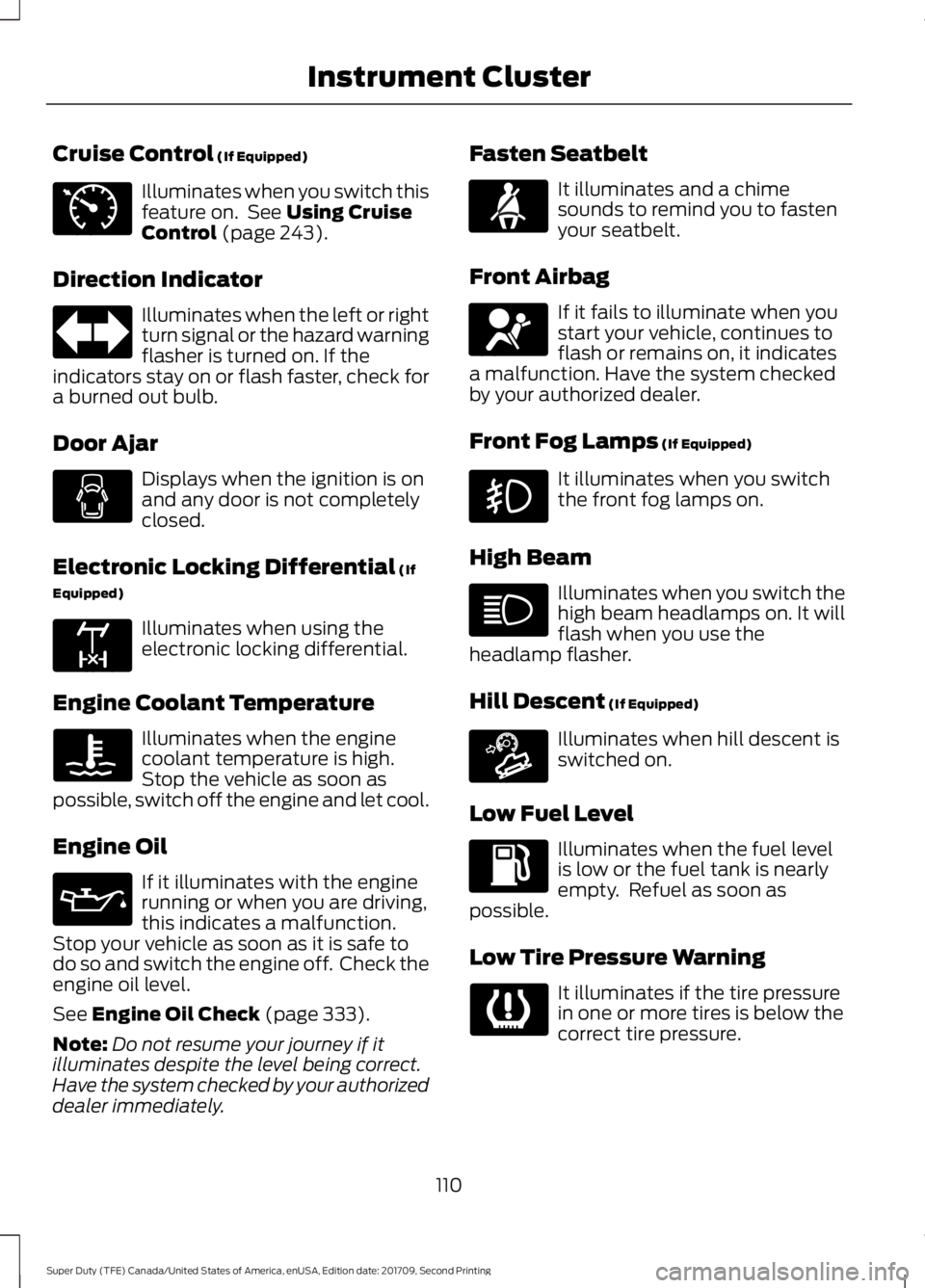
Cruise Control (If Equipped)
Illuminates when you switch this
feature on. See
Using Cruise
Control (page 243).
Direction Indicator Illuminates when the left or right
turn signal or the hazard warning
flasher is turned on. If the
indicators stay on or flash faster, check for
a burned out bulb.
Door Ajar Displays when the ignition is on
and any door is not completely
closed.
Electronic Locking Differential
(If
Equipped) Illuminates when using the
electronic locking differential.
Engine Coolant Temperature Illuminates when the engine
coolant temperature is high.
Stop the vehicle as soon as
possible, switch off the engine and let cool.
Engine Oil If it illuminates with the engine
running or when you are driving,
this indicates a malfunction.
Stop your vehicle as soon as it is safe to
do so and switch the engine off. Check the
engine oil level.
See
Engine Oil Check (page 333).
Note: Do not resume your journey if it
illuminates despite the level being correct.
Have the system checked by your authorized
dealer immediately. Fasten Seatbelt It illuminates and a chime
sounds to remind you to fasten
your seatbelt.
Front Airbag If it fails to illuminate when you
start your vehicle, continues to
flash or remains on, it indicates
a malfunction. Have the system checked
by your authorized dealer.
Front Fog Lamps
(If Equipped) It illuminates when you switch
the front fog lamps on.
High Beam Illuminates when you switch the
high beam headlamps on. It will
flash when you use the
headlamp flasher.
Hill Descent
(If Equipped) Illuminates when hill descent is
switched on.
Low Fuel Level Illuminates when the fuel level
is low or the fuel tank is nearly
empty. Refuel as soon as
possible.
Low Tire Pressure Warning It illuminates if the tire pressure
in one or more tires is below the
correct tire pressure.
110
Super Duty (TFE) Canada/United States of America, enUSA, Edition date: 201709, Second Printing Instrument ClusterE71340 E163170 E71880 E67017 E163171
Page 114 of 660
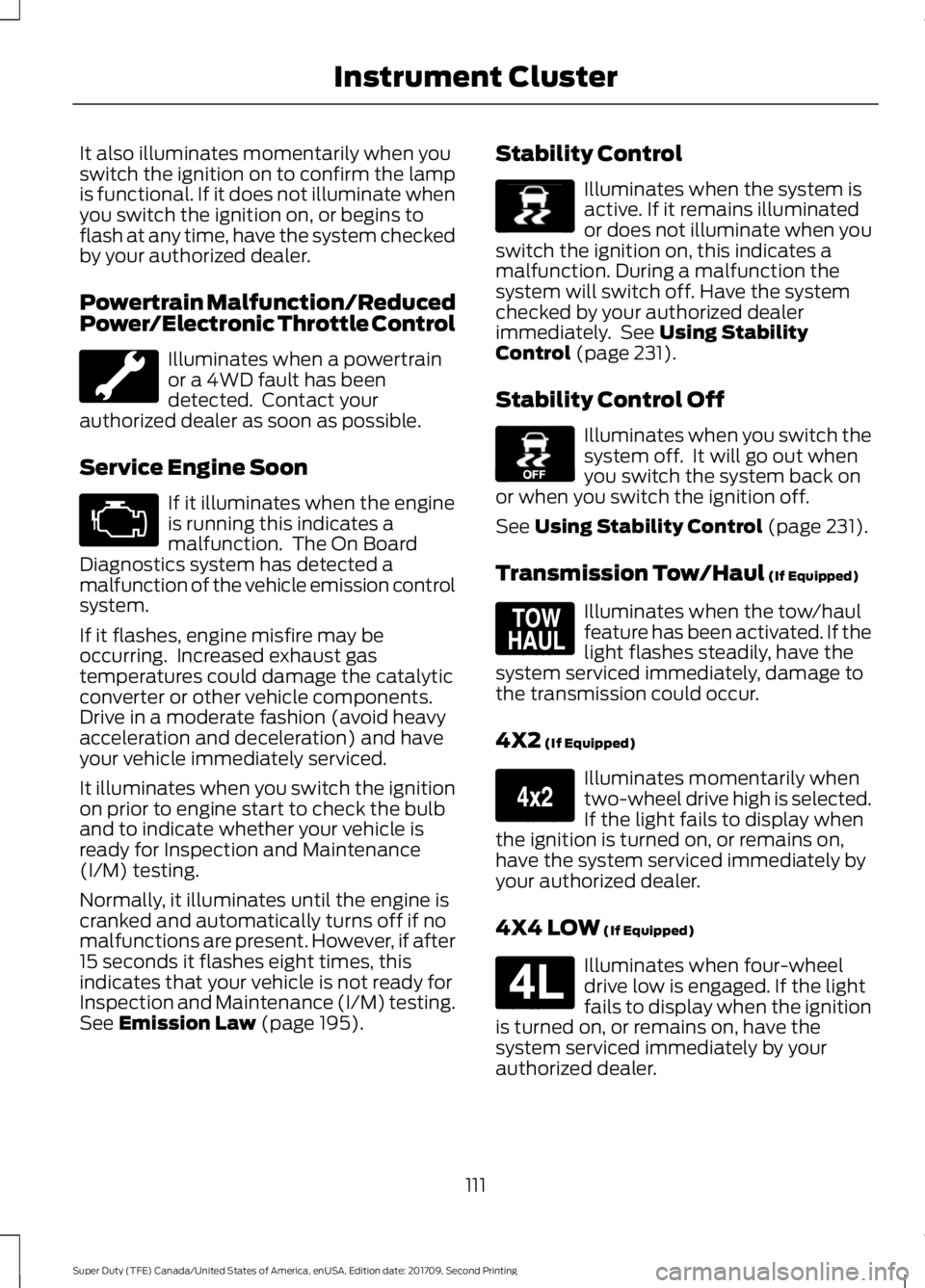
It also illuminates momentarily when you
switch the ignition on to confirm the lamp
is functional. If it does not illuminate when
you switch the ignition on, or begins to
flash at any time, have the system checked
by your authorized dealer.
Powertrain Malfunction/Reduced
Power/Electronic Throttle Control
Illuminates when a powertrain
or a 4WD fault has been
detected. Contact your
authorized dealer as soon as possible.
Service Engine Soon If it illuminates when the engine
is running this indicates a
malfunction. The On Board
Diagnostics system has detected a
malfunction of the vehicle emission control
system.
If it flashes, engine misfire may be
occurring. Increased exhaust gas
temperatures could damage the catalytic
converter or other vehicle components.
Drive in a moderate fashion (avoid heavy
acceleration and deceleration) and have
your vehicle immediately serviced.
It illuminates when you switch the ignition
on prior to engine start to check the bulb
and to indicate whether your vehicle is
ready for Inspection and Maintenance
(I/M) testing.
Normally, it illuminates until the engine is
cranked and automatically turns off if no
malfunctions are present. However, if after
15 seconds it flashes eight times, this
indicates that your vehicle is not ready for
Inspection and Maintenance (I/M) testing.
See Emission Law (page 195). Stability Control Illuminates when the system is
active. If it remains illuminated
or does not illuminate when you
switch the ignition on, this indicates a
malfunction. During a malfunction the
system will switch off. Have the system
checked by your authorized dealer
immediately. See
Using Stability
Control (page 231).
Stability Control Off Illuminates when you switch the
system off. It will go out when
you switch the system back on
or when you switch the ignition off.
See
Using Stability Control (page 231).
Transmission Tow/Haul
(If Equipped) Illuminates when the tow/haul
feature has been activated. If the
light flashes steadily, have the
system serviced immediately, damage to
the transmission could occur.
4X2
(If Equipped) Illuminates momentarily when
two-wheel drive high is selected.
If the light fails to display when
the ignition is turned on, or remains on,
have the system serviced immediately by
your authorized dealer.
4X4 LOW
(If Equipped) Illuminates when four-wheel
drive low is engaged. If the light
fails to display when the ignition
is turned on, or remains on, have the
system serviced immediately by your
authorized dealer.
111
Super Duty (TFE) Canada/United States of America, enUSA, Edition date: 201709, Second Printing Instrument Cluster E138639 E130458 E161509 E163173 E181780