brake sensor FORD F-550 2022 User Guide
[x] Cancel search | Manufacturer: FORD, Model Year: 2022, Model line: F-550, Model: FORD F-550 2022Pages: 740, PDF Size: 12.6 MB
Page 342 of 740
WHAT IS TRAILER BACKUP
ASSISTANCE
Trailer backup assistance utilizes the
control knob on the instrument panel to
help you steer a trailer. Turn the control
knob in the direction you want the trailer
to go and the system steers the vehicle.
HOW DOES TRAILER BACKUP
ASSISTANCE WORK
Trailer backup assistance uses a sticker or
sensor attached to the trailer to detect the
trailer angle relative to the towing vehicle
and provides instructions, graphics and
camera views on the touchscreen.
TRAILER BACKUP
ASSISTANCE PRECAUTIONS
WARNING: Driving while distracted
can result in loss of vehicle control, crash
and injury. We strongly recommend that
you use extreme caution when using any
device that may take your focus off the
road. Your primary responsibility is the
safe operation of your vehicle. We
recommend against the use of any
hand-held device while driving and
encourage the use of voice-operated
systems when possible. Make sure you
are aware of all applicable local laws
that may affect the use of electronic
devices while driving. WARNING: This system is an extra
driving aid. It does not replace your
attention and judgment, or the need to
apply the brakes. This system does NOT
automatically brake your vehicle. If you
fail to press the brake pedal when
necessary, you may collide with another
vehicle.
Note: The system is not a substitute for
safe driving practices. Always be aware of
your vehicle and trailer combination, and
the surrounding environment.
Note: The system does not detect or
prevent your vehicle or trailer from making
contact with obstacles in the surrounding
environment.
Note: The front end of your vehicle swings
out when changing the direction of the
trailer.
Note: In certain conditions, the trailer could
turn faster or the trailer angle could increase
more than anticipated. Always monitor the
clearance between the trailer and vehicle
and the surroundings.
SETTING UP THE TRAILER
BACKUP ASSISTANCE FOR A
CONVENTIONAL TRAILER
CONFIGURING THE TRAILER
You must configure a trailer in the system
to use trailer backup assistance. This is a
one-time setup process and the trailer
information is saved in the system for the
next time you use that trailer.
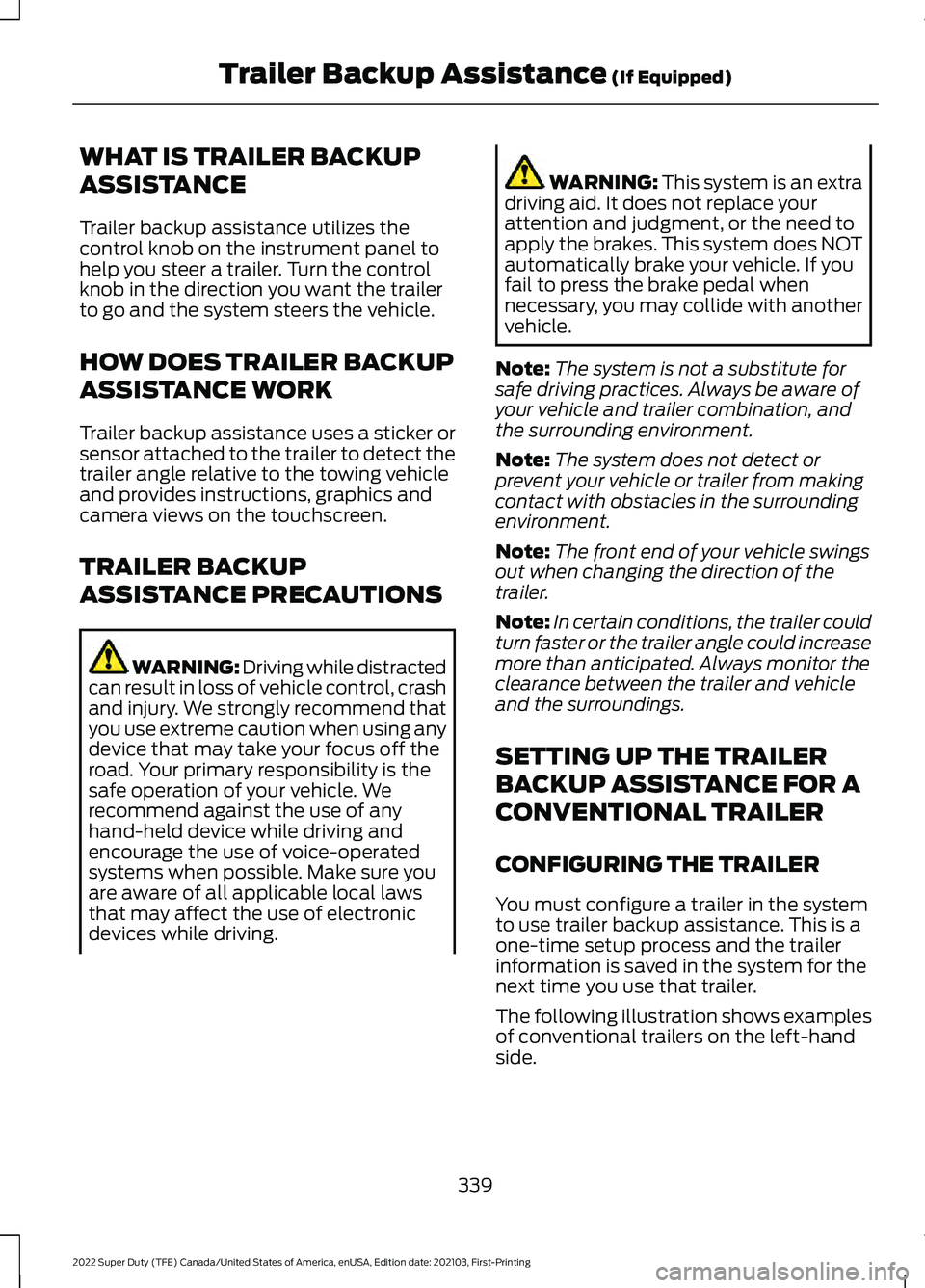
The following illustration shows examples
of conventional trailers on the left-hand
side.
339
2022 Super Duty (TFE) Canada/United States of America, enUSA, Edition date: 202103, First-Printing Trailer Backup Assistance
(If Equipped)
Page 347 of 740
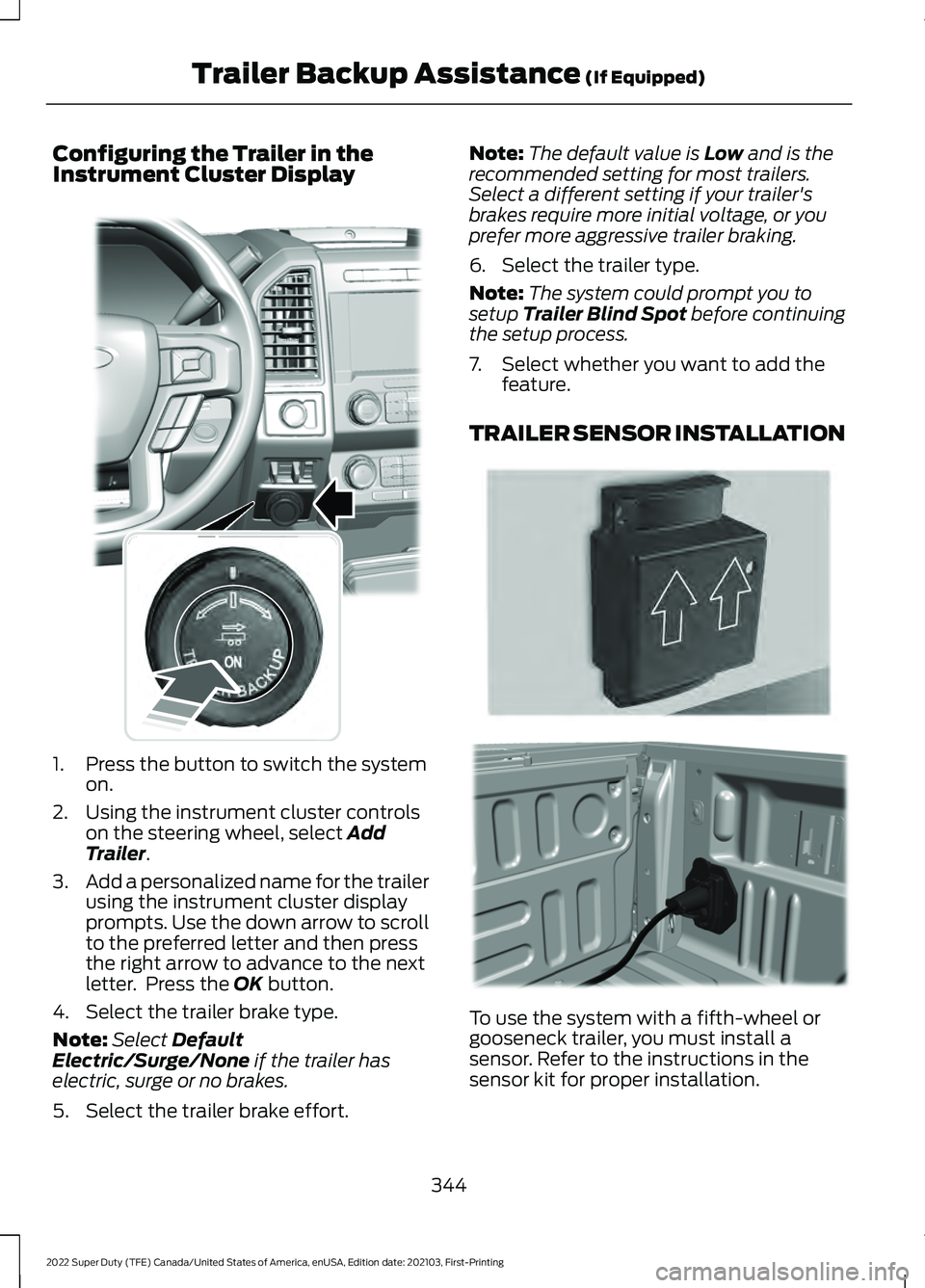
Configuring the Trailer in the
Instrument Cluster Display
1. Press the button to switch the system
on.
2. Using the instrument cluster controls on the steering wheel, select Add
Trailer.
3. Add a personalized name for the trailer
using the instrument cluster display
prompts. Use the down arrow to scroll
to the preferred letter and then press
the right arrow to advance to the next
letter. Press the
OK button.
4. Select the trailer brake type.
Note: Select
Default
Electric/Surge/None if the trailer has
electric, surge or no brakes.
5. Select the trailer brake effort. Note:
The default value is
Low and is the
recommended setting for most trailers.
Select a different setting if your trailer's
brakes require more initial voltage, or you
prefer more aggressive trailer braking.
6. Select the trailer type.
Note: The system could prompt you to
setup
Trailer Blind Spot before continuing
the setup process.
7. Select whether you want to add the feature.
TRAILER SENSOR INSTALLATION To use the system with a fifth-wheel or
gooseneck trailer, you must install a
sensor. Refer to the instructions in the
sensor kit for proper installation.
344
2022 Super Duty (TFE) Canada/United States of America, enUSA, Edition date: 202103, First-Printing Trailer Backup Assistance
(If Equipped)E318266 E315959 E316145
Page 360 of 740
WHAT IS TRAILER REVERSE
GUIDANCE
Trailer reverse guidance provides views
and graphics on the touchscreen to help
you steer your vehicle when you backup a
trailer.
HOW DOES TRAILER REVERSE
GUIDANCE WORK
Trailer reverse guidance uses a sticker or
sensor attached to the trailer to detect the
trailer angle relative to the towing vehicle
and provides instructions, graphics and
camera views on the touchscreen.
TRAILER REVERSE GUIDANCE
PRECAUTIONS
WARNING: Driving while distracted
can result in loss of vehicle control, crash
and injury. We strongly recommend that
you use extreme caution when using any
device that may take your focus off the
road. Your primary responsibility is the
safe operation of your vehicle. We
recommend against the use of any
hand-held device while driving and
encourage the use of voice-operated
systems when possible. Make sure you
are aware of all applicable local laws
that may affect the use of electronic
devices while driving. WARNING: This system is an extra
driving aid. It does not replace your
attention and judgment, or the need to
apply the brakes. This system does NOT
automatically brake your vehicle. If you
fail to press the brake pedal when
necessary, you may collide with another
vehicle. Note:
The system is not a substitute for
safe driving practices. Always be aware of
your vehicle and trailer combination, and
the surrounding environment.
Note: The system does not detect or
prevent your vehicle or trailer from making
contact with obstacles in the surrounding
environment.
Note: The front end of your vehicle swings
out when changing the direction of the
trailer.
Note: In certain conditions, the trailer could
turn faster or the trailer angle could increase
more than anticipated. Always monitor the
clearance between the trailer and vehicle
and the surroundings.
SETTING UP TRAILER
REVERSE GUIDANCE FOR A
CONVENTIONAL TRAILER
CONFIGURING THE TRAILER
You must configure a trailer in the system
to use trailer reverse guidance. This is a
one-time setup process and the trailer
information is saved in the system for the
next time you use that trailer.
The following illustration shows examples
of conventional trailers on the left-hand
side.
Note: Trailer reverse guidance camera
views are available with no trailer setup.
However, complete functionality including
graphics and automatic view switching is
enabled by setup. Setup is required to
enable trailer backup assistance.
357
2022 Super Duty (TFE) Canada/United States of America, enUSA, Edition date: 202103, First-Printing Trailer Reverse Guidance
(If Equipped)
Page 364 of 740
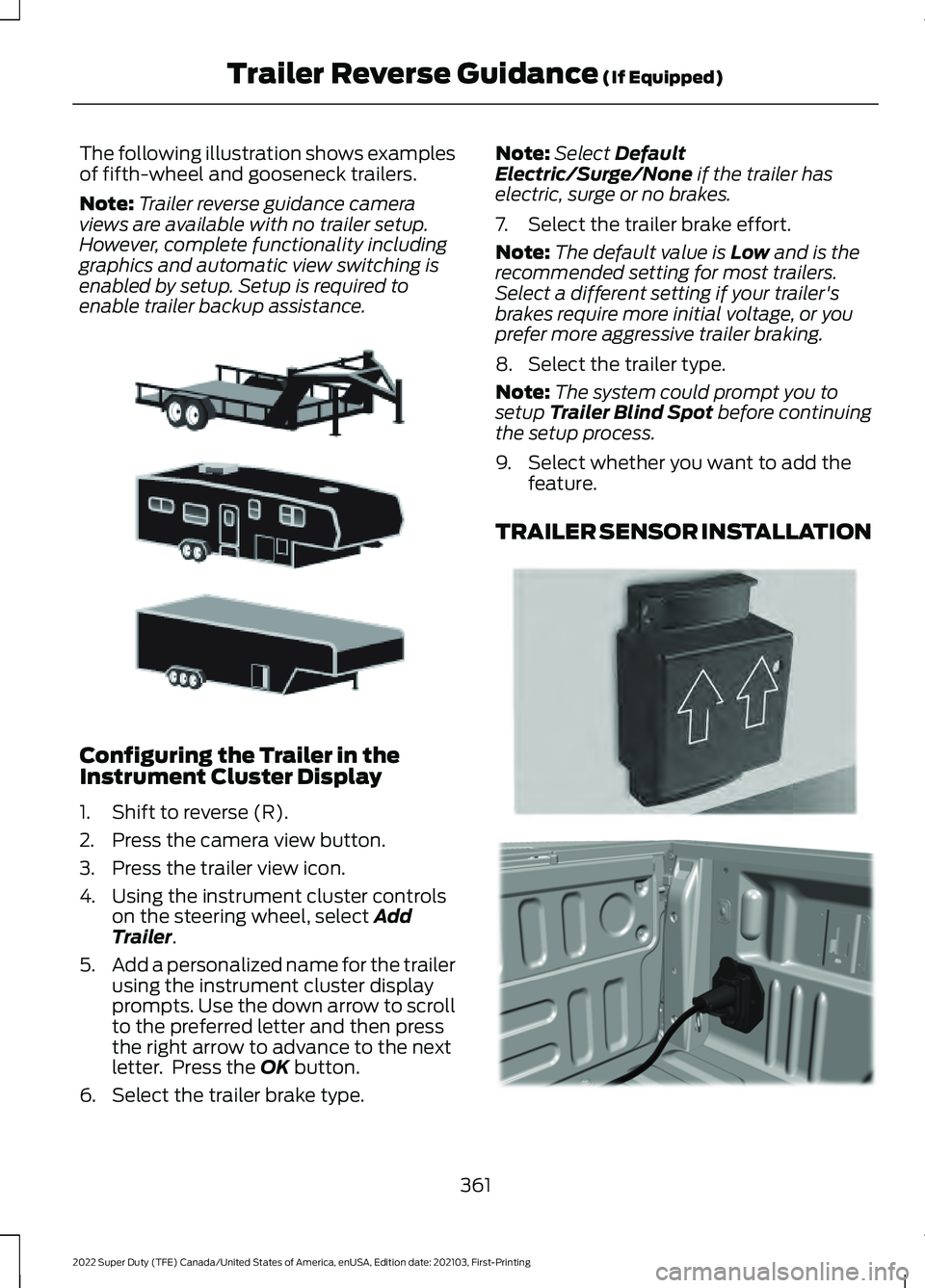
The following illustration shows examples
of fifth-wheel and gooseneck trailers.
Note:
Trailer reverse guidance camera
views are available with no trailer setup.
However, complete functionality including
graphics and automatic view switching is
enabled by setup. Setup is required to
enable trailer backup assistance. Configuring the Trailer in the
Instrument Cluster Display
1. Shift to reverse (R).
2. Press the camera view button.
3. Press the trailer view icon.
4. Using the instrument cluster controls
on the steering wheel, select Add
Trailer.
5. Add a personalized name for the trailer
using the instrument cluster display
prompts. Use the down arrow to scroll
to the preferred letter and then press
the right arrow to advance to the next
letter. Press the
OK button.
6. Select the trailer brake type. Note:
Select
Default
Electric/Surge/None if the trailer has
electric, surge or no brakes.
7. Select the trailer brake effort.
Note: The default value is
Low and is the
recommended setting for most trailers.
Select a different setting if your trailer's
brakes require more initial voltage, or you
prefer more aggressive trailer braking.
8. Select the trailer type.
Note: The system could prompt you to
setup
Trailer Blind Spot before continuing
the setup process.
9. Select whether you want to add the feature.
TRAILER SENSOR INSTALLATION 361
2022 Super Duty (TFE) Canada/United States of America, enUSA, Edition date: 202103, First-Printing Trailer Reverse Guidance
(If Equipped)E311877 E315959 E316145
Page 394 of 740
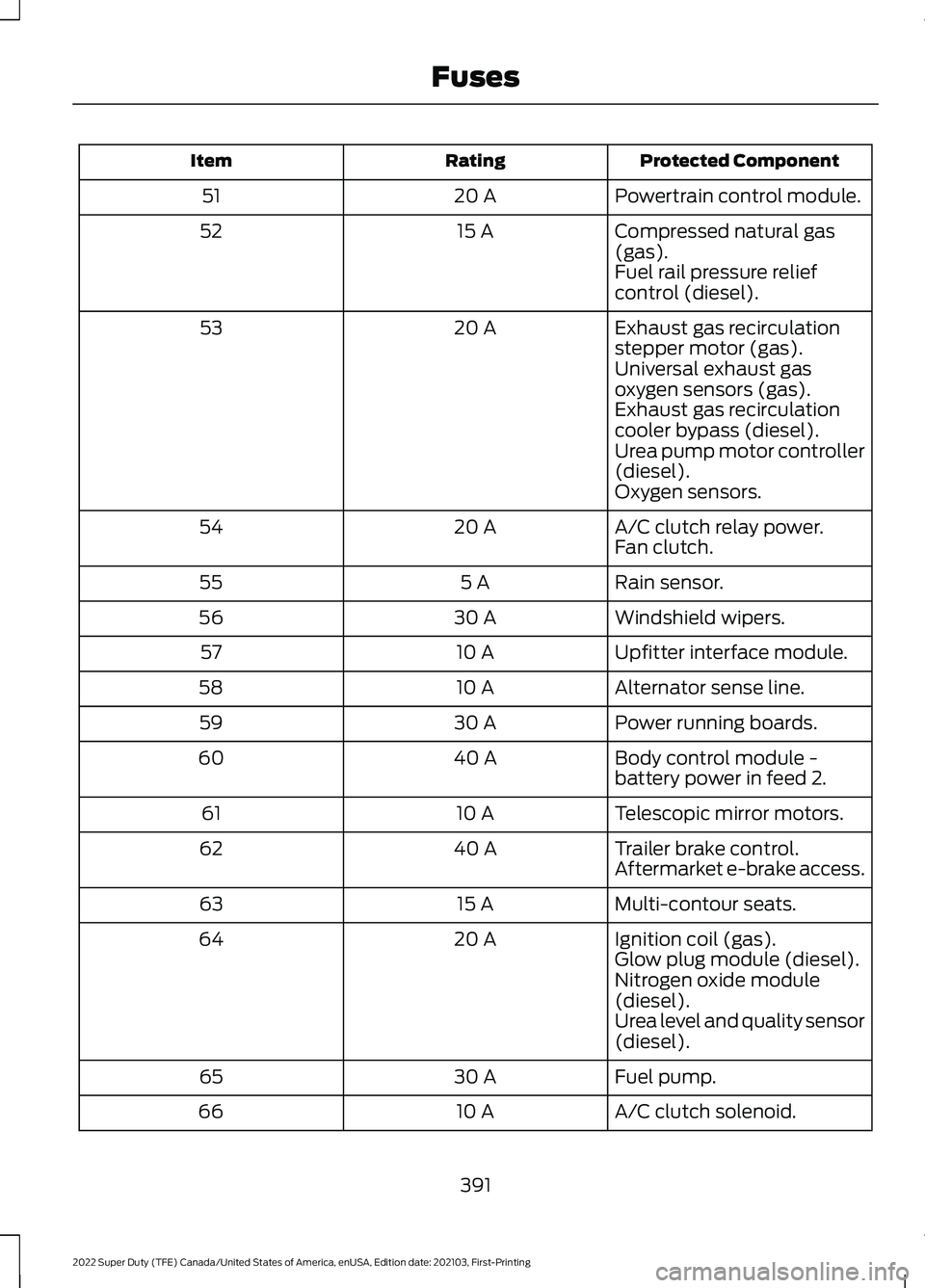
Protected Component
Rating
Item
Powertrain control module.
20 A
51
Compressed natural gas
(gas).
15 A
52
Fuel rail pressure relief
control (diesel).
Exhaust gas recirculation
stepper motor (gas).
20 A
53
Universal exhaust gas
oxygen sensors (gas).
Exhaust gas recirculation
cooler bypass (diesel).
Urea pump motor controller
(diesel).
Oxygen sensors.
A/C clutch relay power.
20 A
54
Fan clutch.
Rain sensor.
5 A
55
Windshield wipers.
30 A
56
Upfitter interface module.
10 A
57
Alternator sense line.
10 A
58
Power running boards.
30 A
59
Body control module -
battery power in feed 2.
40 A
60
Telescopic mirror motors.
10 A
61
Trailer brake control.
40 A
62
Aftermarket e-brake access.
Multi-contour seats.
15 A
63
Ignition coil (gas).
20 A
64
Glow plug module (diesel).
Nitrogen oxide module
(diesel).
Urea level and quality sensor
(diesel).
Fuel pump.
30 A
65
A/C clutch solenoid.
10 A
66
391
2022 Super Duty (TFE) Canada/United States of America, enUSA, Edition date: 202103, First-Printing Fuses
Page 396 of 740
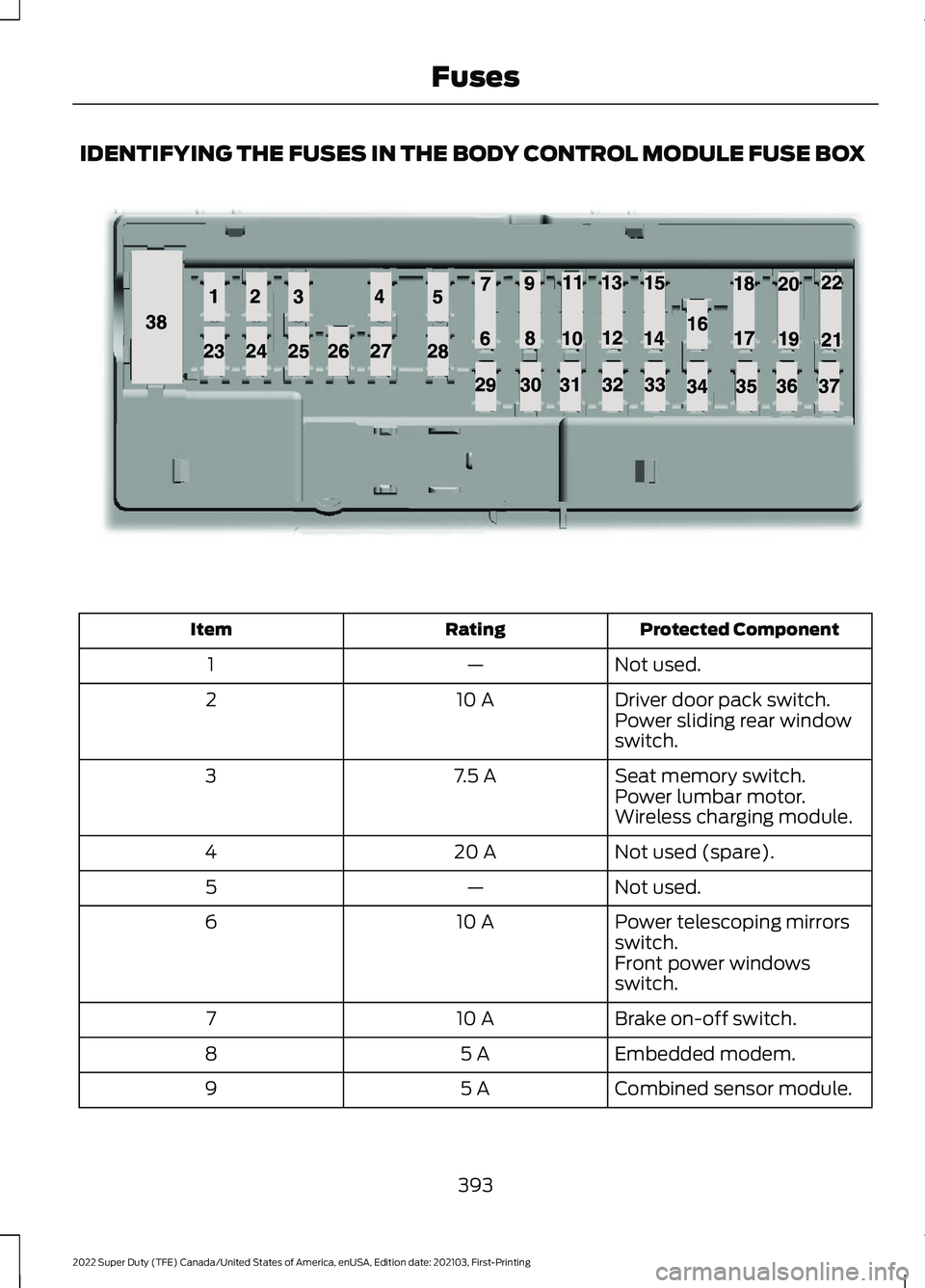
IDENTIFYING THE FUSES IN THE BODY CONTROL MODULE FUSE BOX
Protected Component
Rating
Item
Not used.
—
1
Driver door pack switch.
10 A
2
Power sliding rear window
switch.
Seat memory switch.
7.5 A
3
Power lumbar motor.
Wireless charging module.
Not used (spare).
20 A
4
Not used.
—
5
Power telescoping mirrors
switch.
10 A
6
Front power windows
switch.
Brake on-off switch.
10 A
7
Embedded modem.
5 A
8
Combined sensor module.
5 A
9
393
2022 Super Duty (TFE) Canada/United States of America, enUSA, Edition date: 202103, First-Printing FusesE145984
Page 408 of 740
You may notice a reduction in vehicle
speed caused by reduced engine power in
order to manage the engine coolant
temperature. Your vehicle may enter this
mode if certain high-temperature and
high-load conditions take place. The
amount of speed reduction depends on
vehicle loading, grade and ambient
temperature. If this occurs, there is no
need to stop your vehicle. You can
continue to drive.
The air conditioning may automatically
turn on and off during severe operating
conditions to protect the engine from
overheating. When the coolant
temperature decreases to the normal
operating temperature, the air conditioning
turns on.
If the coolant temperature gauge moves
fully into the red zone, or if the coolant
temperature warning or service engine
soon messages appear in your information
display, do the following:
1. Stop your vehicle as soon as it is safe
to do so. Fully apply the parking brake,
shift into park (P) or neutral (N).
2. Leave the engine running until the coolant temperature gauge needle
returns to the normal position. If the
temperature does not drop after
several minutes, follow the remaining
steps.
3. Switch the engine off and wait for it to
cool. Check the coolant level.
4. If the coolant level is at or below the minimum mark, add prediluted coolant
immediately.
5. If the coolant level is normal, restart the engine and continue. ENGINE AIR FILTER
CHANGING THE ENGINE AIR
FILTER WARNING: To reduce the risk of
vehicle damage and personal burn
injuries, do not start your engine with the
air cleaner removed and do not remove
it while the engine is running.
Use the correct specification air filter
element. See
Motorcraft Parts (page
469).
Note: Failure to use the correct air filter
element may result in severe engine
damage. Resulting component damage
may not be covered by the vehicle Warranty.
Change the air filter element at the correct
service interval. See
Scheduled
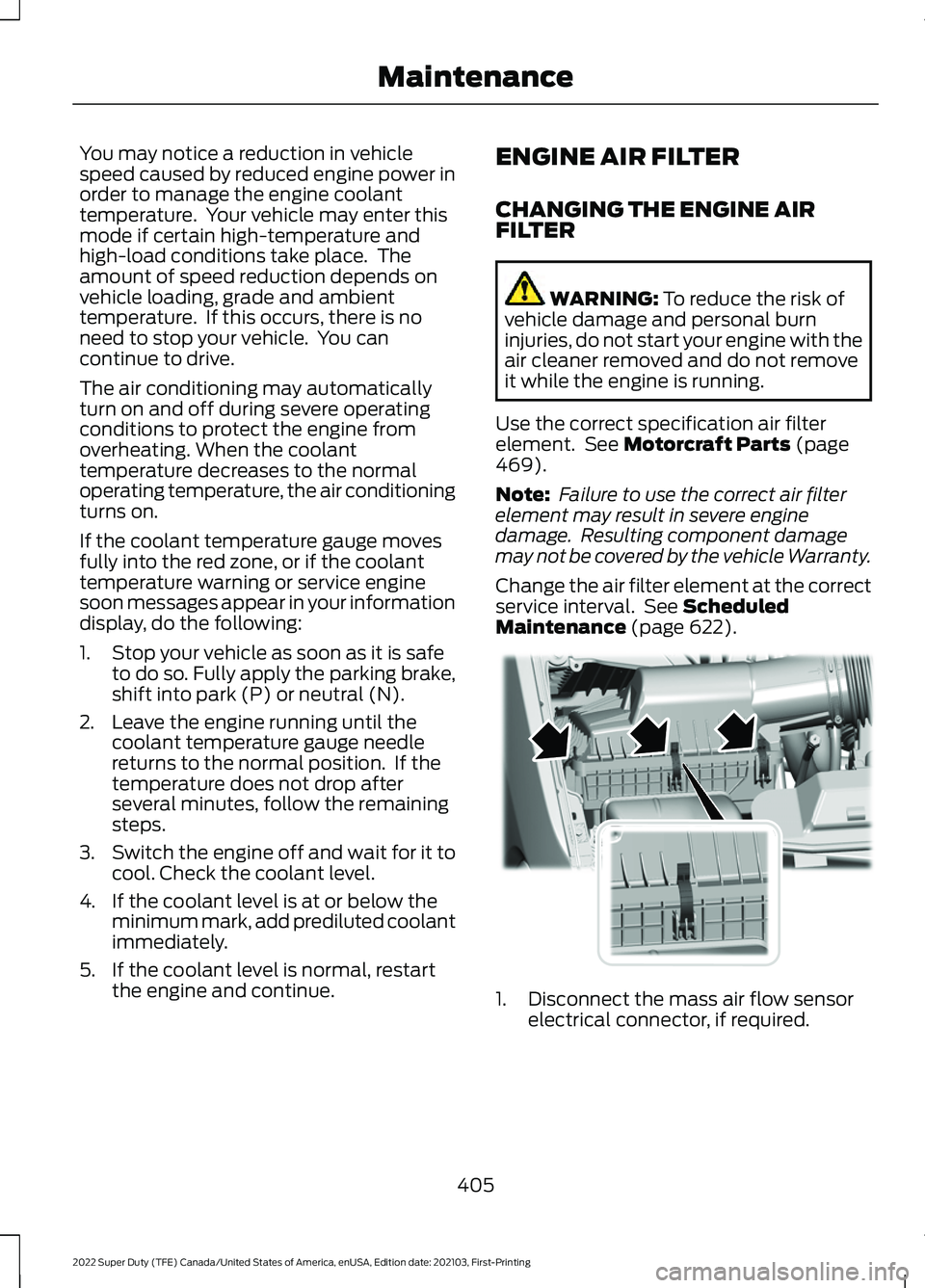
Maintenance (page 622). 1. Disconnect the mass air flow sensor
electrical connector, if required.
405
2022 Super Duty (TFE) Canada/United States of America, enUSA, Edition date: 202103, First-Printing MaintenanceE350657
Page 413 of 740
To maintain correct operation of the
battery management system, if you add
any electrical devices to your vehicle, do
not connect the ground connection directly
to the negative battery terminal. A
connection at the negative battery terminal
can cause inaccurate measurements of
the battery condition and potential
incorrect system operation.
Note:
If you add electrical accessories or
components to your vehicle this may
adversely affect battery performance,
durability and the performance of other
electrical systems on your vehicle.
If you replace the battery make sure it
matches the electrical requirements of
your vehicle.
If you disconnect or replace the battery
and your vehicle has an automatic
transmission, it must relearn its adaptive
strategy. Because of this, the transmission
may shift firmly when first driven. This is
normal operation while the transmission
fully updates its operation to optimum
shift feel.
Remove and Reinstall the Battery
To disconnect or remove the battery, do
the following:
1. Apply the parking brake and switch the
ignition off.
2. Switch all electrical equipment off, for
example lights and radio.
3. Wait a minimum of two minutes before
disconnecting the battery.
Note: The engine management system has
a power hold function and remains powered
for a period of time after you switch the
ignition off. This is to allow diagnostic and
adaptive tables to be stored. Disconnecting
the battery without waiting can cause
damage not covered by the vehicle
Warranty. 4. Disconnect the negative battery cable
terminal.
5. Disconnect the positive battery cable terminal.
6. Remove the battery securing clamp.
7. Remove the battery.
8. To install, reverse the removal procedure.
Note: Before reconnecting the battery,
make sure the ignition remains switched off.
Note: Make sure the battery cable terminals
are fully tightened.
Note: After cleaning or replacing the
battery, make sure you reinstall the battery
cover or shield.
If you disconnect or replace the vehicle
battery, you must reset the following
features:
• Window bounce-back. See Window
Bounce-Back (page 126).
• Clock Settings.
• Pre-set radio stations.
• Steering Angle Sensor.
Note: To calibrate the steering angle
sensor, drive the vehicle above
30 mph
(50 km/h) for a minimum of 1.2 mi (2 km).
Make sure to drive straight ahead for a
minimum of 30 seconds. Several vehicle
functions are disabled and a warning light
could appear until the sensor is calibrated.
Battery Management System
The battery management system monitors
battery conditions and takes actions to
extend battery life. If excessive battery
drain is detected, the system temporarily
disables some of the following features:
• Heated rear window.
• Heated seats.
• Climate control.
• Heated steering wheel.
410
2022 Super Duty (TFE) Canada/United States of America, enUSA, Edition date: 202103, First-Printing Maintenance
Page 458 of 740
CHANGING A FLAT TIRE
WARNING: If the tire pressure
monitor sensor becomes damaged it
may not function.
Note: The use of tire sealant may damage
your tire pressure monitoring system and
should only be used in roadside
emergencies.
Note: The tire pressure monitoring system
indicator light illuminates when the spare
tire is in use. To restore the full function of
the monitoring system, all road wheels
equipped with tire pressure monitoring
sensors must be mounted on this vehicle.
If you get a flat tire when driving, do not
apply the brake heavily. Instead, gradually
decrease your speed. Hold the steering
wheel firmly and slowly move to a safe
place on the side of the road.
Have a flat serviced by an authorized
dealer to prevent damage to the system
sensors.
See Tire Pressure Monitoring
System Precautions (page 449). Replace
the spare tire with a road tire as soon as
possible. During repairing or replacing the
flat tire, have the authorized dealer inspect
the system sensor for damage.
Dissimilar Spare Wheel and Tire
Assembly Information WARNING:
Failure to follow these
guidelines could result in an increased
risk of loss of vehicle control, injury or
death. If you have a dissimilar spare wheel and
tire, then it is intended for temporary use
only. This means that if you need to use it,
you should replace it as soon as possible
with a road wheel and tire assembly that
is the same size and type as the road tires
and wheels that were originally provided
by Ford. If the dissimilar spare tire or wheel
is damaged, it should be replaced rather
than repaired.
A dissimilar spare wheel and tire assembly
is defined as a spare wheel and tire
assembly that is different in brand, size or
appearance from the road tires and
wheels.
Full-size dissimilar spare
When driving with the full-size dissimilar
spare wheel and tire assembly, do not:
•
Exceed
70 mph (113 km/h).
• Use more than one dissimilar spare
wheel and tire assembly at a time.
• Use snow chains on the end of the
vehicle with the dissimilar spare wheel
and tire assembly.
When driving with the full-size dissimilar
spare wheel and tire assembly, 4WD
functionality may be limited. You may
experience the following:
• Additional noise from the transfer case
or other drive components.
• Difficulty shifting out of a mechanically
locked 4WD mode.
When driving with the full-size dissimilar
spare wheel and tire assembly, it is
recommended that you do not:
• Exceed
50 mph (80 km/h) in 4WD.
• Engage 4WD unless the vehicle is
stationary.
• Use 4WD on dry pavement.
455
2022 Super Duty (TFE) Canada/United States of America, enUSA, Edition date: 202103, First-Printing Changing a Road Wheel
Page 721 of 740
How Does Alert Mode Work..........................
289
What Is Alert Mode........................................... 288
AM/FM Radio.................................................527 AM/FM Radio Limitations............................... 527
Selecting a Radio Station............................... 527
Ambient Lighting..........................................125 Adjusting Ambient Lighting............................ 125
Switching Ambient Lighting On and Off........................................................................\
125
Anti-Lock Braking System.......................240 Anti-Lock Braking System
Limitations...................................................... 240
Anti-Theft Alarm System.........................106 Arming the Anti-Theft Alarm System.........107
Disarming the Anti-Theft Alarm
System............................................................... 107
How Does the Anti-Theft Alarm System Work................................................................... 106
What Are the Inclination Sensors................106
What Are the Interior Sensors....................... 106
What Is the Anti-Theft Alarm System.............................................................. 106
What Is the Battery Backup Alarm..............106
What Is the Perimeter Alarm......................... 106
Anti-Theft Alarm System Settings........107 Setting the Alarm Security Level.................. 107
Switching Ask on Exit On and Off................107
What are the Alarm Security Levels............107
What Is Ask on Exit............................................. 107
Appendices.....................................................713
Applying the Parking Brake......................243
App Precautions.........................................608
App Requirements.....................................608
Apps.................................................................580
Audio System
...............................................508
AM/FM Radio....................................................... 527
Audio System – Troubleshooting................532
Digital Radio........................................................ 528
General Information......................................... 508
Satellite Radio.................................................... 529
Audio System Precautions.......................525
Audio System – Troubleshooting..........532 Audio System – Information
Messages......................................................... 532
Audio Unit
......................................................508
Auto-Dimming Exterior Mirror.................130 What Is the Auto-Dimming Exterior
Mirror.................................................................. 130Auto-Dimming Interior Mirror
...................128
Auto-Dimming Interior Mirror
Limitations....................................................... 128
What Is the Auto-Dimming Interior Mirror.................................................................. 128
Autolamps
.......................................................119
Autolamp Settings.............................................. 119
What Are Autolamps......................................... 119
Autolock............................................................84 Autolock Requirements..................................... 84
What Is Autolock.................................................. 84
Automatic Crash Shutoff..........................381 Automatic Crash Shutoff
Precautions..................................................... 382
Re-Enabling Your Vehicle............................... 382
What Is Automatic Crash Shutoff................381
Automatic Emergency Braking..............306 Switching Automatic Emergency Braking
On and Off...................................................... 306
What Is Automatic Emergency Braking............................................................. 306
Automatic Engine Stop..............................196 How Does Automatic Engine Stop
Work.................................................................... 197
Overriding Automatic Engine Stop..............197
Switching Automatic Engine Stop On and Off........................................................................\
197
What Is Automatic Engine Stop................... 196
Automatic High Beam Control
.................121
Automatic High Beam Control
Indicators.......................................................... 123
Automatic High Beam Control Limitations........................................................ 122
Automatic High Beam Control Precautions...................................................... 122
Automatic High Beam Control Requirements.................................................. 122
How Does Automatic High Beam Control Work..................................................................... 121
Overriding Automatic High Beam Control............................................................... 123
Switching Automatic High Beam Control On and Off........................................................ 123
Automatic High Beam Control – Troubleshooting.........................................123
Automatic High Beam Control – Information Messages................................. 123
718
2022 Super Duty (TFE) Canada/United States of America, enUSA, Edition date: 202103, First-Printing Index