suspension FORD F-550 2022 User Guide
[x] Cancel search | Manufacturer: FORD, Model Year: 2022, Model line: F-550, Model: FORD F-550 2022Pages: 740, PDF Size: 12.6 MB
Page 375 of 740
•
If a large obstacle such as a rock
cannot be avoided, choose a path that
places the rock directly under the tire
rather than the undercarriage of the
vehicle. This will help prevent damage
to the vehicle.
• Ditches and washouts should be
crossed at a 45° angle, allowing each
wheel to independently cross the
obstacle.
Hill Climbing WARNING:
Extreme care should
be used when steering the vehicle in
reverse down a slope so as not to cause
the vehicle to swerve out of control.
• Always attempt to climb a steep hill
along the fall line of the slope and not
diagonally.
• If the vehicle is unable to make it up
the hill, DO NOT attempt to turn back
down the slope. Place the vehicle in
low range and slowly back down in
reverse.
• When descending a steep slope, select
low gear and engage hill descent
control. Use the throttle and brake
pedals to control your descent speed.
Note: Hill descent control is functional in
reverse and should be used in this situation.
DRIVING THROUGH WATER
LIMITATIONS - TREMOR Maximum Wading
Depth
Model
33 in (837 mm)
All.
When you are driving though water do not
exceed
4 mph (7 km/h). AFTER DRIVING YOUR VEHICLE
OFF-ROAD WARNING:
After off-road use,
before returning to the road, check the
wheels and tires for damage. Off-road
use may cause damage to your wheels
and tires that can lead to tire failure, loss
of vehicle control, serious injury or death.
Driving off-road places more stress on your
vehicle than most on-road driving. After
driving off-road check for damage to your
vehicle and, if necessary, have your vehicle
fixed as soon as possible.
Inspect the underbody of your vehicle by
checking tires, body structure, steering,
suspension, and exhaust system for
damage.
Check the radiator for mud and debris and
clean as needed.
Remove accumulations of plants or brush.
These things could be a fire hazard or hide
damage to the fuel lines, brake hoses, and
propeller shafts.
After extended operation in mud, sand,
water, or similar dirty conditions, inspect
the underbody and clean your vehicle as
soon as possible.
If you experience unusual vibration after
driving in mud, slush or similar conditions,
check the wheels for impacted material.
Impacted material can cause vibrations
while driving and wheel imbalance.
Remove the material to resolve the
problem.
372
2022 Super Duty (TFE) Canada/United States of America, enUSA, Edition date: 202103, First-Printing Driving Hints
Page 426 of 740
Note:
If your vehicle has an engine cover
remove the cover before application of
shampoo and degreaser.
• Spray an approved engine shampoo
and degreaser on all parts that require
cleaning and rinse with water.
CLEANING STRIPES OR
GRAPHICS
It is recommended to wash your vehicle by
hand however, pressure washing may be
used under the following conditions:
• Use a spray with a 40° wide spray
angle pattern.
• Keep the nozzle at a
12 in (305 mm)
distance and 90° angle to your
vehicle's surface.
• Do not use water pressure higher than
2,000 psi (14,000 kPa)
.
• Do not use water hotter than
179°F
(82°C).
Note: Holding the pressure washer nozzle
at an angle to the vehicle's surface may
damage graphics and cause the edges to
peel away from the vehicle's surface.
CLEANING CAMERA LENSES AND
SENSORS
We recommend that you only use
lukewarm or cold water and a soft cloth
to clean the camera lens and sensors.
Note: Do not pressure wash camera lens
and sensors.
CLEANING THE UNDERBODY
Flush the complete underside of your
vehicle frequently. Keep body and door
drain holes free from packed dirt. Rear suspension components may require
regular cleaning with a power washer or a
thorough rinse with a strong stream of
water if the vehicle is operated in dusty or
muddy environments. Rear leaf springs or
other suspension components may emit
squeaking or popping noises while
operating the vehicle if particles, such as
dirt, rocks, or other debris, are present in
the components.
CLEANING THE EXHAUST
WARNING:
Do not modify or
remove the exhaust tailpipe. Blocked
holes may result in increased exhaust
gas temperatures, vehicle damage,
property damage or personal injury. WARNING:
Failure to keep the
holes in the exhaust tailpipe clean and
free of debris or foreign material may
result in blocked holes. Blocked holes
may result in increased exhaust gas
temperatures, vehicle damage, property
damage or personal injury. WARNING:
The normal operating
temperature of the exhaust system is
very high. Never work around or attempt
to repair any part of the exhaust system
until it has cooled. Use special care when
working around the diesel oxidation
catalytic converter or the diesel
particulate filter. The diesel oxidation
catalytic converter and the diesel
particulate filter heat up to very high
temperatures after only a short period
of engine operation and remain hot after
you switch the engine off.
423
2022 Super Duty (TFE) Canada/United States of America, enUSA, Edition date: 202103, First-Printing Vehicle Care
Page 442 of 740
cause steering, suspension, axle, transfer
case or power transfer unit failure.
Follow the recommended tire inflation
pressures found on the Safety
Compliance Certification label, or the
Tire Label on the B-Pillar or the edge of
the driver door. Failure to follow this
instruction could result in loss of vehicle
control, vehicle rollover, or personal injury
or death.
Note: Do not use snow chains on vehicles
with LT275/65R20 or LT 285/75R18 sized
tires.
Note: The suspension insulation and
bumpers will help prevent vehicle damage.
Do not remove these components from your
vehicle when using snow tires and chains.
The tires on your vehicle have all-weather
treads to provide traction in rain and snow.
However, in some climates, you may need
to use snow tires and cables. If you need
to use cables, we recommend that you use
steel wheels of the same size and
specification, as cables may chip
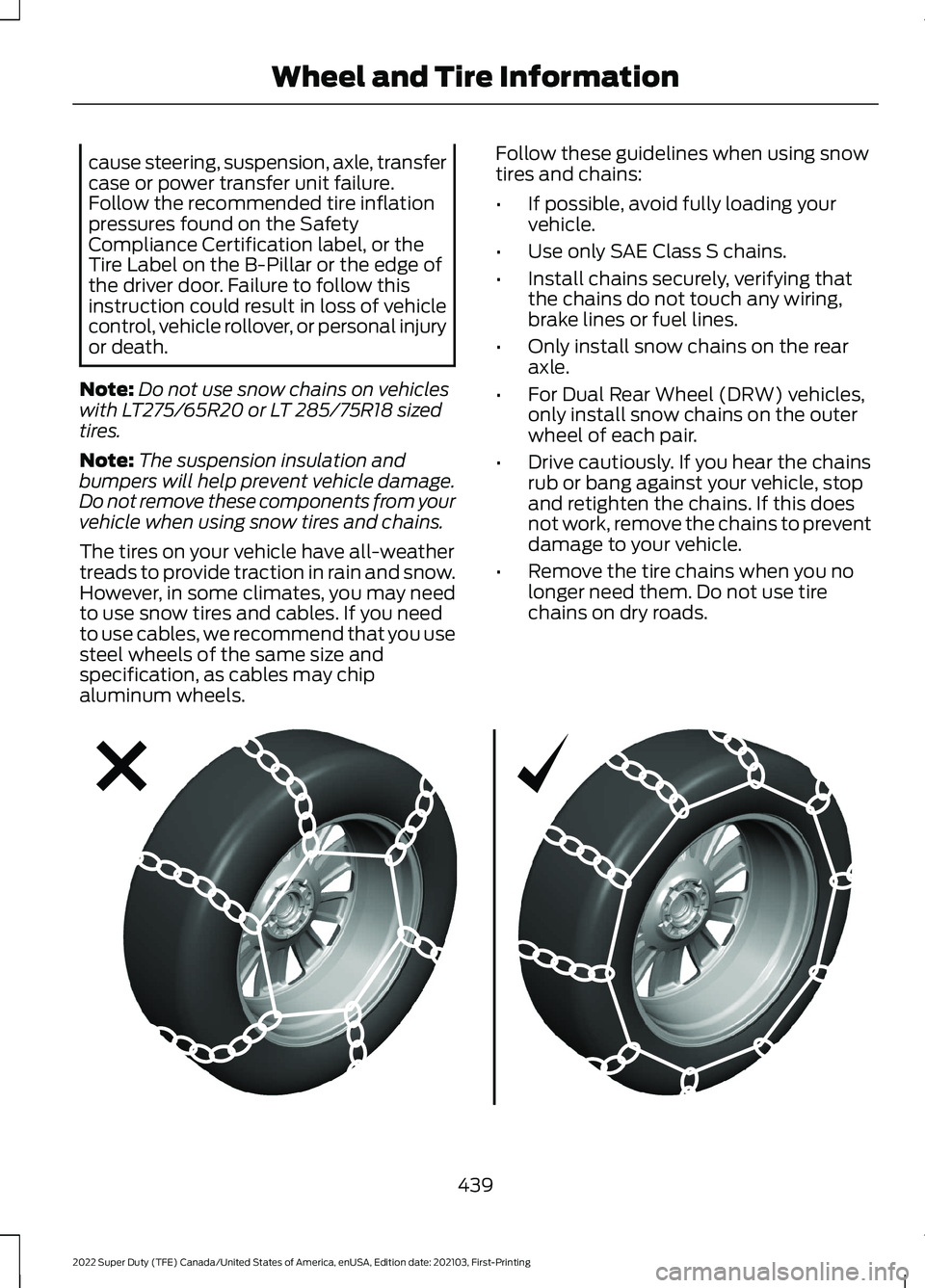
aluminum wheels. Follow these guidelines when using snow
tires and chains:
•
If possible, avoid fully loading your
vehicle.
• Use only SAE Class S chains.
• Install chains securely, verifying that
the chains do not touch any wiring,
brake lines or fuel lines.
• Only install snow chains on the rear
axle.
• For Dual Rear Wheel (DRW) vehicles,
only install snow chains on the outer
wheel of each pair.
• Drive cautiously. If you hear the chains
rub or bang against your vehicle, stop
and retighten the chains. If this does
not work, remove the chains to prevent
damage to your vehicle.
• Remove the tire chains when you no
longer need them. Do not use tire
chains on dry roads. 439
2022 Super Duty (TFE) Canada/United States of America, enUSA, Edition date: 202103, First-Printing Wheel and Tire InformationE292547
Page 443 of 740
Use snow chains that fit against the
sidewall of the tire to prevent the chains
from touching the wheel rims or
suspension. Refer to the previous
illustration.
If you have any questions regarding snow
chains, please contact your authorized
dealer.
440
2022 Super Duty (TFE) Canada/United States of America, enUSA, Edition date: 202103, First-Printing Wheel and Tire Information
Page 517 of 740
Satellite Radio Reception Factors
Potential Satellite Radio Reception Issues
For optimal reception performance, keep the antenna
clear of snow and ice build-up and keep luggage and other
material as far away from the antenna as possible.
Antenna obstructions
Hills, mountains, tall buildings, bridges, tunnels, freeway
overpasses, parking garages, dense tree foliage and
thunderstorms can interfere with your reception.
Terrain
When you pass a ground-based broadcast-repeating
tower, a stronger signal may overtake a weaker one and
the audio system may mute.
Station overload
Your display may show ACQUIRING . . . to indicate the
interference and the audio system may mute.
Satellite radio signal interfer-
ence
SiriusXM Satellite Radio Service
Note: SiriusXM reserves the unrestricted
right to change, rearrange, add or delete
programming including canceling, moving
or adding particular channels, and its prices,
at any time, with or without notice to you.
Neither SiriusXM and its affiliates nor Ford
Motor Company and its affiliates will be
liable to you or any third party for any such
modification, suspension or termination. SiriusXM satellite radio is a
subscription-based satellite radio service
that broadcasts a variety of music, sports,
news, weather, traffic and entertainment
programming. Your factory-installed
SiriusXM satellite radio system includes
hardware and a limited subscription term,
which begins on the date of sale or lease
of your vehicle. See an authorized dealer
for availability.
For more information on extended
subscription terms (a service fee is
required), the online media player and a
complete list of SiriusXM satellite radio
channels, and other features, please visit
www.siriusxm.com in the United States,
www.siriusxm.ca in Canada, or call
SiriusXM at 1-888-539-7474.
Satellite Radio Electronic Serial
Number (ESN)
You need your ESN to activate, modify or
track your satellite radio account.
Locating Your ESN
1. Select SiriusXM as the audio source.
2. Tune to channel 0.
514
2022 Super Duty (TFE) Canada/United States of America, enUSA, Edition date: 202103, First-Printing Audio System - Vehicles With: SYNCE208625
Page 525 of 740
Satellite Radio Reception Factors
Potential Satellite Radio Reception Issues
For optimal reception performance, keep the antenna
clear of snow and ice build-up and keep luggage and other
material as far away from the antenna as possible.
Antenna obstructions
Hills, mountains, tall buildings, bridges, tunnels, freeway
overpasses, parking garages, dense tree foliage and
thunderstorms can interfere with your reception.
Terrain
When you pass a ground-based broadcast-repeating
tower, a stronger signal may overtake a weaker one and
the audio system may mute.
Station overload
Your display may show ACQUIRING . . . to indicate the
interference and the audio system may mute.
Satellite radio signal interfer-
ence
SiriusXM Satellite Radio Service
Note: SiriusXM reserves the unrestricted
right to change, rearrange, add or delete
programming including canceling, moving
or adding particular channels, and its prices,
at any time, with or without notice to you.
Neither SiriusXM and its affiliates nor Ford
Motor Company and its affiliates will be
liable to you or any third party for any such
modification, suspension or termination. SiriusXM satellite radio is a
subscription-based satellite radio service
that broadcasts a variety of music, sports,
news, weather, traffic and entertainment
programming. Your factory-installed
SiriusXM satellite radio system includes
hardware and a limited subscription term,
which begins on the date of sale or lease
of your vehicle. See an authorized dealer
for availability.
For more information on extended
subscription terms (a service fee is
required), the online media player and a
complete list of SiriusXM satellite radio
channels, and other features, please visit
www.siriusxm.com in the United States,
www.siriusxm.ca in Canada, or call
SiriusXM at 1-888-539-7474.
Satellite Radio Electronic Serial
Number (ESN)
You need your ESN to activate, modify or
track your satellite radio account.
Locating Your ESN
1. Select SiriusXM as the audio source.
2. Tune to channel 0.
522
2022 Super Duty (TFE) Canada/United States of America, enUSA, Edition date: 202103, First-Printing Audio System - Vehicles With: SYNC 3E208625
Page 532 of 740
DIGITAL RADIO INDICATORS
HD Radio Indicator
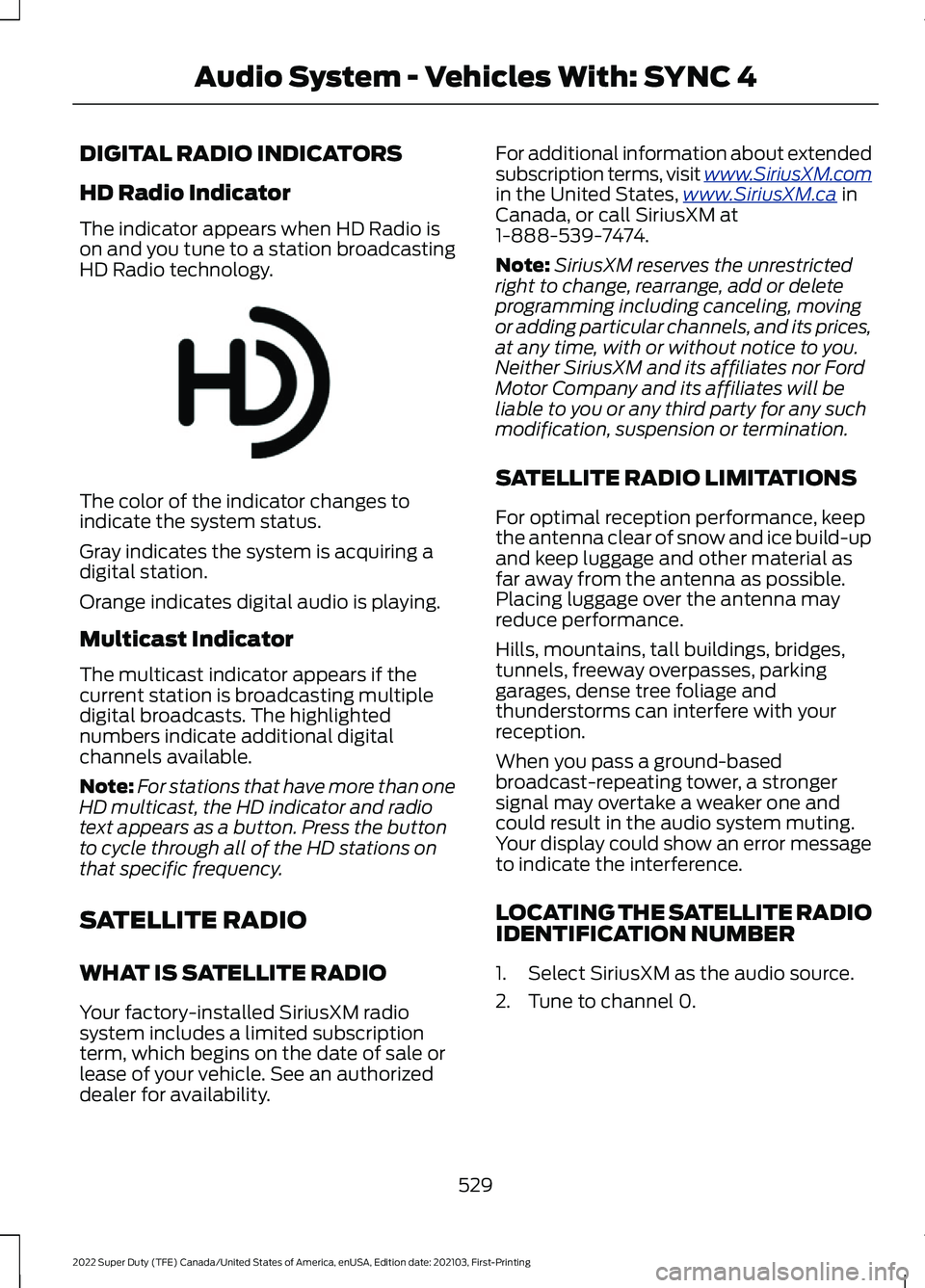
The indicator appears when HD Radio is
on and you tune to a station broadcasting
HD Radio technology.
The color of the indicator changes to
indicate the system status.
Gray indicates the system is acquiring a
digital station.
Orange indicates digital audio is playing.
Multicast Indicator
The multicast indicator appears if the
current station is broadcasting multiple
digital broadcasts. The highlighted
numbers indicate additional digital
channels available.
Note:
For stations that have more than one
HD multicast, the HD indicator and radio
text appears as a button. Press the button
to cycle through all of the HD stations on
that specific frequency.
SATELLITE RADIO
WHAT IS SATELLITE RADIO
Your factory-installed SiriusXM radio
system includes a limited subscription
term, which begins on the date of sale or
lease of your vehicle. See an authorized
dealer for availability. For additional information about extended
subscription terms, visit www .SiriusXM. c om
in the United States,
www .SiriusXM. c a in
Canada, or call SiriusXM at
1-888-539-7474.
Note: SiriusXM reserves the unrestricted
right to change, rearrange, add or delete
programming including canceling, moving
or adding particular channels, and its prices,
at any time, with or without notice to you.
Neither SiriusXM and its affiliates nor Ford
Motor Company and its affiliates will be
liable to you or any third party for any such
modification, suspension or termination.
SATELLITE RADIO LIMITATIONS
For optimal reception performance, keep
the antenna clear of snow and ice build-up
and keep luggage and other material as
far away from the antenna as possible.
Placing luggage over the antenna may
reduce performance.
Hills, mountains, tall buildings, bridges,
tunnels, freeway overpasses, parking
garages, dense tree foliage and
thunderstorms can interfere with your
reception.
When you pass a ground-based
broadcast-repeating tower, a stronger
signal may overtake a weaker one and
could result in the audio system muting.
Your display could show an error message
to indicate the interference.
LOCATING THE SATELLITE RADIO
IDENTIFICATION NUMBER
1. Select SiriusXM as the audio source.
2. Tune to channel 0.
529
2022 Super Duty (TFE) Canada/United States of America, enUSA, Edition date: 202103, First-Printing Audio System - Vehicles With: SYNC 4E142616
Page 627 of 740
Check Every Six Months
The battery connections. Clean if necessary.
The body and door drain holes for obstructions. Clean if necessary. The cooling system fluid level and the coolant system strength. The door weatherstrips for wear. Lubricate if necessary.
The hinges, latches and outside locks for proper operation. Lubricate if necessary. The parking brake for proper operation.
The seatbelts and seat latches for wear and function.
Safety warning lamps, brake, ABS, airbag and seatbelt for operation.
The washer spray and wiper operation. Clean or replace blades as necessary.
Multi-Point Inspection
It is important to have the systems on your
vehicle regularly checked. This can help
identify potential issues and prevent major
problems. We recommend having the
following multi-point inspection performed
at every scheduled maintenance interval
to help make sure your vehicle keeps
running great. Multi-Point Inspection
Hazard warning system operation
Accessory drive belt or belts
Horn operation
Battery performance
Radiator, cooler, heater and air conditioninghoses
Engine air filter
Suspension components for leaks ordamage
Exhaust system
Steering and linkage
Exterior lamps operation
Tires including the spare for wear andproper pressure 2
Fluid levels 1
; fill if necessary
624
2022 Super Duty (TFE) Canada/United States of America, enUSA, Edition date: 202103, First-Printing Scheduled Maintenance
Page 630 of 740
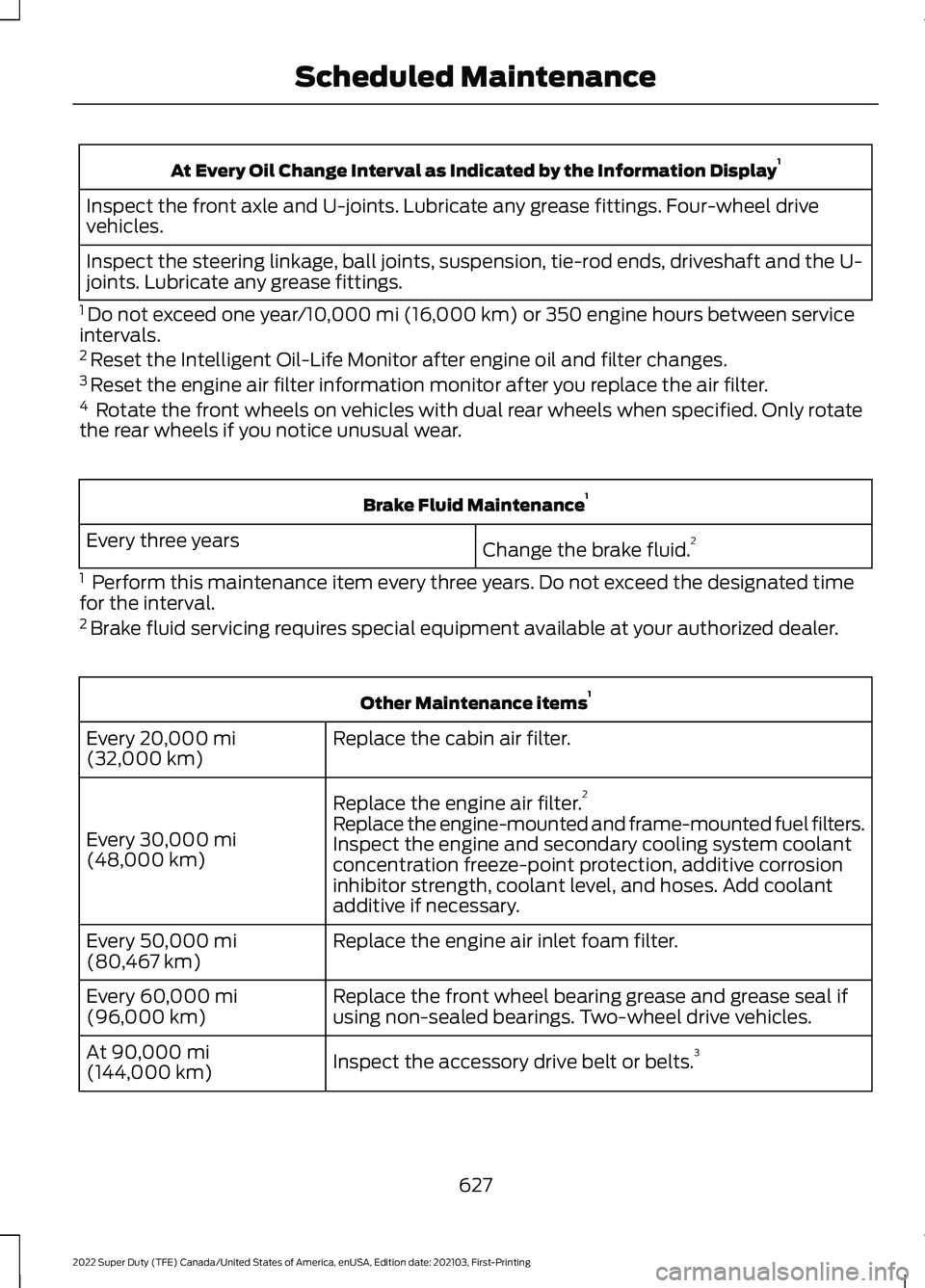
At Every Oil Change Interval as Indicated by the Information Display
1
Inspect the front axle and U-joints. Lubricate any grease fittings. Four-wheel drive
vehicles.
Inspect the steering linkage, ball joints, suspension, tie-rod ends, driveshaft and the U-
joints. Lubricate any grease fittings.
1 Do not exceed one year/10,000 mi (16,000 km) or 350 engine hours between service
intervals.
2 Reset the Intelligent Oil-Life Monitor after engine oil and filter changes.
3 Reset the engine air filter information monitor after you replace the air filter.
4 Rotate the front wheels on vehicles with dual rear wheels when specified. Only rotate
the rear wheels if you notice unusual wear. Brake Fluid Maintenance
1
Change the brake fluid. 2
Every three years
1 Perform this maintenance item every three years. Do not exceed the designated time
for the interval.
2 Brake fluid servicing requires special equipment available at your authorized dealer. Other Maintenance items
1
Replace the cabin air filter.
Every
20,000 mi
(32,000 km)
Replace the engine air filter. 2
Every
30,000 mi
(48,000 km) Replace the engine-mounted and frame-mounted fuel filters.
Inspect the engine and secondary cooling system coolant
concentration freeze-point protection, additive corrosion
inhibitor strength, coolant level, and hoses. Add coolant
additive if necessary.
Replace the engine air inlet foam filter.
Every
50,000 mi
(80,467 km)
Replace the front wheel bearing grease and grease seal if
using non-sealed bearings. Two-wheel drive vehicles.
Every
60,000 mi
(96,000 km)
Inspect the accessory drive belt or belts. 3
At
90,000 mi
(144,000 km)
627
2022 Super Duty (TFE) Canada/United States of America, enUSA, Edition date: 202103, First-Printing Scheduled Maintenance
Page 632 of 740
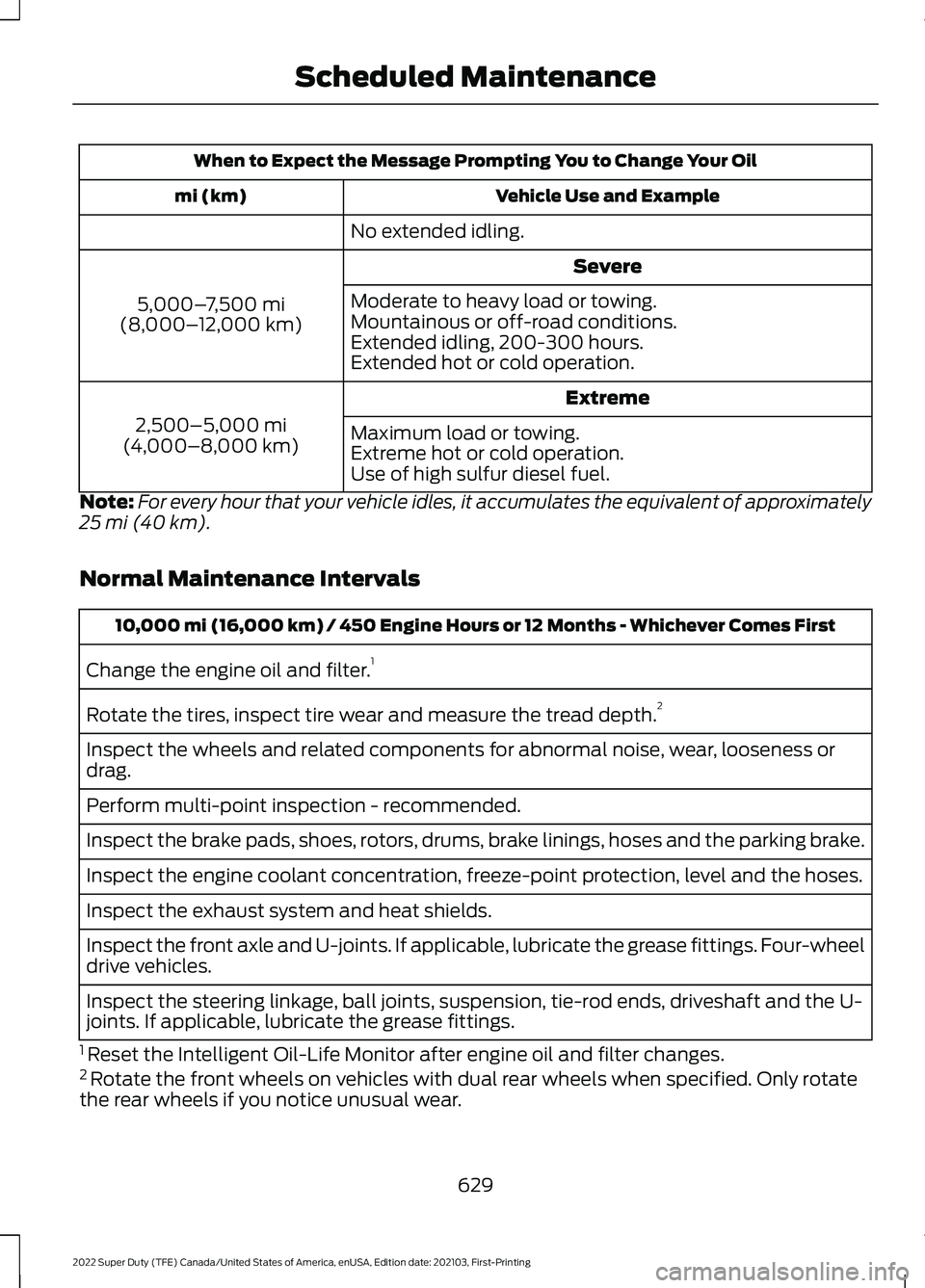
When to Expect the Message Prompting You to Change Your Oil
Vehicle Use and Example
mi (km)
No extended idling. Severe
5,000– 7,500 mi
(8,000– 12,000 km) Moderate to heavy load or towing.
Mountainous or off-road conditions.
Extended idling, 200-300 hours.
Extended hot or cold operation.
Extreme
2,500–5,000 mi
(4,000–8,000 km) Maximum load or towing.
Extreme hot or cold operation.
Use of high sulfur diesel fuel.
Note: For every hour that your vehicle idles, it accumulates the equivalent of approximately
25 mi (40 km).
Normal Maintenance Intervals 10,000 mi (16,000 km) / 450 Engine Hours or 12 Months - Whichever Comes First
Change the engine oil and filter. 1
Rotate the tires, inspect tire wear and measure the tread depth. 2
Inspect the wheels and related components for abnormal noise, wear, looseness or
drag.
Perform multi-point inspection - recommended.
Inspect the brake pads, shoes, rotors, drums, brake linings, hoses and the parking brake.
Inspect the engine coolant concentration, freeze-point protection, level and the hoses.
Inspect the exhaust system and heat shields.
Inspect the front axle and U-joints. If applicable, lubricate the grease fittings. Four-wheel
drive vehicles.
Inspect the steering linkage, ball joints, suspension, tie-rod ends, driveshaft and the U-
joints. If applicable, lubricate the grease fittings.
1 Reset the Intelligent Oil-Life Monitor after engine oil and filter changes.
2 Rotate the front wheels on vehicles with dual rear wheels when specified. Only rotate
the rear wheels if you notice unusual wear.
629
2022 Super Duty (TFE) Canada/United States of America, enUSA, Edition date: 202103, First-Printing Scheduled Maintenance