fuel pressure FORD F-550 2022 Owner's Manual
[x] Cancel search | Manufacturer: FORD, Model Year: 2022, Model line: F-550, Model: FORD F-550 2022Pages: 740, PDF Size: 12.6 MB
Page 501 of 740
WHAT IS A CONNECTED
VEHICLE
A connected vehicle has technology that
allows your vehicle to connect to a mobile
network and for you to access a range of
features. When used in conjunction with
the FordPass app, it could allow you to
monitor and control your vehicle further,
for example checking the tire pressures,
the fuel level and the vehicle location. For
additional information, refer to the local
Ford website.
CONNECTED VEHICLE
REQUIREMENTS
Connected service and related feature
functionality requires a compatible vehicle
network.
Some remote features require additional
service activation. Log in to your Ford
account for details. Some restrictions, third
party terms and message or data rates
may apply.
CONNECTED VEHICLE
LIMITATIONS
Evolving technology, cellular networks, or
regulations could affect functionality and
availability, or continued provision of some
features. These changes could even stop
some features from functioning.
CONNECTING THE VEHICLE TO
A MOBILE NETWORK
WHAT IS THE MODEM
The modem allows access to a
range of features built into your
vehicle. ENABLING AND DISABLING THE
MODEM - VEHICLES WITH:
MODEM
1. Press Settings.
2. Press
FordPass Connect.
3. Press
Connectivity Settings.
4. Switch connectivity features on or off.
ENABLING AND DISABLING THE
MODEM - VEHICLES WITH: SYNC
3
1. Select
Settings.
2. Select
Connectivity Features.
3. Select
Data sharing.
4. Switch connectivity features on or off.
CONNECTING FORDPASS TO THE
MODEM
1. Make sure that the modem is enabled using the vehicle settings menu.
2. Open the FordPass app on your device
and log in.
3. Add your vehicle or select your vehicle if already added.
4. Select the option for vehicle details.
5. Select the option to activate your vehicle.
6. Make sure that the name on the screen
matches the name shown in your
FordPass account.
7. Confirm that FordPass account is connected to the modem.
CONNECTING THE VEHICLE TO
A WI-FI NETWORK
1. Press
Settings.
2. Press
Wi-Fi.
498
2022 Super Duty (TFE) Canada/United States of America, enUSA, Edition date: 202103, First-Printing Connected Vehicle - Vehicles With: SYNC 3
Page 505 of 740
WHAT IS A CONNECTED
VEHICLE
A connected vehicle has technology that
allows your vehicle to connect to a mobile
network and for you to access a range of
features. When used in conjunction with
the FordPass app, it could allow you to
monitor and control your vehicle further,
for example checking the tire pressures,
the fuel level and the vehicle location. For
additional information, refer to the local
Ford website.
CONNECTED VEHICLE
REQUIREMENTS
Connected service and related feature
functionality requires a compatible vehicle
network.
Some remote features require additional
service activation. Log in to your Ford
account for details. Some restrictions, third
party terms and message or data rates
may apply.
CONNECTED VEHICLE
LIMITATIONS
Evolving technology, cellular networks, or
regulations could affect functionality and
availability, or continued provision of some
features. These changes could even stop
some features from functioning.
CONNECTING THE VEHICLE TO
A MOBILE NETWORK
WHAT IS THE MODEM
The modem allows access to a
range of features built into your
vehicle. ENABLING AND DISABLING THE
MODEM
1. Press Settings.
2. Press
Connectivity.
3. Press
Connected Vehicle Features.
4. Switch vehicle connectivity on or off.
CONNECTING FORDPASS TO THE
MODEM
1. Make sure that the modem is enabled using the vehicle settings menu.
2. Open the FordPass app on your device
and log in.
3. Add your vehicle or select your vehicle if already added.
4. Select the option for vehicle details.
5. Select the option to activate your vehicle.
6. Make sure that the name on the screen
matches the name shown in your
FordPass account.
7. Confirm that FordPass account is connected to the modem.
CONNECTING THE VEHICLE TO
A WI-FI NETWORK Select the settings option on the
feature bar.
1. Press
Connectivity.
2. Press
Manage Wi-Fi Networks.
3. Switch
Wi-Fi on.
4. Press
View Available Networks.
5. Select an available Wi-Fi network.
Note: Enter the network password to
connect to a secure network.
502
2022 Super Duty (TFE) Canada/United States of America, enUSA, Edition date: 202103, First-Printing Connected Vehicle - Vehicles With: SYNC 4 E280315
Page 544 of 740
To Access Using Voice Commands
Press the voice button, then when prompted say:
Action and Description
Voice Command
Say the name of the application after the tone.
The app should start. When an app is running through SYNC, you can press the voice button and speak commands specific to the app, for example "Play Playlist Road Trip".
Mobile Applications
SYNC lists all of the currently available mobile apps.
List Applications
Searches your connected mobile device for SYNC-compatible mobile apps.
Find Applications
Use this command to discover the available voice commands.
Help
App Permissions
App permissions are organized by groups.
You can grant these group permissions
individually. You can change a permission
group status any time when not driving, by
using the settings menu.
When you launch an app using SYNC, the
system may ask you to grant certain
permissions, for example:
• To allow your vehicle to provide vehicle
information to the app such as, but not
limited to: Fuel level, fuel economy, fuel
consumption, engine speed, rain
sensor, odometer, VIN, external
temperature, gear position, tire
pressure, and head lamp status.
• To allow your vehicle to provide driving
characteristic information such as, but
not limited to: MyKey, seatbelt status,
engine revolutions per minute, gear
position, braking events, steering wheel
angle, and accelerator pedal position. •
To allow your vehicle to provide
location information, including: GPS
and speed.
• To allow the app to send push
notifications using the vehicle display
and voice capabilities while running in
a background state. Push notifications
may be particularly useful for news or
location based apps.
Note: You only need to grant permissions
the first time you use an app with SYNC.
Note: Ford is not responsible or liable for
any damages or loss of privacy relating to
usage of an app, or dissemination of any
vehicle data that you approve Ford to
provide to an app.
Enabling SYNC Mobile Apps
In order to enable mobile apps, SYNC
requires user consent to send and receive
app authorization information and updates
using the data plan associated with the
connected device.
541
2022 Super Duty (TFE) Canada/United States of America, enUSA, Edition date: 202103, First-Printing SYNC™
Page 626 of 740
It is important to rely upon your dealership
to properly diagnose and repair your
vehicle.
We strongly recommend only using our
genuine or our authorized re-manufactured
replacement parts engineered for your
vehicle.
Additives and Chemicals
We do not recommend using chemicals or
additives not approved by us as part of
your vehicle
’s normal maintenance. Please
consult your warranty information.
Oils, Fluids and Flushing
In many cases, fluid discoloration is a
normal operating characteristic and, by
itself, does not necessarily indicate a
concern or that the fluid needs to be
changed. Have discolored fluids that also
show signs of overheating or foreign
material contamination checked
immediately. Make sure to change the vehicle
’s oils and
fluids at the specified intervals or in
conjunction with a repair. Flushing is a
viable way to change fluid for many vehicle
sub-systems during scheduled
maintenance. It is critical that systems are
flushed only with new fluid that is the same
as that required to fill and operate the
system or using our approved flushing
chemical.
Owner Checks and Services
Make sure you perform the following basic
maintenance checks and inspections. Check Every Month
The air filter restriction gauge. 1
The engine oil level.
Function of all interior and the exterior lights.
The tires including the spare for wear and proper pressure. The windshield washer fluid level.
The fuel and water separator. Drain if necessary or if indicated by the information display. 1
The holes and slots in the tail pipe to make sure they are functional and clear of debris. 1
1 Diesel vehicles only.
623
2022 Super Duty (TFE) Canada/United States of America, enUSA, Edition date: 202103, First-Printing Scheduled Maintenance
Page 716 of 740
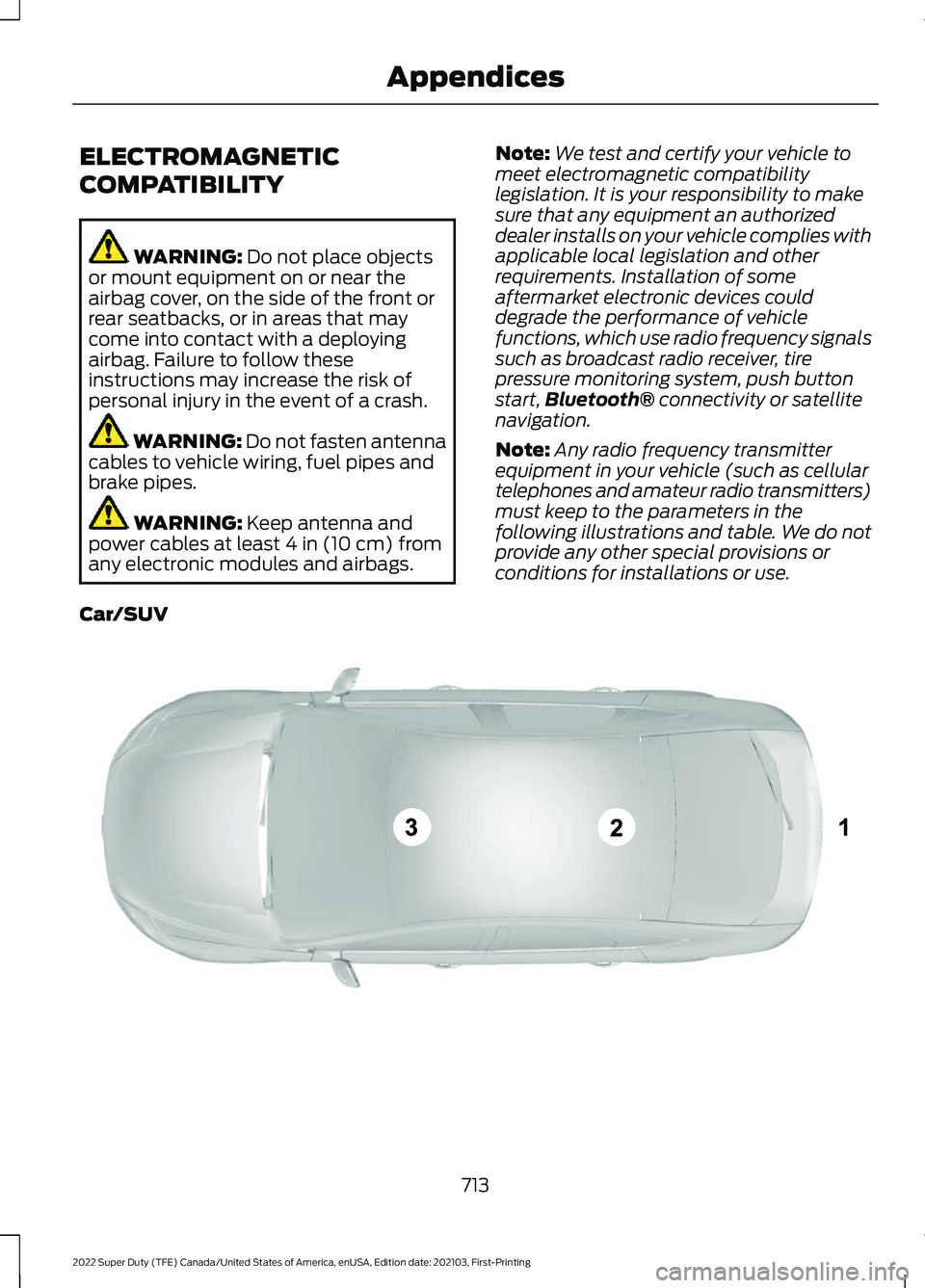
ELECTROMAGNETIC
COMPATIBILITY
WARNING: Do not place objects
or mount equipment on or near the
airbag cover, on the side of the front or
rear seatbacks, or in areas that may
come into contact with a deploying
airbag. Failure to follow these
instructions may increase the risk of
personal injury in the event of a crash. WARNING: Do not fasten antenna
cables to vehicle wiring, fuel pipes and
brake pipes. WARNING:
Keep antenna and
power cables at least 4 in (10 cm) from
any electronic modules and airbags. Note:
We test and certify your vehicle to
meet electromagnetic compatibility
legislation. It is your responsibility to make
sure that any equipment an authorized
dealer installs on your vehicle complies with
applicable local legislation and other
requirements. Installation of some
aftermarket electronic devices could
degrade the performance of vehicle
functions, which use radio frequency signals
such as broadcast radio receiver, tire
pressure monitoring system, push button
start, Bluetooth®
connectivity or satellite
navigation.
Note: Any radio frequency transmitter
equipment in your vehicle (such as cellular
telephones and amateur radio transmitters)
must keep to the parameters in the
following illustrations and table. We do not
provide any other special provisions or
conditions for installations or use.
Car/SUV 713
2022 Super Duty (TFE) Canada/United States of America, enUSA, Edition date: 202103, First-Printing AppendicesE239120
Page 723 of 740
C
Calculating Payload.....................................314
Calculating the Load Limit........................314
Canceling the Set Speed..........................252
Capacities and Specifications................467
Catalytic Converter
......................................223
Catalytic Converter –
Troubleshooting............................................ 223
Catalytic Converter Precautions............223
Catalytic Converter – Troubleshooting........................................223
Catalytic Converter – Warning Lamps................................................................ 223
Center Console.............................................188 Opening the Center Console......................... 188
Center Display Limitations.......................597
Center Display Overview...........................597
Center Display Precautions......................597
Changing a Flat Tire...................................455
Changing a Road Wheel...........................455
Changing the 12V Battery........................409
Changing the Fuel Filter - Diesel...........408
Changing the Fuel Filter - Gasoline
.......................................................409
Changing the Remote Control Battery..............................................................71
Changing the Remote Control Battery - Vehicles With: Flip Key...............................72
Changing the Vehicle Wi-Fi Hotspot Name or Password
..................................506
Charging a Device..........................................181
Charging a Wireless Device......................185
Checking MyKey System Status..............80
Checking the Brake Fluid..........................240
Checking the Coolant................................402
Checking the Seatbelts
................................55
Checking the Selective Catalytic Reduction System Status.......................221
Checking the Tire Pressures
.....................441
Checking the Wiper Blades.......................116
Children and Airbags....................................64
Child Restraint Anchor Points
...................36
Locating the Child Restraint Lower Anchor
Points................................................................... 36
Locating the Child Restraint Top Tether Anchor Points.................................................... 37What Are the Child Restraint Anchor
Points................................................................... 36
Child Restraints
...............................................38
Child Restraint Position Information............38
Child Restraints Recommendation...............39
Child Safety
......................................................35
Child Restraint Anchor Points......................... 36
Child Restraints..................................................... 38
Installing Child Restraints................................. 39
Child Safety Locks.........................................48
Child Safety Precautions.............................35
Cleaning Products
........................................421
Cleaning the Exterior...................................421 Cleaning Camera Lenses and
Sensors............................................................. 423
Cleaning Chrome, Aluminium or Stainless Steel................................................................... 422
Cleaning Headlamps and Rear Lamps................................................................ 421
Cleaning Stripes or Graphics......................... 423
Cleaning the Engine Compartment............422
Cleaning the Exhaust....................................... 423
Cleaning the Exterior Precautions................421
Cleaning the Underbody................................. 423
Cleaning Wheels................................................ 422
Cleaning Windows and Wiper Blades............................................................... 422
Cleaning the Interior
...................................424
Cleaning Carpets and Floor Mats................425
Cleaning Displays and Screens.................... 424
Cleaning Moonroof Tracks............................. 426
Cleaning Plastic.................................................. 424
Cleaning Seatbelts............................................ 426
Cleaning Seats and the Headliner..............424
Cleaning the Instrument Panel.................... 424
Clearing All MyKeys
.......................................79
Clearing the Garage Door Opener..........178
Climate............................................................570
Climate Control
.............................................149
Auto Mode.............................................................. 151
Climate Control Hints..................................152
Cold Weather Precautions
........................373
Configuring the Trip Computer................145
Connected Vehicle
.....................................498
Connected Vehicle –
Troubleshooting............................................ 503
Connecting the Vehicle to a Mobile Network........................................................... 498
720
2022 Super Duty (TFE) Canada/United States of America, enUSA, Edition date: 202103, First-Printing Index
Page 733 of 740
Pre-Collision Assist......................................301
Automatic Emergency Braking.................... 306
Distance Alert..................................................... 305
Distance Indication........................................... 304
Pre-Collision Assist – Troubleshooting............................................ 307
Pre-Collision Assist – Troubleshooting........................................307
Pre-Collision Assist – Frequently Asked Questions........................................................ 308
Pre-Collision Assist – Information Messages......................................................... 307
Preparing Your Vehicle for Storage..........................................................427
Programming a MyKey
.................................79
Programming the Garage Door Opener to Your Garage Door Opener
Motor...............................................................177
Programming the Garage Door Opener to Your Gate Opener Motor....................178
Programming the Garage Door Opener to Your Hand-Held Transmitter............177
Programming the Remote Control
..........74
Programming the Remote Control - Vehicles With: Flip Key
...............................75
Properly Adjusting the Driver and Front Passenger Seats
..........................................64
Puncture See: Changing a Flat Tire................................ 455
Push Button Ignition Switch
.....................192
R
Radio Frequency Certification Labels
...........................................................643
Blind Spot Information System
Sensors............................................................. 643
Body Control Module....................................... 649
Cruise Control Module...................................... 651
Keys and Remote Controls............................ 655
Passive Anti-Theft System............................ 659
Radio Transceiver Module............................. 663
SYNC..................................................................... 666
Telematics Control Unit.................................. 676
Tire Pressure Monitoring System Sensors............................................................. 676
Wireless Accessory Charging Module............................................................. 680Rear Axle Fluid Capacity and
Specification - Diesel
...............................491
Rear Axle Fluid Capacity and Specification - Gasoline
.........................493
Rear Exterior.....................................................34
Rear Occupant Alert System Audible Warnings........................................................173
Rear Occupant Alert System Indicators - Vehicles With: SYNC 3/SYNC 4.........172
Rear Occupant Alert System Indicators - Vehicles With: SYNC..............................172
Rear Occupant Alert System Limitations.....................................................171
Rear Occupant Alert System Precautions...................................................171
Rear Occupant Alert System.....................171
Rear Parking Aid..........................................260 Locating the Rear Parking Aid
Sensors.............................................................. 261
Rear Parking Aid Audible Warnings.............261
Rear Parking Aid Limitations......................... 260
What is the Rear Parking Aid........................ 260
Rear Seats
.......................................................167
Heated Seats....................................................... 169
Manual Seats........................................................ 167
Rear View Camera Guide Lines..............264
Rear View Camera Precautions
.............263
Rear View Camera.......................................263 Rear View Camera Settings........................... 264
Rear View Camera Settings....................264 Switching Rear View Camera Delay On and
Off...................................................................... 265
Zooming the Rear View Camera In and Out..................................................................... 264
Recalling a Preset Position........................174
Recovery Towing
..........................................382
Accessing the Front Towing Point...............382
Recreationally Towing Your Vehicle - 4x2.................................................................386
Recreationally Towing Your Vehicle - 4x4
.................................................................384
Refueling........................................................209 Refueling System Overview.......................... 209
Refueling Your Vehicle..................................... 209
Releasing the Parking Brake....................243
Remote Control Limitations......................69
Remotely Starting and Stopping the Vehicle
...........................................................146
730
2022 Super Duty (TFE) Canada/United States of America, enUSA, Edition date: 202103, First-Printing Index
Page 734 of 740
Remote Start Limitations.........................146
Remote Start Precautions........................146
Remote Start Remote Control Indicators.......................................................147
Remote Start
.................................................146
Remote Start Settings...................................... 147
Remote Start Settings................................147 Setting the Remote Start Duration.............148
Switching Climate Control Auto Mode On
and Off............................................................... 147
Switching Climate Control Last Settings On and Off........................................................ 147
Switching the Heated Seat Settings On and Off........................................................................\
147
Switching the Heated Steering Wheel Settings On and Off..................................... 148
Removing and Installing the Tailgate...........................................................94
Removing the Key Blade.............................70
Removing Your Vehicle From Storage.........................................................428
Repairing Minor Paint Damage..............426
Replacement Parts Recommendation....................................684
Replacing a Lost Key or Remote Control
.............................................................73
Replacing the Cabin Air Filter...................157
Replacing the Front Wiper Blades..........116
Reporting Safety Defects in Canada.........................................................642
Reporting Safety Defects in the United States............................................................642
Reprogramming the Garage Door Opener...........................................................179
Resetting the Individual Trip Values............................................................145
Resetting the Stopping Position - Vehicles With: Power Adjustable
Steering Column
.........................................112
Resetting the Trip Computer....................145
Resetting Tire Pressure Monitoring System.........................................................450
Resuming the Set Speed...........................271
Roadside Assistance
..................................378
Rollover Warning.........................................640
Route Guidance.............................................611
Adjusting the Guidance Prompt
Volume............................................................... 611Canceling Route Guidance..............................
611
Repeating an Instruction.................................. 611
Running-In See: Breaking-In................................................. 373
Running Out of Fuel...................................208 Adding Fuel From a Portable Fuel
Container......................................................... 208
Filling a Portable Fuel Container.................208
S
Satellite Radio
...............................................513
Locating the Satellite Radio Identification
Number............................................................ 529
Satellite Radio Limitations............................ 529
Satellite Radio Settings.................................. 530
Selecting a Channel......................................... 530
What Is Satellite Radio.................................... 529
Saving a Preset Position.............................174
Scheduled Maintenance...........................622
Seatbelt Extensions......................................56
Seatbelt Precautions
....................................49
Seatbelt Reminder.........................................53
How Does the Seatbelt Reminder
Work..................................................................... 53
Seatbelt Reminder Audible Warnings..........55
Seatbelt Reminder Indicators......................... 55
Switching the Seatbelt Reminder On and Off........................................................................\
. 55
Seatbelts...........................................................49 Automatic Locking Mode................................... 51
Seatbelt Reminder............................................... 53
Sensitive Locking Mode...................................... 51
Security............................................................106 Anti-Theft Alarm System................................ 106
Anti-Theft Alarm System Settings..............107
Passive Anti-Theft System............................. 106
Security – Troubleshooting............................ 108
Security – Troubleshooting......................108 Security – Frequently Asked
Questions......................................................... 109
Security – Information Messages................108
Selecting a Drive Mode...............................281
Selecting a Four-Wheel Drive Mode.............................................................230
Selecting the Audio Source.....................525
Selective Catalytic Reduction System Guidelines.....................................................218
731
2022 Super Duty (TFE) Canada/United States of America, enUSA, Edition date: 202103, First-Printing Index