ECO mode FORD F-59 2021 Owner's Manual
[x] Cancel search | Manufacturer: FORD, Model Year: 2021, Model line: F-59, Model: FORD F-59 2021Pages: 191, PDF Size: 2.84 MB
Page 166 of 191
CONNECTED VEHICLE
REQUIREMENTS
Connected service and related feature
functionality requires a compatible vehicle
network.
Some remote features require additional
service activation. Log in to your Ford
account for details. Some restrictions, third
party terms and message or data rates
may apply.
CONNECTED VEHICLE
LIMITATIONS
Evolving technology, cellular networks, or
regulations could affect functionality and
availability, or continued provision of some
features. These changes could even stop
some features from functioning.
CONNECTING THE VEHICLE TO
A MOBILE NETWORK
WHAT IS THE MODEM
The modem allows access to a
range of features built into your
vehicle.
ENABLING AND DISABLING THE
MODEM
1. Press Settings. 2. Press
FordPass Connect.
3. Press
Connectivity Settings.
4. Switch connectivity features on or off.
CONNECTING FORDPASS TO THE
MODEM
1. Make sure that the modem is enabled using the vehicle settings menu.
2. Open the FordPass app on your device
and log in.
3. Add your vehicle or select your vehicle if already added.
4. Select the option for vehicle details.
5. Select the option to activate your vehicle.
6. Make sure that the name on the screen
matches the name shown in your
FordPass account.
7. Confirm that FordPass account is connected to the modem.
CONNECTING THE VEHICLE TO
A WI-FI NETWORK
1. Press
Settings.
2. Press
Wi-Fi.
3. Switch
Wi-Fi on.
4. Press
View Available Networks.
5. Select an available Wi-Fi network.
Note: Enter the network password to
connect to a secure network.
163
2021 Motorhome (TY3) Canada/United States of America, enUSA, Edition date: 202010, Second-Printing Connected Vehicle
(If Equipped)
Page 168 of 191
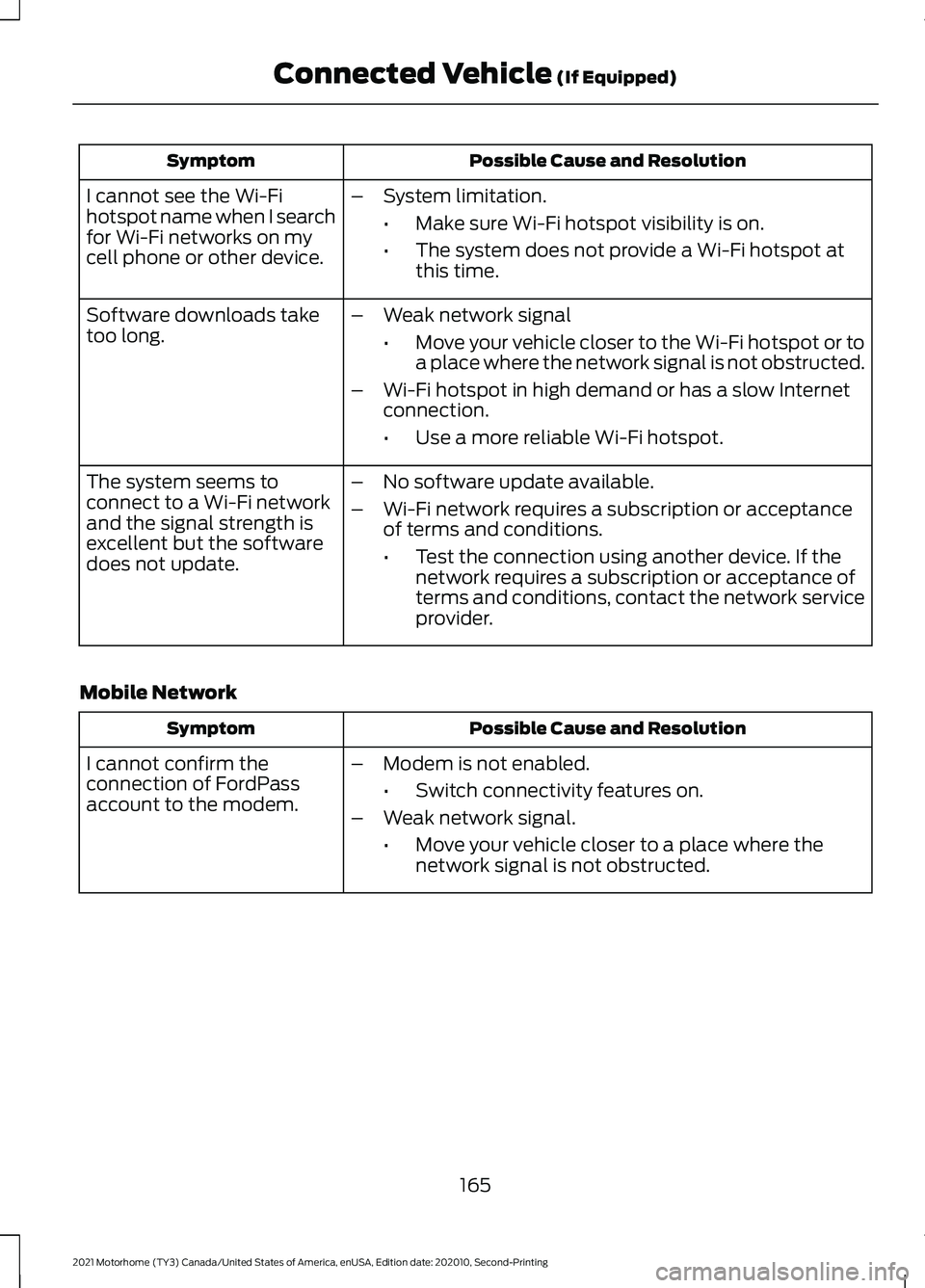
Possible Cause and Resolution
Symptom
I cannot see the Wi-Fi
hotspot name when I search
for Wi-Fi networks on my
cell phone or other device. –
System limitation.
•Make sure Wi-Fi hotspot visibility is on.
• The system does not provide a Wi-Fi hotspot at
this time.
– Weak network signal
•Move your vehicle closer to the Wi-Fi hotspot or to
a place where the network signal is not obstructed.
– Wi-Fi hotspot in high demand or has a slow Internet
connection.
•Use a more reliable Wi-Fi hotspot.
Software downloads take
too long.
–No software update available.
– Wi-Fi network requires a subscription or acceptance
of terms and conditions.
•Test the connection using another device. If the
network requires a subscription or acceptance of
terms and conditions, contact the network service
provider.
The system seems to
connect to a Wi-Fi network
and the signal strength is
excellent but the software
does not update.
Mobile Network Possible Cause and Resolution
Symptom
–Modem is not enabled.
•Switch connectivity features on.
– Weak network signal.
•Move your vehicle closer to a place where the
network signal is not obstructed.
I cannot confirm the
connection of FordPass
account to the modem.
165
2021 Motorhome (TY3) Canada/United States of America, enUSA, Edition date: 202010, Second-Printing Connected Vehicle (If Equipped)
Page 188 of 191
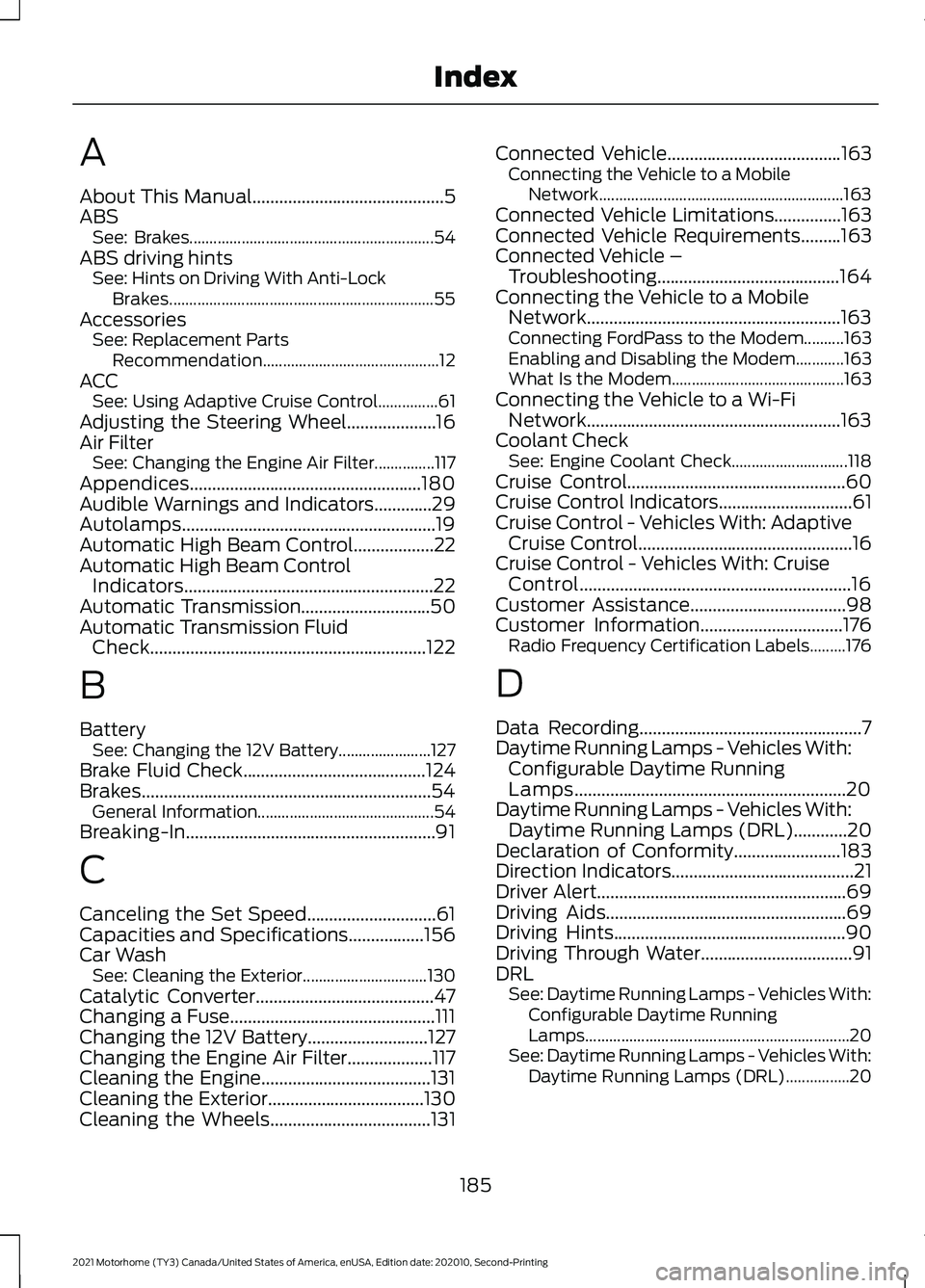
A
About This Manual...........................................5
ABS
See: Brakes............................................................. 54
ABS driving hints See: Hints on Driving With Anti-Lock
Brakes.................................................................. 55
Accessories See: Replacement Parts
Recommendation............................................ 12
ACC See: Using Adaptive Cruise Control...............61
Adjusting the Steering Wheel....................16
Air Filter See: Changing the Engine Air Filter...............117
Appendices....................................................180
Audible Warnings and Indicators.............29
Autolamps.........................................................19
Automatic High Beam Control..................22
Automatic High Beam Control Indicators........................................................22
Automatic Transmission.............................50
Automatic Transmission Fluid Check..............................................................122
B
Battery See: Changing the 12V Battery....................... 127
Brake Fluid Check.........................................124
Brakes.................................................................54 General Information............................................ 54
Breaking-In........................................................91
C
Canceling the Set Speed.............................61
Capacities and Specifications.................156
Car Wash See: Cleaning the Exterior............................... 130
Catalytic Converter........................................47
Changing a Fuse..............................................111
Changing the 12V Battery
...........................127
Changing the Engine Air Filter...................117
Cleaning the Engine......................................131
Cleaning the Exterior...................................130
Cleaning the Wheels
....................................131 Connected Vehicle
.......................................163
Connecting the Vehicle to a Mobile
Network............................................................. 163
Connected Vehicle Limitations
...............163
Connected Vehicle Requirements.........163
Connected Vehicle – Troubleshooting.........................................164
Connecting the Vehicle to a Mobile Network.........................................................163
Connecting FordPass to the Modem..........163
Enabling and Disabling the Modem............163
What Is the Modem........................................... 163
Connecting the Vehicle to a Wi-Fi Network.........................................................163
Coolant Check See: Engine Coolant Check............................. 118
Cruise Control.................................................60
Cruise Control Indicators..............................61
Cruise Control - Vehicles With: Adaptive Cruise Control................................................16
Cruise Control - Vehicles With: Cruise Control.............................................................16
Customer Assistance...................................98
Customer Information................................176 Radio Frequency Certification Labels.........176
D
Data Recording
..................................................7
Daytime Running Lamps - Vehicles With: Configurable Daytime Running
Lamps.............................................................20
Daytime Running Lamps - Vehicles With: Daytime Running Lamps (DRL)............20
Declaration of Conformity........................183
Direction Indicators
.........................................21
Driver Alert........................................................69
Driving Aids......................................................69
Driving Hints
....................................................90
Driving Through Water..................................91
DRL See: Daytime Running Lamps - Vehicles With:
Configurable Daytime Running
Lamps.................................................................. 20
See: Daytime Running Lamps - Vehicles With: Daytime Running Lamps (DRL)................20
185
2021 Motorhome (TY3) Canada/United States of America, enUSA, Edition date: 202010, Second-Printing Index