lock FORD F-600 2022 Repair Manual
[x] Cancel search | Manufacturer: FORD, Model Year: 2022, Model line: F-600, Model: FORD F-600 2022Pages: 740, PDF Size: 12.6 MB
Page 171 of 740
INSTALLING THE HEAD
RESTRAINT
Align the steel stems into the guide sleeves
and push the head restraint down until it
locks.
FOLDING THE SEATS
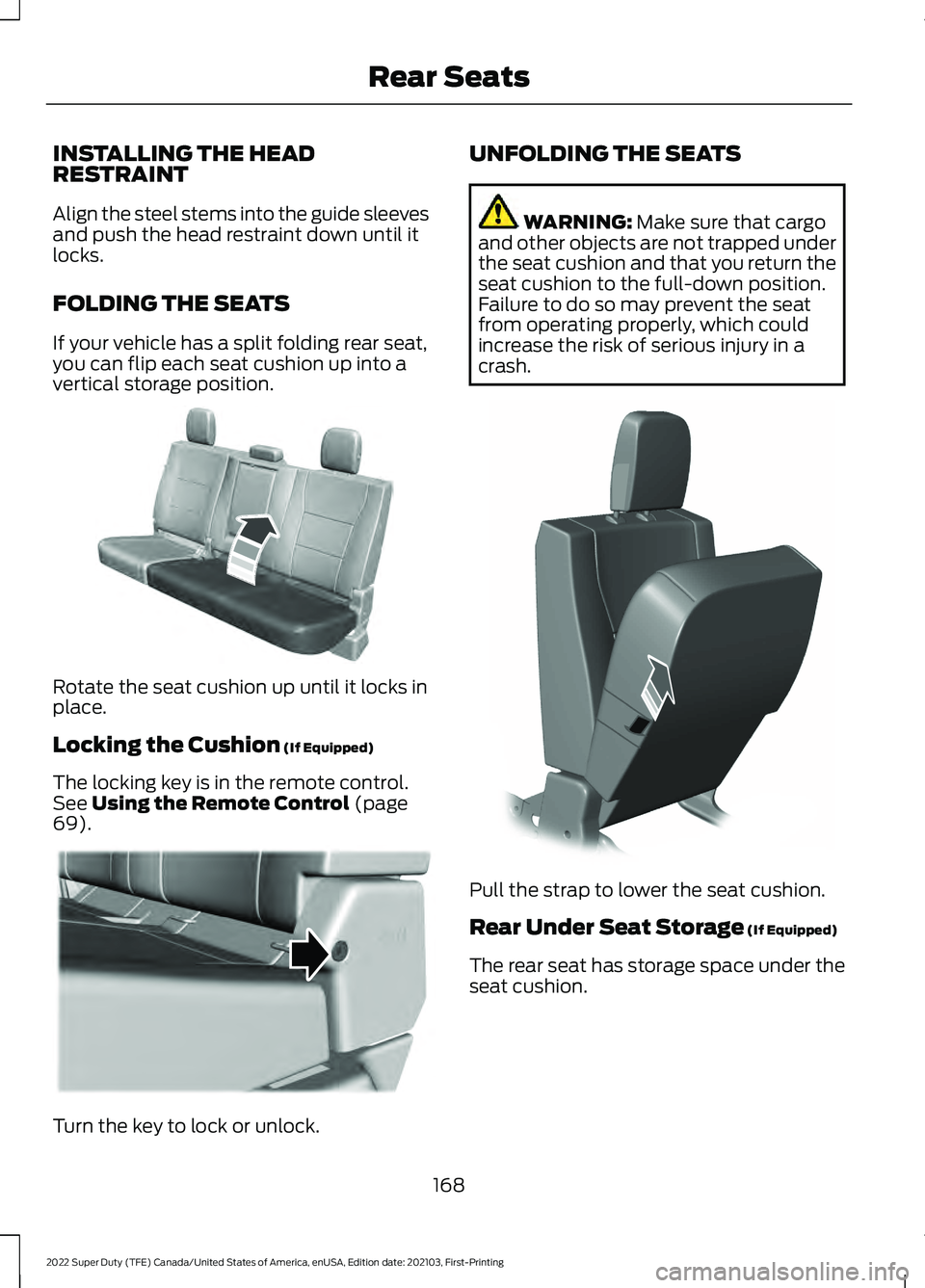
If your vehicle has a split folding rear seat,
you can flip each seat cushion up into a
vertical storage position.
Rotate the seat cushion up until it locks in
place.
Locking the Cushion (If Equipped)
The locking key is in the remote control.
See
Using the Remote Control (page
69). Turn the key to lock or unlock. UNFOLDING THE SEATS WARNING:
Make sure that cargo
and other objects are not trapped under
the seat cushion and that you return the
seat cushion to the full-down position.
Failure to do so may prevent the seat
from operating properly, which could
increase the risk of serious injury in a
crash. Pull the strap to lower the seat cushion.
Rear Under Seat Storage
(If Equipped)
The rear seat has storage space under the
seat cushion.
168
2022 Super Duty (TFE) Canada/United States of America, enUSA, Edition date: 202103, First-Printing Rear SeatsE181250 E224956 E308139
Page 172 of 740
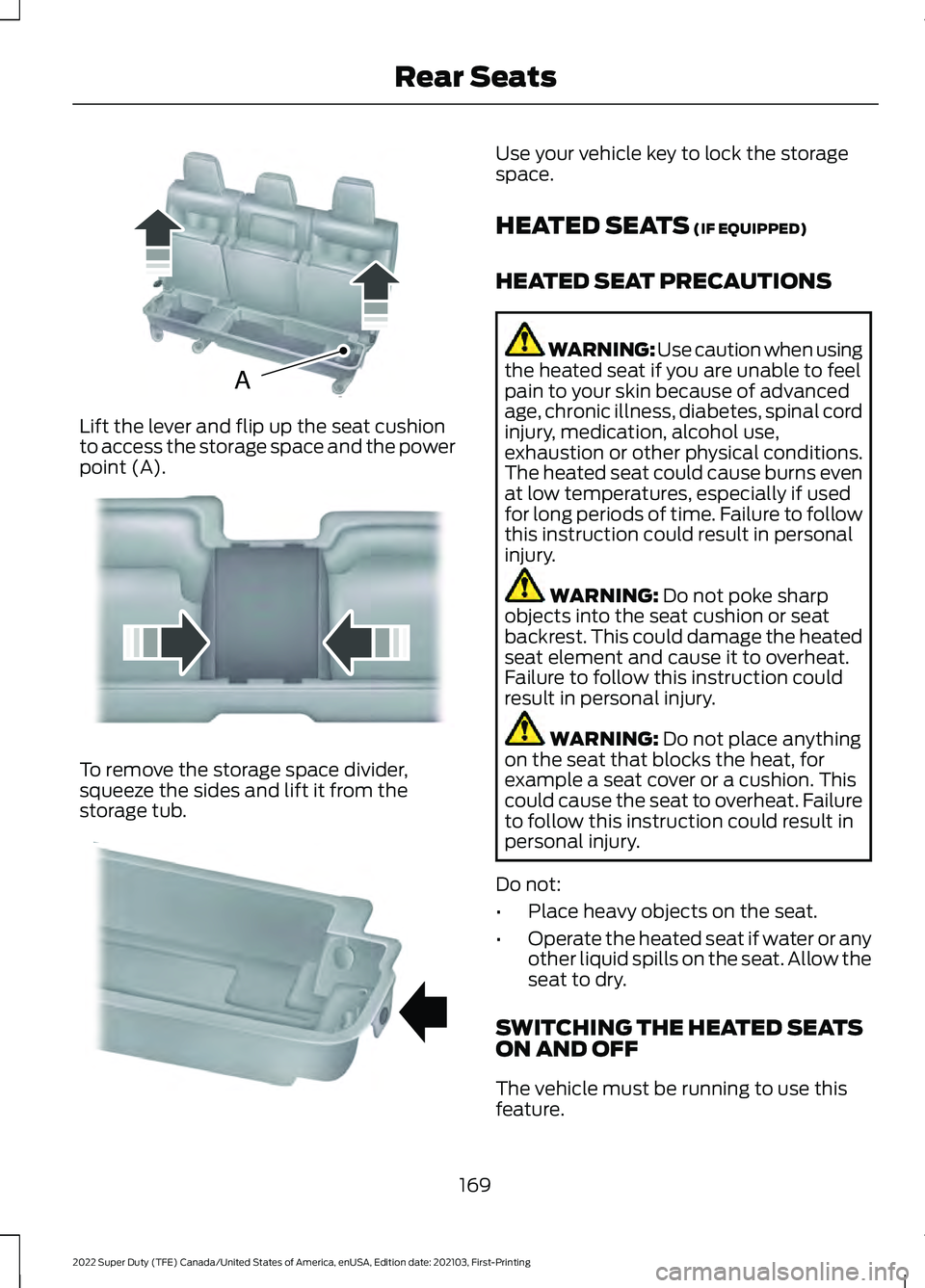
Lift the lever and flip up the seat cushion
to access the storage space and the power
point (A).
To remove the storage space divider,
squeeze the sides and lift it from the
storage tub. Use your vehicle key to lock the storage
space.
HEATED SEATS (IF EQUIPPED)
HEATED SEAT PRECAUTIONS WARNING: Use caution when using
the heated seat if you are unable to feel
pain to your skin because of advanced
age, chronic illness, diabetes, spinal cord
injury, medication, alcohol use,
exhaustion or other physical conditions.
The heated seat could cause burns even
at low temperatures, especially if used
for long periods of time. Failure to follow
this instruction could result in personal
injury. WARNING:
Do not poke sharp
objects into the seat cushion or seat
backrest. This could damage the heated
seat element and cause it to overheat.
Failure to follow this instruction could
result in personal injury. WARNING:
Do not place anything
on the seat that blocks the heat, for
example a seat cover or a cushion. This
could cause the seat to overheat. Failure
to follow this instruction could result in
personal injury.
Do not:
• Place heavy objects on the seat.
• Operate the heated seat if water or any
other liquid spills on the seat. Allow the
seat to dry.
SWITCHING THE HEATED SEATS
ON AND OFF
The vehicle must be running to use this
feature.
169
2022 Super Duty (TFE) Canada/United States of America, enUSA, Edition date: 202103, First-Printing Rear SeatsAE162739 E162740 E162741
Page 177 of 740
WHAT IS THE MEMORY
FUNCTION
The memory function recalls the position
of these features:
•
Driver seat.
• Power mirrors.
• Optional power steering column.
• Optional power adjustable pedals.
MEMORY FUNCTION
PRECAUTIONS WARNING: Before activating the
memory seat, make sure that the area
immediately surrounding the seat is clear
of obstructions and that all occupants
are clear of moving parts. WARNING:
Do not use the memory
function when your vehicle is moving.
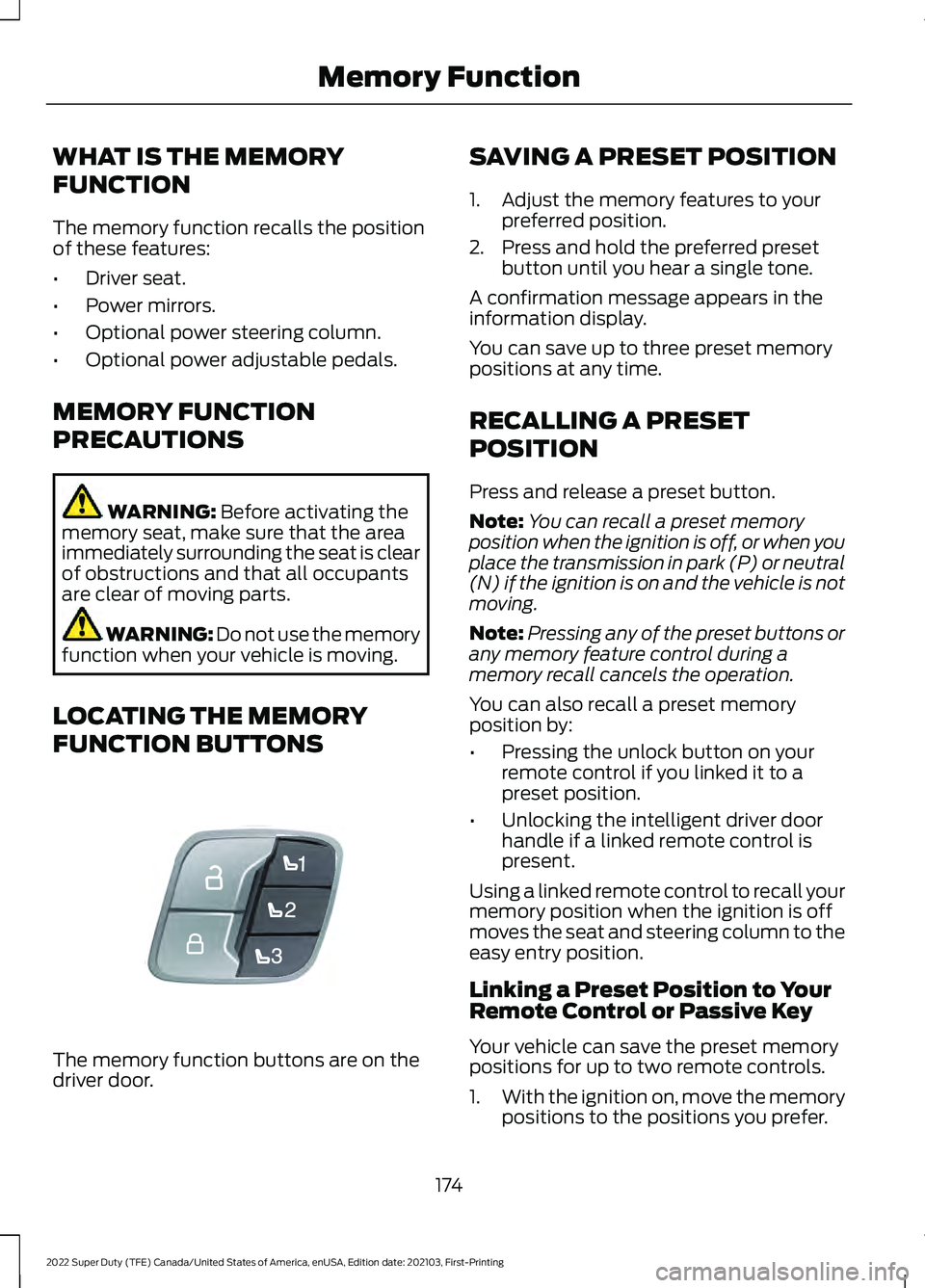
LOCATING THE MEMORY
FUNCTION BUTTONS The memory function buttons are on the
driver door. SAVING A PRESET POSITION
1. Adjust the memory features to your
preferred position.
2. Press and hold the preferred preset button until you hear a single tone.
A confirmation message appears in the
information display.
You can save up to three preset memory
positions at any time.
RECALLING A PRESET
POSITION
Press and release a preset button.
Note: You can recall a preset memory
position when the ignition is off, or when you
place the transmission in park (P) or neutral
(N) if the ignition is on and the vehicle is not
moving.
Note: Pressing any of the preset buttons or
any memory feature control during a
memory recall cancels the operation.
You can also recall a preset memory
position by:
• Pressing the unlock button on your
remote control if you linked it to a
preset position.
• Unlocking the intelligent driver door
handle if a linked remote control is
present.
Using a linked remote control to recall your
memory position when the ignition is off
moves the seat and steering column to the
easy entry position.
Linking a Preset Position to Your
Remote Control or Passive Key
Your vehicle can save the preset memory
positions for up to two remote controls.
1. With the ignition on, move the memory
positions to the positions you prefer.
174
2022 Super Duty (TFE) Canada/United States of America, enUSA, Edition date: 202103, First-Printing Memory FunctionE307868
Page 178 of 740
2. Press and hold the preferred preset
button for about five seconds. A tone
sounds, and the instrument panel
prompts you to press the lock button
on your remote control.
3. Within ten seconds, press the lock button on the remote control you are
linking. The instrument panel indicates
a successful link.
To unlink a remote control, follow the
same procedure – except in step 3, press
the unlock button on the remote control.
Note: If more than one linked remote
control is in range, the memory function
moves to the settings of the first key to
initiate a memory recall.
175
2022 Super Duty (TFE) Canada/United States of America, enUSA, Edition date: 202103, First-Printing Memory Function
Page 179 of 740
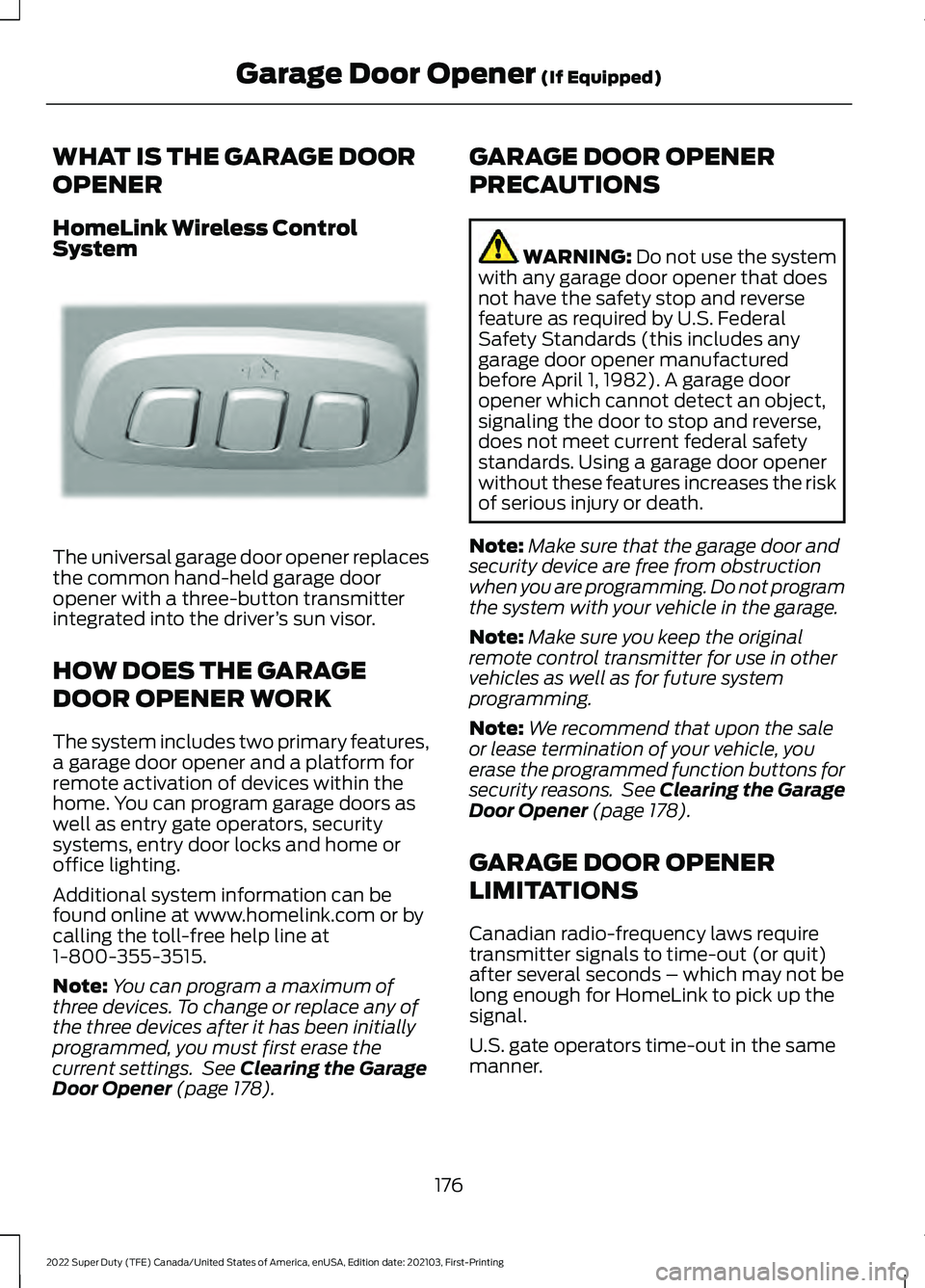
WHAT IS THE GARAGE DOOR
OPENER
HomeLink Wireless Control
System
The universal garage door opener replaces
the common hand-held garage door
opener with a three-button transmitter
integrated into the driver
’s sun visor.
HOW DOES THE GARAGE
DOOR OPENER WORK
The system includes two primary features,
a garage door opener and a platform for
remote activation of devices within the
home. You can program garage doors as
well as entry gate operators, security
systems, entry door locks and home or
office lighting.
Additional system information can be
found online at www.homelink.com or by
calling the toll-free help line at
1-800-355-3515.
Note: You can program a maximum of
three devices. To change or replace any of
the three devices after it has been initially
programmed, you must first erase the
current settings. See Clearing the Garage
Door Opener (page 178). GARAGE DOOR OPENER
PRECAUTIONS WARNING:
Do not use the system
with any garage door opener that does
not have the safety stop and reverse
feature as required by U.S. Federal
Safety Standards (this includes any
garage door opener manufactured
before April 1, 1982). A garage door
opener which cannot detect an object,
signaling the door to stop and reverse,
does not meet current federal safety
standards. Using a garage door opener
without these features increases the risk
of serious injury or death.
Note: Make sure that the garage door and
security device are free from obstruction
when you are programming. Do not program
the system with your vehicle in the garage.
Note: Make sure you keep the original
remote control transmitter for use in other
vehicles as well as for future system
programming.
Note: We recommend that upon the sale
or lease termination of your vehicle, you
erase the programmed function buttons for
security reasons. See Clearing the Garage
Door Opener
(page 178).
GARAGE DOOR OPENER
LIMITATIONS
Canadian radio-frequency laws require
transmitter signals to time-out (or quit)
after several seconds – which may not be
long enough for HomeLink to pick up the
signal.
U.S. gate operators time-out in the same
manner.
176
2022 Super Duty (TFE) Canada/United States of America, enUSA, Edition date: 202103, First-Printing Garage Door Opener
(If Equipped)E188211
Page 190 of 740
CUP HOLDERS
CUP HOLDER PRECAUTIONS
WARNING: Use caution when
stowing items or hot drinks in the cup
holders. Items could become loose or
spill during hard braking, acceleration or
crashes. Failure to follow this instruction
could result in personal injury.
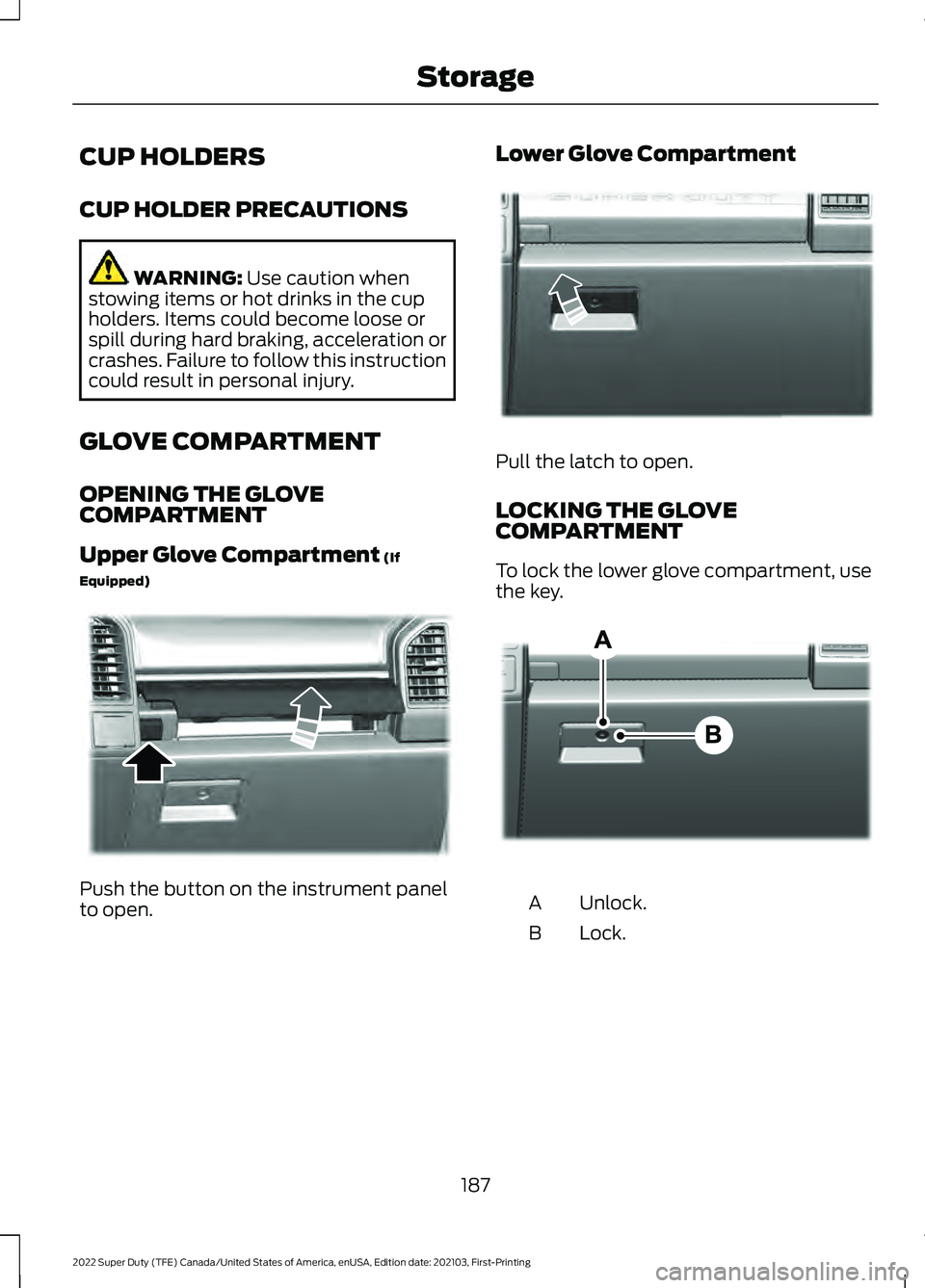
GLOVE COMPARTMENT
OPENING THE GLOVE
COMPARTMENT
Upper Glove Compartment
(If
Equipped) Push the button on the instrument panel
to open. Lower Glove Compartment Pull the latch to open.
LOCKING THE GLOVE
COMPARTMENT
To lock the lower glove compartment, use
the key.
Unlock.
A
Lock.
B
187
2022 Super Duty (TFE) Canada/United States of America, enUSA, Edition date: 202103, First-Printing StorageE351471 E351472 E351483
Page 191 of 740
CENTER CONSOLE
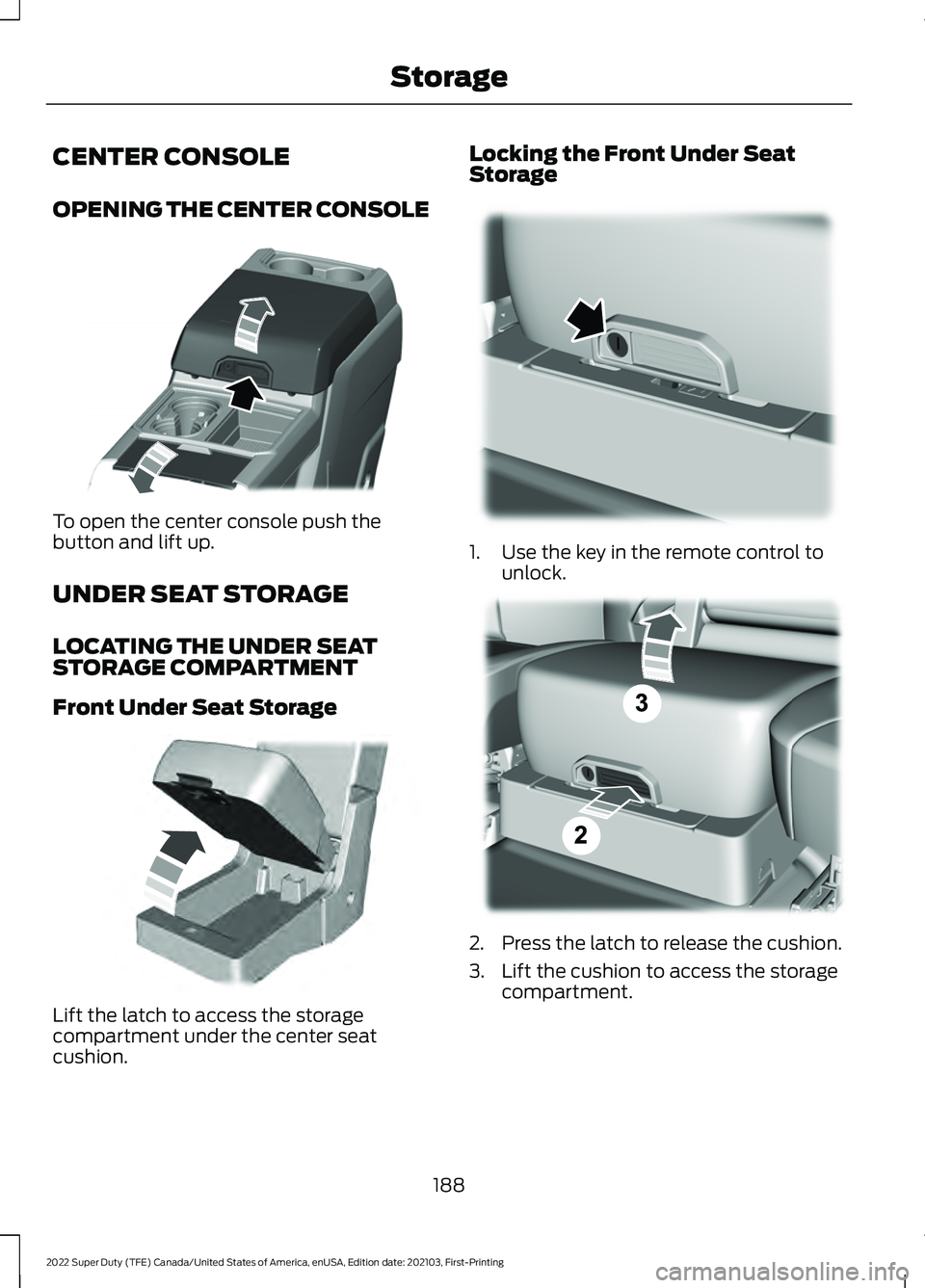
OPENING THE CENTER CONSOLE
To open the center console push the
button and lift up.
UNDER SEAT STORAGE
LOCATING THE UNDER SEAT
STORAGE COMPARTMENT
Front Under Seat Storage
Lift the latch to access the storage
compartment under the center seat
cushion. Locking the Front Under Seat
Storage
1. Use the key in the remote control to
unlock. 2. Press the latch to release the cushion.
3. Lift the cushion to access the storage
compartment.
188
2022 Super Duty (TFE) Canada/United States of America, enUSA, Edition date: 202103, First-Printing StorageE351484 E306120 E224738 E223578
Page 192 of 740
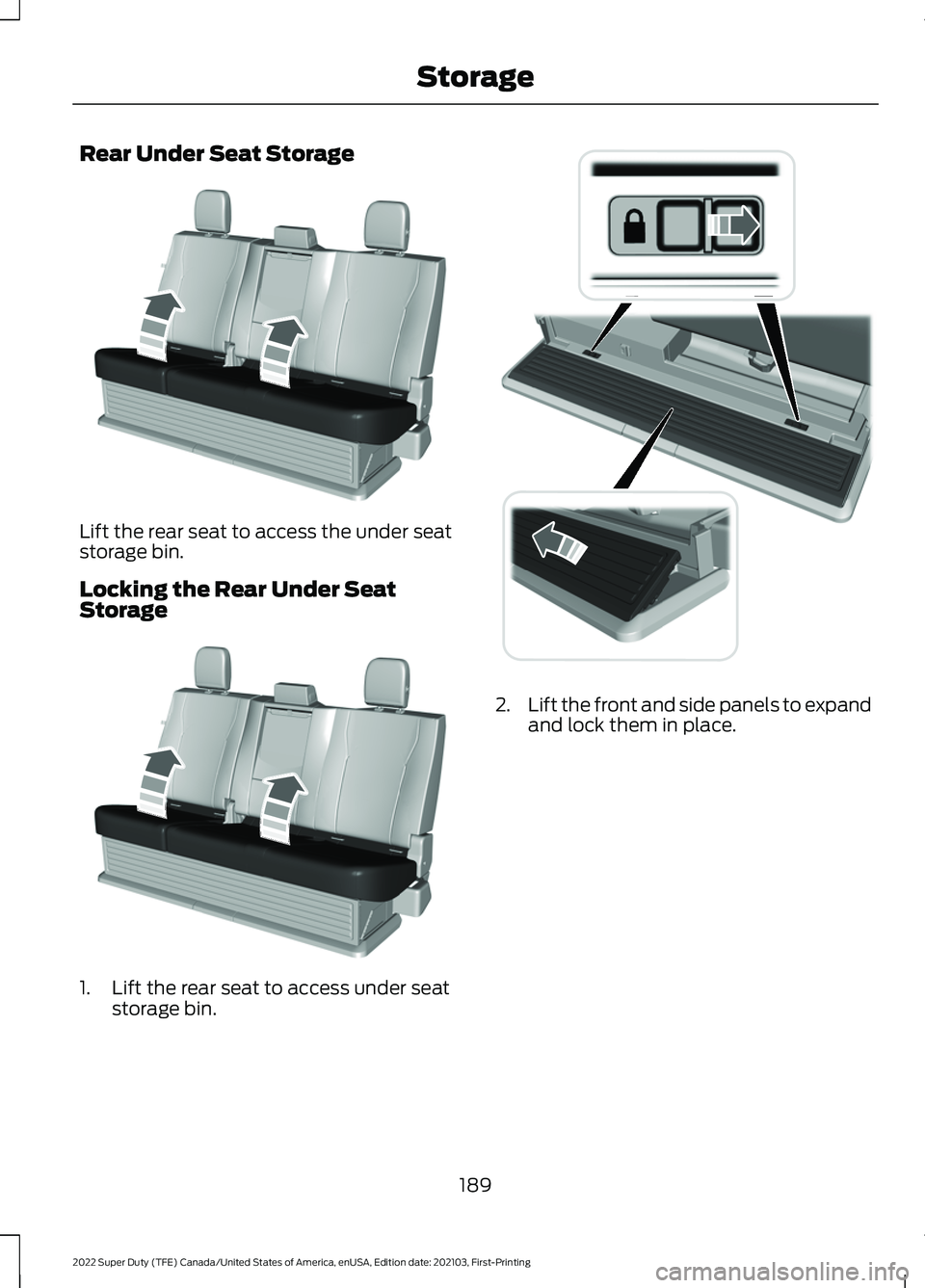
Rear Under Seat Storage
Lift the rear seat to access the under seat
storage bin.
Locking the Rear Under Seat
Storage
1. Lift the rear seat to access under seat
storage bin. 2.
Lift the front and side panels to expand
and lock them in place.
189
2022 Super Duty (TFE) Canada/United States of America, enUSA, Edition date: 202103, First-Printing StorageE229819 E229819 E235007
Page 193 of 740
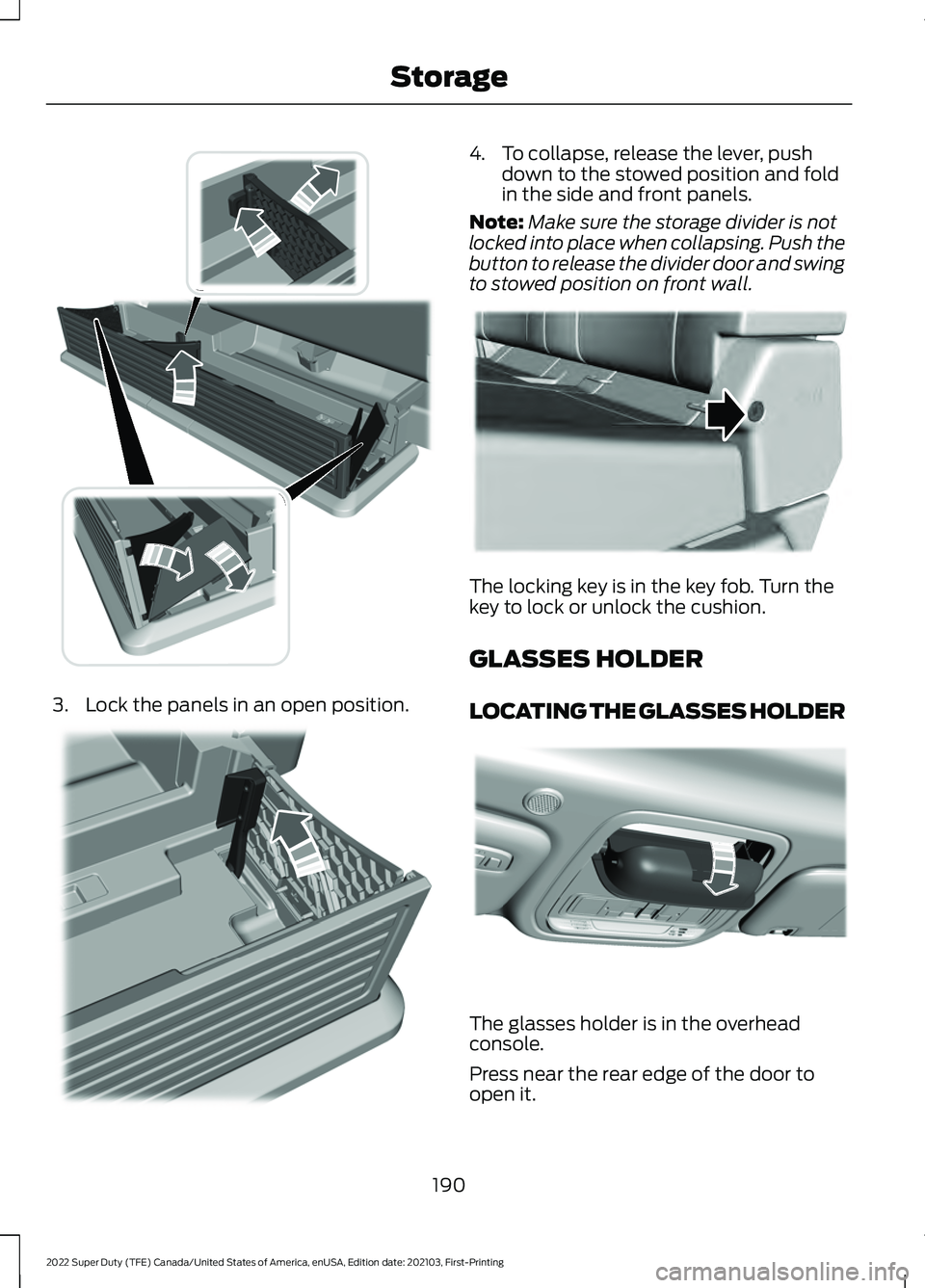
3. Lock the panels in an open position. 4. To collapse, release the lever, push
down to the stowed position and fold
in the side and front panels.
Note: Make sure the storage divider is not
locked into place when collapsing. Push the
button to release the divider door and swing
to stowed position on front wall. The locking key is in the key fob. Turn the
key to lock or unlock the cushion.
GLASSES HOLDER
LOCATING THE GLASSES HOLDER
The glasses holder is in the overhead
console.
Press near the rear edge of the door to
open it.
190
2022 Super Duty (TFE) Canada/United States of America, enUSA, Edition date: 202103, First-Printing StorageE235008 E235009 E224956 E306967
Page 197 of 740
2. Press the push button ignition switch.
Note:
The engine may continue cranking
for up to 15 seconds or until it starts.
Note: The engine takes longer to start at
lower temperatures. It may crank for several
seconds when very cold.
Glow Plug Indicator The engine does not start until
the glow plug indicator turns off.
This may take several seconds
in extremely cold conditions.
RESTARTING THE ENGINE AFTER
STOPPING IT - VEHICLES WITH:
PUSH BUTTON START
The system allows you to start the engine
within 10 seconds of switching it off, even
if it does not detect a valid passive key.
Within 10 seconds of switching the engine
off, fully press the brake pedal and press
the push button ignition switch. After 10
seconds, you can no longer start the engine
if the system does not detect a valid
passive key.
When you start the engine, it remains
running until you press the push button
ignition switch, even if your vehicle does
not detect a valid passive key. If you open
and close a door when the engine is
running, the system searches for a valid
passive key. ENGINE BLOCK HEATER (IF
EQUIPPED)
ENGINE BLOCK HEATER
PRECAUTIONS WARNING:
Failure to follow engine
block heater instructions could result in
property damage or serious personal
injury. WARNING: Do not use your heater
with ungrounded electrical systems or
two-pronged adapters. There is a risk of
electrical shock. WARNING:
Do not fully close the
hood, or allow it to drop under its own
weight when using the engine block
heater. This could damage the power
cable and may cause an electrical short
resulting in fire, injury and property
damage.
We recommend that you do the following
for a safe and correct operation:
• Use a 16-gauge outdoor extension cord
that is product certified by
Underwriter ’s Laboratory (UL) or
Canadian Standards Association
(CSA). This extension cord must be
suitable for use outdoors, in cold
temperatures, and be clearly marked
Suitable for Use with Outdoor
Appliances. Do not use an indoor
extension cord outdoors. This could
result in an electric shock or become a
fire hazard.
• Use as short an extension cord as
possible.
• Do not use multiple extension cords.
194
2022 Super Duty (TFE) Canada/United States of America, enUSA, Edition date: 202103, First-Printing Starting and Stopping the EngineE321258