clock FORD F-650/750 2018 User Guide
[x] Cancel search | Manufacturer: FORD, Model Year: 2018, Model line: F-650/750, Model: FORD F-650/750 2018Pages: 386, PDF Size: 9.01 MB
Page 214 of 386
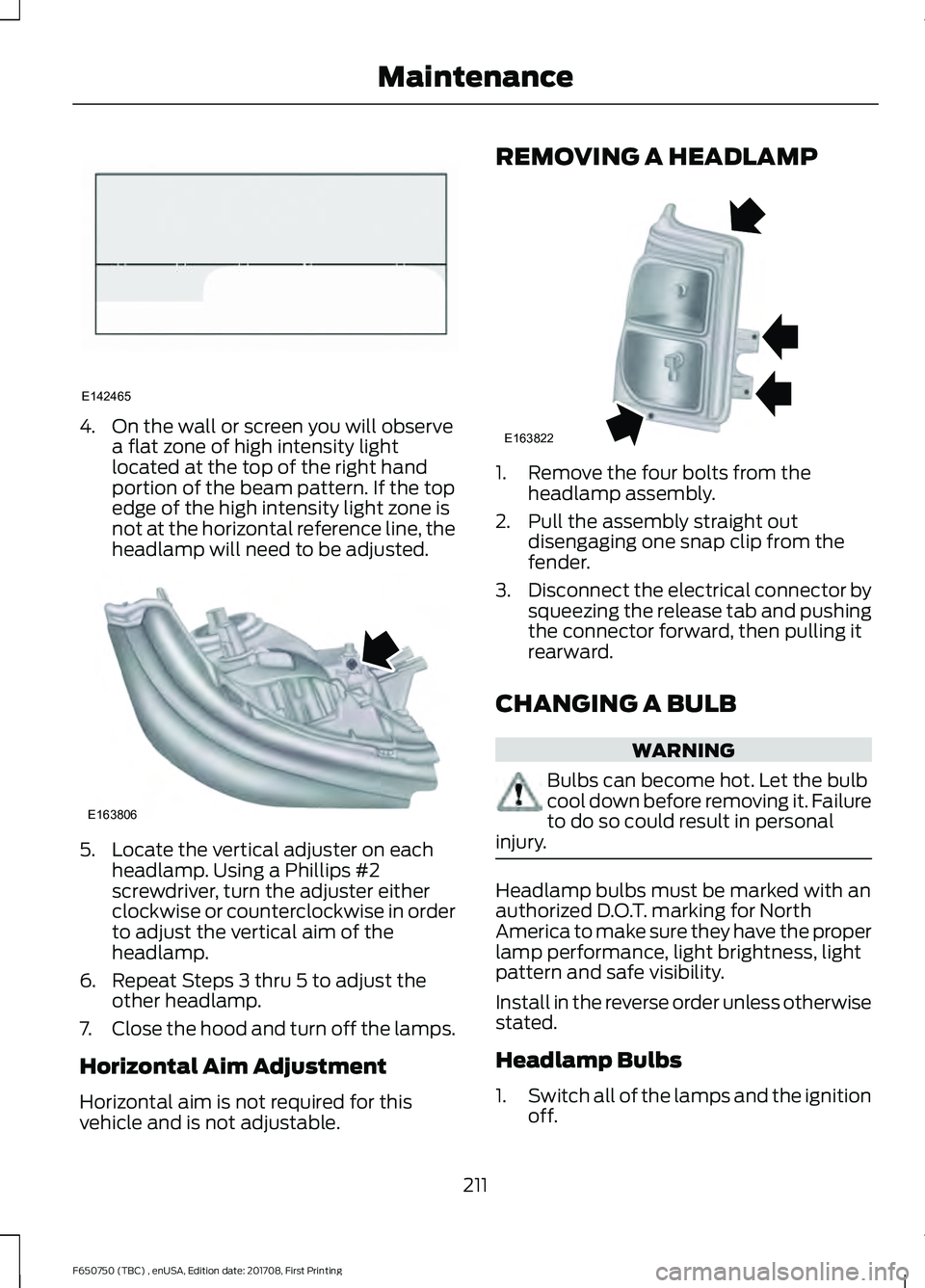
4. On the wall or screen you will observe
a flat zone of high intensity light
located at the top of the right hand
portion of the beam pattern. If the top
edge of the high intensity light zone is
not at the horizontal reference line, the
headlamp will need to be adjusted. 5. Locate the vertical adjuster on each
headlamp. Using a Phillips #2
screwdriver, turn the adjuster either
clockwise or counterclockwise in order
to adjust the vertical aim of the
headlamp.
6. Repeat Steps 3 thru 5 to adjust the other headlamp.
7. Close the hood and turn off the lamps.
Horizontal Aim Adjustment
Horizontal aim is not required for this
vehicle and is not adjustable. REMOVING A HEADLAMP
1. Remove the four bolts from the
headlamp assembly.
2. Pull the assembly straight out disengaging one snap clip from the
fender.
3. Disconnect the electrical connector by
squeezing the release tab and pushing
the connector forward, then pulling it
rearward.
CHANGING A BULB WARNING
Bulbs can become hot. Let the bulb
cool down before removing it. Failure
to do so could result in personal
injury. Headlamp bulbs must be marked with an
authorized D.O.T. marking for North
America to make sure they have the proper
lamp performance, light brightness, light
pattern and safe visibility.
Install in the reverse order unless otherwise
stated.
Headlamp Bulbs
1.
Switch all of the lamps and the ignition
off.
211
F650750 (TBC) , enUSA, Edition date: 201708, First Printing MaintenanceE142465 E163806 E163822
Page 215 of 386
2. Remove the headlamp. See
Removing a Headlamp (page 211).
3. Release the clip and remove the bulb.
Note: Do not touch the bulb glass.
Note: If the bulb is accidentally touched, it
should be cleaned with rubbing alcohol
before being used.
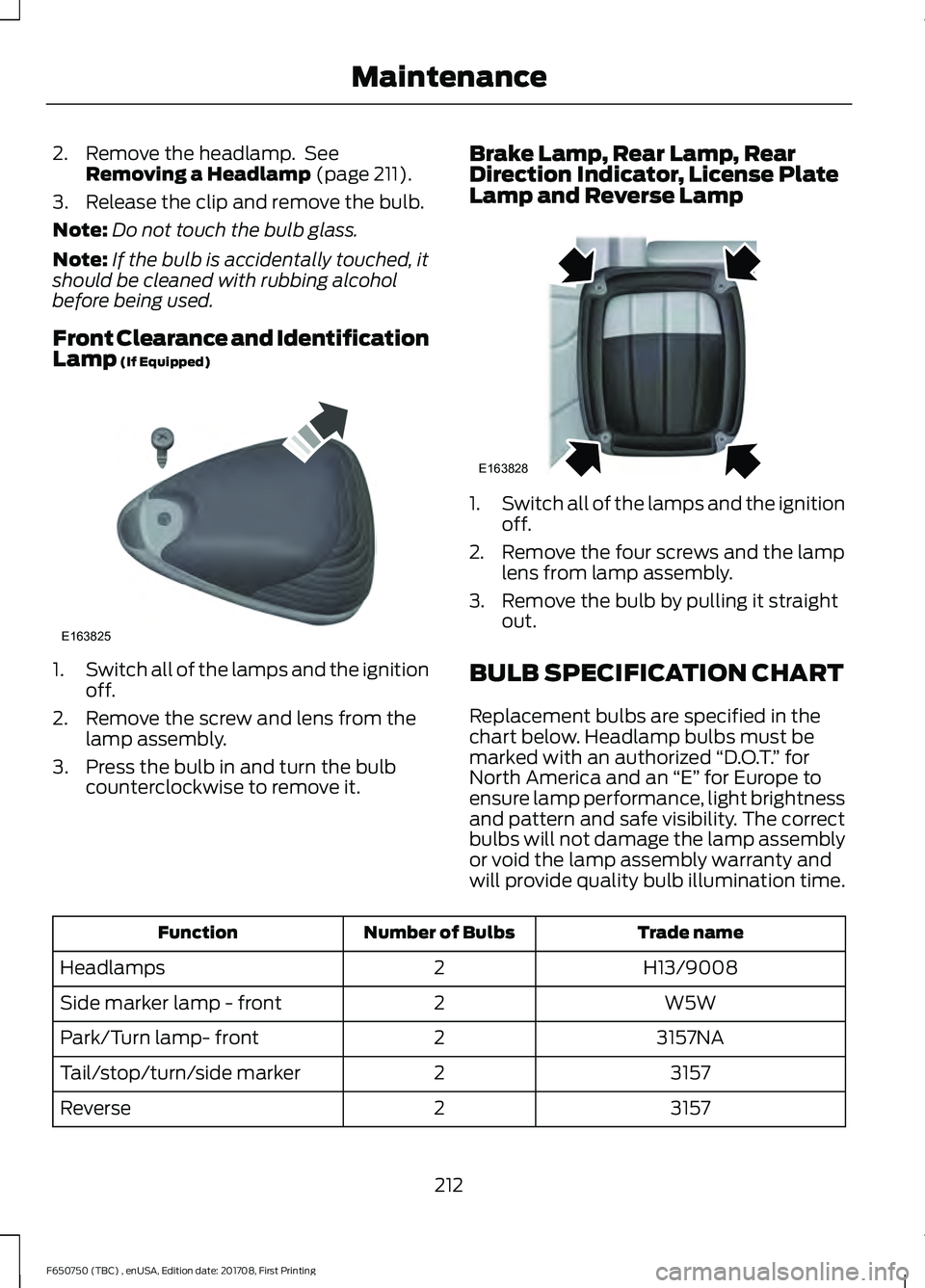
Front Clearance and Identification
Lamp
(If Equipped) 1.
Switch all of the lamps and the ignition
off.
2. Remove the screw and lens from the lamp assembly.
3. Press the bulb in and turn the bulb counterclockwise to remove it. Brake Lamp, Rear Lamp, Rear
Direction Indicator, License Plate
Lamp and Reverse Lamp 1.
Switch all of the lamps and the ignition
off.
2. Remove the four screws and the lamp lens from lamp assembly.
3. Remove the bulb by pulling it straight out.
BULB SPECIFICATION CHART
Replacement bulbs are specified in the
chart below. Headlamp bulbs must be
marked with an authorized “D.O.T.” for
North America and an “E” for Europe to
ensure lamp performance, light brightness
and pattern and safe visibility. The correct
bulbs will not damage the lamp assembly
or void the lamp assembly warranty and
will provide quality bulb illumination time. Trade name
Number of Bulbs
Function
H13/9008
2
Headlamps
W5W
2
Side marker lamp - front
3157NA
2
Park/Turn lamp- front
3157
2
Tail/stop/turn/side marker
3157
2
Reverse
212
F650750 (TBC) , enUSA, Edition date: 201708, First Printing MaintenanceE163825 E163828
Page 222 of 386
Regular fuel filter changes are an
important part of engine maintenance;
failing to keep with the scheduled
maintenance could lead to engine
performance issues and fuel injection
system damage. See Scheduled
Maintenance (page 320).
Use only recommended service parts
conforming to specifications. See
Motorcraft Parts
(page 257).
Note: Using fuel that has high levels of
impurities may require more frequent filter
replacements than the service interval
specifies.
Diesel Fuel Conditioner Module
Filter
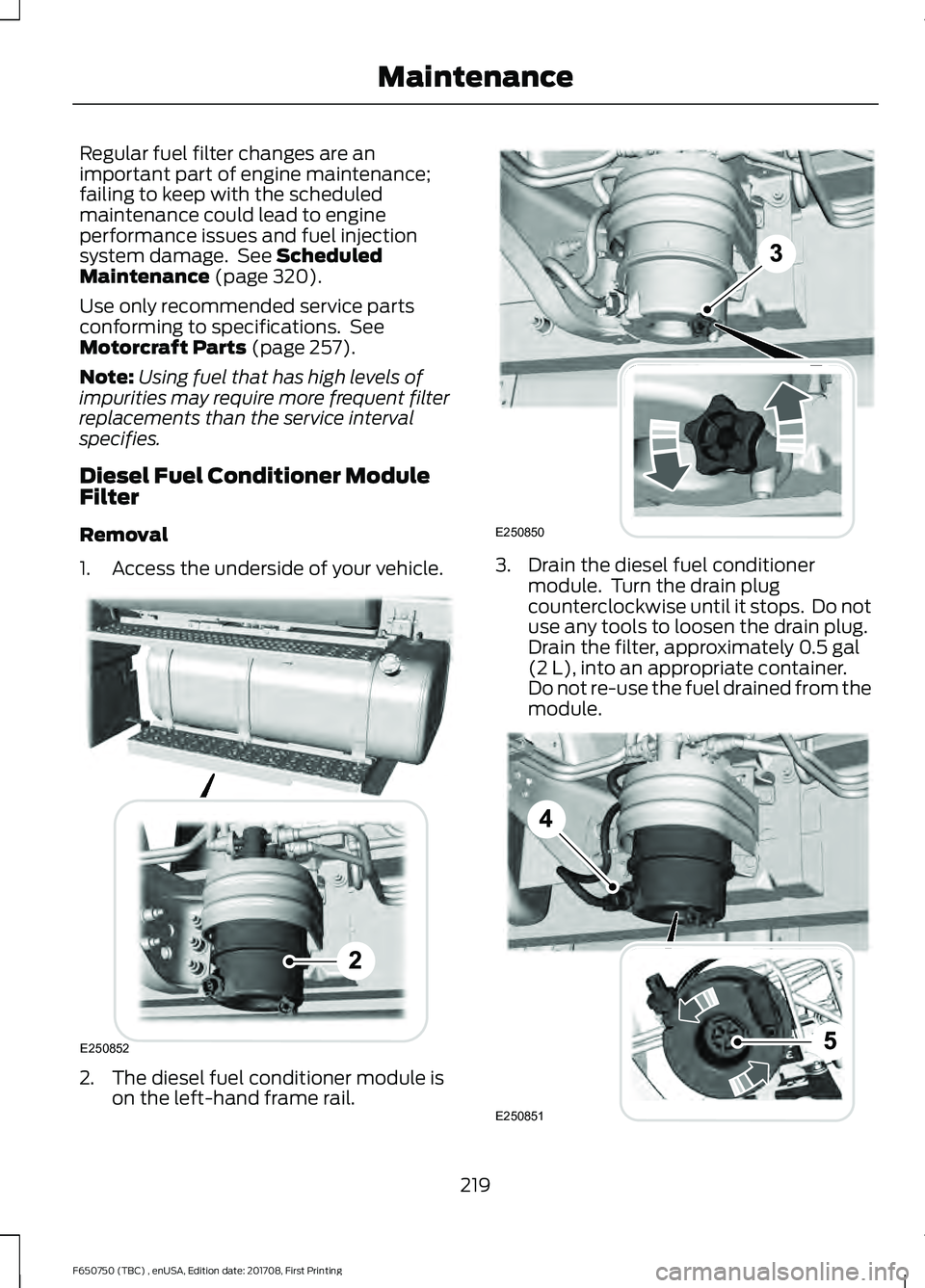
Removal
1. Access the underside of your vehicle. 2. The diesel fuel conditioner module is
on the left-hand frame rail. 3. Drain the diesel fuel conditioner
module. Turn the drain plug
counterclockwise until it stops. Do not
use any tools to loosen the drain plug.
Drain the filter, approximately
0.5 gal
(2 L), into an appropriate container.
Do not re-use the fuel drained from the
module. 219
F650750 (TBC) , enUSA, Edition date: 201708, First Printing MaintenanceE250852 E250850 E250851
Page 223 of 386
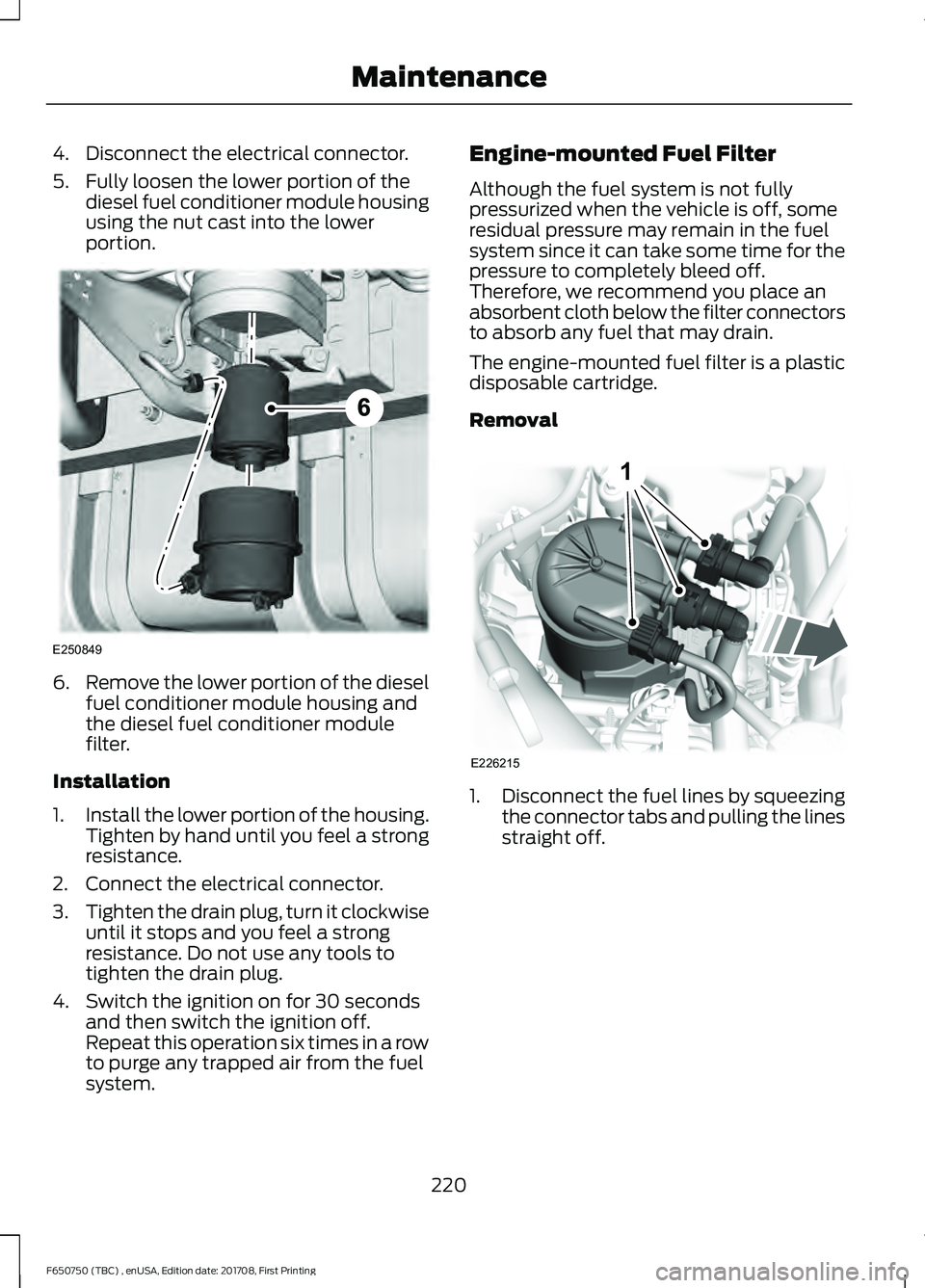
4. Disconnect the electrical connector.
5. Fully loosen the lower portion of the
diesel fuel conditioner module housing
using the nut cast into the lower
portion. 6.
Remove the lower portion of the diesel
fuel conditioner module housing and
the diesel fuel conditioner module
filter.
Installation
1. Install the lower portion of the housing.
Tighten by hand until you feel a strong
resistance.
2. Connect the electrical connector.
3. Tighten the drain plug, turn it clockwise
until it stops and you feel a strong
resistance. Do not use any tools to
tighten the drain plug.
4. Switch the ignition on for 30 seconds and then switch the ignition off.
Repeat this operation six times in a row
to purge any trapped air from the fuel
system. Engine-mounted Fuel Filter
Although the fuel system is not fully
pressurized when the vehicle is off, some
residual pressure may remain in the fuel
system since it can take some time for the
pressure to completely bleed off.
Therefore, we recommend you place an
absorbent cloth below the filter connectors
to absorb any fuel that may drain.
The engine-mounted fuel filter is a plastic
disposable cartridge.
Removal
1.
Disconnect the fuel lines by squeezing
the connector tabs and pulling the lines
straight off.
220
F650750 (TBC) , enUSA, Edition date: 201708, First Printing MaintenanceE250849 E226215
1
Page 224 of 386
2.
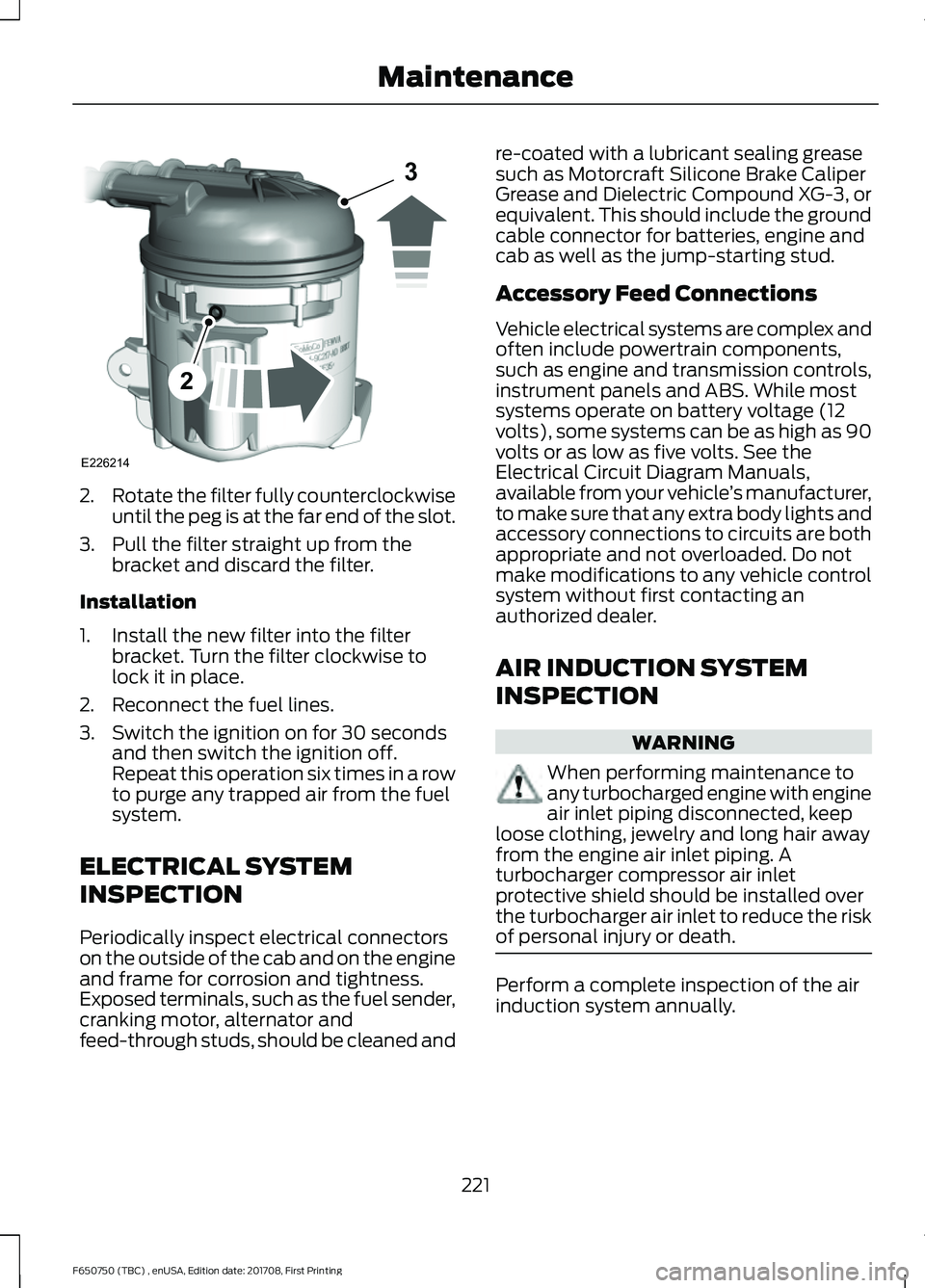
Rotate the filter fully counterclockwise
until the peg is at the far end of the slot.
3. Pull the filter straight up from the bracket and discard the filter.
Installation
1. Install the new filter into the filter bracket. Turn the filter clockwise to
lock it in place.
2. Reconnect the fuel lines.
3. Switch the ignition on for 30 seconds and then switch the ignition off.
Repeat this operation six times in a row
to purge any trapped air from the fuel
system.
ELECTRICAL SYSTEM
INSPECTION
Periodically inspect electrical connectors
on the outside of the cab and on the engine
and frame for corrosion and tightness.
Exposed terminals, such as the fuel sender,
cranking motor, alternator and
feed-through studs, should be cleaned and re-coated with a lubricant sealing grease
such as Motorcraft Silicone Brake Caliper
Grease and Dielectric Compound XG-3, or
equivalent. This should include the ground
cable connector for batteries, engine and
cab as well as the jump-starting stud.
Accessory Feed Connections
Vehicle electrical systems are complex and
often include powertrain components,
such as engine and transmission controls,
instrument panels and ABS. While most
systems operate on battery voltage (12
volts), some systems can be as high as 90
volts or as low as five volts. See the
Electrical Circuit Diagram Manuals,
available from your vehicle
’s manufacturer,
to make sure that any extra body lights and
accessory connections to circuits are both
appropriate and not overloaded. Do not
make modifications to any vehicle control
system without first contacting an
authorized dealer.
AIR INDUCTION SYSTEM
INSPECTION WARNING
When performing maintenance to
any turbocharged engine with engine
air inlet piping disconnected, keep
loose clothing, jewelry and long hair away
from the engine air inlet piping. A
turbocharger compressor air inlet
protective shield should be installed over
the turbocharger air inlet to reduce the risk
of personal injury or death. Perform a complete inspection of the air
induction system annually.
221
F650750 (TBC) , enUSA, Edition date: 201708, First Printing MaintenanceE226214
2
3
Page 255 of 386
WARNINGS
Do not attempt to change a tire on
the side of the vehicle close to
moving traffic. Pull far enough off the
road to avoid the danger of being hit when
operating the jack or changing the wheel. Note:
Passengers should not remain in the
vehicle when the vehicle is being jacked.
Park on a level surface, set the parking
brake and activate the hazard flashers. 1.
Turn the engine off and block the wheel
that is diagonally opposite of the flat
tire using a wheel chock.
2. Loosen each wheel lug nut ½ turn counterclockwise, but do not remove
them until the wheel is raised off the
ground.
3. Replace the flat tire with the spare tire,
making sure the valve stem is facing
outward on all front and inboard rear
wheels. If you are replacing the
outboard wheel, the valve stem must
be facing inward. Reinstall the lug nuts
until the wheel is snug against the hub.
Do not fully tighten the lug nuts until
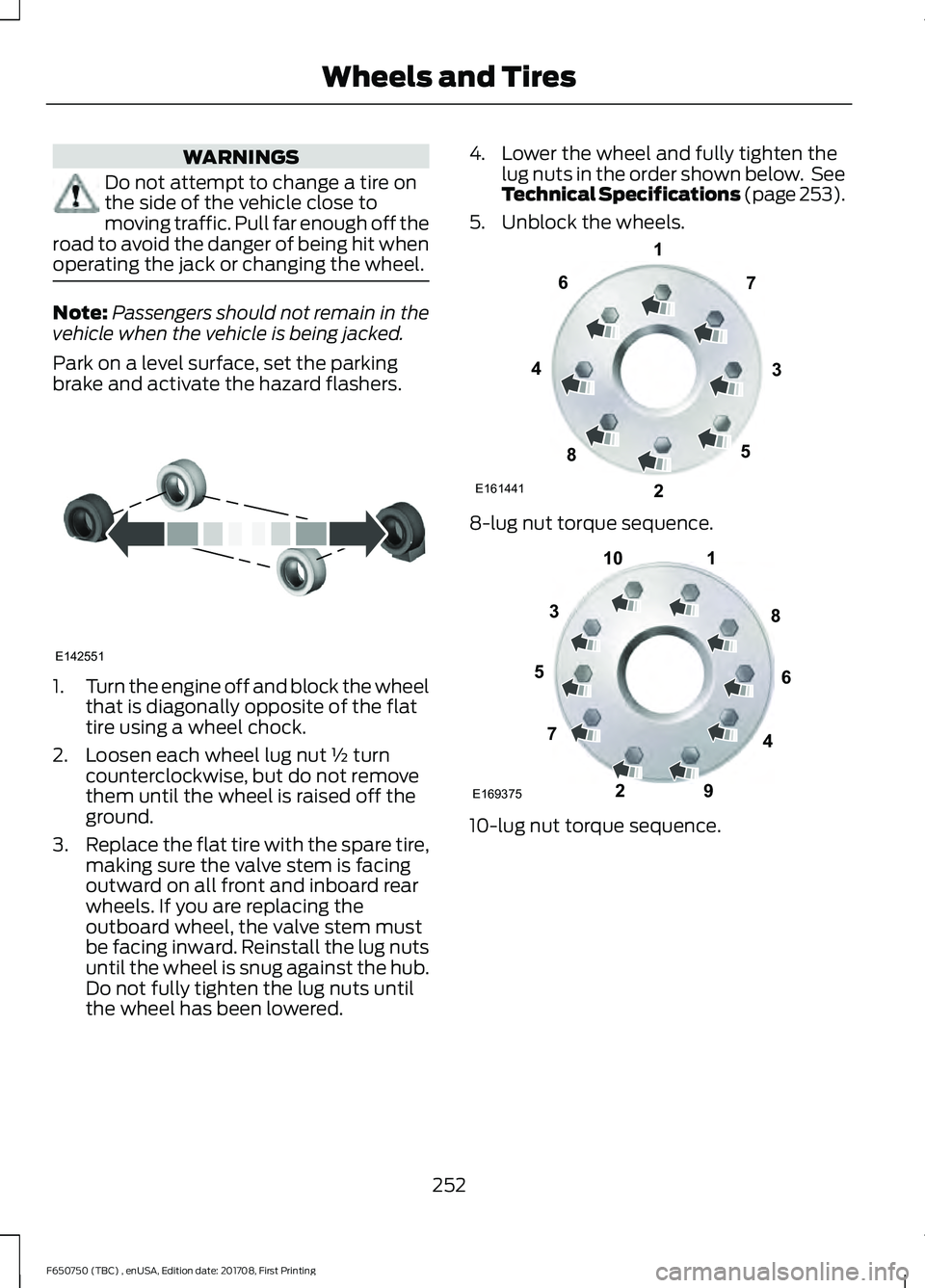
the wheel has been lowered. 4. Lower the wheel and fully tighten the
lug nuts in the order shown below. See
Technical Specifications (page 253).
5. Unblock the wheels. 8-lug nut torque sequence.
10-lug nut torque sequence.
252
F650750 (TBC) , enUSA, Edition date: 201708, First Printing Wheels and TiresE142551 E161441
13
4
27
6
5
8 1
2
3
4
5
6
7 8
9
10
E169375
Page 281 of 386
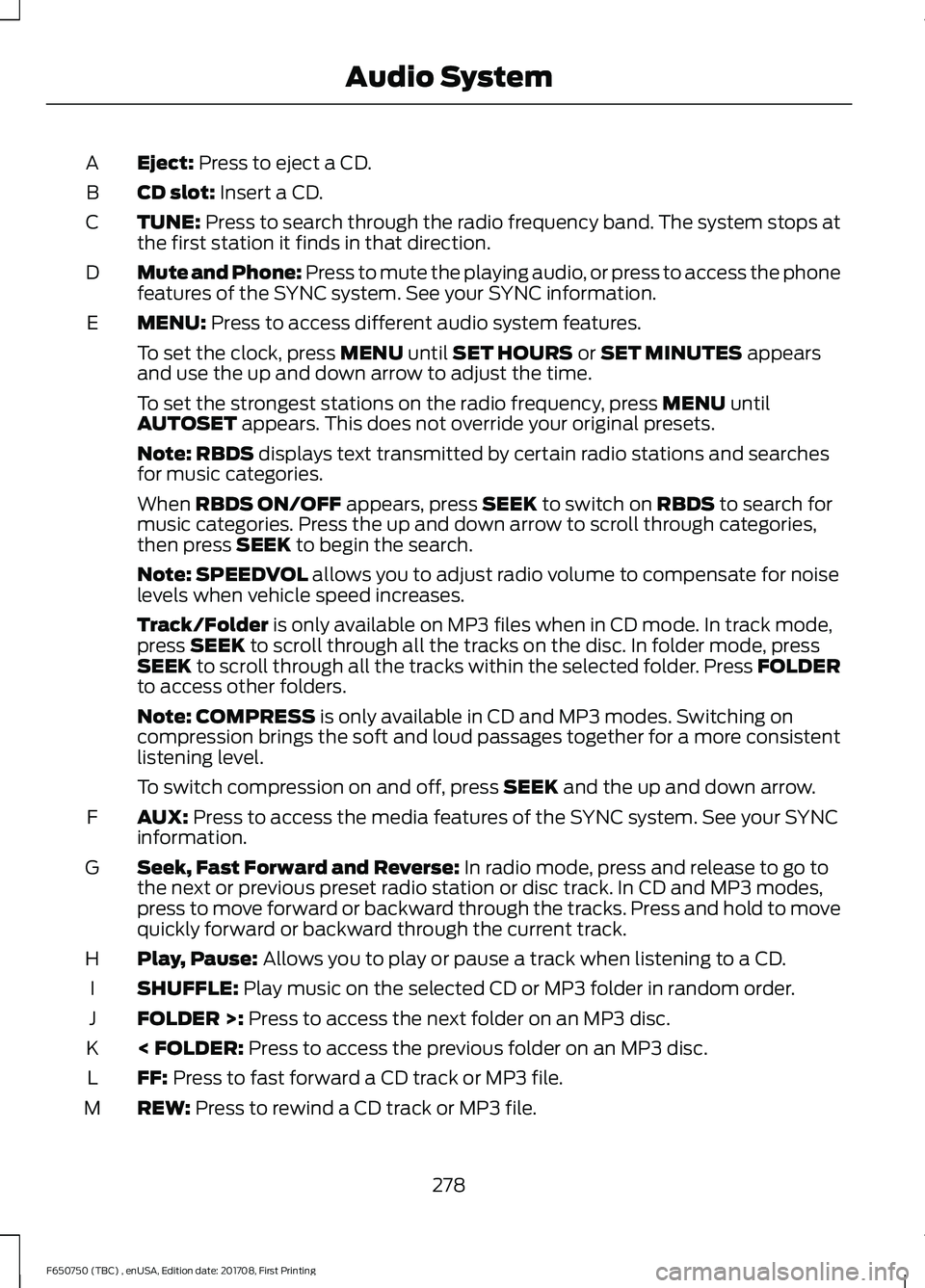
Eject: Press to eject a CD.
A
CD slot:
Insert a CD.
B
TUNE:
Press to search through the radio frequency band. The system stops at
the first station it finds in that direction.
C
Mute and Phone: Press to mute the playing audio, or press to access the phone
features of the SYNC system. See your SYNC information.
D
MENU:
Press to access different audio system features.
E
To set the clock, press
MENU until SET HOURS or SET MINUTES appears
and use the up and down arrow to adjust the time.
To set the strongest stations on the radio frequency, press
MENU until
AUTOSET appears. This does not override your original presets.
Note:
RBDS displays text transmitted by certain radio stations and searches
for music categories.
When
RBDS ON/OFF appears, press SEEK to switch on RBDS to search for
music categories. Press the up and down arrow to scroll through categories,
then press
SEEK to begin the search.
Note:
SPEEDVOL allows you to adjust radio volume to compensate for noise
levels when vehicle speed increases.
Track/Folder
is only available on MP3 files when in CD mode. In track mode,
press SEEK to scroll through all the tracks on the disc. In folder mode, press
SEEK to scroll through all the tracks within the selected folder. Press FOLDER
to access other folders.
Note:
COMPRESS is only available in CD and MP3 modes. Switching on
compression brings the soft and loud passages together for a more consistent
listening level.
To switch compression on and off, press
SEEK and the up and down arrow.
AUX:
Press to access the media features of the SYNC system. See your SYNC
information.
F
Seek, Fast Forward and Reverse:
In radio mode, press and release to go to
the next or previous preset radio station or disc track. In CD and MP3 modes,
press to move forward or backward through the tracks. Press and hold to move
quickly forward or backward through the current track.
G
Play, Pause:
Allows you to play or pause a track when listening to a CD.
H
SHUFFLE:
Play music on the selected CD or MP3 folder in random order.
I
FOLDER >:
Press to access the next folder on an MP3 disc.
J
< FOLDER:
Press to access the previous folder on an MP3 disc.
K
FF:
Press to fast forward a CD track or MP3 file.
L
REW:
Press to rewind a CD track or MP3 file.
M
278
F650750 (TBC) , enUSA, Edition date: 201708, First Printing Audio System
Page 283 of 386
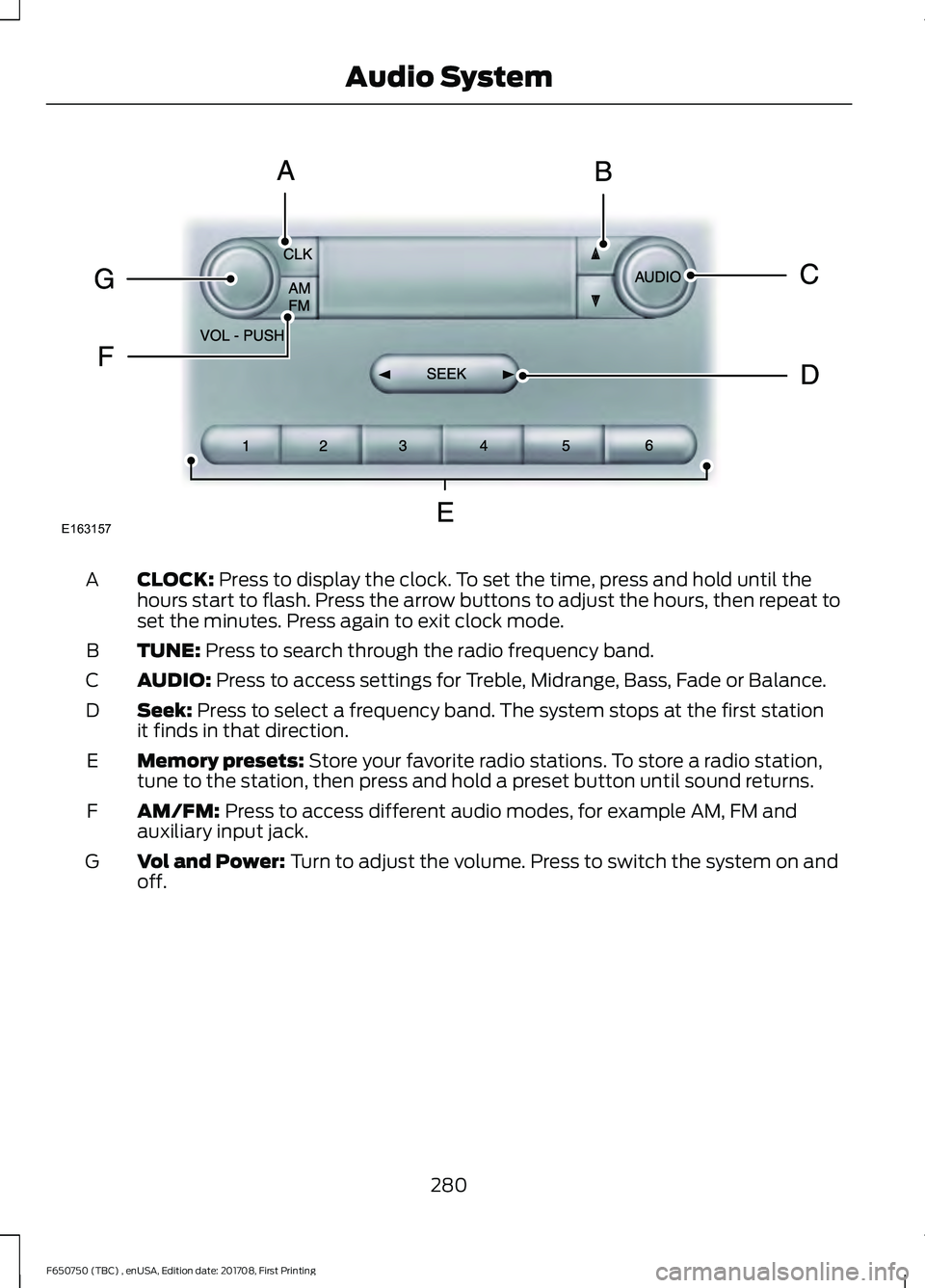
CLOCK: Press to display the clock. To set the time, press and hold until the
hours start to flash. Press the arrow buttons to adjust the hours, then repeat to
set the minutes. Press again to exit clock mode.
A
TUNE:
Press to search through the radio frequency band.
B
AUDIO:
Press to access settings for Treble, Midrange, Bass, Fade or Balance.
C
Seek:
Press to select a frequency band. The system stops at the first station
it finds in that direction.
D
Memory presets:
Store your favorite radio stations. To store a radio station,
tune to the station, then press and hold a preset button until sound returns.
E
AM/FM:
Press to access different audio modes, for example AM, FM and
auxiliary input jack.
F
Vol and Power:
Turn to adjust the volume. Press to switch the system on and
off.
G
280
F650750 (TBC) , enUSA, Edition date: 201708, First Printing Audio SystemE163157