display FORD F150 2008 11.G Workshop Manual
[x] Cancel search | Manufacturer: FORD, Model Year: 2008, Model line: F150, Model: FORD F150 2008 11.GPages: 400, PDF Size: 3.94 MB
Page 129 of 400
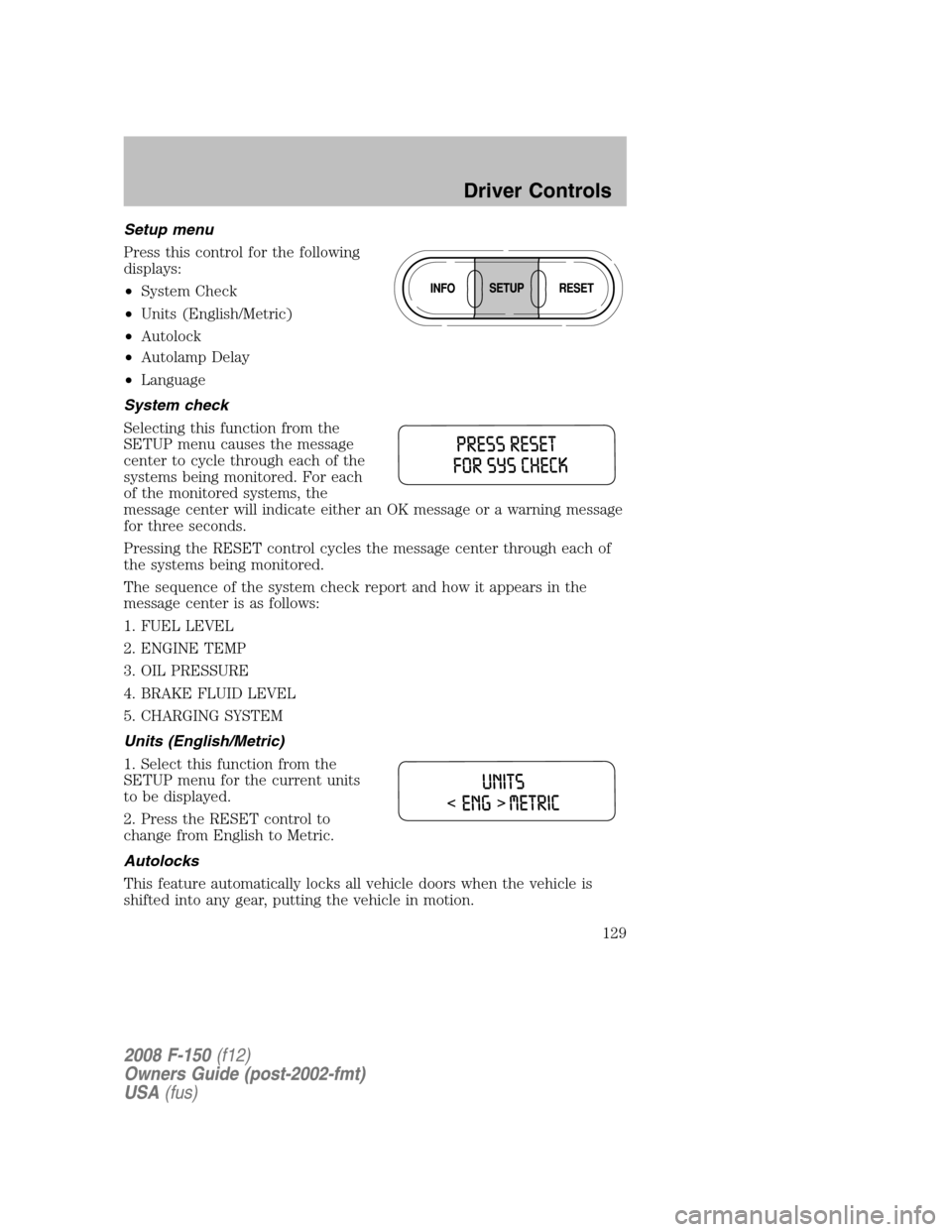
Setup menu
Press this control for the following
displays:
•System Check
•Units (English/Metric)
•Autolock
•Autolamp Delay
•Language
System check
Selecting this function from the
SETUP menu causes the message
center to cycle through each of the
systems being monitored. For each
of the monitored systems, the
message center will indicate either an OK message or a warning message
for three seconds.
Pressing the RESET control cycles the message center through each of
the systems being monitored.
The sequence of the system check report and how it appears in the
message center is as follows:
1. FUEL LEVEL
2. ENGINE TEMP
3. OIL PRESSURE
4. BRAKE FLUID LEVEL
5. CHARGING SYSTEM
Units (English/Metric)
1. Select this function from the
SETUP menu for the current units
to be displayed.
2. Press the RESET control to
change from English to Metric.
Autolocks
This feature automatically locks all vehicle doors when the vehicle is
shifted into any gear, putting the vehicle in motion.
2008 F-150(f12)
Owners Guide (post-2002-fmt)
USA(fus)
Driver Controls
129
Page 130 of 400
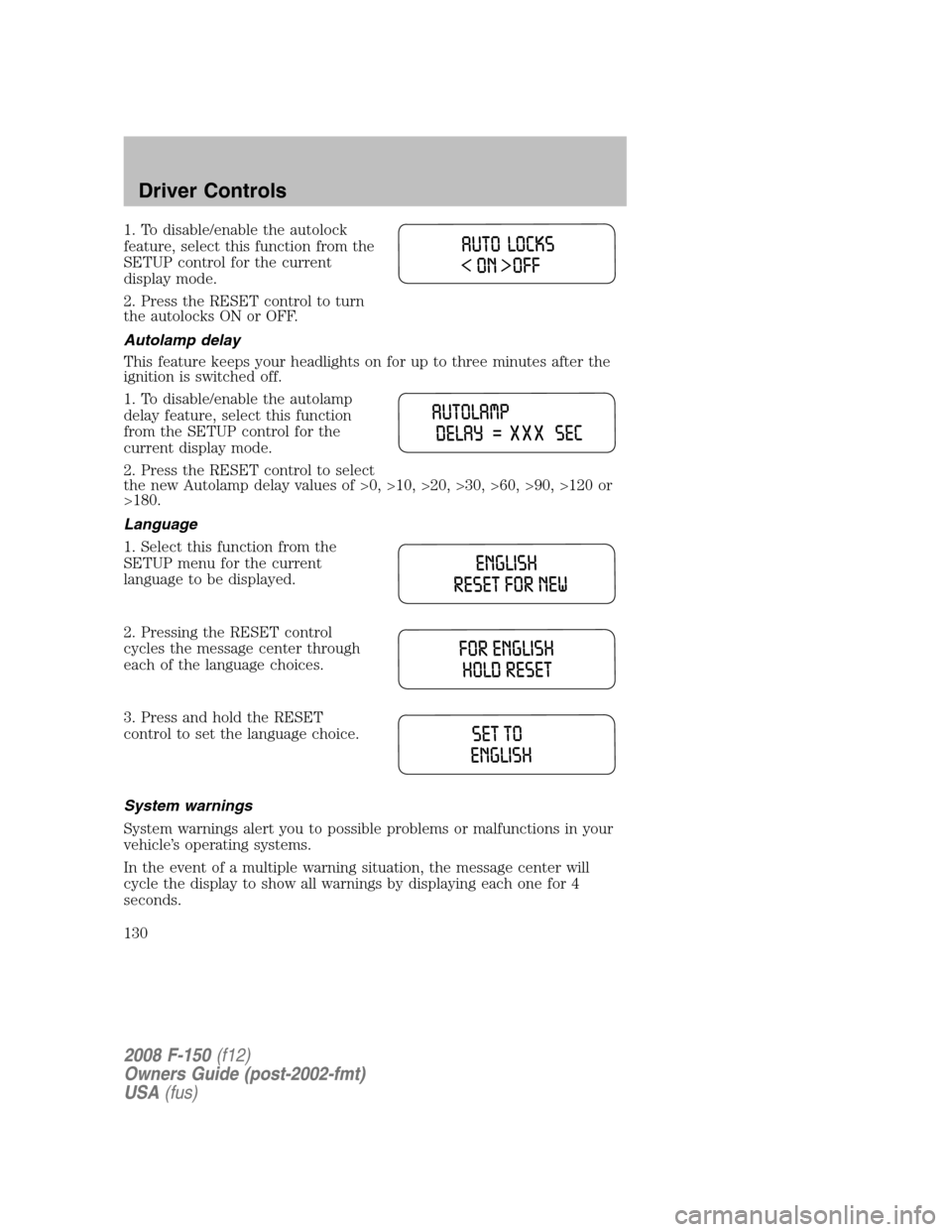
1. To disable/enable the autolock
feature, select this function from the
SETUP control for the current
display mode.
2. Press the RESET control to turn
the autolocks ON or OFF.
Autolamp delay
This feature keeps your headlights on for up to three minutes after the
ignition is switched off.
1. To disable/enable the autolamp
delay feature, select this function
from the SETUP control for the
current display mode.
2. Press the RESET control to select
the new Autolamp delay values of >0, >10, >20, >30, >60, >90, >120 or
>180.
Language
1. Select this function from the
SETUP menu for the current
language to be displayed.
2. Pressing the RESET control
cycles the message center through
each of the language choices.
3. Press and hold the RESET
control to set the language choice.
System warnings
System warnings alert you to possible problems or malfunctions in your
vehicle’s operating systems.
In the event of a multiple warning situation, the message center will
cycle the display to show all warnings by displaying each one for 4
seconds.
2008 F-150(f12)
Owners Guide (post-2002-fmt)
USA(fus)
Driver Controls
130
Page 131 of 400
The message center will display the last selected feature if there are no
more warning messages. This allows you to use the full functionality of
the message center after you acknowledge the warning by pressing the
RESET control and clearing the warning message.
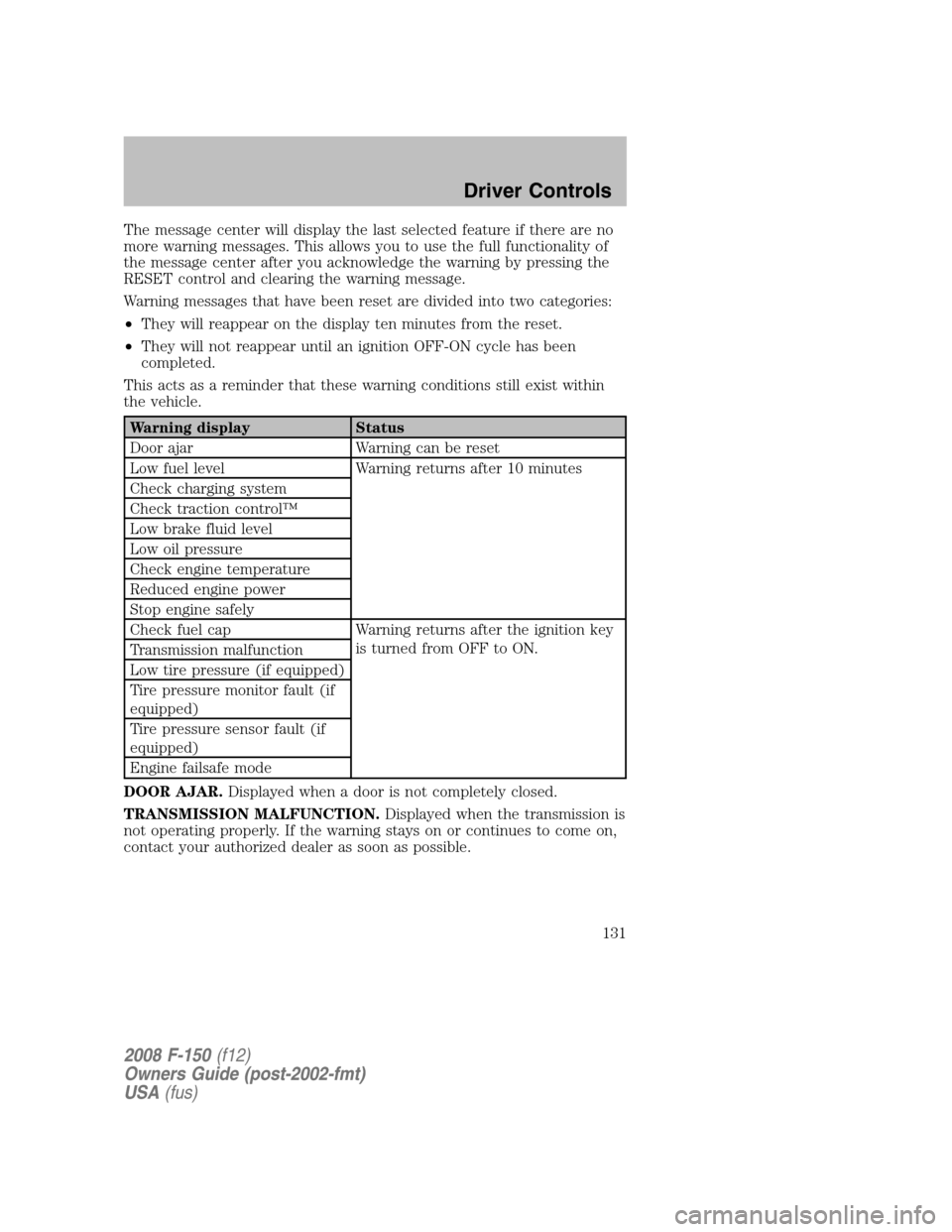
Warning messages that have been reset are divided into two categories:
•They will reappear on the display ten minutes from the reset.
•They will not reappear until an ignition OFF-ON cycle has been
completed.
This acts as a reminder that these warning conditions still exist within
the vehicle.
Warning display Status
Door ajar Warning can be reset
Low fuel level Warning returns after 10 minutes
Check charging system
Check traction control™
Low brake fluid level
Low oil pressure
Check engine temperature
Reduced engine power
Stop engine safely
Check fuel cap Warning returns after the ignition key
is turned from OFF to ON.
Transmission malfunction
Low tire pressure (if equipped)
Tire pressure monitor fault (if
equipped)
Tire pressure sensor fault (if
equipped)
Engine failsafe mode
DOOR AJAR.Displayed when a door is not completely closed.
TRANSMISSION MALFUNCTION.Displayed when the transmission is
not operating properly. If the warning stays on or continues to come on,
contact your authorized dealer as soon as possible.
2008 F-150(f12)
Owners Guide (post-2002-fmt)
USA(fus)
Driver Controls
131
Page 132 of 400
CHECK ENGINE TEMPERATURE.Displayed when the engine
coolant is overheating. Stop the vehicle as soon as safely possible, turn
off the engine and let it cool. Check the coolant and coolant level. Refer
toEngine coolantin theMaintenance and Specificationschapter. If
the warning stays on or continues to come on, contact your authorized
dealer as soon as possible.
Never remove the coolant reservoir cap while the engine is
running or hot.
REDUCED ENGINE POWER.Displayed when the engine is
overheating. Stop the vehicle as soon as safely possible, turn off the
engine. If the warning stays on or continues to come on, contact your
authorized dealer as soon as possible.
STOP ENGINE SAFELY.Displayed when the engine is overheating.
Stop the vehicle as soon as safely possible, turn off the engine. If the
warning stays on or continues to come on, contact your authorized
dealer as soon as possible.
LOW FUEL LEVEL.Displayed as an early reminder of a low fuel
condition.
CHECK CHARGING SYSTEM.Displayed when the electrical system is
not maintaining proper voltage. If you are operating electrical accessories
when the engine is idling at a low speed, turn off as many of the
electrical loads as soon as possible. If the warning stays on or comes on
when the engine is operating at normal speeds, have the electrical
system checked as soon as possible.
CHECK TRACTION CONTROL™.Displayed when the Traction
Control™ system is not operating properly. If this message is displayed
on the message center the Traction Control™ system will be partially
operable. If this warning stays on, contact your authorized dealer for
service as soon as possible. For further information, refer toTraction
control™in theDrivingchapter.
LOW BRAKE FLUID LEVEL.Indicates the brake fluid level is low and
the brake system should be inspected immediately. Refer toBrake fluid
reservoirin theMaintenance and Specificationschapter.
LOW OIL PRESSURE.Displayed when the engine oil pressure is low. If
this warning message is displayed, check the level of the engine oil.
Refer toEngine oilin theMaintenance and Specificationschapter for
information about adding engine oil. If the oil level is OK and this
warning persists, shut down the engine immediately and contact your
authorized dealer for service.
2008 F-150(f12)
Owners Guide (post-2002-fmt)
USA(fus)
Driver Controls
132
Page 133 of 400
CHECK FUEL CAP.Displayed when the fuel filler cap is not properly
installed. Check the fuel filler cap for proper installation. Refer toFuel
filler capunder theFuel information sectionin theMaintenance and
Specificationschapter.
LOW TIRE PRESSURE (if equipped).Displayed when one or more
tires on your vehicle have low tire pressure. Refer toInflating Your
Tiresin theTires, Wheels and Loadingchapter.
TIRE PRESSURE MONITOR FAULT (if equipped).Displayed when
the Tire Pressure Monitoring System is malfunctioning. If the warning
stays on or continues to come on, have the system inspected by your
authorized dealer.
TIRE PRESSURE SENSOR FAULT (if equipped).Displayed when a
tire pressure sensor is malfunctioning, or your spare tire is in use. For
more information on how the system operates under these conditions,
refer toUnderstanding Your Tire Pressure Monitoring Systemin the
Tires, Wheels and Loadingchapter. If the warning stays on or
continues to come on, have the system inspected by your authorized
dealer.
ENGINE FAILSAFE MODE.Displayed when the engine has defaulted
to a ’limp-home’ operation. If the warning stays on or continues to come
on, contact your authorized dealer as soon as possible.
DATA ERR.These messages indicate improper operation of the vehicle
network communication between electronic modules.
•Fuel computer
•Charging system
•Autolamp delay
•Auto locks
•Brake fluid
•Compass
•Outside temperature
•Engine sensor
Contact your authorized dealer as soon as possible if these messages
occur on a regular basis.
2008 F-150(f12)
Owners Guide (post-2002-fmt)
USA(fus)
Driver Controls
133
Page 233 of 400
If reset mode has been entered successfully, the horn will sound once,
the TPMS indicator will flash and the message center will displayTRAIN
LF TIRE.
If after repeated attempts to enter reset mode, the horn does not sound,
the TPMS indicator does not flash and the message center does not
display TRAIN LF TIRE, seek service from your authorized dealer.
TPMS reset sequence
The TPMS system needs to be reset starting with the left front tire in
the following clockwise order:
1. Left front tire
2. Right front tire
3. Right rear tire
4. Left rear tire
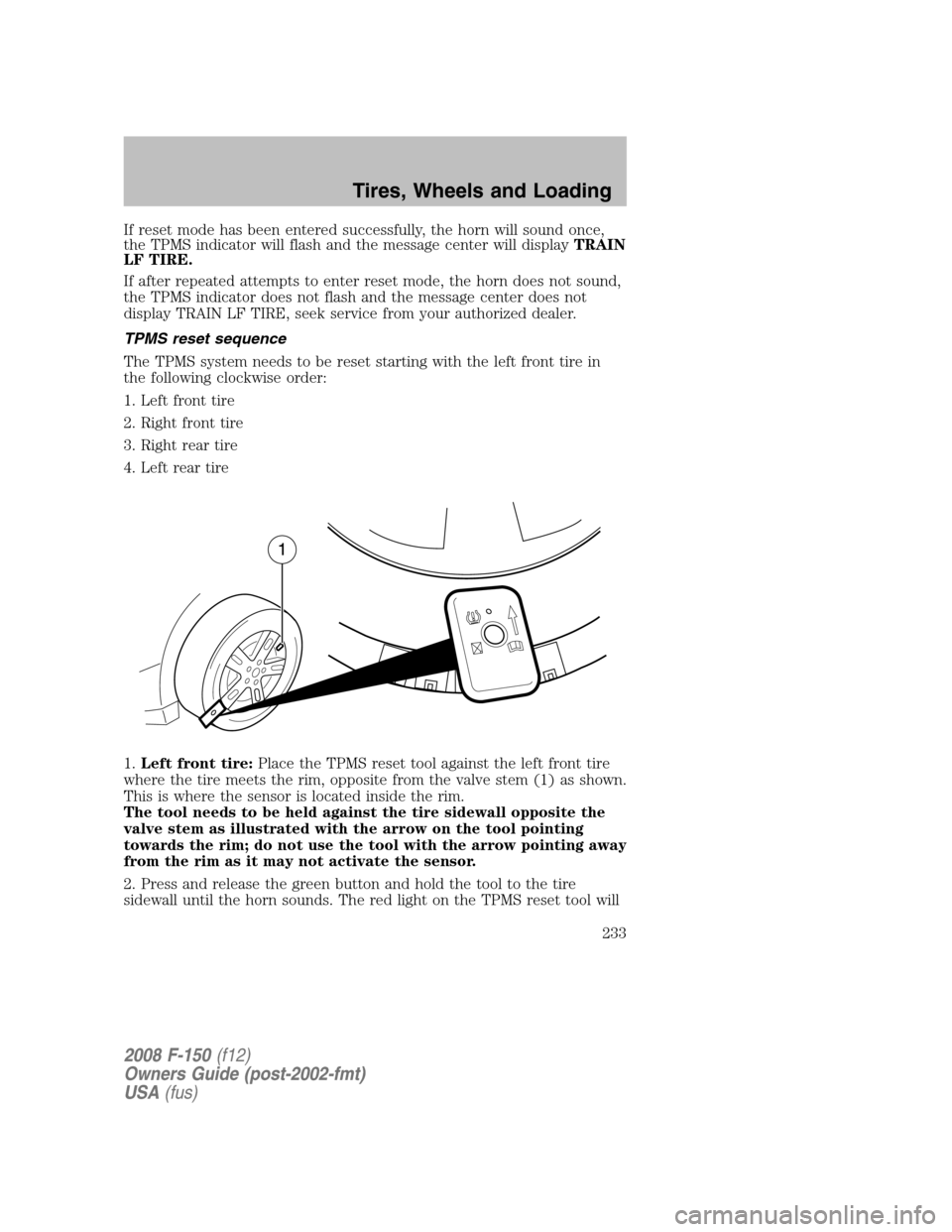
1.Left front tire:Place the TPMS reset tool against the left front tire
where the tire meets the rim, opposite from the valve stem (1) as shown.
This is where the sensor is located inside the rim.
The tool needs to be held against the tire sidewall opposite the
valve stem as illustrated with the arrow on the tool pointing
towards the rim; do not use the tool with the arrow pointing away
from the rim as it may not activate the sensor.
2. Press and release the green button and hold the tool to the tire
sidewall until the horn sounds. The red light on the TPMS reset tool will
2008 F-150(f12)
Owners Guide (post-2002-fmt)
USA(fus)
Tires, Wheels and Loading
233
Page 280 of 400
REVERSE CAMERA SYSTEM (IF EQUIPPED)
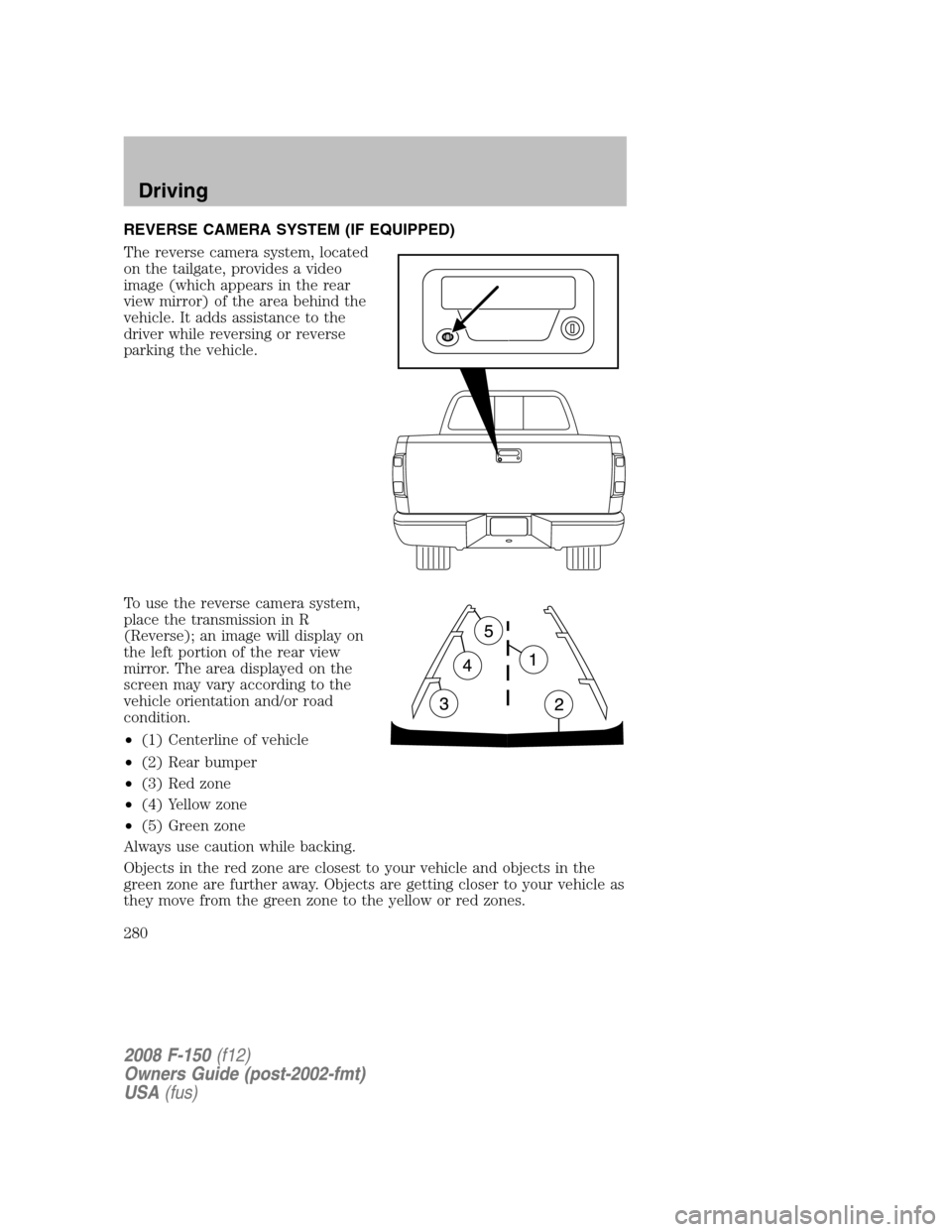
The reverse camera system, located
on the tailgate, provides a video
image (which appears in the rear
view mirror) of the area behind the
vehicle. It adds assistance to the
driver while reversing or reverse
parking the vehicle.
To use the reverse camera system,
place the transmission in R
(Reverse); an image will display on
the left portion of the rear view
mirror. The area displayed on the
screen may vary according to the
vehicle orientation and/or road
condition.
•(1) Centerline of vehicle
•(2) Rear bumper
•(3) Red zone
•(4) Yellow zone
•(5) Green zone
Always use caution while backing.
Objects in the red zone are closest to your vehicle and objects in the
green zone are further away. Objects are getting closer to your vehicle as
they move from the green zone to the yellow or red zones.
2008 F-150(f12)
Owners Guide (post-2002-fmt)
USA(fus)
Driving
280