light FORD F150 2008 11.G Workshop Manual
[x] Cancel search | Manufacturer: FORD, Model Year: 2008, Model line: F150, Model: FORD F150 2008 11.GPages: 400, PDF Size: 3.94 MB
Page 126 of 400
•Average Fuel Economy
•Trip Elapsed Drive Time
Odometer/Trip odometer
Refer toGaugesin theInstrument Clusterchapter.
Compass display
The compass reading may be affected when you drive near large
buildings, bridges, power lines and powerful broadcast antenna. Magnetic
or metallic objects placed in, on or near the vehicle may also affect
compass accuracy.
Usually, when something affects the compass readings, the compass will
correct itself after a few days of operating your vehicle in normal
conditions. If the compass still appears to be inaccurate, a manual
calibration may be necessary. Refer toCompass zone/calibration
adjustment.
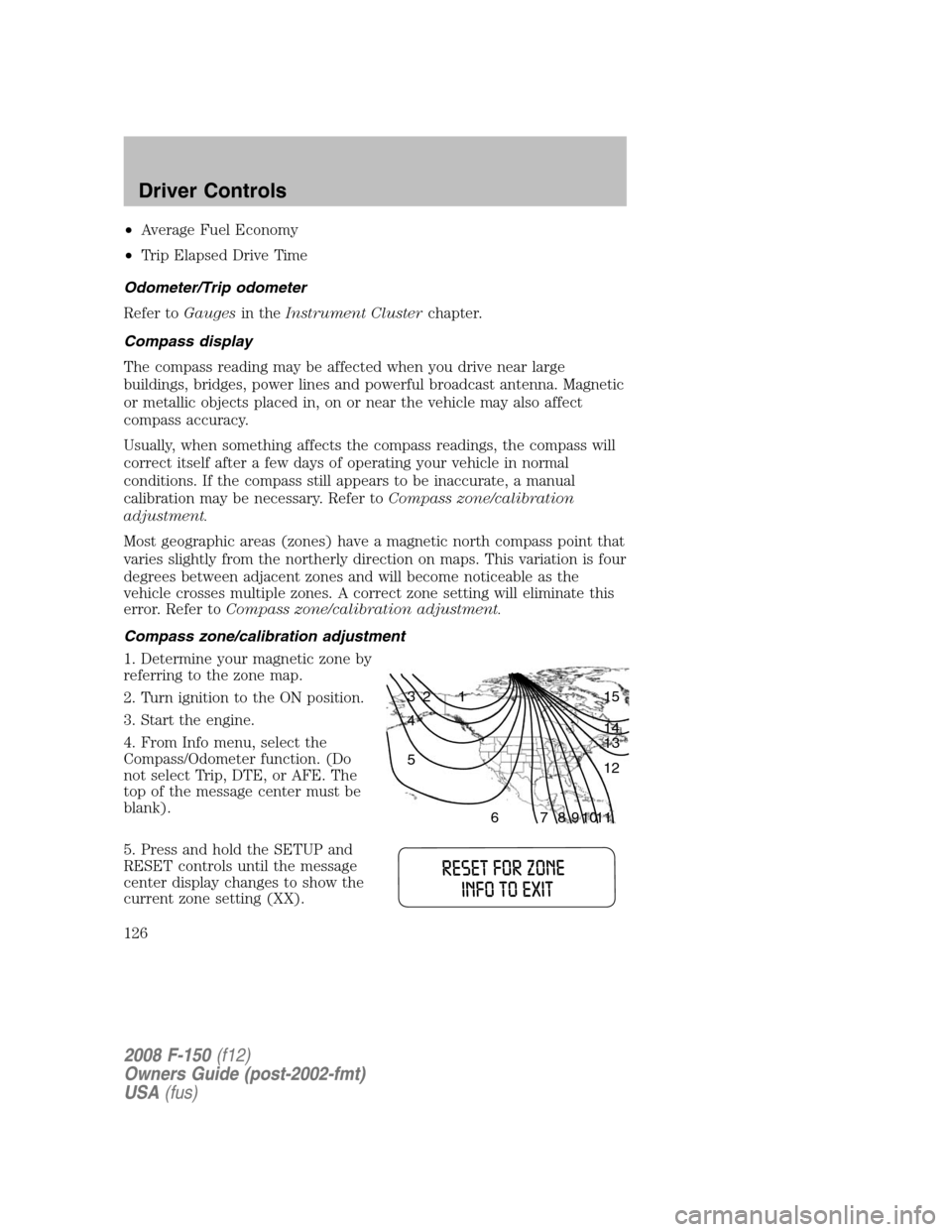
Most geographic areas (zones) have a magnetic north compass point that
varies slightly from the northerly direction on maps. This variation is four
degrees between adjacent zones and will become noticeable as the
vehicle crosses multiple zones. A correct zone setting will eliminate this
error. Refer toCompass zone/calibration adjustment.
Compass zone/calibration adjustment
1. Determine your magnetic zone by
referring to the zone map.
2. Turn ignition to the ON position.
3. Start the engine.
4. From Info menu, select the
Compass/Odometer function. (Do
not select Trip, DTE, or AFE. The
top of the message center must be
blank).
5. Press and hold the SETUP and
RESET controls until the message
center display changes to show the
current zone setting (XX).
1 2 3
4
5
6 7 8 9 101112 13 14 15
2008 F-150(f12)
Owners Guide (post-2002-fmt)
USA(fus)
Driver Controls
126
Page 130 of 400

1. To disable/enable the autolock
feature, select this function from the
SETUP control for the current
display mode.
2. Press the RESET control to turn
the autolocks ON or OFF.
Autolamp delay
This feature keeps your headlights on for up to three minutes after the
ignition is switched off.
1. To disable/enable the autolamp
delay feature, select this function
from the SETUP control for the
current display mode.
2. Press the RESET control to select
the new Autolamp delay values of >0, >10, >20, >30, >60, >90, >120 or
>180.
Language
1. Select this function from the
SETUP menu for the current
language to be displayed.
2. Pressing the RESET control
cycles the message center through
each of the language choices.
3. Press and hold the RESET
control to set the language choice.
System warnings
System warnings alert you to possible problems or malfunctions in your
vehicle’s operating systems.
In the event of a multiple warning situation, the message center will
cycle the display to show all warnings by displaying each one for 4
seconds.
2008 F-150(f12)
Owners Guide (post-2002-fmt)
USA(fus)
Driver Controls
130
Page 138 of 400
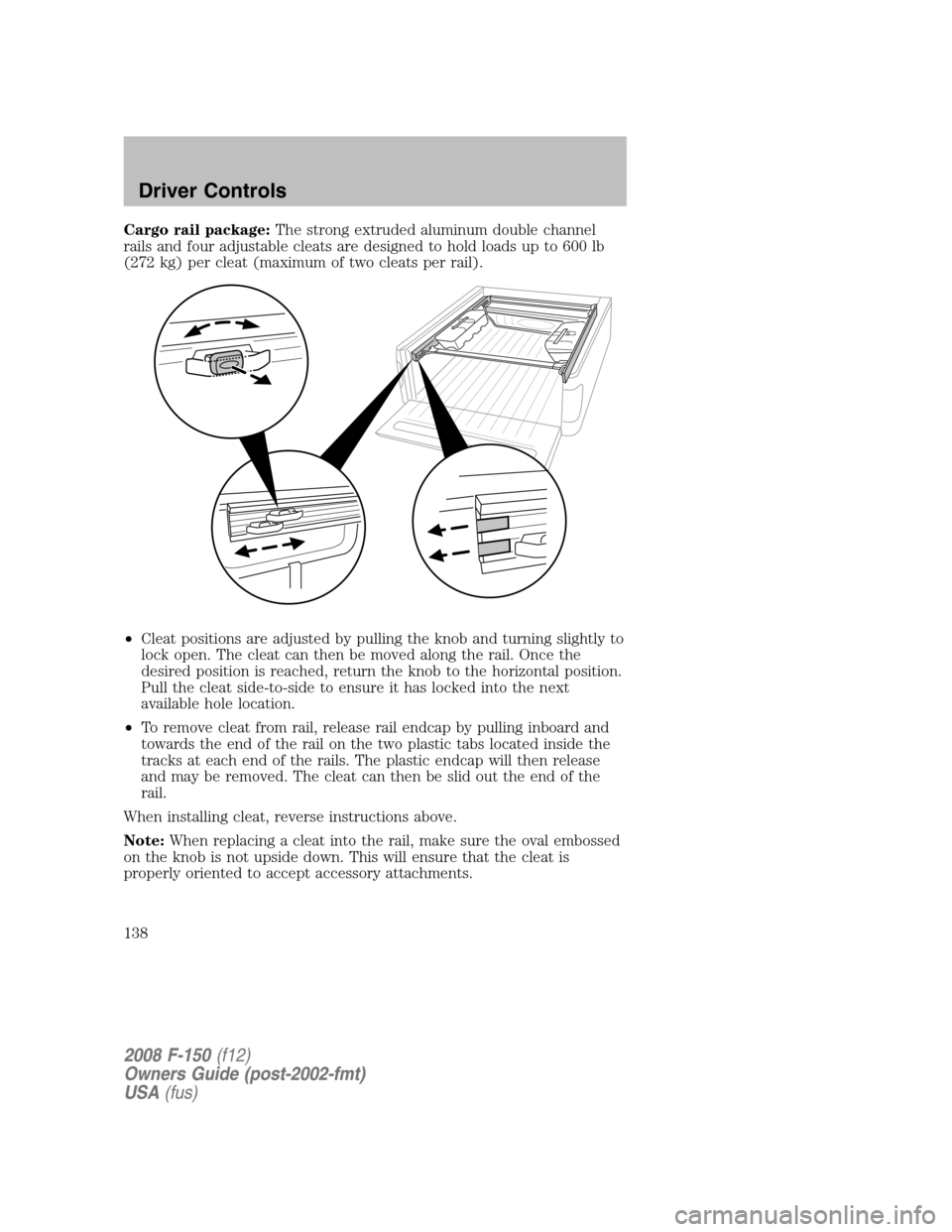
Cargo rail package:The strong extruded aluminum double channel
rails and four adjustable cleats are designed to hold loads up to 600 lb
(272 kg) per cleat (maximum of two cleats per rail).
•Cleat positions are adjusted by pulling the knob and turning slightly to
lock open. The cleat can then be moved along the rail. Once the
desired position is reached, return the knob to the horizontal position.
Pull the cleat side-to-side to ensure it has locked into the next
available hole location.
•To remove cleat from rail, release rail endcap by pulling inboard and
towards the end of the rail on the two plastic tabs located inside the
tracks at each end of the rails. The plastic endcap will then release
and may be removed. The cleat can then be slid out the end of the
rail.
When installing cleat, reverse instructions above.
Note:When replacing a cleat into the rail, make sure the oval embossed
on the knob is not upside down. This will ensure that the cleat is
properly oriented to accept accessory attachments.
2008 F-150(f12)
Owners Guide (post-2002-fmt)
USA(fus)
Driver Controls
138
Page 151 of 400
Programming remote transmitters
It is necessary to haveall(maximum of six — original and/or new) of
your remote transmitters available prior to beginning this procedure. If
all remote entry transmitters are not present during the programming
procedure, the transmitters that are not present during programming will
no longer operate the vehicle.
To program the transmitters yourself:
Note:Ensure the brake pedal is not
depressed during this sequence.
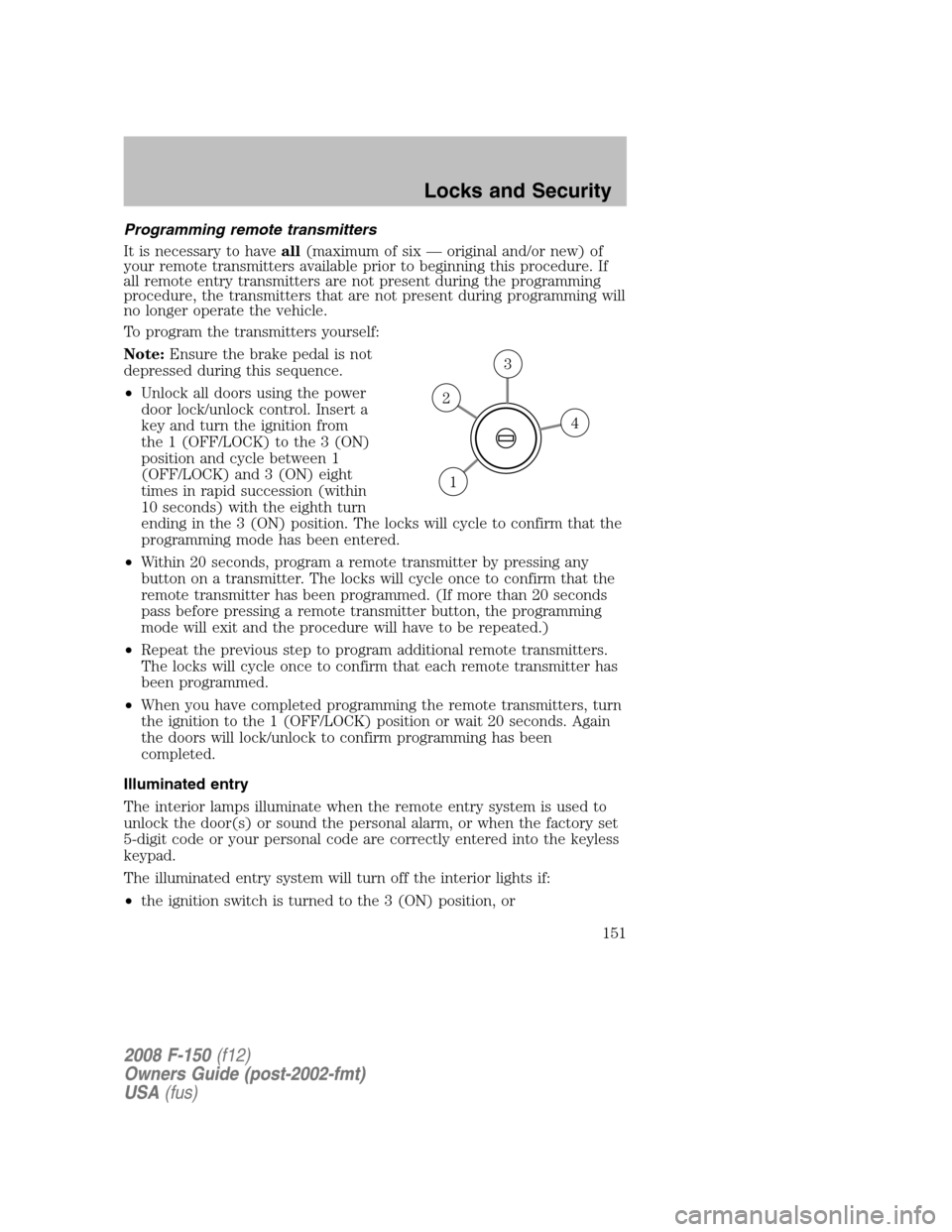
•Unlock all doors using the power
door lock/unlock control. Insert a
key and turn the ignition from
the 1 (OFF/LOCK) to the 3 (ON)
position and cycle between 1
(OFF/LOCK) and 3 (ON) eight
times in rapid succession (within
10 seconds) with the eighth turn
ending in the 3 (ON) position. The locks will cycle to confirm that the
programming mode has been entered.
•Within 20 seconds, program a remote transmitter by pressing any
button on a transmitter. The locks will cycle once to confirm that the
remote transmitter has been programmed. (If more than 20 seconds
pass before pressing a remote transmitter button, the programming
mode will exit and the procedure will have to be repeated.)
•Repeat the previous step to program additional remote transmitters.
The locks will cycle once to confirm that each remote transmitter has
been programmed.
•When you have completed programming the remote transmitters, turn
the ignition to the 1 (OFF/LOCK) position or wait 20 seconds. Again
the doors will lock/unlock to confirm programming has been
completed.
Illuminated entry
The interior lamps illuminate when the remote entry system is used to
unlock the door(s) or sound the personal alarm, or when the factory set
5-digit code or your personal code are correctly entered into the keyless
keypad.
The illuminated entry system will turn off the interior lights if:
•the ignition switch is turned to the 3 (ON) position, or
4
3
2
1
2008 F-150(f12)
Owners Guide (post-2002-fmt)
USA(fus)
Locks and Security
151
Page 152 of 400

•the remote transmitter lock control is pressed, or
•after 25 seconds of illumination.
The dome lamp control (if equipped) mustnotbe set to the off position
for the illuminated entry system to operate.
The inside lights will not turn off if:
•they have been turned on with the dimmer control, or
•any door is open.
The battery saver will shut off the interior lamps 30 minutes after the
last door is closed, even if the dimmer control is on.
Perimeter lighting feature (if equipped)
The perimeter lighting feature illuminates the exterior of the vehicle in
order to provide better visibility to the user while he or she approaches
and enters the vehicle.
The perimeter lighting feature activates when:
•the ignition is in the 1 (OFF/LOCK) position,
•the autolamp sensor determines that it is dark, and
•the user activates an unlock feature, using either the remote keyless
transmitter or the keypad.
The perimeter lighting feature will illuminate the headlamps and parking
lamps for 25 seconds, or until:
•the ignition is turned to any position other than the 1 (OFF/LOCK)
position, or
•the user activates a lock feature, using either the remote keyless
transmitter or the keypad.
Enabling/disabling the perimeter lighting feature
Your vehicle comes with the perimeter lighting feature enabled. All
vehicle doors must be closed before beginning the procedure. You must
complete Steps 1–5 within 30 seconds, or the procedure will have to be
repeated. If the procedure needs to be repeated, you must wait a
minimum of 30 seconds to begin again.
1. Turn the ignition to the 3 (ON) position, then press the
control
three times.
2. Turn the ignition to the 1 (OFF/LOCK) position, then press the
control three times.
3. Turn the ignition to the 3 (ON) position; the horn will chirp to
indicate the driver configuration mode has been activated.
2008 F-150(f12)
Owners Guide (post-2002-fmt)
USA(fus)
Locks and Security
152
Page 161 of 400
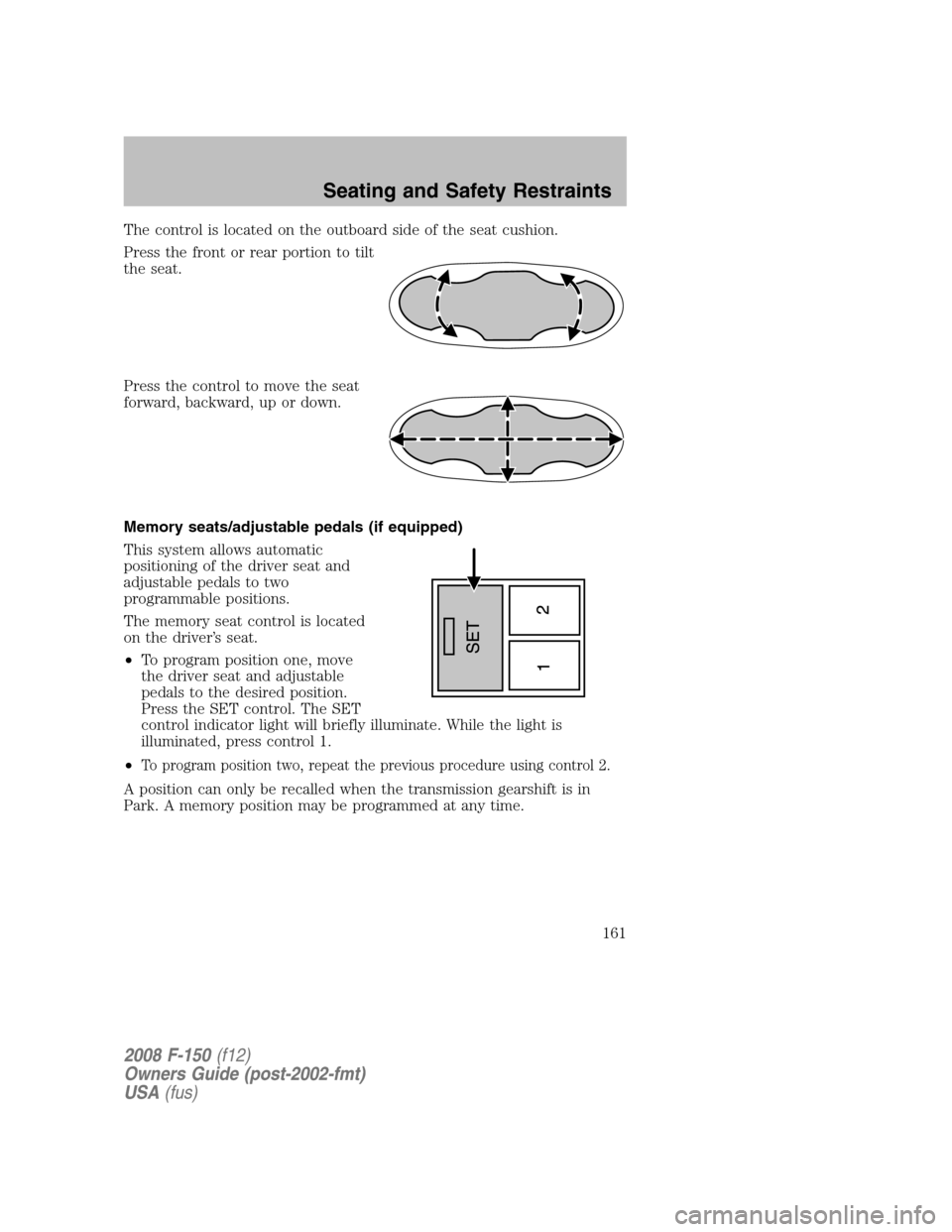
The control is located on the outboard side of the seat cushion.
Press the front or rear portion to tilt
the seat.
Press the control to move the seat
forward, backward, up or down.
Memory seats/adjustable pedals (if equipped)
This system allows automatic
positioning of the driver seat and
adjustable pedals to two
programmable positions.
The memory seat control is located
on the driver’s seat.
•To program position one, move
the driver seat and adjustable
pedals to the desired position.
Press the SET control. The SET
control indicator light will briefly illuminate. While the light is
illuminated, press control 1.
•
To program position two, repeat the previous procedure using control 2.
A position can only be recalled when the transmission gearshift is in
Park. A memory position may be programmed at any time.
2008 F-150(f12)
Owners Guide (post-2002-fmt)
USA(fus)
Seating and Safety Restraints
161
Page 162 of 400
Heated seats (if equipped)
Persons who are unable to feel pain to the skin because of
advanced age, chronic illness, diabetes, spinal cord injury,
medication, alcohol use, exhaustion, or other physical conditions, must
exercise care when using the seat heater. The seat heater may cause
burns even at low temperatures, especially if used for long periods of
time. Do not place anything on the seat that insulates against heat,
such as a blanket or cushion, because this may cause the seat heater
to overheat. Do not puncture the seat with pins, needles, or other
pointed objects because this may damage the heating element which
may cause the seat heater to overheat. An overheated seat may cause
serious personal injury.
Note:Do not do the following:
•Place heavy objects on the seat
•Operate the seat heater if water or any other liquid is spilled on the
seat. Allow the seat to dry thoroughly.
To operate the heated seats, do the following:
•Push control located on the
instrument panel to set at high
heat.
•Push control again to set at low heat.
•Push again to deactivate.
The indicator light on the control will illuminate when activated.
The system automatically shuts off after 10 minutes.
REAR SEATS
Head restraints
The purpose of these head restraints is to help limit head motion in the
event of a rear collision. To properly adjust your head restraints, lift the
head restraint so that it is located directly behind your head or as close
to that position as possible.
2008 F-150(f12)
Owners Guide (post-2002-fmt)
USA(fus)
Seating and Safety Restraints
162
Page 164 of 400
Returning the seat to seating position
Before returning the seatback to its original position, make sure
that cargo or any objects are not trapped underneath the
seatback. After returning the seatback to its original position, pull on
the seatback to ensure that it has fully latched. An unlatched seat may
become dangerous in the event of a sudden stop or collision.
1. Pull control on the side of the seat to release seat cushion from
storage position.
2. Push seat cushion down until it locks into horizontal position.
SAFETY RESTRAINTS
Personal Safety System™
The Personal Safety System™ provides an improved overall level of
frontal crash protection to front seat occupants and is designed to help
further reduce the risk of airbag-related injuries. The system is able to
analyze different occupant classifications and conditions and crash
severity before activating the appropriate safety devices to help better
protect a range of occupants in a variety of frontal crash situations.
Your vehicle’s Personal Safety System™ consists of:
•Driver and passenger dual-stage airbag supplemental restraints.
•Front outboard safety belts with pretensioners, energy management
retractors, and safety belt usage sensors.
•Driver’s seat position sensor.
•Front crash severity sensor.
•Front passenger sensing system
•Passenger Airbag Off indicator light.
•Restraints Control Module (RCM) with impact and safing sensors.
•Restraint system warning light and back-up tone.
•The electrical wiring for the airbags, crash sensor(s), safety belt
pretensioners, front safety belt usage sensors, driver seat position
sensor, and indicator lights.
How does the Personal Safety System™ work?
The Personal Safety System™ can adapt the deployment strategy of your
vehicle’s safety devices according to crash severity and occupant
2008 F-150(f12)
Owners Guide (post-2002-fmt)
USA(fus)
Seating and Safety Restraints
164
Page 166 of 400
and they move forward during pre-crash braking. The most effective way
to reduce the risk of unnecessary injuries is to make sure all occupants
are properly restrained. Accident statistics suggest that children are
much safer when properly restrained in the rear seating positions than in
the front.
Air bags can kill or injure a child in a child seat.NEVERplace a
rear-facing child seat in front of an active air bag. If you must
use a forward-facing child seat in the front seat, move the seat all the
way back.
Always transport children 12 years old and under in the back
seat and always properly use appropriate child restraints.
The front passenger sensing system can automatically turn off the
passenger front airbag when a rear facing child seat, a forward-facing
child restraint, or a booster seat is detected. Even with this technology,
parents areSTRONGLYencouraged to always properly restrain children
in the rear seat. The sensor also turns off the airbag when the passenger
seat is empty to prevent unnecessary replacement of the airbag(s) after
a collision.
When the front passenger seat is occupied and the sensing system has
turned off the passenger’s frontal airbag, the “pass airbag off” indicator
will light and stay lit to remind you that the front passenger frontal
airbag is off. SeeFront passenger sensing systemin theAirbag
supplemental restraint system (SRS)section of this chapter.
Front safety belt usage sensors
The front safety belt usage sensors detect whether or not the driver and
front outboard passenger safety belts are fastened. This information
allows your Personal Safety System™ to tailor the airbag deployment
and safety belt pretensioner activation depending upon safety belt usage.
Refer toSafety belt usage sensorslater in this chapter.
Front outboard safety belt pretensioners
The safety belt pretensioners at the front outboard seating positions are
designed to tighten the safety belts firmly against the occupant’s body
during frontal collisions. This helps increase the effectiveness of the
safety belts. In frontal collisions, the safety belt pretensioners can be
activated alone or, if the collision is of sufficient severity, together with
the front airbags.
2008 F-150(f12)
Owners Guide (post-2002-fmt)
USA(fus)
Seating and Safety Restraints
166
Page 167 of 400
Front outboard safety belt energy management retractors
The front outboard safety belt energy management retractors allow
webbing to be pulled out of the retractor in a gradual and controlled
manner in response to the occupant’s forward momentum. This helps
reduce the risk of force-related injuries to the occupant’s chest by
limiting the load on the occupant. Refer toEnergy management
retractorssection in this chapter.
Determining if the Personal Safety System™ is operational
The Personal Safety System™ uses a warning light in the instrument
cluster or a back-up tone to indicate the condition of the system. Refer
to theWarning lights and chimessection in theInstrument Cluster
chapter. Routine maintenance of the Personal Safety System™ is not
required.
The Restraints Control Module (RCM) monitors its own internal circuits
and the circuits for the airbag supplemental restraints, crash sensor(s),
safety belt pretensioners, front safety belt buckle sensors, and the driver
seat position sensor. In addition, the RCM also monitors the restraints
warning light in the instrument cluster. A difficulty with the system is
indicated by one or more of the following.
•The warning light will either flash or stay lit.
•The warning light will not illuminate immediately after ignition is
turned on.
•A series of five beeps will be heard. The tone pattern will repeat
periodically until the problem and warning light are repaired.
If any of these things happen, even intermittently, have the Personal
Safety System™ serviced at an authorized dealer immediately. Unless
serviced, the system may not function properly in the event of a
collision.
Safety restraints precautions
Always drive and ride with your seatback upright and the lap
belt snug and low across the hips.
To reduce the risk of injury, make sure children sit in the back
seat where they can be properly restrained.
2008 F-150(f12)
Owners Guide (post-2002-fmt)
USA(fus)
Seating and Safety Restraints
167