set clock FORD F150 2008 11.G Owners Manual
[x] Cancel search | Manufacturer: FORD, Model Year: 2008, Model line: F150, Model: FORD F150 2008 11.GPages: 400, PDF Size: 3.94 MB
Page 28 of 400
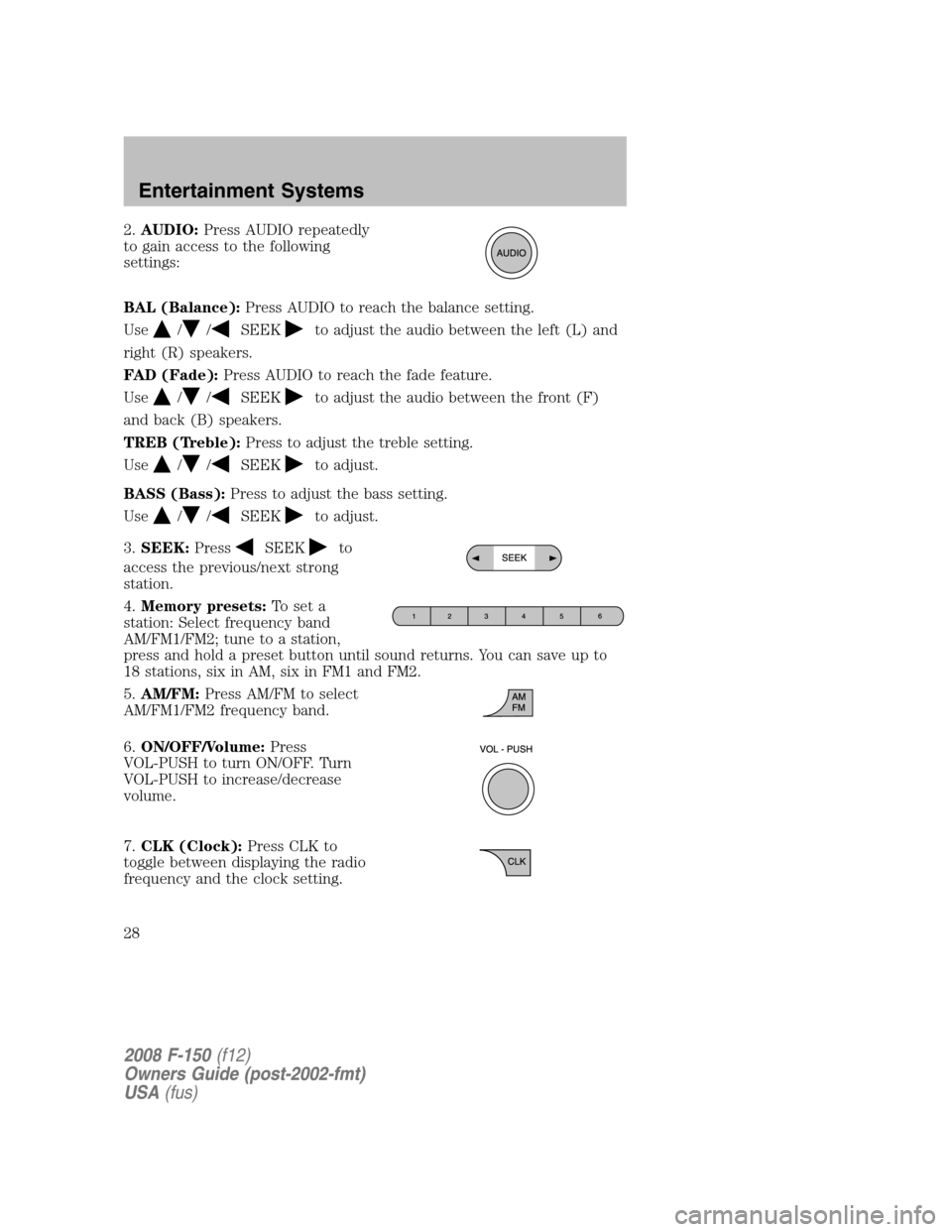
2.AUDIO:Press AUDIO repeatedly
to gain access to the following
settings:
BAL (Balance):Press AUDIO to reach the balance setting.
Use
//SEEKto adjust the audio between the left (L) and
right (R) speakers.
FAD (Fade):Press AUDIO to reach the fade feature.
Use
//SEEKto adjust the audio between the front (F)
and back (B) speakers.
TREB (Treble):Press to adjust the treble setting.
Use
//SEEKto adjust.
BASS (Bass):Press to adjust the bass setting.
Use
//SEEKto adjust.
3.SEEK:Press
SEEKto
access the previous/next strong
station.
4.Memory presets:To set a
station: Select frequency band
AM/FM1/FM2; tune to a station,
press and hold a preset button until sound returns. You can save up to
18 stations, six in AM, six in FM1 and FM2.
5.AM/FM:Press AM/FM to select
AM/FM1/FM2 frequency band.
6.ON/OFF/Volume:Press
VOL-PUSH to turn ON/OFF. Turn
VOL-PUSH to increase/decrease
volume.
7.CLK (Clock):Press CLK to
toggle between displaying the radio
frequency and the clock setting.
2008 F-150(f12)
Owners Guide (post-2002-fmt)
USA(fus)
Entertainment Systems
28
Page 29 of 400
Setting the clock:Press and hold CLK until the hours begin to flash.
Press
//SEEKto manually increase/decrease the hours.
Press CLK again to set the minutes using
//SEEKto
manually increase/decrease the minutes. Allow 10 seconds to pass to
confirm that the time has been set.
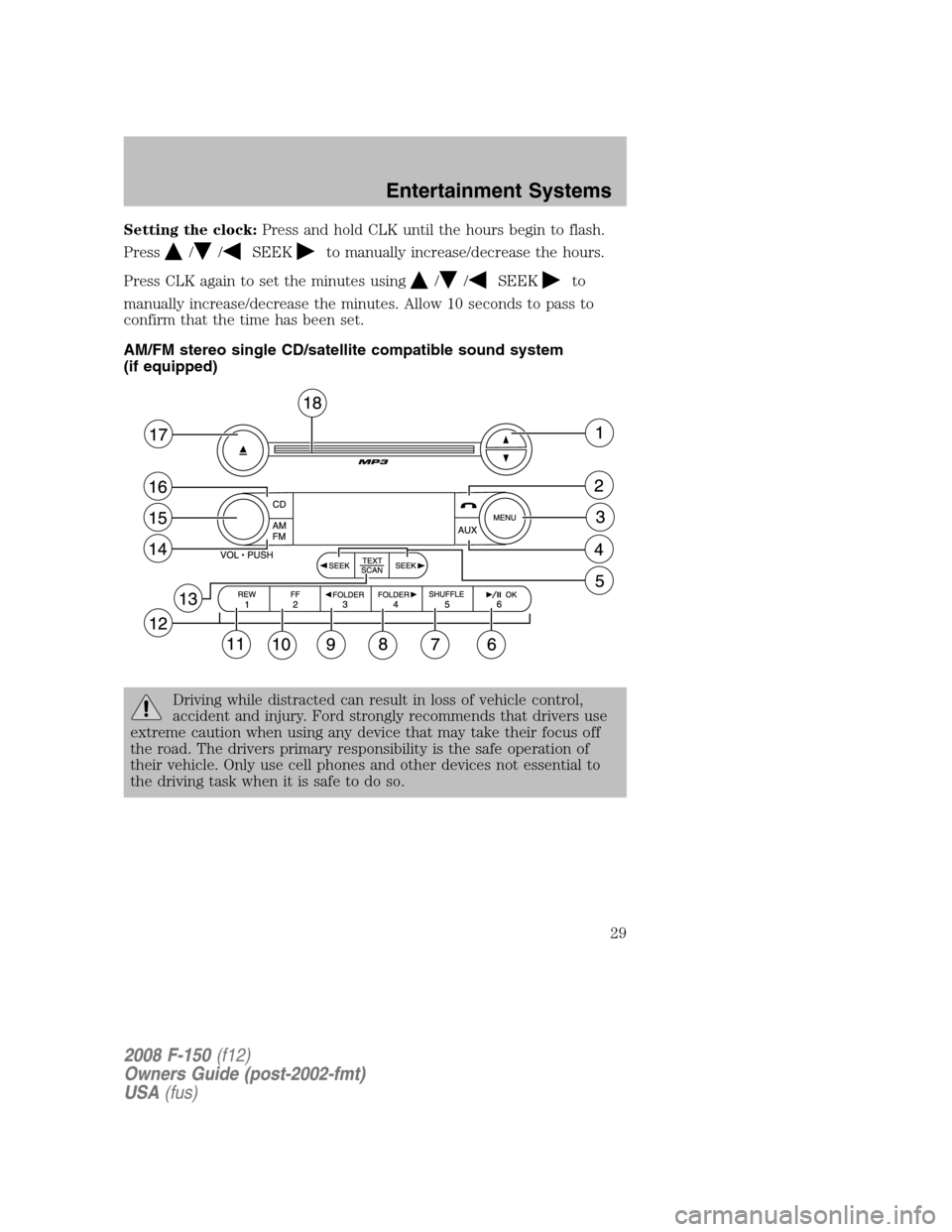
AM/FM stereo single CD/satellite compatible sound system
(if equipped)
Driving while distracted can result in loss of vehicle control,
accident and injury. Ford strongly recommends that drivers use
extreme caution when using any device that may take their focus off
the road. The drivers primary responsibility is the safe operation of
their vehicle. Only use cell phones and other devices not essential to
the driving task when it is safe to do so.
2008 F-150(f12)
Owners Guide (post-2002-fmt)
USA(fus)
Entertainment Systems
29
Page 31 of 400
•DELETE SONG:Press OK to delete a song from the system’s
memory. Press
/to cycle through the saved songs. When the
song appears in the display that you would like to delete, press OK.
The song will appear in the display for confirmation. Press OK again
and the display will read SONG DELETED. If you do not want to
delete the currently listed song, press
/to select either
RETURN or CANCEL.
Note:If there are no songs presently saved, the display will read NO
SONGS.
•DELETE ALL SONGS:Press OK to delete all song’s from the
system’s memory. The display will read ARE YOU SURE ? Press OK to
confirm deletion of all saved songs and the display will read ALL
DELETED.
Note:If there are no songs presently saved, the display will read NO
SONGS.
•ENABLE ALERTS / DISABLE ALERTS:Press OK to enable/disable
the satellite alert status which alerts you when your selected songs are
playing on a satellite radio channel. (The system default is disabled.)
SONG ALERTS ENABLED/DISABLED will appear in the display. The
menu listing will display the opposite state. For example, if you have
chosen to enable the song alerts, the menu listing will read DISABLE
as the alerts are currently on, so your other option is to turn them off.
Satellite radio is available only with a valid SIRIUS radio
subscription. Check with your authorized dealer for availability.
Setting the clock:Press MENU until SELECT HOURS or SELECT
MINUTES is displayed. Use
//SEEK, SEEKto adjust the
hours/minutes.
AUTOSET:Press MENU until the display reads AUTOSET. Autoset
allows you to set the strongest local radio stations without losing your
original manually set preset stations for AM/FM1/FM2.
Use
//SEEK, SEEKto turn on/off.
When the six strongest stations are filled, the station stored in preset 1
will begin playing. If there are less than six strong stations, the system
will store the last one in the remaining presets.
RBDS: Available only in FM mode. This feature allows you to search
RBDS-equipped stations for a certain category of music format:
CLASSIC, COUNTRY, INFORM, JAZZ/RB, ROCK, etc.
2008 F-150(f12)
Owners Guide (post-2002-fmt)
USA(fus)
Entertainment Systems
31
Page 38 of 400
•DELETE ALL SONGS:Press OK to delete all song’s from the
system’s memory. The display will read ARE YOU SURE ? Press OK to
confirm deletion of all saved songs and the display will read ALL
DELETED.
Note:If there are no songs presently saved, the display will read NO
SONGS.
•ENABLE ALERTS / DISABLE ALERTS:Press OK to enable/disable
the satellite alert status which alerts you when your selected songs are
playing on a satellite radio channel. (The system default is disabled.)
SONG ALERTS ENABLED/DISABLED will appear in the display. The
menu listing will display the opposite state. For example, if you have
chosen to enable the song alerts, the menu listing will read DISABLE
as the alerts are currently on, so your other option is to turn them off.
Satellite radio is available only with a valid SIRIUS radio
subscription. Check with your authorized dealer for availability.
Setting the clock:Press until SELECT HOUR or SELECT MINUTES is
displayed. Press
//SEEKto adjust the hours/minutes.
AUTOSET:Press MENU until the display reads AUTOSET. Autoset
allows you to set the strongest local radio stations without losing your
original manually set preset stations for AM/FM1/FM2.
Use
//SEEK, SEEKto turn on/off.
When the six strongest stations are filled, the station stored in preset 1
will begin playing. If there are less than six strong stations, the system
will store the last one in the remaining presets.
RBDS: Available only in FM mode. This feature allows you to search
RBDS-equipped stations for a certain category of music format:
CLASSIC, COUNTRY, INFORM, JAZZ/RB, ROCK, etc.
To activate,press MENU repeatedly until RBDS (ON/OFF) appears in
the display. Use
//SEEKto toggle RBDS ON/OFF. When
RBDS is OFF, you will not be able to search for RBDS equipped stations
or view the station name or type.
To search for specific RBDS music categories:When the desired
category appears in the display, press
/to find the desired type,
then press and release
SEEK, SEEKor press and hold SCAN to
begin the search.
To view the station name or type:When the desired category appears
in the display, press TEXT/SCAN to toggle between displaying the station
type (COUNTRY, ROCK, etc.) or the station name (WYCD, WXYZ, etc.).
2008 F-150(f12)
Owners Guide (post-2002-fmt)
USA(fus)
Entertainment Systems
38
Page 233 of 400
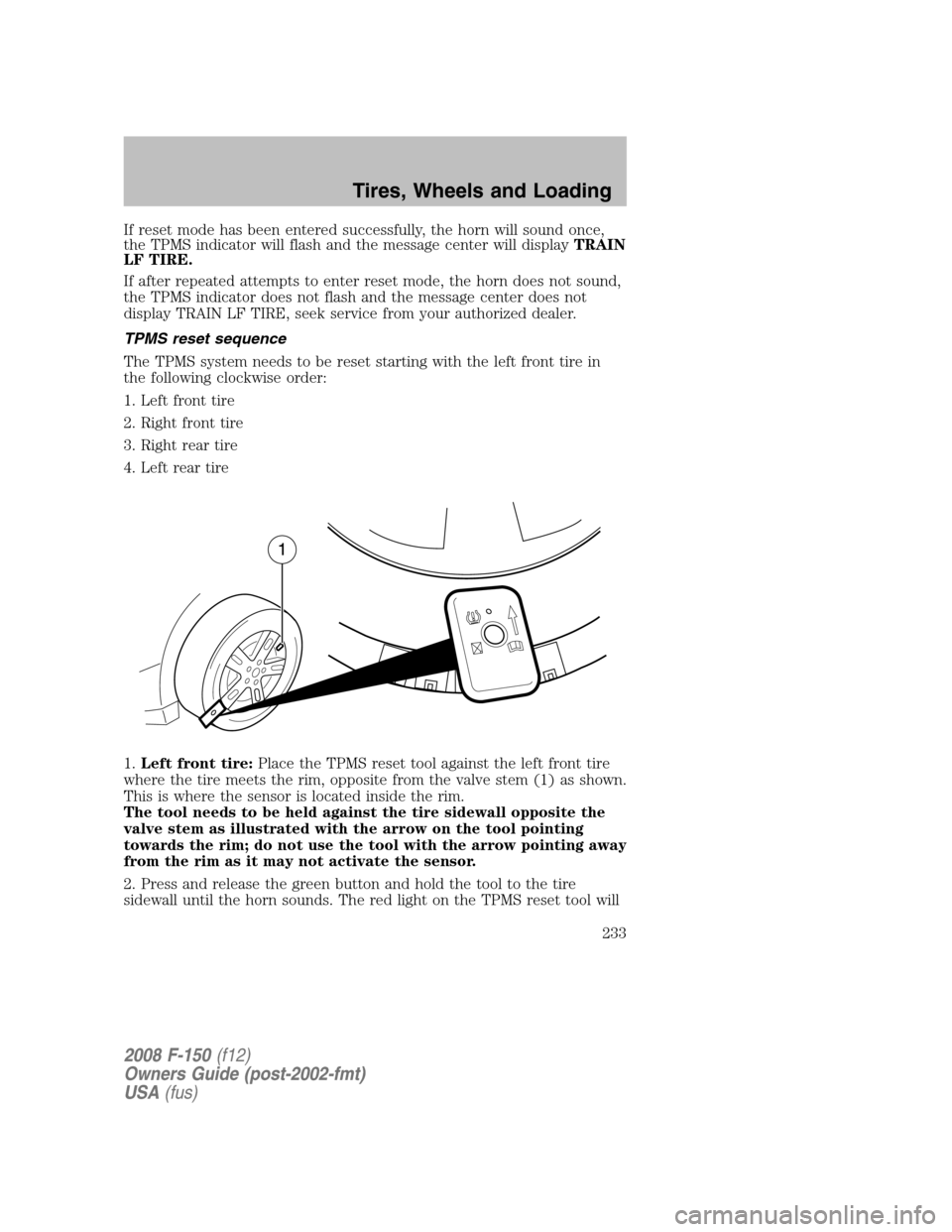
If reset mode has been entered successfully, the horn will sound once,
the TPMS indicator will flash and the message center will displayTRAIN
LF TIRE.
If after repeated attempts to enter reset mode, the horn does not sound,
the TPMS indicator does not flash and the message center does not
display TRAIN LF TIRE, seek service from your authorized dealer.
TPMS reset sequence
The TPMS system needs to be reset starting with the left front tire in
the following clockwise order:
1. Left front tire
2. Right front tire
3. Right rear tire
4. Left rear tire
1.Left front tire:Place the TPMS reset tool against the left front tire
where the tire meets the rim, opposite from the valve stem (1) as shown.
This is where the sensor is located inside the rim.
The tool needs to be held against the tire sidewall opposite the
valve stem as illustrated with the arrow on the tool pointing
towards the rim; do not use the tool with the arrow pointing away
from the rim as it may not activate the sensor.
2. Press and release the green button and hold the tool to the tire
sidewall until the horn sounds. The red light on the TPMS reset tool will
2008 F-150(f12)
Owners Guide (post-2002-fmt)
USA(fus)
Tires, Wheels and Loading
233
Page 310 of 400
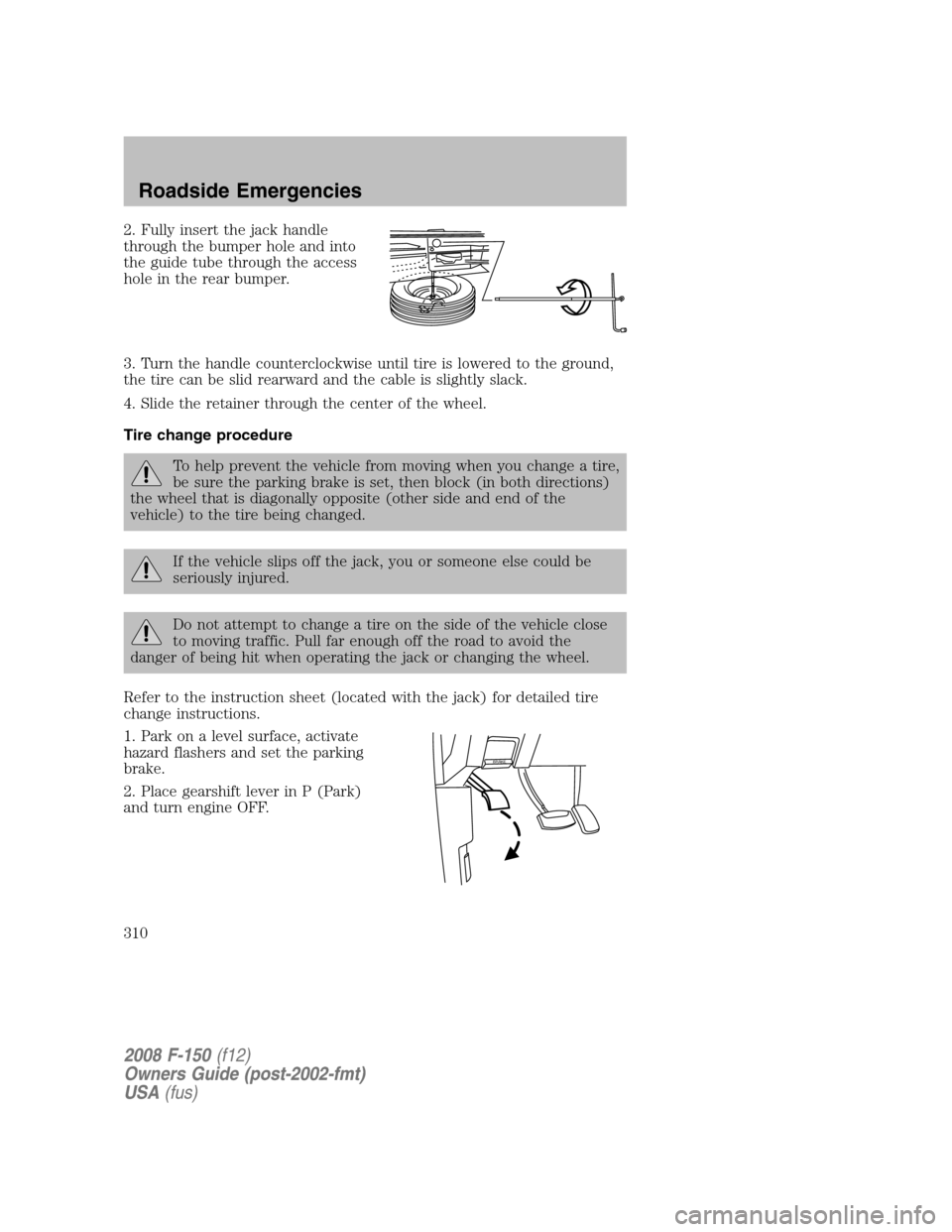
2. Fully insert the jack handle
through the bumper hole and into
the guide tube through the access
hole in the rear bumper.
3. Turn the handle counterclockwise until tire is lowered to the ground,
the tire can be slid rearward and the cable is slightly slack.
4. Slide the retainer through the center of the wheel.
Tire change procedure
To help prevent the vehicle from moving when you change a tire,
be sure the parking brake is set, then block (in both directions)
the wheel that is diagonally opposite (other side and end of the
vehicle) to the tire being changed.
If the vehicle slips off the jack, you or someone else could be
seriously injured.
Do not attempt to change a tire on the side of the vehicle close
to moving traffic. Pull far enough off the road to avoid the
danger of being hit when operating the jack or changing the wheel.
Refer to the instruction sheet (located with the jack) for detailed tire
change instructions.
1. Park on a level surface, activate
hazard flashers and set the parking
brake.
2. Place gearshift lever in P (Park)
and turn engine OFF.
BRAKE
2008 F-150(f12)
Owners Guide (post-2002-fmt)
USA(fus)
Roadside Emergencies
310
Page 311 of 400
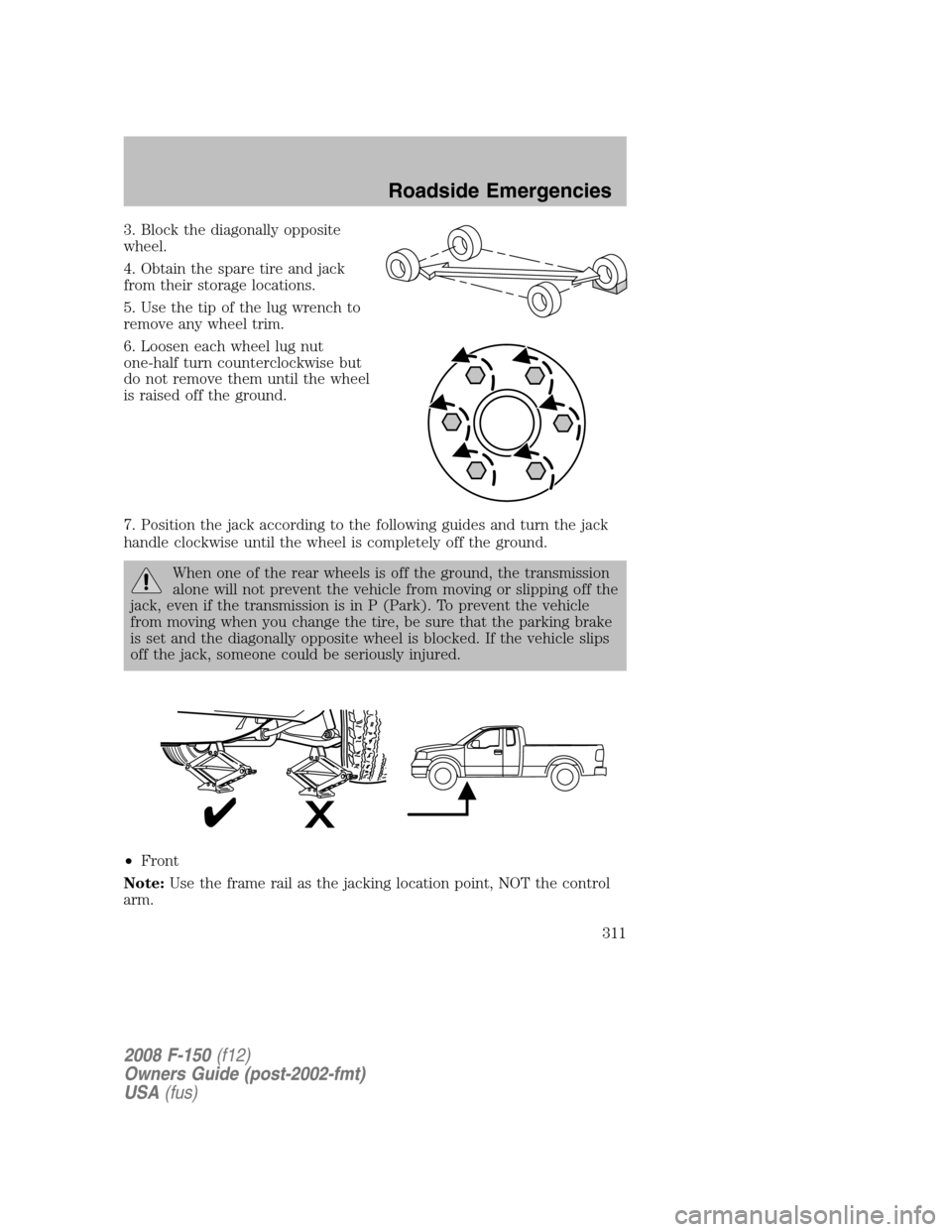
3. Block the diagonally opposite
wheel.
4. Obtain the spare tire and jack
from their storage locations.
5. Use the tip of the lug wrench to
remove any wheel trim.
6. Loosen each wheel lug nut
one-half turn counterclockwise but
do not remove them until the wheel
is raised off the ground.
7. Position the jack according to the following guides and turn the jack
handle clockwise until the wheel is completely off the ground.
When one of the rear wheels is off the ground, the transmission
alone will not prevent the vehicle from moving or slipping off the
jack, even if the transmission is in P (Park). To prevent the vehicle
from moving when you change the tire, be sure that the parking brake
is set and the diagonally opposite wheel is blocked. If the vehicle slips
off the jack, someone could be seriously injured.
•Front
Note:Use the frame rail as the jacking location point, NOT the control
arm.
2008 F-150(f12)
Owners Guide (post-2002-fmt)
USA(fus)
Roadside Emergencies
311
Page 350 of 400
Keep batteries out of reach of children. Batteries contain sulfuric
acid. Avoid contact with skin, eyes or clothing. Shield your eyes
when working near the battery to protect against possible splashing of
acid solution. In case of acid contact with skin or eyes, flush
immediately with water for a minimum of 15 minutes and get prompt
medical attention. If acid is swallowed, call a physician immediately.
Battery posts, terminals and related accessories contain lead and
lead compounds.Wash hands after handling.
Because your vehicle’s engine is also electronically controlled by a
computer, some control conditions are maintained by power from the
battery. When the battery is disconnected or a new battery is installed,
the engine must relearn its idle and fuel trim strategy for optimum
driveability and performance. Flexible fuel vehicles (FFV) must also
relearn the ethanol content of the fuel for optimum driveability and
performance. To begin this process:
1. With the vehicle at a complete stop, set the parking brake.
2. Put the gearshift in P (Park) (automatic transmission) or the neutral
position (manual transmission), turn off all accessories and start the
engine.
3. Run the engine until it reaches normal operating temperature.
4. Allow the engine to idle for at least one minute.
5. Turn the A/C on and allow the engine to idle for at least one minute.
6. Drive the vehicle to complete the relearning process.
•The vehicle may need to be driven 10 miles (16 km) or more to
relearn the idle and fuel trim strategy along with the ethanol content
for flexible fuel vehicles.
•If you do not allow the engine to relearn its idle trim, the idle quality
of your vehicle may be adversely affected until the idle trim is
eventually relearned.
•For flexible fuel vehicles, if you are operating on E85, you may
experience poor starts or an inability to start the engine and
driveability problems until the fuel trim and ethanol content have been
relearned.
If the battery has been disconnected or a new battery has been installed,
the clock and the preset radio stations must be reset once the battery is
reconnected.
2008 F-150(f12)
Owners Guide (post-2002-fmt)
USA(fus)
Maintenance and Specifications
350
Page 392 of 400

Child safety seats - booster
seats ...........................................193
Cleaning your vehicle
engine compartment ..............331
instrument panel ............333–334
interior .....................................335
plastic parts ............................332
safety belts ..............................335
washing ....................................329
waxing .....................................330
wheels ......................................330
wiper blades ............................333
Climate control (see
Air conditioning or
Heating) ...........................81, 85, 87
Clock adjust
6-CD in dash .............................38
AM/FM Stereo ...........................28
AM/FM/CD .................................31
Clutch
fluid ..........................................371
operation while driving ..........275
recommended shift speeds ....276
Compass, electronic ..........123, 125
calibration ...............................125
set zone adjustment .......125–126
Console ......................................104
overhead ..........................104–105
Controls
power seat ...............................160
steering column ......................117
Coolant
checking and adding ..............351
refill capacities ................355, 381
specifications ..........................381
Cruise control
(see Speed control) ..................115
Customer Assistance ................296Ford Extended Service
Plan ..........................................325
Getting assistance outside
the U.S. and Canada ..............326
Getting roadside assistance ...296
Getting the service
you need .................................321
Ordering additional
owner’s literature ...................327
Utilizing the Mediation/
Arbitration Program ...............325
D
Daytime running lamps
(see Lamps) ................................92
Dipstick
automatic transmission
fluid ..........................................372
engine oil .................................345
Driveline universal joint
and slip yoke .............................377
Driving under special
conditions ..................275, 287, 290
sand .........................................289
snow and ice ...........................291
through water .................289, 292
DVD system .................................51
E
Electronic message center .......125
Emergencies, roadside
jump-starting ..........................315
Emergency Flashers .................298
Emission control system ..........368
Engine ........................................385
cleaning ...................................331
coolant .....................................351
fail-safe cooling .......................356
2008 F-150(f12)
Owners Guide (post-2002-fmt)
USA(fus)
Index
392
Page 396 of 400

Safety Compliance
Certification Label ....................386
Satellite Radio Information ........48
Seats ..........................................158
child safety seats ....................196
cleaning ...................................336
heated ................................87, 162
memory seat ...................149, 161
SecuriLock passive
anti-theft system ...............155–156
Servicing your vehicle ..............339
Setting the clock
AM/FM stereo ...........................28
AM/FM/CD .................................31
AM/FM/In-dash 6 CD ................38
Snowplowing .................7, 293–294
Spark plugs,
specifications .....................380, 385
Special notice
ambulance conversions ..............7
four-wheel drive vehicles .......295
utility-type vehicles ....................8
Specification chart,
lubricants ...................................381
Speed control ............................115
Starting a flex fuel vehicle .......261
Starting your
vehicle ........................258–259, 261
jump starting ..........................315
Steering wheel
controls ....................................117
tilting .......................................103
T
Tailgate ..............................134–135Temperature control
(see Climate control) .................81
Tilt steering wheel ....................103
Tire Pressure Monitoring
System (TPMS)
Tires, Wheels and Loading ....226
Tires ...........................211–212, 307
alignment ................................219
care ..........................................215
changing ..........................307, 310
checking the pressure ............215
inflating ...................................213
label .........................................225
replacing ..................................217
rotating ....................................219
safety practices .......................218
sidewall information ...............221
snow tires and chains ............236
spare tire .................................307
terminology .............................212
tire grades ...............................212
treadwear ........................211, 216
Towing .......................................243
recreational towing .................257
trailer towing ..........................243
Traction control ........................266
Traction-lok rear axle ...............268
Transfer case
fluid checking .........................376
Transmission .............................269
brake-shift interlock
(BSI) ................................269–270
fluid, checking and adding
(automatic) .............................372
fluid, checking and adding
(manual) .................................375
fluid, refill capacities ..............381
lubricant specifications ..........381
manual operation ....................275
Turn signal ..................................95
2008 F-150(f12)
Owners Guide (post-2002-fmt)
USA(fus)
Index
396