ignition FORD F150 2009 12.G Manual PDF
[x] Cancel search | Manufacturer: FORD, Model Year: 2009, Model line: F150, Model: FORD F150 2009 12.GPages: 405, PDF Size: 2.82 MB
Page 240 of 405
9. Press and release the green button and hold the tool to the tire
sidewall until the horn sounds. The red light on the TPMS reset tool will
illuminate while the tool is active. The horn will sound once within
10 seconds to indicate the process was successful.
Note:
•If a double horn chirp is heard, repeat the procedure. If a single horn
chirp is not heard, move the vehicle to rotate the wheels at least a
14-turn and repeat the procedure starting with Step 1.
•If a double horn chirp is heard even after the wheels were
repositioned, seek service from your authorized dealer.
10. Perform Steps 8 and 9 on the right front tire, right rear tire and
finally the left rear tire. Training is complete after the horn sounds for
the last tire trained (left rear tire) and the message center displays:
TRAINING COMPLETE.
Turn the ignition to off. If two short horn beeps are heard, the reset
procedure was unsuccessful and must be repeated.
If after repeating the procedure and two short beeps are heard when the
ignition is turned to off, seek assistance from your authorized dealer.
SNOW TIRES AND CHAINS
WARNING:Snow tires must be the same size, load index, speed
rating as those originally provided by Ford. Use of any tire or
wheel not recommended by Ford can affect the safety and
performance of your vehicle, which could result in an increased risk of
loss of vehicle control, vehicle rollover, personal injury and death.
Additionally, the use of non-recommended tires and wheels could
cause steering, suspension, axle or transfer case/power transfer unit
failure.
The tires on your vehicle have all-weather treads to provide traction in
rain and snow. However, in some climates, you may need to use snow
tires and chains. If you need to use chains, it is recommended that steel
wheels (of the same size and specifications) be used, as chains may chip
aluminum wheels.
2009 F-150(f12)
Owners Guide, 1st Printing
USA(fus)
Tires, Wheels and Loading
240
Page 253 of 405
Crew Cab 4x4 (157” wheelbase)
Engine Rear axle ratio Maximum
GCWR-lb. (kg)Maximum
trailer
weight-lb. (kg)
4.6L 3V3.55 13500 (6123) 7700 (3493)
3.73 15100 (6849) 9300 (4218)
5.4L3.31 14000 (6350) 8100 (3674)
3.55 15500 (7031) 9600 (4354)
3.73 15500 (7031)
17100 (7756)*9600 (4354)
11100 (5035)*
*Maximum GCWR and trailer weight when equipped with Max Trailer
Tow package.
Trailer frontal area considerations:
•Not to exceed towing vehicle frontal area 36 square feet (3.4 square
meters) without the Class IV trailer towing package.
•Not to exceed 60 square feet (5.52 square meters) with the Class IV
trailer towing package–excluding vehicles with 3.15 rear axle ratio.
•Not to exceed 45 square feet (4.18 square meters) with the Class IV
trailer towing package for vehicles with 3.15 rear axle ratio only.
Note:Do not exceed trailer weight of 5,000 lb. (2,268 kg) when towing
with bumper only.
Preparing to tow
Use the proper equipment for towing a trailer and make sure it is
properly attached to your vehicle. See your authorized dealer or a
reliable trailer dealer if you require assistance.
Hitches
Do not use hitches that clamp onto the vehicle’s bumper or attach to the
axle. You must distribute the load in your trailer so that 10%–15% of the
total weight of the trailer is on the tongue.
Weight distributing hitch
When hooking up a trailer using a load equalizing hitch, always use the
following procedure:
1. Park the unloaded vehicle on a level surface. With the ignition on and
all doors closed, allow the vehicle to stand for several minutes so that it
can level.
2009 F-150(f12)
Owners Guide, 1st Printing
USA(fus)
Tires, Wheels and Loading
253
Page 255 of 405
WARNING:The Ford TBC has only been verified to be
compatible with trailers having electric-actuated drum brakes
(one to four axles) and not hydraulic surge or electric-over-hydraulic
types. It is the responsibility of the customer to ensure that the trailer
brakes are adjusted appropriately, functioning normally and all electric
connections are properly made.
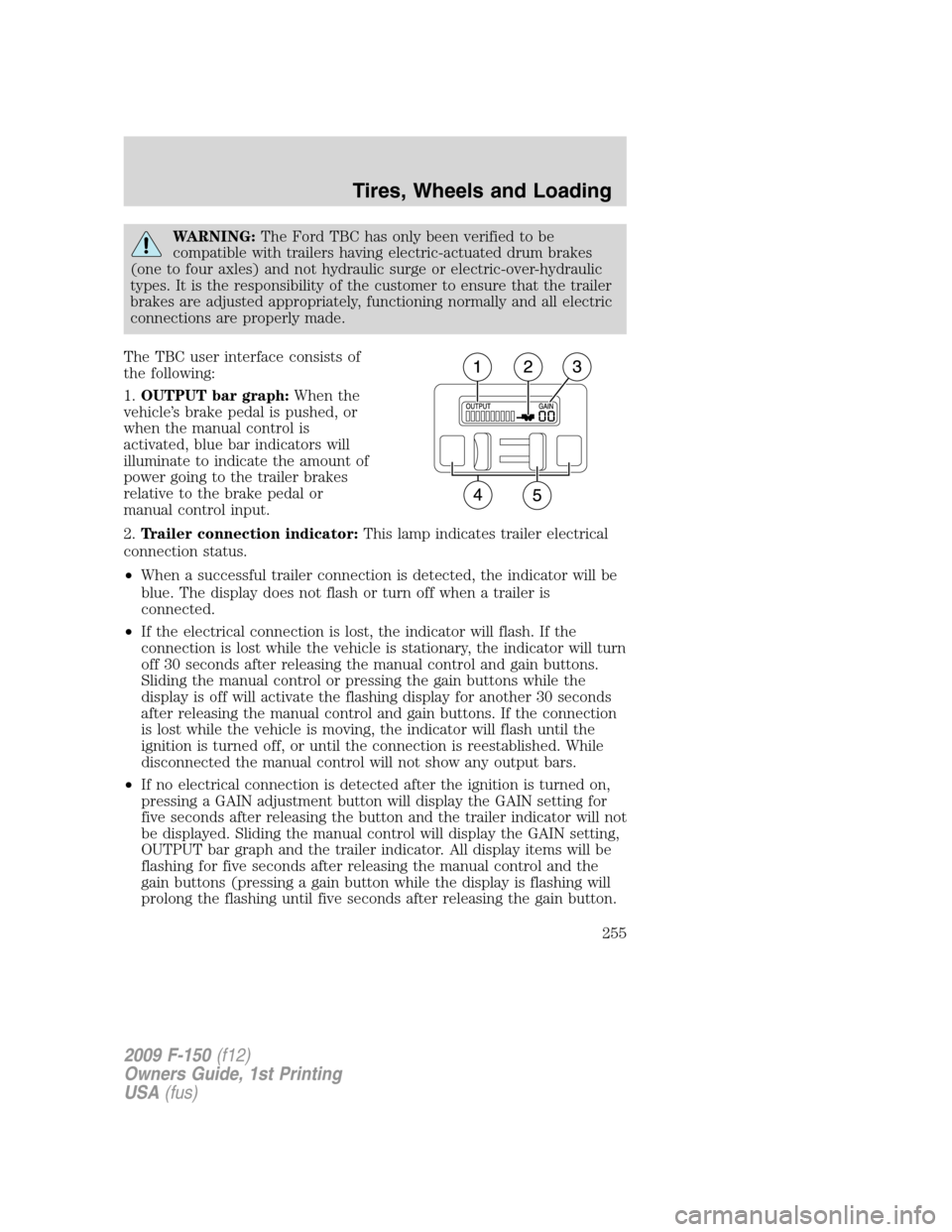
The TBC user interface consists of
the following:
1.OUTPUT bar graph:When the
vehicle’s brake pedal is pushed, or
when the manual control is
activated, blue bar indicators will
illuminate to indicate the amount of
power going to the trailer brakes
relative to the brake pedal or
manual control input.
2.Trailer connection indicator:This lamp indicates trailer electrical
connection status.
•When a successful trailer connection is detected, the indicator will be
blue. The display does not flash or turn off when a trailer is
connected.
•If the electrical connection is lost, the indicator will flash. If the
connection is lost while the vehicle is stationary, the indicator will turn
off 30 seconds after releasing the manual control and gain buttons.
Sliding the manual control or pressing the gain buttons while the
display is off will activate the flashing display for another 30 seconds
after releasing the manual control and gain buttons. If the connection
is lost while the vehicle is moving, the indicator will flash until the
ignition is turned off, or until the connection is reestablished. While
disconnected the manual control will not show any output bars.
•If no electrical connection is detected after the ignition is turned on,
pressing a GAIN adjustment button will display the GAIN setting for
five seconds after releasing the button and the trailer indicator will not
be displayed. Sliding the manual control will display the GAIN setting,
OUTPUT bar graph and the trailer indicator. All display items will be
flashing for five seconds after releasing the manual control and the
gain buttons (pressing a gain button while the display is flashing will
prolong the flashing until five seconds after releasing the gain button.
2009 F-150(f12)
Owners Guide, 1st Printing
USA(fus)
Tires, Wheels and Loading
255
Page 257 of 405
4. Use the GAIN adjustment (+/–) buttons to increase or decrease the
GAIN setting to the desired starting point. A GAIN setting of 6.0 is a
good starting point for heavier loads.
5. In a traffic-free environment, tow the trailer on a dry, level surface at
a speed of 20–25 mph (30–40 km/h) and squeeze the manual control
lever completely.
6. If the trailer wheels lockup (indicated by squealing tires), reduce the
GAIN setting; if the trailer wheels turn freely, increase the GAIN setting.
Repeat Steps 5 and 6 until the GAIN setting is at a point just below
trailer-wheel lockup. If towing a heavier trailer, trailer wheel lockup
may not be attainable even with the maximum GAIN setting of 10.
Explanation of instrument cluster messages:
The TBC interacts with the instrument cluster message center. These
messages, accompanied by a single chime, will be displayed when the
TBC determines a malfunction in the trailer connection, TBC system, or
in the trailer. These messages are listed below:
TRAILER DISCONNECTED (if equipped with message center):
This message is displayed when a trailer connection was determined and
then a disconnection, either intentionally or unintentionally, has been
sensed during a given ignition cycle. It is also displayed if a trailer fault
occurs causing the trailer to appear disconnected. This message is also
displayed during manual activation without a trailer connected.
TRAILER BRAKE MODULE FAULT: This message is displayed in
response to faults sensed by the TBC. In the event this message is seen,
please take your vehicle to an authorized dealer for diagnosis and repair.
The TBC may still function, but performance may be degraded.
WIRING FAULT ON TRAILER: The TBC is capable of determining
certain faults in the vehicle wiring and trailer wiring/brake system. These
faults do not mean there is anything wrong with the TBC. This message
is displayed when one of the following faults has occurred:
•Short circuit on the electric brake output wire:If theWIRING
FAULT ON TRAILERmessage is displayed with no trailer connected,
the problem is with the vehicle wiring from the TBC to the 7–pin
connector in the bumper. If the message is only displayed with a
trailer connected, the problem is related to the trailer wiring; consult
your trailer dealer for assistance. This can be a short to ground (i.e.,
chaffed wire) or a short to voltage (i.e., a pulled pin on trailer
emergency break-away battery) or trailer brakes drawing too much
current.
2009 F-150(f12)
Owners Guide, 1st Printing
USA(fus)
Tires, Wheels and Loading
257
Page 258 of 405
Note:Your TBC can be diagnosed by your authorized dealer to
determine exactly which trailer fault has occurred; however, if the fault
is with the trailer this diagnosis isnotcovered under your Ford
warranty.
Points to Remember:
•Remember to adjust gain setting before using the TBC for the first
time.
•Readjust GAIN setting on the TBC (according to procedure above)
whenever road, weather and trailer or vehicle loading conditions
change from those that existed when the gain was initially set.
•The sliding lever on the TBC should be used only for manual
activation of trailer brakes to assist with proper adjustment of the
GAIN. Misuse, such as application during trailer sway, could cause
instability of trailer and/or tow vehicle.
•Avoid towing in adverse weather conditions. The TBC does not
provide anti-lock control of the trailer wheels. Trailer wheels can
lockup on slippery surfaces, resulting in reduced stability of trailer and
tow vehicle.
•The TBC interacts with the brake system of the vehicle, including
ABS, in order to reduce the likelihood of trailer wheel lockup.
Therefore, if these systems are not functioning properly the TBC may
not function at full performance.
•When the vehicle is turned off, the TBC Output is disabled and the
display is shut down. Reactivation of the ignition from off to on will
awaken the TBC module.
•The TBC is only a factory or dealer installed item. Ford is not
responsible for warranty or performance of the TBC due to misuse or
customer installation.
•Do not attempt removal of the TBC without consulting the
Workshop Manual.Damage to the unit may result.
Trailer lamps
Trailer lamps are required on most towed vehicles. Make sure all running
lights, brake lights, turn signals and hazard lights are working. See your
authorized dealer or trailer rental agency for proper instructions and
equipment for hooking up trailer lamps.
2009 F-150(f12)
Owners Guide, 1st Printing
USA(fus)
Tires, Wheels and Loading
258
Page 261 of 405
RECREATIONAL TOWING
Follow these guidelines if you have a need for recreational (RV) towing.
An example of recreational towing would be towing your vehicle behind
a motorhome. These guidelines are designed to ensure that your
transmission is not damaged.
2WD vehicles:Do not tow your vehicle with any wheels on the ground,
as vehicle or transmission damage may occur. It is recommended to tow
your vehicle with all four (4) wheels off the ground such as when using a
car-hauling trailer. Otherwise, no recreational towing is permitted.
4WD vehicles equipped with manual-shift transfer case:
•Release the parking brake.
•Turn the key in the ignition to the off position.
•Place the transmission in N (Neutral).
•Place the transfer case lever in N (Neutral).
•The maximum recommended distance is unlimited.
•The vehicle must be towed in the forward position to ensure no
damage is done to the internal transfer case components.
The transfer case N (Neutral) position overrides the transmission and
puts the vehicle in neutral regardless of transmission gearshift lever
position. The vehicle can move forward or backward. This position
should only be used when towing the vehicle.
WARNING:Do not leave the vehicle unattended with the
transfer case in the N (Neutral) position. Always set the parking
brake fully and turn off the ignition when leaving the vehicle.
After reaching the destination, you must place your vehicle’s 4x4
gearshift lever in gear (2H, 4H or 4L).
In case of a roadside emergency with a disabled vehicle, seeWrecker
towingin theRoadside Emergencieschapter.
4WD vehicles equipped with an electronic-shift transfer case:Do
not tow your vehicle with any wheels on the ground, as vehicle or
transmission damage may occur. It is recommended to tow your vehicle
with all four (4) wheels off the ground such as when using a car-hauling
trailer. Otherwise, no recreational towing is permitted.
In case of a roadside emergency with a disabled vehicle, seeWrecker
towingin theRoadside Emergencieschapter.
2009 F-150(f12)
Owners Guide, 1st Printing
USA(fus)
Tires, Wheels and Loading
261
Page 262 of 405
STARTING
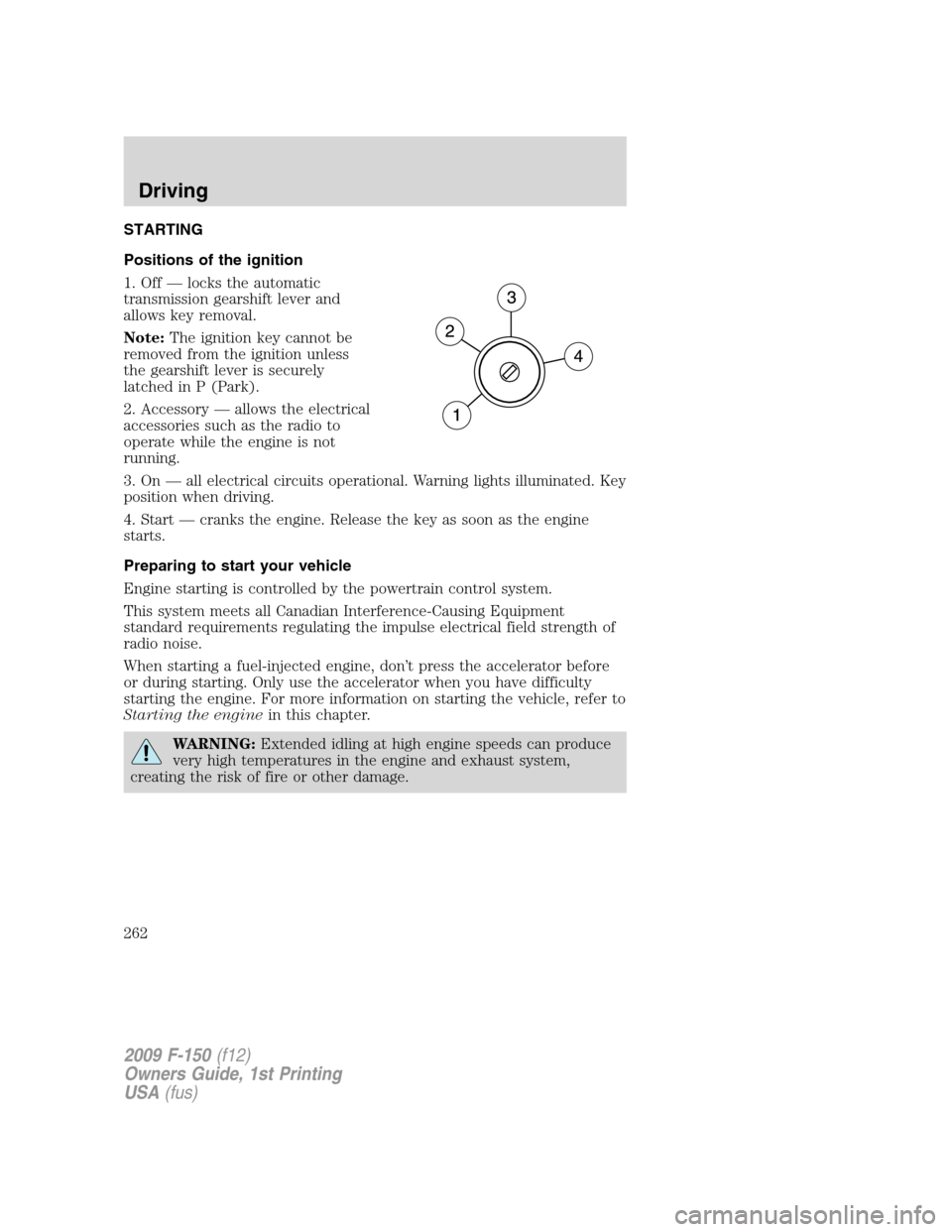
Positions of the ignition
1. Off — locks the automatic
transmission gearshift lever and
allows key removal.
Note:The ignition key cannot be
removed from the ignition unless
the gearshift lever is securely
latched in P (Park).
2. Accessory — allows the electrical
accessories such as the radio to
operate while the engine is not
running.
3. On — all electrical circuits operational. Warning lights illuminated. Key
position when driving.
4. Start — cranks the engine. Release the key as soon as the engine
starts.
Preparing to start your vehicle
Engine starting is controlled by the powertrain control system.
This system meets all Canadian Interference-Causing Equipment
standard requirements regulating the impulse electrical field strength of
radio noise.
When starting a fuel-injected engine, don’t press the accelerator before
or during starting. Only use the accelerator when you have difficulty
starting the engine. For more information on starting the vehicle, refer to
Starting the enginein this chapter.
WARNING:Extended idling at high engine speeds can produce
very high temperatures in the engine and exhaust system,
creating the risk of fire or other damage.
2009 F-150(f12)
Owners Guide, 1st Printing
USA(fus)
Driving
262
Page 270 of 405
ABS warning lamp
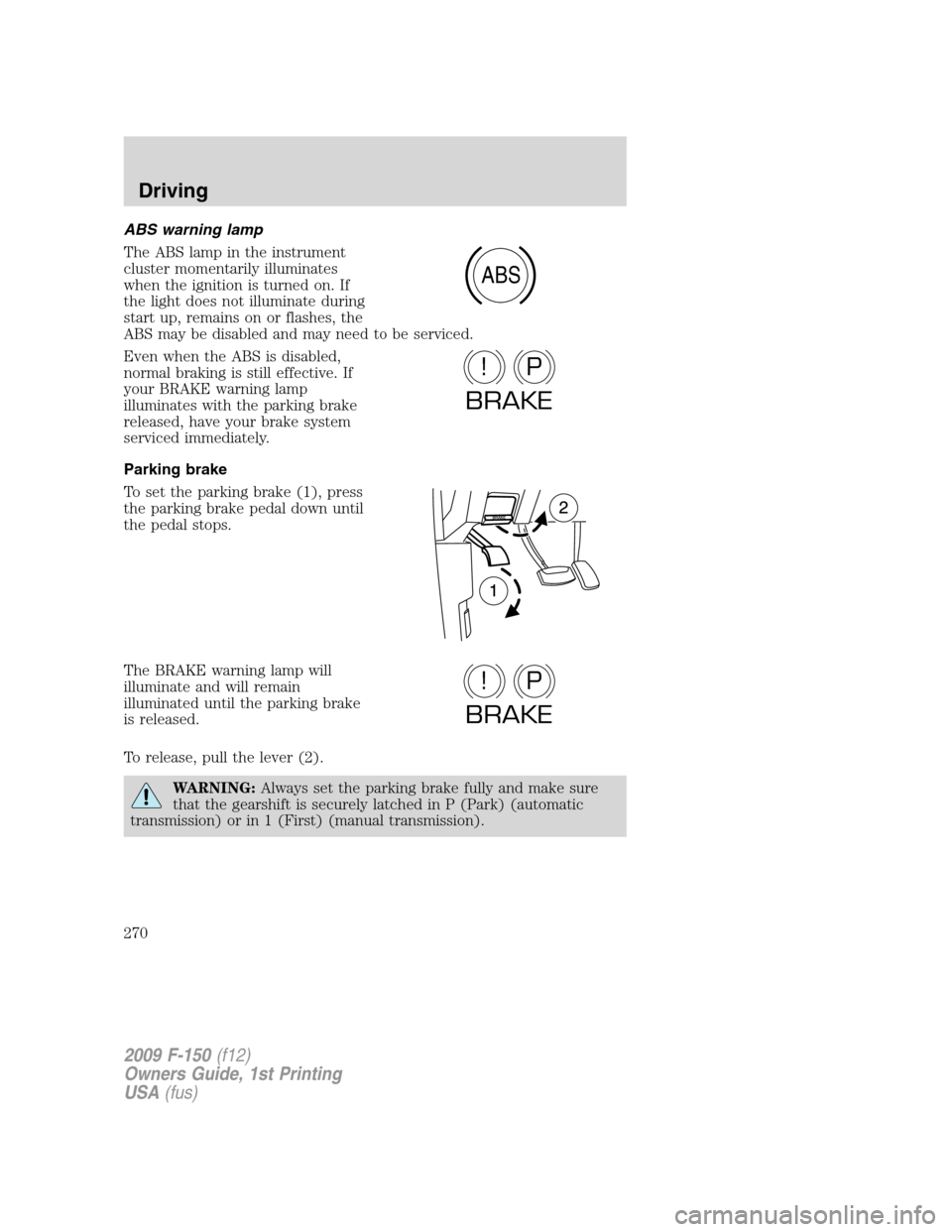
The ABS lamp in the instrument
cluster momentarily illuminates
when the ignition is turned on. If
the light does not illuminate during
start up, remains on or flashes, the
ABS may be disabled and may need to be serviced.
Even when the ABS is disabled,
normal braking is still effective. If
your BRAKE warning lamp
illuminates with the parking brake
released, have your brake system
serviced immediately.
Parking brake
To set the parking brake (1), press
the parking brake pedal down until
the pedal stops.
The BRAKE warning lamp will
illuminate and will remain
illuminated until the parking brake
is released.
To release, pull the lever (2).
WARNING:Always set the parking brake fully and make sure
that the gearshift is securely latched in P (Park) (automatic
transmission) or in 1 (First) (manual transmission).
ABS
P!
BRAKE
P!
BRAKE
2009 F-150(f12)
Owners Guide, 1st Printing
USA(fus)
Driving
270
Page 278 of 405
PREPARING TO DRIVE
WARNING:Utility vehicles have a significantly higher rollover
rate than other types of vehicles.
WARNING:In a rollover crash, an unbelted person is
significantly more likely to die than a person wearing a seat belt.
Utility vehicles and trucks have larger tires and increased ground
clearance, giving the vehicle a higher center of gravity than a passenger
car.
WARNING:Vehicles with a higher center of gravity such as
utility vehicles and trucks handle differently than vehicles with a
lower center of gravity. Utility vehicles and trucks arenotdesigned for
cornering at speeds as high as passenger cars any more than low-slung
sports cars are designed to perform satisfactorily under off-road
conditions. Avoid sharp turns, excessive speed or abrupt maneuvers in
these vehicles. Failure to drive cautiously could result in an increased
risk of loss of vehicle control, vehicle rollover, personal injury and
death.
WARNING:Loaded vehicles, with a higher center of gravity,
may handle differently than unloaded vehicles. Do not overload
your vehicle and use extra precautions, such as driving at slower
speeds, avoiding abrupt steering changes and allowing for increased
stopping distance, when driving a heavily loaded vehicle. Over-loading
or loading the vehicle improperly can deteriorate handling capability
and contribute to loss of vehicle control and vehicle rollover.
AUTOMATIC TRANSMISSION OPERATION
Brake-shift interlock - column-shift transmission
This vehicle is equipped with a park/brake-shift interlock feature that
prevents the gearshift lever from being moved from P (Park) when the
ignition is in the on position unless the brake pedal is depressed.
If you cannot move the gearshift lever out of P (Park) with ignition in
the on position and the brake pedal depressed, it is possible that a fuse
has blown or the vehicle’s brakelamps are not operating properly. Refer
toFuses and relaysin theRoadside Emergencieschapter.
2009 F-150(f12)
Owners Guide, 1st Printing
USA(fus)
Driving
278
Page 279 of 405
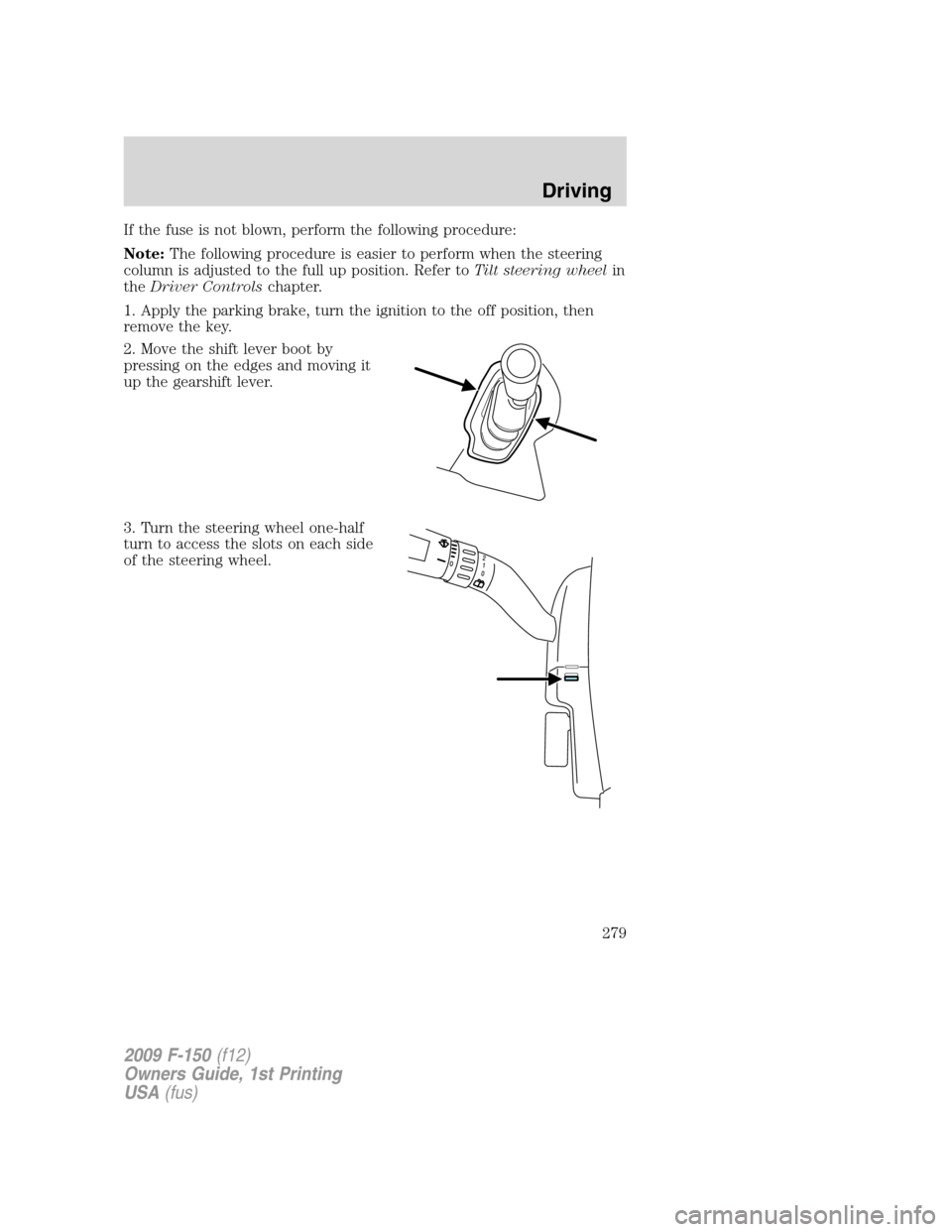
If the fuse is not blown, perform the following procedure:
Note:The following procedure is easier to perform when the steering
column is adjusted to the full up position. Refer toTilt steering wheelin
theDriver Controlschapter.
1. Apply the parking brake, turn the ignition to the off position, then
remove the key.
2. Move the shift lever boot by
pressing on the edges and moving it
up the gearshift lever.
3. Turn the steering wheel one-half
turn to access the slots on each side
of the steering wheel.
2009 F-150(f12)
Owners Guide, 1st Printing
USA(fus)
Driving
279