ECO mode FORD F150 2009 12.G Owners Manual
[x] Cancel search | Manufacturer: FORD, Model Year: 2009, Model line: F150, Model: FORD F150 2009 12.GPages: 405, PDF Size: 2.82 MB
Page 13 of 405
bulb works. If any light remains on after starting the vehicle, refer to the
respective system warning light for additional information.
Note:Some warning lights are reconfigurable telltale (RTT) indicator
lights and will illuminate in the Message Center Display and function the
same as the warning light.
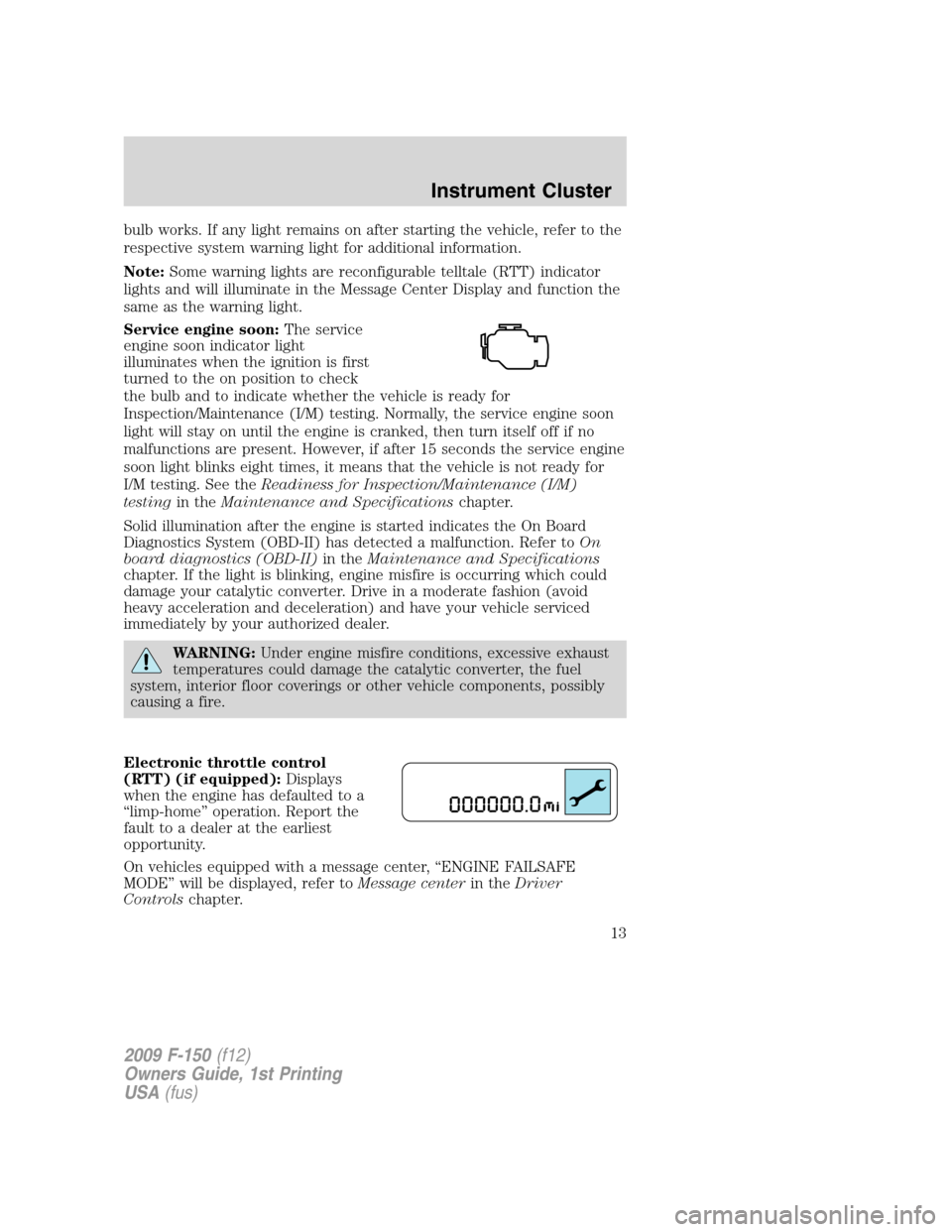
Service engine soon:The service
engine soon indicator light
illuminates when the ignition is first
turned to the on position to check
the bulb and to indicate whether the vehicle is ready for
Inspection/Maintenance (I/M) testing. Normally, the service engine soon
light will stay on until the engine is cranked, then turn itself off if no
malfunctions are present. However, if after 15 seconds the service engine
soon light blinks eight times, it means that the vehicle is not ready for
I/M testing. See theReadiness for Inspection/Maintenance (I/M)
testingin theMaintenance and Specificationschapter.
Solid illumination after the engine is started indicates the On Board
Diagnostics System (OBD-II) has detected a malfunction. Refer toOn
board diagnostics (OBD-II)in theMaintenance and Specifications
chapter. If the light is blinking, engine misfire is occurring which could
damage your catalytic converter. Drive in a moderate fashion (avoid
heavy acceleration and deceleration) and have your vehicle serviced
immediately by your authorized dealer.
WARNING:Under engine misfire conditions, excessive exhaust
temperatures could damage the catalytic converter, the fuel
system, interior floor coverings or other vehicle components, possibly
causing a fire.
Electronic throttle control
(RTT) (if equipped):Displays
when the engine has defaulted to a
“limp-home” operation. Report the
fault to a dealer at the earliest
opportunity.
On vehicles equipped with a message center, “ENGINE FAILSAFE
MODE” will be displayed, refer toMessage centerin theDriver
Controlschapter.
2009 F-150(f12)
Owners Guide, 1st Printing
USA(fus)
Instrument Cluster
13
Page 22 of 405
AUDIO SYSTEMS
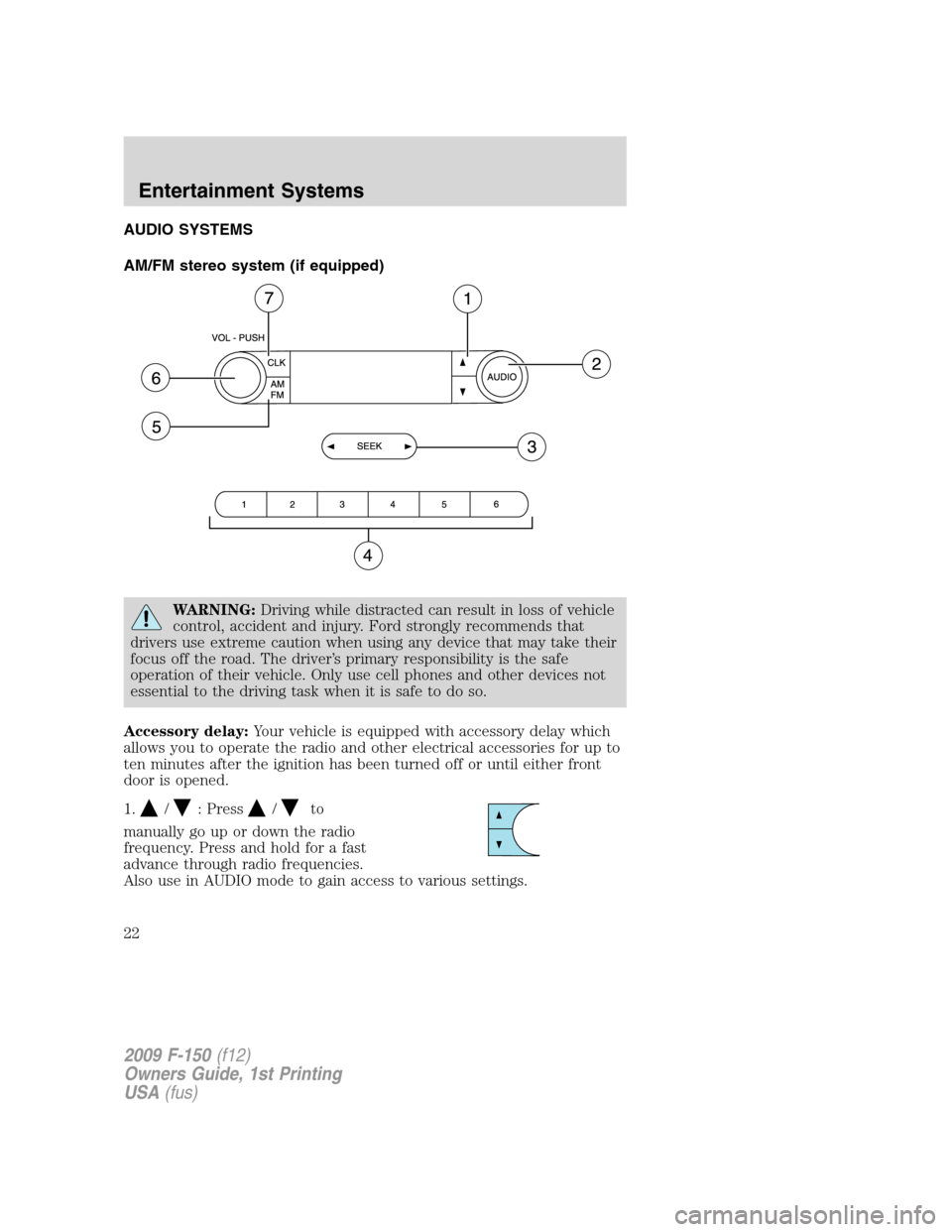
AM/FM stereo system (if equipped)
WARNING:Driving while distracted can result in loss of vehicle
control, accident and injury. Ford strongly recommends that
drivers use extreme caution when using any device that may take their
focus off the road. The driver’s primary responsibility is the safe
operation of their vehicle. Only use cell phones and other devices not
essential to the driving task when it is safe to do so.
Accessory delay:Your vehicle is equipped with accessory delay which
allows you to operate the radio and other electrical accessories for up to
ten minutes after the ignition has been turned off or until either front
door is opened.
1.
/: Press/to
manually go up or down the radio
frequency. Press and hold for a fast
advance through radio frequencies.
Also use in AUDIO mode to gain access to various settings.
2009 F-150(f12)
Owners Guide, 1st Printing
USA(fus)
Entertainment Systems
22
Page 26 of 405

another control within those five seconds, the search will not initiate.
The 10 strongest stations will be filled and the station stored in preset 1
will begin playing.
If there are fewer than 10 strong stations, the system will store the last
one in the remaining presets.
RDBS Radio
Available only in FM mode. This feature allows you to search
RDBS-equipped stations for a certain category of music format:
CLASSIC, COUNTRY, JAZZ/RB, ROCK, etc.
To activate:Press MENU repeatedly until RDBS (ON/OFF) appears in
the display. Use
SEEKto toggle RDBS ON/OFF. When RDBS is
off, you will not be able to search for RDBS equipped stations or view
the station name or type.
CAT/FOLD (Category/Folder):This feature allows you to select from
various music categories.
To change RDBS categories:Press MENU repeatedly until RDBS
ON/OFF appears in the display. Use
SEEKto toggle RDBS
between ON/OFF. Press CAT. PRESS UP OR DOWN TO CHANGE RDBS
CATEGORY will appear in the display.
Press
to scroll through all possible categories. When the desired
category appears in the display, press
SEEKto find the next
station playing that selection or press SCAN for a brief sampling of all
stations playing that category of music.
CD/MP3 Player
CD:Press to enter CD/MP3 mode. If a disc is already loaded into the
system, CD/MP3 play will begin where it ended last. If no CD is loaded,
NO DISC will appear in the display.
LOAD:
For a single CD system–This control is not operational. To load a CD,
simply insert the disc, label side up, into the CD slot.
For a CD6 system–Press LOAD. When the display reads SELECT
SLOT, choose the desired slot number using memory presets 1–6. When
the display reads LOAD CD #, load the desired disc, label side up. If you
do not choose a slot within five seconds, the system will choose for you.
Once loaded, the first track will begin to play.
2009 F-150(f12)
Owners Guide, 1st Printing
USA(fus)
Entertainment Systems
26
Page 31 of 405
your four-digit PIN and the system will unlock all channels and the
display will read CHANNEL UNLOCKED.
d. RESET PIN:Press OK when RESET PIN is displayed. The display
will read ARE YOUR SURE. Press OK again to automatically reset the
PIN number to its initial password setting (1234). PIN RESET TO
DEFAULT PIN will be displayed.
e. RETURN:Press OK when RETURN is displayed and the system
will exit back to the satellite radio menu.
Sound Adjustments
Press SOUND repeatedly to cycle through the following features:
BASS:Press
SEEKto adjust the level of bass.
TREBLE:Press
SEEKto adjust the level of treble.
BALANCE:Press
SEEKto adjust the audio between the left
(L) and right (R) speakers.
FADE:Press
SEEKto adjust the audio between the back (B)
and front (F) speakers.
SPEED COMPENSATED VOLUME:With this feature on, radio volume
automatically gets louder with increasing vehicle speed to compensate
for road and wind noise.
The default setting isoff.
Use
SEEKto adjust between SPEED OFF and levels1–7:
Increasing the level from 1 (lowest setting) to 7 (highest setting) allows
the radio volume to automatically change slightly with vehicle speed to
compensate for road and wind noise.
Recommended level is1–3;SPEED OFF turns the feature off and level 7
is the maximum setting.
Extra Features
AUX:Press repeatedly to cycle through LINE IN (auxiliary audio mode),
and SYNC (if equipped).
For location and further information on auxiliary audio mode, refer to
Auxiliary input jacklater in this chapter.
If your vehicle is equipped with SYNC, please refer to supplemental
information onSYNC.
2009 F-150(f12)
Owners Guide, 1st Printing
USA(fus)
Entertainment Systems
31
Page 36 of 405
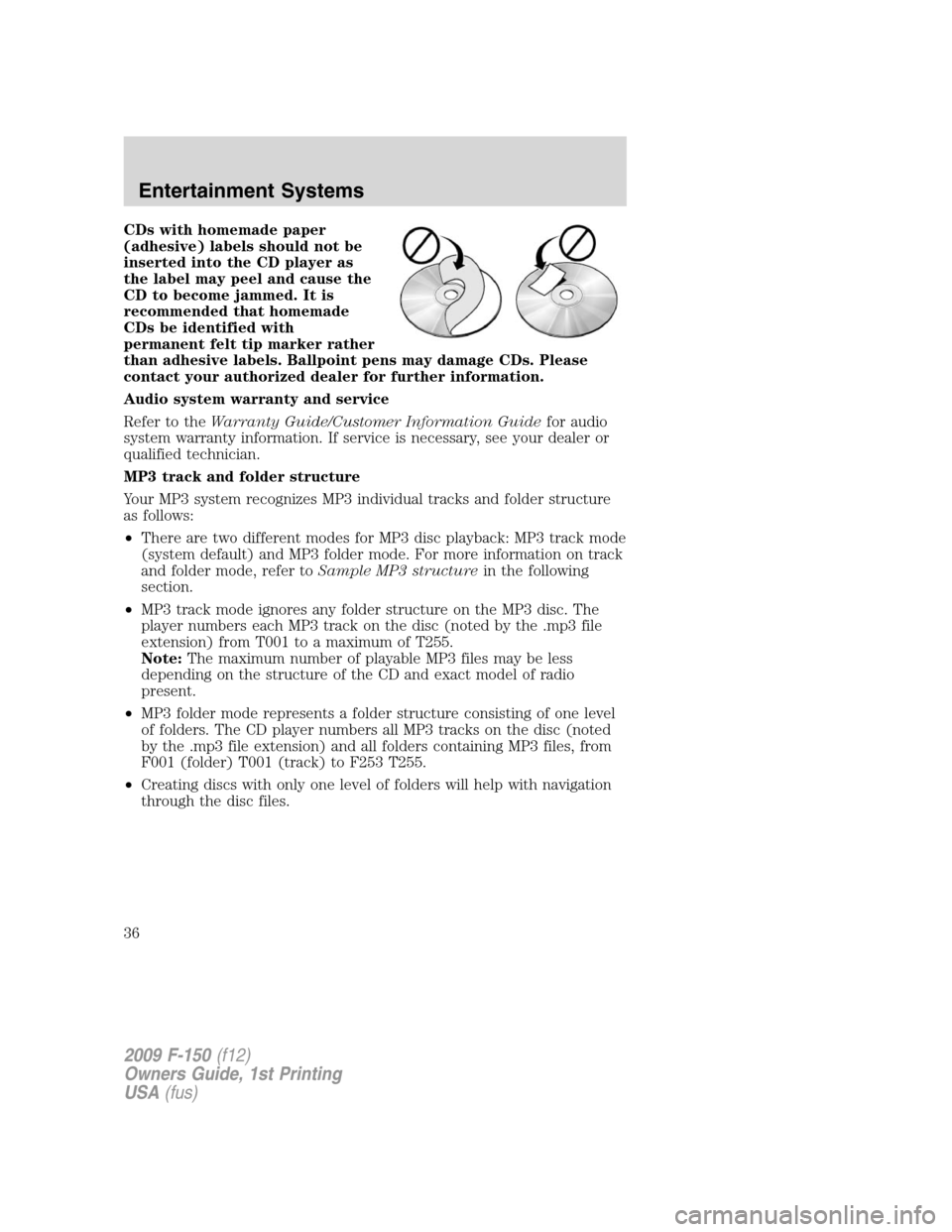
CDs with homemade paper
(adhesive) labels should not be
inserted into the CD player as
the label may peel and cause the
CD to become jammed. It is
recommended that homemade
CDs be identified with
permanent felt tip marker rather
than adhesive labels. Ballpoint pens may damage CDs. Please
contact your authorized dealer for further information.
Audio system warranty and service
Refer to theWarranty Guide/Customer Information Guidefor audio
system warranty information. If service is necessary, see your dealer or
qualified technician.
MP3 track and folder structure
Your MP3 system recognizes MP3 individual tracks and folder structure
as follows:
•There are two different modes for MP3 disc playback: MP3 track mode
(system default) and MP3 folder mode. For more information on track
and folder mode, refer toSample MP3 structurein the following
section.
•MP3 track mode ignores any folder structure on the MP3 disc. The
player numbers each MP3 track on the disc (noted by the .mp3 file
extension) from T001 to a maximum of T255.
Note:The maximum number of playable MP3 files may be less
depending on the structure of the CD and exact model of radio
present.
•MP3 folder mode represents a folder structure consisting of one level
of folders. The CD player numbers all MP3 tracks on the disc (noted
by the .mp3 file extension) and all folders containing MP3 files, from
F001 (folder) T001 (track) to F253 T255.
•Creating discs with only one level of folders will help with navigation
through the disc files.
2009 F-150(f12)
Owners Guide, 1st Printing
USA(fus)
Entertainment Systems
36
Page 42 of 405
4.A/C:Press to activate/deactivate air conditioning. Use with
recirculated air to improve cooling performance and efficiency. A/C
engages automatically in MAX A/C,
(defrost) and
(floor/defrost).
5.
Recirculated air:Press to activate/deactivate air recirculation in
the vehicle. Recirculated air may reduce the amount of time needed to
cool down the interior of the vehicle and may also help reduce undesired
odors from reaching the interior of the vehicle. Recirculated air engages
automatically when MAX A/C is selected or can be engaged manually in
any airflow mode except
(defrost). When the ignition switch is
turned off and back on, the climate system will return to the recirculated
air mode only if the A/C button LED is illuminated and the air
distribution selection is either
(panel) or(panel/floor).
6.MAX A/C:Distributes recirculated air through the instrument panel
vents to cool the vehicle. This re-cooling of the interior air is more
economical and efficient. Recirculated air may also help reduce
undesirable odors from entering the vehicle. Press the MAX A/C button
again for normal A/C operation.
7.Temperature control:Controls the temperature of the airflow in the
vehicle.
8.
Fan speed adjustment:Controls the volume of air circulated in
the vehicle.
9.
Power:Press to activate/deactivate the climate control system.
When the system is off, outside air is prevented from entering the
vehicle.
Operating tips
•To reduce fog build up on the windshield during humid weather, place
the air flow selector in the
(defrost) or(floor/defrost)
position.
•To reduce humidity build up inside the vehicle: do not drive with the
system off or with recirculated air engaged.
•Do not put objects under the front seats that will interfere with the
airflow to the back seats.
•Remove any snow, ice or leaves from the air intake area at the base of
the windshield.
•To improve the A/C cool down, drive with the windows slightly open
for 2-3 minutes after start up or until the vehicle has been “aired out.”
2009 F-150(f12)
Owners Guide, 1st Printing
USA(fus)
Climate Controls
42
Page 43 of 405
•If you are driving during extreme high ambient temperatures and
idling for extended periods of time in gear, it is recommended to run
the A/C in the MAX A/C position, adjust the blower fan speed to the
lowest setting and put the vehicle’s transmission into the P (Park) to
continue to receive cool air from your A/C system.
•For maximum cooling performance (Max A/C):
Max A/C mode:
•Move the temperature control to the coolest setting.
•Set the fan to the highest speed initially, then adjust to maintain
comfort.
Panel (
) and panel/floor () modes:
•Move the temperature control to the coolest setting.
•Select A/C and recirculated air (
). Use recirculated air with A/C
to provide colder airflow.
•Set the fan to the highest speed initially, then adjust to maintain
comfort.
•To aid in side window defogging/demisting in cold weather:
1. Select
.
2. Select A/C.
3. Adjust the temperature control to maintain comfort.
4. Set the fan speed to the highest setting.
5. Direct the outer instrument panel vents towards the side windows.
To increase airflow to the outer instrument panel vents, close the vents
located in the middle of the instrument panel.
2009 F-150(f12)
Owners Guide, 1st Printing
USA(fus)
Climate Controls
43
Page 45 of 405
4.A/C:Press to activate/deactivate air conditioning. Use with
recirculated air to improve cooling performance and efficiency. A/C
engages automatically in MAX A/C,
(defrost) and
(floor/defrost).
5.AUTO:Press to engage automatic temperature control. Select the
desired temperature using the temperature control. The system will
automatically determine fan speed, airflow location, A/C on or off, and
outside or recirculated air, to heat or cool the vehicle to reach the
desired temperature.
6.MAX A/C:Distributes recirculated air through the instrument panel
vents to cool the vehicle. This re-cooling of the interior air is more
economical and efficient. Recirculated air may also help reduce
undesirable odors from entering the vehicle. Press the MAX A/C button
again for normal A/C operation.
7.PASS TEMP:Press to activate separate passenger temperature
control and turn the dial to increase/decrease the airflow temperature for
the passenger in the front of the vehicle.
8.
Recirculated air:Press to activate/deactivate air recirculation in
the vehicle. Recirculated air may reduce the amount of time needed to
cool down the interior of the vehicle and may also help reduce undesired
odors from reaching the interior of the vehicle. Recirculated air engages
automatically when MAX A/C is selected or can be engaged manually in
any airflow mode except
(defrost). When the ignition switch is
turned off and back on, the climate system will return to the recirculated
air mode only if the A/C button LED is illuminated and the air
distribution selection is either
(panel) or(panel/floor).
9.
Passenger heated seat control:Press to control the passenger
heated seat. Refer toHeated seatsin theSeating and Safety Restraints
chapter for more information.
10.
Driver heated seat control:Press to control the driver heated
seat. Refer toHeated seatsin theSeating and Safety Restraints
chapter for more information.
11.
Power/Driver temperature:Press to activate/deactivate the
climate control system. When the system is off, outside air is prevented
from entering the vehicle. Turn to increase/decrease the air temperature
on the driver side of the vehicle. The control also adjusts the passenger
side temperature when PASS TEMP is disengaged. The recommended
initial setting is between 72°F (22°C) and 75°F (24°C), then adjust for
comfort. The driver side temperature setting will appear in the upper left
corner of the display.
2009 F-150(f12)
Owners Guide, 1st Printing
USA(fus)
Climate Controls
45
Page 47 of 405
3.Manual override control:Allows you to manually select where
airflow is directed. To return to full automatic control, press AUTO.
When choosing to control airflow manually, press repeatedly to toggle
through the settings to choose:
•
:Distributes air through the windshield defroster vents, de-mister
vents, floor vents and rear seat floor vents. The system will
automatically provide outside air to reduce window fogging.
•
:Distributes air through the instrument panel vents.
•
:Distributes air through the instrument panel vents, floor vents,
rear seat floor vents and de-mister vents.
•
:Distributes air through the floor vents and rear seat floor vents.
4.A/C:Press to activate/deactivate air conditioning. Use with
recirculated air to improve cooling performance and efficiency. A/C
engages automatically in MAX A/C,
(defrost) and
(floor/defrost).
5.AUTO:Press to engage automatic temperature control. Select the
desired temperature using the temperature control. The system will
automatically determine fan speed, airflow location, A/C on or off, and
outside or recirculated air, to heat or cool the vehicle to reach the
desired temperature.
6.MAX A/C:Distributes recirculated air through the instrument panel
vents to cool the vehicle. This re-cooling of the interior air is more
economical and efficient. Recirculated air may also help reduce
undesirable odors from entering the vehicle. Press the MAX A/C button
again for normal A/C operation.
7.
Recirculated air:Press to activate/deactivate air recirculation in
the vehicle. Recirculated air may reduce the amount of time needed to
cool down the interior of the vehicle and may also help reduce undesired
odors from reaching the interior of the vehicle. Recirculated air engages
automatically when MAX A/C is selected or can be engaged manually in
any airflow mode except
(defrost). When the ignition switch is
turned off and back on, the climate system will return to the recirculated
air mode only if the A/C button LED is illuminated and the air
distribution selection is either
(panel) or(panel/floor).
8.
Passenger heated seat:Press to control the passenger heated
seat. Refer toHeated and cooled seatsin theSeating and Safety
Restraintschapter for more information.
2009 F-150(f12)
Owners Guide, 1st Printing
USA(fus)
Climate Controls
47
Page 52 of 405
VOICE COMMANDS IN CLIMATE MODE
Please refer to theVoice commands in climate modesection of the
Navigation supplementfor more information on using voice commands
with the climate control system.
Operating tips
•To reduce fog build up on the windshield during humid weather, place
the air flow selector in the
position.
•To reduce humidity build up inside the vehicle: do not drive with the
system off or with
(recirculated air) engaged.
•Do not put objects under the front seats that will interfere with the
airflow to the back seats.
•Remove any snow, ice or leaves from the air intake area at the base of
the windshield.
•To improve the A/C cool down, drive with the windows slightly open
for 2-3 minutes after start up or until the vehicle has been “aired out.”
•If you are driving during extreme high ambient temperatures and
idling for extended periods of time in gear, it is recommended to run
the A/C in the MAX A/C position, adjust the blower fan speed to the
lowest setting and put the vehicle’s transmission into the P (Park) to
continue to receive cool air from your A/C system.
•For maximum cooling performance MAX A/C:
In AUTO: Press AUTO control and set to desired temperature.
In Manual Override Control: Choose
(panel), A/C,
and
(recirculation) controls, set the temperature to 60°F (16°C) and
the fan to the highest blower setting.
•To aid in side window defogging/demisting in cold weather:
1. Select
.
2. Select A/C.
3. Adjust the temperature control to maintain comfort.
4. Set the fan speed to the highest setting.
5. Direct the outer instrument panel vents towards the side windows.
To increase airflow to the outer instrument panel vents, close the vents
located in the middle of the instrument panel.
2009 F-150(f12)
Owners Guide, 1st Printing
USA(fus)
Climate Controls
52