towing FORD F150 2016 13.G Owner's Guide
[x] Cancel search | Manufacturer: FORD, Model Year: 2016, Model line: F150, Model: FORD F150 2016 13.GPages: 505, PDF Size: 6.27 MB
Page 258 of 505
5. Select the trailer type.
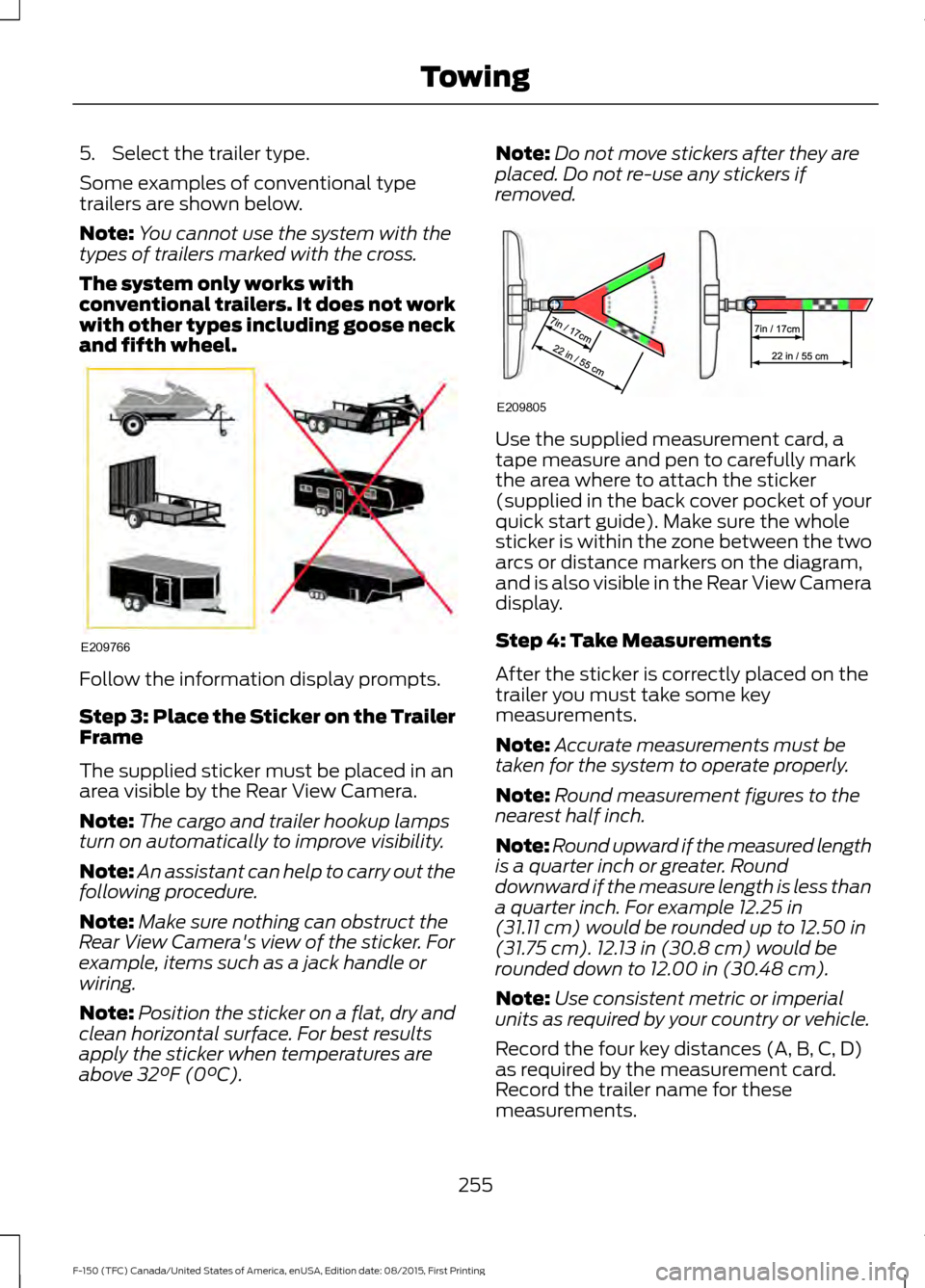
Some examples of conventional type
trailers are shown below.
Note:
You cannot use the system with the
types of trailers marked with the cross.
The system only works with
conventional trailers. It does not work
with other types including goose neck
and fifth wheel. Follow the information display prompts.
Step 3: Place the Sticker on the Trailer
Frame
The supplied sticker must be placed in an
area visible by the Rear View Camera.
Note:
The cargo and trailer hookup lamps
turn on automatically to improve visibility.
Note: An assistant can help to carry out the
following procedure.
Note: Make sure nothing can obstruct the
Rear View Camera's view of the sticker. For
example, items such as a jack handle or
wiring.
Note: Position the sticker on a flat, dry and
clean horizontal surface. For best results
apply the sticker when temperatures are
above 32°F (0°C). Note:
Do not move stickers after they are
placed. Do not re-use any stickers if
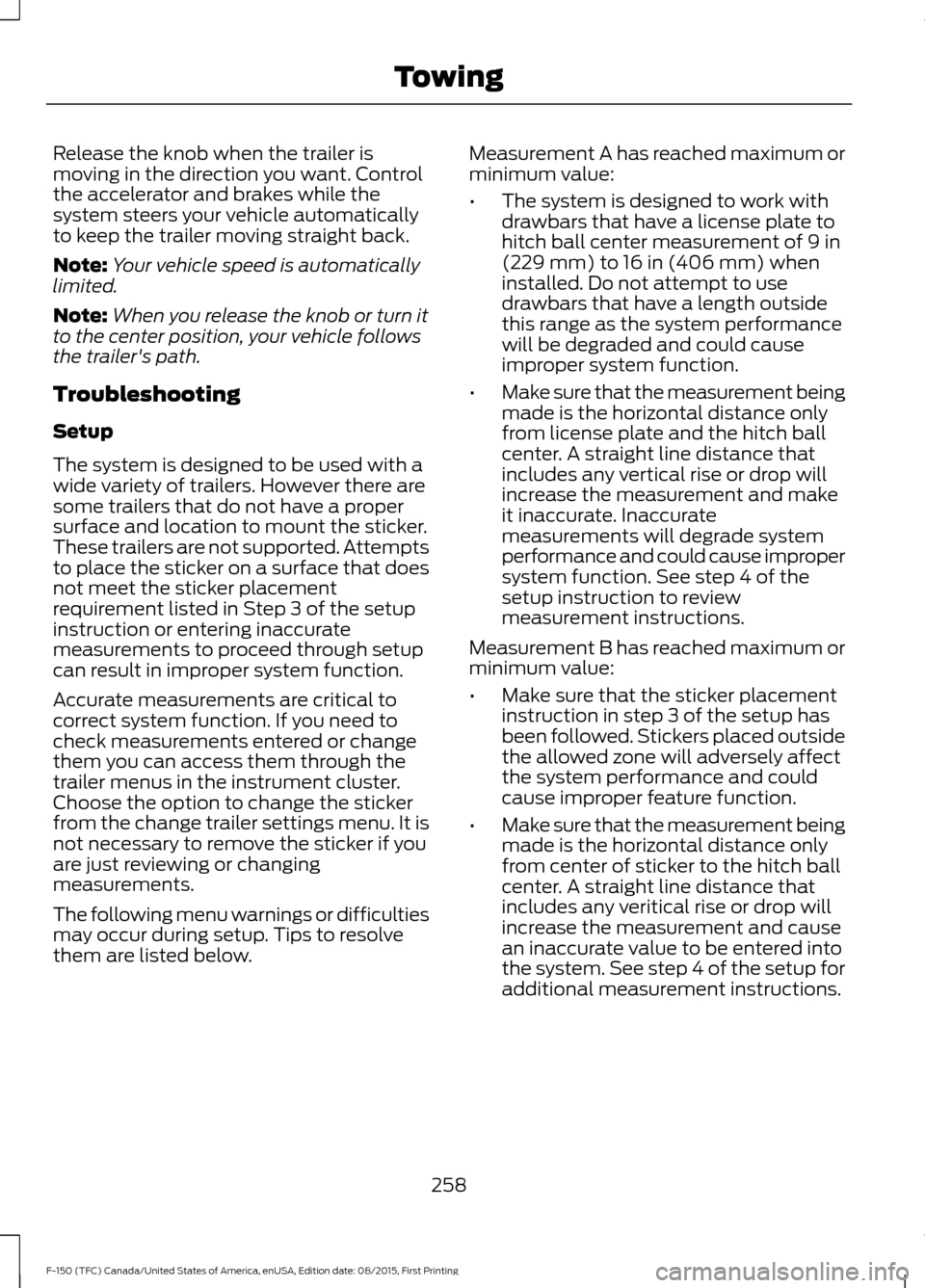
removed. Use the supplied measurement card, a
tape measure and pen to carefully mark
the area where to attach the sticker
(supplied in the back cover pocket of your
quick start guide). Make sure the whole
sticker is within the zone between the two
arcs or distance markers on the diagram,
and is also visible in the Rear View Camera
display.
Step 4: Take Measurements
After the sticker is correctly placed on the
trailer you must take some key
measurements.
Note:
Accurate measurements must be
taken for the system to operate properly.
Note: Round measurement figures to the
nearest half inch.
Note: Round upward if the measured length
is a quarter inch or greater. Round
downward if the measure length is less than
a quarter inch. For example
12.25 in
(31.11 cm) would be rounded up to 12.50 in
(31.75 cm). 12.13 in (30.8 cm) would be
rounded down to 12.00 in (30.48 cm).
Note: Use consistent metric or imperial
units as required by your country or vehicle.
Record the four key distances (A, B, C, D)
as required by the measurement card.
Record the trailer name for these
measurements.
255
F-150 (TFC) Canada/United States of America, enUSA, Edition date: 08/2015, First Printing TowingE209766 E209805
Page 259 of 505
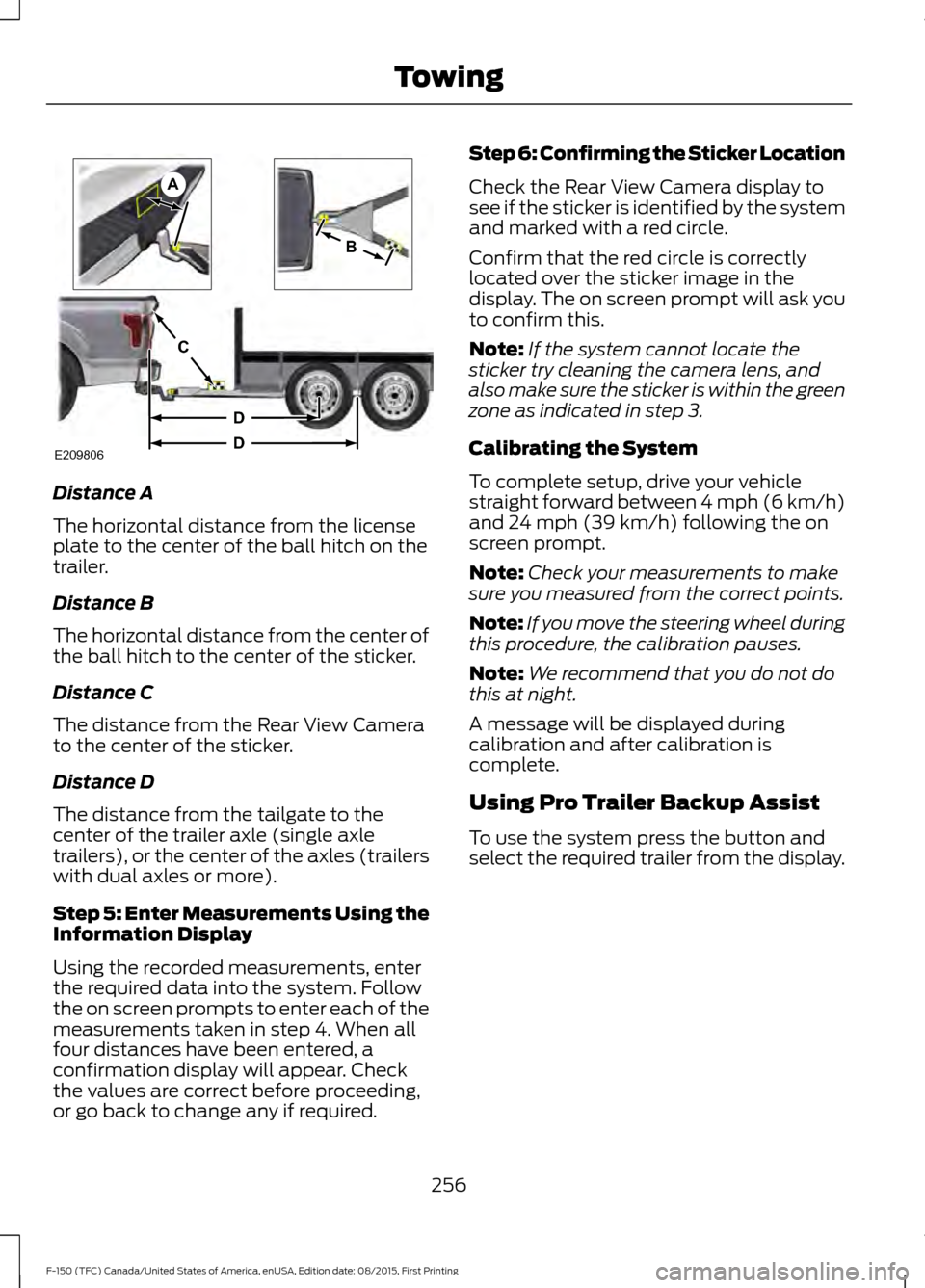
Distance A
The horizontal distance from the license
plate to the center of the ball hitch on the
trailer.
Distance B
The horizontal distance from the center of
the ball hitch to the center of the sticker.
Distance C
The distance from the Rear View Camera
to the center of the sticker.
Distance D
The distance from the tailgate to the
center of the trailer axle (single axle
trailers), or the center of the axles (trailers
with dual axles or more).
Step 5: Enter Measurements Using the
Information Display
Using the recorded measurements, enter
the required data into the system. Follow
the on screen prompts to enter each of the
measurements taken in step 4. When all
four distances have been entered, a
confirmation display will appear. Check
the values are correct before proceeding,
or go back to change any if required. Step 6: Confirming the Sticker Location
Check the Rear View Camera display to
see if the sticker is identified by the system
and marked with a red circle.
Confirm that the red circle is correctly
located over the sticker image in the
display. The on screen prompt will ask you
to confirm this.
Note:
If the system cannot locate the
sticker try cleaning the camera lens, and
also make sure the sticker is within the green
zone as indicated in step 3.
Calibrating the System
To complete setup, drive your vehicle
straight forward between 4 mph (6 km/h)
and 24 mph (39 km/h) following the on
screen prompt.
Note: Check your measurements to make
sure you measured from the correct points.
Note: If you move the steering wheel during
this procedure, the calibration pauses.
Note: We recommend that you do not do
this at night.
A message will be displayed during
calibration and after calibration is
complete.
Using Pro Trailer Backup Assist
To use the system press the button and
select the required trailer from the display.
256
F-150 (TFC) Canada/United States of America, enUSA, Edition date: 08/2015, First Printing TowingE209806
A
B
C
D
D
Page 260 of 505
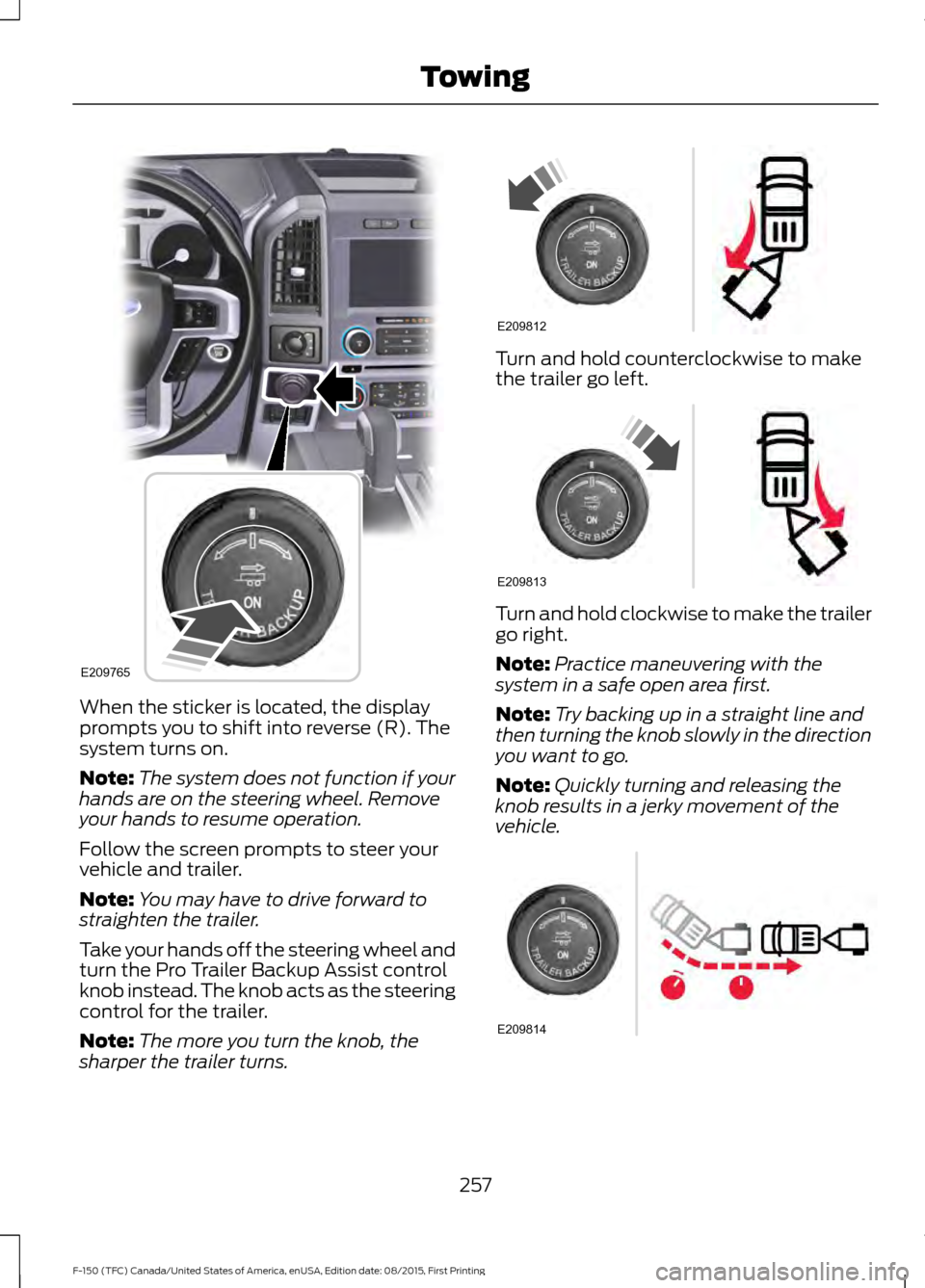
When the sticker is located, the display
prompts you to shift into reverse (R). The
system turns on.
Note:
The system does not function if your
hands are on the steering wheel. Remove
your hands to resume operation.
Follow the screen prompts to steer your
vehicle and trailer.
Note: You may have to drive forward to
straighten the trailer.
Take your hands off the steering wheel and
turn the Pro Trailer Backup Assist control
knob instead. The knob acts as the steering
control for the trailer.
Note: The more you turn the knob, the
sharper the trailer turns. Turn and hold counterclockwise to make
the trailer go left.
Turn and hold clockwise to make the trailer
go right.
Note:
Practice maneuvering with the
system in a safe open area first.
Note: Try backing up in a straight line and
then turning the knob slowly in the direction
you want to go.
Note: Quickly turning and releasing the
knob results in a jerky movement of the
vehicle. 257
F-150 (TFC) Canada/United States of America, enUSA, Edition date: 08/2015, First Printing TowingE209765 E209812 E209813 E209814
Page 261 of 505
Release the knob when the trailer is
moving in the direction you want. Control
the accelerator and brakes while the
system steers your vehicle automatically
to keep the trailer moving straight back.
Note:
Your vehicle speed is automatically
limited.
Note: When you release the knob or turn it
to the center position, your vehicle follows
the trailer's path.
Troubleshooting
Setup
The system is designed to be used with a
wide variety of trailers. However there are
some trailers that do not have a proper
surface and location to mount the sticker.
These trailers are not supported. Attempts
to place the sticker on a surface that does
not meet the sticker placement
requirement listed in Step 3 of the setup
instruction or entering inaccurate
measurements to proceed through setup
can result in improper system function.
Accurate measurements are critical to
correct system function. If you need to
check measurements entered or change
them you can access them through the
trailer menus in the instrument cluster.
Choose the option to change the sticker
from the change trailer settings menu. It is
not necessary to remove the sticker if you
are just reviewing or changing
measurements.
The following menu warnings or difficulties
may occur during setup. Tips to resolve
them are listed below. Measurement A has reached maximum or
minimum value:
•
The system is designed to work with
drawbars that have a license plate to
hitch ball center measurement of 9 in
(229 mm) to 16 in (406 mm) when
installed. Do not attempt to use
drawbars that have a length outside
this range as the system performance
will be degraded and could cause
improper system function.
• Make sure that the measurement being
made is the horizontal distance only
from license plate and the hitch ball
center. A straight line distance that
includes any vertical rise or drop will
increase the measurement and make
it inaccurate. Inaccurate
measurements will degrade system
performance and could cause improper
system function. See step 4 of the
setup instruction to review
measurement instructions.
Measurement B has reached maximum or
minimum value:
• Make sure that the sticker placement
instruction in step 3 of the setup has
been followed. Stickers placed outside
the allowed zone will adversely affect
the system performance and could
cause improper feature function.
• Make sure that the measurement being
made is the horizontal distance only
from center of sticker to the hitch ball
center. A straight line distance that
includes any veritical rise or drop will
increase the measurement and cause
an inaccurate value to be entered into
the system. See step 4 of the setup for
additional measurement instructions.
258
F-150 (TFC) Canada/United States of America, enUSA, Edition date: 08/2015, First Printing Towing
Page 262 of 505
Measurement C has reached maximum or
minimum value:
•
Make sure that the sticker placement
instructions in step 3 of the setup have
been followed. Stickers placed outside
the allowed zone will adversely affect
the system performance and could
cause improper feature function. If you
have met all the criteria for sticker
placement and you see this message
this sticker is either too far below or too
close to the camera to properly
recognize the sticker. In order for the
system to operate correctly the sticker
height must be lowered if you receive
the minimum warning or the sticker
height must be raised if you receive the
maximum warning.
•Only one sticker can be placed on
the trailer for correct system
function. The previous sticker must
be removed or covered so only one
sticker is visible to the camera.
• Measurement B and C must be
measured again if a new sticker is
placed on the trailer.
Measurement D has reached maximum or
minimum value:
• Make sure that the measurement being
made is the horizontal distance only
from tailgate to the center of the single
axle or the center of all the axles on the
trailer. See step 4 of the setup for
additional measurement instructions.
The TBA system does not support
trailer lengths outside the range
allowed by the information display. System is circling something beside the
sticker or system cannot find the sticker:
•
Make sure the rear camera is clean and
the sticker is clearly visible in the
camera image. Clean the camera and
sticker if necessary.
• The camera system uses the entered
measurements to help locate the
sticker. Inaccurate sticker
measurements will degrade the
system ’s ability to locate the sticker.
Verify the measurements entered into
the system are accurate.
• If you cannot resolve the issue a new
sticker location should be tried. The
sticker location must still meet the
requirements noted in step 3 of the
setup instructions. Only one sticker can
be placed on the trailer for correct
system function. The previous sticker
must be removed or covered so only
one sticker is visible to the camera.
Calibration
The system monitors various vehicle
parameters to ensure your vehicle is being
driven straight and the trailer straight
behind your vehicle. Any steering input or
trailer movement will pause the calibration.
For best results:
• Use a long, straight and smooth road
when attempting to calibrate.
• Drive straight forward.
• Drive between 5 mph (8 km/h) and
25 mph (40 km/h).
System Operation
The following warnings or difficulties may
occur during feature operation. Tips to
resolve them are listed below.
259
F-150 (TFC) Canada/United States of America, enUSA, Edition date: 08/2015, First Printing Towing
Page 263 of 505
The system is not available:
•
The system relies on many
sub-systems in your vehicle to operate
correctly. If those sub-systems are not
operating correctly the system may not
be available.
•Low battery voltage is a condition
which will prevent the system from
operating. Please make sure the
battery is correctly charged if the
system is not available.
• You may need to drive your vehicle
straight forward above 25 mph
(40 km/h) before the system is
available again.
• If the message still displays take your
vehicle to an authorized dealer for
service.
Sticker lost:
• Check for the following if you receive
the lost sticker message while using
the system.
•Stop your vehicle as soon as the
message displays.
• Make sure the sticker is visible in
the rear view camera image.
• Clean the sticker and camera to
make sure they are unobstructed.
• Remove any items that may be
blocking the view of the sticker.
Depending on your trailer
configuration and any equipment
mounted to your trailer it is possible
for the sticker to be blocked from
view of the camera as it rotates on
the hitch ball but not be blocked
during setup. Remove the
obstruction if possible. It wil be necessary to remove the sticker
from it’
s current location if the
obstruction cannot be cleared and
place a new sticker that will be
visible to the camera in all positions
of the trailer behind your vehicle.
• You can change your sticker
location by going into the trailer
menu, selecting trailer options,
selecting change trailer settings
and then selecting the change
sticker option. The previous sticker
must be removed. ONLY ONE
STICKER SHOULD BE PLACED
ON THE TRAILER FOR CORRECT
SYSTEM FUNCTION.
• The camera system uses the
entered measurements to help
locate the sticker. Inaccurate
measurements will reduce the
system ’s ability to locate the
sticker. Check the measurements
entered into the system are correct.
Refer to the step 4 of Pro trailer
backup Assist setup for instructions
on measurements.
• You can change your measurement
by going into the trailer menu,
selecting trailer options, selecting
change trailer setting and then
selecting the change sticker option.
Disregard the prompt to remove
this sticker and continue to the next
step if you only plan to update the
measurements for the current
sticker location.
System will not backup straight:
• Factors such as the drawbar
connection to the hitch receiver, road
camber, road grade and compliance in
the trailer suspension can influence
how straight the system is able to back
your trailer when the knob is not turned.
You can compensate for the trailer
drifting to the right or left by slowly
turning the Pro Trailer Backup Assist
260
F-150 (TFC) Canada/United States of America, enUSA, Edition date: 08/2015, First Printing Towing
Page 264 of 505
knob until the trailer is following your
desired path and then holding the knob
in that position. If you would like to
recalibrate the system for straight
backing, you can do so with the
following procedure.
•
Go into the trailer menu, select
trailer options, select change trailer
setting and then select the change
sticker option. Your saved
measurements will be displayed.
Do not change them but continue
to confirm measurements. Once
you confirm the measurements, the
system will then prompt you to
perform the calibration procedure.
System consistently shows Stop Now Max
trailer angle reached warning:
• The system uses your measurements
to determine sticker position and
establish system limits. Accurate
sticker placement and trailer
measurements will provide the best
system performance. If you are
consistently receiving this warning it is
likely there is an issue with sticker
placement or the entered
measurements. Make sure that the sticker is placed correctly based on
steps 3 and the measurements were
made correctly according to Step 4.
The troubleshooting guide for trailer
measurements can also be reviewed
for help in making measurements.
•
To change sticker location or
change trailer measurements, go
into the trailer menu, select trailer
options, select change trailer
setting and then select the change
sticker option.
• If the sticker location needs to be
changed, the previous sticker must
be removed and a new sticker
needs to be placed on the trailer.
ONLY ONE STICKER SHOULD
BE PLACED ON THE TRAILER
FOR PROPER SYSTEM
FUNCTION.
• Disregard the prompt to remove
this sticker and continue to the next
step if you only plan to update the
measurements for the current
sticker location.
261
F-150 (TFC) Canada/United States of America, enUSA, Edition date: 08/2015, First Printing Towing
Page 265 of 505
System consistently shows Stop now take
control of steering warning:
•
The system displays this warning when
it can no longer steer the vehicle and
you must take over steering. There are
four reasons why this warning displays
and additional information regarding
the reason for the warning is available
on the center display.
•The steering wheel is touched while
the system is controlling it. Avoid
touching the wheel during system
operation.
• The maximum speed for feature
operation is exceeded. System
performance is optimized at slower
speeds. Backup slowly.
• The sticker was lost by the camera
system. Once your vehicle is
stopped additional warnings will
indicate the sticker was lost. Refer
to sticker lost trouble shooting tips.
• An internal condition for system
operation was not met which
requires your vehicle return to
manual control of the steering.
TRAILER SWAY CONTROL (If
Equipped) WARNING
Turning off trailer sway control
increases the risk of loss of vehicle
control, serious injury or death. Ford
does not recommend disabling this feature
except in situations where speed reduction
may be detrimental (such as hill climbing),
the driver has significant trailer towing
experience, and can control trailer sway
and maintain safe operation. Note:
This feature does not prevent trailer
sway, but reduces it once it begins. Note:
This feature cannot stop all trailers
from swaying.
Note: In some cases, if vehicle speed is too
high, the system may activate multiple
times, gradually reducing vehicle speed.
This feature applies your vehicle brakes at
individual wheels and, if necessary, reduces
engine power. If the trailer begins to sway,
the stability control light flashes and the
message
TRAILER SWAY REDUCE
SPEED appears in the information display.
The first thing to do is slow your vehicle
down, then pull safely to the side of the
road and check for proper tongue load and
trailer load distribution. See
Load
Carrying (page 241).
RECOMMENDED TOWING
WEIGHTS
Note: Do not exceed a trailer weight of
5,100 lb (2,313 kg) when towing with, or by,
bumper only.
Note: Do not exceed a trailer weight of
5,100 lb (2,313 kg)
if your vehicle is not
equipped with a Heavy Duty Trailer Towing
Package.
Note: Make sure to take into consideration
trailer frontal area. Vehicles not equipped
with the Trailer Tow Package or the Heavy
Duty Payload Package should not exceed
36.6 feet 2
(3.4 meters 2
) trailer frontal area.
Vehicles equipped with the Trailer Tow
Package or the Heavy Duty Payload
Package should not exceed 60 feet 2
(5.6
meters 2
) trailer frontal area.
Note: Exceeding this limitation may
significantly reduce the performance of your
towing vehicle. Selecting a trailer with a low
aerodynamic drag and rounded front design
helps optimize performance and fuel
economy.
262
F-150 (TFC) Canada/United States of America, enUSA, Edition date: 08/2015, First Printing Towing
Page 266 of 505
Note:
For high altitude operation, reduce
the gross combined weight by 2% per
1,000 ft (305 m) starting at the 1,000 ft
(305 m) elevation point.
Note: Certain states require electric trailer
brakes for trailers over a specified weight.
Be sure to check state regulations for this
specified weight. The maximum trailer
weights listed may be limited to this
specified weight, as your vehicle's electrical
system may not include the wiring
connector needed to use electric trailer
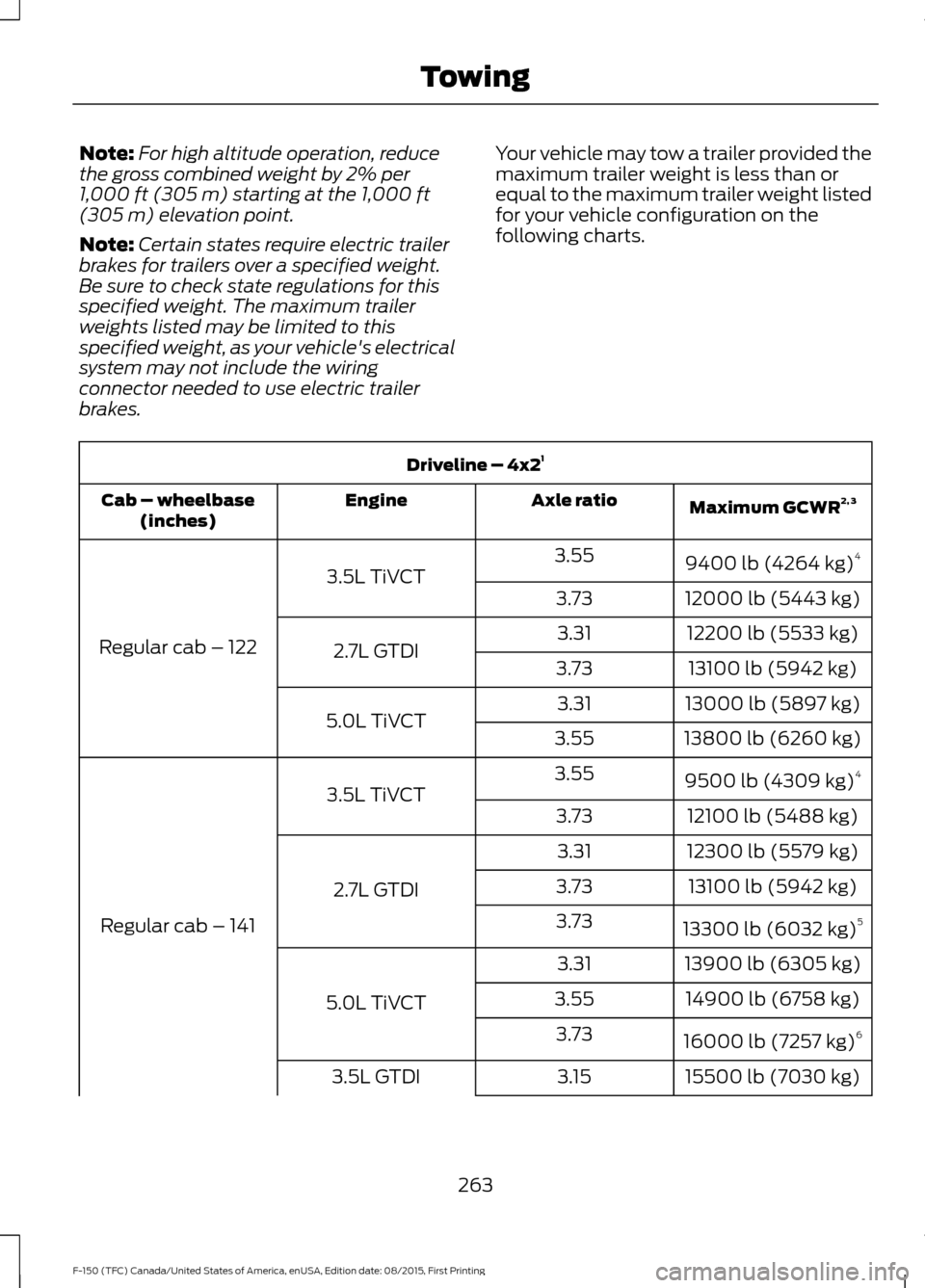
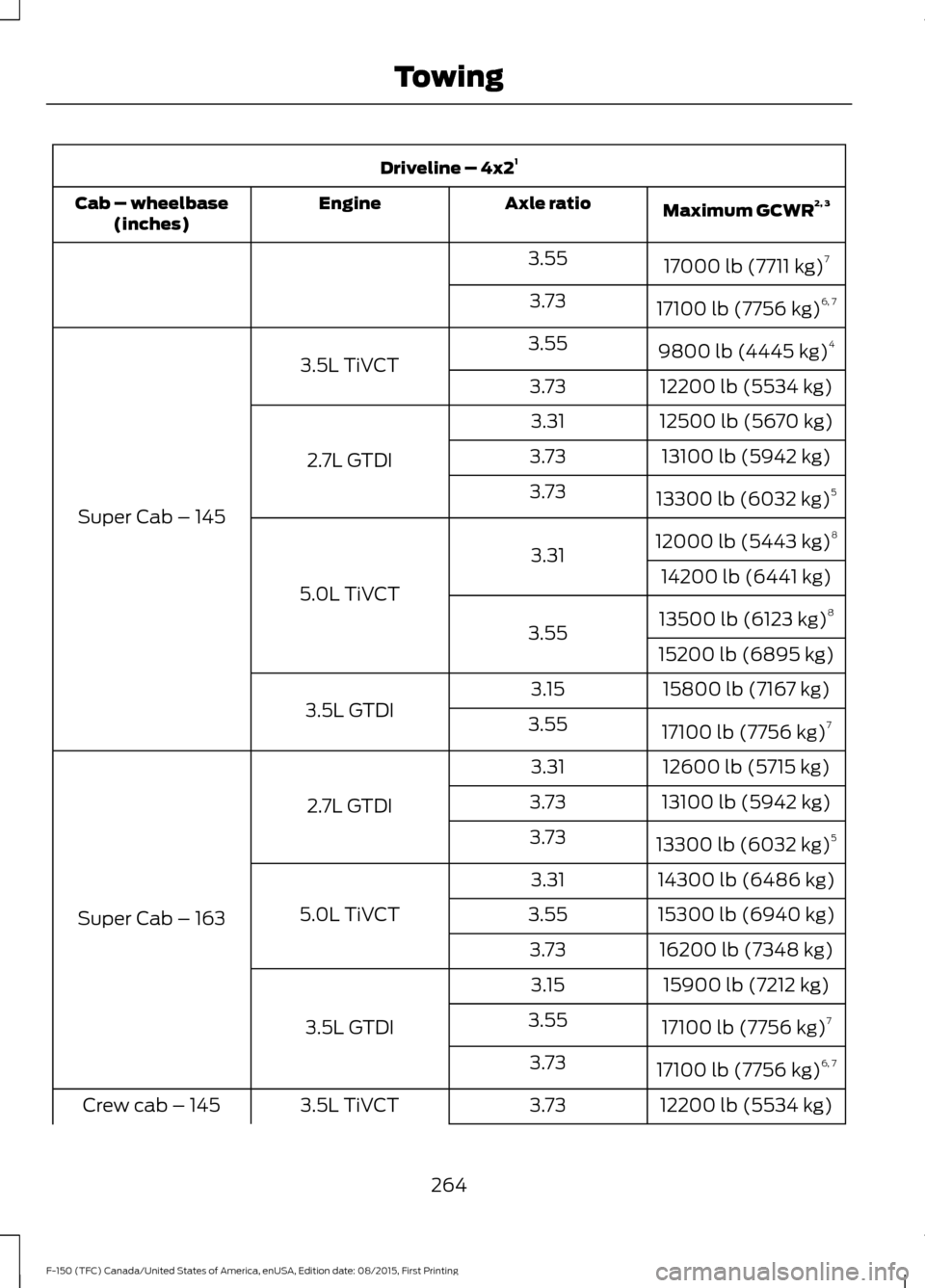
brakes. Your vehicle may tow a trailer provided the
maximum trailer weight is less than or
equal to the maximum trailer weight listed
for your vehicle configuration on the
following charts.Driveline – 4x2
1
Maximum GCWR 2, 3
Axle ratio
Engine
Cab – wheelbase
(inches)
9400 lb (4264 kg)4
3.55
3.5L TiVCT
Regular cab – 122 12000 lb (5443 kg)
3.73
12200 lb (5533 kg)
3.31
2.7L GTDI 13100 lb (5942 kg)
3.73
13000 lb (5897 kg)
3.31
5.0L TiVCT 13800 lb (6260 kg)
3.55
9500 lb (4309 kg) 4
3.55
3.5L TiVCT
Regular cab – 141 12100 lb (5488 kg)
3.73
12300 lb (5579 kg)
3.31
2.7L GTDI 13100 lb (5942 kg)
3.73
13300 lb (6032 kg) 5
3.73
13900 lb (6305 kg)
3.31
5.0L TiVCT 14900 lb (6758 kg)
3.55
16000 lb (7257 kg) 6
3.73
15500 lb (7030 kg)
3.15
3.5L GTDI
263
F-150 (TFC) Canada/United States of America, enUSA, Edition date: 08/2015, First Printing Towing
Page 267 of 505
Driveline – 4x2
1
Maximum GCWR 2, 3
Axle ratio
Engine
Cab – wheelbase
(inches)
17000 lb (7711 kg)7
3.55
17100 lb (7756 kg) 6, 7
3.73
9800 lb (4445 kg) 4
3.55
3.5L TiVCT
Super Cab – 145 12200 lb (5534 kg)
3.73
12500 lb (5670 kg)
3.31
2.7L GTDI 13100 lb (5942 kg)
3.73
13300 lb (6032 kg) 5
3.73
12000 lb (5443 kg) 8
3.31
5.0L TiVCT 14200 lb (6441 kg)
13500 lb (6123 kg) 8
3.55 15200 lb (6895 kg)
15800 lb (7167 kg)
3.15
3.5L GTDI 17100 lb (7756 kg)7
3.55
12600 lb (5715 kg)
3.31
2.7L GTDI
Super Cab – 163 13100 lb (5942 kg)
3.73
13300 lb (6032 kg) 5
3.73
14300 lb (6486 kg)
3.31
5.0L TiVCT 15300 lb (6940 kg)
3.55
16200 lb (7348 kg)
3.73
15900 lb (7212 kg)
3.15
3.5L GTDI 17100 lb (7756 kg)7
3.55
17100 lb (7756 kg) 6, 7
3.73
12200 lb (5534 kg)
3.73
3.5L TiVCT
Crew cab – 145
264
F-150 (TFC) Canada/United States of America, enUSA, Edition date: 08/2015, First Printing Towing