power steering FORD F150 2016 13.G Owners Manual
[x] Cancel search | Manufacturer: FORD, Model Year: 2016, Model line: F150, Model: FORD F150 2016 13.GPages: 505, PDF Size: 6.27 MB
Page 5 of 505
Power Running Boards
Using Power Running Boards....................76
Steering Wheel
Adjusting the Steering Wheel....................78
Audio Control...................................................79
Voice Control...................................................80
Cruise Control
.................................................80
Information Display Control......................80
Pedals
Adjusting the Pedals......................................81
Wipers and Washers
Windshield Wipers
.........................................82
Autowipers.......................................................82
Windshield Washers
.....................................83
Lighting
Lighting Control
..............................................84
Autolamps........................................................84
Instrument Lighting Dimmer
.....................85
Daytime Running Lamps
............................86
Automatic High Beam Control.................86
Front Fog Lamps............................................88
Direction Indicators
.......................................88
Spot Lamps.....................................................88
Interior Lamps.................................................89
Ambient Lighting
.............................................91
Windows and Mirrors
Power Windows
..............................................92
Exterior Mirrors
................................................93
Interior Mirror
....................................................97
Sliding Windows
.............................................97
Sun Visors
.........................................................97
Moonroof..........................................................98 Instrument Cluster
Gauges.............................................................100
Warning Lamps and Indicators...............103
Audible Warnings and Indicators............107
Information Displays
General Information....................................108
Information Messages................................124
Climate Control
Manual Climate Control.............................139
Automatic Climate Control........................141
Hints on Controlling the Interior
Climate.........................................................142
Heated Windows and Mirrors..................145
Cabin Air Filter...............................................145
Remote Start.................................................146
Seats
Sitting in the Correct Position..................147
Head Restraints
.............................................147
Manual Seats.................................................149
Power Seats
...................................................150
Memory Function
..........................................152
Rear Seats
.......................................................154
Heated Seats.................................................154
Climate Controlled Seats..........................155
Front Seat Armrest.......................................157
Rear Seat Armrest
........................................157
Universal Garage Door Opener
Universal Garage Door Opener...............158
Auxiliary Power Points
Auxiliary Power Points................................162
Storage Compartments
Center Console..............................................164
2
F-150 (TFC) Canada/United States of America, enUSA, Edition date: 08/2015, First Printing Table of Contents
Page 7 of 505
Pro Trailer Backup Assist™......................253
Trailer Sway Control...................................262
Recommended Towing Weights...........262
Essential Towing Checks
..........................269
Towing Points
................................................276
Transporting the Vehicle............................277
Towing the Vehicle on Four Wheels......278
Driving Hints
Breaking-In......................................................281
Economical Driving
......................................281
Driving Through Water
...............................282
Floor Mats
.......................................................282
Snowplowing................................................283
Roadside Emergencies
Roadside Assistance..................................286
Hazard Warning Flashers
..........................287
Fuel Shutoff
...................................................287
Jump Starting the Vehicle........................288
Post-Crash Alert System
..........................290
Customer Assistance
Getting the Services You Need................291
In California (U.S. Only)
.............................292
The Better Business Bureau (BBB) Auto Line Program (U.S. Only)
.....................293
Utilizing the Mediation/Arbitration Program (Canada Only).......................294
Getting Assistance Outside the U.S. and Canada........................................................294
Ordering Additional Owner's Literature....................................................295
Reporting Safety Defects (U.S. Only)............................................................296
Reporting Safety Defects (Canada Only)............................................................296
Fuses
Fuse Specification Chart..........................298
Changing a Fuse
..........................................306 Maintenance
General Information
...................................307
Opening and Closing the Hood..............307
Under Hood Overview - 2.7L EcoBoost™...............................................308
Under Hood Overview - 3.5L Ecoboost™...............................................309
Under Hood Overview - 3.5L....................310
Under Hood Overview - 5.0L.....................311
Engine Oil Dipstick........................................312
Engine Oil Check...........................................312
Engine Coolant Check.................................313
Automatic Transmission Fluid Check.............................................................317
Transfer Case Fluid Check.........................317
Brake Fluid Check.........................................318
Power Steering Fluid Check.....................318
Washer Fluid Check
.....................................318
Fuel Filter
.........................................................318
Changing the 12V Battery..........................318
Checking the Wiper Blades
.....................320
Changing the Wiper Blades
.....................320
Adjusting the Headlamps..........................321
Changing a Bulb...........................................322
Bulb Specification Chart...........................327
Changing the Engine Air Filter................329
Vehicle Care
General Information
...................................330
Cleaning Products
.......................................330
Cleaning the Exterior..................................330
Waxing..............................................................331
Cleaning the Engine
....................................332
Cleaning the Windows and Wiper Blades..........................................................332
Cleaning the Interior...................................333
Cleaning the Instrument Panel and Instrument Cluster Lens........................333
Cleaning Leather Seats.............................334
Repairing Minor Paint Damage...............335
4
F-150 (TFC) Canada/United States of America, enUSA, Edition date: 08/2015, First Printing Table of Contents
Page 12 of 505
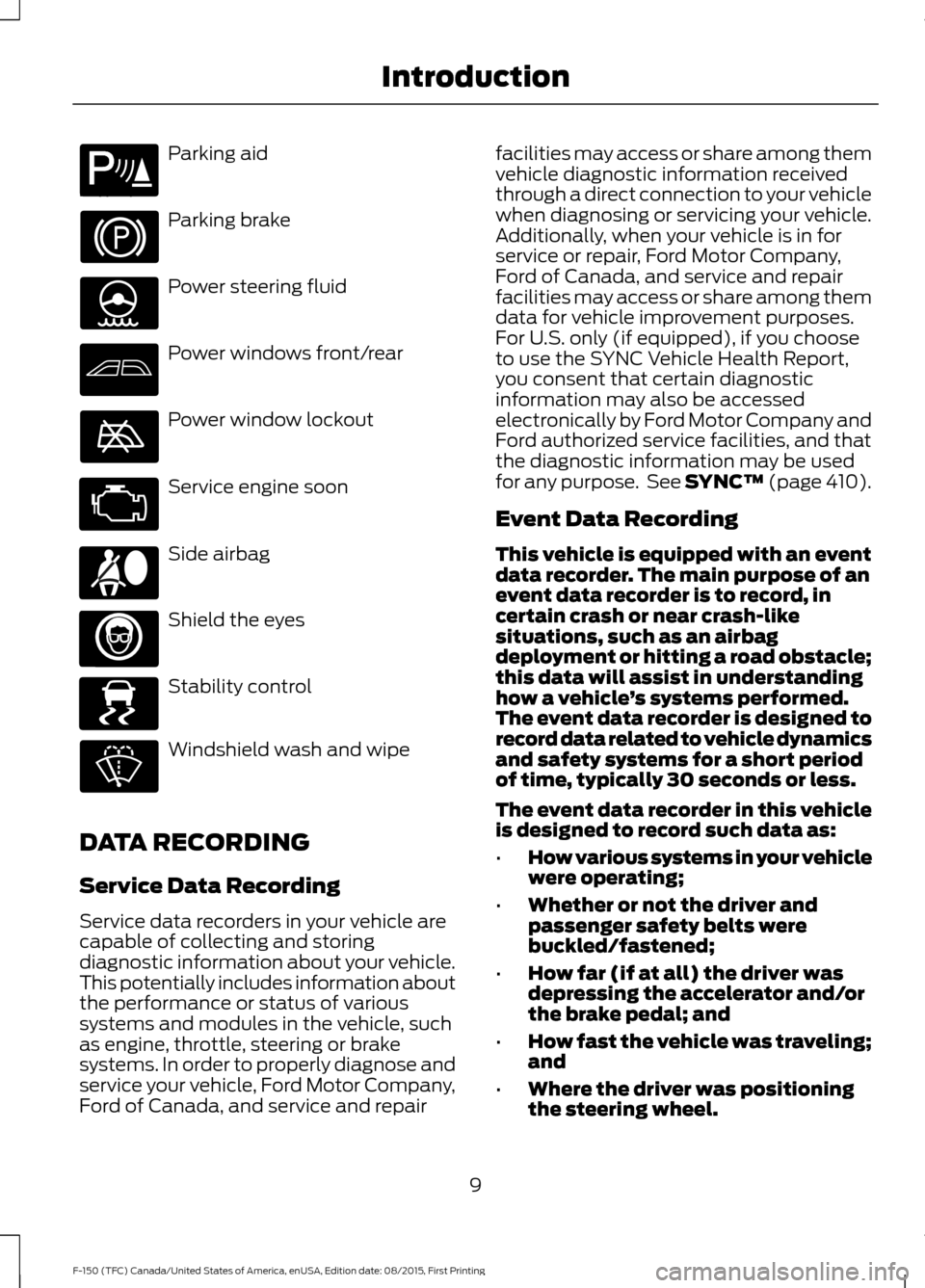
Parking aid
Parking brake
Power steering fluid
Power windows front/rear
Power window lockout
Service engine soon
Side airbag
Shield the eyes
Stability control
Windshield wash and wipe
DATA RECORDING
Service Data Recording
Service data recorders in your vehicle are
capable of collecting and storing
diagnostic information about your vehicle.
This potentially includes information about
the performance or status of various
systems and modules in the vehicle, such
as engine, throttle, steering or brake
systems. In order to properly diagnose and
service your vehicle, Ford Motor Company,
Ford of Canada, and service and repair facilities may access or share among them
vehicle diagnostic information received
through a direct connection to your vehicle
when diagnosing or servicing your vehicle.
Additionally, when your vehicle is in for
service or repair, Ford Motor Company,
Ford of Canada, and service and repair
facilities may access or share among them
data for vehicle improvement purposes.
For U.S. only (if equipped), if you choose
to use the SYNC Vehicle Health Report,
you consent that certain diagnostic
information may also be accessed
electronically by Ford Motor Company and
Ford authorized service facilities, and that
the diagnostic information may be used
for any purpose. See SYNC™ (page 410).
Event Data Recording
This vehicle is equipped with an event
data recorder. The main purpose of an
event data recorder is to record, in
certain crash or near crash-like
situations, such as an airbag
deployment or hitting a road obstacle;
this data will assist in understanding
how a vehicle
’s systems performed.
The event data recorder is designed to
record data related to vehicle dynamics
and safety systems for a short period
of time, typically 30 seconds or less.
The event data recorder in this vehicle
is designed to record such data as:
• How various systems in your vehicle
were operating;
• Whether or not the driver and
passenger safety belts were
buckled/fastened;
• How far (if at all) the driver was
depressing the accelerator and/or
the brake pedal; and
• How fast the vehicle was traveling;
and
• Where the driver was positioning
the steering wheel.
9
F-150 (TFC) Canada/United States of America, enUSA, Edition date: 08/2015, First Printing IntroductionE139213 E167012 E138639
Page 57 of 505
6. Install a new battery with the + facing
up.
7. Replace the battery cover.
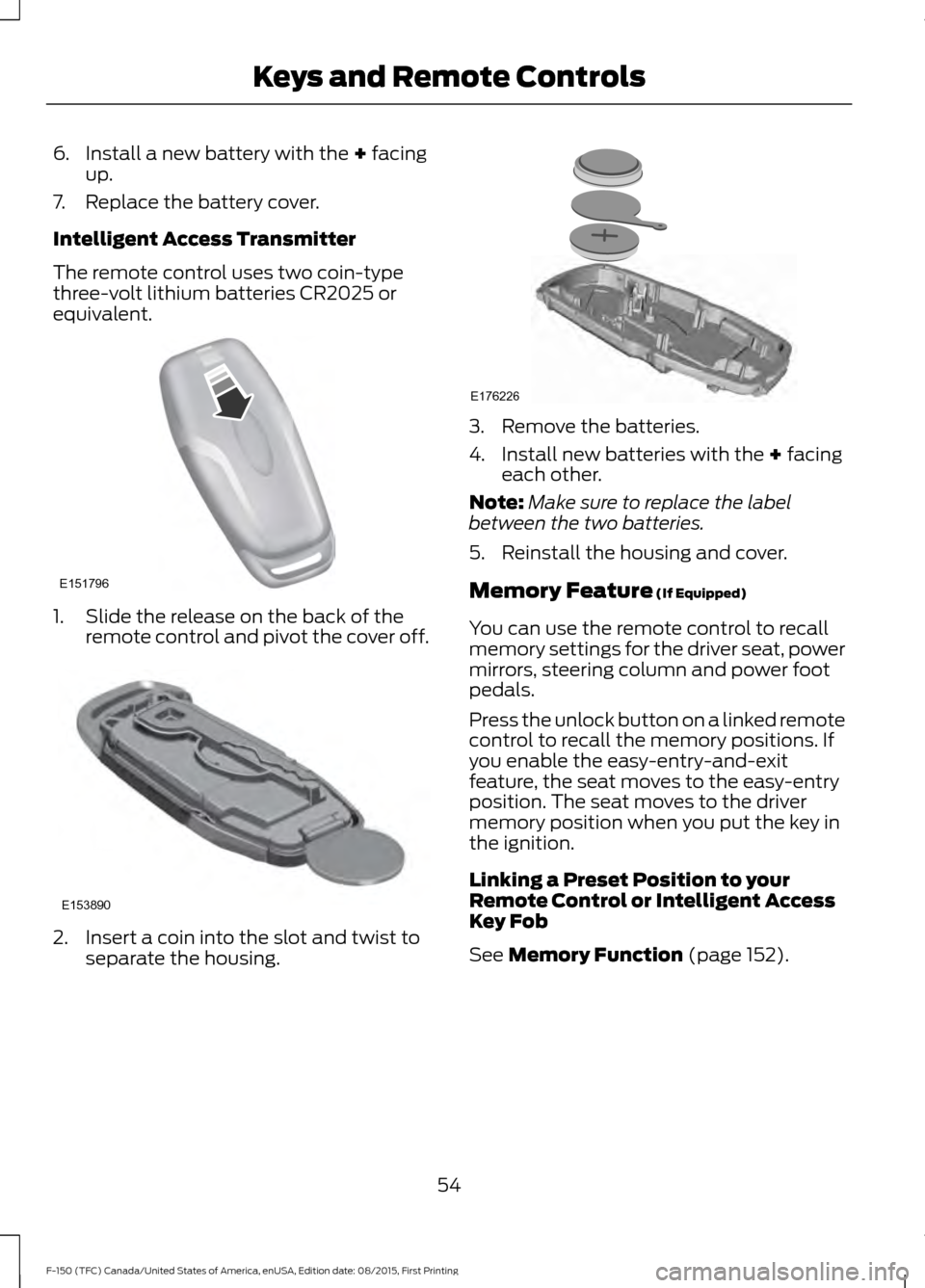
Intelligent Access Transmitter
The remote control uses two coin-type
three-volt lithium batteries CR2025 or
equivalent. 1. Slide the release on the back of the
remote control and pivot the cover off. 2. Insert a coin into the slot and twist to
separate the housing. 3. Remove the batteries.
4. Install new batteries with the
+ facing
each other.
Note: Make sure to replace the label
between the two batteries.
5. Reinstall the housing and cover.
Memory Feature
(If Equipped)
You can use the remote control to recall
memory settings for the driver seat, power
mirrors, steering column and power foot
pedals.
Press the unlock button on a linked remote
control to recall the memory positions. If
you enable the easy-entry-and-exit
feature, the seat moves to the easy-entry
position. The seat moves to the driver
memory position when you put the key in
the ignition.
Linking a Preset Position to your
Remote Control or Intelligent Access
Key Fob
See
Memory Function (page 152).
54
F-150 (TFC) Canada/United States of America, enUSA, Edition date: 08/2015, First Printing Keys and Remote ControlsE151796 E153890 E176226
Page 81 of 505
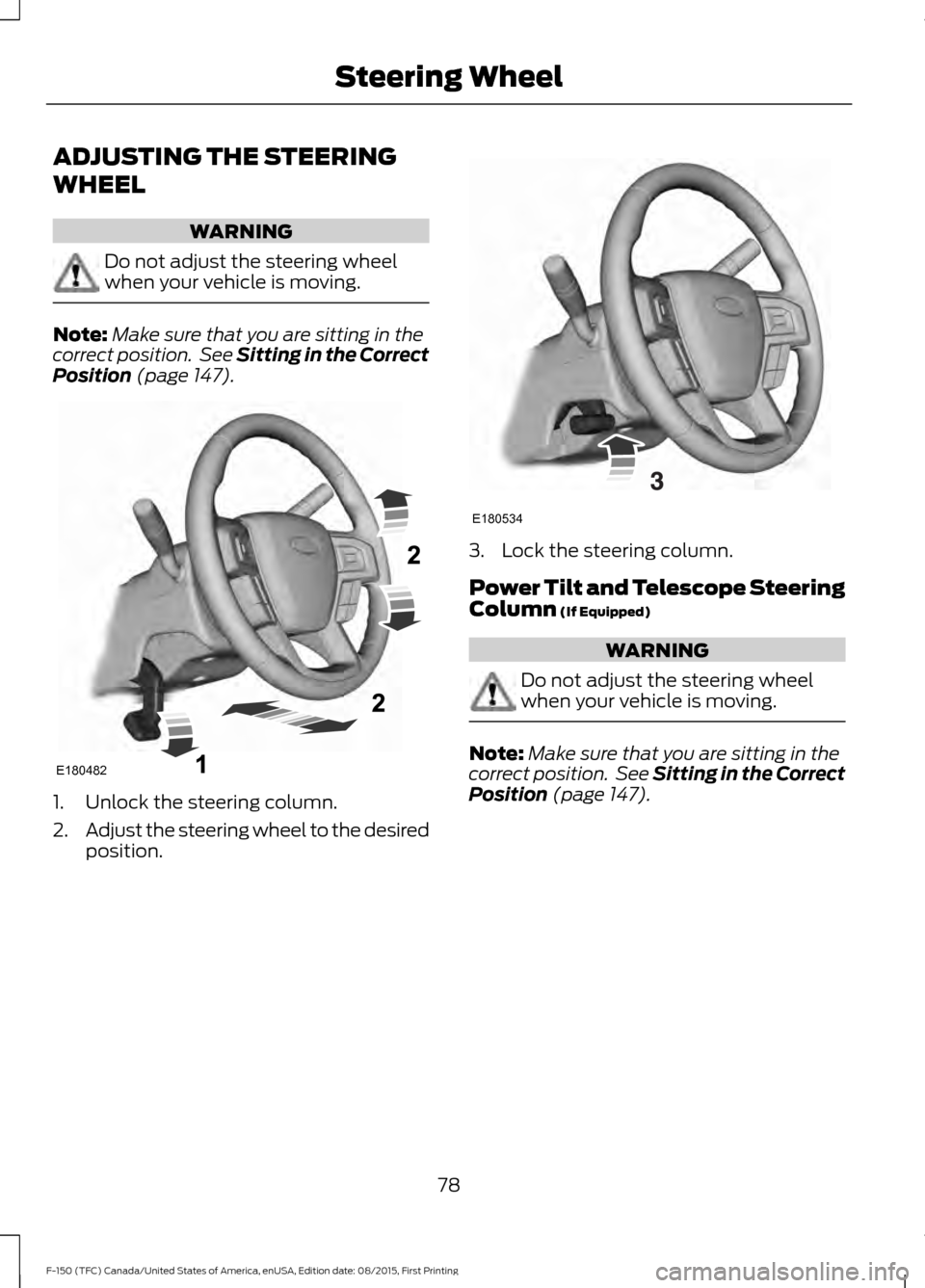
ADJUSTING THE STEERING
WHEEL
WARNING
Do not adjust the steering wheel
when your vehicle is moving.
Note:
Make sure that you are sitting in the
correct position. See Sitting in the Correct
Position (page 147). 1. Unlock the steering column.
2.
Adjust the steering wheel to the desired
position. 3. Lock the steering column.
Power Tilt and Telescope Steering
Column
(If Equipped)
WARNING
Do not adjust the steering wheel
when your vehicle is moving.
Note:
Make sure that you are sitting in the
correct position. See Sitting in the Correct
Position
(page 147).
78
F-150 (TFC) Canada/United States of America, enUSA, Edition date: 08/2015, First Printing Steering WheelE180482 E180534
Page 84 of 505
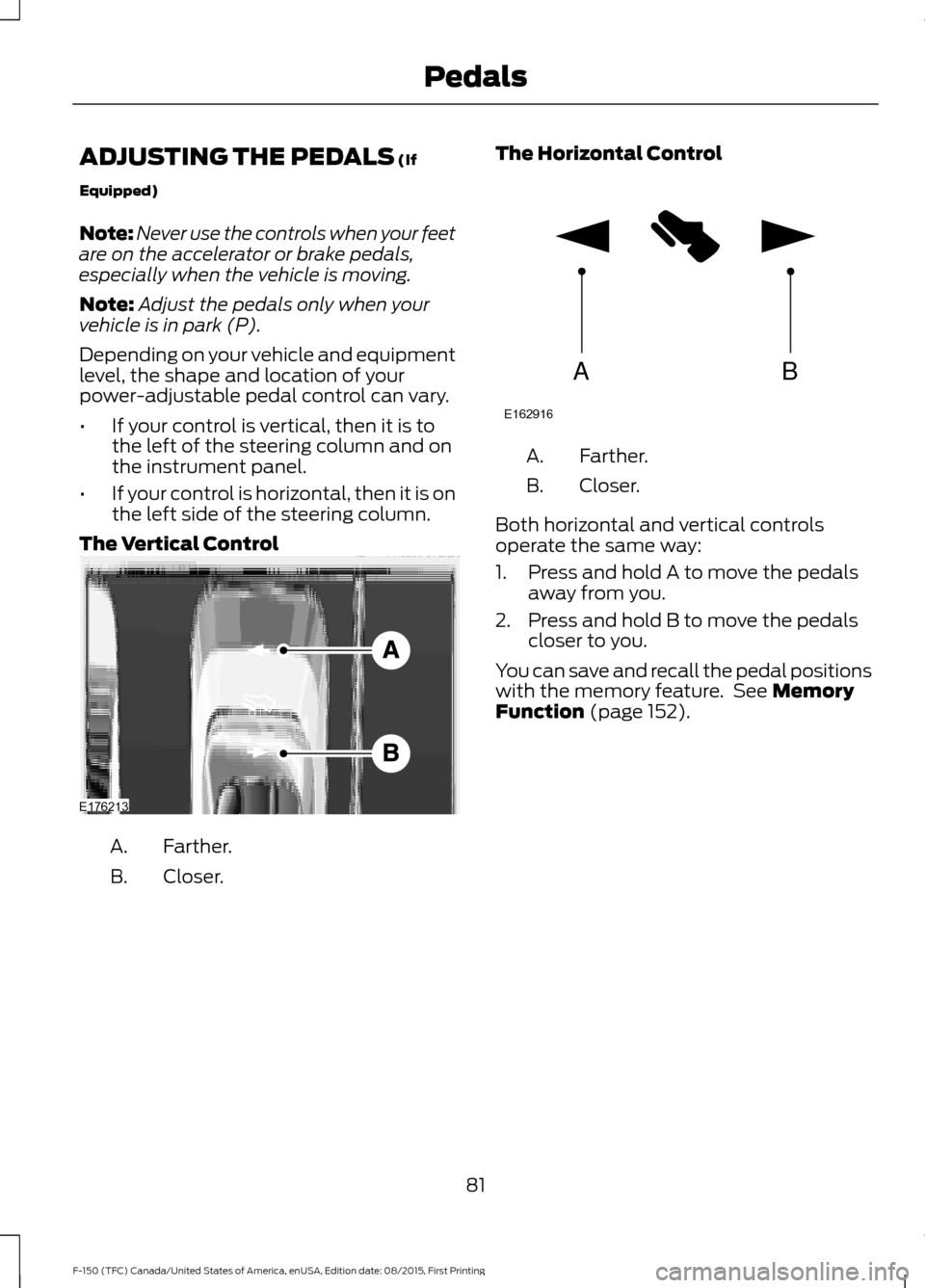
ADJUSTING THE PEDALS (If
Equipped)
Note: Never use the controls when your feet
are on the accelerator or brake pedals,
especially when the vehicle is moving.
Note: Adjust the pedals only when your
vehicle is in park (P).
Depending on your vehicle and equipment
level, the shape and location of your
power-adjustable pedal control can vary.
• If your control is vertical, then it is to
the left of the steering column and on
the instrument panel.
• If your control is horizontal, then it is on
the left side of the steering column.
The Vertical Control Farther.
A.
Closer.
B. The Horizontal Control Farther.
A.
Closer.
B.
Both horizontal and vertical controls
operate the same way:
1. Press and hold A to move the pedals away from you.
2. Press and hold B to move the pedals closer to you.
You can save and recall the pedal positions
with the memory feature. See
Memory
Function (page 152).
81
F-150 (TFC) Canada/United States of America, enUSA, Edition date: 08/2015, First Printing PedalsE176213 AB
E162916
Page 118 of 505
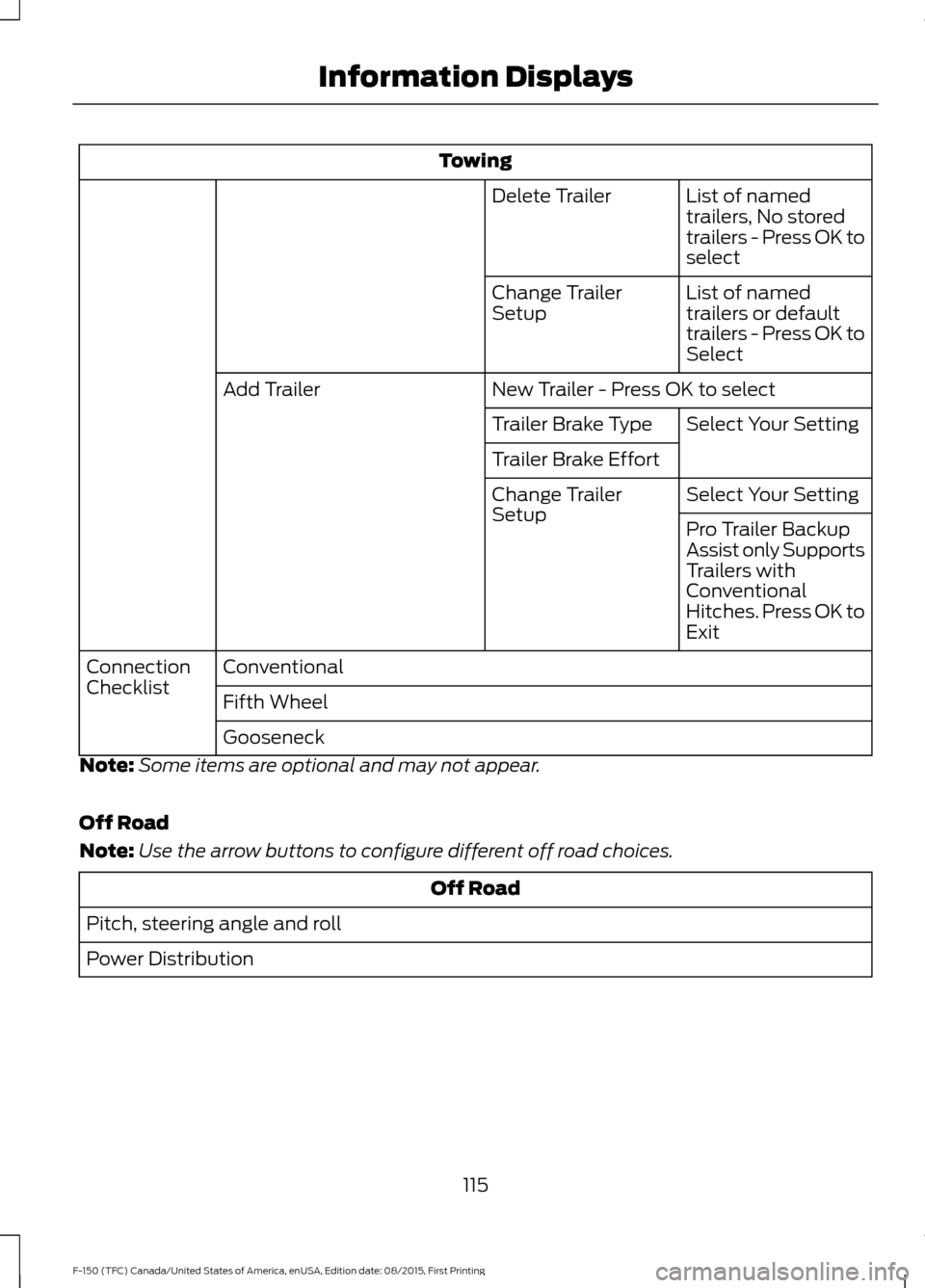
Towing
List of named
trailers, No stored
trailers - Press OK to
select
Delete Trailer
List of named
trailers or default
trailers - Press OK to
Select
Change Trailer
Setup
New Trailer - Press OK to select
Add Trailer
Select Your Setting
Trailer Brake Type
Trailer Brake Effort
Select Your Setting
Change Trailer
Setup
Pro Trailer Backup
Assist only Supports
Trailers with
Conventional
Hitches. Press OK to
Exit
Conventional
Connection
Checklist
Fifth Wheel
Gooseneck
Note: Some items are optional and may not appear.
Off Road
Note: Use the arrow buttons to configure different off road choices. Off Road
Pitch, steering angle and roll
Power Distribution
115
F-150 (TFC) Canada/United States of America, enUSA, Edition date: 08/2015, First Printing Information Displays
Page 125 of 505
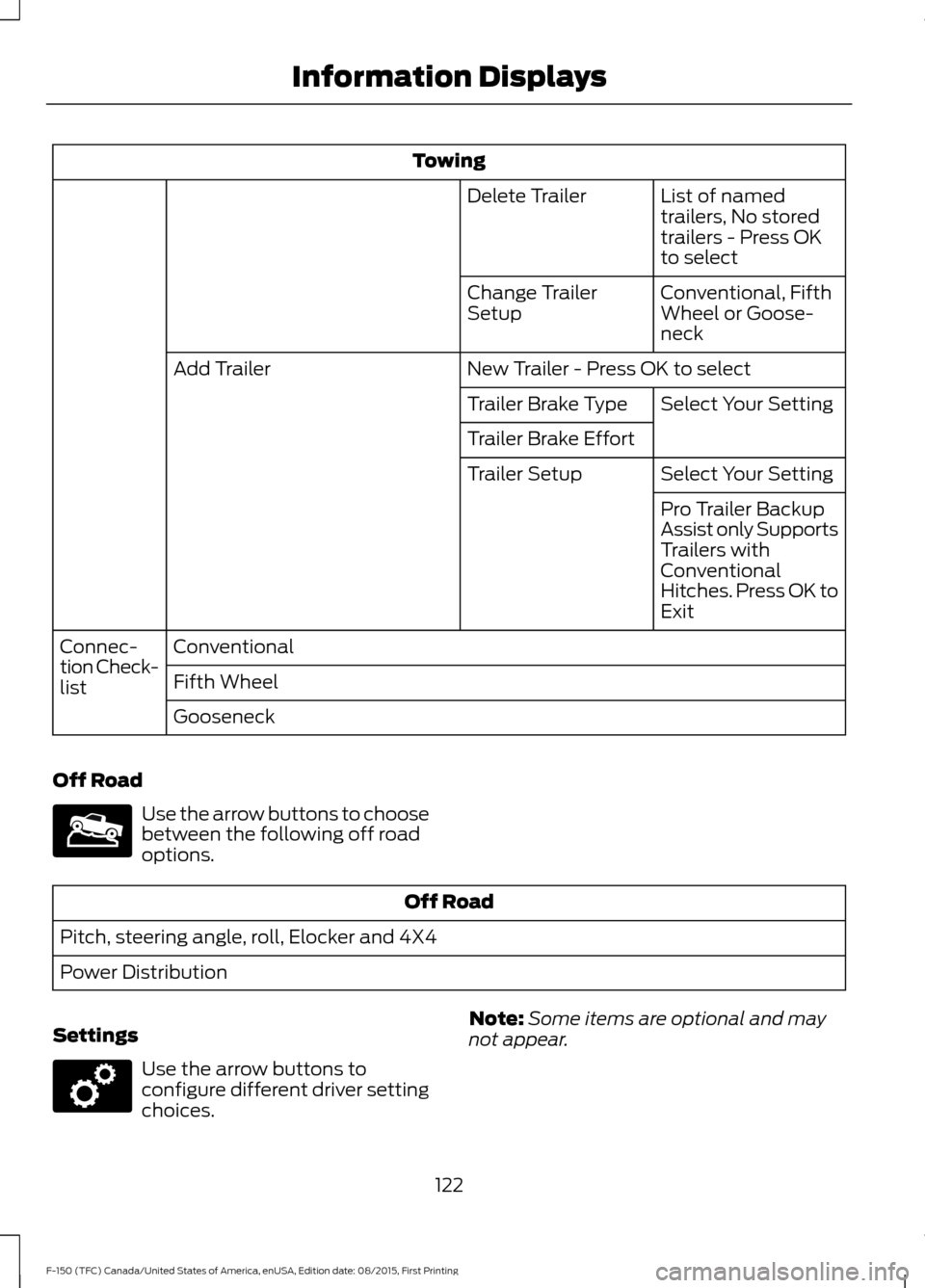
Towing
List of named
trailers, No stored
trailers - Press OK
to select
Delete Trailer
Conventional, Fifth
Wheel or Goose-
neck
Change Trailer
Setup
New Trailer - Press OK to select
Add Trailer
Select Your Setting
Trailer Brake Type
Trailer Brake Effort
Select Your Setting
Trailer Setup
Pro Trailer Backup
Assist only Supports
Trailers with
Conventional
Hitches. Press OK to
Exit
Conventional
Connec-
tion Check-
list Fifth Wheel
Gooseneck
Off Road Use the arrow buttons to choose
between the following off road
options.
Off Road
Pitch, steering angle, roll, Elocker and 4X4
Power Distribution
Settings Use the arrow buttons to
configure different driver setting
choices.
Note:
Some items are optional and may
not appear.
122
F-150 (TFC) Canada/United States of America, enUSA, Edition date: 08/2015, First Printing Information DisplaysE176097 E176098
Page 134 of 505
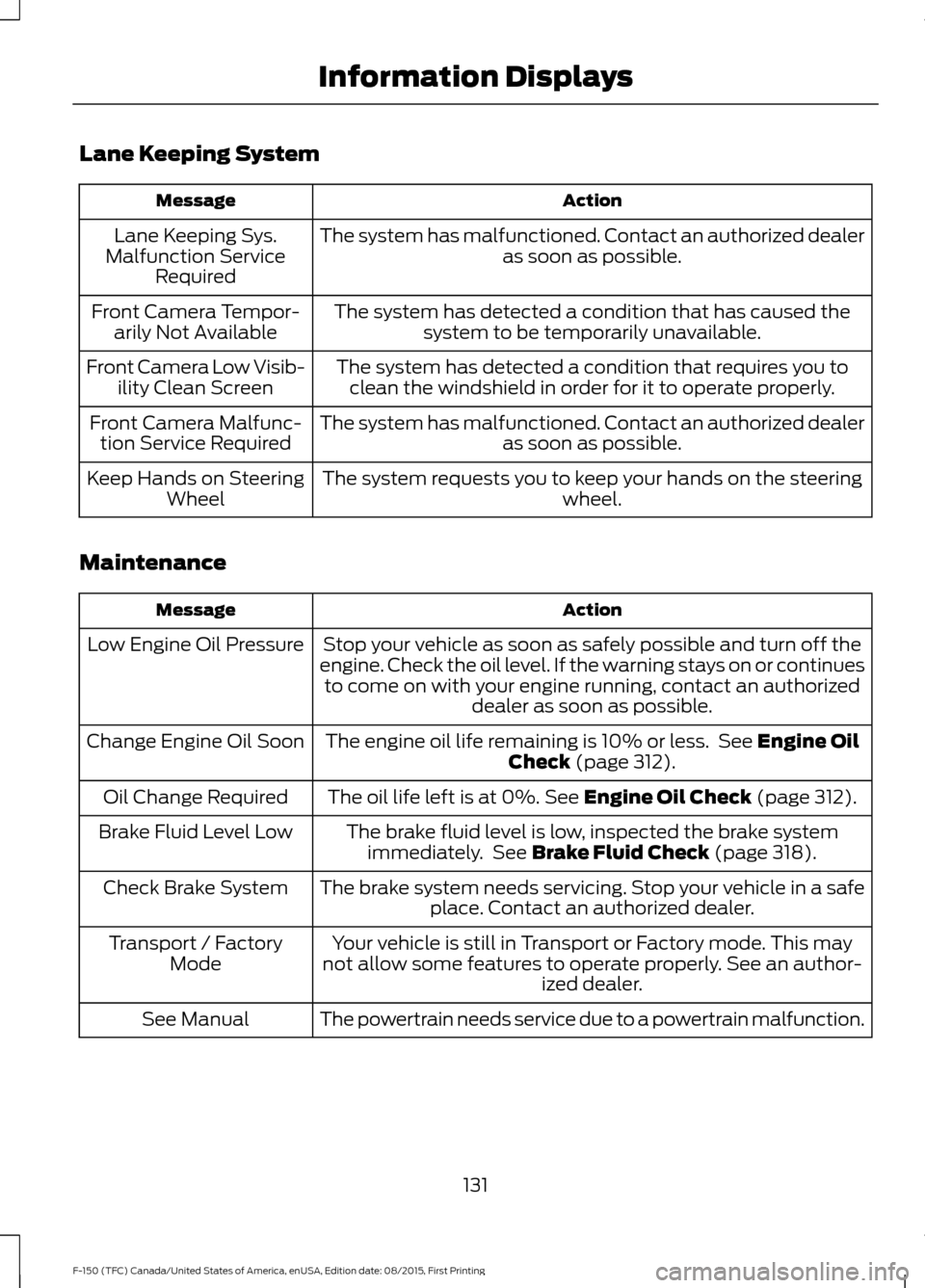
Lane Keeping System
Action
Message
The system has malfunctioned. Contact an authorized dealer as soon as possible.
Lane Keeping Sys.
Malfunction Service Required
The system has detected a condition that has caused thesystem to be temporarily unavailable.
Front Camera Tempor-
arily Not Available
The system has detected a condition that requires you toclean the windshield in order for it to operate properly.
Front Camera Low Visib-
ility Clean Screen
The system has malfunctioned. Contact an authorized dealeras soon as possible.
Front Camera Malfunc-
tion Service Required
The system requests you to keep your hands on the steering wheel.
Keep Hands on Steering
Wheel
Maintenance Action
Message
Stop your vehicle as soon as safely possible and turn off the
engine. Check the oil level. If the warning stays on or continues to come on with your engine running, contact an authorized dealer as soon as possible.
Low Engine Oil Pressure
The engine oil life remaining is 10% or less. See Engine Oil
Check (page 312).
Change Engine Oil Soon
The oil life left is at 0%.
See Engine Oil Check (page 312).
Oil Change Required
The brake fluid level is low, inspected the brake systemimmediately. See
Brake Fluid Check (page 318).
Brake Fluid Level Low
The brake system needs servicing. Stop your vehicle in a safeplace. Contact an authorized dealer.
Check Brake System
Your vehicle is still in Transport or Factory mode. This may
not allow some features to operate properly. See an author- ized dealer.
Transport / Factory
Mode
The powertrain needs service due to a powertrain malfunction.
See Manual
131
F-150 (TFC) Canada/United States of America, enUSA, Edition date: 08/2015, First Printing Information Displays
Page 137 of 505
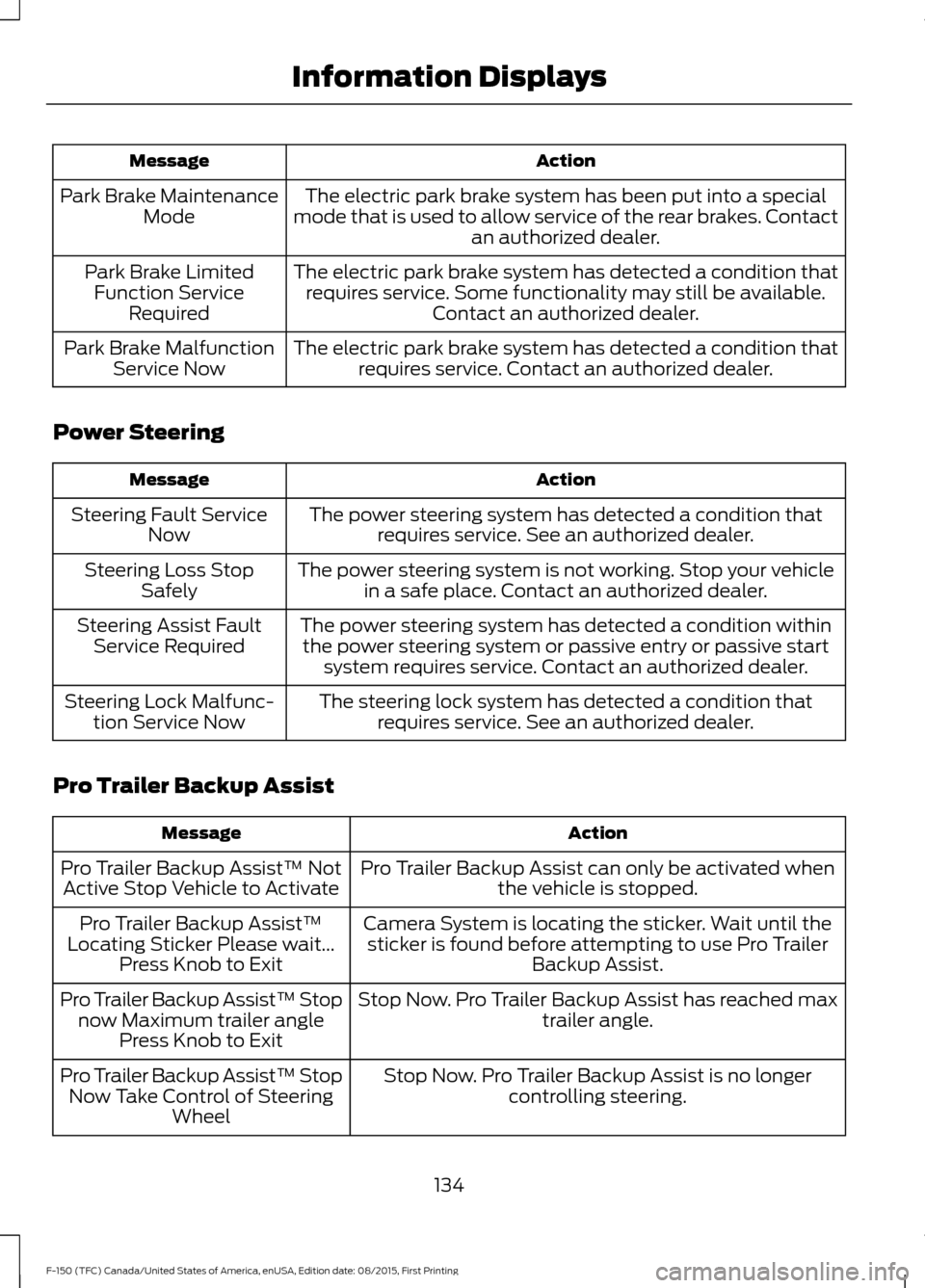
Action
Message
The electric park brake system has been put into a special
mode that is used to allow service of the rear brakes. Contact an authorized dealer.
Park Brake Maintenance
Mode
The electric park brake system has detected a condition thatrequires service. Some functionality may still be available. Contact an authorized dealer.
Park Brake Limited
Function Service Required
The electric park brake system has detected a condition thatrequires service. Contact an authorized dealer.
Park Brake Malfunction
Service Now
Power Steering Action
Message
The power steering system has detected a condition thatrequires service. See an authorized dealer.
Steering Fault Service
Now
The power steering system is not working. Stop your vehiclein a safe place. Contact an authorized dealer.
Steering Loss Stop
Safely
The power steering system has detected a condition withinthe power steering system or passive entry or passive start system requires service. Contact an authorized dealer.
Steering Assist Fault
Service Required
The steering lock system has detected a condition thatrequires service. See an authorized dealer.
Steering Lock Malfunc-
tion Service Now
Pro Trailer Backup Assist Action
Message
Pro Trailer Backup Assist can only be activated whenthe vehicle is stopped.
Pro Trailer Backup Assist™ Not
Active Stop Vehicle to Activate
Camera System is locating the sticker. Wait until thesticker is found before attempting to use Pro Trailer Backup Assist.
Pro Trailer Backup Assist™
Locating Sticker Please wait... Press Knob to Exit
Stop Now. Pro Trailer Backup Assist has reached maxtrailer angle.
Pro Trailer Backup Assist™ Stop
now Maximum trailer angle Press Knob to Exit
Stop Now. Pro Trailer Backup Assist is no longercontrolling steering.
Pro Trailer Backup Assist™ Stop
Now Take Control of Steering Wheel
134
F-150 (TFC) Canada/United States of America, enUSA, Edition date: 08/2015, First Printing Information Displays